
Cutting what an in-product AI assistant costs to run
The first version of our in-product AI assistant answered well and cost too much to run. The design was the obvious one: take everything the assistant might need to know, put it in the prompt, add the user's question, send it off.
Someone asking how to change their password paid the same as someone asking how conversion rules interact with budget rules, because both requests carried the same catalogue of 68 feature descriptions. Cost tracked the size of the product, not the difficulty of the question, and that gets worse every time you ship a feature.
What fixed it was architecture, not a cheaper model. This article covers where the money actually goes inside one answer, the single flag that saved the most, how to load knowledge in stages, what to instrument before you change anything, and what is still broken. If you want the buyer's side of the same subject, what running an AI ads manager actually costs covers the invoice rather than the code.
Where the money goes in one answer
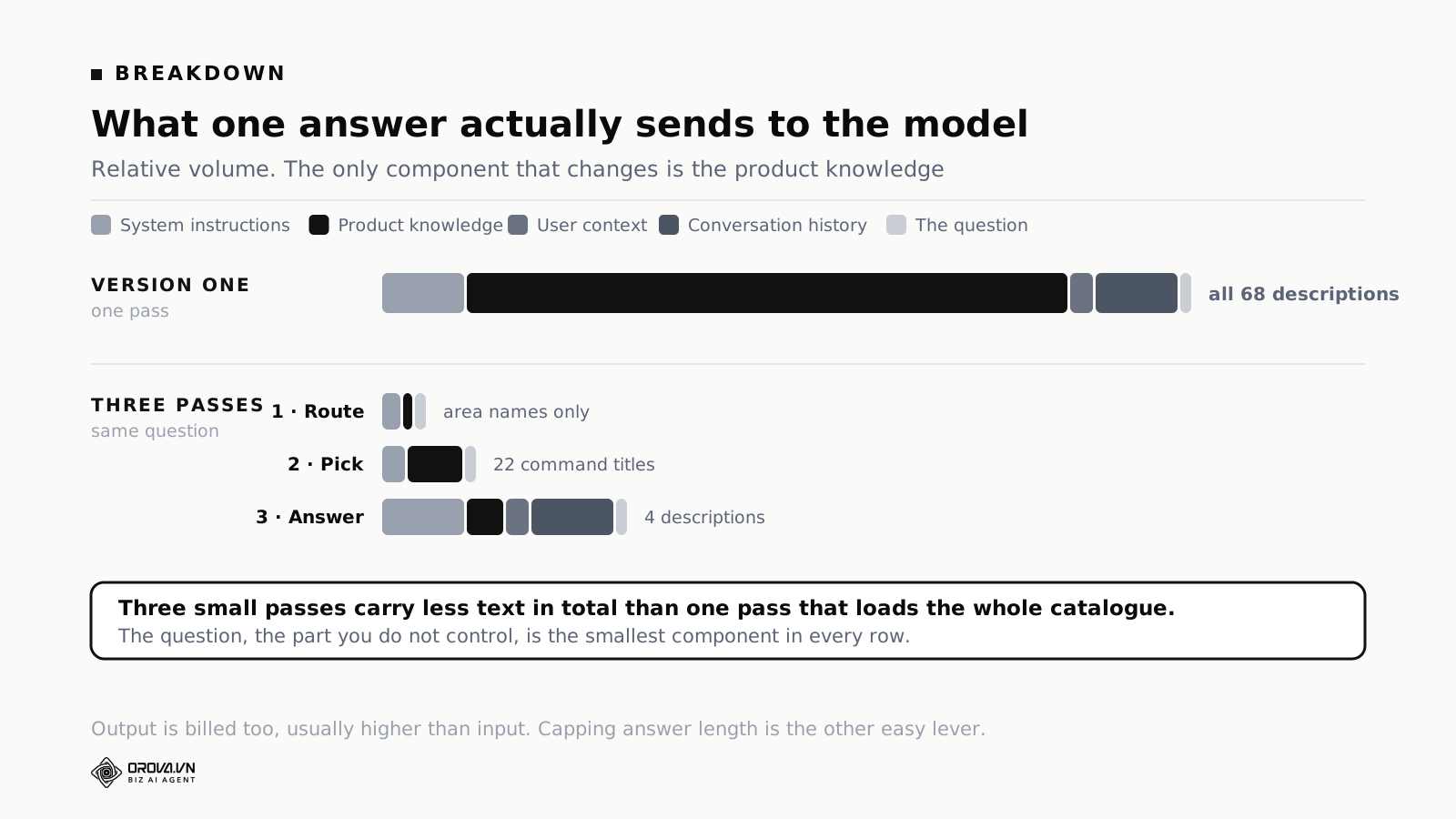
Every request to a language model is billed by the volume of text going in and coming out. So before optimising anything, list what a single answer sends. There are only six things.
System instructions. Tone, format, what to do when uncertain, how to present an action. Long, but fixed and shared by every request.
Product knowledge. The feature catalogue: what each feature does and where to find it. In version one this was all 68 entries on every request, and it was by a wide margin the largest component.
User context. Display name, workspace and its identifier, language preference, remaining usage allowance. A few lines.
Conversation history. Prior turns, carried so follow-up questions make sense. Grows during a conversation, which means the same conversation gets more expensive with every message.
The question. Almost always the smallest item in the request, often a single line.
Account data. Live rows from the user's own account, when the answer needs them. Absent from most requests and enormous when present.
Two facts fall out of that list. The thing you control least, the question, is the smallest. The thing you control most, the knowledge you load, is the biggest. Nearly all of the available saving is in deciding what not to send.
The other useful observation is that output is billed too, usually at a higher rate than input. An assistant that answers in four paragraphs where two would do is paying a premium on every request, and length is one of the easiest things to constrain in an instruction.
The flag that saves the most: does this question need account data?
Start here, because it is the single largest lever and the simplest to build. One classification, one branch.
Two questions that look alike:
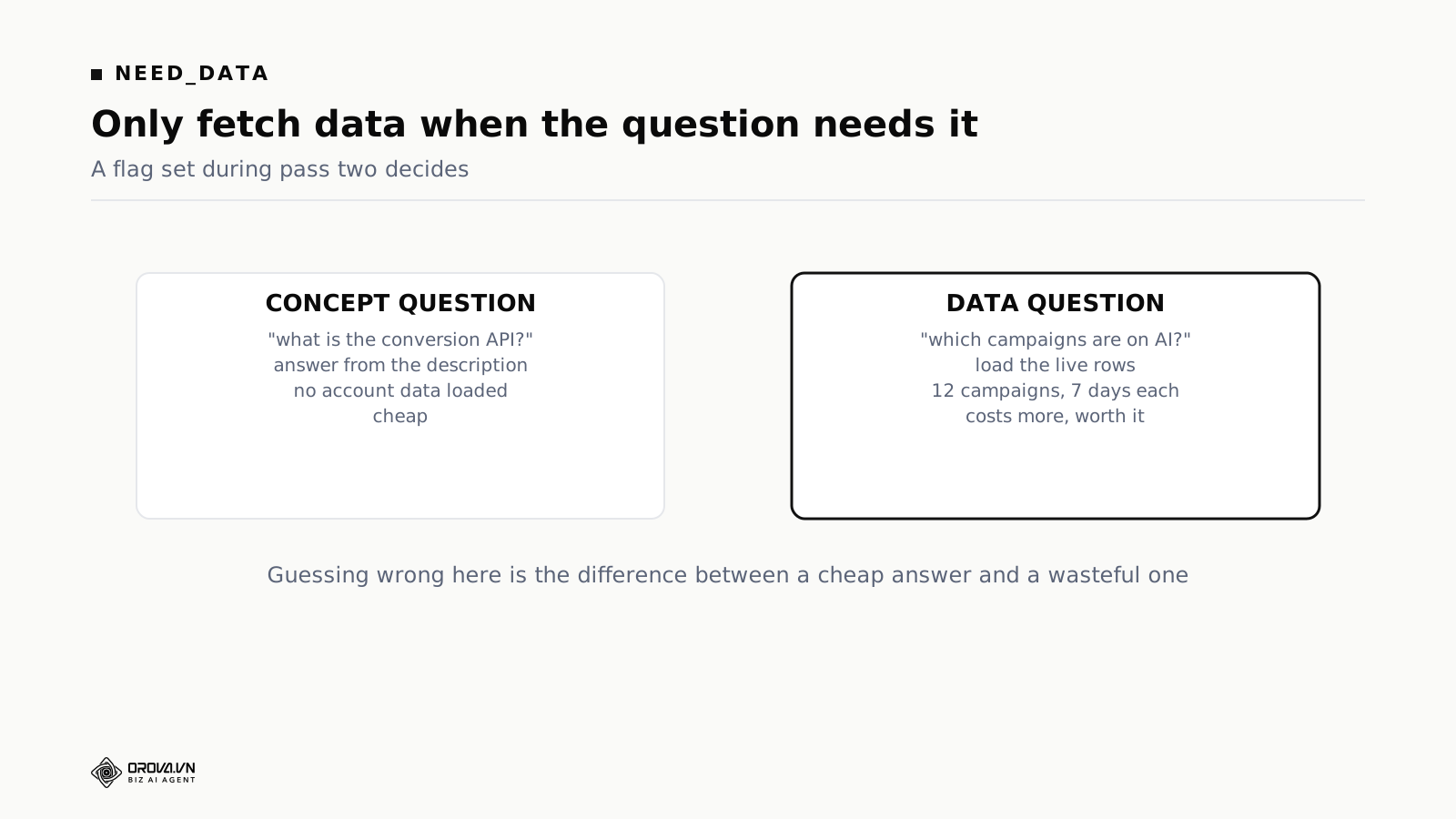
"What is the conversion API?" is answerable from the feature description alone. No account data required.
"Which of my campaigns have AI monitoring enabled?" cannot be answered without reading live rows from the account.
The second is expensive. Loading a project's campaigns with several days of metrics each is a lot of text. The first is close to free. So the assistant sets a flag before it answers: does this question require the user's own data? Only when the flag is set does the final step load live rows.
The saving is large because most questions are conceptual. People ask what things are and where to find them far more often than they ask for their own numbers.
Tune the flag to err toward loading data when the question is genuinely ambiguous. A wasted load costs money. A missing load produces an answer that says "I cannot see your campaigns", which the user reads as the product being broken. Those two failures are not equally bad.
One more thing worth doing at the same point: bound what a data load may pull. Reading every campaign with ninety days of daily rows is technically an answer to "how are my campaigns doing" and it is a terrible one, because most of that text contributes nothing. Decide the date range and the row cap in code, not in the prompt.
Loading knowledge in three passes
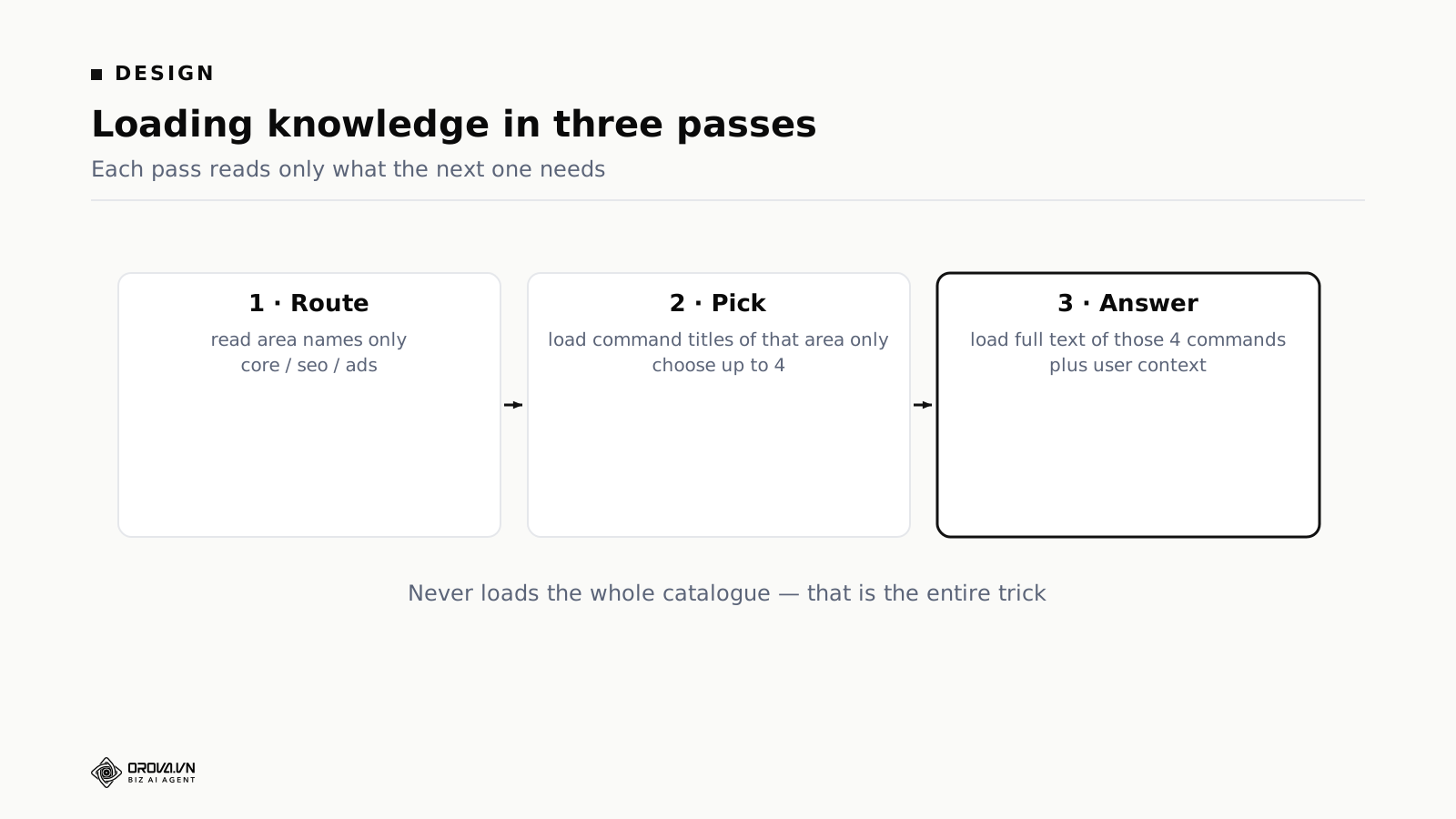
The second change splits one large call into three small ones.
Route. The model gets only the names of the product areas: core, SEO, ads. Nothing else. Its one job is deciding which area the question belongs to. This prompt is tiny, and it should stay tiny. Extra instructions here do not improve a choice between three labels, they dilute it. Ours is the area names, one sentence on what each covers, and an instruction to pick exactly one.
Pick. Having chosen an area, load only the command titles inside it. One line per feature, no descriptions. The model selects the handful relevant to the question.
Answer. Now load the full descriptions and URLs for only those selected commands, plus the user context, and generate the reply.
The total text across all three passes is a fraction of what one pass sent, because the expensive material, the full descriptions, is only ever loaded for a few items rather than all 68.
There is a second benefit nobody predicts. Each pass can be evaluated on its own. When an answer comes out wrong you can see which stage failed, because you can inspect the routing decision and the selection separately from the reply. A single-prompt design gives you one output and no visibility into where the reasoning turned. That debuggability turned out to be worth as much as the money, and it is the argument we use whenever somebody proposes collapsing the passes back into one for speed.
Three calls instead of one: the arithmetic
The obvious objection is that we replaced one model call with three, and calls have overhead. Both true, and the arithmetic still favours the split.
Cost is driven overwhelmingly by how much text goes in and comes out, not by the number of requests. Three small requests cost far less than one large one when the large one carries an entire catalogue. Per-request overhead is real and small next to the text saved.
The genuine cost is latency, not money. Three sequential passes take longer than one, and the user waits. We accepted that because people ask this assistant a question, read the answer and act on it. It is not a conversation they are having for its own sake. In a product where the assistant is the main interface rather than a shortcut, the same arithmetic could easily come out the other way.
There is one technique that pulls in the opposite direction and it is worth knowing about before you commit. Most model providers will cache a stable prompt prefix and charge less for the cached portion on subsequent requests. That rewards exactly what the three-pass design removes: a large, identical block of text at the front of every request. If your catalogue is small enough that the whole thing fits comfortably, and your traffic is high enough to keep a cache warm, a single cached pass can end up cheaper and faster than three uncached ones.
The way to decide is not to reason about it. Build the single-pass version, measure it with caching enabled, then measure the tiered version, and compare on the same traffic. The answer depends on catalogue size and request volume, and both of those are properties of your product rather than of the technique.
Capping how many sources one answer may load
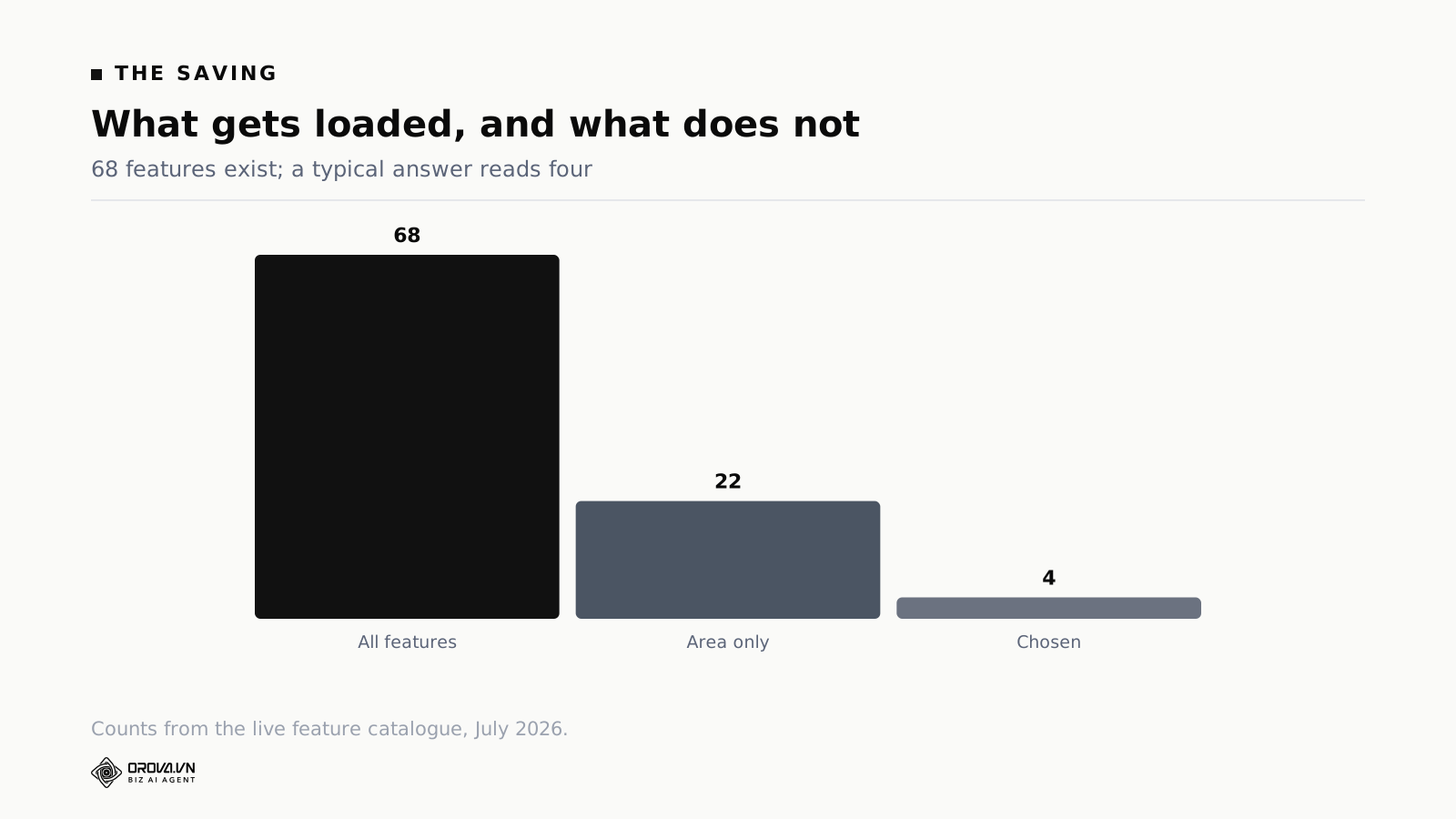
The selection step has one dominant failure mode: it picks too many things. A model asked to find relevant items will find plenty, because almost everything is relevant to something.
The instruction that mattered most was the cap. At most four, stated firmly, as a hard limit rather than a preference. Without the cap the step routinely selected a dozen, which put most of the catalogue back into the request and undid the entire design.
Four is not a magic number, and it is worth explaining how to pick your own. Look at how many features a good answer actually cites. For navigation questions it is one. For a comparison it is two. For a question that touches a workflow it is three or four. Beyond four, in our catalogue, the extra entries never appeared in the reply. They were loaded, billed, and ignored.
So the cap should sit just above the largest number of items a good answer uses, not at whatever feels safe. Setting it generously is the same mistake as not setting it, arrived at more slowly.
Two implementation notes. Enforce the cap in code as well as in the prompt, because an instruction is a request and a slice is a guarantee. And log how often the selection hits the cap. A step that hits its limit on most requests is telling you either that the cap is too low or that your areas are too broad, and the fix is different in each case.
Measure before you optimise
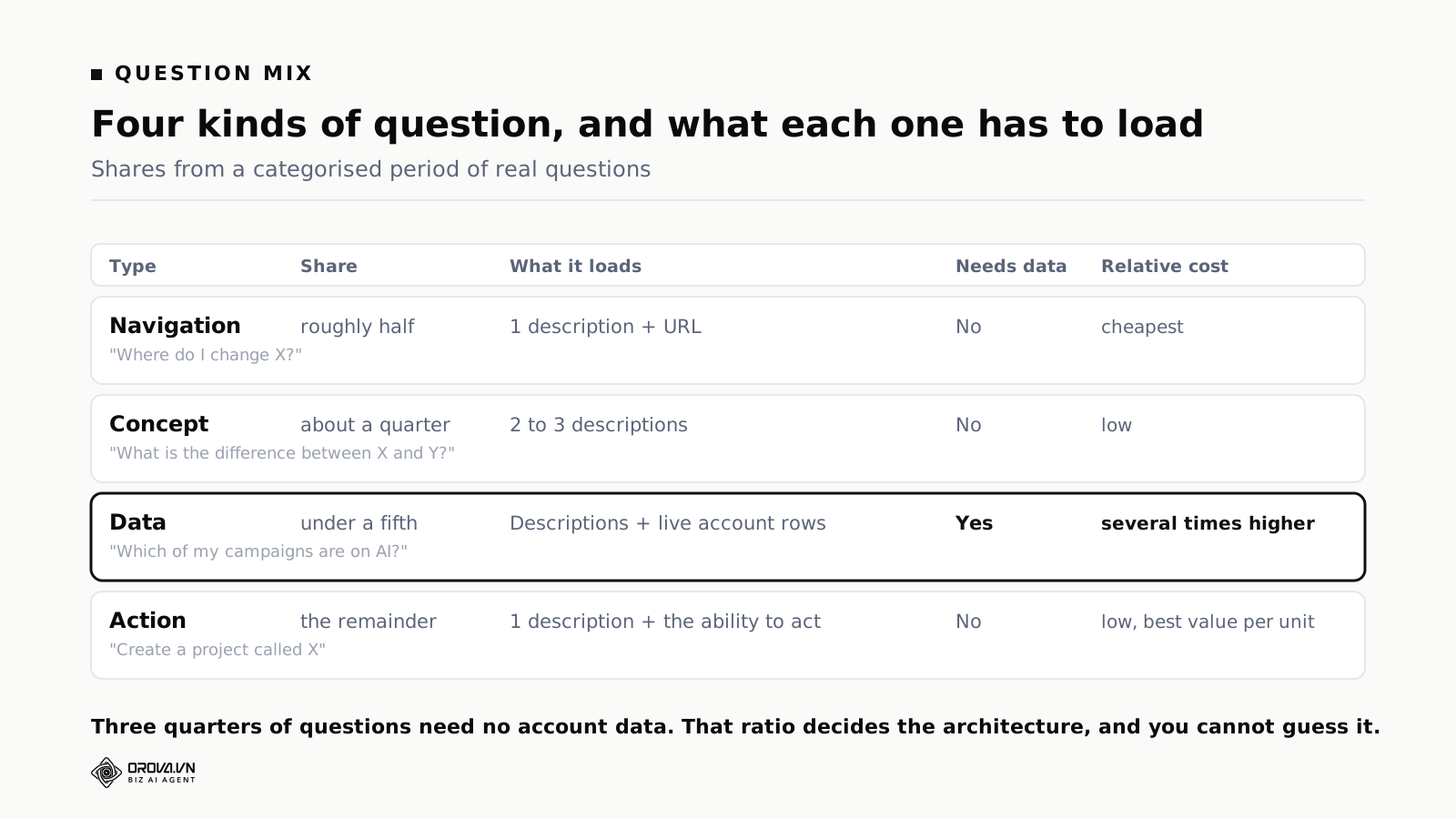
Before redesigning anything we categorised a period of real questions. The breakdown changed what we built.
Navigation questions, roughly half. "Where do I change X", "how do I find Y". These need one feature description and a URL. The old design loaded all 68 to answer them.
Concept questions, about a quarter. "What is X", "what is the difference between X and Y". Two or three descriptions, no account data.
Data questions, under a fifth. "Which of my campaigns", "how much of my allowance is left". These genuinely need live rows and they are the expensive ones.
Action requests, the remainder. "Create a project called X", "run the analysis". One feature plus the ability to act.
Three quarters of questions needed no account data at all, and the largest group needed exactly one description. That pointed straight at both fixes. Without measuring, we would have started by shortening the descriptions, which saves a little and costs accuracy.
What to instrument, in the order it becomes useful:
- Text volume in and out, per request, tagged by which pass produced it. Without this you are guessing about the thing you are trying to reduce.
- The data flag, logged per request. The ratio of data to non-data questions is the number your whole architecture rests on.
- How many items the selection step chose, so you can see how often it hits the cap.
- The rephrase rate: how often a user asks the same thing again in different words within a minute. This measures failure from the user's side rather than yours, and it is the single most useful number on the list.
- Which area routing chose, kept alongside the question, so you can read back through misroutes rather than reasoning about them.
Intuition about which questions are common is usually wrong, and it is wrong in a specific direction: you will assume users ask harder questions than they do.
How much conversation to carry
An assistant with no memory is frustrating, because users restate context every message. An assistant with unlimited memory gets steadily more expensive inside a single conversation, since every prior turn travels with every new request. This is the cost driver that grows while you are not looking.
Our settings are the last twenty messages within a conversation, and the last twenty conversations kept in history. Both came from observation rather than theory. Conversations longer than about twenty messages are rare, and when they happen they have usually drifted onto a new topic, so the earliest messages contribute nothing but volume.
One trick pays for itself. The assistant remembers which area the previous turn used. A follow-up like "and how do I turn that off?" routes to the same area without re-running the routing pass, which is cheaper and more accurate, because pronouns are exactly where routing goes wrong.
Carry the same discipline into what a stored turn contains. You need the question and the answer. You do not need to store and replay the full descriptions that were loaded to produce that answer, and if you do, your history component grows at the rate of your knowledge base rather than at the rate of the conversation.
Images, and validating what you are given
Users can attach screenshots, up to four per message, four megabytes each, in the common image formats.
One implementation detail worth passing on: validate the file by reading its contents, not by trusting the label the browser sends. The browser reports a content type. That report is trivially forged, and treating it as authoritative means accepting whatever a determined sender chooses to upload. Reading the first bytes and checking them against known image signatures is a few lines of code and closes the gap.
This has nothing to do with AI. An assistant that accepts uploads is a file upload endpoint wearing a friendly interface, the usual rules apply, and the friendliness makes them easier to forget.
On cost: attach images only to the final pass, alongside the chosen descriptions. The routing decision does not need to see the picture, and images are expensive. Sending a screenshot through a step whose entire job is choosing between three labels is pure waste, and it is the kind of waste that survives for months because nothing about it looks wrong.
Letting the assistant act, and where to stop it
Answering questions is half of it. The more useful half is doing the thing. The assistant can create a project, rename one, delete one, change AI quality settings, adjust language and tone, toggle rules, change schedules, trigger a sync, run an analysis, and clear history.
The constraint that makes this safe is short: the assistant proposes, a signed button executes.
When the model decides an action is appropriate, it does not perform it. It emits a structured proposal, the interface renders it as a confirmation button, and only a click sends the request. That request carries a cryptographic signature so a proposal cannot be forged or replayed by anything that manages to inject text into the conversation.
This matters more than it looks. A model that acts directly on natural language will eventually act on a misread instruction. One human click between intention and execution costs an interaction and removes a whole category of failure.
Destructive actions, deleting a project, clearing history, disconnecting a platform, render in red and take the same confirmation. Connecting a new platform is not done by the assistant at all. It provides the authorisation link, because credentials should pass between the user and the platform without an intermediary holding them.
Four things it is deliberately not allowed to do
It does not build or edit multi-step automations. It can run one, change its schedule, or delete it. It cannot construct the steps. Multi-step automation deserves the deliberation of building it on a canvas, and a chat box makes it too easy to create something nobody reviewed.
It does not write or publish content. That is a separate part of the product with its own review flow.
It does not change billing. Money decisions go through the billing pages.
It does not read data the user has not connected for AI use. The system can technically see whether a project has Google Analytics linked. It could helpfully volunteer insights from a source the user never switched on. It does not. If a source is off, the assistant explains how to switch it on.
The pattern behind all four is one sentence: the assistant is a fast path to things you could already do, not a privileged path to things you could not. That restraint costs a little helpfulness and buys something better, which is that the user's mental model of what the assistant can see stays accurate. A system that occasionally knows more than you expected is unsettling in a way that outweighs the convenience.
Answering in the user's language without paying twice
The product runs in several languages and the assistant has to answer in the user's chosen one. Straightforward in principle, and easy to get subtly wrong. The model would answer in the language of the question rather than the language of the setting, which breaks the moment somebody types an English product term inside an otherwise Vietnamese question.
The fix was position, not wording. The language instruction is the highest-priority rule in the prompt, stated before anything else and phrased as absolute. A rule buried in the middle of a long prompt competes with everything around it. Feature names stored internally in one language get translated naturally rather than quoted verbatim.
The costly way to solve this is the one to avoid: generating an answer and then translating it in a second call. That doubles the output volume, which is the expensive half of the bill, and it introduces a second place where meaning drifts. Instructing once, at the front, costs nothing per request.
Two details that show up in multilingual assistants and are worth checking in yours. Keep the knowledge base in one language and let the model render it, rather than storing a translated copy per language, which multiplies your maintenance rather than your cost. And do not translate identifiers: campaign names, workspace names and URLs belong to the user and should come back exactly as they went in.
What each type of question costs to run
Model pricing changes constantly, so here is the shape rather than an amount.
A navigation question, the most common type, is the cheapest thing the assistant does. Three small passes, no account data, a short answer.
A concept question costs modestly more, because the answer is longer and the answer is output.
A data question costs several times a navigation question, because loading campaigns with daily metrics is genuinely a lot of text. This is why the data flag matters more than any other single optimisation.
An action request sits in between and produces the most value per unit of cost, because it replaces navigating several screens.
The distribution matters more than any individual figure. With three quarters of questions needing no account data, average cost lands near the cheap end. Under the single-pass design, average cost sat at the expensive end regardless of what was asked, which is the argument for the redesign in one sentence.
One consequence worth flagging: your cost per user is set by your question mix, and your question mix is set by your interface. Prompt people toward data questions and costs rise. Make plain navigation genuinely easy without the assistant, and the expensive questions become the main use, which is a worse mix than it sounds.
Bill every pass, including the cheap ones
Each pass is a model call, and each one is deducted from the workspace's usage. Three passes, three deductions. Charging a user three times for one question felt wrong at first, and there was an argument for absorbing the routing passes as overhead.
We bill all three, for one reason: hidden costs eventually surface as either a price rise or a quality cut. A system where some work is billed and some is absorbed drifts toward making the absorbed work as cheap as possible, which here would mean routing badly to save money and producing worse answers.
Billing every call keeps the incentive pointed the right way. If routing is expensive, it shows up, and the response is to make routing cheaper by design rather than by degrading it. It also means the usage figure a user sees reflects what actually happened, which matters in a product where the same allowance pays for content generation, campaign analysis and assistant conversations.
What is still unsolved
Three open problems, stated plainly, because these are where you will spend your time too.
Follow-up questions that change area. The area memory that makes follow-ups cheap also makes them wrong when the user genuinely switches topic mid-conversation. We re-route when the question looks unrelated, and "looks unrelated" is a heuristic that gets it wrong in both directions.
Questions spanning two areas. "How does my content performance affect what I should bid on?" legitimately needs two areas, and the routing design forces one. These currently get a partial answer from whichever area won. The honest fix is multi-area routing, which raises cost for the minority of questions that need it, and that is a trade we have not made.
Knowing when the knowledge is stale. Feature descriptions live in a database and get updated when features change. When somebody forgets, the assistant confidently describes behaviour that no longer exists. There is no automated detection for this, and it is the failure mode most likely to erode trust, because the answer is wrong in a way that sounds authoritative.
That third one has a partial mitigation worth copying even without a full fix. Store a last-reviewed date against each description and surface the stalest entries to whoever maintains them. It does not detect the error, but it puts the oldest text in front of a human on a regular basis, which catches a fair share of it.
Where to start if you are building one
Concrete steps, in the order we would take them now.
Categorise fifty real questions. From support tickets, from sales calls, from whatever you have. Sort them into needs-data and does-not-need-data. That ratio determines your architecture more than any other input and you cannot guess it.
Build the single-pass version. Yes, the expensive one. It is quick and it sets a quality baseline. Everything afterwards is measured against it. If the tiered version answers worse, the tiering is wrong and you now know.
Add the data flag. Biggest saving, simplest change. One classification, one branch.
Cap the answer length and the data load. Two limits in code, both cheap to add, both effective immediately. Output is billed at a premium and a data load without a bound is the largest request your system will ever send.
Tier the knowledge, if your catalogue justifies it. Below roughly twenty items, skip it and keep the single pass. The whole catalogue is small enough to load and the tiering costs you complexity for nothing.
Instrument everything. Cost per question type, routing accuracy, rephrase rate. Rephrase rate first if you can only have one.
The order matters. Building the tiers before you know your question mix means optimising a structure you may not need, which is how a two-week feature becomes a two-month one.
Frequently asked questions
Would a cheaper model solve this instead?
Partly, and it treats the symptom. A cheaper model on a bloated context still pays for the bloat, and it usually answers worse. Fixing the architecture lets you spend the saving on a better model where it matters, which is what we did.
Why not use retrieval instead of hand-built tiers?
For a large, unstructured knowledge base, retrieval is the right tool. Ours is small and highly structured, 68 features in a clear hierarchy, so explicit routing is more predictable and easier to debug. When an answer is wrong we can see which pass chose wrongly. With retrieval that diagnosis is murkier.
Can the same approach work for a support chatbot?
Yes, and the tiering maps cleanly: route by topic, pick relevant articles, answer from those. The difference is that support knowledge bases are usually larger and less structured than a product feature catalogue, which is the point where retrieval starts beating hand-built tiers.
Does the user notice the three passes?
Only as slightly longer latency before the answer starts. They are invisible otherwise.
What happens if routing picks the wrong area?
The answer comes from the wrong feature set and is unhelpful, and the user rephrases. This is the main failure mode, which is why the routing prompt deserves attention out of proportion to its size. Naming the features it used inside the answer helps, because a misroute becomes obvious to the reader instead of silently confusing them.
How do you stop the assistant inventing features that do not exist?
The structure helps more than the prompt does. Because the answering pass only ever sees descriptions of features that genuinely exist in the catalogue, there is little raw material for invention. The model is summarising real entries rather than recalling from training. The remaining risk is describing a real feature inaccurately, which is why keeping those descriptions current matters so much.
Is this worth doing for a small product?
Below roughly twenty features, probably not. The whole catalogue is small enough to load in one pass. Tiering pays off as the catalogue grows, and it is easier to design in early than to retrofit.
Should the routing step use the same model as the answering step?
It does not have to, and this is a real lever. Routing is a classification between a handful of labels, which small models do well. Answering is where quality shows. Measure routing accuracy on the smaller model against the larger one on the same set of questions before you decide, because a cheap misroute produces an expensive wrong answer.
What single number tells me whether this is working?
Text volume per answer, averaged over a week, split by question type. If the average is close to your cheapest question type, the routing is doing its job. If it sits near your most expensive type, something is loading data or descriptions that the answer never uses.
Related reading: what an AI ads manager costs the buyer, advisory mode versus auto-execute, and why an ads agent has to explain itself.
To try the assistant on your own workspace, start at orova.vn.
Orova Ads optimises campaigns for you
Connect Google, Meta and TikTok in one place. AI reads the numbers, proposes changes and executes under the rules you set.
Explore Orova Ads