
19 starter ad automation rules and what each one does
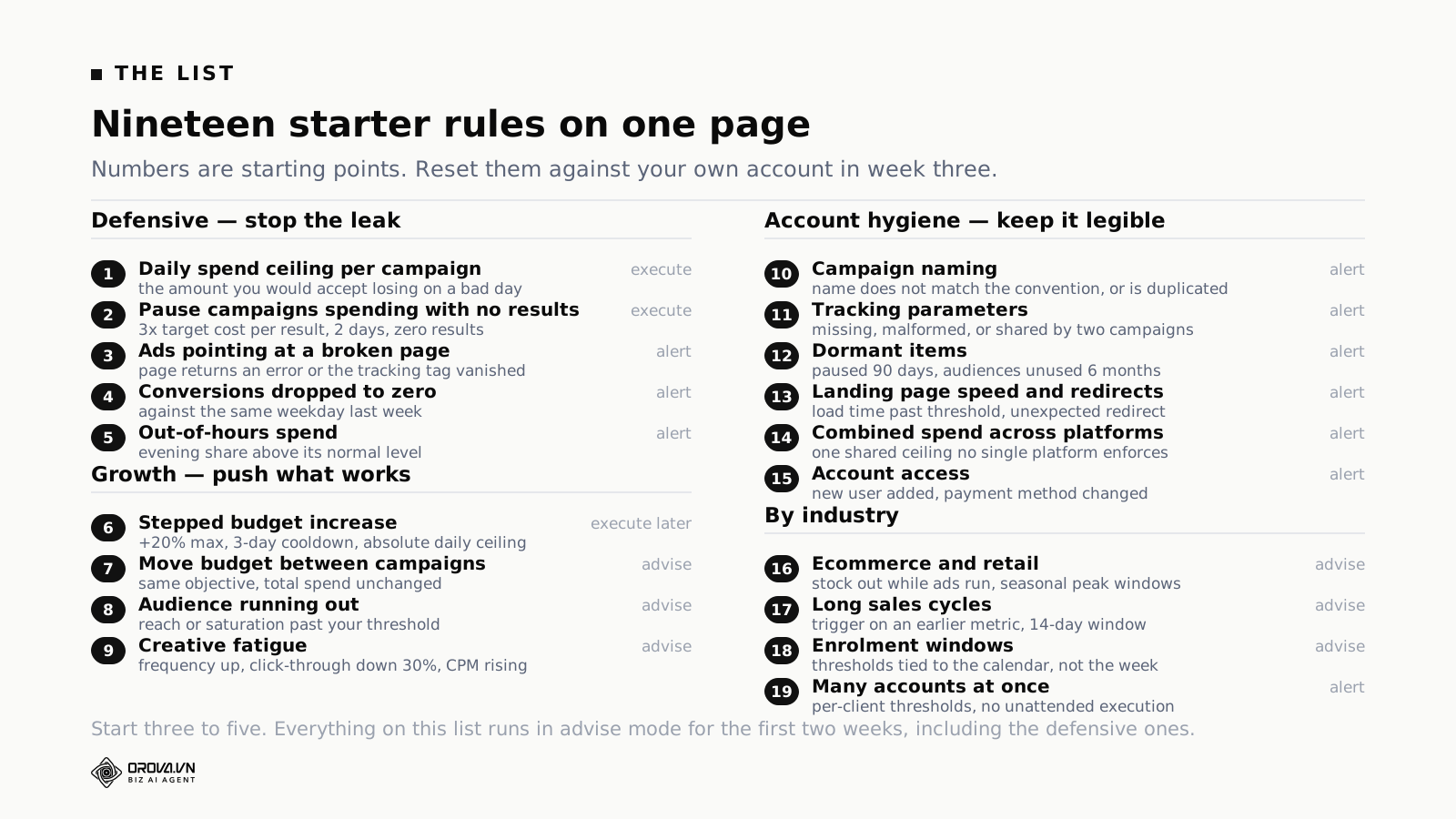
Nineteen rules, grouped by the situation your account is in, each with a starting threshold and the reason behind it. You are not meant to switch on all nineteen. Pick three to five, run them for two weeks without letting anything act on its own, then decide.
Every number below is a starting point, not a conclusion. Your target cost per result, your seasonality and your purchase cycle are not the same as anyone else's, and there is a section later on replacing each number with one from your own account.
If you want the wider picture first — what automation can and cannot safely do inside an ad account — read what artificial intelligence advertising can automate. This article is the checklist.
How many rules to start with
Three to five. Below three you do not cover the common leaks. Above seven you lose track of which rule is doing what, and when something odd happens you cannot say which one caused it.
That number does not scale with budget. An account spending ten times more should still start with the same five rules — the thresholds change, the count does not. Spending more does not make you better at watching several automations at once; it just raises the cost of not noticing.
Which set fits your account
Before reading the list, answer one question: where is the account today?
Leaking spend. Something is burning money without producing and you do not know what. Start with rules 1 to 5.
Stable and you want growth. Cost per result is acceptable and you want to scale without breaking it. Start with rules 1, 2 and 6, in that order, and do not add 6 until the first two have run for a month.
Watching many accounts. Your problem is not one bad account, it is that you cannot look at ten. Start with the hygiene rules, 10 to 15. They are cheap, they never act on their own, and they surface the thing you would have found in week four.
Just starting. The account is young and the data is thin. Three rules, no more, and they are the three in the minimum set below.
Three families, and what a mistake costs in each
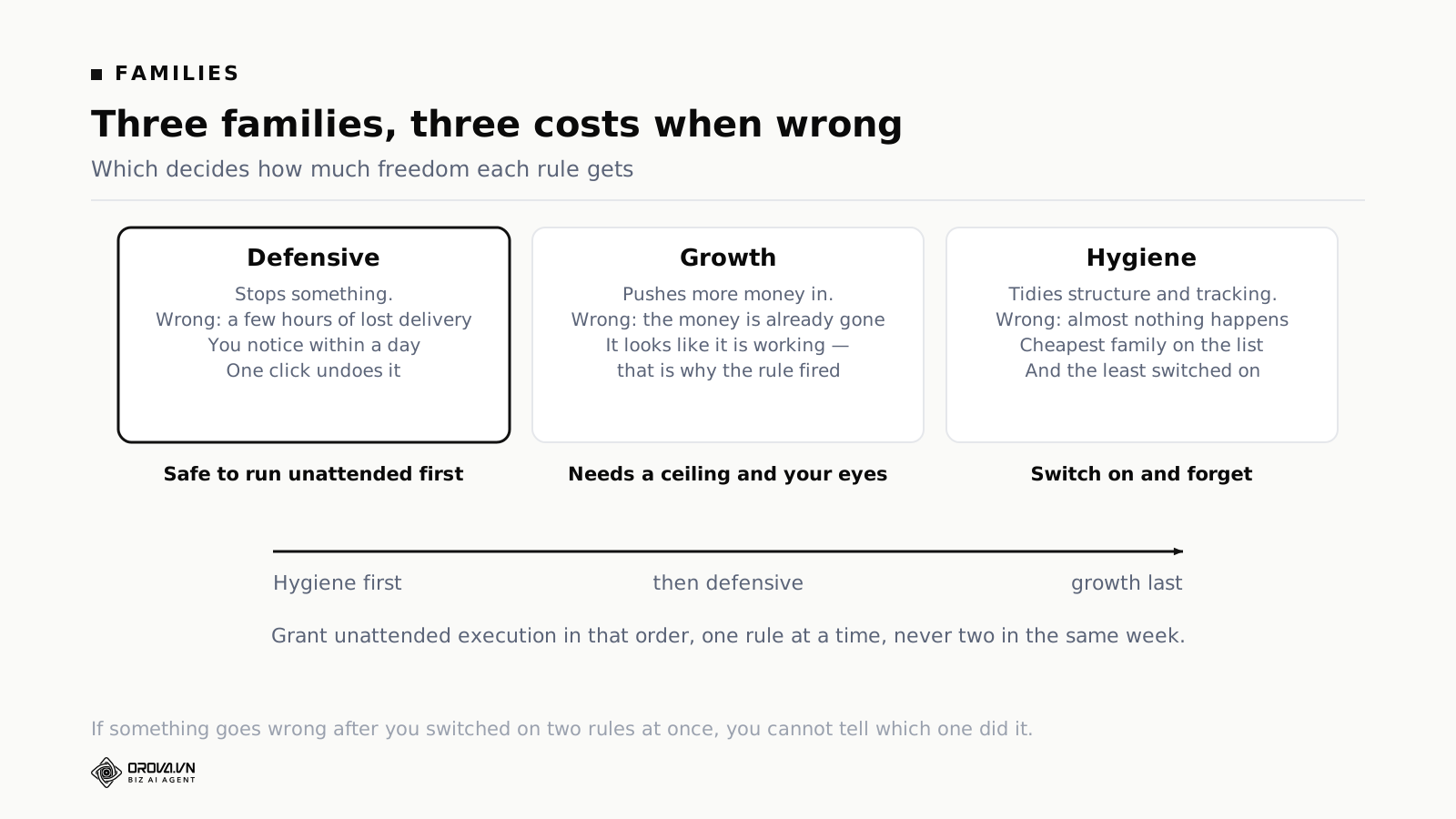
Defensive rules stop something. When one is wrong you lose a few hours of delivery, you notice within a day, and one click undoes it. This is the family that can eventually run unattended.
Growth rules push more money in. When one is wrong the money has already gone, and the awkward part is that it looked like it was working — that is why the rule fired. This family needs an absolute ceiling and someone reading the output.
Hygiene rules tidy structure, naming and tracking. When one is wrong, almost nothing happens. This is the cheapest family and the least used, which is the wrong way round.
Grant unattended execution in that order: hygiene, then defensive, then growth. One rule at a time, never two in the same week. If something goes wrong after you switched on two, you cannot tell which one did it, and you will end up switching both off.
The five defensive rules
Rule 1 — a daily spend ceiling per campaign
What it blocks: a spend spike from a misconfiguration. Somebody types an extra zero, a duplicated campaign inherits a lifetime budget as a daily one, an automated bid strategy meets an unexpected auction.
Threshold: the amount you would genuinely accept losing on a bad day, per campaign. For most accounts that is somewhere between one and a half and twice the normal daily budget.
Why: this rule almost never fires, and the one time it does it pays for the entire exercise. Ceilings are worth having precisely because the event they catch is rare, expensive and fast.
Rule 2 — pause campaigns spending with no results
What it blocks: the slow leak. A campaign that delivers, gets clicks, and produces nothing.
Threshold: spend above three times your target cost per result, at least 100 clicks, across two consecutive days, zero conversions. Exclude brand campaigns and anything live under seven days.
Why three times and not one: a campaign that has spent exactly one target cost per result without converting is entirely normal. Conversions do not arrive on a schedule. Only a multiple gives you grounds to conclude anything, and below three you will pause campaigns that were about to work.
This is the rule most accounts promote to unattended execution first, because a wrong pause costs a few hours and is undone in one click.
Rule 3 — ads pointing at a broken page
What it blocks: paying for clicks that land on an error, a redirect to the wrong place, or a page whose tracking tag has disappeared.
Threshold: not a threshold — a daily check. Landing page returns anything other than a success code, or redirects somewhere other than the intended destination, or the measurement tag is no longer present in the page source.
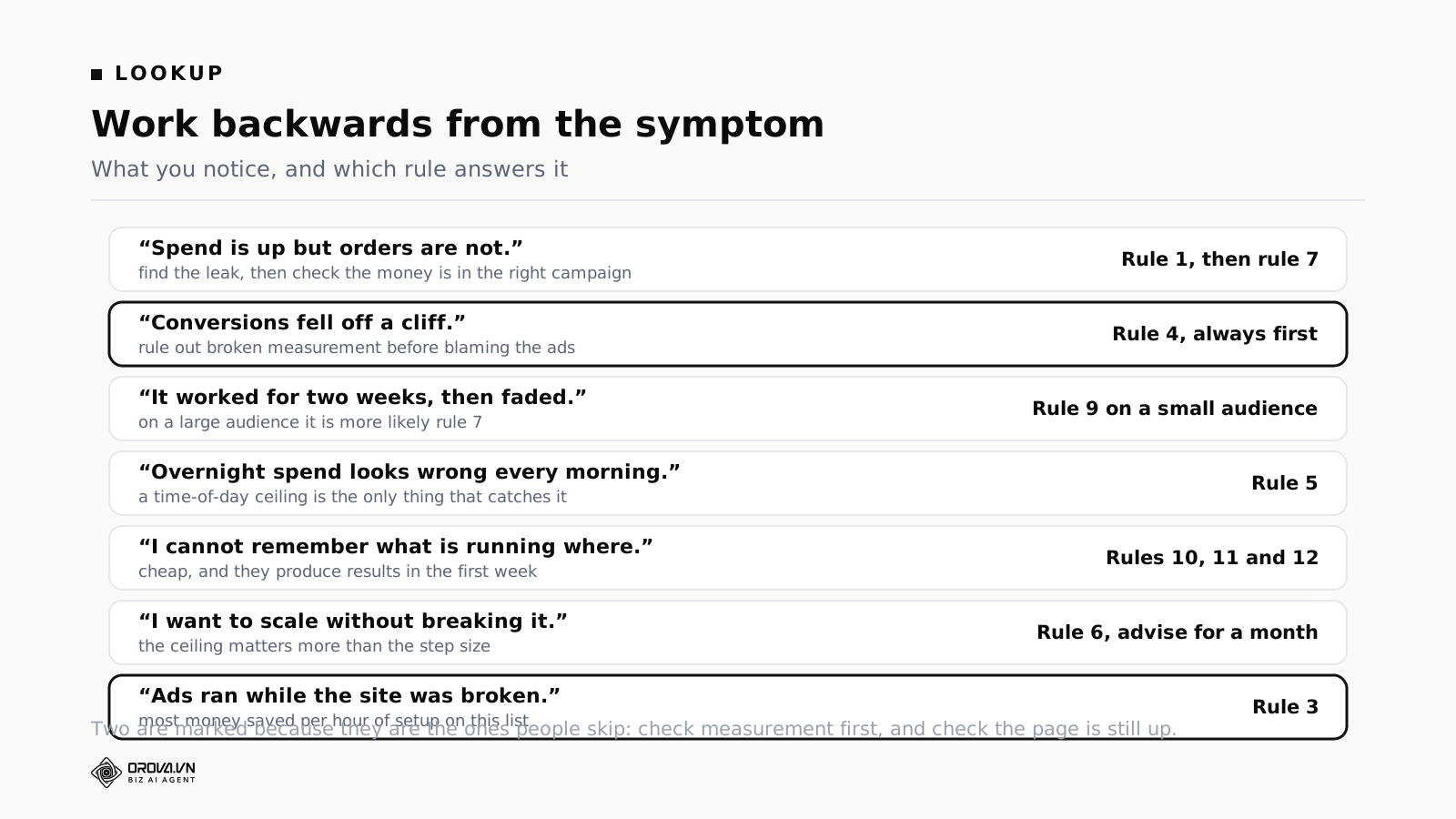
Why it matters more than it sounds: a broken landing page does not stop delivery and does not stop billing. Nothing in any ad platform tells you about it. The only signal is conversions falling, which you read as an ad problem and spend a week investigating.
The tag half of this check exists because of a real incident: a site update removed the tracking snippet and an account lost two weeks of conversion data before anyone noticed. The ads kept running the whole time, and every other rule in the account was reading numbers that had stopped meaning anything.
Highest money saved per hour of setup on this list, and the least switched on.
Rule 4 — conversions dropped to zero
What it blocks: acting on broken measurement.
Threshold: conversions at zero for a full day against the same weekday last week. Compare like for like — Sunday against Sunday, not Sunday against Wednesday.
Why: every other rule on this list reads numbers from the platform. If those numbers are wrong, every other rule is wrong too, and wrong convincingly. A pause rule will confidently pause exactly the campaigns that are working, because those are the ones whose conversions vanished. This rule is the one that protects the rest.
Rule 5 — out-of-hours spend
What it blocks: the overnight surprise on accounts where nobody is watching between six in the evening and nine in the morning.
Threshold: evening and overnight spend above its normal share of the day. Work out the normal share from 30 days of hourly data first — on many accounts it is higher than people assume, and the alert is useless until you know the baseline.
Why: not because night traffic is worse. Because a problem that starts at eight in the evening has fourteen hours to run before anyone sees it, and that is where a single bad day becomes a bad week.
The four growth rules
Rule 6 — stepped budget increases
What it does: raises the daily budget on a campaign that is performing, in small steps.
Threshold: cost per result under target for three consecutive days with at least 30 conversions in the window. Raise by 20%, once every three days at most, never above an absolute daily ceiling you set by hand.
Why the ceiling is not optional: do the arithmetic. Twenty percent per step, twice a week, doubles the daily budget in about two weeks and quadruples it in four. Nobody decided on four times the budget. The compounding did, and it did it while every individual step looked reasonable.
The other reason for the three-day cooldown is the learning phase. A budget change unsettles delivery, and raising again before things settle means the numbers the next step reads are not describing a stable campaign.
Rule 7 — move budget between campaigns
What it does: flags when a campaign with clearly better cost per result is holding a smaller budget than a worse one against the same objective, and proposes a shift that keeps total spend unchanged.
Threshold: at least a 25% difference in cost per result, and both campaigns must have at least 30 conversions in the window. That second condition is not optional, for the reason in the misconfiguration section below.
Why advisory only: two campaigns against the same stated objective often serve different purposes in practice — one is prospecting, one is retargeting, one carries a product you are trying to establish. The numbers cannot see that.
Rule 8 — the audience is running out
What it does: alerts when reach or audience saturation passes a threshold, when two ad sets are competing for the same people, and suggests where to expand.
Threshold: account specific. Start by alerting when reach passes 60% of the estimated audience size, and when two ad sets show substantial overlap.
Why advisory only, permanently: audience changes force the platform's optimisation to relearn, and the effect does not show up in the first few days. An automation acting here is making a decision it cannot evaluate.
Rule 9 — creative fatigue
What it does: recommends rotating creative when three signals appear together — frequency past your threshold, click-through rate down more than 30% against the prior seven days while spend holds steady, and cost per thousand impressions rising three days running.
Threshold: all three together, not any one alone. Each on its own has too many innocent explanations.
Why: this is the ceiling on every growth rule. Rule 6 will keep raising the budget on a campaign whose creative is used up, and the numbers will keep looking acceptable for about a week after it stopped being true.
The six account hygiene rules
Rule 10 — campaign naming
Alert when a campaign name does not match your convention, or when two campaigns share a name. Sounds trivial. Every automated report, every name-based filter, every rule scoped by name, and every handover between people depends on it. A naming rule costs ten minutes and prevents a category of confusion that is very hard to diagnose later.
Rule 11 — tracking parameters
Alert when a destination link is missing tracking parameters, when the parameters do not match the expected pattern, and when two campaigns are using the same tracking identifier. The third catches the classic duplication error: somebody copies a campaign, forgets to change the parameter, and from that day forward two campaigns report as one in your analytics. Nothing in the ad platform is wrong, and every number downstream is.
Rule 12 — dormant items
List campaigns paused more than 90 days, audiences unused for more than six months, and creatives that have never delivered a single impression. None of this costs money directly. All of it costs attention, because every list you scan gets longer and the real items get harder to see.
Rule 13 — landing page speed and unexpected redirects
Alert when load time passes a threshold you set, and when a destination redirects somewhere other than where you pointed it. Separate from rule 3, which catches the page being broken. This one catches the page being slow or quietly moved, which costs conversions without ever showing up as an error.
Rule 14 — combined spend across platforms
Alert when total spend across every connected platform passes a shared ceiling, and produce a weekly comparison of cost per result across them. This is the one control no single platform can enforce, because Google does not know what you spent on Meta. If you run more than one platform, switch this on in the first week even though it is a hygiene rule.
Rule 15 — account access
Alert when a new user is added to the account and when the payment method changes. Two events, both rare, both worth knowing about within the hour. On shared and agency-managed accounts this is the cheapest security control available.
The four rules that depend on your industry
The outline this article was planned from named four industries. Two of them — education and real estate — turned out to need the same rule as everything else with a long decision cycle, so they are grouped that way below rather than given separate entries that would say the same thing twice.
Rule 16 — ecommerce and retail: stock and seasonal peaks
Two conditions. Alert when a product is out of stock while ads for it are still running, and relax your cost-per-result thresholds during declared peak windows, then restore them afterwards.
The stock half needs a connection to your inventory system. If you do not have one, keep the seasonal half and handle stock manually — but know that ads running against out-of-stock items is one of the most reliable ways to spend a week's budget on nothing.
On the seasonal half: the point is not to be lenient during peak. It is that a fixed threshold set in March is wrong in November in both directions, and a rule that is wrong on a predictable schedule teaches people to ignore it.
Rule 17 — long sales cycles: services, B2B, real estate
Three conditions, and this is really one rule about not concluding too early. Trigger on an intermediate metric rather than closed deals. Extend the window to at least 14 days. And block every pause rule that depends on final conversions.
That last one matters most. In a business where weeks pass between the click and the close, a campaign with no closed deals in seven days is normal, not a fault signal. Rule 2 as written will pause your best campaigns in a long-cycle account unless you point it at something earlier in the funnel — a qualified enquiry, a booked call, a completed form that a human has read.
Rule 18 — enrolment windows and anything on a calendar
For education, training, and any business whose demand arrives in defined windows: tie thresholds to the calendar rather than to a rolling week.
The specific failure to avoid is a rule comparing this week against last week across a window boundary. The week enrolment opens against the week before it will show a change large enough to trigger almost anything you have written, and none of that change is about your ads. Write the boundary dates into the rule as exclusions, or switch the rule off for those two weeks.
Rule 19 — running many accounts at once
For agencies and in-house teams handling several clients or brands. Four conditions: a morning summary per account rather than one combined; alerts measured against each account's own thresholds, never a shared one; separate logs per account; and no unattended execution on any account without a written agreement covering it.
The last is a contractual rule rather than a technical one, and it should be a hard default. Nobody wants the conversation that starts with a client asking who authorised a budget change.
One case this list does not cover directly: mobile app accounts, which need cost per install tracked separately from cost per activation, plus an alert on day-one retention falling. The shape is the same as rule 17 — trigger on the earlier, more frequent event, and never let a pause rule read the final one.
The minimum three, if you only pick three
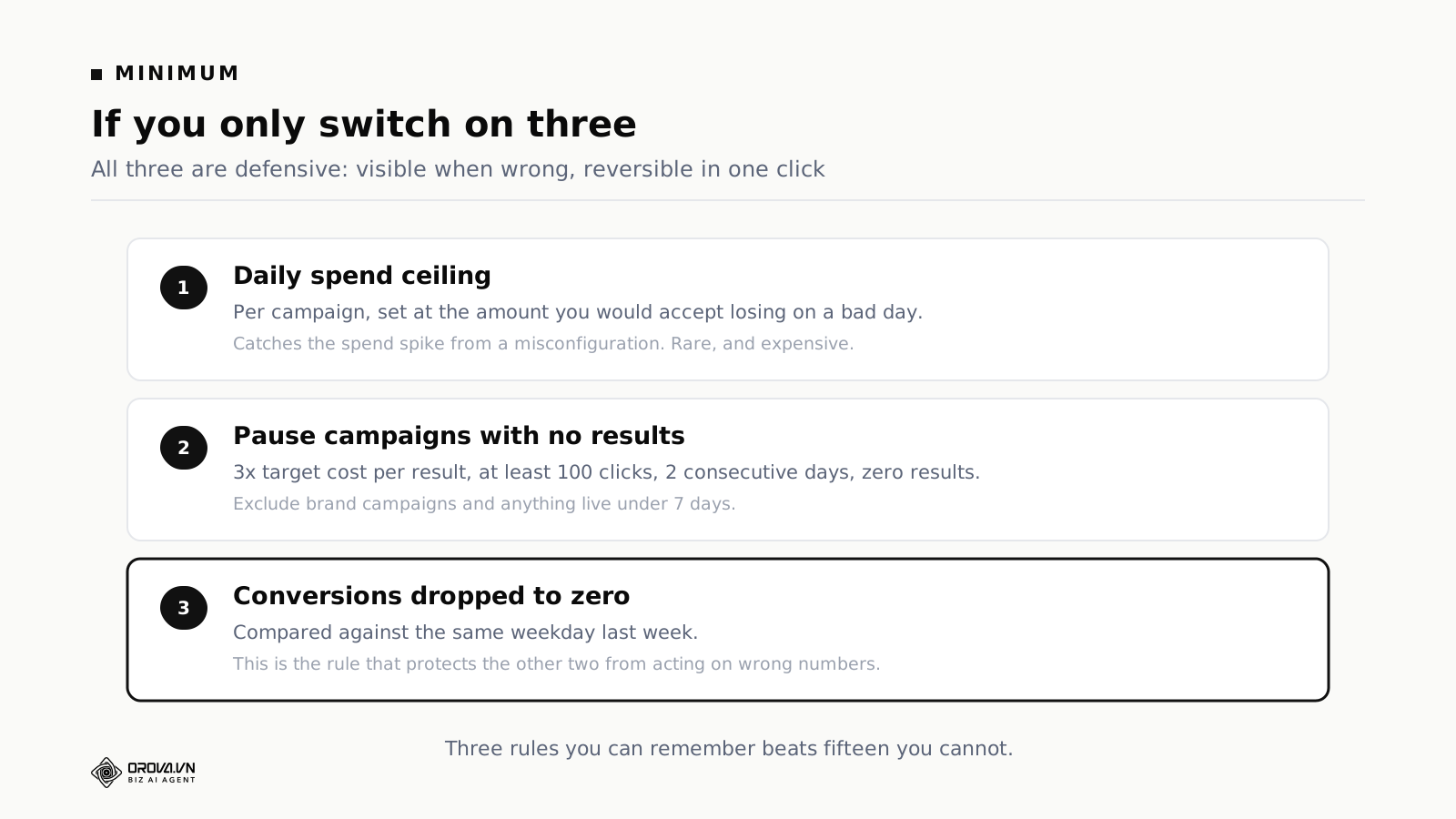
If you plan to switch on three rules and then not touch anything for three months, these are the three. All defensive, all visible when wrong, all reversible in one click.
Rule 1, the daily spend ceiling. Set per campaign at the amount you would accept losing on a bad day.
Rule 2, pause campaigns with no results. Three times target cost per result, at least 100 clicks, two consecutive days, zero conversions, brand and new campaigns excluded.
Rule 4, conversions dropped to zero. Against the same weekday last week. This is the one that protects the other two from acting on numbers that have stopped being true.
Three rules you can remember beats fifteen you cannot.
Setting the thresholds from your own data
Every number above is a starting point. Here is how to replace each one.
The spend threshold for a pause rule
Take your target cost per result and multiply by three. If you have never stated a target, take the 90-day average and multiply by two and a half.
The reason for the multiple rather than the raw number: conversions arrive irregularly. A campaign that has spent one target cost per result without converting has told you nothing. At three times, the silence starts to mean something.
The minimum click count
Take the inverse of your average conversion rate and double it. A 2% conversion rate gives 100 clicks. A 1% rate gives 200.
This is the guard against concluding early, and it is the single condition that separates a rule you can trust from one that fires on noise. Without it the rule will act on entities where the numbers genuinely say nothing, and it will do so with complete confidence.
The frequency threshold
Not calculable from a formula. Export 90 days, plot click-through rate against frequency for your own ad sets, find the point where the line starts falling, and set the threshold about 15% below it.
Every account has a different point and it moves with the season. Reset it quarterly.
The budget step size
Twenty percent is a sensible default almost everywhere. Not because it is optimal but because platform optimisation responds badly to large sudden changes in either direction, and 20% is comfortably inside what the delivery system absorbs without restarting.
On very small budgets, 20% may be too small in absolute terms for the platform to register as a change at all. In that case set the step as a fixed amount rather than a percentage.
The efficiency threshold for any alert
Pull 90 days at campaign level, take the median rather than the mean, and set the trigger 25% to 40% above it. Then count how many times that threshold would have been crossed in those 90 days. More than a dozen and it is too tight. Zero and it is too loose to ever do anything.
How to run the first two weeks
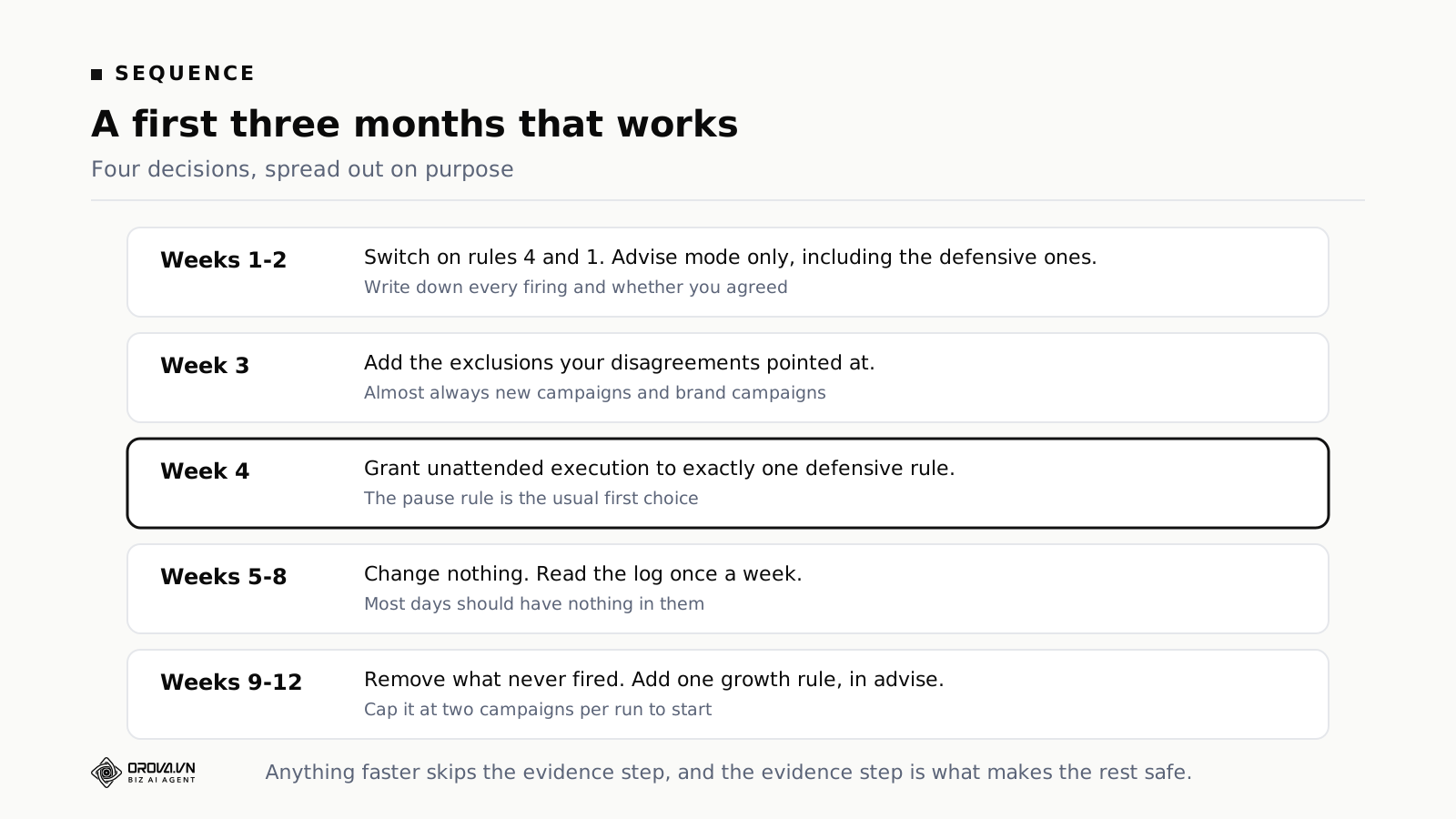
Switch on your chosen rules in advisory mode. Grant unattended execution to nothing in the first two weeks, including the defensive ones.
Every time something fires, record three things: which rule, whether you agreed, and if not, why. Three columns, one row per firing. A spreadsheet is fine.
After two weeks, read the table.
Rules you agreed with almost every time are candidates for unattended execution. Rules you disagreed with for a reason that has a pattern — they all involved campaigns under a week old, say — get an exclusion added and stay advisory. Rules you disagreed with for scattered reasons get switched off, and switching them off is a result, not a failure.
This is deliberately slow. The two weeks are what buy the confidence to let anything act on its own later.
If you run more than one platform
Do not switch the same rules on across Google, Meta and TikTok at the same time. It sounds tidy and it triples the volume of recommendations in exactly the week when you are least able to judge whether the thresholds are right.
Start on the platform carrying the largest spend. Settle the thresholds over two or three weeks. Then carry the structure across — the numbers will not transfer, because cost per result and conversion rates differ per platform, but the shape does, and the second platform takes a fraction of the time.
Rule 14 is the exception. Switch it on immediately, because a combined spend ceiling is the one control no individual platform can enforce.
Three mistakes when choosing
Choosing by what sounds useful rather than by what is wrong
People switch on rules because they sound clever, not because the account has that problem. The result is a list of rules that never fire and a growing sense that the software does nothing.
The fix: write down the three things you currently do by hand every week and find rules for exactly those three. Nothing else, in the first month.
Using the thresholds from an article
Including this one. Every number here is a starting point chosen to be defensible across many accounts, which means it is precisely correct for none of them.
The fix: after two weeks in advisory mode, reset every threshold against your own data using the section above.
Never revisiting
A set of rules that was right in March may be wrong in November. Budgets change, campaign structures change, seasons change, and the rules do not notice any of it.
The fix: a quarterly review where you read the active list out loud and ask of each one whether it still makes sense. Reading out loud is not a joke — it is faster at catching a rule you no longer understand than reading silently.
Two rules that are almost always misconfigured
Two of the nineteen account for most of the early complaints, and in both cases the cause is the same kind of mistake.
Rule 9, creative fatigue
The usual advice is a single frequency threshold applied to every ad set. Configured that way it produces constant alerts on retargeting and never fires on prospecting, which is the reverse of useful.
Frequency tolerance is a property of the audience, not of the account. A retargeting pool of recent visitors sustains a much higher frequency before performance degrades than a cold interest-based audience does, because the people in it already know who you are.
The fix is to set the threshold per audience type rather than globally. Fifteen minutes once, and most of the noise goes away permanently.
Rule 7, moving budget between campaigns
The complaint is always the same: the rule keeps recommending a shift toward a campaign that is small and looks brilliant.
Small campaigns produce better-looking cost per result for a mechanical reason. They are reaching the easiest part of the audience — the people closest to converting anyway. Scale them and you reach further into that audience, where performance regresses toward the account average.
The fix is the minimum-volume condition: both campaigns must have enough conversions in the window for the comparison to mean anything. Without it, rule 7 will reliably recommend pouring budget into whichever campaign is currently smallest, over and over.
How to read a rule before you switch it on
Whatever tool you use, every rule should show four things. Reading all four takes about a minute and it is the minute that prevents most misconfiguration.
The condition. What must be true, written in fields you can measure. "Spend above three times target cost per result, at least 100 clicks, across two consecutive days, zero conversions." Read the data minimum carefully. A rule without one will fire on entities where the numbers do not yet mean anything.
The action. What happens when it fires — pause, raise, lower, or only notify. Several rules that sound like actions are only alerts, and the distinction matters when you are counting how much authority you have handed over.
The limits. Maximum entities changed per run, maximum size of one change, absolute floor and ceiling, cooldown, and the exclusion list. If a rule cannot state its limits, it does not get unattended execution. That is not a preference, it is the whole safety model.
The reasoning. A sentence saying why the rule exists and in what situation it would be wrong. This is not decoration — it is what lets you set the threshold, because the right number depends on understanding what the rule is defending against.
The mechanics of writing that condition well, clause by clause, are covered in writing ad automation rules as sentences.
A representative account across three months
This sequence is composited from several accounts rather than drawn from one, and it carries no result figures, because those depend far too much on industry to generalise. The shape is the useful part.
Weeks 1 and 2. Rules 4 and 1 switched on, everything advisory. The first week produces seven recommendations. Three are old campaigns everyone knew were poor but nobody had switched off. Two are new campaigns still settling — wrong. Two are genuine finds.
Week 3. An exclusion is added for campaigns under seven days old. Recommendations drop to about three a week, and all three are agreed with. Nothing else changes.
Weeks 4 to 6. Exactly one rule gets unattended execution: rule 2, pause campaigns with no results. Everything else stays advisory. Over three weeks it fires four times with no objections.
Week 7. Rule 6 is added in advisory mode. This is when they discover three campaigns have no absolute daily ceiling set at all, which gets fixed before the rule runs a second time.
Weeks 9 to 12. Rule 6 gets unattended execution, capped at two campaigns per run and restricted to business hours. Final state after three months: two rules executing, nine advisory, four switched off as a poor fit.
Those four switched off are also a result. Knowing for certain that four things do not suit your account is worth as much as knowing that two do, and it is the part people treat as failure when it is the opposite.
What these rules do not solve
They do not fix the product or the price. If cost per result is high because the offer does not fit the market, no rule rescues that. Rules help you notice sooner and stop spending on it faster, which is worth having and is not the same thing.
They do not fix broken measurement. Rule 4 catches the total failure. It does not catch a conversion that is being counted twice, or an attribution setting somebody changed. Every rule reads platform numbers, and wrong numbers produce wrong rules, confidently.
They do not replace judgement about the market. Which audience to expand into, which message to test, which channel to drop. Account data does not contain enough information to answer those.
Three cases also call for building something of your own rather than picking from a list: when the condition depends on data outside the ad platform, such as stock levels or a CRM outcome; when your thresholds have to follow a calendar rather than a rolling window; and when your actual response is a sequence — check this, and if it holds, check that, and only then act.
Frequently asked questions
Can I switch on several of these at once?
Technically yes, practically not in the first month. Several at once means several streams of output and no way to tell which rule is creating the value or the noise.
Can two rules conflict?
Yes, and it is common. Rule 6 wants to raise a budget while rule 2 is considering a pause on the same campaign. That is why cooldowns and per-run caps exist. The cleanest fix is to add a condition to one of them so they cannot both match — rule 6 already requires cost per result under target, which is what keeps it out of rule 2's territory.
Is there a version of this for very small budgets?
The minimum three. Below a certain spend, most volume-based rules never reach their data minimums, so adding more has no effect other than making the list longer.
What happens if two people configure the same account?
The most common source of confusion on a shared account is not a rule misfiring — it is somebody quietly changing a threshold and nobody else knowing. Whatever tool you use, check whether it logs configuration changes with the name of who made them, and read that log alongside the action log.
Do I need to look at this every day?
No. The morning summary is enough, with closer attention in the first two weeks while thresholds settle. After that most days should have nothing in them, and that is the correct state rather than a sign the system is idle.
How long before any of this shows an effect?
Defensive rules usually within the first week, because what they catch already exists in the account and nobody had looked. Growth rules take at least a month, because they need enough cycles to compare against.
Which one should I switch on if I only have time for one?
Rule 4. It is an alert, it costs nothing, it never acts, and it tells you when every other number you are looking at has stopped being true.
Where to start
Pick the situation that describes your account, take three rules from it, and run them in advisory mode with a spreadsheet open. Two weeks of writing down whether you agreed is worth more than any threshold in this article.
After three months your configuration will not match any of the four groupings above exactly. That is the sign it is working — the list was a starting point and your account is not a starting point.
Further reading: what artificial intelligence advertising can automate, the limits to set before anything changes a budget, and thresholds for pausing campaigns that spend without results.
Let Orova SEO handle the repetitive part
Keyword research, drafting, refreshing old posts and rank tracking — running automatically on your own site.
Explore Orova SEO