
What artificial intelligence advertising can automate
Artificial intelligence advertising is good at a short list of jobs and unreliable at everything else. The short list: reading your account data every day, flagging what has moved outside a range you set, checking a metric against a threshold you wrote down, doing budget arithmetic, and drafting ad text for you to approve. What you sell, who you sell it to and what the ad promises stay with you.
This article sets out what can be handed over on Google Ads, Meta and TikTok right now, what each handover has to contain so that a wrong decision costs you a little instead of a week of budget, and where the whole approach stops working.
If you want the concrete list of rules to switch on in your first month, that is a separate piece: 19 starter ad automation rules and what each one does. Read this one for the shape, that one for the checklist.
What artificial intelligence advertising actually does today
Three quite different products share the label, and most disappointment comes from buying one while expecting another.
Text generation. You describe the product, the tool writes headlines and descriptions. It never reads performance, never touches spend, and has no idea which campaign is bleeding. Useful, cheap, and completely separate from optimisation.
Analysis and advice. The tool pulls campaign data on a schedule, compares it against targets, and hands you a list of recommendations. You read them and click the buttons yourself. No write access to the account.
Execution. Same reading, same comparison, but when the conditions are met the software calls the platform API and makes the change. A budget moves at two in the morning. A campaign spending with nothing to show for it gets paused before you wake up.
The third one is where the value and the risk both live. It is also the one most vendors describe in the vaguest terms, which is a signal in itself.
The five levers, and which ones a machine can pull
Ad optimisation comes down to five levers. Most accounts use two.
Budget — moving money toward what works. Bids — how much you will pay per result, adjusted by audience, device, time and place. Targeting — who sees the ad, including the negative lists that stop you paying for the wrong searches. Creative — the ad itself, which decays and needs replacing before it does. Landing page — where the click lands, and the lever nobody touches.
A machine can pull the first three safely because each one is a number in a field, the effect shows up in the same metrics table within days, and a wrong move is reversed by typing the old number back. Creative and landing page fail all three tests.
One more thing about cadence: change less often than instinct suggests. Every edit resets the platform's learning. Weekly is enough for budget and negative lists. Two to four weeks is right for creative. A tool that proposes changes every day on a stable account is not being helpful, it is being noisy, and noise is how people end up ignoring the one alert that mattered.
The five jobs it is genuinely good at
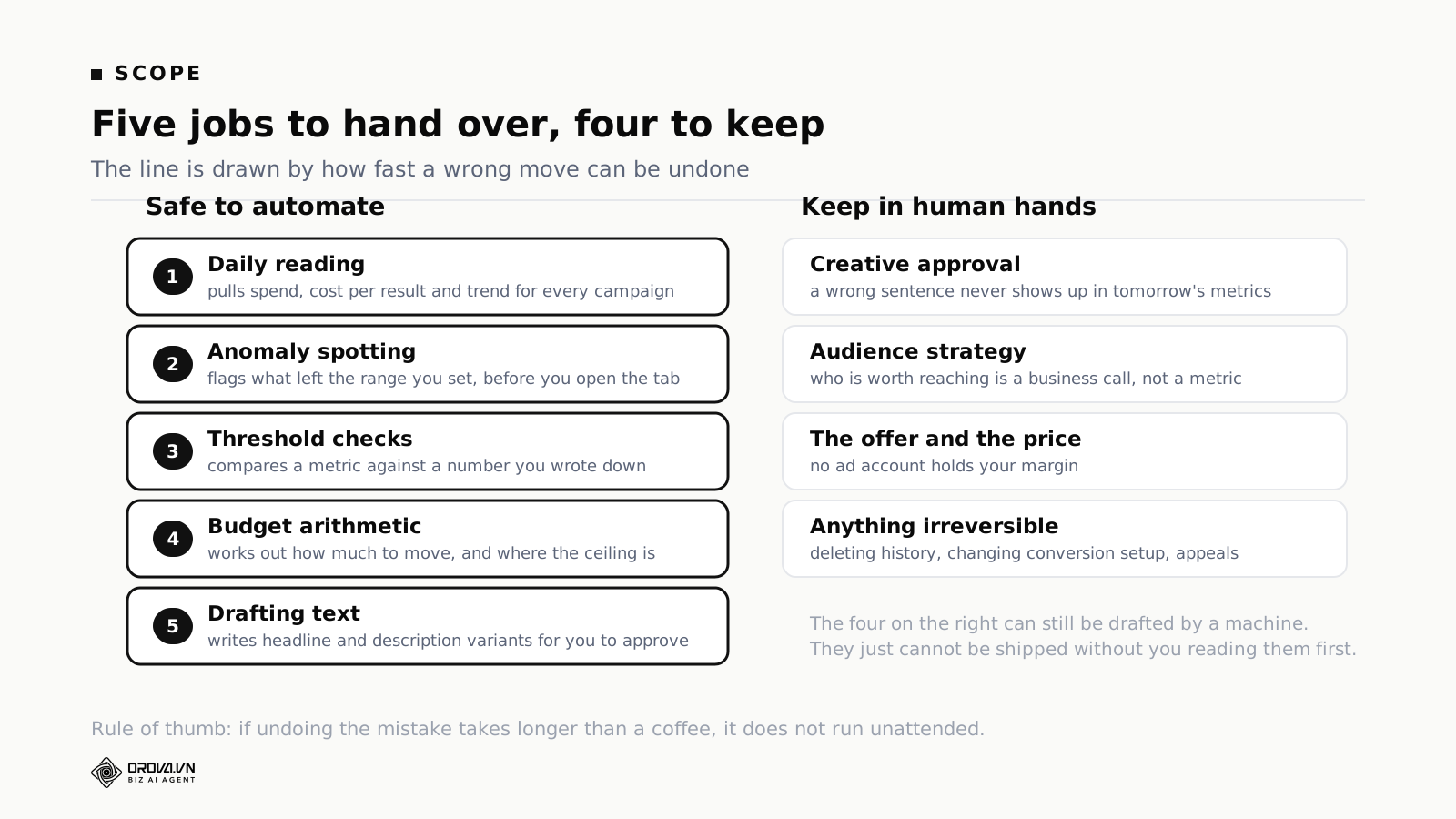
Reading the account every day. A person opens the ads manager when something feels off. Software opens it every morning at the same time, for every campaign, whether or not anything feels off. On a five-campaign account that is a convenience. On forty campaigns across three platforms it is the difference between catching a problem on day two and catching it on day nine.
Spotting what left the range. Anomaly detection sounds advanced and is mostly subtraction. Cost per result this week against cost per result the previous three weeks. Frequency now against frequency a fortnight ago. Click-through rate on an ad against the average of the ad set it sits in. The value is not the cleverness, it is that the comparison runs on everything rather than on the campaign you happened to open.
Checking a threshold. This is the core of every automation worth having. You write down a number. The software compares a metric against it and reports which entities are on the wrong side. No judgement, no interpretation, and therefore no drift between what it decided on Tuesday and what it decides on Wednesday with the same inputs.
Budget arithmetic. Working out that a campaign at 62% lost impression share due to budget would need roughly 2.6 times its current daily budget to capture the traffic it is missing, then checking whether that number sits under your ceiling. This is exactly the sort of sum people do badly in their heads and skip when busy.
Drafting. Fifteen headline variants inside the character limit, referencing the offer you described. Not for publishing unread. For getting past the blank page, which is where most creative refresh cycles die.
Notice what all five have in common: the input is data you already have, the output is either a list or a number, and a mistake is visible immediately.
The jobs it should not touch
Publishing creative. Technically easy through every major API. Do not allow it. Ad copy touches brand voice, customer promises and, in finance, health and education, regulatory exposure. A wrong sentence does not appear in tomorrow's metrics table. It appears in a complaint six weeks later, or in a policy strike, and by then the campaign that carried it has been paused, restarted and renamed.
Audience strategy. A machine can tell you that the lookalike from your purchaser list is outperforming the interest stack by 40% on cost per result. It cannot tell you that the purchaser list is 80% one distributor who is about to leave. Which people are worth reaching is a business question that no ad account holds the data for.
The offer and the price. Same reason, more sharply. A rule engine optimising toward cost per lead will happily push all your money into the campaign advertising the cheapest, worst-margin product, because that campaign has the best-looking numbers. Margin is not a field in any ad platform.
Anything you cannot undo in a minute. Deleting campaigns or ad sets. Changing conversion tracking or pixel setup. Editing billing. Submitting policy appeals. Removing another rule's limits. The common property is that the damage lands somewhere other than a metrics table, which means nobody notices it while it is cheap to fix.
What one automated action is made of
Every automation you will ever write has four parts. Leave one out and the thing either never fires or fires far too hard.
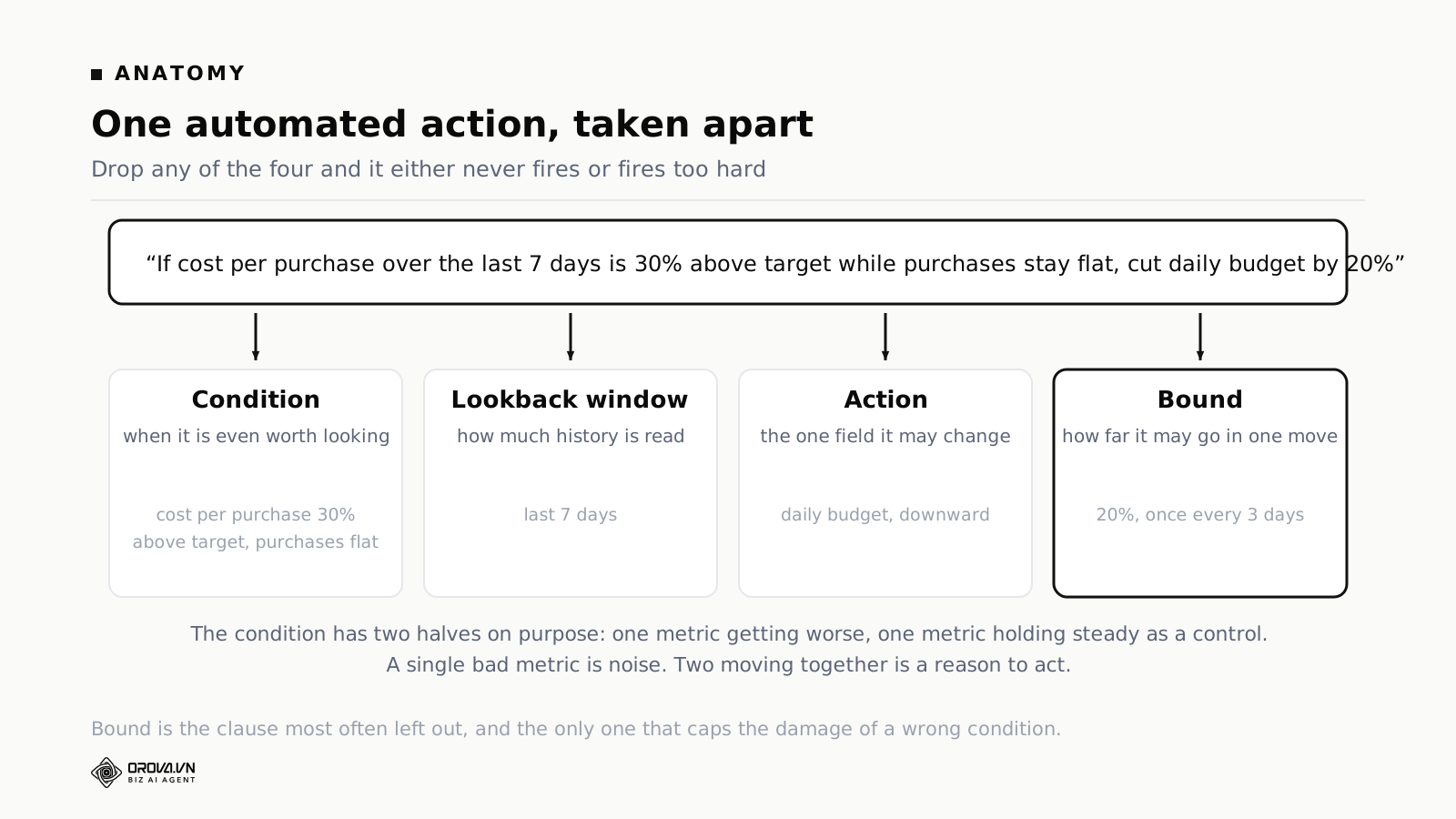
Condition. What has to be true before anything happens. Write two halves, not one: a metric getting worse, and a second metric acting as a control. "Cost per purchase 30% above target" on its own fires during a week when you deliberately scaled. "Cost per purchase 30% above target while purchase volume is flat" only fires when you are paying more for the same result, which is the situation you actually care about.
Lookback window. How much history gets read. Three days, seven days, thirty days. This is the setting people skip and it changes the answer more than the threshold does. A weak Monday is not evidence of a broken campaign. It might be weather, a competitor promotion, or ordinary variance. Seven days covers a full weekly cycle and is the sane default for most accounts; low-volume accounts should use fourteen.
Action. The single field it may change, and the direction. "Reduce daily budget." Not "review," not "consider," not "optimise." A rule that ends in a verb you cannot execute is a note, and notes belong in a document.
Bound. How far it may go in one move, and how often it may repeat. This is the clause most often left out and the only one that limits what a wrong condition costs you.
What the budget lever actually does
Budget deserves a paragraph of its own because it is the field people automate first and understand least.
Budget is a volume dial, not a money dial. You are not buying results in proportion to spend. You are telling the platform to deliver more broadly, and broader means reaching people who fit your offer less well. Cost per result almost always drifts up as volume goes up. The only question is whether it drifts past your margin.
Magnitude matters as much as timing. Doubling a budget in one move pushes the campaign back into the learning phase, which means the next few days look worse before they look better. Plenty of advertisers panic at that point, cut back, and never let anything stabilise.
There is one state where raising budget is nearly always right, and it has a name: budget-constrained. Demand exceeded supply. People would have seen the ad, but the daily budget ran out and delivery stopped. Not recognising that state means leaving money on the table every day it persists.
So a budget rule worth trusting needs four things to agree before it moves anything: efficiency against your target, the campaign's learning state, whether it is budget-constrained, and the trend across the window rather than one day's figure. Four out of four, or no change.
Two ways to lose impressions, and only one is fixable with money
Google Search reports lost impression share in two separate columns: lost impression share due to budget, and lost impression share due to rank. The first means you ran out of money while searches were still happening. The second means you lost the auction.
Only the first is fixable with money. Pour budget into a rank problem and the money leaves while the problem stays, because you are losing on ad relevance, landing page experience and bid competitiveness, not on funding. Any budget rule you write on Google should read the budget column specifically and say so, rather than reacting to a general sense that you are missing impressions.
This is the clearest example of a wider point. Most bad automation is not caused by a bad threshold. It is caused by pointing a correct threshold at the wrong metric.
Why every action needs a bound, with the arithmetic
Take a campaign on a 2 million VND daily budget and a rule that raises the budget by 50% whenever yesterday's cost per result came in under target. No cap, no cooldown, evaluated daily. That is a rule a reasonable person writes in five minutes and it is the most expensive kind of mistake in this whole field.
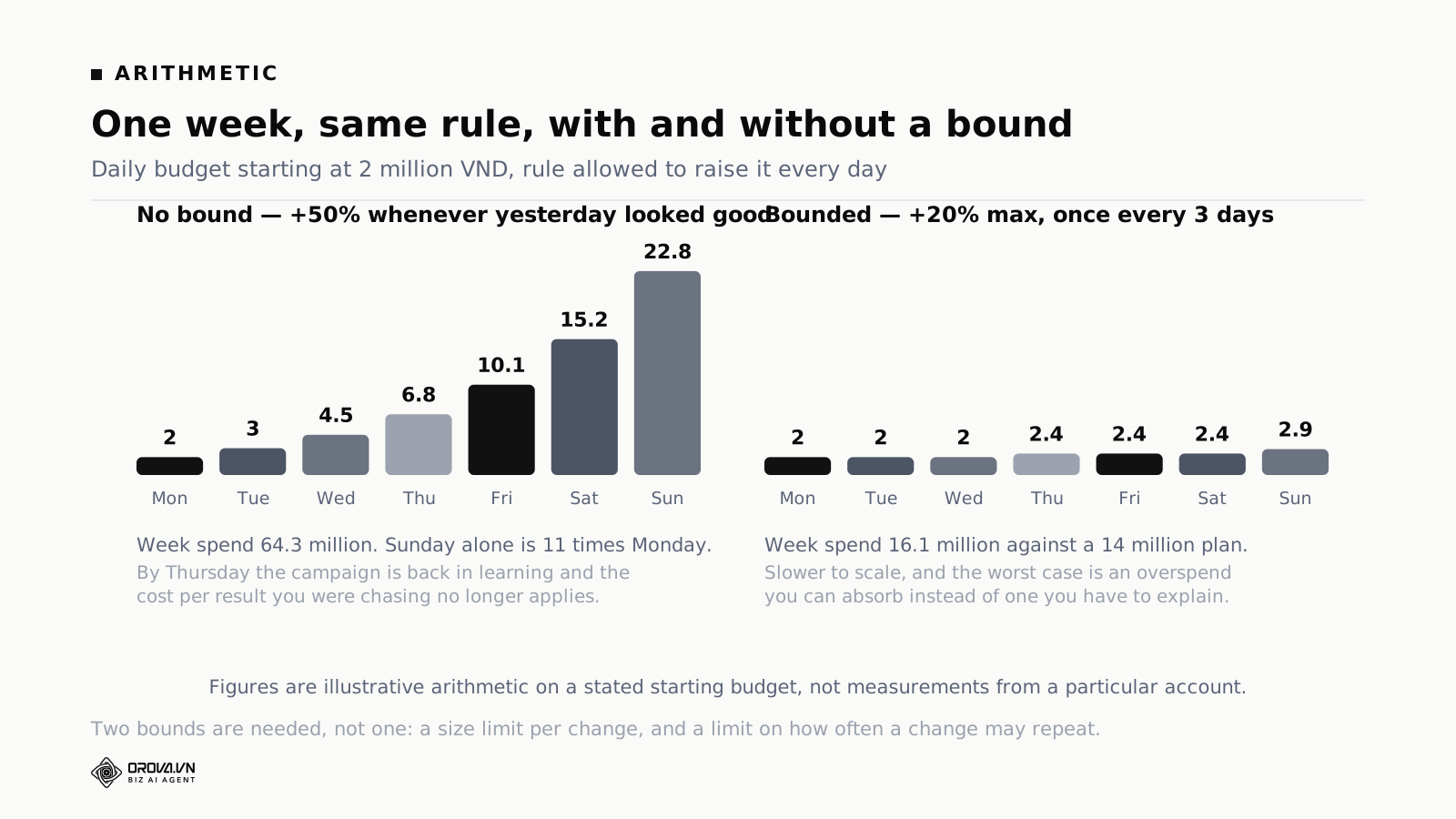
Monday 2 million. Tuesday 3. Wednesday 4.5. Thursday 6.75. Friday 10.1. Saturday 15.2. Sunday 22.8. Week total: 64.3 million against a 14 million plan, and the Sunday rate is more than eleven times where you started. Worse, the campaign has been in learning since Wednesday, so the cost-per-result figure the rule was reading stopped meaning anything about halfway through.
The same rule with two bounds — no more than 20% per change, no more than once every three days — spends 16.1 million across the week. Slower, and the worst case is an overspend you can absorb rather than one you have to explain.
Note that it takes two bounds, not one. A size limit alone still compounds if the rule runs daily. A frequency limit alone still allows one enormous jump. Write both.
Three more bounds are worth having on any account with more than a handful of campaigns:
A floor as well as a ceiling. Rules that reduce budget need a minimum below which they stop, otherwise a campaign gets trimmed to a level where it cannot gather enough data to ever look good again, and then gets trimmed further for looking bad.
A cap on how many entities one run may touch. This blocks the worst failure mode there is: one mis-set threshold cascading across an entire account in a single pass. Five campaigns per run is a sensible starting number.
A scope limit. By default the automation should only be able to change campaigns you explicitly switched on. Everything else is read for context and never written to.
Advise mode and execute mode
Every action you set up should exist in two states, and you should be deliberate about which one it is in.
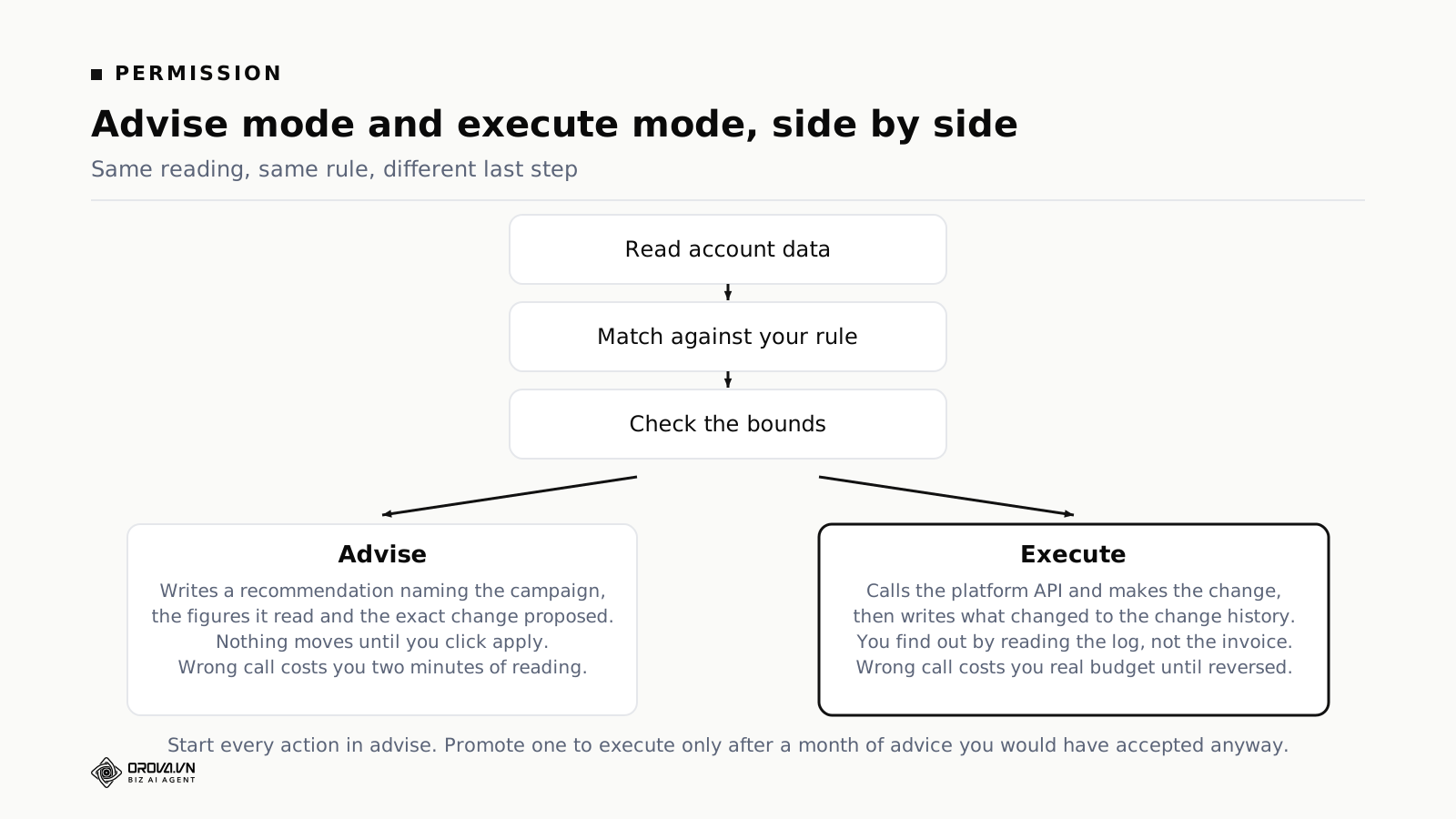
In advise mode, the conditions match and you get a recommendation: the campaign name, the figures it read, the exact change proposed, and the window it looked at. Nothing moves until you apply it. A wrong recommendation costs you two minutes of reading.
In execute mode, the same match runs, the bounds are checked, and then the change is made on the platform and written to a log. You find out by reading the log rather than by noticing something odd in the billing tab. A wrong execution costs you real budget until it is reversed.
Granting execute permission does not remove the bounds. That confusion is common and worth stating plainly: execute means the last step happens without you, not that the checks before it stop running.
Nearly everyone who does this well follows the same path. Everything runs in advise for the first month. You read the recommendations daily. At the end of the month you can see which ones you accepted every time without thinking, and those are the ones that earn execute. The first to be promoted is almost always defensive: pausing a campaign that has spent without a single conversion. The cost of a wrong pause is a few hours of lost delivery. The cost of not pausing is the whole daily budget.
A related decision worth making explicitly: what limits to set before anything is allowed to change a budget.
What to let it read, and what to deny it
Ask any tool that claims to analyse your account exactly what it is looking at. The answer tells you how much its output is worth.
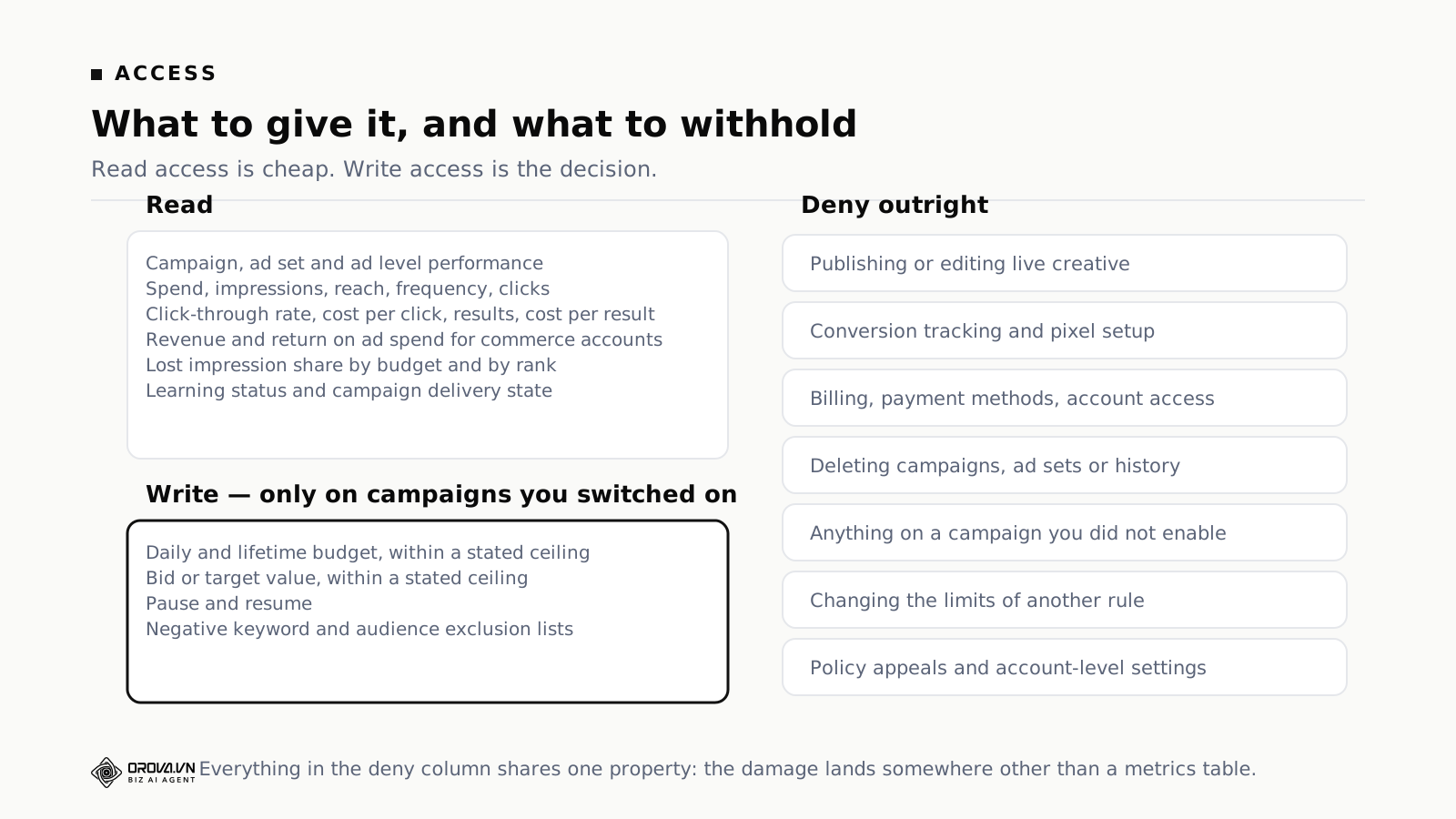
Read access should cover three levels — campaign, ad set and individual ad. At each level: spend, impressions, reach, frequency, clicks, click-through rate, cost per click, results and cost per result. Commerce accounts add revenue and return on ad spend. Google accounts should also expose lost impression share split by budget and by rank, plus the campaign's learning or delivery state.
Write access should be short: budget within a ceiling, bid or target value within a ceiling, pause and resume, and negative keyword or audience exclusion lists. That is enough to run a competent optimisation routine. Anything longer than that list deserves a specific justification.
The deny list matters more than either. Creative publishing, conversion tracking and pixel setup, billing and payment methods, deleting anything, touching a campaign you did not enable, changing another rule's limits, and account-level settings including policy appeals.
One more read-side rule: no conclusion without enough evidence. A campaign that has been live for two days with twelve clicks tells you nothing, no matter how confident a summary of it sounds. Set a minimum — a number of days live, a number of clicks or a number of conversions — below which the automation reports "not enough data" instead of a verdict. This single setting prevents more bad decisions than any threshold you will choose.
How the platforms already automate, and where their rules stop
This is the strongest objection to everything above, so take it head on. Google, Meta and TikTok all ship automation, some of it free and genuinely good.
Google automated rules let you pause, enable, adjust budgets and bids, and send email alerts on a schedule of hourly, daily, weekly or monthly, based on conditions built from account metrics. Smart Bidding sets bids per auction using signals no external tool can see. Meta Advantage campaign budget distributes spend across ad sets, Advantage+ audience expands targeting beyond what you specified, and Advantage+ shopping allocates between new and existing customers. TikTok Smart+ does the equivalent.
Use all of it where it fits. Bidding in particular: per-auction bidding is not a job an external rule engine should be attempting, and any vendor claiming to beat Smart Bidding at its own game is worth a hard look.
The limits are structural rather than a matter of quality. Platform automation optimises inside the platform, toward the objective you declared to the platform. Three things it does not know:
Your margin. To Meta, a purchase is a purchase. To you, a small-basket order at thin margin is a different event from a large-basket order at healthy margin. The maximum you can pay for a result has to come from your own economics.
The other platforms. Google optimises the Google account. If Meta is cheaper this month, nothing inside Google will move money there. That decision sits above all three accounts.
What happened after the lead. The platform sees a form submission. Whether that person answered the phone, qualified and paid is known only to your sales system. Both Google and Meta accept that information back — offline conversion imports on Google, the Conversions API on Meta — and feeding it back is the single highest-return piece of plumbing in this whole area, because it changes what the platform's own automation is optimising toward. Start with clean conversion data before you automate anything at all.
There is also a practical limit to the native rule builders themselves: the conditions available are the ones the platform chose to expose, they only see that platform's data, and they cannot express a condition like "cost per qualified lead from the CRM." Anything involving your own numbers has to live outside.
Choosing the first three actions to automate
Do not switch on fifteen rules in week one. Three is the right number to start with, and they should be chosen in this order.
One. Pause campaigns spending with no conversions. Condition: spend above a set amount over the last seven days with zero conversions. This is defensive, the cost of being wrong is small, and it is the only rule that pays for itself in the first month on almost every account. Set the spend threshold at roughly three times your target cost per result, so that a campaign has been given a fair chance before it gets stopped.
Two. Alert on cost per result crossing your ceiling. Not an action — an alert, in advise mode, permanently. Condition: seven-day cost per result more than 30% above target while result volume is flat. You will tune this threshold twice before it stops firing on things you do not care about. That tuning is the point of running it in advise.
Three. Raise budget on budget-constrained campaigns that are under target. Condition: campaign losing impression share to budget, cost per result under target across seven days. Bound: 20% per change, once every three days, hard ceiling on the daily budget. This is the one that makes money rather than saving it, and it is third because it is the one where a missing bound hurts.
Everything after that depends on your account. The starter list of nineteen rules groups them by the situation an account is in, with a suggested threshold for each.
Two threshold traps that cost real money
Both of these come from live systems, and both look like nothing until they fire.
Zero is not the same as blank. Most software treats an empty setting as "use the default." In most programming languages the number zero is also treated as empty. So somebody who sets a return-on-ad-spend threshold of 0 — meaning "flag every campaign producing no revenue at all" — gets silently treated as having set nothing, the default is substituted, and the rule matches fourteen campaigns it should never have looked at. When you set a threshold to zero anywhere, run the rule once in advise mode and check the list of matched entities before you trust it.
A number without a currency is ambiguous by a factor of thousands. An account list containing both US dollar and Vietnamese dong accounts, with a rule that says "spend above 500," will do something spectacular. Automatic conversion at a live exchange rate is not the answer either — rates move daily, and a campaign paused because of a rate fetched at an awkward moment is genuinely hard to trace back afterwards. Attach a currency to the threshold, filter to accounts in that currency, and refuse to run when the scope mixes currencies. Refusing is more annoying than guessing, and with money, annoying beats wrong.
How often to run it
Once a day, early morning, is right for most accounts. High-spend accounts can justify two or three times a day. Every fifteen minutes is never right: ad data does not change that fast, each run is a decision point where a wrong rule can act, and every run costs something — API quota, model tokens, or your attention when it emails you. Running more often does not optimise harder.
Reading a machine recommendation critically
Whatever tool produces it, apply these five checks before you accept anything.
Does it name the entity? A recommendation about "your campaigns" is not a recommendation. It should name the campaign, the ad set, or the ad.
Does it carry a number in both directions? Good output states the observation and the prescription numerically: cost per purchase ran 38% above target across seven days, therefore reduce daily budget by 20%. One number without the other is half an argument.
Does it state the window? If it cannot tell you what period it read, you cannot judge whether the conclusion holds. Seven days and thirty days routinely point in opposite directions on the same campaign.
Does it name the field and the new value? "Optimise your audience targeting" is not something you can execute. "Add these four placements to the exclusion list" is. If accepting the recommendation still leaves you deciding what to do, the tool did the easy half.
Does it say what would change its mind? The best output includes the condition under which it would be wrong: "if the drop is seasonal rather than structural, hold instead." That sentence is a sign the reasoning was constrained rather than generated.
If most of the output fails these checks, the problem is usually not the model. It is that the instruction driving it was written too loosely. Vague instructions produce vague analysis, reliably. Writing the rule as a precise sentence fixes more output quality problems than switching tools does.
Where rule-based automation runs out
Four situations where the honest answer is that no rule will help you.
Situations nobody has seen yet. A rule encodes a situation someone already understood. The first week of a new platform feature is not in there. Neither is an unusual market event. During those windows a well-built system correctly does less, because no condition matches — which is the behaviour you want, and also means you are back to judgement.
Seasonality. Rules compare against your targets and against recent trend. A predictable annual surge looks, to a windowed comparison, exactly like a structural improvement, and a predictable annual slump looks like a broken campaign. Both Google and Meta offer seasonality adjustments and data exclusions for exactly this reason, and a person still has to tell the system that next week is not normal.
Brand campaigns. Rules optimise measurable response. A campaign whose value is mostly downstream and unmeasured in the ad account will always look worse to a rule engine than it is. Exclude it from automation rather than letting a rule slowly starve it.
Very small accounts. Data-sufficiency limits are protective, and on low volume they mean most rules never fire. That is correct behaviour, not a malfunction, but it does mean automation adds little at that scale. With three campaigns you can hold the whole picture in your head.
There is a fifth failure that is entirely self-inflicted: two of your own rules disagreeing. One says reduce budget because cost per result is high; another says raise it because the campaign is budget-constrained. Both conditions can be true at once. Decide the priority order when you write them — defensive rules should always outrank growth rules — rather than discovering the conflict from the change history.
Three questions to ask any vendor in this category
These work regardless of which tool you end up with.
Show me a real recommendation on a real account. Not a product video. Ask for a screenshot of actual output. If it says "optimise your audience targeting" with no number, no reasoning and no named campaign, you are about to pay a subscription for a general-purpose model with a dashboard on top.
Can it execute, and where exactly do I stop it? Advice-only tools are safe and you still do the clicking. Executing tools save real effort, which makes the follow-up mandatory: what is the per-change cap, what is the floor, how many entities can one run touch, and can I set a scope? A vendor who cannot answer those should not have write access to your budget.
What can I reconstruct three months from now? The most skipped question. If the tool made two hundred budget changes this quarter and there is no record of what changed, when and why, then when results decline you have no way to find the cause. Google's change history and Meta's activity log will show that a change happened; only the tool can tell you which condition triggered it.
Frequently asked questions
Can automated changes get my ad account banned?
Changes go through the platform's official API — the same operations you perform in the web interface, issued as commands. Account restrictions come from policy-violating creative, payment problems or suspicious account access, not from programmatic budget edits.
The exception worth knowing: aggressive polling can hit API rate limits, which is an inconvenience rather than a risk. Another reason not to run every fifteen minutes.
Is this worth it on a small account?
The smaller the account, the smaller the benefit. Value scales with the number of campaigns and platforms you are watching at once. Below about ten active campaigns, a daily alert email is most of the value and full automation is not worth configuring.
Does it replace a media buyer?
No. It replaces the repetitive layer: reading numbers daily, spotting what drifted out of range, executing changes that already have a clear rule. Choosing what to sell, writing something worth clicking and understanding why demand softened this season stay human work.
What happens when it gets something wrong?
You reverse it, which is why every execution needs a log entry with a timestamp, the old value, the new value and the condition that fired. If a tool cannot produce that, treat it as advice-only regardless of what it can technically do.
Do I need to know how to code?
No. Both Google's native rule builder and every serious third-party tool take conditions as forms or plain sentences. What you need is not syntax but arithmetic: knowing your target cost per result, your ceiling, and how many days of data make a trend on your account.
Should I use the platform's built-in rules or an external tool?
Start with the platform's. They are free, they run on the platform's own infrastructure, and they cover pause, budget and bid adjustments on a schedule. Move outward when you need a condition the platform cannot express — anything involving your margin, your CRM outcomes, or a comparison across two platforms.
What to do this week
Connect one account in read-only mode and let it report for five working days without changing anything. Read what it flags. Half of it will be noise, and the half that is not tells you which three thresholds are worth writing down.
Then write the first rule as a full sentence with all four parts, run it in advise for a month, and promote it to execute only if you would have accepted every recommendation it made. The intelligence in artificial intelligence advertising is not in the model. It is in the numbers you decided on and the limits you put around them.
Further reading: what the first week actually looks like, advise versus auto-execute in more detail, and the Google Ads optimisation actions worth knowing.
Orova Ads optimises campaigns for you
Connect Google, Meta and TikTok in one place. AI reads the numbers, proposes changes and executes under the rules you set.
Explore Orova Ads