
Google Ads artificial intelligence: advise or execute
Google Ads artificial intelligence now covers two different things, and they need two different answers. One is Google's own automation inside the account: Smart Bidding, Performance Max, and the suggestions on the Recommendations page that Google will apply for you if you let it. The other is outside software connected through the Google Ads API that reads your performance data, decides what should change, and can make the change itself.
This article is about the second, and about the question that decides what it can cost you: which changes is it allowed to make without asking first?
Most teams treat that as one switch. Automation on, automation off. That framing is what makes the decision feel dangerous, because one switch forces the same answer for pausing a campaign that has burned money for two days with nothing to show, and for rewriting the copy your customers read.
Permission belongs to the action, not to the software. An automation that may pause two kinds of campaign and may not touch anything else is a normal, healthy setup. What follows is how that works: the four levels an action can hold, what actually changes when one moves from advise to execute, which actions earn execute rights first, and the four questions to answer before you grant any of them. The numbers themselves, meaning how big a step and what ceiling and how long a cooldown, are a separate job covered in the limits to set before automation can change a budget.
What Google Ads artificial intelligence is allowed to do, and who decides
Two words carry this whole article, so define them before anything else.
Advise means the software evaluates a condition against your account data and, when the condition is met, produces a recommendation: what it found, which campaign or ad group, the numbers behind it, and what it suggests you do. Nothing in the account moves. A person reads it and decides.
Execute means the software evaluates the same condition with the same numbers and then makes the change itself, through the Google Ads API, and records what it did.
The level is set per action by whoever is accountable for the spend, and it is written down. Not "the tool has access to the account", which is a statement about sign-in. "This named action may pause campaigns, at most two per run, never brand campaigns, granted on 3 August by the person who owns the budget." Access and permission are different questions and Google only answers the first one for you.
Why the on/off framing fails
One switch has to cover every situation, and no setting is right for all of them.
Take two actions from opposite ends of the risk range. The first pauses a campaign that has spent three times your target cost per acquisition across two consecutive days with zero conversions. The second rewrites ad copy.
The first one stops something. It is reversible with one click, and its worst outcome is a campaign that sits paused for a few hours when it should have kept running. The second one changes what customers see. It cannot be un-seen, and it touches brand voice, legal claims, and in some industries regulated language.
A single switch forces the same answer for both. Switch it on and you have authorised copy rewrites you never wanted. Switch it off and you keep pausing dead campaigns yourself on Sunday evening, which is the exact work you bought software to stop doing.
Per-action permission removes the false choice. The pause action gets execute rights. The copy action stays advisory forever. Neither decision constrains the other, and neither has to be revisited when the other changes.
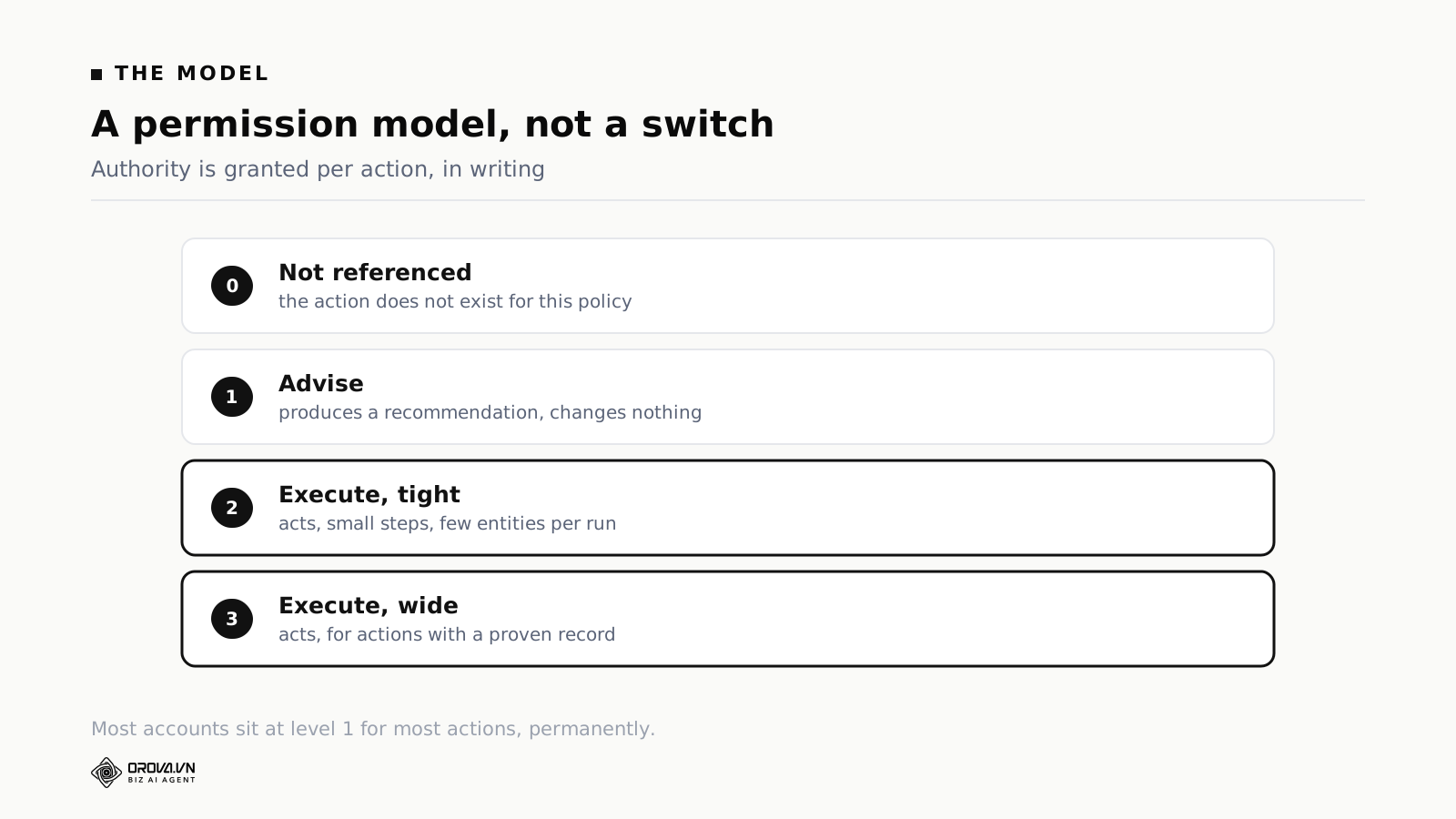
The four levels of authority
Level 0, not used on this account
The action exists in the software but is switched off for you. It is never evaluated, never raised, never mentioned.
This level matters more than it sounds. Software that surfaces every possible action produces a wall of notifications nobody reads, and a wall nobody reads is the same as no monitoring at all. Most accounts should have well over half the available actions at level 0: actions for platforms you do not run, objectives you do not use, account structures you do not have.
Switching an action off is a decision, not a gap in your setup.
Level 1, advise
The condition is evaluated. When it is met, you get a recommendation with the entity and the numbers. Nothing changes in the account.
This is where most of your active actions should sit, indefinitely. Advisory output is not a training wheel you remove once you trust the system. For a large class of actions, anything touching creative, anything with a strategic dimension, anything where the right answer depends on business context the software cannot see, advise is the permanent correct setting.
Level 2, execute within tight limits
The software performs the action under stated constraints: a maximum number of campaigns per run, a maximum size of change, a floor and a ceiling it cannot cross, and a list of exclusions.
The limits are what make execute rights grantable at all. "The software can adjust budgets" is not a sentence anyone should agree to. "The software can increase a campaign budget by at most 20% per step, at most twice a week, never above 500,000 VND a day, never on brand campaigns, at most two campaigns per run" is specific enough that you can work out the worst case before you sign it.
Level 3, execute within wider limits
The same thing with looser constraints, granted only to actions with a record on this specific account. They have fired many times, you reviewed the firings, and the outcomes matched what the rule predicted.
Very few actions reach level 3 on any given account, and that is the intended result. Level 3 is earned with evidence, not granted by default.
What Google's own settings control, and where they stop
Before you add anything, look at what Google already gives you, because three of its controls do part of this job and one of them is a per-action permission model already.
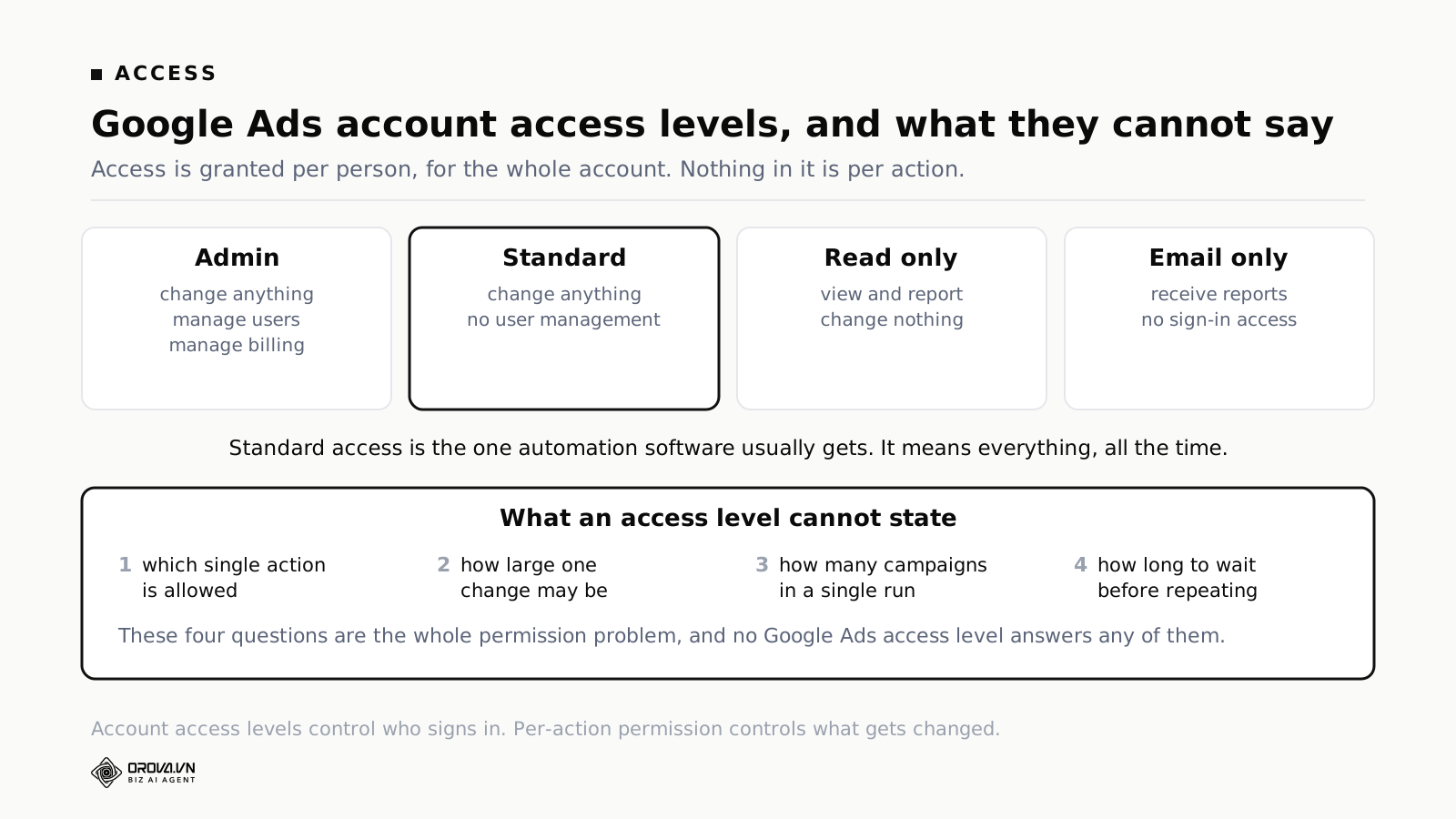
Account access levels. Google Ads grants access per person: Admin, Standard, Read only, and Email only. Admin adds user and billing management. Standard is the one automation software usually receives, and Standard means everything: any campaign, any budget, any bid strategy, any time. Read only means the software can watch and report but cannot change anything, which is a real option and worth using during an evaluation. There is no level between Read only and Standard, and no level that says "may pause campaigns but may not raise budgets".
Auto-apply recommendations. On the Recommendations page, Google lets you turn on automatic application of its own suggestions, and it does this per recommendation type rather than all at once. That list is a permission table for Google's own automation. Treat it the same way you treat outside software: read each type, decide whether you would have approved that change manually, and leave the rest off. The types that add keywords, change bidding strategy or upgrade campaign types deserve much more suspicion than the ones that fix a broken final URL.
Automated rules. Google Ads has had automated rules for years, and for simple conditions inside one account they are free and they run natively. Two features of them are worth copying into how you handle anything else. You can preview the results of a rule before you save it, which tells you exactly which campaigns would have been affected. And you can set how the rule notifies you when it runs. If you build nothing else, build the habit of previewing before saving.
Change history. Every change made in the account is recorded with the date, the account it came from, the campaign, and the old and new values. Changes made by software through the API show up here under the login the software authenticated with, not under a person's name. That is your ground truth when something unexpected happened, and it is the first place to look during any review.
Where all of this stops is the interesting part. None of these settings can state which single action is allowed, how large one change may be, how many campaigns may be touched in one run, or how long to wait before repeating a change on the same campaign. Those four questions are the entire permission problem, and you answer them outside Google, in whatever software you connect and in the document you write down.
What actually changes between advise and execute
This is the part most people get wrong, and getting it wrong is what makes the decision feel scarier than it is.
The intuition is that advisory mode has protections and execute mode removes them, so you are trading safety for speed. In a properly built setup that is not what happens.
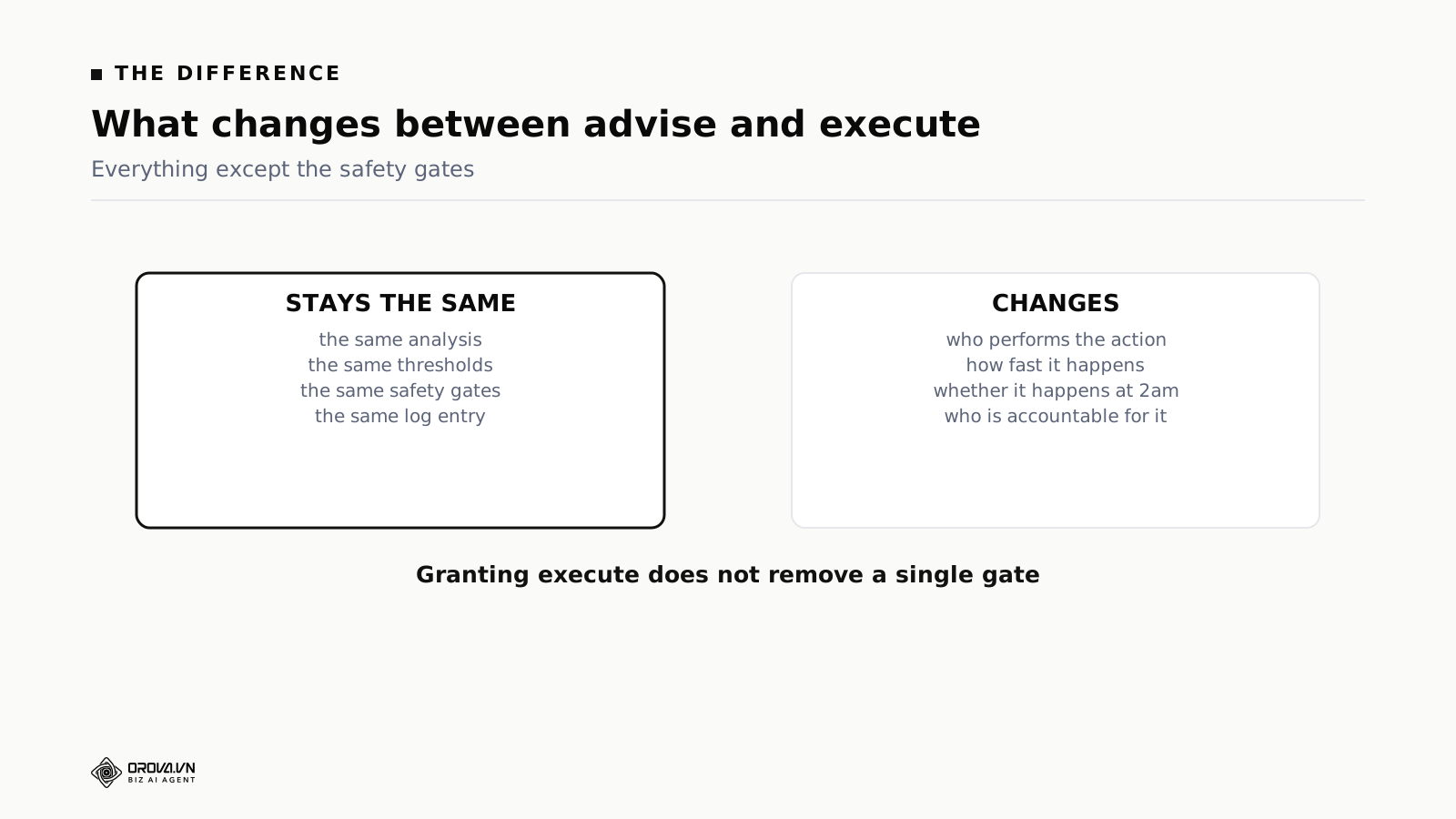
What stays identical
The analysis. The same condition is evaluated against the same data over the same number of days with the same thresholds. An action in execute mode does not become more eager to decide that something is wrong.
The safety checks. Exclusion lists, minimum data requirements, protection for campaigns still in a learning phase, caps on how many campaigns can be touched, limits on how big a change can be: every one of them applies in both modes. In advise mode they decide whether a recommendation is raised. In execute mode they decide whether the change is made. Same checks, same order.
The record. Both modes write down the condition that fired, the entity, the numbers at the time, and the action. The structure is the same; the execute record has one extra field noting that the change was applied.
What changes
Who performs the action. In advise mode a person opens Google Ads and makes the change. In execute mode the software makes it through the API, and it appears in change history.
How fast it happens. A recommendation raised at 02:00 gets acted on at 09:00, or on Monday. In execute mode the gap is minutes. For actions that stop spend which is producing nothing, that gap is the entire benefit.
Whether it happens at all. A meaningful share of advisory recommendations are never acted on. Not because they were wrong, but because they arrived during a busy week and got buried under everything else. Execute mode turns a recommendation you agreed with into a change that actually occurred.
Who is accountable. In advise mode the person who made the change owns it. In execute mode the person who granted the permission owns it. Accountability does not disappear, it moves earlier, to the moment of configuration. That is why the grant is recorded with a date and a name.
Which actions earn execute rights, and in what order
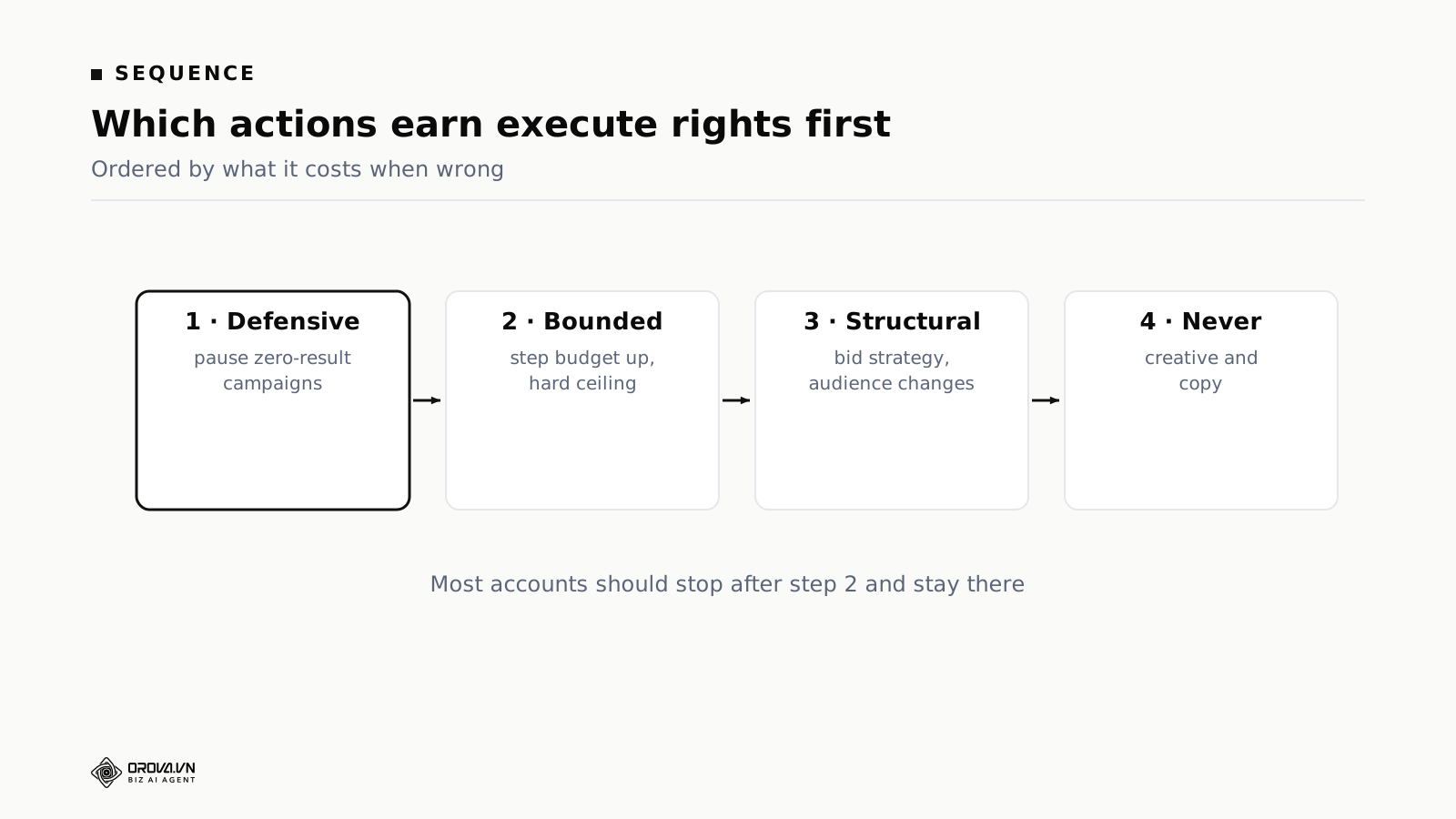
Order actions by what it costs when the action is wrong. Not by how often it would fire, and not by how much time it would save you.
Tier one, actions that stop something
Pausing a campaign that has spent past a threshold with no results. Pausing an ad group or ad set whose frequency has climbed past the point where extra impressions do nothing. Halting delivery when the landing page is returning errors.
These are the natural first grant. The failure is visible, because a campaign that should not have been paused gets noticed quickly. It is reversible with one click. And the alternative is expensive: money spent overnight on something producing nothing is money you do not get back.
Tier two, adjustments inside a range you set
Stepping a budget up on a campaign performing above target, stepping it down on one performing below, moving a bid within a band.
These become grantable once you have watched the same action in advise mode long enough to know it fires at reasonable moments. The limit is what makes them safe. A 20% step with a hard ceiling has a worst case you can calculate before you agree to it.
Tier three, structural changes
Changing bid strategy, restructuring audiences, altering targeting. These change how Google's own optimisation behaves, which means the effect is not linear and not immediately visible. A bid strategy change can look fine for four days and then show its real shape.
Most accounts should leave tier three in advise mode. The time saved is small, and the cost of a wrong call is large and slow to surface.
Tier four, never
Creative and copy. Not because software cannot produce them, but because the failure is a claim your legal team never approved appearing in front of customers, and no threshold protects against that.
This is a position, not a technical limit. Nothing in the numbers can tell you whether a sentence is safe to publish.
A schedule instead of round the clock
There is a setting between advise and execute that gets used more than either once teams find it. The action executes, but only inside a window when someone is reachable: execute rights between 08:00 and 20:00 on weekdays, advisory the rest of the time. Overnight and at weekends it raises recommendations that wait for the morning.
That sounds like it gives up the main benefit, since the whole argument for execute rights was catching things at 02:00. For actions that stop spend, it does, and those should run round the clock. For budget increases and anything where the cost of being wrong builds up over time, restricting execution to hours when someone can see the notification is a sensible trade.
The four questions to answer before you grant execute
Answer all four in writing before moving any action from advise to execute. If you cannot answer one of them, the action stays advisory.
One: what is the worst realistic outcome?
Not the worst imaginable outcome. The worst outcome allowed by the limits you have set.
For a budget step limited to 20%, twice a week, ceiling 500,000 VND a day, two campaigns per run, the worst case is arithmetic: maximum extra daily spend, times the maximum number of campaigns affected, times the maximum time before someone looks. Write the number down.
If the number is small enough that you would shrug at it, grant the right. If it makes you uncomfortable, tighten a limit and calculate again. If no set of limits makes it comfortable, the action stays advisory and you have learned something useful about it.
Two: how would you find out?
Every execute grant needs a path by which you discover what happened. Where does the notification go, who reads it, and how long passes between the change and a person seeing it?
If the honest answer is that it goes to a channel nobody checks, you have not granted execute rights, you have removed oversight. Fix the notification path first, then grant.
Three: how do you undo it?
For a pause, one click. For a budget step, set the number back, which means you need to know what the number was. Change history holds the old value, and so should the record your software writes.
Some changes do not reverse cleanly. Restarting a paused campaign can re-enter a learning phase. Reverting a bid strategy does not restore the optimisation state that existed before it. Know which of these applies before you grant, not after.
Four: has this action been right on this account?
Not right in general. Right here, with your structure, your seasonality, your conversion tracking.
The evidence comes from advise mode. Run the action advisory for a few weeks, look at every time it fired, and ask whether you agreed. If you agreed most of the time and the disagreements had a pattern you could fix by changing a threshold, the action is ready. If the disagreements were scattered and you cannot explain them, it is not ready, and the problem is usually the condition rather than the permission.
A worked example: pausing a campaign that spends without converting
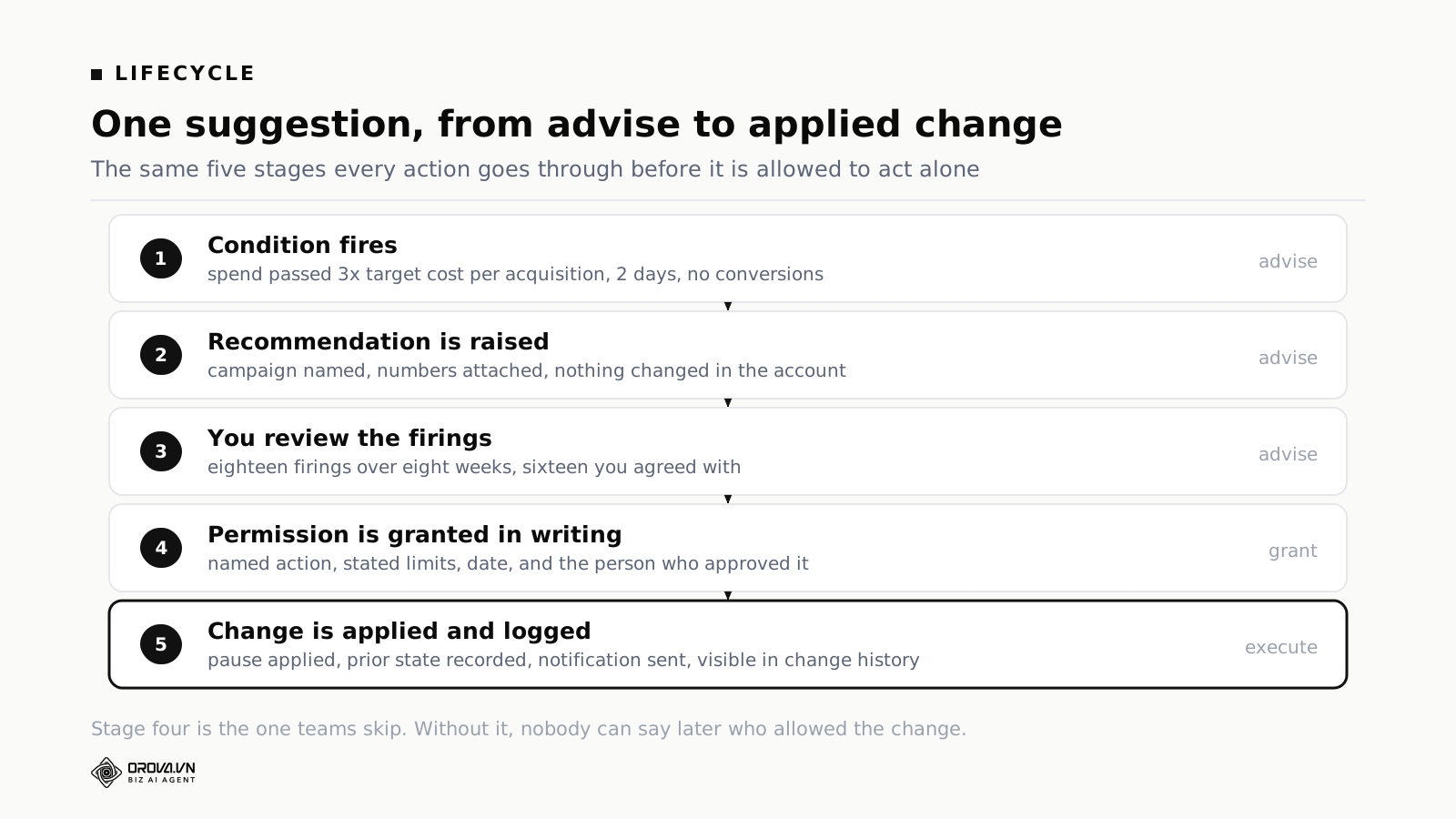
The action: pause a campaign that has spent at least three times the target cost per acquisition, over at least one hundred clicks, across two consecutive days, with zero conversions.
Advise, weeks one to four. The action fires eleven times. You review each one. Nine you agree with immediately. Two you disagree with, and both were campaigns launched four days earlier that were still in a learning phase.
The threshold change. The disagreements have a pattern, which is the good outcome. Add an exclusion: campaigns younger than seven days are not eligible. Keep it on advise.
Advise, weeks five to eight. It fires seven times. You agree with all seven. Two of them you would not have caught yourself for another day.
The four questions. Worst outcome: two campaigns paused that should not have been, costing a few hours of delivery each, reversible with one click. How you find out: a notification to the channel the ads team reads every morning. How you undo it: one click, accepting that a paused campaign may re-enter a learning phase. Track record: eighteen firings, sixteen you agreed with, two explained and fixed.
The grant. Execute rights with tight limits. At most two campaigns per run, brand campaigns excluded, campaigns under seven days old excluded. Recorded with the date and the person who approved it.
Elapsed time: eight weeks. That is the honest pace. Teams that grant execute rights in week one are not moving faster, they are skipping the evidence and finding out later what the action does on a bad day.
The harder case: increasing a budget
Pausing is the easy example. Increasing spend is harder, because it has no natural stopping point.
The action: a campaign that has delivered cost per acquisition at or below target for three consecutive days, with at least thirty conversions in that period, gets its daily budget increased.
Why it is harder. A wrong pause costs you a few hours of delivery. A wrong budget increase costs money continuously until somebody notices, and noticing is delayed because the campaign looks like it is working. That is why the rule fired in the first place.
The limits. A step of 20%. A cooldown of three days on the same campaign. An absolute daily ceiling set per campaign by the person who owns the budget, not calculated from anything. At most two campaigns per run. A minimum of thirty conversions in the period. Excluded: brand campaigns, and campaigns under fourteen days old.
The worst case. Two campaigns, 20% each, no further steps for three days. If each campaign was on a daily budget of one million VND, the maximum extra spend before the next review is four hundred thousand VND a day across both, and one point two million across a weekend. That is a number the budget owner can accept or reject on the spot, which is the whole point of writing it down.
What changed after running it. The first version had no absolute ceiling, so the ceiling was going to be whatever the account's total budget allowed. Within three weeks a well performing campaign had climbed well above where its owner would have set it by hand. Performance held, but the objection was correct: nobody had decided that number, the arithmetic had. A stated per-campaign ceiling became a required field. An action that cannot state its ceiling does not get execute rights.
How to choose that ceiling, and the other numbers around it, is a longer subject with its own method. It is covered in the limits to set before automation can change a budget.
What the record of each change has to contain
An execute grant is only as good as the record it produces. For every action taken, you want: the time, the action that fired, the campaign or ad group affected, the values that met the condition, the change made, the previous value, and which permission grant authorised it.
That last field is the one people leave out and the one that matters most when something unexpected has happened. The first question in that moment is not what changed, because change history in Google Ads answers that. The first question is who authorised this class of change, and when. A record that answers only the first question turns a five minute review into an afternoon of reading configuration history.
Keep both records. Change history is Google's account of what happened in the account. The software's own record is the account of why it happened and under whose authority. When the two disagree, believe change history and go find out why your software thinks otherwise.
How the review runs, and who is in the room
A permission table is a document, and documents rot without a process attached to them. Three meetings keep it honest, and none of them takes long.
The first grant meeting
Whoever owns the spend, plus whoever operates the accounts, with the advisory history in front of them. Go action by action through the ones that actually fired. For each: how often did it fire, how often did you agree, what were the disagreements, what is the worst outcome, how would you find out, how do you undo it.
Expect to grant execute rights on two to four actions in a first meeting. If the list comes out longer, the group is approving actions it has not reviewed.
The quarterly review
Read the current permission table out loud. For each granted action: has it fired since the last review, were the outcomes what you expected, do the limits still make sense at the current budget, is the notification path still being read by a person.
Revoking a right at this meeting is a normal outcome, not a failure. Actions granted during a high season often make no sense in a quiet one, and a limit set against a one million VND daily budget is the wrong limit at five million.
The incident review
When an action does something wrong, the review has a fixed shape. What fired, on what data, was the condition correct given that data, was the data correct, which limit should have caught it, and what changes now.
The most common finding is not that the rule was wrong. It is that a limit was missing: an exclusion nobody thought of, or a minimum data requirement set too low. That is a five minute fix, and it is why one visible wrong action is worth more to you than months of advisory recommendations nobody read.
Mistakes to look for while you review
Granting broadly to save configuration time. Turning on execute for a whole category because doing it action by action is tedious. The tedium is the point. It is what forces you to think about how each action fails. A category grant means you have authorised actions you have never read.
Granting to actions that rarely fire. An action that fires twice a year saves you almost no time in execute mode and carries the same tail risk. The value of execute rights scales with how often the action fires. The risk does not. Grant to the weekly ones and leave the rare ones on advise.
Revoking everything after one bad outcome. The first wrong pause produces a strong urge to switch it all off. Resist it. A visible wrong pause is a data point you can act on by adjusting a threshold or adding an exclusion. The overnight spend that advise mode never caught leaves no trace at all except the number at the end of the month.
Never revisiting a grant. Account structures change, seasons change, budgets change. A grant that was right in March can be wrong in November, and nothing in the software will tell you.
Objections worth taking seriously
This is a lot of process for a small account
Fair. On an account spending a few million VND a month with one person managing it, an eight week advisory phase and a quarterly review are heavier than the problem warrants.
The compressed version: run advise for two weeks, grant execute on actions that stop spend and nothing else, keep everything else advisory permanently, and review once whenever the budget changes materially. That is most of the protection at a fraction of the process.
Google already has automated rules and auto-apply
It does, and if your needs fit inside them, use them. They are free, they run natively, and they do not require you to give a third party Standard access.
What they do not do is evaluate a condition that spans Google and another platform, apply a limit derived from your own account history rather than a fixed number you typed, or tie a change back to the permission that authorised it. The moment your condition needs data from outside Google Ads, native rules stop being an option.
Software that mostly advises is just a report
Partly true, and worth being honest about. The difference is that advisory output is conditional. It appears only when a threshold is crossed, and it names the campaign and the numbers. A report tells you everything every week. Advisory output tells you the four things that changed.
Whether that difference is worth paying for depends on how many accounts you run. On one account, a good weekly report you actually read may be enough.
Our agency handles this
Then the permission table is a document you and the agency sign together, and it is more useful, not less. The questions do not change: which actions may be taken without asking you, what are the limits, where does the notification go, and who is accountable when it goes wrong. Most disputes with an agency about an unexpected change are disputes about a permission nobody wrote down.
What this model does not solve
Permission answers who is allowed to do what. It says nothing about whether the underlying rule is any good.
An action can hold correctly limited execute rights, fire exactly when its condition says it should, record everything perfectly, and still be a bad rule, because the condition assumes something about your account that is not true. No amount of permission structure catches that. Only the advisory phase catches it, which is why the advisory phase is not a formality you rush through.
The second thing it does not solve is measurement. Software acting on the numbers Google reports inherits whatever is wrong with those numbers. If conversion tracking is under-reporting, a pause rule will pause campaigns that were working, and it will do so confidently, with a clean record and a correct condition. Permission limits the damage. It does not prevent the mistake. Fixing measurement comes before granting execute rights on anything, and it is the step teams most often skip because it is nobody's favourite week.
The third is timing. Google's reported numbers move for a day or two after the fact as conversions are attributed back. An action reading yesterday's data is reading an incomplete picture, and the shorter the period it looks at, the more incomplete it is. That is a reason to require a minimum number of clicks or conversions before a condition may be evaluated at all, not a reason to distrust automation in general.
Frequently asked questions
How many actions should hold execute rights on one account?
On a typical account, two to five. The mix matters more than the count. If all of them stop spend, the setup is conservative and sound. If several of them make structural changes, the account has probably granted faster than the evidence supports.
Can permissions differ per campaign?
They should. A brand campaign and a prospecting campaign deserve different levels of intervention. Exclusion lists are the mechanism: an action can hold execute rights across the account while a named set of campaigns is excluded from it.
What happens if the Google Ads API fails halfway through an action?
The attempt is recorded as failed, with the error, and it is not retried automatically. Silent retries are how one intended change becomes three. A failed action should be surfaced to you the same way a completed one is.
Does execute mode need more monitoring than advise mode?
Less, in practice, but of a different kind. Advise mode needs someone to read and act on every recommendation. Execute mode needs someone to read a summary of what was done, which is faster. You move from a queue you have to process to a record you have to review.
Does granting execute rights reduce the amount of work?
It removes the doing, not the deciding. Reviewing advisory history, setting limits, running quarterly reviews: that work is real and ongoing. What disappears is opening the platform, finding the campaign, making the change, writing it down. On an action that fires weekly, that is the difference between a task and a notification.
Who should hold the permission?
Whoever is accountable for the spend. In a small team that is one person. In a larger one, the grant belongs to the person who would be asked about an unexpected change, not to whoever happened to configure the tool.
Is advisory-only a valid permanent setup?
Yes. Advisory-only still checks conditions on a schedule no person keeps and applies thresholds consistently at 03:00 on a Sunday. Plenty of accounts run advisory-only forever and get most of the value.
Should I give automation software Admin access?
No. Standard is enough for making campaign changes, and Admin adds user and billing management that no automation needs. During an evaluation, start at Read only and see what the software would have recommended before you give it the ability to change anything.
Google Ads artificial intelligence does not need a trust decision from you. It needs a table: one row per action, one level per row, each level backed by a limit you calculated and a track record you watched. Most rows will say advise, and that is the correct answer. A few will say execute inside stated limits, and those few save the hours that matter. The list of rows that say execute should be short enough to read out loud in a meeting.
Related reading: the limits to set before automation can change a budget, thresholds for pausing campaigns that spend without results, budget ceilings that stop spend leaks, and the first week with automation connected to a live account.
Let Orova SEO handle the repetitive part
Keyword research, drafting, refreshing old posts and rank tracking — running automatically on your own site.
Explore Orova SEO