
Ad automation schedules: three clocks, one run time
A shop owner set an automated rule: every morning, find campaigns spending without converting and pause them. Run time, eight in the morning. Weeks later a campaign was paused at two in the morning, local time, with nobody near a keyboard.
The system did what it was told. The eight in the morning he typed was not the eight in the morning the system used. Every ad automation schedule sits on three clocks at once: the ad account's time zone, the server that fires the schedule, and yours. Only one of them decides what "today" means in your numbers, and it is usually not the one you typed into.
This article shows you how to find out which clock your account runs on, how to pick a run time that reads complete numbers instead of half a day, and how to check a whole portfolio in one afternoon. Open your ad account settings while you read. The time zone is on the first screen and you will need it for every section below.
Three clocks, three different jobs
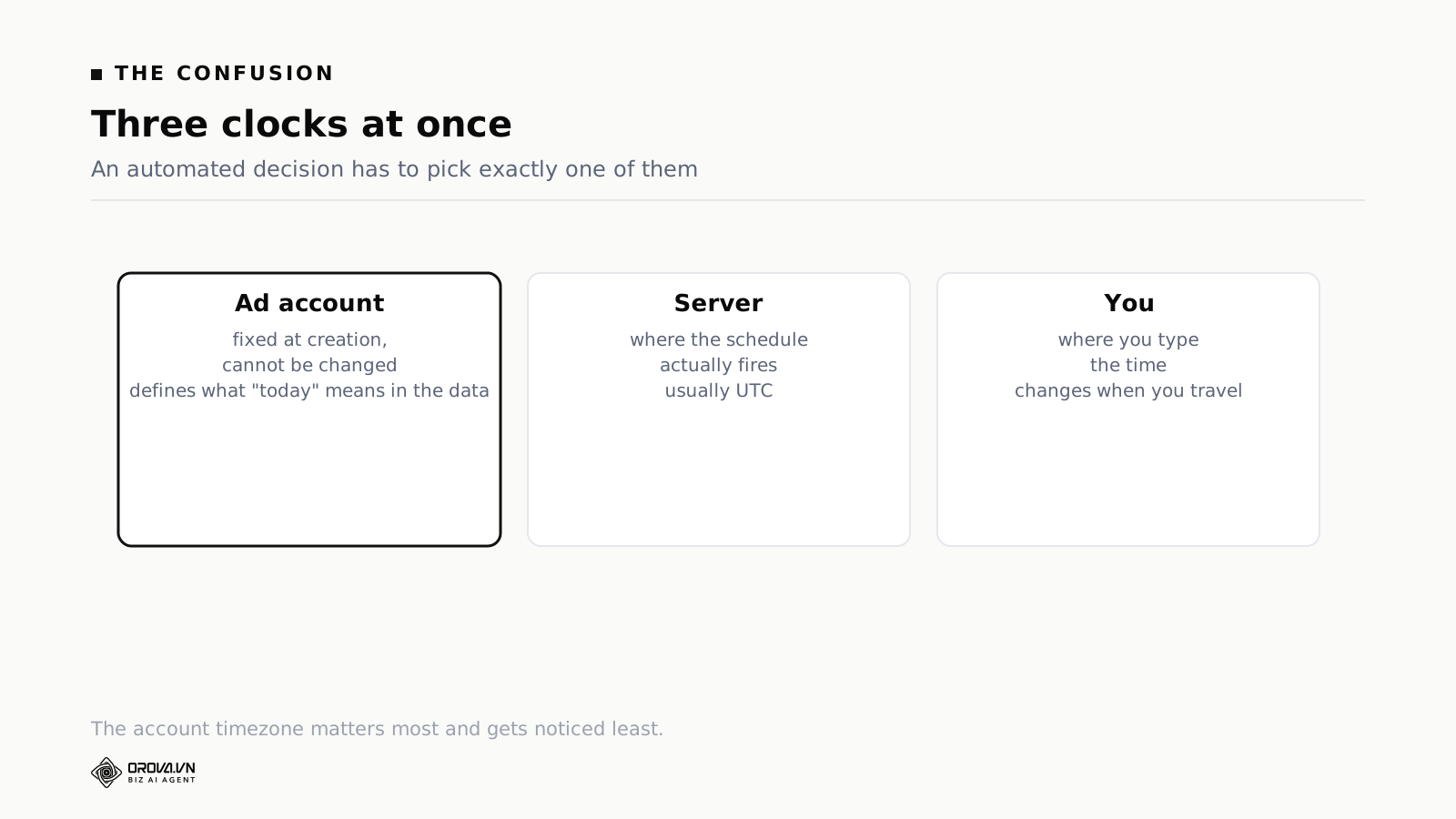
The ad account's time zone
This is the one that matters and the one nobody looks at. When an ad account is created, somebody picks a time zone. That choice sets when the account's day starts and ends. It decides where daily figures are cut and when the daily budget resets.
On both Google Ads and Meta, this normally cannot be changed after creation. Set it wrong and the only fix is a new account, which means losing all campaign history and starting the learning period over.
A lot of accounts were opened by an overseas agency, or set up in a hurry on whatever default was offered, and now sit in a time zone nowhere near the business they serve. When that happens, "spend today" in the reports is not spend today as you understand it.
Checking takes thirty seconds. In Google Ads it is under Admin, then Account settings. In Meta it is in Business settings under the ad account's details. Write down what you find before you read further.
The server's time zone
This is where the schedule actually fires. Most systems run on UTC internally, because storing one canonical time avoids a whole family of bugs.
You rarely need to know this number. It turns into a problem when a tool stores times in server time and shows them in your time, or the other way round, without saying which one is on screen. If a scheduler ever shows you a run time you did not enter, that is what happened.
Your own clock
This is the one you experience, so you assume it is the one that counts. It is also the one that moves. Travel to another country and your browser reports a new zone. If a tool quietly follows the browser, your schedules move with you and nobody tells you.
The useful habit here is to treat your own clock as an input method, not as a reference. You type in local time because it is convenient. What you check is the converted time the system shows back.
The date-shift trap
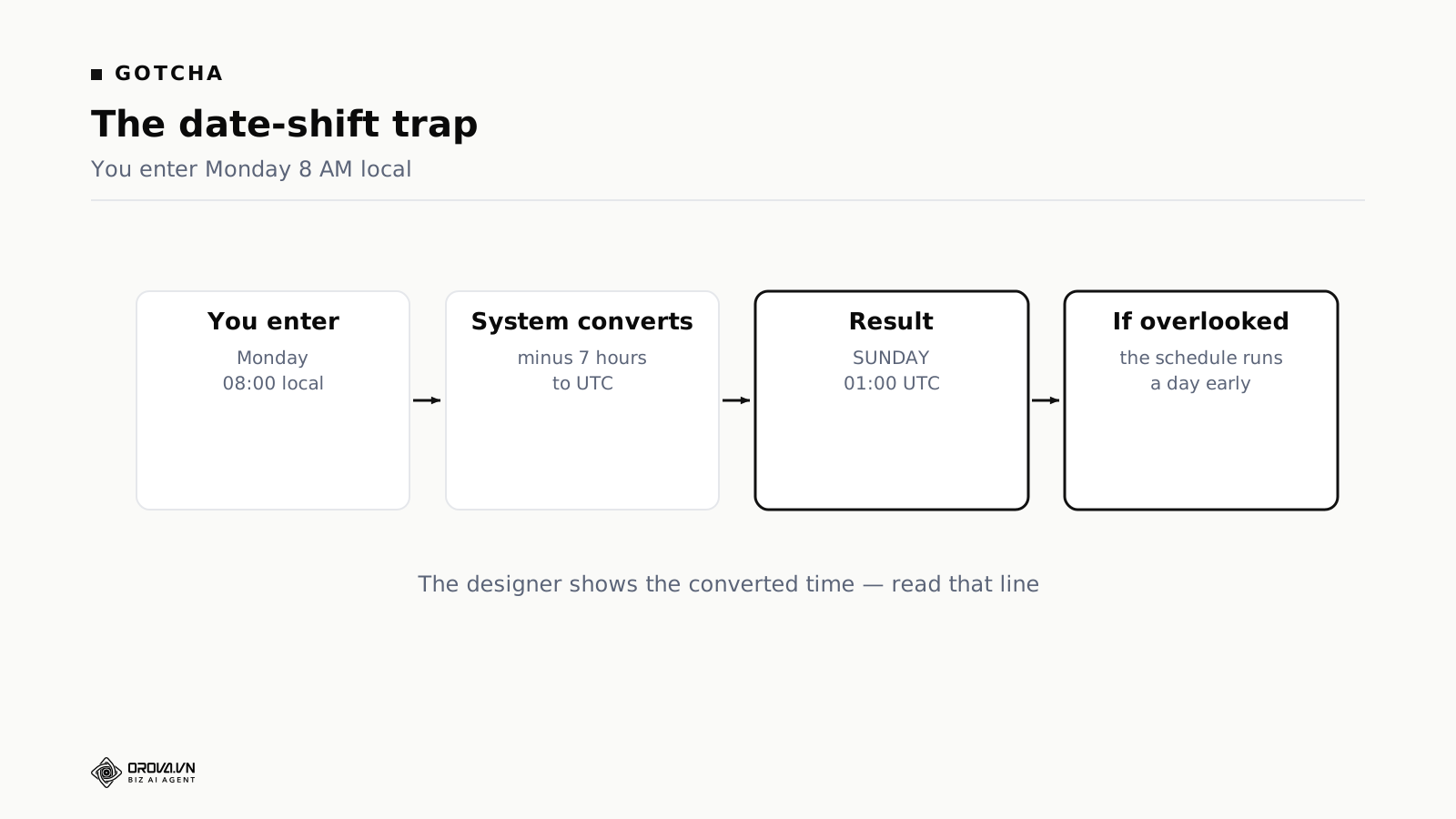
Take a weekly schedule set for Monday, eight in the morning, local time. The system stores in UTC, so it subtracts seven hours. Eight on Monday minus seven hours is one on Monday. Nothing moves.
Now set the same schedule for five in the morning. Five on Monday minus seven hours is ten on Sunday evening. The day moved backwards.
If the converter handles the hour but forgets the weekday, the schedule runs a full day early. It then runs reliably every single week, so nobody suspects an error. They just find it mildly odd that the weekly report always arrives a day ahead of the week it covers.
We hit exactly this on an internal publishing job: set to two in the morning server time when the intention was nine in the morning local. Seven hours out, running wrong for days, until somebody noticed content going live at dawn.
Two things prevent it. The scheduler must shift the weekday as well as the hour when a conversion crosses midnight. And it must print the resulting time back to you underneath the field, so an invisible calculation becomes a number you can check.
If the tool you use does not print that line, do the arithmetic yourself once, on paper, for each recurring schedule. It takes a minute per schedule and it is the only way to catch this class of error before it produces months of slightly wrong reports.
Daily budgets reset on account time, not yours
Daily budgets reset when the account's day rolls over. If the account is on US time and you sit in Asia, that reset lands around lunchtime or mid-afternoon where you are.
The effect is specific and it confuses people every week. A campaign exhausts its budget in your evening and stops delivering. The next day it suddenly starts spending again at lunchtime, out of nowhere. Nothing changed. That is simply when the account's new day began.
Seen from another time zone this looks like the platform behaving randomly. Once you know the account's zone it becomes predictable to the hour.
It also changes what a budget rule means. A rule that raises budget when a campaign is limited by budget needs to know where it is in the account's day. Hitting the cap at nine in the evening means one thing if the account's day has three hours left and something completely different if the account's day started an hour ago.
There is a practical consequence for anyone whose account clock is badly offset from their market. The budget is at its freshest when your audience is asleep, and by the time your audience wakes up a chunk of it is already spent on whatever traffic was available overnight. Splitting campaigns so that low-value overnight traffic sits on its own budget line is usually cheaper than trying to fight the reset hour.
What hour should a rule run
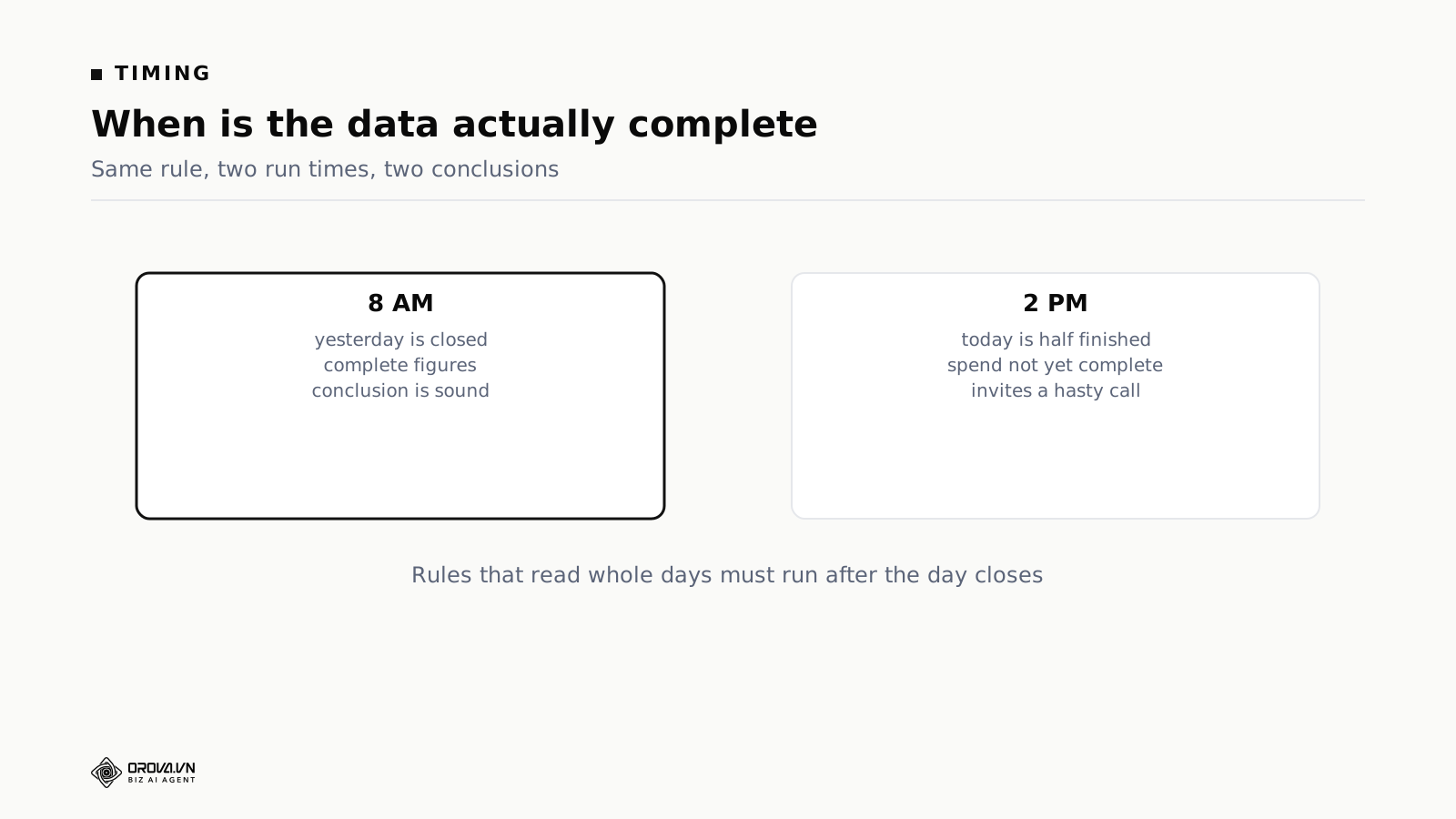
Choosing the zone is half the job. The other half is choosing the hour, and the principle is short: a rule that reads daily figures must run after that day has closed in the account's time zone.
Plenty of schedules sit in mid-afternoon, when the current day is about half done. A campaign that has spent thirty dollars by two in the afternoon may spend seventy by midnight. Any conclusion you draw at two is a conclusion about partial data, and the rule acts on it as though it were final.
There is a second delay on top of that. Ad figures do not appear the instant they happen. Platforms need time to aggregate, and conversions in particular keep landing for hours after the day has ended, because attribution windows extend past the click. Running at exactly midnight, the moment the day closes, still reads incomplete numbers.
So leave a gap. For an account whose zone matches your own, seven or eight in the morning works well: late enough for the figures to settle, early enough that you can act on the result during the working day.
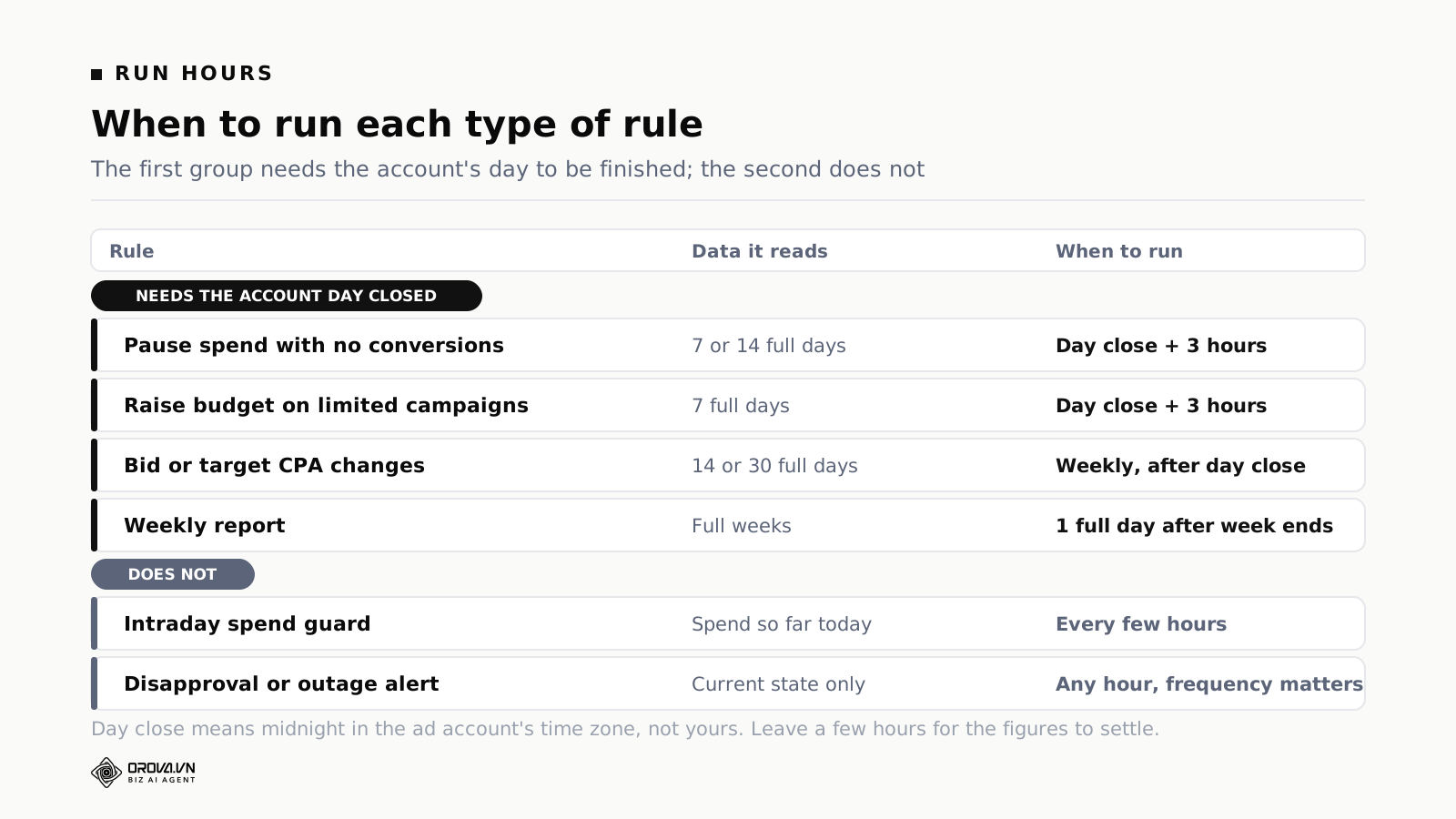
| Rule type | Data it reads | When to run it |
|---|---|---|
| Pause campaigns spending with no conversions | Full days, 7 or 14 | A few hours after the account's day closes |
| Raise budget on budget-limited campaigns | Full days, 7 | After the account's day closes, so the new budget covers a whole day |
| Bid or target CPA adjustments | Full days, 14 or 30 | Weekly, after the account's day closes |
| Intraday spend guard | Spend so far today | Every few hours during the account's day, thresholds stated in hours |
| Disapproval and outage alerts | Current state, not history | Any hour, frequency is what matters |
| Weekly report | Full weeks | At least one full day after the week closes on account time |
The one exception to the day-boundary rule is the intraday spend guard. It runs mid-day on purpose, because the point is early intervention rather than a conclusion. Its thresholds have to be written as "spend so far today" with an explicit hour count, never as "spend for the day".
The same question, three different answers
Take an ordinary question: how much has this campaign spent today?
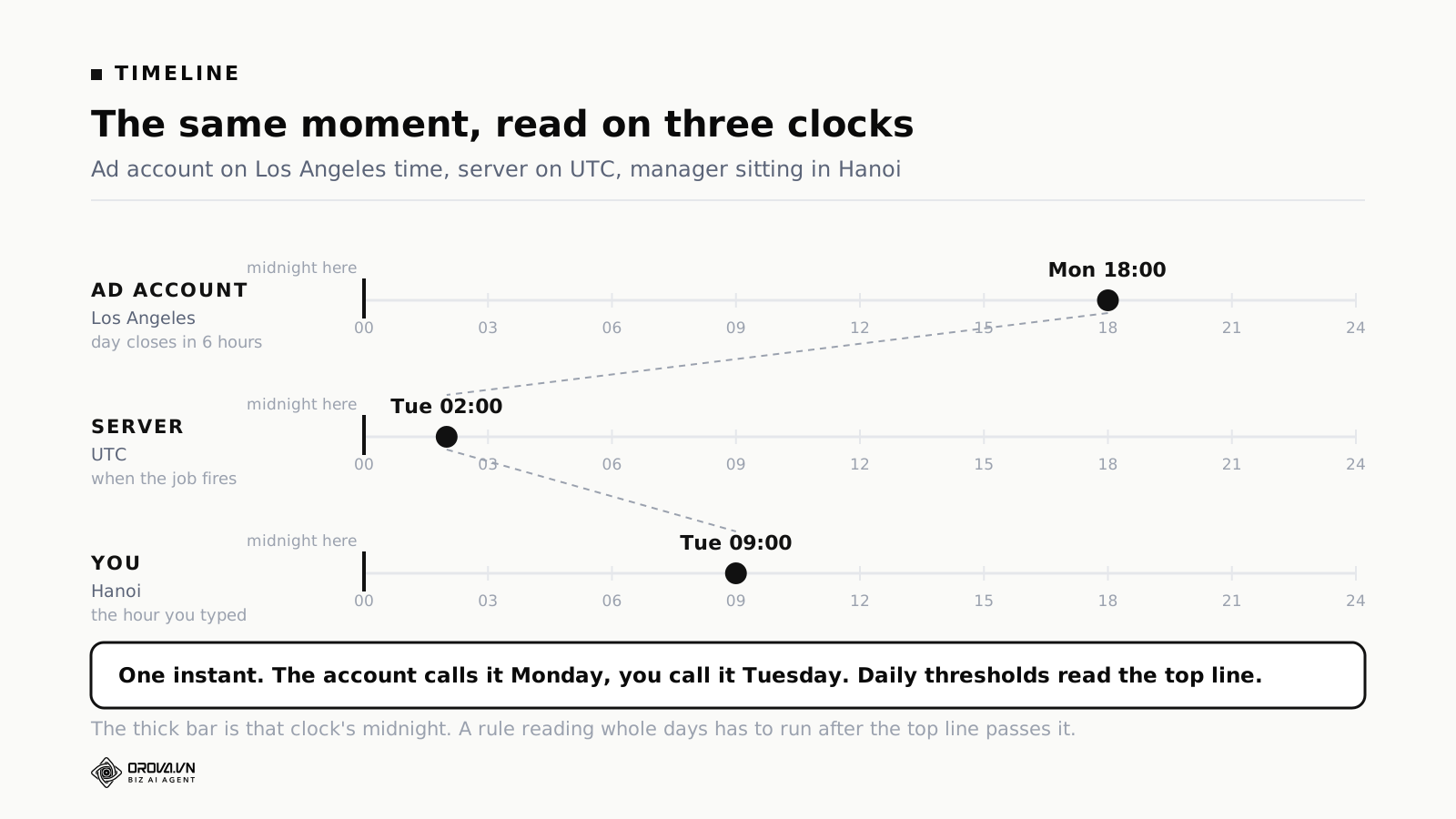
Suppose the account is set to Los Angeles time, the manager sits in Hanoi, and it is nine on Tuesday morning where the manager is.
In account time it is six on Monday evening, so the account's "today" is Monday and it is eighteen hours in. In the manager's time, "today" is Tuesday and it is nine hours in. In server time it is two on Tuesday morning.
Three answers to one question, each correct under its own reading. In practice the figures in the ads interface always follow account time. When the manager in Hanoi sees "spend today: $180", that number covers Monday.
This is where the morning surprise comes from. You open the account first thing, the working day has barely started, and today's spend is already high. Nothing is broken. The account's day is nearly over.
The habit that fixes it is small: whenever you quote a figure to somebody, say which day boundary it came from. "Spend today, account time" is four words and it removes an entire category of disagreement.
How this changes what your thresholds mean
This is the most expensive consequence, because it makes a rule do the opposite of what it was written for.
Take a rule that says: if a campaign spends over $80 in a day with no conversions, pause it. It reads as unambiguous. But which day, cut where?
Run it at nine in the morning local on a US-time account and the account's day is nearly finished. Eighty dollars represents almost a full day of spending, and the threshold behaves exactly as intended.
Run the same rule at nine in the evening local and the account's day is a few hours old. Eighty dollars in the first few hours is normal for a large campaign. The rule pauses something healthy, and it does it quietly, and you find out when weekly volume drops.
Same threshold, same rule, different hour, opposite outcome. Two fixes cover it. Daily thresholds run after the day closes. Short-window thresholds state the number of hours explicitly instead of using the word "today".
The general form of this is worth keeping: every number in an ad account needs a unit, and for time the unit is the time zone. A threshold of $80 with no day boundary attached is as incomplete as a budget with no currency attached.
Daylight saving moves your day boundary twice a year
If the account sits in a region that observes daylight saving and you do not, the offset between your clock and the account's clock changes twice a year. Nothing in your configuration changes. The relationship between the two clocks does.
A rule you set to run three hours after the account's day closes is now running two hours after, or four. Most of the time that gap is wide enough to absorb an hour. If you scheduled tight, right at the edge of when the data settles, it is not.
Regions do not switch on the same dates either. The United States and Europe change on different weekends, so for a couple of weeks each spring and autumn a portfolio spanning both has offsets that do not match any part of the year.
What to do about it is unglamorous. Put two calendar notes a year against the markets you run in. On those weeks, open the run history and confirm your schedules still land where you expect. Do not try to encode the transition dates into your rules, because the rule then becomes something nobody can read and somebody has to maintain forever.
One more detail: the platforms do not all handle the transition identically. On the day the clock goes back there is an hour that happens twice, and on the day it goes forward there is an hour that does not exist. A schedule set for that hour either runs twice or does not run at all. Avoid scheduling anything at the transition hour and the problem disappears.
Four scheduling modes and which one to pick
Most automation tools offer roughly the same four ways to trigger a run, and they differ a lot in how much time zone exposure they carry.
On click. No time zone question at all, because you are sitting there. This is the right mode while you are learning what a rule does and while you are testing a new threshold.
After each data sync. The run follows the data rhythm instead of the clock, so most of the trouble in this article does not apply. If you would rather not think about zones, this is the safe default and for most accounts it performs no worse than a fixed schedule.
Every N minutes. No zone exposure either, but a different cost: frequent runs use up your monthly allowance without adding information, because ad data does not refresh that fast. Worth it only on accounts spending enough that a few hours of a runaway campaign is real money.
Weekly on a chosen day and hour. The most zone-sensitive mode and the one most often used for periodic reporting. This is where the date-shift trap lives. Read the converted-time line before saving, every time.
If you are unsure, start with "after each sync" and move to a fixed weekly schedule only for things that genuinely need to land on a particular day, like a report somebody expects in their inbox on Monday.
Ad scheduling by hour of day
There is a second place time zones cost money directly, and it is not automation rules. It is scheduling campaigns heavier and lighter by hour.
Plenty of categories have clear peak windows. Restaurants take orders at lunch and dinner. Home services take calls during business hours. Audiences of office workers convert at lunchtime and late in the evening. Weighting budget toward those windows is one of the simplest optimisations available.
It only works if the window is defined on the clock your customers live on. Setting "run heavy from 11 to 13" on a US-time account when your customers are in Asia means running heavy while they sleep. This is where a mis-set account zone does the most visible damage, because you are not just misreading a report, you are actively spending against the wrong hours.
The check is quick. Open the hourly breakdown report. If the window with the most conversions does not match when you believe your customers are active, you are reading a different clock than you think you are.
Reading the hourly breakdown without fooling yourself
Since so much comes back to that report, it is worth knowing how to read it properly. Four rules.
Pull at least four weeks. Hourly data is noisy. A single week produces spikes that are coincidence, and building a schedule on them means scheduling around noise.
Separate weekdays from weekends. Almost every business has a different shape on Saturday than on Tuesday. Averaging the two produces a curve that describes neither, and a schedule built from that curve underperforms both.
Look at cost per result by hour, not volume by hour. The hour with the most conversions is often just the hour with the most spend. What you want is the hour where each conversion is cheapest, which is frequently a different hour and sometimes a surprising one.
Check whether a weak hour is demand or delivery. If your budget consistently runs out by mid-afternoon, the evening looks weak in the data only because you were not there. That is a budget artefact, not a demand signal, and scheduling away from the evening on that basis is exactly backwards. To tell the difference, raise the budget for a week and see whether the evening fills in.
Only once you have four weeks, split by day type, measured by efficiency and corrected for budget exhaustion, is it worth building a schedule around the result. Elaborate schedules built on one noisy week routinely perform worse than running flat.
When a scheduled run is missed, and when it never fires at all
Runs get missed. The server is busy, the previous run has not finished, a network call fails. What matters is what the system does next, and there are three reasonable behaviours for different kinds of work.
Catch up as soon as possible. Right for anything not time-sensitive, like sending a report. An hour late is still useful.
Skip it and wait for the next slot. Right for time-sensitive work. A rule reading yesterday's figures is still correct if it runs in the afternoon. A rule setting budgets for a peak window is pointless once the window has passed.
Catch up but record that it was late. The work happens, and the history says how late, so that when somebody reconciles figures later the odd timestamp has an explanation.
Across all three, the system has to say it missed something. A silently skipped run creates a gap nobody knows about, and that gap might be the night a campaign burned through its budget.
The quieter failure is the schedule that never fires at all. It can be configured correctly, converted correctly, and still never run: saved as a draft, disabled during a busy week and forgotten, blocked because the workspace ran out of its monthly allowance, or attached to a project somebody deleted.
Nothing about this looks wrong from the outside. The rule exists, the settings are right, and the account behaves as though no automation was ever set up, which functionally it was not.
Detection is the same habit in both cases: count the entries in the run history. A daily schedule produces seven entries a week. Six means something happened. Zero does not mean a quiet week, it means the schedule is dead. Absence is a more urgent signal than anything in the content of a single run.
Campaigns and teams spread across countries
Two versions of the same problem, and they compound.
The campaign version: one campaign targeting Vietnam and Australia. The daily budget resets on account time, but the two audiences are awake on different rhythms, so whichever market wakes first tends to consume the budget.
If the account is on Vietnam time, the day begins at local midnight, which is four in the morning in Australia. Australians wake up hours later with budget still sitting there. If the account is on Australian time, the day begins while Vietnam is at nine in the evening, prime local time, with a freshly reset budget that empties fast.
No setting is right for both. The answer is to split the campaigns by market, each with its own budget, instead of letting two audiences compete for one pot. It reads as obvious written down and plenty of accounts still combine them, because when the campaign was built nobody was thinking about what hour the budget resets.
The team version: the person setting schedules is in one country, the person reading reports is in another, and the ad account runs on a third clock. Three places, three versions of "today", and every discussion of numbers starts with an argument.
Pick one time zone as the team standard and write it where everyone can see it. Use the account's, because it cannot be changed and it governs the data. Every subsequent conversation about figures references that standard. It feels laborious for about a fortnight and then becomes reflex, and it ends the kind of argument where two people hold different numbers because they were looking at different windows.
Reading the run history to verify
The reliable way to know when a system actually runs is not to read the configuration. It is to read the history.
Every execution records a timestamp. Compare those against what you expected. Three recent entries are enough to detect drift.
A consistent offset of a fixed number of hours is a time zone problem, and the fix is in the configuration. An inconsistent offset is usually something else: a queue, or the previous run not having finished, or a retry after a failure.
One detail worth knowing before you compare notes with a colleague. Run history is normally displayed in the viewer's own time zone while the underlying record is stored in UTC. Two people in different countries open the same history and read different clock times for the same event, and both are right. When you discuss a specific event, say the zone. It sounds pedantic and it saves a surprising amount of back and forth.
Four things to check in the history today, none of which take more than a minute:
- Count the entries for each daily schedule over the last week. Seven, or an explanation.
- Take the most recent entry for a weekly schedule and confirm the weekday is the one you chose, not the one before it.
- For any rule that reads daily figures, confirm the timestamp falls after the account's day closed, plus a few hours.
- Look for two entries close together where there should be one. That is a catch-up after a missed run, and it tells you the schedule is less reliable than it looks.
Time zones in client reporting
For agencies this is where time zones cause the most friction, not technically but in terms of trust.
A client gets a weekly report, opens their account to check, and the numbers do not match. Not by much, but enough to ask. A question about mismatched numbers always costs more time than the size of the discrepancy warrants, because you end up explaining rather than reporting.
The cause is almost always one of three things: the report was cut on a different clock than the account, the two parties are looking at different date ranges, or the report was generated before the last day's data had settled.
Three fixes, each done once.
State the range and its zone at the top of the report. "From 00:00 on the 1st to 23:59 on the 7th, account time." One line, and it heads off most of the questions.
Generate reports at least a day late. Do not send a weekly report on Sunday night, because Sunday's data is incomplete. Tuesday morning gives you settled figures and a client who is at their desk.
Explain a likely discrepancy before you are asked. A line saying conversion figures may rise slightly over the next 48 hours because of attribution delay reads as competence. The same information given after a client asks reads as an excuse.
A timezone audit, step by step
If you manage several accounts and suspect something is off, this is an afternoon's work. Roughly two hours for ten accounts. For a team that has never audited this, it almost always turns up at least one mismatch, usually one that has been wrong for a long time.
Step one, build the table. One row per account: name, time zone, currency, market served, who manages it. You will reuse this table well beyond today.
Step two, flag the mismatches. Mark any account whose zone differs from the market it serves. This is the group where daily figures are cut somewhere other than where your intuition expects.
Step three, confirm the offset from the data. For each flagged account, open the hourly breakdown and find the hour where spend restarts from zero. That is the account's midnight. Compare it to your own clock and you have the offset, without needing admin access to any settings page.
Step four, review every automated schedule on those accounts. Read the converted time, confirm the day and the hour are what you meant, and check specifically whether the run lands before the account's day has closed.
Step five, check hour-of-day campaign schedules. Where campaigns are set to run heavier in peak windows, verify those windows against the account clock. This is where a mismatch costs money most visibly.
Step six, write the conclusions into the table. Standard zone for reporting, run times for rules, anything unusual. When a new person joins, that table saves them half a day of confusion.
If you inherited a mess
A realistic version of the above: you take over a portfolio built by somebody else, with mixed zones, undocumented schedules and reports nobody can reconcile.
Do not try to standardise everything. Accounts cannot change zones, so full standardisation means rebuilding, and rebuilding costs more than it returns in nearly every case.
Work in this order. Document first and change nothing, because knowing the shape of the mess is most of the work and it costs an afternoon. Fix the reports second, so that every report states its zone and its window; that removes most of the confusion without touching a single account. Fix the schedules third, one account at a time, so each rule runs after its account's day closes. Consider a rebuild only where the cost is proven, meaning the zone genuinely blocks hour-of-day scheduling and that scheduling matters to the business. Otherwise document the offset and move on.
Frequently asked questions
My account is on a different zone from my customers. How much does that cost me?
Directly, nothing. Delivery follows real user behaviour, not the account clock. Indirectly it costs you through two channels: budget resets at an odd local hour, so the budget is freshest when your audience is least active, and any hour-of-day scheduling you configure is offset from the windows you intended. If you do no hour-of-day scheduling and your budget rarely runs out, the practical cost is close to zero.
Should rule schedules follow the account zone or my own?
Set them by the account's day boundary, then express that in whatever local time it corresponds to. The account defines the data. Where the two conflict, and the correct run time falls at three in the morning for you, that is an argument for letting the run happen automatically, not for moving it to a convenient hour and reading partial data.
Can I see the account's day boundary without admin access?
Yes. Open the hourly breakdown and find the hour where spend restarts from zero. That is the account's midnight. Compare it against your own clock and you have the offset.
Can I change an ad account's time zone?
Generally not, after creation. The restriction exists because changing it would make historical figures non-comparable. A different zone means a new account.
Should I recreate an account that has the wrong zone?
Rarely worth it. A new account loses all campaign learning history. For most situations, living with the offset and documenting it clearly beats starting over.
Do the ad platforms handle this the same way?
Broadly, in that each account carries its own zone and reports on it. They differ in the details: how daylight saving is applied, how quickly figures settle, and whether hourly reporting is available at every level. If you run rules across platforms against a shared threshold, check those differences rather than assuming.
Does any of this apply if I run one account in one country?
Two parts do. Data lag applies wherever you are, so a rule running at midnight still reads incomplete figures. And the missed-run check applies, because a schedule that stopped firing looks identical to a quiet week no matter how many zones you deal with.
What day should a weekly report run?
Monday morning to review the previous week and plan, or Friday afternoon to close it out. Avoid weekends. Nobody reads it, and by Monday the email has scrolled away.
Does running a rule every fifteen minutes cause problems?
Not technically, but it uses up your monthly allowance without adding information, because ad data does not change that fast. For most accounts once a day is enough, with an intraday spend guard on top if the account spends enough to justify it.
What is the single fastest check?
Open your ad account settings and read the time zone. Thirty seconds. For a good number of people it is thirty seconds spent discovering that every daily figure they have been reading is cut several hours from where they assumed.
Related reading: spend guardrails and caps, budget pacing on autopilot, and your first week with an AI ads agent.
To see how your own schedules convert before they run, start at orova.vn.
Let Orova SEO handle the repetitive part
Keyword research, drafting, refreshing old posts and rank tracking — running automatically on your own site.
Explore Orova SEO