
Why ad automation should run one step at a time
An automation that changes things in an ad account can run its steps two ways. All at once, or one after another, each step finishing before the next begins. Running them all at once is faster by a factor of however many entities are involved. Running them one at a time is what you want for anything that writes.
The reason is not caution in general. It is that a run which fans out across forty campaigns has no point at which anything can stop it. By the time the first result shows that something is wrong, all forty have already been changed. Running one step at a time puts a gap between each action, and something can happen in that gap.
This article covers the mechanism: the two shapes a run can take, the failure that ordering prevents, what it costs in wall-clock time, where running in parallel is correct, and the four guards that sit alongside it. It does not cover how to design a workflow that spans search and ad data, which is a different subject with its own article.
The two shapes a run can take
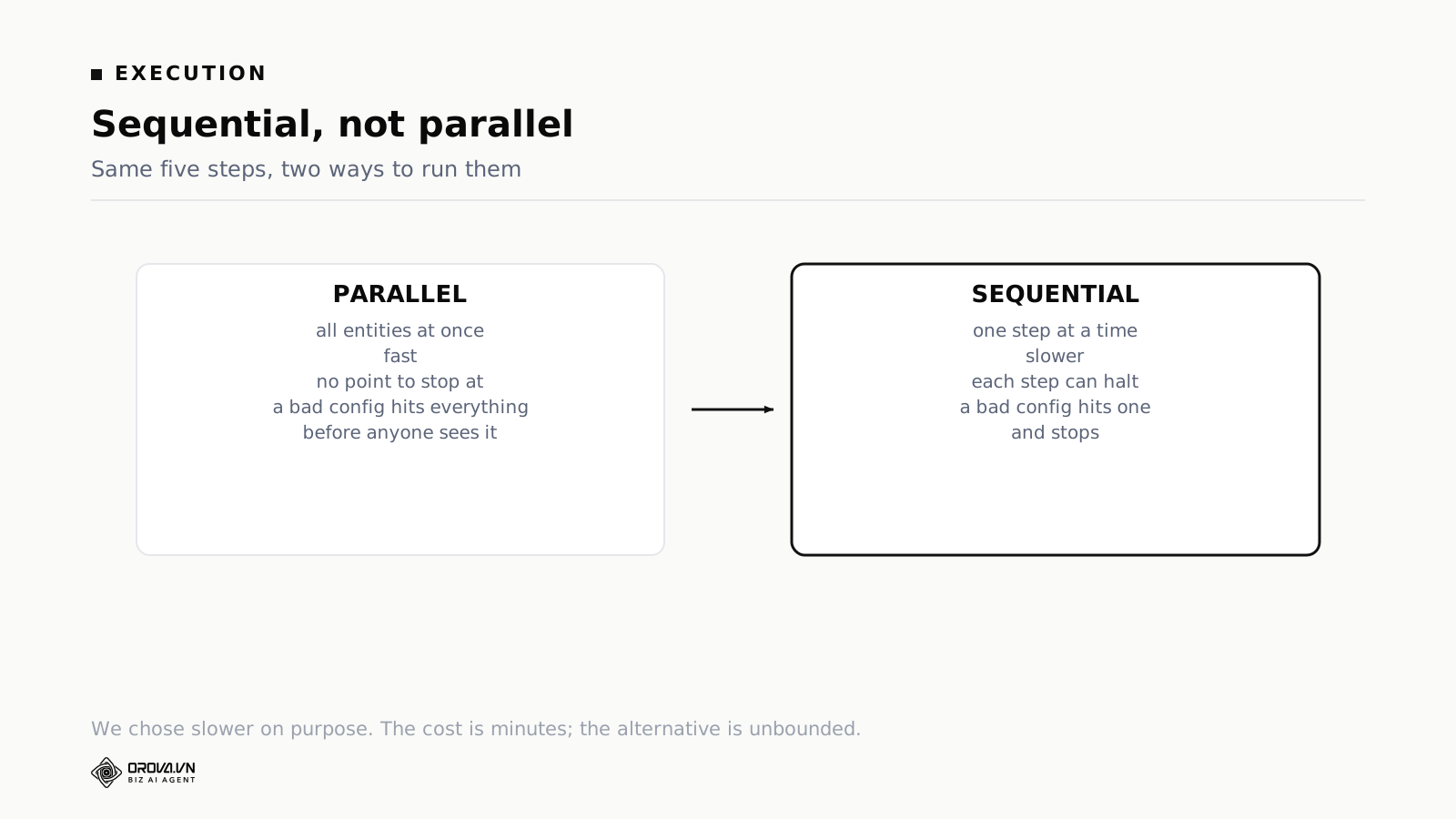
All at once
Every entity is processed together. Total time equals the time of the slowest single item. Twenty campaigns, three seconds each, done in three seconds.
For anything that only reads, this is straightforwardly right and there is no argument to have. Pulling yesterday's figures from three platforms at the same time is faster and nothing about it can go wrong that would not also go wrong one at a time.
For anything that changes something, it has a property that only shows up on the day something is misconfigured: between the first change and the last, there is no moment at which anything can intervene. Not a check, not a limit, not a person.
One after another
One entity, then the next. Total time equals the sum. Twenty campaigns, three seconds each, sixty seconds.
What you get for the extra fifty-seven seconds is nineteen gaps. In each gap three things can happen: a check can look at the result of the step that just finished, a cap can be reached, or a person can stop the run.
None of that matters on a day when everything is configured correctly, which is most days. All of it matters on the day something is not.
It is worth being specific about what occupies those gaps, because a gap with nothing in it buys you nothing. Three things sit there. A check that reads the result of the step that just ran and decides whether to continue. A running count against the cap, so the run knows when it has done enough. And the notification, if you send one per action rather than one per run, which turns the gap into a place where a person can act.
The failure that running in order prevents
Spell out the scenario, because it is the one that changes people's minds.
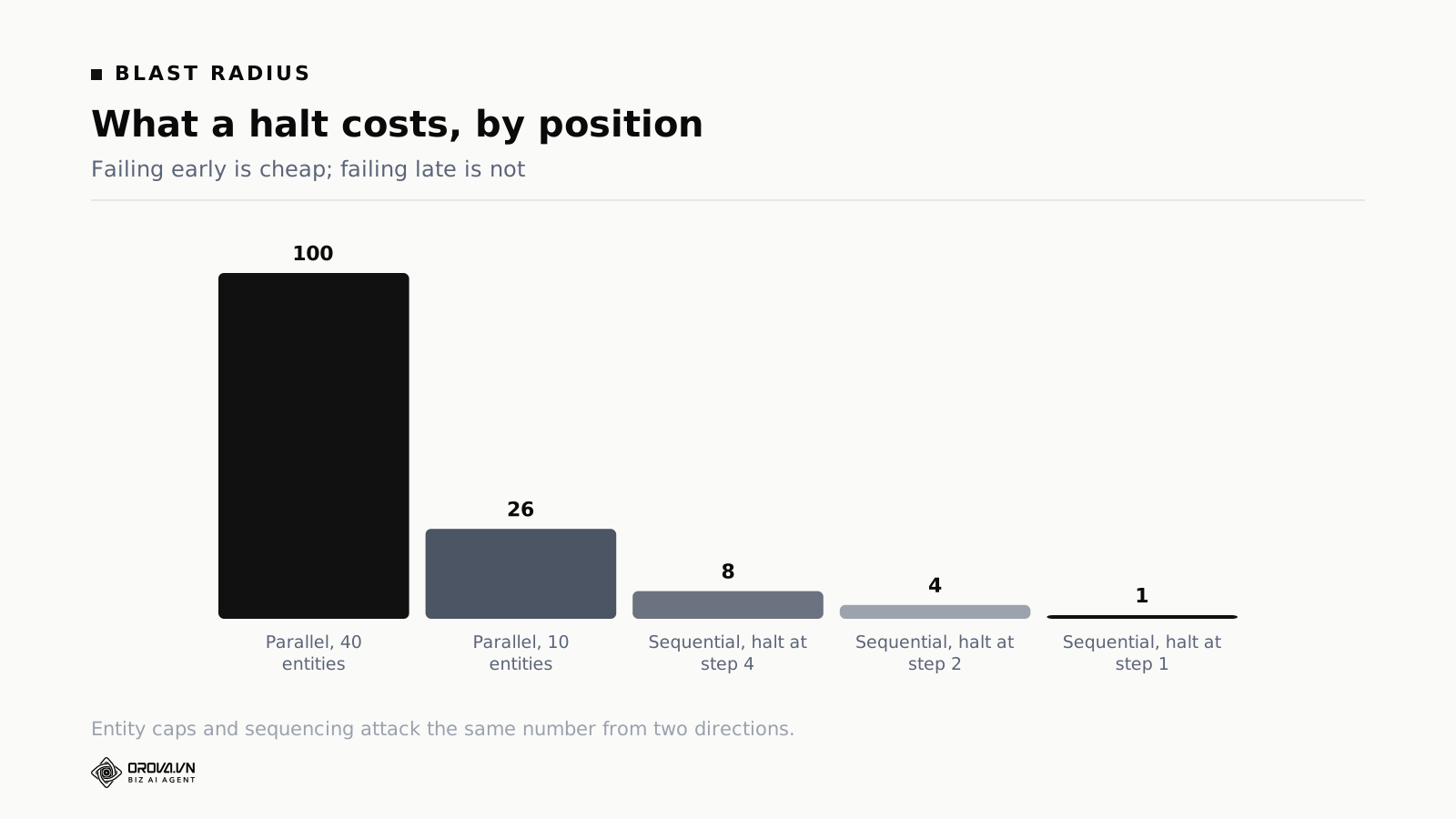
A reporting delay means a batch of campaigns shows zero conversions for yesterday. The data is wrong, and nothing about it looks wrong. The numbers are present, correctly formed, and consistent with each other. A rule that pauses campaigns spending without converting evaluates them, and the condition holds for forty campaigns at once.
Run all at once: forty campaigns pause. The notification arrives after the work is done. Whoever reads it at nine in the morning is reading a report of something finished, and now has forty campaigns to re-enable and a day of explaining.
Run one at a time, with a cap of two campaigns per run: one campaign pauses, then the second. The run ends there because the cap is reached. The next scheduled run happens later, by which time either the reporting has caught up or somebody has seen the first two and stopped it.
Same rule, same bad data, two very different mornings. Nothing about the rule was fixed in the second version. The blast radius was.
Caps and ordering do different jobs
A cap limits how many entities one run may touch. Ordering limits how much can happen before something gets a chance to intervene. They overlap and neither replaces the other.
A cap without ordering still lets its whole allowance execute in one burst, which means the notification and the damage arrive together. Ordering without a cap eventually processes everything, just more slowly, and a workflow running unattended overnight has plenty of time.
Together they bound the count and the rate. Wanting both is not belt and braces, it is two different numbers.
What running in order costs you
There is a real cost and it is worth naming precisely rather than waving at.
Wall-clock time
A workflow touching twenty entities takes twenty times as long as the same work done together. In practice that is minutes rather than hours, and for the actions worth running unattended it does not matter. A pause that happens five minutes later than it could have is still hours earlier than a person would have managed.
Where it does matter is anything with a real deadline. A promotion that ends at midnight. A budget that has to be spent before a period closes. For those, the answer is to schedule the run earlier, not to run everything at once.
Retries stop being simple
When step seven of a sequence fails, what should happen to steps one through six is not obvious, and the honest answer is that nothing should happen to them automatically.
Automatic retry is how one intended change becomes two. Consider a budget increase where the API call succeeds and the response is lost on the way back. The system sees a failure. It retries. The budget goes up twice, and the record shows one intended change and two applied ones. Anything that writes has to either carry an identifier that lets the platform recognise a repeat, or not retry at all. Not retrying is simpler to reason about and easier to explain to whoever owns the budget.
Automatic rollback has the same problem in reverse. Undoing the first six steps assumes they were wrong, and usually they were not. The failure was at step seven.
So: the run stops, the failure is recorded with its error, completed steps stay completed, and a person decides. That is more work on the day it happens and much less work in the following week.
Rate limits punish bursts
Ad platforms limit how many operations an application may send in a period. Send forty changes in one second and some of them come back rejected, which leaves you with a run that partly applied. Partly applied is the worst of the three possible states, because the account no longer matches either the before or the intended after, and reconstructing which is which means reading the change history line by line.
Spacing the calls out avoids that failure mode entirely. This is not the reason to run in order, but it is a reason not to fight it.
Where running in parallel is correct
A blanket rule would be wrong, and the boundary is easy to state.
Reading data. Pulling performance figures from three platforms at once is better in every way. Nothing changes, so there is nothing to stop.
Evaluating conditions. Checking hundreds of thresholds against a snapshot of data has no effect on the account. Do them together and they finish in almost no time.
Producing a report. Same reasoning. A report that assembles ten sections can assemble them at the same time.
The line: parallel for anything that reads, one at a time for anything that writes. Nearly every difficult case resolves by asking which side of that line the operation sits on. When a step is genuinely ambiguous, treat it as a write.
Two cases sit awkwardly on the line and are worth deciding in advance. Applying a label or a tag changes something, but nothing about delivery or spend, and running those together is defensible. Sending notifications is the other one: forty notifications at once is not dangerous, it is just forty notifications, and the reason to space them is that a person reading them can then act between two of them.
The cost of drawing the line in the wrong place is asymmetric. Treating a read as a write costs you seconds. Treating a write as a read costs you the only chance anything had to stop the run.
The four guards on every workflow that changes something
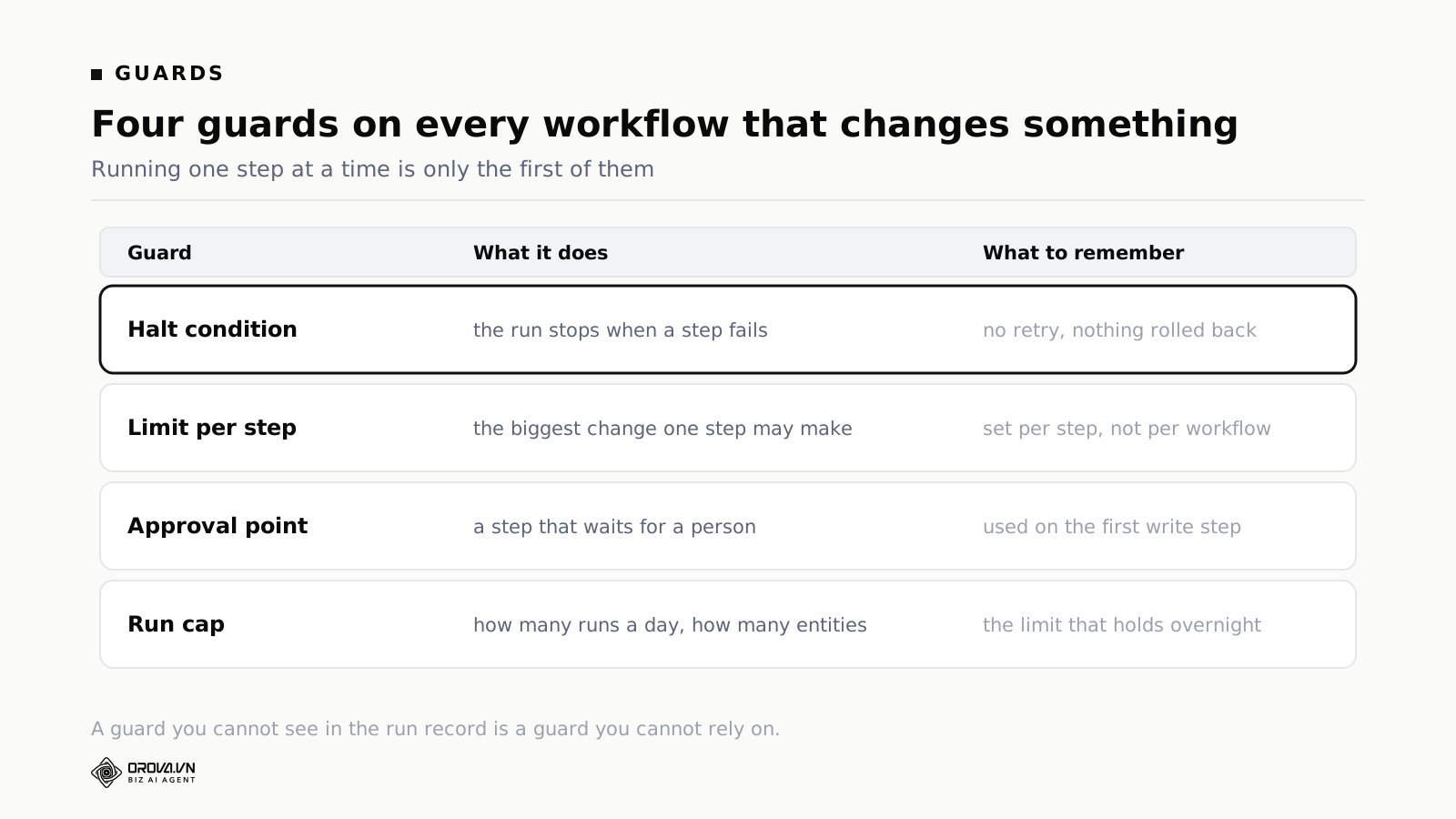
One: a halt condition
Every workflow needs a defined answer to what stops it. Two things should stop a run: a step that fails, and a condition that is not met. Both are normal outcomes, not errors, and both get written to the record.
The distinction that matters here is between stopping and crashing. A run that stopped because a condition was not met is working correctly. A run that crashed is not. If those two look the same in your record, you cannot tell a healthy workflow from a broken one, and you will eventually ignore both.
Two: a limit on each step
The largest change a single step may make, and the number of entities it may make it to. Set per step, not per workflow, because a workflow usually contains one step that matters and four that do not. A notification step needs no limit. The step that changes a budget needs a percentage and a ceiling.
The numbers themselves are a subject of their own, covered in the limits to set before automation can change a budget.
Three: an approval point
A step that waits for a person before the following steps run. Use it on the first write step of any workflow you have just built, for its first few weeks.
An approval point is expensive in the sense that it stops the workflow being unattended, which was the whole point. It is worth it while the logic is new, because the thing you are testing is not the threshold, it is whether the chain of conditions expresses what you meant.
Four: a run cap
How many runs a day, and how many entities in total across those runs. This is the guard that holds while nobody is watching.
Ordering alone does not bound the total. A workflow running every hour, one entity at a time, gets through a lot of entities between Friday evening and Monday morning. The cap is what makes the overnight worst case a number you can calculate rather than a function of how long you were asleep.
Ordering the steps inside a workflow
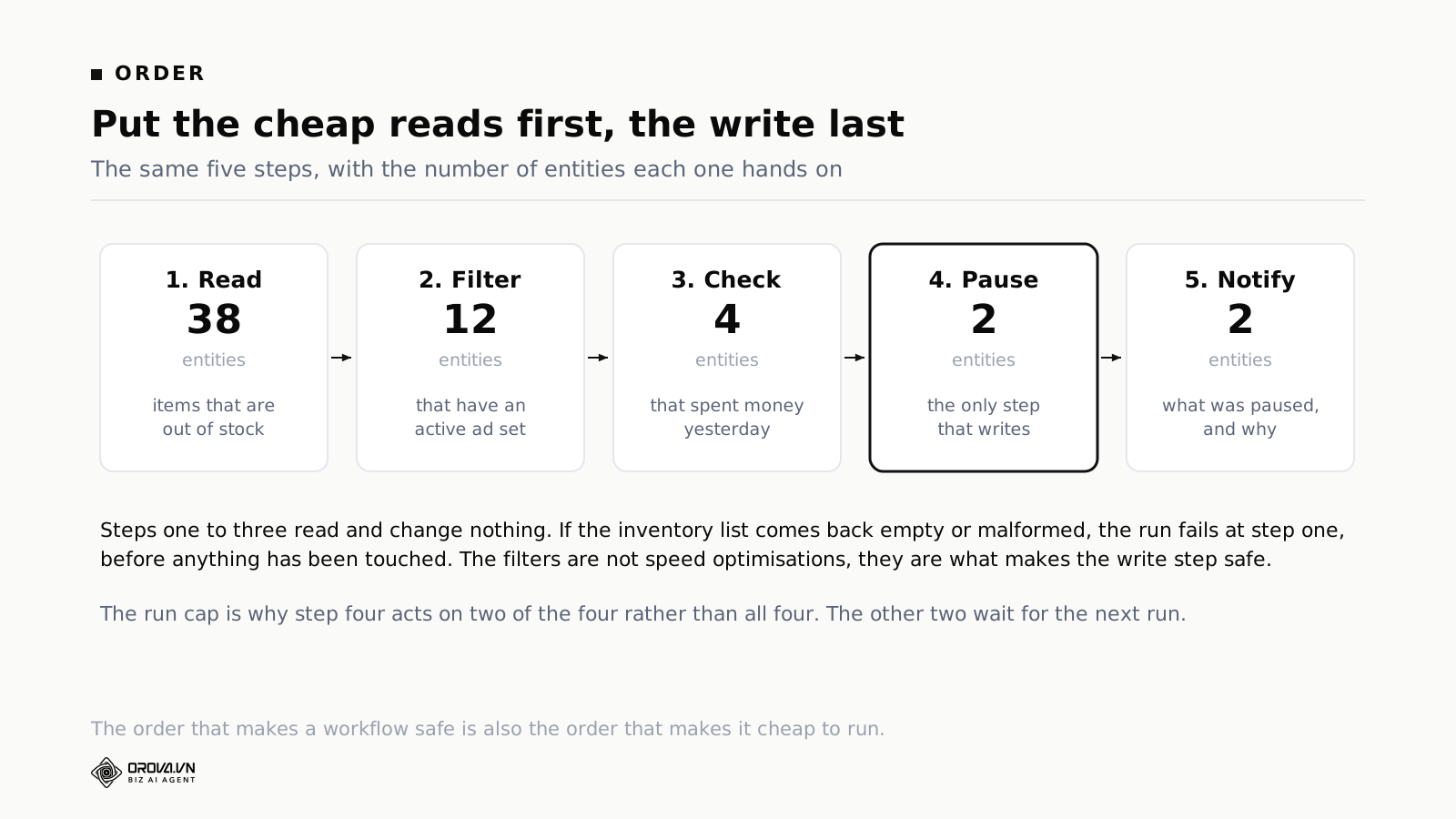
Because steps run in order, the order is a decision rather than a detail. Three rules cover most of it.
Cheap checks first
Anything answerable with arithmetic goes before anything requiring interpretation. The expensive step then runs only on what survived the cheap ones.
The reverse order, interpretation first and filters afterwards, is the most common mistake in workflows people build themselves. It is slower and it costs more, because the expensive step runs on forty entities to produce a result that four of them needed.
Read before write
Gather everything you need before changing anything. A workflow that writes, then reads, then writes again has a problem when it stops in the middle: the account is in a state that matches neither the before nor the intended after.
Reading first means a run that stops leaves the account untouched, which is the outcome you want from every failure you have not thought of yet.
Most reversible first
If a workflow does several things, order them by how easily each undoes. A run that stops halfway then leaves you in the most recoverable position available.
In practice that means notifications and labels before budget changes, and budget changes before anything structural like a bid strategy.
A worked example, step by step
Stopping ads for items that are out of stock, end to end, because it shows why ordering carries the weight.
Step one, read stock levels. Pull the current list of out of stock items from the inventory system. Reads only. Suppose it returns thirty-eight items.
Step two, filter. Keep only the items that have an active ad set. Twelve remain. This costs nothing and removes two thirds of the work.
Step three, check spend. Of those twelve, keep the ones that actually spent money yesterday. Four remain. An out of stock item whose ad set is already paused needs no action.
Step four, pause. The only step that writes, running on the smallest possible list, and subject to the cap on entities per run.
Step five, notify. Send what was paused and why.
If the inventory system returns an empty response or a malformed list, the run fails at step one, before anything has been changed. Order first, ordering second: the sequence is only useful because the steps are arranged so that the cheap safe ones come first.
The version most people build
The intuitive order puts the pause immediately after reading stock levels. It works every day until the inventory system returns something unexpected, and then it pauses ad sets for items that are in stock.
The filter steps look like optimisations. They are the checks that make the write step safe, and treating them as optional is how a workflow that ran cleanly for two months does something surprising in the third.
How a workflow earns the right to change things
The same path as any other automated action, with one extra thing to watch.
Weeks one to four. The workflow runs and records what it would have done, changing nothing. Note whether you agreed each time.
The extra thing. With a standard rule you are testing a threshold. With a workflow you built, you are testing the logic as well: whether the chain of conditions says what you meant it to say.
These fail differently, and telling them apart saves weeks. A wrong threshold fires at the wrong moment, and you can see why. Wrong logic fires at moments that look arbitrary, and the giveaway is that you cannot explain why it fired even after reading the record.
What to do about each. A threshold problem is a number change. A logic problem means rebuilding the chain, and it is usually faster to rebuild than to patch, because a chain that was assembled around a misunderstanding tends to have the misunderstanding in more than one step.
Week five onward. If the firings became predictable and you agreed with them, letting it act on its own is reasonable, with an entity cap, a schedule window, and the same questions any permission grant needs answered. That side of it is covered in the article on advise and execute permissions.
Reading the run record
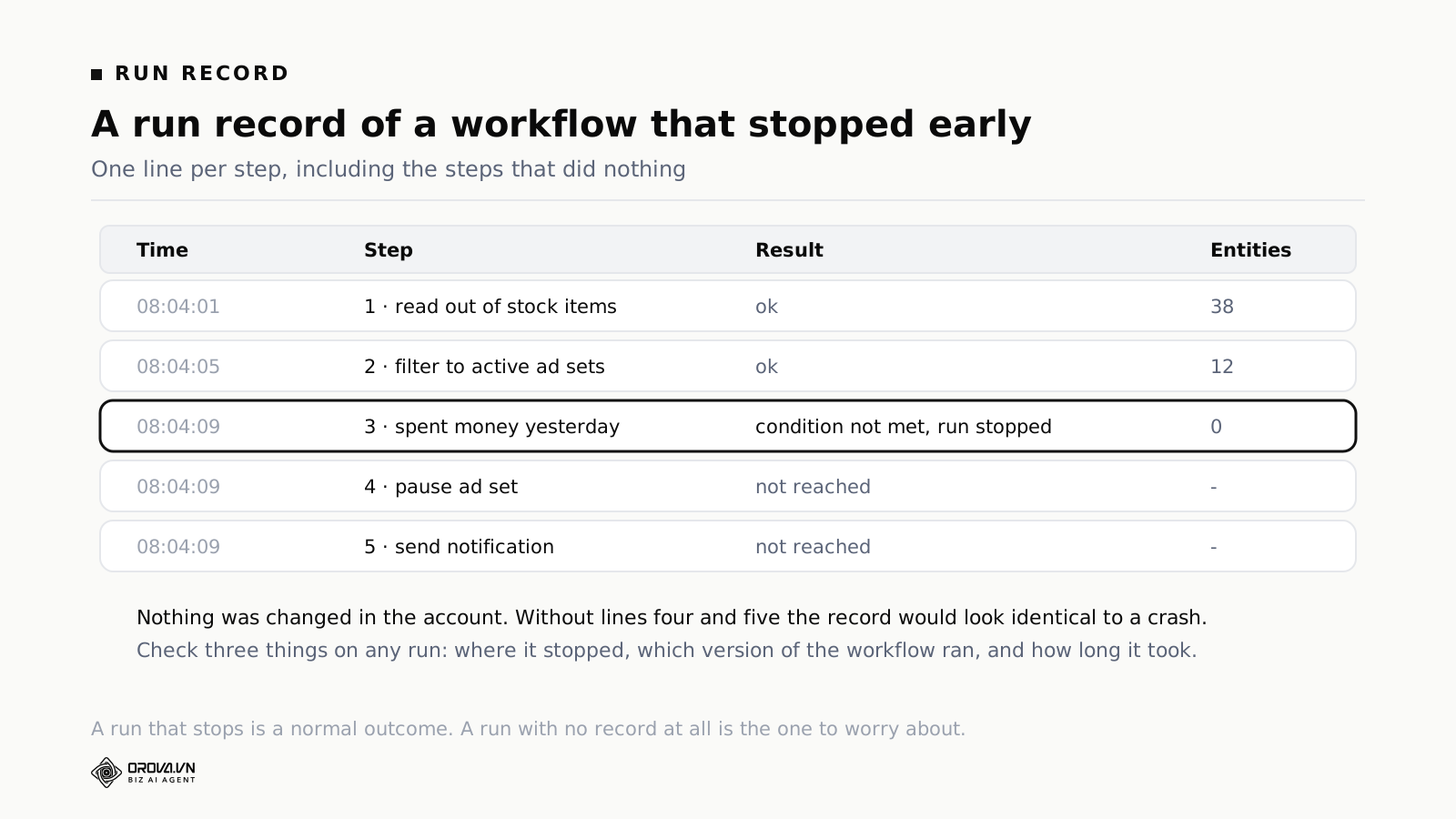
A run should produce a line per step, including the steps that did nothing. That last part is easy to skip when building and painful to add later.
If the record only showed steps that executed, a run that stopped at step three would look exactly like a run that broke at step three. Writing "step three: condition not met, run stopped" and then "step four: not reached" makes the difference visible in one glance.
Three things to check on any run.
Where it stopped. Stopping at the same step every time means either the condition is unreachable or the step before it is producing something unexpected. You can only tell by reading the numbers alongside.
Which version ran. Behaviour changes with edits. Without the version recorded on each run, a run from last month cannot be explained, and workflow edits are the configuration change most often made alone and unreviewed.
How long it took. A run that suddenly takes four times as long is usually hitting rate limits and retrying at the platform level, which is worth knowing before it turns into partial application.
Three signs a workflow needs rebuilding
It stops at the same step every run
Either the condition can never be true or the previous step is handing it something it did not expect. Both take about ten minutes to find, and both get ignored because a workflow that stops looks harmless. It is harmless. It is also doing nothing, which is not what you built it for.
Nobody can say what it does
Ask someone else on the team to describe the workflow without opening it. If they cannot, it has outgrown what a chain of steps should hold. Splitting it into two workflows with clearer purposes is usually faster than documenting the one you have.
It has been edited more than five times in a month
Frequent edits mean the logic never settled, which usually means it was built before the problem was understood. Going back to the earliest version and starting again from what you have learned is often quicker than patching further.
What running one step at a time does not protect against
A guard oversold is a guard misused, so here are the four things this one does not do.
It does not make a wrong rule right. A workflow encoding a bad assumption acts on that assumption patiently, one entity at a time, until it has covered everything it is allowed to reach. Ordering bounds the rate, not the correctness.
It does not help if nothing occupies the gap. The pause between steps is only worth anything if a check, a cap, or a person is there. A workflow running unattended for a week with no caps eventually does everything the parallel version would have done, just later.
It does not survive bad data. If the numbers are wrong, every step acts wrongly with a perfectly correct justification recorded next to it. The only defence against that is a separate check on whether the numbers themselves are behaving, run daily and read by a person.
It does not bound how much a run costs. A long run that proceeds one step at a time can consume more processing than a short one that fans out. The run cap bounds cost. Ordering bounds blast radius. Different guards, different jobs.
What it buys you is a chance to intervene. It does not intervene on your behalf.
How this compares with the platforms' own automated rules
Google Ads and Meta both offer automated rules at no charge, and they are the right answer more often than vendors like to admit.
What they do well
Simple conditions inside one platform, acting on that platform's entities, on a schedule you choose. They are free, they run natively, and there is nothing to integrate or maintain. Google's version lets you preview which campaigns a rule would have affected before you save it, which is the single most useful feature in this whole category and costs nothing to use.
Where the shape stops fitting
A condition that depends on the previous step's result. A rule is one condition and one action. As soon as what you want to do depends on what the last step returned, you are describing a sequence, and a rule cannot express one.
A condition that spans platforms. Neither platform knows what the other spent, so a combined ceiling cannot exist inside either one.
A threshold derived from your own history. Native rules take a fixed number you type. Comparing against your own trailing ninety-day median requires computing and storing that median somewhere.
A condition that reads an outside system. Stock levels, deal stages, delivery status. None of it is visible to an ads platform.
The honest recommendation
Use native rules for the simple cases and do not pay for a layer that adds nothing. Reach for a multi-step workflow when the condition crosses a boundary, between platforms, between systems, or between one step's result and the next step's condition. Teams that route everything through one tool for consistency usually end up with a slower and more expensive version of something that was already working.
One thing to copy either way
Whatever you use, match the run frequency to how fast the underlying thing actually changes. Ad performance does not meaningfully move in fifteen minutes, so an evaluation that often reaches the same conclusion repeatedly. Daily suits most accounts. Hourly makes sense for a defensive check on a high-spend account during a volatile period and rarely otherwise. And schedule runs at an odd minute rather than exactly on the hour, because platform APIs are busiest on the hour and a run that starts at 08:04 meets fewer rate limits than one that starts at 08:00.
A checklist before you switch a workflow on
Six questions, five minutes, for any workflow you built yourself.
One: does a standard rule already do this? Rebuilding one as a workflow loses the documented limits for no gain. The usual reason people build a duplicate is not knowing the original exists.
Two: is every write step behind at least one cheap filter? If the first step changes something, reorder it before you do anything else.
Three: what is the worst case allowed by the limits? Entities per run, times the size of the change, times the number of runs before someone looks. Write the number down and decide whether you would shrug at it.
Four: what stops it? Name the halt condition out loud. If the answer is that it runs until it finishes, there is no halt condition.
Five: where does the notification go, and who reads it? If the honest answer is a channel nobody checks, fix that first.
Six: is it advisory for the first month? It should be, including the ones that look obviously safe. Especially those, because obviously safe is the reason nobody reviews them.
Question three is the one that gets skipped, and it is the only one that produces a number you can argue about.
Frequently asked questions
Does this apply to reading data too?
No. Reads run in parallel. Pulling figures from three platforms at once is better in every respect, because nothing changes and there is nothing to stop.
Can I force parallel execution for steps that write?
You should not, and in most tools you cannot. If yours allows it, the question to answer first is what would stop the run halfway through, and if there is no answer, leave it alone.
Does step order affect cost as well as safety?
Yes, substantially. A filter that cuts the list from forty entities to four costs one step and saves thirty-six on every step after it. The arrangement that makes a workflow safe is usually the same one that makes it cheap.
How long does a typical run take?
Minutes for most configurations. Wall-clock time only becomes noticeable on workflows touching many entities, and the cap on entities per run usually keeps that number small anyway.
What happens if a step fails?
The run stops, the failure is recorded with its error, and nothing retries by itself. Steps already completed stay completed. You decide what to do with them.
Why not retry automatically just once?
Because a failed response is not the same as a failed change. If the platform applied the change and the reply was lost, a retry applies it twice. Unless every write carries an identifier the platform uses to recognise a repeat, one retry is one extra change you did not intend.
Does ordering apply to scheduled runs as well as manual ones?
It should. There is no good reason for a scheduled run to behave differently from one you started by hand, and if it does, the scheduled path is the one running unattended.
Can I test a workflow without touching the account?
Run it in advisory mode against real data. It evaluates every condition and reports what it would have done. That is more informative than a simulated run, because the data is real and most surprises come from the data rather than the logic.
How many entities should one run be allowed to touch?
Two or three on most accounts, one on small ones. The purpose is not throughput. It is to make a wrong threshold visible while it is still a small problem, and to make the overnight worst case a number you can work out in advance.
What do I do with the steps that already completed when a run stops?
Read the record, decide, and act by hand. In most cases nothing needs undoing, because the completed steps were reads. When a write did complete, the record holds the previous value, which is the reason to insist that it does.
Can two workflows run at the same time?
Yes, and each is still ordered within itself. Two workflows touching the same campaign is a configuration problem rather than an engine problem, and the cooldown on each action is what stops the overlap compounding.
The interesting question about automation is not how fast it can act. It is what happens between one action and the next. On every day the configuration is right, the gap costs a few minutes and does nothing at all. On the one day it is wrong, the gap is the difference between one campaign and forty.
Related reading: the limits to set before automation can change a budget, building one workflow across search and ad accounts, and thresholds for pausing campaigns that spend without results.
Orova Ads optimises campaigns for you
Connect Google, Meta and TikTok in one place. AI reads the numbers, proposes changes and executes under the rules you set.
Explore Orova Ads