
AI SEO software that also acts on your ad accounts

AI SEO software now covers a lot of ground: rank tracking with anomaly detection, technical crawls, content briefs, automatic title and meta rewrites. Almost all of it shares one boundary. It reads your search data, tells you something useful, and stops at the edge of the SEO tool. Nothing it learns ever reaches the ad account, even when both are working the same terms and drawing on the same budget.
This article is about the layer above that boundary. A workflow is a scheduled chain of steps where a search-data condition and an ad-account action sit on the same run. If you are choosing a tool in this category and you also buy paid search, that capability is worth checking before anything else, because very little in the category has it.
What follows is the whole model: what a step is, which conditions you get, what a run does, how it is metered and what it cannot do. Then a nine-question checklist to take into a vendor call and the limits that will make you walk away from one.
What most AI SEO software does, and where it stops
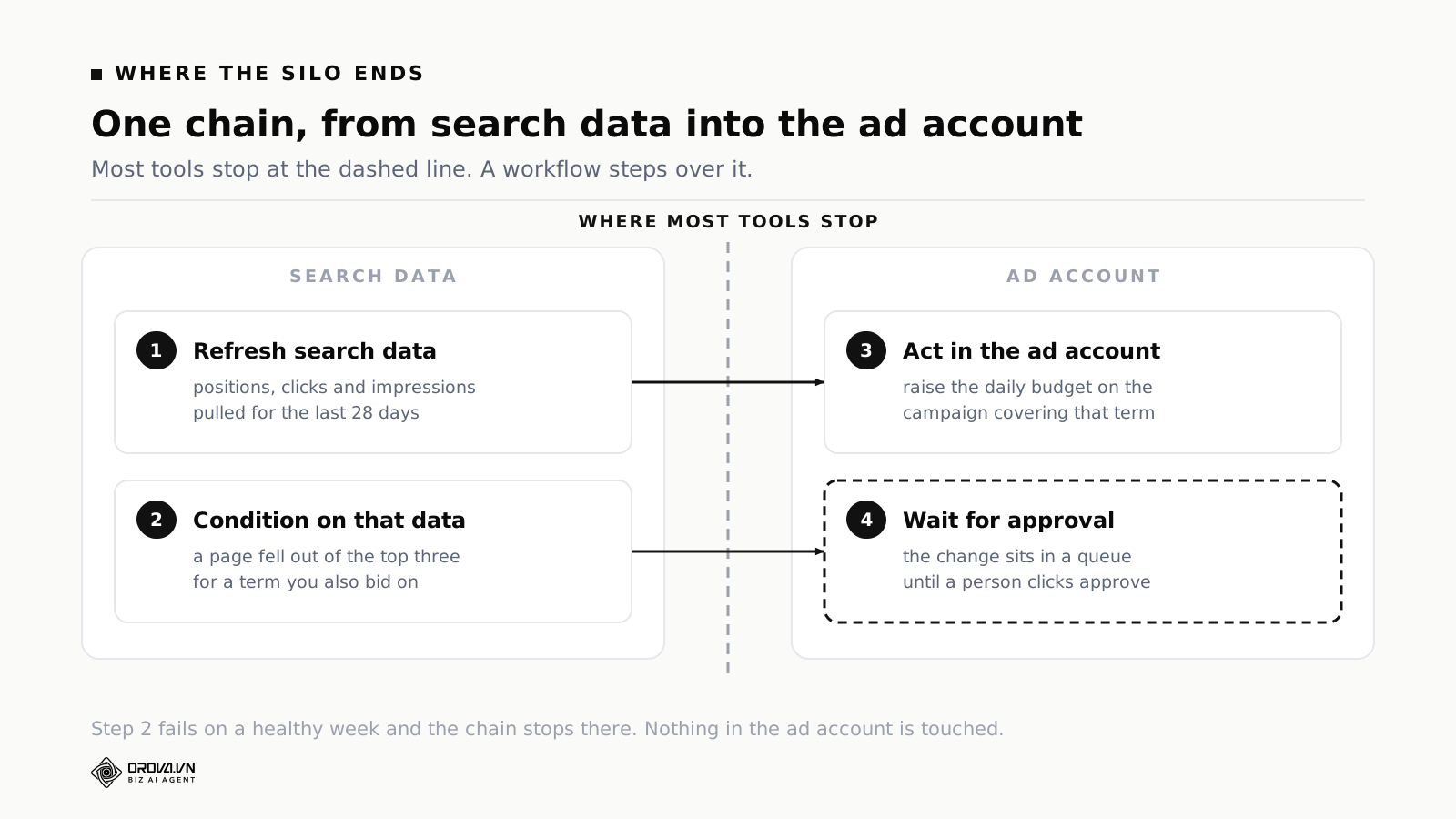
Nearly every tool in the category does three things. It pulls Search Console and rank data on a schedule. It scores pages and flags the ones losing ground. It generates something: a title, a meta description, a brief, an outline. All three are genuinely useful and all three end inside the tool.
Now look at the decisions that sit across the line:
- An article reaches the top three for a term you also bid on. You could cut that keyword's bid, or pause the ad group, and keep the traffic for free.
- The same article drops to position eleven. Now you want the bid back, quickly, before the week's revenue goes with it.
- A page still ranks but its click-through rate has halved. Something changed in the results page above you. Your paid ad on that query is now carrying the whole term.
- A competitor publishes on your best topic and starts outranking you. Their paid presence on that query usually went up at the same time.
None of those calls can be made by software that sees only one side. You can make them by hand. Most people do for about a month, then stop, because it means holding two dashboards in your head on a Monday morning and nobody is paid to do that reliably.
So the question when buying is narrower than "is the AI any good". It is: can this tool act on the other channel, and if not, what is it expecting you to do with what it tells you?
A rule and a workflow are not the same thing
Both Google Ads and Meta ship automated rules, free, inside the ad platform. An automated rule answers one question: given this data, in this account, what should happen. It checks on a schedule and it acts on things it can see.
A workflow is an ordered chain of steps that runs on a schedule, where each step is either a condition or an action, and different steps can point at different accounts and different channels. It does not judge anything by itself. It decides what happens when, and in what order.
| Automated rule | Workflow | |
|---|---|---|
| Question it answers | Given these numbers, what should happen? | What runs, in what order, and when? |
| Scope | One account, one platform | Several accounts, several channels |
| Trigger | A number crossing a line | The clock |
| Where it lives | Inside Google Ads or Meta, free | Outside the platforms, in a tool you buy |
| Sees search data | No | Yes, if the tool syncs it |
A test that settles most arguments about which one you need: if the answer depends on the clock, it is a workflow. If it depends on the numbers inside one account, use the platform's own automated rules and save your money. If it depends on the individual auction, leave it to Smart Bidding and stop trying.
The mistake worth naming is using one for the other's job. Wanting the tool to weigh each campaign against your own economics is rule work. Wanting it to sync data every Monday, then check the search side, then queue stale articles, then email one summary is workflow work, and no amount of rule configuration will do it.
What a mixed run looks like end to end
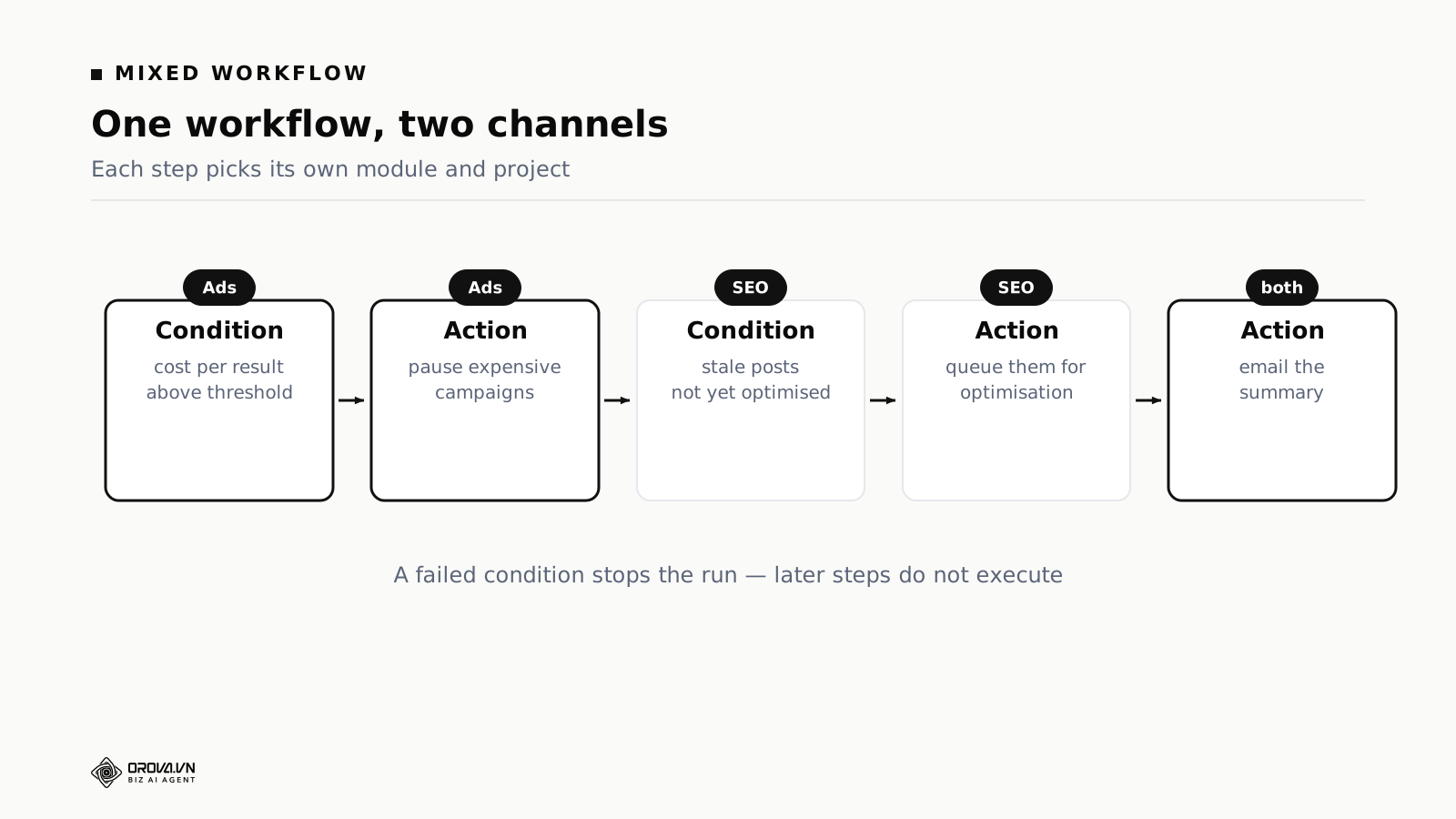
A concrete chain, running Monday mornings.
Step one — condition, ads. Is any campaign's cost per result above your threshold? If not, the run stops here and nothing below it executes.
Step two — action, ads. Pause those campaigns, capped at however many per run you allowed.
Step three — condition, search. Are there published articles not yet optimised?
Step four — action, search. Queue them for optimisation.
Step five — action, shared. Email one summary of everything that happened.
Step one is the part people misread. If that condition fails, the whole chain stops, including the search half further down. That is the design, not a bug: a straight chain is predictable, and when it stops you know exactly where and why.
If you want the search half to run whatever the ad account is doing, build two workflows. Cramming both into one chain and hoping it branches is the fastest way to build something nobody can read in six months.
Add the approval step and the shape changes again. An action can be set to write its change into a queue instead of pushing it live, so a person clicks approve and only then does the budget move. That is the setting most teams use for their first three months, and several never turn it off. It is also the question vendors are slowest to answer, which tells you something.
The building blocks you get to work with
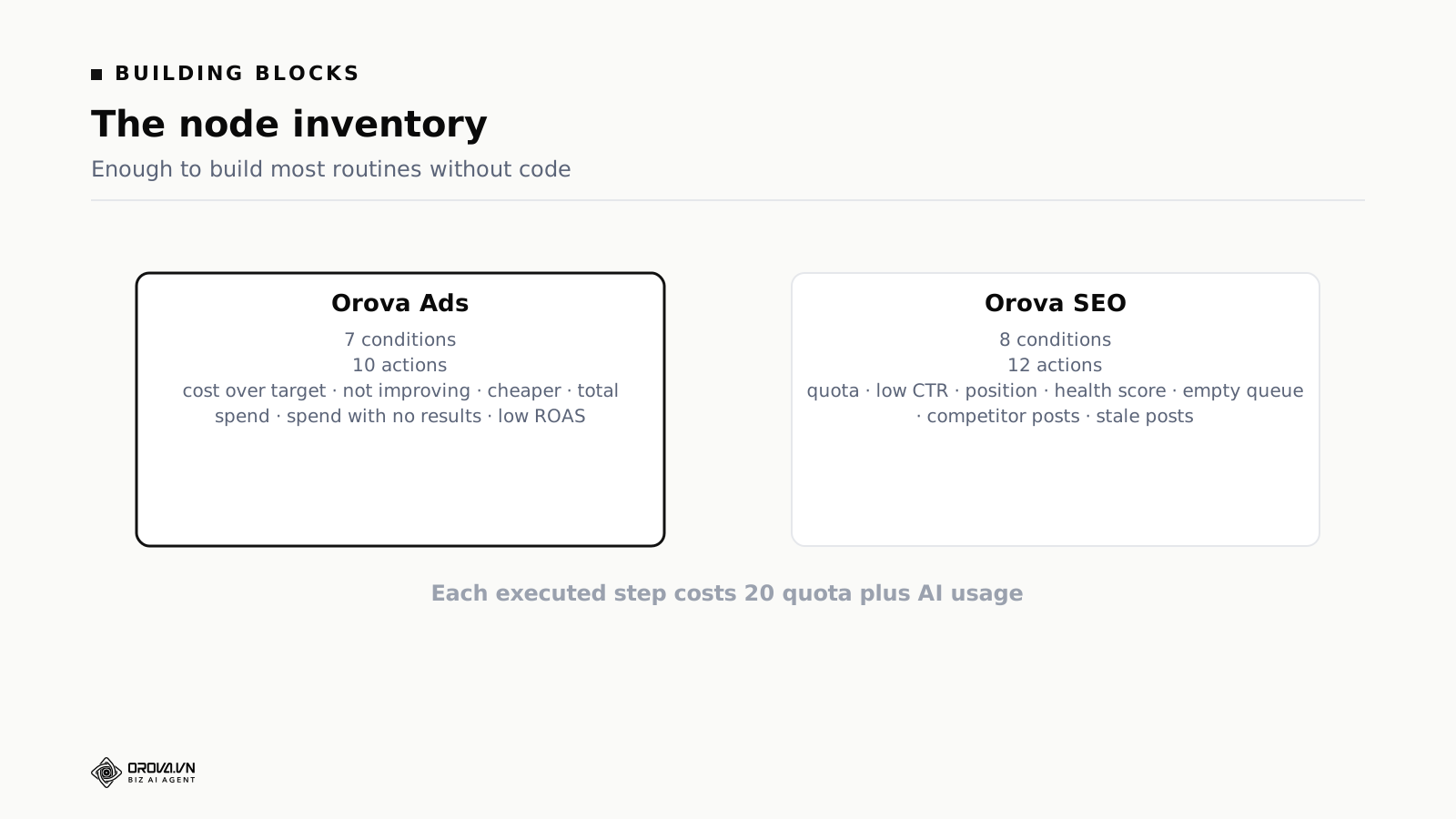
On the advertising side there are seven conditions: cost per result above a threshold, cost not improving against the previous period, cost falling by at least a set percentage, total spend above a level, spending with zero results, return on ad spend below a level, and whether any campaigns are running at all.
And ten actions: refresh data, pause expensive campaigns, pause zero-result campaigns, pause campaigns whose cost is not improving, raise budget on strong campaigns up to a ceiling, lower budget on weak ones down to a floor, schedule campaigns on and off by time, set budgets on a schedule, email a data summary, and run an AI analysis against a rule set you chose.
On the search side there are eight conditions and twelve actions. The conditions are the ones worth studying, because they are what makes this SEO software rather than a timer with a nice interface: remaining quota, click-through rate below a threshold, average position, site health score, an empty writing queue, recommendations left unactioned, new competitor articles detected, and posts that have gone stale.
Each one replaces a question a person would otherwise open Search Console to ask.
- Click-through rate below a threshold catches the page that still ranks and stopped being clicked. Usually a title or description problem, and invisible in a traffic chart until the month is over.
- Average position catches the slip while it is still a slip, not after it has become a traffic drop.
- Empty writing queue catches the week nobody noticed the pipeline ran dry. This one sounds trivial and is the condition most often left running a year later.
- Stale posts surfaces decay on a schedule instead of during the annual content audit that never happens.
Actions on the search side cover the work those conditions imply: refreshing search data, queueing articles for optimisation, acting on recommendations, reporting. Like the paid actions, each is a specific operation with a verifiable outcome.
One thing to check in any tool you are evaluating: read the list of available actions and see whether any of them are vague. A node called "optimise content" with no stated output is a node you cannot verify, which means you cannot trust the run history either.
How it is metered, and why that changes the design
Each executed step is metered at twenty units, plus the AI usage for any step that calls a model. It matters while you are designing, because it changes the shape of what you build.
A fifteen-step chain running daily costs five times a three-step one. So put the filtering condition at the front. If step one fails, the other fourteen never execute and you pay for one step. That is also why the condition comes before the action in the example above, rather than the other way round.
When you compare vendors, ask whether metering is per run or per executed step. Per-run pricing sounds cheaper and quietly removes any reason to design well.
Why the steps run one after another
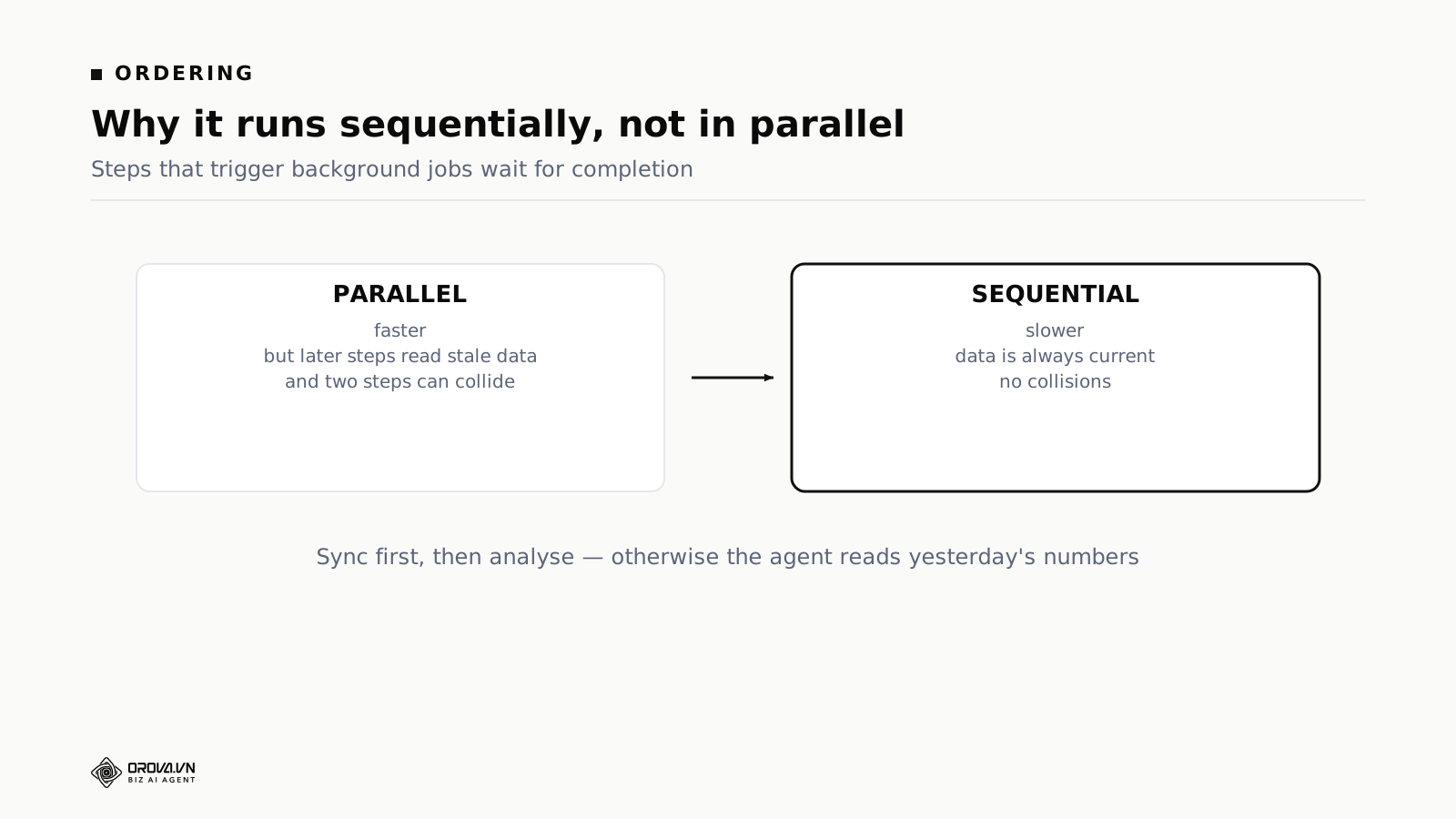
Steps execute one at a time, and for steps that kick off a background job — a data sync, an AI analysis, a competitor scan, a site health check — the engine waits for the job to finish before moving on.
Two reasons. Later steps usually depend on earlier ones, so running them together means the analysis step reads the previous sync's data while today's is still downloading. And two steps can collide: one pauses a campaign while another changes its budget, and the outcome depends on which finished first. That is the least reproducible class of bug there is.
The cost is time. A chain with two background-job steps can take several minutes. For something that runs once a day, several minutes is not a cost at all.
Conditions are where the craft lives
Most people agonise over which action to pick and skim past the condition. It is the other way round. Actions have few sensible options. Conditions are what separate a workflow you keep from one you switch off in week three.
The advertising conditions fall into three families.
Absolute thresholds. Cost per result above a number, spend above a level, return on ad spend below a level. Easy to understand and easy to set, with one weakness: a fixed number knows nothing about seasonality. A threshold that behaves in an ordinary month will alarm every morning in a peak one.
Period comparisons. Cost not improving against the previous period, cost falling by at least a set percentage. These compare one stretch of days against the one before, so they cope with seasonality far better. If your account swings by season, start here.
State checks. Spending with zero results, campaigns running or not. Binary, no threshold to argue about, and the safest place to begin.
Make your first workflow use a state check. "Spent two days and produced nothing" is a statement nobody in the room will dispute, needs no calibration, and catches the most expensive category of problem. Move to period comparisons once you are comfortable. Leave absolute thresholds until last, because they require knowing your account's baseline properly, and most people think they know it before they do.
The search-side conditions have their own trap: setting a click-through-rate threshold without pairing it with a position band. A page sitting at position twenty-eight has a low click-through rate because it is at position twenty-eight, not because the title is weak. Rewriting that title is wasted work. The condition worth running is low click-through rate and position in the top ten, which is the group where a better title actually converts a ranking you already own.
Set the lookback window deliberately too. Seven days reacts fast and reacts to noise. Twenty-eight days is stable and slow. For paid conditions on a busy account, seven days is usually right; for search conditions, twenty-eight, because ranking data moves too slowly for a week to mean much.
Three workflows worth building first
Daily budget protection
Runs each morning. Step one, refresh data. Step two, condition: has any campaign spent across two consecutive days with zero results? Step three, action: pause them, maximum two. Step four, email what was paused.
The easiest to trust and the fastest to justify, because it does exactly the job people skip at weekends.
Weekly content review
Runs Monday morning. Step one, refresh search data. Step two, condition: any articles with low click-through rate but a good position? Step three, queue them for title and meta work. Step four, email the list.
That group is the cheapest win available in SEO. The ranking already exists; only the title is failing to earn the click.
Friday summary
Runs Friday afternoon. No modifying actions at all: refresh both channels, send one combined summary.
It sounds dull and it is the workflow people keep longest, because it removes the Monday round of dashboards without asking anyone to trust an agent with anything.
Build your first one, step by step
Use the Friday summary, because it touches nothing.
Open the designer. A full-screen canvas with draggable nodes joined by arrows. Right-click to add or remove.
Set the schedule. The first node is always the schedule. Choose weekly, Friday, late afternoon. Times are entered in your own timezone, with the corresponding reference time shown underneath so you can check it.
Add an ads data refresh node. Pick the ads module and the advertising project. This one starts a background job, so the run waits for it.
Add a search report refresh node. Pick the SEO module and the website project. Note this is a different module and a different project from the step before it. That is allowed, and it is the entire point.
Add an email summary node. Enter the recipient.
Run a test. Do not enable the schedule yet. A test run shows how far the chain gets, how long each step takes, and what the email actually looks like.
Enable the schedule. Once the test produced what you expected, and not before.
Fifteen minutes, start to finish. The second workflow takes five, because the hard part was the model, not the interface.
A failed condition stops everything below it
People build long chains with an ad condition at the front and search steps at the back, then ask why the search half never runs. The ad account is healthy, so condition one fails and the run ends at step one. Split it into two workflows, or put the independent part first.
Scheduling too often
Daily, weekly and monthly are the options. Ad and search data do not change fast enough to justify several runs a day, and running often costs money without adding information. Protection daily, review weekly. That covers most accounts.
Timezone mistakes
Times are entered in your local timezone and converted on save, with the converted time shown for checking. If your team spans countries, or the account bills in another timezone, read that line. Twelve hours out means the run evaluates a day that has not finished.
Mixing currencies in one threshold
If a step's scope covers accounts billed in different currencies, "spend above 500" means nothing. The run is blocked rather than converted at an exchange rate, because rates move daily and a campaign paused on a rate fetched at an awkward moment is close to impossible to explain three months later. Pick one currency per threshold and split the workflow if your portfolio mixes them.
Skipping the test run
The designer has a test button. Use it before the schedule goes live. It shows which step the chain reaches, where it stops and why. None of that is readable off the diagram. If a node needs a project and none is selected, the field is flagged and test runs are blocked, while saving a draft still works. Saving something incomplete is fine; running it is not.
What you can inspect afterwards
Every workflow keeps a history of its runs. Reading it is how you know what the software is doing on your behalf, and it is the second thing to check when you are evaluating a tool.
A history entry answers three questions: when it ran, how far it got, why it stopped. Three outcomes cover almost everything.
Completed with actions. The chain reached the end and at least one action executed. The entry states what was done.
Completed without actions. The chain reached the end and every condition concluded nothing needed doing. On a healthy account this is the most common outcome, and it is not a fault.
Stopped early. A condition failed or a step errored. The entry records which step and why.
The second outcome should be the most frequent one you see. If every week produces actions, either the account genuinely has continuous problems or your thresholds are too tight. Both are worth an hour of your time.
For steps that modify an ad account, an entry is also written into the change history, marked as coming from a workflow rather than from a person or a rule. So when you find a paused campaign, you can trace which workflow paused it, when, and on which condition, without asking anyone.
Saved versions, and what a rollback does
Every save captures a version and the last ten are kept. Restoring an earlier one is a single button, and the restore itself captures a version of what you had before restoring, so a rollback is never a one-way door.
Ten sounds like a footnote and it changes behaviour. When people know they can go back, they experiment with thresholds. When there is no way back, they either avoid touching anything or make a change and hesitate to save it. Ask any vendor for the number. "We keep backups" is not the number.
When a workflow and an automated rule touch the same campaign
If you run both, this will happen, so plan for it now rather than during the week it starts.
Say a rule watches campaign A with authority to raise budget, while a daily workflow includes a step that lowers budgets on weak campaigns, and campaign A qualifies for both. The budget gets pushed back and forth and nobody can explain why the number keeps moving.
Three fixes, best first.
Separate the scopes. The rule handles one group of campaigns, the workflow another. Cleanest, and it survives staff changes.
Split by type of decision. Rules take the judgements that need weighing, like raising and lowering budget on performance. Workflows take the unambiguous defensive work, like pausing a campaign that spent with no results. These two rarely overlap in practice.
Add cooldowns. If both genuinely must touch the same campaigns, add a "no repeat within three days" limit on each side. Less clean, but it stops the oscillation.
What not to do: nudge the thresholds back and forth until the collision goes away. That leaves both numbers drifted from what they originally meant, and six months later nobody can explain why the threshold is 87.
What a month of runs looks like
Here is the shape of a month on a daily protection workflow, on a moderately busy account. The figures are illustrative; the distribution is the point.
| Outcome | Runs | What it means |
|---|---|---|
| Completed, no action | 22 | Conditions evaluated, nothing crossed a line |
| Stopped at step one | 5 | No campaigns running in scope that day |
| Paused a campaign | 2 | Both correct on review |
| Errored | 1 | Platform token expired, fixed in five minutes |
Two things to take from that.
The value came from two runs out of thirty. That ratio is normal, and it is why manual checking gets abandoned: the effort is constant while the payoff is occasional and unpredictable. Software does not mind an unrewarding month.
The errored run is the argument for reading the history rather than trusting silence. Nothing alerted anyone. The workflow simply stopped doing its job until a person looked. A weekly glance at the history tab is the cheapest insurance in this whole setup, and an absence of entries matters more than their content.
Six months in, what people keep running
Which workflows survive tells you more than any feature list.
The reporting one always survives. It touches nothing, cannot go wrong, and removes a chore. It is also the one people underestimate at the start, because it looks too simple to matter.
The defensive one usually survives. Pausing campaigns that spend without converting keeps proving itself and fails cheaply. The ones that get switched off are the ones whose thresholds were set too loosely on day one, produced a wrong pause in the first fortnight and lost trust before they had earned any.
The expansion one often gets disabled. Automatic budget increases, even capped, make people uneasy in a way automatic pauses do not, and the asymmetry is entirely about which direction the money moves. Plenty of teams run it for a month, watch it behave correctly, and still put it back on advise-only. That is a preference, not a failure.
The clever one rarely survives. The ten-step chain across both channels with carefully tuned thresholds, built by someone enthusiastic in week two. It gets disabled around month three, usually while that person is on holiday and something behaves oddly and nobody else can read it.
So build for the colleague who inherits it, not for yourself on the day you are most interested. A three-step workflow anyone can read outlasts a ten-step one only its author could maintain, and outlasting is the whole point.
One more pattern from the same data: the workflows that last have descriptive names and a filled-in description saying why they exist. The ones called "test 2" get deleted in the first tidy-up regardless of what they were doing. When you change a threshold, write one line of why in that description. Three months later the note tells you whether to change it back; the number on its own tells you nothing.
Practical limits worth knowing before you commit
Four things this category does not do. Better to know now than after a fortnight of building.
It cannot branch. The chain is straight. There is no "if this, then that, otherwise something else" inside a single workflow. If your logic genuinely needs a branch, you need two workflows with different leading conditions. It works, and it is less tidy than a real branch would be.
It cannot loop. No "repeat for each campaign until done". Actions that touch several things have their own caps, like pausing up to two campaigns, but you cannot build arbitrary iteration.
It cannot read data the platforms do not expose. Your margin, your stock levels and your sales pipeline are invisible unless that data has been brought in first. Conditions can only see what has been synced.
It cannot judge creative. No step evaluates whether an ad is any good, only what happened after it ran. That distinction disappoints people who hoped automation would review their work.
These are real limits, not gaps waiting to be filled next quarter. If your requirement falls outside them, a script written by an engineer will serve you better, and it is cheaper to hear that now.
What to check before you buy any tool in this category
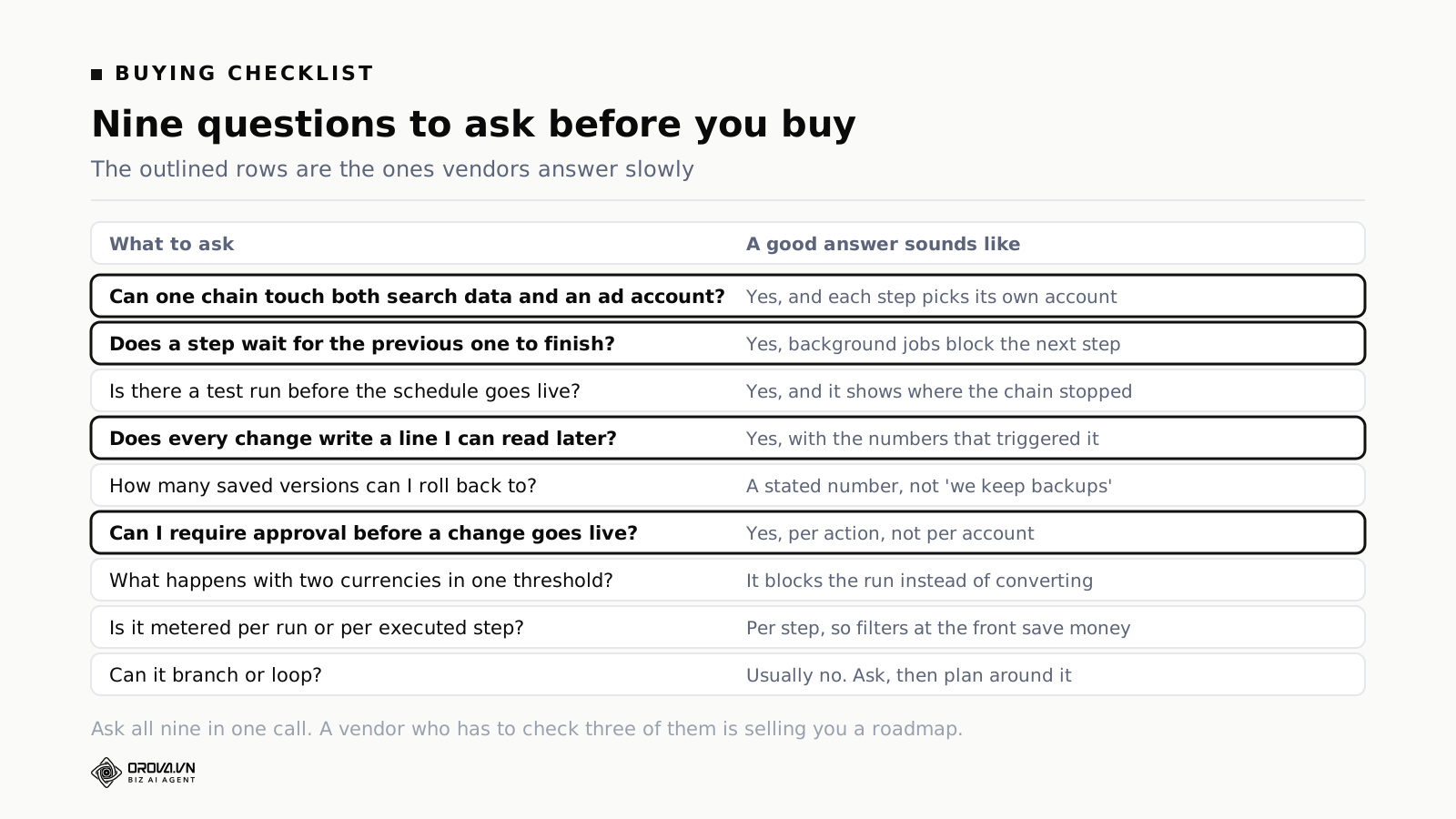
Take these into the demo call and ask them in one sitting.
| Question | What a good answer sounds like |
|---|---|
| Can one chain touch both search data and an ad account? | Yes, and each step picks its own account and project |
| Does a step wait for the previous one to finish? | Yes, background jobs block the next step |
| Is there a test run before the schedule goes live? | Yes, and it reports where the chain stopped |
| Does every change write a line I can read later? | Yes, with the numbers that triggered it |
| How many saved versions can I roll back to? | A stated number, not "we keep backups" |
| Can I require approval before a change goes live? | Yes, per action, not only per account |
| What happens with two currencies in one threshold? | It blocks the run rather than converting silently |
| Is it metered per run or per executed step? | Per executed step, so filters at the front save money |
| Can it branch or loop? | Usually no. Ask anyway, then plan around it |
Alongside the checklist, decide what you actually want automated before you look at any product. Every marketing task falls into one of three groups, and only one of them belongs to software.
Repetitive with a clear rule. Open the report, find campaigns outside range, pause the ones burning money. Anyone following the same rule reaches the same answer. Give this to software early. It is the group where software beats people outright, not by being clever but by not tiring and not forgetting.
Judgement inside a known frame. Should this budget go up or down, given efficiency, learning state and constraint. Rules exist but weighing is required. Automatable, and best left on advise-only until it has been right for a month.
Needs context that is not in any table. Which product line to push this quarter, what message fits the current mood, whether to answer a competitor's price cut. No condition can express this, because the inputs were never in the data.
The common mistake is trying to automate the third group, usually by asking an AI broad strategic questions and hoping. The output always sounds reasonable and is never usable, because what is missing is information, not reasoning. The opposite mistake is just as common: refusing to automate the first group out of a preference for doing it personally.
Two things not to hand over, whatever the tool promises. Do not combine automatic writing with automatic publishing, because that puts unread content in front of the public. And do not let modifying actions run through your peak weeks — holidays, launches, major promotions — when the data is abnormal by design and every condition is comparing it against normal. Turn the acting steps off for those weeks and keep the reporting.
One more, less obvious. Do not build anything on metrics you do not trust. If conversion data is duplicated, missing or full of junk leads, every condition standing on it is skewed. Automation on a dirty signal does not fail occasionally; it fails consistently and fast.
Frequently asked questions
How do I know whether this is worth buying for me?
Time yourself next Monday. Note how long the routine check takes and how many of the steps you actually completed rather than intended to. Ninety minutes and about half the steps makes a strong case. Fifteen minutes and all of them makes a weak one, and building something elaborate would be solving a problem you do not have.
Does a workflow replace a person?
No. It replaces the repetitive layer: opening the right place, reading the right numbers, doing the things that already have a rule. Strategy, messaging and reacting to the market stay with people.
Can one workflow cover several projects?
Yes. Each step picks its own project, so one chain can span several projects and both channels. The more it mixes, though, the harder it is to re-read months later.
What happens if a step fails?
The chain stops there and records the reason. Later steps do not run. Continuing past a failure would mean acting on incomplete data.
Is there a limit on the number of steps?
No hard limit, but two practical ones: each step is metered, and long chains are hard to reason about. The workflows people keep longest have three to six steps.
Does it run when my computer is off?
Yes. Workflows run on a server to their own schedule. This is a real difference from browser-based tools, which need an open window and a machine that stayed awake.
How many workflows should one account have?
Fewer than you think. Two or three covers most situations: one daily defensive, one weekly review, one reporting. Accounts with a dozen almost always have overlapping conditions nobody has audited, and the overlap is where unexplained behaviour comes from.
Can I copy a workflow between projects?
Build one, confirm it behaves, then rebuild it for the second project while adjusting the thresholds. Structure transfers between accounts. Numbers usually do not, because the economics differ.
Will it change my ad account on its own?
Only action steps change anything, and by default only on campaigns you enabled for monitoring. Every change writes an entry into the change history marked as coming from a workflow. If you want a person in the loop, put the action behind approval and the change waits in a queue.
Is this different from the automated rules already in Google Ads?
Yes, in scope. Google's rules are free and good at what they do, and they only see the Google account. They cannot read your Search Console data, cannot act on Meta, and cannot put both in one summary. If everything you want lives inside one ad account, use them and buy nothing.
Choosing AI SEO software comes down to one question that most feature comparisons skip: when the tool finds something in your search data, can it do anything about it in the place where you spend money? If the answer is no, you are buying a better report, and the connecting work stays on your desk.
If you are starting anyway, do not build the sophisticated thing first. Build the one you do by hand every week and resent most. It is both the most repetitive and the one you understand well enough to describe in steps without thinking.
Set expectations honestly on week one. Your first workflow will not save ninety minutes. It will save about twenty, and you will spend fifteen of those reading its output carefully because you do not trust it yet. The real saving arrives in month two or three, once the thresholds are calibrated and you have stopped double-checking. Teams that judge this on week one almost always decide it was not worth it, which is a shame, because week one is the only week where that conclusion is guaranteed to be wrong.
Related reading: your first week with an AI ads agent, combined SEO and ads reporting, and allocating budget across platforms.
To try the model on your own accounts, start at orova.vn and build the Friday summary first. It touches nothing and it still removes the Monday round.
Orova Ads optimises campaigns for you
Connect Google, Meta and TikTok in one place. AI reads the numbers, proposes changes and executes under the rules you set.
Explore Orova Ads