
Cloud based crm software vs on-premise: which fits you in 2026?

Choosing the right cloud based crm software often boils down to a decisive operational question: should your organization invest in a centralized cloud platform or maintain an on-premise installation? If your commercial strategy demands rapid sales pipeline execution, mobile team access, and zero internal server overhead, cloud CRM is your best choice; conversely, if your enterprise operates under strict air-gapped data mandates and maintains an in-house database administration unit, on-premise remains the viable route. This comprehensive guide compares both architectures across total cost of ownership, pipeline automation rules, data permission granularity, deployment complexity, and lead-to-cash execution to help you make an informed decision.
Cloud Based CRM Software vs On-Premise: The 2026 Comparison Matrix
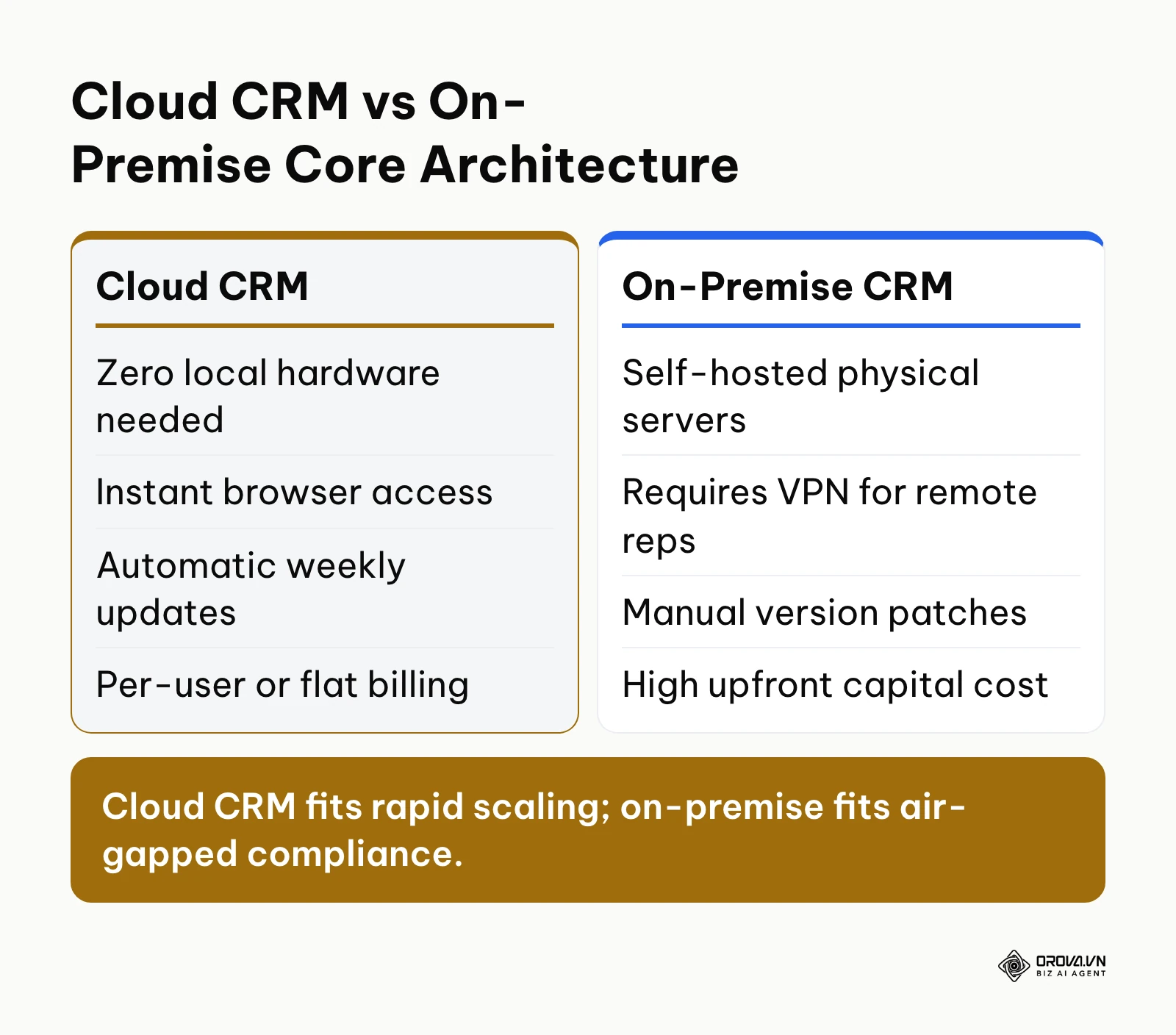
At their core, cloud based CRM software and on-premise customer relationship management systems handle the same fundamental objective: organizing customer contacts, tracking opportunities, and recording sales transactions. The core difference lies in where the application engine and database live. Cloud platforms operate on vendor-managed infrastructure accessed through web browsers, whereas on-premise systems reside on local physical servers managed directly by your internal IT department. The comparison matrix below outlines how both options stack up across ten critical operational criteria.
| Operational Criterion | Cloud Based CRM Software | On-Premise CRM Software | Architectural Advantage |
|---|---|---|---|
| Hosting & Infrastructure | Hosted in vendor data centers with managed uptime | Installed on local office servers or private clouds | Cloud CRM (Zero hardware footprint) |
| Upfront Capital Expenditure | Low initial outlay with operational subscription billing | High upfront perpetual licenses and server procurement | Cloud CRM (Preserves working capital) |
| Implementation Velocity | Rapid deployment ranging from hours to two weeks | Extended setup spanning three to six months | Cloud CRM (Faster time-to-value) |
| System Updates & Patches | Continuous updates applied automatically by vendor | Manual patch application requiring planned downtime | Cloud CRM (Zero maintenance labor) |
| Remote & Mobile Access | Native web and mobile access without secondary tools | Requires secure corporate VPNs or remote desktops | Cloud CRM (Frictionless field access) |
| Data Governance & Custody | Stored under vendor multi-tenant or dedicated cloud | Full physical custody on internal corporate drives | On-Premise (Complete physical control) |
| Customization Depth | Modular custom fields, workflows, and public APIs | Direct underlying database manipulation and code forks | On-Premise (Unrestricted core altering) |
| Long-Term Scaling Economics | Scales linearly or expands through per-seat surcharges | Fixed infrastructure costs after initial deployment | Context-dependent (Team size determines TCO) |
| In-House IT Dependency | Requires business operations leads rather than sysadmins | Demands dedicated database administrators and network engineers | Cloud CRM (No technical hiring hurdles) |
| Offline Operational Resilience | Requires active Internet connectivity for live sync | Operates over local area network regardless of web outages | On-Premise (Independent of ISP reliability) |
When evaluating commercial sales operations, system architecture determines how fast frontline sales representatives log daily interactions. Modern sales workflows require dynamic record access across distributed territories, which traditional on-premise setups struggle to accommodate without cumbersome technical bridges.
What Is Cloud Based CRM Software?
Cloud based CRM software is an operational platform where customer records, pipeline deals, communication histories, and commercial quotes are hosted on remote server clusters and accessed through standard web browsers. It was engineered specifically to liberate growing commercial businesses from physical hardware maintenance, enabling instant user provisioning and centralized customer records across distributed offices.
What Is On-Premise CRM Software?
On-premise CRM software is a software application installed locally on an enterprise's physical server hardware and internal network infrastructure. It was built for heavily regulated corporations that require complete custody over their underlying database files, allowing internal systems teams to modify source scripts and govern security perimeters behind private enterprise firewalls.
Total Cost of Ownership: Cloud CRM Subscriptions vs On-Premise Capital Outlay
Calculating the real financial commitment of customer relationship management requires looking far past the baseline price listed on a software vendor's marketing page. When conducting a thorough cloud crm vs on premise crm cost comparison, business leaders frequently discover that entry-tier cloud subscriptions hide compounding per-seat inflation, while on-premise deployments harbor massive upfront professional service fees.
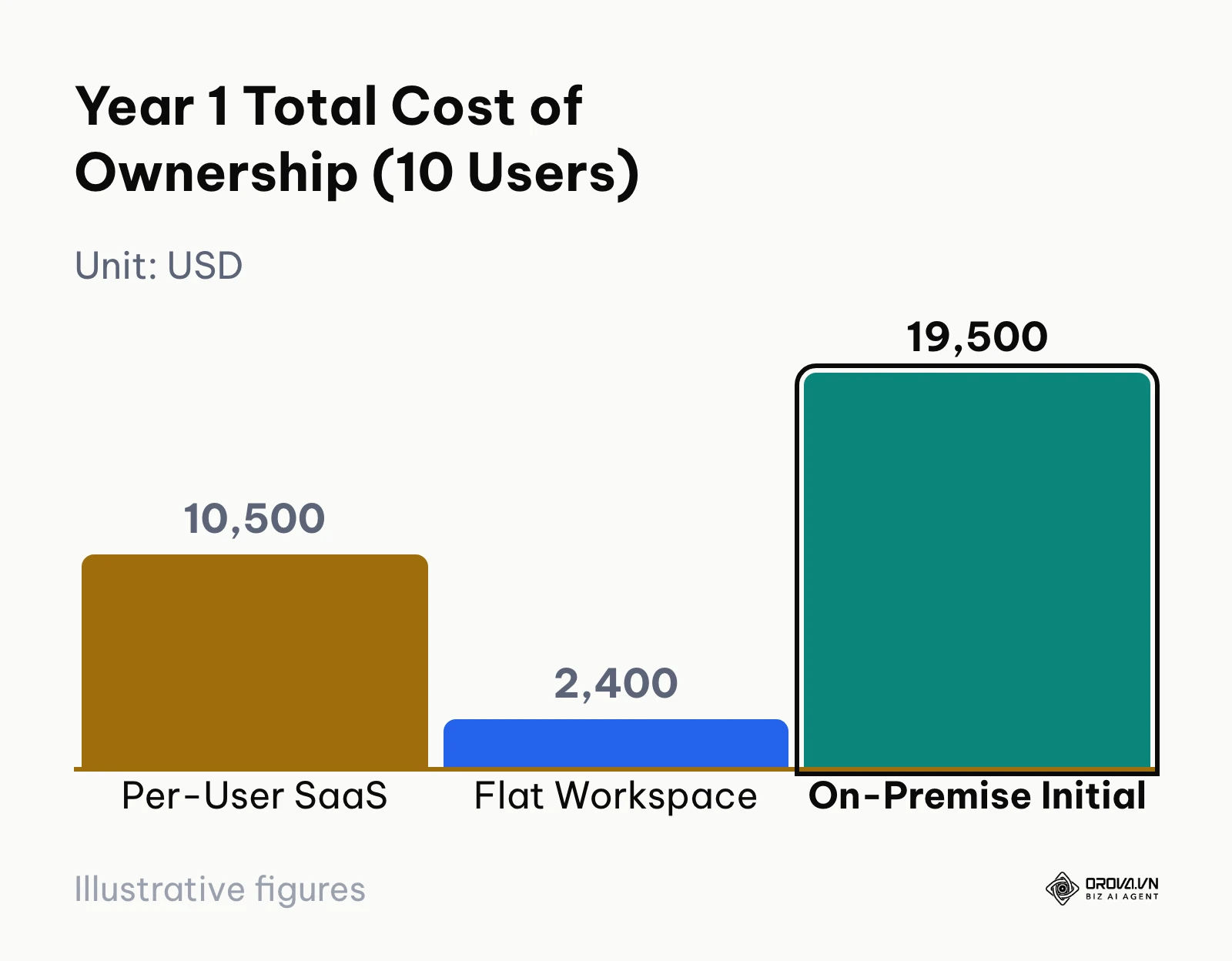
According to the National Institute of Standards and Technology (NIST) Special Publication 800-145 (2011), cloud infrastructure relies on rapid elasticity and measured service, which removes local server provisioning constraints for end users. However, elasticity cut both ways. In a standard per-user SaaS subscription, costs scale linearly with every hire. A team that begins with five sales reps paying 45 dollars per user per month spends 2,700 dollars annually on baseline licenses. Once that team expands to 10 reps and requires custom reporting, document generation add-ons, and expanded database storage, the monthly invoice routinely balloons beyond expectations.
To illustrate the financial trajectory of commercial software, the table below provides a realistic numerical comparison of a 10-person commercial sales team over a standard 12-month operating window across three typical pricing models.
| Expense Category | Per-User Cloud CRM (50 dollars/user/mo + Add-ons) | Flat Workspace Cloud CRM | On-Premise CRM (10 Perpetual Licenses) | Financial Impact Analysis |
|---|---|---|---|---|
| Core Software Licensing | 6,000 (50 × 10 users × 12 mos) | 1,800 (150/mo flat workspace) | 8,500 (One-time perpetual purchase) | Per-user pricing increases directly with headcount additions. |
| Server Hardware & Operating OS | 0 (Included in cloud architecture) | 0 (Included in cloud architecture) | 4,500 (Dedicated rack server + Windows Server) | On-premise requires upfront hardware capitalization. |
| Implementation & Customization | 1,200 (Self-directed onboarding) | 300 (Template import configuration) | 3,500 (External systems integrator deployment) | On-premise deployment demands costly database consultants. |
| Storage & File Attachment Add-ons | 1,500 (125/mo overage for PDF storage) | 0 (Included within workspace limits) | 500 (Local network backup drive array) | Per-user SaaS tools charge steep premiums for contract attachments. |
| API & Integration Connectors | 1,800 (150/mo for CRM webhooks) | 300 (Standard webhook gateway) | 0 (Direct database views and SQL queries) | Cloud CRM vendors frequently lock API connectors behind higher tiers. |
| Annual IT Maintenance & Patches | 0 (Managed automatically by vendor) | 0 (Managed automatically by vendor) | 2,500 (Internal staff labor allocations) | On-premise servers require routine sysadmin patch cycles. |
| Total 12-Month Outlay | 10,500 | 2,400 | 19,500 | Flat workspace cloud saves 8,100 dollars vs per-user SaaS in Year 1. |
On-premise installations become cost-effective strictly over a multi-year horizon (typically year four and beyond) for static enterprise teams that never change their core workflows. However, for growing companies experiencing team shifts, cloud CRM systems eliminate server obsolescence and volatile maintenance expenses.
Winner for Total Cost of Ownership: Cloud CRM wins decisively for small and mid-sized sales teams during the initial three years of operation, particularly when deployed on flat-resource or transparent workspace pricing models that avoid punitive per-seat expansion fees.
Lead Management and Pipeline Automation: How Cloud CRM Compares to On-Premise Control
The primary purpose of a commercial sales engine is converting incoming interest into completed revenue. In this operational arena, cloud based CRM software delivers agility that legacy on-premise systems struggle to match. A chronic operational failure in commercial sales teams is lead stagnation: marketing spends budget acquiring prospective inquiries, an inbound lead lands in a representative's queue, and the record sits untouched for days because management lacks active oversight.
Addressing this bottleneck requires automated lead reclaiming mechanisms configured directly within the pipeline stages. In modern cloud architectures, administrators establish strict timeout thresholds measured in minutes. If an inbound inquiry assigned to a sales representative remains in the "New Contact" stage without an updated phone note, email touchpoint, or scheduled meeting for 60 minutes, the software automatically strips ownership and routes the prospect back into the general unassigned pool.
Practical scenario: Consider a mid-market machinery distribution firm with eight account executives handling fifty incoming web inquiries daily.
- The operations manager created four structured pipeline stages: Inbound Inquiry, Technical Discovery, Quotation Delivered, and Payment Scheduling.
- The team configured an automated rule: any prospect remaining in Inbound Inquiry for more than 45 minutes without an activity log triggered an automated escalation alert, followed by a full record reclaim at the 90-minute mark.
- When sales representatives initially pushed back against losing ownership of inquiries they had not yet reviewed, management showed that stagnant inquiries suffered an eighty percent drop in conversion probability. The team resolved this by routing reclaimed inquiries to an active duty rep through a round-robin schedule.
- Within three weeks of setting stage-level reclaim thresholds, the team eliminated unworked inquiries entirely, ensuring that every incoming inquiry received direct contact within two hours of submission.
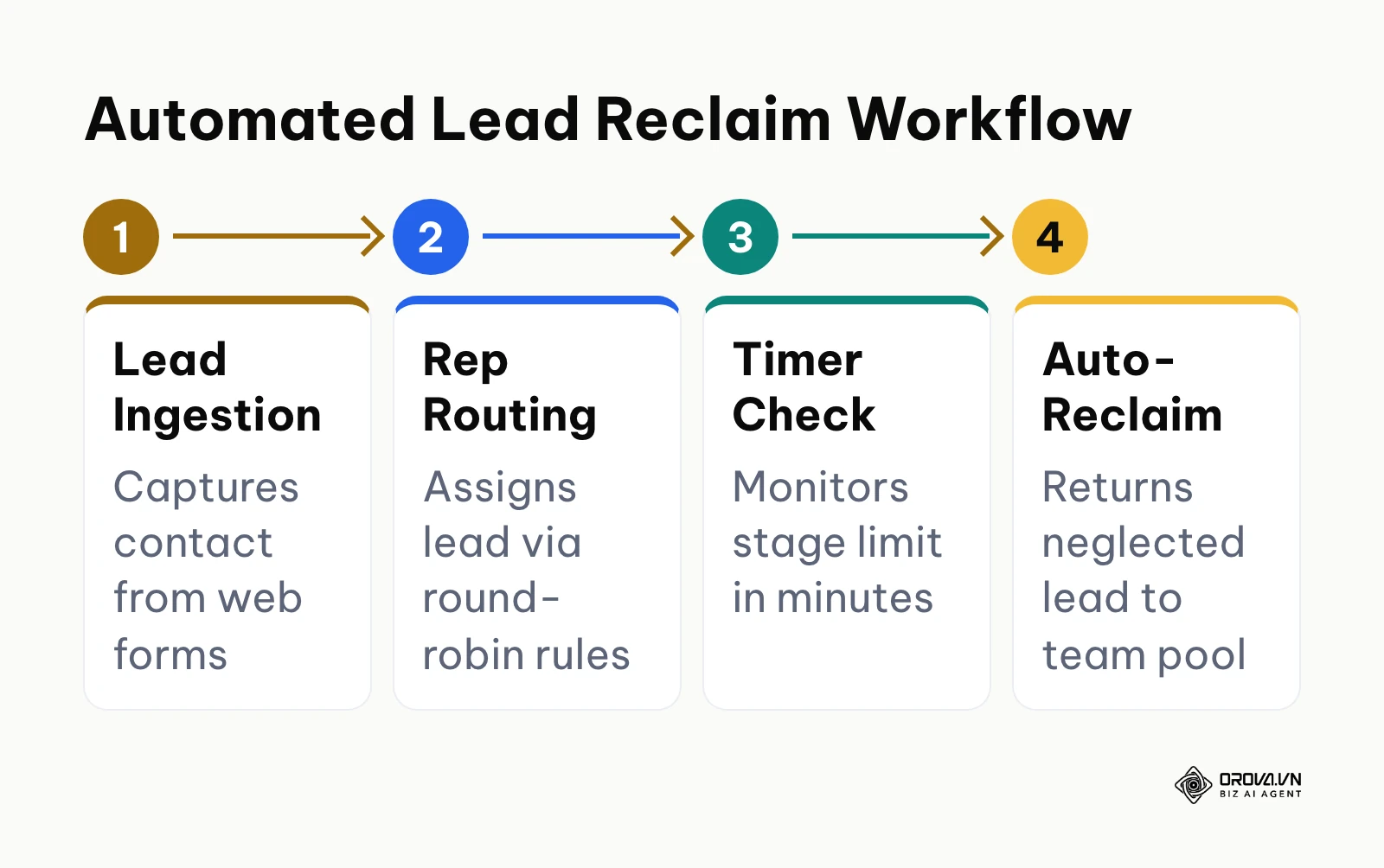
On-premise CRM platforms can duplicate these workflows, but doing so typically demands complex SQL server triggers, custom cron scripts, or expensive external workflow middleware. Cloud based CRM software provides visual drag-and-drop workflow builders that sales directors can adjust in seconds without filing an internal IT helpdesk ticket. For teams working to align their commercial velocity, studying crm sales pipeline management principles highlights how automated routing preserves conversion momentum.
Winner for Pipeline Automation: Cloud CRM wins due to accessible native workflow engines, real-time trigger execution, and out-of-the-box stage timeout automations that protect pipeline velocity.
Data Security and Role Governance: Cloud CRM Hosting vs On-Premise Firewalls
Data protection remains the central battlefield when comparing cloud environments to local server storage. Critics of cloud platforms often express anxiety regarding third-party server hosting, fearing that proprietary client databases could be compromised off-site. Conversely, on-premise proponents emphasize physical data custody.
In actual commercial operations, internal data theft by departing personnel poses a far more frequent threat than external server breaches. A salesperson handing in a two-week notice can easily export your entire corporate customer registry to a private USB drive if your software lacks strict governance controls.
According to Gartner in their Magic Quadrant for Sales Force Automation Platforms (2024), enterprise cloud providers invest significantly more in SOC 2 Type II compliance, physical perimeter security, and continuous vulnerability monitoring than an average commercial enterprise can maintain internally. The crucial distinction in software security is not whether data sits in the cloud or in your server closet; it is whether your software architecture enforces granular separation between viewing permissions and editing rights across your organizational tree.
To audit whether your prospective CRM system provides enterprise-grade data governance, use the following interactive checklist across daily actions, administrative tasks, and organizational scope.
The 15-Point CRM Permission and Security Audit Checklist
| Governance Category | Verification Item | Operational Standard & Enforcement Focus |
|---|---|---|
| I. Access Controls | Decoupled View vs. Edit Permissions | System enables assigning read-only access to customer files without granting permission to alter contact details or deal amounts. |
| I. Access Controls | Department Hierarchy Scoping | Access permissions dynamically mirror your company tree, granting branch managers visibility over subordinates while isolating parallel branch records. |
| I. Access Controls | Granular Export Restrictions | Master administrator can completely disable spreadsheet and CSV file export buttons for standard sales representatives. |
| I. Access Controls | Assigned-Only Record Visibility | Option to restrict frontline representatives strictly to records where they are designated as the explicit account owner. |
| I. Access Controls | Unassigned Pool Isolation | Clear boundary rules governing who can claim, reassign, or delete records sitting in the unassigned company pool. |
| II. Pipeline Governance | Per-Stage Pipeline Locks | Capability to prevent sales representatives from moving deal stages backward or skipping mandatory qualification fields. |
| II. Pipeline Governance | Restricted Deal Loss Archiving | Requiring a standardized drop-down loss reason before an opportunity can be archived as closed-lost. |
| II. Pipeline Governance | Field-Level Data Masking | Ability to hide sensitive customer information, such as direct financial details or personal cell numbers, from secondary support roles. |
| II. Pipeline Governance | Individual Permission Overrides | Facility to customize access for a specific individual employee without altering the baseline role template for the entire department. |
| III. Security Hygiene | Automated Activity Audit Logging | Immutable system log tracking every instance of record creation, contact editing, phone note entry, and ownership transfer. |
| III. Security Hygiene | Session Timeout Protocols | Automatic browser session termination after specified periods of inactivity to protect unattended office terminals. |
| III. Security Hygiene | Two-Factor Authentication (2FA) Enforcement | Mandatory multi-factor authentication across all user tiers without requiring top-tier enterprise licensing add-ons. |
| III. Security Hygiene | Secure Public Quotation Generation | Direct generation of tokenized, encrypted web links for client document viewing rather than unencrypted file attachments. |
| III. Security Hygiene | Immediate User Revocation | One-click account suspension that instantly invalidates active authentication tokens across desktop and mobile browsers. |
| III. Security Hygiene | Automated Backup Redundancy | Continuous snapshot backups stored across geographically separated server regions with documented restore protocols. |
Department-Level Boundaries and Export Governance
While on-premise systems allow you to wall off your database from the open web, they frequently lack built-in departmental permission trees, leaving internal data susceptible to unauthorized internal browsing. Cloud CRM platforms excel at providing nuanced role matrices out of the box.
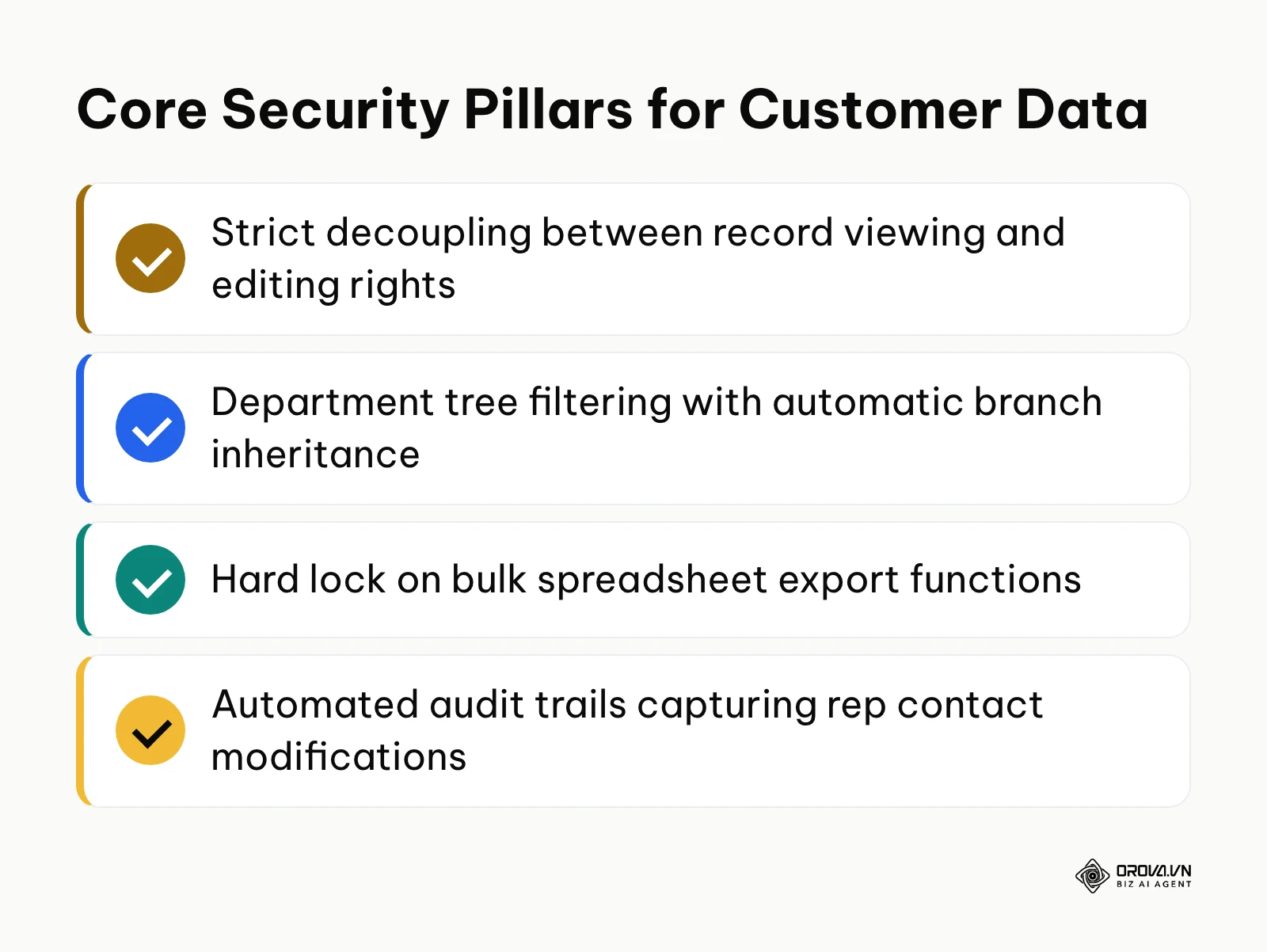
Winner for Data Security: Tie. On-premise wins for organizations with sovereign regulatory mandates requiring air-gapped physical storage; cloud CRM wins for everyday commercial enterprises requiring granular department-level permission boundaries and export controls.
If your sales team struggles with neglected inquiries and pipeline leaks, Orova CRM offers a unified customer register from lead to cash. Set stage-level reclaim timers down to the minute, isolate view and edit rights across department branches, and monitor sales quotas by day or week without seat penalty pricing.
Deployment Speed and Data Migration: Cloud CRM Onboarding vs On-Premise Setup
The operational friction of moving from messy desktop spreadsheets to a centralized CRM platform often derails internal adoption. When evaluating deployment speed, cloud based CRM software operates in a completely different category than on-premise software. Setting up an on-premise CRM requires provisioning physical rack space, installing compatible operating systems, configuring network routing, establishing VPN credentials, and testing database write speeds. This setup phase alone routinely consumes eight to twelve weeks before a single customer record is imported.
In contrast, cloud CRM environments spin up within minutes. The core challenge in cloud CRM onboarding is not infrastructure provisioning; it is data hygiene and schema mapping. To prevent system failure, commercial teams must follow a disciplined ingestion protocol.
| Migration Phase | Operational Step | Data Hygiene & Schema Mapping Task |
|---|---|---|
| Step 1 | Header Normalization | Align spreadsheet columns to standard CRM fields (e.g., Company, Phone). |
| Step 2 | Key Deduplication | Flag and merge redundant records using primary phone and email keys. |
| Step 3 | Custom Field Configuration | Construct exact match fields (dropdowns, currency values) in CRM schema. |
| Step 4 | Sample Batch Validation | Import a 50-row trial batch to verify phone formats and stage mapping. |
| Step 5 | Full Ingestion & Ownership Assignment | Execute bulk upload (under 5,000 rows/batch) mapped to specific reps. |
| Step 6 | Access Verification & Baseline Lock | Test department visibility restrictions before opening system live. |
Step-by-Step Data Hygiene and Rep Onboarding
Practical scenario: A regional wholesale electrical distributor with 12 sales representatives decided to migrate from uncoordinated Excel files to a centralized CRM system.
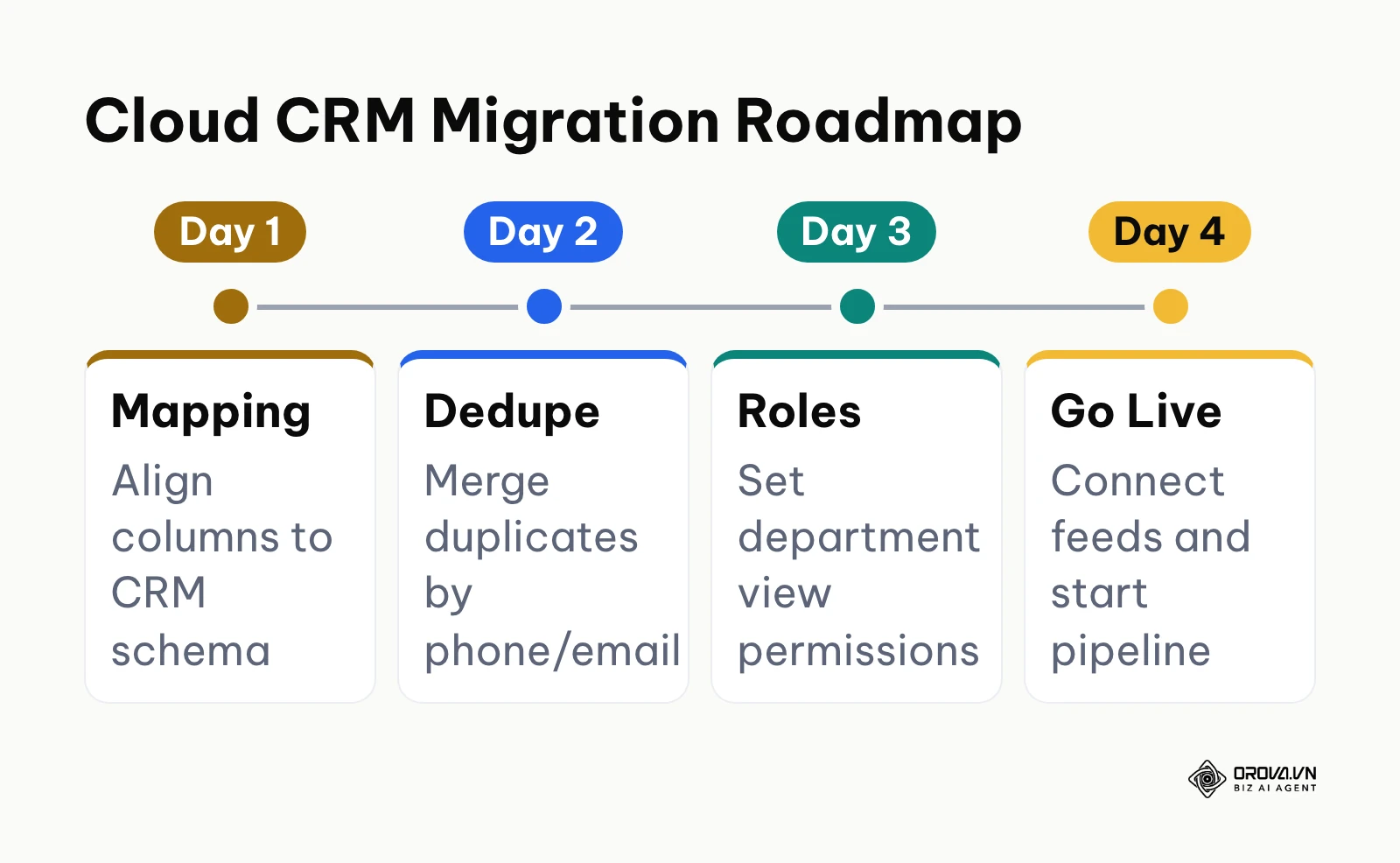
- The administrative team collected spreadsheets from each rep, discovering 3,400 raw entries containing widespread duplicates and mismatched regional formats.
- The team executed a standardized cleaning procedure, filtering records against a single unique key (primary phone number) and consolidating fragmented communication histories into clean CSV imports, following established principles on how to clean crm data to ensure consistent formatting.
- During the initial import test, custom address fields mismatched and failed to populate correctly. The team corrected this by pre-building 21 distinct custom field types in the CRM settings before executing the final import.
- The migration was finalized over a single weekend. On Monday morning, representatives logged into their browser workspaces, viewed their assigned contact lists, and initiated outreach without experiencing a single hour of operational downtime.
Deploying on-premise software with equivalent custom data fields would have required manual SQL table alterations and internal client machine updates.
Winner for Deployment Speed: Cloud CRM wins unequivocally. Implementation schedules drop from several months to under a week, allowing commercial teams to focus on customer engagement rather than database maintenance.
Lead-to-Cash and Field Mobility: Cloud CRM Agility vs On-Premise Infrastructure
A modern commercial workflow does not stop when a sales representative marks an opportunity as "Closed-Won." Revenue realization requires generating professional price estimates, delivering public review links, logging partial installment payments, and tracking outstanding accounts receivable. Furthermore, teams with outside field representatives require mobile tools to verify on-site merchant visits.
Traditional on-premise CRM installations excel at recording historical accounting records behind corporate walls, but they falter in field sales environments. Outside representatives visiting retail accounts or industrial job sites cannot easily connect to an on-premise database without stable broadband and active VPN tunneling. This technical friction leads to delayed note-taking, skipped check-ins, and out-of-date pipeline visibility.
Cloud based CRM software natively closes the operational loop between field prospecting and cash collection. Because cloud platforms operate through modern mobile browsers, representatives can generate official quotes on-site, issue encrypted viewing links directly to a customer's smartphone, and verify merchant visits using built-in device geolocation and display photos.
According to the International Data Corporation (IDC) Worldwide Software as a Service and Cloud Software Forecast (2023), centralized operational applications yield measurable reductions in internal IT support tickets compared to legacy on-premise deployments, largely because mobile browser access eliminates client-side connection failures.
+--------------------------------------------------------------------------+
|                  THE UNIFIED LEAD-TO-CASH REVENUE CYCLE                  |
+--------------------------------------------------------------------------+
|  [Capture]     --> Inbound lead lands from web, site forms, or field rep |
|  [Qualify]     --> Rep validates budget and moves deal through pipeline  |
|  [Quote]       --> System generates standard PDF quote with public link  |
|  [Commit]      --> Client reviews quotation online without account setup |
|  [Installment] --> Rep logs partial milestone deposit directly in record |
|  [Reconcile]   --> Overview dashboard monitors outstanding receivables   |
+--------------------------------------------------------------------------+
When field agents execute route plans, browser-based cloud CRM enables instant check-ins with location verification and storefront photos. Back-office sales managers can monitor daily visit quotas in real time without waiting for end-of-week reporting spreadsheets. For emerging organizations assessing their software architecture, evaluating crm for small business architecture highlights the necessity of unifying client databases with front-line cash collection.
Winner for Field Mobility and Lead-to-Cash: Cloud CRM wins by integrating real-time mobile browser access, geolocation route logging, and public quotation delivery into a continuous sales cycle.
The 25-Point Cloud CRM Operational Scoring Matrix
Before committing financial capital to any commercial sales platform, evaluate your shortlisted software against this comprehensive 25-criteria matrix. A production-ready CRM should achieve a minimum score of 80 out of 100 possible points across these four core functional categories.
| Evaluation Category | Specific Assessment Criterion | Weight (Points) | Cloud CRM Baseline | On-Premise Baseline |
|---|---|---|---|---|
| I. Governance & Security | Granular decoupling of View vs. Edit permissions | 4 | Standard feature | Requires custom code |
| Department organizational tree inheritance | 4 | Standard feature | Complex configuration | |
| Global lock on bulk spreadsheet export | 4 | Configurable in settings | Database level only | |
| Field-level data masking for non-owners | 4 | Available in admin | Custom programming | |
| Two-factor authentication (2FA) enforcement | 4 | Native browser 2FA | Dependent on domain OS | |
| Complete immutable activity audit trails | 5 | Automatic logging | Requires SQL auditing | |
| II. Pipeline Automation | Minute-level stage timeout and lead reclaim rules | 5 | Visual rule configuration | Requires scheduled cron |
| Automated round-robin lead allocation | 4 | Native rule builder | Third-party script | |
| Inbound form integration with duplicate checking | 4 | Direct endpoint sync | Middleware connector | |
| Customizable deal stages with mandatory fields | 4 | Drag-and-drop builder | Manual table schema | |
| Custom reason prompts for closed-lost records | 4 | Native modal prompt | Basic database field | |
| Scheduled follow-up email sequences | 4 | Built-in email tool | External mail server | |
| III. Lead-to-Cash Execution | Professional PDF quote and invoice generation | 4 | Template warehouse | Crystal Reports / Word |
| Tokenized public viewing links for client quotes | 4 | Native cloud links | Requires public web server | |
| Staged installment payment recording | 4 | Native ledger ledger | ERP integration required | |
| Overdue accounts receivable dashboard tracking | 4 | Automatic overview | Manual accounting pull | |
| Multi-currency transaction logging | 4 | Native currency tags | System-wide base currency | |
| IV. Field Operations & Daily Use | Zero-install mobile browser responsiveness | 4 | Responsive HTML5 | Requires VPN client |
| Route planning with verified GPS check-ins | 4 | Device geolocation API | Third-party mobile app | |
| On-site photo attachment for retail displays | 4 | Native mobile upload | File server sync utility | |
| Flexible spreadsheet-style table customization | 4 | Column drag and freeze | Fixed desktop views | |
| Up to 21 distinct custom field data types | 4 | No-code administration | Database administrator | |
| Daily and weekly sales quota tracking by rep | 4 | Converted target metric | Static annual reporting | |
| Rapid bulk CSV data import with field mapping | 4 | Guided import wizard | SQL import scripts | |
| Scalable workspace billing without per-seat spikes | 5 | Available on flat plans | Heavy capital upfront |
When to Choose Cloud CRM: Four Clear Operational Scenarios
Investing in cloud based CRM software delivers the highest return on investment under specific organizational conditions:
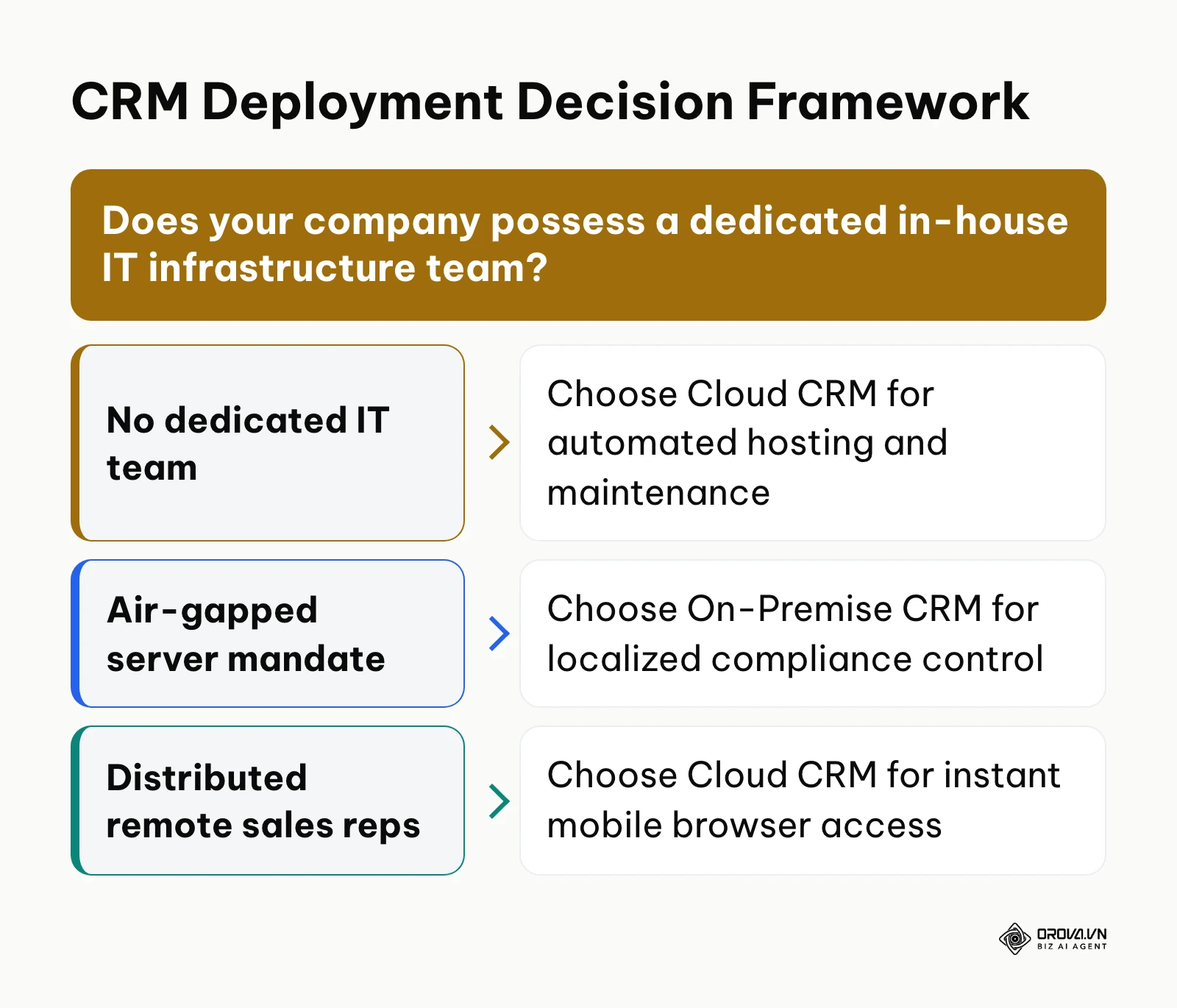
- Distributed or Mobile Sales Teams: When your commercial team includes remote business development representatives, territory account managers, or field agents who spend their days away from a central office, cloud CRM provides uninterrupted browser access without requiring corporate VPNs.
- Growing Organizations Without Dedicated IT Staff: If your company operates without a dedicated database administrator, systems engineer, or on-call network specialist, cloud CRM delegates infrastructure health, data backups, and security patches entirely to the service provider.
- High-Velocity Pipeline Environments: Organizations handling dozens of inbound marketing inquiries daily require real-time lead routing and automated stage-timeout reclaiming. Cloud platforms execute these automation rules instantly without custom backend scripting.
- Agile Businesses Requiring Predictable Operational Outlays: Companies that prioritize preserving liquid capital benefit significantly from operational subscription pricing, avoiding the heavy capital equipment outlays associated with physical server procurement.
When to Choose On-Premise CRM: Four Specific Enterprise Scenarios
Conversely, on-premise CRM software remains the appropriate architectural choice under certain enterprise constraints:
| Enterprise Constraint | Regulatory & Operational Driver | Architectural Rationale |
|---|---|---|
| Air-Gapped Compliance | Defense contractors and intelligence bodies bound by sovereign legal covenants | Mandatory physical server isolation behind local corporate firewalls |
| Amortized Private Server Racks | Enterprises maintaining dedicated database administration teams on site | Maximizes return on historical capital expenditure without new software subscriptions |
| Unrestricted Database Modifying | Corporations requiring direct SQL table changes and custom compiled code forks | Bypasses multi-tenant cloud restrictions for deep proprietary modifications |
| Telecommunications Blackouts | Commercial facilities operating in remote regions with unstable web coverage | Continuous local area network logging independent of external Internet uptime |
- Air-Gapped and Sovereign Data Mandates: Defense contractors, intelligence service providers, and specialized financial institutions bound by strict legal covenants may be prohibited from hosting proprietary customer identity records on external cloud infrastructure.
- Existing Data Center Infrastructure with Dedicated Staff: Enterprises that have already amortized modern private server arrays and maintain full-time database administration teams can deploy on-premise CRM systems without incurring new capital equipment expenses.
- Unrestricted Underlying Database Customization: Large corporations that require direct, unrestricted SQL-level manipulation of database tables, proprietary stored procedures, and custom compiled code forks often find standard cloud multi-tenant boundaries too restrictive.
- Operations in Regions with Unreliable Internet Infrastructure: Facilities operating in remote geographic territories with unstable telecommunications infrastructure require local area network access to maintain continuous record entry during external network blackouts.
Eliminate user license traps and lead hoarding in one operational workspace. Orova CRM gives growing teams centralized pipeline control, quote-to-invoice workflows, and field route verification with all capabilities unlocked, free until July 7, 2027.
Can You Combine Cloud CRM and On-Premise Systems in a Hybrid Stack?
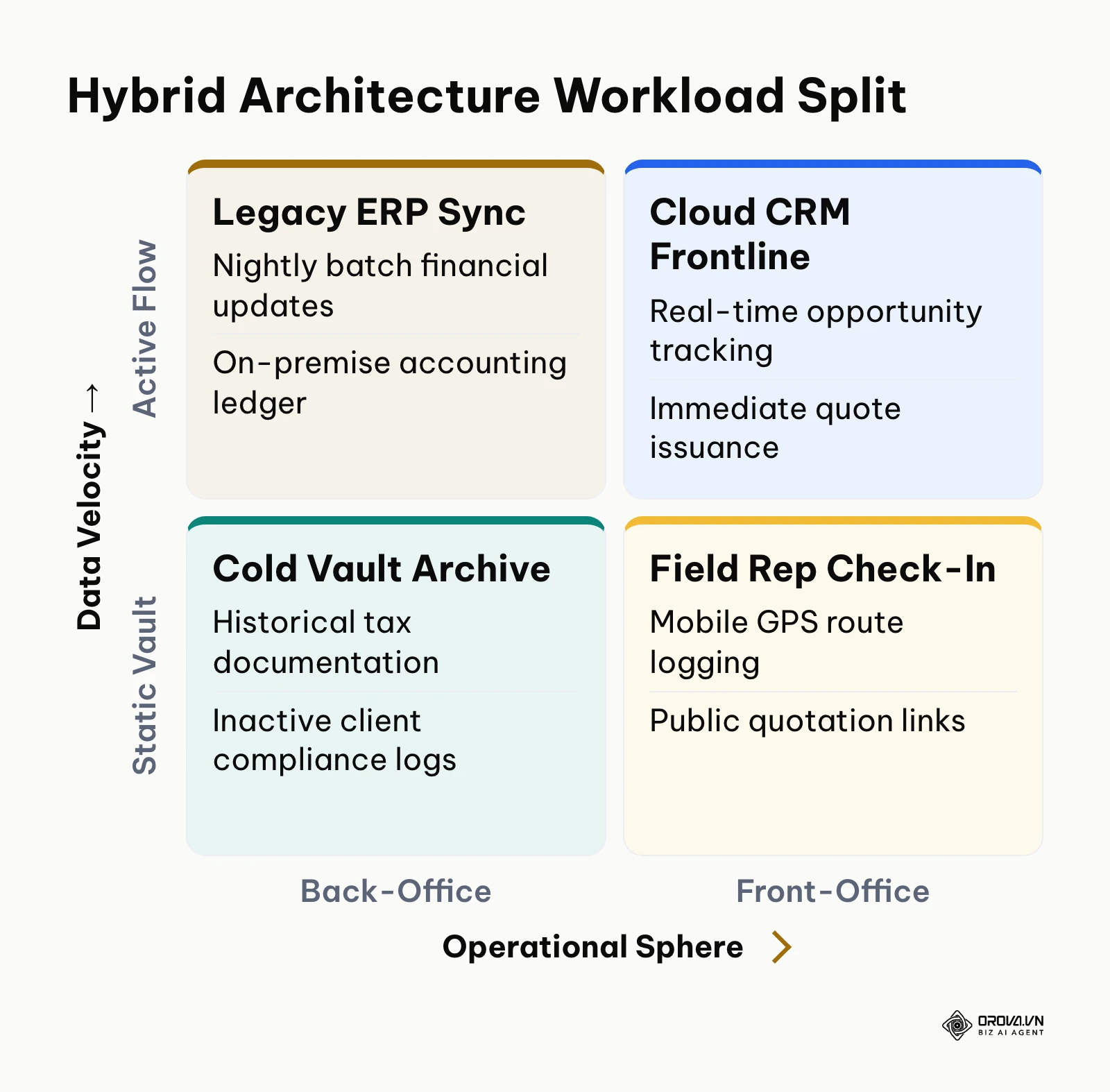
Many established enterprises choose not to treat cloud and on-premise as mutually exclusive options. Instead, they deploy a hybrid operational architecture. Under this model, an enterprise maintains its historical transaction ledger, enterprise resource planning (ERP) system, and general accounting ledger on secure on-premise servers, while deploying cloud based CRM software on the commercial frontline for sales representatives.
| Operational Sphere | System Component | Core Architectural Workloads | Data Transfer Protocol |
|---|---|---|---|
| Frontline Sales | Cloud CRM Platform | Leads captured from web and site forms; automated lead reclaim timer protects response speed; reps generate quotes and share public links; installment milestones logged upon customer deposit. | Encrypted REST API with scheduled synchronization. |
| Back-Office Core | On-Premise ERP System | General ledger and double-entry accounting records; warehouse inventory physical counts and logistics; historical financial audit archives. | Local database staging and verified ledger batch import. |
Frontline Velocity Meets Back-Office Compliance
In a well-designed hybrid architecture, frontline sales representatives never interact directly with cumbersome legacy ERP screens. They manage active prospect pipelines, record meeting notes, and issue commercial estimates within an agile cloud workspace. Once a deal transitions to "Closed-Won" and the initial deposit clears, an encrypted REST API transmits the finalized customer profile and invoice line items to the on-premise ERP system for fulfillment and tax accounting.
The primary operational risk in a hybrid stack is data synchronization friction. If field mapping between the cloud CRM and on-premise tables is poorly maintained, customer records can duplicate or overwrite critical contact details. To execute this transition smoothly, organizations deploy modern cloud CRM architectures that bridge frontline sales velocity with operational control. Teams configure stage-level lead reclaiming rules measured in minutes, enforce strict department viewing and editing boundaries across organizational trees, generate standardized commercial quotations with public client links, and log installment receipts without exposing internal backend databases to external security vulnerabilities.
The Future of Cloud CRM Over the Next Three Years: Author Perspective
Observing the ongoing structural shifts in commercial software through 2026, I anticipate that the relationship between sales organizations and their CRM platforms will undergo three fundamental transformations over the coming two to three years.
First, I believe that traditional per-seat SaaS pricing will face an inevitable contraction. Today, businesses are growing weary of the "user tax" model, where adding a frontline employee penalizes the operational budget with software license surcharges. Over the next 24 to 36 months, I expect commercial buyers to push aggressively toward resource-based, flat workspace pricing models. Companies will demand software where access is democratized across the entire organization, from sales reps to field technicians, without fear of ballooning monthly fees. However, this shift could decelerate if major legacy SaaS conglomerates successfully lock mid-market enterprises into rigid multi-year enterprise bundling agreements. To prepare, operations leaders should avoid signing multi-year contracts that mandate steep minimum seat commitments.
Second, I project that artificial intelligence will transition from a marketing novelty into specialized background workflow orchestration. As of 2026, many platforms promote surface-level AI tools, such as basic text rewrite buttons or generic chatbots, which provide negligible operational value. In my view, the real AI breakthrough in CRM over the next three years will focus on silent, deterministic operational hygiene: automated duplicate reconciliation, structured audit anomaly detection, and deep semantic inquiry routing. Rather than generating promotional copy, algorithmic models will quietly ensure that incoming corporate leads are matched to existing account hierarchies without human intervention. This transformation could be hindered if corporate data privacy regulations restrict the automated parsing of unstructured commercial communications. Organizations should prepare today by establishing rigorous manual data hygiene standards, because machine learning models cannot fix fundamentally broken data structures.
Third, I believe the traditional boundary separating front-office sales pipelines from back-office quotation and cash collection will dissolve entirely. Today, too many sales teams still record a deal in a CRM, switch to a desktop spreadsheet to calculate a discount quote, and open a separate messaging tool to check payment status. In the next three years, competitive pressure will force commercial platforms to consolidate the entire lead-to-cash lifecycle into a single operational view. Teams that operate within fragmented toolchains will simply be outpaced by competitors who issue interactive quotes and reconcile installments within a single screen. This operational consolidation might falter if regional banking and invoicing standards remain stubbornly fractured across international borders. Sales directors should begin preparing now by mapping their entire lead-to-cash flow on paper and identifying every point of software handoff where deals lose momentum.
Frequently Asked Questions About Cloud Based CRM Software
What is the primary difference between cloud based CRM software and on-premise CRM?
The fundamental difference centers on infrastructure custody and operational access. Cloud based CRM software is hosted on remote, vendor-maintained server environments and accessed directly through web browsers, eliminating internal hardware overhead. On-premise CRM software is installed locally on a company's internal server hardware, requiring dedicated in-house IT staff to handle server maintenance, security firewalls, and manual software upgrades.
How much does cloud based CRM software typically cost for a small business?
Pricing varies significantly depending on the vendor's billing model. Traditional SaaS platforms charge per user, typically ranging from 15 to 65 dollars per user per month for standard editions, with advanced workflow tiers reaching 150 dollars or more. When accounting for storage expansions and integration connectors, a 10-person sales team typically spends 8,000 to 12,000 dollars annually. Alternatively, modern flat-workspace platforms charge predictable hosting fees that can lower Year 1 total cost of ownership by over seventy percent.
How does cloud based CRM software prevent sales representatives from hoarding leads?
Advanced cloud CRM platforms implement automated lead reclaiming mechanisms governed by strict stage timeout rules. Administrators configure threshold limits measured in minutes for each individual pipeline stage. If an assigned representative fails to log an activity, note, or stage update within the designated timeframe, the software automatically strips rep ownership and returns the neglected prospect to the unassigned pool for redistribution.
Can an on-premise CRM operate without an active Internet connection?
Yes. Because on-premise CRM software is installed on local physical hardware connected to your corporate Local Area Network (LAN), internal staff located within the physical office can continue logging customer updates, viewing account histories, and modifying deal records even during wide-scale external Internet outages. However, remote employees outside the office will lose connectivity until the network is restored.
How are AI capabilities reshaping cloud based CRM software in 2026?
As of 2026, the most effective AI applications within commercial CRM software are shifting away from superficial text generation and moving toward operational workflow automation. Practical machine learning handles automated contact deduplication, semantic inquiry routing, and background data hygiene, ensuring that commercial pipelines maintain pristine data integrity without burdening sales representatives with manual administrative data entry.
Is cloud based CRM software secure enough for sensitive commercial customer data?
Yes, provided the software incorporates robust role-based governance. Reputable cloud CRM providers host databases within high-security facilities featuring SOC 2 Type II compliance, automated redundancy, and continuous encryption in transit and at rest. To prevent internal data leaks, organizations must select systems that decouple viewing permissions from editing rights, mirror organizational departmental trees, and enforce hard locks on bulk spreadsheet exports.
Where Should You Start with Cloud CRM?
Transitioning your commercial team to a modern software foundation does not require an overwhelming operational overhaul. Depending on your current organizational situation, choose the single actionable step you can complete in a single afternoon:
- If your sales team is currently tracking deals across scattered desktop spreadsheets: Stop attempting to build complex macro formulas. Take your primary spreadsheet, delete unused historical columns, and standardize three essential column headers: Contact Name, Phone Number, and Pipeline Stage. Completing this simple data cleanup prepares your records for an error-free, one-click CSV ingestion into a centralized customer registry.
- If you are already using a legacy CRM but struggling with lead neglect and rep adoption: Open your administrative settings and establish a clear lead reclaiming rule. Define a single 60-minute timeout rule on your inbound inquiry stage so that any prospect left untouched automatically returns to a shared pool, immediately demonstrating to your team that speed-to-contact is an absolute operational priority.
- If your business is evaluating software replacements due to escalating per-seat costs: Perform a 12-month software audit. Tally your baseline licensing fees, storage add-on charges, and API connector costs, then compare that sum against modern workspace-based architectures to see exactly how much capital your company can redirect toward commercial growth by modernizing your cloud based crm software.
About the author

Builder of Orova
Nguyễn Đỗ Trọng Ân has 8 years of experience in marketing, including 6 years managing market development across Asia. He builds Orova, a Biz AI Agent that never sleeps: it plans, runs and optimizes work for businesses.
Run your business with AI Agents
Orova is the always-on Biz AI Agent — it plans, runs, and optimizes the work for you.
Save time, unlock productivity.