
Cloud based LMS vs on-premise LMS: Which to choose in 2026 (with 3-year TCO)

Selecting a cloud based lms versus an on-premise system represents one of the most critical infrastructure choices an organization's training leadership will make. Companies frequently struggle between maintaining direct physical custody of their learning servers and embracing the operational agility of a managed software-as-a-service (SaaS) subscription. Organizations with lean technical teams and distributed workforces should choose a cloud based lms for rapid deployment and automated maintenance, whereas highly regulated defense contractors operating air-gapped networks requiring total data isolation must implement an on-premise LMS.
To make an objective procurement decision, this guide evaluates both hosting paradigms across five structural benchmarks: three-year total cost of ownership (TCO), implementation velocity, native course authoring capabilities, vendor pilot validation protocols, and technical security controls.
Cloud-Based LMS vs On-Premise LMS: High-Level Comparison
A cloud based lms hosts application software, media databases, and student progress records in a vendor-managed cloud environment, whereas an on-premise LMS requires installing and maintaining the software on private company servers behind an internal firewall. This architectural distinction fundamentally dictates your ongoing capital expenditure, IT workload, and deployment flexibility.
| Evaluation Criterion | Cloud-Based LMS | On-Premise LMS | Advantage |
|---|---|---|---|
| Infrastructure Hosting | Vendor cloud (multi-tenant or dedicated AWS/GCP/Azure) | Internal company servers or rented data center racks | Cloud-Based LMS |
| Upfront Capital Outlay | Low (small or no setup fee, then a recurring subscription) | High (servers, OS, and perpetual licenses bought upfront) | Cloud-Based LMS |
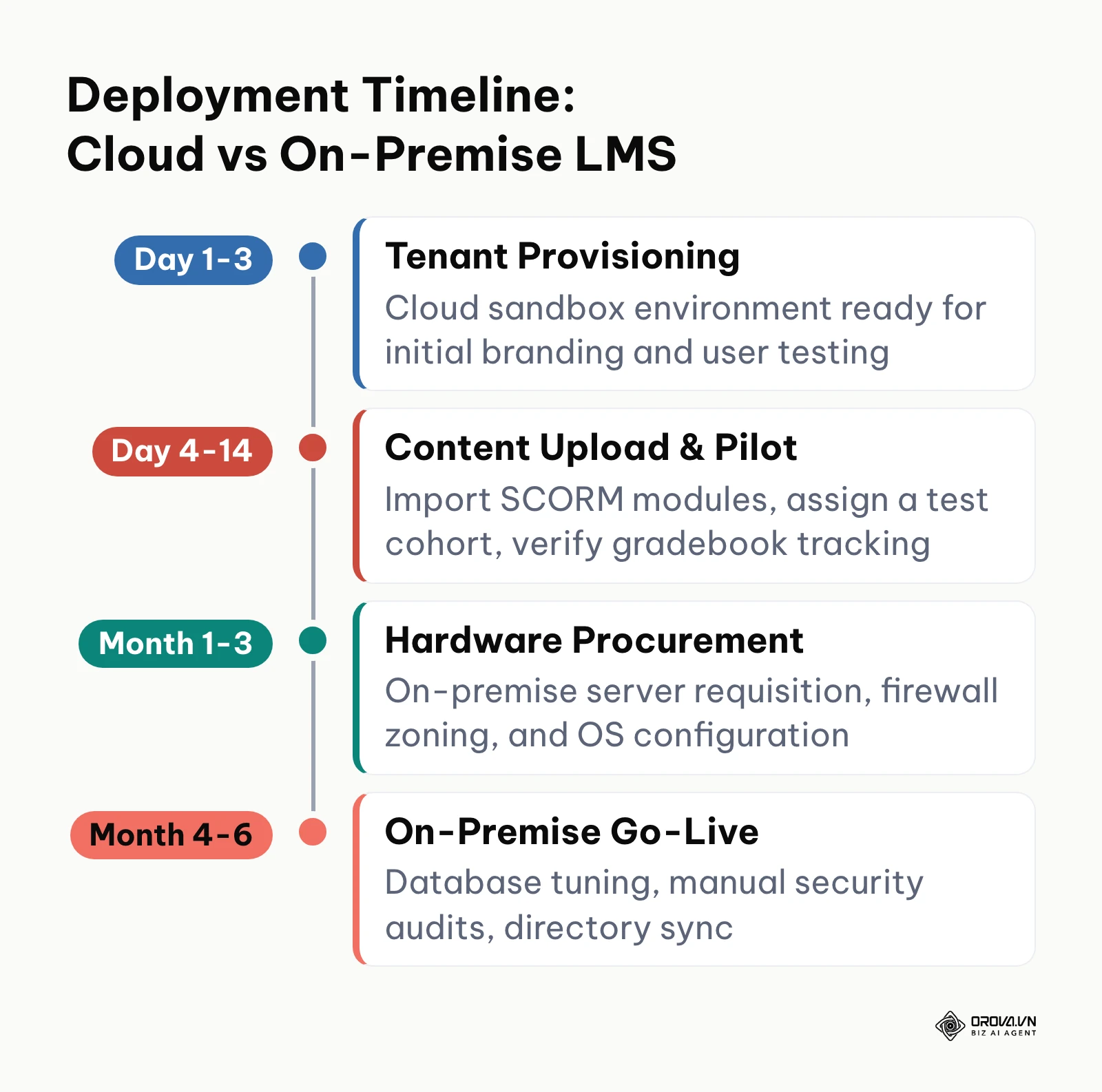
| Deployment Timeline | 1 to 14 business days | 3 to 6 months | Cloud-Based LMS |
| IT Maintenance & Patches | Handled automatically by vendor without downtime | Managed manually by internal systems engineers | Cloud-Based LMS |
| Scalability | Instant elasticity via software subscription tiers | Hardware expansion, load balancer reconfigurations, storage SANs | Cloud-Based LMS |
| Data Custody & Residency | Shared or vendor-managed multi-region data centers | Direct physical custody within sovereign corporate perimeter | On-Premise LMS |
| Source Code Customization | Configuration via APIs, webhooks, and vendor settings | Direct database queries, custom PHP/Java/Python core modifications | On-Premise LMS |
| Feature Upgrade Cadence | Bi-weekly or monthly automated feature rollouts | Annual or bi-annual manual upgrade projects with regression testing | Cloud-Based LMS |
What Are Cloud-Based LMS and On-Premise LMS Platforms?
Both architectures deliver courses and record compliance scores, but they operate on conflicting infrastructure principles. Selecting the right foundation requires understanding their original engineering design goals.
What Is a Cloud-Based LMS?
A cloud based lms is a software-as-a-service platform hosted, secured, and updated on a vendor's remote cloud infrastructure. It was engineered to eliminate internal corporate server provisioning, allowing human resources and instructional design departments to manage training programs through a web browser without dedicated network engineers.
What Is an On-Premise LMS?
An on-premise LMS is an enterprise learning software suite installed directly onto a company's self-managed physical servers or private virtual machines. It was designed for organizations requiring absolute physical custody of proprietary training data, zero reliance on external third-party cloud uptime, and unrestricted access to the underlying relational database architecture.
Total Cost of Ownership (TCO): Cloud-Based LMS vs On-Premise LMS
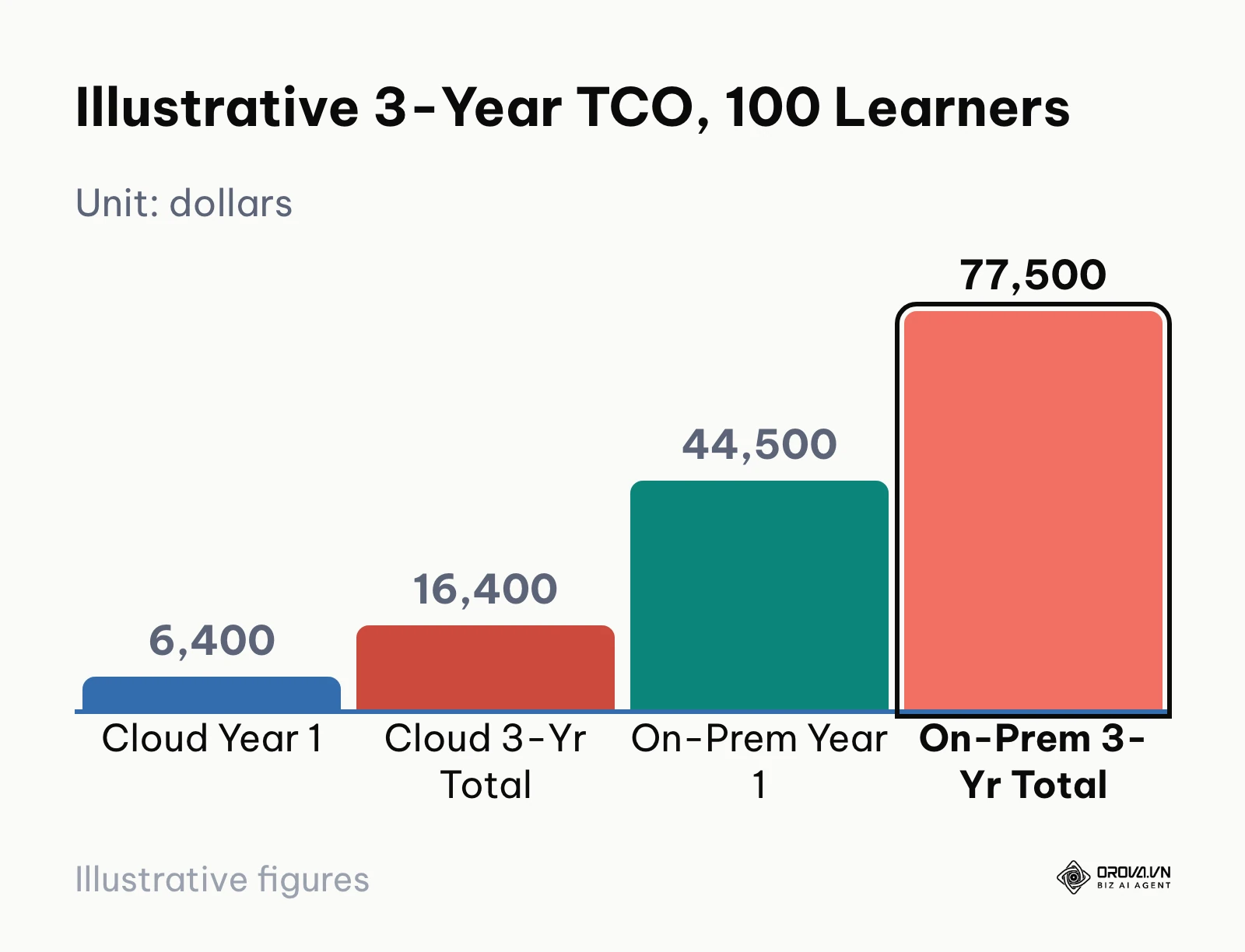
Comparing initial software invoices misleads procurement committees because software licenses constitute only a fraction of lifetime deployment expenses. A cloud based lms shifts capital expenditures into predictable operational expenses, whereas an on-premise system demands substantial initial hardware commitments followed by ongoing internal IT labor overhead. The illustrative model below (example assumptions, not vendor quotes) shows how this cumulative cost divergence can play out over a three-year operating lifecycle. Replace each line with your own quotes and salary data.
According to the National Institute of Standards and Technology (NIST) in Special Publication 800-145 (2011), cloud computing is characterized by on-demand self-service, rapid elasticity, and measured service. In practice, that service model moves most infrastructure maintenance to the hosting provider. In contrast, on-premise deployments require internal allocations for server rack depreciation, electrical power, hypervisor virtualization licenses, backup storage networks, and systems administration salaries.
| Expense Category (illustrative) | Year 1: Cloud LMS (100 Users) | 3-Year Cloud Total | Year 1: On-Premise (100 Users) | 3-Year On-Premise Total |
|---|---|---|---|---|
| Software Licensing | 4,800 dollars (4 dollars/user/month) | 14,400 dollars | 18,000 dollars (Perpetual license tier) | 18,000 dollars |
| Server Hardware & OS | 0 dollars (Included in cloud subscription) | 0 dollars | 12,000 dollars (Rack server + Windows/Linux OS) | 15,000 dollars (Hardware refresh/parts) |
| Setup & Implementation | 1,600 dollars (Admin onboarding + branding) | 2,000 dollars (Minor configuration) | 8,500 dollars (Network configuration + database setup) | 11,500 dollars (Migration adjustments) |
| Internal IT Maintenance Labor | 0 dollars (Zero sysadmin overhead) | 0 dollars | 6,000 dollars (15% allocation of an 80,000-dollar sysadmin salary) | 18,000 dollars (Ongoing patches & monitoring) |
| Upgrades & Security Patches | 0 dollars (Automatic updates) | 0 dollars | 0 dollars (Included in Year 1 maintenance) | 15,000 dollars (Major version migration consultant) |
| Total Cumulative Cost | 6,400 dollars | 16,400 dollars | 44,500 dollars | 77,500 dollars |
Running the same illustrative assumptions at other headcounts shows how the gap moves:
- 50 Users: At the same per-user assumption, the cloud line drops to roughly 2,400 dollars a year, while the on-premise model still needs most of its upfront hardware, database licenses, and setup work, because servers do not shrink with the roster.
- 100 Users: This is the table above: 6,400 dollars in cloud Year 1 against 44,500 dollars on-premise, rising to 77,500 dollars over three years once internal IT maintenance hours are counted.
- 200 Users: The cloud subscription line doubles to about 9,600 dollars a year, while the on-premise line grows more slowly (extra storage and capacity) but starts from a much higher base.
Real vendor pricing varies widely by seat count, features, and contract length, so treat the per-user figure as a placeholder and ask each shortlisted vendor whether video bandwidth, support, and storage are included or billed separately.
Illustrative example: A mid-sized precision manufacturing company with 80 shop-floor technicians tasked its HR director with establishing a formal safety certification portal. The director initially reviewed quotes for a self-hosted open-source LMS, which appeared attractive due to zero software license fees, alongside a commercial cloud LMS subscription quoted at 360 dollars per month. During technical scoping with internal IT, the team discovered the on-premise deployment required a dedicated database server license (3,400 dollars), an off-site secondary disaster recovery backup connection (180 dollars monthly), and an estimated 12 hours per month of senior network administrator maintenance time. After calculating the actual three-year TCO, leadership rejected the on-premise installation and signed a multi-user cloud tier. The company launched its safety modules on schedule without requisitioning new server hardware or requesting emergency IT overtime.
Under almost all circumstances involving small-to-midsize organizations (under 1,000 employees), the cloud based lms delivers superior cost efficiency by eliminating dedicated infrastructure maintenance and unexpected version migration fees.
Deployment Speed and Maintenance: Cloud-Based LMS vs On-Premise LMS
Implementation velocity separates modern SaaS tools from traditional enterprise software. A cloud based lms deploys in days because the underlying multitenant environment, database schemas, and networking routes are pre-configured. Conversely, an on-premise LMS requires a coordinated enterprise project involving hardware procurement, firewall zoning, SSL certificate installation, and directory integration. The visual timeline below contrasts these two implementation paths.
While a cloud platform activates via an administrative web browser sign-in, an on-premise build requires rigorous internal validation. If an operating system kernel patch conflicts with the learning software's underlying PHP or Java runtime, internal engineers must troubleshoot the regression manually. In contrast, cloud LMS providers run dedicated site reliability engineering (SRE) teams and publish uptime commitments in their service level agreements, so check that figure in the contract.
Illustrative example: A regional logistics agency with 150 commercial drivers needed to roll out mandatory cold-chain compliance modules within three weeks to meet transport ministry auditing deadlines. The training supervisor attempted to install an open-source LMS instance on a local virtual machine, running standard Apache web server and MySQL database packages. During initial load testing with 30 concurrent video sessions, the server ran out of memory, causing SCORM tracking packages to drop connection states and corrupt learner quiz submissions. Lacking in-house database optimization expertise, the supervisor switched to a turn-key cloud LMS sandbox, imported the required video files, and invited driver cohorts via email magic links. All 150 drivers completed their compliance certifications three days ahead of the regulatory deadline with zero tracking errors.
For organizations operating under strict project deadlines or lacking dedicated DevOps engineers, the cloud based lms wins decisively on deployment speed and maintenance simplicity.
Course Creation and AI Integration: Cloud-Based LMS vs On-Premise LMS
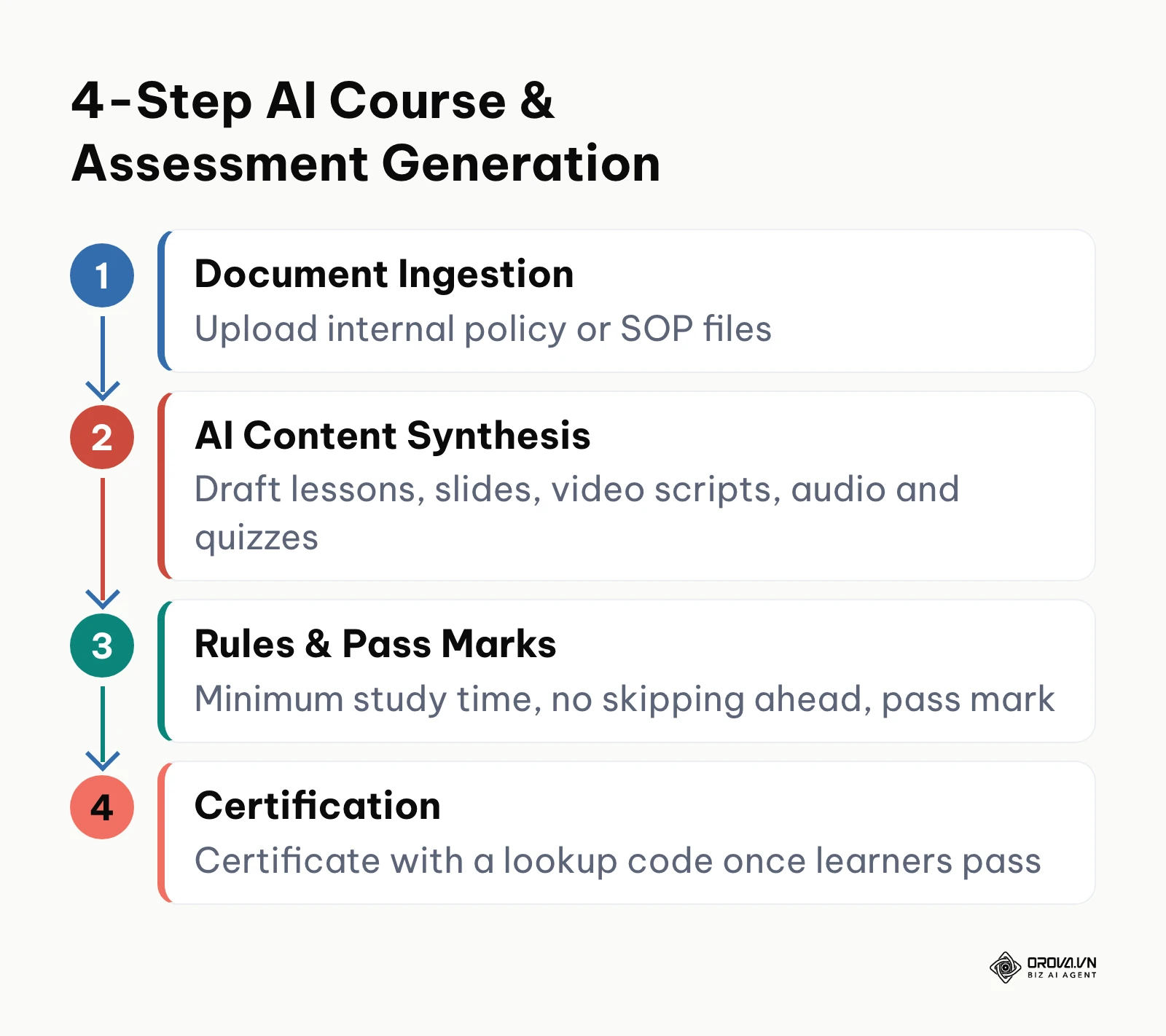
Authoring rich learning materials has historically formed the primary bottleneck in enterprise training. In traditional on-premise systems, creating an interactive course requires purchasing third-party desktop authoring software, assembling slides, embedding media, exporting zip packages, and uploading them manually to the server. Modern cloud platforms increasingly eliminate this friction by incorporating artificial intelligence directly into the browser workspace. The diagram below illustrates this streamlined 4-step content lifecycle.
According to the Advanced Distributed Learning (ADL) Initiative in the SCORM 1.2 Specification (2001), compliant learning management systems must support standardized run-time environments and data tracking via API wrappers to ensure course packages function across heterogeneous platforms. Modern cloud systems maintain full compatibility with this legacy standard while enabling automated generative transformation from internal manuals. Learning leaders can consult a dedicated SCORM compliant LMS testing guide to evaluate how different engines handle completion triggers and bookmarking.
The standard 4-step cloud AI course creation workflow operates as follows:
- Document Ingestion: The administrator uploads unstructured internal documentation, including SOP operating manuals, technical safety guidelines, or policy briefs in PDF, DOCX, or raw text format.
- AI Content Synthesis: The cloud engine analyzes the source text and drafts it into structured reading lessons, presentation slides, narrated video scripts, audio briefs, and balanced multiple-choice question banks.
- Rules & Pass Thresholds: The training administrator reviews generated assets, edits specific phrasing, and configures enforcement logic, such as mandatory minimum screen time, disabled forward scrubbing on video lessons, and required passing scores (e.g., 80%).
- Automated Certification: Upon completing the required lessons and passing the quiz, the system automatically issues a digital certificate with a unique verification code that anyone can look up.
To understand how these automated authoring features align with broader procurement goals, teams should review this framework on how to choose an LMS before locking in multi-year commitments.
Because cloud platforms integrate directly with scalable cloud AI APIs and modern media processing clusters, a cloud based lms provides vastly superior native content authoring and generative quiz creation compared to static on-premise software.
If turning manuals and slides into employee training is slowing your schedule down, try Orova Training. It uses AI to draft lessons, slides, podcasts, narrated videos with subtitles, and flashcard sets, then lets you assign each course to a workspace, a group, or individual learners. Sign up yourself, no card needed, and test the workflow on one real onboarding course.
Vendor Evaluation and Pilot Testing: Cloud-Based LMS vs On-Premise LMS
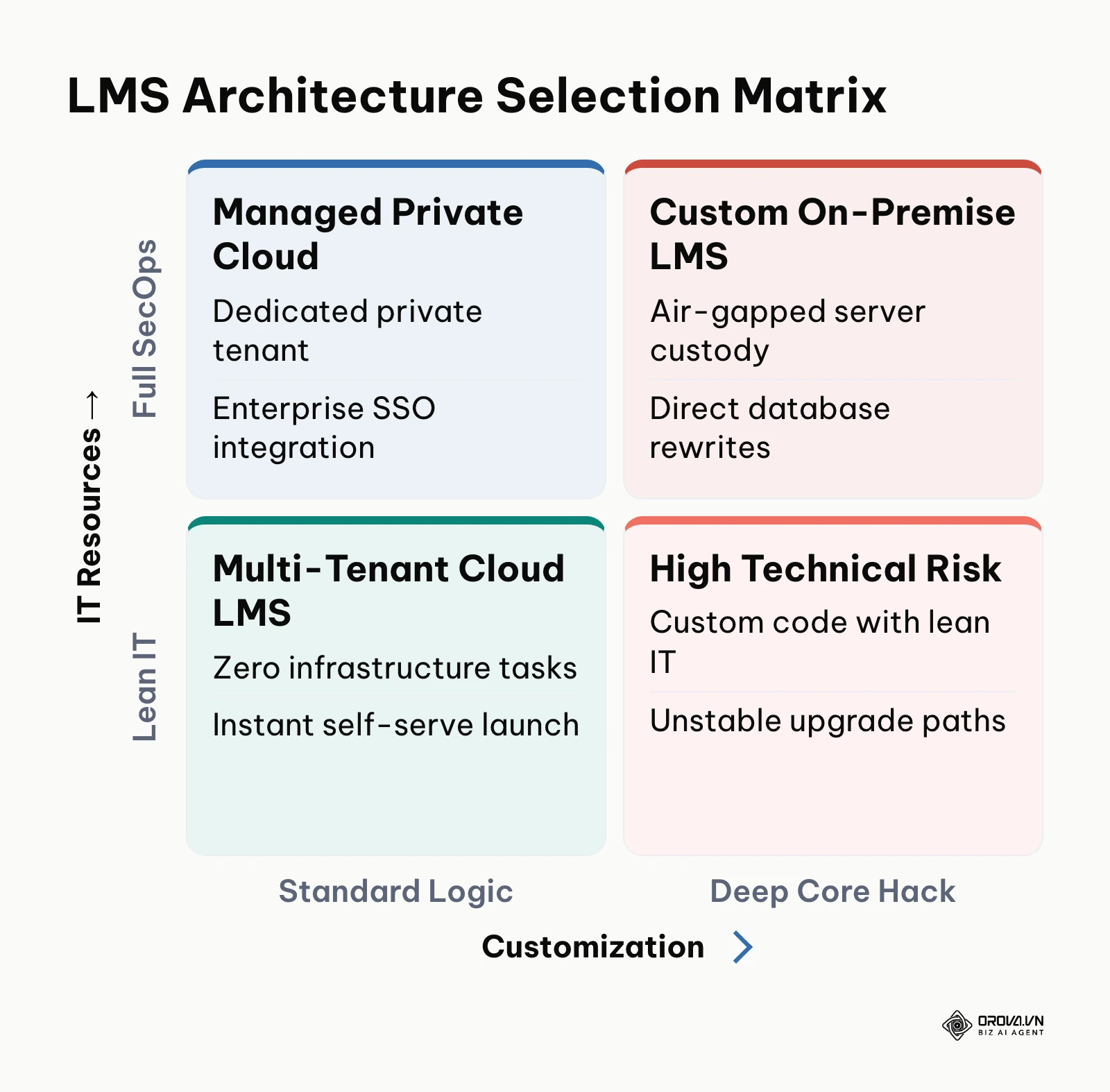
Procuring an enterprise learning system without executing a hands-on proof of concept (POC) frequently leads to buyer remorse. Evaluating an on-premise system requires establishing a sandboxed virtual server, which consumes significant engineering resources before a single stakeholder evaluates the user interface. A cloud based lms allows immediate, zero-friction sandbox creation. The matrix below balances these architectural trade-offs against institutional IT capability.

To safeguard your investment, evaluation teams should run a 14-day pilot using a weighted scorecard across three core functional pillars: Learner Experience, Administrative & Assessment, and Technical & Security. A candidate vendor must achieve a minimum composite score of 80% across all 15 criteria before contract execution.
| Evaluation Category | Detailed Criterion | Weight (%) | Pass Criteria (Pass / Fail) | Your Result |
|---|---|---|---|---|
| Learner Experience | 1. Mobile Responsiveness | 8% | Clean layout on iOS and Android without horizontal scrolling | [ ] Pass [ ] Fail |
| Learner Experience | 2. Media Streaming Latency | 7% | Video lessons buffer and begin playback in under 2 seconds | [ ] Pass [ ] Fail |
| Learner Experience | 3. Assessment Navigation | 7% | Clear button layouts with unmistakable answer selection indicators | [ ] Pass [ ] Fail |
| Learner Experience | 4. Progress Visualization | 5% | Accurate visual percentage indicators across multi-module courses | [ ] Pass [ ] Fail |
| Learner Experience | 5. Audio Playback Support | 5% | Background audio briefs continue playing when switching browser tabs | [ ] Pass [ ] Fail |
| Admin & Assessment | 6. Bulk Question Import | 8% | Upload question banks via clean CSV/Excel without parser formatting errors | [ ] Pass [ ] Fail |
| Admin & Assessment | 7. Automated Question Generation | 8% | Creates balanced single and multiple-choice questions from PDF text | [ ] Pass [ ] Fail |
| Admin & Assessment | 8. Strict Learning Rules | 7% | Enforces mandatory minimum duration and disables forward video scrubbing | [ ] Pass [ ] Fail |
| Admin & Assessment | 9. Automated Credentialing | 7% | Automatically issues customized PDF certificates upon passing quiz | [ ] Pass [ ] Fail |
| Admin & Assessment | 10. Granular Reporting | 6% | Exports individual learner timestamps, quiz attempts, and item responses | [ ] Pass [ ] Fail |
| Technical & Security | 11. SCORM 1.2 Import/Export | 8% | Successfully loads and tracks external SCORM packages with correct score reporting | [ ] Pass [ ] Fail |
| Technical & Security | 12. Single Sign-On (SSO) | 8% | Integrates cleanly via standard SAML 2.0 or OAuth identity providers | [ ] Pass [ ] Fail |
| Technical & Security | 13. Role-Based Access Control | 6% | Restricts course editing permissions strictly to designated training admins | [ ] Pass [ ] Fail |
| Technical & Security | 14. Data Backup Verification | 5% | Automated daily database snapshots with verified point-in-time recovery | [ ] Pass [ ] Fail |
| Technical & Security | 15. Offline State Protection | 5% | Preserves active quiz progress locally if client internet connection drops | [ ] Pass [ ] Fail |
Migrating historical question banks and learner completion histories from spreadsheet templates or Google Forms into a cloud LMS represents another frequent challenge. To avoid corrupting question formatting during migration, follow a strict three-phase sanitization process:
- First, extract all Google Forms and spreadsheet questions into a clean UTF-8 encoded CSV template, ensuring all HTML formatting tags, soft line breaks, and non-standard quotation marks are stripped.
- Second, format columns strictly into four discrete attributes: Question Stem, Answer Options (separated by dedicated delimiter pipes), Correct Answer Key, and Explanation Rationale.
- Third, test the import file on a private staging sandbox with five questions before executing the full 500-question catalog upload to verify character encodings.
For agility and ease of stakeholder evaluation, the cloud based lms is clearly superior during the pilot testing and vendor selection phase.
Security, Compliance, and Offline Reliability: Cloud-Based LMS vs On-Premise LMS
Traditional cybersecurity doctrine favored on-premise systems under the assumption that keeping data behind a physical office firewall guaranteed superior security. Today, large cloud providers often run security programs that a small internal IT department would struggle to match.
According to the International Organization for Standardization (ISO) in the ISO/IEC 27001 Information Security Standard (2022), an information security management system should cover controls such as access control, cryptography, and backup, which are exactly the areas to probe in any LMS hosting review. Reputable cloud LMS providers routinely provide independently audited SOC 2 Type II reports, ISO 27001 certifications, and automated daily off-site backups across distributed availability zones. Conversely, an on-premise LMS relies entirely on internal staff to install operating system security patches, manage database firewall configurations, and maintain hardware redundancy.
A critical consideration for retail, field service, and construction organizations is offline and low-bandwidth resilience. Well-built cloud LMS web applications can handle connectivity interruptions through client-side browser caching, so ask vendors to demonstrate it during the pilot:
- While a learner progresses through an assessment, the browser stores question states and recorded answers locally within the browser's IndexedDB or persistent localStorage cache.
- If a mobile worker enters a Wi-Fi dead zone while answering questions, the interface remains interactive, buffering timestamps and choices locally without freezing the exam screen.
- Once connectivity is restored, the client executes an automated synchronization handshake, posting cached responses to the cloud server and verifying the database commit before displaying final scoring.
Organizations exploring modern engagement tactics alongside robust compliance can consult this gamified LMS blueprint to understand how interactive mechanics function reliably across diverse device environments.
Illustrative example: A retail chain operating 120 store locations deployed tablet-based product knowledge certifications for its store associates. The training coordinator initiated a mandatory quarterly assessment across all branches. Several store locations featured basement stockrooms where cellular data and store Wi-Fi fluctuated intermittently. During testing, three associates experienced abrupt connection drops while halfway through a 40-question technical exam. Because the cloud LMS employed local client-side state caching, the application preserved all completed selections without redirecting to a network error page. When associates walked back into the front retail area with stable signal, the tablets automatically synchronized their responses with the central administrative database, awarding all passing scores without requiring re-takes.
On-premise systems hold the advantage when strict sovereign regulations demand physical server custody within an air-gapped facility, but for general commercial operations, a SOC-certified cloud based lms provides superior operational security and seamless connection resilience.
When to Choose a Cloud-Based LMS
Selecting a cloud platform is the optimal architectural decision for organizations meeting several operational profiles:
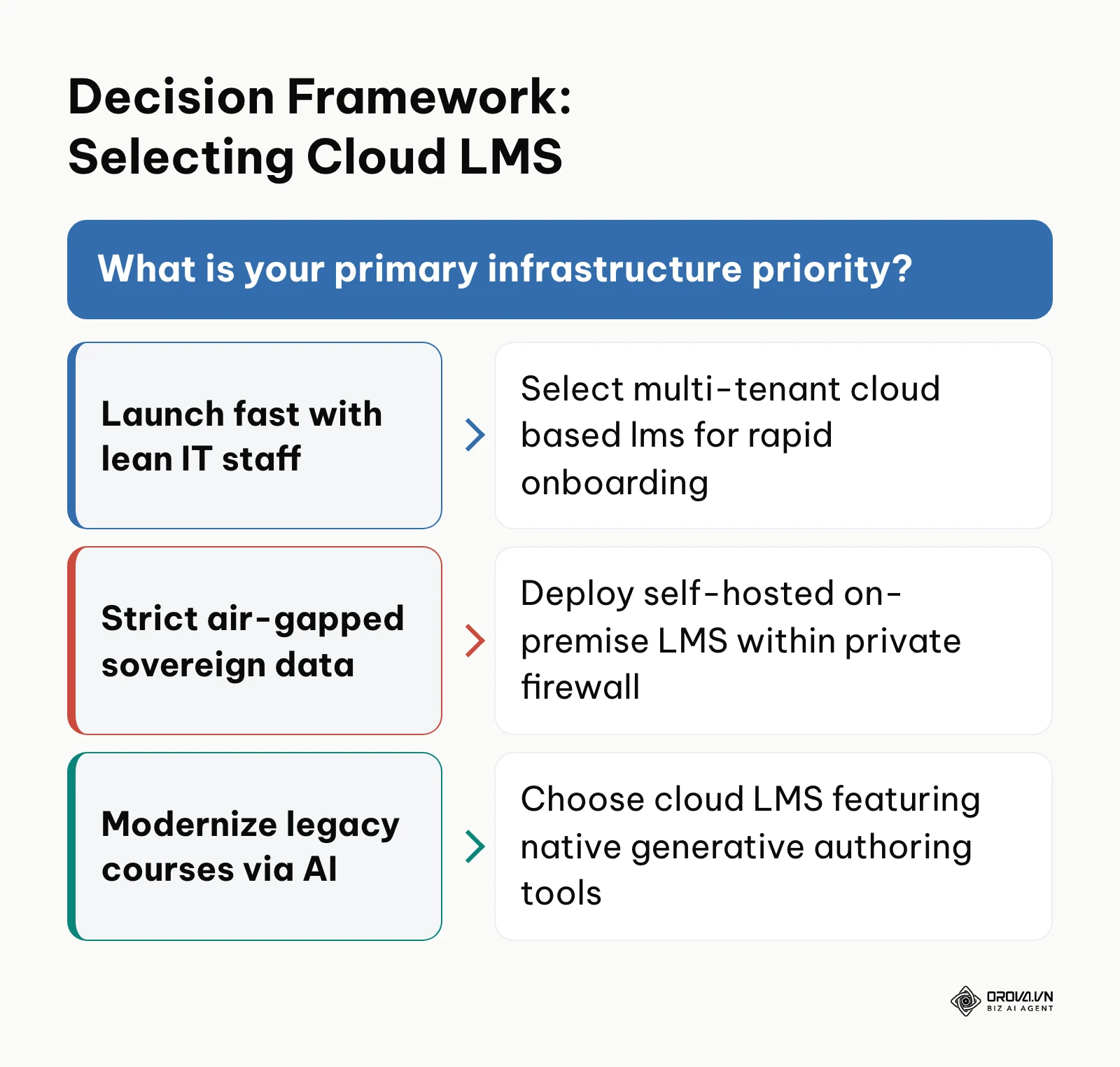
- Small-to-Midsize Enterprises with Lean IT Teams: Organizations with fewer than 1,000 employees that lack dedicated systems administration staff should choose a cloud LMS. Offloading server maintenance, database optimization, and software updates to the SaaS vendor prevents operational strain on internal IT staff.
- Distributed, Remote, or Multi-Location Workforces: When employees work across various regional branches, home offices, or field sites, a cloud LMS provides uninterrupted global access over HTTPS without requiring employees to establish complex corporate virtual private network (VPN) tunnels.
- Organizations Requiring Rapid Implementation: If business demands, executive directives, or regulatory compliance audits require launching employee training within 30 days, cloud provisioning is the only architecture capable of meeting that timeline.
- Dynamic Training Curricula Requiring Constant Updates: Sales teams, customer support units, and fast-moving software startups whose training materials evolve monthly benefit immensely from the rapid, browser-based authoring and generative AI tools standard in modern cloud platforms.
When to Choose an On-Premise LMS
Conversely, self-hosting an on-premise LMS remains the necessary strategy under specific enterprise conditions:
- Air-Gapped or Sovereign Defense Operations: Military organizations, intelligence contractors, and nuclear power utilities operating isolated networks physically disconnected from the public internet must deploy on-premise systems to prevent external connectivity.
- Strict Sovereign Data Mandates: Certain government entities and financial institutions operate under statutory mandates that strictly prohibit hosting employee personally identifiable information (PII) on multi-tenant cloud hardware or foreign-owned data center infrastructure.
- Deep Custom Core Source Code Requirements: If an enterprise requires modifying the fundamental source code of the LMS application—such as rewriting the relational database query engine to interface with a proprietary 1980s mainframe ERP—an open-source on-premise codebase provides that unrestricted low-level access.
- Massive, Static Concurrent User Bases: Large universities or state agencies supporting tens of thousands of concurrent students that already maintain fully amortized enterprise data center hardware and full-time server engineering teams can occasionally achieve favorable unit economics by running self-hosted software.
Stop maintaining servers or grading exam spreadsheets by hand. Assign courses, enforce study time with skip-ahead blocking, run AI-graded online exams, and issue certificates with a public lookup code, all in your browser with Orova Training. It is free until 7 July 2027, so you can certify your first team without a procurement cycle.
Can You Use Both Cloud-Based LMS and On-Premise LMS?
Large enterprises frequently deploy a hybrid training architecture rather than forcing all departments onto a single platform. In this structure, the organization maintains an internal on-premise LMS inside the corporate intranet for highly classified engineering schematics and trade-secret manufacturing procedures. Simultaneously, the company subscribes to an agile cloud based lms to train external channel partners, customer onboarding cohorts, and remote commercial sales teams. The comparison below clarifies this division of operational responsibilities.
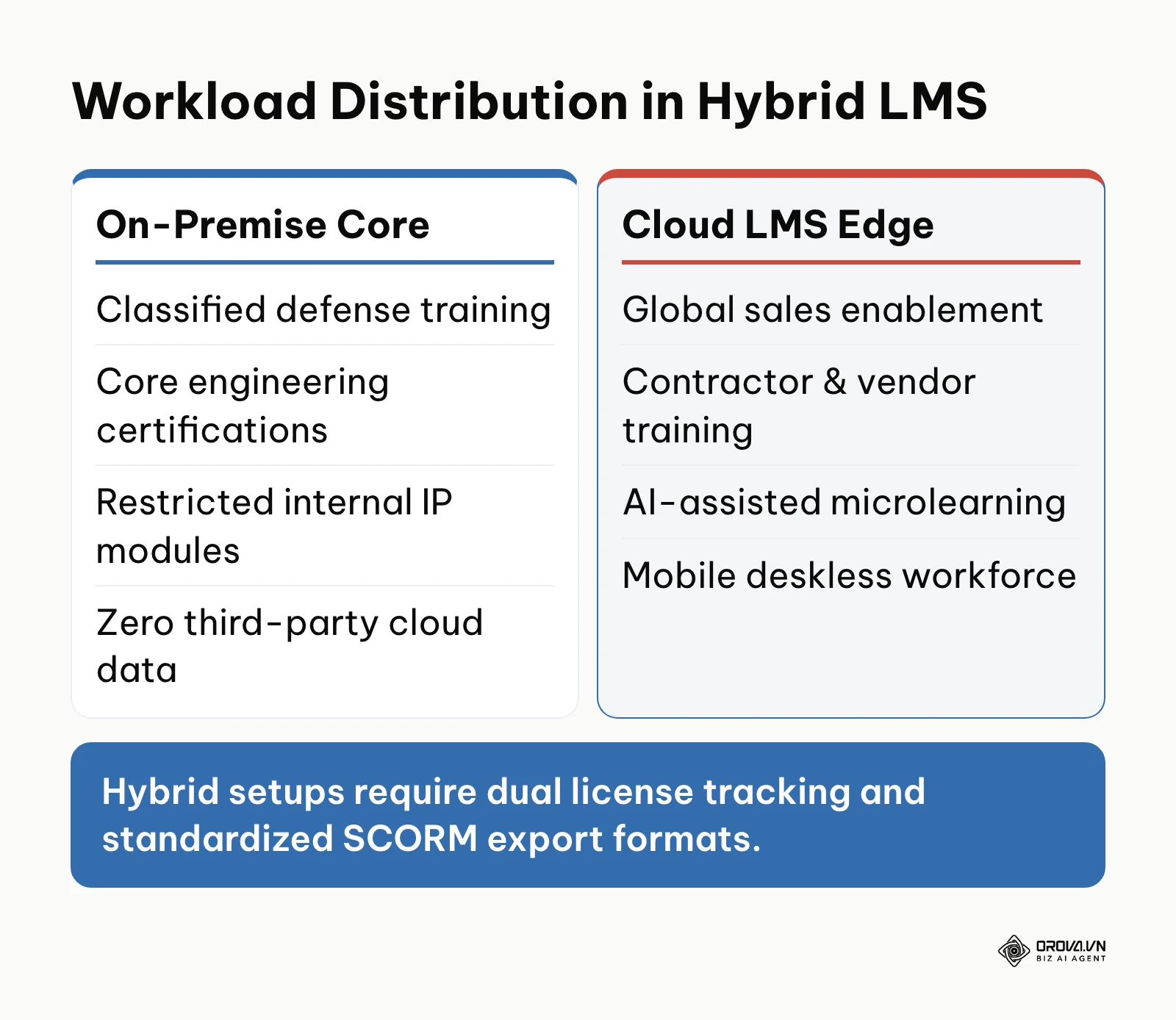
Operating a dual-system deployment introduces operational complexities that leadership must manage carefully. User records must be synchronized via enterprise identity providers, and completion reporting must be aggregated into an external business intelligence warehouse. Furthermore, instructional designers must author courses strictly in universally compatible formats, such as SCORM 1.2, to guarantee that content runs seamlessly across both environments without formatting corruption.
For organizations navigating this transition, Orova Training is a cloud-based option that can sit alongside an existing LMS. It uses AI to draft lessons, slides, podcasts, narrated videos with subtitles, and flashcard sets. Training administrators can assign courses to a whole workspace, to individuals, or to groups, track each learner's progress, and enforce study time while blocking skipping ahead and downloads. Online multiple-choice exams are graded by AI, and scores can still be edited by hand. For cross-platform portability, courses can be exported as SCORM 1.2 packages for Moodle or Canvas, and certificates are issued automatically when learners pass, each with a public lookup code and a PDF download.
Cloud-Based LMS Trends in the Coming Years: Author's Perspective
The enterprise learning landscape is evolving rapidly under the influence of generative artificial intelligence and shifting workplace demographics. Based on industry developments observed through 2026, I anticipate three major structural shifts over the next two to three years.
First, I believe monolithic, static course catalogs will largely disappear in favor of dynamic, generative microlearning modules. Today, instructional designers spend months assembling 45-minute courses that employees struggle to complete. Within the next two to three years, cloud learning engines will increasingly synthesize personalized five-minute modules generated directly from an organization's updated standard operating procedures. To prepare for this transition, learning leaders should begin auditing and structuring their internal documentation into clean, text-based reference libraries today. However, this shift could decelerate if corporate legal teams establish strict liability guidelines regarding automated instructional outputs.
Second, in my view, LMS evaluation metrics will shift from basic course completion tracking toward automated AI rubric evaluation. Current platforms measure whether an employee scrolled through slides or clicked multiple-choice options. I foresee cloud LMS engines adopting conversational and short-answer evaluation agents that assess written reasoning and practical problem-solving using structured grading rubrics. Organizations should begin testing short-answer evaluation workflows now to prepare their workforces for competency-based testing. This trend could be delayed if the computational costs of running large language model inference remain high for high-volume enterprise testing.
Third, I lean toward the expectation that data privacy regulations will force cloud vendors to offer localized sovereign cloud options. While multi-tenant architectures dominate the commercial market today, growing regional data protection laws will likely require vendors to provide isolated regional database storage and dedicated encryption keys. Forward-looking procurement officers should require prospective cloud LMS vendors to demonstrate clear regional data residency roadmaps during current contract negotiations. This forecast would prove inaccurate if international regulatory bodies establish universal cross-border corporate training data transfer frameworks.
Frequently Asked Questions About Cloud-Based LMS
How much does a cloud based lms actually cost per month for 50 to 100 users?
Pricing for a cloud based lms is usually quoted per active user or per seat band on an annual subscription, and it varies widely between vendors and feature tiers. Use the illustrative TCO table above as a template: plug in each vendor's per-user quote, then confirm whether hosting, video bandwidth, security patches, and support are included or billed separately.
How do you migrate question banks and learner history from Excel or Google Forms to a cloud based lms?
To migrate data cleanly, export your spreadsheet questions into a UTF-8 encoded CSV file structured into standardized columns: Question Text, Options, Correct Answer Key, and Explanation. Before importing hundreds of records, test a small sample of five questions in a sandbox environment to ensure special characters and question stems render properly without formatting corruption.
What happens if a learner loses internet connection during a quiz on a cloud based lms?
Well-built cloud learning platforms can use client-side browser caching via IndexedDB or localStorage to store learner answers and progress timestamps locally. If internet connectivity drops during an active quiz, the learner can continue interacting with the test interface without data loss, and the application automatically synchronizes recorded responses once the connection reconnects.
What role does artificial intelligence play in a modern cloud based lms?
In modern cloud LMS platforms, artificial intelligence automates time-consuming instructional design tasks by converting uploaded documents into presentation slides, video scripts with synchronized audio narration, and balanced quiz question banks. Additionally, some platforms use AI to help grade answers, while administrators keep the final say on scores.
Can a cloud based lms comply with strict enterprise data residency regulations?
Yes, reputable cloud LMS vendors maintain compliance with regional data privacy frameworks by hosting applications on enterprise cloud infrastructures like AWS, Azure, or Google Cloud that support dedicated regional data centers. Organizations requiring strict compliance should verify that the vendor provides data encryption at rest, SOC 2 Type II auditing, and explicit geographic data residency guarantees.
How long does a typical cloud based lms pilot implementation take?
A well-structured cloud LMS pilot program generally requires 14 business days to execute thoroughly. This timeline provides sufficient duration for administrators to brand the portal, upload two sample courses, import a test question bank, invite a pilot cohort of 10 to 20 learners, and evaluate the platform against a structured weighted scorecard.
Where Should You Start With Your LMS Transition?
Beginning an enterprise software evaluation can feel overwhelming, but practical progress starts with small, targeted diagnostics rather than sprawling committee meetings. Depending on your current operational reality, take one concrete action this afternoon:
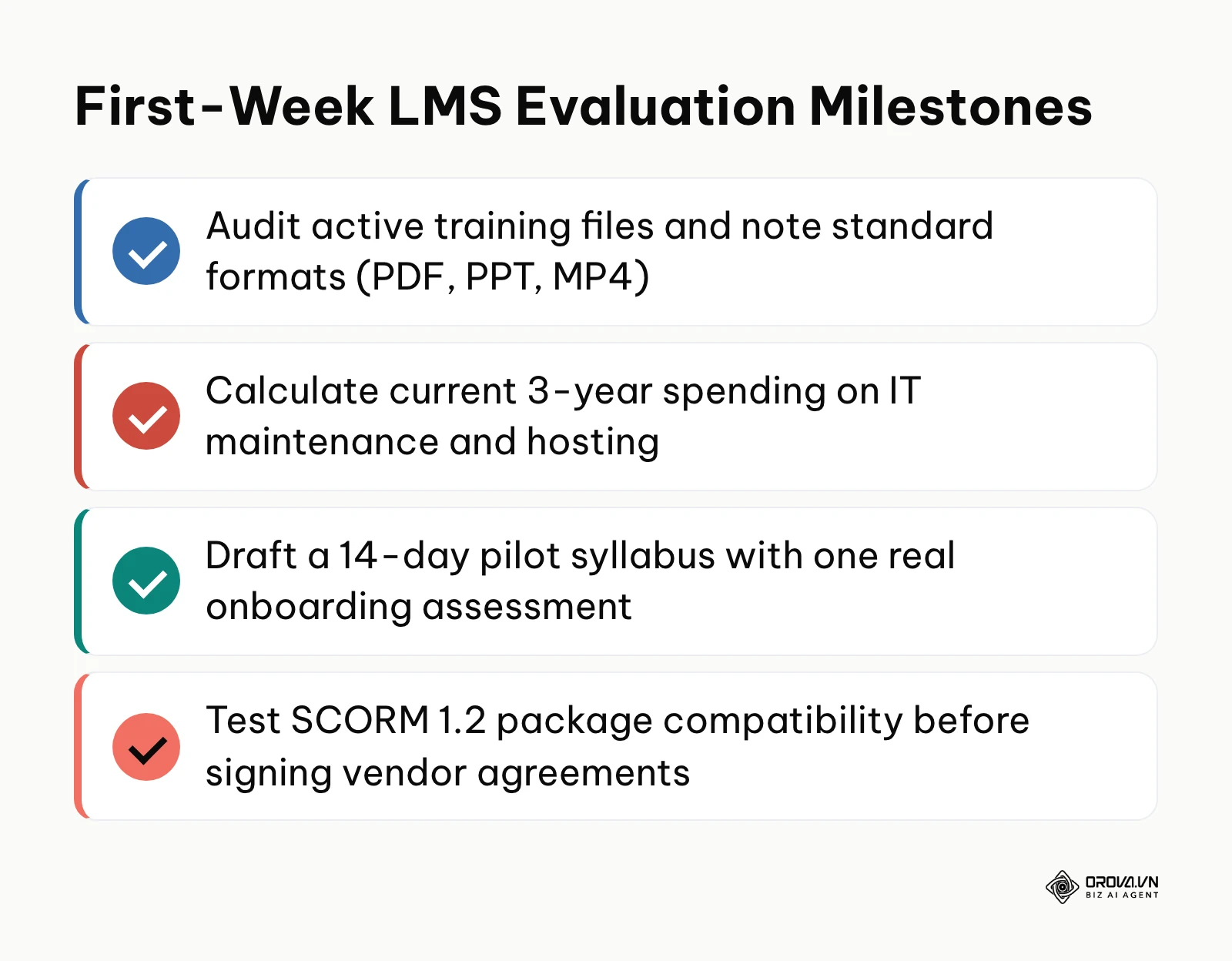
If your organization currently tracks employee training via spreadsheets and shared network folders, dedicate two hours today to collecting your five most critical safety or onboarding documents. Consolidate these files into standard PDF or DOCX formats and record their average page counts. Having clean source materials ready is the single most important prerequisite for testing how efficiently a modern cloud platform converts documents into interactive digital lessons.
If your legacy on-premise LMS software support or server hardware lease expires within six months, schedule an immediate meeting with your lead systems engineer to calculate your true three-year hosting and maintenance overhead. Request an itemized estimate of server depreciation, operating system license fees, off-site backup storage bills, and monthly administrative labor hours. Having an accurate baseline of your internal expenses provides the exact financial benchmark needed to evaluate cloud vendor quotes objectively.
If you need to rapidly train and onboard remote or deskless teams across multiple locations, set up a trial account on a modern cloud platform and configure a single short assessment using an existing standard operating procedure. Distribute the assessment link to three team members using mobile smartphones, and observe whether they can complete the material intuitively without technical support. Taking that initial diagnostic step is the fastest way to confirm whether your organization is ready to modernize its training infrastructure with a scalable cloud based lms.
About the author

Builder of Orova
Nguyễn Đỗ Trọng Ân has 8 years of experience in marketing, including 6 years managing market development across Asia. He builds Orova, a Biz AI Agent that never sleeps: it plans, runs and optimizes work for businesses.
Run your business with AI Agents
Orova is the always-on Biz AI Agent — it plans, runs, and optimizes the work for you.
Save time, unlock productivity.