
LMS Schoology: what it is, how it works and who it fits

Deploying lms schoology across a learning institution often begins with a familiar operational bottleneck: instructors store syllabus materials in disconnected personal cloud folders, student assignments flood email inboxes, and school leaders struggle to reconcile attendance and term marks with their central student database. Conventional perspectives frequently view learning software as little more than a digital filing cabinet for syllabus documents and multiple-choice questions. In practice, treating an instructional ecosystem as basic file storage overlooks the day-to-day complexity of modern educational workflows. Selecting, configuring, and scaling an instructional platform demands a grounded grasp of curriculum architecture, data exchange standards, and ongoing ownership costs. This comprehensive guide breaks down the core architecture of the platform, compares it against primary competitors, lists the cost lines to budget for beyond the license, and provides actionable frameworks for developing standardized question banks and scalable grading rubrics.
What is LMS Schoology? Definition, Core Purpose, and Technical Scope
LMS Schoology is a cloud-based learning management system designed to deliver curriculum, manage classroom communication, and evaluate student performance across primary and secondary education institutions. Unlike static storage tools or basic assignment portals, the platform provides an integrated pedagogical workspace combining interactive discussion feeds, criterion-based rubric grading, and bidirectional student information system synchronization.
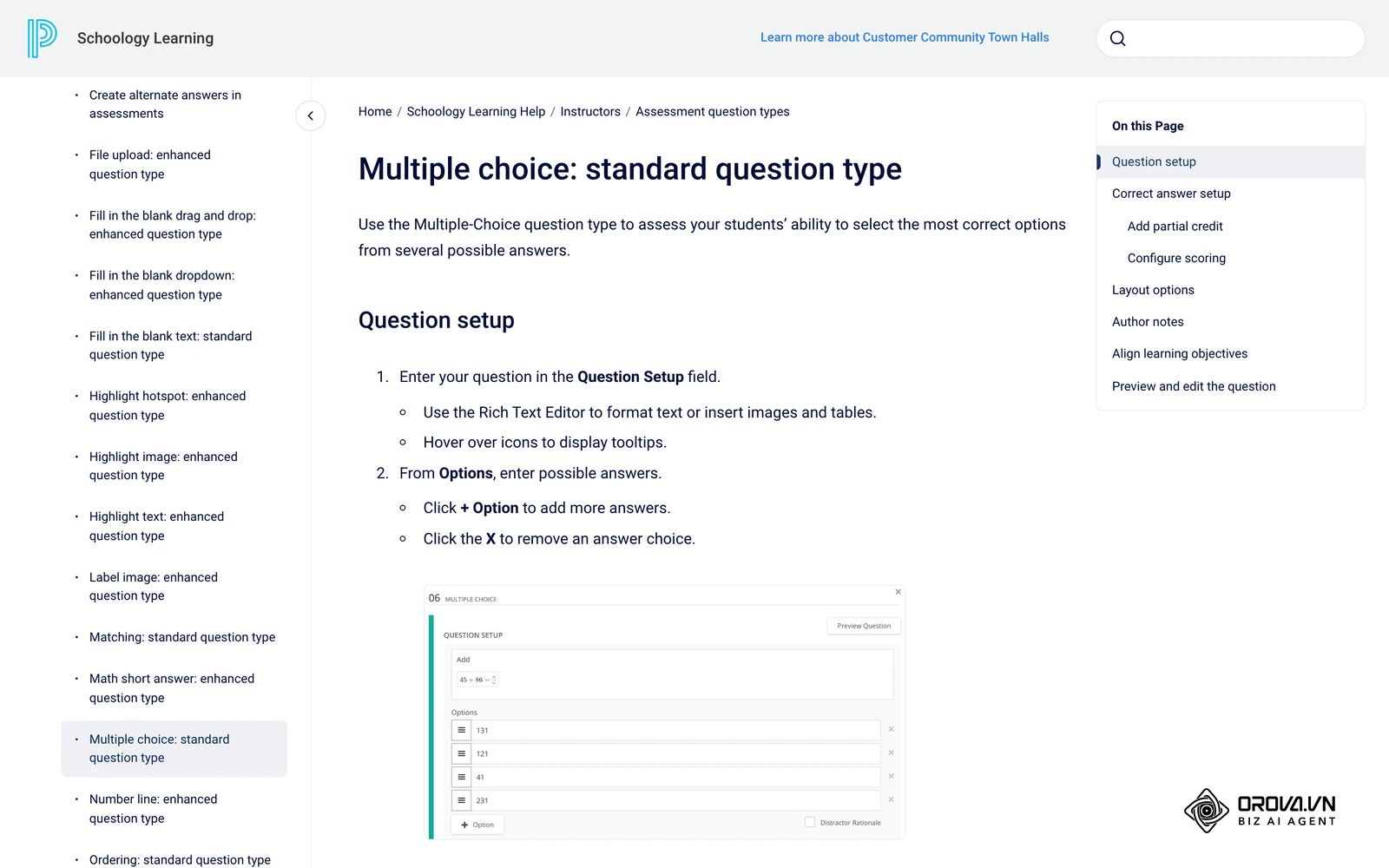
The software was originally founded in 2009 by Jeremy Friedman, Ryan Hwang, Tim Trinidad, and Bill Kindler while studying at Washington University in St. Louis. Their initial objective was to build an academic collaboration environment that mirrored the user experience of contemporary social networking platforms. In November 2019, education technology provider PowerSchool acquired Schoology, embedding the software into its broader suite of administrative and student information products.
Understanding the operational boundaries of this platform requires distinguishing it from neighboring categories in the educational technology stack. The following table highlights where core responsibilities diverge.
| Technology Category | Architectural Distinction | Everyday Operational Example |
|---|---|---|
| LMS Schoology | Manages instructional delivery, learning materials, interactive discussions, student submissions, and rubric-based evaluations. | A history instructor creates a unit containing video lessons, an interactive debate thread, and a document assignment scored against an analytical rubric. |
| Student Information System (SIS) | Serves as the authoritative institutional database for demographic records, official transcripts, attendance tracking, and state compliance reporting. | An administrative registrar enrolls a transfer student into ninth grade, assigns them an official state identifier, and logs verified immunization records. |
| Video Conferencing / Chat Tools | Facilitates live synchronous communication and informal messaging without structured grading workflows or curriculum archiving. | A science teacher hosts a live forty-minute video lecture and shares screen slides during an unplanned school closure. |
To understand this distinction in everyday terms, imagine a municipal public library system. The Student Information System acts as the central administrative ledger that issues your official library card, tracks your legal residency, and records whether your account is in good standing. In contrast, an educational platform functions like the curated reading rooms and structured study seminars held inside that library. It provides the study desks, organizes the reading syllabus, facilitates group discussions with the instructor, and collects written project submissions. It relies on the administrative ledger to know who is admitted, but its day-to-day job is managing the learning experience itself.
Why LMS Schoology Exists: Core Problems and Architectural Role
Educational organizations adopt specialized learning management software to solve three structural breakdowns: fragmented instructional delivery, inaccessible student assessment histories, and disconnected parent communication. When an institution relies on informal combinations of file shares, physical handouts, and separate email threads, learning materials disappear into private folders. If an instructor departs mid-year, the curriculum often vanishes with them. Furthermore, evaluating student progress through informal channels prevents academic coordinators from verifying whether assignments align with state or institutional standards.
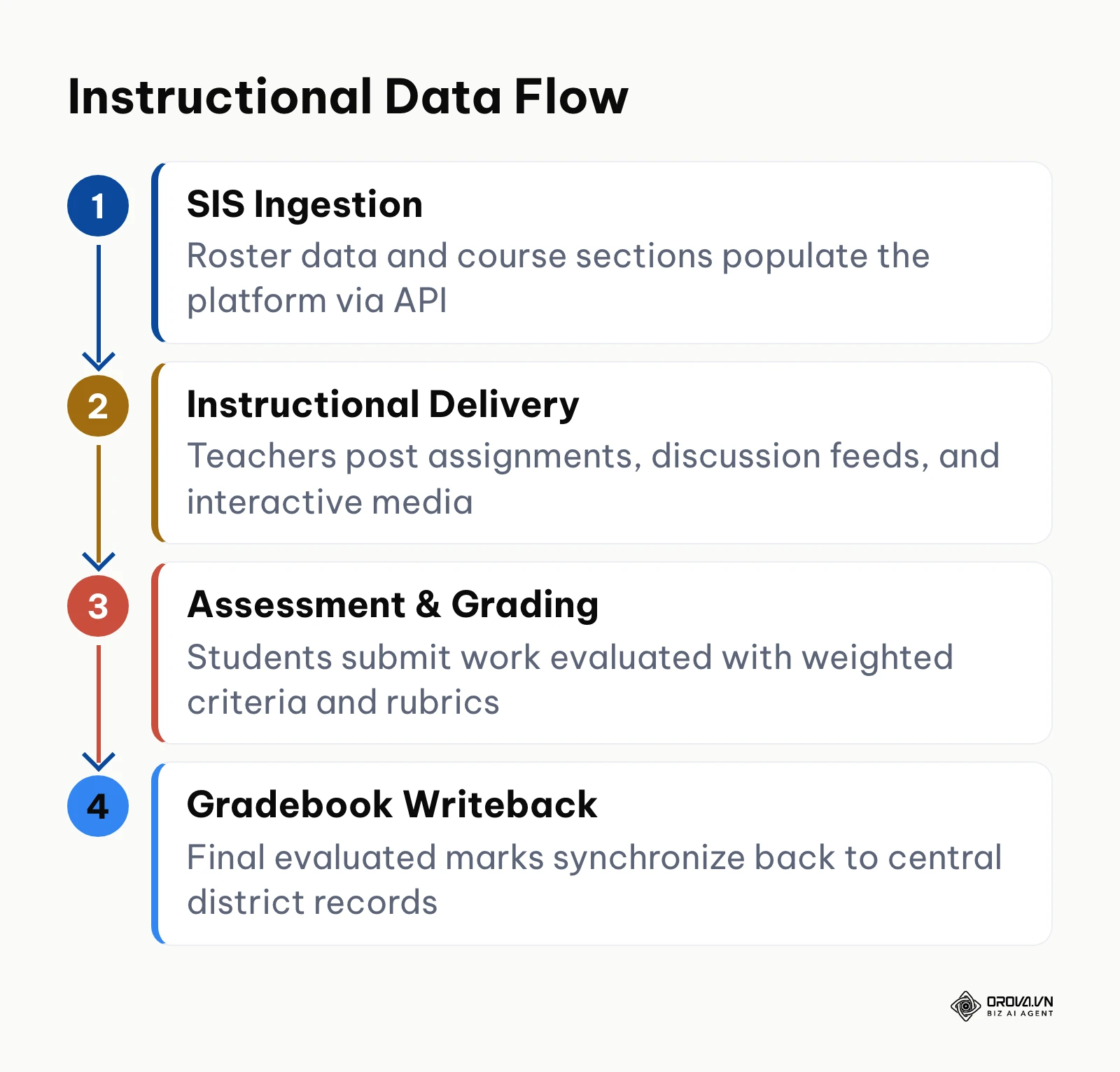
In a modern enterprise educational technology stack, the learning platform occupies the instructional execution layer. Upstream, identity providers (such as Microsoft Entra ID or Google Workspace) and Student Information Systems maintain official rosters and user authentication credentials. The platform ingests this roster data, creates course sections automatically, and provides instructors with a secure digital workspace. Downstream, the platform transmits final course marks, assessment scores, and attendance indicators back to the central student database and external business intelligence warehouses for district-wide reporting.
When institutions bypass a centralized instructional system, the hidden operational penalties accumulate quickly. Instructors spend hours each week answering duplicate logistical emails about missing worksheets. Administrators lose the ability to audit curriculum equity across classrooms. Most critically, families are left in the dark until quarterly grade reports arrive, removing the opportunity for timely academic intervention.
The diagram below summarizes the four-stage instructional data lifecycle from administrative ingestion to central grade writeback.
When you do not need LMS Schoology yet: deploying the platform is premature if your organization runs independent micro-cohort workshops under twenty-five learners, where a shared Google Drive folder and direct messaging suffice without software licensing overhead. Similarly, corporate departments requiring strict occupational safety certification should avoid adopting an academic platform, opting instead for a lightweight compliance-focused learning system. Finally, institutions without dedicated technical personnel to manage annual SIS data rosters should first standardize their basic digital files before committing to enterprise configuration.
Tangible Value and Measurable Benefits of LMS Schoology
Deploying a structured educational platform delivers value across two distinct organizational layers: macro-level institutional administration and daily classroom instructional execution.
Administrative Efficiency and Curriculum Standardization
For academic leaders, centralizing instructional resources eliminates curriculum fragmentation. Rather than maintaining separate lesson files across disconnected hard drives, department heads can build master curriculum shells inside shared resource libraries. When a new teacher joins the faculty, they can clone an accredited course outline complete with standardized assessment rubrics in minutes.
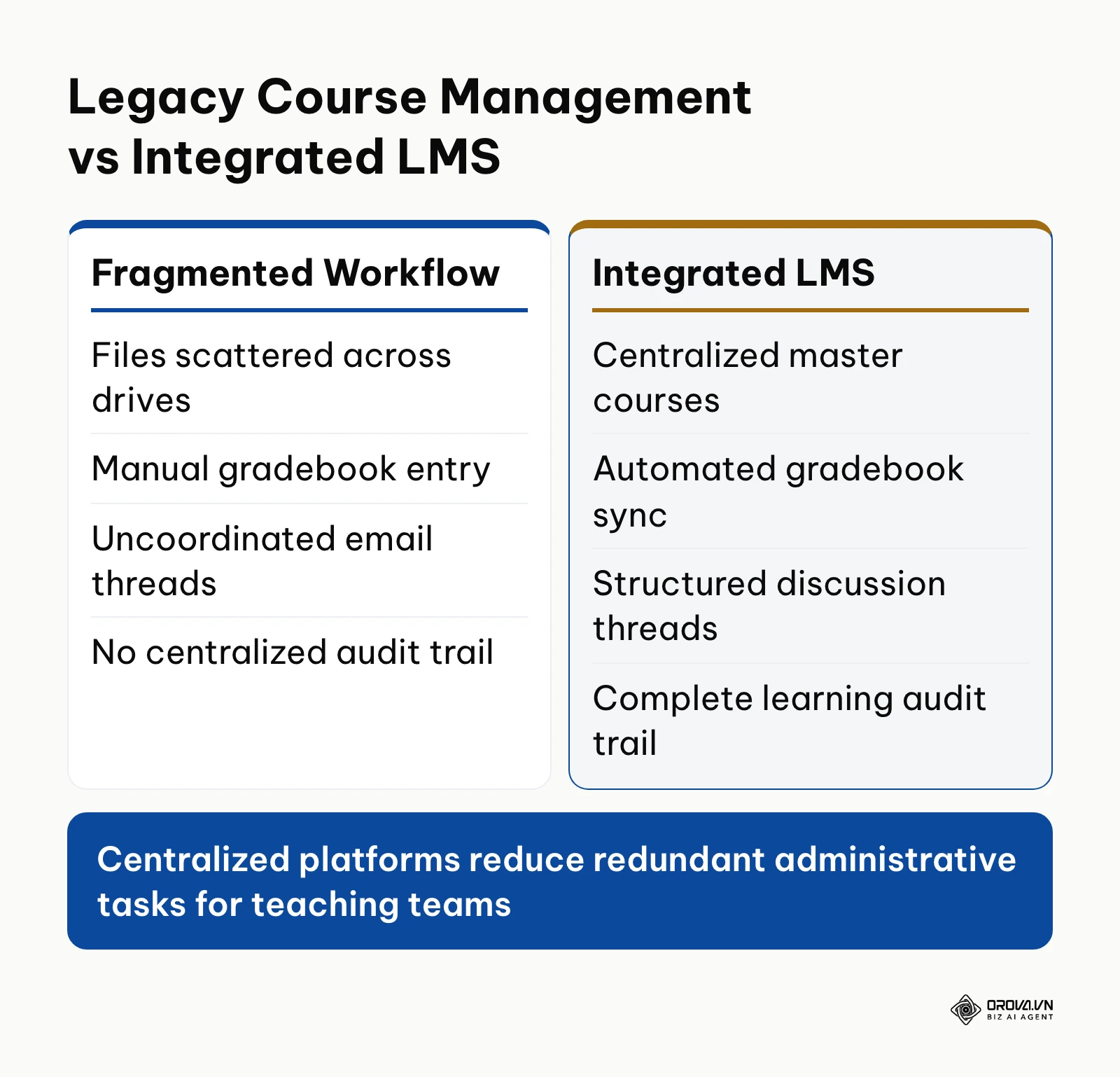
The diagram below contrasts the operational friction of uncoordinated file repositories against an integrated courseware architecture.
Centralized platforms also establish reliable data trails for institutional accreditation. Academic directors can generate compliance reports showing exact learning standard coverage across all grade levels.
Engaging Learning Experiences and Rubric-Driven Feedback
For educators and learners, the platform replaces rigid file directories with a collaborative interface resembling a structured social feed. Instructors can post dynamic updates, embed interactive multimedia, and organize unit materials into modular folders with sequential completion rules.
Rather than returning physical papers covered in handwritten notes days after a deadline, instructors evaluate digital submissions using interactive rubrics. Tapping a cell on a standardized scoring matrix calculates point values automatically and provides students with clear qualitative criteria. Learners access assignments, review instructor annotations, and submit multimedia responses directly through native mobile applications.
Real-Time Parent and Guardian Visibility
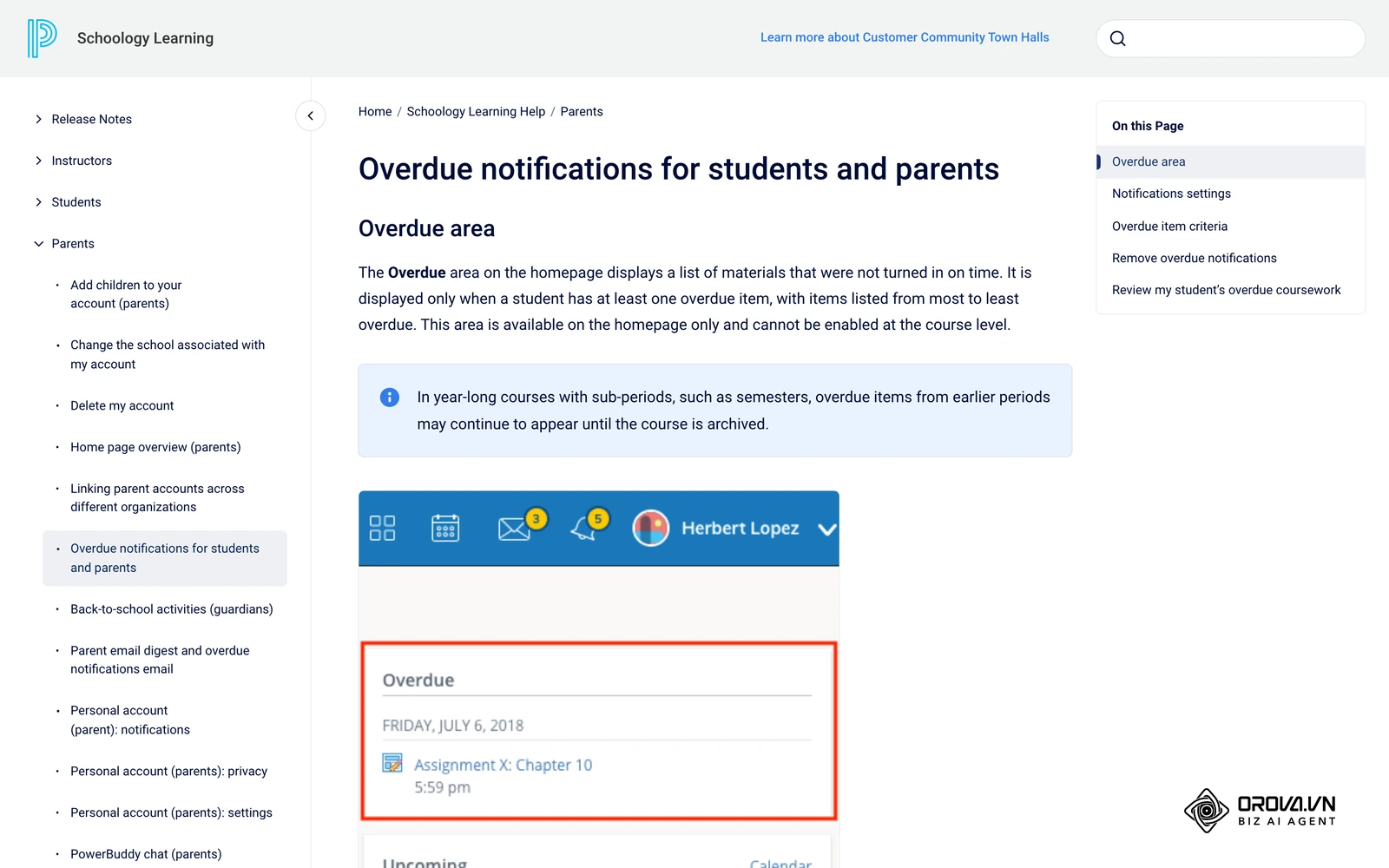
Parent engagement represents one of the most persistent hurdles in secondary education. When families lack insight into daily classroom requirements, academic intervention arrives too late. The platform addresses this by providing dedicated parent access accounts. Guardians can view assigned due dates, check whether homework has been submitted, and inspect rubric feedback without gaining access to other students' confidential records. The screenshot below shows the Overdue area on a Schoology home page, which lists work that was not turned in on time. This window prevents surprises at parent-teacher conferences and fosters shared accountability.
The following table summarizes the measurable institutional benefits, associated performance metrics, and realistic realization timelines.
| Core Institutional Benefit | Primary Measurement Metric | Realization Horizon |
|---|---|---|
| Reduced Administrative Grading Overhead | Average teacher hours spent per week on manual mark calculation and gradebook transfer | First weeks after onboarding |
| Curriculum Asset Reusability | Percentage of course materials cloned directly from verified institutional resource banks | One academic semester |
| Accelerated Student Intervention | Days elapsed between a missed assignment and guardian communication contact | First weeks after launch |
| Standardized Rubric Alignment | Proportion of summative assignments evaluated against verified institutional rubrics | One full academic year |
Example scenario: A suburban secondary school serving 850 students and 45 faculty members replaced fragmented paper assignments with centralized digital submissions. The academic coordinator built five standardized departmental master courses, enrolled curriculum chairs as co-instructors, and configured weighted grading categories allocating 30% to formative coursework and 70% to summative evaluations. During the initial month, several teachers encountered duplicate course sections because student rosters had been imported twice from an outdated database export; the technical coordinator corrected the issue by configuring an automated nightly database sync. Within eight weeks, parents monitored assignment completion through their portal accounts, and teachers answered missing work inquiries through structured portal messages rather than disconnected personal emails.
If drafting lessons and quizzes from scratch is slowing your training team down, Orova Training can help. AI drafts lessons, slides, multi-voice podcasts and flashcards, runs online quizzes with AI grading that you can adjust by hand, and exports SCORM 1.2 packages to Moodle or Canvas.
How LMS Schoology Works: Core Architecture and Workflow Breakdown
The internal architecture of the platform relies on modular instructional containers that separate systemic administration from classroom collaboration. When navigating the software, users interact with four foundational functional areas.
Core Navigation and Structural Pillars
Every operational workflow within the platform originates from four top-level architectural navigation pillars.
- Home Dashboard: Serves as the personal command center for each authenticated user. It aggregates an activity stream of updates, pending assignment deadlines, calendar reminders, and direct notifications across all enrolled sections.
- Primary Input: System notifications, teacher announcements, upcoming calendar deadlines.
- Primary Output: Personalized daily workflow priorities for learners and instructors.
- Failure Point: Notification fatigue caused by uncurated district-wide broadcast messages.
- Courses: Represents the active instructional containers where teaching and learning take place. Within a course, instructors post learning materials, host graded discussions, manage digital dropboxes, and maintain the electronic gradebook.
- Primary Input: Roster enrollments from administrative syncs, unit learning content, assignment prompts.
- Primary Output: Student submission artifacts, rubric evaluations, running academic averages.
- Failure Point: Unstructured folder layouts that bury essential due dates under deep hierarchical subfolders.
- Groups: Collaborative communities decoupled from formal course grading and academic terms. Institutions use groups for extracurricular athletics, faculty professional learning communities, student clubs, and parent advisory committees.
- Primary Input: Manual or rule-based member enrollments, collaborative resource sharing.
- Primary Output: Community announcements, shared media albums, peer discussions.
- Failure Point: Abandoned groups left active after the conclusion of an extracurricular season.
- Resources: The institutional digital warehouse where curriculum materials are created, cataloged, and stored independently of active student enrollments. Instructors can save individual assignments, full unit folders, or comprehensive question banks to personal or department collections.
- Primary Input: Master lesson plans, assessment items, external digital learning objects.
- Primary Output: Packaged course modules ready for deployment across multiple active course sections.
- Failure Point: Failure to establish standard folder naming conventions, leading to duplicated and conflicting curriculum versions.
Assessment Engine: Question Banks, Rubrics, and Bulk Question Formatting
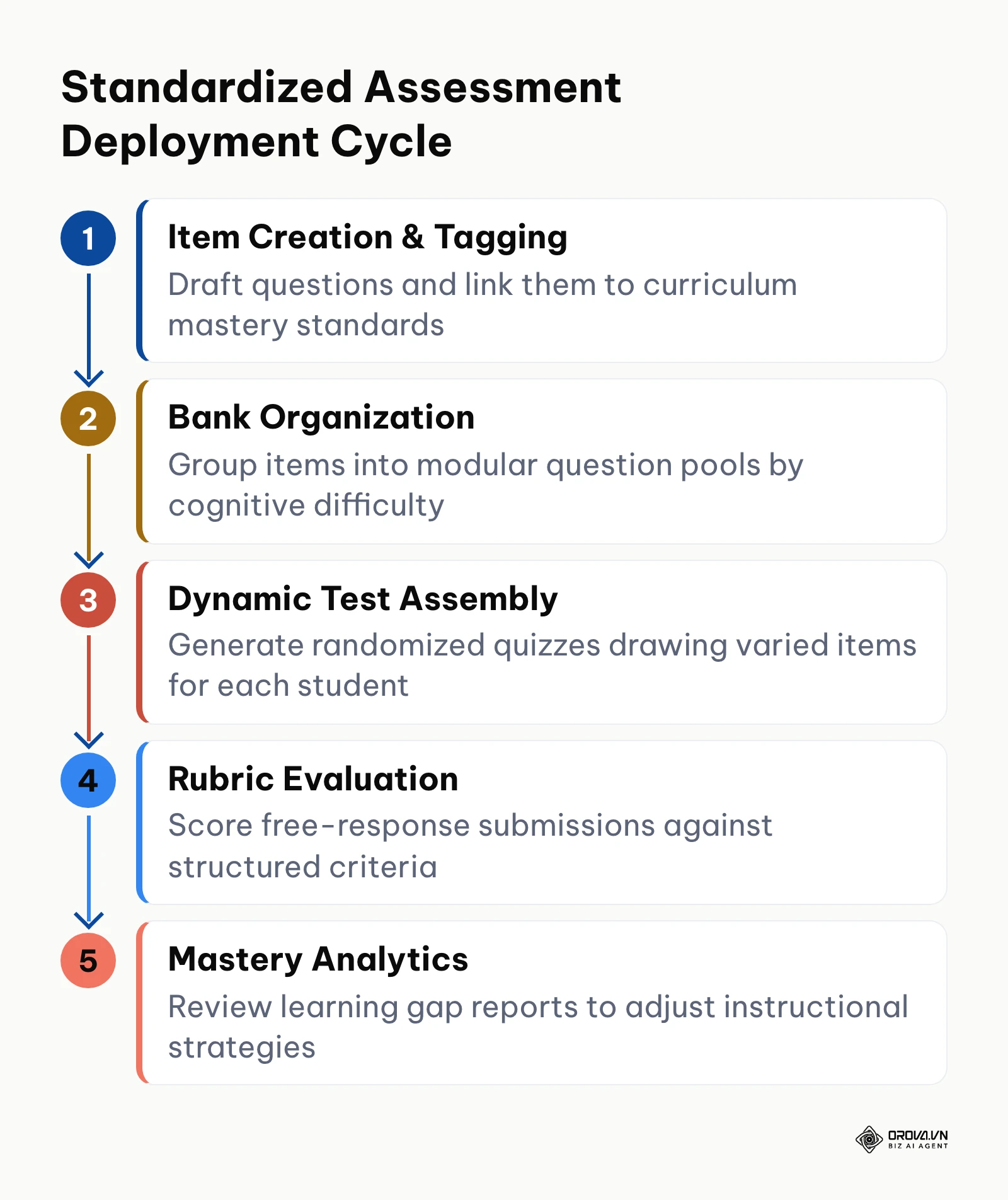
The assessment engine inside the platform enables educators to move beyond static paper testing to dynamic, standards-aligned evaluations. Achieving this efficiency requires moving away from one-off quiz construction toward reusable item banks.
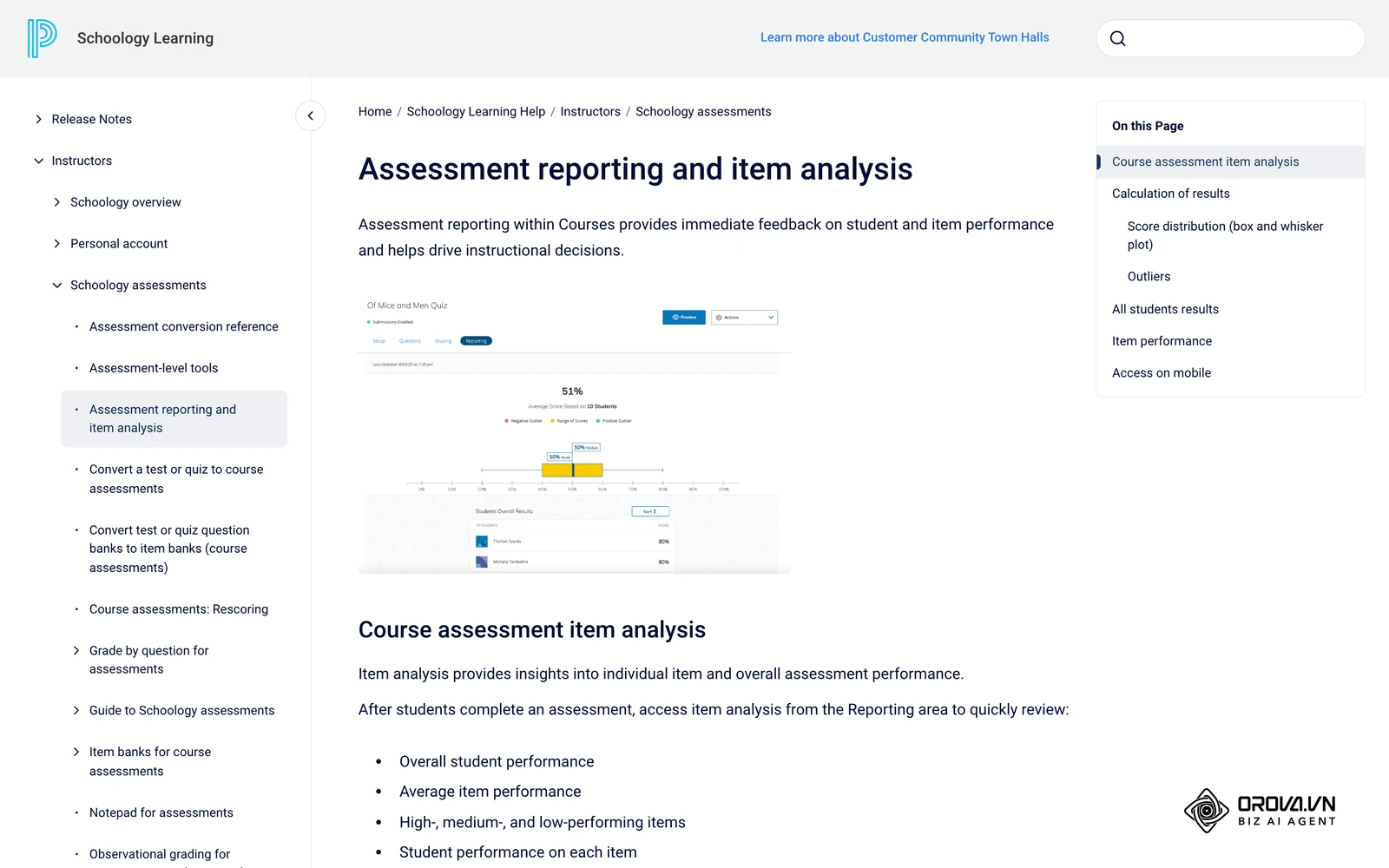
The diagram below illustrates the sequential five-stage assessment engineering lifecycle.
To establish an assessment repository that scales across an entire department, instructional teams should follow this six-step implementation sequence:
- Define Mastery Standards: Import institutional learning standards into the system dashboard before creating individual test questions.
- Establish Question Bank Taxonomies: Create named collections inside the departmental Resource library organized by unit, cognitive difficulty, and objective standard.
- Format Assessment Items for Bulk Ingestion: Prepare assessment questions using standardized syntax to avoid manual web form data entry.
- Attach Analytical Rubrics to Open-Ended Items: Create multi-tier scoring rubrics with specific qualitative descriptors for each performance level.
- Configure Randomized Question Delivery: When deploying an assessment, configure dynamic question blocks that draw random selections from specified pools to minimize academic dishonesty.
- Audit Item Discrimination Metrics: After student completion, inspect question-level response distribution reports to identify ambiguous prompts or poorly performing distractors.
When importing large volumes of multiple-choice and short-answer prompts, manual entry creates substantial delays. Many teams keep a master copy of their items in a structured plain-text format, such as the GIFT syntax below, so questions stay consistent and easy to review. Check which import formats your Schoology instance accepts before converting a whole bank:
// Unit 3 Biology: Cellular Respiration Assessment Bank
::Q1: Glycolysis Location:: Where does glycolysis take place within a eukaryotic cell? {
  =Cytoplasm
  ~Mitochondrial matrix
  ~Endoplasmic reticulum
  ~Inner mitochondrial membrane
}

::Q2: ATP Yield Calculation:: What is the net gain of ATP molecules produced directly from one glucose molecule during glycolysis? {
  =2
  ~4
  ~36
  ~38
}

::Q3: Anaerobic Conditions:: Under anaerobic conditions, yeast cells convert pyruvate into which primary end product? {
  =Ethanol and carbon dioxide
  ~Lactic acid
  ~Acetyl-CoA
  ~Citric acid
}
Example scenario: A secondary science department chair overseeing eight biology teachers across two campuses standardized mid-term assessment creation. The team assembled a centralized question bank comprising 180 questions tagged to curriculum standards, attached a four-level analytical rubric to the laboratory report module, and randomized test question delivery. During the initial exam session, students encountered page latency because high-resolution microscope images attached to several questions exceeded fifteen megabytes each; the chair re-compressed the visual assets to lightweight web formats and updated the assessment package. Following that optimization, 620 students completed the digital assessment concurrently without technical interruption, and the department generated standard-aligned mastery reports within twenty minutes of exam completion.
Multi-Platform Head-to-Head: Schoology vs Canvas LMS vs Google Classroom
Evaluating enterprise learning systems requires comparing technical functionality directly against operational requirements. While Google Classroom offers an entry-level assignment management interface and Canvas LMS dominates higher education research institutions, Schoology focuses specifically on primary and secondary school district workflows.
The following evaluation matrix compares all three platforms across ten technical and operational criteria.
| Technical Evaluation Criterion | LMS Schoology | Canvas LMS | Google Classroom | Operational Significance |
|---|---|---|---|---|
| 1. K-12 Social Collaboration Feed | Full Support: Native threaded updates, media albums, and moderated class feeds. | Partial Support: Structured discussion boards with academic forum layout. | Partial Support: Linear class stream displaying assignments and basic announcements. | Determines how easily younger students and blended classes engage in peer discussions. |
| 2. Criterion-Based Rubric Grading | Full Support: Interactive rubric matrices with automated grade calculation and qualitative feedback. | Full Support: Advanced institutional outcomes rubrics with point weighting and SpeedGrader integration. | Partial Support: Basic numeric rubrics without institutional standard tagging or deep analytics. | Critical for standardizing subjective grading across multi-section academic departments. |
| 3. Question Banking & Randomization | Full Support: Centralized question banks, dynamic item pools, and automated random selection. | Full Support: Robust question banks, item groups, and native QTI specification support. | Not Supported: Relies on standalone Google Forms without native LMS item bank management. | Essential for creating secure, reusable unit exams that minimize cheating. |
| 4. Bidirectional SIS Grade Sync | Full Support: Deep native integration with PowerSchool SIS and automated API writeback. | Full Support: Enterprise SIS integration through OneRoster standards and partner adapters. | Partial Support: Limited roster export dependent on third-party connectors or basic Google tools. | Saves hundreds of teacher hours by preventing duplicate manual gradebook entry. |
| 5. Dedicated Parent Access Portals | Full Support: Granular parent accounts with view-only student calendar, grade, and assignment tracking. | Full Support: Canvas Parent app and observer accounts with granular observer permissions. | Partial Support: Automated daily/weekly email summaries without interactive portal logins. | Empowers guardians to intervene early when students fall behind on homework deadlines. |
| 6. Learning Standards Mastery Tracking | Full Support: Direct tagging of state standards to assignments with mastery distribution charts. | Full Support: Comprehensive learning outcomes dashboard with institutional analytics. | Not Supported: Lacks native state standards mastery tracking and performance aggregation. | Required for standards-based grading models and district-wide accreditation reporting. |
| 7. Native Mobile Application Suite | Full Support: Dedicated iOS and Android apps for educators, students, and guardians. | Full Support: Separate native apps optimized for students, instructors, and parents. | Full Support: Unified mobile app focused primarily on document submission and class streams. | Vital for closing the homework gap for students who rely primarily on mobile devices. |
| 8. Open Standards (LTI 1.3) Interoperability | Full Support: Supports 1EdTech LTI 1.3 connections for digital textbooks and external tools. | Full Support: Industry-leading LTI 1.3 ecosystem with extensive vendor marketplace. | Partial Support: Relies on Google Workspace add-ons rather than full enterprise LTI standards. | Ensures secure single sign-on and grade passback from external publishing tools. |
| 9. Built-in Synchronous Conferencing | Partial Support: Integrates via external LTI apps (Zoom, Microsoft Teams) or PowerSchool add-ons. | Partial Support: Relies on BigBlueButton, Zoom, or Teams via external LTI connectors. | Full Support: Native one-click Google Meet integration embedded into every course header. | Dictates whether live remote teaching requires third-party video conferencing licenses. |
| 10. Corporate Training Suitability | Limited: Built around schools, courses and terms rather than corporate org charts and compliance cycles. | Partial Support: Adaptable via Canvas Catalog, though primarily designed for academia. | Not Supported: Lacks enterprise organizational hierarchies, compliance tracking, and SCORM support. | Determines whether the software can support employee professional development and compliance. |
According to the 1EdTech Consortium in the Learning Tools Interoperability (LTI) v1.3 Core Specification (2019), secure tool integration requires OAuth 2.0 message signing and JSON Web Tokens to protect student records. Both Schoology and Canvas support these open protocols, which helps protect student data when courses connect to third-party tools. When determining how to choose an LMS for an expanding academic or training ecosystem, aligning platform capabilities with institutional workflows prevents expensive software migrations later.
Technical Boundaries: Schoology in Corporate Training vs Academic Environments
A recurring question among organizational leaders is whether a platform built for primary and secondary education can serve as an enterprise employee training platform. While the user interface is intuitive, applying academic software to corporate learning environments exposes five significant technical bottlenecks:
- Incompatible Organizational Hierarchies: Academic platforms structure access around districts, schools, grade levels, and classroom sections. Corporate training requires multi-tiered corporate hierarchies such as business units, geographic divisions, cost centers, and matrix reporting lines.
- Absence of Native SCORM and xAPI Deep Telemetry: Enterprise corporate training relies heavily on authoring tools that export interactive modules. According to the Advanced Distributed Learning (ADL) Initiative in the Sharable Content Object Reference Model (SCORM) 2004 4th Edition Specification (2009), standardized courseware relies on defined runtime environments and data tracking models to log learner progress. Schoology can host SCORM packages as course materials, but corporate teams that need detailed xAPI telemetry, learner-level variable tracking and audit-ready completion records usually add a dedicated corporate training system or learning record store. Organizations operating in regulated corporate environments frequently consult a SCORM compliant LMS testing guide to verify runtime parameters before rolling out mandatory compliance modules.
- Rigid Academic Term Cycles: The platform is engineered around semester calendars, grading quarters, and summer rollovers. Corporate compliance programs operate on rolling anniversary dates, requiring automated retraining intervals (such as annual data privacy certifications) that academic platforms cannot automate natively.
- Teacher-Student Relationship Paradigm: Academic software assumes an instructor is actively guiding, evaluating, and monitoring a cohort. Corporate workforce training requires self-paced asynchronous enrollment, automated credential issuance, and manager-level audit dashboards.
- Licensing Framework Tied to Named Student Roster Cycles: Academic contracts assume a stable student population enrolled for nine to twelve months. High-turnover corporate environments with seasonal contractors or rotating deskless staff face prohibitive licensing friction under traditional academic pricing schedules.
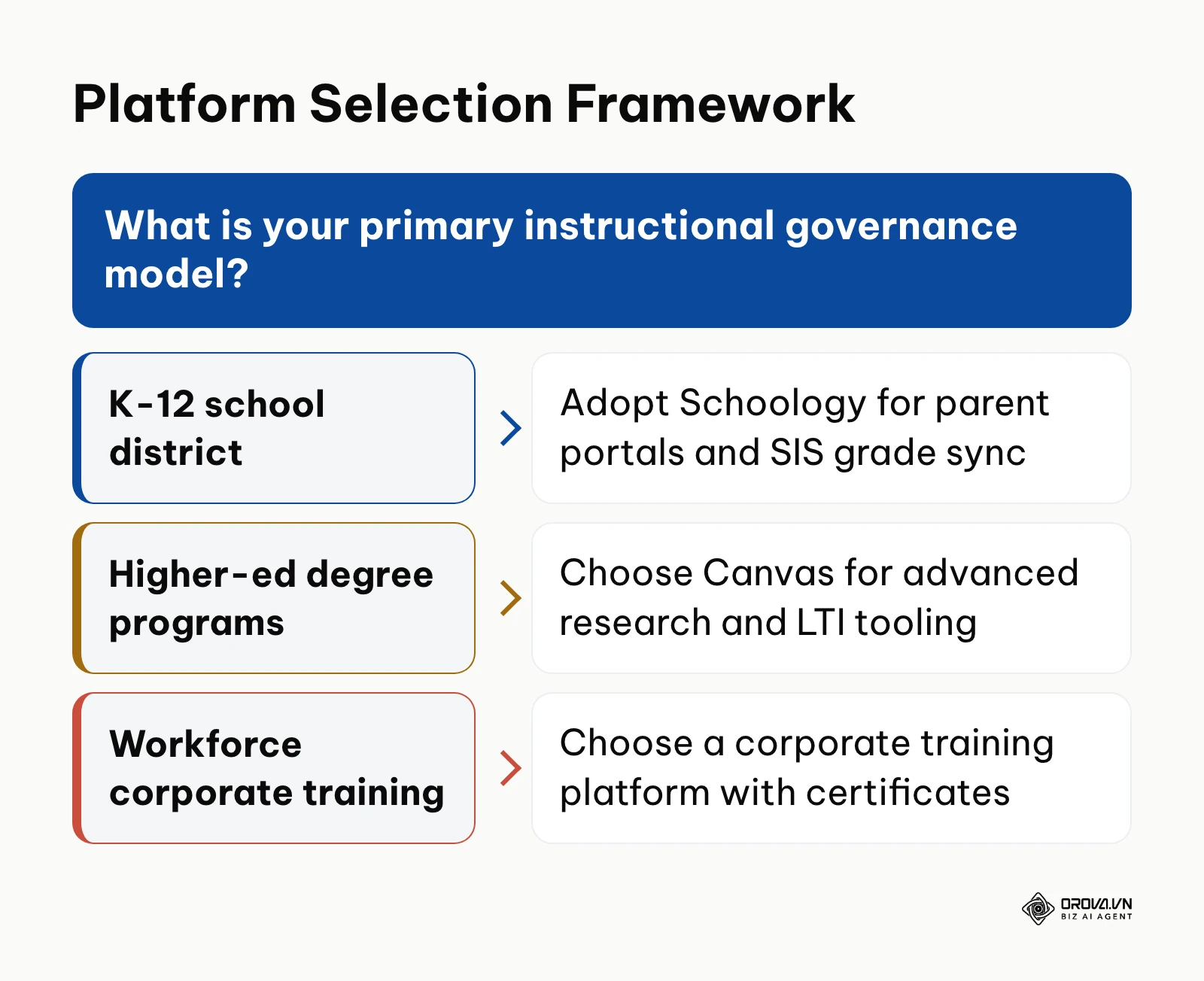
The framework below illustrates how different organizational profiles map to corresponding software categories.
The following table contrasts the structural characteristics of mainstream learning software models.
| Architectural Category | Core Structural Characteristics | Ideal Organizational Profile |
|---|---|---|
| K-12 Academic LMS (e.g., Schoology) | Deep SIS synchronization, parent visibility portals, standard-aligned rubrics, academic terms. | Public school districts, private academies, regional education service agencies. |
| Higher-Ed Extensible LMS (e.g., Canvas) | Advanced research tooling, developer APIs, modular LTI ecosystems, credit-hour tracking. | Colleges, research universities, professional graduate schools. |
| Enterprise Corporate Training Platform | Automated recurring compliance, org-chart reporting, self-paced certification, SCORM tracking. | Commercial enterprises, healthcare networks, financial institutions, distributed workforces. |
How to Implement and Adapt to LMS Schoology: Action Plan by Role
Successfully adopting a comprehensive educational platform requires coordinating technical architecture with classroom instructional design. Rather than treating rollout as a single IT event, institutions must define structured milestones tailored to distinct professional roles.
District Administrators and Academic Directors
Academic leaders establish the strategic framework, policy standards, and accountability mechanisms that govern digital teaching.
- Publish Institutional Folder and Course Taxonomies: Standardize unit naming conventions across all departments during week one to prevent students from navigating forty different course structures.
- Standardize Departmental Grading Categories: Align grading weights (such as 40% formative coursework and 60% summative projects) across all grade levels before instructors begin building assignments.
- Establish a Master Course Blueprinting Protocol: Require curriculum chairs to store vetted course shells in the institutional Resource repository, ensuring lesson plans remain accessible regardless of faculty turnover.
- Define Clear Faculty Communication Expectations: Establish school-wide norms regarding update frequency, grading turnaround intervals, and parent response expectations.
Instructional Designers and Lead Teachers
Curriculum designers translate academic standards into engaging daily digital learning experiences.
- Audit and Modernize Existing Digital Assets: Convert static PDF worksheets into interactive digital discussions or structured rubric assignments during the first week.
- Construct Tagged Question Banks Before Designing Tests: Assemble modular assessment pools in shared resource folders prior to the start of the academic term.
- Implement Sequential Folder Completion Rules: Configure prerequisite requirements within course units so students must review foundational instructional media before attempting summative assessments.
- Calibrate Rubric Criteria Across Grade-Level Teams: Conduct collaborative moderation sessions where educators evaluate identical sample student submissions against a shared rubric to ensure consistent grading standards.
IT Specialists and System Integration Engineers
The priority matrix below helps implementation teams focus their initial energy on high-impact configurations while avoiding early technical traps.
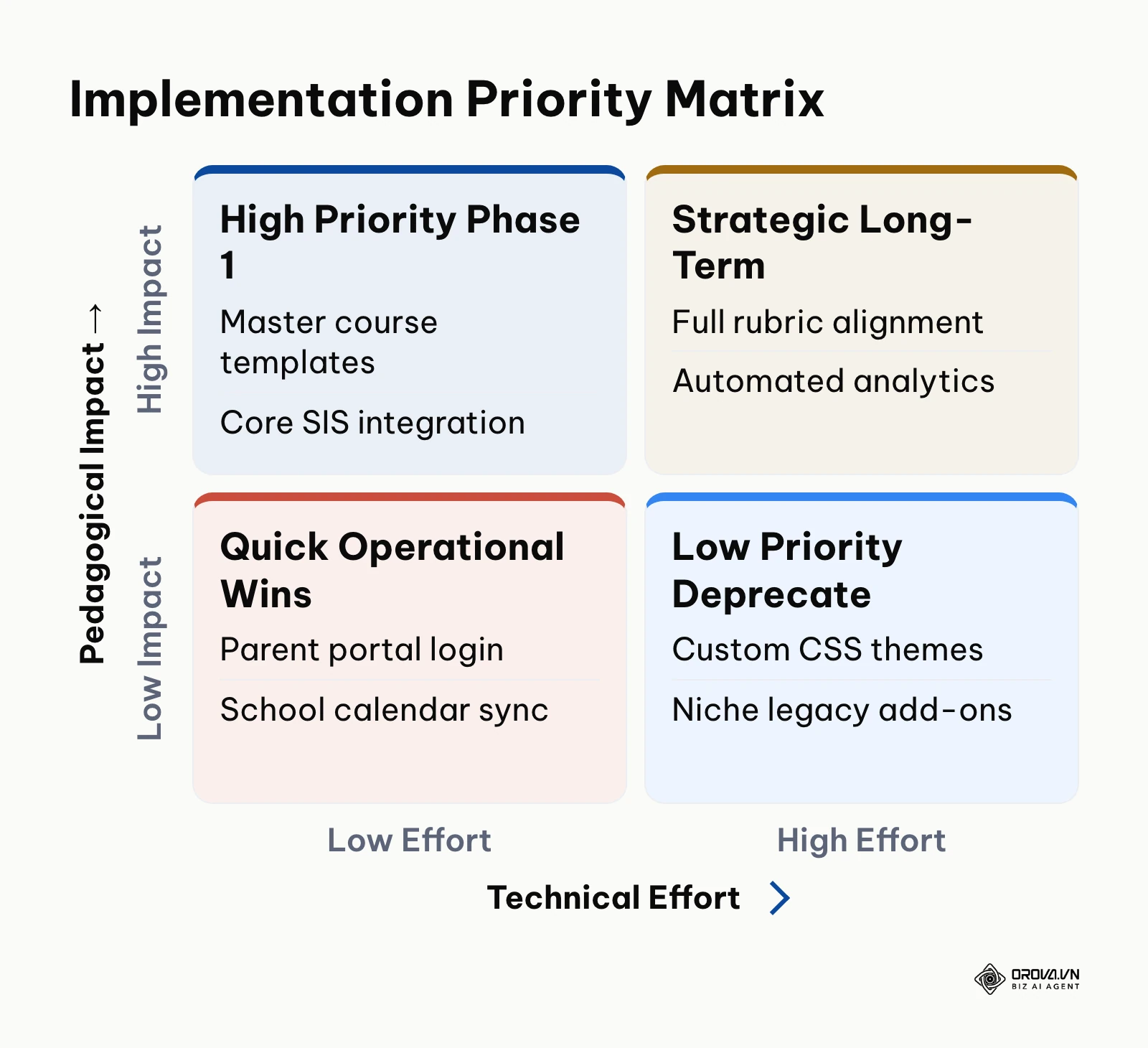
Technical personnel manage user authentication, API connections, and data integrity across the district software ecosystem.
- Configure Automated Single Sign-On (SSO): Connect the platform to your central identity provider via SAML 2.0 or OAuth during week one to eliminate separate user password management.
- Establish Bidirectional OneRoster Sync Schedules: Configure nightly API synchronizations between your Student Information System and the platform to automate enrollment additions, drops, and section updates.
- Validate LTI 1.3 Security Handshakes: Test all third-party digital textbook and software integrations in an administrative sandbox before deploying tools to teacher dashboards.
- Configure Automated Gradebook Sync Writebacks: Verify that category configurations, calculation formulas, and letter grade boundaries align between the instructional platform and the authoritative SIS gradebook.
Total Cost of Ownership: What to Budget Beyond the License
One of the most persistent oversights during educational software procurement is focusing exclusively on base software subscription fees while neglecting essential implementation overhead. PowerSchool does not publish flat public pricing for Schoology, because contracts depend on district enrollment size, contract duration, and bundled software modules. The practical way to plan is to ask for an itemized quote and check that every line below is covered.
| Cost Line | What It Usually Covers | Question to Ask Before Signing |
|---|---|---|
| Annual licenses | Named student and staff accounts for the contract term | Is pricing per enrolled student, per school, or a district-wide bundle? |
| Implementation and setup | Tenant provisioning, single sign-on, initial administrative configuration | Is setup a one-time fee, and which tasks remain with our IT team? |
| SIS connector | Roster and grade synchronization with the student information system | Is grade writeback included for our SIS, or priced separately? |
| Support tier | Ticketing, response times, named contacts | What response time is guaranteed during exam weeks? |
| Staff training | Workshops for department chairs, teachers and administrators | How many sessions are included, and are recordings provided? |
| Renewal terms | Price changes after the first contract year | How are renewal increases calculated and capped? |
For a 500-learner rollout, the license line is only one of six lines. Institutions that fail to budget for integration connectors and professional development often face delayed rollouts or discover that teachers abandon the platform due to lack of practical training.
Common Implementation Pitfalls and Prevention Strategies
Deploying learning software across dozens of departments inevitably introduces operational hurdles. The following table highlights common implementation missteps, their practical consequences, and proven remediation strategies.
| Common Implementation Pitfall | Practical Operational Consequence | Recommended Prevention Strategy |
|---|---|---|
| Unsynchronized Grading Scales Between LMS and SIS | Discrepancies between term report cards and daily online student averages, causing parent confusion. | Align grading scales, rounding rules, and weighting categories between the platform and SIS before term launch. |
| Unrestricted Folder Structures | Students must navigate wildly different course layouts across teachers, increasing missed work rates. | Enforce a district-wide course shell template with uniform weekly unit folders. |
| Manual Roster Administration | Student schedule changes fail to reflect in courses, requiring hours of manual administrative correction. | Deploy automated OneRoster or direct API syncs that update course enrollments automatically every night. |
| Unmoderated Course Discussion Streams | Inappropriate student posts appear publicly across classroom streams, creating disciplinary issues. | Enable mandatory teacher moderation rules on public course updates and student discussion boards. |
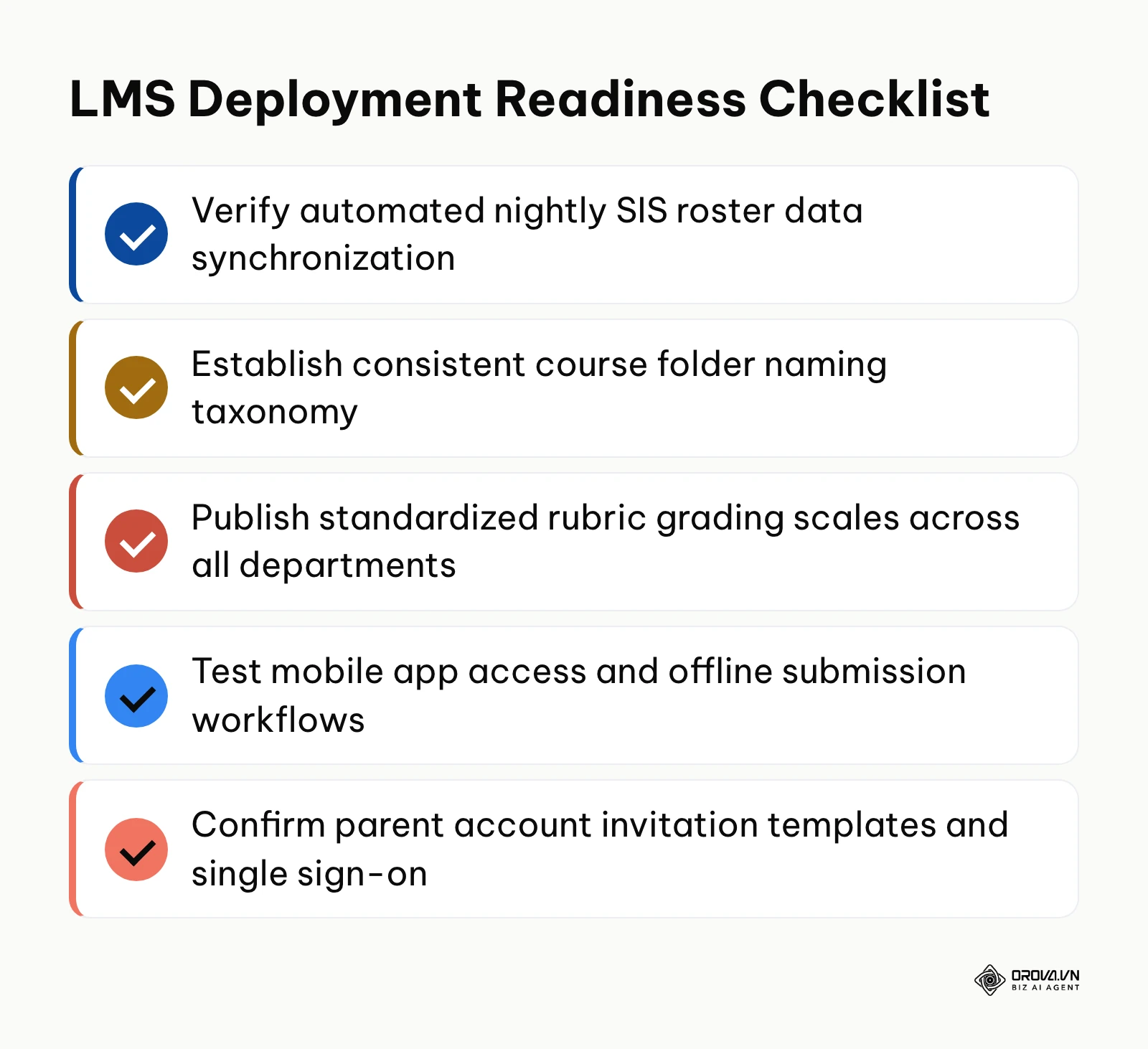
The readiness checklist below summarizes the technical baselines required before launching live courses to students and families.
Example scenario: A district instructional technologist supporting three middle schools introduced rubric-based grading across sixty classrooms. The specialist delivered a practical workshop guiding teachers through building four-tier analytical rubrics, established common grading scales in the system dashboard, and scheduled bi-weekly virtual office hours. Initial hesitation arose when humanities instructors struggled to align creative writing assignments with rigid percentage categories; the technologist resolved this by building customizable rubric templates that supported narrative qualitative feedback alongside numeric scores. Consequently, teachers adopted digital rubrics across all language arts courses, and student performance discrepancies between separate class sections narrowed during subsequent department reviews.
Training staff rather than students? With Orova Training you assign courses to a whole workspace, a group or one person, track each learner's progress, block video skipping, and award certificates automatically when learners pass, each with a public verification code. It is free until 7 July 2027, and you can sign up without a card.
Trends in LMS Schoology and Learning Platforms Over the Next Few Years: Author's Perspective
Looking at the educational technology landscape as of 2026, learning platforms are undergoing their most significant architectural shift in over a decade. Below are three developments I expect will reshape the space over the coming years.
Shift From Passive Content Repositories to Generative Multi-Modal Tutoring
Today, instructors spend significant hours writing question variations and compiling supplementary study guides. In my view, learning platforms over the next two to three years will transition from hosting static assignment repositories to embedding continuous conversational evaluation engines. Rather than waiting for a teacher to score a worksheet days later, integrated tools will analyze student draft writing in real time, probe conceptual misunderstandings, and generate personalized remedial exercises. I lean toward this perspective because real-time formative dialogue provides far deeper mastery signals than static multiple-choice testing. However, this shift could be delayed if tightening student privacy regulations restrict the processing of learner data through generative computing models. Readers should prepare now by standardizing clear competency rubrics rather than relying solely on rigid multiple-choice banks.
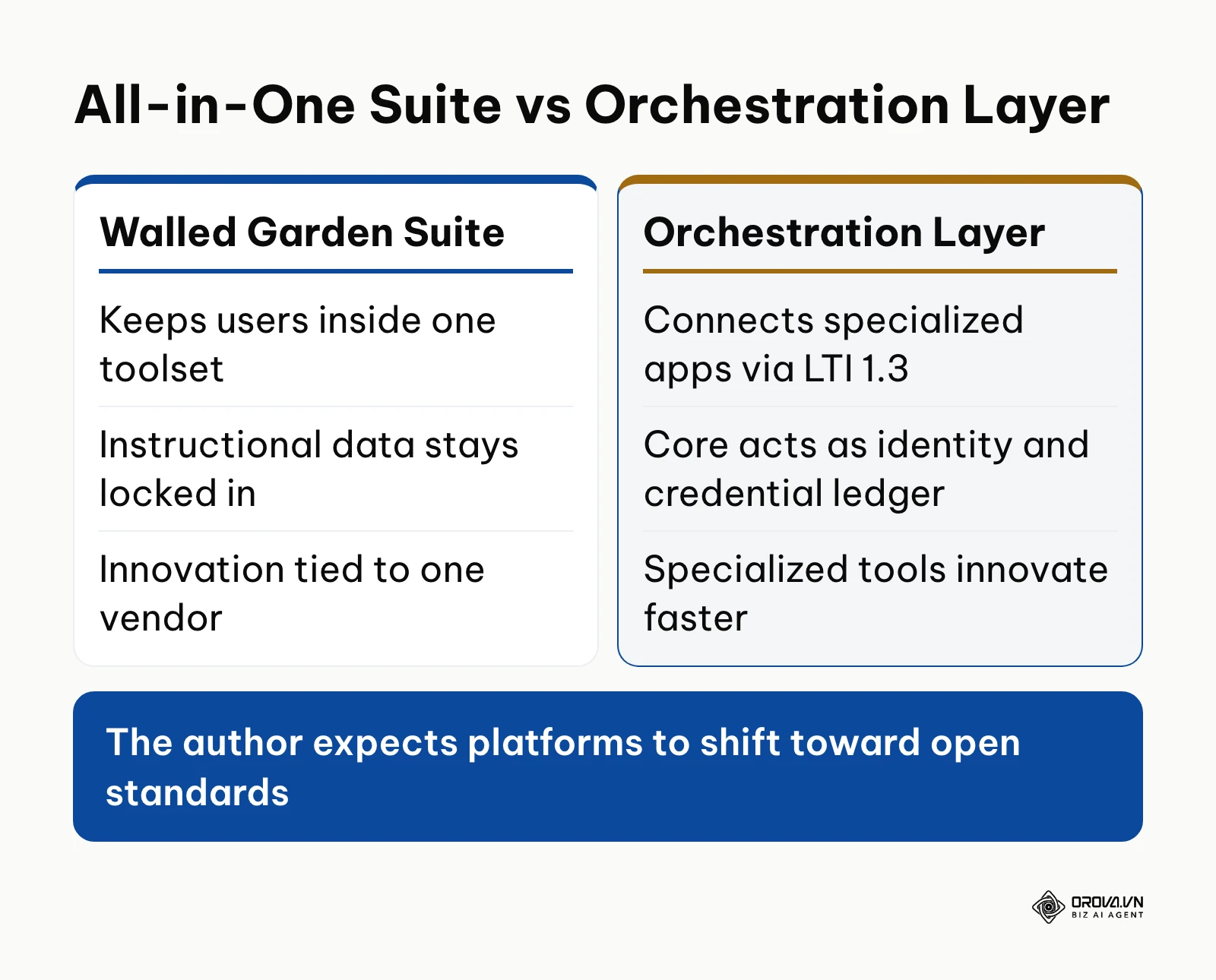
Disintegration of Walled Gardens in Favor of Open Telemetry and LTI 1.3 Standards
Monolithic learning software suites historically attempted to keep users entirely inside their proprietary toolsets. As of 2026, many district leaders are pushing back on closed ecosystems that trap instructional data. I think it is likely that the traditional all-in-one platform interface will gradually dissolve into a secure orchestration layer. In my assessment, institutions will connect best-of-breed specialized applications via 1EdTech LTI 1.3 protocols, while the core platform functions primarily as an identity, credential, and compliance ledger. I favor this model because specialized instructional tools innovate far faster than any single enterprise vendor can manage. This progression could stall if major legacy providers restrict external API access to protect software market share. Technology coordinators should audit existing software dependencies today and mandate open standards compliance across all software contracts.
Convergence of Academic Pedagogies and Corporate Micro-Credentialing
The structural divide separating academic school record-keeping from workforce competency tracking remains wide. Over the next two to three years, I believe secondary and post-secondary educational software will increasingly incorporate granular skill tagging and verifiable digital credentials aligned with occupational registries. I favor this direction because employers and university admissions offices increasingly demand transparent evidence of practical capability rather than unstandardized course letter grades. While academic institutions traditionally measure student success through seat time, organizations seeking higher participation often adopt a gamified LMS architecture to sustain learner completion rates. This convergence might be hindered if state education accreditation boards refuse to recognize non-traditional micro-credentials in place of conventional graduation credits. Curriculum developers should begin indexing course units to observable competencies rather than relying solely on seat time.
Frequently Asked Questions About LMS Schoology
What should a school budget for Schoology with 500 to 1,000 learners?
PowerSchool does not publish list prices, so the figure comes from a quote based on enrollment, contract length and bundled modules. Ask for each line separately: annual licenses, one-time setup, the SIS connector, the support tier, staff training and renewal terms. The license is rarely the only cost in year one.
Can Schoology be effectively utilized for corporate internal training?
While an organization can technically create courses and enroll adult learners, the platform is fundamentally engineered around primary and secondary school structures. It lacks essential corporate capabilities such as corporate organizational hierarchy tracking, automated annual compliance retraining cycles, and native SCORM deep telemetry. Organizations requiring workforce onboarding, compliance auditing, and employee certification should deploy an enterprise corporate training system rather than an academic platform.
How can instructors export gradebook and analytics data to external BI tools like Looker Studio or Excel?
System administrators and instructors can export gradebook data, assignment completion records, and attendance logs through the system reporting dashboard as structured CSV files. For district-level analytics, administrators can move exported files or API data into tools like Google Looker Studio, Microsoft Power BI, or a district data warehouse; check with your PowerSchool administrator which export options your contract includes.
Is LMS Schoology still necessary now that generative AI tools can create learning content?
Generative tools can produce lesson plans and draft quiz questions rapidly, but they do not provide user authentication, FERPA-compliant privacy protection, structured gradebook calculation, or official SIS synchronization. A learning management platform remains essential as the secure operating system where curriculum is assigned, student submissions are authenticated, and accredited academic records are maintained. Generative tools serve as content accelerators, while the platform serves as the authoritative institutional record.
How does Schoology handle integration with Google Workspace and Microsoft 365?
PowerSchool offers a Google Drive Assignments app and a OneDrive Assignments app for Schoology. Instructors and students can attach documents directly from Google Drive or Microsoft OneDrive, and instructors can create assignments that give each student an individual working copy. Single sign-on authentication allows users to log into the platform using existing Google or Microsoft institutional credentials.
What is the difference between Schoology Basic and the Enterprise version?
Schoology Basic is the entry tier aimed at individual teachers, without district administrative controls or automated rostering; check PowerSchool's current terms, since availability has changed over time. The Enterprise version includes district-wide administration dashboards, automated bidirectional Student Information System integration, custom branding, enterprise security controls, and dedicated implementation services.
Where Should You Start? Action Pathways by Maturity Stage
Navigating the deployment or optimization of an instructional platform depends entirely on your institution's current technical foundation. Rather than attempting a comprehensive system overhaul overnight, focus on a single high-impact step matched to your current operational maturity.
If your institution currently lacks a digital learning platform: map your top three recurring instructional workflows on paper and test them inside a sandbox environment with two colleagues over an afternoon. Focus strictly on creating one sample course, adding a three-resource unit folder, and verifying that an assignment submission can be evaluated against a basic rubric. Completing this single workflow provides immediate clarity on navigation mechanics before committing to district-wide procurement.
If your institution operates with fragmented digital tools: conduct a three-hour digital file audit to consolidate all active curriculum documents, syllabus outlines, and grading rubrics into a single structured shared folder. Establishing uniform folder naming conventions and purging duplicate file versions creates the standardized content hierarchy required for seamless ingestion into an enterprise courseware structure.
If your institution currently runs an instructional platform without measuring learning outcomes: configure a single course gradebook category to track criterion-based rubric mastery and review the resulting assignment completion distribution after the next grading cycle. Analyzing how students perform against specific mastery indicators reveals actionable curriculum gaps that traditional percentage averages conceal.
Following this structured path ensures that your institution establishes measurable instructional impact before scaling your deployment of lms schoology.
About the author

Builder of Orova
Nguyễn Đỗ Trọng Ân has 8 years of experience in marketing, including 6 years managing market development across Asia. He builds Orova, a Biz AI Agent that never sleeps: it plans, runs and optimizes work for businesses.
Run your business with AI Agents
Orova is the always-on Biz AI Agent — it plans, runs, and optimizes the work for you.
Save time, unlock productivity.