
Docebo LMS review: features, licensing models, and rollout guide

Docebo LMS is a cloud-based learning platform that large organizations use to train employees, partners, and customers from one system. If you are evaluating it, the short answer is this: Docebo LMS fits best when you need several branded academies, deep integrations, and AI course authoring at scale, and it fits less well when a small internal team simply needs onboarding and compliance courses without a dedicated administrator. This guide explains how Docebo LMS is usually licensed, what a rollout involves step by step, what its Docebo Creator authoring tool does, which metrics to track, and an eight-question checklist to test whether an enterprise suite or a lighter platform suits your organization.
What Is Docebo LMS and Who Is It Really Built For?
Docebo LMS is a cloud-based enterprise learning management system designed to manage, deliver, and track formal and social learning programs for internal workforces and extended partner networks. The platform centralizes compliance tracking, automated role-based course enrollments, and multi-domain branding, enabling global organizations to govern complex organizational hierarchies within a unified infrastructure.
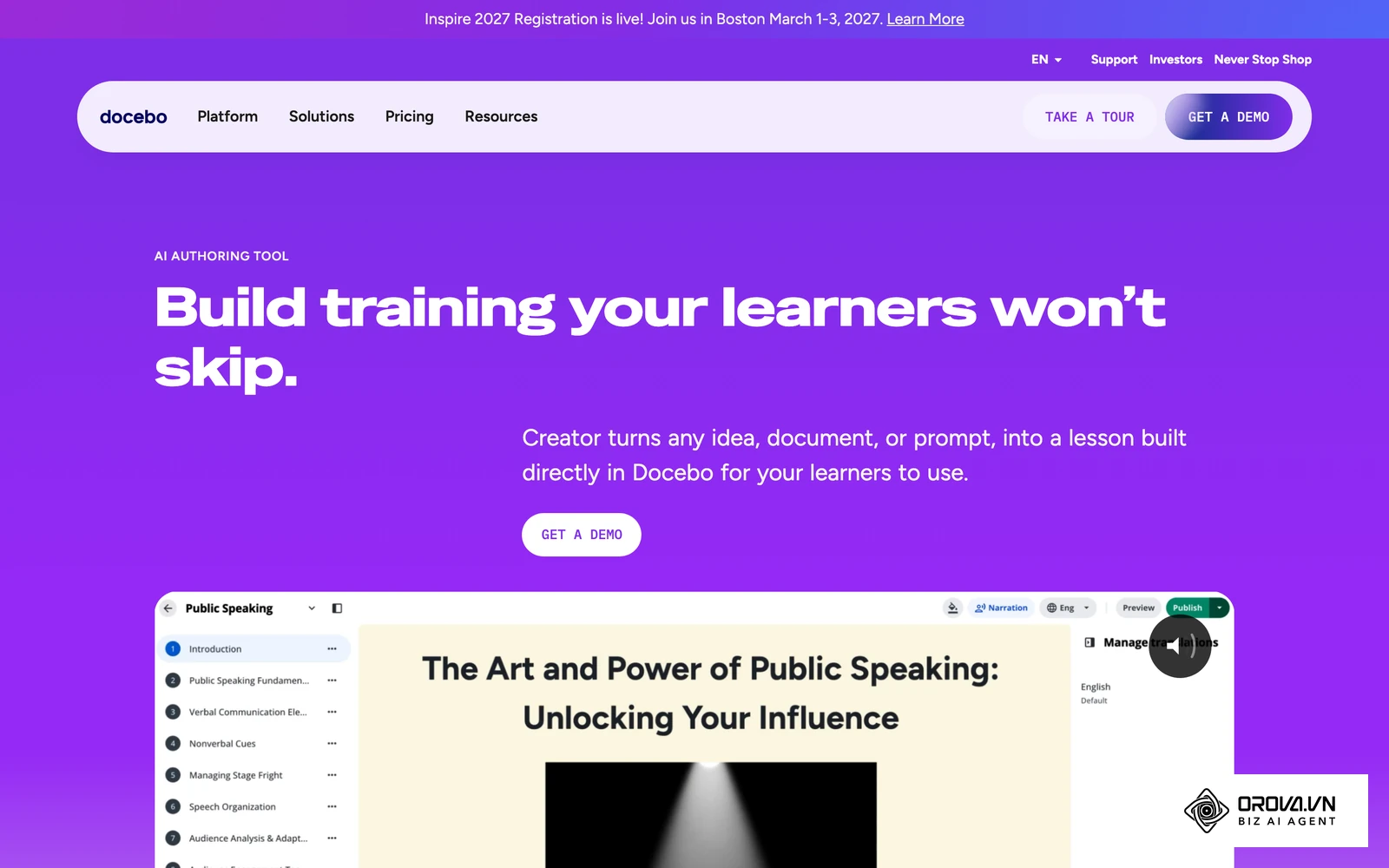
The platform excels when deployed by mid-market and enterprise organizations with large learner populations, particularly those managing hybrid audiences consisting of internal staff, external franchisees, customer academies, and supply-chain partners. When a company needs distinct sub-domains with independent branding, segregated course catalogs, and dedicated administration rights for regional business units, the platform delivers enterprise-grade segregation.
Conversely, companies with 50 to 500 internal employees focused strictly on rapid onboarding, skills training, and compliance tracking may find that much of the infrastructure goes unused. If your training team lacks a dedicated systems administrator or an instructional designer skilled in packaging SCORM courses, maintaining this environment generates administrative bottlenecks rather than operational velocity. Understanding how to choose an LMS requires looking closely at your internal technical capabilities before committing to a multi-year enterprise contract.
Enterprise Preparation: What to Audit Before Purchasing Docebo LMS
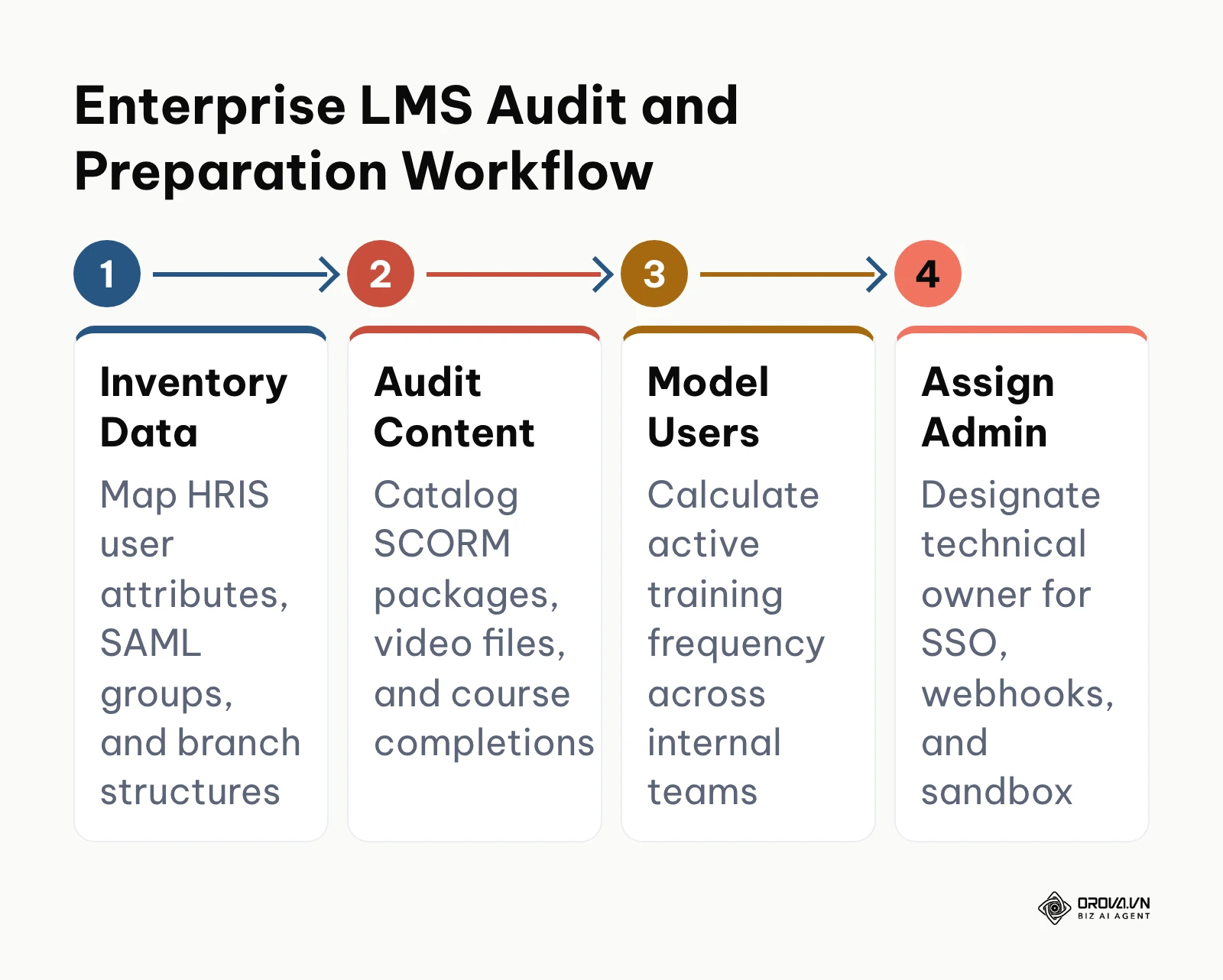
Deploying an enterprise learning management system requires significant organizational alignment before signing an order form. Without thorough preparation, onboarding timelines can slip as system administrators struggle to clean legacy employee data and resolve format incompatibilities across existing course materials. The diagram and table below outline the preparation phases needed to audit your technical infrastructure, data architecture, and content assets.
| Prerequisite Item | Source / Originating System | Estimated Preparation Time | Technical Requirement |
|---|---|---|---|
| HRIS User Architecture | Workday, BambooHR, or ADP | 1 to 2 weeks | Standardized employee profile attributes (department, branch, hire date, manager email). |
| Single Sign-On Credentials | Okta, Microsoft Entra ID, or Google Workspace | 3 to 5 business days | SAML 2.0 or OpenID Connect protocol endpoints with configured claims mapping. |
| Legacy Content Catalog | Internal file servers, Google Drive, or prior LMS | 2 to 3 weeks | Inventory of SCORM 1.2, video files, PDFs, and slide decks tagged by compliance status. |
| Extended Network Hierarchy | Channel sales and partner management teams | 1 week | Defined tenant boundaries, portal URL domains, and external user self-registration policies. |
| Dedicated System Administrator | Internal IT or People Operations team | Immediate | A named owner with protected weekly time for platform governance. |
Organizations must complete these assessments early to avoid delays. Auditing employee data fields ensures that automated enrollment rules function smoothly once user synchronization begins. Cataloging course assets prevents corrupt or outdated course packages from stalling the content ingestion phase.
The 6-Step Implementation and Configuration Process for Docebo LMS
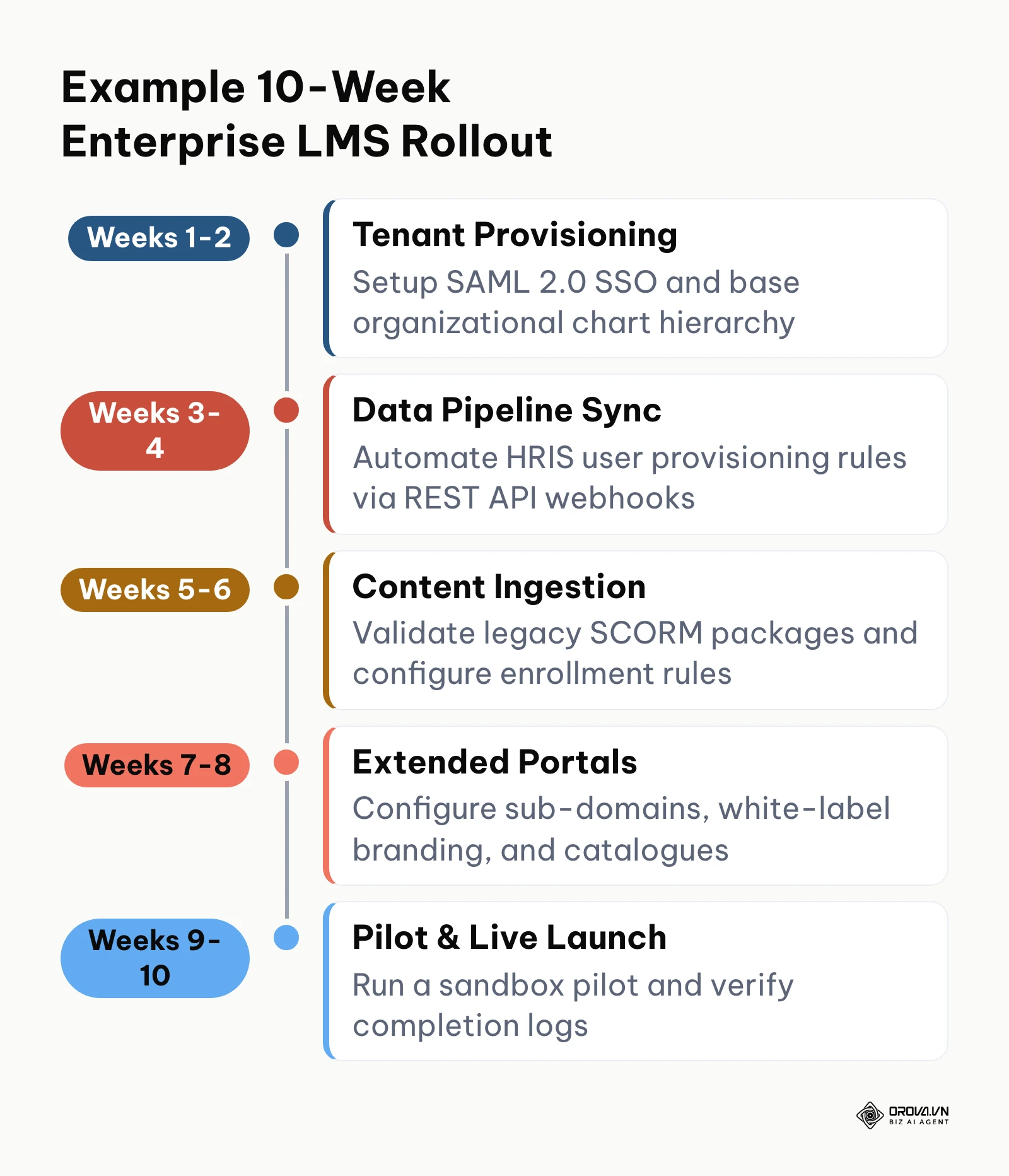
Deploying Docebo LMS in an enterprise environment requires a structured technical roadmap to ensure data integrity, reliable user provisioning, and frictionless course delivery. The timeline below shows the milestones of an example ten-week implementation cycle; your own timeline depends on data quality and integrations.
Step 1: Selecting and Auditing User Licensing Models (Monthly, Yearly, or Registered Users)
What to do: Select the correct active user billing structure with your vendor representative and configure automated identity governance rules to prevent unauthorized seat activations.
How to do it: Ask the vendor which user definition your quote uses, then review how users are provisioned in the admin area. Enterprise LMS vendors commonly license through one of three mechanisms: monthly active users (MAU), yearly active users (YAU), or registered users. In an MAU contract, any user who logs into the portal or accesses a learning object within a calendar month triggers an active billing unit. If your compliance training occurs during an annual review month, your active user count can spike dramatically, pushing your account above the contracted threshold. Configure your directory synchronization filters to exclude suspended accounts, contractors, and inactive employees from syncing into the learner directory.
Signs of doing it right: Your synchronized user count reflects only active employees with assigned learning tracks, and test synchronization scripts run without triggering unexpected user creation alerts.
Common errors: Syncing your entire company directory without role-based exclusion filters. When non-learning personnel log in to check a single profile field, the system classifies them as an active learner, consuming a paid license slot for that billing cycle.
Step 2: Migrating Legacy SCORM Packages and Configuring Course Repositories
What to do: Validate, upload, and organize legacy training modules into the central course repository while verifying runtime communication tracking.
How to do it: Access the Central Repository within the administrative panel. Before batch-uploading courses, test each package in an isolated testing environment to verify that the manifest file parses completion markers accurately. SCORM 2004 4th Edition, published by the Advanced Distributed Learning (ADL) Initiative in 2009, adds sequencing and navigation rules for multi-SCO packages, so these packages need extra testing whenever they move between platforms. If your modules rely on older standards, verifying a SCORM compliant LMS testing process ensures bookmarks, quiz scores, and session termination commands transfer cleanly to the learner transcript table.
Signs of doing it right: Course status switches automatically from "In Progress" to "Completed" upon learner quiz submission, and the tracking database captures seat time accurately across both desktop and mobile web browsers.
Common errors: Uploading raw ZIP archives containing nested folders or broken manifest XML files. This corrupts the course structure, causing modules to freeze on the final slide without sending completion flags to the grade book.
Step 3: Setting Up Extended Enterprise Branches and Multi-Domain Portals
What to do: Establish distinct sub-organizations, URL routing, and customized branding for separate business divisions or external partner networks.
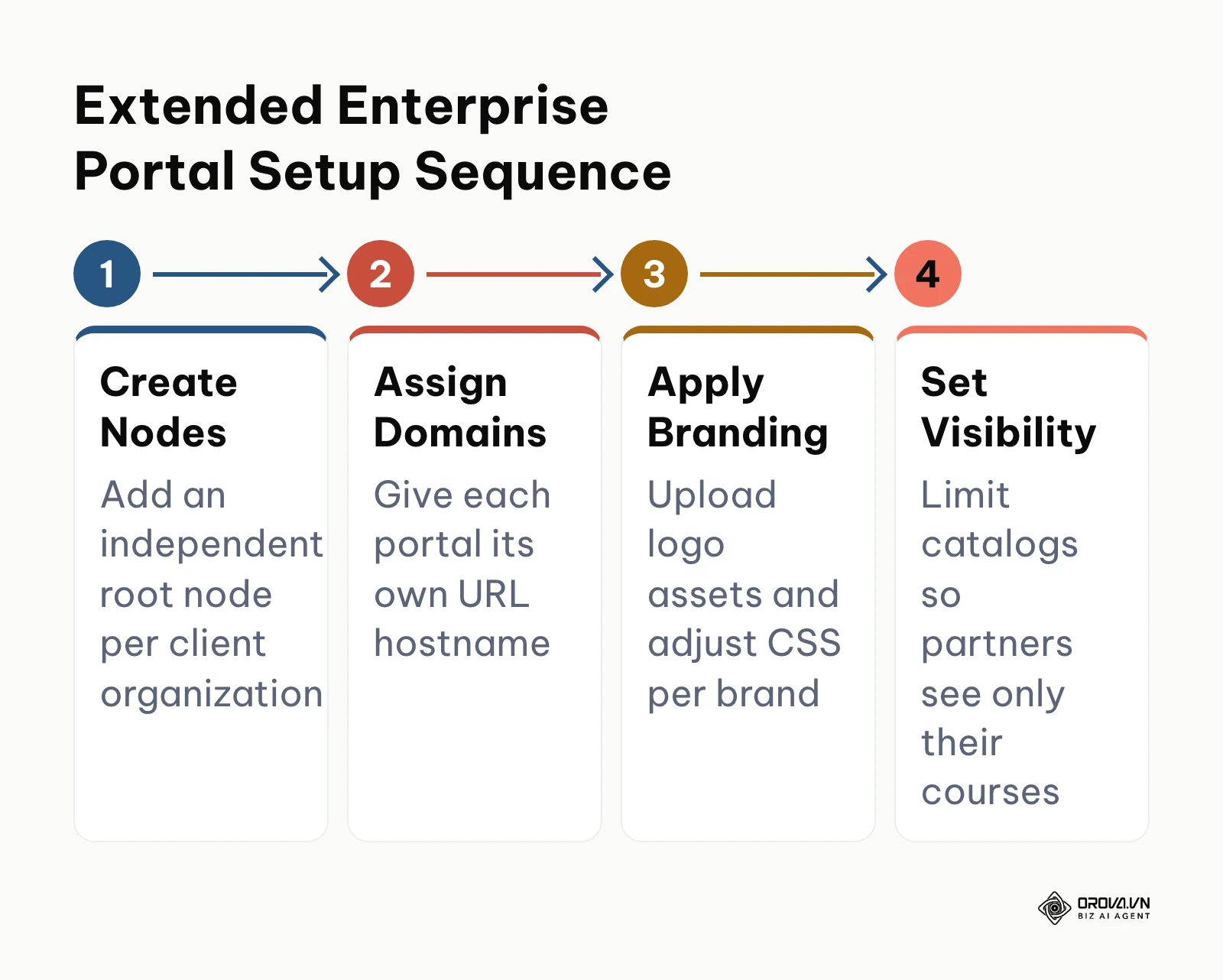
How to do it: Open the Extended Enterprise application within the administration menu. Create distinct client organizations by establishing independent root nodes in the organizational hierarchy. Assign dedicated URL hostnames to each tenant, configure individual logo assets, and customize cascading style sheets (CSS) to match brand guidelines. Establish catalog visibility rules so that external partners see only relevant product certification content while internal compliance modules remain hidden.
Signs of doing it right: External users navigating to partner portals encounter isolated authentication prompts and browse customized course catalogs without discovering internal workforce directories.
Common errors: Failing to restrict global course catalog permissions. When permissions leak across branch boundaries, external channel partners can accidentally view internal corporate policies and sensitive operational guidelines.
Step 4: Integrating HRIS Data Feeds and SAML 2.0 Single Sign-On
What to do: Connect your central human resources information system and identity provider to automate user provisioning, updates, and access revocation.
How to do it: Navigate to the API and Webhooks section and generate secure authentication credentials. Configure an automated data pipeline using scheduled REST API calls or pre-built connectors for platforms like BambooHR or Workday. Within the SAML 2.0 Settings panel, upload your identity provider metadata XML file, map the unique user identifier attribute (typically work email), and define role assignment attributes. Establish automated de-provisioning webhooks so that when an employee departs the organization, their platform access terminates instantly.
Signs of doing it right: Creating a test user in your human resources software automatically generates an account in the LMS with correct department tags and automated course enrollments within ten minutes.
Common errors: Incorrect attribute key mapping between the identity provider and the learning management system. A mismatch between "mail" and "userPrincipalName" prevents users from signing in, generating widespread single sign-on authentication errors.
Step 5: Testing Docebo Creator AI Authoring
What to do: Audit the native AI authoring workflow in Docebo Creator, measure how long a usable lesson takes, and clarify how AI usage is counted in your contract.
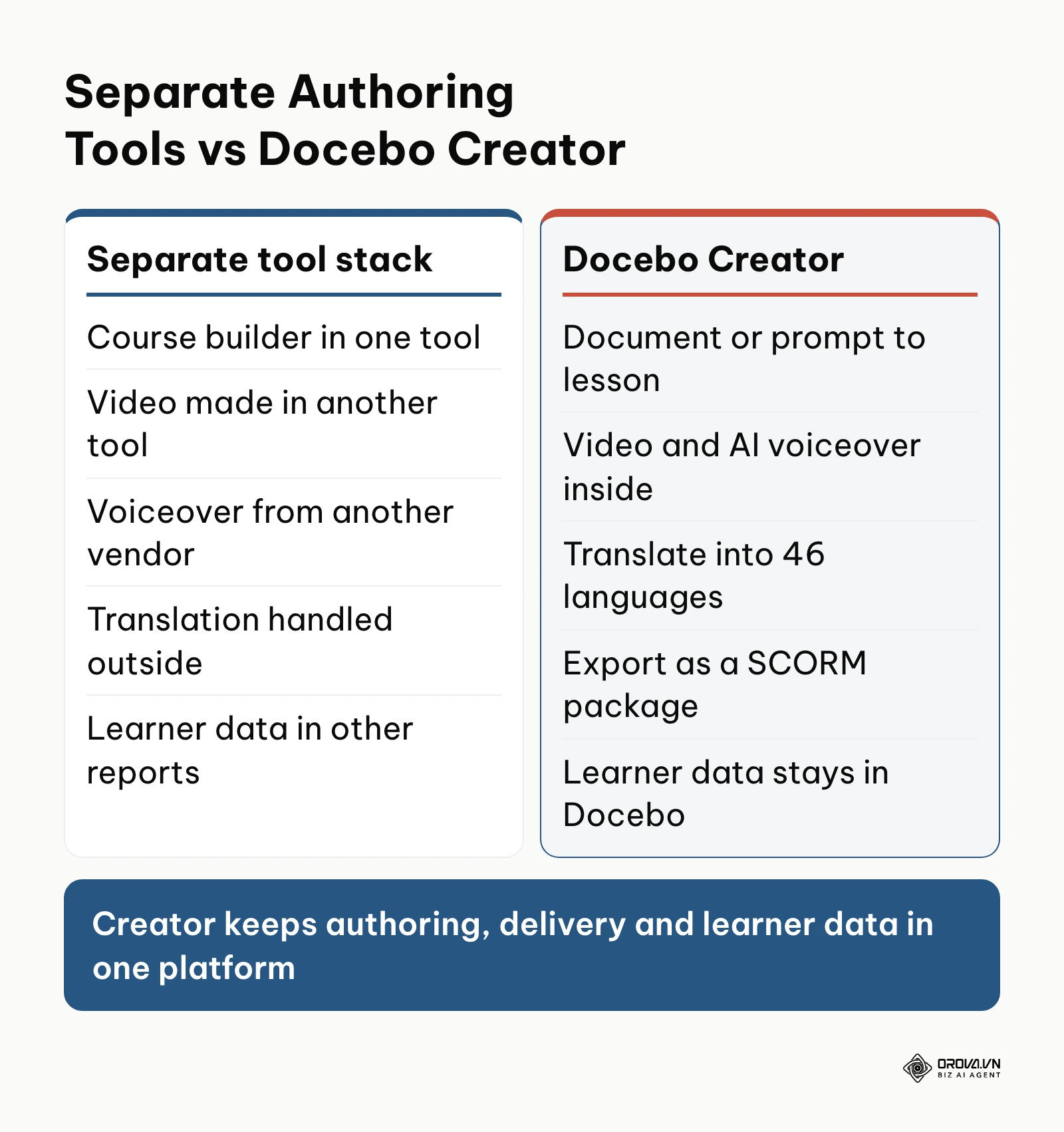
How to do it: Open Docebo Creator in your trial or sandbox. According to Docebo's content creation page, Creator turns a document or prompt into a structured lesson with images and knowledge checks, adds AI voiceover, translates lessons into 46 languages, and can export a SCORM package. Test it by converting one standard operating procedure document into a lesson, adding voiceover, and translating it into one language your offices use. Ask the vendor how AI generation, voiceover, and translation usage is counted under your plan, and note the answer next to your test results.
Signs of doing it right: Generated courses display clean slide typography, synchronized audio narration, and interactive knowledge checks, and you have a written answer on how AI usage is counted under your contract.
Common errors: Assuming every AI feature shown in the demo is included in your plan. Confirm in writing which Creator capabilities your contract covers before scheduling a bulk production project.
Step 6: Configuring Blended Learning, ILT Sessions, and Certification Rules
What to do: Construct hybrid learning tracks combining self-paced digital modules with live instructor-led training (ILT) classrooms, automated attendance verification, and digital credential distribution.
How to do it: Open the Course Management portal, create an Instructor-Led Training course, and establish physical and virtual classroom sessions. Connect a supported video conferencing integration, such as Zoom, for virtual sessions. Under the Certifications and Retraining tab, define validity windows (such as 365 days for workplace safety credentials) and configure automated re-enrollment triggers that notify learners 30 days before their certifications expire.
Signs of doing it right: Learners attending virtual classroom sessions receive automated attendance credit upon meeting the minimum connection duration, and system-generated certificate credentials populate their learner profile immediately.
Common errors: Relying on manual attendance entry for large hybrid classes. When instructors forget to mark attendance rosters manually, learners remain locked out of subsequent module prerequisites, stalling certification compliance across the department.
Illustrative scenario: An enterprise software firm with 450 employees attempted to implement blended product onboarding across five remote offices.
The team configured six self-paced SCORM modules, integrated Zoom webhooks for live weekly technical demonstrations, and linked automated certification issuance upon course completion.
However, instructors did not configure automated webhook attendance triggers, forcing the HR coordinator to cross-reference Zoom attendee logs manually against LMS rosters each Friday afternoon; unrecorded attendees were blocked from subsequent training modules.
The administrator resolved this by rebuilding the session templates with automated API attendance thresholds set at forty-five minutes of active connection time, instantly unlocking subsequent coursework for verified attendees.
Within two weeks, all forty newly hired engineers completed their technical onboarding and received verified certifications without administrative intervention.
If configuring enterprise roles and portals is more than your internal training needs, Orova Training lets you build lectures, slide decks, podcasts, and narrated videos with AI from your own material, then run online quizzes graded by AI and award certificates automatically when learners pass.
In-Depth Analysis: Total Cost of Ownership, Licensing Models, and Architectural Trade-Offs
Evaluating an enterprise learning management system requires examining financial obligations beyond the base software license. Enterprise software agreements typically bundle multi-year commitments with recurring support charges, integration consulting, and administrative labor costs that belong in the budget alongside the license itself.
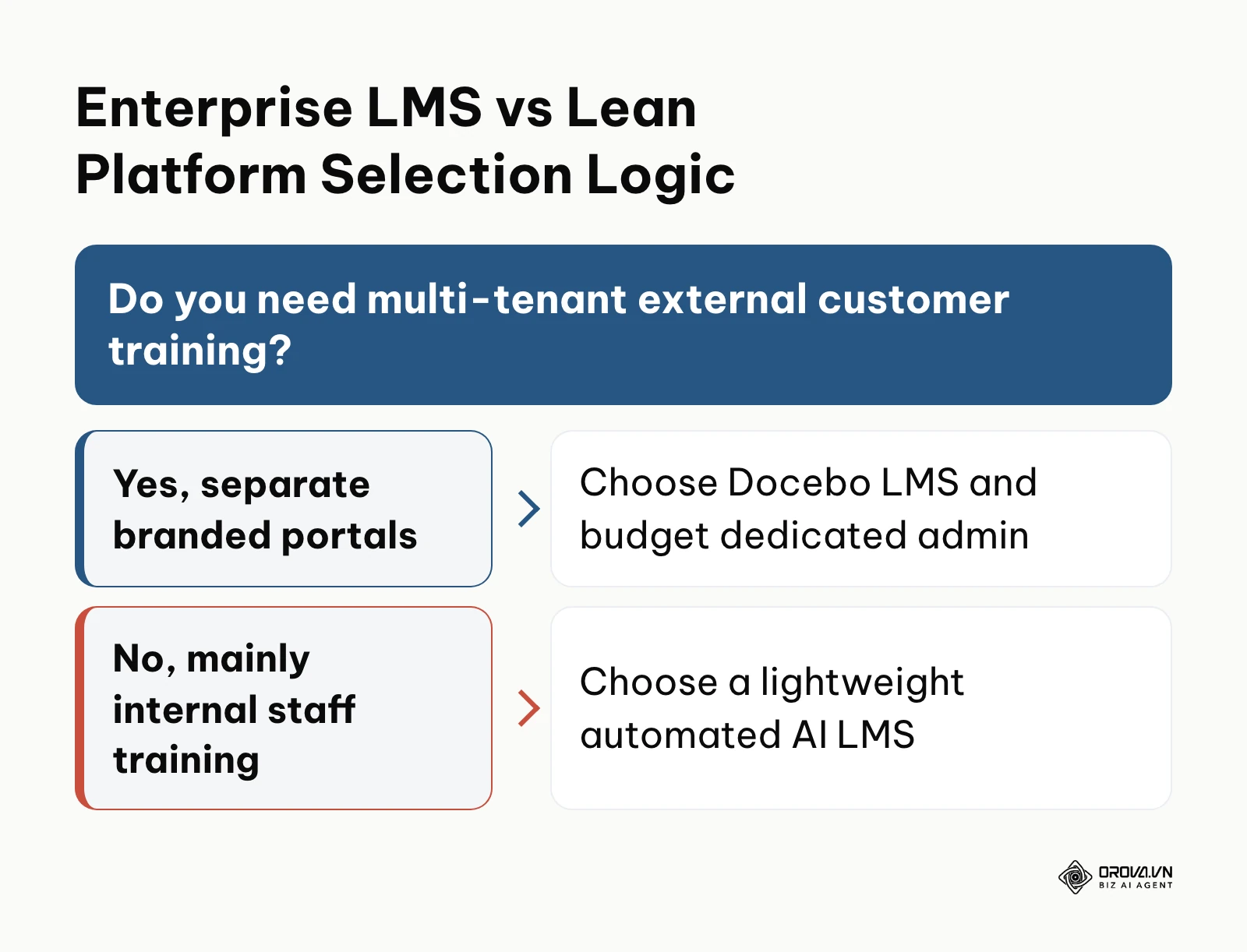
Illustrative scenario: A medical equipment distributor with 300 employees evaluated enterprise LMS contracts to train 250 internal staff and 50 hospital technicians.
The procurement team compared a monthly active user contract against a registered user agreement and initially selected the monthly model because its base quote was lower.
Six months into deployment, the distributor launched an annual regulatory compliance certification that required all 300 users plus 100 external contractor technicians to log in during the same two-week testing window, pushing usage above the contracted monthly threshold and triggering an overage charge.
The team re-negotiated the contract structure toward a yearly active user baseline while assigning an administrative coordinator to audit directory sync schedules weekly.
The company stabilized its licensing costs and maintained a consistent audit trail without exceeding budgeted software allocations.
How Active User Licensing Models Work
Many enterprise LMS vendors quote each customer individually rather than publishing a fixed price list. Understanding how active user models impact your budget is critical for forecasting financial commitments.
- Monthly Active Users (MAU): You contract for a specific threshold of unique user logins per month (for example, 250 users). If your usage remains steady, this provides flexibility. However, if company-wide compliance reviews occur once or twice a year, your active user count surges, which can trigger overage fees.
- Yearly Active Users (YAU): You purchase a pool of unique learners who can access the portal over a twelve-month agreement. This accommodates seasonal training spikes effectively, but requires accurate forecasting. Unused licenses expire at the end of the contract term without roll-over credits.
- Registered Users: You pay for every user profile stored in the platform, regardless of whether they log in. While this eliminates overage surprises, it forces administrators to delete or archive departed or dormant profiles constantly to prevent seat bloat.
To understand the real financial impact, list every cost component in the quote, not only the subscription line. The table below shows what to check under each licensing model; bring it to your vendor call and fill in the figures from your own quote.
| Cost Component | Monthly Active Users | Yearly Active Users | Registered Users | Question to Ask the Vendor |
|---|---|---|---|---|
| Base platform subscription | Set by a monthly unique-login threshold | Set by a yearly pool of unique learners | Set by every stored profile | Which user definition applies to my quote? |
| Implementation and onboarding | Confirm | Confirm | Confirm | Is onboarding a one-time fee or included? |
| Peak season overage | Highest exposure | Low exposure | None, but dormant profiles count | How is overage calculated and billed? |
| Add-ons (Extended Enterprise, Creator, analytics) | Confirm if included | Confirm if included | Confirm if included | Which add-ons are part of the base plan? |
| Administrator time | Internal cost | Internal cost | Internal cost | How many admin hours do similar customers report? |
Administrative complexity and unexpected integration work are common reasons organizations give for replacing an LMS, so budget for the internal labor required to manage permissions, user directories, and technical configurations, not only for the license.
From Docebo Shape to Docebo Creator
Older reviews of Docebo still describe Docebo Shape, a separate tool that turned documents into short microlearning content. Docebo's former Shape product page now redirects to its content creation page, which presents Docebo Creator as the authoring tool built directly into Docebo.
According to that page, Creator brings course building, video, voiceover, and translation inside Docebo. You start from a document or a prompt, Creator generates a structured course with lessons, images, and knowledge checks, you refine it on a drag-and-drop canvas, and you can translate a lesson into 46 languages or export it as a SCORM package. The page also describes conversational AI podcasts built from a lesson and assessment settings for passing score and attempt limits.
For buyers, the practical step is to confirm which of these Creator capabilities your contract includes and how AI generation usage is counted before you plan a large batch of video-based courses. Teams that already author in an external tool should also decide whether they will keep that tool or move authoring into Creator, so they do not pay for two authoring stacks.
Compatibility Checklist: Docebo LMS vs Lean AI Platform
Before entering vendor procurement cycles, complete this eight-question readiness audit. Score each item to determine whether your operational demands require an enterprise suite or whether a modern, lightweight platform provides better organizational fit.
| # | Readiness Evaluation Criterion | Yes (1 Point) | No (0 Points) | Operational Threshold Implication |
|---|---|---|---|---|
| 1 | Does your organization manage external customer or partner training requiring separate domains? | If No, multi-tenant portal functionality represents unneeded architectural overhead. | ||
| 2 | Do you possess a dedicated LMS administrator with at least 20 hours per week for system maintenance? | If No, enterprise setup complexity creates operational bottlenecks. | ||
| 3 | Does your training library require complex SCORM 2004 multi-SCO tracking or third-party content marketplaces? | If No, modern document, slide, and video formats deliver faster authoring turnarounds. | ||
| 4 | Is your total active training audience greater than 500 learners per month? | If No, minimum enterprise annual contract commitments inflate cost per learner. | ||
| 5 | Does your compliance program mandate complex classroom resource booking (physical rooms and lab equipment)? | If No, standard virtual meeting integrations handle scheduling without extra overhead. | ||
| 6 | Do you have an established IT engineering team available to configure SAML SSO, API webhooks, and sandbox testing? | If No, implementation cycles can run well beyond plan. | ||
| 7 | Are you prepared to sign multi-year enterprise contracts with upfront annual commitments? | If No, seat-based financial lock-in restricts organizational agility. | ||
| 8 | Does your instructional design workflow rely on external authoring tools like Articulate 360 rather than native AI drafting? | If No, check whether built-in AI authoring in a lighter platform already covers your needs. |
Scoring Interpretation:
- 6 to 8 Points (Strong Enterprise Fit): Your operational profile aligns with an enterprise LMS like Docebo. You have the technical staff, external partner networks, and administrative budget necessary to maximize complex multi-domain ecosystems.
- 3 to 5 Points (Borderline / Overkill Warning): You risk overpaying for capabilities your team will not utilize. Consider simplifying your requirements or evaluating streamlined alternatives before committing to a multi-year enterprise contract.
- 0 to 2 Points (Lean Platform Recommended): An enterprise LMS represents operational overkill. Your team will achieve faster time-to-value with an automated, lightweight learning platform that handles native authoring, automated assessments, and compliance verification without dedicated administrative overhead.
Measuring LMS Performance: Business Metrics and Warning Thresholds
Deploying learning software requires clear governance metrics to ensure the platform delivers business value rather than accumulating digital dust. The matrix below categorizes administrative metrics by reporting complexity and strategic impact.
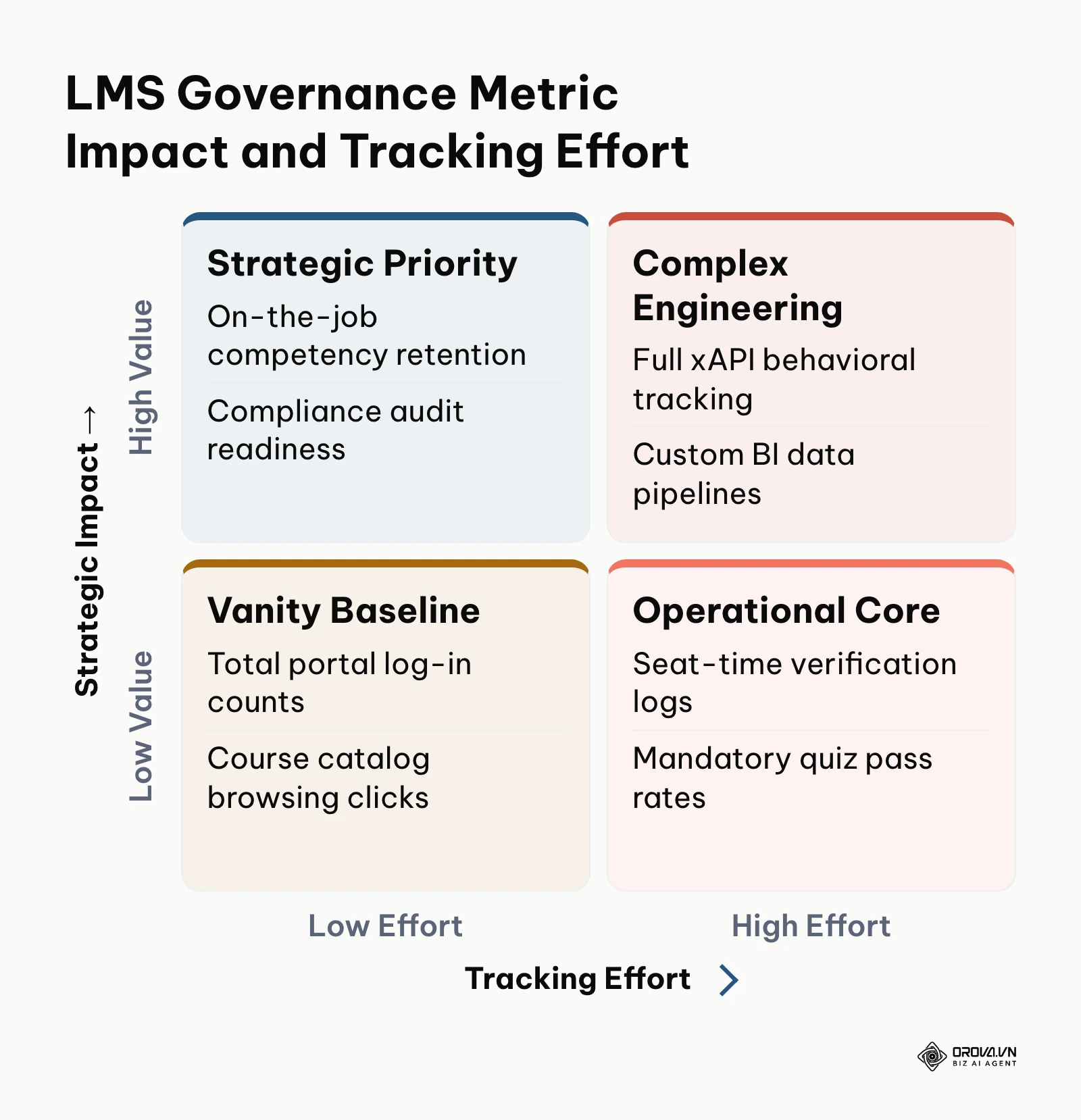
| Metric Name | Strategic Business Meaning | Typical Data Source | Suggested Warning Threshold |
|---|---|---|---|
| Active License Utilization | Ratio of contracted user seats actively accessing learning paths | Subscription or usage report | Below 60% of contracted seats across a 60-day rolling window |
| Mandatory Compliance Rate | Percentage of employees completing required safety or policy tracks | Enrollment and completion report | Below 95% within 14 days of compliance deadlines |
| Course Completion Velocity | Average business days elapsed between assignment and certificate award | Learner transcripts | Exceeding 21 business days for core onboarding tracks |
| Assessment Failure Rate | Frequency of learners failing knowledge checks on initial attempts | Quiz and question statistics | Higher than 35% (indicates flawed test design or unclear content) |
| Active Administrative Hours | Total weekly staff hours dedicated to system troubleshooting and enrollment | Internal time tracking or IT service desk tickets | Exceeding 15 hours per week for internal teams under 500 staff |
These thresholds are suggested starting points, not industry benchmarks; adjust them to your own baseline and review the metrics monthly. If active seat utilization drops below sixty percent, your organization is paying for idle software capacity. If administrative hours exceed fifteen hours weekly for a mid-market workforce, system complexity is consuming productive resources that should be directed toward instructional improvement.
Assign courses to your whole workspace, a group, or one person, track each learner's progress, block skipping and downloads, and issue certificates with a public verification code. Orova Training is free until 7 July 2027, no card required.
Common Implementation Mistakes When Deploying Docebo LMS
Even well-funded enterprise rollouts encounter friction when administrative governance is neglected. Recognizing these frequent pitfalls helps teams safeguard their deployment timelines and budgets.
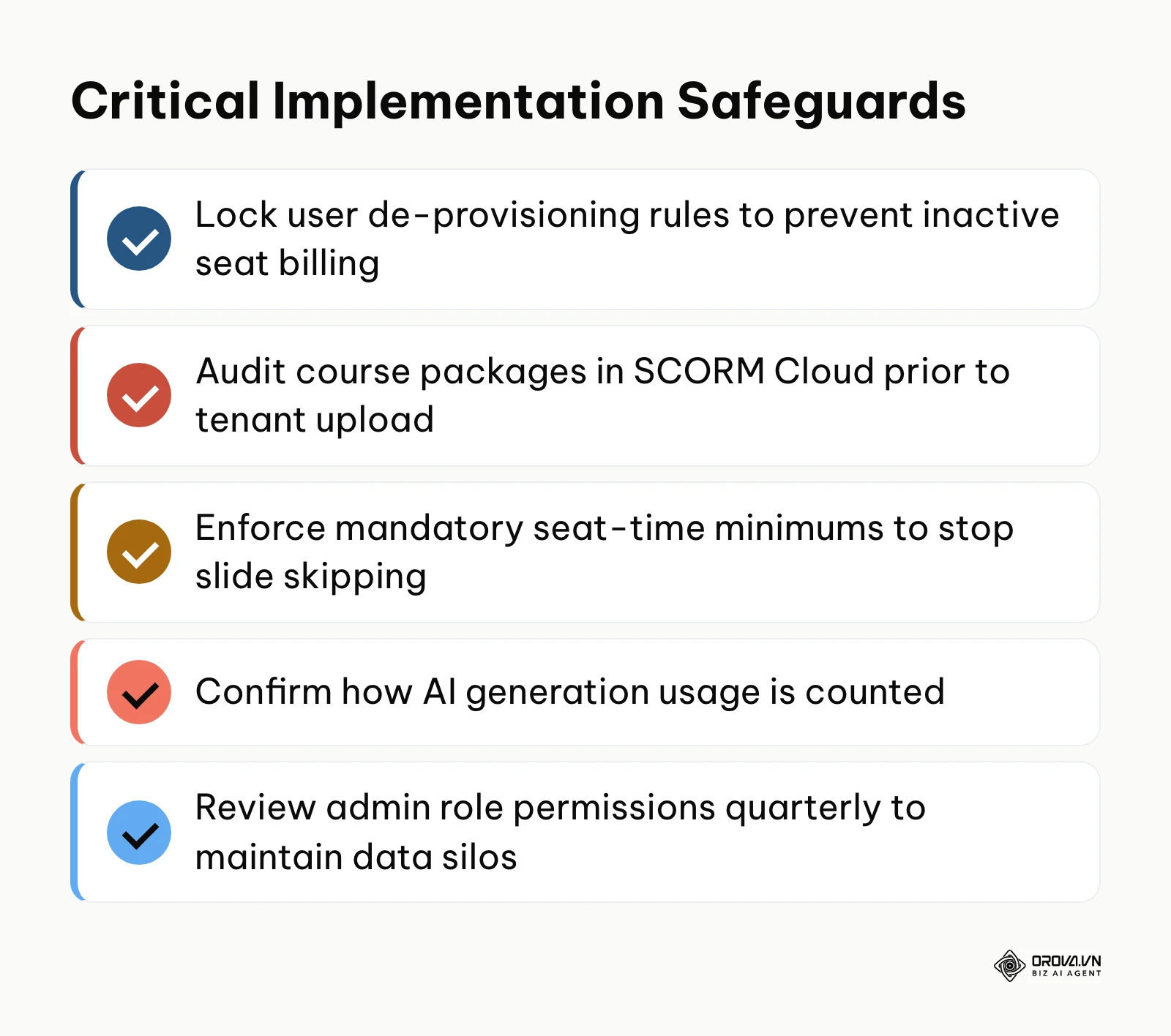
- Over-Purchasing Feature Add-Ons During Initial Contracting: Procurement teams often purchase every available add-on, including advanced white-label branding, gamification engines, and extended enterprise portals, before establishing their core internal compliance pathways. This inflates year-one licensing for features that sit idle for months. Resolution: Contract strictly for baseline user delivery during year one, adding advanced sub-domain and localization modules only when operational demand arises.
- Neglecting Automated User De-Provisioning Workflows: Integrating user creation from human resources software while neglecting de-provisioning rules leaves departing employees registered in the system indefinitely. Resolution: Implement automated SCIM (System for Cross-domain Identity Management) or webhook-driven user archiving that deactivates learner profiles immediately upon employee departure.
- Skipping Sandbox SCORM Validation: Uploading third-party course packages directly into production catalogs without testing them in an isolated sandbox leads to missing score flags and corrupted transcripts. Resolution: Enforce a protocol requiring every SCORM package to pass tracking verification in an isolated test environment before publishing it to general employee catalogs.
- Failing to Enforce Active Seat-Time Minimums: When training modules lack seat-time tracking rules, employees often click through presentation slides in seconds to register course completions without reading materials. Resolution: Configure completion criteria requiring learners to spend a verified minimum duration on each lesson with slide-advance restrictions enabled.
- Over-Engineering Gamification and Social Channels: Spending weeks designing badges, leaderboards, and social forum channels for formal compliance training does not by itself improve knowledge retention and adds administrative upkeep. A well-designed gamified LMS framework focuses on deliberate skill incentives rather than superficial badge mechanics. Resolution: Focus administrative effort on concise course materials, objective knowledge checks, and verifiable certificate distribution before enabling public social learning feeds.
- Underestimating Content Creation Bottlenecks: Expecting managers and subject matter experts to author polished multimedia courses using complex external tools often results in abandoned, half-finished training initiatives. Resolution: Adopt modern authoring pipelines that transform existing reference documents directly into structured presentations, interactive quizzes, and narrated audio summaries.
Illustrative scenario: A logistics firm with 220 drivers and warehouse specialists purchased an enterprise LMS to deliver annual safety refreshers.
The training coordinator uploaded five slide decks as unrestricted PDF viewers, expecting drivers to complete the forty-page reading assignment during scheduled maintenance breaks.
Within three days, records indicated that eighty percent of drivers had completed the safety course, but random spot-checks revealed drivers were scrolling through forty pages in under forty seconds simply to trigger completion checkboxes.
The coordinator overhauled the training by dividing documents into modular chapters, applying a mandatory fifteen-minute minimum seat-time rule that paused playback whenever the active tab lost focus, and inserting three-question comprehension checks between sections.
Drivers engaged directly with the training materials, and the company established verifiable audit logs verifying authentic compliance across its logistics fleet.
Trends in Corporate LMS Over the Next Few Years: Author's Outlook
The enterprise learning management software landscape is experiencing structural shifts driven by workforce distribution and automated software intelligence. As of 2026, traditional learning architectures face increasing pressure from agile, automated platforms.
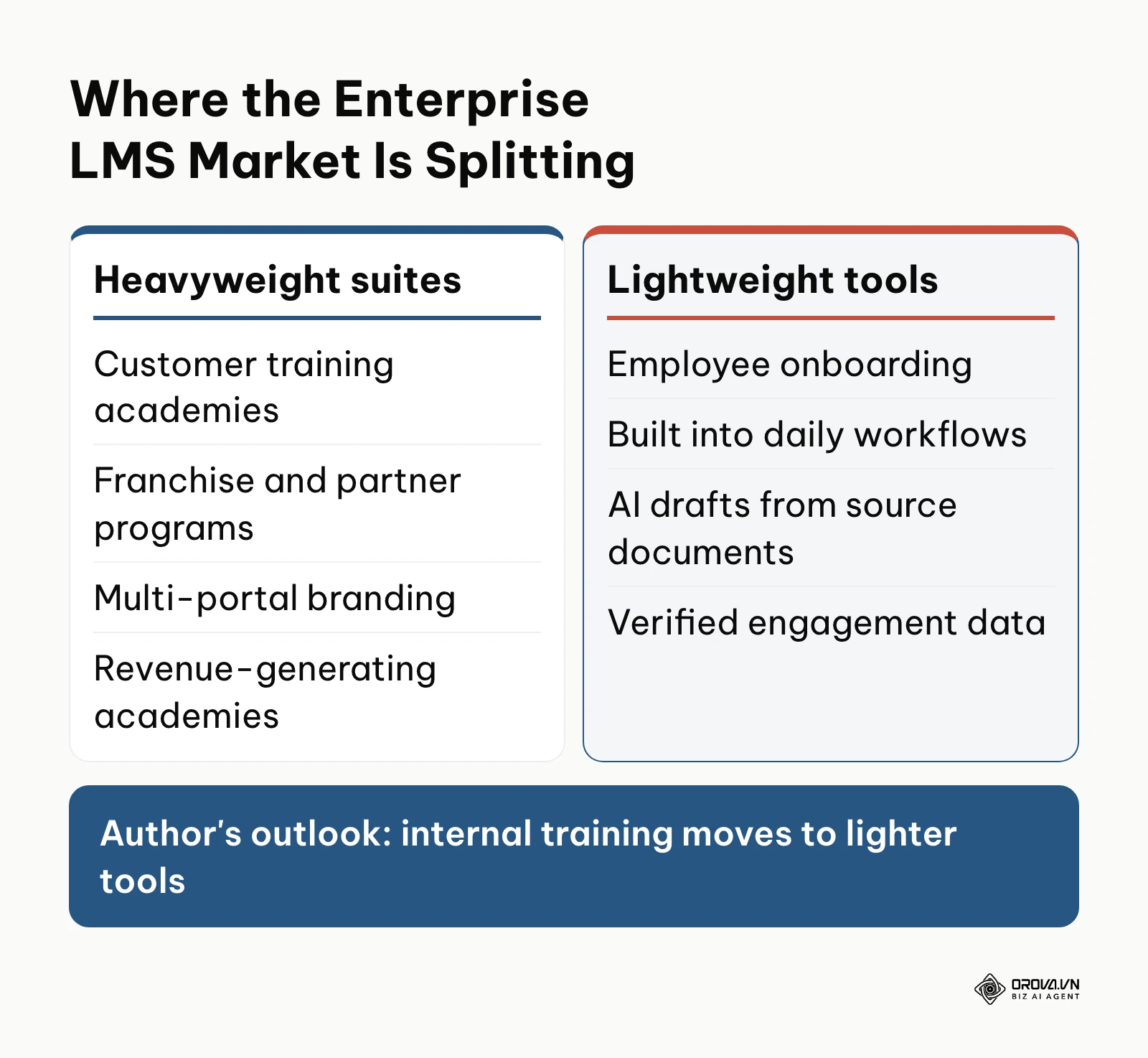
In my view, the traditional model of the monolithic enterprise LMS will divide into two distinct categories over the next few years. Heavyweight platforms will increasingly focus on customer training, franchise management, and revenue-generating extended academies where multi-portal branding justifies substantial software expenditures. Meanwhile, internal employee training will shift toward lightweight, automated systems that integrate directly into daily workflows. Organizations should prepare by standardizing their core training content into clean, structured reference formats rather than locking intellectual property into proprietary authoring tools. A delay in API standardization across corporate identity systems could, however, slow this architectural division.
I also anticipate that generative AI will take over most first-draft instructional writing for standard corporate training. Today, authoring teams spend weeks formatting slide presentations and writing multiple-choice questions from policy documents. Over the next few years, I expect enterprise training engines to ingest raw technical documentation and generate modular, multi-format courses, including synthesized presenter videos and adaptive rubrics, in a matter of minutes. Corporate training teams must transition their skill sets from manual content formatting toward editorial review, subject-matter validation, and learning outcome verification. If copyright litigation or compute constraints restrict commercial model deployments, the timeline for automated authoring adoption could extend.
Finally, I lean toward the expectation that passive completion metrics will lose credibility during regulatory compliance audits. For decades, completing a course meant clicking through slides without proving comprehension. Over the coming years, compliance bodies and corporate leadership will demand verifiable engagement data, including active seat-time tracking, tamper-proof digital certificates, and randomized oral or short-answer assessments evaluated against standardized rubrics. Training leaders should audit their compliance courses today to ensure their tracking engines verify active presence rather than passive browser clicks. If enterprise regulatory frameworks fail to modernize their auditing criteria, traditional check-the-box training practices may persist longer than anticipated.
Frequently Asked Questions About Docebo LMS
How does Docebo Creator handle producing courses in bulk?
According to Docebo's content creation page, Creator can start from any document or prompt, generate structured lessons with knowledge checks, add AI voiceover, and translate lessons into 46 languages, so one source document can be reused across markets. How AI usage for bulk production is counted depends on your contract, so confirm it with Docebo before planning a large batch.
How many administrative hours does a 100 to 300 person company spend managing Docebo LMS without a dedicated specialist?
There is no published benchmark for this, and the answer depends on how clean your HR data is and how many integrations you run. Administrative time usually goes to resolving identity synchronization errors, structuring branch permissions, packaging course assets, and answering learner access issues. Track your own admin hours during the first quarter; if they keep rising, either assign a named administrator or simplify the configuration.
Does Docebo LMS automate attendance tracking and certificate delivery for live instructor-led training?
The platform automates attendance tracking when virtual classroom sessions integrate with supported webinar tools such as Zoom and attendance rules are configured correctly. Once attendance is confirmed, the system issues digital certificates automatically upon meeting completion criteria. However, if instructors conduct physical classroom sessions or fail to configure automated webhook thresholds, attendance must be verified manually before certificates can be issued.
What role does artificial intelligence play in modern enterprise LMS platforms?
Artificial intelligence in modern learning systems has expanded beyond algorithmic course recommendations to automate content drafting and assessment evaluation. Contemporary platforms utilize language models to transform policy documents into structured slides, generate comprehension questions from source text, summarize video lessons, and evaluate short-answer responses against predefined rubrics, significantly reducing the manual labor required to maintain training libraries.
What is the primary operational difference between internal and Extended Enterprise licensing?
Internal licensing covers direct employees accessing a shared organizational directory, primarily utilized for onboarding, professional development, and mandatory compliance. Extended Enterprise licensing enables organizations to deploy segregated sub-domain portals with independent branding, administrative controls, and course catalogs for external audiences such as clients, franchisees, and supply-chain partners, preventing external learners from accessing internal corporate data.
Where Should You Start?
Selecting and deploying corporate learning software requires matching your internal resources against the technical demands of your chosen platform. Depending on where your organization currently stands in its evaluation process, take one practical step today to establish clarity.
If you are currently evaluating Docebo LMS sales quotes, assemble your last twelve months of human resources training logs to calculate your authentic peak monthly active user count. Compare that number against standard licensing proposals, adding projected implementation fees and administrative labor to determine your true first-year operational investment before signing multi-year agreements.
If you already operate an enterprise LMS but experience declining employee engagement, conduct a content audit across your five most critical compliance modules this afternoon. Check whether your existing courses enforce verified seat-time tracking and objective knowledge checks, or whether employees are simply fast-forwarding through legacy slide decks to complete mandatory tasks.
If your mid-market organization needs to launch employee onboarding and skills training without navigating complex enterprise software deployments, take your primary standard operating procedure document and test an automated authoring workflow. Experiencing how modern tools transform source text into structured slide decks, audio overviews, and objective assessments in minutes will clarify whether your team truly requires an enterprise platform like Docebo LMS.
About the author

Builder of Orova
Nguyễn Đỗ Trọng Ân has 8 years of experience in marketing, including 6 years managing market development across Asia. He builds Orova, a Biz AI Agent that never sleeps: it plans, runs and optimizes work for businesses.
Run your business with AI Agents
Orova is the always-on Biz AI Agent — it plans, runs, and optimizes the work for you.
Save time, unlock productivity.