
Artificial intelligence advertising: a 7-step setup guide (2026)

Artificial intelligence advertising is the use of machine learning to decide who sees an ad, how much to bid for each impression, and which creative combination to show. In practice, it allows growth marketing teams to automate creative variation testing, predict consumer conversion probability, and scale return on ad spend without manual campaign micro-management. By following this guide from start to finish, you will build an end-to-end, multi-channel ad delivery system that feeds clean first-party conversion data to Google and Meta, generates dynamic creative assets under strict brand safety guardrails, and optimizes bidding automatically to maintain your target return on ad spend (ROAS).
Before you begin, ensure you have administrative access to your Meta Business Manager and Google Ads accounts, a verified domain with server-side access for Conversion API integration, and a minimum of ten modular creative assets. You should plan for approximately four to six hours of setup time. If your business currently spends zero dollars on paid acquisition or has not yet validated its core product-market fit with baseline web traffic, focus on manual customer research before implementing this automated playbook.
What Artificial Intelligence Advertising Delivers (And How the Workflow Works)
Implementing artificial intelligence advertising automates bid adjustments, predicts customer conversion propensity, and tests hundreds of creative variations to maximize return on ad spend. The complete workflow spans seven technical steps, requiring roughly four to six hours of initial setup followed by a fourteen-day algorithmic calibration cycle.
At its technical core, modern AI advertising combines machine learning bidding models (such as Google Smart Bidding and Meta Advantage+), natural language processing for responsive ad copy synthesis, and dynamic creative optimization (DCO) to assemble personalized ad variants for individual users at auction time. Rather than guessing which headline or demographic segment performs best, you provide foundational brand assets and conversion data, allowing the machine learning system to allocate budget toward the highest-probability outcomes. For a platform-by-platform overview of how Google, Meta, and TikTok apply these systems, see our AI ads guide; this article focuses on the setup steps.
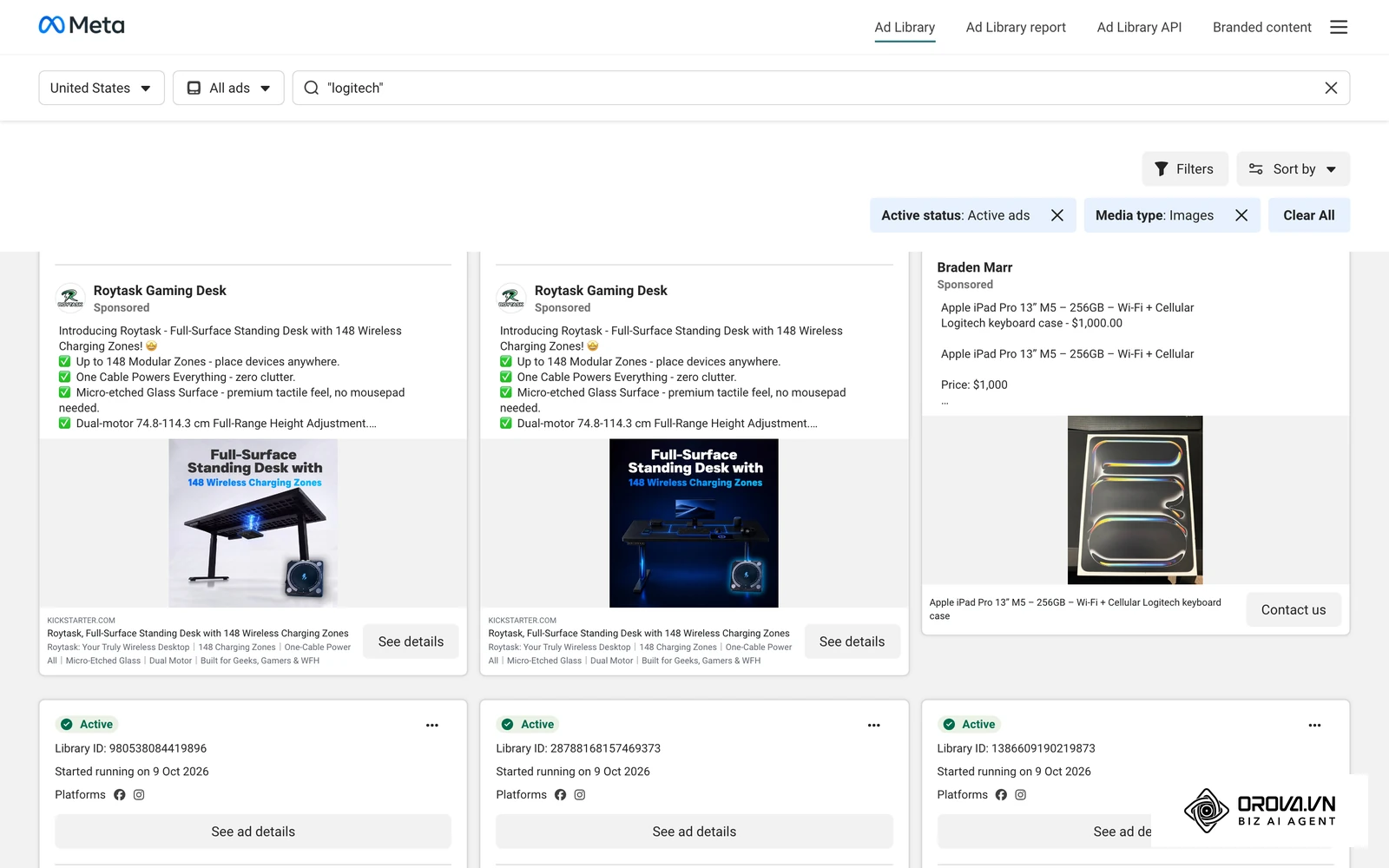
The screenshot below comes from the Meta Ad Library, a public archive of ads currently running on Facebook and Instagram. Browsing it shows how advertisers supply several images, headlines, and text variations that the delivery system mixes into live placements.
Prerequisites Before Setting Up Artificial Intelligence Advertising
Before enabling automated bidding or dynamic creative delivery, your tracking infrastructure and ad accounts must meet baseline data requirements. Feeding incomplete or distorted data into machine learning models causes algorithmic drift, where the system optimizes toward low-value clicks rather than verified revenue.
The table below outlines the five operational requirements you must verify before activating automated advertising workflows.
| Requirement | Source / Access Location | Estimated Time | Consequence If Missing |
|---|---|---|---|
| Admin Ad Account Access | Meta Business Manager / Google Ads Admin Settings | 15 minutes | Cannot authorize server-side API webhooks or publish automated asset groups |
| Server-Side Tracking Gateway | Cloudflare Worker / Google Tag Manager Server Container | 60–90 minutes | Ad networks miss part of your conversion signals because browsers and ad blockers stop client-side pixels |
| Seed Customer List | CRM export (hashed email, phone, lifetime value) | 30 minutes | Algorithmic audience signals take weeks longer to discover profitable buyer personas |
| Modular Creative Library | Asset folder (10+ visuals, 5+ benefit angles) | 120 minutes | Dynamic creative models suffer creative fatigue and fail to deliver optimal combinations |
| Target ROAS Thresholds | Internal financial model / unit economics sheet | 30 minutes | Automated bidding algorithms risk overspending without clear profitability guardrails |
Step 1: Connect First-Party Conversion Signals for AI Advertising via Server-Side APIs
Your primary objective in this step is to establish an authenticated, server-to-server data pipeline (a Conversions API connection) that transmits verified customer purchase events directly to advertising platform machine learning models.
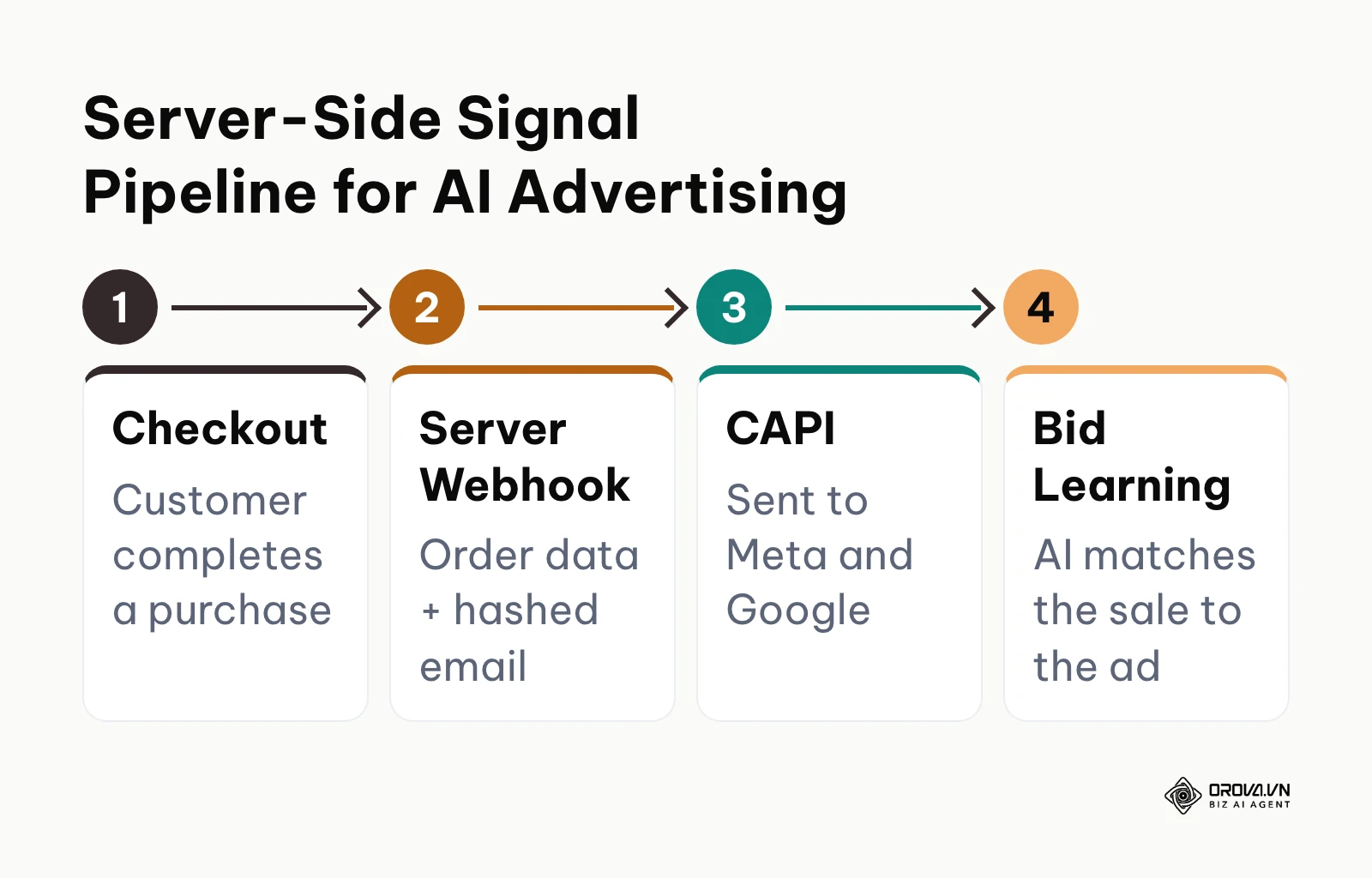
As of 2026, third-party cookies face severe technical restrictions across all major web browsers. Relying solely on client-side browser pixels blinds ad algorithms to actual conversion values. Browser restrictions and ad blockers mean a pixel-only setup misses part of your conversions, so bidding algorithms end up learning from incomplete data.
The following diagram outlines the signal flow from customer checkout to server-side platform attribution.
Technical Configuration in Meta and Google Ads Managers
- Navigate to Meta Events Manager, select your target Data Source (Pixel), and click the Settings tab.
- Scroll to the Conversions API section and select Set up direct integration (or connect via your server-side Google Tag Manager container).
- Generate an API Access Token, store it in your encrypted environment vault, and configure your backend webhook to transmit the standard purchase conversion event.
- Include SHA-256 hashed customer parameters (em for email, ph for phone number, client_ip_address, client_user_agent, and external_id).
- Open your Google Ads account, navigate to Goals > Conversions > Summary, and click your primary purchase conversion action.
- Expand the Enhanced Conversions tab, select Turn on enhanced conversions, and specify API or Google Tag Manager as your transmission method.
- Ensure your data payload maps first-party customer variables to the Google Ads conversion tracking tag.
Verification and Common Deduplication Pitfalls
You can visually confirm that your setup is working by inspecting the Event Match Quality score in Meta Events Manager. A properly configured server-side pipeline should reach a "Good" or "Great" rating, with server events showing as active. In Google Ads, open the Enhanced Conversions diagnostics for your purchase action and confirm that enhanced conversions are being recorded once a few days of data have arrived.
The most frequent technical failure during server-side integration is event duplication. If your client-side browser pixel and server-side webhook both transmit a purchase event without an identical event_id string, the ad platform counts two sales for a single transaction. This distorts your cost per acquisition (CPA) and causes automated bidding algorithms to overestimate performance. To resolve this, ensure your backend order generation script generates a unique UUID (such as the order confirmation number) and injects that identical string into both the browser dataLayer and the server-side payload.
Illustrative example: A mid-sized direct-to-consumer apparel brand spending 8,000 dollars per month across Meta and Google integrated a server-side Conversions API gateway. The media buyer mapped the purchase event with hashed email and unique order IDs. During the first 48 hours, Meta Events Manager reported a 180% conversion rate spike because the browser pixel and server webhook transmitted mismatched event IDs. The developer updated the checkout template to pass the exact order number as the deduplication key across both payloads. The deduplication rate stabilized at 98.4%, and the data freshness lag in Ads Manager dropped from 48 hours to under two hours.
Step 2: Define AI Advertising Audience Signals and Negative Exclusions
The objective of this step is to direct algorithmic audience discovery toward qualified prospective buyers while establishing rigid exclusion lists that prevent ad spend waste.
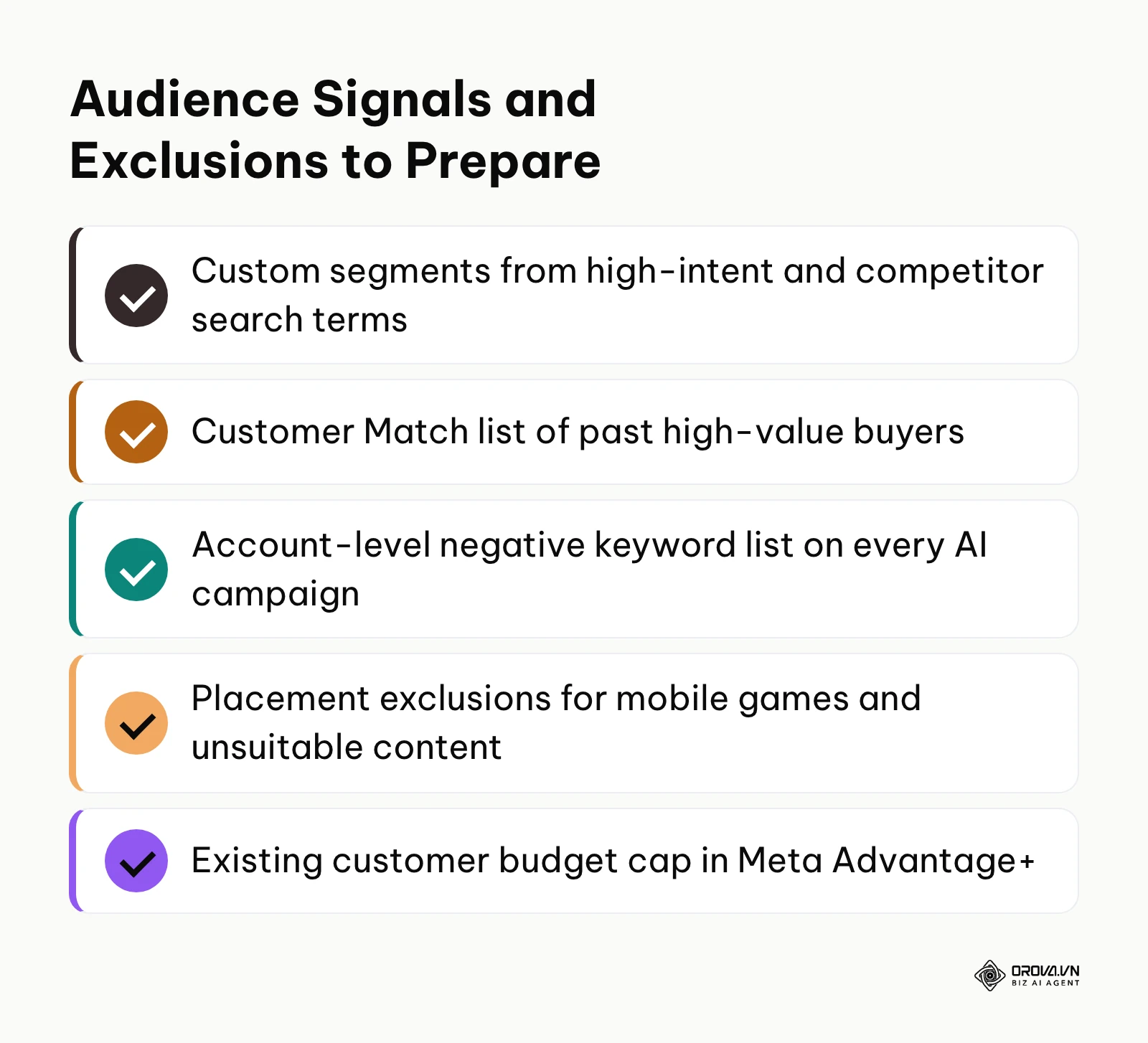
Automated advertising models (such as Google Performance Max and Meta Advantage+) do not operate as rigid targeting silos. Instead, they use audience inputs as initial guidance signals to explore broader network inventories. If you fail to define strict negative exclusions, the algorithm will seek out low-hanging, cheap impressions across irrelevant placements, including casual gaming apps and click-farm display networks.
The summary below lists the signal and exclusion inputs to prepare before any automated campaign goes live.
Configuring Audience Signals in Performance Max and Advantage+
- In Google Ads, navigate to your Performance Max campaign, select Asset Groups, and click the edit icon on your primary asset group.
- Scroll to Audience Signals and click Add an audience signal.
- Under Custom Segments, create a segment containing searchers who entered high-intent purchase terms and competitor brand queries.
- Under Your Data, link your customer match list containing past purchasers with lifetime values above your median benchmark.
- In your Google Ads account root settings, navigate to Tools > Shared Library > Exclusion Lists, and apply your master negative keyword list at the account level.
- In Meta Ads Manager, open your Advantage+ Shopping Campaign settings, navigate to Audience Controls, and define your Existing Customer Budget Cap (typically set between 5% and 15% to prioritize net-new customer acquisition).
- Apply your brand exclusion lists in Meta Business Settings to prevent automated ads from serving on unauthorized partner networks.
7-Step Audience Signal and Exclusion Checklist
Review the following verification points before setting your campaigns live. Overlooking these items can cause automated bidding models to drain your daily budget within 48 hours.
- [ ] Customer Match list uploaded to Google Ads with at least 1,000 matched user records.
- [ ] High-value search terms mapped to Custom Intent Audience Signals in Performance Max.
- [ ] Account-level negative keyword list linked to all active AI campaigns.
- [ ] Branded search terms added to a Brand Exclusion List to prevent cannibalizing organic search.
- [ ] Informational queries (e.g., "free", "login", "careers", "DIY", "open source") added to negative lists.
- [ ] Content suitability settings configured to exclude mobile gaming apps and sensitive YouTube categories.
- [ ] Existing customer budget cap set in Meta Advantage+ to prevent overspending on retargeting.
Illustrative example: A B2B software company allocating 12,000 dollars per month to Google Performance Max configured its audience signals using a CRM export of closed-won opportunities. In the first 72 hours, the campaign spent 45% of its daily budget on casual mobile gaming placements, generating hundreds of low-intent clicks with zero product signups. The marketing manager applied account-level placement exclusions for all mobile app categories and uploaded a negative keyword list containing 420 informational terms. Within four business days, gaming app impressions dropped to zero, and qualified trial signups appeared in the CRM attribution dashboard.
Step 3: Generate and Assemble Modular Creative Assets for AI Advertising
The objective of this step is to produce modular headlines, body copy, and visual media assets formatted for dynamic algorithmic assembly across diverse placement formats.
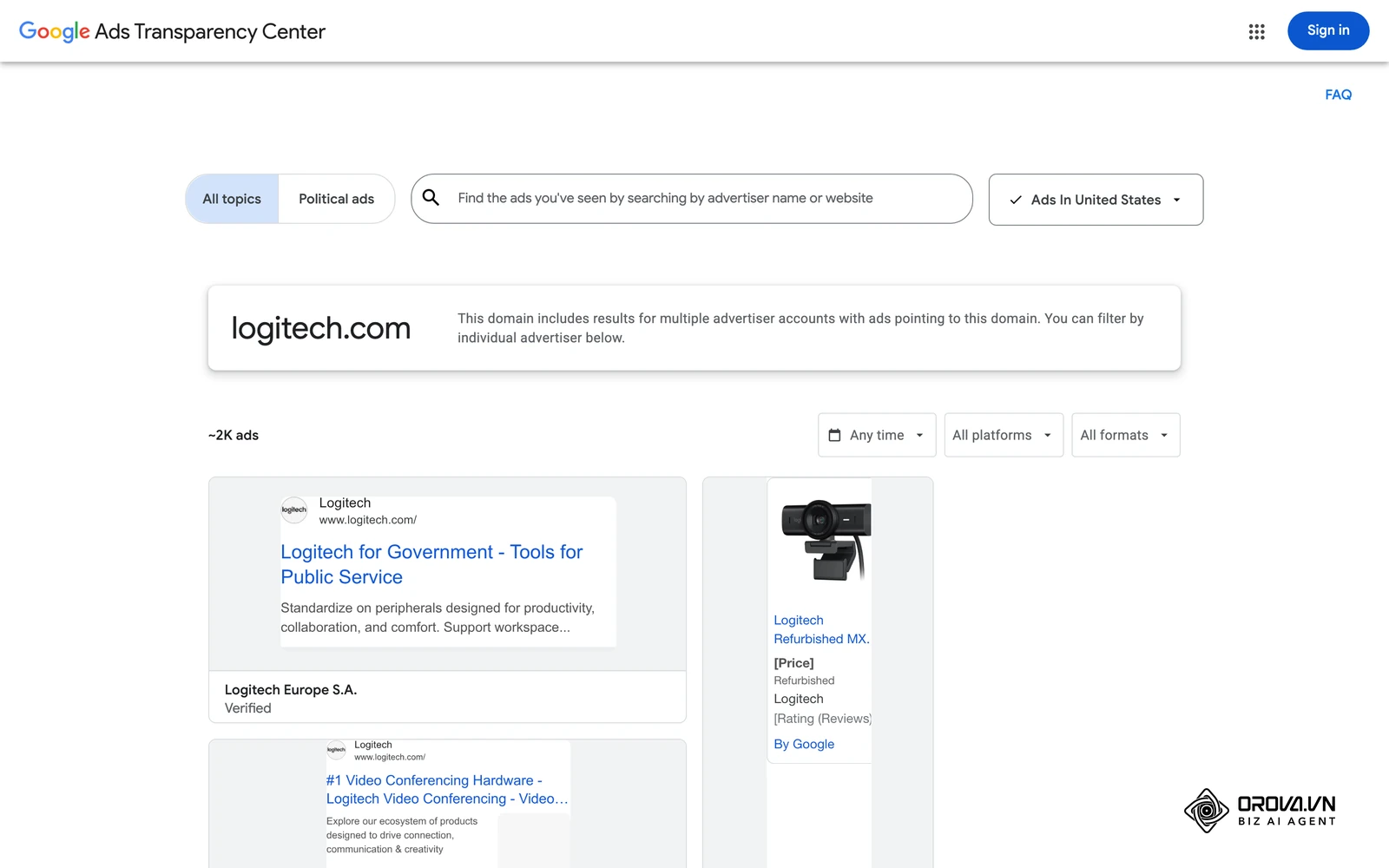
Traditional digital advertising relied on static ad units where a single graphic was paired with fixed copy. In artificial intelligence advertising, platforms rely on dynamic creative optimization (DCO). The ad network's machine learning engine dynamically matches specific headline angles, image orientations, and promotional hooks to individual users based on their historical browsing behavior. In practice, dynamic creative learns more from a few genuinely different creative angles than from minor cosmetic variations of a single asset.
Structuring Modular Asset Groups in Google and Meta
- In Google Ads, navigate to your campaign's Asset Groups interface.
- Submit fifteen distinct headlines (up to 30 characters each), ensuring at least three focus on pricing, three on speed or convenience, and three on specific customer problems.
- Provide four distinct descriptions (one short 60-character version and three 90-character versions).
- Upload at least five landscape images (1.91:1), five square images (1:1), and five portrait images (4:5) highlighting your product in use.
- Upload at least one landscape and one vertical video (9:16) demonstrating product functionality within the first three seconds.
- In Meta Ads Manager, create a new ad set, enable the Dynamic Creative toggle (or select Flexible Ad Format in campaign creation), and upload up to ten images or videos, five primary text variations, and five distinct headlines.
You can verify that your creative assembly meets technical standards by reviewing the Ad Strength meter in Google Ads. Do not publish asset groups that show "Poor" or "Average" ratings; supply additional unique headline angles until the meter displays "Good" or "Excellent". In Meta Ads Manager, review the Ad Preview pane and cycle through all variations to confirm that text overlays remain legible across Stories, Reels, and Feed placements.
A common mistake during creative assembly is supplying semantic duplicates (e.g., "Buy Running Shoes", "Purchase Running Shoes Online", and "Running Shoes On Sale"). Machine learning models cannot extract meaningful behavioral signals from near-identical copy. Ensure every headline tests a fundamentally different value proposition, such as warranty length, delivery speed, customer reviews, or product durability.
OROVA ADS applies AI Agent to automate and optimize ad performance on Google, Meta and TikTok. Scale your budget safely, monitor 24/7 and expand your business quickly.
Experience the solution at orova.vn/ads
Step 4: Establish Human-in-the-Loop Brand Safety in Artificial Intelligence Advertising
Your primary objective in this step is to establish an editorial verification workflow that prevents algorithmic hallucinations, trademark infringements, and platform ad policy violations before assets reach the live auction.
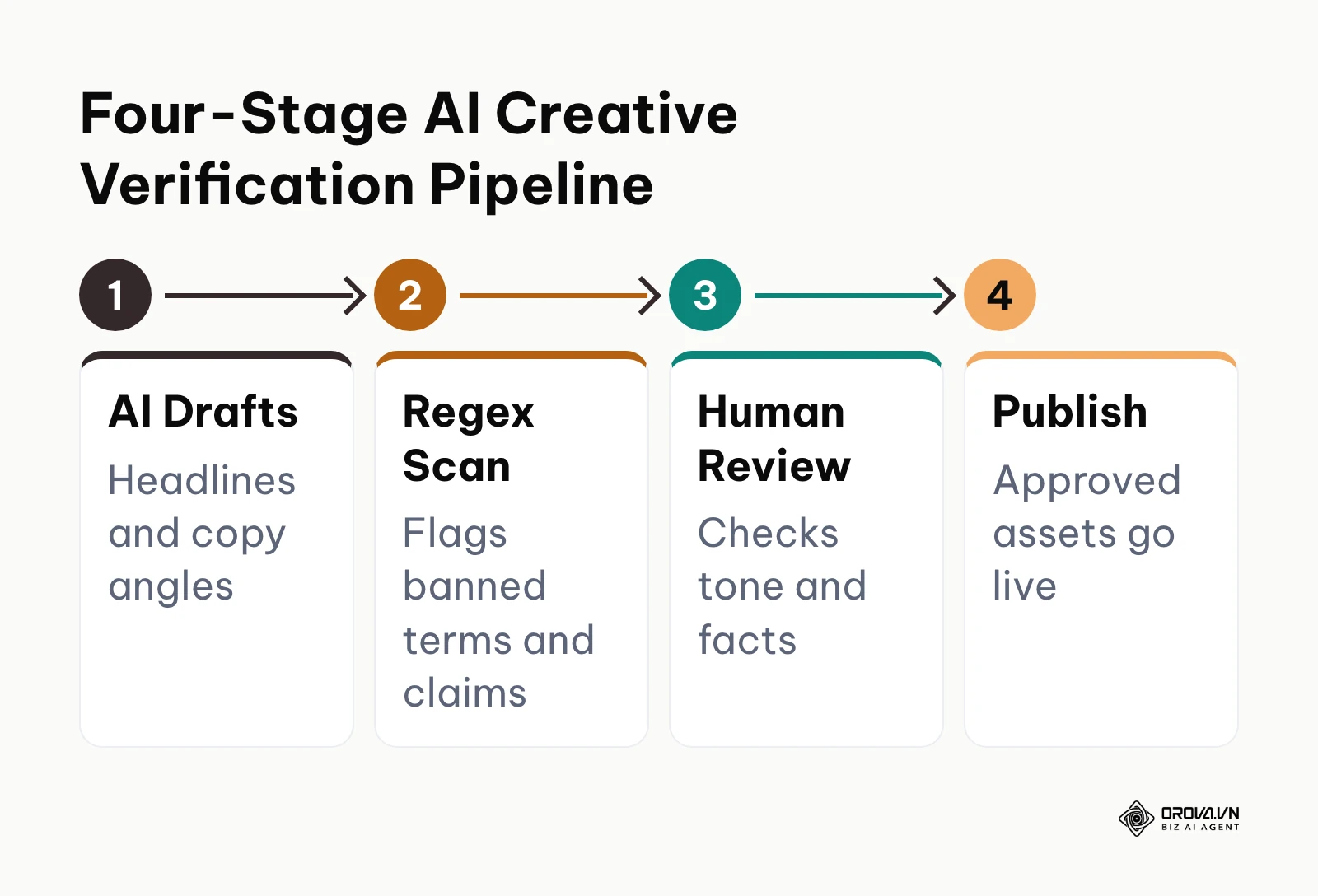
While generative AI models accelerate ad copy production, unvetted automated assets carry substantial operational risks. Generative tools frequently introduce unverified absolute claims (e.g., "the number one rated software"), violate medical and financial ad guidelines, or hallucinate product features. Our digital marketing compliance checklist covers the wider regulatory rules these assets must also respect. Once published, non-compliant ads trigger immediate platform disapprovals, algorithmic delivery penalties, or ad account bans.
The workflow below illustrates the four-stage verification pipeline for automated creative deployment.
Implementing Policy Regex and Brand Safety Reviews
- Establish a central staging sheet for all AI-generated copy variations before uploading them to ad platforms.
- Run an automated regular expression (regex) script or keyword filter across all text fields to screen for prohibited trigger terms (e.g., "cure", "guaranteed profit", "free gift", "miracle", or third-party trademark names).
- Review destination URLs to ensure automated ads do not link to pages with broken tracking scripts or non-compliant landing page copy.
- Verify that visual assets generated or enhanced by AI algorithms are free of distorted brand logos, unnatural body proportions, or copyrighted elements.
- In Meta Business Support Home and Google Ads Policy Manager, review your account compliance history to confirm zero unresolved policy strikes.
15-Point Brand Safety and Ad Policy Checklist
Every batch of AI-assisted advertising assets must satisfy all fifteen criteria in the table below prior to platform submission.
| Verification Category | Check Number | Audit Standard | Verification Criteria |
|---|---|---|---|
| Platform Policy Compliance | 1 | Prohibited Claims | Zero unverified claims regarding health, finance, or weight loss |
| Platform Policy Compliance | 2 | Personal Attributes | No copy asserting or implying personal traits (e.g., race, religion, debt status) |
| Platform Policy Compliance | 3 | Sensational Language | Absence of misleading clickbait, urgent capitalization, or fake UI buttons |
| Platform Policy Compliance | 4 | Intellectual Property | No uncredited third-party logos, celebrity likenesses, or trademarked slogans |
| Platform Policy Compliance | 5 | Destination Relevancy | Landing page directly matches the product and promotional offer in the ad |
| Brand Integrity & Tone | 6 | Voice Consistency | Vocabulary aligns with approved brand guidelines and corporate tone |
| Brand Integrity & Tone | 7 | Pricing Accuracy | Disclosed discounts match active checkout cart configurations |
| Brand Integrity & Tone | 8 | Visual Artifacts | No warped hands, illegible background text, or uncanny synthetic faces |
| Brand Integrity & Tone | 9 | Value Proposition | Ad clearly presents a real product benefit without confusing metaphors |
| Brand Integrity & Tone | 10 | Logo Fidelity | Brand logos maintain correct aspect ratios, colors, and clear margins |
| Factual & Legal Governance | 11 | Substantiated Data | Any statistical figure or award cited includes source documentation |
| Factual & Legal Governance | 12 | Disclaimer Visibility | Mandatory regulatory disclaimers appear visibly within the creative frame |
| Factual & Legal Governance | 13 | Return Policy Terms | Shipping and return timelines reflect actual operational capabilities |
| Factual & Legal Governance | 14 | Localized Language | Copy adheres to standard grammar and spelling for the target territory |
| Factual & Legal Governance | 15 | AI Transparency Tags | Compliance with platform labels for synthetic or manipulated media |
Step 5: Select Smart Bidding Strategies for AI Advertising and Set Value Rules
The objective of this step is to select the appropriate automated bidding algorithm and configure mathematical guardrails that prevent the system from overpaying for customer acquisition.
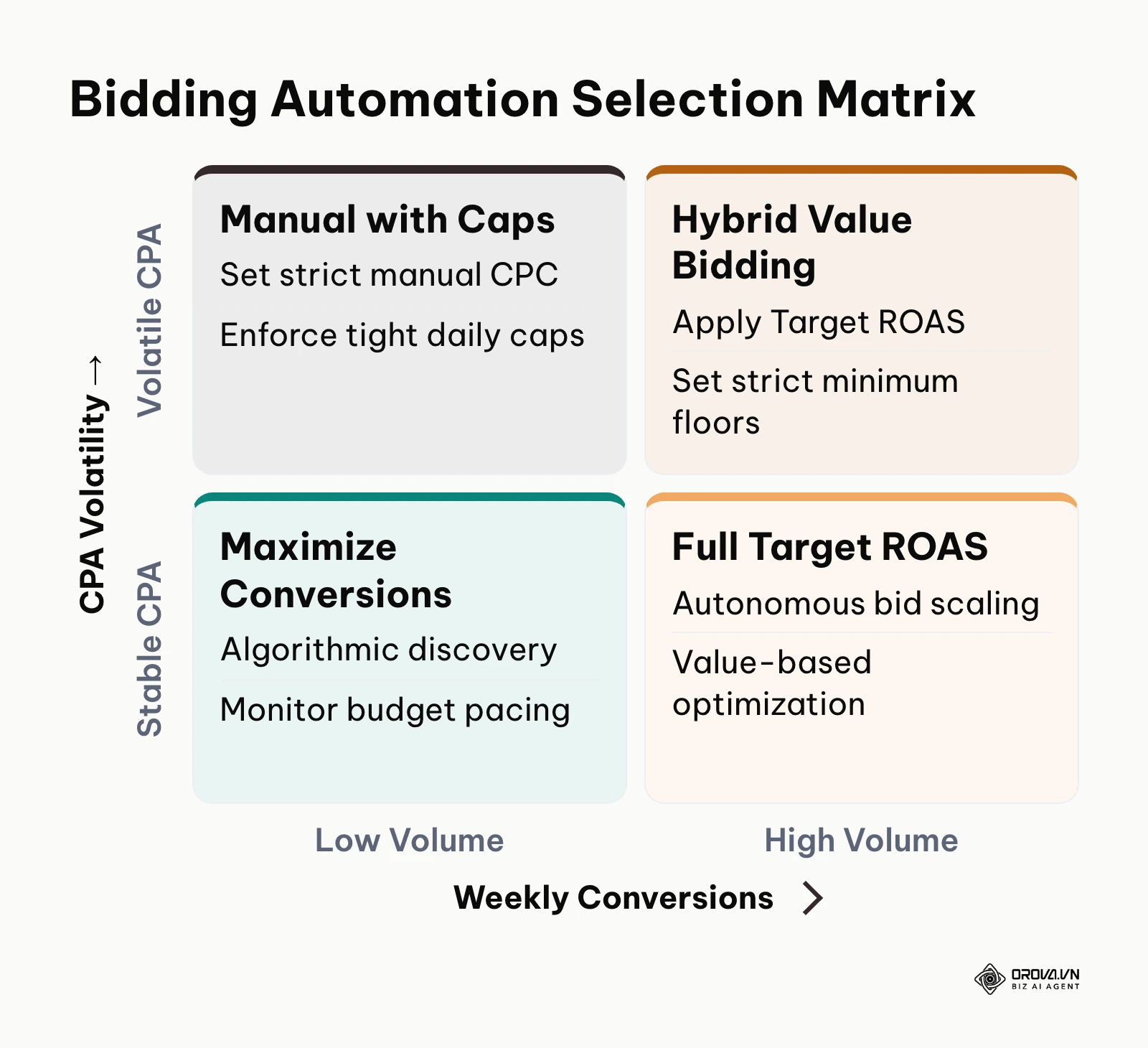
Automated bidding models are objective-seeking mathematical functions. If you instruct an algorithm to "Maximize Conversions" without supplying a Target CPA (Cost Per Acquisition) or Target ROAS constraint, it will exhaust your daily budget pursuing the easiest available conversions, regardless of profitability. Smart Bidding also needs a steady flow of recent conversions before value-based bidding becomes reliable, so tighten targets only after the account has built meaningful conversion history.
The decision matrix below illustrates when to transition between bidding automation tiers based on data volume.
Configuring Smart Bidding and Value Rules
- In Google Ads, open your campaign settings and click the Bidding section.
- Select Conversions or Conversion value as your primary bidding focus.
- Check the box to Set a target cost per action (Target CPA) or Set a target return on ad spend (Target ROAS).
- Enter a target based on historical performance rather than aspirational goals (e.g., if historical CPA is 30 dollars, set your initial Target CPA at 30 to 33 dollars, not 15 dollars).
- Open Conversion Value Rules in Google Ads to apply bid adjustments for high-value audiences (e.g., +20% for recurring buyers or tier-one geographic locations).
- In Meta Ads Manager, configure your campaign bid strategy under Campaign Budget settings, choosing between Highest Volume (for initial signal discovery) or Cost per result goal / ROAS goal (for margin preservation).
- Consult our guide on the break even roas calculator to ensure your platform targets align with real gross margin requirements. For broader scaling strategies, review our automated ads playbook.
Comparing the Three Levels of Advertising Automation
To determine the right level of automation for your ad account, consult the comparative matrix below.
| Automation Tier | Platform Features (Meta / Google) | Minimum Data & Budget Threshold | Risks & Required Monitoring Controls | When to Apply |
|---|---|---|---|---|
| Manual Bidding | Manual CPC / Enhanced CPC / Fixed Meta Bids | Under 1,000 dollars/month; < 15 conversions/week | High labor requirement; slow reaction to real-time auction spikes | New ad accounts with zero conversion history and tight budgets |
| Hybrid Automation (Recommended) | Target CPA with bid caps; Advantage+ with customer caps | 1,000–10,000 dollars/month; 15–50 conversions/week | Medium risk; requires weekly search term audits and manual negative additions | Established brands scaling budget while protecting baseline profitability |
| Full Autonomous AI | Target ROAS Value Bidding; Uncapped Advantage+ Shopping | Over 10,000 dollars/month; > 50 conversions/week | High risk of runaway spend during attribution lags; model drift vulnerabilities | Mature accounts with verified server-side data and high transaction volume |
Step 6: Launch Controlled A/B Incrementality Tests in AI Advertising
Your objective in this step is to launch a controlled split test that isolates whether AI-generated asset combinations and automated bidding deliver true incremental profit compared to standard control campaigns.
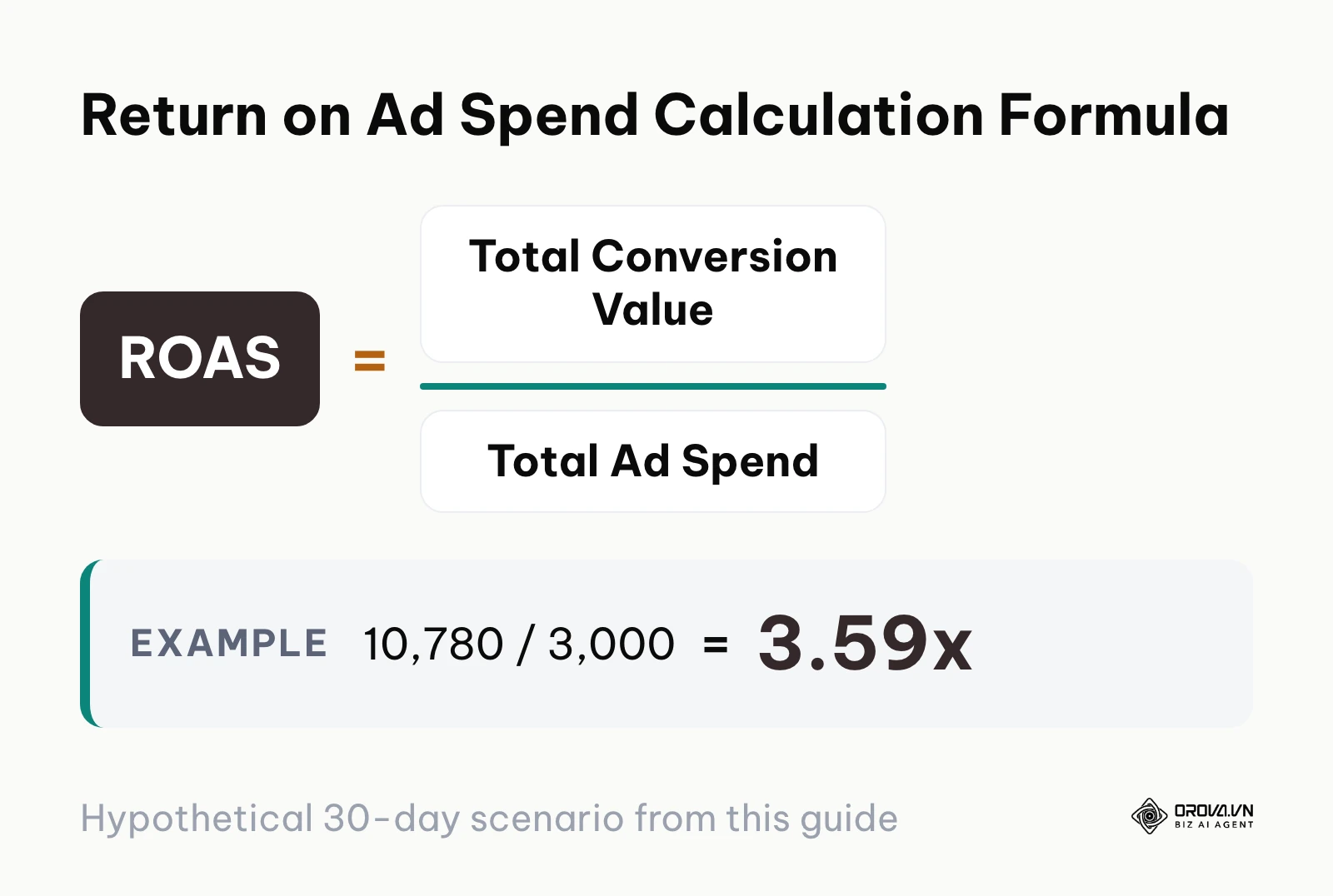
Ad platforms frequently claim high return metrics in their default reporting dashboards by taking credit for conversions that would have occurred organically. Without a structured split test, growth teams risk allocating budget to automated campaigns that simply retarget existing brand advocates.
The formula below details the return calculation used to benchmark algorithmic ad profitability.
Financial Impact Model: A Hypothetical Monthly Spend Simulation
The mathematical calculation below illustrates a hypothetical 30-day simulation of a direct-to-consumer brand spending 3,000 US dollars per month (all amounts below are in US dollars), comparing historical manual performance against an AI-assisted smart bidding and dynamic creative asset workflow.
Baseline Campaign (Manual Bidding & Static Ads):
- Total Monthly Ad Spend: 3,000
- Total Attributed Conversions: 107 orders
- Cost Per Acquisition (CPA): 3,000 / 107 = 28.04
- Average Order Value (AOV): 70.00
- Total Revenue Generated: 107 * 70.00 = 7,490.00
- Return on Ad Spend (ROAS): 7,490.00 / 3,000.00 = 2.50x
Optimized Campaign (Smart Bidding & Dynamic AI Asset Pool):
- Total Monthly Ad Spend: 3,000 (constant)
- Total Attributed Conversions: 154 orders (+47 net conversions)
- Cost Per Acquisition (CPA): 3,000 / 154 = 19.48 (rounded to 19.50)
- Average Order Value (AOV): 70.00
- Total Revenue Generated: 154 * 70.00 = 10,780.00
- Return on Ad Spend (ROAS): 10,780.00 / 3,000.00 = 3.59x
- Net Revenue Gain: 10,780.00 - 7,490.00 = 3,290.00 additional revenue at zero additional ad spend
The table below contrasts the unit economics and production efficiency between these two approaches.
| Campaign Dimension | Manual Baseline (Control) | AI-Assisted Optimization (Variant) | Variance / Net Impact |
|---|---|---|---|
| Creative Asset Production Cost | 1,200 (agency design fee) | 250 (modular software tools) | -950 in production overhead |
| Total Asset Variations Tested | 4 static image units | 50 modular dynamic variants | +46 variations tested |
| Time to Statistical Confidence | 28 days | 14 days | 50% faster learning cycle |
| Cost Per Acquisition (CPA) | 28.04 | 19.50 | -30.5% reduction in acquisition cost |
| Total Return on Ad Spend (ROAS) | 2.50x | 3.59x | +1.09x lift in blended ROAS |
Illustrative example: A boutique home goods retailer spending 5,000 dollars per month launched an A/B split test in Meta Experiments comparing historical static creative against a dynamic asset group containing ten AI-synthesized product angles. During the first four days, the automated algorithm funneled 60% of test traffic to an aggressive headline variation promising "same-day delivery," resulting in cart abandonment when checkout calculated standard shipping fees. The growth lead paused that specific headline variation within the dynamic pool and added transparent shipping terms across remaining assets. Over the full 14-day experiment, the dynamic group generated 42 verified purchases compared to 28 in the control group, maintaining a 3.4x ROAS without increasing daily spend.
Step 7: Audit Search Queries and Prune Underperforming AI Advertising Assets
Your objective in this step is to conduct routine performance audits, pruning low-efficiency creative assets and eliminating wasteful search queries discovered by automated bidding systems.
Artificial intelligence models in advertising do not remain permanently optimized. Consumer fatigue degrades creative responsiveness, seasonal auction dynamics shift baseline CPAs, and broad match models continually test peripheral search terms. Left unattended, automated campaigns experience performance decay.
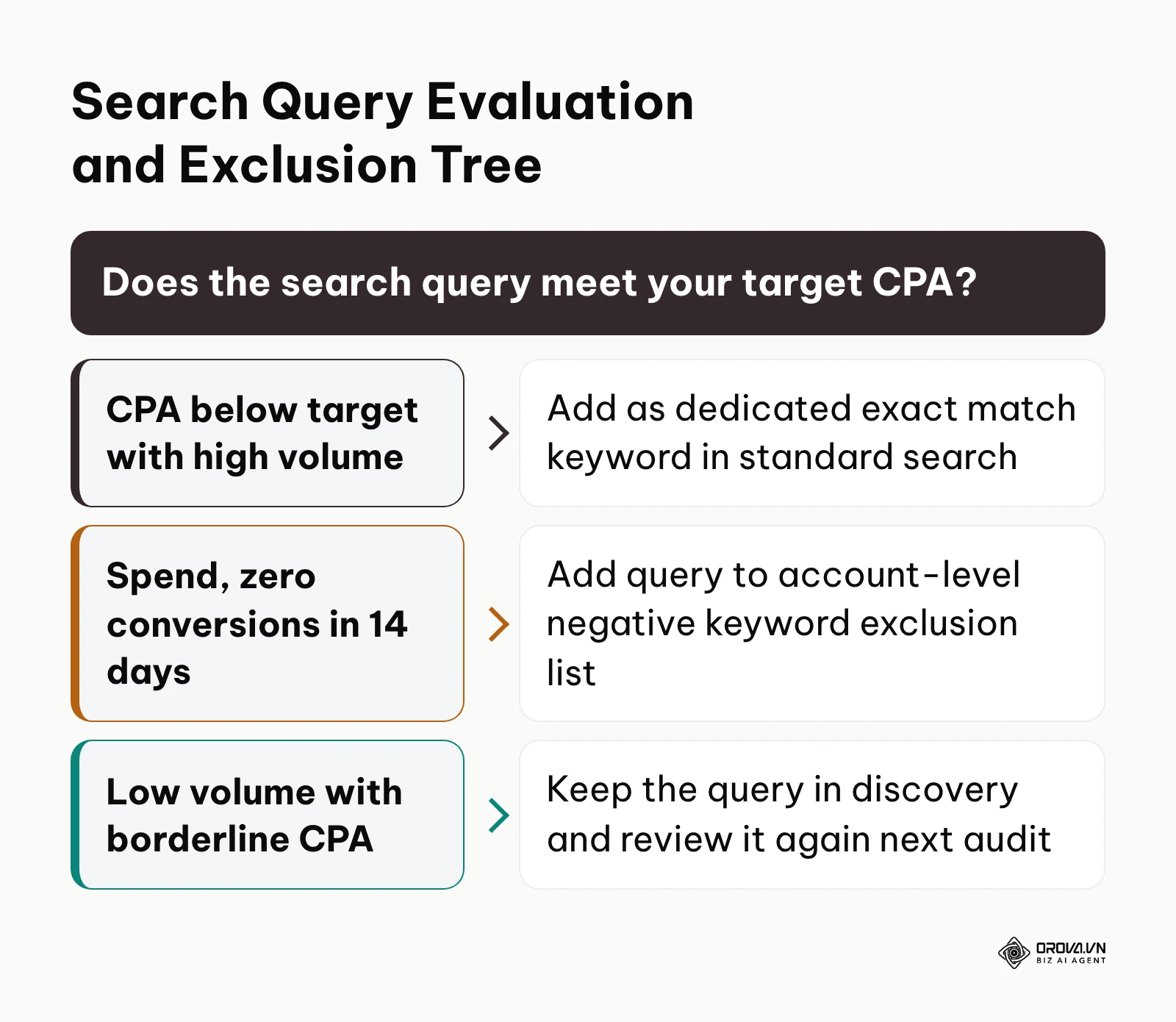
The decision tree in the audit section below shows how to treat each search query that automated campaigns discover.
Auditing Search Terms and Placement Distribution
- In Google Ads, open your Performance Max or Search campaign and navigate to Insights & Reports > Search Terms (or Search Themes).
- Sort search terms by spend descending and filter for queries with zero conversions over the trailing 14 days.
- Select irrelevant or non-converting queries and click Add as negative keyword (adding them to your account-level negative list).
- Navigate to your Asset Groups, click View Details, and inspect the Performance column.
- Identify any headlines or images rated as Low by Google's performance algorithm.
- Replace "Low" rated assets with new variations that iterate on the messaging of your Best rated assets.
- In Meta Ads Manager, view your dynamic ad reporting, break down results by Dynamic Creative Element, and disable media files with CPAs exceeding your break-even threshold. To ensure disciplined budget governance, monitor your overall ad spend pacing across campaigns every week.
A frequent error during asset maintenance is replacing creative assets too quickly. Modifying asset groups while an algorithm is in its initial learning phase resets the calibration cycle, causing CPAs to spike. Never prune an asset until it has accumulated at least 2,000 impressions or delivered a full week of substandard performance.
Want to scale your budget but afraid of breaking performance?
Integrate OROVA ADS now - an AI Agent that automatically monitors and optimizes Google, Meta, TikTok ads 24/7. Now, expanding and replicating your Performance Ads team is just one click away.
Try it now at: orova.vn/ads
Master Checklist for Artificial Intelligence Advertising Implementation
The table below compiles the entire seven-step implementation procedure into an operational checklist for media buying teams.
| Implementation Step | Primary Operational Action | Completion Verification Indicator | Estimated Completion Time |
|---|---|---|---|
| Step 1: Signal Setup | Configure server-side API webhooks for Meta and Google | Event Match Quality >= 8.0/10; Green active status | 60–90 minutes |
| Step 2: Audience Signals | Upload customer match data; apply account negative lists | Audience signal applied; zero gaming app spend | 45 minutes |
| Step 3: Modular Creatives | Upload 15 headlines, 4 descriptions, 15 image ratios | Google Ad Strength displays "Good" or "Excellent" | 90–120 minutes |
| Step 4: Brand Safety | Audit copy against 15-point compliance checklist | Zero policy violation flags in Policy Manager | 30 minutes |
| Step 5: Bidding Strategy | Configure Target CPA/ROAS based on break-even math | Status reads "Learning" with realistic target floors | 30 minutes |
| Step 6: A/B Testing | Execute 14-day incrementality split test against control | Statistical confidence score >= 90% in experiment | 14 days monitoring |
| Step 7: Asset Pruning | Cull "Low" rated assets; add non-converting negatives | Search terms cleaned; low assets replaced | 45 minutes weekly |
Common Pitfalls in Artificial Intelligence Advertising and How to Fix Them
Growth teams encounter predictable obstacles when delegating campaign execution to machine learning algorithms. The table below outlines the six most common operational pitfalls and their technical solutions.
| Operational Pitfall | Underlying Root Cause | Corrective Remediation |
|---|---|---|
| Runaway Budget Drain in First 48 Hours | Bidding strategy set to uncapped "Maximize Conversions" without target floors | Apply a conservative Target CPA cap immediately; limit initial daily budget to 50% of target |
| Overspending on Ineffective Display Placements | Default opt-in to mobile app categories and search partner networks | Exclude all mobile application placement categories in Google Account Content Suitability |
| Creative Fatigue and CPA Spikes | Relying on static imagery or insufficient variation within dynamic pools | Refresh the bottom 20% of lowest-performing assets every 14 days with new visual angles |
| Algorithmic Signal Confusion | Multiple campaigns targeting overlapping audience segments without exclusions | Consolidate fragmented campaigns into unified asset groups; apply universal exclusion lists |
| Double-Counted Conversions | Browser pixel and server webhook transmitting mismatched event identifiers | Standardize order confirmation UUIDs as identical event_id strings across payloads |
| Account Policy Penalties | AI-generated copy containing non-compliant superlatives or policy triggers | Route all generated ad copy through human editorial review and automated regex compliance checks |
How to Measure Results After Implementing Artificial Intelligence Advertising
Evaluating artificial intelligence advertising requires looking beyond surface-level click metrics. Focus on blended Return on Ad Spend (total revenue divided by total paid media spend), platform Cost Per Acquisition, and conversion value per cost. In your platform reporting dashboards, check the delivery status column for campaigns stuck in "Learning" or "Learning limited", which signals that the system lacks enough conversions to stabilize.
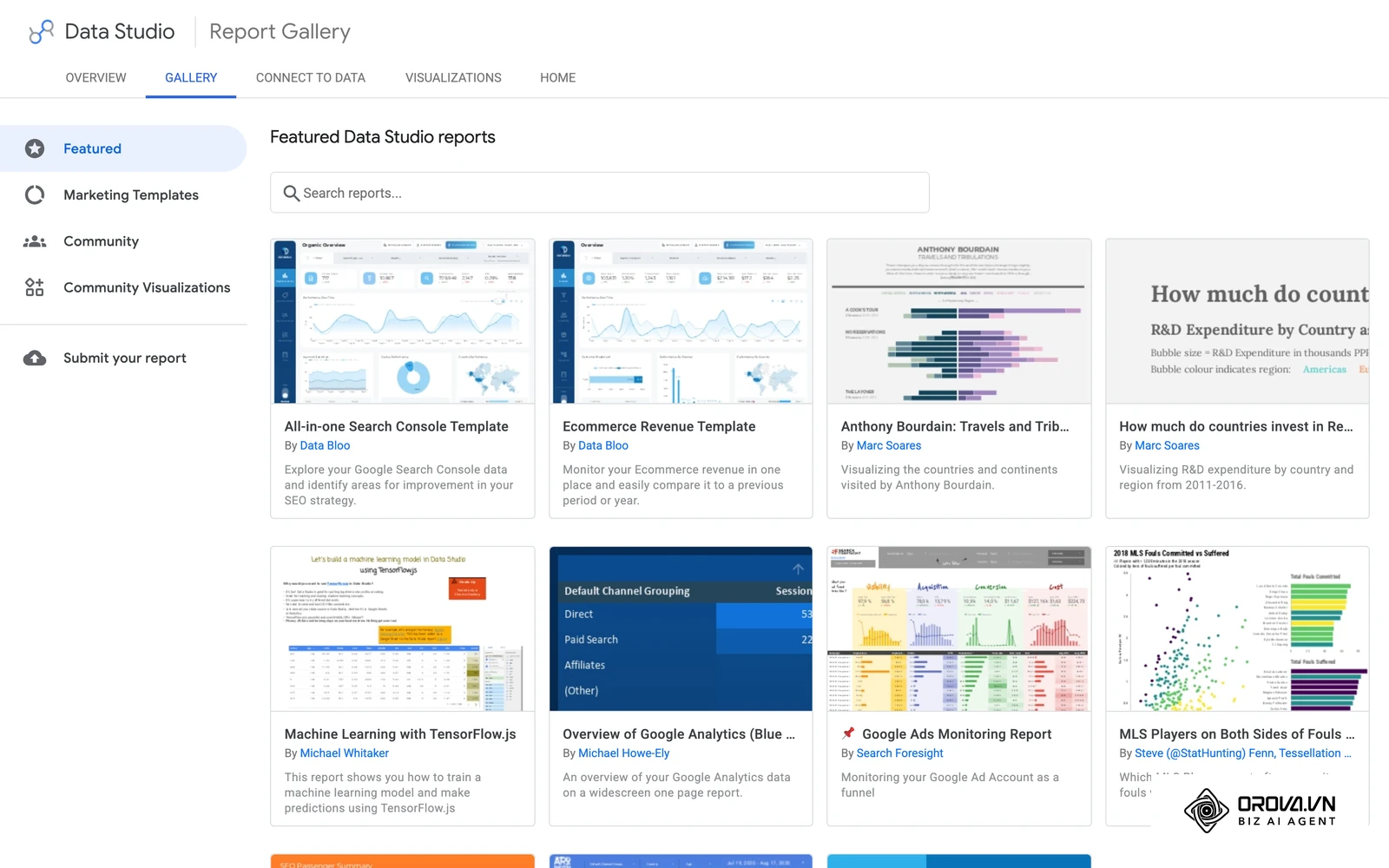
The Looker Studio Report Gallery below shows the kind of cross-platform dashboard many teams use to track these numbers, followed by a comparison of in-platform attribution against holdout incrementality tests.
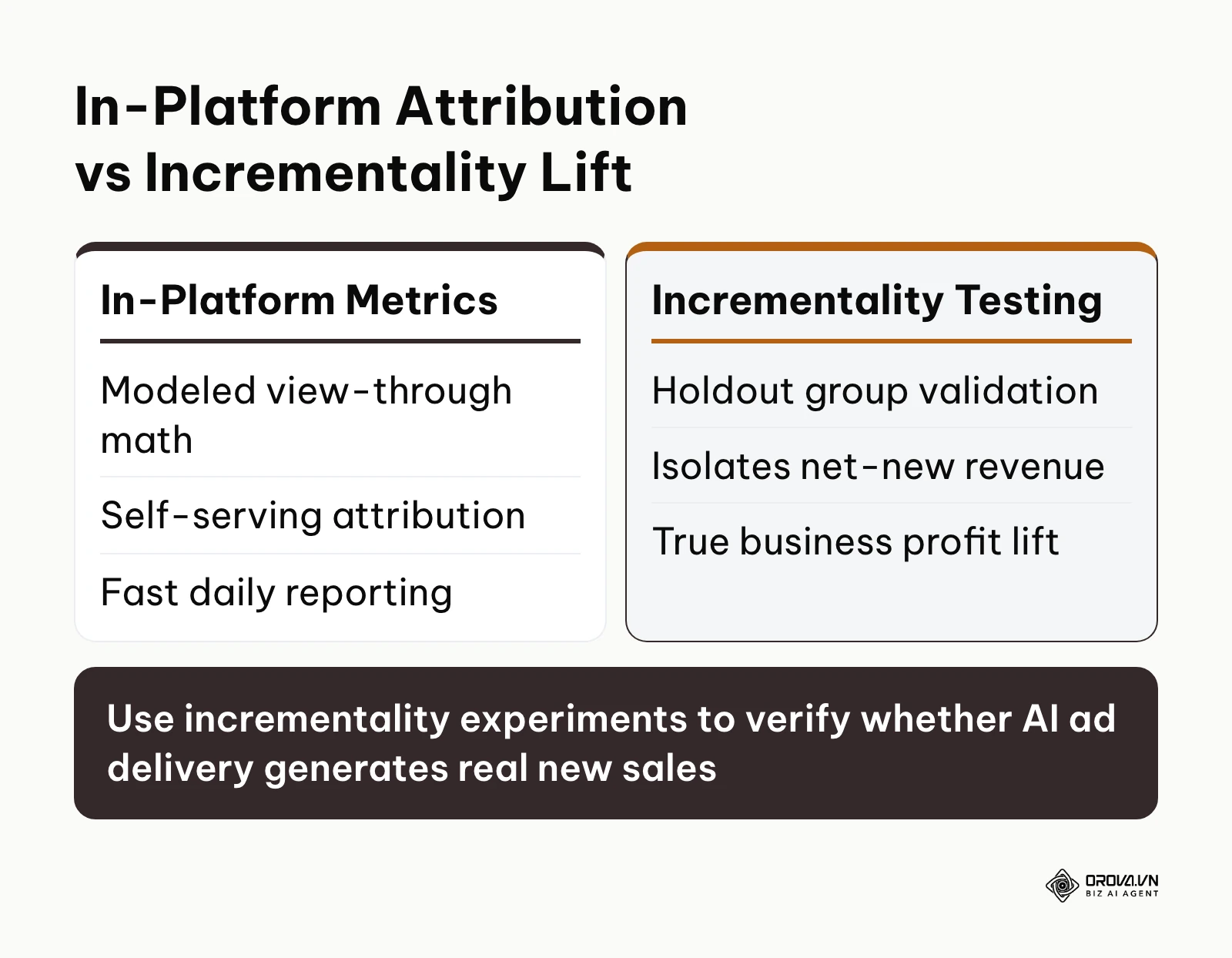
Review your numbers inside Google Ads Campaign Reports, Meta Ads Manager, and consolidated Looker Studio dashboards. Do not judge campaign success after 48 hours; automated bidding systems require seven to fourteen days to process conversion lag and complete attribution modeling.
Trends in Artificial Intelligence Advertising Over the Next Few Years: Author's Perspective
The trajectory of automated advertising is accelerating rapidly. Below are three developments I anticipate over the next few years.
Real-Time Generative Personalization at the Ad Impression Level
As of 2026, advertising platforms assemble pre-uploaded static assets into dynamic grids. Over the next few years, I believe we may transition to real-time generative synthesis, where ad networks generate customized visual backgrounds and hyper-specific copy at the millisecond of auction delivery based on user browsing history. Media teams should prepare now by standardizing brand design guidelines into structured metadata rather than focusing on manual image production. This shift could be delayed if international copyright regulations enforce strict watermarking laws that increase image rendering latency.
Autonomous Cross-Platform Budget Allocation
Today, cross-channel budget balancing remains largely manual, requiring media buyers to shift spend between Google, Meta, and TikTok based on daily performance. In my view, ad buying will evolve toward autonomous software agents that redistribute spend across ad networks in response to real-time inventory pricing and inventory stock levels. Growth marketers should prepare by establishing unified first-party server tracking and automated data warehouses. However, this projection could falter if major ad tech platforms strengthen their proprietary barriers, restricting cross-network attribution data.
Privacy-Preserving Agentic Bidding in Clean Rooms
As browser-based tracking continues to recede, advertisers are adopting first-party data clean rooms. Over the next few years, I expect artificial intelligence advertising algorithms to rely increasingly on decentralized clean-room models, training on encrypted customer behavior without accessing raw user identities. Marketers should focus on acquiring first-party consent and organizing CRM transactional records today. If consumer privacy legislation bans automated profiling altogether, the industry may be forced to revert to contextual advertising models.
Frequently Asked Questions About Artificial Intelligence Advertising
How can advertisers prevent AI bidding algorithms from overspending on low-quality traffic?
To prevent algorithms from chasing low-intent clicks, establish strict Target CPA or Target ROAS constraints and apply account-level negative keyword and placement exclusions. Restricting campaign delivery by excluding mobile gaming apps and unverified display partner networks ensures the machine learning model bids only on qualified prospects.
How should small businesses with budgets under 1,000 dollars per month start using AI in advertising?
Small businesses with limited ad budgets should begin with hybrid automation on a single platform, such as Google Search using Maximize Conversions with a strict Target CPA cap. Pair this with modular AI-generated text variations while avoiding expensive automated software tools until consistent sales are established.
How can marketers measure true incremental ROAS without being deceived by platform attribution reports?
Marketers should conduct holdout incrementality tests, where a portion of the target audience is intentionally excluded from ad exposure to measure baseline organic sales. Comparing revenue lift between the exposed group and the holdout group reveals the true incremental revenue generated by automated campaigns.
What is the difference between dynamic creative optimization and generative AI advertising?
Dynamic creative optimization (DCO) takes pre-existing human-made assets (headlines, images, calls to action) and algorithmically tests combinations in the ad auction. Generative AI advertising uses machine learning models to synthesize entirely new copy, imagery, and video content from text prompts before platform deployment.
Will artificial intelligence advertising completely replace human media buyers?
Artificial intelligence advertising automates routine operational tasks such as bid adjustments, placement selection, and copy variation testing, but it cannot replace human strategic judgment. Human marketers remain essential for brand positioning, financial guardrail setting, creative angle ideation, and regulatory compliance.
Where Should You Start with Artificial Intelligence Advertising?
Your starting point depends on your current ad spend, existing data infrastructure, and media buying experience.
If you are a bootstrapped business spending under 1,000 dollars per month, your immediate afternoon action is to audit your conversion tracking. Set up Google Enhanced Conversions and verify that purchase values pass accurately to your ad account, then enable a single search campaign with manual Target CPA caps.
If you are an established brand spending between 1,000 dollars and 10,000 dollars per month experiencing creative fatigue, your immediate task is to build a modular creative library. Produce ten distinct visual assets and fifteen unique headlines addressing different consumer pain points, and deploy them inside an Advantage+ or Performance Max asset group with strict negative keyword exclusions.
If you are an agency or enterprise brand managing over 10,000 dollars per month across multiple channels, your immediate priority is to deploy server-side Conversions API webhooks and establish a 14-day incrementality testing framework. Regardless of your current budget tier, establishing disciplined first-party tracking and human-in-the-loop guardrails is the most sustainable way to scale artificial intelligence advertising.
About the author

Builder of Orova
Nguyễn Đỗ Trọng Ân has 8 years of experience in marketing, including 6 years managing market development across Asia. He builds Orova, a Biz AI Agent that never sleeps: it plans, runs and optimizes work for businesses.
Run your business with AI Agents
Orova is the always-on Biz AI Agent — it plans, runs, and optimizes the work for you.
Save time, unlock productivity.