
CRM sales pipeline management: how to master it in 7 steps (2026)

Effective crm sales pipeline management transforms unpredictable selling into a repeatable, revenue-generating engine. When you finish this implementation guide, you will have a production-ready sales pipeline configured inside your CRM with six standardized stages, objective exit gates that block premature deal progression, automated service-level agreements (SLAs) that reclaim abandoned opportunities, and an arithmetic weighted forecasting model connected directly to invoicing.
Executing this setup requires administrator access to your CRM platform, historical conversion metrics or estimated win rates, and roughly three to four hours of configuration time. Teams selling high-volume, self-serve consumer goods or solo businesses with fewer than two high-touch B2B opportunities per month can skip this methodology, as simple contact lists will suffice for their needs.
What Is CRM Sales Pipeline Management and Why Structure Matters
CRM sales pipeline management is the systematic practice of organizing, tracking, and optimizing active sales opportunities as they advance through defined purchasing milestones in your customer relationship management software. Setting up a structured pipeline takes approximately three hours of initial configuration across seven sequential steps. Doing so provides full visibility into open deal values, prevents leads from stalling, and delivers reliable revenue forecasts.
A sales pipeline differs fundamentally from a marketing funnel. While a marketing funnel tracks broad audience awareness and aggregate lead volume, a CRM sales pipeline tracks specific, qualified deals managed by individual sales representatives. The diagram below summarizes the six core milestone stages that govern this operational workflow.
Without rigorous management, pipelines become holding pens for stalled deals. Reps inflate their numbers by leaving dead deals in late stages, sales managers make inaccurate forecasts, and valuable prospective buyers slip through the cracks due to inconsistent follow-up. Standardizing your pipeline ensures that every opportunity satisfies objective qualification criteria before advancing, protecting your forecast accuracy and team productivity.
Preparation Before Starting Your CRM Sales Pipeline Setup
Before opening your CRM configuration settings, gather the core operational assets outlined in the table below. Configuring a pipeline without clear stage definitions or permission models creates clutter and disrupts daily sales activities. The checklist summary below highlights the four critical operational requirements you must verify first.
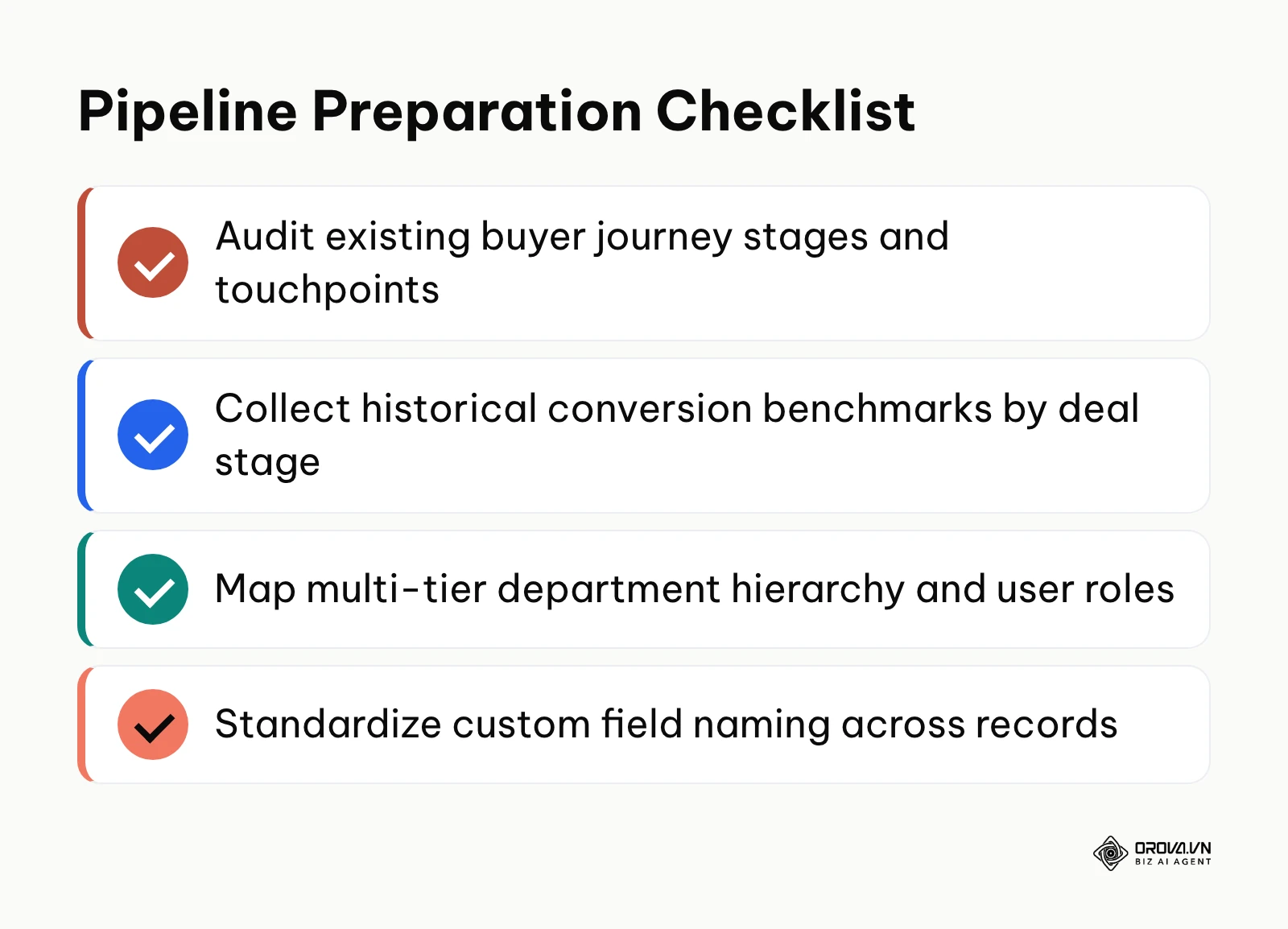
| Required Asset | Where to Source | Estimated Time | Risk if Missing |
|---|---|---|---|
| Historical Buyer Journey Map | Sales call recordings, winning deal notes, customer interview transcripts | 60 minutes | Pipeline stages reflect internal rep wishes rather than genuine buyer buying milestones. |
| Stage Win Rate Benchmarks | Past 6–12 months of closed sales data or CRM historical win/loss reports | 45 minutes | Weighted forecasting formulas produce arbitrary, misleading revenue projections. |
| Department Organizational Chart | Internal human resources directory or commercial team roster | 20 minutes | Junior reps view or edit protected accounts, leading to territory disputes. |
| Standard Product & Pricing Catalog | Approved finance rate cards, discount guidelines, itemized SKU lists | 30 minutes | Reps issue non-standard proposals with inaccurate payment terms. |
Step 1: Map Your Buyer Journey to 6 Standard CRM Deal Stages
The objective of this step is to mirror your customer's actual buying decision process within your CRM rather than mapping arbitrary internal sales activities.
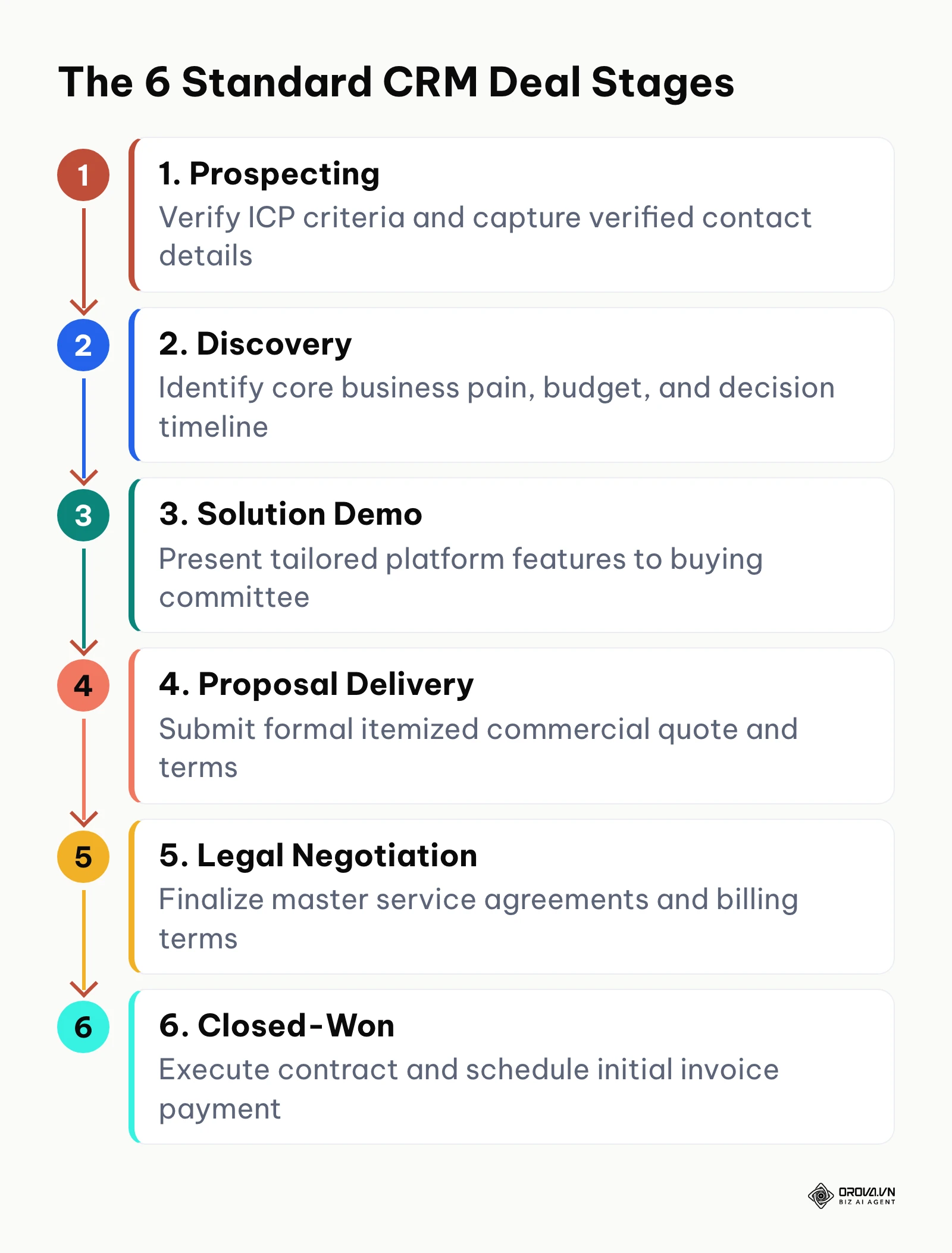
To configure these stages, navigate to your CRM administration portal, locate Settings ▸ Objects ▸ Deals (or Opportunities), and select Pipelines. Click Add Pipeline or edit your default board. Create six distinct, sequential stages using the standard framework illustrated below: Prospecting, Discovery, Solution Demo, Proposal Delivery, Legal Negotiation, and Closed-Won.
[Prospecting] ➔ [Discovery] ➔ [Solution Demo] ➔ [Proposal Delivery] ➔ [Legal Negotiation] ➔ [Closed-Won]
When structuring stages, ensure that the definitions reflect verified customer actions. For example, a stage named "Demo Completed" describes what the sales rep did, whereas "Demo Accepted by Economic Buyer" reflects a shared milestone confirmed by the customer. Understanding what is CRM architecture reveals that stage names must serve as verifiable state changes, not rep activity logs.
Visually inspect your pipeline view in Kanban mode. You should see six uniform columns with clear titles, zero duplicate columns, and an empty board ready to accept deals.
A common pitfall at this stage is creating too many granular columns, such as "Left Voicemail" or "Sent Follow-up Email." When reps are forced to update ten or twelve distinct stages, administrative friction increases, and deals get left behind. To resolve this, keep macro stages limited to six, and use task reminders or activity logs for daily touchpoints.
Step 2: Establish Quantitative Stage Exit Criteria and Required Fields
The objective of this step is to establish mandatory, data-backed gates that must be satisfied before any deal can be dragged into a subsequent pipeline stage.
In your CRM setup menu, open each pipeline stage and enable Required Properties on Stage Exit (often labeled as "Mandatory Fields" or "Stage Validation Rules"). Configure field validation rules that prevent a sales rep from saving a stage transition unless specific data points and document links are present in the deal record.
The table below provides a field-tested exit criteria checklist across all six sales stages. Every stage requires a specific rep action, attached tangible evidence, and an enforceable service level agreement (SLA).
| Stage Name | Mandatory Sales Action | Attached Evidence/Data Required | Standard Stage SLA |
|---|---|---|---|
| 1. Prospecting | Confirm Ideal Customer Profile (ICP) fit and verify business contact details. | Verified work email, direct phone number, company employee headcount, primary use case. | Max 2 business days |
| 2. Discovery | Identify quantified business pain, budget source, and decision timeline. | Documented pain point metrics, confirmed budget range, target go-live date. | Max 5 business days |
| 3. Solution Demo | Deliver tailored demonstration to buying committee; secure technical validation. | Meeting summary notes, confirmed technical requirements checklist, decision-maker names. | Max 7 business days |
| 4. Proposal Delivery | Present formal commercial scope, itemized pricing, and implementation terms. | Public quotation URL or uploaded PDF quote, itemized SKU list, payment milestone schedule. | Max 5 business days |
| 5. Legal Negotiation | Resolve redlines on commercial contracts and data privacy terms. | Redlined Master Services Agreement (MSA), verified billing contact, legal reviewer sign-off. | Max 10 business days |
| 6. Closed-Won | Secure signed commercial contract and generate first milestone billing record. | Fully executed digital signature document, billing tax ID, initial payment receipt. | Max 1 business day |
Illustrative Example (Ví dụ minh hoạ):
- Context: A mid-market B2B software provider with 12 account executives experienced a 38 percent drop in quarterly forecast accuracy due to reps prematurely moving early leads into late negotiation stages.
- Actions Taken: The sales director implemented mandatory stage exit gates in the CRM. Reps could not advance deals to "Proposal Delivery" without linking a discovery brief confirming an approved budget and naming the economic buyer.
- Stumbling Block & Resolution: Account executives initially complained that mandatory fields slowed down their workflow and attempted to bypass rules using dummy placeholder text. The administrator added dropdown validation and conducted a 30-minute training showing how verified data prevented wasted proposal preparation.
- Verifiable Outcome: Deals entering the proposal stage showed a verifiable 22 percent increase in conversion to closed-won within two quarters, and inflated late-stage pipeline volume dropped immediately.
Step 3: Configure Inactivity SLAs and Automated Lead Reclamation Rules
The objective of this step is to eliminate deal rotting by configuring automated rules that alert reps to neglected accounts and reclaim stagnant deals back to a central pool.
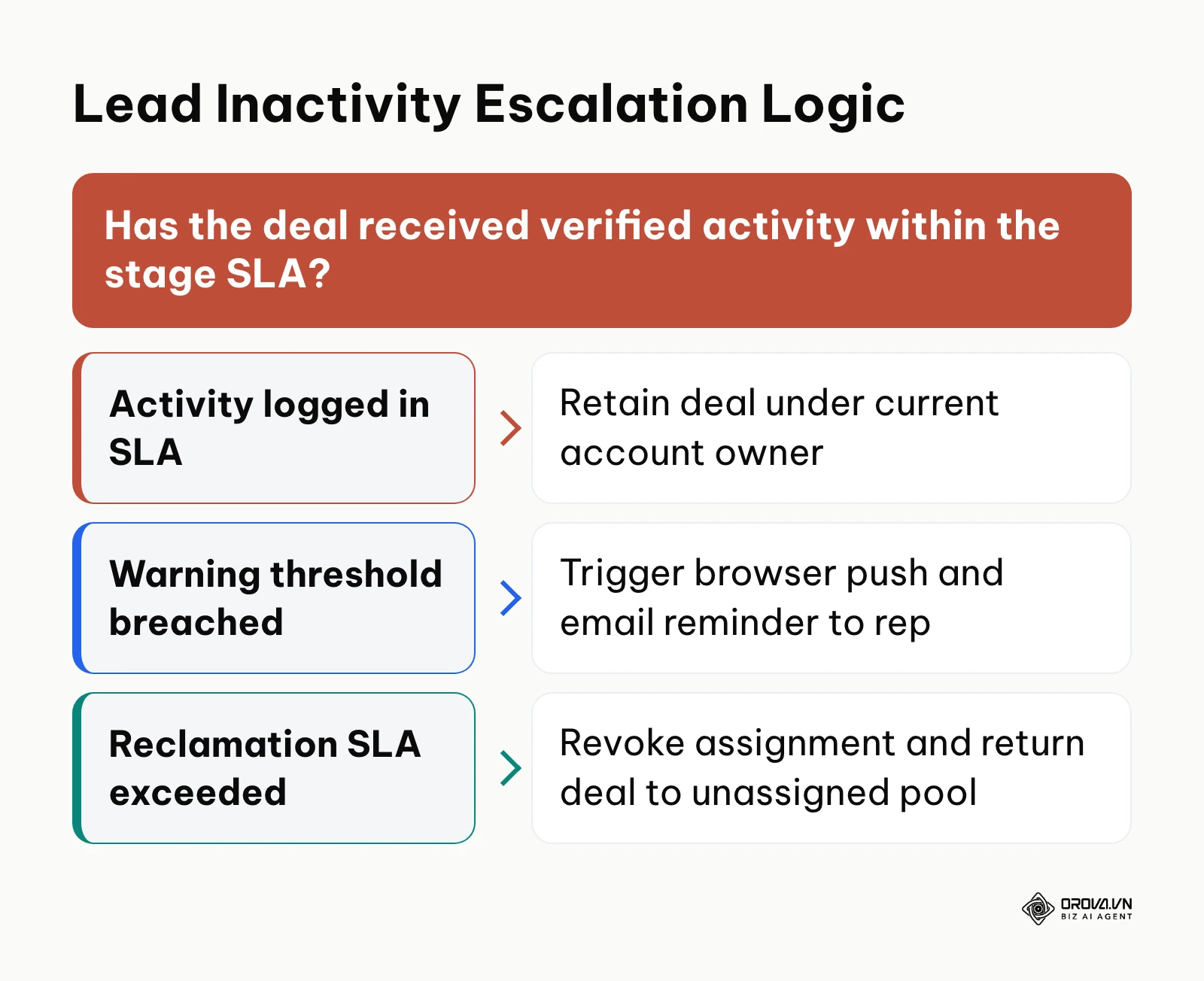
Deal rotting occurs when an opportunity remains in a pipeline stage without any logged phone calls, emails, or notes beyond an acceptable threshold. According to the Harvard Business Review research article "Why Sales Pipeline Management Matters" (2021), sales teams with disciplined pipeline processes prevent stagnation that otherwise drains up to a third of potential deal value.
In your CRM automation or workflow builder, create an automated rule triggered by the property Time Since Last Activity Logged. Pair this with your stage configuration settings to automatically mark deals as decaying when they exceed established limits.
The matrix below outlines the exact SLA thresholds and automated escalation rules to enforce across each pipeline phase.
| Pipeline Stage | Inactivity Warning Threshold | Auto-Reclamation to Pool Threshold | Automated Action & Redistribution Rule |
|---|---|---|---|
| 1. Prospecting | 60 minutes without touchpoint | 4 business hours | Remove current rep assignment; return deal to the unassigned team pool; reassign via round-robin. |
| 2. Discovery | 24 hours after qualification | 72 hours without contact | Flag deal as stagnant; send browser push notification to manager; unassign if no note is logged. |
| 3. Solution Demo | 48 hours post-demo | 5 business days | Require sales manager review; if buyer has gone dark, revert deal stage to nurture status. |
| 4. Proposal Delivery | 3 business days post-quote | 7 business days | Trigger high-priority reminder task; return account to unassigned pool after 10 days of silence. |
| 5. Legal Negotiation | 4 business days | 14 business days | Alert VP of Sales; schedule executive alignment touchpoint before deal is archived. |
To verify this setup, open your CRM deal view and locate a test record. Let the record sit past the Prospecting warning threshold. You should observe a visual decay marker (such as a red highlight or warning badge) on the Kanban card, followed by an automated reallocation to the unassigned team pool when the full SLA expires.
Illustrative Example (Ví dụ minh hoạ):
- Context: A commercial solar equipment distributor with six regional sales representatives was losing up to 40 inbound qualified leads each month because reps cherry-picked easy inquiries and ignored difficult ones.
- Actions Taken: The operations team configured an automated 120-minute inactivity rule. If an assigned rep did not log an outbound call or message within two hours, the CRM automatically revoked the assignment and routed the lead to an unassigned holding pool for immediate pickup by available peers.
- Stumbling Block & Resolution: Reps initially pushed back, claiming they were in meetings and could not respond within two hours. Management created an "In Meeting" status toggle that paused the SLA countdown for pre-scheduled appointments up to three hours.
- Verifiable Outcome: Initial contact response time dropped from an average of 34 hours down to 42 minutes, and lead conversion rates from inbound inquiry to discovery meeting increased visibly across the team.
Integrating these controls works best when your inbound B2B lead generation funnel feeds clean, verified data directly into your CRM intake rules.
Tired of bloated pipelines and lost deals? Orova CRM gives your entire team a single customer book with custom drag-and-drop pipelines, automated lead distribution rules, and minute-based lead reclamation that routes neglected prospects back to an unassigned pool. Start managing your pipeline with operational precision.
Step 4: Configure Multi-Tier Department Permissions and Territory Routing
The objective of this step is to establish clear role-based data boundaries so that sales reps can view pipeline activity without modifying or poaching opportunities assigned to other departments.
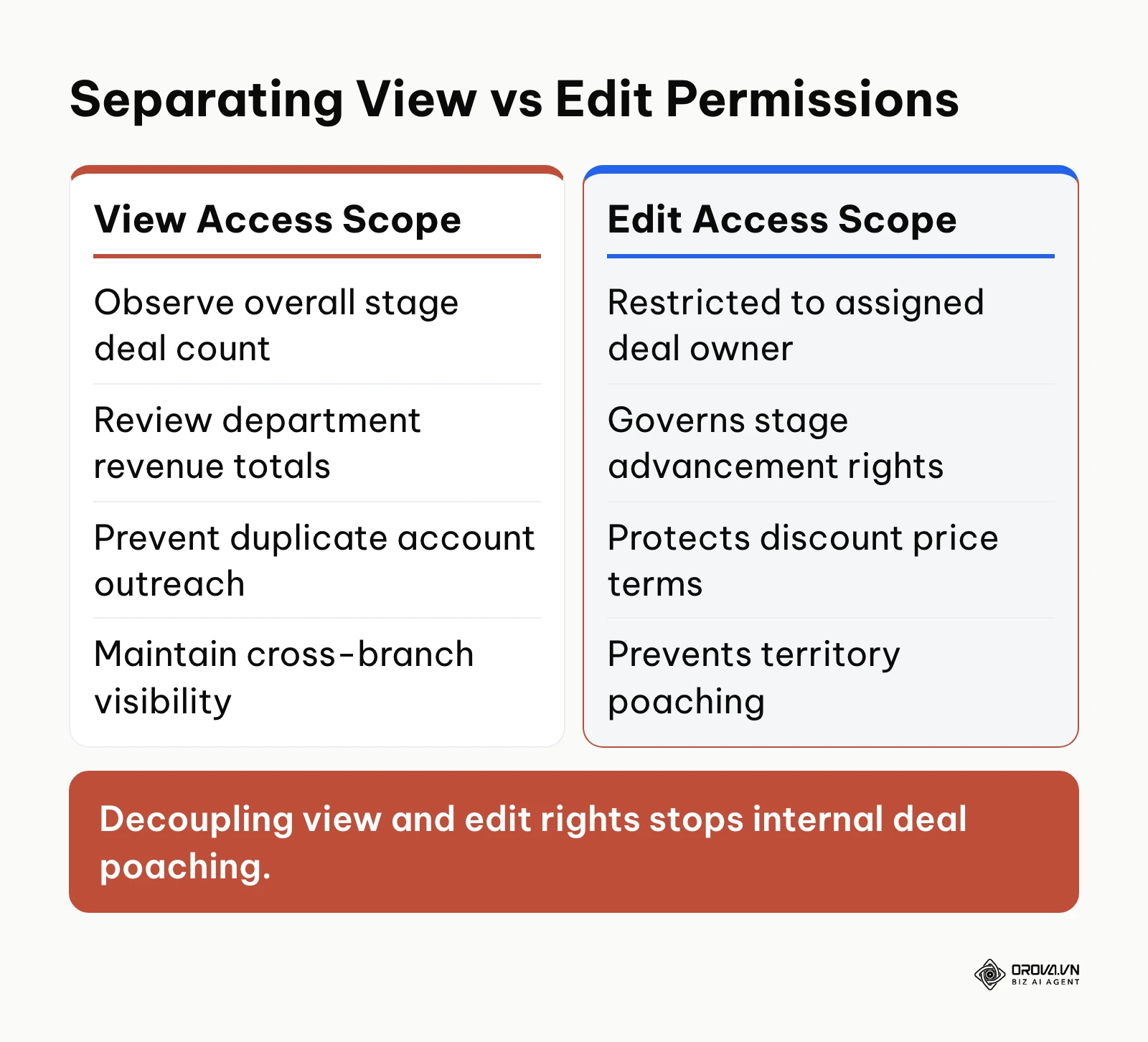
Navigate to Settings ▸ Users & Permissions ▸ Roles (or Data Access Scopes). Avoid granting universal read/write permissions to all team members. Instead, separate View Access from Edit Access across your organizational hierarchy:
- Individual Sales Representatives: Set View permissions to "Own Department and Sub-branches" so they maintain visibility into territory accounts and avoid duplicate outreach. Set Edit permissions strictly to "Assigned Records Only."
- Sales Team Leads & Branch Managers: Set View and Edit permissions to "Own Branch and Direct Sub-branches." This allows managers to reassign stalled deals, adjust commercial terms, and monitor branch pipelines.
- Executive Administrators: Grant full workspace visibility and editing rights across all departments, unassigned pools, and system configurations.
The table below outlines the role-based permission matrix required to protect pipeline data integrity:
| Organizational Role | Configured View Access Scope | Configured Edit Access Scope | Operational Governance Purpose |
|---|---|---|---|
| Individual Sales Representatives | Own department and direct sub-branches | Assigned records only | Maintains visibility into territory accounts; prevents duplicate outreach and deal poaching. |
| Sales Team Leads & Branch Managers | Own branch and direct sub-branches | Own branch and direct sub-branches | Enables managers to reassign stalled deals, adjust commercial terms, and monitor branch pipelines. |
| Executive Administrators | Entire company workspace | Entire company workspace | Full operational oversight across all departments, unassigned holding pools, and system configurations. |
To verify your configuration, log in using a test sales rep account. Navigate to the pipeline board. You should be able to view deals belonging to colleagues in your branch, but the option to edit properties, change deal amounts, or advance pipeline stages on those records must be disabled or hidden.
A frequent error is linking permissions solely to geographical tags rather than reporting hierarchies. If a representative transfers to another product team, their old deals become inaccessible or orphaned. Always bind edit permissions to clear user assignment properties backed by a standardized department tree.
Step 5: Implement Weighted Pipeline Forecasting and Quota Allocation
The objective of this step is to eliminate wishful sales forecasting by applying mathematically sound stage probabilities and tracking quota achievement against real-time pipeline values.
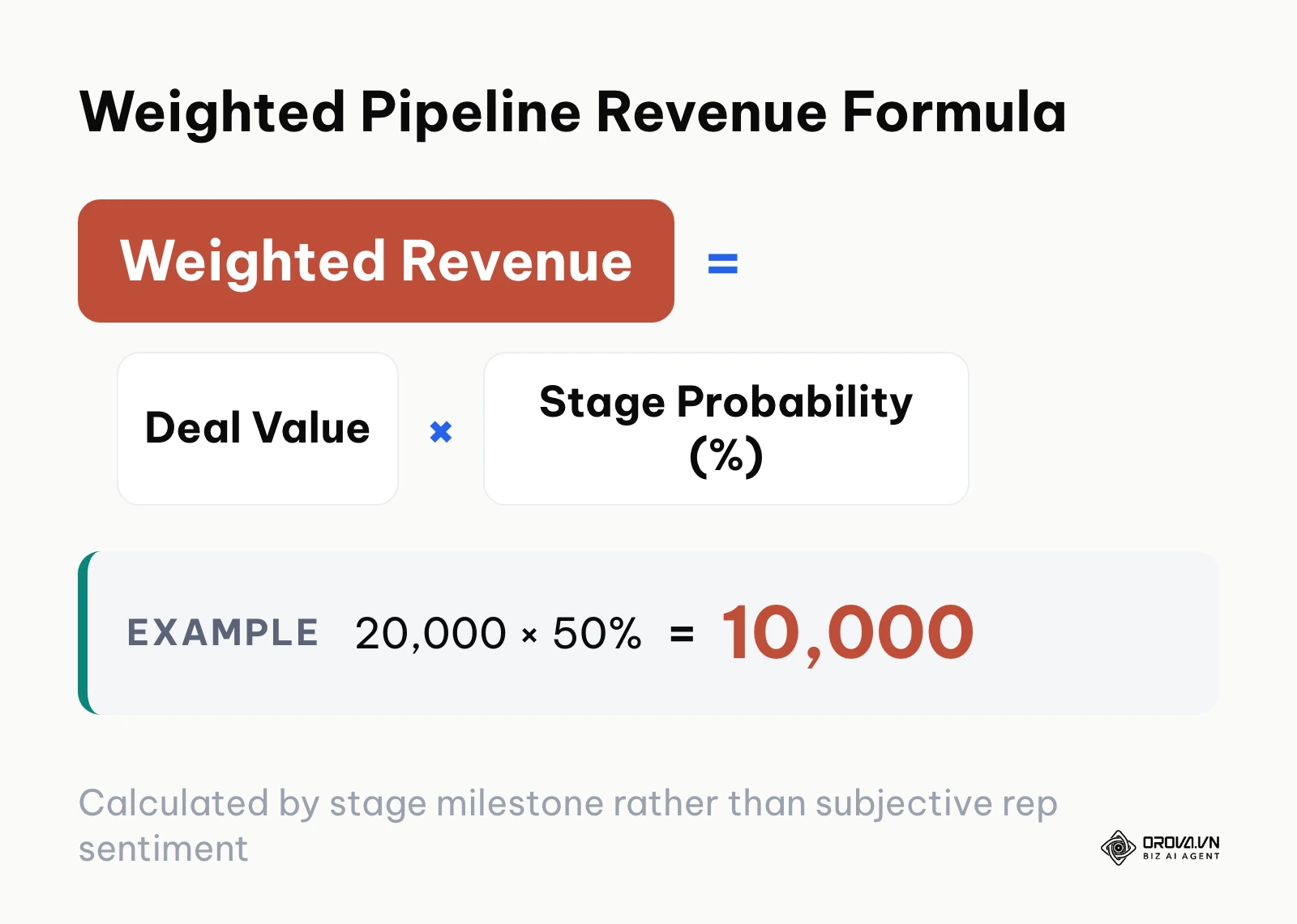
Subjective rep forecasting ruins financial planning. Data from the CSO Insights Sales Operations Optimization Study (2023) revealed that less than half of forecasted deals ultimately close as planned, primarily due to subjective deal staging and the absence of verifiable exit criteria. A weighted sales pipeline forecasting model corrects this by multiplying the total value of each deal by the historical probability of winning a deal at that specific stage.
$$\text{Weighted Revenue} = \text{Deal Value} \times \text{Stage Win Probability}$$
The formula above standardizes revenue projections across your pipeline. In your CRM reporting console, set default win probabilities for each stage based on historical closing data. If historical data is limited, use standard industry baselines:
- Prospecting: 10%
- Discovery: 25%
- Solution Demo: 50%
- Proposal Delivery: 75%
- Legal Negotiation: 90%
- Closed-Won: 100%
The arithmetic simulation table below illustrates how a five-deal pipeline converts raw unweighted value into an accurate weighted forecast.
| Deal Identifier | Assigned Sales Rep | Stage Name | Deal Value | Stage Probability (%) | Expected Weighted Revenue |
|---|---|---|---|---|---|
| Acme Industrial | Sarah Jenkins | 4. Proposal Delivery | 40,000.00 | 75% | 30,000.00 |
| Nexus Logistics | Marcus Vance | 2. Discovery | 18,000.00 | 25% | 4,500.00 |
| Vanguard Health | Elena Rostova | 5. Legal Negotiation | 65,000.00 | 90% | 58,500.00 |
| Beacon Retail | Sarah Jenkins | 3. Solution Demo | 22,000.00 | 50% | 11,000.00 |
| Apex Media | Marcus Vance | 1. Prospecting | 15,000.00 | 10% | 1,500.00 |
| Total Pipeline | Team Combined | All Stages | 160,000.00 | Weighted Average | 105,500.00 |
To evaluate individual performance against targets, compare weighted pipeline values against allocated rep quotas. The table below outlines a monthly quota attainment analysis for the three account executives featured in the simulation.
| Sales Representative | Monthly Assigned Quota | Weighted Pipeline Value | Projected Quota Attainment (%) | Status Assessment |
|---|---|---|---|---|
| Sarah Jenkins | 45,000.00 | 41,000.00 | 91.11% | On Target; minor pipeline additions required. |
| Marcus Vance | 40,000.00 | 6,000.00 | 15.00% | Critical Deficit; immediate prospecting required. |
| Elena Rostova | 60,000.00 | 58,500.00 | 97.50% | On Target; high confidence closing late deal. |
Illustrative Example (Ví dụ minh hoạ):
- Context: A B2B technical consulting firm with four senior account executives suffered from wide discrepancies between monthly sales forecasts and actual collected revenues.
- Actions Taken: The sales VP replaced subjective rep "commit" tags with an automated weighted calculation in the CRM. Win probabilities were locked strictly to the deal's current stage, preventing reps from overriding probability percentages manually.
- Stumbling Block & Resolution: Account executives resisted the change when their perceived pipeline totals dropped by half overnight. Leadership instituted a weekly pipeline review that recognized reps based on weighted milestone accuracy rather than gross unweighted volume.
- Verifiable Outcome: Within three months, the variance between the first-of-the-month weighted forecast and month-end realized revenue narrowed from a 42 percent discrepancy down to less than 8 percent.
Step 6: Connect Closed-Won Milestones to Quotes, Invoicing, and Cash Collection
The objective of this step is to bridge the gap between winning a deal and collecting actual cash by linking your CRM pipeline directly to quotation documents and installment billing schedules.
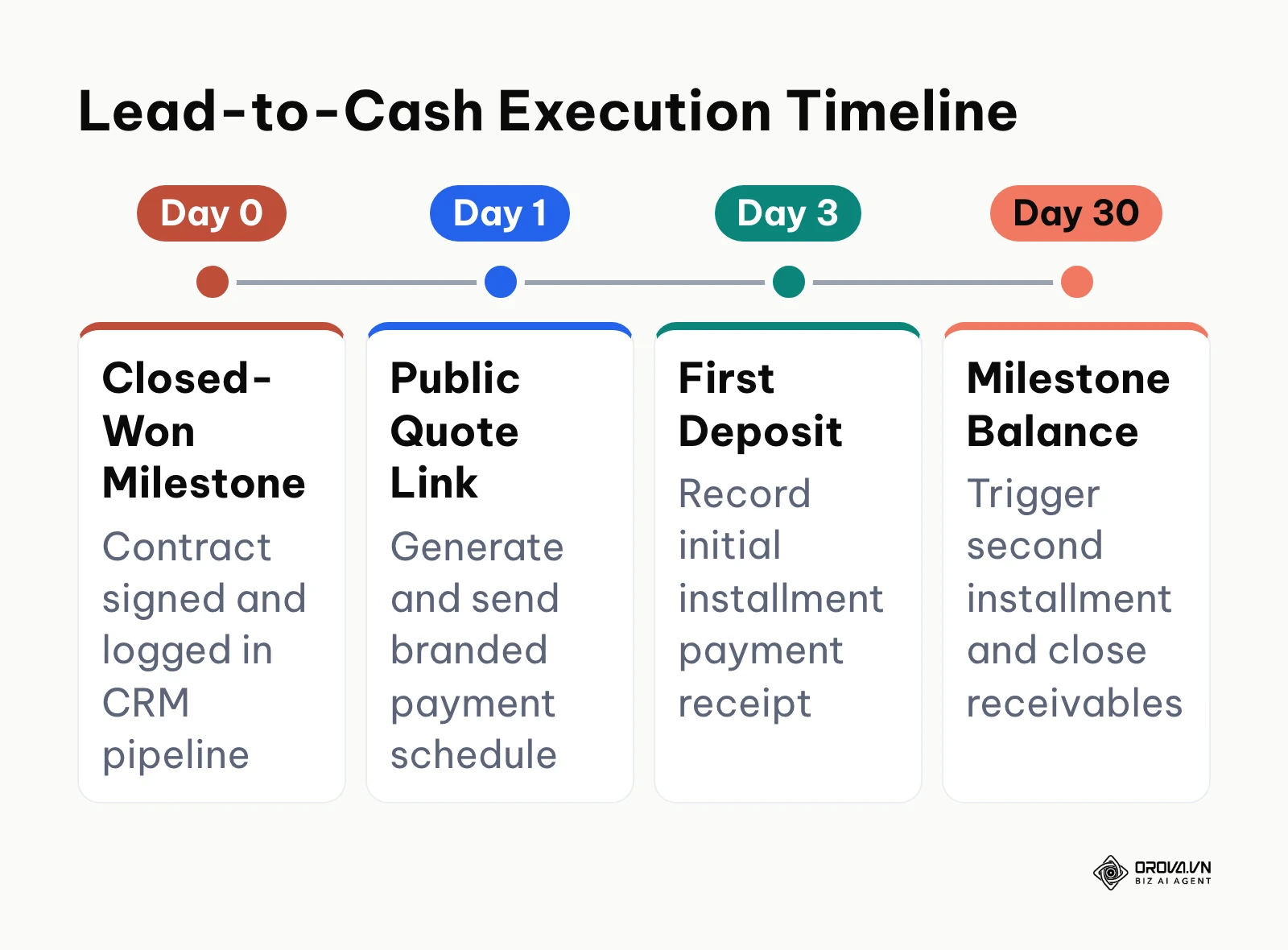
A common breakdown in commercial operations occurs the moment a deal moves to "Closed-Won." Sales reps consider their job finished, but finance has not received billing details, contracts lack payment terms, and cash collection stalls. Complete pipeline management requires an uninterrupted lead-to-cash workflow.
To implement this connection, configure your CRM deal record layout to generate structured commercial documents:
- Public Quotation Link: Enable the CRM quotation generator to produce trackable, web-hosted quotation links containing your itemized product list, service scopes, and payment terms. This link allows prospects to review, approve, and download PDF proposals without email attachment friction.
- Installment Payment Schedules: Set up milestone payment tracking directly on the order record. For example, configure an enterprise contract with a 50 percent upfront deposit, 30 percent upon project delivery, and 20 percent net-30 final settlement.
- Accounts Receivable Tracking: Create aging debt status fields (Total Contract Value, Collected Cash, Outstanding Balance, Overdue Aging Days) directly on the customer record.
After moving a test opportunity to Closed-Won, verify that an associated order record generates automatically with its corresponding payment installment schedule. You should see active balance tracking reflecting zero collected cash until the initial invoice deposit is logged.
Step 7: Institute Weekly Pipeline Review Cadence and Deal Hygiene Routines
The objective of this step is to maintain data accuracy and eliminate dead opportunities through a disciplined, recurring weekly inspection rhythm.
Set aside 45 minutes every Monday morning for a structured pipeline review with your sales team. During this session, do not ask reps to narrate every deal history. Instead, filter your CRM board by specific operational exceptions:
- Deals with Zero Logged Activities: Isolate any deal that has had no interaction recorded in the past five business days.
- Deals Sticking Past Stage SLA Limits: Inspect opportunities lingering in Discovery or Proposal Delivery beyond your standard stage velocity targets.
- Deals with Incomplete Exit Fields: Identify records that advanced without mandatory documentation or verified decision-maker names.
When deals fail to meet exit criteria or prospects cease communication, reps must either log a verified next step or mark the opportunity as Closed-Lost with a mandatory reason code (such as "Budget Deficit," "Competitor Selection," or "Feature Gap"). Keeping dead deals in your active pipeline distorts your weighted forecasts and clouds visibility. Regular efforts to clean CRM data ensure that managers make strategic decisions based on reliable market signals.
Master Checklist for CRM Sales Pipeline Management
The table below provides a unified summary of the entire CRM sales pipeline implementation process. Print or save this checklist to verify your operational readiness at each stage of deployment.
| Step Number & Focus | Primary Implementation Action | Verifiable Completion Signal | Estimated Setup Time |
|---|---|---|---|
| Step 1: Stage Mapping | Build 6 standard buyer-centric deal stages in CRM settings. | Six uniform Kanban columns visible with zero duplicate stages. | 30 minutes |
| Step 2: Exit Criteria | Set mandatory stage validation rules and required fields. | Form validation blocks stage advancement if evidence is absent. | 45 minutes |
| Step 3: Stagnation SLAs | Configure automated decay warnings and reclamation rules. | Stale deals trigger visual warnings and return to the pool. | 40 minutes |
| Step 4: Department Permissions | Separate View vs. Edit scopes across department hierarchy. | Reps can view team pipeline records but cannot edit them. | 25 minutes |
| Step 5: Weighted Forecasting | Apply mathematical stage probabilities to pipeline values. | Dashboard displays expected weighted revenue alongside quotas. | 35 minutes |
| Step 6: Lead-to-Cash Handoff | Link Closed-Won deals to quote links and payment milestones. | Order records display installment balance and debt tracking. | 30 minutes |
| Step 7: Inspection Cadence | Establish 45-minute Monday pipeline hygiene reviews. | Zero active deals past stage SLA without logged next steps. | Ongoing (weekly) |
Eliminate deal stagnation and gain full revenue visibility from first touch to final payment. Orova CRM combines stage-based weighted forecasting, multi-tier department permissions, and milestone invoicing in one self-serve workspace, completely free until July 7, 2027. Set up your workspace in minutes without a credit card.
Common Mistakes in CRM Sales Pipeline Management and How to Fix Them
Managing a sales pipeline requires constant adherence to operational standards. The table below outlines the six most frequent operational mistakes, their root causes, and how to resolve them.
| Operational Mistake | Root Cause Behind Breakdown | Actionable Practical Fix |
|---|---|---|
| Stale Deals Cluttering Stages | Reps fear removing dead deals because unweighted pipeline volume decreases. | Enforce automatic 10-day deal reclamation rules to move dormant accounts to an unassigned holding pool. |
| Subjective Deal Advancement | Reps advance deals based on positive verbal sentiment rather than verified actions. | Implement hard CRM stage validation rules requiring signed scope documents or confirmed budgets. |
| Misleading Forecast Numbers | Calculating projections using total deal volume rather than mathematical stage probabilities. | Apply an arithmetic weighted forecasting formula based strictly on current pipeline stage position. |
| Territory and Account Conflicts | Open edit permissions allow reps to claim, reassign, or modify peer opportunities. | Restrict edit permissions strictly to assigned account owners while maintaining departmental view access. |
| Post-Sale Revenue Leakage | Disconnection between CRM Closed-Won status and accounting invoice generation. | Connect deal records directly to public quotation links and multi-stage installment billing records. |
| Over-Complicated Pipelines | Creating 10 to 15 granular stages that mirror micro-tasks instead of macro buying milestones. | Consolidate pipeline into six standardized milestone stages; manage micro-tasks via activity logs. |
How Orova CRM Supports This End-to-End Workflow
Executing this comprehensive methodology requires an operational platform designed for structured pipeline execution. Orova CRM delivers this governance through a single customer book for your entire sales team. The platform features an intuitive drag-and-drop Kanban pipeline board supporting multiple custom workflows, customizable stages, and operating hours configured per pipeline.
To eliminate deal stagnation, Orova CRM includes automated lead reclamation that scans your database every 10 minutes. If an account is neglected past your customized minute-based threshold, the system automatically revokes ownership and returns the prospect to the unassigned pool for redistribution.
Data governance is enforced through a unified permission card that separates View and Edit access scopes across multi-tier department trees. Revenue forecasting is grounded in mathematical stage-weighted calculations rather than speculative sentiment, paired with quota tracking across daily, weekly (ISO Monday-start), monthly, quarterly, and annual cadences.
From the sales menu, teams can generate branded quotations with public viewing links, track multi-installment payment collections, and monitor overdue accounts receivable balances alongside field rep check-ins with photo attachments and GPS coordinates.
Measuring Success: Key CRM Sales Pipeline Metrics to Track
To verify that your pipeline implementation is functioning correctly, monitor four core operational metrics inside your reporting dashboard:
- Pipeline Stage Velocity: The average number of days an opportunity spends in each stage. Look for this in your CRM stage duration analytics. A healthy system shows steady movement, while spikes in Discovery or Proposal Delivery indicate bottlenecked exit criteria.
- Stage Conversion Rate: The percentage of deals that successfully transition from one stage to the next. Track this across 30-, 60-, and 90-day intervals to identify drop-off points.
- Stale Deal Ratio: The proportion of total pipeline opportunities that have exceeded established stage SLAs. Enforcing automated reclamation should drive this metric below 5 percent within eight weeks.
- Forecast-to-Actual Variance: The percentage gap between your weighted pipeline projection at the start of the month and actual cash collected by month-end. Disciplined teams maintain a variance under 10 percent.
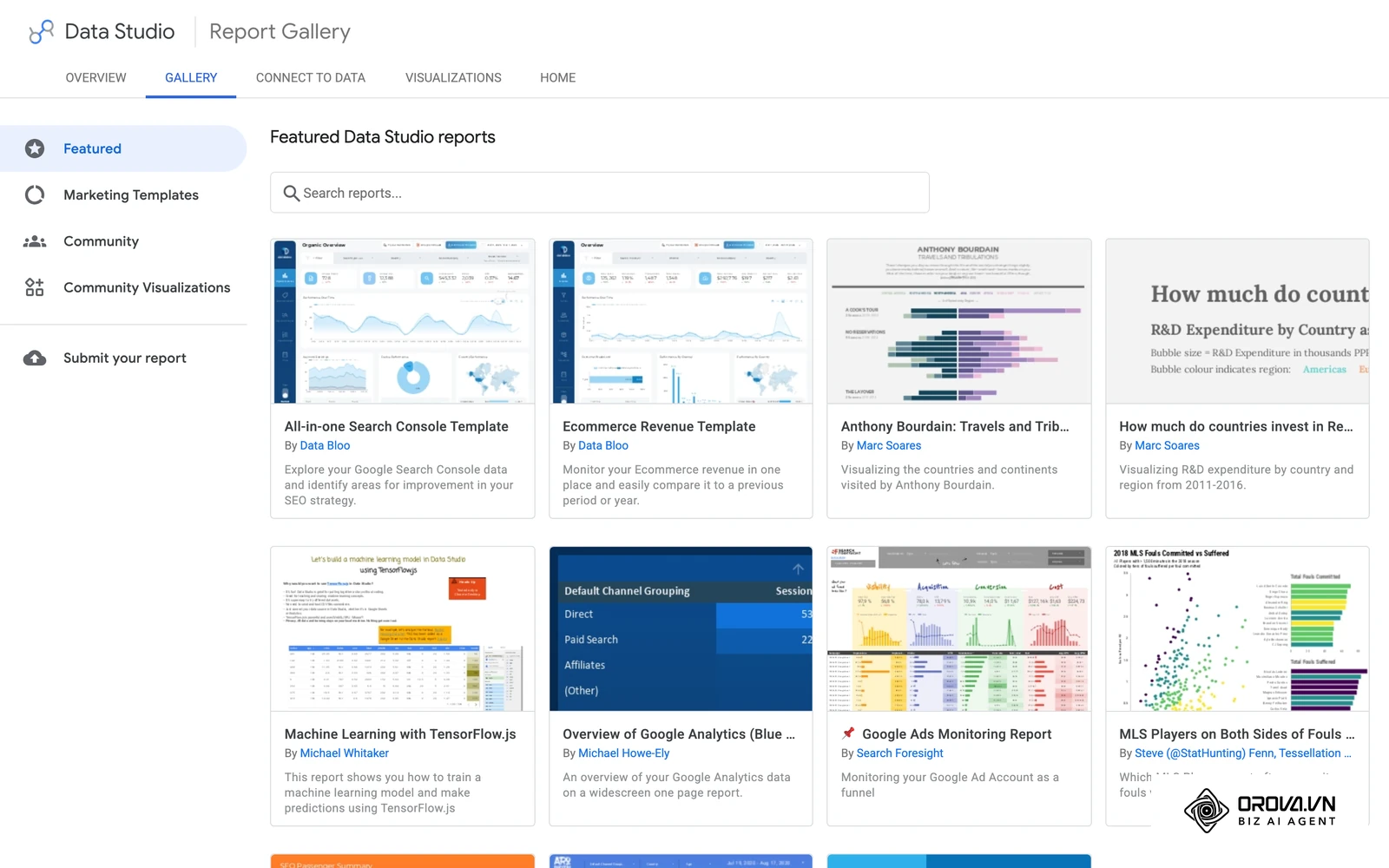
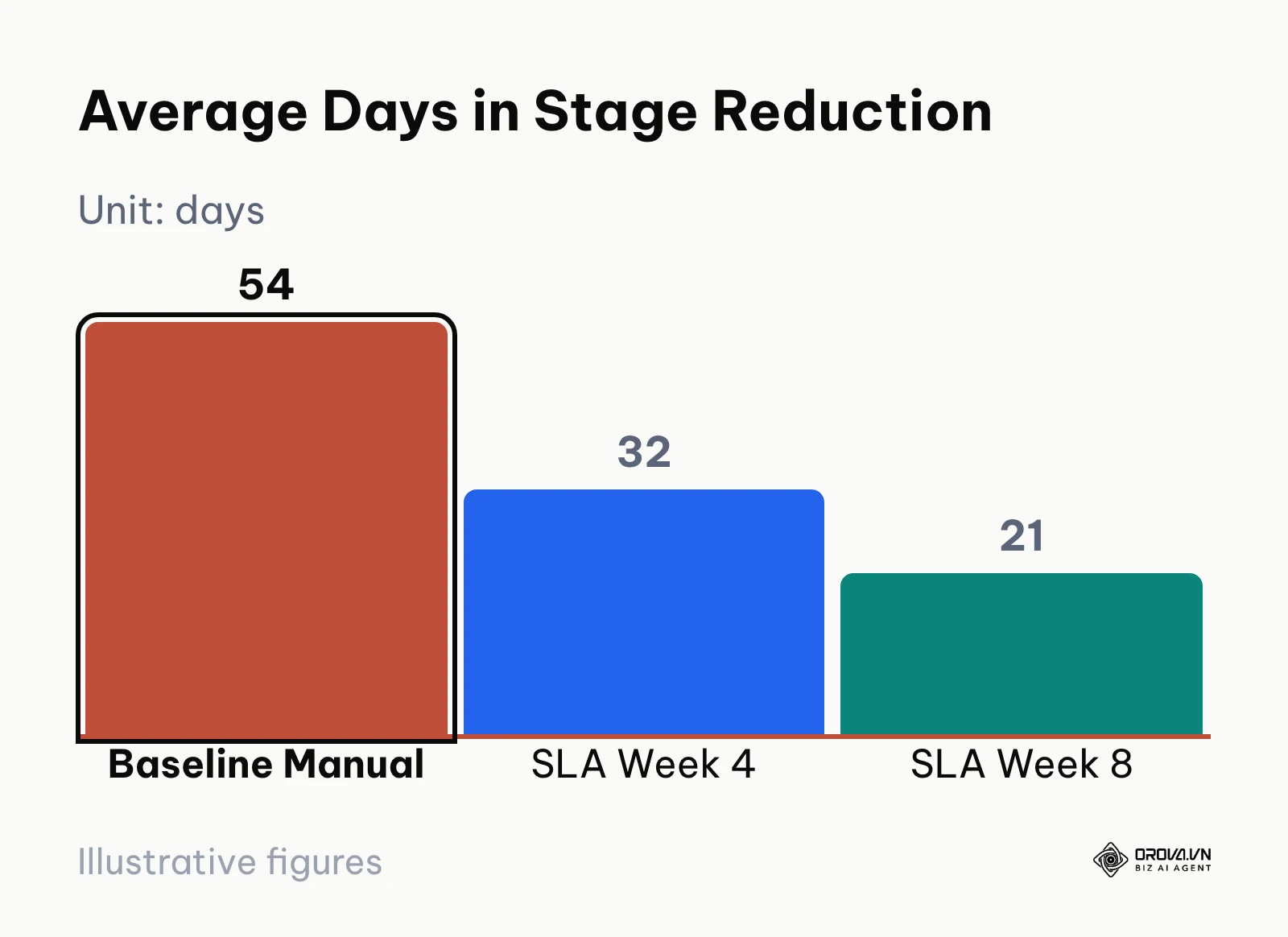
Automating these summaries through an automated sales report gives commercial leadership instant visibility into emerging bottlenecks before they impact quarterly performance.
Trends in CRM Sales Pipeline Management: Author's Outlook
As of 2026, the traditional practice of manual CRM pipeline updates is rapidly becoming obsolete. Today, we observe sales operations teams struggling under administrative debt, with reps spending excessive hours logging activities rather than engaging with buyers. Over the next two to three years, I anticipate that autonomous activity capture and zero-data-entry CRM architectures will become the standard. Background communication logging, meeting transcription parsing, and interaction indexing will automatically enrich deal records, eliminating subjective manual status updates entirely.
Furthermore, I project that static monthly pipeline reviews will be completely replaced by continuous, automated SLA governance. Rather than waiting for a manager to audit stalled deals at month-end, CRM platforms will proactively enforce stagnation thresholds in real time, shifting neglected accounts to available team members within hours. Commercial teams should prepare for this shift today by standardizing their data schemas, pruning arbitrary pipeline stages, and codifying quantitative stage exit rules into firm operational policies.
However, this evolution toward automated pipeline management could face significant resistance if enterprise data privacy regulations tighten further. If compliance frameworks restrict background tracking or autonomous data enrichment across corporate communication channels, commercial teams will remain reliant on disciplined, human-driven data governance and manual exit criteria enforcement.
Frequently Asked Questions about CRM Sales Pipeline Management
How does artificial intelligence impact CRM sales pipeline management?
Modern AI tools assist pipeline management by parsing email threads, transcribing sales calls, and auto-populating custom fields. However, AI cannot compensate for undefined qualification standards. Teams must first establish clear, human-governed stage exit criteria before relying on machine-assisted summaries.
How often should a sales team clean their CRM pipeline?
Pipeline hygiene should be maintained continuously through automated stagnation rules rather than quarterly cleanup marathons. Individual reps should review their open opportunities daily, while sales leadership should run weekly 45-minute pipeline inspection sessions to review stage velocity and remove unqualified accounts.
What is the ideal number of stages in a B2B sales pipeline?
Most high-performing B2B sales teams operate with five to seven stages. Six stages—Prospecting, Discovery, Solution Demo, Proposal Delivery, Legal Negotiation, and Closed-Won—represent the operational standard. Adding more stages introduces administrative clutter, while fewer stages obscure deal velocity and degrade forecast accuracy.
What is the difference between an unweighted and a weighted sales pipeline?
An unweighted pipeline calculates the gross sum of all active deal values regardless of their stage position, presenting an unrealistically optimistic revenue figure. A weighted pipeline multiplies each deal value by its historical stage win probability, delivering a statistically sound projection for financial planning.
How should businesses handle deals that stall during negotiation?
When an opportunity stalls past its stage SLA without communication, it should not remain in late-stage limbo. The deal should be placed into an automated reclamation pool or marked as Closed-Lost with a documented reason code, allowing marketing or dedicated SDRs to nurture the contact until purchasing interest re-emerges.
Where Should You Start with CRM Sales Pipeline Management?
To implement this structured methodology without overwhelming your daily operations, identify your current business scenario and execute the single high-impact action listed below:
- If you are a solo founder or small business operating out of spreadsheets: Spend 90 minutes this afternoon setting up a standard six-stage Kanban board in your CRM. Import your active leads into the Prospecting and Discovery stages, delete arbitrary micro-task columns, and assign explicit contract values and close dates to each record.
- If you are a mid-market sales manager dealing with stalled opportunities and poor follow-up: Open your CRM workflow builder today and configure an automated inactivity alert. Establish a 48-hour touchpoint SLA for qualified leads, and build an unassigned holding pool where unattended leads are automatically reclaimed for team re-routing.
- If you are an enterprise sales leader struggling with erratic revenue forecasting: Audit your stage definitions before your next leadership meeting. Remove subjective stage progression rules and institute mandatory exit criteria fields requiring verified commercial evidence, then apply mathematical stage probabilities to run your first structured audit of crm sales pipeline management.
About the author

Builder of Orova
Nguyễn Đỗ Trọng Ân has 8 years of experience in marketing, including 6 years managing market development across Asia. He builds Orova, a Biz AI Agent that never sleeps: it plans, runs and optimizes work for businesses.
Run your business with AI Agents
Orova is the always-on Biz AI Agent — it plans, runs, and optimizes the work for you.
Save time, unlock productivity.