
Sales pipeline management: how to build your system in 7 steps (2026)

Mastering sales pipeline management is the single fastest way to turn chaotic deal tracking into predictable recurring revenue. By following this guide, you will construct an operational system that weeds out dead opportunities, enforces objective stage progression, and delivers a board-ready revenue forecast every single week. Before you begin, ensure you have an administrator-level login to your sales workspace, access to historical win-loss records, and your current team compensation quotas. The complete architecture requires roughly three to four hours to configure and test across your workspace. Solo freelancers managing five or fewer personal referrals can safely skip this operational framework, as it is built specifically for commercial teams running multi-stage B2B transactions.
What is sales pipeline management and how does the process work?
Sales pipeline management is the systematic practice of tracking, qualifying, and advancing sales opportunities through predefined commercial stages until they reach a closed outcome. The process involves seven core steps: mapping buying milestones, defining exit criteria, configuring permissions, automating inactivity handoffs, setting activity quotas, modeling velocity formulas, and executing weekly hygiene audits. Setting up the framework usually takes a focused half day.
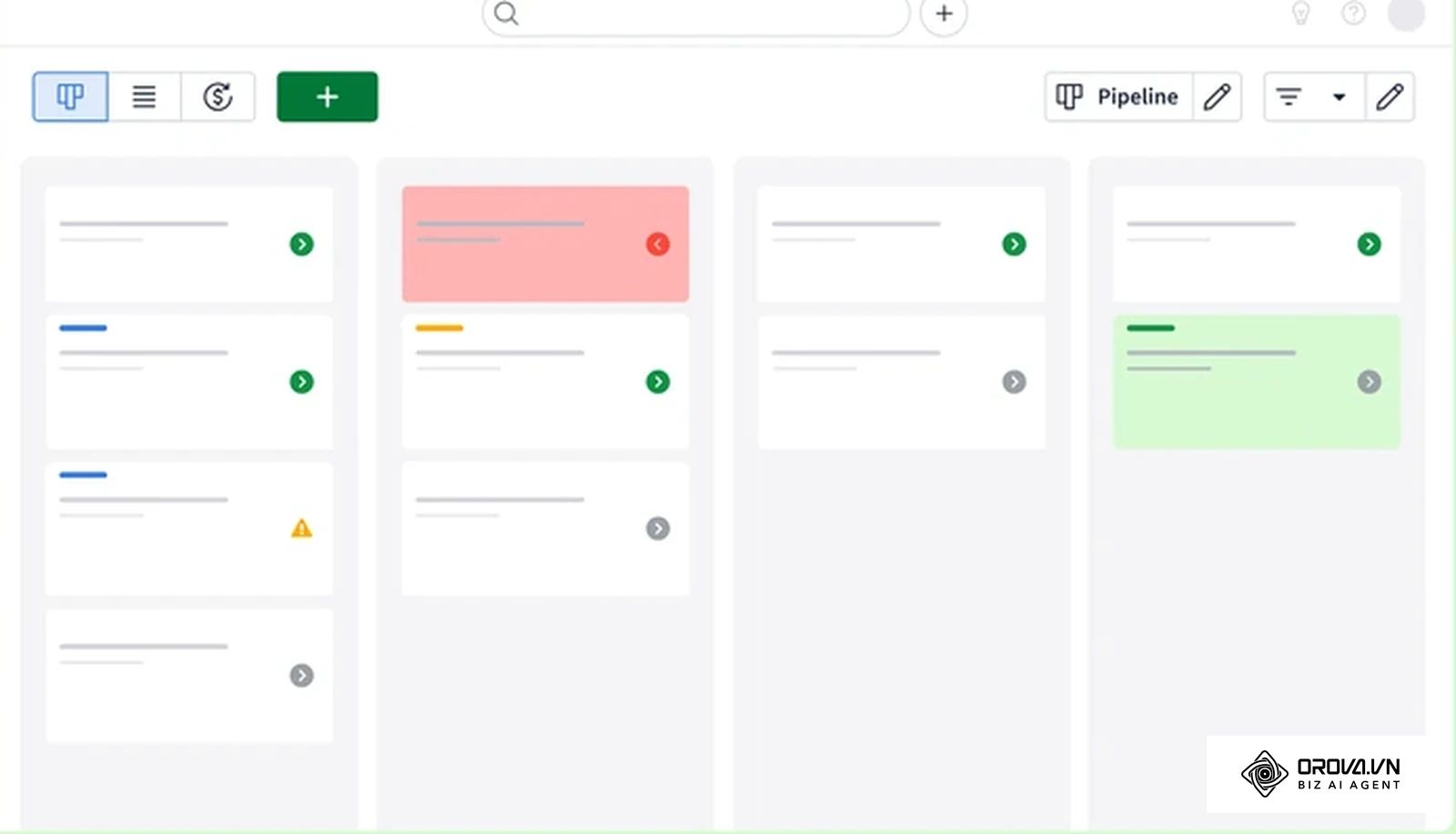
Beyond the basic definition, commercial leaders often confuse a sales pipeline with a sales funnel. While a sales funnel models the mental awareness journey of a prospective buyer from awareness to decision, a sales pipeline tracks the concrete, operational actions your sales representatives take to validate, negotiate, and close a deal. Proper pipeline oversight removes rep guesswork and establishes a single source of commercial truth. If you are new to the software side, start with our plain-English explainer on what a CRM is.
Preparation before starting sales pipeline management
Before configuring any software settings or revising stage definitions, assemble the foundational assets outlined in the table below. Lacking these prerequisites leads to subjective stage labels, miscalculated revenue forecasts, and rep friction during daily deal entry.
| Required Asset | Where to Obtain | Time to Gather | Risk if Missing |
|---|---|---|---|
| Historical Deal Log | Existing CRM export or legacy billing spreadsheets | 45 minutes | Inability to calculate baseline stage win rates and velocity |
| Defined ICP Criteria | Commercial leadership and product marketing playbooks | 30 minutes | Pipeline gets clogged with unqualified, low-margin inquiries |
| Org Chart & Roles | People operations or organizational directory | 15 minutes | Confused data boundaries and leaked deal ownership |
| Standard Price List | Finance department or commercial deal desk | 30 minutes | Reps enter inaccurate deal values, skewing forecasts |
Step 1: Map customer buying stages to pipeline milestones
To manage your sales pipeline effectively, you must align your internal sales stages directly with the milestones of your customer's procurement journey.
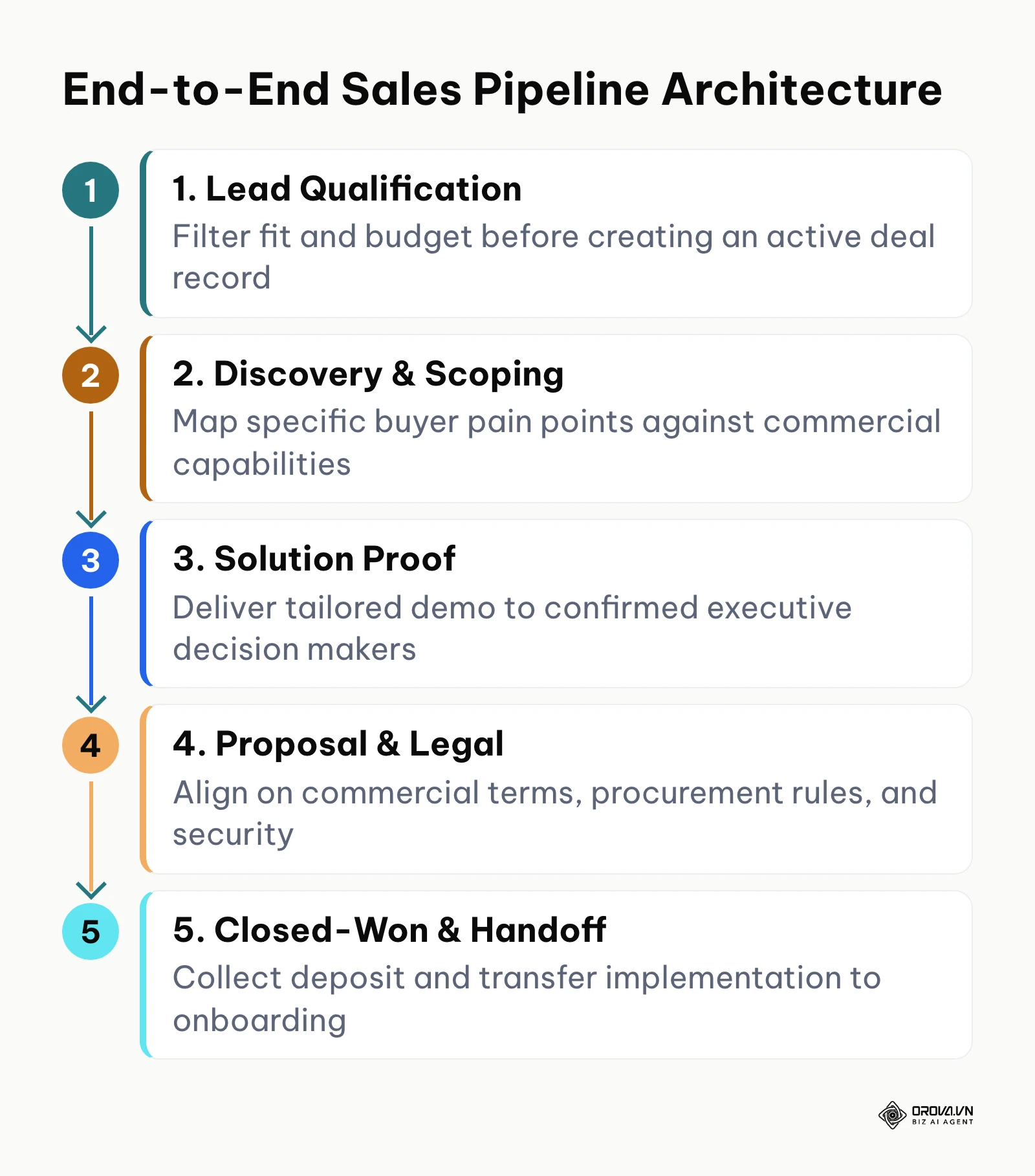
First, access your workspace settings and open your pipeline configuration screen. Replace generic stage names such as "In Progress" or "Working" with customer-centric milestone names: Inbound Qualification, Problem Discovery, Solution Verification, Commercial Proposal, and Contract Execution. If your business runs multiple distinct go-to-market motions, such as enterprise software versus direct hardware distribution, create separate pipeline boards for each motion rather than forcing them into a single convoluted workflow. Connect your upstream lead sources by aligning your B2B lead generation channels directly to the initial qualification stage so incoming prospects never bypass intake validation.
You know this step is completed correctly when your CRM board displays five to six distinct columns where every column label describes an objective customer milestone rather than an internal seller activity.
A common error at this step is creating too many granular stages, such as separate columns for "First Call Scheduled" and "Follow-up Sent". This bloats the board and causes rep fatigue. To resolve this, merge micro-tasks into activity checklists within a single stage rather than creating standalone pipeline columns.
Step 2: Establish objective exit criteria for each sales pipeline stage
Define verifiable, evidence-based rules that must be documented before any opportunity can advance to the next pipeline stage.
Why exit criteria protect forecast integrity
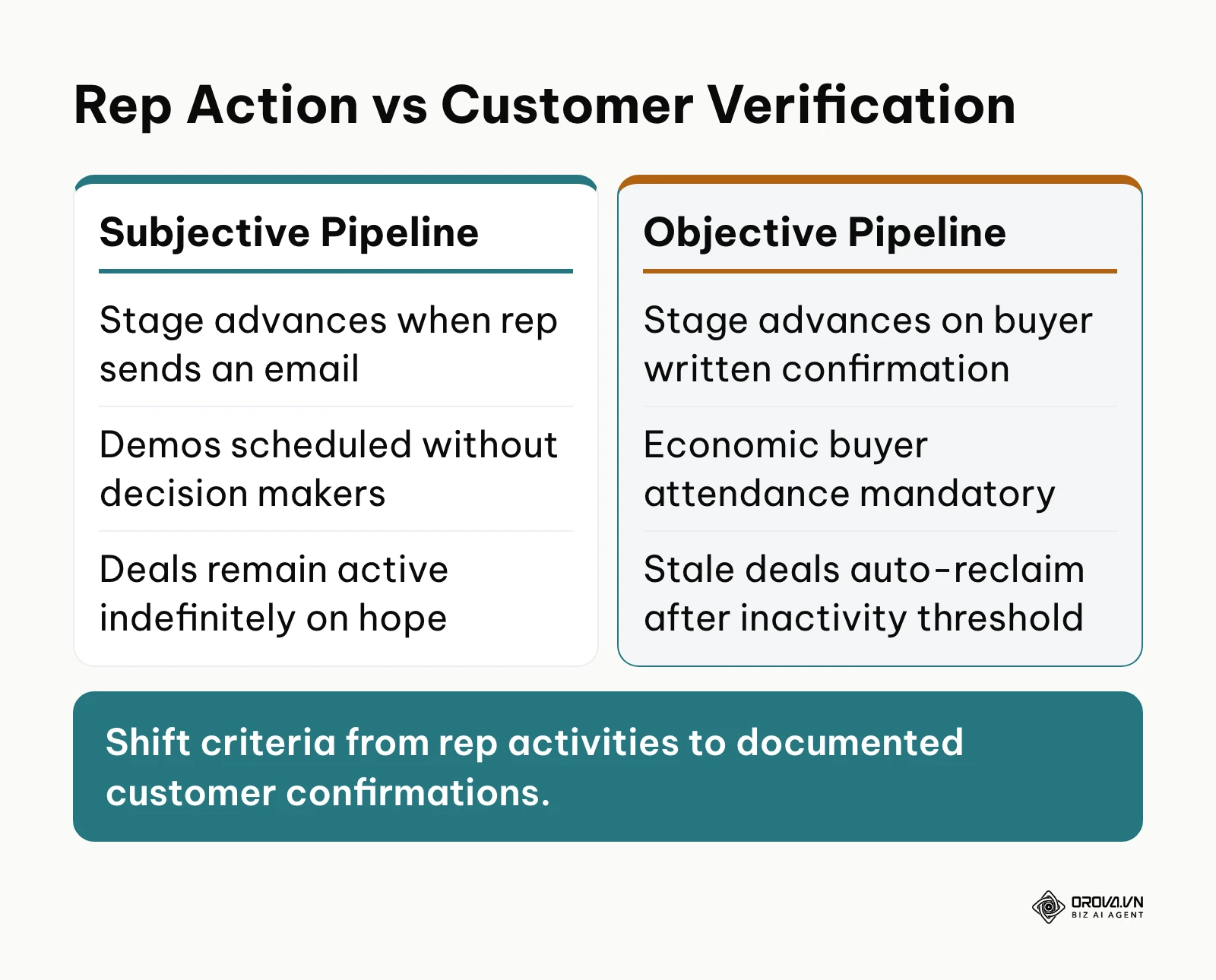
Exit criteria replace rep optimism with buyer verification. When reps move deals forward based on positive feelings rather than documented buyer commitments, the pipeline becomes an unreliable vanity metric.
To implement exit criteria, open your stage setup menu and configure mandatory field rules for every transition. Require reps to upload specific artifacts, such as a confirmed pain checklist, an agreed mutual action plan, or a validated budget range. The table below shows how objective verification replaces seller subjectivity at every stage.
| Pipeline Stage | Commercial Objective | Required Rep Action | Verifiable Exit Criteria (Must Have Proof) | Key Metric Tracked |
|---|---|---|---|---|
| 1. Lead Qualification | Verify prospect fit against Ideal Customer Profile (ICP) | Review inbound intake data and schedule initial triage call | Logged confirmation of minimum employee headcount and verified business email domain | ICP Fit Rate (%) |
| 2. Problem Discovery | Uncover commercial bottlenecks, timeline, and budget parameters | Conduct 30-minute structured discovery conversation | Completed discovery document logging target go-live date and designated budget authority | Qualification Conversion (%) |
| 3. Solution Presentation | Demonstrate technical feasibility and commercial alignment | Deliver tailored software walkthrough to core operational users | Calendar invitation accepted by at least one executive decision maker or department head | Demo-to-Proposal Rate (%) |
| 4. Proposal & Negotiation | Resolve pricing terms, security posture, and legal clauses | Issue formal commercial quote and negotiate contract revisions | Written email confirmation from buyer acknowledging quote receipt and reviewing contract terms | Proposal Win Rate (%) |
| 5. Closed-Won | Finalize contractual agreement and initiate customer onboarding | Execute countersigned agreement and collect initial payment | Executed contract file uploaded and initial invoice deposit logged in accounting | Deal Cycle Duration (Days) |
Hypothetical example:
- Context: A B2B software team of eight account executives suffered from an inflated late-stage pipeline worth 1.2 million in contract value that consistently missed quarterly targets by more than 40 percent.
- Actions Taken: The sales operations manager added mandatory exit fields in their CRM: reps could not drag an opportunity from "Discovery" to "Solution Presentation" without attaching an email from the prospect confirming their executive sponsor would attend the presentation.
- Stumbling Block & Fix: Reps initially complained that prospects were reluctant to confirm attendance over email. The manager resolved this by providing an email template stating that technical demo engineering resources could only be provisioned once executive attendance was confirmed.
- Visual Result: Within three weeks, the stage board shrunk from 84 unverified deals to 38 highly active opportunities, and every deal in the presentation stage had an attached PDF calendar confirmation in its file tab.
The primary pitfall here is accepting verbal assurances as valid evidence. If a rep notes "buyer sounded very excited", that deal must remain in its current stage until an explicit artifact, like a signed mutual evaluation plan, is uploaded.
Step 3: Configure role-based access to safeguard sales pipeline data
Protect your customer book and prevent deal poaching by structuring view and edit permissions according to your corporate departmental tree.
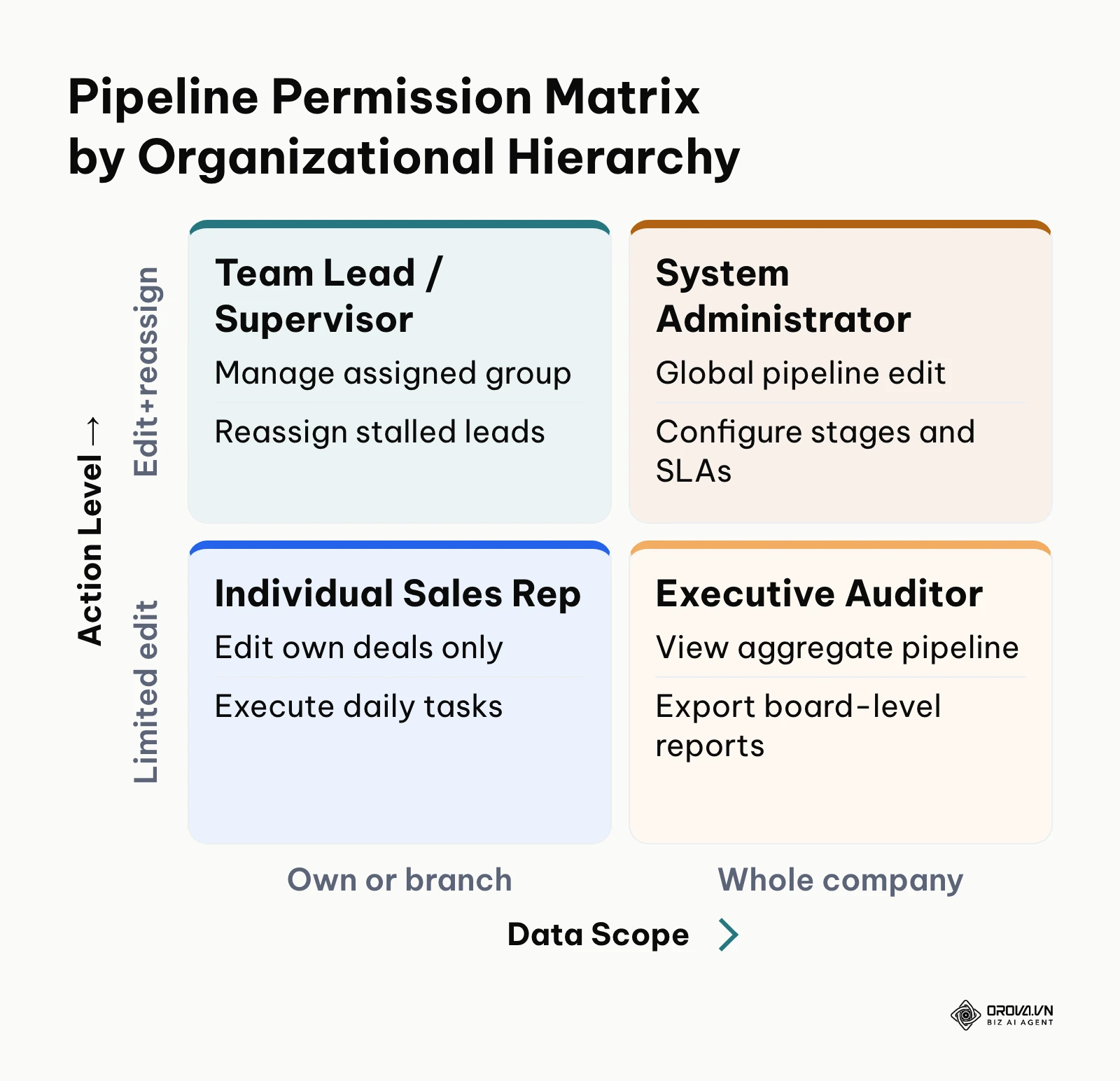
To configure data governance, navigate to your workspace administration panel and select the permissions tab. Never grant full global edit permissions to front-line sales representatives. Split permissions into two explicit tiers: View Scope and Edit Scope. Configure your settings so that standard account representatives can view and edit only the accounts and opportunities assigned directly to them. Department heads and team leads should be granted view and edit rights over their entire reporting branch, while executive leadership retains global read-only visibility for reporting. Learn more about platform tiering in our guide to CRM for small business to structure roles appropriately as your team scales. When evaluating how to manage a sales pipeline in a CRM across distributed offices, role-based boundary enforcement is critical for maintaining clean attribution.
You can visually verify this configuration by logging into the platform using a test rep account. The rep should see only their active deals on the Kanban board, with no access to deals owned by peers in other regional territories.
A common pitfall during permission configuration is accidentally blocking team leads from reassigning deals when an employee leaves the company. Always verify that supervisory roles include the specific administrative grant to reassign record ownership across their assigned departmental sub-nodes.
Standardizing your sales stages is only half the battle; keeping the whole team disciplined needs one shared place to work. Orova CRM gives your team a drag-and-drop pipeline, View and Edit scopes by department, and a reclamation rule that returns neglected customers to a shared pool, so qualified buyers do not slip through the cracks.
Step 4: Automate stale deal reclamation SLAs to protect pipeline health
Implement strict service-level agreements (SLAs) that automatically reclaim abandoned or neglected deals and return them to a central company pool for redistribution.
Configuring automated deal reclamation rules
Speed of response matters most for new inbound leads, because interest fades quickly once a buyer has reached out. When reps hold onto deals without logging meaningful touchpoints, potential buyers disengage permanently.
Execute the following four-step technical SLA framework to enforce operational responsiveness:
- Set Stage Inactivity Thresholds: In your pipeline settings, define the maximum allowable idle duration for each stage. For instance, set a threshold of 120 minutes for brand-new inbound leads, 5 business days for deals in Discovery, and 10 business days for deals in Proposal Review.
- Configure Impending Breach Nudges: Establish automated reminder notifications. If an assigned rep fails to log an outgoing call, email, or meeting note within 80 percent of the stage threshold, trigger a browser push notification and an urgent task alert warning them of impending forfeiture.
- Execute Automated Reclamation to Pool: If the idle threshold expires with zero logged touchpoints, configure an automated trigger that unassigns the rep, tags the deal status as "Reclaimed Stale", and moves the record into an unassigned communal pool.
- Deploy Fair Redistribution Routing: Set up an automated routing rule that reallocates reclaimed opportunities exclusively to active representatives who currently have zero overdue pipeline tasks.
Use the table below as a starting template for your own reclamation rules, then adjust each threshold to the real rhythm of your sales cycle.
| Pipeline Stage | Maximum Idle Time | Reminder Before Breach | Action on Breach | Who Picks Up the Deal |
|---|---|---|---|---|
| New Inbound Lead | 120 minutes (business hours) | At 96 minutes | Unassign and move to shared pool | Next available inside rep |
| Problem Discovery | 5 business days | At day 4 | Unassign and move to shared pool | Team lead reassigns within the branch |
| Solution Presentation | 7 business days | At day 6 | Flag to team lead, then move to pool | Team lead decides keep or reassign |
| Proposal & Negotiation | 10 business days | At day 8 | Flag to team lead; no automatic move | Original owner keeps the deal with a dated next step |
Hypothetical example:
- Context: A commercial equipment distributor with 15 regional sales agents was losing an estimated 30 percent of inbound web leads because reps let them sit uncontacted for three to four days while traveling.
- Actions Taken: Sales operations activated an automated reclamation rule: if a new inbound deal had no logged activity within 180 minutes during business hours, the system unassigned the original owner and transferred the record to a "Triage Queue" accessible to inside reps.
- Stumbling Block & Fix: The outside sales agents initially felt micromanaged and bypassed the system by posting blank text notes into deal timelines. The team resolved this by updating the rule condition to require verified external actions, such as an outbound phone event or sent email via the system.
- Visual Result: The shared unassigned queue displayed 14 reclaimed records during the first week, all of which were picked up by inside reps within 20 minutes, visibly clearing the red overdue flags on the regional pipeline board.
The most frequent issue encountered here is setting identical time limits across all stages. A complex legal review naturally requires more days than an initial outreach call. Calibrate your inactivity rules to reflect the operational reality of each stage rather than applying a blanket number.
Step 5: Establish daily and weekly stage activity quotas
Anchor your team's commercial goals to operational activity leading indicators rather than relying solely on end-of-month closed revenue numbers.
To establish pipeline quotas, open your target settings menu. Break annual or quarterly financial quotas down into monthly, weekly, and daily operational requirements. While closed revenue serves as your primary outcome target, configure secondary stage targets that track the exact number of opportunities entering each milestone. For instance, if closing one enterprise deal requires four completed demos, assign every representative a strict secondary quota of conducting at least five qualified discovery calls and advancing three opportunities to Solution Presentation every single week.
You can verify this setup by viewing the representative performance leaderboard. Each sales rep profile should display a progress bar showing their exact percentage toward their daily and weekly stage-entry targets.
A common mistake is setting quotas based on vanity metrics, such as total outbound cold emails sent, rather than pipeline stage conversions. Focus quota tracking strictly on qualified deals moving across verified exit boundaries to keep reps focused on high-intent buyer engagements.
Step 6: Calculate sales pipeline velocity and model weighted forecasts
Transform your static pipeline data into a dynamic revenue prediction engine using standard velocity mathematics and stage probability weighting.
Applying the pipeline velocity formula
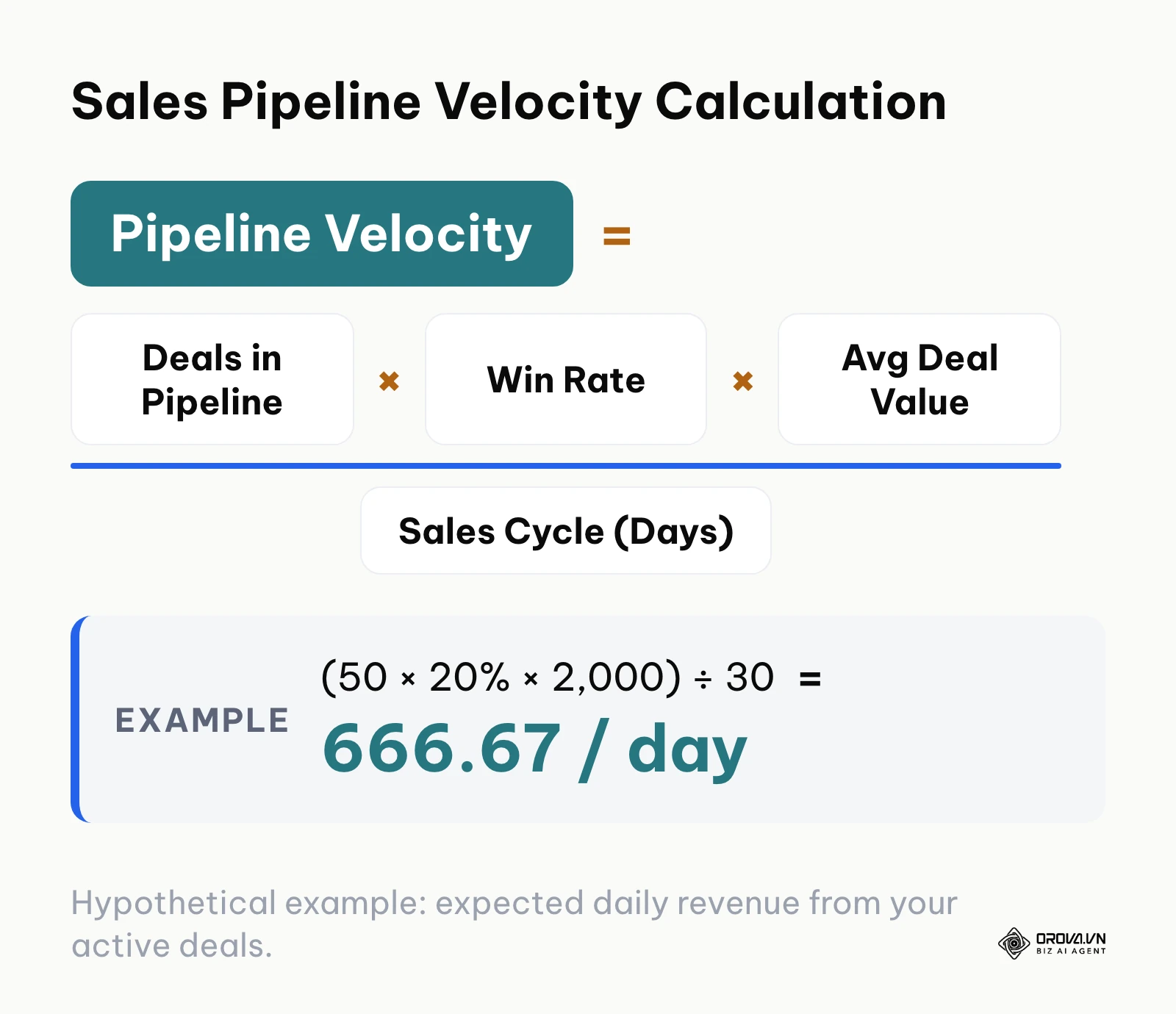
To understand how rapidly your current opportunities convert into recognized revenue, apply the standard pipeline velocity formula:
$$\text{Pipeline Velocity} = \frac{\text{Number of Active Deals} \times \text{Win Rate (\%)} \times \text{Average Deal Value}}{\text{Sales Cycle Length (Days)}}$$
Hypothetical example: your team currently manages 50 qualified opportunities across all stages, maintains an average win rate of 20 percent (0.20), carries an average contract value of 2,000 (amounts in this example are in whatever currency you sell in), and operates with an average sales cycle of 30 days from initial contact to signature.
Plugging these figures into the formula gives:
$$\text{Pipeline Velocity} = \frac{50 \times 0.20 \times 2,000}{30} = \frac{20,000}{30} = 666.67 \text{ per day}$$
In this hypothetical example, the active pipeline generates an expected 666.67 in closed revenue for every calendar day of operation, translating to roughly 20,000 in monthly revenue.
Modeling a weighted pipeline forecast
To forecast revenue for the upcoming 30-day window, apply objective probability weights to each pipeline column based on historical conversion data, as detailed in the hypothetical breakdown below.
| Pipeline Stage | Active Deal Count | Total Stage Value (currency units) | Historical Win Rate (%) | Weighted Forecast Value (currency units) |
|---|---|---|---|---|
| Inbound Qualification | 20 | 40,000 | 10% | 4,000 |
| Problem Discovery | 15 | 30,000 | 25% | 7,500 |
| Solution Presentation | 10 | 20,000 | 50% | 10,000 |
| Proposal & Negotiation | 5 | 10,000 | 75% | 7,500 |
| Total Pipeline | 50 | 100,000 | N/A | 29,000 |
Hypothetical example:
- Context: A mid-market IT services consultancy entered Q3 with an unweighted pipeline worth 450,000 across 30 enterprise opportunities, leading the founders to budget for major staff additions.
- Actions Taken: The commercial director conducted an audit, assigned stage weighting probabilities (10% to 75%), and calculated that the realistic weighted expectation was only 115,000.
- Stumbling Block & Fix: The sales representatives pushed back against lower weighted projections because it reduced their perceived achievement on monthly dashboard rollups. The director addressed this by introducing a dual-view forecast widget displaying both total pipeline volume and weighted probability side-by-side.
- Visual Result: The executive dashboard reflected an accurate 115,000 projection, allowing the leadership team to adjust capital allocation realistically and avoid an untimely cash crunch.
A recurring error during forecast modeling is applying industry-average win percentages rather than your company's historical performance. Recalculate your historical stage conversion rates every quarter to keep weighted predictions accurate.
Step 7: Conduct weekly pipeline hygiene audits and purge dead deals
Establish a non-negotiable weekly inspection ritual to eliminate deal rot, update stagnant close dates, and maintain pristine board data.
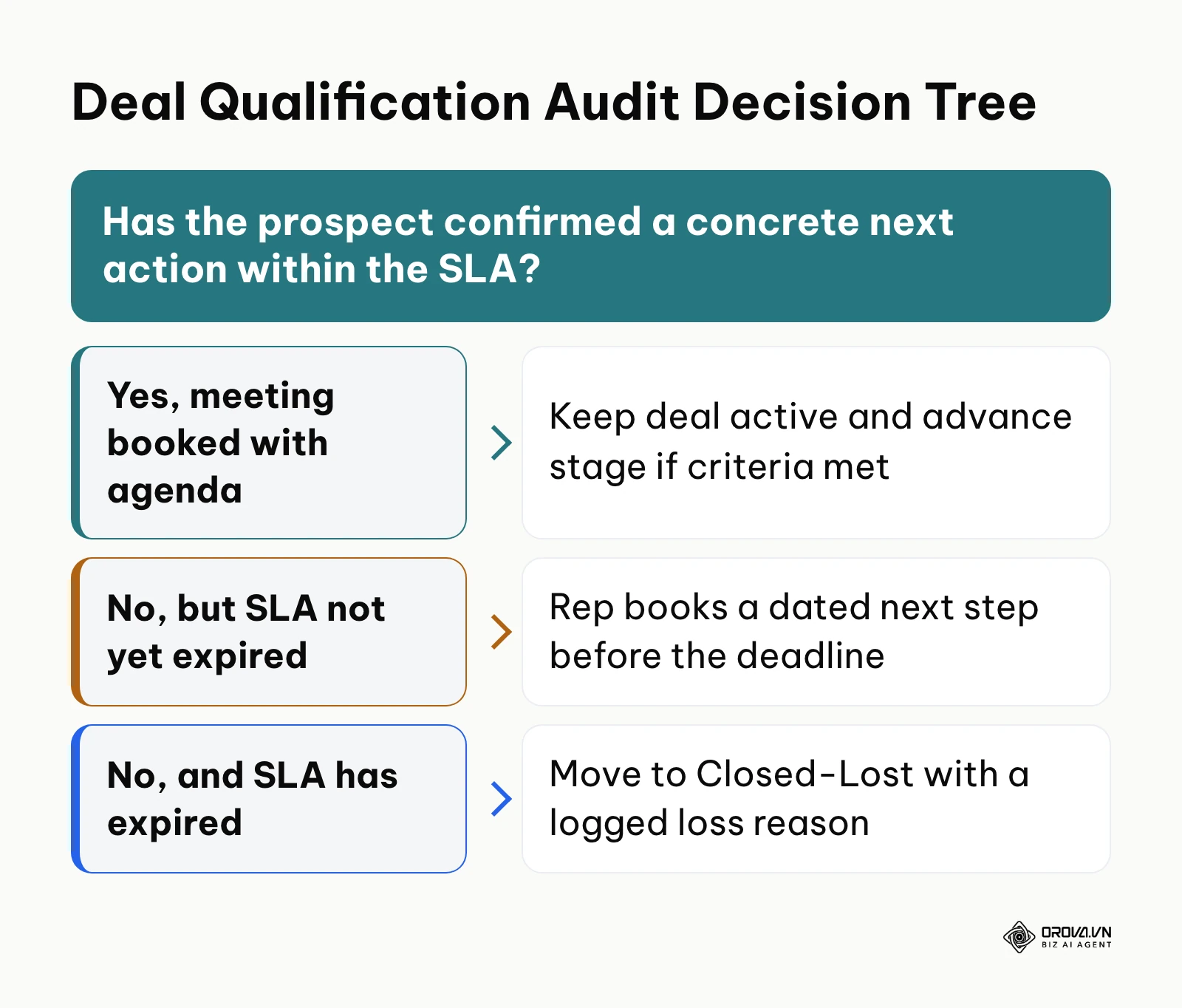
Schedule a recurring 45-minute operational review every Monday morning. During this session, the sales manager and account executives review the live pipeline board filtered by age. Sort the view to identify any opportunity that has remained in its current stage longer than twice your team's average stage duration. For every stagnant deal, the representative must answer one question: has the prospect confirmed a concrete, dated next step on their calendar? If the answer is no, and the deal has exceeded its allowable SLA, move the record immediately to "Closed-Lost" and log a mandatory loss category: Bad Fit, Price Objection, Lost to Competitor, or Project Canceled.
You know this step is functioning properly when the total number of deals with past-due task dates or expired anticipated close dates on your board drops to zero by noon every Monday.
The primary trap during pipeline hygiene reviews is allowing reps to push close dates into the future indefinitely. If an opportunity's estimated close date has been modified three consecutive times without an updated procurement timeline from the buyer, enforce an immediate transition to Closed-Lost to preserve forecasting credibility.
Complete sales pipeline management execution checklist
Use the operational summary table below as your quick-reference checklist to build, verify, and maintain your commercial pipeline architecture.
| Step | Core Implementation Task | Tangible Completion Signal | Estimated Time |
|---|---|---|---|
| 1. Milestone Mapping | Configure 5-6 customer-aligned pipeline stages | Pipeline board shows buyer milestone columns | 45 minutes |
| 2. Exit Criteria | Set mandatory fields and verification rules per stage | Mandatory validation prompts active on stage moves | 60 minutes |
| 3. Access Control | Assign View and Edit rights across the organizational tree | Rep accounts see only assigned deals; managers see branch | 30 minutes |
| 4. Inactivity SLAs | Configure automated deal reclamation and reassignment | Idle deals automatically unassign and move to open pool | 45 minutes |
| 5. Activity Quotas | Establish daily and weekly stage-entry targets | Quota progress bars visible on rep dashboards | 30 minutes |
| 6. Velocity Modeling | Calculate daily throughput and weighted stage forecasts | Weighted forecast card matches calculated formula | 45 minutes |
| 7. Hygiene Auditing | Run weekly Monday reviews and archive stalled deals | Zero expired close dates or unactioned tasks on board | 45 min / week |
Stop deals from going stale and see your whole pipeline in one place. With Orova CRM, you can route new leads by rules, set View and Edit scopes by department, and track stage targets for each team and person. Sign up and use every feature for free until the end of July 7, 2027.
Common sales pipeline management errors and how to fix them
Even experienced commercial leaders run into structural snags when systematizing their pipeline. The table below details the five most common pipeline failures, their root operational causes, and direct instructions to fix them.
| Common Pipeline Error | Typical Operational Cause | Concrete Remediation Action |
|---|---|---|
| Massive Forecast Collapse at Month-End | Reps manually inflate win probabilities to mask missed activity targets | Enforce strict exit criteria checklists; base all forecast rollups on stage probability formulas |
| Qualified Leads Growing Cold in Queue | Reps hoard inbound leads without taking timely follow-up action | Implement automated reclamation SLAs that revoke lead ownership after 120 minutes of inactivity |
| Reps Bypassing Required Information | Deal creation forms contain dozens of non-essential, complex text fields | Trim intake forms to 5 critical fields; lock future stage progression behind progressive data requirements |
| Internal Rep Friction Over Deal Poaching | Global pipeline visibility allows reps to view and claim unworked peer accounts | Enforce departmental permission boundaries separating individual rep view rights from managerial oversight |
| Inaccurate Historical Win Rate Metrics | Reps delete stalled opportunities rather than marking them Closed-Lost | Restrict record deletion privileges; mandate a single-choice loss reason dropdown on every Closed-Lost move |
When building out your commercial stack, it helps to choose software that supports these controls out of the box. Orova CRM, for example, offers a drag-and-drop pipeline with stages you define yourself, separate View and Edit scopes based on your department tree, and a reclamation rule that returns neglected customers to a shared pool once the care deadline you set for each stage (in minutes) has passed, with a reminder before it happens. Its Overview screen shows a weighted forecast calculated by stage, a loss-reason report, and target attainment for each department and each person.
Measuring results: key metrics to validate your pipeline health
To verify that your sales pipeline management architecture is delivering operational value, track three specific indicators on your CRM analytics screen. First, monitor your Average Sales Cycle Length over a 30-day rolling window; as exit criteria weed out bad deals earlier, cycle duration should decrease noticeably. Second, track your Stage-to-Stage Conversion Velocity, accessible via your CRM funnel report, to pinpoint exactly which transition suffers from friction. Finally, review your Forecast Variance percentage at the close of every month. To get these numbers without rebuilding a spreadsheet each week, follow our guide to setting up an automated sales report. As your exit criteria take hold, the gap between projected weighted revenue and actual collected revenue should narrow month after month; set your own acceptable variance from your first three months of data.
Trends in sales pipeline management over the next few years: author's perspective
Looking at the commercial landscape as of 2026, three distinct developments are reshaping how modern enterprises manage their revenue pipelines.
I believe that buyer-verified digital sales rooms will replace rep-entered CRM notes as the primary driver of pipeline progression. Today, we already see modern sales organizations shifting toward shared collaboration workspaces where buyers and sellers co-author onboarding plans and technical requirements. I think more teams will tie stage movement to actions the buyer completes in a shared space, such as approving a mutual action plan or uploading procurement documents, rather than to a rep dragging a deal tile on gut feeling.
I expect automated pipeline rules to shrink the administrative side of the sales manager role. Current operations still consume dozens of managerial hours every week auditing deal timestamps and scolding reps for missing follow-up dates. In my view, more of the routine triage, such as flagging idle deals and returning them to a shared pool, will be handled by rules rather than by manual checks. That frees sales leaders to spend more of their week coaching reps on real conversations instead of policing timestamps.
I foresee conversational AI fundamentally transforming deal qualification, though over-reliance on AI summaries poses a genuine risk. While automated agents are already capturing, transcribing, and synthesizing customer calls into structured data, I believe teams that rely entirely on generative AI to assess deal health risk serious forecasting errors. AI models can easily misinterpret polite enterprise pleasantries as genuine buying intent. To protect operational accuracy, revenue leaders must continue grounding their pipeline rules in cold, hard contractual evidence rather than relying purely on machine-generated sentiment scores.
Frequently asked questions about sales pipeline management
How often should a sales pipeline be audited for accuracy?
A sales pipeline should undergo an operational hygiene audit once a week. Setting aside 45 minutes every Monday morning allows sales managers and account executives to identify stagnant deals, update expired close dates, and remove disqualified opportunities before weekly executive forecasting reports are compiled.
What is the ideal number of stages in a B2B sales pipeline?
The ideal B2B sales pipeline consists of five to six clearly defined stages. Adding more than seven stages creates operational drag, encourages reps to skip steps, and complicates stage analytics, while fewer than four stages fails to provide sufficient operational visibility into deal velocity.
How does artificial intelligence affect sales pipeline management?
Artificial intelligence streamlines administrative pipeline overhead by automatically logging buyer communications, identifying at-risk opportunities based on inactivity patterns, and routing unworked leads to available reps. However, AI cannot replace rigorous human judgment when verifying strategic stakeholder alignment or negotiating complex contractual terms.
What is the difference between a sales pipeline and a sales forecast?
A sales pipeline represents all active, open commercial opportunities your team is currently working on across various stages. A sales forecast is a mathematical projection that calculates how much revenue those active pipeline opportunities are realistically expected to generate within a specific upcoming timeframe based on historical win rates and stage weighting.
How do you handle a deal that has stalled indefinitely?
When a prospective buyer stops responding for more than twice your typical stage cycle length, immediately move the opportunity to the Closed-Lost column with a documented reason of "Unresponsive / Stalled". Keeping dead opportunities on your active board distorts forecasting and prevents reps from focusing their energy on responsive, high-intent prospects.
Where should you start?
If you are a solo founder or sales leader facing a bloated, disorganized CRM board, do not attempt to overhaul your entire operating methodology overnight. Identify which of the following three scenarios matches your current situation, and take a single decisive step during your next work session.
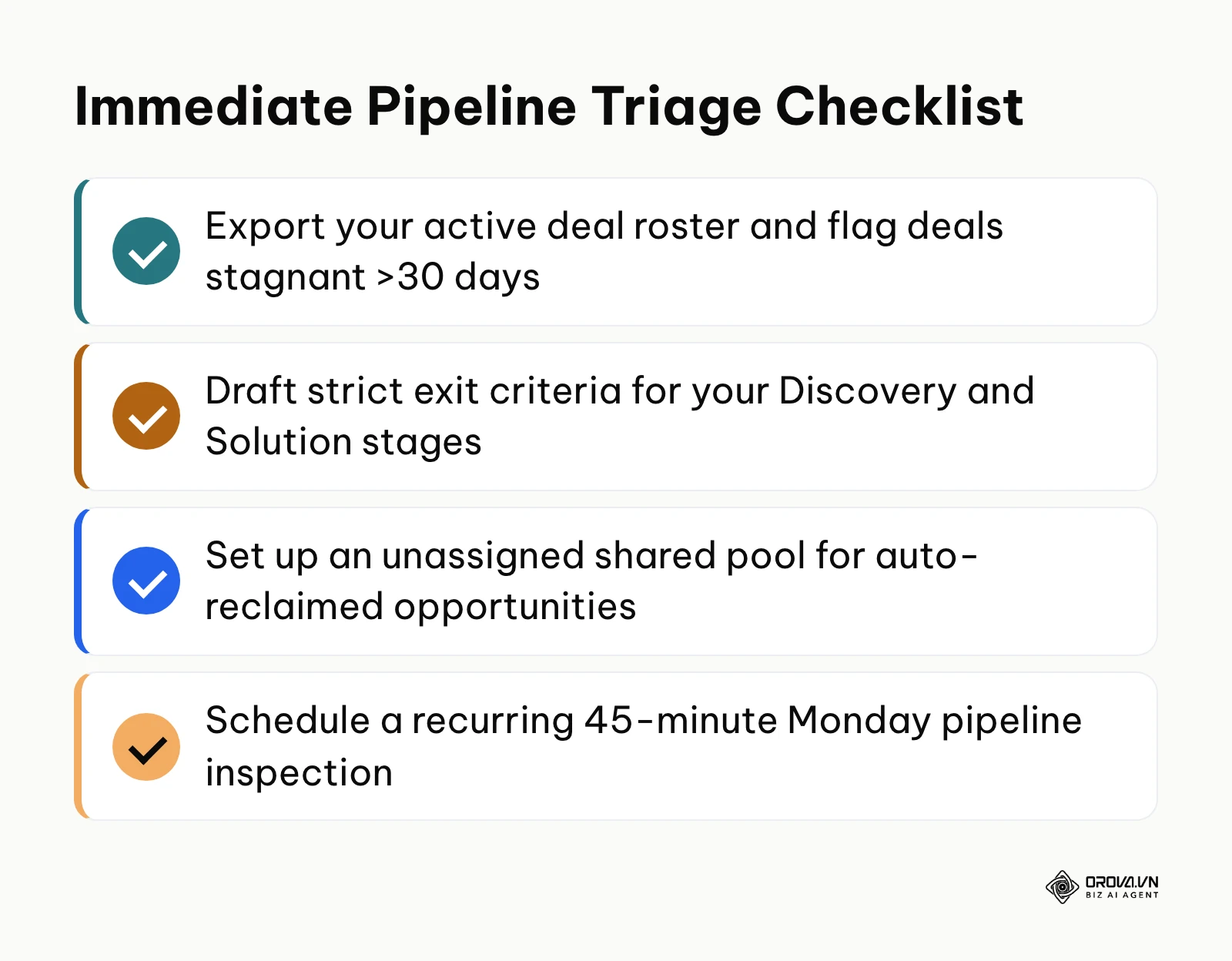
If your pipeline is currently packed with dozens of older deals that have had no customer engagement for months, dedicate 90 minutes to export your deal roster, apply a 30-day inactivity filter, and ruthlessly move every stalled opportunity into Closed-Lost to reset your baseline.
If your team is actively working opportunities but constantly missing monthly revenue targets, spend two hours drafting an explicit Exit Criteria Checklist for your Solution Presentation and Proposal stages, ensuring reps must upload concrete buyer evidence before advancing deals.
If your organization suffers from uneven lead distribution or rep deal hoarding, access your CRM workflow settings this afternoon and establish an automated reclamation SLA that returns uncontacted inquiries to an open pool after 120 minutes. Any one of these single actions is a practical first step toward clearer, more disciplined sales pipeline management.
About the author

Builder of Orova
Nguyễn Đỗ Trọng Ân has 8 years of experience in marketing, including 6 years managing market development across Asia. He builds Orova, a Biz AI Agent that never sleeps: it plans, runs and optimizes work for businesses.
Run your business with AI Agents
Orova is the always-on Biz AI Agent — it plans, runs, and optimizes the work for you.
Save time, unlock productivity.