
Course management: how to build, audit, and scale in 7 steps (2026)

Course management is the ongoing process of organizing, reviewing, updating, assigning, and retiring training courses so that every learner works from current, verified material. Executing structured course management transforms unorganized folders of slides, operational manuals, and training videos into a standardized, measurable curriculum. Following this step-by-step implementation guide will produce an active, fully audited course catalog equipped with structured review workflows, automated question banks, and verified completion tracking.
Before starting, you will need administrative access to your learning portal, existing raw training files, subject matter expert (SME) contacts, and approximately four to six hours of setup time. If your team consists of a solo operator delivering one-off live webinars without recurring staff onboarding, formal system-level management is unnecessary and simple document sharing will suffice.
What Course Management Means for Modern Business Operations
Course management represents the systematic operational workflow of organizing, reviewing, updating, distributing, and retiring educational courses across an enterprise. Doing this correctly establishes standardized employee execution, ensures regulatory compliance, and eliminates duplicate instructional work. The entire setup process requires 7 sequential steps and typically takes between four and six hours for an initial operational training track.
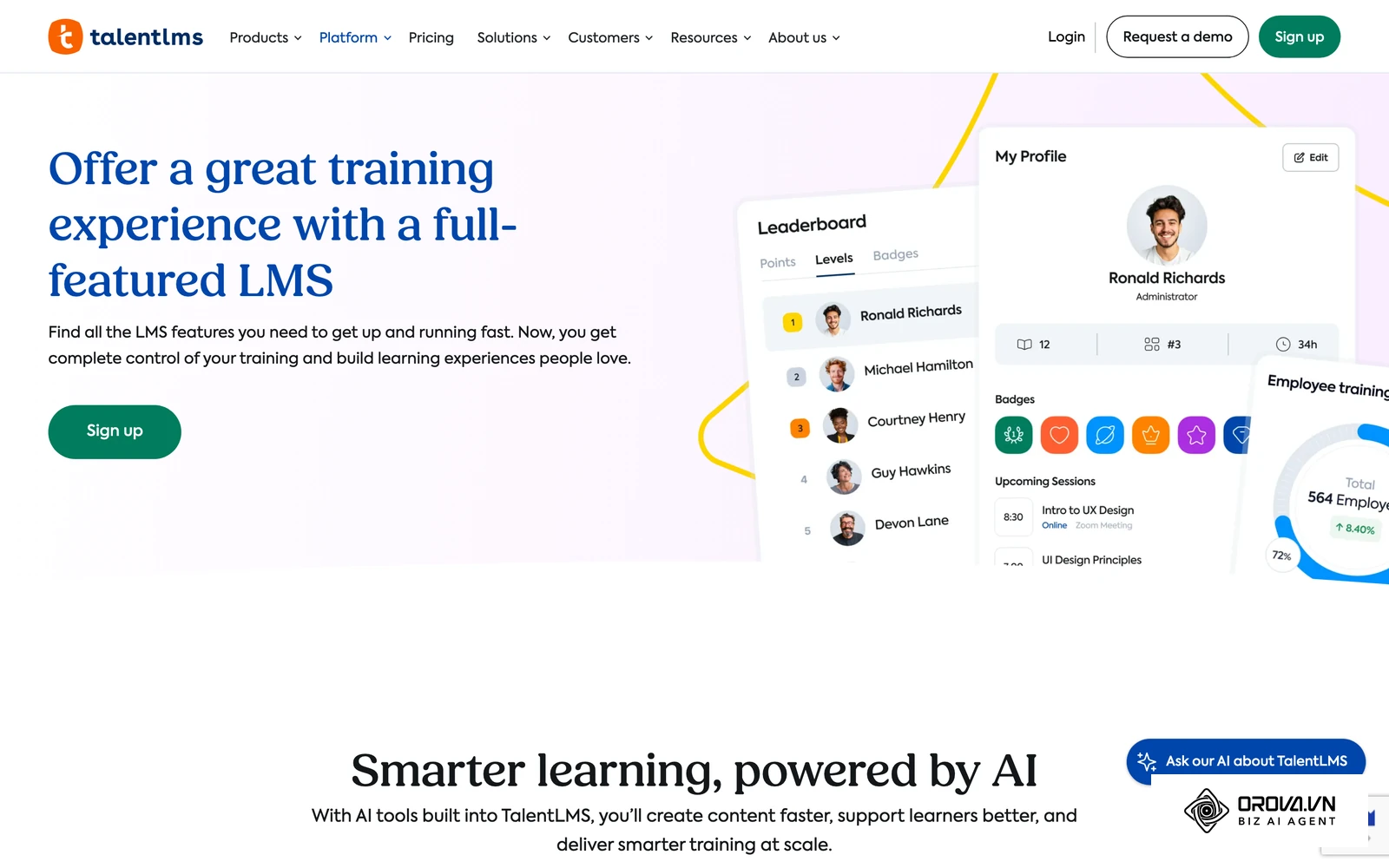
In technical operations, course management is frequently confused with learning delivery platforms. While a content repository merely stores raw assets, dedicated course management governs the instructional architecture, content validity, and assessment rigor. Organizations often struggle because they treat training as a static publishing event rather than a living operational asset.
The comparison table below details the technical boundaries between Course Management Systems (CMS), Learning Management Systems (LMS), and Training Management Systems (TMS).
| Capability Benchmark | Course Management System (CMS) | Learning Management System (LMS) | Training Management System (TMS) | Best-Fit Operational Scenario |
|---|---|---|---|---|
| Primary System Focus | Content structuring, curriculum hierarchy, and version auditing | Learner enrollment, progress tracking, and certificate delivery | Commercial logistics, classroom schedules, and budget accounting | Organizations needing high content iteration speed rely on CMS foundations |
| Content Authoring & Ingestion | Native multi-format composition (documents, slides, media, quizzes) | Primarily imports packaged files (SCORM, xAPI) authored elsewhere | Minimal authoring; focuses on session scheduling and room logistics | Use CMS for direct curriculum drafting without external authoring tools |
| SME Review & Approval Gates | Multi-tier editorial workflows (Draft, SME Sign-Off, Admin Gate) | Basic status flags (Active, Inactive, Archived) | Commercial approval workflows (Budget, Trainer Availability) | Choose CMS when training materials face strict legal or technical audits |
| Question Bank Governance | Granular question pooling, difficulty tagging, and rubric controls | Basic static quizzes tied directly to individual modules | Attendance logs and high-level training completion scores | Essential for certifications requiring randomized evaluation sets |
| Content Lifecycle Maintenance | Automated expiration schedules, review alerts, and deprecation | Manual replacement of course files and course unpublishing | Calendar event archiving and resource reallocation | Crucial for dynamic technical workflows updated multiple times per year |
| Interoperability & Packaging | Exports clean SCORM 1.2 or modular lesson schemas | Ingests SCORM packages and tracks run-time learner sessions | Integrates with enterprise resource planning and payment gateways | CMS serves as the upstream authoring source feeding delivery LMSs |
| Compliance & Anti-Scrubbing | Native player rules (tab focus timers, lock scrubbing, copy guard) | Standard tracking via manifest data and completion status | Tracks sign-in sheets and physical credential sign-offs | Essential for mandated security, safety, and compliance programs |
| Cohort & Group Distribution | Rule-based assignment by department, role, or tenure groups | User catalogs, self-enrollment paths, and cohort assignments | Booking portals for internal and external attendee registrations | Select LMS features when managing multi-tenant customer academies |
| Analytics & Diagnostic Depth | Granular item-response statistics and drop-off analysis | Course completion rates, time-in-course, and test scores | Revenue, resource utilization, and cost-per-seat financial metrics | CMS pinpoints weak curriculum sections; LMS measures overall adoption |
| System Administration Overhead | Lightweight; operated directly by L&D leads and domain experts | Moderate to heavy; requires dedicated system administrators | Heavy; requires coordination between HR, finance, and operations | Smaller teams often roll out faster with a lightweight CMS setup |
According to the quality development model defined in ISO/IEC 19796-1:2005 by the International Organization for Standardization, effective course management requires documented criteria across content conception, development, distribution, and maintenance. Implementing these boundaries ensures your instructional infrastructure remains resilient as headcounts scale.
Prerequisites to Prepare Before Starting Course Management
Before configuring your courses, assemble your operational assets, stakeholders, and technical permissions. Entering this workflow without verified source documentation leads to stalled drafts and misaligned policies.
The checklist below outlines the prerequisite elements, source locations, time allocations, and operational risks of proceeding unprepared.
| Required Prerequisite | Source Location | Estimated Gathering Time | Risk if Missing |
|---|---|---|---|
| Raw Training Source Documents | Department shared drives, SOP repositories, internal wikis | 60–90 minutes | Creators invent unverified curriculum content, creating policy liabilities |
| Designated SME Directory | Departmental org charts and team leadership rosters | 30 minutes | Modules stall indefinitely in review stages without accountable reviewers |
| Course Taxonomy Schema | Internal job architecture or functional competency matrix | 45 minutes | Training catalog becomes fragmented with duplicate, unfindable lessons |
| Assessment Question Blueprints | Operational error logs, compliance manuals, skill rubrics | 60 minutes | Tests measure trivial memorization instead of real job execution capabilities |
| Admin Portal Access | Enterprise IT helpdesk or software management workspace | 15 minutes | Setup halts immediately during hierarchy and user permission configuration |
Step 1: Audit and Inventory Assets for Course Management
The objective of this step is to establish an exhaustive inventory of all existing instructional documents and identify obsolete procedures before building courses.
To perform the asset audit, open your company shared drive or knowledge base. Create an audit spreadsheet titled Course Asset Inventory. Create six columns: Asset Name, Current Format, Target Competency, Owner, Last Updated Date, and Audit Decision (Keep, Revise, or Retire). Review each document sequentially. Verify whether the instructions reflect workflows active as of 2026. Flag any file that has not been modified within the past twelve months for mandatory SME verification.
You know this step is complete when every training file is cataloged in your spreadsheet and categorized with a definitive decision flag.
Example course asset inventory (copy the columns into your own spreadsheet):
| Asset Name | Current Format | Target Competency | Owner | Last Updated | Audit Decision |
|---|---|---|---|---|---|
| Security_v2.pdf | Data Protection | SecOps | 2024-03-12 | Revise | |
| Sales_Deck.pptx | PPTX | CRM Pipeline | RevOps | 2026-01-10 | Keep |
| Onboard_Ops.doc | DOCX | Admin Tasks | HR People | 2023-08-01 | Retire |
A common failure at this stage is cataloging duplicate files stored across personal employee folders. This symptom manifests when two departments use conflicting slide decks for identical procedures. Resolve this by declaring the departmental shared drive as the sole source of truth and deleting localized copies. Another error is attempting to audit formatting rather than factual accuracy. Focus strictly on whether the underlying operational instructions remain valid.
Step 2: Establish a RACI and Approval Workflow for Course Management
The objective of this step is to define formal review boundaries so that no course reaches employees without technical and instructional validation.
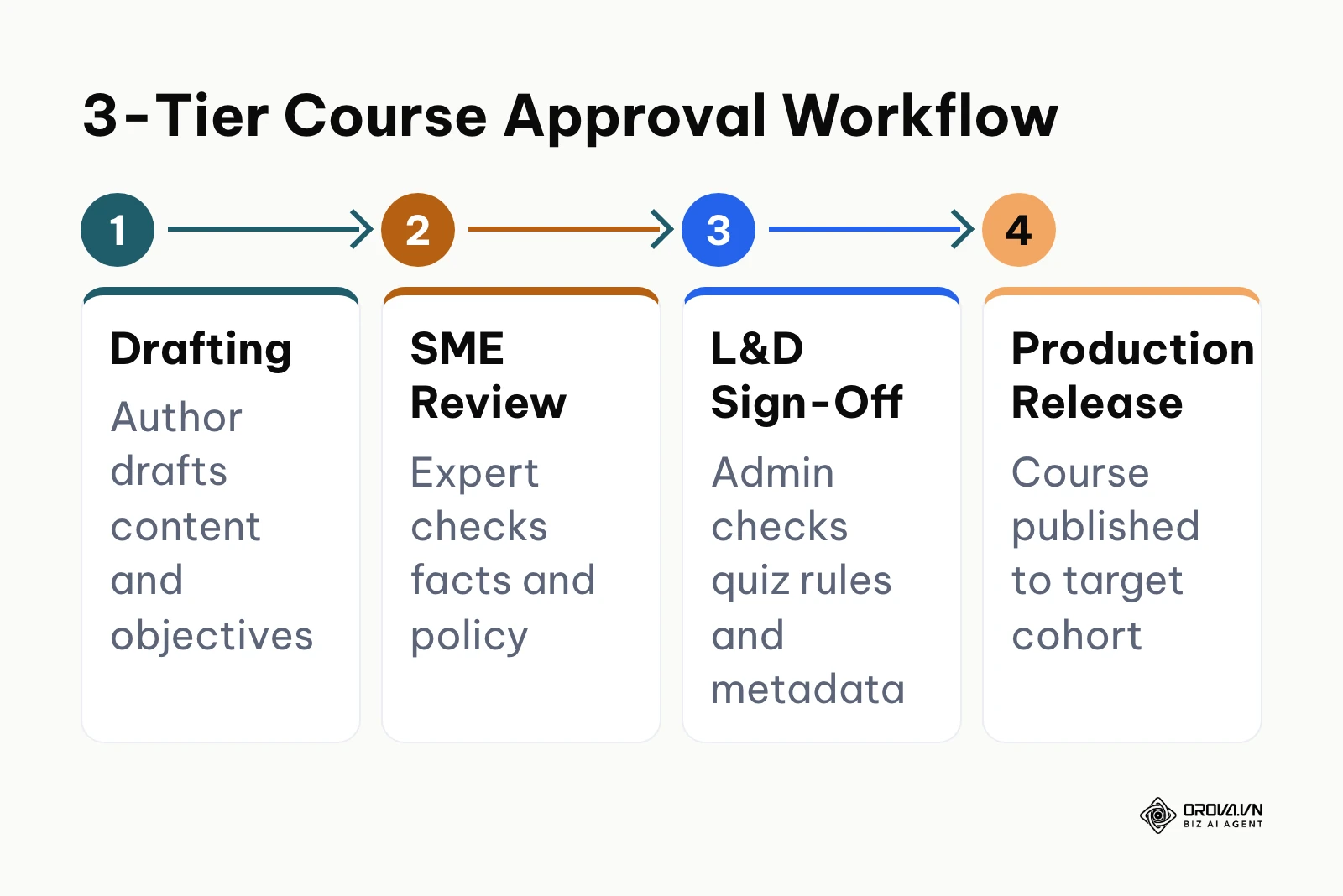
Navigate to your documentation portal and build a RACI matrix (Responsible, Accountable, Consulted, Informed) specifying roles across the course lifecycle. Next, configure your production stages into a mandatory three-tier review gate: Drafting (Instructional Author), Technical Review (Subject Matter Expert), and Administrative Release (L&D Lead). In your management software, locate the course permissions screen, set default author permissions to Draft Only, and restrict the Publish toggle exclusively to designated system administrators.
Course governance RACI matrix template:
| Lifecycle Stage | Instructional Author | Domain SME | L&D Admin | Learners |
|---|---|---|---|---|
| Curriculum Scoping | Responsible | Consulted | Accountable | Informed |
| Content Authoring | Responsible | Consulted | Informed | None |
| Technical Fact-Check | Consulted | Responsible | Accountable | None |
| Pedagogical Audit | Responsible | Informed | Responsible | None |
| Final Publishing | Informed | Informed | Responsible | Informed |
| Archival Retirement | Consulted | Consulted | Responsible | Informed |
You know this step is successful when an author attempting to change a course status from Draft to Live encounters a permissions gate requiring administrative sign-off.
A common pitfall is assigning domain experts the responsibility of building course formatting rather than verifying facts. This causes severe project bottlenecks because busy engineers or legal counsel delay formatting slides. Correct this by restricting SME involvement strictly to factual review of text scripts and quiz answers, leaving assembly to training authors.
Illustrative example: A 75-person financial technology firm experienced inconsistent compliance training because individual team leads published unverified onboarding guides directly to new hires. The operations director intervened by implementing a mandatory RACI framework across three administrative roles, revoking direct publishing rights, and establishing a single review queue in the company training portal. During the initial rollout, engineering managers resisted the review step, claiming it delayed deployment. The director resolved the friction by creating a standardized 48-hour SLA for review sign-offs with pre-structured feedback forms. The resulting course library displayed clear audit logs showing verified sign-offs from both legal counsel and department heads on all active onboarding modules.
Step 3: Structure Modular Curricula for Course Management
The objective of this step is to decompose dense operational manuals into structured, bite-sized lessons organized within a logical curriculum hierarchy.
Open your course management authoring workspace. Select Create Course and enter the standardized course naming convention: [Department] - [Skill Code] - [Course Title]. Under the curriculum builder tab, divide the program into three distinct levels: Chapters (the overarching topic), Lessons (the conceptual unit), and Content Items (individual text briefs, presentation decks, video demonstrations, or flashcard decks). Keep individual lessons focused on a single operational action that takes between five and fifteen minutes to complete. When authoring training to support business initiatives, structure foundational knowledge in earlier modules before introducing advanced topics, so each new lesson builds on what learners already know.
Example course architecture for a customer support program (OPS-101):
| Level | Item | Format | Purpose |
|---|---|---|---|
| Chapter 1 | Ticket Management & SLAs | Topic | Groups related lessons |
| Lesson 1.1 | Triage Rules | 5-minute text brief | One operational action |
| Lesson 1.2 | Escalation Matrix | 16:9 slide overview | One operational action |
| Checkpoint | Formative SLA Quiz | 5 questions | Confirms Chapter 1 understanding |
| Chapter 2 | Incident Handling | Topic | Groups related lessons |
| Lesson 2.1 | Priority 1 Outage Procedures | Video walkthrough | One operational action |
| Capstone | Diagnostic Outage Simulation | Rubric-scored case | Tests applied skill |
You will visually confirm this step when viewing the course outline: the tree structure will display clean hierarchical nesting with distinct icons for documents, slides, audio briefs, and quizzes, without any single content block exceeding 1,500 words.
A frequent error is building monolithic, 60-minute video files or 80-slide decks inside a single module. Learners lose progress when interrupted, and administrators must re-record entire videos when a single operational step changes. Resolve this by enforcing an architectural limit of no more than ten minutes of instructional media per individual item.
Standardizing course management does not require stitching together separate authoring tools and spreadsheets. With Orova Training, you can turn source documents into lessons, slides, podcasts, narrated videos, and flashcards, then run online quizzes graded by AI that you can still adjust by hand.
Step 4: Build Question Banks and Assessments for Course Management
The objective of this step is to construct robust question pools that measure learner competency rather than passive completion.
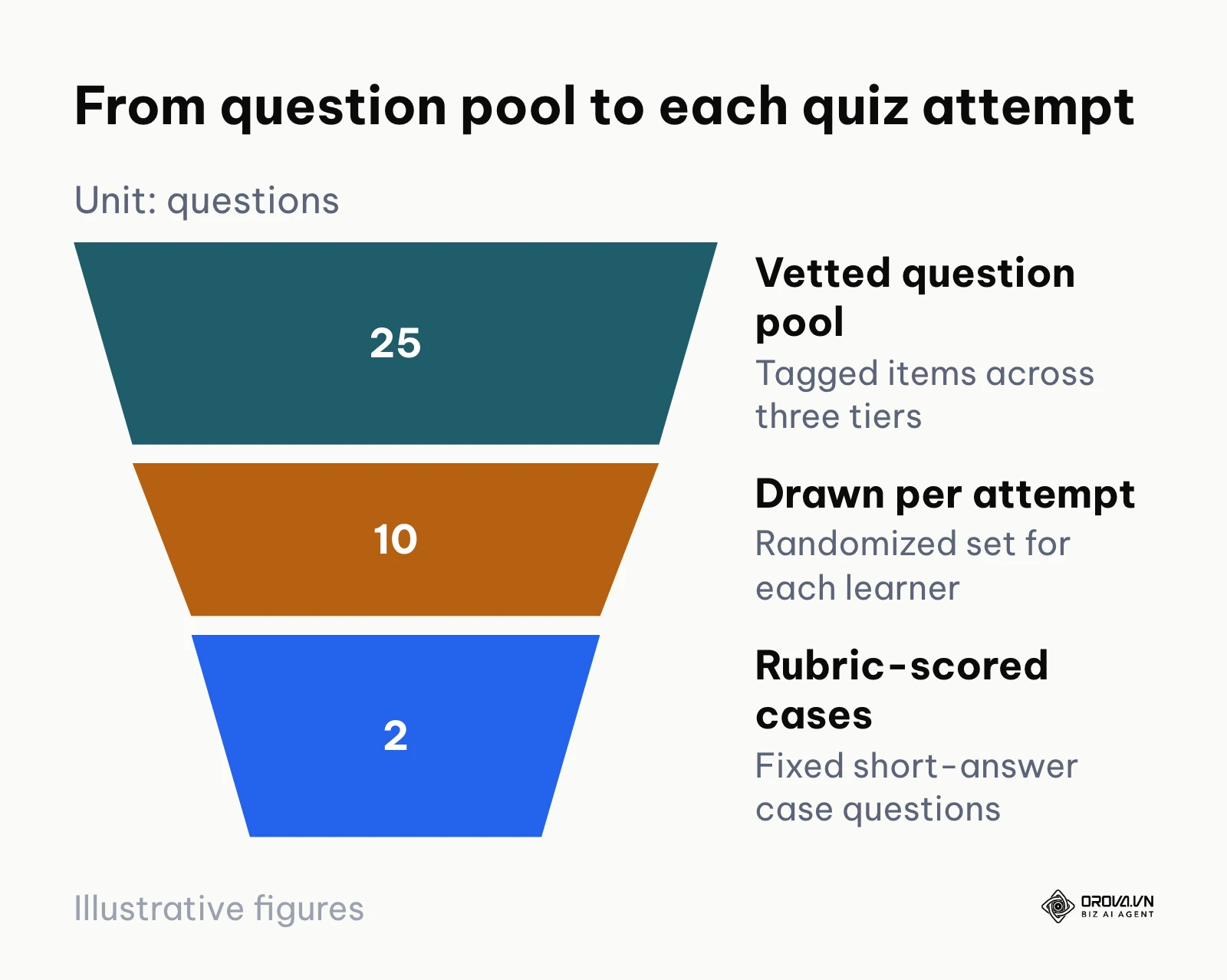
Access the assessment configuration screen within your course workspace. Click New Quiz and select Question Bank Management. Rather than attaching fixed questions to a quiz, build a tagged pool containing at least 20 vetted items per course. Categorize items into three Bloom's Taxonomy cognitive tiers: Recall (single-choice facts), Application (scenario-based multi-select), and Problem Solving (short-answer case evaluations). Configure the quiz settings to draw 10 randomized questions per learner attempt. For open-ended questions, input a standardized grading rubric specifying exact criteria for acceptable, partial, and non-acceptable answers. When scaling employee instruction, modern software allows teams to build full curriculum units and create an online course with AI using source documents to draft initial assessment items rapidly.
Assessment blueprint example (25-item pool, 10 questions per attempt):
| Cognitive Level | Question Type | Pool Size | Delivery Mode | Weight |
|---|---|---|---|---|
| 1. Recall | Single Choice | 10 items | 4 random draw | 20% |
| 2. Application | Multiple Select | 10 items | 4 random draw | 30% |
| 3. Problem Solving | Short-Answer Rubric | 5 items | 2 fixed cases | 50% |
Success is verified when taking a preview quiz: the system dynamically shuffles answer choices, presents a unique subset of questions from the parent bank, and presents an evaluative rubric on short-answer submission screens.
A common pitfall is writing single-choice questions with obvious distractor options. This gives leadership a false sense of compliance while employees guess correct answers without understanding the material. Remedy this by analyzing item response metrics after the first cohort completes the quiz; replace any question where 100% of learners select the correct answer without consulting training materials.
Illustrative example: A 120-person logistics organization discovered that warehouse staff regularly failed equipment inspections despite scoring 100% on onboarding tests. The training coordinator investigated the quiz structure and found a static 5-question test with obvious answers shared among workers. The coordinator created a 30-item question bank divided into safety regulations, equipment inspection checklists, and incident response scenarios, setting the quiz to pull 10 randomized questions with scrambled options for each attempt. When workers struggled with practical hazard identification, the coordinator added scenario-based image questions requiring identification of real warehouse safety violations. The resulting dashboard showed balanced score distributions between 78% and 92%, with zero identical test configurations across the incoming cohort.
Step 5: Configure Compliance Rules and Completion Tracking
The objective of this step is to enforce instructional engagement standards so learners cannot bypass training material.
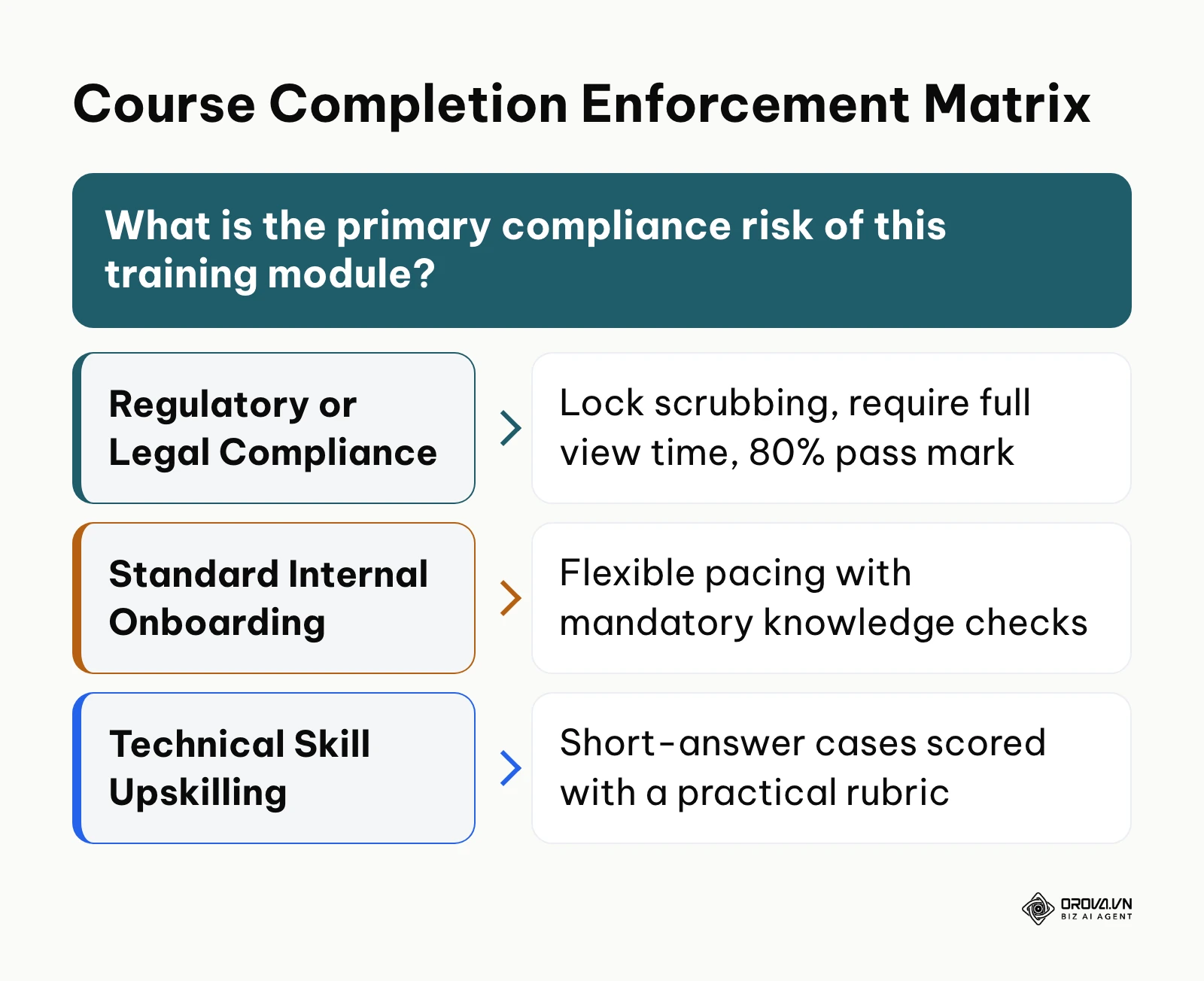
Open the course Settings panel and select Completion Criteria. Set the module status to Mandatory Sequence, requiring learners to finish units in numerical order. In the player settings, activate the Minimum Required Duration toggle, setting the timer to match the content length (for example, four minutes on a four-minute audio summary). Toggle on Prevent Fast-Forwarding to disable progress bar scrubbing on video and audio assets. Finally, enable Active Tab Tracking so viewing timers pause automatically whenever the learner navigates away from the browser window. Set the overall course passing grade to 80% on summative quizzes.
Player enforcement checklist for a compliance course:
| Setting | Recommended Value | What It Prevents |
|---|---|---|
| Sequential progression | On (unlock lessons linearly) | Skipping ahead to the final quiz |
| Prevent scrubbing | On for audio and video | Fast-forwarding through required media |
| Active tab focus | On (pause timers when window is inactive) | Idle tabs counted as study time |
| Minimum view time | 8 minutes per module (example) | Clicking through without reading |
| Minimum passing score | 80% on summative final exam | Certification without demonstrated knowledge |
| Copy protection | On (disable text selection and right-click) | Copying content and answers out of the course |
You can confirm these settings by launching a test account in learner mode: attempting to click ahead to Lesson 3 should display a padlock icon, and dragging the video timeline forward should be disabled.
A frequent error is setting excessive viewing timers that exceed the natural reading time of the lesson. When a 500-word text document requires a mandatory 15-minute dwell time, learners leave the tab open idly, skewing engagement analytics. Set minimum timers to roughly 70% of average reading speed (approximately 150 words per minute) to ensure compliance without causing artificial friction.
Step 6: Distribute and Assign Content in Course Management
The objective of this step is to deliver training programs to specific organizational cohorts using automated assignment rules rather than manual enrollments.
Navigate to the Learner Groups or Cohorts workspace. Rather than enrolling employees individually, build dynamic groups mapped to specific departments, operational roles, or start dates (e.g., Engineering - Level 2 or New Hires - Q1 2026). Select your verified course, open the Distribution tab, and link the course to target cohorts. Set relative completion deadlines (such as Complete within 14 calendar days of hire date) rather than fixed calendar dates to accommodate continuous onboarding. For enterprises utilizing an external learning management system to host employee profiles, export the finalized course package as an interoperable SCORM 1.2 zip bundle to maintain content integrity while tracking completion across existing human resource platforms. If you are still comparing delivery platforms, this guide on how to choose an LMS covers the main selection criteria.
Following the packaging standards in the SCORM 2004 4th Edition CAM Specification published by the Advanced Distributed Learning Initiative in 2009, modular course items must maintain independent asset schemas to ensure seamless migration between authoring environments. Maintaining this standard protects your course assets from vendor lock-in.
Cohort distribution mapping for course OPS-101:
| Target Cohort | Enrollment Trigger | Due Date Window | Auto-Certificate |
|---|---|---|---|
| Support Agents (Tier 1) | Automatic on hire | 14 days from start | Enabled |
| QA Analysts | Department assignment | 30 days from assignment | Enabled |
| Customer Success Leads | Optional / elective | No fixed deadline | Disabled |
You know this step is successful when navigating to the learner tracking roster: all employees belonging to the selected department appear populated with Assigned statuses and individualized due dates calculated from their start parameters.
A common pitfall is assigning massive course bundles globally across all employees simultaneously. Staff become overwhelmed with administrative notifications, leading to high drop-off rates and incomplete compliance reporting. Prevent this by staggering course assignments into sequential milestones linked to quarterly professional development tracks.
Step 7: Execute Audits and Deprecate Content in Course Management
The objective of this step is to systematically review active courses, revise outdated operational guidance, and securely archive retired procedures.
Open your course catalog administrative view and filter courses by Creation Date. Establish a rigid quarterly audit schedule using the 4-phase lifecycle audit checklist shown below. When a standard operating procedure changes, duplicate the active course to create a new minor version (e.g., v1.1 for text adjustments; v2.0 for structural workflow changes). Never overwrite active courses mid-cohort; doing so invalidates historical completion records and breaks compliance audit trails. Once the new version passes SME review, update cohort distribution rules to point new learners to v2.0 and switch the status of v1.0 to Archived.
The operational table below provides the full verification checklist across the 4 stages of course management governance.
| Lifecycle Phase | Strict Quality Standards & Acceptance Criteria | Accountable Owner (RACI) | Verification & Acceptance Method |
|---|---|---|---|
| Phase 1: Drafting & Assembly | Lesson word count under 1,500 words; multimedia formatted to 16:9; question pool contains minimum 20 vetted items mapped to Bloom's taxonomy. | Instructional Designer / Course Author | Automated authoring check validates zero missing media links, correct tag metadata, and rubric attachments. |
| Phase 2: SME Technical Review | Factual accuracy verified against current company procedures; zero outdated legal, policy, or software references; test answer key verified. | Department Subject Matter Expert | Written sign-off logged in system ticket; review completed within standard 5-business-day review window. |
| Phase 3: Production Release | Access controls set to target cohort; anti-scrubbing and active-window timers verified; certificate templates linked with valid verification URLs. | L&D Operations Administrator | Test learner account execution validates sequential progression, scoring thresholds, and automated roster assignment. |
| Phase 4: Periodic Audit & Archival | Course reviewed every 90 days; courses older than 12 months re-certified; retired courses unassigned without erasing historical completion records. | Compliance Officer & L&D Lead | Catalog sweep verifies zero active links to deprecated SOPs; audit logs archived for internal and external inspections. |
Completion of this step is visually confirmed when the administrative course catalog displays distinct version tags (v1.0 - Archived, v2.0 - Active) with historical learner completion data intact on the archived module.
A frequent error during deprecation is deleting historical courses directly from the database. This erases the completion records of current employees, creating compliance risks during regulatory audits. Always use the Archive or Deprecate status, which preserves historical learner certifications while hiding the course from the active catalog.
Illustrative example: A 250-person software company faced an urgent SOC 2 compliance audit and discovered that its active security course contained outdated password policies from two years prior. The compliance manager initiated an emergency course management audit across all technical training modules. Instead of editing the live course while employees were halfway through training, the manager cloned the module into version 2.1, updated the password complexity instructions, generated five new scenario-based quiz questions, and secured rapid approval from the information security officer. The administrator routed all upcoming cohorts to version 2.1 while transitioning the older version to archived status. When the auditor requested training verification, the manager presented distinct timestamped completion logs for both legacy and updated cohorts, proving complete regulatory coverage without data loss.
Master Checklist for Operational Course Management
The table below consolidates the full 7-step course management lifecycle into an operational quick-reference matrix that teams can review before launching any enterprise training program.
| Step Number & Phase | Core Operational Task | Definition of Done (Verifiable Indicator) | Estimated Setup Time |
|---|---|---|---|
| Step 1: Asset Audit | Inventory and triage legacy documents and training files | Audit spreadsheet complete with Keep/Revise/Retire tags | 60–90 minutes |
| Step 2: Governance & RACI | Establish review roles and lock administrative publish gates | Author accounts restricted to draft status; SME roster confirmed | 30–45 minutes |
| Step 3: Curriculum Structure | Build modular lesson hierarchy with 5–15 minute units | Course tree visually verified with zero monolithic files | 60–90 minutes |
| Step 4: Assessment Banking | Configure dynamic question pools with rubrics | 20-question randomized pool functioning in preview mode | 45–60 minutes |
| Step 5: Player Compliance | Apply sequencing, minimum timers, and anti-scrubbing | Test account confirms locked scrub bars and active window pauses | 20–30 minutes |
| Step 6: Cohort Distribution | Map courses to dynamic groups with relative due dates | Roster populated with automated assignments and tracking tags | 30–45 minutes |
| Step 7: Lifecycle Audit | Schedule 90-day review cycles and archive obsolete versions | Version tags applied; historical audit logs preserved | 30 minutes |
Ready to replace scattered files and manual tracking? Build structured courses, assign them to people or groups, enforce viewing rules, and issue verifiable certificates with Orova Training. It is free until July 7, 2027, with no credit card required to get started.
Common Course Management Mistakes and Practical Fixes
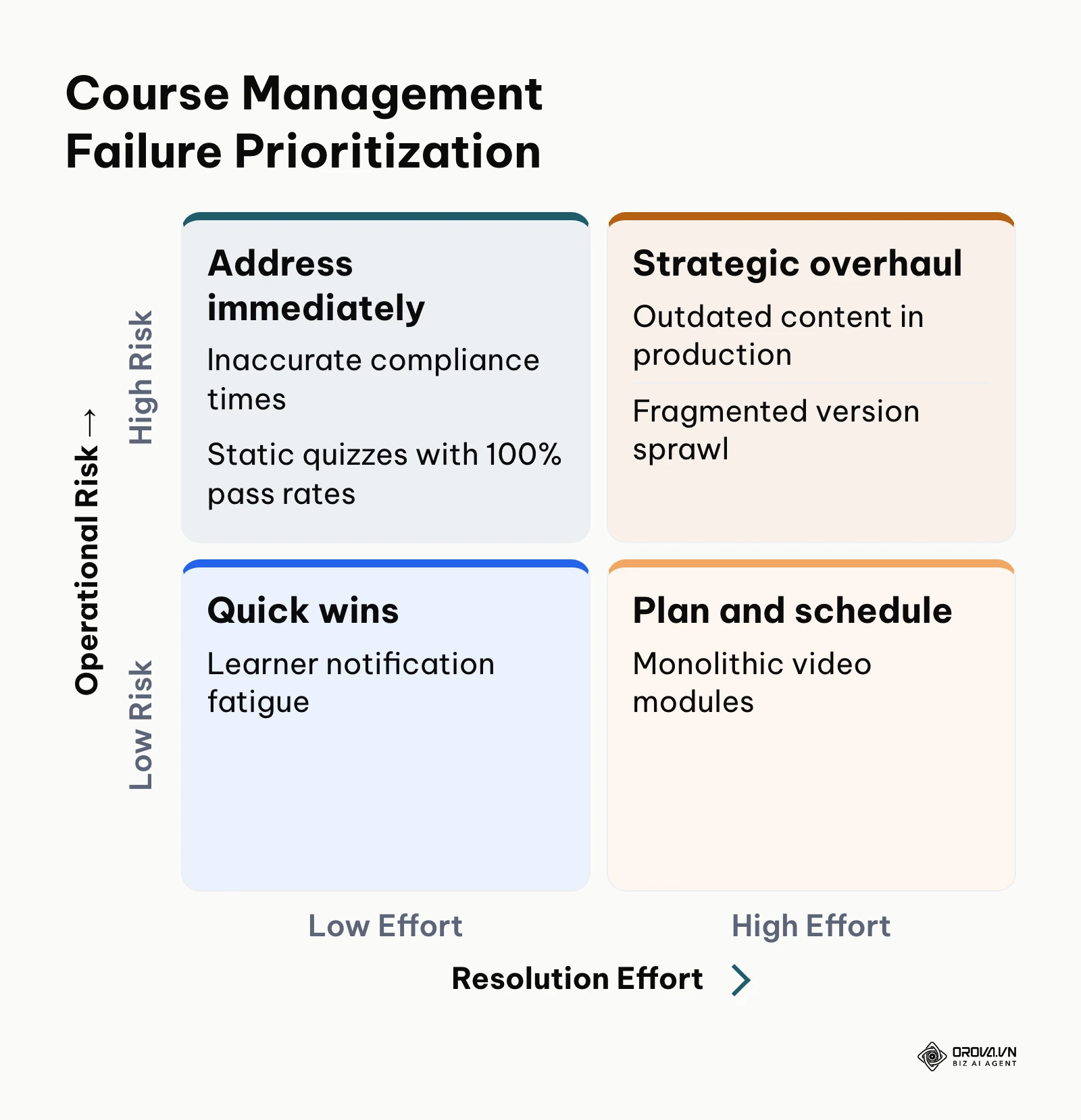
Even experienced training leads run into structural failures when scaling course management programs. The table below outlines recurring operational breakdowns, root causes, and immediate corrective steps.
| Operational Breakdown | Common Root Cause | Practical Resolution Strategy |
|---|---|---|
| Outdated Content In Production | Decentralized authoring with zero review gates or expiration tags | Implement a mandatory 90-day review cycle and assign single-owner accountability for each course module. |
| Universal 100% Quiz Pass Rates | Predictable, static questions without randomized answer pools | Build tagged question pools of 20+ items; randomize selections and incorporate rubric-graded practical case studies. |
| High Drop-Off on Video Modules | Un-segmented, monolithic recordings exceeding 30 minutes | Split videos into focused sub-topic clips under eight minutes; intersperse interactive formative knowledge checks. |
| Inaccurate Compliance Times | Learners leaving browser tabs open while performing other work | Enable active-tab detection and auto-pausing timers to ensure recorded time reflects genuine engagement. |
| Fragmented Version Sprawl | Authors overwriting live courses to patch small procedural errors | Enforce semantic versioning; clone live modules into minor releases and archive older iterations cleanly. |
| Learner Notification Fatigue | Enrolling all staff into large course bundles simultaneously | Structure training into quarterly milestone tracks and trigger enrollments dynamically based on role changes. |
Software can take over much of this administrative work. In Orova Training, for example, administrators can use AI to draft lessons, slides, podcasts (30 voices), narrated videos with subtitles, and flashcards; run online quizzes graded by AI with manual score adjustment; assign courses to a whole workspace, individuals, or groups and track each person's progress; enforce viewing rules that block skipping ahead and downloading; issue certificates automatically on passing, each with a public verification code; and export SCORM 1.2 packages to Moodle or Canvas.
How to Measure Success After Implementing Course Management
Tracking course management success requires measuring curriculum operational efficiency and content health rather than merely logging completion checkmarks. Three diagnostic metrics determine whether your management framework is performing correctly:
First, monitor the Course Currency Index (CCI). Calculate this by dividing the number of courses reviewed and certified within the last 90 days by the total number of active catalog courses, multiplied by 100. A practical working target is to keep the CCI above 90%. Review this metric monthly within your course administrative catalog.
Second, examine the Item Discrimination Ratio (IDR) across quiz question banks. View item-response analytics in your assessment dashboard after at least 30 learners attempt a quiz. An item where both top performers and bottom performers answer with identical frequencies indicates a flawed question that fails to measure competency. Flag questions with an IDR below 0.20 for immediate revision or retirement.
Third, quantify administrative efficiency through Content Maintenance Overhead. The quantitative business model below illustrates the measurable operational savings when transitioning from manual course tracking to centralized course management for a 100-employee company. The figures are an illustrative example, not industry benchmarks:
Annual course management savings model, 100 staff (illustrative):
| Operational Variable | Manual Setup | Managed CMS |
|---|---|---|
| Course update time (hours per quarter) | 20 hours | 5 hours |
| Assessment compilation time (hours per quarter) | 15 hours | 3.75 hours |
| Compliance verification time (hours per quarter) | 10 hours | 2.5 hours |
| Total annual governance hours | 180 hours | 45 hours |
| Annual hours saved | — | 135 hours |
| Labor savings at 35 US dollars per hour | — | 4,725 US dollars per year |
Centralized training governance also tends to reduce the time spent troubleshooting delivery errors, because every course has one owner, one active version, and one review date.
Future of Course Management in the Coming Years: Author's Outlook
Course management architectures are evolving rapidly under the influence of generative content pipelines and shifting organizational structures. The following three perspectives outline how I expect this operational discipline to change over the next two to three years.
Dynamic micro-curricula will replace monolithic annual training tracks. More teams are moving away from long introductory courses toward short, modular operational briefings embedded in daily work. In my view, monolithic courses will become far less common in internal enterprise training because workflow software updates faster than traditional authoring teams can rewrite manuals. Training administrators should immediately begin decomposing large slide decks into granular, tag-based knowledge items that can be reorganized dynamically. If legacy regulatory bodies fail to modernize compliance standards that mandate fixed seated hours, however, adoption of dynamic micro-learning will face resistance in heavily regulated industries.
Autonomous AI agents will execute continuous course maintenance and audit sweeps. Today, instructional leads spend substantial manual effort reviewing support tickets, finding outdated policies, and updating quiz banks. I believe that course management systems will increasingly incorporate background AI agents that continuously monitor an organization's updated policy documents, automatically flag discrepancies in existing course text, and draft proposed revisions for SME approval without human prompting. Organizations should prepare now by standardizing raw documentation in structured formats to allow automated ingestion. This projection could prove overly optimistic if enterprise data privacy regulations restrict automated indexing of internal communication systems.
Assessment will shift decisively from memorization tests to automated scenario evaluations. Current assessment models still rely heavily on single-choice multiple-choice quizzes that measure surface-level recall. I expect that generative grading rubrics will make open-ended, simulated problem-solving a common standard for internal certifications. Instead of picking an option, learners will submit written action plans, verbal briefings, or technical explanations that are graded against rigorous multi-variable rubrics. Instructional designers should prepare by developing clear performance rubrics for operational tasks today rather than writing more multiple-choice questions.
Frequently Asked Questions About Course Management
What is the primary difference between a Course Management System and a Learning Management System?
A Course Management System focuses fundamentally on curriculum authoring, content structure, editorial review gates, and question bank administration. A Learning Management System focuses primarily on user profile tracking, enterprise enrollment hierarchies, classroom event scheduling, and regulatory reporting across an enterprise. While many modern platforms combine elements of both, maintaining a dedicated course management layer ensures training materials remain modular and auditable before distribution.
How often should an organization audit and update active training courses?
Organizations should execute high-level course catalog sweeps every 90 days and perform thorough pedagogical and factual reviews every twelve months. Any training module governing legal compliance, workplace safety, or volatile technical systems must be reviewed immediately whenever underlying operational standard operating procedures change.
How does artificial intelligence assist modern course management workflows?
Artificial intelligence accelerates course management by scanning raw reference documentation to draft modular lesson outlines, generate diverse question pools mapped to cognitive levels, and evaluate open-ended learner responses against structured rubrics. These capabilities reduce administrative bottlenecks, allowing training teams to focus on technical accuracy and pedagogical strategy rather than manual formatting.
Can an enterprise run course management without deploying a heavy enterprise LMS?
Yes, small to mid-sized organizations frequently manage internal training using lightweight Course Management Systems that deliver materials and quizzes directly through secure browser links. If an organization does not require complex multi-department billing, external customer portal management, or intricate HRIS synchronization, an agile course management platform provides faster deployment and lower operational overhead.
How can administrators prevent employees from sharing quiz answers to cheat on course assessments?
The most reliable safeguard is implementing randomized question pools with randomized option shuffling rather than static tests. When a course pulls 10 random questions from a vetted pool of 30 items with randomized answer ordering, no two learners receive identical tests, rendering simple answer keys ineffective while encouraging genuine comprehension of the underlying material.
Where Should You Start With Course Management?
Your immediate first action depends on the current operational maturity of your organizational training:
If your organization currently stores training materials across scattered departmental cloud folders with zero tracking, start by dedicating a single two-hour session to building an asset audit inventory. Locate your five most frequently accessed onboarding documents, log their owners and last-modified dates into a central spreadsheet, and mark outdated procedures for immediate revision.
If your team already uses structured slides and documents but struggles with unverified employee comprehension, focus your first session on your assessment architecture. Open your most critical operational course, write ten new scenario-based questions with detailed answer rationales, and configure your software to pull randomized five-question sets for upcoming cohorts.
If your company already operates an established training library but suffers from outdated compliance materials, conduct a catalog audit sweep. Filter your course catalog by creation date, identify all courses that have not undergone SME review within the past 180 days, and assign formal review deadlines to designated domain experts to establish continuous, auditable course management.
About the author

Builder of Orova
Nguyễn Đỗ Trọng Ân has 8 years of experience in marketing, including 6 years managing market development across Asia. He builds Orova, a Biz AI Agent that never sleeps: it plans, runs and optimizes work for businesses.
Run your business with AI Agents
Orova is the always-on Biz AI Agent — it plans, runs, and optimizes the work for you.
Save time, unlock productivity.