
Social media posting schedule: How to build one in 7 steps (2026)

Establishing a structured social media posting schedule is the single most effective way to eliminate the daily scramble for content ideas, prevent audience fatigue, and ensure consistent multi-platform distribution. When you finish this guide, you will have a fully populated 7-day publishing calendar, standardized tracking parameters, and an operational safeguard to halt scheduled queues during public crises. Executing this system requires administrative access to your social media accounts, an existing repository of brand creative assets, and roughly three hours of initial setup time. If you run a personal profile that publishes spontaneous life updates or manage a breaking news wire desk that relies entirely on real-time journalism, this systematic queue-based framework is not designed for your operational model.
What a Social Media Posting Schedule Delivers
A social media posting schedule establishes an organized timeline detailing exactly what creative asset, copy variation, link parameter, and media format publishes across designated social networks at specified hours throughout the week. Implementing this workflow eliminates ad-hoc scrambling, ensures balanced content pillar distribution, and provides predictable organic reach across platforms like LinkedIn, Instagram, Facebook, and TikTok. The complete setup process spans seven operational steps and takes approximately three hours to configure from initial audit to active queue automation.
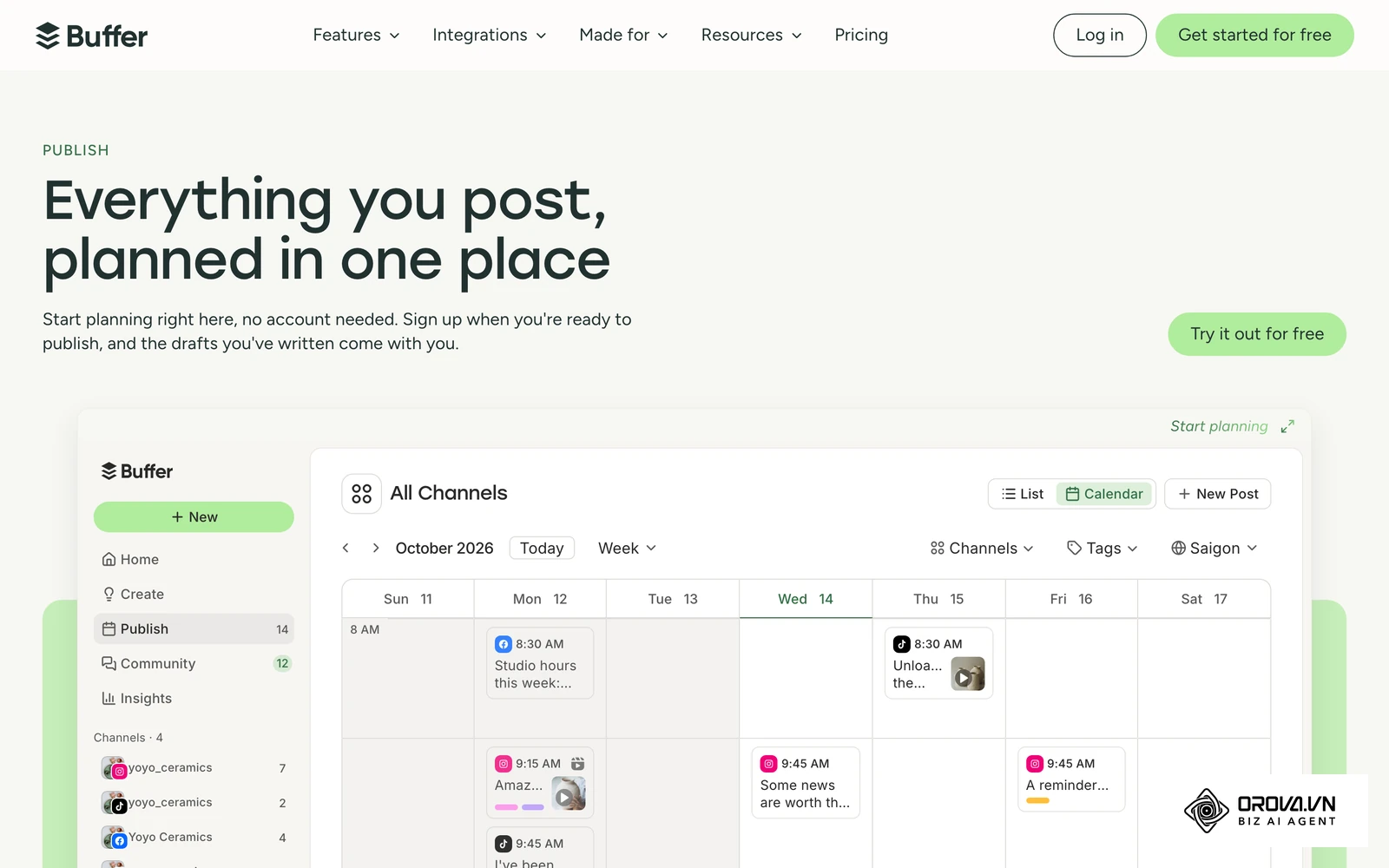
Rather than treating publishing as an isolated daily task, a structured schedule separates content production from content distribution. This operational separation enables marketing teams to batch creative work, apply rigorous quality assurance, and systematically analyze campaign performance using standardized tracking parameters.
Prerequisites: What to Prepare Before Scheduling
Before assembling your publishing queues, gather all necessary operational access credentials, tracking codes, and asset libraries. Missing any foundational element will disrupt publishing automation and introduce data gaps in your conversion analytics.
| Component | Where to Access | Estimated Time | Impact if Missing |
|---|---|---|---|
| Native Admin Permissions | Meta Business Suite, LinkedIn Page Admin, TikTok Business Center | 20 minutes | Inability to connect scheduling tools or access audience activity logs |
| Audience Activity Logs | Native analytics tabs on each target social platform | 30 minutes | Inaccurate posting time slots based on guesswork rather than real follower patterns |
| Digital Asset Repository | Cloud drive (Google Drive, Dropbox, or DAM system) with approved creative | 45 minutes | Broken publishing queues caused by missing video files or image aspect ratios |
| Google Analytics 4 Property | Google Analytics Admin console (Data Streams & Campaign URL Builder) | 15 minutes | Inability to attribute downstream website traffic, signups, or sales to specific time slots |
| Brand Copy Guidelines | Internal style guide (approved voice, hashtags, disclaimer rules) | 15 minutes | Inconsistent tone and potential compliance issues across automated channels |
Step 1: Audit Content Inventory and Audience Time Zones
Your initial task is to catalog your existing media assets and identify the geographic concentration of your active followers. Completing this audit ensures you never build a publishing calendar that demands more creative assets than your team can sustainably produce, while aligning scheduled slots with peak user activity.
Where and How to Extract Follower Data
Begin by opening the native analytics dashboards for each active social channel. In Meta Business Suite, navigate to Insights > Audience, and review the top cities, countries, and peak hours when your followers are actively browsing. For LinkedIn Company Pages, open the Analytics menu and select Followers to review geographic distribution. On TikTok, navigate to TikTok Studio > Analytics > Followers to view active hours.
Consolidate these findings into a central spreadsheet. If 60% of your LinkedIn audience resides along the United States Eastern Seaboard while 40% is in Central Europe, you must establish an overlapping time band (typically 8:00 AM to 10:00 AM Eastern Time, which corresponds to 2:00 PM to 4:00 PM Central European Time) to capture peak engagement across both cohorts simultaneously.
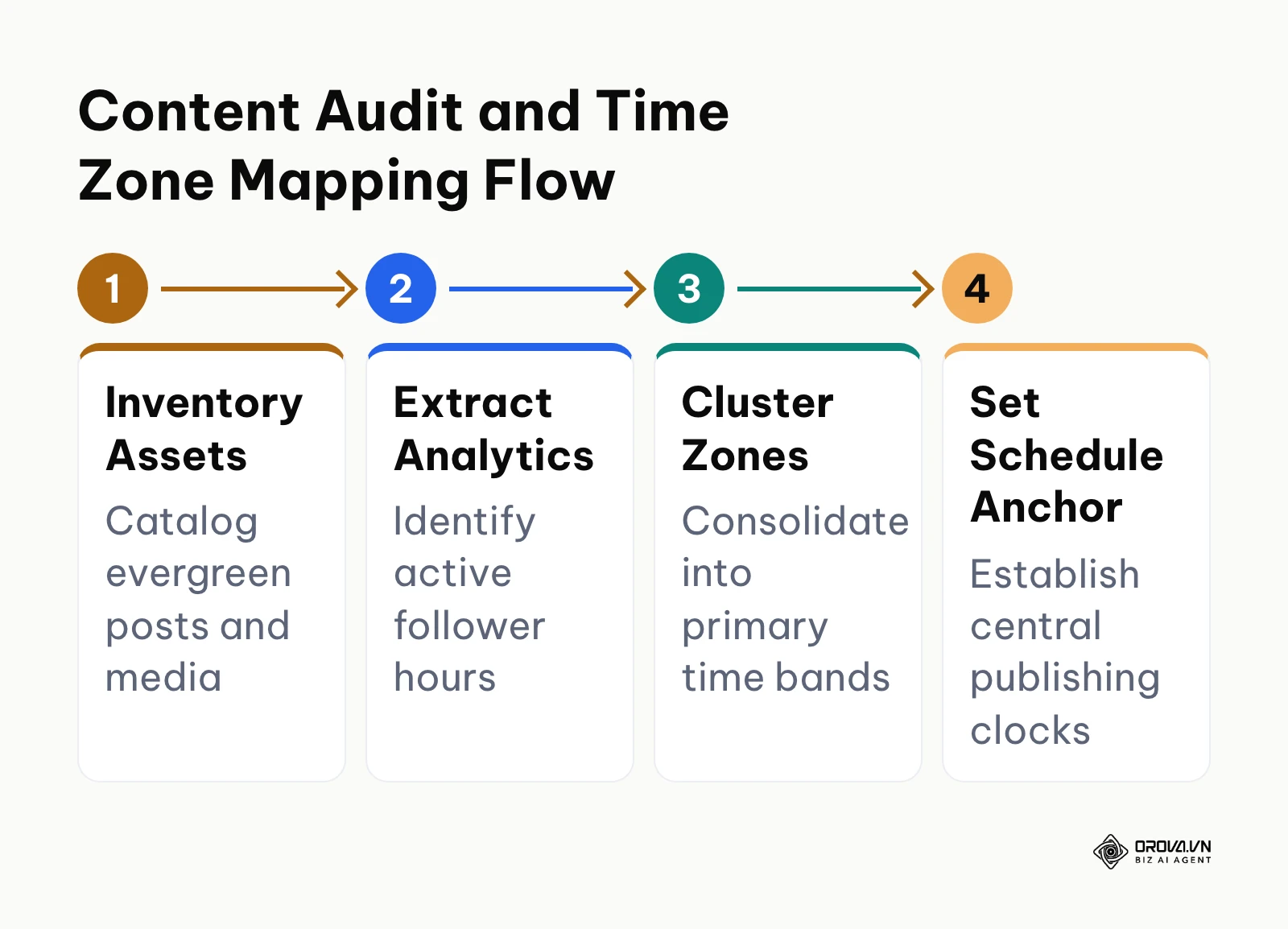
The process diagram below summarizes how to move from inventory audits to setting unified scheduling clocks across regions.
After mapping geographic clusters, catalog your available evergreen assets into specific formats: short-form vertical videos (9:16), single image cards (1:1), multi-slide carousels (4:5 or 1:1), and text-based discussion prompts.
Visual Verification
You will know this step is complete when your audit spreadsheet displays a verified list of at least 15 usable content assets alongside two defined primary time zones for your brand. Each time zone row should display the specific 3-hour window when follower activity reaches its highest volume according to native data.
Common Pitfalls and Solutions
- Relying solely on global generic benchmarks: Publishing at 10:00 AM Eastern Time because an online blog recommended it, despite your primary buyer demographic residing in Singapore or Sydney. Fix: Always audit your native follower distribution before adopting any generalized time recommendations.
- Ignoring daylight saving shifts: Clocks shifting in North America or Europe can misalign your scheduled post by one hour against international audiences. Fix: Standardize your primary scheduling clock to UTC or Coordinated Universal Time, noting seasonal offsets twice a year.
Illustrative example:
- Context: A B2B software team with 12,000 LinkedIn followers operated across both London and New York with a single marketing coordinator.
- Steps taken: The coordinator audited follower location analytics, discovered a 55% North American and 35% European split, and established a primary publishing window at 1:30 PM Greenwich Mean Time (8:30 AM Eastern Time).
- Snag and resolution: Engagement on Friday afternoon dropped by 45% because London professionals had already logged off for the weekend. The coordinator resolved this by shifting Friday posts to 11:00 AM GMT to catch European lunch browsing without sacrificing early US morning reach.
- Visible outcome: The team established two repeatable weekday time anchors (1:30 PM GMT Monday through Thursday, and 11:00 AM GMT Friday) that preserved consistent impressions across both continents.
Step 2: Establish Platform Cadence and the 7-Day Matrix
The objective of this step is to assign specific post frequencies and publication times to each target platform, assembling them into a comprehensive 7-day schedule matrix. Spreading content too thinly across five channels dilutes production quality, whereas posting excessively risks overwhelming your audience.
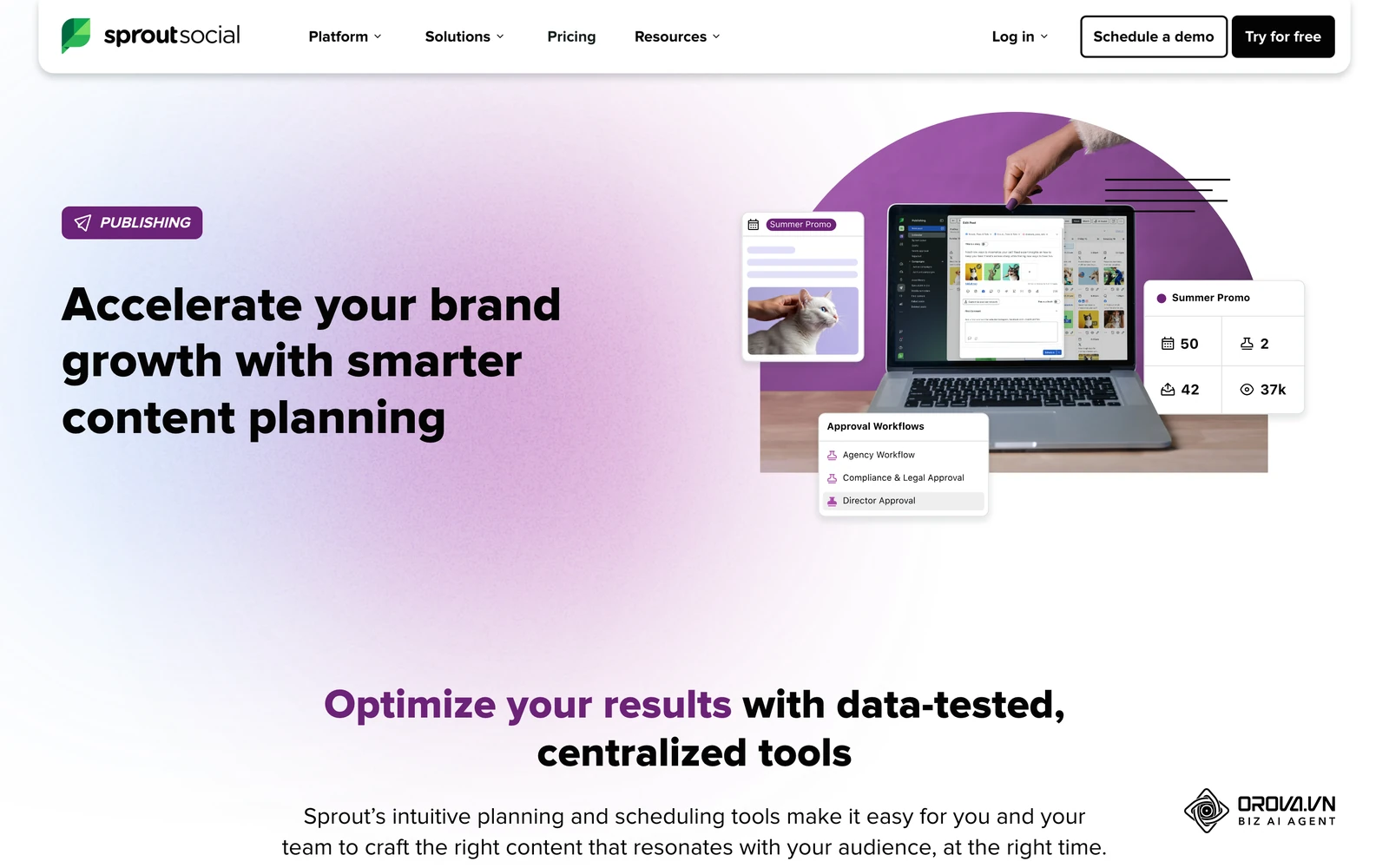
A documented cadence is what turns occasional posting into a habit your audience can anticipate, and it gives you a stable baseline to measure against. To achieve this consistency, define your baseline weekly cadence for each active platform (these are common starting ranges, not platform rules; adjust them to your own production capacity and analytics):
- LinkedIn (Company Page): 3 to 5 times per week. Focus on morning business hours (Tuesday through Thursday).
- Instagram: 3 to 5 in-feed posts per week (mix of Reels and Carousels) plus consistent Stories.
- Facebook: 3 to 5 posts per week, prioritizing video formats and community discussions.
- TikTok: 3 to 7 posts per week, emphasizing short-form video hooks and native storytelling.
- YouTube Shorts / Threads: 3 to 5 posts per week as repurposed vertical video and conversational micro-posts.
The 7-Day Multi-Platform Schedule Matrix
The following matrix provides a production-ready weekly publishing blueprint that integrates optimal time windows, platform frequencies, content pillars, and recommended creative formats.
| Day | Platform | Target Time (Audience Local) | Content Pillar & Ratio Label | Creative Format |
|---|---|---|---|---|
| Monday | 08:30 AM | Educational (Industry Insight) | Document Carousel (PDF) | |
| Monday | 12:15 PM | Educational (Actionable Framework) | Carousel (10 slides) | |
| Monday | TikTok | 05:00 PM | Culture / Relatable (Behind the Scenes) | Vertical Video (30-45s) |
| Tuesday | 09:00 AM | Community (Discussion Prompt) | Image + Text Question | |
| Tuesday | 11:30 AM | Direct Promotion (Customer Case Study) | Short-form Reel (9:16) | |
| Tuesday | 01:00 PM | Educational (Problem Breakdown) | Text Post + Static Graphic | |
| Wednesday | TikTok | 12:00 PM | Educational (How-To Tutorial) | Vertical Video (45-60s) |
| Wednesday | 02:00 PM | Community (Poll / User UGC Spotlight) | Carousel or Single Image | |
| Wednesday | 08:45 AM | Direct Promotion (Product Walkthrough) | Video Clip (with captions) | |
| Thursday | 01:15 PM | Educational (Curated Industry Trend) | Link Post + Custom Graphic | |
| Thursday | 09:30 AM | Educational (Cheat Sheet / Infographic) | High-contrast Carousel | |
| Thursday | TikTok | 04:30 PM | Community (Q&A Response Video) | Vertical Video (15-30s) |
| Friday | 09:00 AM | Culture (Team Story / Milestone) | Single Image + Personal Story | |
| Friday | 11:00 AM | Culture (Customer Spotlight / Review) | Single Image Testimonial | |
| Friday | 01:00 PM | Community (Weekend Wrap-up & Question) | Reel with Trending Audio | |
| Saturday | 10:30 AM | Culture / Lifestyle (Brand Aesthetic) | Single Photo / Micro-video | |
| Saturday | TikTok | 02:00 PM | Entertainment / Trend Reaction | Vertical Video (under 30s) |
| Sunday | 06:00 PM | Educational (Week-Ahead Strategy Primer) | Text-only Thought Leadership | |
| Sunday | YouTube Shorts | 07:30 PM | Educational (Repurposed Top Reel) | Vertical Video (9:16) |
Manual Posting vs. Automated Scheduling: Run Your Own Reach Test
A common question among growth marketers is whether scheduling content through software hurts reach compared to publishing manually inside native apps. The major networks offer their own scheduling (Meta Business Suite Planner, LinkedIn scheduled posts, TikTok Studio) and publish official APIs for approved partner tools, and none of them documents a rule that reduces distribution for scheduled posts. Ranking signals are built around how people respond to a post, not around the button that published it. Rather than trusting anyone's claim, including this one, you can check it on your own account with a simple controlled test.
Pick one channel, run the test for four to eight weeks, and alternate methods on comparable slots (same weekday, same hour, same content pillar and format). Log every post in a sheet like the one below:
| Post ID | Publish Method | Day & Slot | Pillar / Format | Reach (% of followers) | Engagement Rate | Link CTR | Published On Time? |
|---|---|---|---|---|---|---|---|
| IG-01 | Manual (native app) | Tue 11:30 | Educational / Carousel | 7.1% | 2.3% | 1.0% | No (posted 11:52) |
| IG-02 | Scheduled (tool) | Tue 11:30 | Educational / Carousel | 6.9% | 2.5% | 1.1% | Yes |
| IG-03 | Manual (native app) | Thu 09:30 | Community / Single image | ... | ... | ... | ... |
| IG-04 | Scheduled (tool) | Thu 09:30 | Community / Single image | ... | ... | ... | ... |
The figures in the first two rows are illustrative placeholders showing how to fill the sheet, not research results.
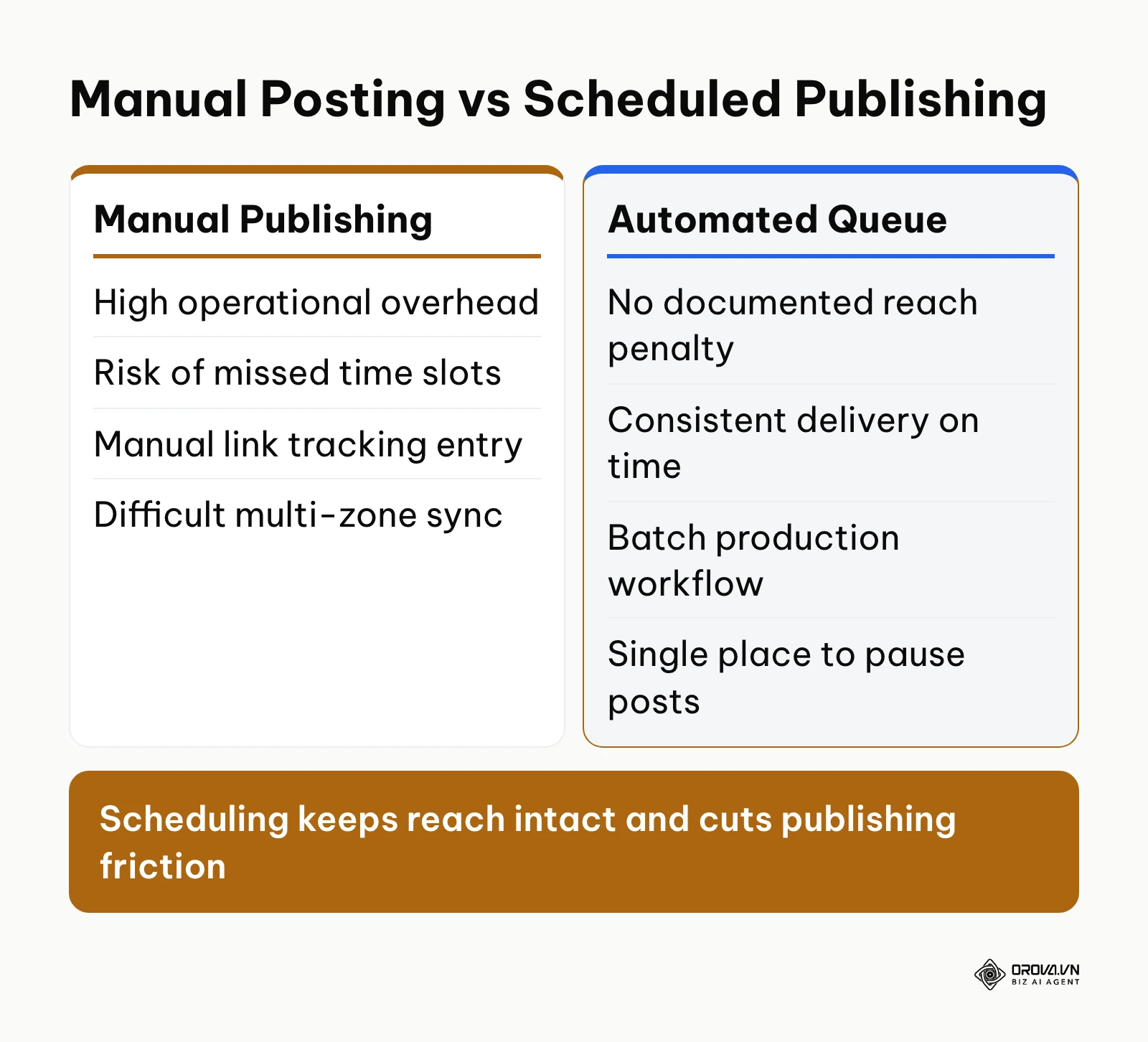
At the end of the test, average each column by method. If reach and engagement stay within the normal week-to-week swing of your account, the publishing method is not what drives results, and the real difference shows up in on-time delivery and the hours your team saves by batching. The diagram below compares the two workflows.
Visual Verification
Review your completed 7-day matrix table. Every day of the week must have assigned time slots, designated channels, specific content pillars, and clearly defined media formats. No two posts on the same channel should be scheduled within four hours of each other.
Common Pitfalls and Solutions
- Overloading Mondays and neglecting weekends: Jamming four posts into Monday morning while leaving Friday through Sunday completely dark creates unnatural engagement spikes and declines. Fix: Distribute posts evenly across Tuesday, Wednesday, and Thursday, maintaining lighter community-oriented touchpoints on weekends.
- Copying the exact same time slot across all networks: Scheduling Facebook, LinkedIn, and Instagram posts simultaneously at 9:00 AM causes notification overlap for multi-platform followers. Fix: Stagger cross-platform publishing times by at least 45 to 90 minutes.
Step 3: Map Content Pillars to Weekly Publishing Slots
Once your schedule matrix establishes the publishing timeline, you must allocate specific thematic categories, known as content pillars, to prevent your feed from becoming an endless sales pitch. When followers perceive an account as purely transactional, unfollow rates increase and organic reach contracts.
The 80/20 and 4-1-1 Content Formulas
Two widely used content allocation models govern an effective social media posting schedule:
- The 80/20 Rule: 80% of your scheduled content must deliver direct value to the audience (educational frameworks, industry analysis, community discussions, entertaining commentary), while no more than 20% directly promotes your product, service, or gated lead magnet.
- The 4-1-1 Rule: In every sequence of six posts, four should be educational or helpful resources, one should be a soft community or culture piece, and one should be a direct conversion call-to-action (CTA).
To organize these principles in practice, map your slots across four primary pillars:
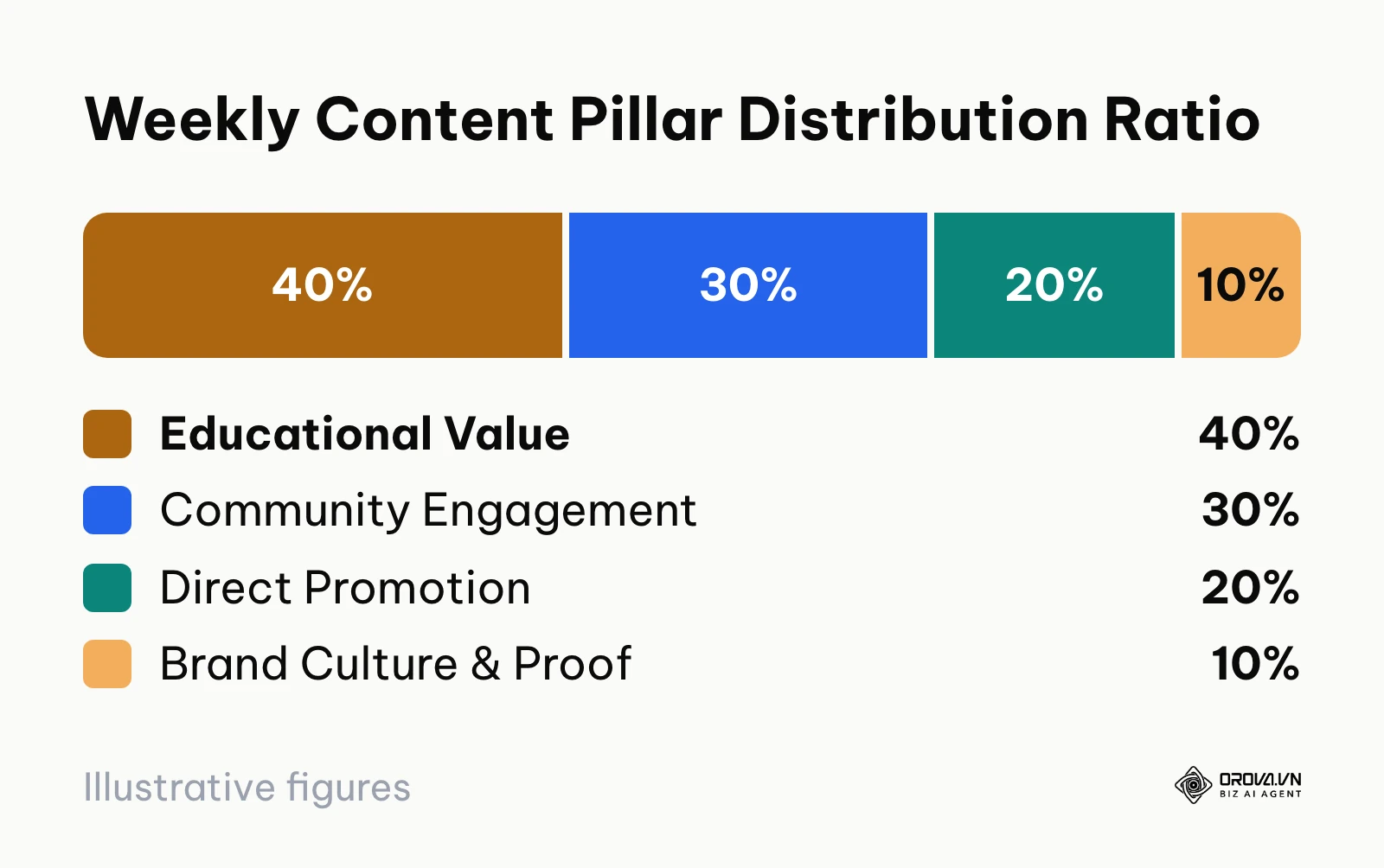
- Pillar 1: Educational / Tactical Value (40%): Step-by-step guides, industry teardowns, how-to tutorials, and actionable frameworks.
- Pillar 2: Community & Engagement (30%): Open questions, contrarian opinions, polls, user-generated content, and relatable industry observations.
- Pillar 3: Conversion & Product Proof (20%): Customer case studies, feature announcements, product demos, webinar registrations, and promotional offers.
- Pillar 4: Brand Culture & Credibility (10%): Behind-the-scenes milestones, company values, team highlights, and authentic founder commentary.
The ratio chart below highlights the balanced distribution needed to retain audience interest while generating commercial leads.
Visual Verification
Color-code your weekly calendar by pillar (for example: Blue for Education, Green for Community, Orange for Conversion, Purple for Culture). Step back and look at your 7-day view. You should see a vibrant spread of Blue and Green across the week, with Orange conversion posts appearing selectively on high-traffic days such as Tuesday afternoon or Thursday morning.
Common Pitfalls and Solutions
- Clustering conversion posts consecutively: Scheduling two product pitches back-to-back within 24 hours leads to declining click-through rates. Fix: Separate direct conversion posts by at least two educational or community posts.
- Vague content pillars: Defining pillars with overly broad labels such as "General Marketing" or "Tips." Fix: Define specific sub-themes with tangible outcomes, such as "Workflow Automation Teardowns" or "Common Operational Pitfalls."
Juggling separate browser tabs for every network makes any schedule hard to keep. With Orova Social, you compose a post once, publish it to up to 8 channels including Facebook, Instagram, TikTok, YouTube, Threads and LinkedIn, let AI draft captions in your brand voice, and see every scheduled slot on a daily, weekly or monthly content calendar.
Step 4: Standardize UTM Tracking Parameters
The objective of this step is to establish a rigorous URL tagging taxonomy so that every link clicked inside your social media posting schedule is accurately tracked in Google Analytics 4 (GA4). Without standardized Urchin Tracking Module (UTM) parameters, all social referral traffic aggregates into generic direct or unassigned channels in your reporting dashboard.
Constructing the UTM Parameter Matrix
Use the official Google Campaign URL Builder or an internal spreadsheet formula to append five standard tracking tags to every destination link:
- utm_source: The specific platform sending the visitor (linkedin, facebook, instagram, tiktok, youtube).
- utm_medium: The distribution mechanism (social, paid-social, or profile-link).
- utm_campaign: The overarching theme or initiative (q2-lead-gen, evergreen-audit, product-launch).
- utm_content: The specific post format and time identifier (carousel-tue-09am, video-thu-01pm, link-mon-morning).
- utm_term: Optional parameter used to identify specific keywords or audience segments.
| Platform | Recommended utm_source | Recommended utm_medium | Example utm_campaign | Example utm_content | Formatted Tracking URL Example |
|---|---|---|---|---|---|
| social | b2b-playbook | pdf-carousel-tue-0830 | https://example.com/guide?utm_source=linkedin&utm_medium=social&utm_campaign=b2b-playbook&utm_content=pdf-carousel-tue-0830 | ||
| social | spring-promo | story-link-wed-1200 | https://example.com/offer?utm_source=instagram&utm_medium=social&utm_campaign=spring-promo&utm_content=story-link-wed-1200 | ||
| social | community-growth | blog-post-thu-0115 | https://example.com/blog?utm_source=facebook&utm_medium=social&utm_campaign=community-growth&utm_content=blog-post-thu-0115 | ||
| TikTok | tiktok | social | viral-hooks | bio-link-product-demo | https://example.com/demo?utm_source=tiktok&utm_medium=social&utm_campaign=viral-hooks&utm_content=bio-link-product-demo |
| YouTube | youtube | social | reels-repurpose | shorts-desc-sun-0730 | https://example.com/free-tool?utm_source=youtube&utm_medium=social&utm_campaign=reels-repurpose&utm_content=shorts-desc-sun-0730 |
If you are evaluating management platforms to streamline distribution, reading our analysis of social media scheduler options can help you select a solution that supports dynamic link tagging out of the box.
Visual Verification
Paste a generated tracking link into a private browser tab and navigate to the target page. Open Google Analytics 4, navigate to Reports > Realtime, and scroll down to the Event count by Event name and First user source / medium cards. Within 30 seconds, you must see an active session logged under your exact specified source and medium parameters (for example, linkedin / social).
Common Pitfalls and Solutions
- Inconsistent casing and spelling: Tagging one link with utm_source=LinkedIn (capitalized) and another with utm_source=linkedin (lowercase) splits reporting data into two separate rows in GA4. Fix: Enforce strict lowercase formatting for all UTM tags across your entire team.
- Using spaces or special characters: Placing spaces in campaign names creates messy encoded strings like %20. Fix: Use simple hyphens (-) to separate words in campaign tags.
Illustrative example:
- Context: An e-commerce apparel brand with 35,000 Instagram followers ran weekly carousel product promotions without tagged links.
- Steps taken: The marketing manager established a strict UTM naming convention, integrated shortened links into story stickers and bio profiles, and documented the syntax inside the team calendar template.
- Snag and resolution: GA4 initially grouped 40% of campaign visits into the "Unassigned" traffic channel because the team accidentally used utm_medium=post instead of standard utm_medium=social. The manager corrected the parameter rules in the master template.
- Visible outcome: The brand gained complete visibility in GA4, allowing them to confirm that Tuesday 11:30 AM carousel links generated three times more direct checkout revenue than Thursday morning image posts.
Step 5: Batch Produce and Stage Multi-Channel Assets
The objective of this step is to produce creative assets in weekly or bi-weekly batches rather than creating posts one day at a time. Assembling copy, imagery, and video files in dedicated production sprints protects creative focus and builds a content buffer that prevents schedule disruptions.
Establishing the Production Workflow
Designate one day each week (such as Thursday) as your dedicated Content Production Sprint:
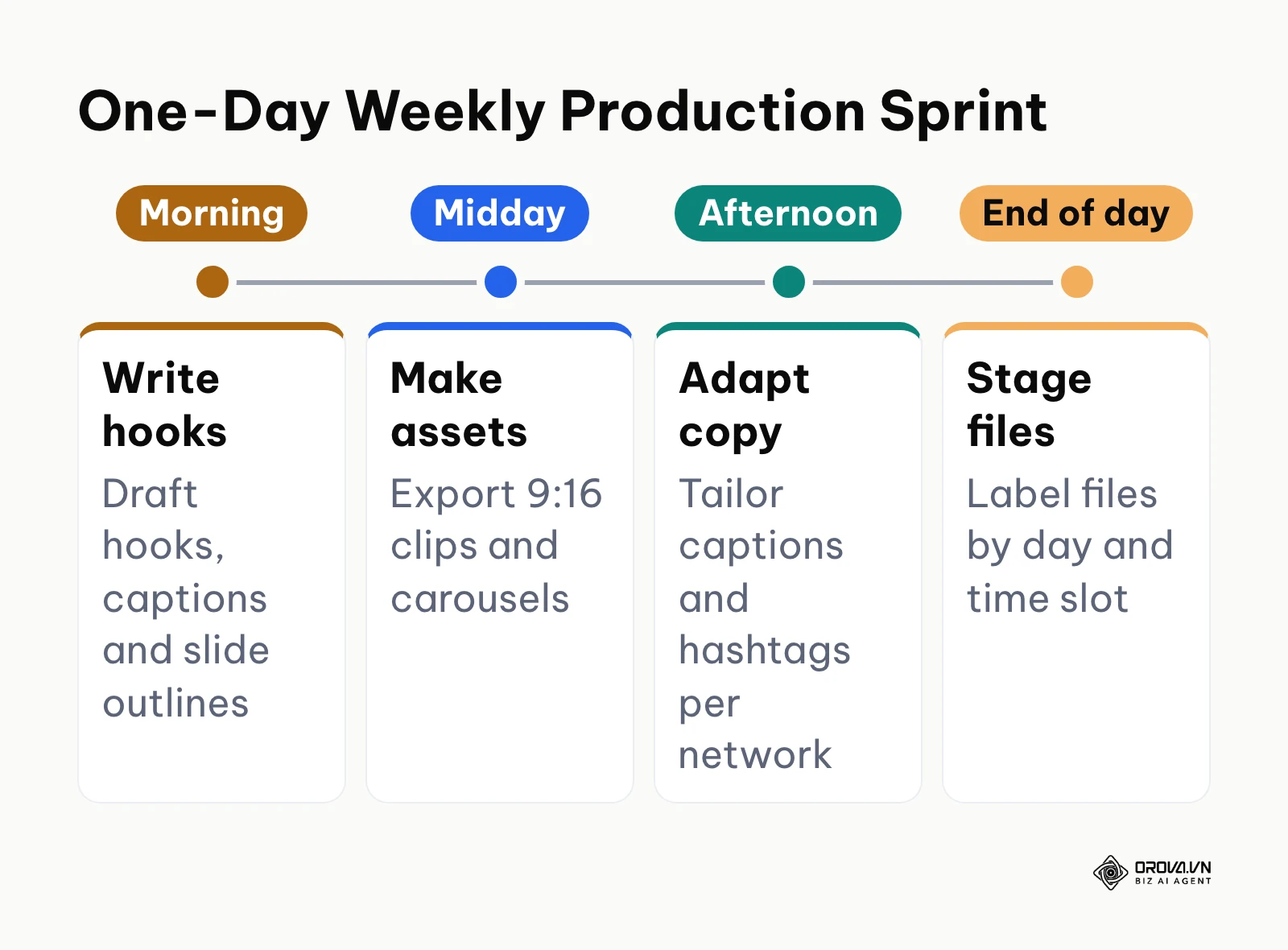
- Scripting and Outlining (Morning): Draft copy hooks, captions, and slide outlines for the upcoming week based on your 7-day schedule matrix.
- Creative Asset Creation (Midday): Export vertical video clips (9:16) for TikTok, Instagram Reels, and YouTube Shorts. Render multi-slide carousels (1080x1350 for Instagram, multi-page PDF for LinkedIn).
- Copywriting and Caption Formatting (Afternoon): Adapt the central narrative for each target network. Format LinkedIn posts with clean line breaks and concise professional takeaways. Keep Instagram captions engaging with conversational prompts. Include relevant keywords and hashtags natively.
Store final assets in a standardized folder structure: /2026-Calendar/Week-18/[Platform]/[Day-Time]_[Topic]_[Format].[ext]
When managing visual channels, learning how to schedule Instagram posts properly ensures carousel formatting and aspect ratios display correctly across user feeds.
Visual Verification
Open your weekly production staging folder by end-of-day Thursday. You should see all video, image, and text files for the following week fully rendered, proofread, and labeled with their target publication day and time slot.
Common Pitfalls and Solutions
- Single-channel creative formatting: Trying to upload a horizontal 16:9 YouTube video thumbnail directly into an Instagram 4:5 carousel feed creates awkward cropping and black bars. Fix: Design visual templates in standard modular aspect ratios: 9:16 vertical video, 1:1 square, and 4:5 portrait graphics.
- Missing accessibility text: Forgetting closed captions on short-form video clips decreases engagement, as a large percentage of mobile users browse feeds with audio muted. Fix: Burn synchronized captions directly into short-form videos during the batch export phase.
Step 6: Configure the Publishing Calendar and Queues
With your creative assets produced and tagged, upload them into your chosen scheduling calendar. This step locks in your publication dates, queues your media files, and activates automated distribution.
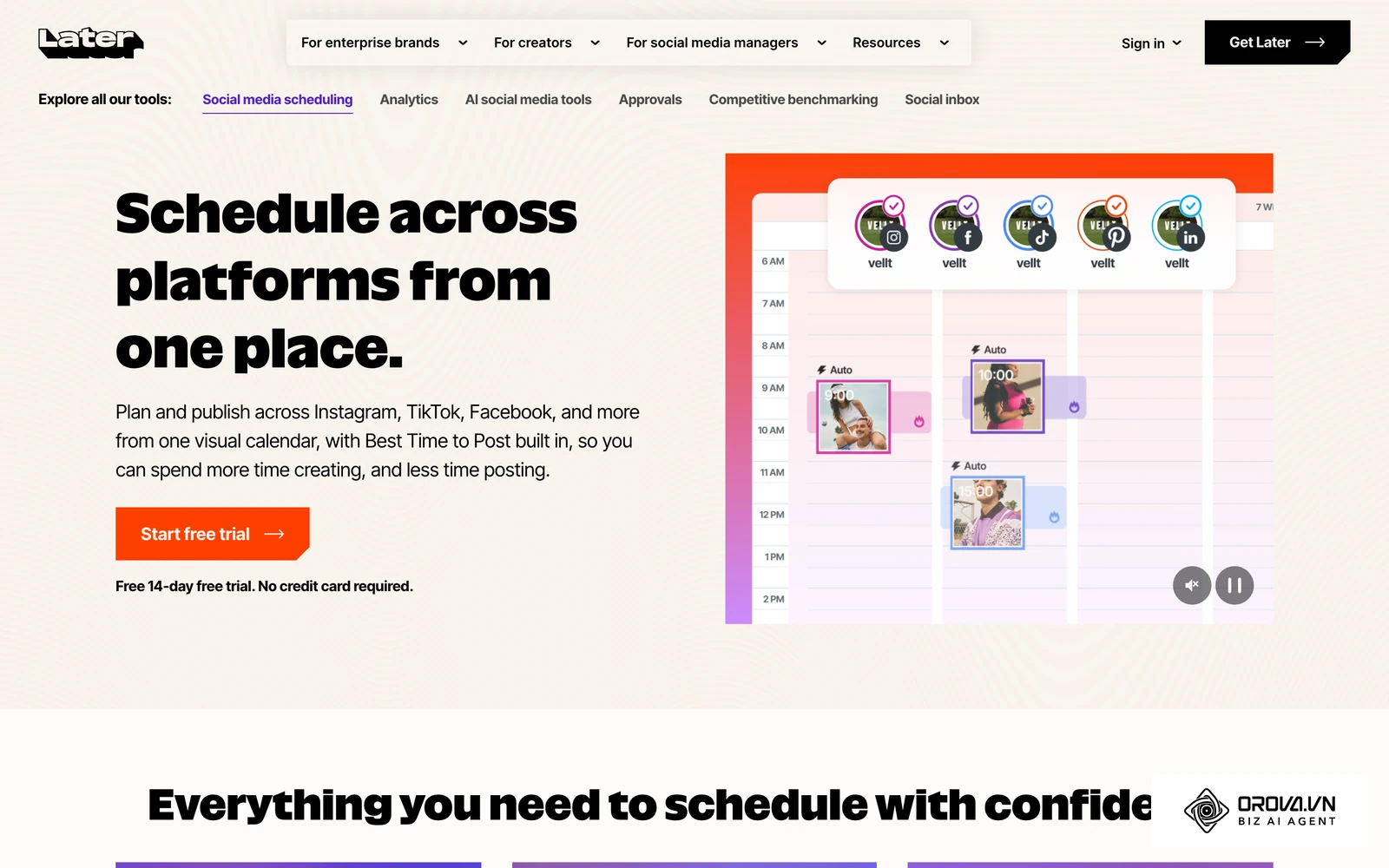
Step-by-Step Calendar Ingestion
Open your publishing dashboard or native scheduling tool:
- Select the Target Channel: Choose the specific business page or profile for the scheduled slot.
- Upload Media Files: Attach the corresponding video file, image gallery, or document PDF. Confirm that media previews render without compression artifacts or distorted ratios.
- Paste Formatted Copy and URLs: Insert the channel-specific caption along with your pre-generated UTM tracking link.
- Set Publication Date and Time: Configure the time picker to match your 7-day schedule matrix down to the exact minute. When scheduling for short-form video, learning how to schedule TikTok posts ensures that visual thumbnails, trending sound tracks, and caption tags remain intact prior to publication.
- Verify Queue Status: Confirm that the post status switches from "Draft" to "Scheduled."
Teams that publish across numerous platforms often find it beneficial to manage all social media in one place to maintain a bird's-eye view of all upcoming queues from a single dashboard.
Visual Verification
Navigate to the calendar view of your publishing software. You must see distinct color-coded post cards occupying each planned slot on your Monday through Sunday grid. Clicking on any card should open a clean preview showing the exact copy, attached media, and scheduled delivery timestamp.
Common Pitfalls and Solutions
- Expired account authorization tokens: Social network connections to third-party tools expire periodically or break when a password or admin role changes. An expired token will silently cause scheduled posts to fail. Fix: Check your account connection health status weekly in your tool's settings menu.
- Accidentally scheduling for AM instead of PM: A common clerical mistake is setting a 1:00 PM post to 1:00 AM, publishing content when your target audience is asleep. Fix: Utilize a 24-hour military clock (13:00 instead of 1:00 PM) in your scheduling tool settings to prevent time-of-day errors.
Step 7: Deploy the Crisis Kill-Switch Protocol
The final and most crucial operational step is establishing an emergency kill-switch mechanism. When a brand crisis, public safety tragedy, or major product outage occurs, automated social media feeds that blithely publish cheerful promotions or playful memes look tone-deaf and cause severe brand damage.
Most published best-time-to-post studies point to weekday mid-mornings through early afternoons, especially Tuesday through Thursday, as the most reliable engagement windows. However, those peak engagement hours can amplify reputational damage if scheduled promotional content publishes during a sensitive news cycle.
The 4-Step Crisis Kill-Switch Checklist
Keep this operational checklist accessible to all social media managers and communications leaders:
Emergency queue pause checklist (kill-switch):
- Step 1: Declare the Pause State: The communications lead or marketing director issues an official "Hold Social" command in the internal team communications channel.
- Step 2: Trigger the Global Queue Pause: If your scheduling software offers a pause-all control, use it; if not, open its calendar and move every upcoming post back to draft. If publishing via native tools, access Meta Business Suite Planner, LinkedIn Scheduled Posts, and TikTok Studio to manually pause upcoming queued items.
- Step 3: Audit Staged Drafts (Next 72 Hours): Review every post scheduled for publication over the next three days. Mark any sales-oriented, humorous, or celebratory posts as "Draft" so they cannot trigger automatically.
- Step 4: Establish Resume Criteria: Do not unpause feeds arbitrarily. Set an explicit operational check: feeds remain paused until an internal review confirms the external crisis has settled or the technical incident is resolved.
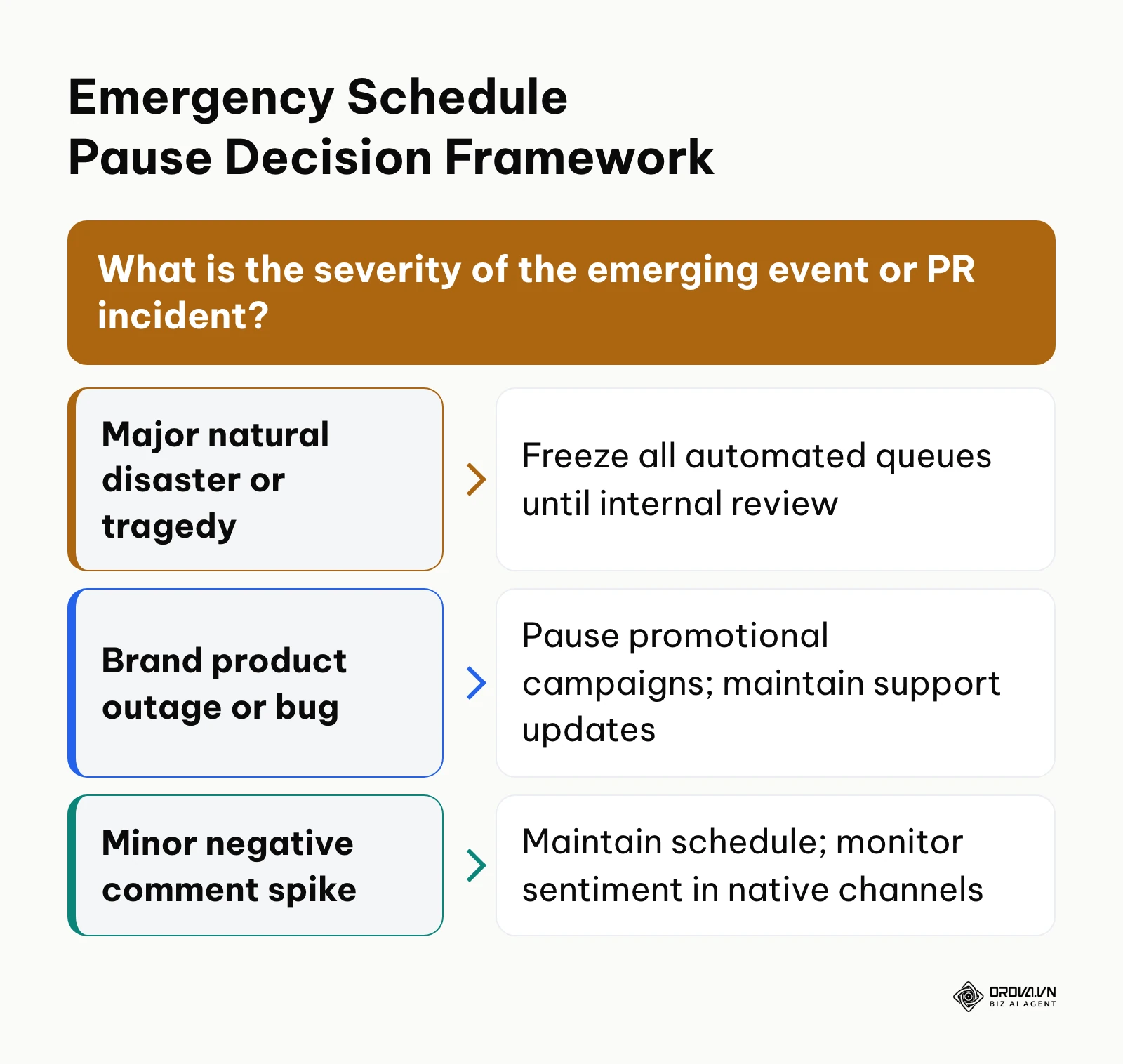
The decision framework below outlines the specific operational response required depending on the nature of the external incident.
Visual Verification
Upon triggering the kill-switch, look at your master publishing calendar view. Every scheduled card should either display an explicit "Paused" badge or revert to "Draft" status, confirming that no automated post can trigger without manual re-authorization.
Common Pitfalls and Solutions
- Forgetting secondary networks: Pausing your Meta and LinkedIn queues while forgetting that a lighthearted video is scheduled on TikTok or YouTube Shorts. Fix: Maintain a written master inventory of every active channel and assign one team member to cross-verify all accounts during a freeze.
- Unpausing prematurely: Resuming standard promotional messaging while a public crisis is still dominating news headlines. Fix: Require formal sign-off from senior marketing leadership before reactivating any automated publishing queue.
Illustrative example:
- Context: A direct-to-consumer beverage brand with 80,000 multi-channel followers ran automated daily lifestyle promotions.
- Steps taken: When a regional hurricane caused widespread power outages and severe disruption in their primary market, the social coordinator initiated the team's documented emergency kill-switch protocol.
- Snag and resolution: A scheduled Tuesday product discount reel published automatically because it was scheduled inside an auxiliary platform account not connected to the central scheduler. The coordinator noticed the error within 12 minutes, deleted the post manually, and immediately updated the master account inventory document to include all secondary channels.
- Visible outcome: The brand prevented insensitive automated promotional content from running during an active emergency, maintaining positive brand perception while directing public channels toward community support updates.
Master Checklist: Social Media Posting Schedule Execution
Print this reference table or duplicate it in your team workspace to verify that each stage of your social media posting schedule is executed cleanly.
| Step | Core Operational Task | Verification Sign | Estimated Time |
|---|---|---|---|
| 1. Audit & Zones | Extract follower activity hours; cluster into primary time zones. | Two validated time windows logged in audit spreadsheet. | 30 minutes |
| 2. Cadence Matrix | Assign platform post counts; build 7-day multi-channel grid. | Complete 7-day matrix table with times, formats, and channels. | 45 minutes |
| 3. Content Pillars | Apply 80/20 and 4-1-1 rules across scheduled calendar slots. | Balanced color-coded pillar distribution across all 7 days. | 20 minutes |
| 4. UTM Standards | Append structured UTM parameters to all destination links. | Active test session verified in Google Analytics 4 Realtime report. | 25 minutes |
| 5. Batch Production | Produce copy, images, and videos in weekly sprint batches. | Staging folder populated with approved assets for the upcoming week. | 60 minutes |
| 6. Calendar Queue | Upload files, captions, and links into publishing calendar. | All post cards visible in calendar view with "Scheduled" status. | 30 minutes |
| 7. Kill-Switch | Document 4-step emergency pause protocol and assign roles. | Team sign-off on crisis checklist and verified pause button location. | 15 minutes |
Turn your 7-day matrix into a schedule that runs on time. Orova Social lets you schedule posts ahead, automatically publishes missed slots, cuts long videos into 9:16 clips with subtitles, and exports your posting calendar to Excel for reporting. Get started free until July 7, 2027, no credit card needed.
Common Scheduling Mistakes and Practical Fixes
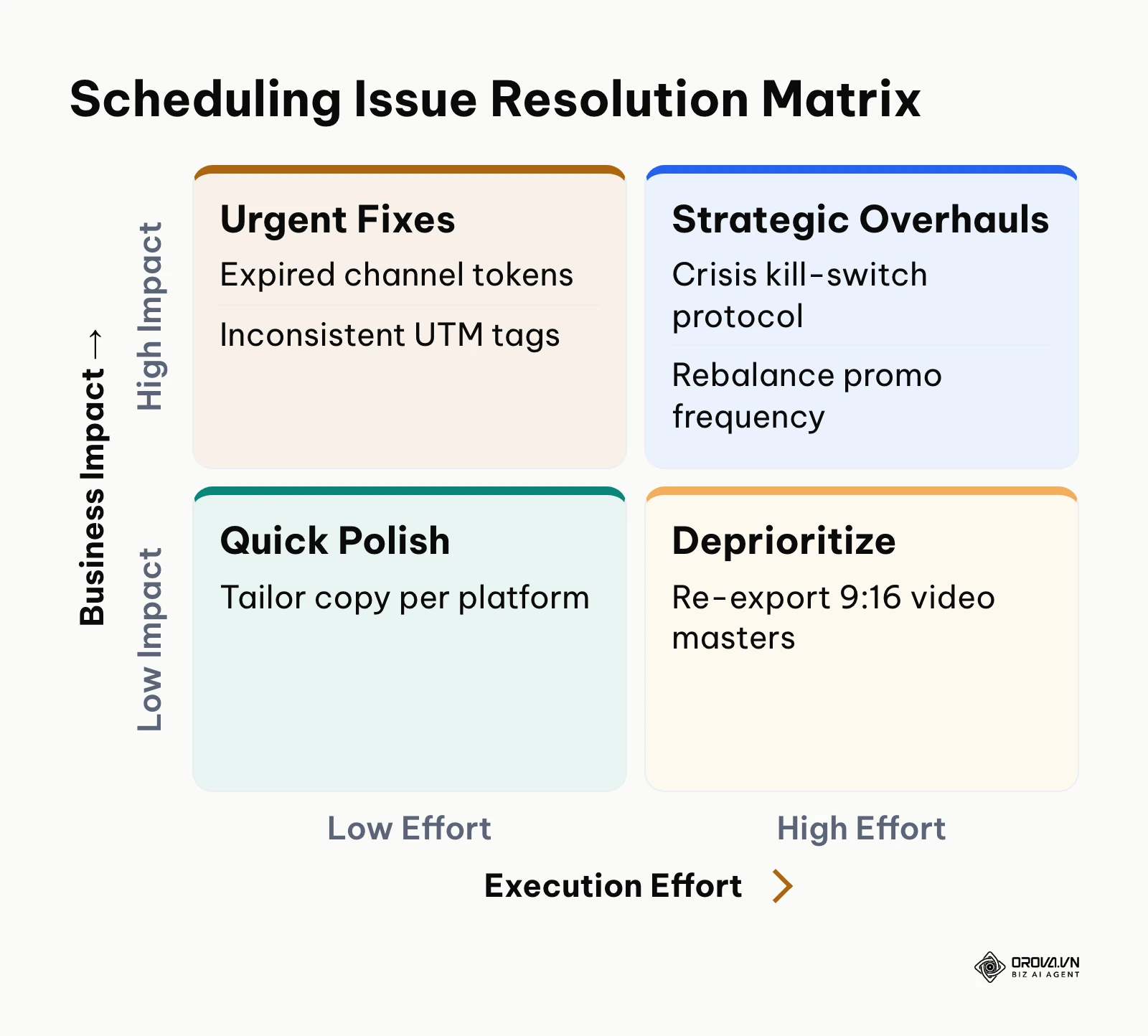
Even experienced marketing teams encounter operational friction when automating their content calendars. The table below consolidates the six most frequent technical and strategic errors along with concrete methods to resolve them.
| Operational Issue | Root Cause | Practical Solution |
|---|---|---|
| Scheduled Posts Failing to Publish | Expired OAuth API token permissions between your tool and social networks. | Reconnect social channel account credentials monthly in settings; verify administrative permissions. |
| Traffic Misattributed in GA4 | Missing or inconsistent lowercase UTM tags across team members. | Enforce a shared Campaign URL Builder spreadsheet with locked dropdown menus for source and medium. |
| Sudden Reach Drop on Multiple Posts | Algorithm flagging repeated identical copy or link spamming across channels. | Tailor copy angles, headlines, and first-line hooks for each specific platform even when sharing identical links. |
| Video Assets Cropping Incorrectly | Uploading horizontal 16:9 files to mobile-first vertical channels like TikTok or Reels. | Produce dedicated 9:16 vertical video masters (1080x1920) with safe zones for on-screen text and captions. |
| Audience Burnout / Negative Feedback | Publishing direct promotional offers too frequently without sufficient value posts. | Recalibrate your schedule using the 80/20 formula: insert at least four educational posts between sales CTAs. |
| Accidental Inappropriate Posts | Automated queue executing during an unexpected company incident or external crisis. | Execute the 4-step crisis kill-switch checklist to freeze all active queues as soon as an incident is confirmed. |
The priority matrix below illustrates how marketing teams should prioritize resolving these scheduling issues based on business impact and required effort.
Measuring Performance and Iterating Your Schedule
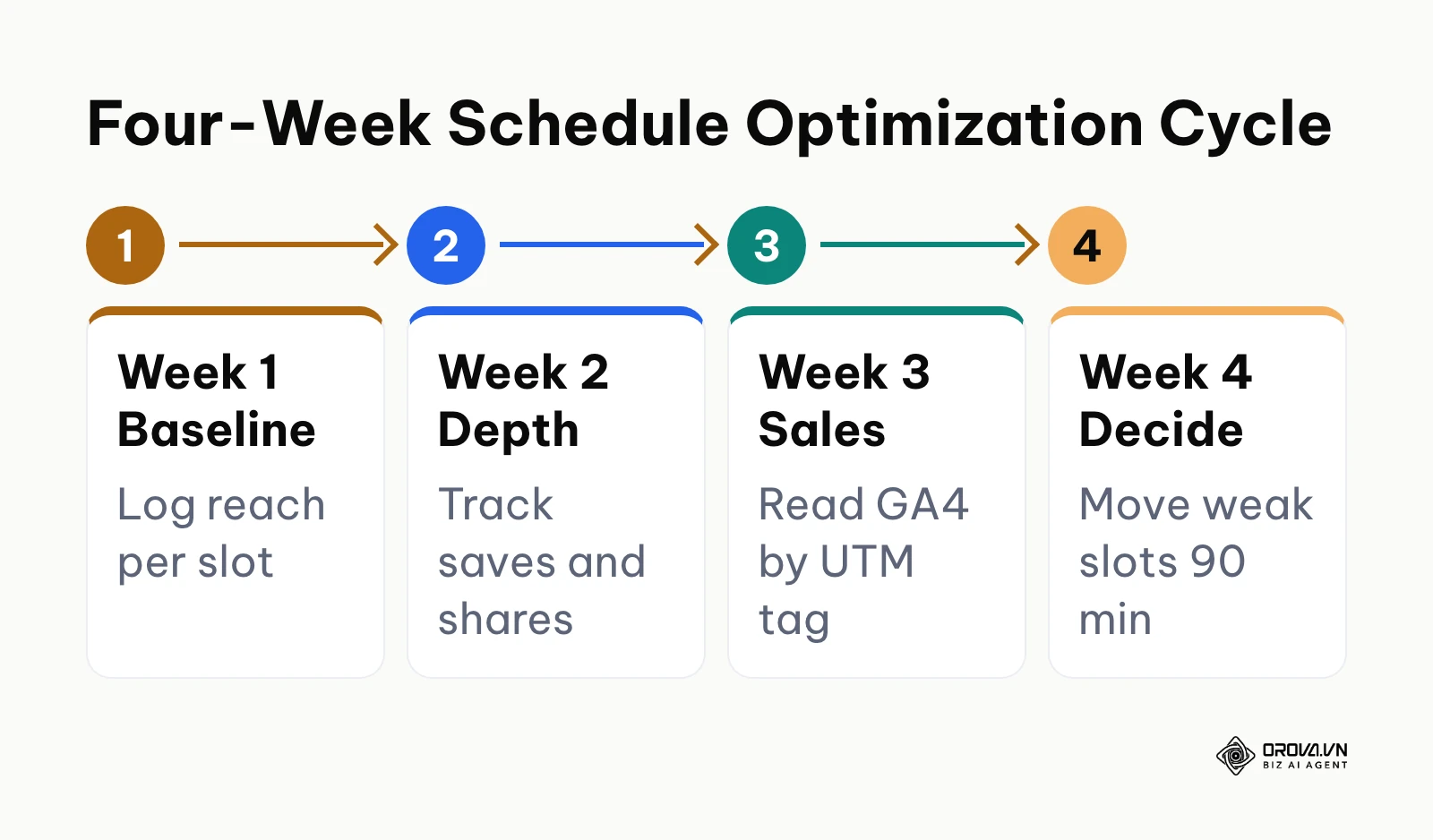
Setting your schedule is not a one-time event; you must measure performance and iterate your publishing cadence based on objective data. Review performance weekly using native network insights and Google Analytics 4 to determine whether your selected time slots and formats are delivering results.
Focus your analysis on three core metrics:
- Audience Retention & Reach Rate: Track the percentage of your follower base viewing each post. If reach on a specific day (such as Friday afternoon) drops consistently over three consecutive weeks, shift that slot 90 minutes earlier or test an alternate format.
- Engagement Depth: Monitor saves, shares, and substantive comments rather than simple likes. Carousels and educational guides that generate high save rates signal strong content pillar alignment.
- Qualified Traffic and Conversions: In GA4, navigate to Acquisition > Traffic acquisition, filter by Session source / medium, and review conversion events. Identify which specific time slots in your utm_content tags drive actual newsletter signups, demo requests, or product purchases.
Use a simple weekly review sheet so every decision is tied to a number you can find again:
| Metric | Where to Find It | Warning Sign | What to Change |
|---|---|---|---|
| Reach rate per slot | Native insights for each post (Meta Business Suite, LinkedIn Analytics, TikTok Studio) | Same slot underperforms three weeks in a row | Move the slot 90 minutes earlier or swap the format |
| Saves and shares | Native post insights | Educational posts get likes but almost no saves | Make the content more practical (checklists, templates, steps) |
| Conversions by slot | GA4 > Acquisition > Traffic acquisition, filtered by session source / medium and utm_content | A high-reach slot sends traffic that never converts | Move conversion posts to the slots that do convert |
| On-time delivery | Calendar view of your scheduler (published vs failed) | Any failed or late post | Reconnect the channel and check admin permissions |
Allow any new schedule to run for at least four weeks before making substantial timing changes. This observation window ensures you gather statistically reliable patterns rather than reacting to temporary day-to-day anomalies. The roadmap below outlines the 4-week iteration sequence to refine your publishing calendar.
Social Media Posting Schedule Trends in the Coming Years: Author's Outlook
As an industry observer tracking social media distribution systems as of 2026, I see clear signs that fixed, static publishing time slots are losing their historic effectiveness. Today, machine learning recommendation engines on platforms like TikTok, YouTube, and Meta rely heavily on real-time content graphs rather than reverse-chronological follower feeds. A post's initial distribution is increasingly determined by early retention metrics from small test cohorts rather than the exact minute it enters the platform.
Over the next two to three years, I believe social media scheduling is likely to shift from rigid time grids to dynamic, algorithmic delivery queues. Instead of setting a post for "Tuesday at 9:00 AM," marketers will likely submit assets to automated delivery engines that analyze real-time platform traffic, audience presence, and competing feed velocity to release the post within a dynamic four-hour window. In my view, artificial intelligence will increasingly take over multi-channel adaptation, taking a single master concept and automatically reformatting aspect ratios, caption lengths, and audio hooks tailored specifically to each target platform's algorithmic preferences.
What could prove this perspective wrong? If major social networks restrict third-party API capabilities to protect proprietary ad revenue, or if user privacy regulations limit the depth of real-time activity tracking, platforms will remain reliant on standard scheduling protocols. Furthermore, highly regulated sectors like financial services and healthcare will always require strict, human-approved publication timestamps to satisfy compliance standards.
To prepare for this evolution, you should focus today on standardizing your creative asset repositories, refining your brand voice guidelines, and mastering content pillar balance. Tools and algorithms will continue to automate the tactical mechanics of distribution, but clear messaging and high-value creative assets remain the fundamental drivers of audience engagement.
Frequently Asked Questions About Social Media Posting Schedule
Does scheduling social media posts with third-party tools reduce reach compared to manual posting?
Not by design. The major networks run official publishing APIs for approved partner tools and offer their own native schedulers, and none of them documents a penalty for scheduled posts. Ranking systems focus on how people respond to a post, such as watch time, comments, shares, and clicks, rather than on how it was published. If you want proof for your own account, run the side-by-side reach test described in Step 2 for four to eight weeks.
How should you schedule posts when your audience spans multiple time zones?
When your audience is distributed globally, identify the overlapping window where the majority of your active followers are awake and active. For example, scheduling between 8:00 AM and 10:00 AM Eastern Time captures morning readers in North America alongside afternoon professionals across Europe. If your follower base is split between diametrically opposed regions, such as North America and Australia, establish alternating schedule slots or consider maintaining regional profile handles.
Can you publish the exact same post across all channels simultaneously?
While you can share the same underlying idea or link across multiple platforms, you should never publish identical copy and media formats at the exact same minute. Each network has distinct technical requirements: Instagram thrives on visual carousels and Reels, LinkedIn requires structured professional formatting, and TikTok demands vertical storytelling. Furthermore, staggering your publication times by at least 45 to 90 minutes prevents cross-platform followers from receiving duplicate notifications simultaneously.
What is the role of artificial intelligence in managing a social media posting schedule?
Artificial intelligence serves as a workflow accelerator across caption ideation, asset formatting, and performance analysis. AI tools can analyze historical engagement data to suggest optimal posting windows, generate initial draft variations across different brand tones, and reformat long-form video footage into vertical short clips. However, strategic oversight, final proofreading, and brand safety compliance must remain under human editorial control.
How do you prevent creator burnout while maintaining a high-frequency posting schedule?
The most reliable defense against creator burnout is adopting a batch production workflow governed by defined content pillars. Dedicate one focused session each week to script, record, and stage all upcoming assets, rather than waking up each morning wondering what to publish. Relying on an organized 7-day schedule matrix removes the cognitive load of ad-hoc publishing and creates a sustainable operational buffer.
Should brands maintain the same posting schedule on weekends as weekdays?
For B2B brands and professional service firms, weekday mornings generally yield higher engagement than weekends, making a Monday through Friday schedule optimal. However, consumer brands, entertainment accounts, and e-commerce companies frequently observe strong engagement on Saturday and Sunday afternoons when users have leisure browsing time. Audit your native audience insights to determine whether your specific followers remain active over the weekend before scheduling content.
Where Should You Start?
The most effective starting point depends on your current operational maturity and team capacity:
If you are a solo founder or creator with no existing calendar: Do not attempt to launch on five social networks simultaneously. Select two core channels where your target buyers actively congregate, such as LinkedIn and Instagram. Open a simple spreadsheet, map out three recurring weekday publication slots (Tuesday, Wednesday, and Thursday), and commit to publishing two educational posts and one community discussion each week for 30 days.
If you are a small marketing team posting inconsistently across scattered documents: Consolidate your existing brand assets into a centralized staging folder. Conduct an audience activity audit in your native platform dashboards to pinpoint your two primary time zones. Then, populate the 7-day schedule matrix provided in this guide, standardize your UTM parameter naming conventions, and establish a weekly batch production sprint every Thursday to queue posts one week in advance.
If you are a growing brand or agency managing multiple brand channels: Formalize your operational governance immediately. Configure your publishing software with native admin permissions across all target networks, implement the 4-step crisis kill-switch checklist with designated team responsibilities, and integrate custom UTM parameters into your Google Analytics 4 dashboards to track downstream revenue. Once your operational safeguards are active, begin testing advanced multi-format cadences across video, carousels, and text posts to optimize your long-term social media posting schedule.
About the author

Builder of Orova
Nguyễn Đỗ Trọng Ân has 8 years of experience in marketing, including 6 years managing market development across Asia. He builds Orova, a Biz AI Agent that never sleeps: it plans, runs and optimizes work for businesses.
Run your business with AI Agents
Orova is the always-on Biz AI Agent — it plans, runs, and optimizes the work for you.
Save time, unlock productivity.