
Manage all social media in one place: 2026 workflow guide

If you are running digital marketing for a business, your browser likely looks like a chaotic mosaic of open tabs. You have Meta Business Suite in one window, LinkedIn analytics in another, and your smartphone buzzing with TikTok notifications on your desk. The sheer volume of manual login and context switching is enough to drain your creative energy before you even write a single caption. The solution seems obvious, but finding the right software to manage all social media in one place is notoriously difficult. Many platforms promise a seamless hub, but in reality, they suffer from disconnected APIs, clunky video uploads, and hidden pricing tiers that punish you for growing your team.
The short answer: to manage all social media in one place, centralize five things, in this order of pain: one shared inbox, one content calendar, one approval trail, one combined report and one map of roles and permissions. The tool you pick matters less than the workflow behind it. This guide walks through that workflow step by step, shows the hidden costs to check before you buy, and explains where common tool types fit.
What It Means to Manage All Social Media in One Place
To manage all social media in one place means utilizing a unified software platform to handle scheduling, publishing, community engagement, and performance analytics across multiple networks from a single dashboard. This approach is designed for marketing teams, agency owners, and serious creators who need to eliminate manual tab-switching, maintain consistent brand messaging, and consolidate reporting data. You should adopt this method when your daily operational tasks begin to overshadow your content creation efforts. Conversely, if you only operate a single personal profile and post sporadically, investing time and money into a centralized dashboard is unnecessary.
The Core Workflow: 10 Steps to Centralize Publishing and Inbox
Buying a subscription to a platform does not automatically fix a messy operation. If you connect your accounts without a plan, you will simply move your chaos from ten different websites into one expensive dashboard. A structured onboarding workflow is mandatory.
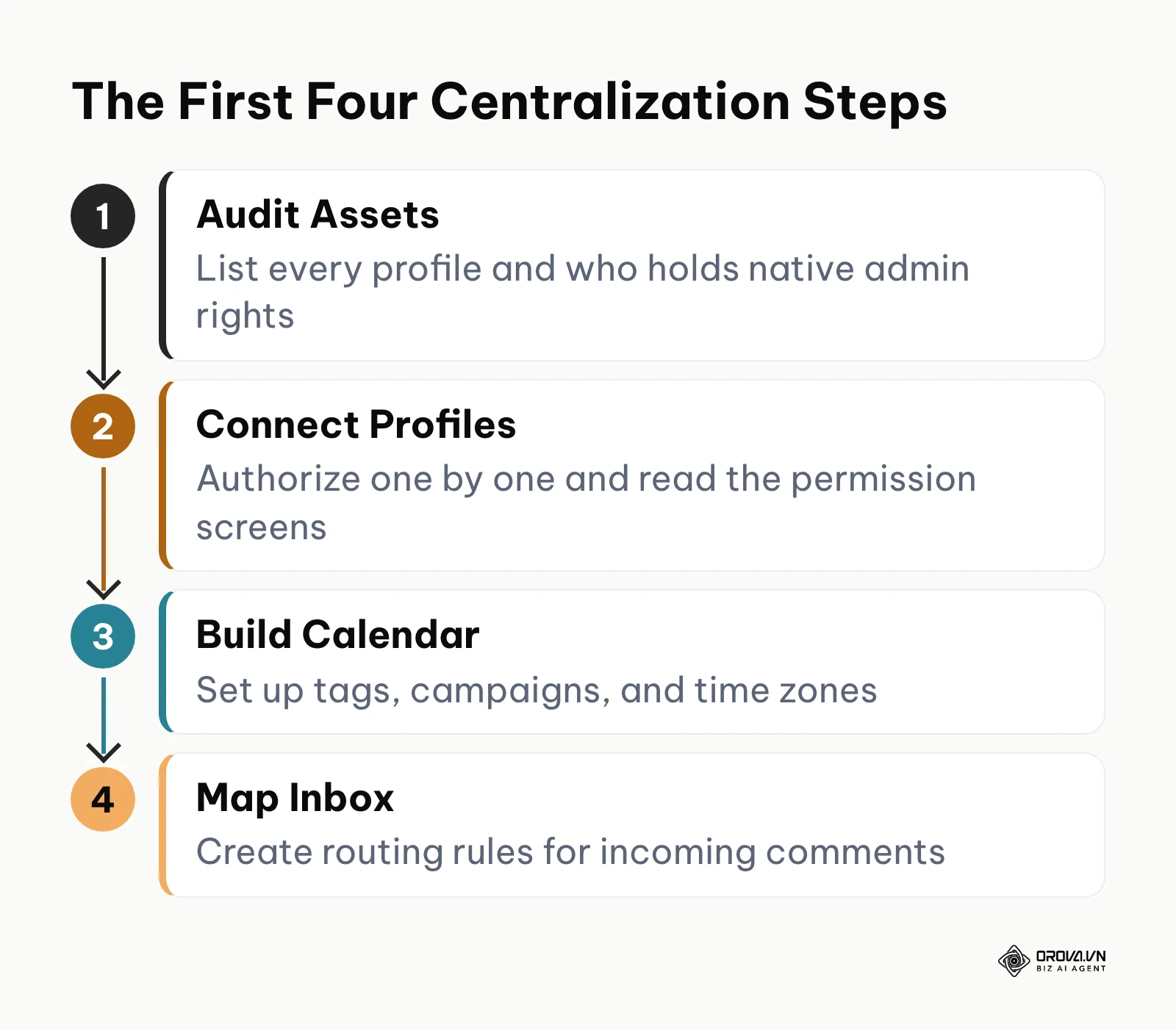
You need to prepare your digital assets and team hierarchy before you authorize any third-party application. Below is the precise 10-step workflow you must follow to centralize your operations successfully without losing data or confusing your staff.
- Audit Existing Channels and Access Levels: List every active profile your brand owns. More importantly, verify who holds the native administrative rights for each one. You cannot connect a Facebook page to a third-party tool if you only have "Editor" access natively.
- Define the Approval Hierarchy: Determine who holds the pen and who holds the stamp. Decide if junior writers need their posts reviewed, or if clients need to approve content before it goes live.
- Standardize Brand Assets and Naming Conventions: Gather all your logos, color codes, and standard hashtags into a single accessible drive. Establish a naming convention for your campaigns so that your reporting data remains clean later.
- Configure Workspace and Time Zones: When setting up your new platform, configure the overarching workspace. Ensure the default time zone matches your target audience, not necessarily where your remote team is located.
- Connect Profiles and Verify API Permissions: Authorize the connections one by one. Read the permission screens carefully. You must grant the application the right to read comments, publish media, and access basic insights.
- Map the Unified Inbox Routing: Do not let all comments dump into a single unstructured feed. Set up automation rules to tag specific keywords. For instance, route any comment containing the word "refund" directly to the customer support tag.
- Set Up Crisis Management Kill Switches: Identify the single button in your new platform that pauses all scheduled queues. In the event of a PR crisis, you need to know exactly how to halt all outbound automated messaging within ten seconds.
- Build the Content Calendar Taxonomy: Create custom labels for your content pillars (e.g., "Educational", "Promotional", "Culture"). Tagging posts correctly at the scheduling phase is the only way to get granular data later.
- Test the End-to-End Publishing Flow: Schedule a private test post for every network. Verify how line breaks render on LinkedIn, how link previews look on Facebook, and how video thumbnails appear on Instagram.
- Establish a Token-Refresh Routine: APIs disconnect. Set a recurring calendar event to check the connection status of all profiles.
Illustrative example: a mid-sized e-commerce brand decided to consolidate 12 regional profiles. The team audited their access levels, mapped out an approval hierarchy in a spreadsheet, and connected their profiles. However, they stumbled when customer complaints in the unified inbox began mixing with positive engagement, overwhelming the marketing team. They fixed this by creating specific keyword tags to automatically route shipping inquiries to the support staff's view. The visible result was that both teams achieved a state of inbox zero every day at 4 PM, with no overlapping replies.
The Hidden Costs: Calculating Real ROI
When you search for software, you will typically see an attractive entry price. However, marketing software pricing models are notoriously complex. The base price rarely reflects the actual cost of running a professional operation. If you do not calculate the true tech stack ROI upfront, you will find yourself trapped in expensive contracts.
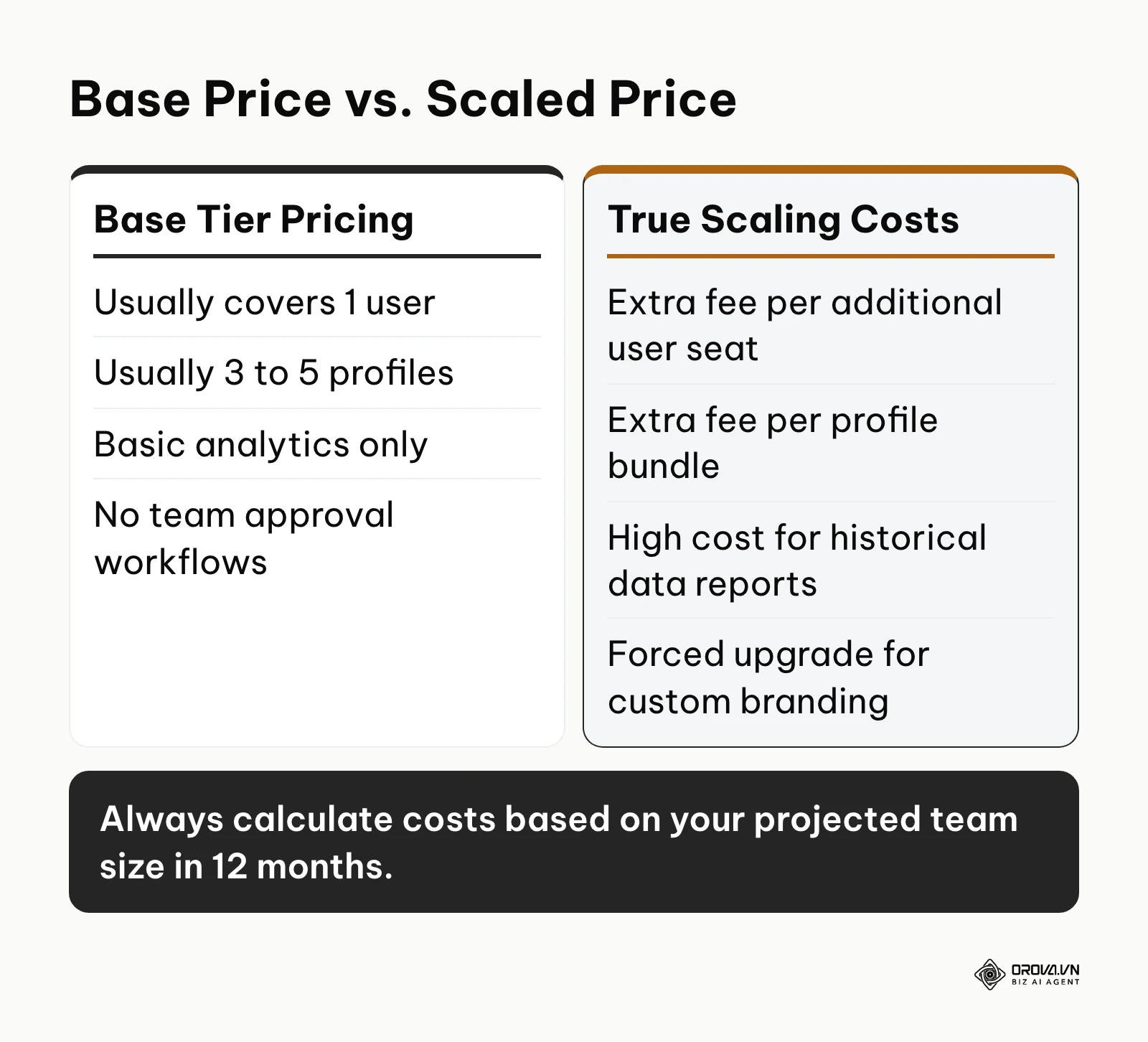
The most significant hidden cost is the per-seat pricing trap. Most entry-level tiers only include one user. As soon as you add a copywriter and a manager, your monthly fee often triples. Next is the profile limit trap. A standard bundle might cover five profiles, but if your brand operates on Facebook, Instagram, LinkedIn, X, TikTok, and YouTube, you immediately cross into a higher pricing tier.
Furthermore, historical data access is heavily monetized. While native apps provide years of data, third-party tools often restrict your analytics view to the last 30 or 90 days on lower tiers. If you need a year-over-year performance report, you are forced to upgrade. Finally, white-label reporting—the ability to remove the software's logo and add your own for client presentations—is almost exclusively reserved for the most expensive enterprise plans.
| Cost Category | Base Plan Reality | Enterprise/Scaling Reality |
|---|---|---|
| User Seats | 1 user included | Extra fee for each additional user |
| Social Profiles | 3-5 profiles included | Forced tier upgrade for more profiles |
| Historical Data | 30 to 90 days of lookback | Custom pricing for 1-year lookback |
| Inbox Features | Basic chronological feed | Premium add-on for keyword routing |
| White-label Reports | Tool logo on all PDFs | Usually only on top-tier plans |
Illustrative example: a boutique marketing agency signed up for a popular scheduling tool on its entry plan. They connected their initial 10 client accounts and added three staff members. They stumbled when they attempted to generate a monthly PDF report for a major client, only to discover that white-label reports and advanced analytics required an upgrade to a much more expensive agency tier. They fixed their budget issue by auditing their actual needs and moving to a platform that charged a flat fee based on connected profiles rather than user seats. The visible result was a predictable software budget that allowed them to reallocate funds directly into ad spend.
Struggling to coordinate content across Facebook, Instagram, TikTok, and LinkedIn? Orova Social lets you write once and publish to 8 channels, including Zalo OA and Telegram. You can auto-repost missed slots and export your calendar to Excel to keep your team aligned.
The Five Hubs You Are Really Consolidating
Most people who search for a way to manage all social media in one place picture a single login. In practice, "one place" is five separate jobs that used to live in five different spots: the inbox, the calendar, the approval trail, the report and the list of who can touch which account. A tool can pull one of these together and leave the other four scattered. Before you compare any software, decide which of the five hubs is costing you the most time, and centralize that one first.
This guide deliberately does not repeat a long list of scheduling apps. If you want a side-by-side comparison of publishing tools, read our breakdown of the social media scheduler options. Here we focus on the process: how each hub should work once it is in one place, and what usually breaks.
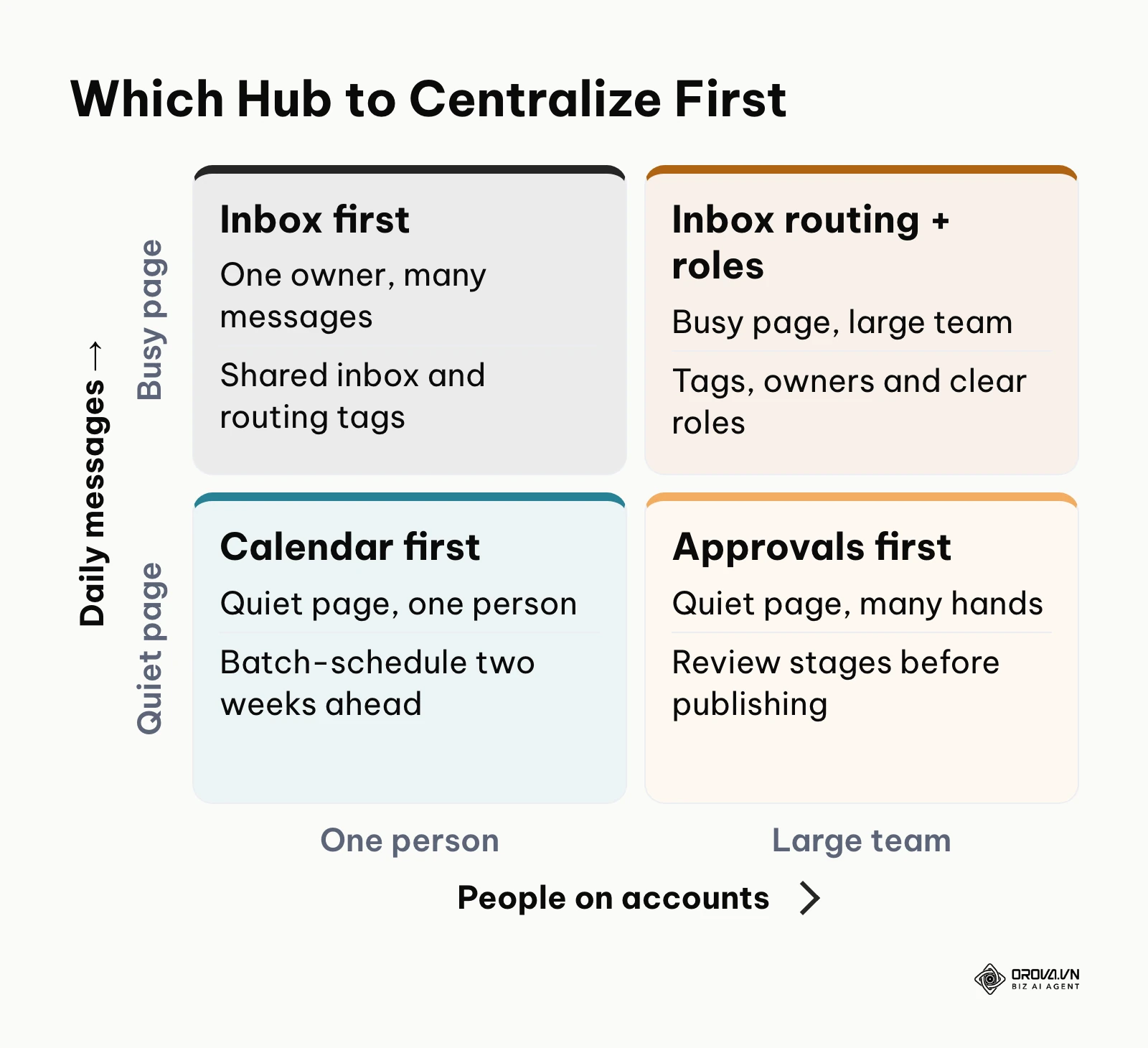
A simple way to decide where to start is to look at two things. The first is how many messages land on your accounts each day. The second is how many people touch those accounts. A busy page run by one person needs an inbox first. A quiet page run by five people needs approvals and roles first. A busy page run by a large team needs inbox routing plus clear roles at the same time. A quiet page run by one person can start with a calendar and stop there.
Hub 1: One Shared Inbox for Comments and Messages
The inbox is where scattered channels hurt the most. A question on a TikTok video, a complaint in an Instagram direct message and a sales lead in a LinkedIn comment all look equally small when they arrive, and all of them get lost the same way: nobody owns them.
A shared inbox fixes ownership, not volume. The goal is that every incoming item has exactly one person responsible for it and a visible status. To get there, set up three things:
- One queue with filters, not one feed per network. Your team should be able to see every new item in one list and narrow it by network, by account or by tag.
- Routing tags. Agree on a short list of tags such as "support", "sales lead", "spam" and "press". Keep the list under ten; long tag lists stop being used within a month.
- A clear "done" state. Each item ends as replied, assigned, or dismissed. If an item can sit in the list with no status, it will.
Write down a response rule for each tag. For example, "support" items get a first reply within one working day, "sales lead" items are handed to sales the same day, and "press" items go straight to the manager. The rule matters more than the tool, because the same rule works whether you use a dedicated inbox product or a native app.
Be honest about what your current tool can and cannot do here. Some social media platforms are built around the inbox and treat publishing as a secondary feature. Others are built around publishing and do not handle replies at all. If replies are your main bottleneck, check the inbox features in a free trial before you move anything else.
Hub 2: One Shared Content Calendar
The calendar is the hub most teams centralize first, because it is the easiest to see. A shared calendar shows every planned post across every network on one timeline, so nobody publishes a promotion on Facebook on the same morning a product apology goes out on LinkedIn.
A good shared calendar follows a few habits:
- Every post carries a content pillar tag. Use the taxonomy from step 8 of the workflow above. Without it, your calendar is a list of dates, not a plan.
- Each network gets its own version of the post. Write the core message once, then adapt length, hashtags and format per network. A post that reads naturally on LinkedIn usually looks stiff on TikTok.
- One time zone rule. Schedule in the time zone of your audience and display it clearly, especially if your team works remotely.
- A weekly review slot. Spend fifteen minutes each week looking at the next two weeks. Gaps and collisions are cheap to fix in advance and expensive to fix on the day.
Most scheduling tools also let you export or share the calendar. A shareable view is what turns the calendar from a private to-do list into a shared agreement with your manager or client.
Hub 3: One Approval Trail
When several people write for the same brand, approvals stop being optional. The risk is not only typos. It is a junior writer publishing a draft, a discount posted with the wrong end date, or a reply to an angry customer that should have gone through a manager.
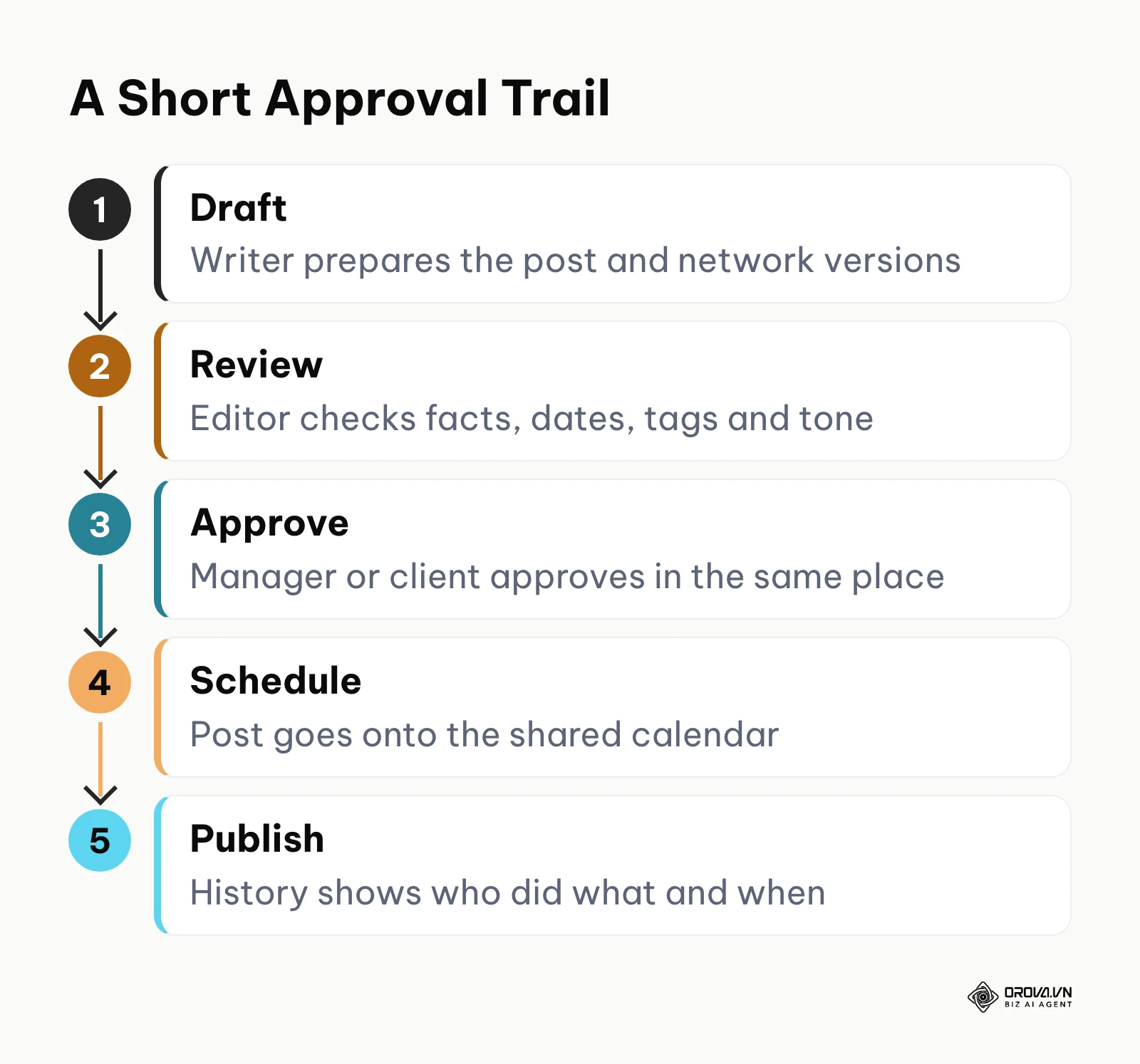
An approval trail means that every post has a visible history: who drafted it, who reviewed it, who approved it and when it went live. Keep the stages short. A typical flow has four or five steps: draft, review, approve, schedule and publish. Each extra stage slows your team down, so add one only when a real mistake shows you need it.
Agree on who can skip stages. Urgent replies and live event coverage often cannot wait for a full review. Write down which situations allow a fast path and who is allowed to use it. Without that rule, people either wait too long or quietly bypass the process.
For agencies, the client is part of the trail. Many platforms let you send a client a preview of upcoming posts to approve or reject. Whatever tool you use, keep the client's approval in the same place as the post, not in a separate email thread that nobody can find three months later.
Hub 4: One Combined Report
Reporting is where scattered channels waste the most hours. Exporting numbers from each network, pasting them into a spreadsheet and fixing the date formats can take a full day each month.
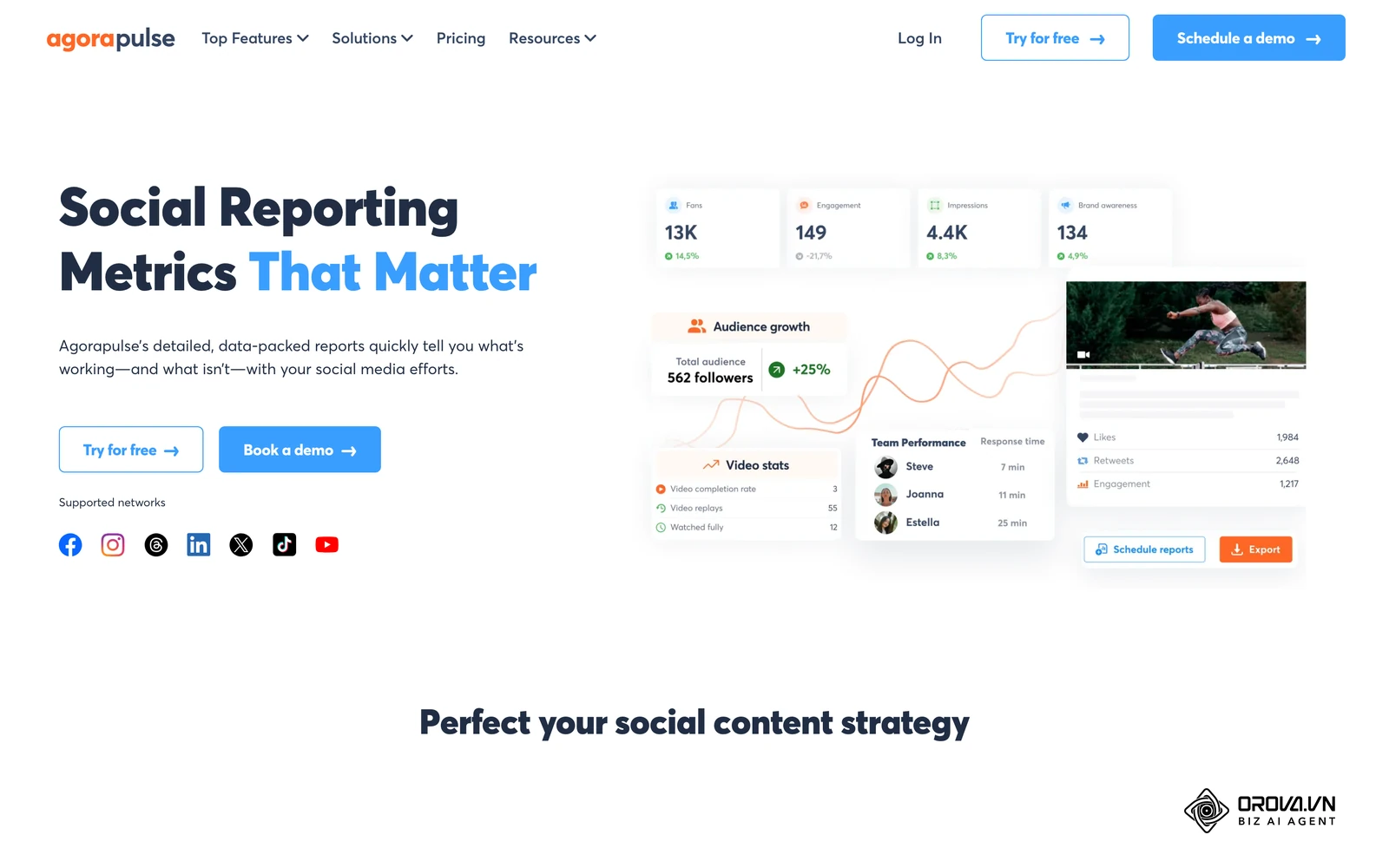
A combined report pulls the same few metrics from every network into one view. Pick metrics that mean the same thing everywhere: posts published, reach, engagement, link clicks and replies handled. Avoid stacking a metric that each network defines differently, such as "views", without noting the difference.
Use your content pillar tags here as well. A combined report that shows "educational posts got more saves than promotional posts across all networks" is worth more than six separate dashboards. If you want to go deeper into measurement, our guide to social analytics tools covers what to track and how to read it.
Keep one simple rule for the report: it should answer a decision. If nobody changes anything after reading it, remove metrics until someone does.
Hub 5: One Map of Roles and Permissions
The last hub is the least visible and the most dangerous. When access is scattered, former employees keep admin rights, freelancers share one password, and nobody knows who connected an old app that still posts on the brand's behalf.
Centralizing roles means two lists kept in one place. The first list shows who holds native admin rights on each network. The second shows who can do what inside your management tool: draft, approve, publish, reply or view reports. Review both lists every quarter and the day anyone leaves the team.
Give each person the lowest role that lets them do their job. Writers draft, editors approve, community managers reply, and only one or two people can connect or disconnect accounts. This also protects your connections: as the section on API disconnects explains below, removing the wrong admin can break publishing for the whole team.
Where Common Tool Types Fit
You do not need twelve tools to cover five hubs. Most teams combine one main platform with the native apps of the networks they rely on. The short table below shows where a few well-known options usually sit. For a fuller comparison of schedulers, see the social media scheduler guide, and for a deeper look at one of the oldest platforms, read our Hootsuite social media marketing guide.
| Tool | Strongest hub | Note |
|---|---|---|
| Hootsuite | Calendar and monitoring streams | Wide network coverage, suited to large teams |
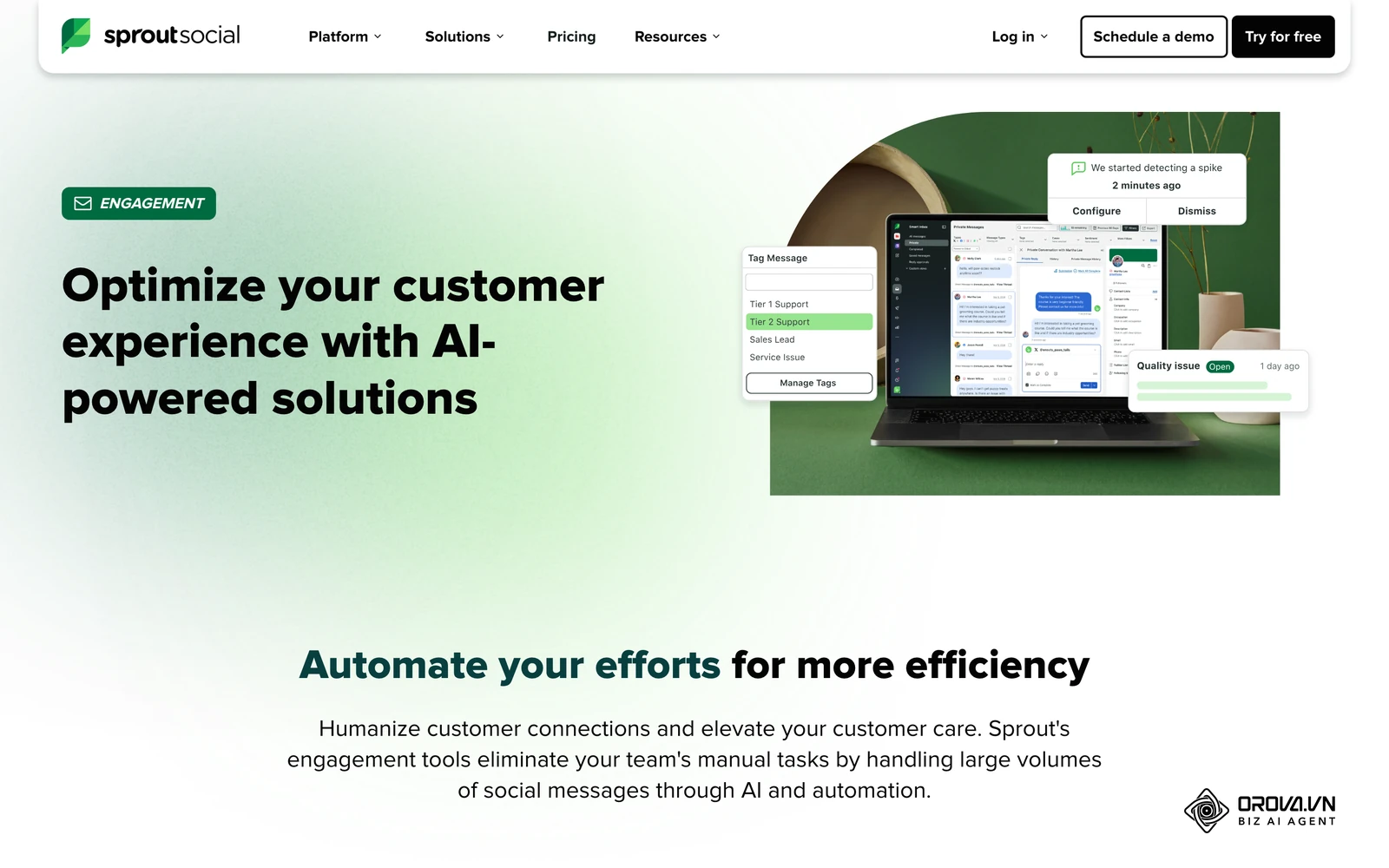
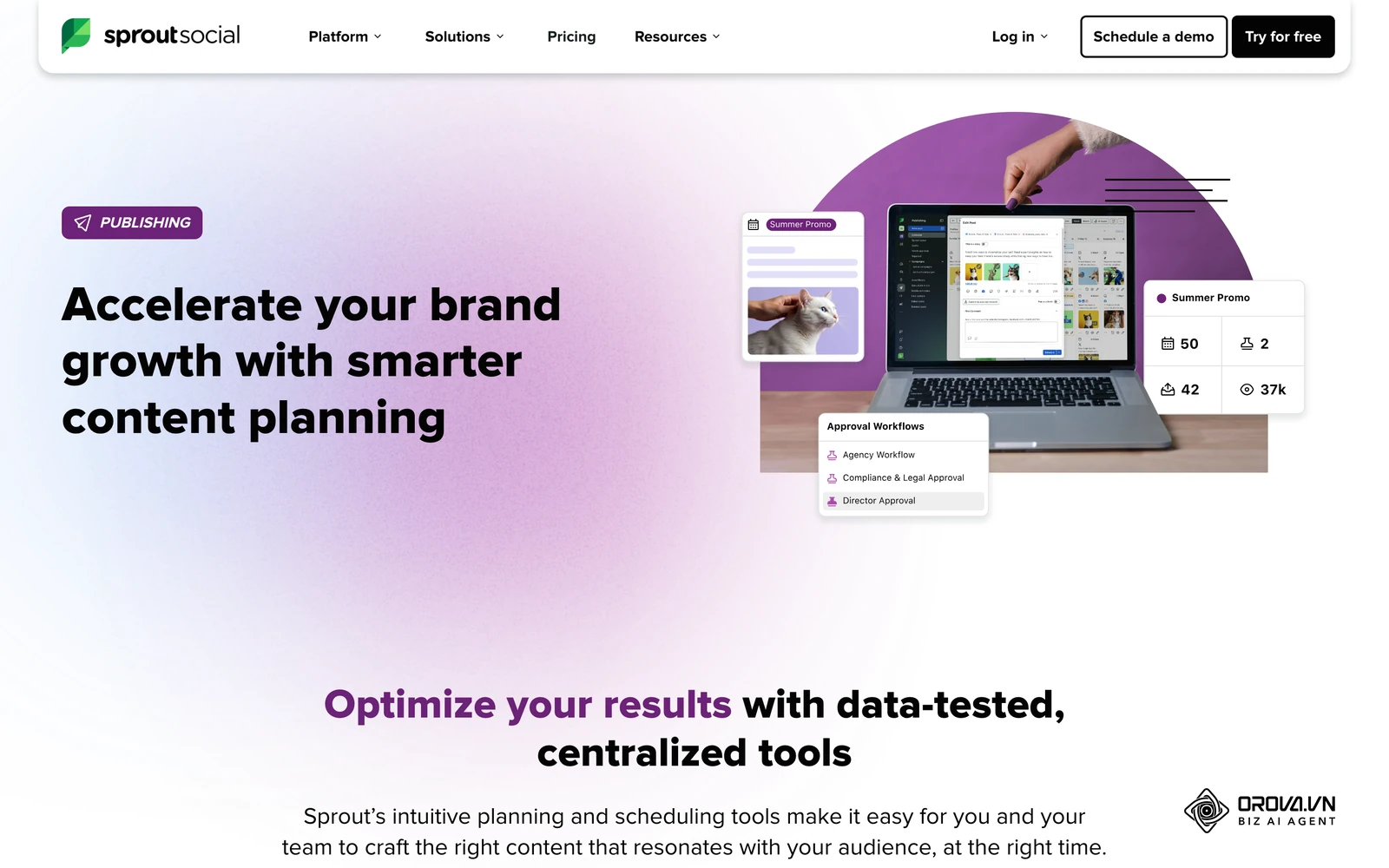
| Sprout Social | Shared inbox and reporting | Built around message routing and team reports |
| Agorapulse | Shared inbox | Focused on clearing every incoming item |
| Orova Social | Calendar and publishing | Write once, publish to 8 channels including Zalo OA and Telegram; exports the calendar to Excel |
| Meta Business Suite | Inbox and calendar for Facebook and Instagram only | Native and free, but limited to Meta networks |
Use the table as a starting point, not a verdict. Run a short trial with your real accounts and your real approval flow before you commit.
Free Native Tools vs. Consolidating
A common question is whether you can avoid paying for software entirely by combining free native tools. The answer depends on your channel mix and your tolerance for inefficiency.
Meta Business Suite
Meta Business Suite is an incredibly powerful, completely free tool provided directly by Meta. It allows you to schedule posts, manage the inbox, and view analytics for Facebook and Instagram simultaneously. Because it is native, it never suffers from third-party API disconnects, and it always supports the latest features, such as specific tagging or story stickers, before any other platform.
However, its fatal flaw is its exclusivity. It only works for Meta products. If your brand also needs LinkedIn, X, or TikTok, you are forced back into the multi-tab workflow. Using Meta Business Suite alongside another tool often causes reporting fragmentation. It is sufficient only if your brand exists exclusively within the Meta ecosystem.
X Pro (TweetDeck)
X Pro (formerly TweetDeck) is the native power-user tool for X (formerly Twitter). It allows you to set up multiple columns to monitor lists, hashtags, and mentions as they come in. It is unmatched for rapid-fire engagement on that specific network. However, like Meta Business Suite, it exists in a silo. Furthermore, as X has moved TweetDeck behind a premium subscription paywall, it is no longer a free workaround, making the argument for a unified third-party platform even stronger.
How to Choose Based on Team Size and Budget
Selecting the right tool requires matching your operational maturity with the software's capabilities. Buying an enterprise tool for a solo operation will result in wasted features, while forcing an agency to use a basic scheduler will result in workflow bottlenecks.
| Operational Scale | Recommended Stack Focus | Common Budget Trap to Avoid |
|---|---|---|
| Solo Creator / Freelancer | Visual planning, basic cross-posting | Paying for advanced team collaboration features |
| Small to Mid-Size Business | AI workflows, broad channel support | Getting locked into high per-seat pricing |
| Growing Agency (3-5 users) | Client approvals, white-label reports | Ignoring the cost of adding new client profiles |
| Enterprise / Large Team | Deep inbox routing, social listening | Buying complex tools without proper staff training |
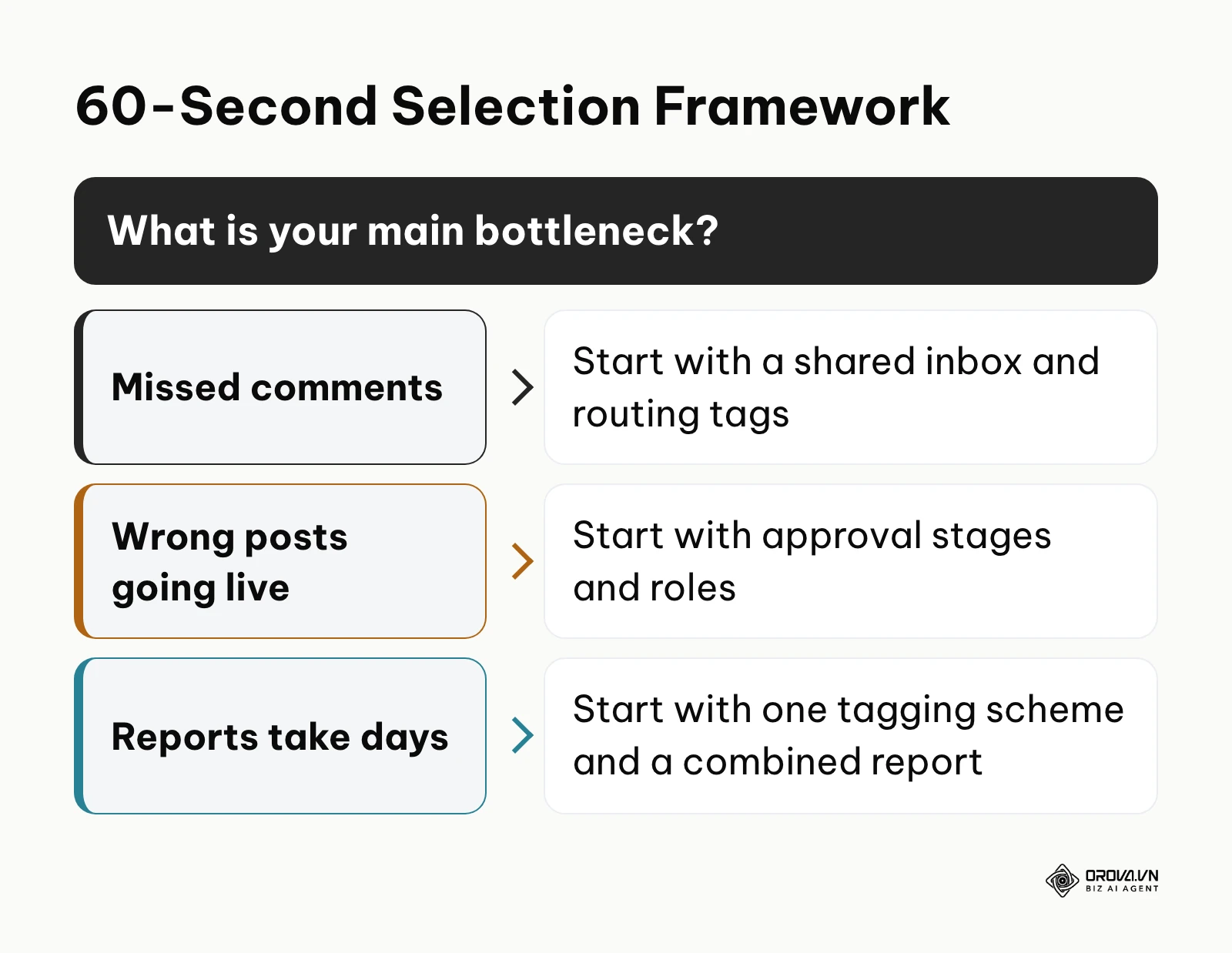
Team size is only half of the decision. The other half is your main bottleneck. If you keep missing comments, start with a shared inbox and routing tags. If wrong posts keep going live, start with approval stages and roles. If monthly reports take days, start with one tagging scheme and a combined report. Fix the bottleneck first, then expand to the other hubs.
Illustrative example: a solo creator was manually posting videos across four platforms every day. They mapped out a plan to scale into a media company and hired two freelance editors. They stumbled when they tried to use a basic, free scheduling tool, resulting in editors accidentally publishing rough drafts instead of submitting them for review. They fixed the workflow by migrating to a platform that supported distinct user roles, allowing editors to draft and the creator to approve. The visible result was the elimination of publishing errors and a streamlined daily approval process.
Stop paying extra for basic scheduling capabilities. With Orova Social, you can automatically cut long videos into 9:16 vertical clips with subtitles and dubbing, all while using AI to write captions in your brand voice. It is free until July 7, 2027.
Fixing the Biggest Headache: API Disconnects
The most frustrating aspect of using a platform to manage all social media in one place is the inevitable API disconnect. You will schedule a week of brilliant content, only to receive an email stating your posts failed because the connection was lost. This is not necessarily the fault of your software; it is a security measure enforced by the social networks.
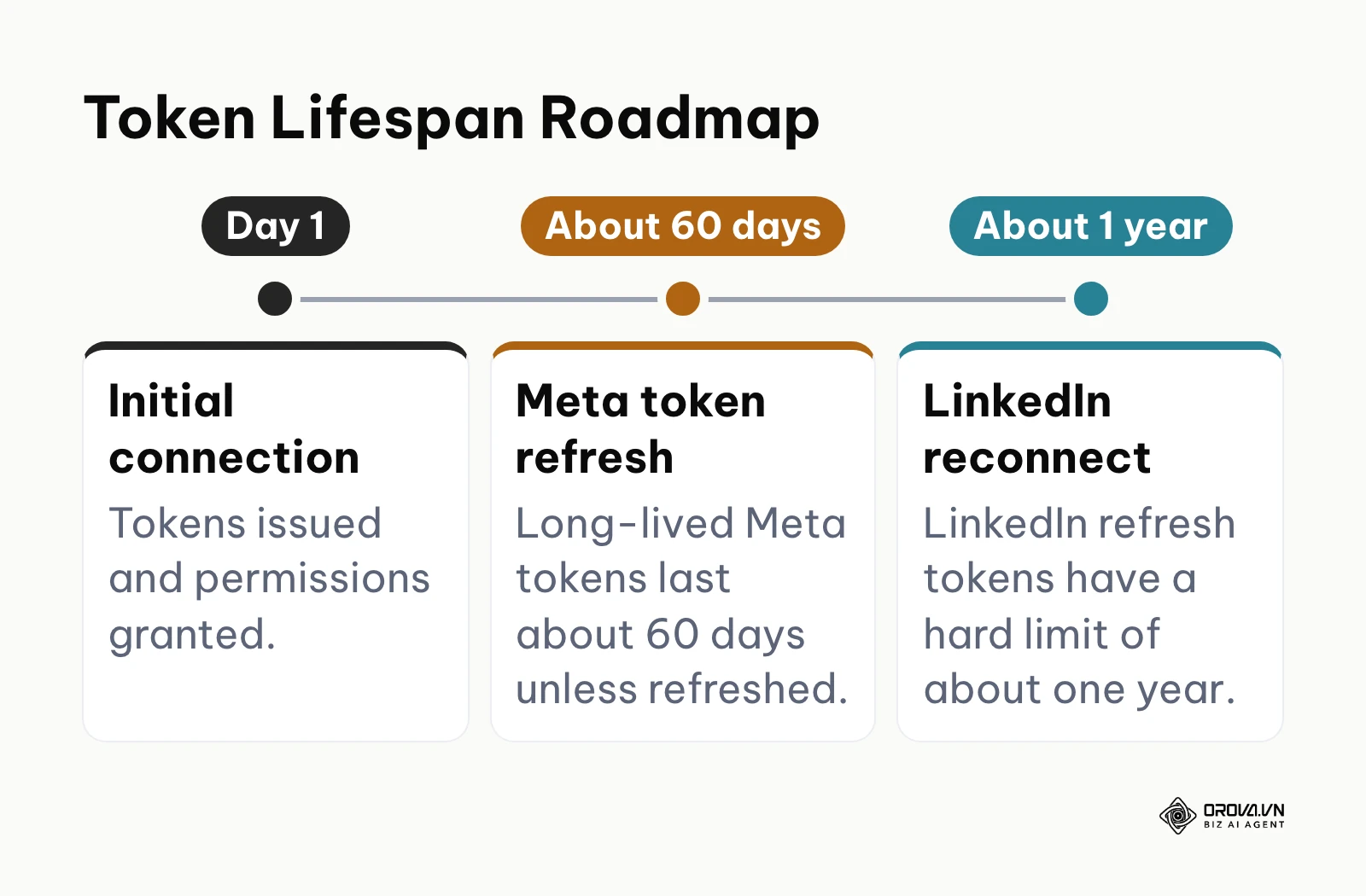
Social networks use OAuth tokens to grant third-party tools access to your account. To protect user data, these tokens expire. Meta, for instance, can invalidate tokens after a password change or suspicious login activity, and its long-lived tokens last about 60 days unless refreshed. LinkedIn access tokens also expire on a fixed schedule, and its refresh tokens have a hard limit of about one year, after which someone must reconnect the account.
To mitigate this, you must build token maintenance into your workflow. Never change the password of the primary admin account without immediately logging into your management software to re-authenticate the connections. Furthermore, if you remove an admin from a Facebook page natively, it can sever the connection for the entire team on the third-party tool. Establishing a clear protocol for access management is critical.
Social Media Management Trends in the Next Few Years: My Predictions
The landscape of digital marketing is shifting rapidly. Based on the technological developments and API restrictions we are seeing today, I predict several major changes in how we will manage these channels over the next two to three years.
AI Moves from Drafting to Active Moderation
Currently, artificial intelligence is primarily utilized for generative tasks—writing captions, suggesting hashtags, or resizing images. I believe that within the next few years, AI will become deeply embedded in the inbox. We are already seeing early signs of this with automated sentiment analysis. I expect platforms to deploy AI agents that can autonomously resolve tier-one customer service inquiries in the comments section, instantly hiding spam and providing tailored responses based on your brand's historical data, drastically reducing the manual load on community managers. You should start building a comprehensive FAQ database now to train these future models.
Native Video APIs Will Force New Workflows
The friction between third-party schedulers and native short-form video features (like trending audio libraries and interactive stickers) is growing. As of 2026, networks are highly protective of their in-app experiences. I believe that platforms like TikTok and Instagram will further restrict third-party access to their most viral features to force users back into their native apps. Consequently, third-party tools will pivot to become organizational hubs—places where video assets are planned, approved, and stored—while the actual pushing of the "publish" button will increasingly rely on mobile notification workarounds. Teams must prepare by optimizing their mobile asset transfer workflows.
Decentralized Networks Will Complicate Consolidation
The rise of decentralized and federated networks, such as Mastodon and Bluesky, presents a unique challenge. Some of these networks do not operate on a single centralized server, which makes building reliable APIs incredibly difficult for management software. I lean towards the prediction that we will see a fragmentation in the market. Unified dashboards will struggle to integrate these decentralized nodes reliably. Marketing teams should prepare by maintaining flexibility; do not expect a single piece of software to flawlessly connect to emerging federated protocols anytime soon.
Frequently Asked Questions About Managing Social Media
Can I post to TikTok with trending audio using a third-party scheduler?
Often not. Licensing rules limit which sounds third-party tools can attach to a post, so scheduled videos usually go out with original audio. A common workaround is to plan and approve the video in your management tool, then publish it from the native app on a phone so you can add the sound there.
How does AI help in managing multiple accounts?
AI speeds up adapting one message for several networks. Instead of rewriting a casual short post into a more formal LinkedIn update by hand, you can ask an AI writer for a version in the tone each network expects, then edit it. Some inbox tools also use AI to sort incoming messages by topic or mood, which helps a team find urgent items faster.
Will my reach drop if I use a third-party tool to publish?
There is no clear evidence that posting through an approved tool lowers reach by itself. What matters more is the post: native formatting, correct tags and replying to early comments. If a tool makes your posts look generic or you stop engaging after publishing, reach can suffer for those reasons.
How many people should have admin access to each account?
Keep it to two people per network wherever possible: one main owner and one backup. Everyone else should work through roles in your management tool. This makes access easy to review and stops connections from breaking when one person leaves.
Do I need a paid tool to manage all social media in one place?
Not always. If you only use Facebook and Instagram, Meta Business Suite covers the calendar and inbox at no cost. Once you add networks outside Meta, need approvals, or report for several clients, a dedicated platform usually saves more time than it costs.
Where to Start?
Transitioning to a unified platform can feel overwhelming, but you do not need to execute the entire 10-step workflow in a single afternoon. Your starting point depends entirely on which of the five hubs is hurting most right now.
If you are an overwhelmed solo creator struggling just to maintain a consistent presence, start with the calendar hub. Connect only your two most important networks to a scheduling tool and spend one hour this week batch-scheduling your core content for the next two weeks. This simple action breaks the cycle of daily panic-posting. To build the audience those posts reach, see our guide on how to grow facebook page followers.
If you are a growing team where customer complaints are slipping through the cracks, your first step is not scheduling; it is the inbox hub. Dedicate your next working session to connecting your profiles to a shared inbox. Focus on one routing rule for words like "help" or "support" so your team can keep a 24-hour response promise for critical issues. If you also need to catch brand mentions outside your own pages, a social listening tool is the next layer.
If you are an agency owner worried about scaling costs, your immediate task is the roles hub and a cost audit. Build a simple spreadsheet listing your current user headcount, client profiles and who holds admin rights on each. Use it to filter software by how prices grow with users and profiles, so you do not get trapped in a per-seat contract next year.
About the author

Builder of Orova
Nguyễn Đỗ Trọng Ân has 8 years of experience in marketing, including 6 years managing market development across Asia. He builds Orova, a Biz AI Agent that never sleeps: it plans, runs and optimizes work for businesses.
Run your business with AI Agents
Orova is the always-on Biz AI Agent — it plans, runs, and optimizes the work for you.
Save time, unlock productivity.