
How to start email marketing for a small business in 7 steps (2026)

Mastering how to start email marketing for a small business gives you a direct, owned channel to generate predictable sales without paying ever-increasing ad costs to social media platforms. By following this guide, you will establish a fully authenticated business sending domain, build an automated permission-based lead intake mechanism, craft a five-part customer conversion sequence, and deploy campaigns that attribute tangible revenue directly to your bottom line.
Before you begin, prepare access to your custom domain DNS hosting provider, an active business mailbox such as Google Workspace or Microsoft 365, a clean spreadsheet of contacts who explicitly requested your communications, and roughly two to four hours of focused setup time. This guide is for businesses mailing people who asked to hear from them; it does not cover cold email to strangers or high-volume transactional order notifications.
How to start email marketing for a small business
To launch email marketing for a small business, you must authenticate your domain DNS records, configure a structured sending infrastructure, assemble a verified opt-in contact list, deploy persuasive content sequences, and track commercial conversions. The entire setup takes roughly three hours across seven logical steps, enabling you to generate recurring sales while keeping your messages safely out of spam filters.
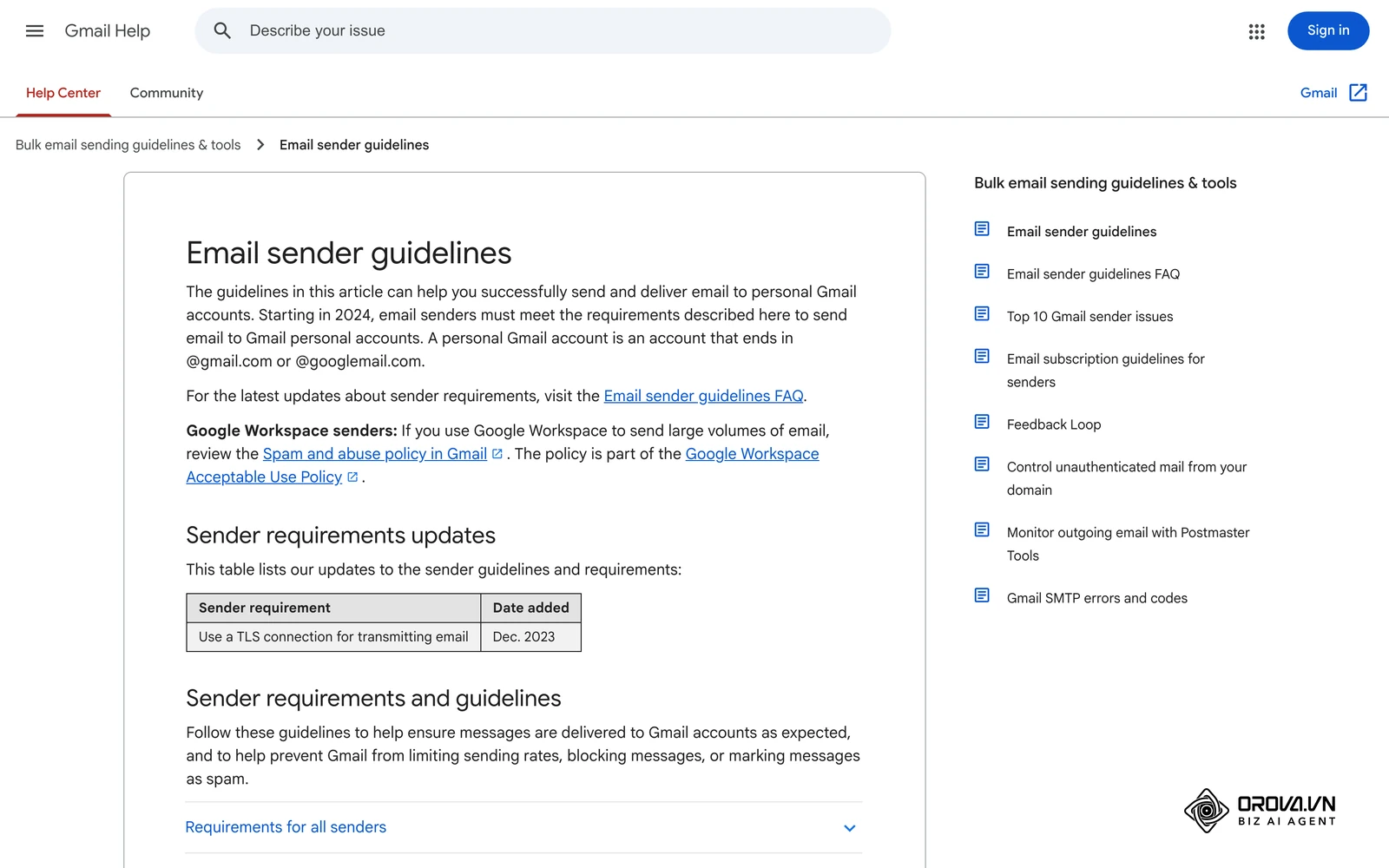
Email marketing remains the highest-yielding owned distribution channel available to independent enterprises because you control the subscriber relationship directly. Unlike third-party social algorithms that throttle organic post reach to force ad spending, your email inbox connection provides unmediated communication with prospects who actively requested your insights and commercial offers.
Preparation checklist before launching email marketing for small business
Launching campaigns without technical prerequisites in place causes immediate deliverability failures, wasted software spend, and irreversible domain reputation damage. Assemble the administrative assets listed below before configuring your campaigns.
| Preparation Item | Where to Obtain | Estimated Setup Time | Impact if Missing |
|---|---|---|---|
| Custom Domain DNS Access | Domain registrar (Cloudflare, GoDaddy, Namecheap) | 15 minutes | Cannot publish SPF, DKIM, or DMARC; emails go to spam |
| Business Domain Mailbox | Google Workspace, Microsoft 365, or private cPanel | 20 minutes | Cannot send legitimate authenticated corporate communications |
| Opt-in Lead Magnet Asset | Internal product guides, discount codes, or audit sheets | 60 minutes | Website visitors will not submit opt-in forms without incentive |
| Verified Subscriber Records | Existing customer invoices or inbound contact requests | 30 minutes | Bounces spike immediately, triggering provider rate-limiting |
| Conversion Measurement Plan | Google Analytics 4, CRM pipeline, or Conversion API | 30 minutes | Cannot determine if campaigns produce revenue or burn cash |
Step 1: Configure email marketing authentication with SPF, DKIM, and DMARC
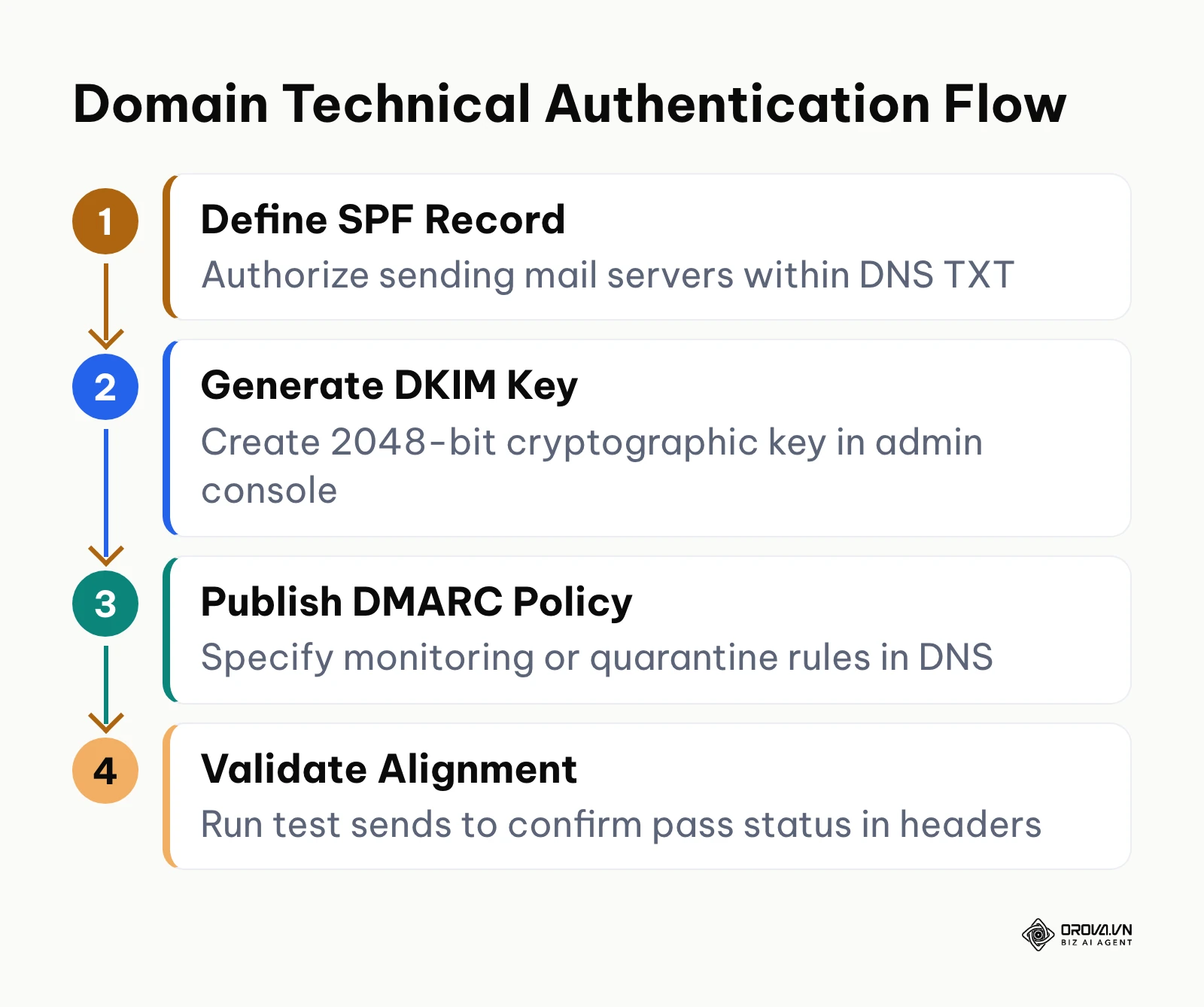
To protect your domain reputation and improve deliverability, establish cryptographic identity protocols that verify your small business as the legitimate sender of every outbound message.
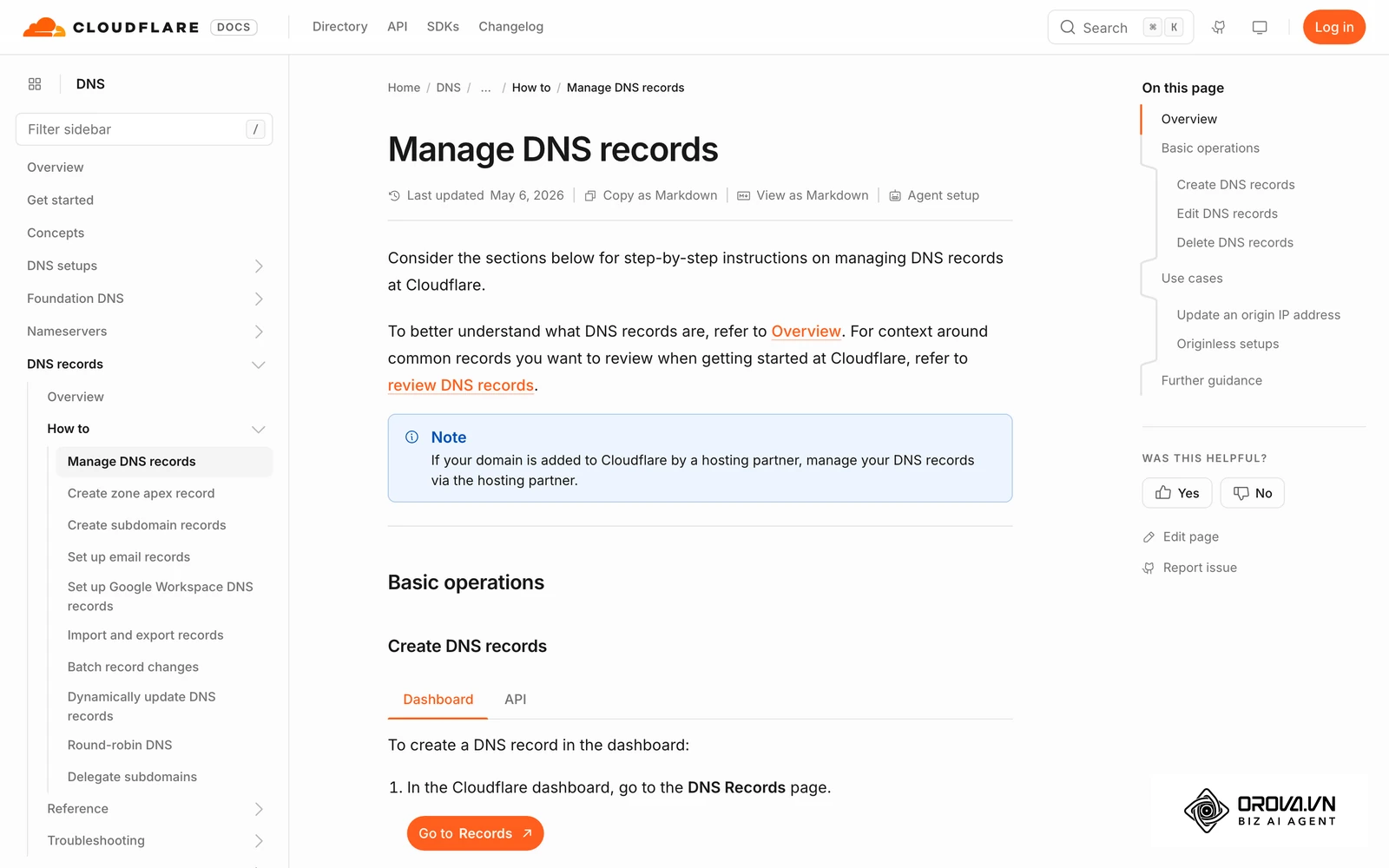
Access the management console of your DNS hosting provider, such as Cloudflare, GoDaddy, or Namecheap. Navigate to the DNS Records administration table and add three specific TXT entries. First, publish an SPF (Sender Policy Framework) record under your root domain @ with the value v=spf1 include:_spf.google.com ~all (adjusting the include statement to reflect your authorized mail servers). Second, navigate to your email workspace administrative dashboard, such as Google Admin or Microsoft 365 Defender, locate the DKIM (DomainKeys Identified Mail) generator, generate a 2048-bit key, and paste the resulting TXT record name (for example, google._domainkey) and cryptographic string into your DNS settings. Third, create an explicit DMARC (Domain-based Message Authentication, Reporting, and Conformance) TXT record at _dmarc.yourdomain.com with the value v=DMARC1; p=quarantine; rua=mailto:dmarc-reports@yourdomain.com; pct=100.
To confirm the configuration visually, query your domain using an online visual verification tool like MXToolbox or Google Admin Toolbox Dig. You should see passing results across SPF alignment, valid DKIM public key resolution, and an active DMARC policy. Send a test message to an external mailbox and inspect the raw email headers: both spf=pass, dkim=pass, and dmarc=pass must appear in the Authentication-Results header line.
A common failure occurs when administrators create multiple conflicting SPF TXT records on a single root domain, which invalidates the specification and causes mail servers to return a permanent error. Merge all authorized sending systems into a single v=spf1 record containing fewer than ten DNS lookups. Another frequent error is copying the DKIM public key with accidental trailing spaces, which causes cryptographic validation to fail silently.
Hypothetical example: A regional architectural consultancy with four staff members experienced delivery failures where client project updates landed in junk folders. The business operations manager opened Cloudflare DNS and discovered two separate SPF records left behind by an old website host alongside a missing DKIM record. The manager deleted the outdated records, created a single consolidated SPF TXT record authorizing their Google Workspace server, and generated a 2048-bit DKIM key inside Google Admin. Within two hours, test emails sent to external corporate Outlook accounts displayed Authentication-Results: dmarc=pass, eliminating spam filtering warnings on client correspondence.
Step 2: Choose the sending platform for your email marketing campaigns
Decide where your campaigns will be sent from before you write a single message, because the choice affects deliverability, unsubscribe handling, and reporting.
Small businesses usually pick between two setups: a dedicated email marketing platform (an email service provider, or ESP) that sends from its own infrastructure on your authenticated domain, or a campaign tool that sends from your existing business mailbox over IMAP/SMTP. If you connect a business mailbox, use SMTP submission on port 587 with TLS (or port 465 with SSL) and create an app-specific password rather than sharing your main login.
When setup is complete, the platform shows the connection as active and a test message reaches an external inbox with spf=pass, dkim=pass, and dmarc=pass in its headers.
A common setup error is trying unencrypted transmission on port 25, which many hosting providers block. Another is treating a personal business mailbox as a bulk-sending server: mailbox providers such as Google Workspace and Microsoft 365 publish daily sending limits for each account, and those limits exist to stop mass mailing. Check the current limits in your provider's help center and plan around them rather than trying to work around them.
Dedicated email platform versus sending from your business mailbox
The right choice depends on how many people you mail, how often, and what kind of messages you send.
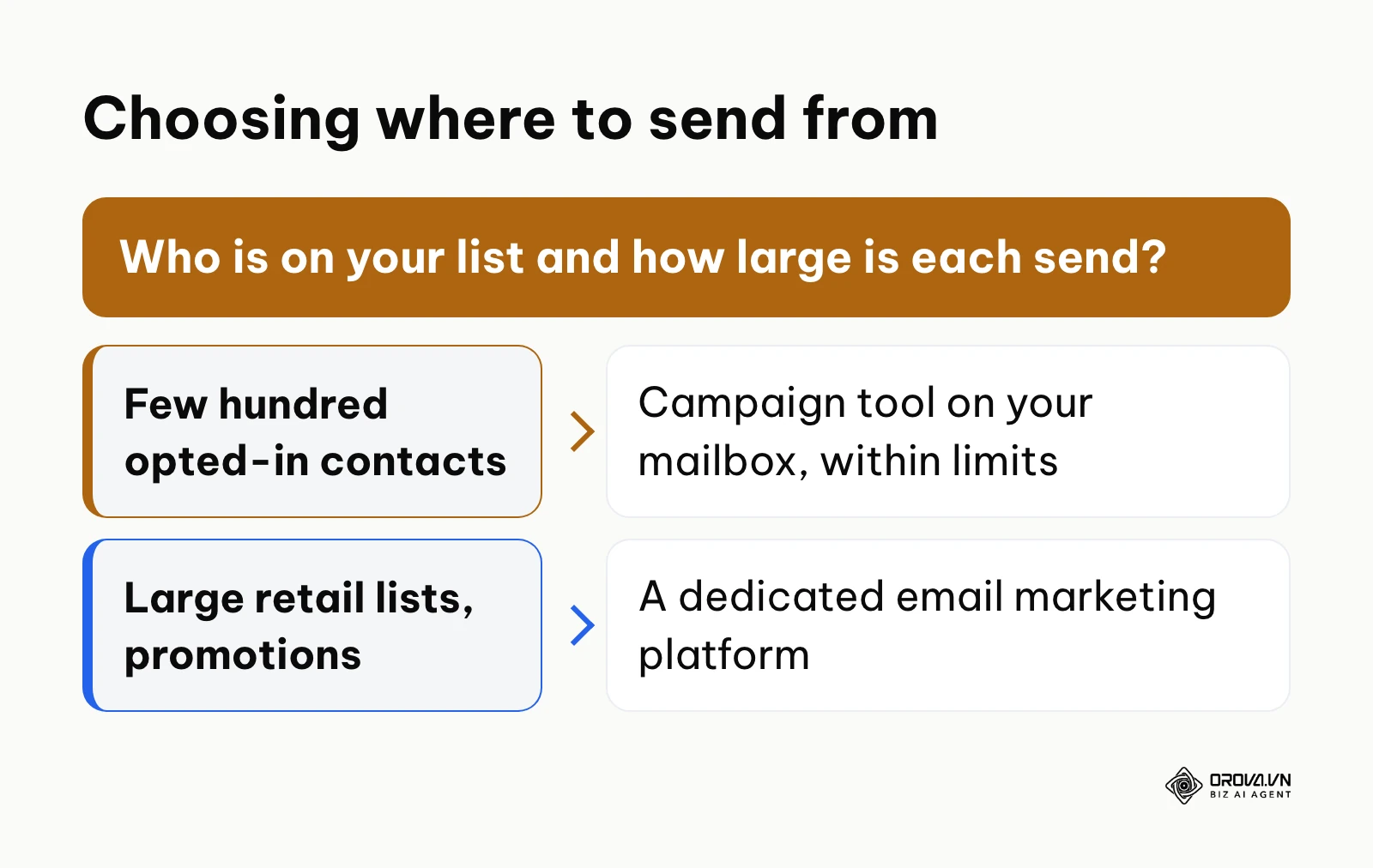
| Question | Business mailbox with a campaign tool | Dedicated email marketing platform |
|---|---|---|
| Who is on the list? | Existing customers and partners who asked to hear from you | Retail subscribers collected through website and store sign-ups |
| How large is each send? | Small, well within your mailbox provider's daily limit | Larger lists that would exceed a normal mailbox limit |
| What do messages look like? | Personal, mostly text, one sender name customers already know | Designed newsletters and regular promotions |
| How do replies work? | Replies land in the same business inbox your team already reads | Replies often go to a separate address you must monitor |
| What must you avoid? | Splitting a large list across extra mailboxes to get around limits | Importing contacts who never opted in |
If your list is growing past what one business mailbox is meant to send, move to a dedicated email marketing platform instead of adding more mailboxes. The decision diagram below summarizes the choice.
Step 3: Build your permission-based email marketing contact list
Capture verified, interested contacts through compliant, value-driven opt-in pathways rather than purchasing unverified third-party databases.
Log in to your website content management system or landing page builder. Create a frictionless lead capture element by navigating to Forms, building an intake module requesting only first name and corporate email address, and embedding it on high-traffic landing pages. Attach an immediate deliverable: a diagnostic checklist, an industry pricing benchmark, or an introductory discount. Within your contact management settings, activate double opt-in verification so that new submissions must confirm their request via a verification link before joining active marketing segments. When importing historical offline customer records, access your contact manager, select Import Contacts, upload a sanitized CSV file, and map your columns accurately to custom fields while applying a foundational hygiene filter to clean CRM data before queueing live messages.
A successful setup shows new test submissions appearing instantaneously within your contact management table with a confirmed subscription status tag and a timestamp recording their consent source.
A dangerous mistake at this stage is uploading old business card collections or conference lead spreadsheets of people who never agreed to receive marketing email. Never buy contact lists, guess addresses from name patterns, or scrape emails from websites: those contacts did not give permission, and they generate hard bounces and spam complaints that damage your sender reputation. For older customer records, send a short message asking whether people want to keep hearing from you, and only keep those who say yes.
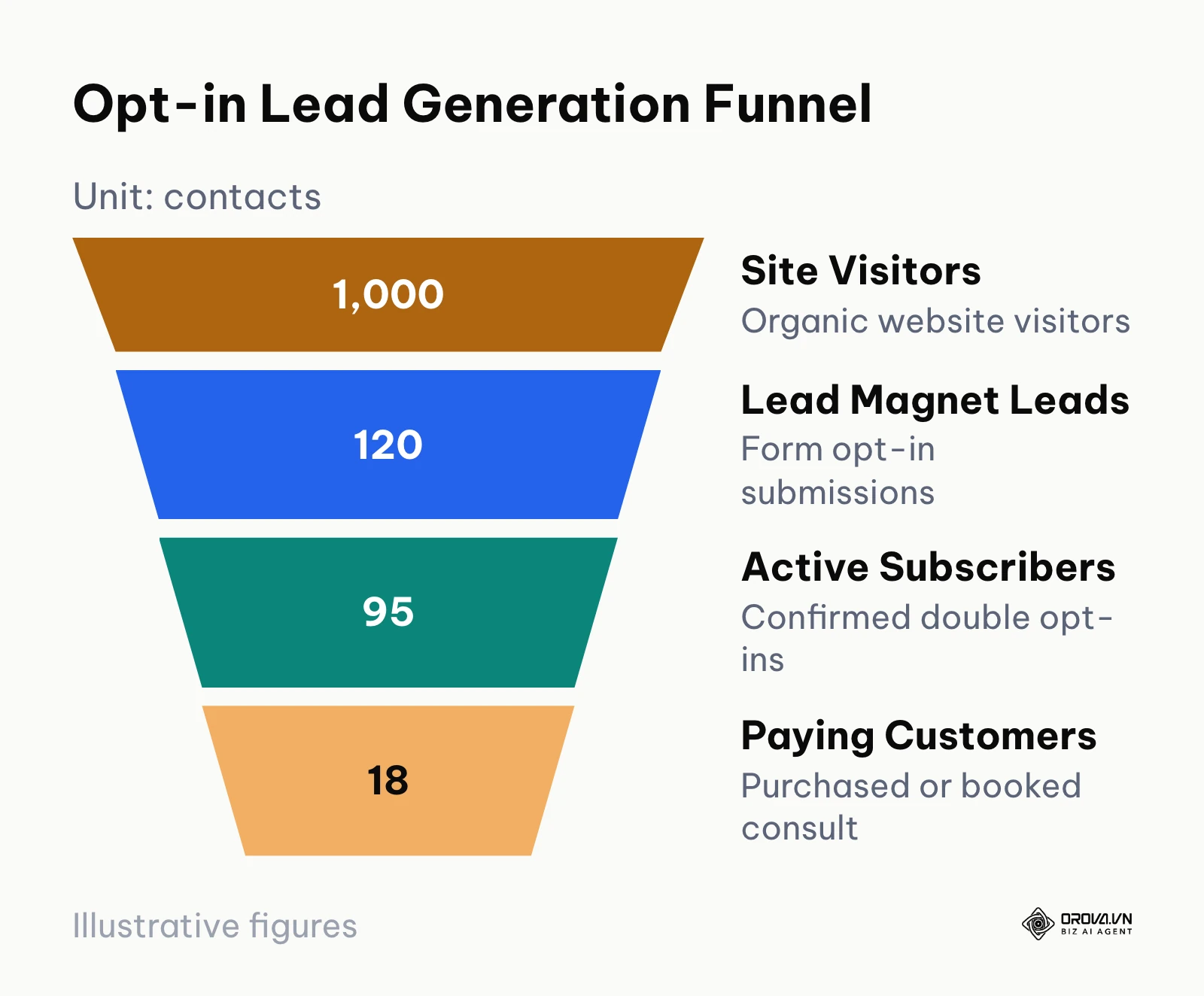
The funnel diagram below uses hypothetical numbers to show how contacts thin out between a site visit and a purchase in an opt-in process.
Use the table below to check that every source feeding your list carries clear permission.
| Contact Source | Permission Step | What to Record |
|---|---|---|
| Website sign-up form | Unticked checkbox or clear sign-up button, then double opt-in | Date, form name, and confirmation click |
| In-store or event sign-up | Customer writes or types their own address and agrees to receive emails | Date, place, and the wording they agreed to |
| Existing customers | Ask whether they want marketing emails, not only receipts | Date and the message they replied to |
| Purchased, guessed, or scraped addresses | None possible: do not import them | Nothing; delete the file |
Step 4: Write high-converting email marketing sequences and conversion copy
Develop an automated welcome sequence that establishes authority, delivers promised lead magnet resources, and drives initial transaction velocity.
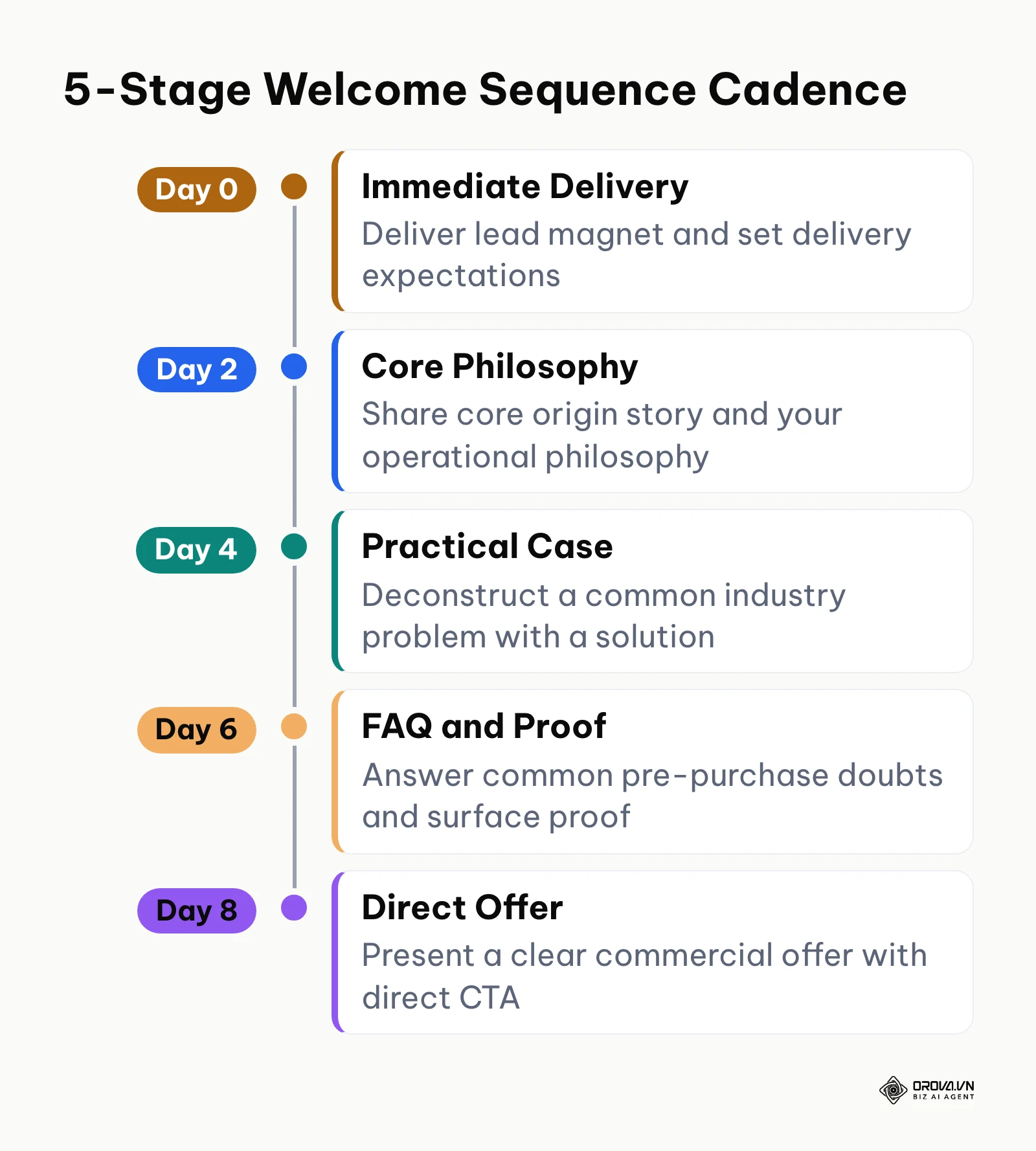
Navigate to your platform's sequence builder, locate Automations, click Create New Workflow, and select the trigger Contact Joins List. Construct a five-message welcome sequence spaced across eight days. In the email editor, write subject lines under 50 characters, specify clear preview preheader text that reinforces the opening hook, and format the body text using legible 16-pixel type with single-column layouts. Use personal merge tags cautiously, ensuring you define fallback values (for example, using there if First_Name is blank) to prevent awkward formatting errors. Ensure every message carries a singular, prominent call to action pointing to an active, mobile-responsive destination.
Inspect your sequence inside the visual flow builder: each trigger condition, scheduled delay interval, and message envelope must connect sequentially without detached branches. Send a test email to your personal inbox to verify that the sender name, subject line, preheader text, and body typography render cleanly on both desktop and mobile screens.
The most frequent copywriting error among small business owners is writing self-centered company announcements rather than focusing on solving a tangible operational headache for the recipient. If your emails read like corporate brochures, readers stop clicking.
The timeline diagram below illustrates the pacing for a standard five-message welcome cadence.
| Email Sequence Stage | Recommended Timing | Subject Line Pattern | Primary Commercial Purpose |
|---|---|---|---|
| Email 1: The Resource Delivery | Instant (Minute 0) | [Access Inside] Your [Lead Magnet Name] | Deliver asset, confirm opt-in, ask for reply whitelist |
| Email 2: The Core Philosophy | Day 2 (+48 hours) | Why most [Industry Goal] strategies fail | Introduce your unique approach and operational framework |
| Email 3: The Practical Case Study | Day 4 (+96 hours) | How [Client/Scenario] achieved [Specific Result] | Demonstrate proof, deconstruct workflow hurdles |
| Email 4: The Overcoming Doubts | Day 6 (+144 hours) | Quick question regarding your [Business Bottleneck]? | Address common objections, FAQs, and price hesitations |
| Email 5: The Commercial Invitation | Day 8 (+192 hours) | Ready to fix [Problem]? Let us look at your numbers | Direct call-to-action for consult, audit, or purchase |
Hypothetical example: A boutique management consulting firm struggled to convert website inquiries into paid discovery calls. The sole founder drafted a three-part automated sequence inside their campaign manager. Message one delivered a proprietary diagnostic spreadsheet instantly upon form submission. Message two arrived two days later, analyzing the three most expensive bookkeeping mistakes made by growing service firms. Message three arrived on day five, offering a 20-minute operational calendar audit with a direct booking link. Because each message answered a question prospects already had, more inquiries turned into booked calls, and the founder no longer had to write follow-ups by hand.
Want campaign results tied to replies and orders instead of open rates alone? Orova Connect sends email campaigns from the company mailbox you connect over IMAP/SMTP and reports delivered, opened, clicked, replied, and converted recipients in one funnel.
Step 5: Execute pre-flight email marketing testing and delivery schedules
Verify that every technical, legal, and operational element of your campaign functions flawlessly before dispatching to your production contact list.
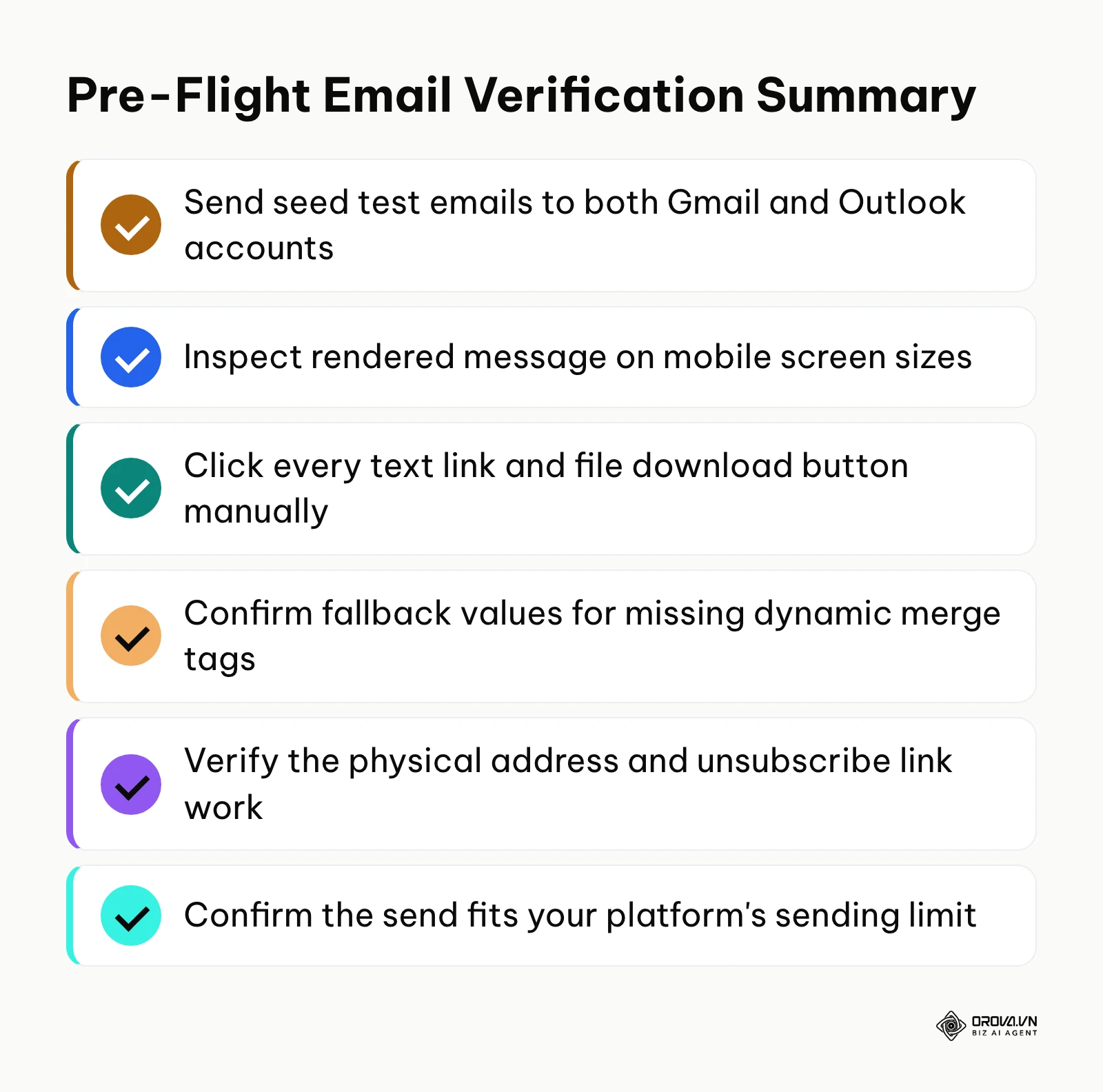
Inside your campaign scheduling interface, open the Review & Send preview window. Execute a mandatory pre-flight audit using the structured table below. Check that the size of the send fits your sending platform: if you send from a business mailbox, the whole campaign must stay within that mailbox provider's daily limit, and a steady sending pace is safer than releasing every message at once.
When the audit is complete, your platform will display zero critical warnings in the campaign pre-check panel. A test dispatch sent to an internal review group will arrive with functional links, intact dynamic variables, and a functioning unsubscribe mechanism.
A common failure is forgetting to test the unsubscribe link. In general terms, the US CAN-SPAM Act expects commercial email to carry a working opt-out and a valid postal address, and the EU GDPR expects a lawful basis such as consent for marketing to people in the EU; check the rules that apply to your audience. Gmail and Yahoo also expect bulk senders to offer easy unsubscribing, and recipients who cannot leave a list tend to press the spam button instead.
The summary diagram below details the essential verification steps required before scheduling your campaign.
| Verification Category | Item to Check | Common Failure Symptom | Verification Status |
|---|---|---|---|
| Authentication | SPF, DKIM, and DMARC alignment | Test message lands in spam or shows a warning banner | Pass / Fail |
| Personalization | Dynamic fallback merge strings | Email displays "Hello {{First_Name}}" in body | Pass / Fail |
| Hyperlinks | Destination URLs and UTM parameters | Broken 404 error page or missing tracking tags | Pass / Fail |
| Unsubscribe Link | One-click unsubscribe functionality | Link is inactive or points to broken landing page | Pass / Fail |
| Responsive Layout | Mobile rendering on iOS and Android | Horizontal scrolling required, microscopic buttons | Pass / Fail |
| Sender Identity | Business name and postal address in the footer | Footer missing, readers cannot tell who sent the email | Pass / Fail |
| File Attachments | Download links instead of raw files | Heavy MIME file attachment triggers spam filter | Pass / Fail |
| Sending Volume | Campaign size against your platform's sending limit | Sending stops partway through the list | Pass / Fail |
If a campaign would not fit within your mailbox provider's daily limit, schedule it across several days or move it to a dedicated email marketing platform. Do not spread it across additional company mailboxes to get around the limit; providers treat that pattern as abuse.
Step 6: Track email marketing conversions and revenue attribution
Evaluate campaign efficacy by measuring downstream transactional revenue and confirmed sales meetings rather than relying solely on vanity open rates.
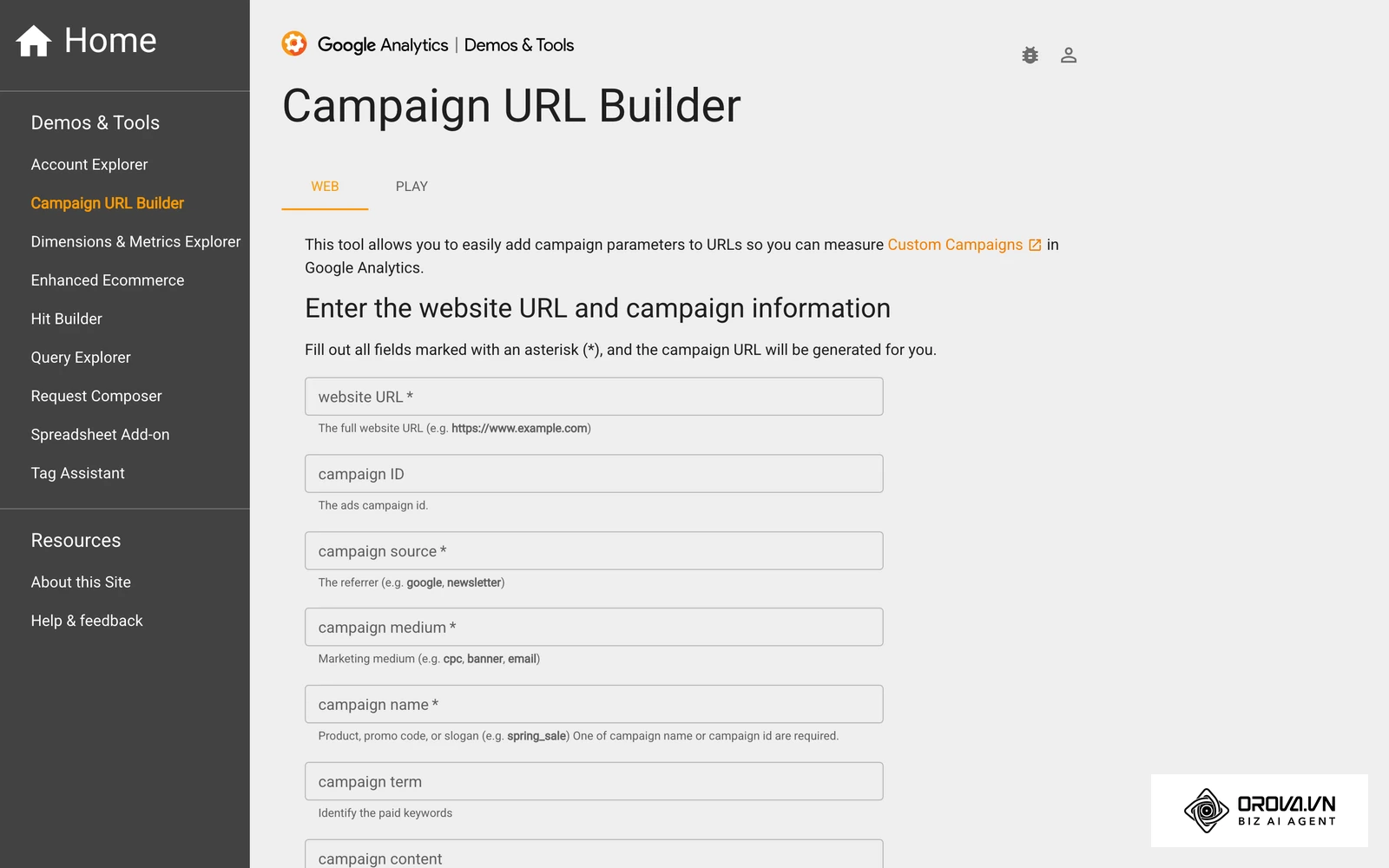
Open your tracking setup interface and navigate to Conversions or Integrations. When configuring campaign links, append standardized UTM parameters: set utm_medium=email, utm_source=newsletter, and utm_campaign=[campaign_name]. To capture true sales transactions, connect your e-commerce checkout or booking platform directly via a dedicated Conversion API or server-side webhook rather than relying exclusively on browser cookies. In your analytics console or CRM for small business, define a specific conversion event (such as Order_Completed or Discovery_Call_Booked) with an assigned monetary value and an attribution window of 30 days.
Navigate to your campaign performance report after dispatch. A properly instrumented tracking architecture displays a multi-tier funnel: Delivered -> Opened -> Clicked -> Converted. You will see precise revenue figures attributed to specific campaign IDs rather than ambiguous open percentages.
Relying exclusively on open rates to determine campaign success is a critical error. Ever since Apple introduced Mail Privacy Protection (MPP), Apple Mail clients automatically pre-load remote images, which can record an open even if the person never viewed the message. Track click-to-open ratios (CTOR), link click rates, and verified conversion events to determine your actual return on investment and measure content marketing ROI accurately.
The table below lists what to measure after each campaign and where to find it.
| Metric to Track | How to Measure It | What It Tells You |
|---|---|---|
| Delivered | Sent messages minus bounces in your campaign report | Whether your list and authentication are healthy |
| Clicks | Unique link clicks on UTM-tagged links | Whether the content and offer were relevant |
| Replies | Replies received in the sending inbox | Whether readers want a conversation, especially in B2B |
| Conversions | Conversion events (order, booking) inside the attribution window | Whether the campaign produced business results |
| Unsubscribes and spam reports | Campaign report plus Google Postmaster Tools | Whether you are mailing too often or to the wrong people |
Open rates still help you compare subject lines over time, but treat them as a rough signal, not as proof of results.
Step 7: Clean subscriber lists to maintain email marketing sender reputation
Maintain long-term inbox placement by pruning unengaged contacts and isolating deliverability issues before they harm your domain reputation.
Navigate to your subscriber database, open Segments, and build an automated segment labeled Inactive Subscribers. Define the criteria as any contact who has not clicked an email link or registered a confirmed conversion event within the preceding 90 days (for senders mailing weekly) or 180 days (for senders mailing monthly). Deploy a brief two-part re-engagement sequence asking these contacts directly if they wish to remain on your dispatch list. If they do not respond or click within 14 days, permanently unsubscribe or archive them from your active sending lists.
Your active subscriber count will decrease, but your campaign engagement percentages will immediately rebound. Visual confirmation occurs within your deliverability monitoring tools: bounces fall and the spam rate in Google Postmaster Tools stays low. Google's sender guidelines ask senders to keep the reported spam rate below 0.1 percent and never let it reach 0.3 percent.
Small business owners often resist removing inactive contacts because they equate total list size with marketing reach. In reality, carrying dead subscribers tells mailbox providers like Google and Yahoo that your content is unwanted, ultimately dragging your messages into the spam folder for your most profitable customers.
Hypothetical example: An online specialty tea shop had collected email addresses for several years and noticed that product announcements brought in fewer orders each season, with some messages landing in Gmail's spam folder. The owner created an automated sunset segment for contacts who had not clicked any email in six months, sent them one "Do you still want to hear from us?" message, and archived everyone who did not respond. The list became smaller, but later campaigns went to people who wanted them, spam placement eased, and clicks rose relative to the number of people mailed.
Master email marketing execution checklist for small businesses
Use this comprehensive operational checklist to track your progress from initial DNS configuration to active campaign measurement.
| Execution Phase | Core Implementation Task | Success Criterion | Estimated Time |
|---|---|---|---|
| Phase 1: Authentication | Publish SPF, DKIM, and DMARC TXT records in DNS | MXToolbox displays green passes across all protocols | 30 minutes |
| Phase 2: Sending Platform | Choose a dedicated platform or connect your business mailbox | Test message arrives with SPF, DKIM, and DMARC passing | 20 minutes |
| Phase 3: List Building | Upload opted-in records and activate double opt-in forms | Zero syntax errors, test form creates confirmed lead | 30 minutes |
| Phase 4: Copywriting | Draft five-part welcome flow with fallback merge tags | Sequence triggers automatically upon form completion | 60 minutes |
| Phase 5: Pre-Flight | Run 8-point checklist (links, footers, mobile rendering) | Seed test emails display clean layout across devices | 20 minutes |
| Phase 6: Attribution | Append UTM tags and connect Conversion API endpoints | Revenue figures link to specific campaign IDs | 30 minutes |
| Phase 7: List Hygiene | Automate sunset policy for contacts inactive for 90 days | Spam rate in Postmaster Tools stays below 0.1% | 15 minutes |
Ready to send your first permission-based campaign? Try Orova Connect free until July 7, 2027: preview who will receive it, add your unsubscribe link, send yourself a test, and move interested recipients into your CRM. No card required.
Common email marketing mistakes and troubleshooting procedures
When managing campaigns across diverse inbox ecosystems, technical issues inevitably arise. Use the troubleshooting matrix below to identify and rectify root causes quickly.
| Operational Mistake | Common Root Cause | Corrective Action |
|---|---|---|
| Messages land in Spam folder | DMARC failure or spam complaints > 0.3% | Verify DNS alignment; pause blasts and prune inactive contacts |
| Incomplete personal tags visible | Missing default fallback parameters in code | Configure universal merge tag fallbacks (e.g., Hello there) |
| Skyrocketing bounce rates | Sending to old, purchased, or scraped contact lists | Remove contacts who never opted in; ask older contacts to reconfirm |
| Campaign abruptly stops sending | Send size exceeded the mailbox provider's daily limit | Schedule across several days or move to a dedicated email platform |
| High unsubscribe spikes | Inconsistent frequency or aggressive selling | Reset expectations; balance educational value with commercial offers |
| Inaccurate performance data | Evaluating success solely via open rates | Shift primary reporting focus to click-to-open and sales conversions |
If you want campaigns, replies, and customer records in one place, Orova Connect includes email campaigns that send from the company mailbox you connect over IMAP/SMTP, not from an Orova mail server, so SPF, DKIM, and DMARC stay with your own domain administrator. Before sending, Preview recipients counts who will receive the message and leaves out duplicates and people who already unsubscribed; you insert a personal unsubscribe link for each recipient yourself. After sending, the report shows a Sent, Delivered, Opened, Clicked, Replied, Converted funnel, separates real opens from machine pre-loads, counts conversions your website reports through the Conversion API, and lets you add interested recipients to your CRM.
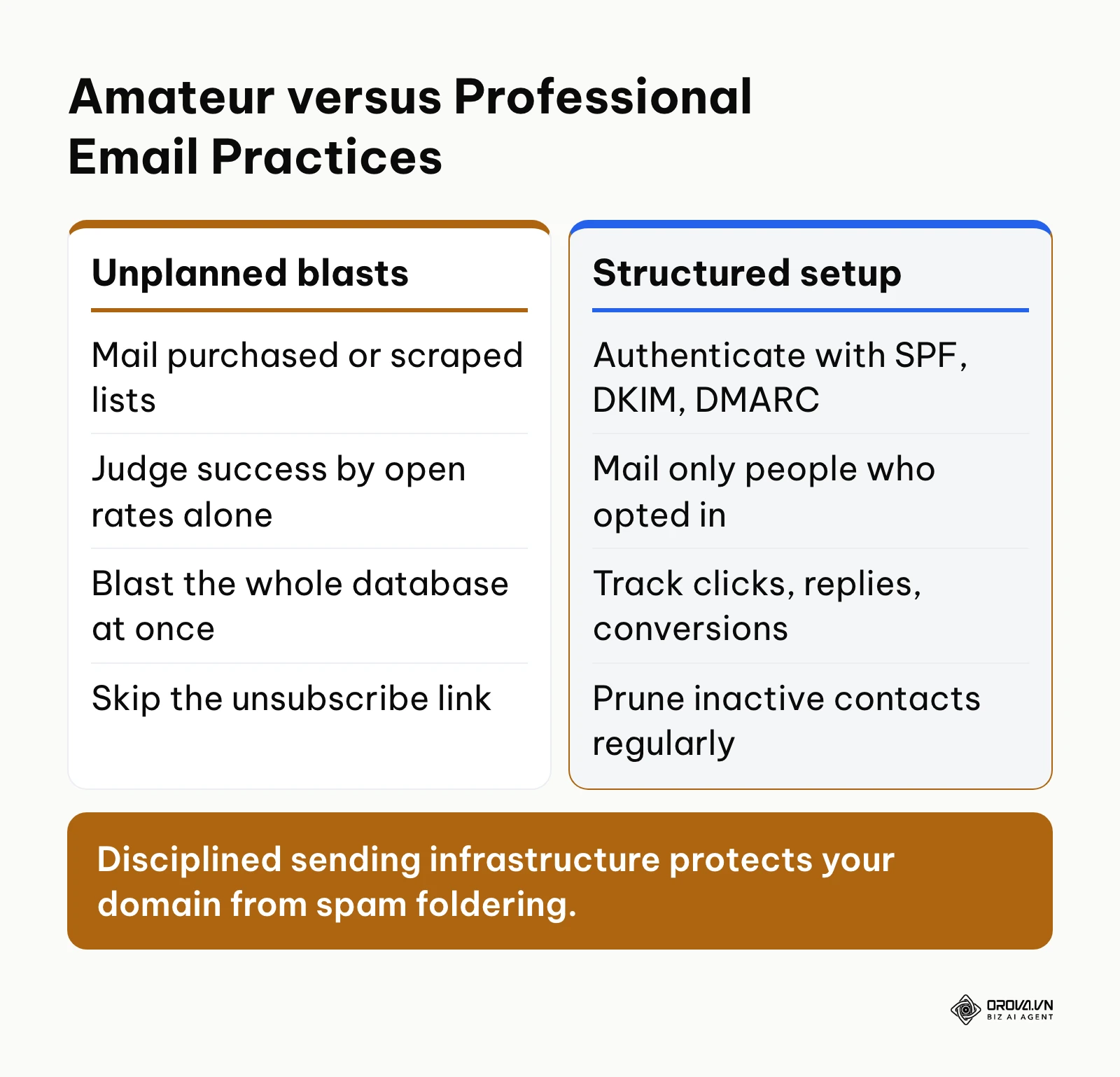
The comparison diagram below illustrates the operational differences between unstructured email blasts and disciplined small business sending setups.
Measuring email marketing performance after campaign launch
To verify whether your email marketing initiatives are functioning effectively, monitor four primary health metrics inside your reporting dashboard.
| Health Metric | Where to Check It | What to Watch For |
|---|---|---|
| Delivery rate | Campaign report | A steady drop usually means the list is aging or authentication has broken |
| Click-to-open rate (CTOR) | Campaign report: unique clicks compared with opens | How relevant the message was; compare with your own previous campaigns, not industry averages |
| Spam complaint rate | Google Postmaster Tools and provider dashboards | Any rise after a send; keep it well under Google's thresholds |
| Conversion rate | Conversion events inside your attribution window | Share of recipients who bought, sent an inquiry, or booked a call |
On spam complaints, the threshold is published: according to Google Workspace Admin Help in their Email sender guidelines (2024), senders must implement SPF, DKIM, and DMARC authentication while keeping reported spam rates below 0.3 percent to avoid widespread inbox rejection.
Review these metrics a few days after each send and compare them with your previous campaigns, so you judge trends rather than single numbers.
Trends in email marketing for small businesses over the next few years: author's perspective
Unauthenticated, batch-and-blast email already struggles to reach the inbox. Over the next few years, I anticipate three structural shifts that will redefine how small businesses communicate with their audiences.
First, I believe static email templates will increasingly give way to context-aware content assisted by artificial intelligence. Today, we already see machine learning algorithms assembling tailored product recommendations in enterprise software. Within two years, I expect small business email engines to dynamically customize paragraphs, value propositions, and calls to action based on real-time CRM behavioral triggers rather than static list segments. Senders who keep mailing identical weekly newsletters to everyone are likely to see engagement slip. However, if privacy regulations restrict behavioral tracking further, this shift could take longer to mature. Small businesses should prepare now by organizing their customer data fields meticulously.
Second, I believe major mailbox providers will tighten cryptographic domain requirements even further. As specified by the Internet Engineering Task Force (IETF) in RFC 7489 Domain-based Message Authentication, Reporting, and Conformance (2015), an explicit DMARC policy tells receiving mail servers how to treat messages that fail cryptographic verification. Today, basic SPF and DKIM authentication are mandatory. In the coming years, I lean toward the view that receiving servers will give more weight to stricter DMARC policies such as p=reject and to brand verification standards like BIMI (Brand Indicators for Message Identification). Senders without a verifiable domain identity are likely to see more of their mail rejected.
Third, I expect first-party conversion tracking to matter more than client-side engagement reporting. With privacy firewalls rendering pixel-based open tracking increasingly unreliable, small businesses must tie campaign dispatches directly to server-side purchase webhooks and CRM deal stages. The useful tools will be the ones that show which campaigns led to replies, bookings, and orders, not the ones that report the biggest open numbers.
Frequently asked questions about how to start email marketing for a small business
How should a B2B small business with under 500 contacts send campaigns compared to large ESPs?
For B2B consulting, corporate services, and regional contractors with a few hundred contacts who opted in, a plain, personal email from a business mailbox often reads more naturally than a designed newsletter. You can send it through a campaign tool connected to that authenticated mailbox, as long as each send stays within your mailbox provider's daily limit and every message includes a working unsubscribe link. If the list grows beyond that, move to a dedicated email marketing platform rather than adding more mailboxes.
How can I measure true sales revenue when Apple Mail Privacy Protection inflates open rates?
Because Apple Mail Privacy Protection automatically caches images on proxy servers, open rates often appear artificially high. To measure true sales performance, configure standardized UTM tracking parameters on every destination link and deploy server-side conversion tracking. Connect your shopping cart or appointment booking engine directly to your marketing dashboard via Conversion API endpoints so closed deals can be attributed to the campaign that preceded them.
What happens if my company mailbox hits its daily sending limit during an active campaign?
If a mailbox reaches its provider's daily sending limit, the provider rejects or defers further messages until the limit resets, and accounts that hit the limit repeatedly can be restricted. Plan sends so they stay within the limit, schedule larger campaigns across several days, or move to a dedicated email marketing platform. Do not spread one campaign across extra company mailboxes to get around the limit.
What is the role of artificial intelligence in small business email marketing today?
In current email operations, artificial intelligence serves primarily as an assistive tool for copy editing, tone adjustment, and multilingual translation rather than autonomous campaign management. Senders can use AI to rewrite subject lines for higher clarity, personalize body content variations without fabricating factual figures, and localize sales proposals across multiple languages while preserving underlying technical merge tags.
Do I need a dedicated IP address when starting email marketing for a small business?
Most small businesses do not need a dedicated IP address. Dedicated IPs need consistent, steady sending volume to build and keep a good reputation; if your volume is modest or irregular, mailbox providers have little history to judge it by. A reputable email marketing platform's shared sending pool, or your authenticated business mailbox for small personal sends, is usually the better fit.
Where should you start with email marketing today?
To build momentum without becoming paralyzed by technical complexity, identify which of the following three operational scenarios describes your business today and execute that single foundational task.
If you have zero subscribers and only a basic website, your priority is lead intake infrastructure. Spend your next two hours creating a concise, high-value one-page checklist or resource guide that addresses a frequent customer hurdle. Embed a clean two-field opt-in form on your homepage offering this guide, activate double opt-in confirmation, and connect the form to your contact database. Do not worry about composing complex newsletters until you have verified inbound leads flowing into your system.
If you possess a legacy spreadsheet of several hundred past clients and offline contacts, your priority is database sanitation. Do not blast this entire list immediately. Export the file, remove entries older than two years, and keep only people who bought from you or asked to hear from you, and fix obvious typos. Then import those records, authenticate your domain DNS with SPF, DKIM, and DMARC, and send a warm, personal check-in note re-establishing your business relationship.
If you currently send sporadic broadcast newsletters that produce low engagement and zero sales, your priority is conversion attribution. Audit your links, configure server-side conversion goals for your primary checkout or booking forms, and set up an automated three-part welcome cadence for every new contact. Taking that single focused action today is the most reliable way to discover how to start email marketing for a small business and build an enduring channel of owned customer revenue.
About the author

Builder of Orova
Nguyễn Đỗ Trọng Ân has 8 years of experience in marketing, including 6 years managing market development across Asia. He builds Orova, a Biz AI Agent that never sleeps: it plans, runs and optimizes work for businesses.
Run your business with AI Agents
Orova is the always-on Biz AI Agent — it plans, runs, and optimizes the work for you.
Save time, unlock productivity.