
Client database software: 8 best tools in 2026 & comparison table

Choosing the right client database software is one of the highest-leverage operational decisions a growing sales team, professional service firm, or agency can make. When organizations rely on fragmented spreadsheets, sales reps overwrite critical account notes, marketing leads go uncontacted for days, and departing employees can export entire customer books undetected. Choosing the wrong platform results in wasted subscription fees, complex implementation curves, and internal adoption failure.
To build this comparison, we evaluated dozens of platforms against six core operational criteria: contact record customization, department-level permission security, lead assignment and response automation, data import validation, reporting clarity, and transparent pricing. Every tool listed below has been tested against real-world sales operations as of 2026. This guide breaks down each option candidly so you can choose the software that matches your team structure without paying for bloated modules you will never use.
Client database software comparison: 8 top tools at a glance
Client database software stores structured customer profiles, tracks communication timelines, and regulates team access across sales pipelines. The comparison table below highlights how the eight top options handle record management, team scale, and operational security.
| Platform | Best For | Top Strength | Tier & Licensing Model | Quick Verdict |
|---|---|---|---|---|
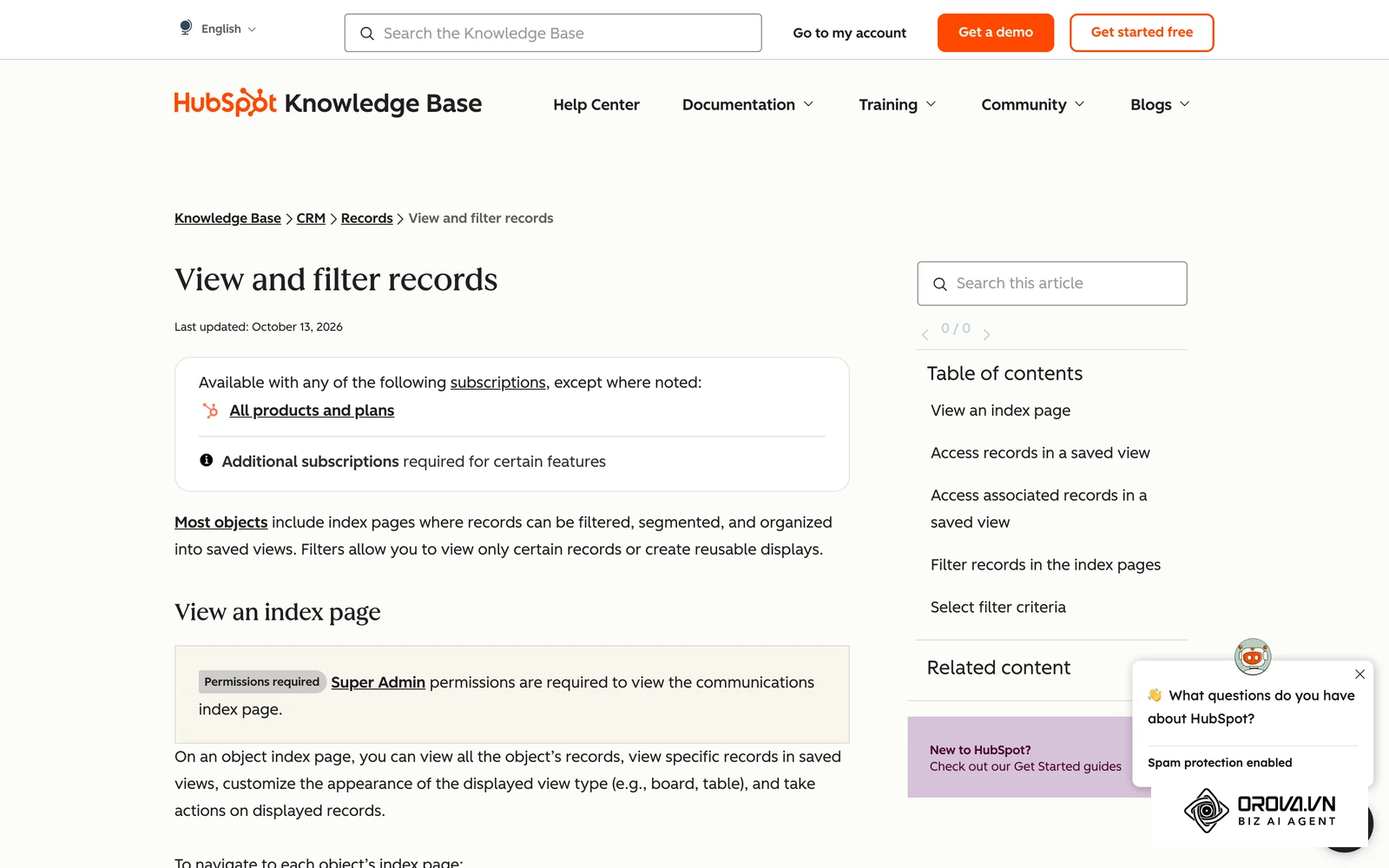
| HubSpot CRM | Inbound marketing teams | Unified marketing-to-sales timeline | Free tier available; tiered per-seat subscription | Intuitive entry point with advanced scaling tiers |
| Pipedrive | Deal-centric sales teams | Clean visual deal pipeline | Tiered per-seat subscription (Essential to Enterprise) | Exceptional pipeline focus, weaker service ticket depth |
| Salesforce Sales Cloud | Enterprise corporations | Infinite data customization and governance | Tiered per-seat enterprise suite | Industry benchmark for scale, high setup complexity |
| Zoho CRM | Cost-conscious growing businesses | Broad ecosystem integration at low cost | Free tier available; tiered per-seat subscription | Feature-packed suite, requires setup across modules |
| Airtable | Custom workflow builders | Relational database flexibility with low code | Free tier available; tiered per-seat subscription | Superb custom views, lacks native phone integration |
| monday CRM | Cross-department collaboration | Visual project and client tracking | Tiered per-seat subscription (minimum 3 seats) | Highly flexible boards, limited deep sales governance |
| Capsule CRM | Small consulting practices | Minimalist contact and task organization | Free tier available; tiered per-seat subscription | Fast onboarding, lightweight workflow automation |
| Orova CRM | Teams needing strict data boundaries | Department permissions and auto lead recycling | Free until July 7, 2027; quota-based tiers | Strong operational control from lead to cash collection |
1: HubSpot CRM
HubSpot CRM is an industry staple for companies that align content marketing with outbound sales outreach. It organizes individual contacts, company accounts, deals, and service tickets into a clean timeline view.
Best for
Small to mid-sized businesses with active inbound lead generation that need marketing, sales, and customer service teams working within a single customer view.
Key strengths
- Unified activity stream: Website page visits, form submissions, marketing email opens, and logged phone calls appear chronologically on each client record. Reps enter calls knowing exactly which whitepapers or pricing pages the prospect inspected.
- Generous foundational tier: The no-cost tier accommodates unlimited users and up to 1,000,000 contacts, making it accessible for startups standardizing raw records before upgrading.
- Extensive application marketplace: HubSpot connects with virtually every major business application, from accounting tools to calendar schedulers, minimizing custom webhook development.
Weaknesses
- Steep tier upgrade pricing: Basic contact management is affordable, but enterprise governance features such as custom permissions, hierarchical team views, and multiple pipeline reports require Professional or Enterprise tiers that cost hundreds of dollars monthly.
- Rigid data relationships: Standardizing non-linear relationships across accounts requires custom objects, which are locked behind higher-tier packages.
Pricing
Free foundational tier available with core contact tools. Paid packages scale across Starter, Professional, and Enterprise editions based on required automation depth and governance controls.
When to choose
Choose HubSpot CRM if your primary customer acquisition channel is inbound digital marketing and you want a single pane of glass without hiring a dedicated database administrator.
2: Pipedrive
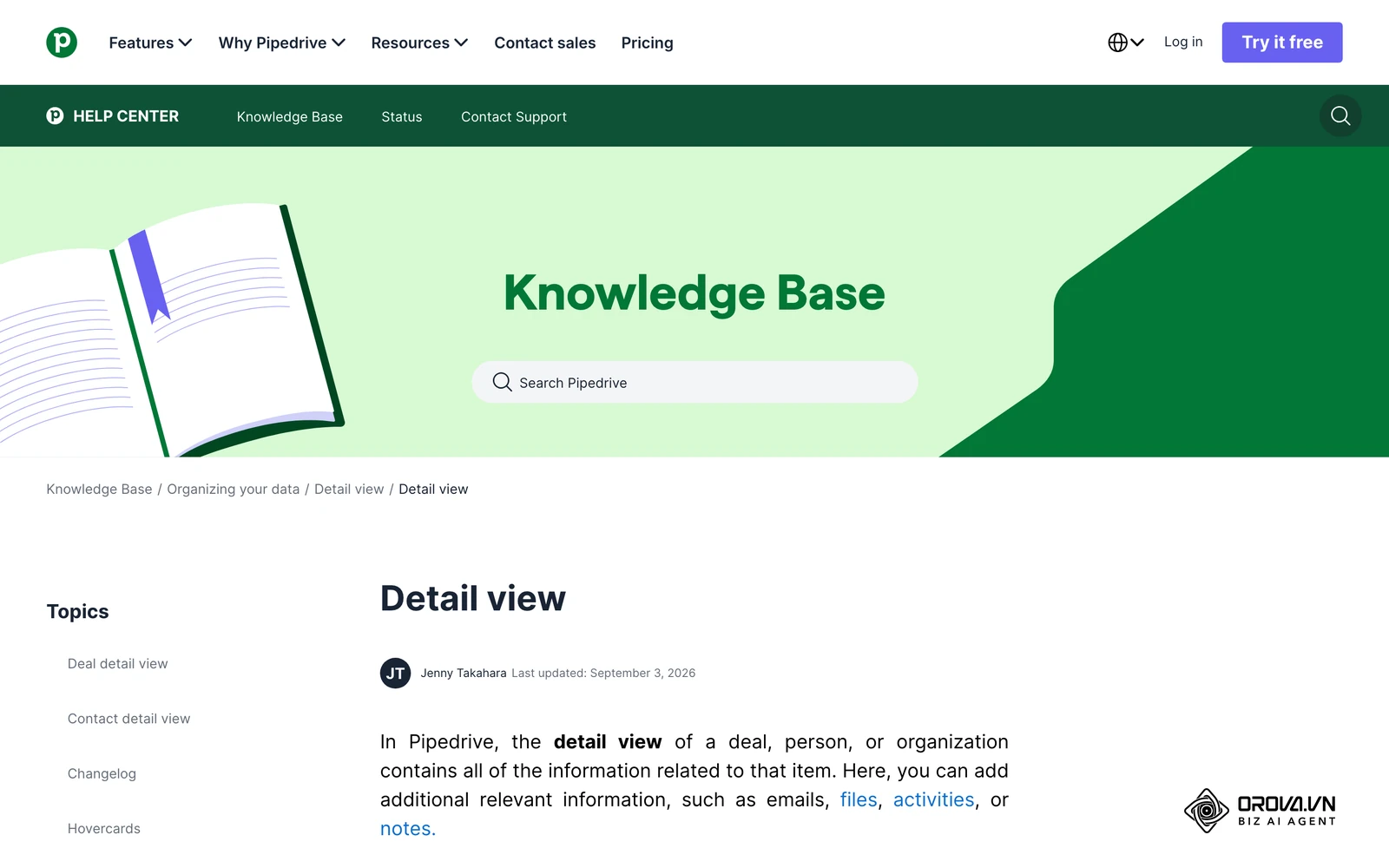
Pipedrive was designed by sales managers specifically around activity-based selling. Rather than acting as a static Rolodex, the software treats every client database entry as an active deal moving toward a revenue milestone.
Best for
B2B sales teams running structured outbound cadences, commercial brokerages, and agencies managing visual deal stages.
Key strengths
- Intuitive pipeline interface: Deal cards display critical contact details, deal values, and decay warnings directly on a drag-and-drop Kanban board.
- Built-in sales activity reminders: The database enforces momentum by prompting reps to schedule a follow-up call, meeting, or email the moment a current task is completed.
- Fast contact timeline filtering: Reps can instantly isolate notes, sent emails, files, or payment updates without scrolling through irrelevant system logs.
Weaknesses
- Weak native marketing engine: Pipedrive lacks built-in landing page hosting and native inbound lead nurturing tools, requiring external third-party software for marketing automation.
- Basic permission splitting: Lower-tier plans offer limited ability to restrict field editing while maintaining account viewing access across departmental subdivisions.
Pricing
Tiered subscription per user per month across Essential, Advanced, Professional, and Enterprise plans, structured around sales pipeline volume and workflow automation requirements.
When to choose
Choose Pipedrive if your sales team struggles with cluttered contact screens and needs an activity-driven pipeline that keeps reps focused on deal progression.
3: Salesforce Sales Cloud
Salesforce Sales Cloud remains the global enterprise standard for complex relational databases, governance, and custom data architecture.
Best for
Mid-market enterprises, multi-division corporations, and highly regulated industries requiring strict compliance, complex sales pipelines, and intricate reporting hierarchies.
Key strengths
- Unrestricted architectural flexibility: Salesforce allows developers to build custom objects, relational joins, automated validation formulas, and custom interface layouts for different employee roles.
- Deep security and role hierarchies: Administrators can restrict data access down to individual database cells based on territory, management level, or department trees.
- Global analytics ecosystem: Custom reports and dashboards can synthesize millions of customer records across disparate corporate entities and product lines.
Weaknesses
- High implementation overhead: Out-of-the-box Salesforce rarely fits operational needs without months of configuration, third-party system integrators, or certified administrators.
- Significant total cost of ownership: Platform licenses, sandbox environments, storage add-ons, and developer costs make Salesforce prohibitively expensive for lean teams.
Pricing
Tiered enterprise subscription ranging from Starter Suite up through Pro Suite, Enterprise, and Unlimited editions, structured around organizational scale and governance requirements.
When to choose
Choose Salesforce Sales Cloud if your enterprise operates multiple sales divisions, requires strict compliance audits, and possesses the budget to maintain dedicated system administrators.
| Enterprise Capability | Native Sales Cloud Functionality | Administrative Requirement |
|---|---|---|
| Custom Object Modeling | Relational schema with unlimited parent-child joins | Certified Salesforce Admin |
| Granular Field Security | Cell-level view/edit permissions across role trees | Security profile configuration |
| Multi-Entity Analytics | Cross-division pipeline and revenue forecasting | Enterprise Analytics Cloud |
4: Zoho CRM
Zoho CRM provides an extensive, feature-heavy customer database platform tailored for cost-conscious companies that want enterprise-style functionality without high license costs.
Best for
Growing businesses seeking an all-in-one software ecosystem spanning invoicing, customer support, and sales pipelines on a predictable budget.
Key strengths
- Comprehensive out-of-the-box tooling: Offers automated assignment rules, email tracking, visual blueprints for sales processes, and basic territory management at entry-level tiers.
- Broad native suite integration: Links directly with Zoho Books for invoicing, Zoho Desk for support tickets, and Zoho Campaigns for bulk messaging.
- Custom field diversity: Supports a wide array of field formats, lookup fields, and conditional layout rules that show or hide inputs based on customer status.
Weaknesses
- Cluttered user experience: The administrative interface contains overlapping configuration menus that can confuse non-technical business owners.
- Ecosystem complexity: Navigating cross-application synchronization rules and distinct configuration menus between Zoho CRM and companion apps requires dedicated administrative time.
Pricing
Free tier available for up to three users. Paid packages scale across Standard, Professional, and Enterprise plans, with bundled access available via the Zoho One suite.
When to choose
Choose Zoho CRM if your company already uses other Zoho products and you need a versatile contact management database with advanced automation on a modest budget.
| Operational Capability | Zoho CRM Standard Functionality | Required Companion Module |
|---|---|---|
| Contact & Deal Stages | Native timeline, pipeline stages, activity logging | Core Zoho CRM |
| Commercial Invoicing | Native basic quotes; full tax invoicing via Zoho Books | Zoho Books integration |
| Marketing Outreach | Web forms and lead capture | Zoho Campaigns / Marketing Automation |
| Customer Support Tickets | Contact-linked customer service history | Zoho Desk integration |
5: Airtable
Airtable combines the familiar, flexible row-and-column layout of a spreadsheet with the relational architecture and field validation of a relational database.
Best for
Operations managers, project-driven service teams, and creative agencies that find conventional CRM structures too rigid for their client onboarding workflows.
Key strengths
- Relational data linking: Easily link client records to project deliverables, invoice line items, creative assets, and vendor accounts without writing SQL queries.
- Multiple visual perspectives: View the same client database as a grid, a Kanban board, a calendar of check-in meetings, or a gallery of client accounts.
- Visual interface builder: Administrators can design drag-and-drop web dashboards that allow account managers to review client data without seeing the underlying database tables.
Weaknesses
- Lacks built-in sales communication: Airtable does not include native click-to-dial telephony, integrated sales mailboxes, or automated sales activity tracking.
- Record volume ceilings: Base workspaces enforce hard row limits (e.g., 50,000 rows on Team plans), making it unsuitable for massive historical lead archives.
Pricing
Free plan available with base record limits. Paid tiers scale across Team and Business subscriptions based on row allowances and interface customization depth.
When to choose
Choose Airtable if your primary objective is tracking complex, customized client deliverables and account relationships rather than managing traditional cold-calling sales pipelines.
6: monday CRM
Built upon the monday.com Work OS platform, monday CRM provides an approachable, highly visual environment for tracking accounts, contacts, and deal stages.
Best for
Teams where project managers, marketing staff, and sales reps must collaborate on client onboarding and account management inside a shared workspace.
Key strengths
- Visual workflow customization: Color-coded status tags, automated stage timelines, and flexible columns make account handoffs between sales and delivery teams obvious.
- Pre-built integration recipes: Connects easily with Gmail, Microsoft Outlook, Slack, and DocuSign using simple "if-this-then-that" logic without technical scripts.
- Fast team adoption: Employees familiar with project boards adapt to monday CRM in hours, avoiding the resistance common with legacy enterprise software.
Weaknesses
- Minimum user tiers: Most paid tiers enforce a minimum purchase of three seats, preventing single-user deployments.
- Limited relational data depth: Linking complex parent-child business entities (such as holding companies with dozens of regional subsidiaries) can feel clunky compared to dedicated SQL or CRM platforms.
Pricing
Tiered per-seat subscription across Basic, Standard, and Pro CRM packages, subject to a three-user minimum commitment.
When to choose
Choose monday CRM if your team prioritizes clean interface design, rapid user onboarding, and seamless operational handoffs from sales closure to project fulfillment.
| Workflow Function | monday CRM Operational Behavior | Best-Fit Team Scenario |
|---|---|---|
| Visual Deal Boards | Color-coded status columns with automated stage notifications | Teams needing instant pipeline visibility |
| Client Project Handoff | Automatic conversion of won deals into project boards | Agencies delivering customized services |
| Cross-Team Collaboration | Real-time task tagging and internal chat per client card | Multi-department client onboarding |
| Contract Sign-Off | Document review and e-signature trigger recipes | Service firms managing client agreements |
7: Capsule CRM
Capsule CRM offers clean, distraction-free contact management designed for professional service providers, boutique agencies, and independent consultancies.
Best for
Law firms, accounting practices, creative consultants, and small B2B services that want straightforward relationship tracking without enterprise clutter.
Key strengths
- Minimalist contact records: Contact cards summarize interaction histories, active projects, and associated tasks in an uncluttered single-column layout.
- Lightweight sales pipelines: Tracks deals cleanly with configurable milestones and stage probabilities without burdening reps with unnecessary required fields.
- Reliable mobile experience: The clean mobile interface enables consultants to review historical meeting notes and log calls while traveling between client offices.
Weaknesses
- Basic reporting capabilities: Lacks multi-touch revenue attribution, territory quota modeling, and advanced forecasting calculations.
- Limited marketing tools: Does not include native email drip campaigns or behavioral website tracking out of the box.
Pricing
Free tier available for up to two users and 250 contacts. Paid subscriptions scale across Starter, Growth, and Advanced plans based on contact record volume and custom field limits.
When to choose
Choose Capsule CRM if you run a relationship-driven professional service firm and want an organized, fast contact book that employees will actually use every day.
If your team needs a structured client database with department-level view and edit boundaries, automated lead distribution, and quote generation connected to milestone payments, explore Orova CRM. You can configure custom records, define response deadlines per pipeline stage, and import contacts without data corruption.
8: Orova CRM
Orova CRM is designed as a unified workspace for sales teams to organize contacts, operate pipelines, issue quotes, and monitor receivables. It treats customer records as an active operational asset that protects internal data boundaries, recovers neglected revenue, and tracks cash collection directly on the account profile.
Best for
B2B companies, distributor networks, and commercial sales teams managing multi-tier sales departments that need granular privacy controls, field check-ins, and automated lead reclamation.
Key strengths
- Department-based permission boundaries: Unlike platforms that bundle access into basic administrative roles, Orova CRM separates View and Edit permissions independently across department trees. Team managers can grant reps visibility into department accounts without allowing them to modify notes, reassign contacts, or export sensitive contact books to Excel.
- Automated lead recovery SLAs: When reps neglect newly assigned leads beyond a designated stage deadline (configured in minutes), the system warns the owner and automatically reclaims the record back into the shared pool every 10 minutes.
- Connected quote-to-cash workflow: Sales reps generate professional quotes with public viewing links, record phased payment milestones, and track overdue receivables directly on the customer record, preventing discrepancies between sales commitments and collections.
- Field route tracking with check-ins: Field sales teams can plan customer visit routes by day and rep, capturing time-stamped notes, photo proof, and device GPS verification directly into the account record.
Weaknesses
- No standalone mobile application: The software operates via responsive web browsers with desktop push notifications, without a dedicated app store download.
- Manual external communications: Communication action buttons launch external dialers or desktop messaging applications rather than providing built-in VoIP telephony or automated broadcast text dispatching.
Pricing
Orova CRM is free until July 7, 2027. All platform capabilities, including the full custom field suite and department permission controls, are unlocked across all accounts, with tiering determined solely by workspace quota allocations.
When to choose
Choose Orova CRM if your business needs strict separation of view and edit permissions across branch offices, automated mechanisms to eliminate abandoned sales leads, and clear visibility into customer payment collections.
| Operational Pillar | Orova CRM Native Workflow | Solved Business Vulnerability |
|---|---|---|
| Department Boundary | Independent view and edit scopes per branch tree | Unauthorized contact list browsing |
| Automated Recycling | 10-minute scans reclaim neglected leads to pool | Inbound marketing leads dying in queues |
| Quote-to-Cash | Quotes with public links and milestone installments | Sales teams servicing accounts with unpaid debt |
| Field Check-In | GPS-verified route check-ins with photo proof | Unverifiable field sales visit reporting |
Data privacy and granular permissions: protecting client records across teams
A major limitation of generic client database software is the failure to address internal data theft and unauthorized cross-department tampering. In multi-branch operations, sales reps frequently browse leads belonging to competing internal teams, or worse, export full contact lists before departing to a competitor.
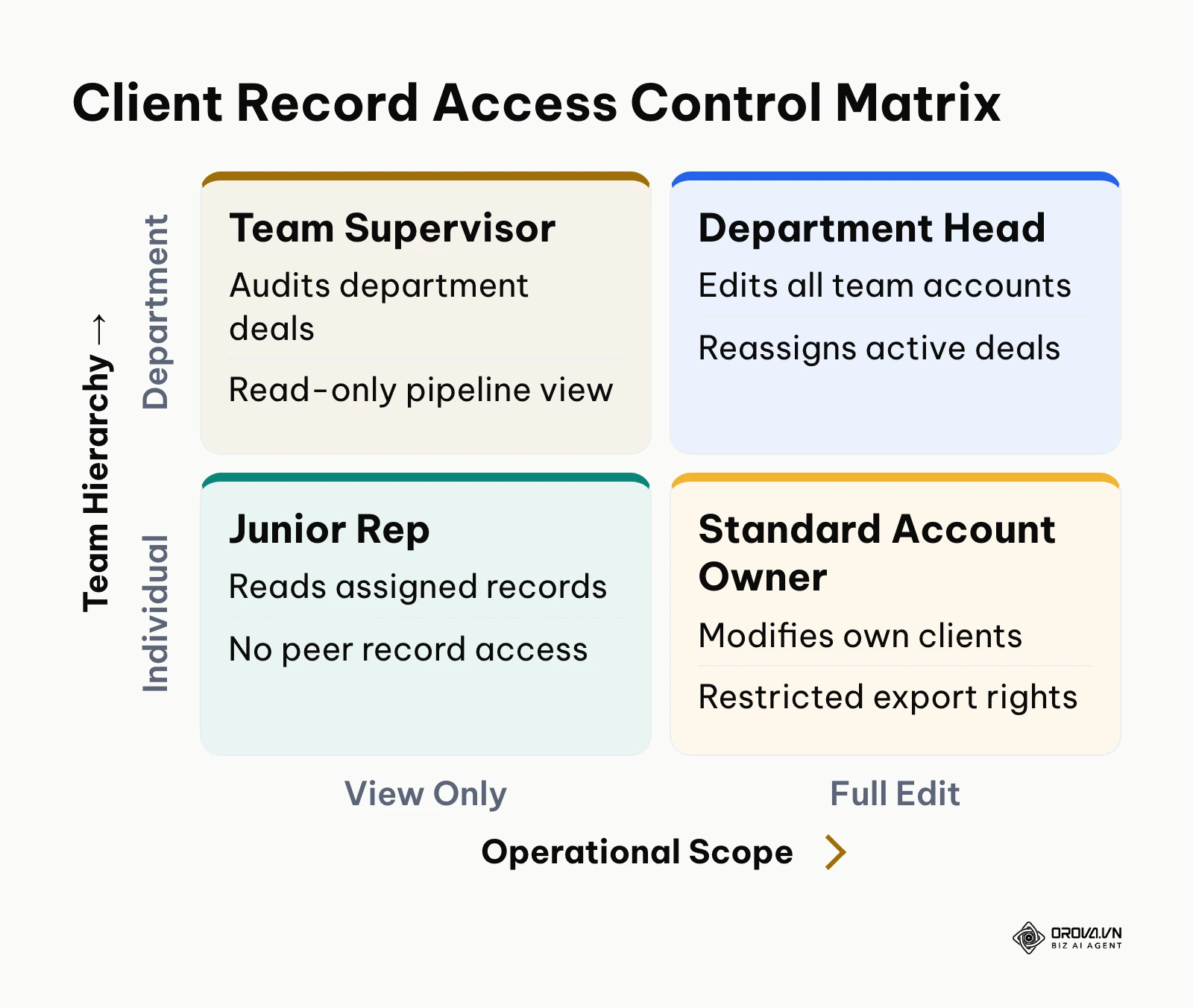
Solving this requires separating View Scope from Edit Scope across your organizational tree, while restricting sensitive destructive actions to system administrators.
+---------------------------------------------------------------------------------+
|                       WORKSPACE PERMISSION STRUCTURE                            |
+---------------------------------------------------------------------------------+
| 1. General Access & Actions                                                     |
|    - Pipeline stage movement        - Internal note logging                     |
|                                                                                 |
| 2. Heavy Administrative Operations (!)                                          |
|    - Excel/CSV contact export (!)   - Duplicate record merging (!)              |
|    - Reassign account manager (!)   - Permanent contact deletion (!)            |
|                                                                                 |
| 3. Customer Scope Separation                                                    |
|    - View Scope: [My Contacts] | [My Department + Sub-branches] | [Shared Pool] |
|    - Edit Scope: [My Contacts] | [Restricted Custom Filter]     | [Locked]      |
+---------------------------------------------------------------------------------+
The matrix below illustrates how granular permissions should be structured across corporate levels:
| Role Level | Permitted View Scope | Permitted Edit Scope | Heavy Operations (!) Allowed |
|---|---|---|---|
| Junior Sales Rep | Own assigned contacts only | Own assigned contacts only | None (Export, Merge, Reassign locked) |
| Senior Account Executive | Own contacts + Shared unassigned pool | Own assigned contacts only | Reassign shared pool to self only |
| Branch / Department Manager | Entire department branch and sub-teams | Entire department branch | Reassign within branch; Export locked |
| Operations Director / Admin | Complete corporate database | Complete corporate database | Full access (Export, Merge, Purge, Audit) |
By locking heavy operations such as data exporting behind administrative authorization, companies eliminate the risk of employees exfiltrating customer lists, while preserving team collaboration on daily pipeline stages.
Lead abandonment SLA and auto-recycling: stopping revenue leaks
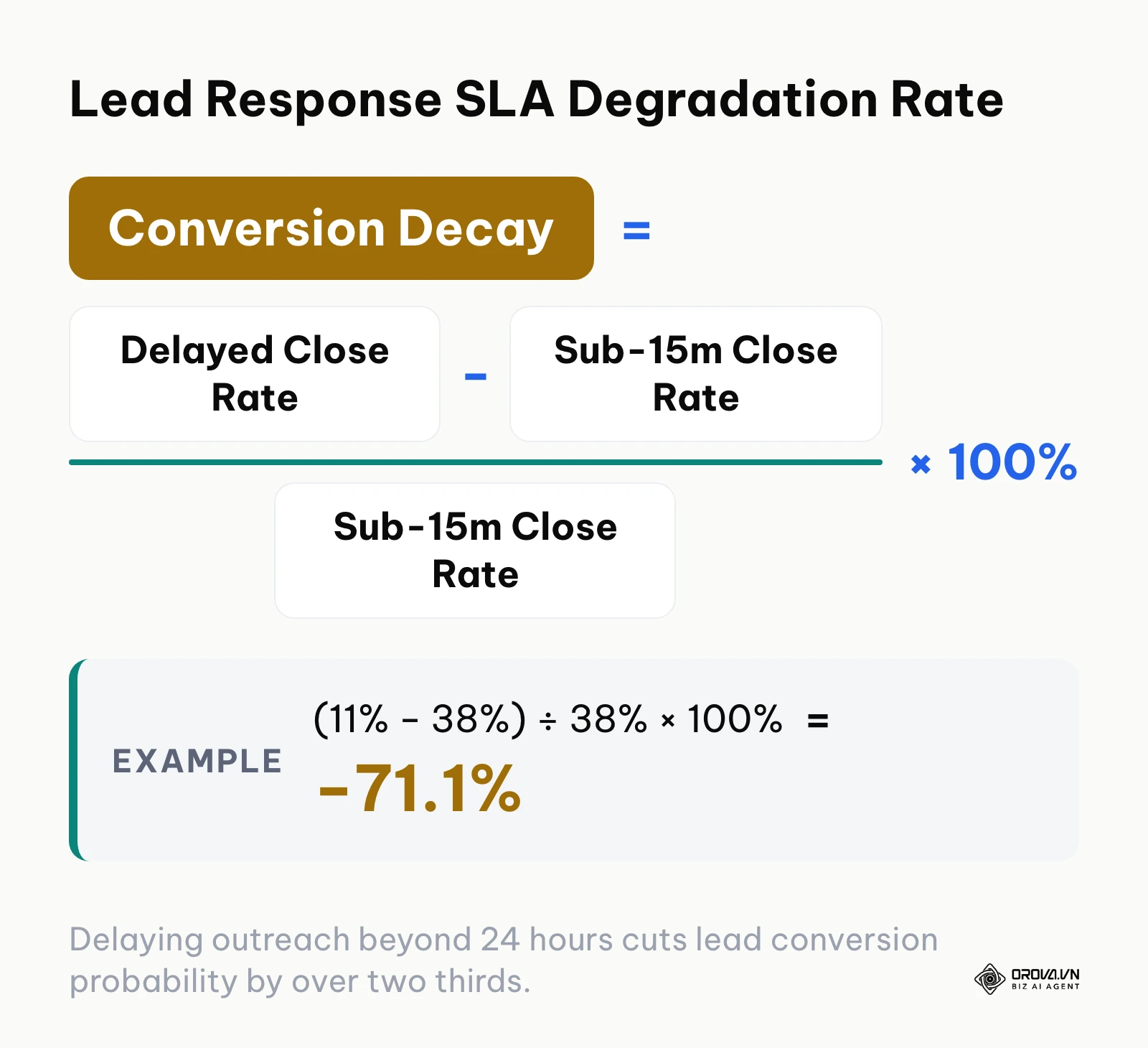
When marketing campaigns generate inbound leads, the speed of initial outreach dictates conversion success. According to the Harvard Business Review study 'The Short Life of Online Sales Leads' (2011), businesses that contact prospective clients within an hour of receiving an inquiry are nearly seven times more likely to qualify the lead than those that wait even an hour longer. Yet in many sales teams, newly assigned leads sit untouched in rep queues for days.
+-----------------------------------------------------------------------------------+
|                         LEAD ABANDONMENT RECYCLING TIMELINE                       |
+-----------------------------------------------------------------------------------+
| [0 min]          [45 min]                      [60 min]           [70 min]        |
| Lead Assigned -> Rep Inactive -> Warning Alert -> SLA Breached -> Reclaim Sweep   |
| (Web inquiry)    (No calls/notes) (Browser ping)  (Deadline hit)   (Auto-returned |
|                                                                    to Shared Pool)|
+-----------------------------------------------------------------------------------+
Numerical example: calculating revenue loss from lead neglect
Consider a commercial B2B supplier receiving 100 qualified inquiries per week, with an average deal size of 2,500.
| Outreach Speed Benchmark | Lead Qualification Rate | Weekly Closed Deals (out of 100) | Weekly Revenue Generated | Lost Revenue vs Fast Response |
|---|---|---|---|---|
| Sub-15 Minute Contact | 38% | 38 deals | 95,000 | 0 (Baseline) |
| 24+ Hour Delayed Contact | 11% | 11 deals | 27,500 | -67,500 / week |
- Fast response benchmark (under 15 minutes): Reaching leads promptly yields an average close rate of 38%, generating 38 closed deals and 95,000 in weekly revenue.
- Delayed response reality (over 24 hours): Allowing inquiries to sit for 24 to 48 hours causes the qualification rate to decay to 11%, generating just 11 closed deals and 27,500 in weekly revenue.
- Weekly revenue leakage: The delay costs the business 67,500 every single week in uncaptured sales from paid advertising investments.
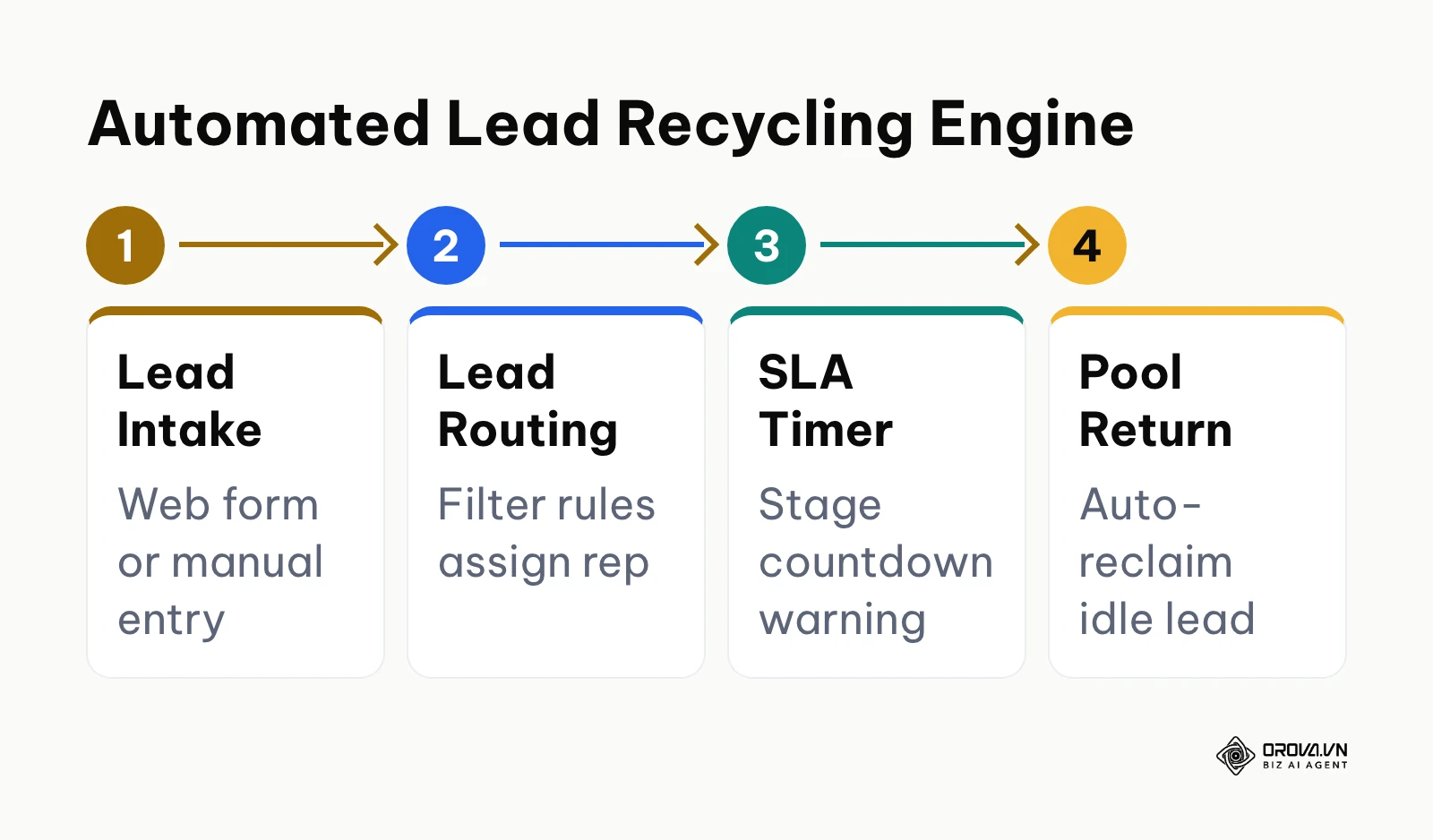
To resolve this without micro-management, implement an automated lead recycling engine:
$$\text{Lead Abandonment Threshold} = \text{Stage Target Response Time (minutes)}$$
When a lead remains in the "New Ingestion" stage without a logged call, meeting, or email interaction past the stage limit (for example, 60 minutes), the system triggers a warning notification. If the timer reaches expiration, an automated background sweep running every 10 minutes strips the inactive rep's ownership and returns the contact to the unassigned shared pool for reassignment to an active agent.
Excel to database migration: the 8-point import validation checklist
Most database implementations fail during the initial spreadsheet import. Uploading messy Excel or CSV workbooks introduces duplicate phone numbers, scrambled birthdates, and mismatched company names that corrupt the entire CRM environment.
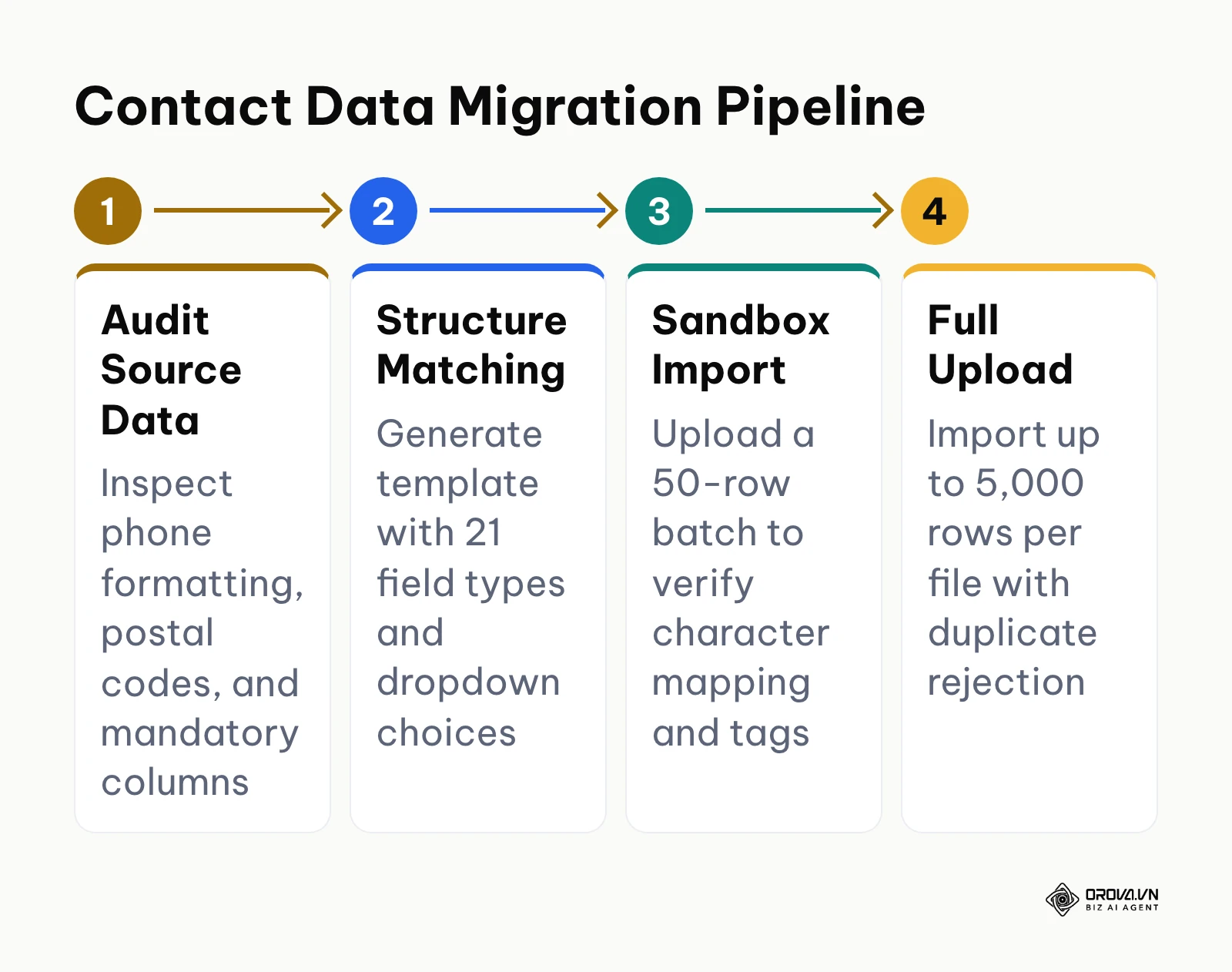
To maintain clean records, follow established protocols for cleaning CRM data before moving files into production.
| # | Common Structural Error | Data Corruption Risk | Pre-Import Standardization Solution |
|---|---|---|---|
| 1 | Inconsistent phone number syntax ((555) 019-2834 vs +15550192834) | Duplicate account creation and failed messaging links | Normalize all numbers to E.164 international format (+15550192834) using Excel text functions. |
| 2 | Inverted date formatting (DD/MM/YYYY mixed with MM/DD/YYYY) | Corrupted follow-up schedules and inaccurate deal aging | Lock column format to standard ISO-8601 (YYYY-MM-DD) across all date fields. |
| 3 | Blank required operational cells (missing email or rep owner) | Incomplete records that bypass lead routing rules | Apply spreadsheet data validation to highlight and reject blank cells in required columns. |
| 4 | Free-text variations in status columns ("Hot", "hot lead", "Warm") | Fragmented pipeline reporting and broken stage filters | Enforce strict drop-down picklists matching software stage labels exactly. |
| 5 | Trailing spaces in names and email addresses ("john@domain.com ") | Bounced automated emails and failed search queries | Run the =TRIM() formula across every text column to eliminate invisible whitespace. |
| 6 | Merged cells and multi-line notes inside a single row | Data shifting across neighboring database columns | Unmerge all cells; separate notes into individual timestamped rows or dedicated text blocks. |
| 7 | Combined contact and company records in one string | Inability to link multiple stakeholders to a single business | Separate fields into "Primary Contact", "Job Title", and "Legal Company Name". |
| 8 | File size exceeding system import limits | Gateway timeouts and half-uploaded, corrupted tables | Split large archives into verified batches of no more than 5,000 rows per file. |
Connecting client records with cashflow: quotes, receivables, and invoices
A client database that only stores contact cards isolates your sales team from financial reality. Sales reps may invest weeks nurturing an account, completely unaware that the customer's finance department has three overdue invoices pending collection.
Connecting the customer book directly to commercial documents resolves this disconnect:
| Financial Milestone Stage | Trigger Event | Customer Account Impact | Operational Action |
|---|---|---|---|
| Quote Acceptance | Client approves terms via public link | Deal moves to "Won"; order generated | Issue deposit request (e.g. 30%) |
| Phased Milestone | Delivery of designated project milestone | Partial invoice logged against order | Account manager confirms receipt |
| Receivable Delinquency | Invoice unpaid past 30 days | Account flagged with overdue debt alert | System halts new quotes until resolved |
- Template-driven PDF quotes: Reps issue standardized quotes directly from the contact profile, pulling saved line items and unit pricing automatically.
- Trackable public links: Sending proposals via authenticated viewing links allows reps to see when prospects review terms, eliminating guesswork.
- Milestone installment logging: Record structured payment schedules (such as 30% upfront, 40% on delivery, 30% upon completion) directly against active orders.
- Overdue receivables visibility: Highlight aging debts on the customer record. When account managers view the profile, visible badges alert them to halt further service delivery until delinquent balances are resolved.
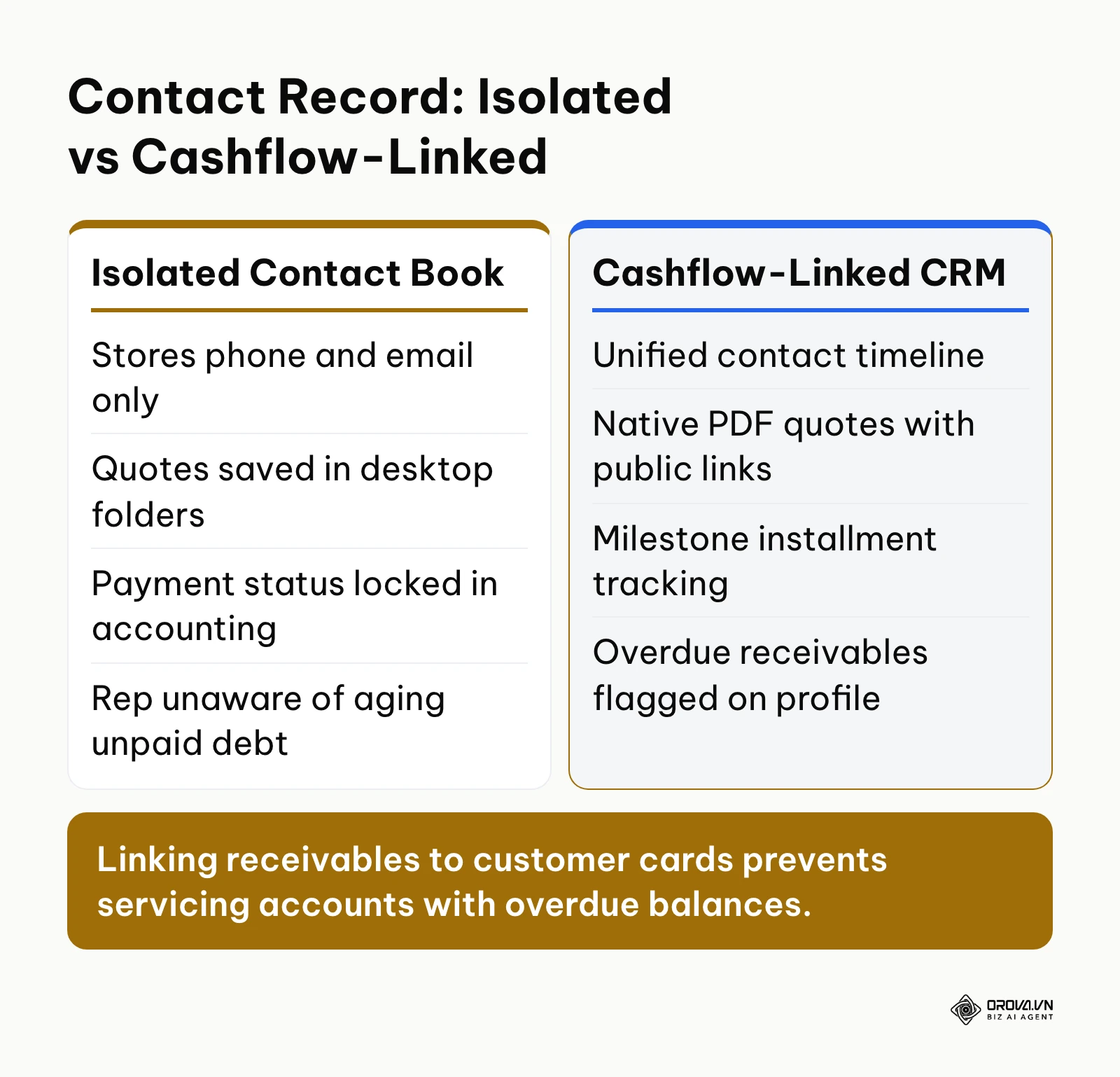
This integrated approach bridges the gap between pipeline tracking and cash collection without forcing sales teams into complex enterprise accounting platforms.
Real-world implementation scenarios
The following scenarios illustrate how different organizations structure and resolve common client database bottlenecks.
| Organization Type | Core Operational Bottleneck | Architecture Implemented | Key Measurable Result |
|---|---|---|---|
| Equipment Distributor (18 reps) | Cross-branch deal poaching | Independent department view/edit scopes | Cross-territory disputes eliminated |
| Training Consultancy (80 leads/wk) | Leads ignored for 48+ hours | Automated 30-min SLA & 10-min pool sweeps | Response time cut from 52h to 18m |
| Architecture Practice (12 staff) | Spreadsheets lost billing milestones | Cashflow-linked customer profile & checklist | 100% receivables visible before deliverables |
Illustrative example: Regional commercial equipment distributor
- Context: A commercial kitchen equipment supplier with 18 sales reps across three regional branch offices struggled with internal deal poaching and territory disputes.
- Implementation steps: The operations director mapped the company's hierarchy into three department branches. They configured customer access so reps could only view and edit accounts assigned to their specific territory branch. Destructive actions, including customer list exports and duplicate merges, were restricted exclusively to regional directors.
- Friction and resolution: Sales reps complained they could not collaborate on national franchise accounts with locations across multiple territories. The director resolved this by creating a dedicated "National Accounts" branch with custom data-sharing filter rules that granted read-only visibility to assigned regional reps while keeping account ownership centralized.
- Observable outcome: Cross-branch territory disputes vanished from weekly executive meetings, and branch directors gained accurate pipeline forecasts without exposing proprietary local client lists to outside teams.
Illustrative example: B2B corporate training consultancy
- Context: An enterprise training consultancy generating 80 weekly inbound leads suffered from slow follow-up times, with inquiries languishing in employee inboxes for over 48 hours.
- Implementation steps: The management team integrated web form inquiries directly into their client database routing engine. They established a strict 30-minute response SLA on the "New Inquiries" stage and enabled automated recycling sweeps running every 10 minutes.
- Friction and resolution: Junior reps initially attempted to "game" the system by adding blank internal notes to pause the SLA countdown without actually calling the prospect. Management reconfigured the stage rule so that only verified outbound communication actions (logged phone calls or sent emails) could satisfy the SLA criteria and advance the deal stage.
- Observable outcome: Average response time dropped from 52 hours to 18 minutes, and inbound qualification rates increased noticeably within the first two weeks of enforcement.
Illustrative example: Architectural design and consulting firm
- Context: A 12-person architecture firm managed project client data across disconnected spreadsheets, resulting in lost billing milestones and duplicate client records.
| Consulting Project Stage | Client Record Data Asset | Verification Gate Before Next Phase | Associated Risk Resolved |
|---|---|---|---|
| Feasibility & Zoning | Municipal permit numbers & property codes | Validated zoning classification tag | Illegal structural variance fines |
| Schematic Design | Multi-stakeholder contact directory | Architectural sign-off document link | Client scope creep disputes |
| Construction Admin | Contractor contacts & milestone schedule | Retainage fee payment confirmation | Work delivered without compensation |
- Implementation steps: The firm migrated 3,200 historical project contacts into a unified database using an 8-point standardization checklist. They established custom fields for property zoning classifications, municipal permit numbers, and milestone billing schedules.
- Friction and resolution: During initial testing, team members imported legacy spreadsheets containing unformatted phone numbers and corrupted date columns, resulting in duplicate contacts. The firm rolled back the test upload, standardized the phone numbers into international E.164 syntax using spreadsheet formulas, and verified an initial batch of 50 rows before completing the full migration.
- Observable outcome: Project leads, permit timelines, and milestone receivables now appear on a single customer screen, allowing architects to verify outstanding fees before issuing final building blueprints.
Eliminate abandoned leads and messy spreadsheets with a dedicated customer book. Orova CRM gives your entire team clear visibility into deals, pipeline stages, and field check-ins. All features are open and free until July 7, 2027, with no credit card required to start.
How to choose client database software by operational scenario
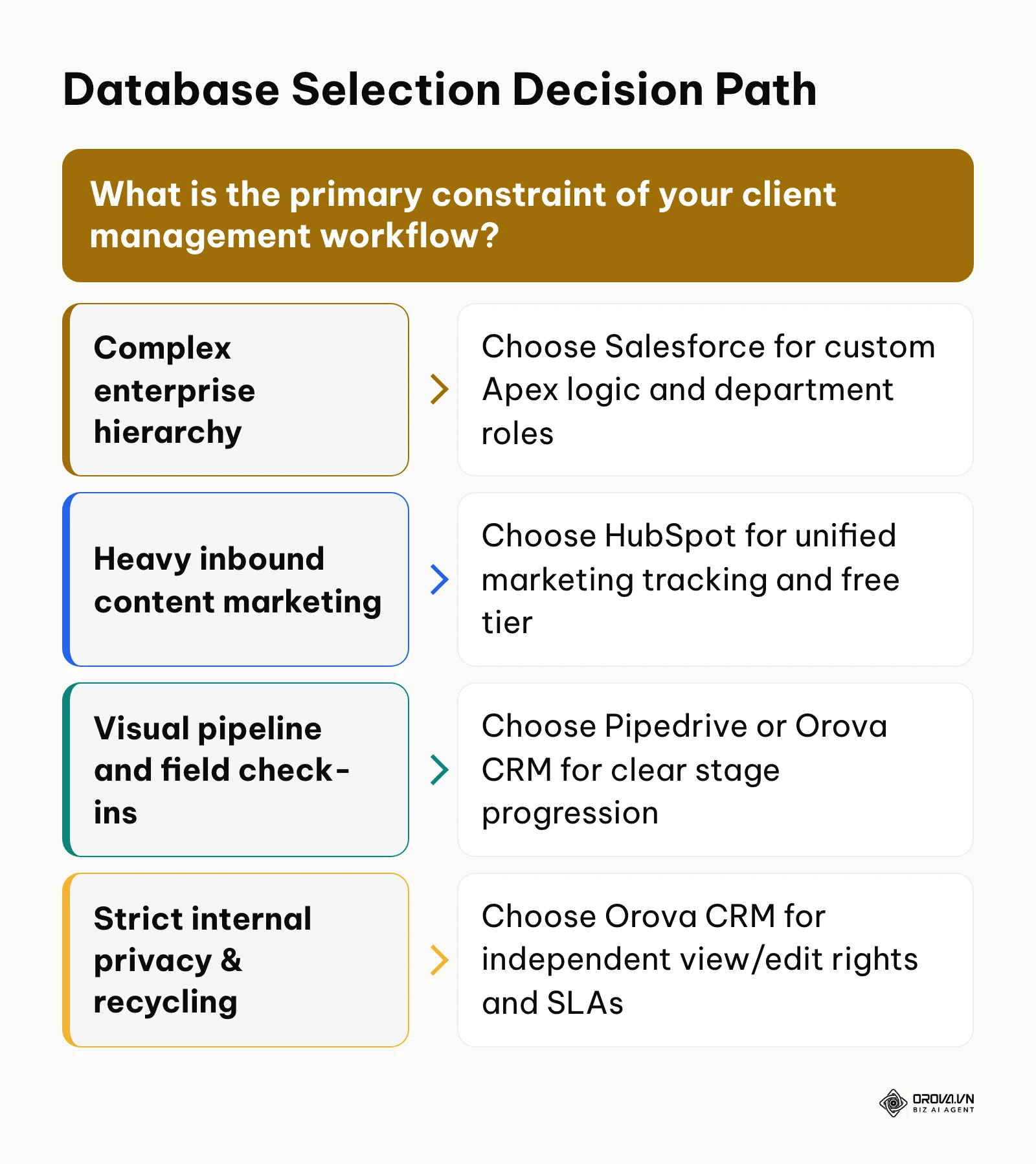
Selecting the right software depends on your operational bottlenecks rather than feature checklists. The table below outlines which platform best addresses specific organizational circumstances.
| Your Primary Operational Need | Recommended Tool | Core Operational Reason |
|---|---|---|
| Content-heavy inbound lead generation | HubSpot CRM | Native tracking connects marketing touchpoints to contact records seamlessly. |
| High-volume outbound cold calling | Pipedrive | Activity-based interface keeps reps focused on immediate next steps. |
| Strict internal privacy and multi-branch teams | Orova CRM | Separate view and edit scopes protect client records across departments. |
| Complex corporate hierarchies and compliance | Salesforce Sales Cloud | Deep custom objects and audit trails satisfy enterprise security mandates. |
| Project deliverables tied to client cards | Airtable | Flexible relational tables link clients directly to project tasks and assets. |
| Tight budget seeking broad software tools | Zoho CRM | Low subscription costs provide broad capability across sales and invoicing. |
| Uncomplicated consulting relationship tracking | Capsule CRM | Clean, fast contact lists without bloated configuration requirements. |
| Cross-functional handoffs from sales to fulfillment | monday CRM | Board-style collaboration helps operations teams manage client handoffs easily. |
If you are exploring broader system architectures beyond static contact lists, review our comprehensive breakdown on what CRM systems actually do to understand how client databases integrate with overall sales operations. For teams building structured commercial funnels, our guide on establishing a sales pipeline management system provides practical stage-by-stage instructions.
Trends in client database software over the next few years: author's outlook
| Evolution Domain | Current 2026 State | 2027–2029 Expected Shift | Actionable Recommendation |
|---|---|---|---|
| Data Hygiene | Manual rep data entry & stale records | Autonomous background data-scrubbing | Standardize unique IDs (E.164, domains) |
| Data Security | Granular permissions locked to enterprise | Department-level scoping as entry baseline | Map org tree and view/edit boundaries now |
| Automation | Superficial conversational AI chatbots | Deterministic lead routing & SLA recycling | Refine operational rules and response SLAs |
1: From passive record storage to autonomous data hygiene
Today, in 2026, the primary weakness of client databases remains human data entry error. Sales reps forget to update phone numbers, fail to log interaction outcomes, and leave stale records lingering in pipelines for months. Data from the Salesforce 'State of Sales Report, Sixth Edition' (2024) indicates that sales representatives spend roughly 70% of their working hours on non-selling operational duties, with fragmented data entry and record maintenance ranking among the heaviest time drains.
I expect that over the next two to three years, client databases will shift from passive repositories into active data-scrubbing systems. Background agents will continuously scan public business registries, email headers, and corporate websites to update job titles, detect departing stakeholders, and archive abandoned accounts without human prompts. However, this shift could be delayed if tighter corporate privacy firewalls and stricter anti-scraping regulations limit automated web-crawling access. Sales organizations should prepare today by cleaning up their core database schemas and establishing strict unique identifiers (such as corporate domains and standardized phone numbers) rather than relying on unstructured text notes.
2: Departmental security becoming a baseline requirement
Historically, granular data governance was reserved exclusively for high-priced enterprise tiers like Salesforce. Growing businesses were forced to accept "all-or-nothing" permission models where any sales rep could browse the entire corporate client roster.
I believe market demand will force mid-market database providers to unbundle granular permissions down to entry tiers. In the coming years, independent view-versus-edit scoping and export-blocking permissions will become standard baseline features rather than enterprise upsells. Companies that fail to structure clear department trees and access boundaries now will face chaotic internal reorganization later. Business leaders should map their organizational hierarchy today, defining exactly which teams require access to specific account records.
3: Pragmatic automation replacing conversational artificial intelligence
Over the past two years, software vendors rushed to insert conversational chatbots and generic generative text summarizers into customer screens. In practice, sales leaders are finding that auto-generated email drafts and generic AI account summaries add little measurable value to closing deals.
I believe the industry will pivot away from superficial chatbots toward deterministic operational automation. The real value of AI in database management lies in automated lead routing, background duplicate detection, and time-decay monitoring that recycles neglected prospects back to high-performing reps. If specialized AI models become drastically cheaper and faster to train on local devices, we might see localized predictive deal assistants emerge; otherwise, rule-based operational engines will remain the backbone of sales execution. Businesses should focus on refining their operational rules and response SLAs today rather than waiting for artificial intelligence to manage their sales pipelines.
Frequently asked questions about client database software
What is the fundamental difference between a client database and a CRM?
A client database is primarily an organized system of record for storing customer contact information, account histories, and custom attributes. A customer relationship management (CRM) platform encompasses that database while adding active sales process tools, including pipeline deal stages, automated email cadences, sales quotas, and revenue reporting.
How can administrators prevent sales reps from exporting the entire customer database?
Protecting your client database requires disabling bulk export permissions across all non-administrative roles. Platforms with granular permissions allow managers to restrict CSV/Excel downloads to system administrators, while permitting reps to view and update only their assigned contact records.
What is the best method to eliminate duplicate phone numbers when importing contacts?
Standardize all phone numbers into international E.164 syntax (such as +1 followed by the area code and subscriber number) before uploading spreadsheets. Most modern database software uses normalized phone numbers and corporate email addresses as primary unique identifiers, automatically merging or flagging duplicates during file ingestion.
How does artificial intelligence genuinely improve client database management?
Artificial intelligence is most effective when handling structural background tasks, such as recognizing unstructured email signatures to update contact cards, identifying duplicate customer entries across multiple branches, and calculating stage-decay probabilities. Conversational chatbots are less impactful than algorithmic data hygiene and intelligent lead distribution.
How do field sales teams log customer visits without complex desktop software?
Field sales teams use browser-based check-in workflows that leverage device GPS and camera access. Reps open the client profile on their mobile browser, capture an on-site photo, log visit notes, and record a verified check-in pin on an integrated map view without needing cumbersome enterprise mobile apps.
Where should you start?
Organizing your customer data does not require a disruptive, multi-month software overhaul. Identify your team's current operational state below and execute the corresponding single-afternoon action.
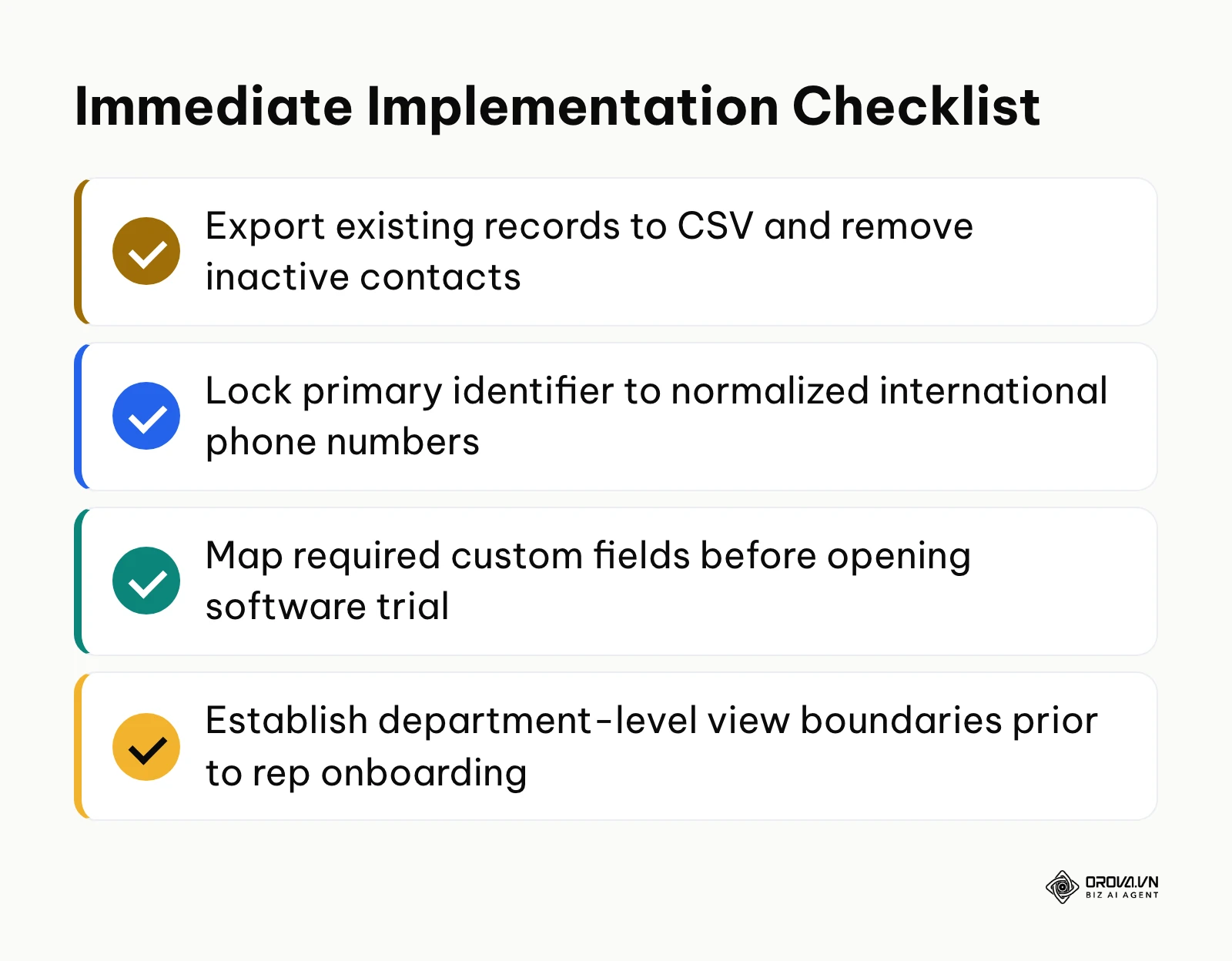
- If your team currently tracks clients across disconnected spreadsheets: Do not purchase enterprise software immediately. Spend an afternoon consolidating your records into a single master sheet, running text formulas to standardize phone numbers into international E.164 format and removing contacts untouched for more than 24 months.
- If your sales reps are dropping leads and missing follow-ups: Define a strict 60-minute response deadline for new inquiries. Implement an automated lead allocation rule that alerts reps when follow-up windows close, and test an automated recycling mechanism that reclaims abandoned leads into an unassigned pool.
- If your growing company is expanding across regional branches: Map your department hierarchy on paper before touching software permissions. Establish separate view boundaries so reps see only their assigned territory, and lock export capabilities to senior directors to protect your proprietary client database software records from internal theft.
About the author

Builder of Orova
Nguyễn Đỗ Trọng Ân has 8 years of experience in marketing, including 6 years managing market development across Asia. He builds Orova, a Biz AI Agent that never sleeps: it plans, runs and optimizes work for businesses.
Run your business with AI Agents
Orova is the always-on Biz AI Agent — it plans, runs, and optimizes the work for you.
Save time, unlock productivity.