
What Is a Content Calendar? A Practical Omnichannel Guide

A content calendar is a shared schedule that shows what you will publish, on which channel, on what date, and who owns each piece, across your blog, social media and email. Without one, most weeks start the same way: you sit down on Monday morning, staring at a blank screen, wondering what you are supposed to post today. Your blog needs an article, your social channels have been quiet for three days, and your email newsletter is severely overdue. You rush to draft something quickly, post it everywhere, and hope it brings in sales. But hope is not a reliable strategy. This chaotic approach leaves your audience confused, damages your brand authority, and leaves your internal team exhausted. The missing link in your marketing operation is not a lack of creative ideas; it is the absence of a unified content calendar. A robust scheduling system connects your long-form articles, daily social posts, and email campaigns directly to your actual business goals. This guide shows you how to build one omnichannel calendar that ties every post to a funnel stage, links each blog article to its social and email follow-ups, and brings old content back into rotation, with a ready-to-copy column layout you can paste into any spreadsheet.
What is a Content Calendar?
A content calendar is a centralized scheduling framework used to plan, track, and manage the publication of marketing materials across various platforms. Unlike a broad strategy that dictates overall goals, a calendar dictates the exact daily execution, detailing what content goes live, where it is published, and who is responsible.
The concept originated in the traditional publishing industry, where magazine editors used literal wall calendars to track article submissions, photography shoots, and printing deadlines. Today, the digital version has evolved to manage extremely complex digital ecosystems involving dozens of variables. It is crucial to distinguish this tool from other related marketing documents to avoid internal confusion.
| Concept | Key Difference | Practical Example |
|---|---|---|
| Content Strategy | Defines the "why" and "who". It is the high-level roadmap. | Identifying that your target audience consists of CFOs who value data security. |
| Content Calendar | Defines the "what", "when", and "where". It is the daily execution plan. | Scheduling a data security checklist to be published on LinkedIn next Tuesday at 9 AM. |
| Social Media Scheduler | A software tool used solely to automate the actual posting of social updates. | Using a platform to automatically push a pre-written tweet without manual intervention. |
To make this tangible, think of a commercial kitchen. The content strategy is the master menu designed by the head chef to attract a specific type of diner. The content calendar is the daily prep list taped to the wall, telling every line cook exactly how many onions to chop and what time the steaks need to hit the grill. Without that specific daily prep list, even the greatest menu in the world will result in a chaotic dinner service and angry customers.
The True Purpose of an Omnichannel Content Calendar
The primary purpose of a content calendar is to transform digital marketing from a series of reactive, disconnected tasks into a proactive, measurable system. It exists to solve the critical problem of inconsistency, which plagues both small businesses and large enterprise teams. When you operate without a clear schedule, your messaging becomes fragmented. A potential customer might read an in-depth, professional article on your blog, only to see a completely unrelated, hastily written meme on your social media page five minutes later. This disjointed experience erodes trust.
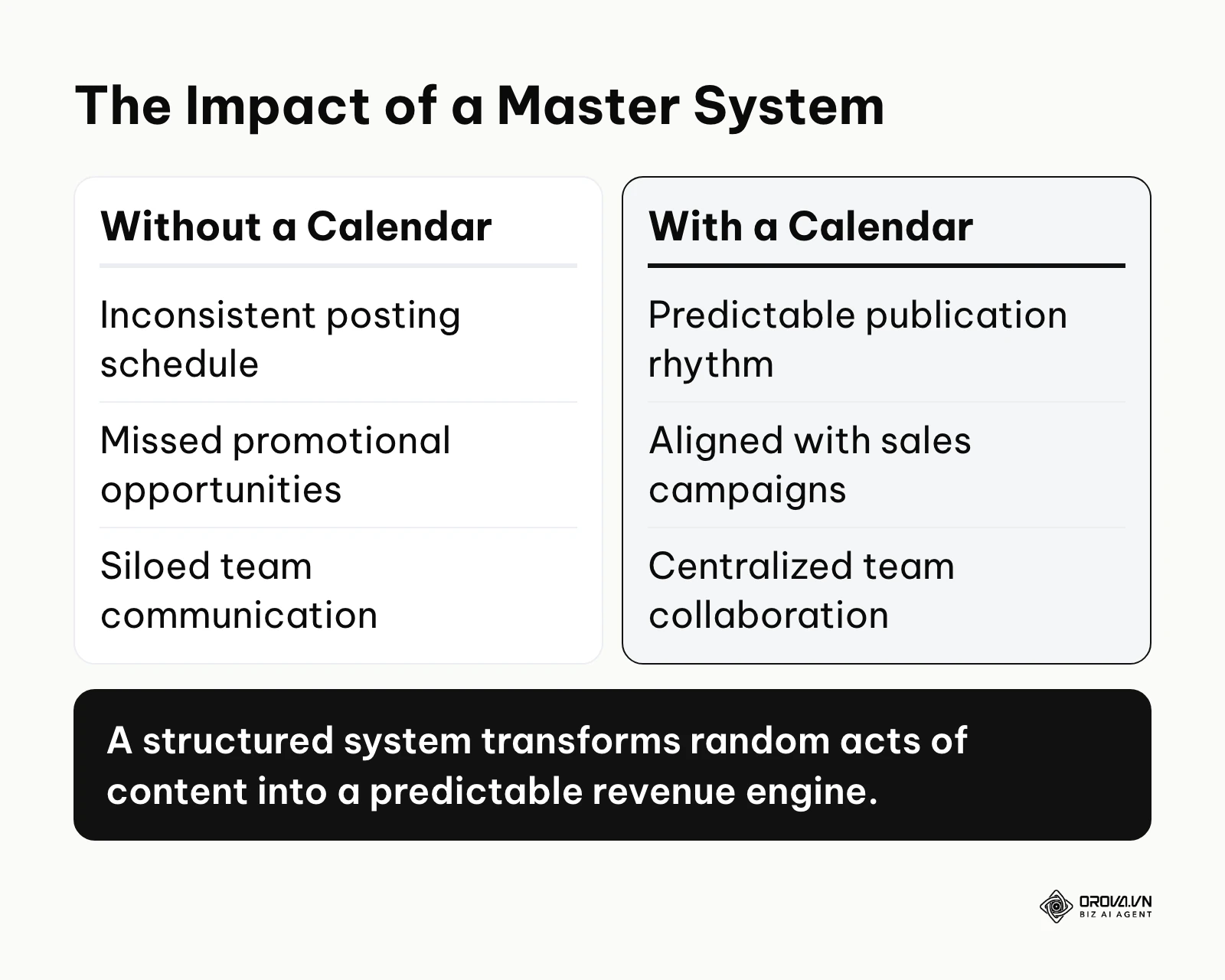
Furthermore, the calendar sits directly at the intersection of your overarching planning and your daily execution. The calendar takes high-level goals, including your SEO priorities, and breaks them down into actionable weekly tasks. If you skip implementing this system, you lose visibility into your production pipeline. You will constantly miss lucrative seasonal promotional opportunities simply because you forgot to prepare the necessary assets in advance. You will also struggle to collaborate effectively, as writers, designers, and social media managers will constantly be waiting on each other, lacking a single source of truth to guide their daily work.
When is a content calendar not needed yet? If you are a solo founder in the earliest product-validation stage and only publish ad-hoc updates to a handful of beta testers, building a complex omnichannel system is a waste of time. Your focus should be on direct customer conversations, not scheduled broadcasting. Additionally, if you lack a clear business model or basic target audience definition, a calendar will only help you publish aimless content faster.
The Tangible Value: Why Businesses and Creators Need It
The decision to implement a structured scheduling framework brings profound benefits that operate on two distinct levels. The first level impacts the overarching business metrics, directly influencing revenue, resource allocation, and risk management. The second level impacts the daily psychological and operational well-being of the creators and marketing staff doing the actual work.
Maximizing Resource Efficiency and ROI
For the business as an entity, the greatest value lies in eliminating wasted effort. When you plan a month in advance, you can batch-produce your assets. Instead of setting up lighting and camera equipment four different times to record four individual videos, a scheduled team can record all four videos in a single afternoon. This batching drastically reduces the cost of production per unit. Additionally, it minimizes the risk of publishing duplicate topics or contradictory messaging, ensuring every dollar spent on creation drives the company toward a unified goal.
Eliminating Decision Fatigue
For the individual marketer, writer, or designer, the primary benefit is the eradication of decision fatigue. Waking up and having to decide what to write about consumes a massive amount of creative energy before a single word is even typed. A well-maintained master system separates the "planning" phase from the "execution" phase. On Monday morning, the marketer does not need to brainstorm; they simply look at the assigned row in the spreadsheet and execute the specific task. This separation dramatically increases output quality because the brain is entirely focused on crafting the best possible message, rather than panicking about topic selection.
Illustrative example: Context: A B2B software startup with a three-person marketing team was struggling to maintain a consistent digital presence. The content manager spent hours every week manually messaging designers to check if article graphics were ready for publication. Steps Taken: The team implemented a centralized omnichannel framework in a shared spreadsheet. They defined clear ownership for each asset type, created a unified approval workflow using simple dropdown statuses, and integrated their blog schedule directly with their daily social media output. Hurdle & Solution: Initially, the sales team completely ignored the new system, continuing to request ad-hoc promotional posts via direct messages. The marketing director solved this by sharing a read-only view of the calendar and instituting a strict policy that any request not submitted to the backlog pipeline would be entirely ignored. Result: The team increased their publication frequency from two chaotic posts a week to a predictable, stress-free schedule of one foundational long-form article and ten micro-posts, completely eliminating their Friday afternoon administrative scramble.
| Benefit | Measured By Which Metric | Time to See Results |
|---|---|---|
| Reduced Production Costs | Hours spent per published asset | 2 to 4 weeks |
| Improved Consistency | Number of publication gaps per month | Immediate |
| Increased Campaign Alignment | Conversion rate of promotional posts | 1 to 3 months |
Once your calendar is planned, publishing it shouldn't mean copying the same post into eight apps. With Orova Social you compose once and publish to Facebook, Instagram, TikTok, YouTube, Threads, LinkedIn, Zalo OA and Telegram, while AI writes captions in your brand voice.
How to Build a Content Calendar: The Omnichannel Architecture
Building an effective system requires moving away from isolated, channel-specific lists. A true omnichannel calendar acts as the central nervous system for your entire marketing department. It must capture everything from the initial brainstorming of an SEO-driven blog post to the final social post promoting it. This section covers the four parts of that architecture: the master template, funnel tags, cross-channel distribution and repurposing.
The Core Hub: Designing the Master Template
The foundation of your entire operation is the Master Template. This is a single, centralized database that serves as the undisputed source of truth for the company. The most common failure point for teams is making this hub too complex, adding dozens of unnecessary columns that discourage daily use. A highly functional master template requires specific, carefully chosen fields.
Your template must include a 'Topic or Working Title' column to clearly identify the asset. You need a 'Target Keyword' column to ensure the piece aligns with search demand. Crucially, you must have a 'Primary Channel' (e.g., the company blog) and 'Secondary Channels' (e.g., LinkedIn, the email newsletter) to define distribution. You need a 'Draft Link' column pointing directly to the working document, and an 'Asset Link' pointing to the final graphics folder. You must include a strict 'Publish Date' and an assigned 'Owner' who is ultimately responsible for pushing the button. Finally, you need a 'Status' column. A simple dropdown menu (Idea, Drafting, Review, Scheduled, Published) is vastly superior to a complex percentage-based progress bar. It instantly tells the marketing director exactly where a bottleneck is occurring without requiring tedious micro-management. The master template should also include a column to note internal links, so that new blog posts automatically connect to older relevant material, strengthening your overall site architecture.
Here is the full layout in one place. Copy the header row into Google Sheets, Excel or a Notion database, add a dropdown to the Status and Funnel Stage columns, and you have a working master calendar. The example rows show how one blog post (the parent) and its social and email follow-ups (the children) sit together.
| Publish Date | Topic / Working Title | Funnel Stage | Primary Channel | Secondary Channels | Target Keyword | Owner | Status | Draft Link | Repurpose Date |
|---|---|---|---|---|---|---|---|---|---|
| Tue, Mar 3 | How to choose a project management tool (parent) | Consideration | Blog | LinkedIn, Newsletter | project management tool | Maya | Scheduled | link to draft doc | Jun 3 |
| Wed, Mar 4 | Carousel: 5 questions to ask before you buy (child of Mar 3) | Consideration | – | – | Leo | Review | link to design file | – | |
| Fri, Mar 6 | Newsletter: this week's buying checklist (child of Mar 3) | Consideration | – | – | Maya | Drafting | link to email draft | – | |
| Mon, Mar 9 | Short video: one mistake teams make when switching tools | Awareness | TikTok, YouTube | – | Leo | Idea | – | – |
The Funnel Integration Layer: Aligning Content with Revenue
Publishing daily updates is completely useless if those updates do not drive business results. A massive gap in most calendar templates is the absence of a 'Marketing Funnel Stage' column. Without this, teams naturally default to publishing whatever feels easiest, which usually results in an unbalanced strategy.
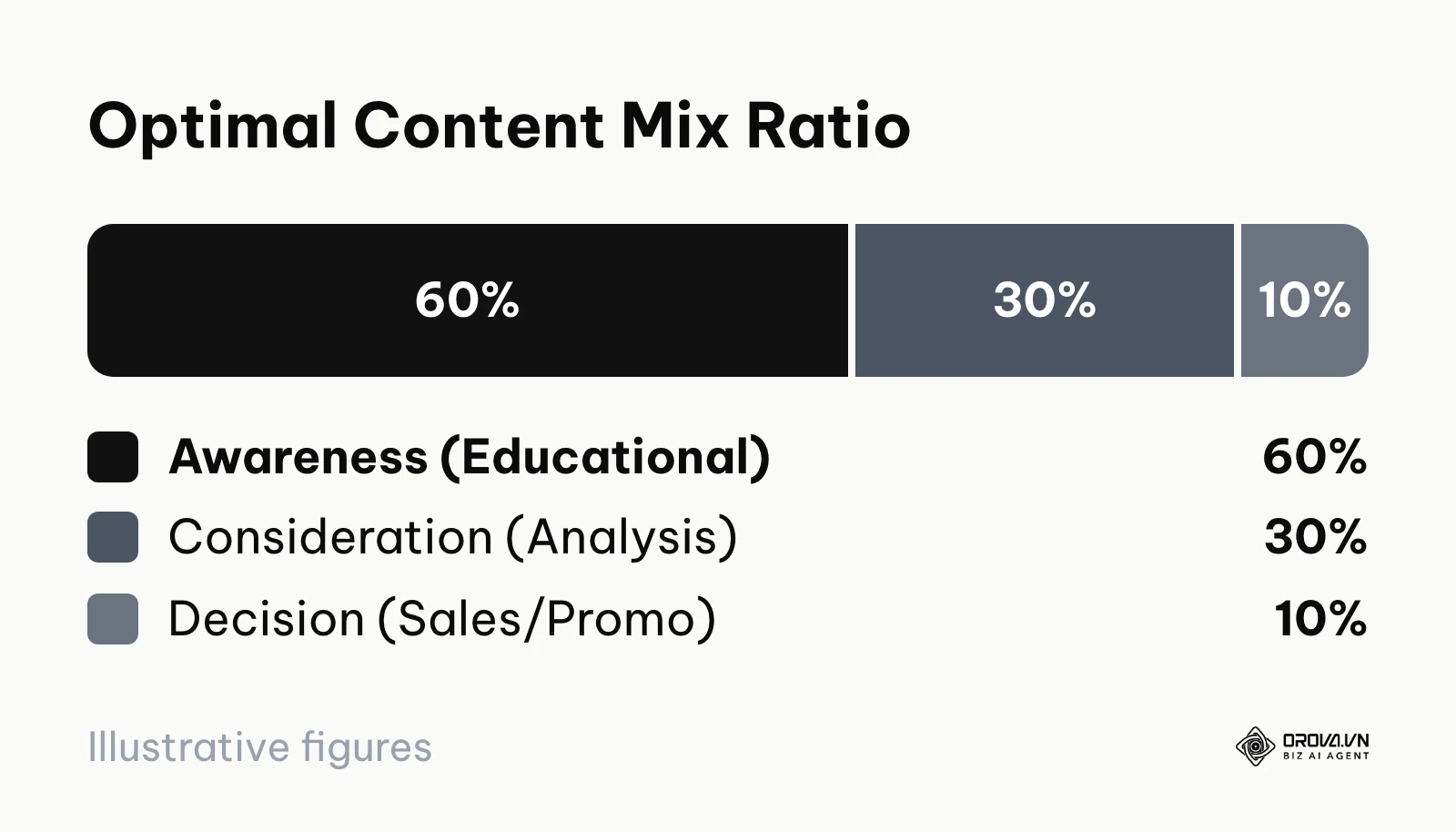
Every single row in your system must be tagged with one of three stages. 'Awareness' content is purely educational, designed to solve a broad problem and attract a new audience who has never heard of your brand. 'Consideration' content is comparative and analytical, designed to prove why your methodology is superior to alternatives. 'Decision' content is highly promotional, designed to push a warm lead into a direct sale or trial signup. We highly recommend adopting a strict 60/30/10 ratio within your planning. Sixty percent of your scheduled slots should be dedicated to broad educational awareness. Thirty percent should focus on deep-dive consideration material, such as case studies. Only ten percent should be hard-hitting decision and promotional posts. If you do not track these tags in your calendar, you will inevitably drift toward publishing 90% sales pitches, which will rapidly alienate and exhaust your audience.
The Cross-Channel Distribution Engine: Breaking Down Silos
The modern digital landscape requires you to be present everywhere, but creating entirely unique concepts for every single platform is a recipe for rapid burnout. The cross-channel distribution engine is a structural method within your calendar that connects long-form foundational assets to daily micro-content. Cross-channel campaigns most often fall apart when no single place tracks which post belongs to which campaign.
To build this engine, your master spreadsheet must support a parent-child relationship between rows. When you schedule a major 3,000-word blog post (the parent asset) for a Tuesday publication, your calendar should immediately require you to generate five to ten child assets scheduled for the subsequent weeks. These child assets are not original ideas; they are specific extracts from the parent piece. You might schedule an X (Twitter) thread summarizing the key arguments for Wednesday, an engaging LinkedIn poll based on a specific statistic for Thursday, and a brief summary for your Friday email newsletter. When creating the long-form parent articles, following best practices for seo content writing ensures the pieces you schedule have enough depth and substance to actually fuel this micro-content engine. If you draft child posts with AI writing tools for website SEO, the calendar is still what decides which extract goes to which channel and when. A critical failure point here is copy-pasting the exact same message across all platforms. Your calendar must specify the distinct format required for each secondary channel, forcing the writer to adapt the tone appropriately while utilizing the same core research.
Illustrative example: Context: A mid-sized e-commerce retailer realized their daily social media engagement was very high, but it was completely failing to drive traffic to their high-converting, long-form product buying guides on their website. The two channels were operating in complete isolation. Steps Taken: The marketing director restructured the entire planning process. They built a master calendar view that explicitly mapped every upcoming long-form buying guide to specific Instagram carousels and Pinterest pins. They added dedicated columns linking the primary website URL directly to the scheduled social graphic assets. Hurdle & Solution: The social media manager found the new master spreadsheet incredibly overwhelming and began missing daily deadlines because they could not easily find their tasks amid the dense SEO data. The solution was creating a customized, filtered view that only displayed rows tagged with 'Social Distribution', completely hiding the complex backend drafting columns. Result: Social posts now pointed to a specific buying guide on a planned date, so the team could finally see which guides social traffic was reaching, and adjust the next month's schedule based on that instead of guesswork.
The Repurposing Workflow: Maximizing Content Lifespan
Perhaps the most tragic waste in modern marketing is spending twenty hours researching and writing a brilliant article, publishing it once, and then abandoning it forever in the archives. A content calendar should not function as a chronological graveyard. It must function as a continuous loop of regeneration.
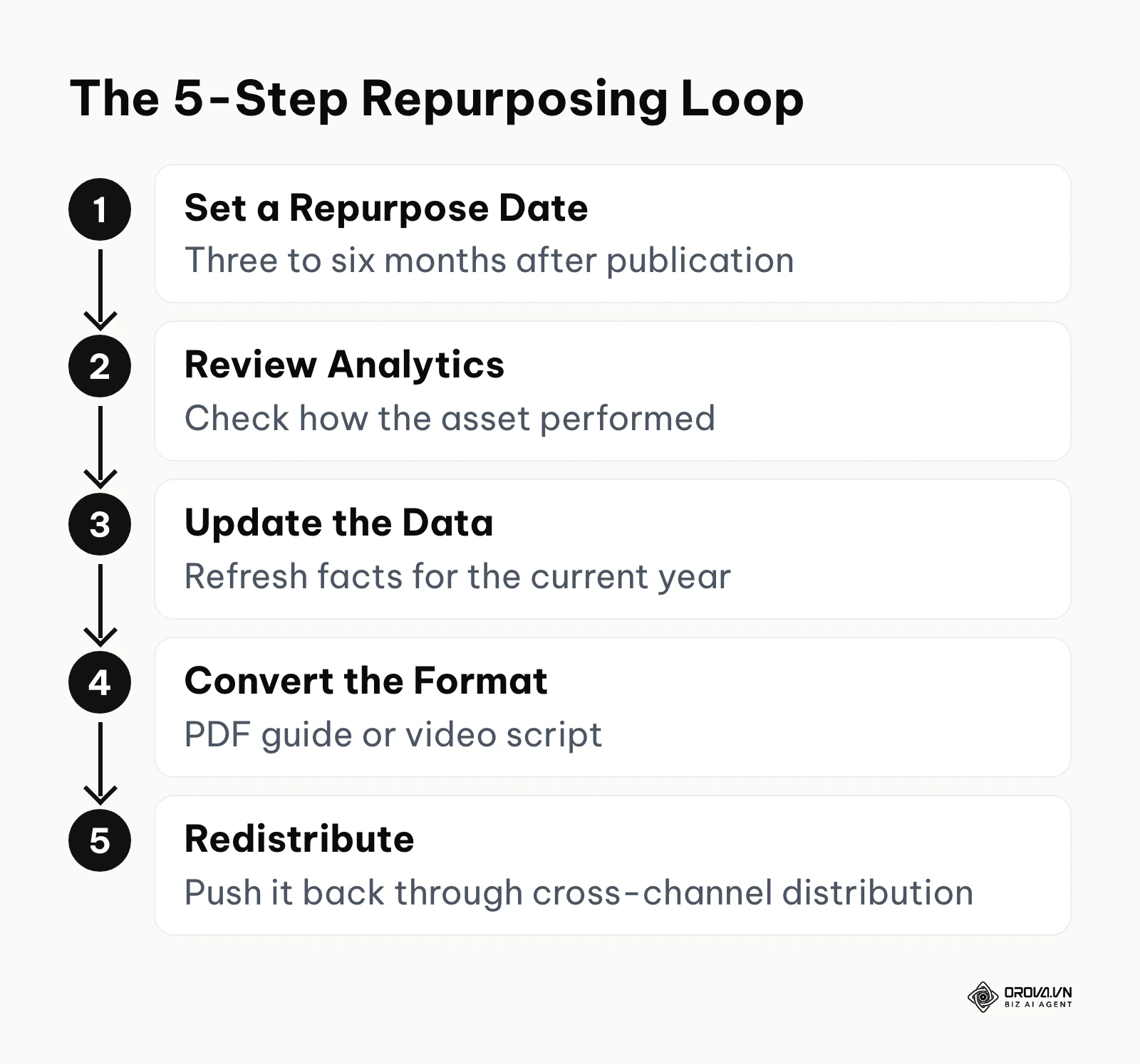
To achieve this, you must add a mandatory 'Repurpose Date' column to your master template. This date should typically be set for three to six months after the initial publication date. When this date arrives, the asset is pushed back into the active workflow. A team member is assigned to review the analytics. If the piece performed well, it is flagged to be updated with new data for the current year, converted into a different format (such as a downloadable PDF guide or a script for a YouTube video), and pushed back through the cross-channel distribution engine. This systematic workflow ensures you extract the maximum possible value from your most expensive, time-consuming foundational assets, significantly lowering your overall customer acquisition cost over time.
| Type of Calendar | Key Characteristics | Best Suited For |
|---|---|---|
| The Foundational Spreadsheet | Built in Google Sheets. Highly customizable, zero learning curve, requires manual status updates. | Solo creators and very small teams just starting out. |
| The Database View | Built in Notion or Airtable. Offers Kanban boards, linked relational databases, and custom filtering. | Mid-sized teams managing complex omnichannel campaigns. |
| The Automated Hub | Dedicated enterprise software. Typically connects to publishing channels and offers built-in approval flows. | Large agencies managing dozens of distinct client brands. |
Measuring the ROI of Scheduled Content
A calendar also makes return on investment measurable, because every row already records the channel, the funnel stage and the campaign. Add two columns, cost and attributed revenue, and you can apply the standard formula: Content ROI = (Revenue from Content − Creation & Distribution Cost) ÷ Creation & Distribution Cost × 100%. Cost includes writer fees, software subscriptions and any paid distribution spend.
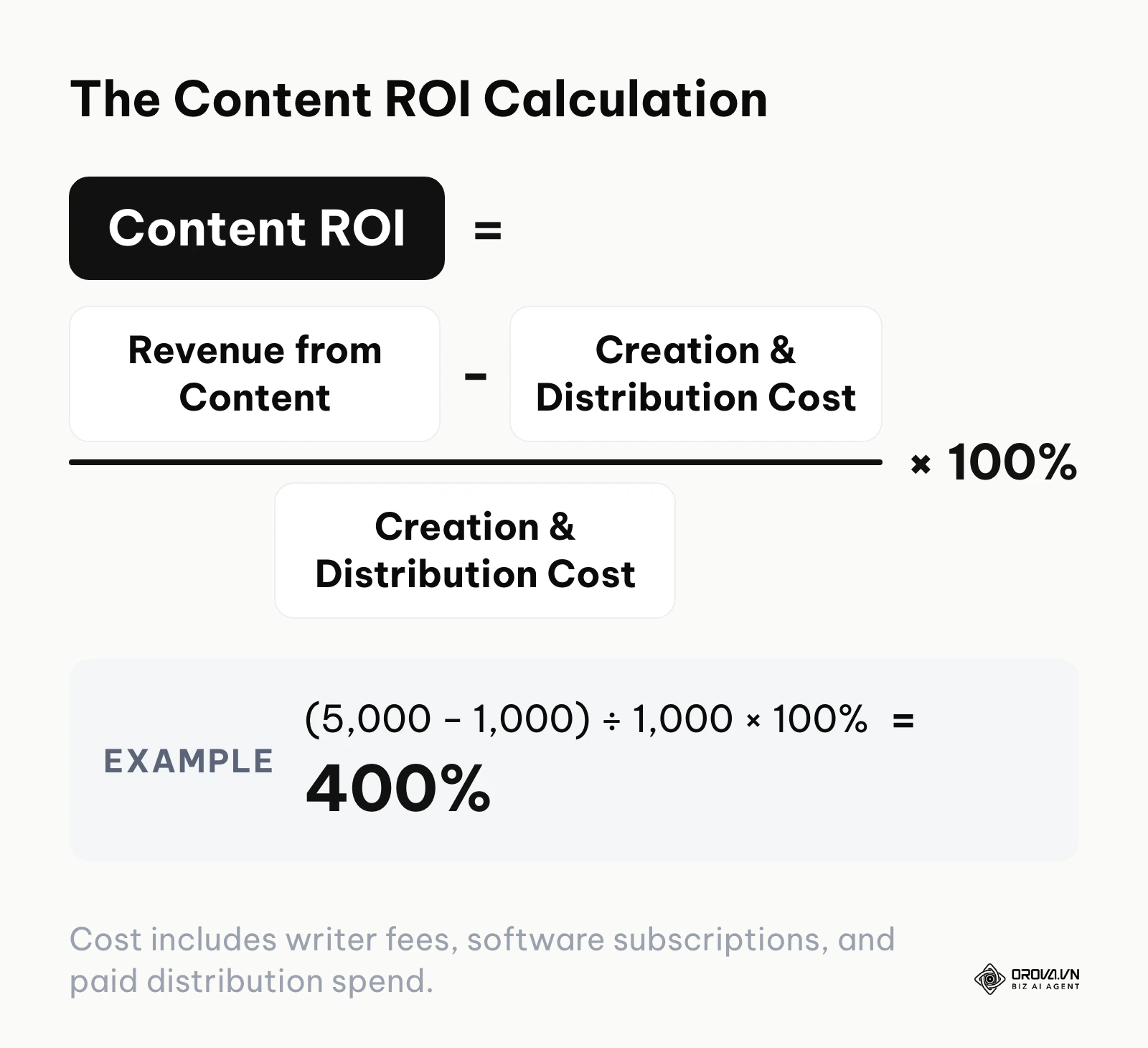
For example, if a quarterly campaign cost 1,000 to produce and promote and your analytics attribute 5,000 in sales to it (in whatever currency you report in), the calculation is (5,000 − 1,000) ÷ 1,000 × 100% = 400%. Treat attributed revenue as an estimate: tag links with campaign codes so you can trace which scheduled posts actually led to sign-ups or purchases, and compare funnel stages against each other rather than judging a single post.
How to Start and Adapt Your Content Engine
Implementing a master scheduling system requires different approaches depending on the size and complexity of your operation. A robust calendar does not replace a holistic SEO strategy; rather, it acts as the daily execution mechanism for that broader vision. You cannot force a highly complex enterprise workflow onto a single freelancer, nor can you expect a massive marketing department to survive on a basic checklist. Here is how specific roles should approach the adaptation process.
For Solo Founders and Creators
If you are operating alone, your primary enemy is overwhelming complexity. Do not attempt to build a system with twenty columns.
- Start with a basic spreadsheet containing only the essential fields: Topic, Target Date, Channel, and Status.
- Commit to planning exactly two weeks in advance. Do not attempt to map out an entire quarter until you have successfully executed a two-week sprint.
- Dedicate one specific afternoon per week solely to filling the calendar and drafting the material, separating the planning brain from the daily execution brain.
For In-House Marketing Managers
As a manager, your calendar is primarily an alignment and communication tool for your team and stakeholders.
- Centralize all requests. Establish a strict rule that if a sales or product team wants something published, they must submit it through a formal intake form that feeds directly into the master calendar backlog.
- Define clear approval bottlenecks. Explicitly note in the calendar who holds the final authority to move an asset from 'Review' to 'Scheduled'.
- Set up automated weekly reporting views that summarize exactly what went live and what is planned for the next seven days, sending this automatically to leadership to maintain visibility and trust.
For Agency Owners and Freelancers
Agencies face the unique challenge of managing multiple distinct brand voices and client approval cycles simultaneously.
- Create isolated workspaces or distinct tabs for every single client to prevent catastrophic cross-posting errors.
- Integrate a client-facing view. Build a filtered version of the calendar that only shows the 'Topic', 'Publish Date', and 'Final Draft Link', allowing clients to approve work without seeing your messy internal drafting process.
- Standardize your tags across all clients. Use the exact same funnel stage definitions and status labels for every account to allow agency directors to quickly assess the health of the entire portfolio at a glance.
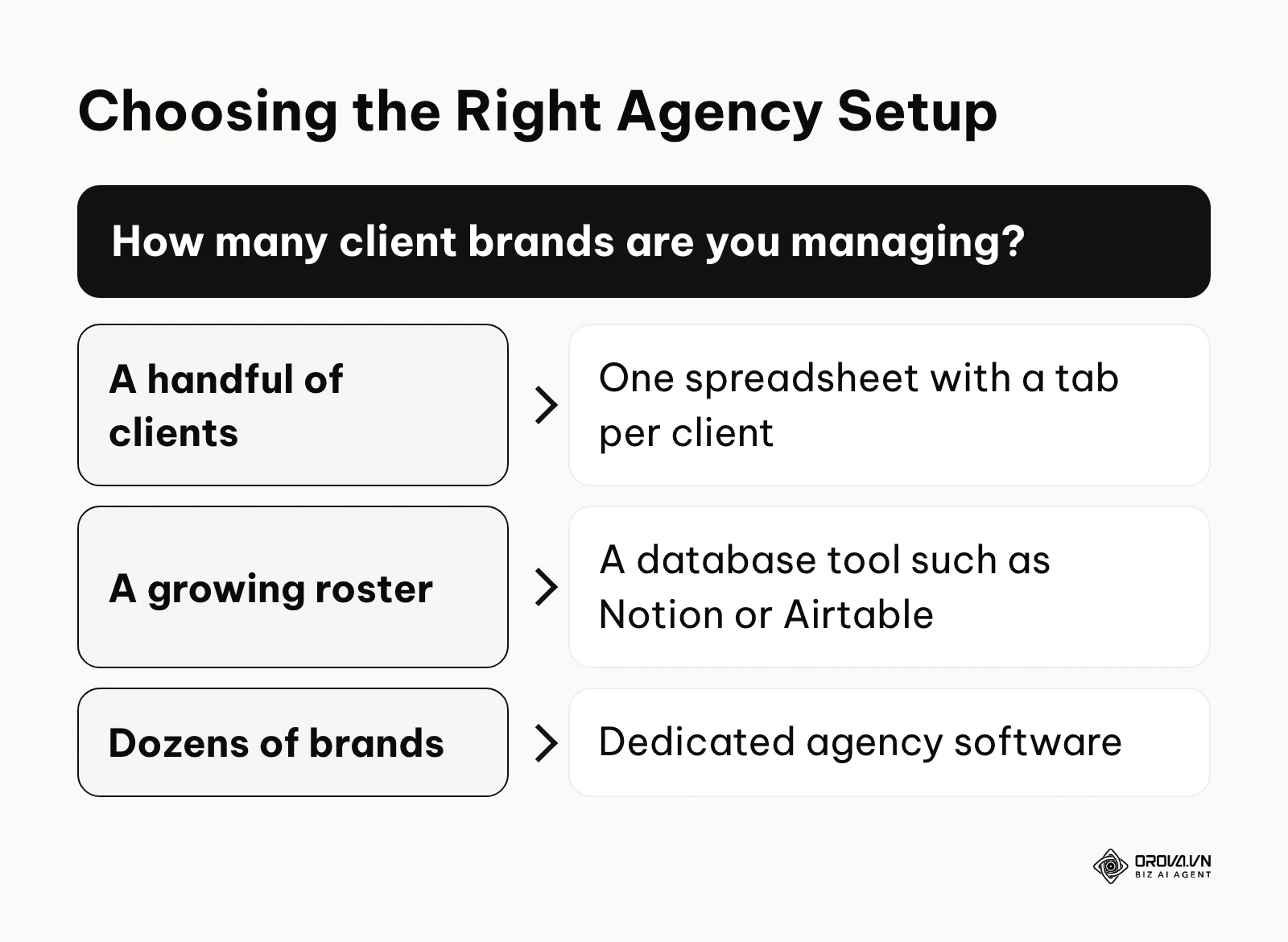
As a rough rule of thumb for tooling: a handful of clients fits in one spreadsheet with a tab per client; a growing roster benefits from a database tool such as Notion or Airtable; dozens of brands usually justify dedicated agency software.
| Common Mistake | Immediate Consequence | How to Avoid It |
|---|---|---|
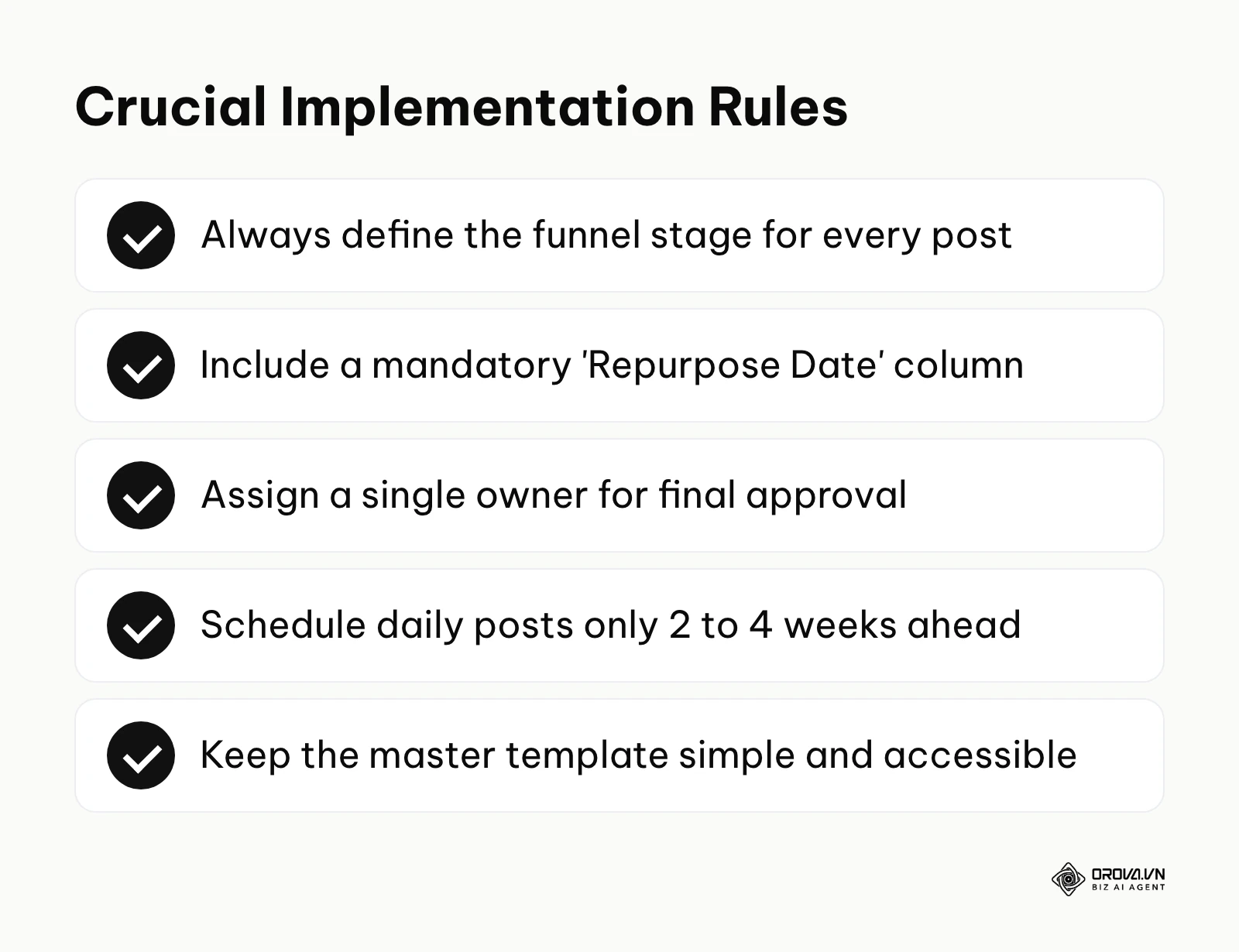
| Planning a full year in advance | The plan becomes obsolete immediately when market conditions or business priorities shift. | Plan foundational themes per quarter, but only schedule specific daily posts 2 to 4 weeks in advance. |
| Failing to assign a single owner | Tasks stall in the drafting phase because everyone assumes someone else is responsible for the final review. | Every single row must have one, and only one, name attached in the 'Owner' column. |
| Treating the calendar as an archive | Old, high-performing assets are forgotten and never utilized again to drive cheap traffic. | Enforce the use of a mandatory 'Repurpose Date' column to create a continuous regeneration loop. |
Turn your content calendar into scheduled posts: Orova Social lets you schedule by day, week or month, posts missed slots automatically, cuts long videos into 9:16 clips with subtitles, and exports your posting schedule to Excel for reporting. Free until July 7, 2027.
Where Content Calendars Are Heading in the Next Few Years: The Author's Take
These are opinions, not forecasts. Each one starts from something visible today and ends with what I would prepare for now.
From manual time slots to suggested scheduling Today, most marketers still decide by hand that Tuesday at 10 AM is the right slot for a post. Many scheduling tools already surface "best time to post" hints based on past engagement. I think that over the next two to three years, calendars will lean more on these suggestions: you approve a batch of assets and the tool proposes when each one goes out, with a human still signing off. My advice is to spend your energy on asset quality and clear funnel tags rather than perfecting manual timing rules.
Revenue data inside the planning view Right now, a calendar tells you what was published, and a separate analytics tool tells you whether it made money. My read is that more teams will pull conversion data back into the calendar itself, so a row shows not just "Published" but what that piece contributed. If that happens, the marketing manager's job shifts from coordinating tasks toward explaining results. The cheap way to prepare is to tag every scheduled link with a campaign code today, so your history is usable later.
AI-assisted repurposing AI is mostly used for first drafts at the moment. I believe its more useful role in the calendar will be repurposing: when an asset reaches its Repurpose Date, an assistant drafts refreshed versions and new social variants and drops them into the Review column for a person to check. Whether that works depends on factual accuracy, which is still a real weakness. To prepare, write down your brand voice guidelines now, so any assisted output can be judged against a clear standard.
Frequently Asked Questions about Content Calendars
What is the ideal content mix ratio for a business calendar? While the exact ratio depends on your specific industry and growth phase, a widely accepted baseline is the 60/30/10 rule. Allocate 60% of your scheduled slots to educational, awareness-stage material that provides value without asking for anything. Dedicate 30% to consideration-stage material, such as comparative guides or case studies that build specific authority. Finally, reserve only 10% for direct, hard-hitting promotional posts that ask for a sale or trial signup. This balance ensures you continuously grow your audience without burning out your existing followers.
Is a content calendar still needed with AI? Yes, it is arguably more necessary than ever. AI dramatically accelerates the speed of content creation, making it incredibly easy to produce massive volumes of text and imagery. Without a rigid scheduling and tracking system, this increased velocity will simply lead to digital clutter, overwhelming your audience with disjointed, conflicting messages. AI solves the problem of production; the calendar solves the problem of strategic alignment and distribution. You still need a central mechanism to ensure the AI-generated assets are being deployed logically to support specific business objectives.
How do I seamlessly link my blog schedule with my social media updates? The most effective method is using a parent-child structure within your master template. Dedicate a primary row to the foundational blog post. Directly underneath it, create three to five indented child rows designated for social media distribution. These child rows should explicitly reference the parent piece, extract specific quotes or statistics from it, and schedule them for publication in the days and weeks following the blog's launch. This ensures every social update is anchored to a deeper, owned asset.
Where can I find a free content marketing calendar template? The internet is flooded with highly complex, overly engineered templates that are often too difficult for beginners to maintain. Instead of searching for a magic pre-built solution, you should build a lean custom template using Google Sheets or Notion. Start with exactly six columns: Topic, Funnel Stage, Target Channel, Draft Link, Publish Date, and Status. This simplistic approach is entirely free, infinitely customizable, and vastly more sustainable for a team just beginning to formalize their workflow.
Where to Begin?
Transitioning from a chaotic publishing approach to a highly structured omnichannel system can feel overwhelming. The key is to start small and adapt the system to your current reality, rather than attempting to copy an enterprise-level workflow overnight.
If you currently have absolutely no system in place and are purely winging it every day, your first step is not to plan a whole year. Open a completely blank spreadsheet today and map out exactly one core topic you want your brand to own this month. Write down one long-form asset for that topic, and list out five specific social media posts derived from it. Schedule these six items over the next two weeks. Successfully executing this single, tightly controlled sprint will prove the value of the system to yourself and your team.
If you are already using tools, but your workflow is scattered—perhaps you are drafting ideas in a notes app, managing deadlines in Trello, and tracking social posts in a native platform scheduler—your immediate action is a strict consolidation audit. Before you write a single new word of copy, force all of your existing scattered tasks into a single master database. You must establish one undisputed source of truth before attempting to scale your production.
If you are publishing consistently on a schedule but have no idea if it is working, your workflow lacks strategic alignment. Your immediate next step is to add a mandatory "Funnel Stage" column to your existing setup. Retroactively review the last twenty items you published and tag them as Awareness, Consideration, or Decision. This simple exercise will instantly reveal your actual content mix and highlight glaring strategic gaps you need to address in your upcoming planning sessions.
About the author

Builder of Orova
Nguyễn Đỗ Trọng Ân has 8 years of experience in marketing, including 6 years managing market development across Asia. He builds Orova, a Biz AI Agent that never sleeps: it plans, runs and optimizes work for businesses.
Run your business with AI Agents
Orova is the always-on Biz AI Agent — it plans, runs, and optimizes the work for you.
Save time, unlock productivity.