
The Ultimate Guide to OROVA SEO: The AI Software That Auto-Writes, Auto-Publishes, and Auto-Optimizes
For marketing managers, business owners, and teams scaling multi-channel digital campaigns, content creation is often the most severe bottleneck. Manual research, drafting, and publishing consume hundreds of hours that could be spent on high-level strategy. Orova SEO is the AI SEO module built into Orova.vn (the Biz AI Agent platform) designed to solve this exact problem. It takes over the most time-consuming aspects of search engine optimization: suggesting keywords, writing SEO-standard articles with images, automatically publishing them to your website on a schedule, optimizing old articles directly on their existing URLs, and measuring real performance using Google Search Console data.
The core positioning is simple: AI SEO software that auto-writes, auto-publishes, and auto-optimizes. You connect your website and Google account once, and from there, you either click to approve or let the AI run entirely on autopilot.
1. Ten Tasks OROVA SEO Automates for Your Team
To eliminate the manual labor of content marketing, OROVA SEO takes over the entire production and maintenance lifecycle. Here are the 10 tasks the AI handles for you:
- Writing SEO-standard articles
- Designing illustration images
- Connecting website, GA4, Google Search Console
- Connecting publishing API
- Scheduling new posts
- Optimizing old posts
- Tracking keyword rankings
- Monitoring competitors
- Providing overview reports
- Auditing website technical health
Why Marketing Teams Choose OROVA SEO
Extreme AI Performance: The AI can monitor 100 websites simultaneously, delivering per-article reports, optimizing content, and writing entirely new articles in just 5 minutes.
Integrated Competitor Observation: It selects keywords and writing angles by analyzing millions of existing articles across the web, ensuring your content fills actual market gaps.
Cost-Effective & Scalable: Costs are calculated on a per-article basis—you only pay for what you write. This makes it significantly cheaper and more flexible than hiring full-service, retainer-based SEO agencies.
2. Deep Dive into the 8 Core Features
OROVA SEO is structured into eight distinct tabs within the workspace. Every website is treated as a "Project," and all tabs share data seamlessly across that specific project.
2.1 Projects — The Website Profile
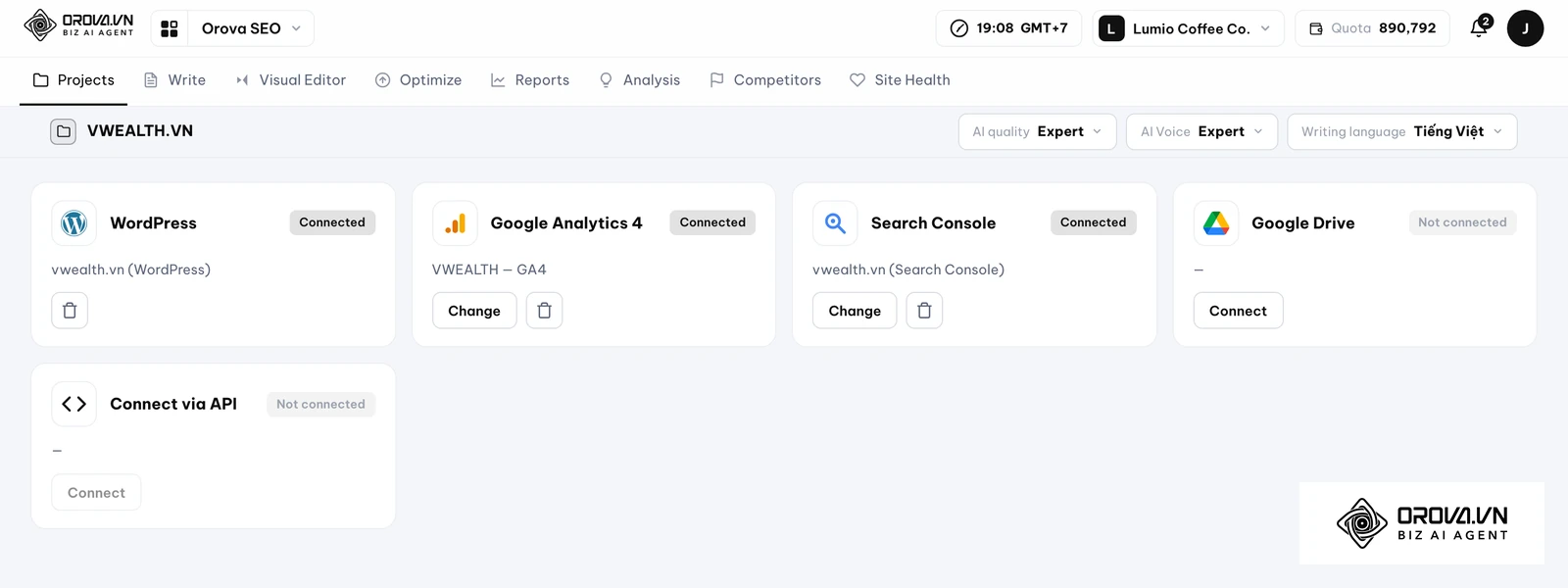
This is the foundation of your automation. You can create a project with a single click by entering your website address and uploading a logo.
Connecting Publishing Destinations:
Choose ONE of two connection methods:
- WordPress: Simply paste your login link, allow the Orova app prompt, and you are connected. No manual token copying or heavy plugins required.
- Non-WordPress (Custom API): Input your website's API address. Orova provides a secret key, and your developers can use the Publish API documentation to handle post, update, and delete commands.
Data Connections:
Log in via Google to grant read-only access to Google Analytics 4 (for traffic), Google Search Console (for keywords, rankings, and clicks), and Google Drive (for brand materials and writing assets). You can revoke this access at any time.
Configuration:
Select your default writing language from a library of 50 languages (multiple can be selected simultaneously). Choose your AI quality (Standard or Expert) and set your brand's tone of voice. You can select from 10 pre-built tones (Expert, Intimate, Humorous, Academic, Inspiring, Storytelling, Formal, Conversational, Technical, Marketing) or create a custom brand voice.
2.2 Content — The Writing and Publishing Engine
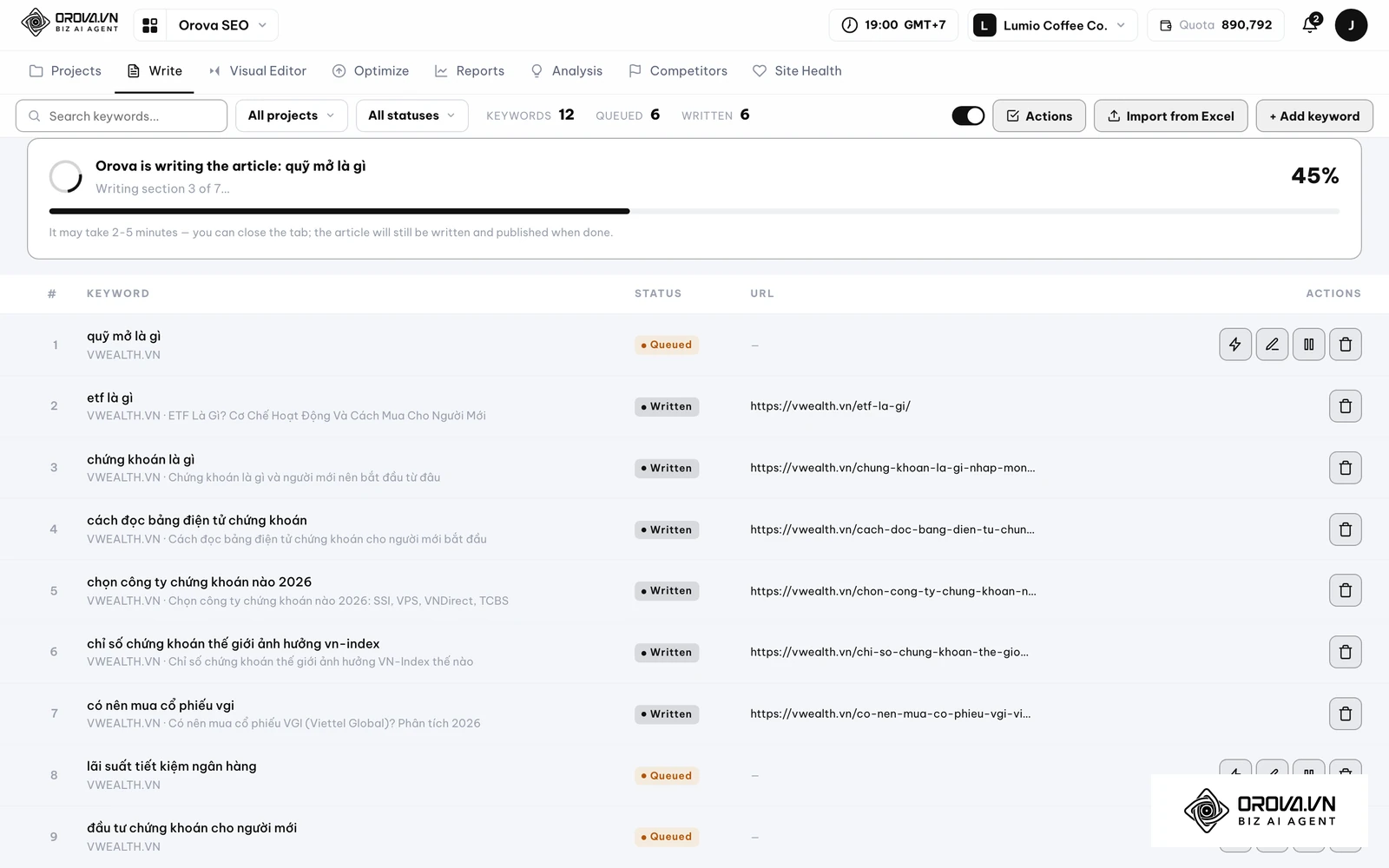
This module is where keywords turn into published pages. You can add keywords manually or import them in bulk via an 8-column Excel template (Keyword, Topic, Outline, Search Intent, Word Count, Image Count, Tone, Language). If you are out of ideas, simply use the "Scan your page" or "Scan competitors" functions.
For each keyword, you define the search intent (Learn / Compare / Buy / Brand), minimum word count, number of images, and referenced Drive documents.
What the AI Does:
- Generates a title (under 60 characters), meta description (140-160 characters), URL slug, H2/H3 outline, main body, and a 3-5 question FAQ section at the end.
- Scans existing articles on your site to prevent duplicate content. If a topic overlaps, it shifts the perspective and notes the reason.
- Automatically inserts 2-5 internal links pointing to real, existing articles on your site.
- Sources images from your connected Drive or uses AI to generate new ones, using the first as the featured image.
- Looks up real-time web data when statistics are needed, citing sources in a reference section.
- Publishes the article directly to the website at the scheduled time in a "Published" state (there is no draft-approval step in the automated flow).
Discover Orova.vn – a Biz AI Agent platform with OROVA SEO, a complete solution for every website. The system supports search engine optimization from A to Z with features including keyword research, writing new SEO-ready articles, optimizing existing content, rank tracking, plus competitor analysis and in-depth technical analysis. Sign up today to experience OROVA SEO completely free (offer valid through July 7, 2027).
2.3 Visual Editor — On-Site Content Editing
For users who want hands-on control without logging into the WordPress admin dashboard, the Visual Editor allows you to edit live articles directly.
You can select an existing article, paste a link, or draft a new one. The editor features standard word-processing tools with undo capabilities. You can modify the content, title, meta description, URL slug, categories, and featured images.
AI Assistance: Highlight any paragraph, type a prompt, and the AI will rewrite it. There are also dedicated buttons for "AI Rewrite Title," "AI Rewrite Meta Description," and "AI Draw Image." Once finished, you can Publish, Update, or Save as Draft.
2.4 Optimize — Revamping Old Posts Without Changing URLs
Content decay is a major issue for established websites. This feature allows you to update thousands of old posts efficiently, which is a core concept covered in our Content Refresh: Revamping Old Posts Without Losing Rankings guide.
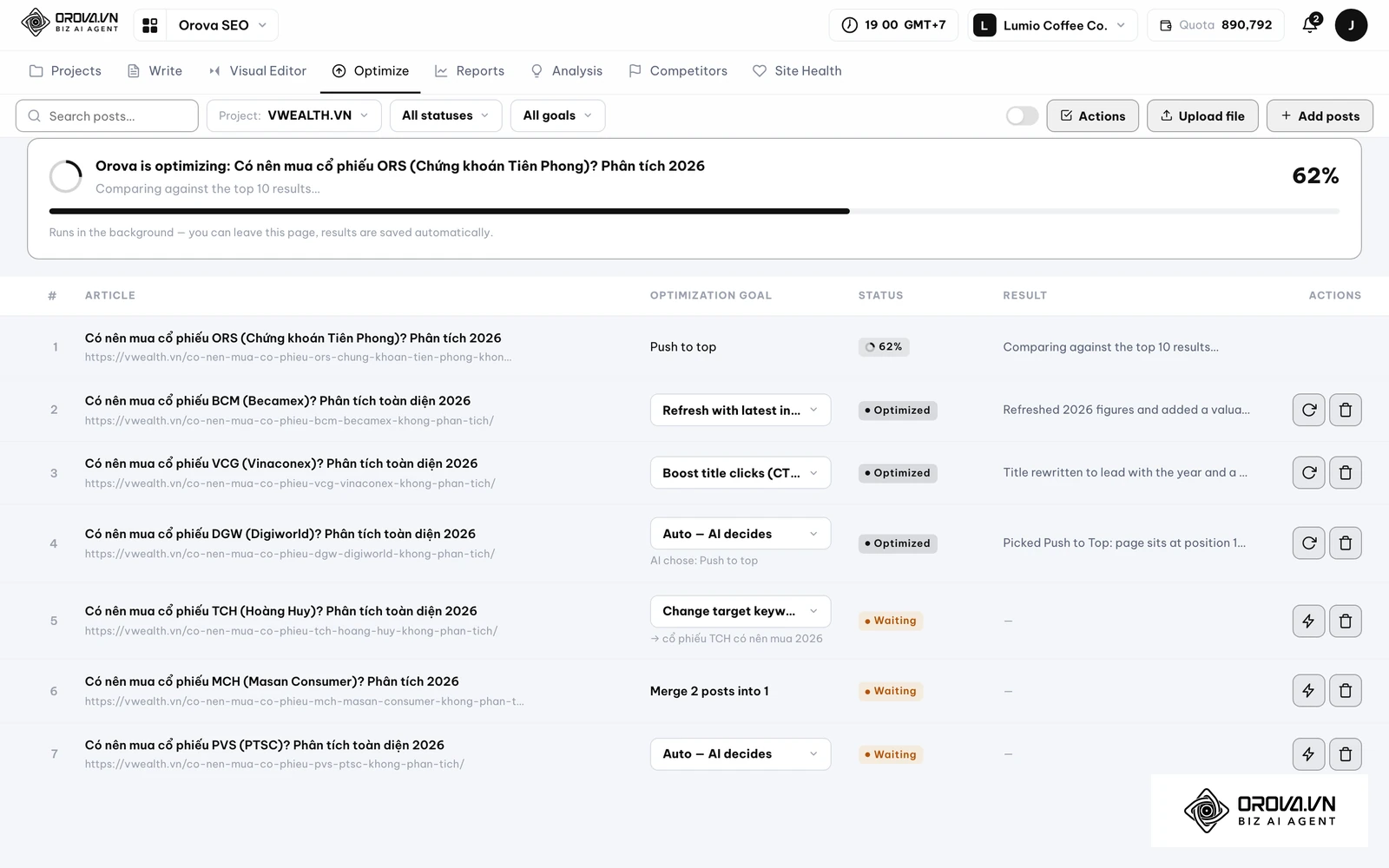
You can push articles into the optimization queue via four methods: ticking rows in the Reports tab, selecting them from the Advisor tab, manually pasting links, or uploading a CSV.
Choose from 7 Optimization Intents:
- Auto (AI decides and logs the reason)
- Latest Update (Scrapes the web for new data and generates new images)
- Merge Duplicates
- Push to Top
- Increase CTR from Title (Edits only title and meta data)
- Deepen Content
- Change Target Keyword
The AI reads the old article, analyzes its exact Search Console metrics, rewrites it according to the chosen intent, and overwrites it on the exact same URL. This ensures you never lose your ranking history or backlink equity.
2.5 Reports — Real Google Data per Article
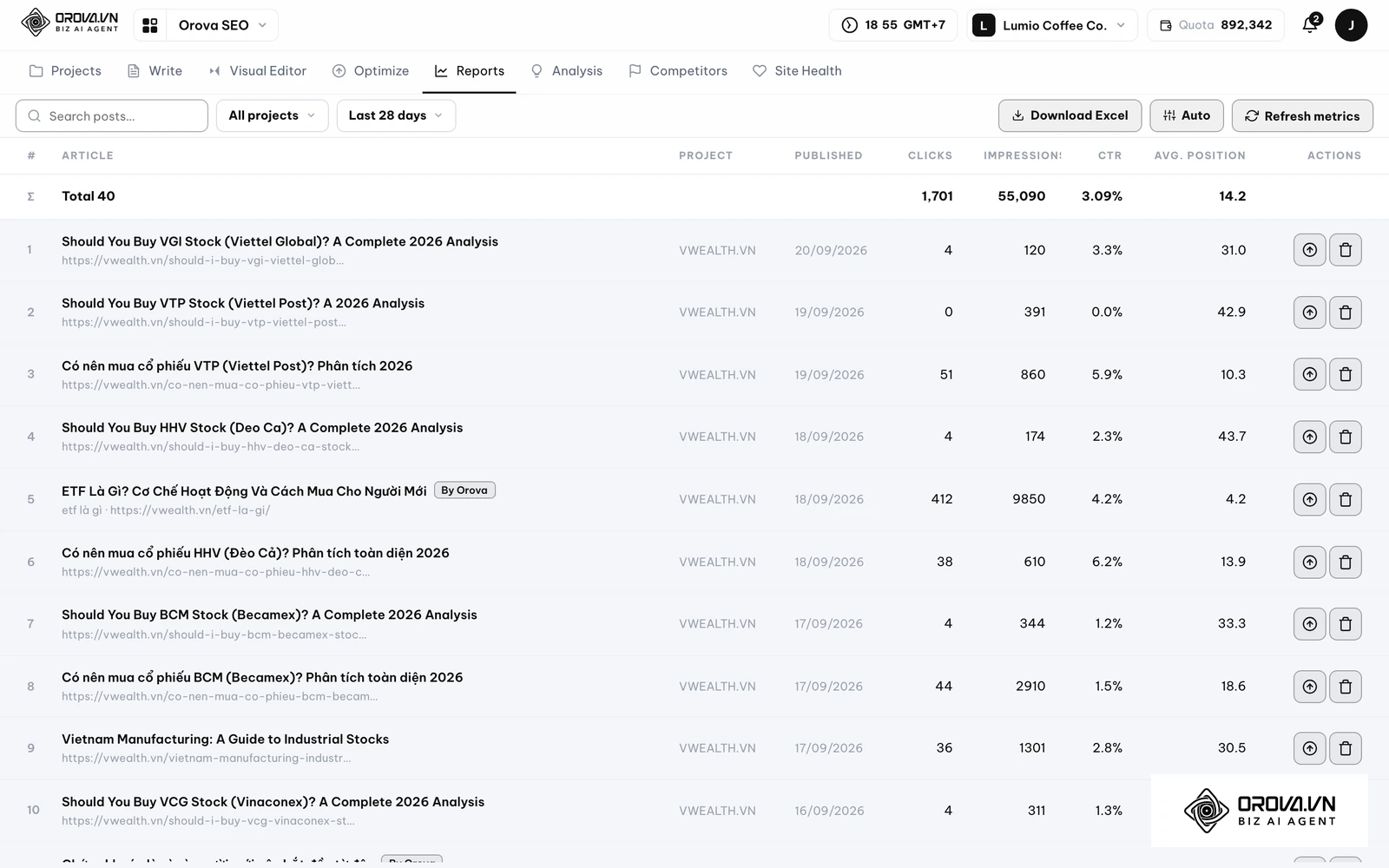
Stop guessing what works. By selecting a date range (from 7 days up to a year), you can view a comprehensive table of all articles on your website—not just the ones written by Orova.
Each row displays Clicks, Impressions, CTR, Average Position, publish date, and word count. You can filter, identify underperforming pages, and push them directly into the Optimize queue with one click. Data can be exported to Excel and set to auto-refresh on a cycle ranging from 30 minutes to 30 days.
2.6 Advisor — Site-Wide Prioritization
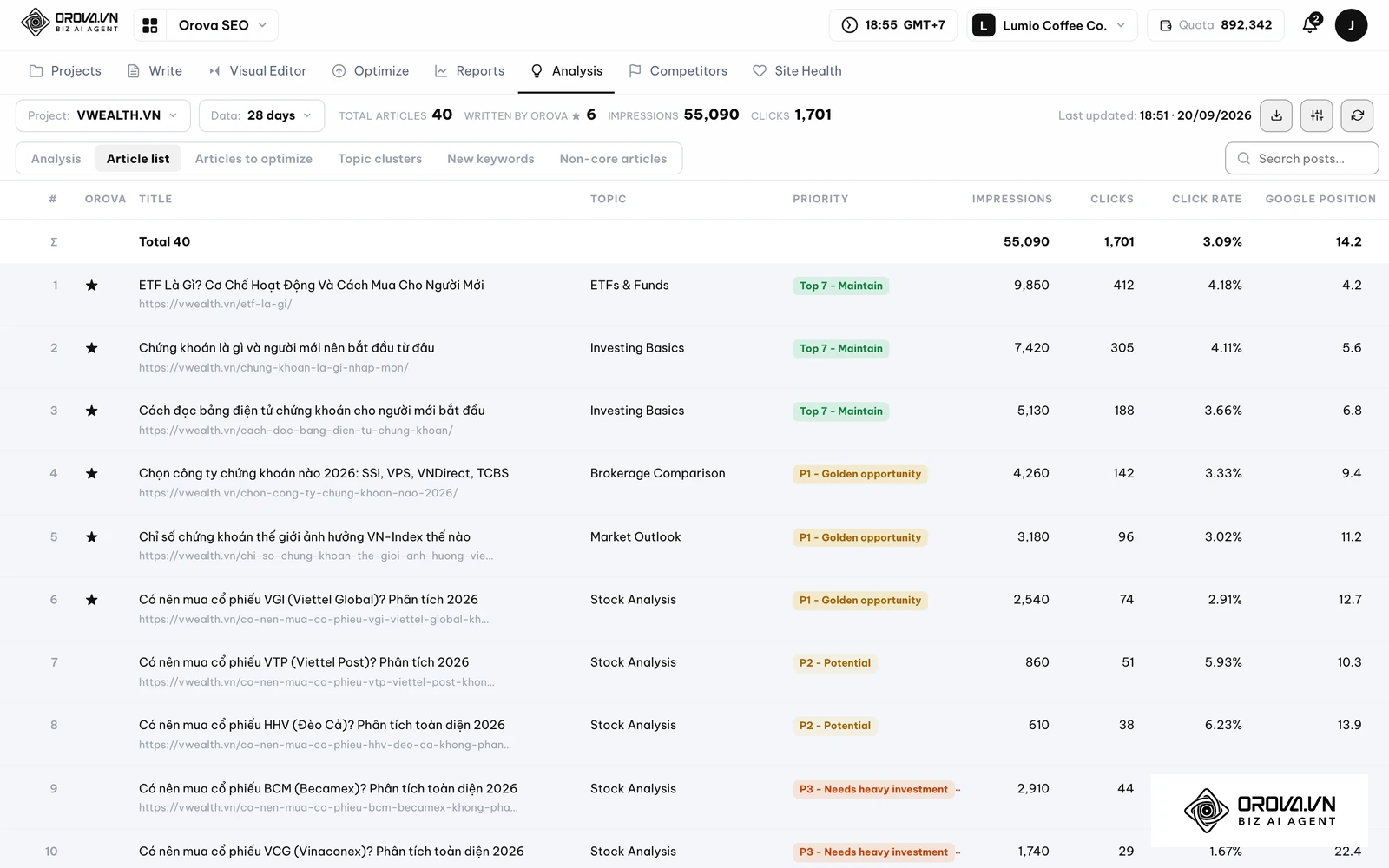
This is your strategic brain. Once GA4 and GSC are connected, the Advisor scans up to 2,000 articles on your site and 5,000 URLs from Search Console. In just 2-4 minutes running in the background, it groups your content into 6-10 topic clusters and flags off-topic (noncore) articles.
7-Tier Priority Ranking:
It grades every page to tell you exactly what to do next: Top 7 Hold, P1 Golden Opportunity (pages on page 2 needing a slight push), P2 Potential, P3 Needs Heavy Investment, P4 Monitor, P5 Re-evaluate, and Low Traffic.
It also suggests new keywords using a strict hierarchy: actual real queries from your Search Console → Google Autocomplete suggestions → AI filling in the conceptual gaps.
2.7 Competitors — Tracking Industry Trends
Add unlimited competitor domains. The system automatically detects their new articles via WordPress API, RSS, or sitemap.
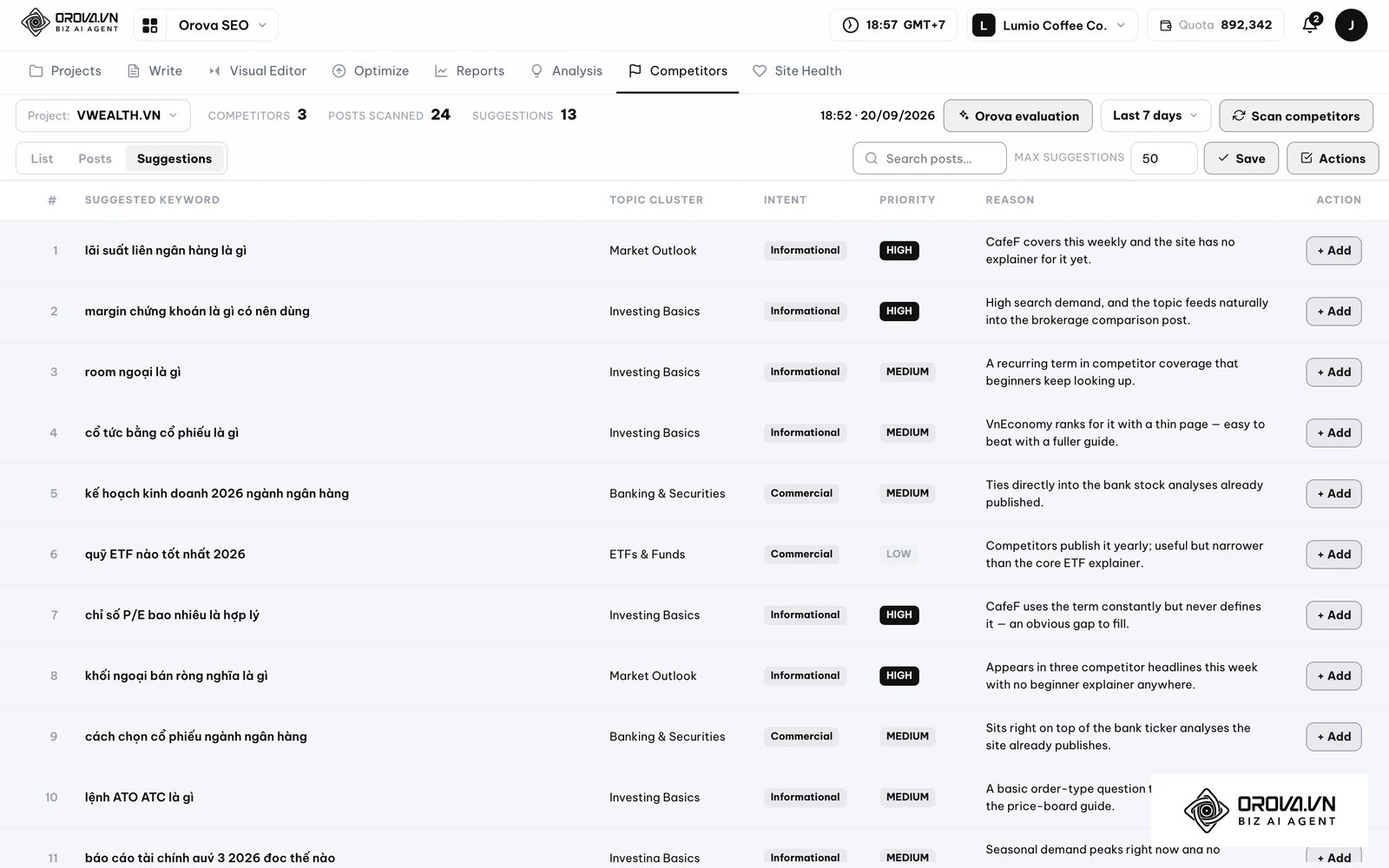
When you click "Orova Evaluate," the AI reads up to 50 of their newest articles, compares them against your existing content, and issues a verdict. It will either tell you to ignore the topic or propose a specific keyword for you, complete with search intent, topic group, and a High/Medium/Low priority rating with a logical justification. Simply check the recommendations to push them straight into your Writing queue.
With OROVA.VN and the OROVA SEO module, you put an end to the exhausting days of manual work for good. Instead of struggling for hours to write articles and compile reports, the entire process is now optimized and completed in just 5 minutes.
2.8 Health — Technical Auditing
A healthy technical foundation is required for content to rank, a principle thoroughly explored in our Technical SEO Complete Guide. Enter your website address to run a 100-point background audit in 1-2 minutes.
The system checks 12 crucial groups:
- Infrastructure & Access: Uptime, sub-3-second response, HTTPS validity, WWW consistency, 404s, compression, index blockages.
- Security: HSTS, iframe blocking, safe content mixing.
- Homepage Structure: Title/meta lengths, single H1, mobile display, language tags.
- Social Sharing: Open Graph, preview images, Twitter cards.
- Basic SEO: Canonicals, schema presence, minimum 300 words, minimum 5 internal links.
- Trust Signals: Contact, Privacy Policy, Terms pages.
- Images: Global alt-text checks.
- Brand: Favicon, iOS icons, theme colors.
- Page Size: Under 1.5MB.
- Google Indexing: robots.txt, sitemap freshness, URL counts.
- Sample Articles: Checks 5 recent posts for speed, titles, and H1s.
- Google PageSpeed: Performance, SEO, and Accessibility for both mobile and desktop.
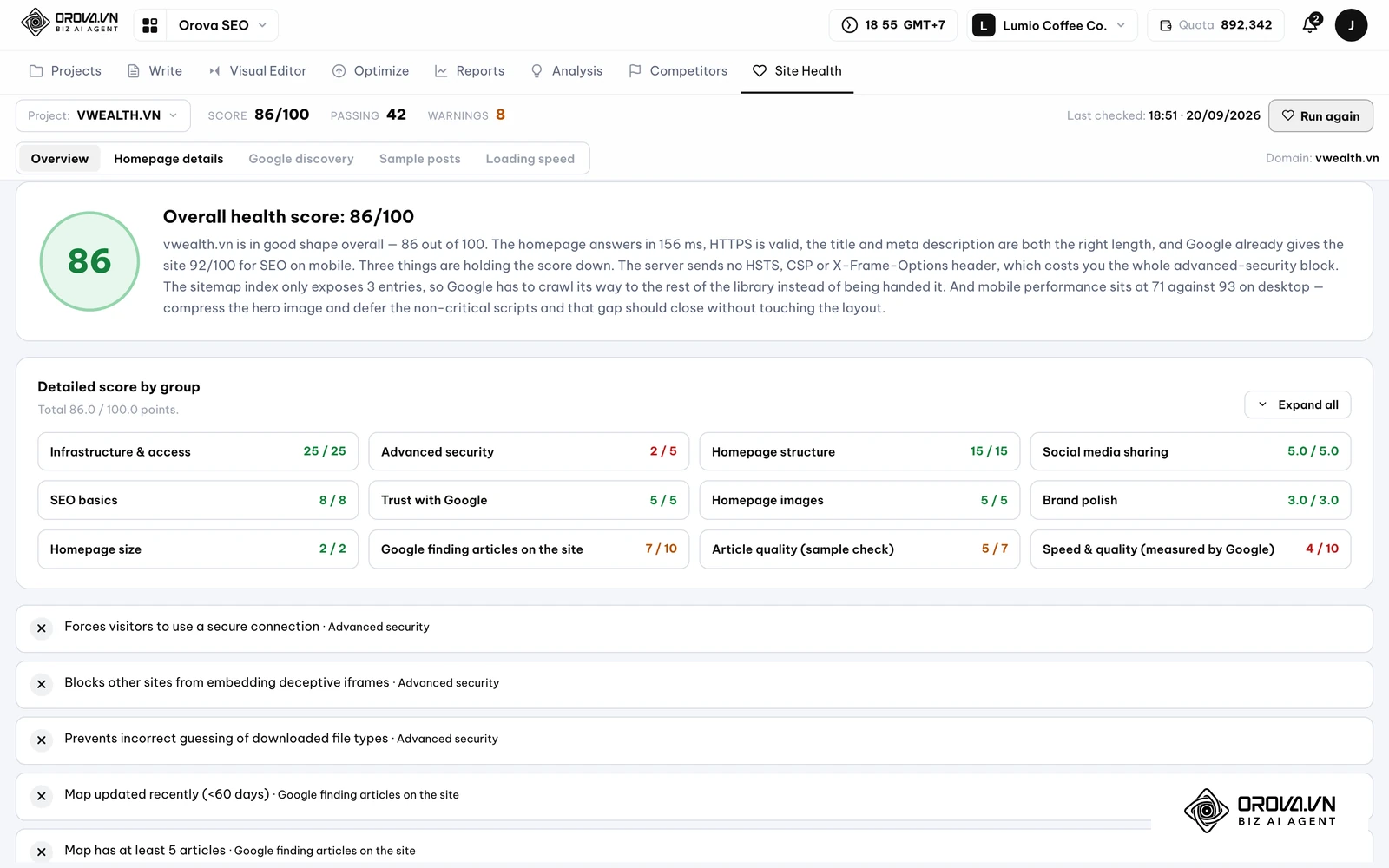
The AI reads the raw data and provides plain-English recommendations on exactly what to fix.
3. The End-to-End User Workflow
Getting started and scaling your traffic follows a predictable, highly automated 12-step loop:
- Create an Orova account, navigate to Workspace ▸ SEO, click Create Project, and enter your website address.
- Configure your project: select the writing language, AI quality, and brand voice.
- Connect Google once (GA4, Search Console, Drive) with read-only permissions.
- Connect your publishing destination (WordPress login or Custom API).
- Go to Content: Add keywords manually or via Excel. If you lack ideas, use the Site/Competitor scan.
- Define parameters for keywords (intent, word count, image count, voice, language, references).
- Set your publishing schedule and toggle "Auto-Write" on.
- Push old articles into the Optimize queue (via link paste, Excel, or Reports/Advisor), select the intent, and toggle "Auto-Optimize".
- Review Reports: Analyze clicks, impressions, CTR, and positions. Push weak articles to optimization.
- Run Advisor: Review priority tiers, extract new keyword opportunities, and merge cannibalized content.
- Add Competitors, run an Evaluation, and queue up the AI's content gap recommendations.
- Run the Health check, apply technical fixes based on the AI's plain-English advice, and repeat the cycle weekly.
4. What OROVA SEO Is (And What It Isn't)
Transparency is critical. OROVA SEO is a powerful software tool, not a traditional human SEO agency. We do not promise guaranteed #1 rankings or instant AI Overview features, because Google rewards genuine value, not just output volume. Google does not penalize AI-written content; it penalizes spam created to trick search engines.
Capabilities we proudly support:
- Auto-writing and auto-publishing on schedule.
- Auto-optimizing old posts while keeping the exact URL intact.
- Drawing AI images or pulling from your Drive.
- Suggesting keywords based on your real Search Console data + Google Autocomplete + AI logic.
- Pulling exact ranking, click, and CTR data from Search Console.
- Operating in 50 languages simultaneously.
What OROVA SEO does NOT do:
- We do not provide monthly search volumes or keyword difficulty (KD) metrics, as we do not connect to Keyword Planner or Trends.
- We do not analyze backlinks or assign arbitrary "Domain Authority" scores.
- We do not scrape Google search results for "People Also Ask" or related searches.
- We are not a full-site crawler like Screaming Frog.
- We do not provide daily ranking line charts (we provide the average position over your selected date range).
- We do not auto-generate JSON-LD schema for articles.
5. Pricing and Access
OROVA SEO breaks the mold of expensive SaaS tiers locking away premium features. Every account has access to every feature. We segment usage entirely by quota—tasks that you do manually (creating projects, connecting APIs, adding keywords, viewing reports) consume zero quota. Only actions where the AI expends compute power (writing, optimizing, analyzing sites, evaluating competitors, and health checks) consume your quota.
There are no mandatory monthly fees, and no credit card is required to start. Best of all, OROVA SEO is completely free to use until July 07, 2027.
The Ultimate Guide to the Best SEO Tools: Complete Free and Paid Tech Stack
6. Frequently Asked Questions (FAQ)
Does Google penalize AI-generated content?
Google does not ban AI-written articles. What Google penalizes is low-quality, spammy content generated purely to manipulate search engines. OROVA SEO focuses on intent, structure, and real-world data integration to ensure high-quality output.
Will I lose my SEO rankings if I optimize an old post?
No. OROVA SEO's Optimize feature specifically overwrites the new content onto your exact existing URL slug. This preserves all your historical rankings and any external backlinks pointing to that page.
Can I use OROVA SEO if my website isn't on WordPress?
Yes. While we offer a seamless one-click WordPress connection, custom-built websites can integrate flawlessly using our Publish API documentation.
Does the software automatically generate schema markup?
No. While the Health check audits whether your site has schema in place, OROVA SEO does not auto-generate JSON-LD schema for the articles it writes.
Where to Start?
If your team is bottlenecked by manual content creation, it is time to automate the heavy lifting. Create a free account, connect your website, and you can have your first fully optimized, AI-generated article published today. Explore the platform and reclaim your time for high-level marketing strategy.
About the author

Builder of Orova
Nguyễn Đỗ Trọng Ân has 8 years of experience in marketing, including 6 years managing market development across Asia. He builds Orova, a Biz AI Agent that never sleeps: it plans, runs and optimizes work for businesses.
Run your business with AI Agents
Orova is the always-on Biz AI Agent — it plans, runs, and optimizes the work for you.
Save time, unlock productivity.