
Programmatic ad strategy: how to launch a campaign in 7 steps (2026)

A programmatic ad campaign automates the bidding, purchasing, and placement of digital ad impressions in milliseconds through algorithmic exchanges, replacing manual insertion orders and fragmented vendor negotiations. By following this execution guide, you will set up a live, fraud-screened programmatic campaign across premium open-web display and video inventory, complete with custom bidding algorithms, automated frequency capping, and supply-path filters.
To complete this process, you need an active seat on a Demand-Side Platform (such as Google Display & Video 360, The Trade Desk, or StackAdapt), verified root-domain tracking scripts, creative assets formatted to Interactive Advertising Bureau (IAB) specifications, and a test budget large enough for the bidding algorithm to learn (each DSP sets its own minimums). If your monthly digital budget is small, or if your acquisition model relies entirely on single-keyword search capture, you do not need this guide; native search engines and direct social channels will yield faster returns with zero platform overhead.
What Is a Programmatic Ad and How the Ecosystem Functions
A programmatic ad is an automated impression transaction executed through algorithmic bidding across interconnected software platforms: Demand-Side Platforms (DSPs), Supply-Side Platforms (SSPs), and Ad Exchanges. Implementing an end-to-end programmatic campaign requires 7 sequential steps and takes approximately 4 to 6 hours of initial technical configuration.
Historically, media planners negotiated ad insertions through paper contracts, fixed CPM (Cost Per Mille) rates, and static date ranges. In modern programmatic media buying, the entire process takes place in real-time auctions (RTB). When a user navigates to an online publication, the browser requests content from the publisher's web server while simultaneously firing an ad tag to an SSP. The SSP packages the available impression data (user device, geographic IP, content category, and viewability prediction) into a bid request and broadcasts it to an Ad Exchange.
The exchange distributes the request to multiple competing DSPs. Within each DSP, programmatic algorithms evaluate the user against advertiser targeting criteria, query historical conversion probabilities, calculate an optimal bid price, and return a bid response. The highest eligible bid wins the auction, and the winning creative renders inside the user's browser viewport before the webpage finishes rendering.
GDN vs. Meta Ads vs. Independent DSPs
Many marketers conflate programmatic advertising with the Google Display Network (GDN) or closed social platforms. While GDN uses automated delivery, it functions as a single publisher network inside a walled garden. Independent DSPs, by contrast, bid across hundreds of independent Ad Exchanges, Connected TV (CTV) networks, digital audio streams, and Digital Out-of-Home (DOOH) screens.
The table below compares the operational scope and technical economics of major media buying channels.
| Evaluation Metric | Google Display Network (GDN) | Meta Ads Network | Independent Programmatic DSP |
|---|---|---|---|
| Primary Inventory Scope | Google AdSense network and YouTube placements | Facebook, Instagram, Messenger, Audience Network | Global open web, CTV, streaming audio, DOOH, mobile apps |
| Technical Complexity | Low (managed in Google Ads interface) | Moderate (managed in Ads Manager) | High (requires bid shading, supply path selection, SSP routing) |
| Audience Data Portability | Restricted to Google properties | Locked inside Meta walled garden | Full ownership of first-party segments, Universal ID integration |
| Fee Transparency | Blended margin (Google controls buy and sell sides) | Blended margin (Meta retains undisclosed margin) | Itemized line-item invoicing (DSP, SSP, data, and verification fees) |
If you are evaluating how to allocate capital across different paid ad platforms, choosing an independent DSP is justified only when your brand demands strict supply-path control, premium cross-exchange deals, and granular log-level attribution data that walled gardens deliberately withhold.
Prerequisites Before Launching a Programmatic Ad Campaign
Launching an enterprise-grade programmatic campaign requires specific structural assets. Skipping technical setup stages results in high bid drop-offs, untracked conversions, and security blocks from publisher ad servers.
| Required Component | Source / Location | Estimated Setup Time | Consequence If Missing |
|---|---|---|---|
| DSP Seat Access | Self-serve contract (StackAdapt, DV360, The Trade Desk) | 2 to 5 business days | Inability to submit bids to automated ad exchanges |
| First-Party Seed Audience | Customer CRM export or pixel retention pool | 1 to 2 hours | Higher acquisition costs due to reliance on unrefined third-party data |
| IAB-Standard Creative Suite | In-house design or creative agency | 3 to 6 hours | Rejection by SSP automated content verification scanners |
| Verified ads.txt File | Publisher root web directory (domain.com/ads.txt) | 30 minutes | Inability to execute direct publisher deals or prevent spoofing |
| Universal Conversion Tag | Web analytics container (Google Tag Manager, Segment) | 45 minutes | Complete loss of conversion tracking and automated algorithmic bid optimization |
| Global Domain Exclusion List | Corporate media safety repository or trade associations | 1 hour | Budget wasted on low-quality arbitrage and bot-driven domains |
Gather these operational assets inside a centralized staging document before entering your DSP console.
Step 1: Audit Tech Tax and Allocate Media Budget for Programmatic Ad Buying
The primary objective of this step is to calculate your true "working media ratio" by stripping away intermediary software markups before committing capital.
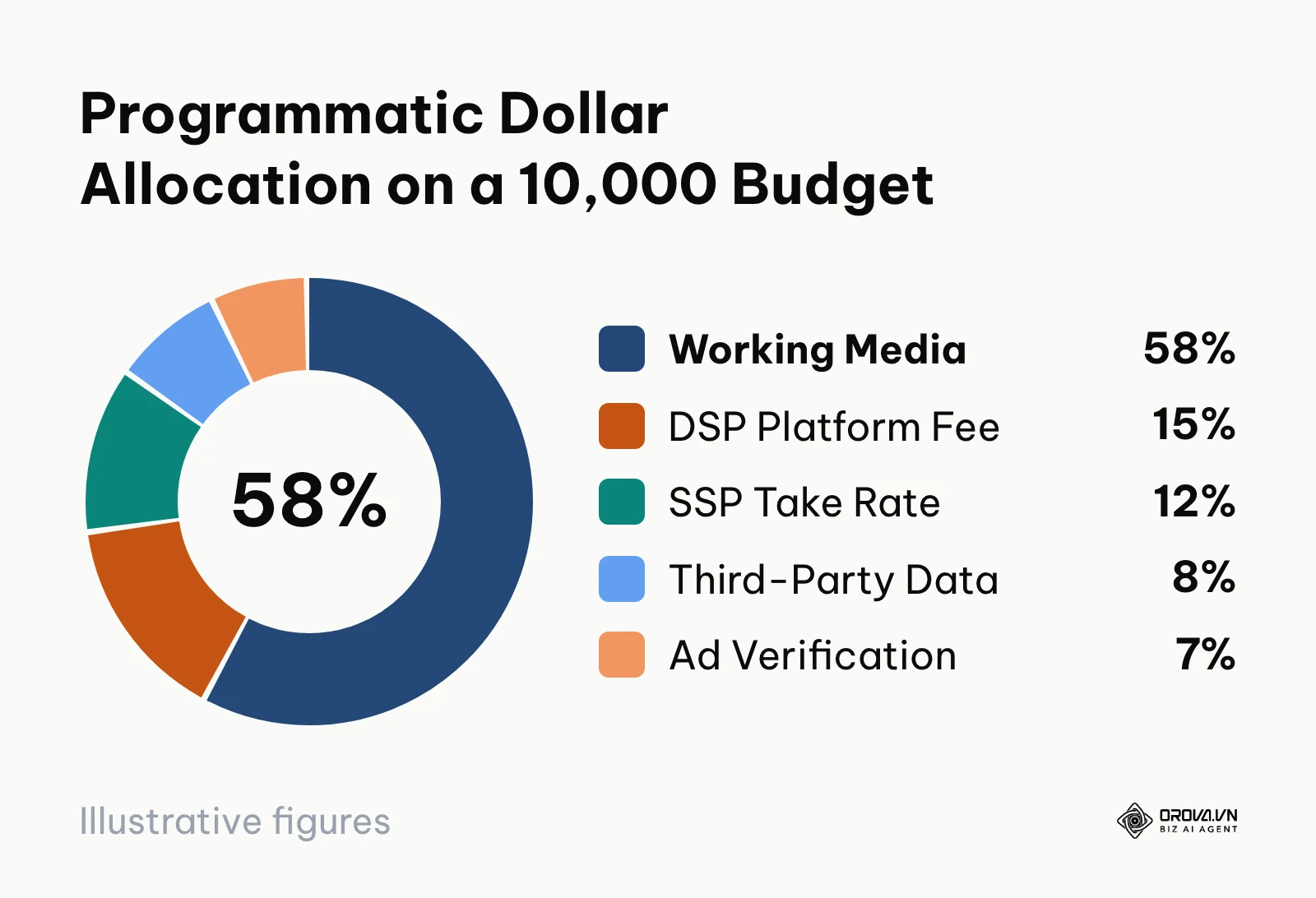
To execute this step, open your media planning spreadsheet. Programmatic ad transactions pass through multiple technology layers, each extracting a fee known in the trade as the "Tech Tax." If you commit a 10,000 gross budget (amounts in this guide are in your own currency) to an open-web exchange, only a fraction of that capital reaches the publisher to purchase actual consumer view time.
The Association of National Advertisers (ANA), in its "Programmatic Media Supply Chain Transparency Study" (2023), concluded that a large share of open-web programmatic spend is lost to non-working fees and low-quality inventory such as made-for-advertising sites. Earlier, the Incorporated Society of British Advertisers (ISBA) and PwC, in their "Programmatic Supply Chain Transparency Study" (2020), found that on average only about half of advertiser spend reached publishers, and roughly 15% of spend was an "unknown delta" that could not be traced between DSP logs and publisher receipts.
Hypothetical example: the breakdown below shows how a 10,000 gross programmatic budget could be distributed across the technology supply chain. The percentage ranges are illustrative; your own contracts and log-level data decide the real split.
| Supply Chain Layer | Illustrative % of Spend | Cost on 10,000 Budget | Representative Vendors | Operational Risk | Optimization Action |
|---|---|---|---|---|---|
| Demand-Side Platform (DSP) | 12% – 18% | 1,500 | Google DV360, The Trade Desk, StackAdapt | Hidden take rates on dynamic pricing models | Negotiate flat SaaS fees or fixed-percentage tiers |
| Supply-Side Platform (SSP) | 10% – 15% | 1,200 | Magnite, PubMatic, OpenX | Double-dipping on buy and sell fees | Implement Supply Path Optimization (SPO) to cut intermediaries |
| Third-Party Audience Data | 6% – 10% | 800 | LiveRamp, Eyeota, Experian | Stale, modeled cookies with high decay rates | Transition to first-party hashed identities and contextual AI |
| Ad Verification & Safety | 5% – 8% | 700 | Integral Ad Science (IAS), DoubleVerify | Redundant pre-bid and post-bid fee stacking | Consolidate verification into a single pre-bid wrapper |
| Working Media (Publisher Net) | 49% – 67% | 5,800 | The New York Times, Forbes, Vox Media | Diminishing ad share of voice and viewability | Enforce strict inventory filters and buy direct PMP seats |
Visual confirmation: Review your platform billing summary. You should see an itemized rate card specifying DSP platform fees, verification pass-through costs, and data ingestion fees separated from media cost.
Common pitfall: Signing contracts with managed-service DSP brokers who offer "zero platform fees." In reality, these vendors often build undisclosed markups directly into net CPMs, drastically diminishing your actual reach. Demand a transparent seat with distinct line-item disclosures to effectively manage your ad spend.
Hypothetical example: A mid-market B2B software firm committed a 10,000 pilot budget through a reseller offering bundled pricing. The team conducted an audit by cross-referencing DSP bid logs against publisher impression timestamps. They discovered that intermediary SSP markups and layered audience data fees consumed 4,600 before a single ad rendered. The team canceled the bundled reseller arrangement, opened a direct self-serve DSP seat, and stripped out redundant third-party B2B data segments in favor of first-party website visitor lists. As an observable outcome, their working media allocation increased from 54% to 76%, lifting total verified impressions from 980,000 to 1,380,000 at the same 10,000 outlay.
Step 2: Choose Inventory Deals and Trading Protocols for Programmatic Ad Delivery
The goal of this step is to select the appropriate programmatic transaction protocol based on your risk tolerance and performance goals.
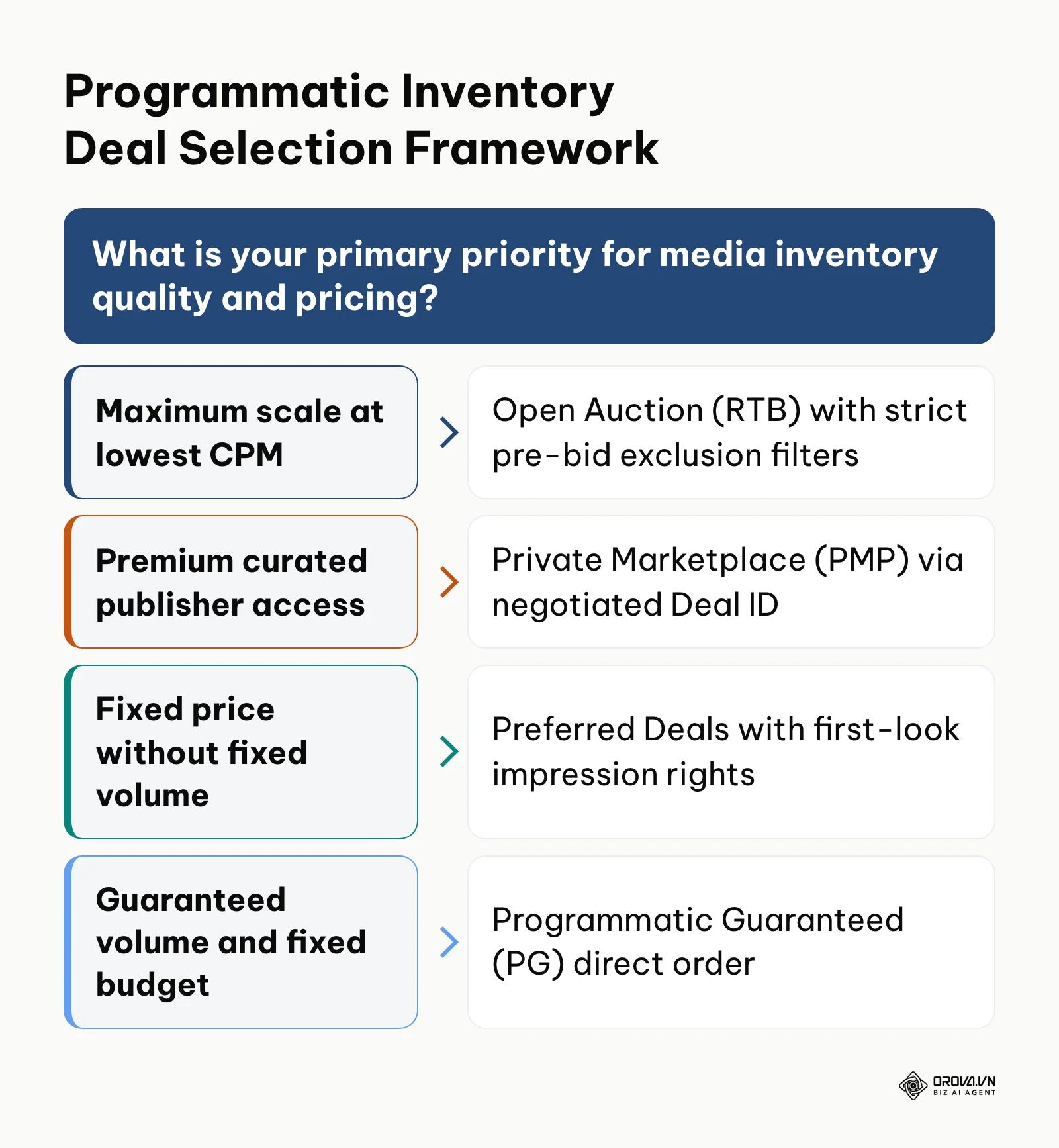
To select your inventory pipeline, navigate to your DSP console and click on Inventory Marketplace or Deals. Here you will see four distinct transaction types:
- Open Auction (Real-Time Bidding - RTB): The standard open exchange where millions of publishers offer remnant impressions to all connected buyers. Offers maximum scale and lowest CPMs, but carries the highest exposure to invalid traffic (IVT).
- Private Marketplace (PMP): An invite-only auction where premium publishers grant access to curated inventory packages using a unique Deal ID. CPMs are higher, but inventory is pre-screened.
- Preferred Deals (Unreserved Fixed Rate): The publisher and advertiser agree on a fixed CPM price for inventory before it goes to open auction, but the buyer is not obligated to purchase every impression.
- Programmatic Guaranteed (PG): A direct reservation model where both the price (fixed CPM) and volume (guaranteed impressions) are locked. Operates like a traditional insertion order executed via automated APIs.
| Deal type | Price | Volume | Best for |
|---|---|---|---|
| Open Auction (RTB) | Set by auction | Not guaranteed | Maximum scale at the lowest cost, with strict pre-bid filters |
| Private Marketplace (PMP) | Auction above a negotiated floor | Not guaranteed | Curated premium sites accessed through a Deal ID |
| Preferred Deals | Fixed CPM | Not guaranteed, first look | Steady pricing without a volume commitment |
| Programmatic Guaranteed (PG) | Fixed CPM | Guaranteed | Reserved premium placements with a fixed budget |
Visual verification: Under your DSP Deals Management tab, confirm that your Deal IDs show an "Approved" or "Active" sync status from the publisher's SSP, displaying the pre-negotiated floor CPM and supported creative formats.
Common pitfall: Bidding on open auction inventory without price floor adjustments. If your bid falls below the publisher's soft floor, the DSP drops the bid before it reaches the exchange, depressing your bid response rate. Check the floor shown on each deal and keep your maximum bid comfortably above it.
Step 3: Implement Cookieless Targeting for Programmatic Ad Audiences
The objective of this step is to establish resilient audience targeting frameworks that function independently of deprecated third-party tracking cookies.
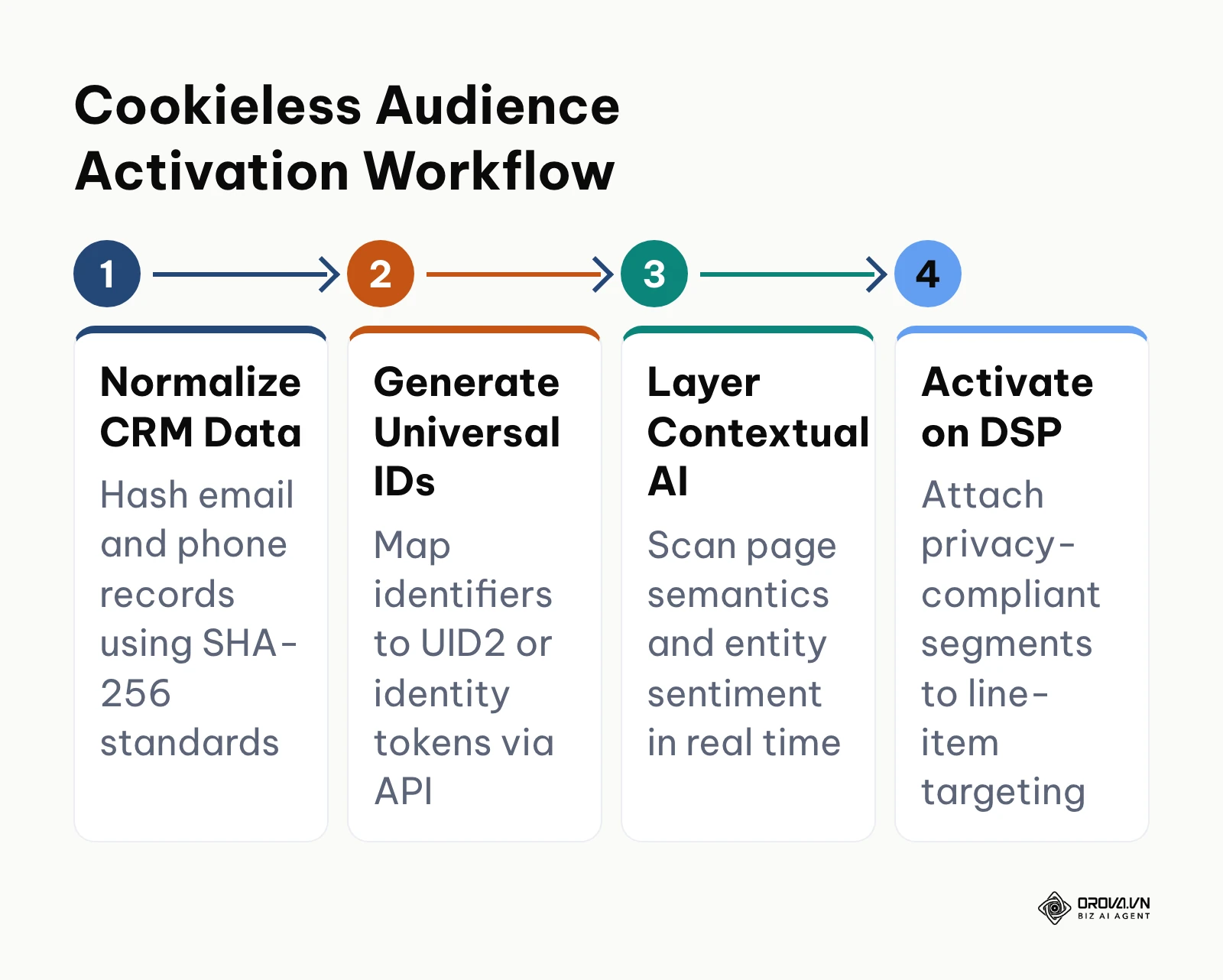
To configure cookieless targeting, open the Audience Manager inside your DSP and execute three distinct targeting strategies:
First-Party Identity Resolution (Universal IDs)
Export your verified CRM records (customer emails and mobile numbers). Normalize the data by stripping whitespace and converting text to lowercase. In your data onboarder or DSP API, hash the records using the SHA-256 cryptographic standard. Push this file to an identity resolution provider (such as Unified ID 2.0 / UID2, LiveRamp RampID, or ID5). The provider converts your hashed emails into encrypted identity tokens that participating SSPs match within the bidstream without exposing personal data.
Privacy-Safe Signals From Your DSP and Publishers
Google has scaled back its Chrome Privacy Sandbox program and announced the retirement of several of its APIs, including Topics and Protected Audience, so do not build your plan around them. Instead, ask your DSP which privacy-safe signals it supports today: publisher first-party audiences offered through PMP deals, seller-defined audiences, data clean-room matches, and the identity tokens from the previous point. Turn on only the options your DSP documents for your target regions and consent setup.
Contextual AI and Semantic Analysis
Click Targeting > Contextual inside your DSP line item. Instead of selecting basic keywords, activate natural language processing (NLP) contextual crawlers. These AI models evaluate the full semantic text, headline sentiment, and entity relationships of a webpage in real time. For example, rather than placing an enterprise cyber insurance ad on any page containing the word "attack," the AI distinguishes between a military history article and a corporate ransomware report.
Visual verification: In your Audience Segment Summary, verify that your cookieless audience lists show an "Active" sync indicator with an estimated reachable impression count spanning mobile web, desktop, and in-app environments.
Common pitfall: Attempting to run classic pixel-based remarketing across mobile Safari and Firefox environments. Third-party cookies are completely blocked on these platforms, resulting in near-zero impression volume. Verify that your line items route through Universal ID tokens to maintain cross-browser coverage.
OROVA ADS applies AI Agent to automate and optimize ad performance on Google, Meta and TikTok. Scale your budget safely, monitor 24/7 and expand your business quickly.
Experience the solution at orova.vn/ads
Step 4: Configure Brand Safety and MFA Exclusion Filters for Programmatic Ad Placements
The objective of this step is to build an automated defense perimeter that eliminates Made-For-Advertising (MFA) websites, bot networks, and toxic environments before your budget deploys.
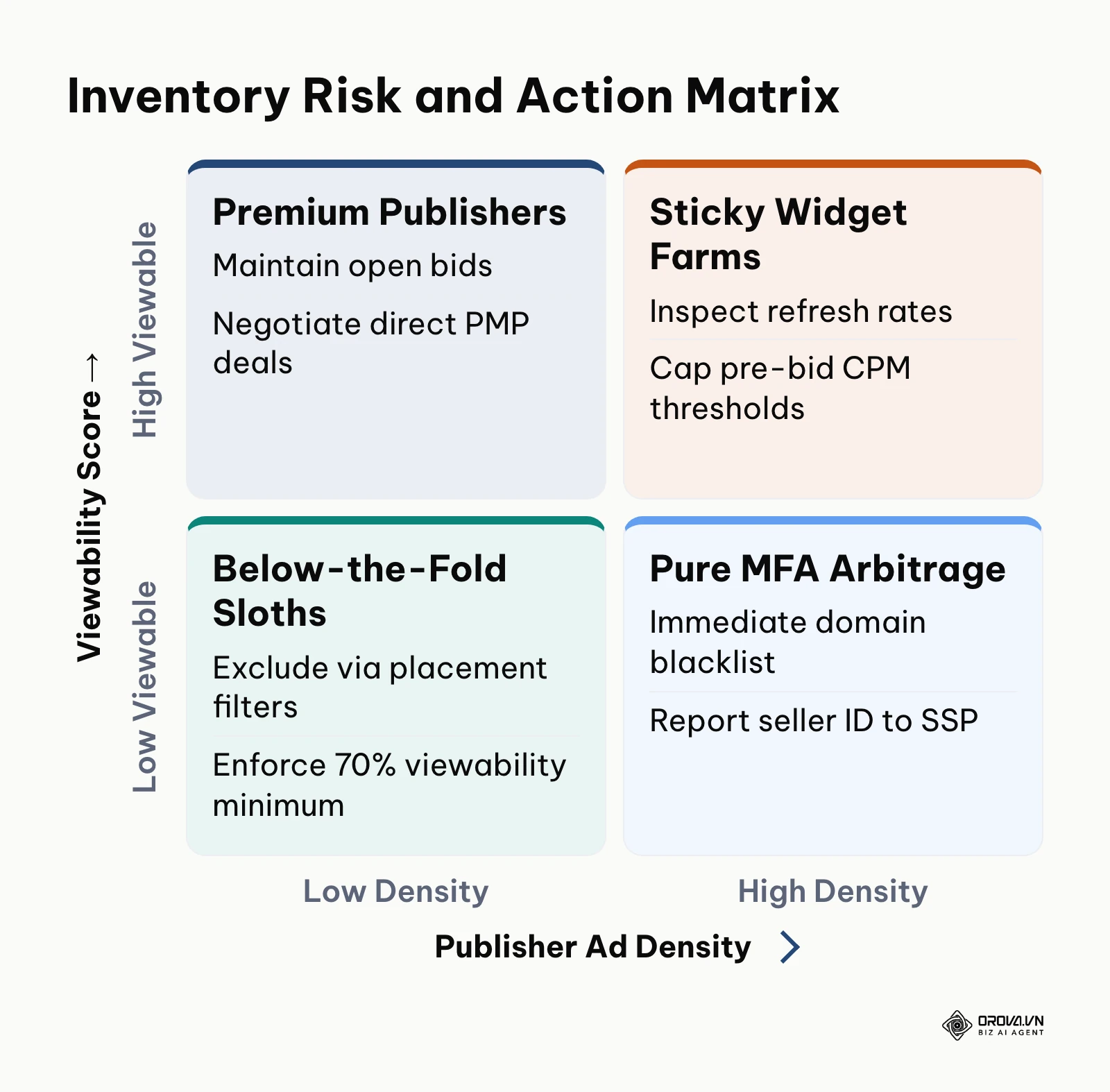
Made-For-Advertising (MFA) websites are sites built exclusively to harvest programmatic ad spend. They feature extreme ad density (often 10 to 20 ads per screen), auto-refresh timers cycling every 10 seconds, fabricated viral slideshows, and paid clickbait traffic from social networks. These sites siphon media budgets while offering zero human attention.
To protect your campaigns, access the Brand Safety & Verification menu in your DSP line item and deploy the following 12-point operational checklist across three phases:
Phase 1: Pre-Bid Viewability & Environment Filters
- [ ] Set minimum pre-bid viewability threshold to 70% based on historical exchange data.
- [ ] Restrict environment delivery strictly to web browsers and native mobile applications (exclude unknown shell browsers).
- [ ] Block all unaccredited video players; limit video inventory to VAST 4.0 compliant, sound-on, or click-to-play placements.
- [ ] Enforce player size filters for video (exclude players smaller than 400x300 pixels).
Phase 2: Fraud & Invalid Traffic (IVT) Controls
- [ ] Activate pre-bid General Invalid Traffic (GIVT) and Sophisticated Invalid Traffic (SIVT) blocking via integrated verification partners (e.g., DoubleVerify, IAS).
- [ ] Enforce strict compliance with authorized seller records: select "Authorized Direct and Resellers" only where validated by ads.txt and app-ads.txt protocols.
- [ ] Exclude all IP ranges associated with cloud data centers (AWS, DigitalOcean, Hetzner, Google Cloud) to prevent server-side bot scraping.
- [ ] Exclude proxy servers, Tor exit nodes, and automated headless browser signatures.
Phase 3: Domain Exclusion & Supply-Path Sanitation
- [ ] Upload an updated global domain blacklist containing known MFA networks and content farms.
- [ ] Set placement exclusion rules for domains exhibiting ad refresh intervals under 30 seconds.
- [ ] Restrict bid requests to transparent seller paths documented in public sellers.json files.
- [ ] Filter out sub-domains using wildcard syntax (*.blogspot.com, *.wordpress.com) unless individually vetted.
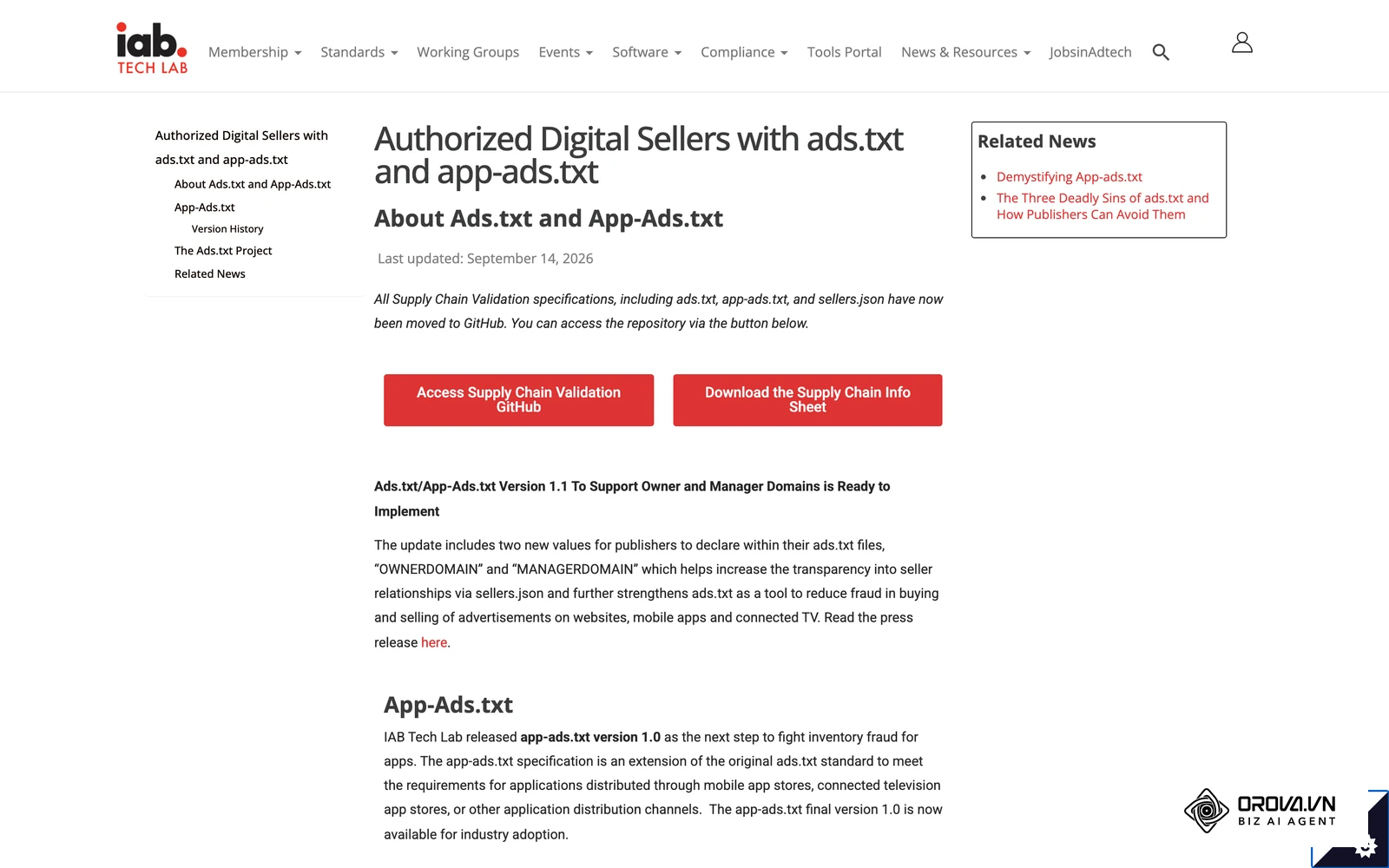
As defined by the IAB Tech Lab in the "Ads.txt Specification Version 1.1" (2022), declaring authorized digital sellers prevents domain spoofing and illicit inventory arbitrage across automated exchange pipes.
Hypothetical example: A direct-to-consumer apparel brand launched a 15,000 programmatic display test. Within 72 hours, the media manager observed unusually high click-through rates (CTR exceeding 2.8%) paired with a bounce rate of 97% and an average session duration of 1.4 seconds. An audit of raw domain impression logs revealed that 42% of impressions were serving on 14 clickbait slideshow domains running five auto-refreshing sticky banners simultaneously. The media manager imported a master MFA exclusion list, enabled pre-bid ad-density limits (excluding pages where ads cover more than 30% of vertical pixel height), and restricted supply paths to verified direct sellers. As an observable outcome, false-click traffic dropped by 89%, average on-site session duration rose to 48 seconds, and conversion actions increased threefold on the same daily spend.
Visual verification: In your DSP line-item settings, verify that your pre-bid verification segment shows as applied, confirming that all bid requests failing the 70% viewability or SIVT checks are dropped before bidding occurs.
Common pitfall: Relying exclusively on post-bid measurement rather than pre-bid prevention. Post-bid reporting informs you that you bought bot traffic after your budget has already been spent. Pre-bid filtering blocks the bid request before your money leaves the account.
Step 5: Upload Creatives and Validate Ad Specs for Programmatic Ad Servers
The objective of this step is to upload, format, and audit your digital creative assets against technical standards to avoid exchange-level delivery throttles.
To upload your assets, click on Creative Library inside your DSP dashboard and select New Creative. For standard display, upload HTML5 zip packages or responsive asset bundles covering core IAB dimensions:
| Size (pixels) | IAB name | Where it usually appears |
|---|---|---|
| 300x250 | Medium Rectangle | In-article and sidebar slots on desktop and mobile |
| 728x90 | Leaderboard | Top or bottom of desktop pages |
| 160x600 | Wide Skyscraper | Desktop sidebars |
| 300x600 | Half Page | High-impact desktop sidebar slots |
| 320x50 | Mobile Leaderboard | Top or bottom banners on mobile web and apps |
For video assets, ensure compliance with the VAST 4.0 (Digital Video Ad Serving Template) standard. MP4 files encoded with the H.264 video codec and AAC audio codec are the most widely accepted; file-weight and bit-rate limits differ by exchange, so check the spec sheet of each deal before exporting.
Every creative then passes the same validation flow:
- Upload the asset package (HTML5 or VAST).
- Automated security and SSL audit by the exchanges.
- Click-tag macro validation.
- Format and file-weight conformance check.
- Ingestion into the ad server's content delivery network.
Next, configure your landing page destination URLs. Enter click-tracking macros provided by your DSP (such as ${CLICK_URL}) directly within your HTML5 clickTag parameter. Every destination URL must be secured via HTTPS protocol; non-secure HTTP links will trigger automatic creative rejection across major Ad Exchanges.
Visual verification: After uploading, navigate to the Creative QA tab. Confirm that all creative variations show a status of "Serving Eligible" across all major exchange partners (e.g., Google Ad Manager, Magnite, PubMatic, OpenX) and that the test preview triggers your destination page with all UTM campaign parameters appended.
Common pitfall: Hardcoding absolute URLs directly inside HTML5 banner code instead of using standard clickTag variables. When hardcoded, the DSP ad server cannot track clicks, and exchanges will reject the creative package outright.
Step 6: Set Bidding Strategies, Frequency Caps, and Dayparting for Programmatic Ad Pacing
The objective of this step is to establish dynamic bidding algorithms, prevent audience fatigue through frequency limits, and align ad delivery with real-world customer activity cycles.
To configure bid parameters, open your DSP line item and click Budget and Bidding.
Bidding Mechanics and Algorithmic Models
Select your bidding strategy based on campaign maturity:
| Bidding strategy | When to use it | How it works |
|---|---|---|
| Fixed CPM | Initial technical tests | You pay one set price per thousand impressions, which gives a baseline win rate across inventory sources |
| Maximized Viewable CPM (vCPM) | Awareness campaigns that need ads actually seen | The algorithm bids higher when an impression is predicted to reach 70%+ viewability |
| Target CPA with bid shading | Campaigns with steady conversion data | Machine learning predicts conversion likelihood; in first-price auctions, bid shading trims your maximum bid toward the lowest price likely to win |
Frequency Capping Controls
Set an explicit frequency cap. A common starting point many buyers use (adjust to your own data):
- Display campaigns: Maximum 3 impressions per unique user identifier per 24-hour cycle.
- Video / CTV campaigns: Maximum 1 impression per unique household per 12-hour cycle.
Without strict frequency capping, algorithmic pacing will repeatedly serve identical impressions to the same active user on high-refresh pages, exhausting your budget while generating zero incremental reach.
Dayparting and Device Targeting
Access Line Item Settings > Schedule & Pacing. Configure dayparting to match historical conversion hours. For B2B campaigns, set delivery from 07:00 to 19:00 Monday through Friday based on the user's local timezone. Set pacing to "Even" to distribute impressions uniformly across the campaign window, avoiding "ASAP" pacing, which often depletes daily allocations before midday.
Visual verification: Review your campaign settings overview. Ensure that the pacing graph displays a smooth horizontal target line, the frequency cap reflects your 3/24h rule, and the maximum bid ceiling is firmly established.
Common pitfall: Setting frequency caps at the individual ad level rather than at the overall campaign or order level. If you have 10 creative sizes running, an ad-level cap allows an individual user to see 30 impressions in a single day (3 impressions per creative size). Always apply frequency capping at the top container level.
Step 7: Launch the Campaign and Monitor Pre-Flight Programmatic Ad Delivery
The goal of this final step is to activate delivery, verify bidstream mechanics, and conduct real-time delivery checks across the first 72 hours of campaign life.
To launch, navigate to your DSP campaign management dashboard, toggle the line item status switch from "Draft/Paused" to Active, and click Save & Deploy.
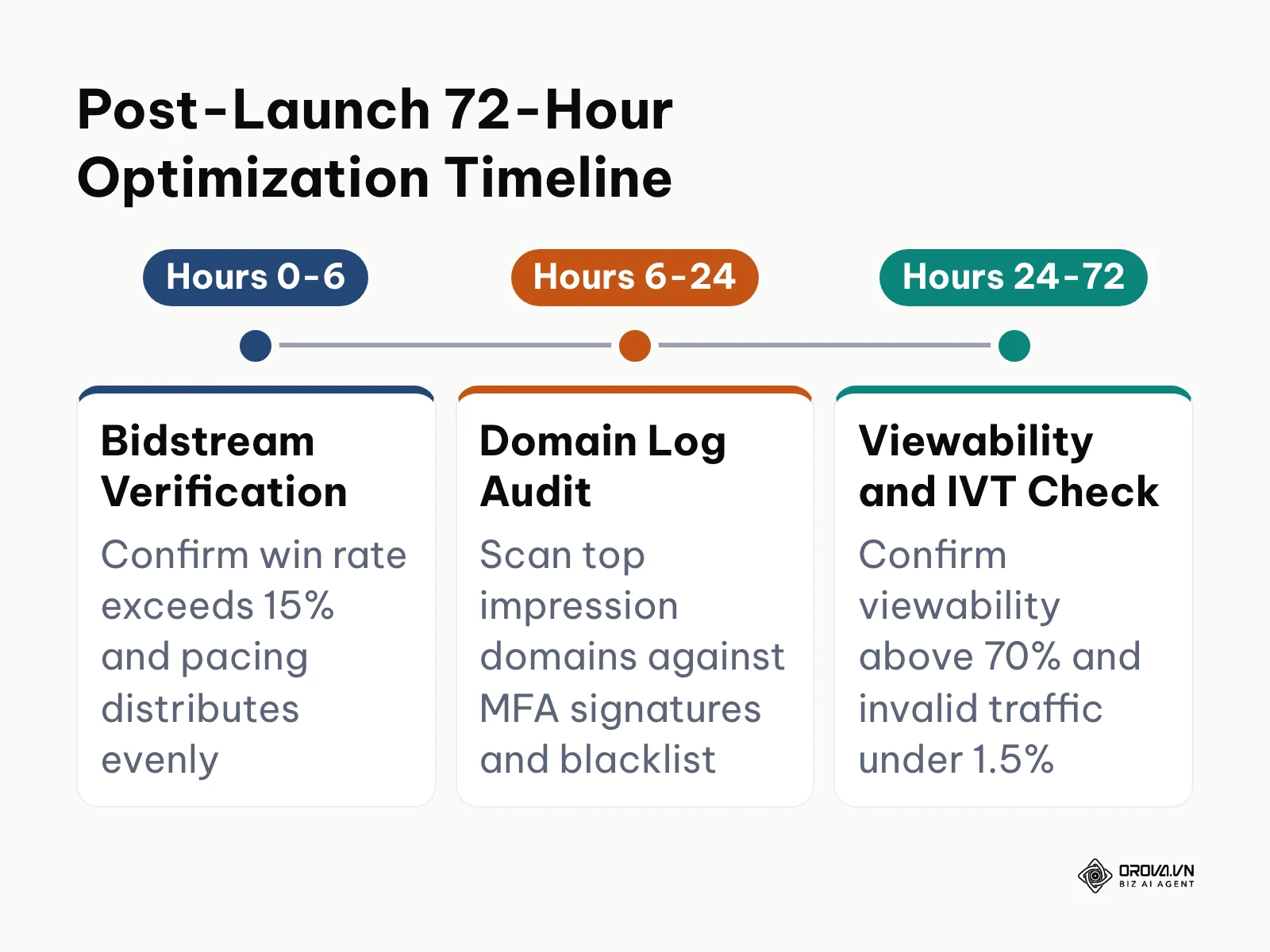
During the initial 72 hours post-launch, monitor your line-item delivery across three precise checkpoints:
Hour 0 to 6: Bidstream Health Audit
Check your Win Rate metric (calculated as Impressions Won divided by Total Bids Submitted).
- Many buyers treat roughly 15% to 30% as a workable open-auction win rate; your DSP and deal mix shift this range.
- If your win rate is below 5%, your maximum bid floor is set too low, your pre-bid targeting filters are too narrow, or your creative formats are not supported by the selected inventory deals.
Hour 6 to 24: Real-Time Domain Delivery Inspection
Generate a raw Domain Performance Report. Sort the report by impression volume descending. If you see unvetted domains absorbing more than 5% of total daily spend within the first 12 hours, immediately review their content. Look for signs of domain masking (discrepancies between the referring URL and the publisher ID) and blacklist suspicious placements.
Hour 24 to 72: Device and Viewability Stabilization
Review your aggregate viewability and invalid traffic scores. Confirm that your actual Media Rating Council (MRC) viewability rate exceeds 70% and that your invalid traffic rate remains under 1.5%. If viewability lags, adjust your pre-bid filter upwards or reallocate spend away from mobile web display toward in-app or premium PMP inventory.
Hypothetical example: A consumer electronics manufacturer launched a programmatic campaign with an aggressive 3,000 weekly budget. Within the first 6 hours, the media team noticed that their win rate was stalled at 3.8%, and the campaign had spent less than 40. An inspection of their DSP console revealed that they had simultaneously stacked an 85% viewability filter, an ultra-strict contextual keyword list, and a low 1.80 maximum CPM ceiling. The exchange could not find eligible inventory that satisfied all three constraints simultaneously. The team widened the contextual net to semantic topic categories and lifted the maximum bid ceiling to 2.80 while retaining the 70% viewability baseline. Within 90 minutes, the win rate stabilized at 22%, and pacing normalized across target tech publication domains.
Visual verification: In your DSP real-time reporting console, confirm that the hourly impression chart shows an active delivery curve, win rates remain between 15% and 30%, and the active eCPM aligns with your initial media model.
Common pitfall: Making aggressive manual bid adjustments during the first 24 hours. Algorithmic bidding models require a learning window of at least 1,000 to 2,000 impressions per creative size to calibrate bid shading and win-rate probabilities. Premature intervention corrupts the algorithm's statistical baseline.
Master Checklist for Programmatic Ad Deployment
Use this consolidated implementation checklist to audit your technical setup before enabling live delivery.
| Step Number & Phase | Core Technical Action | Completion Verification Signal | Estimated Duration |
|---|---|---|---|
| Step 1: Budget & Fees | Calculate working media ratio and tech tax | Itemized rate card signed with transparent line items | 1 to 2 hours |
| Step 2: Inventory Deals | Negotiate Deal IDs and select exchange channels | Deals status shows "Active" with agreed floor CPMs | 2 to 4 hours |
| Step 3: Identity & Targeting | Upload hashed CRM lists and configure contextual AI | Audience segment shows active reach across browsers | 1 to 2 hours |
| Step 4: Brand Safety | Apply 12-point anti-fraud and MFA exclusion filters | Pre-bid verification badge displays "Shield Active" | 1 hour |
| Step 5: Creative QA | Upload IAB banners and validate HTTPS clickTags | Creative status shows "Approved" across major exchanges | 1 to 2 hours |
| Step 6: Pacing & Caps | Set 3/24h frequency caps and algorithmic bid shading | Pacing timeline reflects even daily distribution | 30 minutes |
| Step 7: Pre-Flight Launch | Activate campaign and monitor win-rate curve | Win rate stabilizes between 15% and 30% | 1 hour (plus 72h audit) |
Want to scale your budget but afraid of breaking performance?
Integrate OROVA ADS now - an AI Agent that automatically monitors and optimizes Google, Meta, TikTok ads 24/7. Now, expanding and replicating your Performance Ads team is just one click away.
Try it now at: orova.vn/ads
Common Pitfalls and Troubleshooting in Programmatic Ad Buying
Managing automated media buying across millions of publisher sites inevitably surfaces edge-case technical failures. The table below outlines 6 recurring programmatic errors, their root causes, and immediate recovery protocols.
| Operational Error | Root Cause | Immediate Troubleshooting Protocol |
|---|---|---|
| Zero Impressions Served Despite Active Status | Creative rejection by SSP or bid ceiling below publisher hard floor | Inspect creative QA tab for SSL certificate mismatches; raise maximum CPM bid by 25% to surpass exchange floor prices. |
| Rapid Budget Burn in Under Two Hours | Campaign pacing set to "ASAP" or missing top-level frequency cap | Switch pacing to "Even Throughout Day"; enforce a campaign-level frequency cap of 3 impressions per user per 24 hours. |
| Abnormally High CTR (>3%) with 95%+ Bounce Rate | Accidental placement on MFA clickbait slideshows or mobile gaming apps | Immediately exclude mobile app inventory categories (app-category::games); upload master MFA domain exclusion list. |
| Creative Assets Rejected Across Exchanges | Hardcoded HTTP landing page links or improper clickTag macro execution | Update landing page protocols to HTTPS; re-export HTML5 creative packages using standard dynamic ${CLICK_URL} macros. |
| Low Win Rate Below 5% | Over-constraining targeting by stacking narrow audiences, strict contexts, and high viewability floors | Loosen contextual targeting to broader category topics; reduce viewability pre-bid filter from 85% to the industry standard 70%. |
| Discrepancy Between DSP and Analytics Clicks (>25%) | Heavy landing page payload, missing UTM tags, or click fraud | Compress landing page assets to load under 2 seconds; verify UTM parameter continuity; enforce pre-bid SIVT filtering. |
Measuring Post-Launch Performance and Return on Programmatic Ad Spend
Evaluating the true success of an automated display and video campaign requires moving beyond surface-level vanity metrics. Review your results inside your DSP reporting suite every 7 days using the following core metrics:
- Effective Cost Per Thousand (eCPM): Calculated as (Total Spend / Total Impressions) * 1,000. This reveals the true blended cost of your inventory after bid shading.
- MRC Viewability Rate: Under the Media Rating Council standard, an ad impression is viewable if at least 50% of its pixels remain visible in the active browser viewport for at least one continuous second for display, or two continuous seconds for video. Campaigns should maintain a viewability benchmark of 70% or higher.
- Clean Conversion Lift: Segment your acquisitions into post-click conversions and view through conversions. While view-through metrics indicate brand awareness, relying entirely on 30-day view-through windows inflates programmatic performance. Restrict view-through attribution windows to a strict 24-hour limit to accurately measure baseline incrementality.
- Return on Media Investment: Plug your verified post-click and short-window post-view revenues into the standard ROAS formula to confirm that net revenue outpaces your combined working media spend and tech platform fees.
Compare these outputs against your broader ad performance metrics to determine whether your open-web programmatic placements are driving incremental business value or merely recycling existing customer touchpoints.
Programmatic Ad Trends Over the Next Few Years: Author's Outlook
Direct Supply Path Optimization Eliminates Reseller Arbitrage
Today, as of 2026, an individual ad impression is frequently routed through four or five intermediary ad networks before reaching the end buyer, with each hop deducting an arbitrary tech markup. I anticipate that over the next 2 to 3 years, the open programmatic supply chain will collapse into direct publisher-to-DSP integrations. Leading agencies are already terminating contracts with secondary exchanges, demanding direct SSP connections via verified sellers.json transparency records. Advertisers should prepare by auditing their DSP routing logs and shifting a meaningful share of open-auction spend into curated Private Marketplaces. However, this projection could be delayed if major ad tech holding companies continue using opaque reseller bundles to mask media margin markups.
Autonomous Agentic AI Replaces Manual Bid Shading
Today's DSP platforms rely largely on rigid rule-based automation: if viewability drops below 60%, bid prices drop by 15%. I believe that by 2028, real-time bid optimization will be governed almost entirely by autonomous AI agents capable of evaluating multimodal context simultaneously. These agents will parse page layout rendering speeds, user attention heatmaps, and live inventory pricing volatility in microseconds, dynamically rewriting bid parameters without human intervention. Media buyers should transition now from manual line-item tinkering to learning automated rule-governance architectures. That said, this shift could stall if publisher firewalls restrict real-time bidstream data access under the banner of data privacy protection.
Connected TV and Retail Media Unify Under Single DSP Stacks
Currently, media planners manage Connected TV (CTV) streaming campaigns and Retail Media Network (RMN) shopper campaigns in separate, disconnected platforms. I expect that within 2 to 3 years, enterprise DSPs will consolidate these channels into unified identity-driven marketplaces. Retailers holding rich point-of-sale data (such as Walmart and Amazon) are expanding their off-site programmatic monetization pipes, allowing advertisers to target households on streaming television based on real-time grocery purchases. Media buyers must prepare by centralizing customer identity graphs and establishing clean-room data partnerships today. This trend could falter if conflicting walled-garden standards prevent retailers from establishing shared interoperability protocols.
Frequently Asked Questions About Programmatic Ad Strategies
What is the minimum monthly budget required to justify an independent DSP over Google Ads?
There is no universal number: each DSP sets its own minimum spend or platform fee, and the bidding algorithm needs enough conversions each week to learn. As a rule of thumb, if your monthly budget cannot cover the DSP's minimum plus a test that produces a steady stream of conversions, stay with Google Ads and Meta Ads until it can.
How much of an advertiser's budget is lost to the programmatic tech tax?
The ISBA and PwC "Programmatic Supply Chain Transparency Study" (2020) found that on average only about half of advertiser spend reached publishers, with the rest going to DSP fees, SSP take rates, data and verification charges, and an untraceable "unknown delta". Auditing supply paths, pruning reseller hops, and negotiating direct Private Marketplace deals shrink that share and send more of your budget to working media.
How do advertisers identify and block Made-For-Advertising (MFA) domains?
Advertisers identify MFA sites by analyzing domain-level log data for high ad density (more than 30% of page content consisting of ads), extreme refresh rates (ads rotating every 10 to 15 seconds), and abnormal traffic patterns (high click rates paired with sub-two-second time on site). Blocking requires implementing strict pre-bid viewability filters, uploading master exclusion blacklists, and demanding verified ads.txt direct seller authorization.
Which targeting methods replace third-party cookies in programmatic ad buying?
Modern programmatic buying replaces third-party cookies with three primary privacy-compliant frameworks: first-party identity resolution networks (such as Unified ID 2.0 and RampID), publisher first-party audiences offered through curated deals and clean rooms, and deep contextual AI that analyzes full-page semantics and sentiment in real time.
What role does artificial intelligence play in modern programmatic ad auctions?
Artificial intelligence operates at every stage of the programmatic auction: predicting the probability of user viewability within milliseconds, executing real-time bid shading to prevent overpaying in first-price auctions, and analyzing page content semantics to ensure strict brand safety without relying on blunt keyword blacklists.
How do programmatic platforms enforce brand safety across open-web publishers?
Programmatic platforms enforce safety through pre-bid contextual wrappers that scan page copy before submitting bids, cross-referencing domain registries against global fraud blacklists, and applying strict ads.txt protocols to verify that the exchange selling the impression holds legal authorization from the publisher.
Where Should You Start with Programmatic Ad Buying?
Your first step depends on your current media volume, team infrastructure, and existing channel maturity. Identify your profile below to take an actionable first step during your next work session:
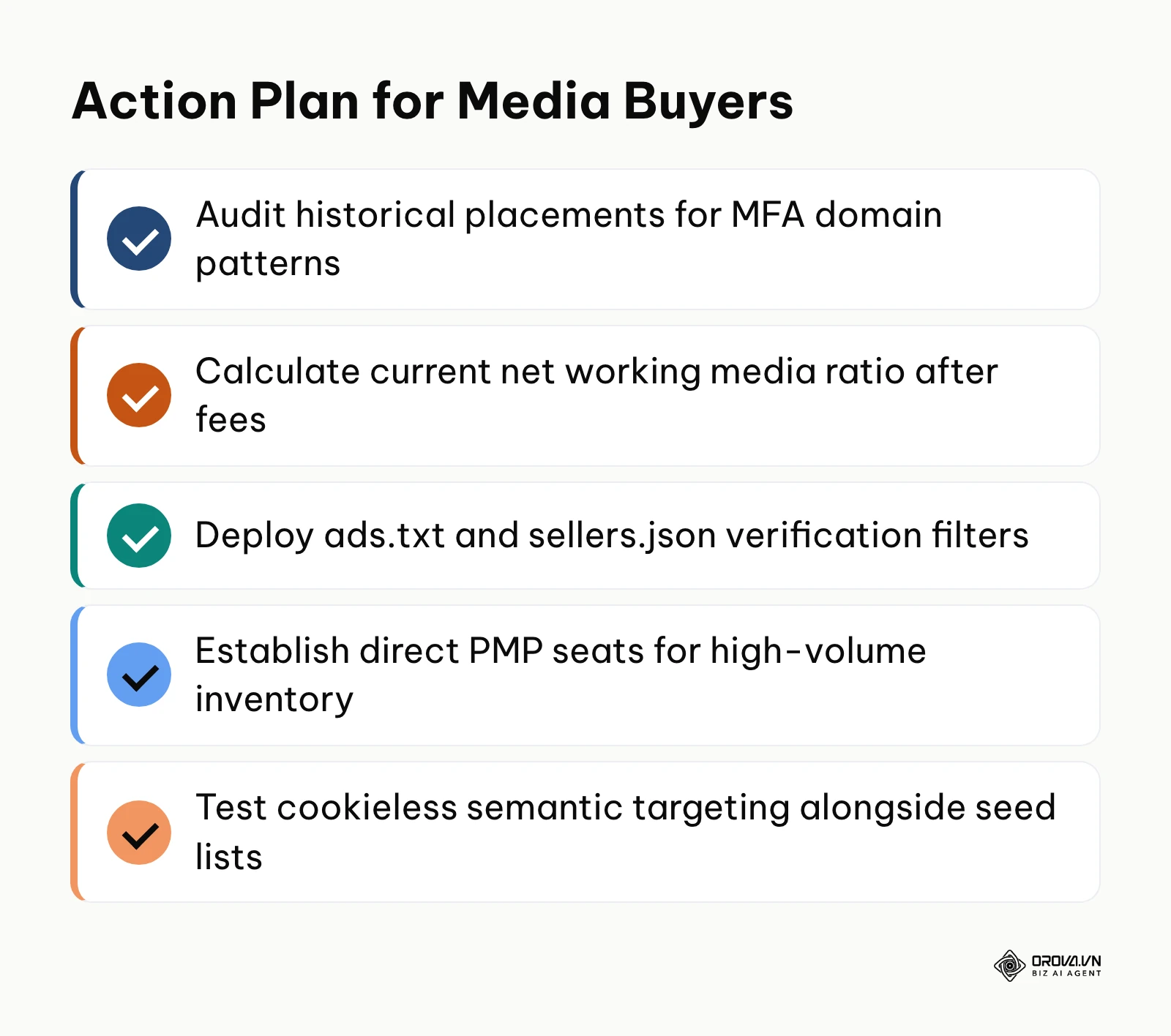
- The SMB Marketer Running Mostly on Google and Meta: If your budget is small, do not commit to an enterprise DSP seat. Your immediate step this afternoon is to open your Display campaigns in Google Ads, review the Where ads showed placement report under Content, and exclude low-quality sites and apps. This cuts waste on low-quality arbitrage traffic without adding new software.
- The Scaling Brand Spending 5,000 to 20,000/Month Ready for Open Web: If you have established consistent acquisition on search and social channels, open a self-serve DSP account and compare its minimum spend and fee terms before signing. Your first step today is to build a master brand safety template: configure a 70% pre-bid viewability threshold, import a verified MFA exclusion list, and create your first curated Private Marketplace deal with a vetted publisher network.
- The Enterprise Media Team Auditing Agency Supply Chains: If you are spending over 20,000 monthly through an agency or reseller, request a raw, unredacted log-level data report covering the past 60 days. Your single task this week is to match DSP impression timestamps against SSP clear prices to calculate your exact working media ratio and eliminate all non-direct reseller hops from your programmatic ad lines.
By replacing passive vendor trust with active supply-path governance, you transform your media buying from an opaque expense into a transparent growth engine driven by every high-performing programmatic ad.
About the author

Builder of Orova
Nguyễn Đỗ Trọng Ân has 8 years of experience in marketing, including 6 years managing market development across Asia. He builds Orova, a Biz AI Agent that never sleeps: it plans, runs and optimizes work for businesses.
Run your business with AI Agents
Orova is the always-on Biz AI Agent — it plans, runs, and optimizes the work for you.
Save time, unlock productivity.