
Six fields every ad change log needs to be reversible
Hand any part of ad management to software and one question decides whether you can live with it: six weeks from now, can you reconstruct what changed, why it changed, and who allowed it? The record that answers all three is a change log. One line per action, written at the moment the action happens, kept whether the outcome was good or bad.
Most logs you will meet fail on the same two fields, and both failures only show up on the morning you need them. This article covers the six fields a line has to carry, the three questions an incident review asks, the four levels of reversibility, and how to check whether your current tool's log would survive any of it.
If you take one thing away, take the drill in the second section. Five minutes, one action, and you will know exactly which fields your log is missing.
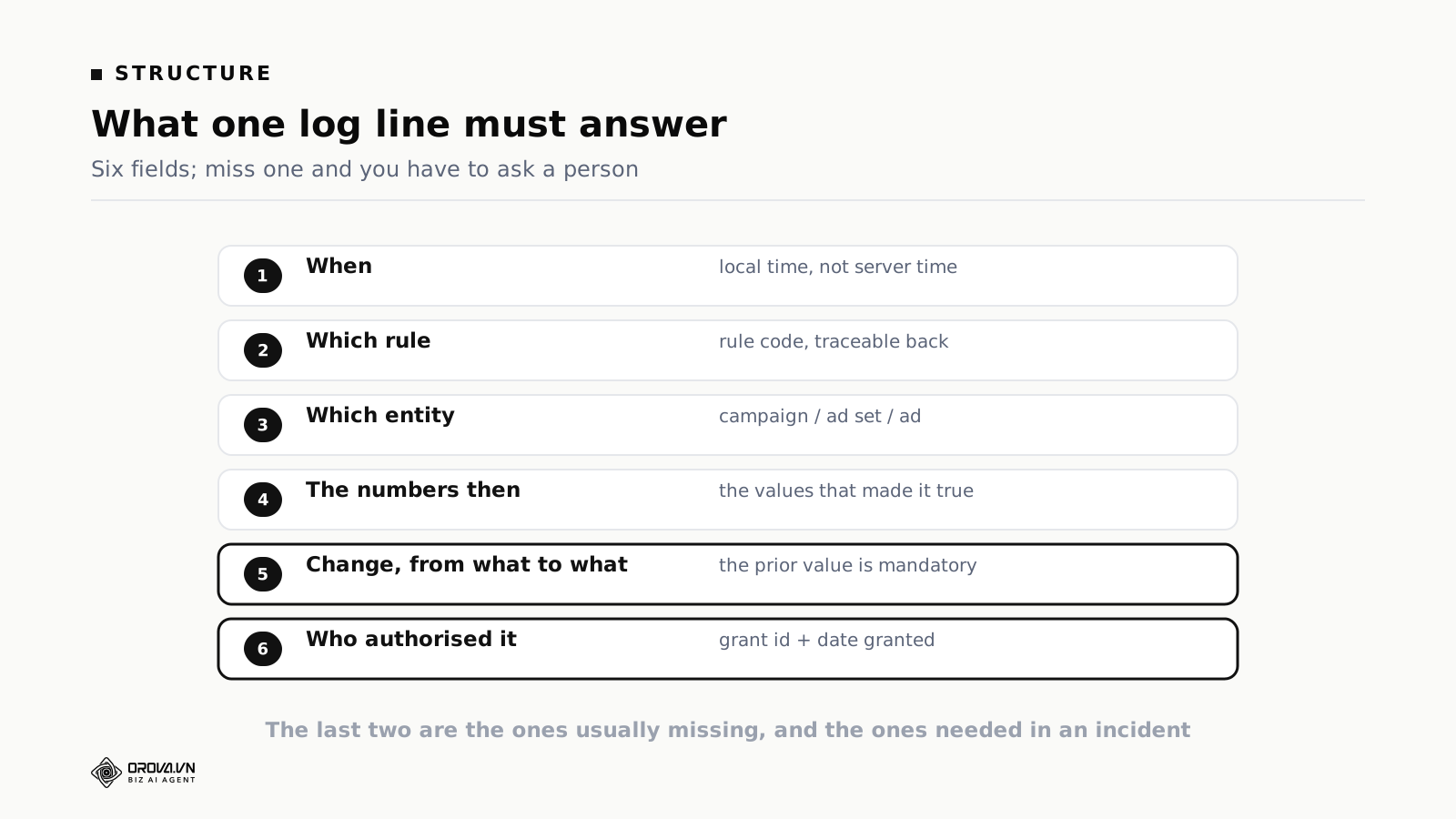
The six fields in a log line
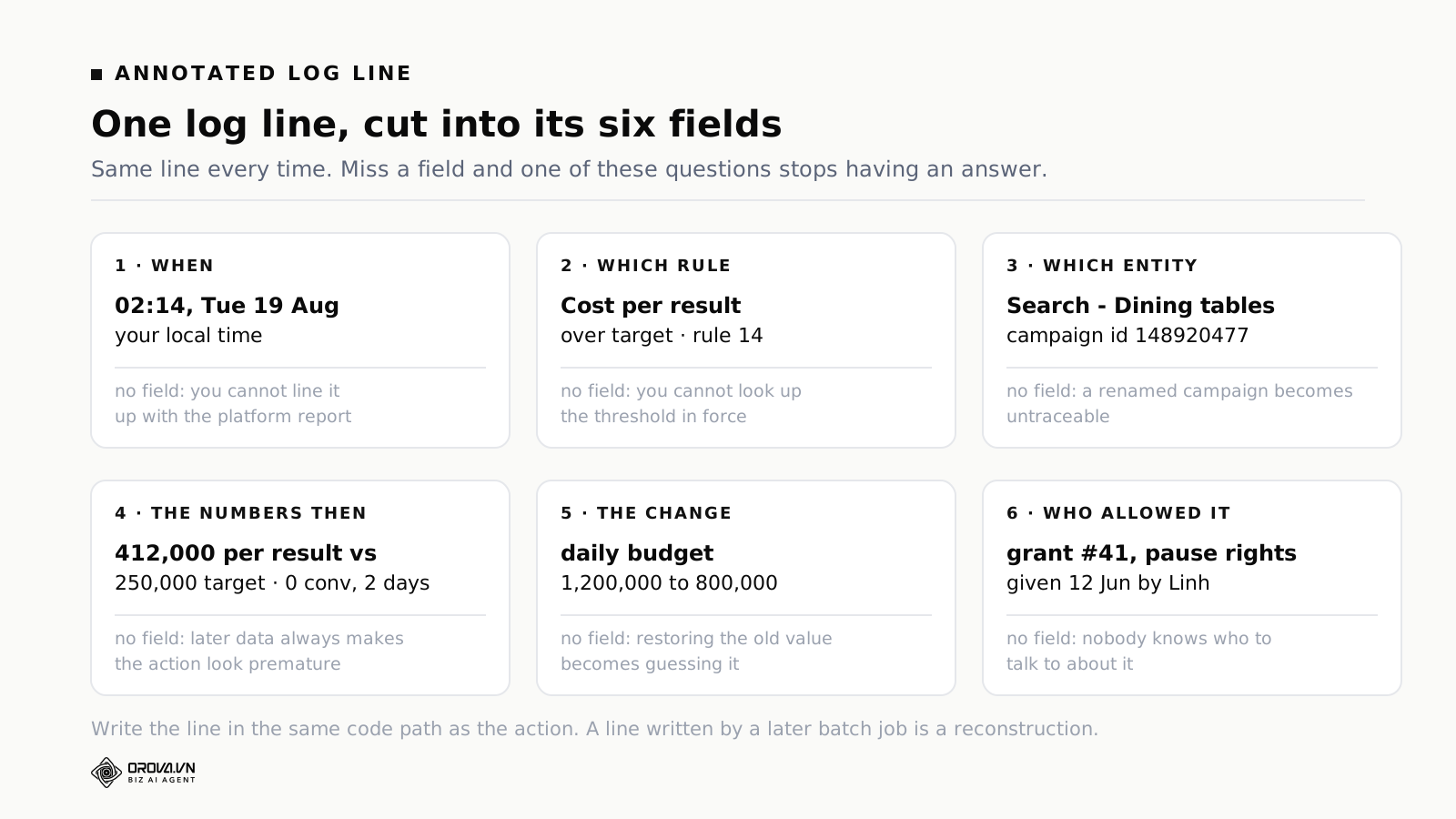
One: when
The timestamp, shown in your local time rather than server time.
Without it: nothing. With the wrong version of it: an afternoon. A log line stamped in one timezone read against a platform report stamped in another makes it impossible to establish what happened before what, and that ordering is usually the whole question.
Two: which rule
The rule identifier, not a description of it. An identifier traces back to a definition you can open: the condition, the threshold, the bounds, the version in force at the time.
Descriptions read better and they drift. A log storing "paused a campaign that was underperforming" starts lying to you after the third time somebody edits what "underperforming" means. A log storing the identifier does not.
Three: which entity
The specific campaign, ad set or ad, with its platform identifier and not only its name.
Names change. Somebody renames a campaign during a quarterly tidy-up and every log line referring to it by name quietly stops resolving to anything. Identifiers survive renames, account restructures and the person who invented the naming convention leaving.
Four: the numbers at the time
The values that made the condition true, captured at the moment of the action.
This is the field most often left out and the one whose absence does the most damage. Ad platform data changes retroactively. Conversions get attributed days late. Spend figures are restated. Some metrics are recomputed when a platform changes how it counts.
So if the line does not store the values as they stood, the numbers you look at three days later are different numbers. You will conclude the system acted wrongly when at the time it acted on exactly what it could see.
Five: the change, from what to what
Not "increased the budget" but "from 1,000,000 to 1,200,000".
The prior value is mandatory, because it is the thing that makes reversal possible. Without it, restoring a value turns into guessing one, or into opening a second system to look up a number that belonged on the line in the first place. That lookup costs you minutes at the exact moment you have none.
Six: who allowed it
The identifier of the permission grant that allowed this class of action, with the date it was given and by whom.
This is the field most tools skip entirely and the one you will want first. When something unexpected has happened, the opening question is rarely what changed, because the account already shows that. It is who signed off on this class of change, and when, and whether that reasoning still holds. A log that cannot answer it turns a five-minute review into an afternoon of reading configuration history.
Three more fields if you build your own sequences
If you write your own multi-step rules rather than using something off the shelf, three additions matter and none are obvious until they bite.
Record the steps that did nothing. In a five-step sequence where step three's condition fails, the last two never run. If the log only shows steps that executed, it reads as though the sequence broke halfway. One line reading "step three: condition not met, sequence stopped" removes an hour of guessing.
Record the version. Sequences get edited and behaviour changes with them. Stamp the version on each run, and keep the last ten versions, because sequence edits are the highest-risk configuration change you have: they are usually made by one person, alone, without review.
Record what the run consumed. Each step costs something to run. Recording it shows you which sequences are expensive without producing much, which is almost always the ones with an interpretive step sitting ahead of a cheap numeric filter.
The failure that looks like silence
One more line type, and it is the one most logs get wrong. When a platform call fails part-way through, a lot of systems record nothing at all. Read back later, that looks identical to the rule never firing.
That is the most dangerous kind of silence, because it convinces you nothing happened when in fact an action was attempted, failed, and may have partly applied. Every attempt should be written with its error, and nothing should retry on its own. Silent retries are how one intended change becomes three.
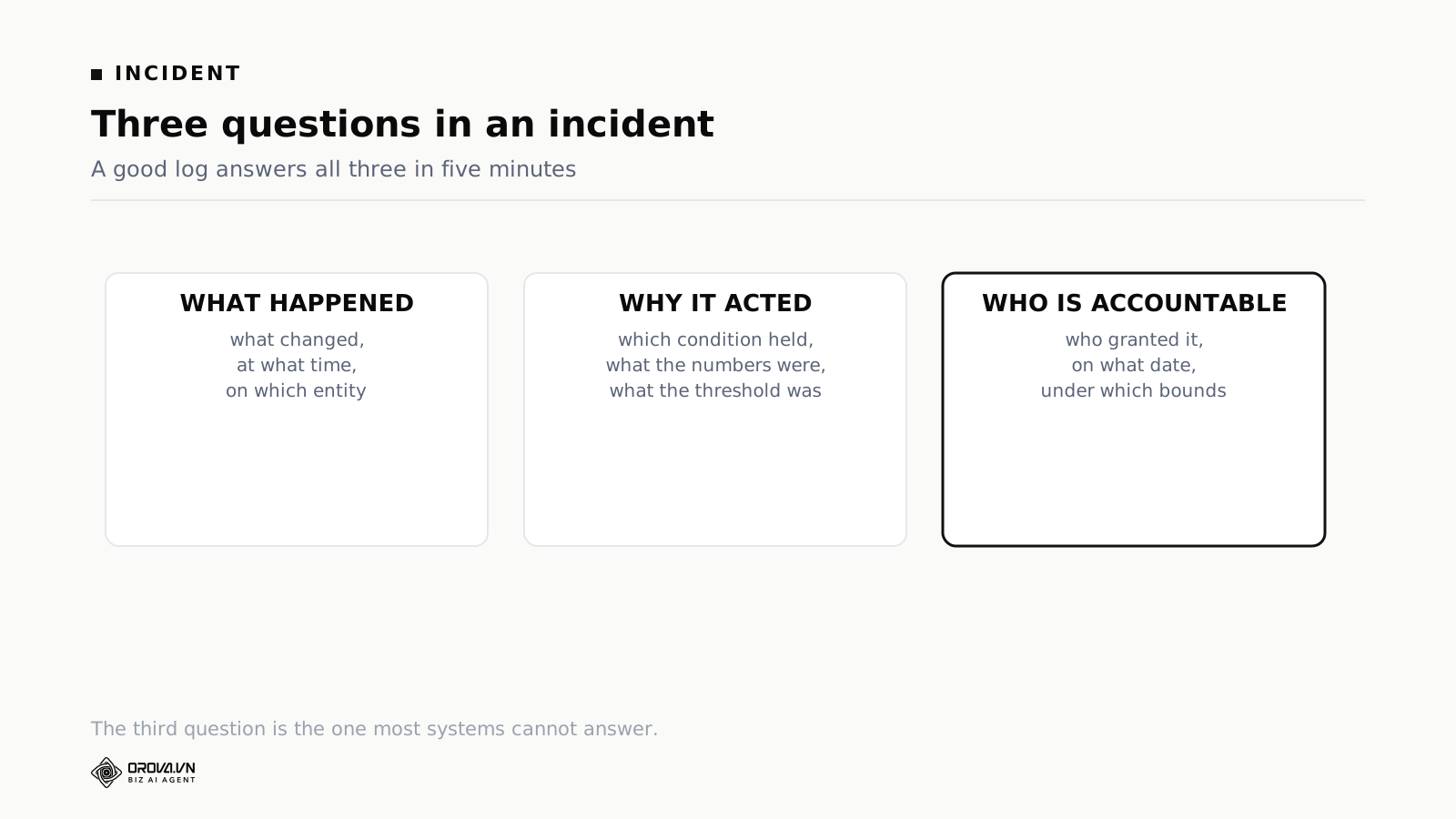
The three questions an incident asks
An incident here is rarely a disaster. Usually it is small. Somebody opens the account on Monday and finds a campaign paused that nobody remembers pausing.
What happened. The easy one. Most systems answer it, and the platforms keep their own change history as well.
Why it acted. Harder. It needs the condition that held, the numbers at the time, and the threshold in force. This is what separates a log from an event list. An event list says what occurred; a log says why.
Who is accountable. The hardest, and the one few systems answer. Not to assign blame, but to know who to talk to and to check whether the reasoning behind the original grant still holds.
The three-minute test
Run this once and you will know where your log stands. Pick any unattended action from the last month. Open the log line. Start a timer.
- Read what changed, from what to what. If you have to open the ad platform to find the old value, the line is missing field five.
- Read why. If you have to open the rule configuration to find the threshold, or the report to find the numbers, the line is missing fields two or four.
- Read who allowed this class of action and when. If you have to ask a colleague, the line is missing field six.
All three answered from one screen inside three minutes is a log that works. Anything else is an event list with good intentions, and you will find that out during an incident rather than during a test.
Hand the same line to a colleague who was not involved, as a second pass. If they can explain what happened and why without asking anyone, the log passes. If they cannot, name the field that was missing and go and ask your vendor for it.
Reversibility has four levels
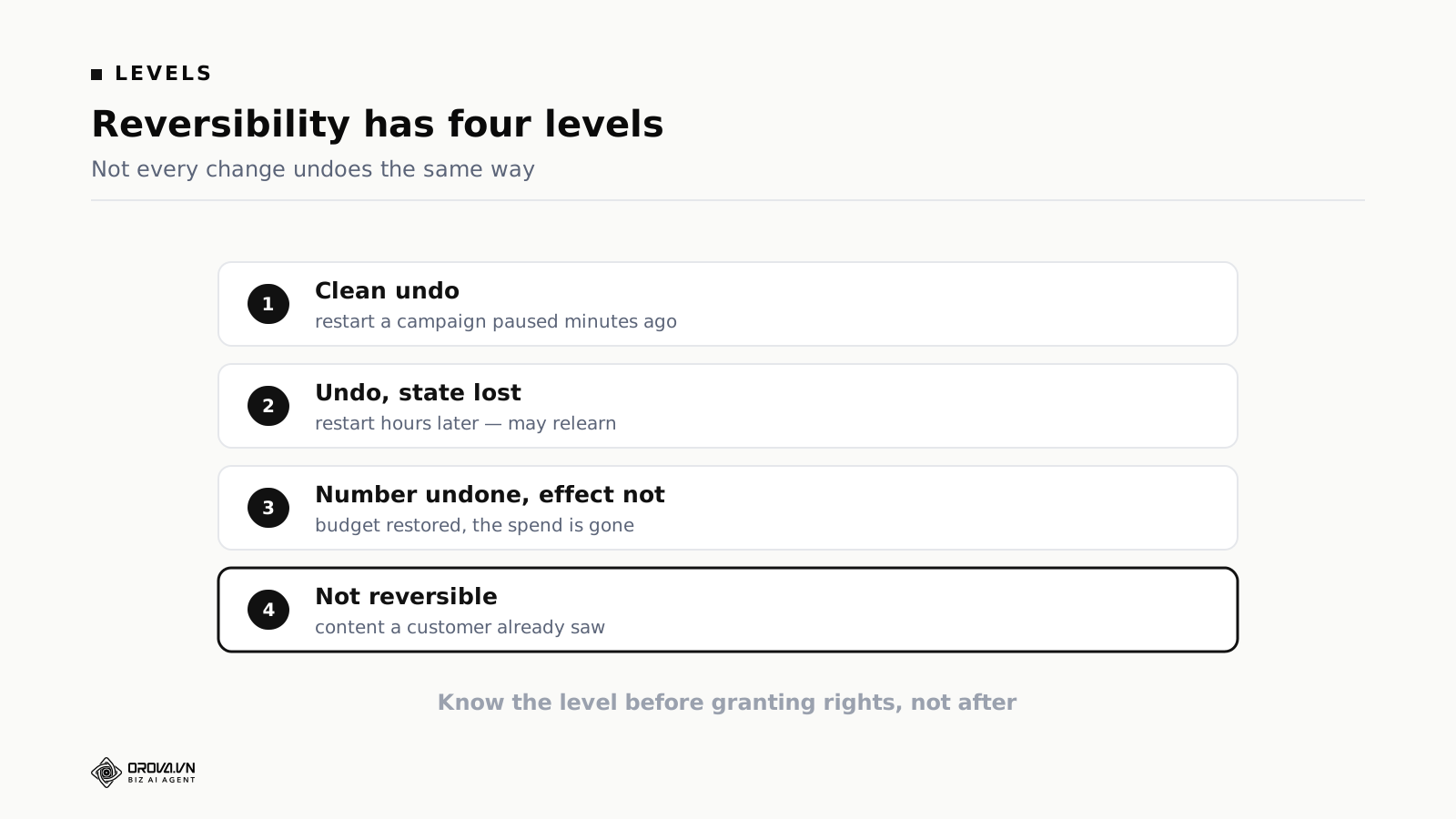
"Reversible" sounds like something an action either is or is not. In practice it has four levels, and confusing them causes most of the unpleasant surprises.
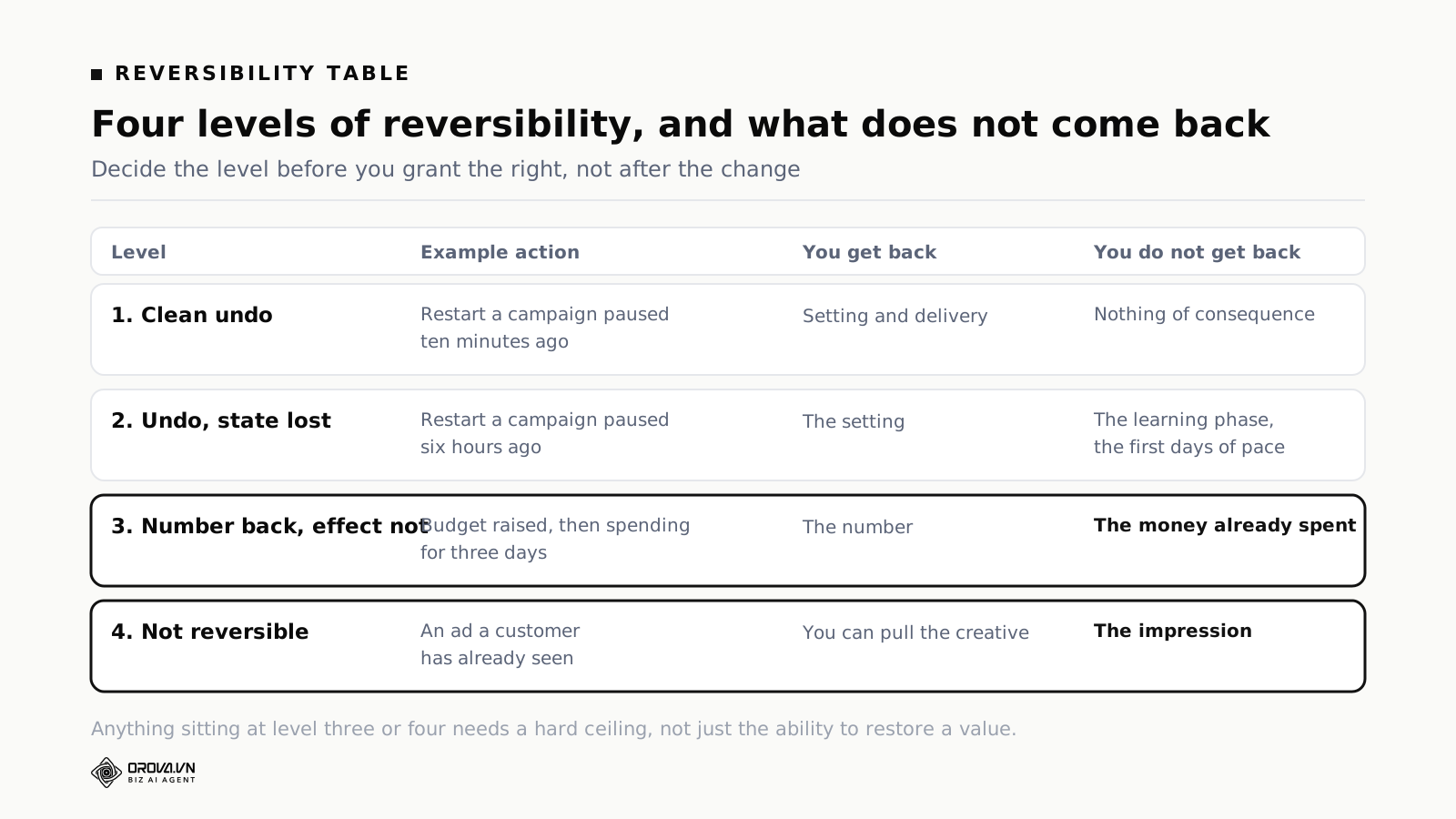
Level one, clean undo. Restarting a campaign paused minutes ago. State is essentially intact and the platform's optimisation has not registered the change. This is what people picture when they hear "one click to undo", and it only holds inside a short window.
Level two, undo with the state lost. Restarting a campaign paused hours ago. It runs again, but it may re-enter a learning phase, and the first days will not match performance before the pause. Configuration restored, results not.
Level three, the number undone, the effect not. A budget was raised and has been spending for three days. You can set the number back. The money is gone. Most growth-side actions sit here, which is why they need an absolute ceiling rather than just the ability to restore a value.
Level four, not reversible. Content a customer has already seen. You can remove the creative; you cannot remove the impression. No threshold protects you at this level, which is the argument for never letting software publish copy or creative unattended, in any configuration.
Two things people get wrong about reversibility
"If it can be undone, it is safe." Reversibility is necessary, not sufficient. An action that can be undone but goes unnoticed for two weeks has a reversibility worth nothing. Evaluating a permission means evaluating two things: how completely it can be undone, and how quickly somebody will know it happened. The second usually matters more.
"Defensive actions are always clean undos." Pausing a campaign sounds fully reversible, and for the first few minutes it is. After a few hours it is level two: restartable, possibly relearning. That does not make pausing unsafe. It means a wrong pause is not free, and that cost belongs in the threshold you set.
Why the numbers at the time is the hardest field to build
Of the six fields, five are copies of things the system already knows. The numbers at the time is the only one that requires actively capturing a state that is about to disappear.
Ad data does not hold still. Conversions attribute days late. Spend gets restated. Metrics are recomputed when a platform changes its measurement.
So a log that stores only an entity identifier and expects you to look the numbers up later is showing you different numbers than the system saw. And the gap always runs one way: later data is always more complete, so every action looks premature in retrospect.
That produces a specific and very common misreading. Somebody reopens an old decision, sees numbers that now look fine, and concludes the software was wrong. In many cases the software was right on the data it had, and what actually needs changing is the evaluation window, not the rule.
The right implementation is to snapshot every field that participates in the condition, at the moment the condition is evaluated, and store it on the line. It costs a little storage. It is the best-spent storage in the whole system.
Two practical notes. Store the raw values, not a rendered sentence, so you can compare across lines later. And store the threshold alongside them, because a threshold that was edited last week makes an old line unreadable if only the value survived.
Your log versus the platform's own change history
Google Ads and Meta both keep change histories. They are free, reasonably complete, and worth using. So the fair question is why keep a separate log at all.
| Platform change history | Your own log | |
|---|---|---|
| What changed | Yes | Yes |
| Prior value | Usually | Yes, as a required field |
| Why it changed | No — it does not know your rules exist | Yes, condition and threshold |
| The numbers at the time | No | Yes, snapshotted |
| Who authorised the class of action | Only the account that made the call | The grant, its date and its owner |
| Spans several platforms | No, one history each | Yes, one stream |
| Catches manual changes | Yes, including ones your tool never saw | Only what passed through it |
| Retention | Set by the platform | Set by you |
Read the last two rows together and the answer becomes obvious: use both. Your log for why, platform history for cross-checking and for catching the manual changes your software never knew about. The second one matters more than people expect on shared accounts, because a change made directly in the ad platform is invisible to every tool sitting above it.
How to actually read a log
Having a log is not the same as using one. Four habits, in order of how much they return.
Five minutes each morning, on the summary and not the log page. This is the one that matters most, and it is a design point as much as a habit. A separate log screen is a screen people only remember once something has gone wrong, and by then they are in a hurry. Anything the software did unattended should appear in whatever daily summary your team already reads. Time-to-awareness for an unattended action drops from days to under a day, with no new screen for anybody to remember.
You are not reading line by line. You are building familiarity. After a few weeks you spot an unusual line instantly, because you know what a normal morning looks like. That is the real difference between somebody who controls a system and somebody who merely trusts it.
One line traced back each week. Pick a random action, open it, and answer for yourself: which condition held, what were the numbers, where was the threshold, would you have agreed. Three minutes. What it catches is rules acting correctly for the wrong reason — doing something you agree with, triggered by a condition you did not expect.
The failed attempts, whenever you look. Filter for errors before you filter for anything else. Successful actions are self-announcing; failures are the ones that quietly stopped protecting you. A run of authentication errors means the software has not been doing its job for however long the run lasts.
Configuration changes once a quarter. Not the action log, but the record of who changed which setting. On a single-operator account this is usually empty. On a shared account it explains most of the behaviour changes nobody can account for.
A worked case, start to finish
Setup. Monday morning, the operator finds two campaigns paused. Nobody on the team remembers doing it.
Without a log. Restart them, assume somebody made a mistake, move on. If the real cause was a rule with the wrong threshold, it pauses them again next weekend and the loop repeats until somebody switches the rule off in frustration.
With a log. Two lines, same rule, fired at 02:00 on Sunday, with the values at the time: spend past three times target cost per acquisition, one hundred and thirty clicks, no conversions across two days.
The follow-up check. Those two campaigns were running a weekend promotion, and on this account conversions from weekend traffic are commonly attributed by Monday. So the rule acted correctly on the data it had, and the data it had was incomplete.
The fix. Not switching the rule off. Adding an exclusion for campaigns tagged as promotional, and extending the evaluation window on this account from two days to three.
Why it worked. Both the diagnosis and the fix depend on the numbers-at-the-time field. If the line had only said "paused campaign X", the operator would open Monday's report, see that conversions had landed, and conclude the software was broken. That conclusion is wrong, and it leads to switching off a rule that was earning its place.
Three signs your log is not good enough
Answering one question takes several screens. If establishing why a campaign was paused means opening the log, then the configuration to check the threshold, then the report to check the numbers, the line is incomplete. All three belong on it.
Reading it still requires asking a person. If a colleague who was not involved cannot explain a line without help, a field is missing. Name it.
Nobody ever opens it. An unread log is a log in the wrong place. The fix is not reminding people to read it. The fix is moving its contents into something they already read every day.
What a log will not do for you
Three limits, so you spend your effort in the right place.
It does not prevent errors. It records them. What prevents is the bounds you set: caps on how many entities one run can touch, limits on how large a change can be, exclusions for campaigns that should be left alone. The log is what lets you find the problem fast and fix the right thing.
It does not tell you whether a rule is any good. It tells you what a rule did and why. Whether that rule suits this account still needs a person to read and judge, usually across an advisory period before anything is allowed to execute.
It does not substitute for correct measurement. The log faithfully records the numbers the system saw. If tracking is broken, it faithfully records a wrong decision, and the record will read as perfectly reasonable.
Logging when several people share one account
On a shared account the log solves a different problem, and it is not the one people expect.
The most common source of confusion is not the software misfiring. It is one person changing a threshold without telling anybody. The following week the rule behaves differently and the whole team goes hunting for a bug that does not exist.
So the log needs two halves that can be read together: actions taken on the account, and changes made to the configuration. Split them into separate places and you lose the clearest causal link available — the setting changed on Tuesday, the behaviour changed on Wednesday. Keep them in one stream, ordered by time.
Past about three people touching one account, collective memory stops being reliable. "I thought you changed it" starts happening monthly, and the only resolution is a record.
Two situations raise this from useful to mandatory.
Agencies spending client money. When the money belongs to somebody else, being able to show what was done and why stops being an internal matter. Every dispute about spend reduces to who decided what, and when. Per-client separation is the minimum, and the log has to export so it can be attached to a monthly report.
Regulated categories. Finance, healthcare, education, anywhere ad content passes an approval step. Here the log is not only operational, it is the evidence that nothing went live without a person seeing it. It is also the strongest argument for keeping the no-unattended-creative rule fixed rather than making it a setting somebody can switch off on a busy afternoon.
Who should see it: everybody, for the action log. Restricting it creates exactly the information gap it exists to close. The configuration change log can reasonably be limited to the people who can make those changes, though there is little harm in leaving it open.
A minimum viable log you can keep in a spreadsheet
If your current tool's log is inadequate and switching is not on the table this quarter, six columns will carry you through the next three months. Fill it in by hand, once a day.
| Column | What goes in it |
|---|---|
| Date and time | Local time, to the minute |
| What happened | Which campaign, which setting, from what to what |
| Why | The condition and the numbers at the time, copied from the report if the tool will not give them to you |
| Who or what did it | A person's name, or the rule and the permission it ran under |
| Did you agree | Yes, no, or unclear |
| If not, why not | One sentence. This is the column that pays for the whole exercise |
Crude, and it does the one thing that matters: it forces you to record your judgement at the time rather than reconstructing it three weeks later. Memory of whether you agreed with a decision shifts remarkably fast once you know how it turned out.
After two weeks, read the last column on its own. It will tell you precisely which threshold needs changing, and it will usually be one threshold rather than the four you assumed.
Keep the spreadsheet even on a small account with two campaigns and one operator, where the full structure is genuinely unnecessary. The requirements do not scale smoothly. One person can hold two campaigns in their head; nobody holds sixty campaigns and three operators in their head, and the transition happens without anybody noticing. One day the team simply stops being able to reconstruct last week. If the spreadsheet exists by then, there is a record to build on instead of a gap where the first six months should be.
Four questions to ask a vendor
These tell you more about a product than any feature page.
Show me a real log line. Not a screenshot from the marketing site. An actual line from an actual account, with the numbers blurred if they must be. Count the fields against the six.
Does it record the prior value? If not, restoring a setting is guessing at it, and every rollback becomes a trip into the ad platform.
What is written when a platform call fails? If the answer is "nothing", that is the dangerous silence. Ask specifically whether a failed attempt is distinguishable from a rule that never fired.
Do unattended actions reference the permission that allowed them? This is the clearest test of whether the product has a real permission model or an on/off switch with better marketing.
Two follow-ups worth adding. Ask how long lines are kept and whether the log exports. A log you can only read on screen is useless to an agency and useless in a quarterly review.
Reading a month of logs
Once a month, read the whole set rather than individual lines. Four patterns are worth hunting for.
Rules that fire constantly. A rule firing daily is either finding a real recurring problem — in which case fix the problem at its source instead of catching it every morning — or its threshold is too loose. Either way, daily firing is a signal, not a success.
Rules that never fire. Dead weight. They cost nothing to run, and they clutter the configuration and make the active list harder to hold in your head. Switch them off.
Actions clustered at the same hour. If most unattended actions land in one window, check what runs in that window. Often the cluster is an artefact of when data refreshes rather than when problems occur, which means the evaluation is running against partially updated numbers.
The same entity appearing week after week. One campaign that turns up in the log every week is telling you something no rule can: it is structurally unstable, and no threshold will settle it. Rebuild it rather than keep catching it.
One pattern deserves separate attention, because it is the most confusing failure there is. When conversion tracking breaks, every rule reading conversions starts producing wrong decisions, and the log records them faithfully, complete with the numbers that justified them. Read back afterwards, that log is internally consistent and entirely misleading. Every line says the rule did the right thing given the data.
You cannot catch that from a single line. You catch it from the shape of the day: several unrelated rules firing at once, across entities with nothing in common. Individually reasonable, collectively absurd. Which is why the daily summary should show the count of actions taken and not only the actions themselves. Fourteen unattended actions on an account that normally has one is a signal on its own, whatever each of them was.
It is also the argument for switching on measurement monitoring before anything else. A rule that alerts when conversions drop to zero against the previous week is cheap, fires rarely, and is the one thing standing between a tracking outage and a log full of well-reasoned mistakes.
Three things to do this week
Open your current tool's log and count how many of the six fields it has. Five minutes, and it tells you exactly where you stand.
Take one unattended action from the past month and run the three-minute test. Can you answer all three incident questions from the log alone, without opening anything else?
For every permission currently granted, write down which reversibility level it sits at. One line each. If any of them lands at level four, revisit that grant today rather than at the next review.
Frequently asked questions
Does a log help if nobody reviews it?
Only after the fact, which is still worth something. The value multiplies with a reading habit. Five minutes each morning is what turns a log from an archive into a control.
How long should logs be kept?
Long enough to cover at least two review cycles. If you review quarterly, six months is the minimum, because the question that comes up in a review is almost always "when did this start".
Does logging slow the system down?
Not meaningfully. A log line is far smaller than the data that was read to produce the action it describes. This is not a place to economise.
Can the log be used as evidence in a dispute?
It depends on the dispute, but an append-only record with timestamps, prior values and grant references is a much stronger position than a recollection. Corrections should append rather than overwrite, so the sequence of what was believed at each point stays readable. That is worth designing for even if you never need it.
Should agency clients see the log?
Yes, separated per client. For an agency the log is evidence of work: what was done, when, and why. It is often easier to present than a metrics report, and it holds up better in a difficult month.
Should the log record evaluations that did not fire?
No. Recording every evaluation where the condition was false produces thousands of lines a day and buries the meaningful ones. Record actions, recommendations and failed attempts. The exception is inside a multi-step sequence, where the step that stopped the run is worth one line.
Where should the log line be written from?
The same code path as the action, not a batch job afterwards. If the write and the action can drift apart, they eventually will, and the log becomes a reconstruction of what somebody believed happened.
Can I ask an assistant about the log instead of reading it?
Yes, and it is worth knowing that two kinds of question cost very different amounts. "Why was campaign X paused last night?" is a lookup: cheap, exact, returns the line. "Should campaign X have been paused?" is an analysis, and a much bigger question.
If you are deciding whether to let software act on an account that matters, the log is what the decision actually rests on. Six fields per line, three questions answerable in three minutes from one screen, and knowing in advance which reversibility level every granted action sits at.
With those, granting execute rights is a reasoned decision with a known worst case. Without them, it is a leap, and you will not find out which kind it was until the Monday somebody finds two campaigns paused.
Further reading: advisory versus execute: a permission model for AI, 19 starter rules and what each is for, and the first week with an AI ads agent.
To see what a full log line looks like on your own account, start at orova.vn.
Orova Ads optimises campaigns for you
Connect Google, Meta and TikTok in one place. AI reads the numbers, proposes changes and executes under the rules you set.
Explore Orova Ads