
What is Facebook pixel tracking? How the Meta Pixel works

Facebook pixel tracking means placing Meta's tracking code (once called the Facebook Pixel, now officially the Meta Pixel) on your website so it can report what ad visitors do after they click: viewing a product, adding to cart, submitting a form, or buying. Meta uses those signals to measure results, build retargeting audiences, and optimize ad delivery.
For years, advertisers treated this as a one-time task: paste a snippet into the website header and trust the platform to report every purchase. That approach no longer holds up on its own. Privacy rules, browser restrictions, ad blockers, and Apple's App Tracking Transparency prompt mean some conversions never reach Meta from the browser. If the algorithm cannot see who is buying, it cannot find more buyers, and costs drift upward. This guide explains how the pixel works, which events to plan, how to stay compliant with consent rules, and how to find and fix the data errors that quietly break campaigns.
What is Facebook pixel tracking?
Facebook pixel tracking is the process of embedding a specific JavaScript code snippet from Meta into your website to monitor user behavior after they click an advertisement. It is used to measure campaign ROI, feed data into optimization algorithms, and build retargeting audiences, differing from traditional analytics by focusing purely on advertising attribution.
You will see both names in the wild: older tutorials say "Facebook Pixel", while Meta's own Events Manager and documentation now say "Meta Pixel", following the parent company's rebrand to Meta. They are the same tool. The name itself comes from the tiny, invisible 1x1 image pixel that developers used to embed in web pages to log server requests. While modern systems use complex JavaScript libraries rather than tiny images, the legacy name has persisted across the industry. Today, it acts as a silent observer on your digital properties, capturing specific user actions and transmitting them back to the advertising network.
To understand its unique role, it is helpful to see how it differs from other familiar data concepts you might encounter.
| Concept | How it differs from the Meta Pixel | Example Use Case |
|---|---|---|
| Google Analytics | Focuses on total site traffic from all channels, not just social ads. | Comparing organic search visitors versus paid social visitors over a month. |
| Conversions API | Sends data directly from your backend server rather than a user browser. | Bypassing a browser ad blocker to report a completed, verified purchase. |
| Offline Conversions | Uploads manual data files of physical events instead of web events. | Uploading a spreadsheet of in-store point-of-sale transactions. |
Think of this system like a digital store greeter who hands a specialized, invisible name tag to every person who enters your physical shop from a specific billboard campaign. As these tagged visitors walk around, look at specific products, or buy something at the register, the greeter takes detailed notes and reports back to you. This constant feedback loop allows you to know exactly which billboard is driving actual sales, rather than just knowing that people are walking through the front door.
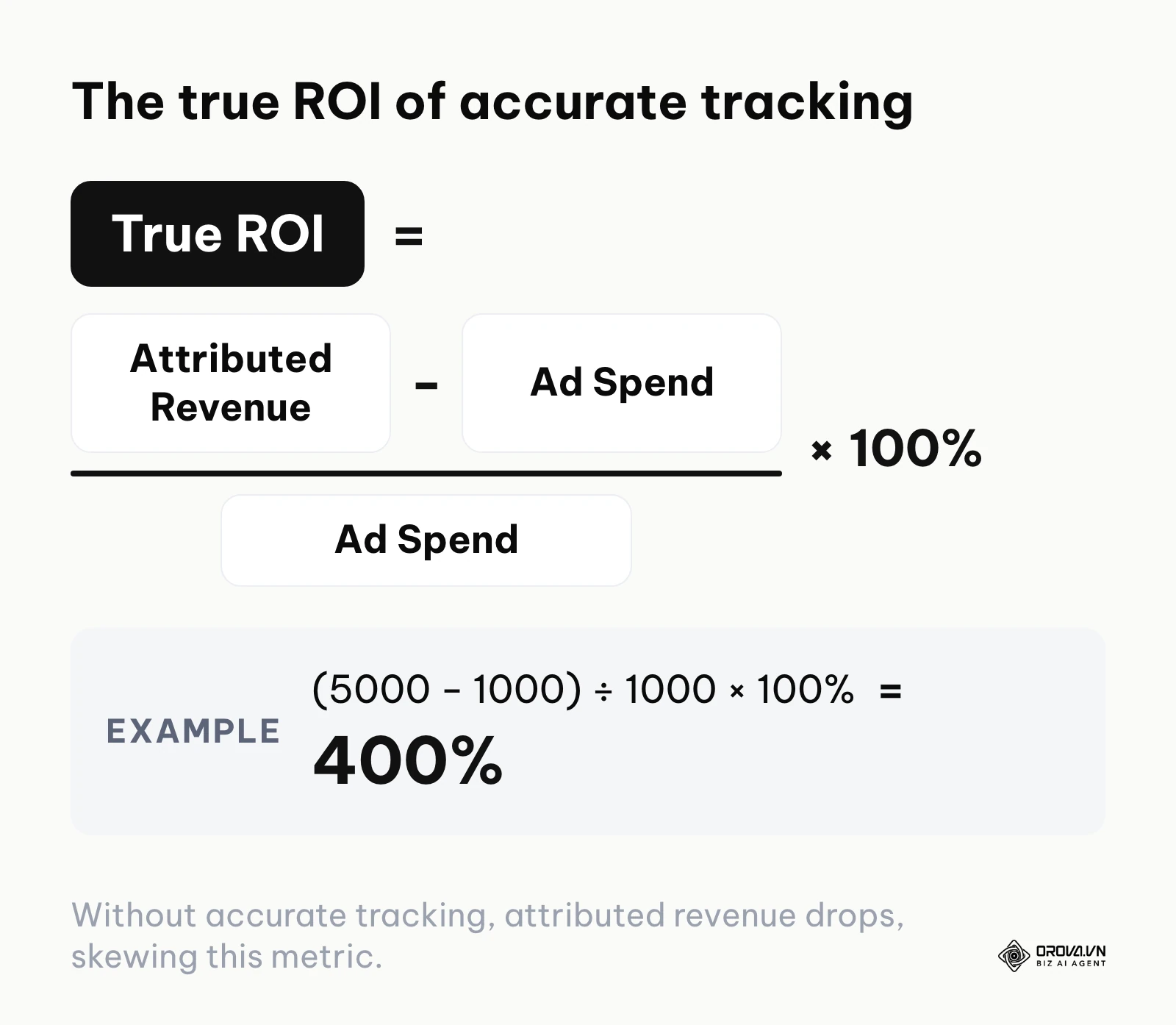
The data quality also changes the numbers you report upward. ROI is calculated as (attributed revenue − ad spend) ÷ ad spend × 100%. If the pixel records 5,000 dollars of purchases from 1,000 dollars of spend, ROI shows as (5000 − 1000) ÷ 1000 × 100% = 400%. If half of those purchases never reach Meta, the same campaign appears to return only 150%, and you may cut a profitable campaign by mistake.
The significance of tracking user actions on Meta
This technology exists fundamentally to close the critical loop between an ad impression and a final business outcome. Without a reliable feedback mechanism, advertising platforms are completely blind. They can tell you how many people saw your ad and how many clicked it, but they have no visibility into what happened after the page loaded. By tracking clicks and on-site behavior systematically, you provide the missing piece of the puzzle, allowing the system to understand the true quality of the traffic it delivers.
In the broader picture of digital marketing infrastructure, this tracking layer sits directly between your website front-end and the advertising platform's machine learning core. It acts as the vital translator, converting raw user interactions on your site into standardized signals that the ad algorithms can interpret and learn from.
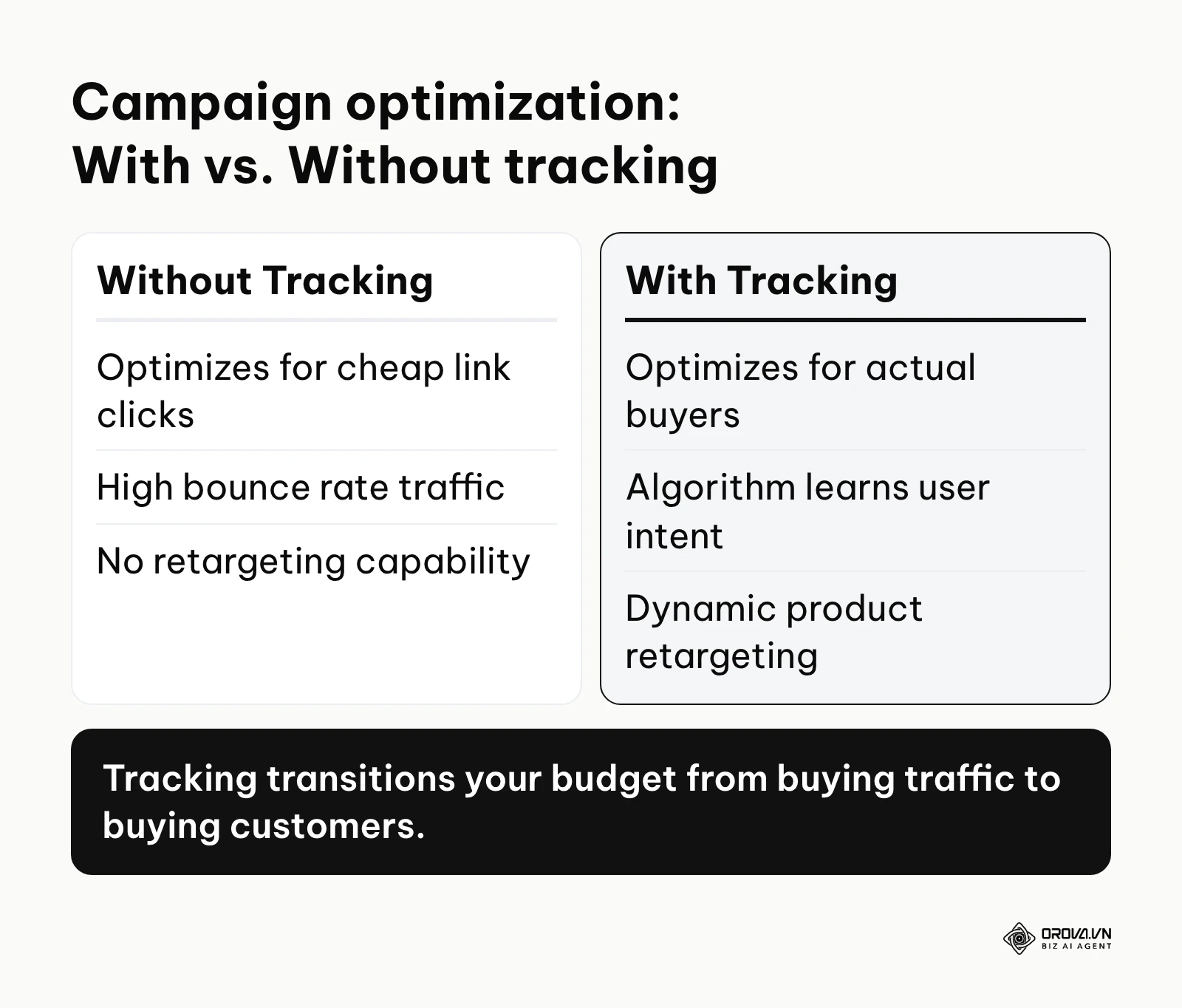
If you choose to ignore this setup, you lose two immense advantages. First, you lose accurate attribution, meaning you will spend money blindly without knowing which specific campaigns, audiences, or creatives are actually generating revenue. Second, you lose the power of algorithmic optimization. Without a steady stream of conversion data, the platform cannot learn the characteristics of your ideal customer, and it will default to showing your ads to people who simply click a lot but never buy anything, draining your budget rapidly.
When is it entirely unnecessary to implement this technical infrastructure? If your business operates strictly as a physical retail location with no digital storefront, lead form, or booking capability, installing website scripts provides zero actionable value. Furthermore, if your primary marketing objective is generating high-level brand awareness strictly through video views native to the social media application itself, web monitoring is a wasted effort. Finally, for temporary, localized events where attendance is secured solely through direct phone calls, you should bypass digital integrations and focus entirely on traditional, localized offline marketing tactics instead.
The true value and benefits of accurate data
Implementing a robust tracking system delivers transformative value across two distinct layers: the overarching business outcomes and the day-to-day operational efficiency of the individuals running the campaigns.
For the business, the primary value is financial risk mitigation. By precisely measuring which campaigns generate positive returns, business owners can confidently scale successful initiatives and instantly cut budgets from failing ones. It saves immense amounts of time that would otherwise be spent manually cross-referencing sales databases with ad platform estimates. Furthermore, it protects the business from the risk of budget exhaustion by ensuring that every dollar spent is directed by data rather than guesswork.
For the marketing teams and implementers, the benefits are equally profound, shifting their daily work from manual guessing to strategic management.
Algorithmic efficiency and lower acquisition costs
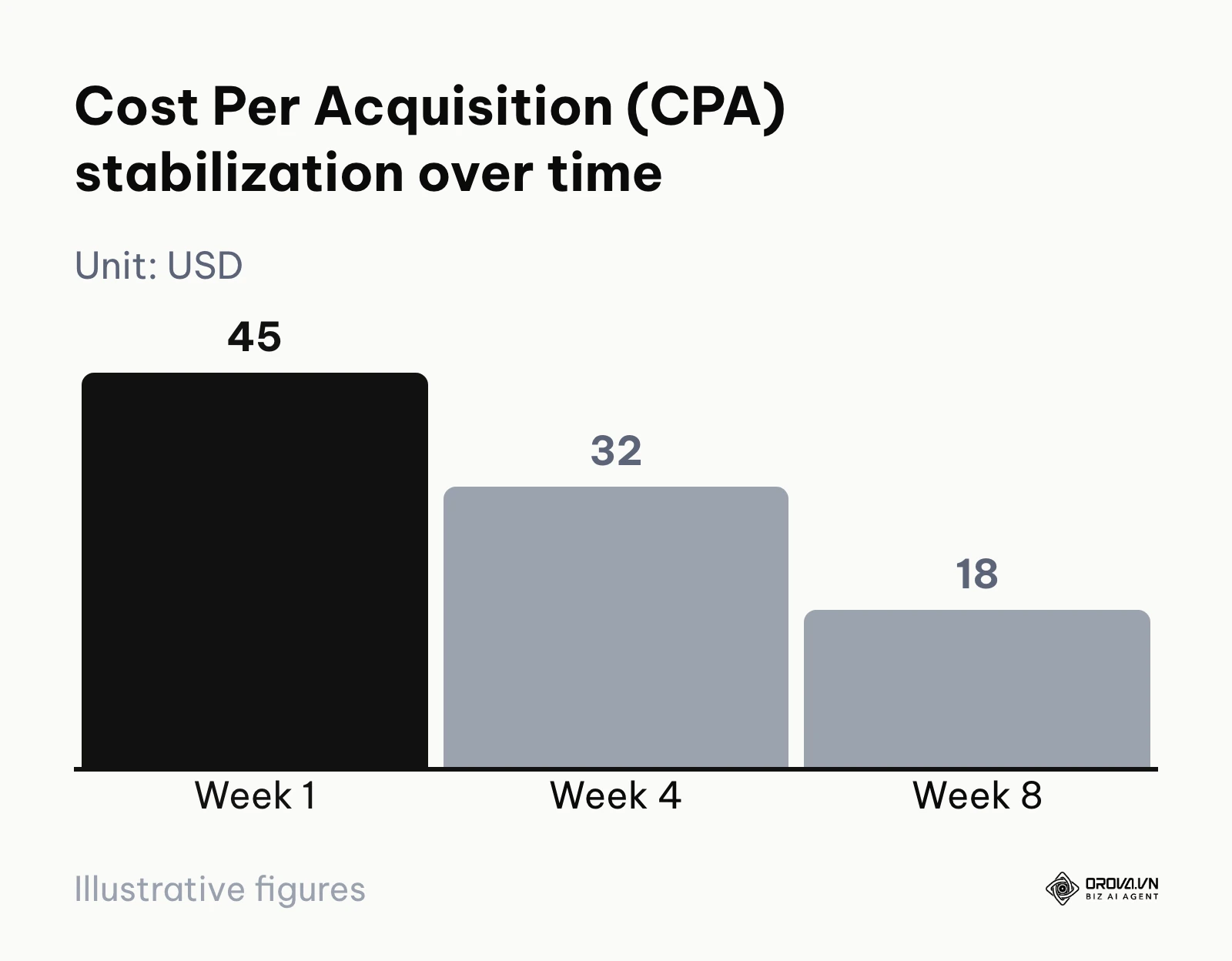
Before proper tracking, marketers often optimize campaigns manually based on surface-level metrics like Cost Per Click (CPC). After implementing a solid data pipeline, the machine learning models take over, analyzing thousands of data points to find users most likely to convert. This often lowers Cost Per Acquisition (CPA) over time because the system spends less on traffic that never converts.
Dynamic audience creation and retargeting
Before tracking, reaching previous website visitors required broad, untargeted campaigns. Afterward, marketers can build specific website custom audiences in Meta Ads Manager from pixel events. They can show tailored ads specifically to users who added a premium product to their cart but abandoned the checkout process, capturing high-intent prospects who just need a slight nudge.
Automated value-based bidding
Before passing specific data, every conversion is treated equally by the algorithm, whether the customer bought a 10 dollars item or a 1000 dollars item. After configuring value parameters, marketers can instruct the platform to optimize for Return on Ad Spend (ROAS). The system learns to pursue users who are likely to make high-value purchases, maximizing total revenue rather than just the raw number of transactions.
| Benefit | Measured by which metric? | What the pixel must send |
|---|---|---|
| Lower acquisition costs | Cost Per Acquisition (CPA) | Purchase or Lead events firing once per real conversion |
| Improved retargeting | Conversion Rate of warm audiences | ViewContent and AddToCart with content_ids |
| Revenue maximization | Return on Ad Spend (ROAS) | Purchase with value and currency |
Illustrative example: An e-commerce apparel brand operated by a mid-level marketing manager was struggling to prove the value of their top-of-funnel campaigns. They implemented the base code across the site and mapped the specific "Purchase" standard event to the final order confirmation URL, passing the exact order value dynamically. Initially, they found their retargeting audience was too small to deliver ads effectively because they only captured a strict 7-day window. They resolved this stumbling block by expanding the audience retention window to 180 days within the platform settings, grouping visitors by seasonal interest. As a result, the brand saw a sustained flow of returning visitors completing their abandoned carts, with acquisition cost moving from 45 dollars in week 1 to 32 dollars in week 4 and 18 dollars in week 8 (illustrative figures).
OROVA ADS applies AI Agent to automate and optimize ad performance on Google, Meta and TikTok. Scale your budget safely, monitor 24/7 and expand your business quickly.
Experience the solution at orova.vn/ads
How Facebook pixel tracking actually works in 2026
To master this subject, you must understand the anatomical breakdown of how data is captured, formatted, and transmitted. It is no longer a single, magical block of code; it is a multi-layered ecosystem involving user browsers, standard protocols, and server-to-server communications.
The Base Code and Standard Events
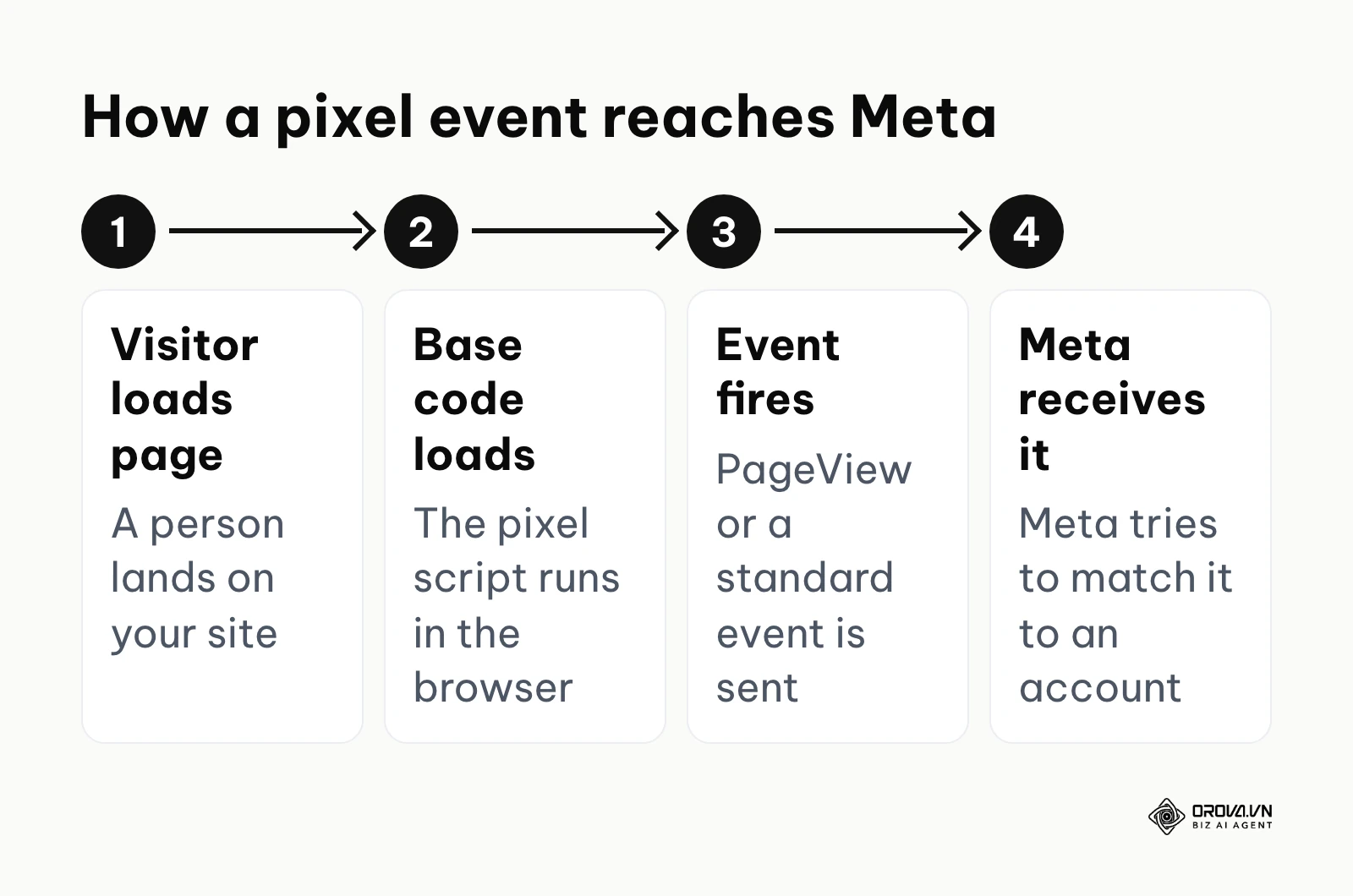
The foundation of the entire system begins with the Base Code. This is a primary snippet of JavaScript that must be installed directly into the global header section of your website. Its sole job is to load the tracking library and establish a baseline connection every time a page renders. By itself, the base code only tracks generic "PageView" events. It knows a user arrived, but it does not know what they did afterward. The browser flow is simple: the visitor loads a page, the base code loads in their browser, an event fires, and Meta receives it and tries to match it to a Meta account.
To track meaningful actions, you must deploy Standard Events on top of the base code. These are predefined, platform-recognized actions like "ViewContent", "AddToCart", "Lead", and "Purchase". When a user clicks a button or loads a specific page, a tiny piece of supplementary code fires, sending that exact standard event back to the platform. The platform's machine learning models are heavily trained on these specific standard events. If you want the algorithm to find buyers, you must feed it the standard "Purchase" event; custom naming conventions will not train the core algorithm effectively.
Custom Conversions vs. Standard Events
Many beginners confuse standard events with custom conversions, leading to poorly optimized campaigns. Standard events require placing specific code on specific pages and are universally understood by the platform's global machine learning models. They are the fuel for algorithmic learning.
Custom Conversions, on the other hand, do not require new code. They are simply rules you create inside the ad platform interface based on existing data. For example, you can create a custom conversion rule that says: "Count a VIP Lead every time the standard PageView event fires on the URL path '/thank-you-vip'."
While custom conversions are excellent for niche reporting or segmenting specific product categories, they are generally weaker for training the delivery algorithm compared to firing a dedicated standard event. You should always prioritize standard events for your primary optimization goals and use custom conversions as a supplementary reporting tool.
The critical shift to Conversions API (CAPI)
The pixel depends on the visitor's browser. If an ad blocker stops the script, a privacy-focused browser limits it, or the visitor declines tracking, the conversion still happens but Meta never hears about it from the browser. On iOS, Apple's App Tracking Transparency prompt further limits what Meta can use from people who opt out. How much data a given site loses varies widely, so measure your own gap by comparing Events Manager with your order or CRM records rather than trusting a generic percentage.
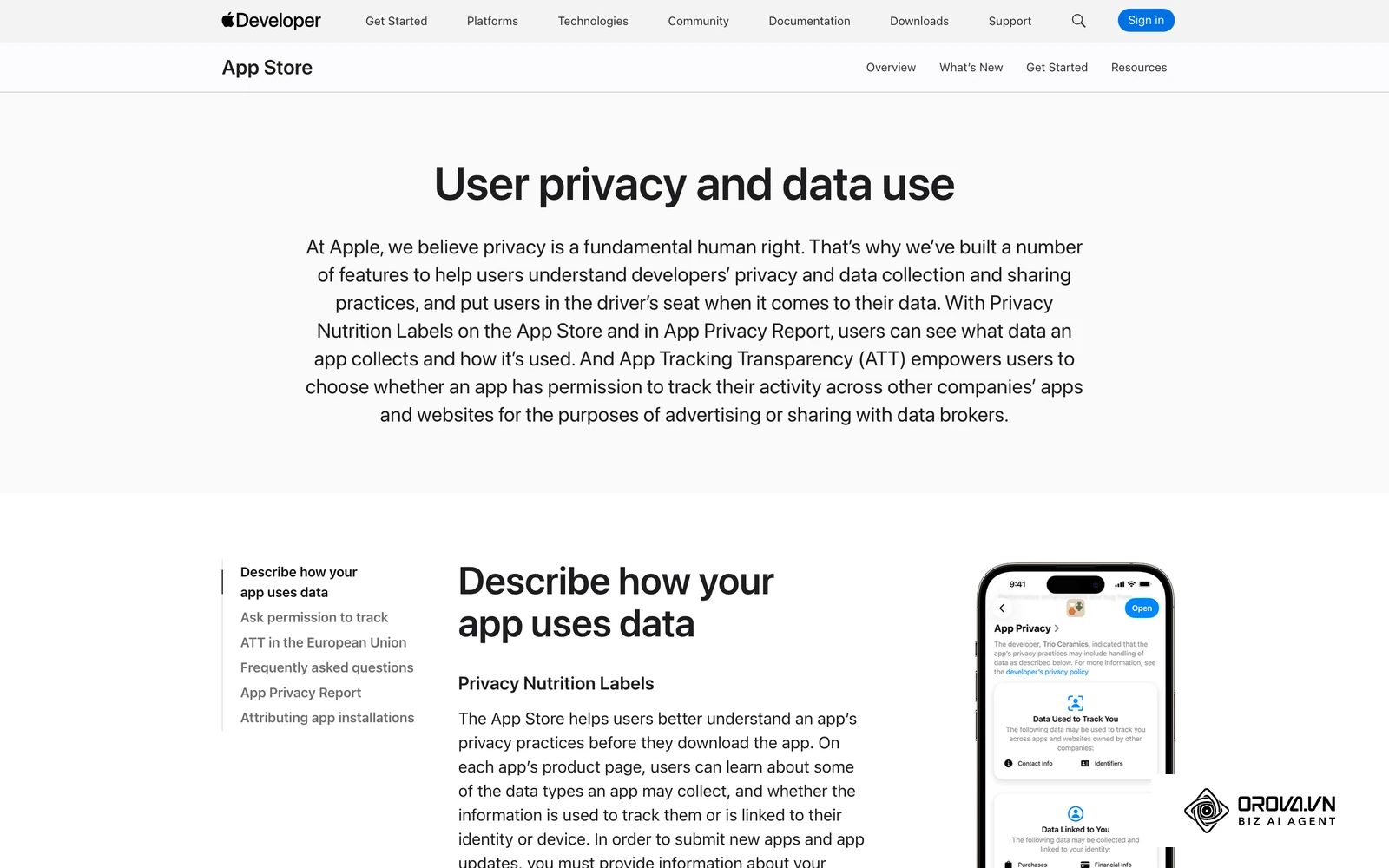
Meta's answer is the Conversions API, which sends the same events from your server. The pixel is not replaced: Meta recommends running both together, with a shared event_id so duplicates are removed. Server setup, deduplication, and Event Match Quality are covered step by step in our Conversions API setup guide, so this article stays focused on getting the pixel itself right.
Navigating privacy compliance and consent modes
Data collection does not exist in a vacuum; it is regulated by privacy laws. In the EU and UK, rules on cookies and similar technologies generally require consent before non-essential tracking such as advertising pixels runs, and other regions have their own notice and opt-out rules. Check the requirements that apply to your market with a qualified advisor.
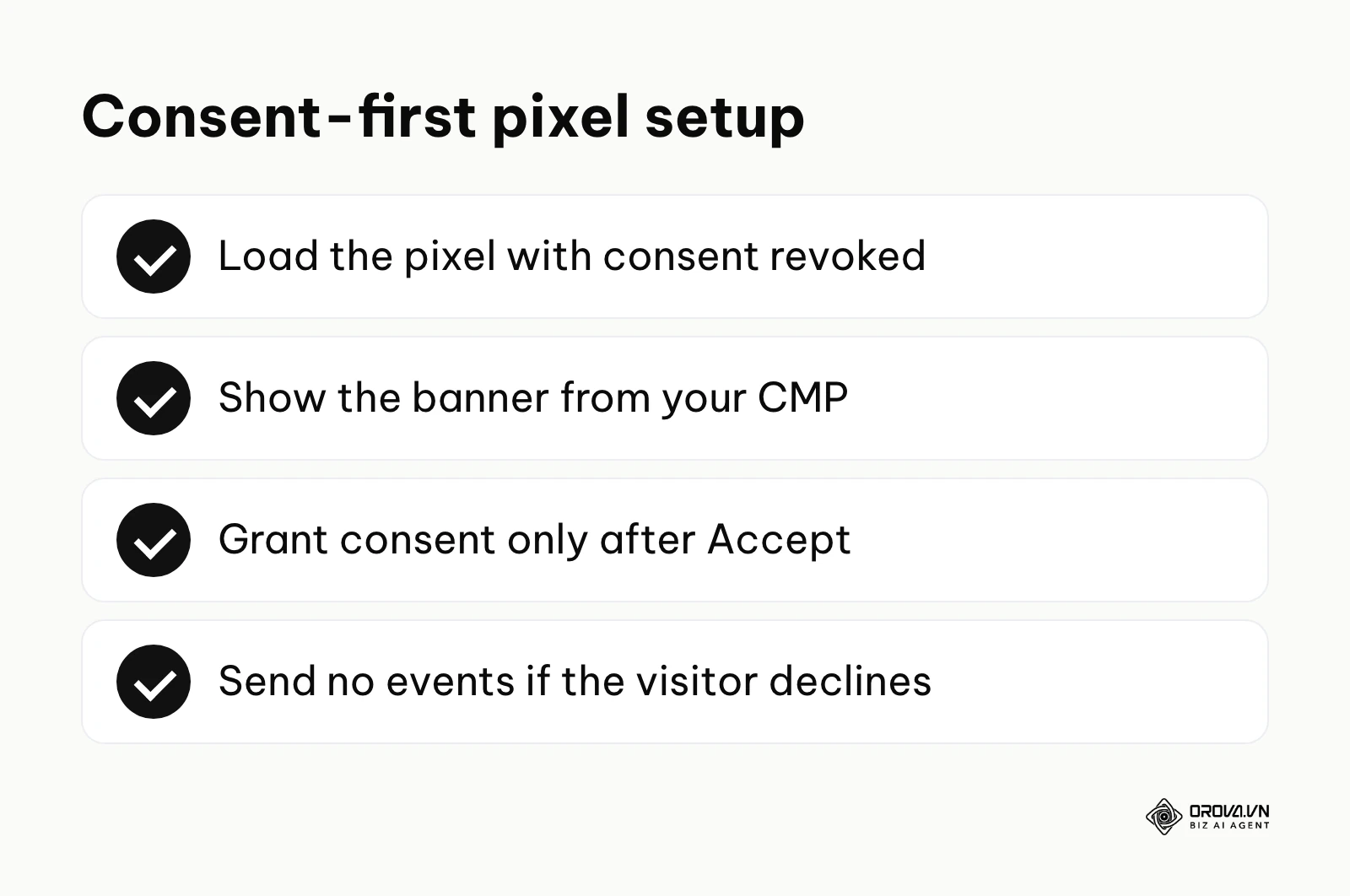
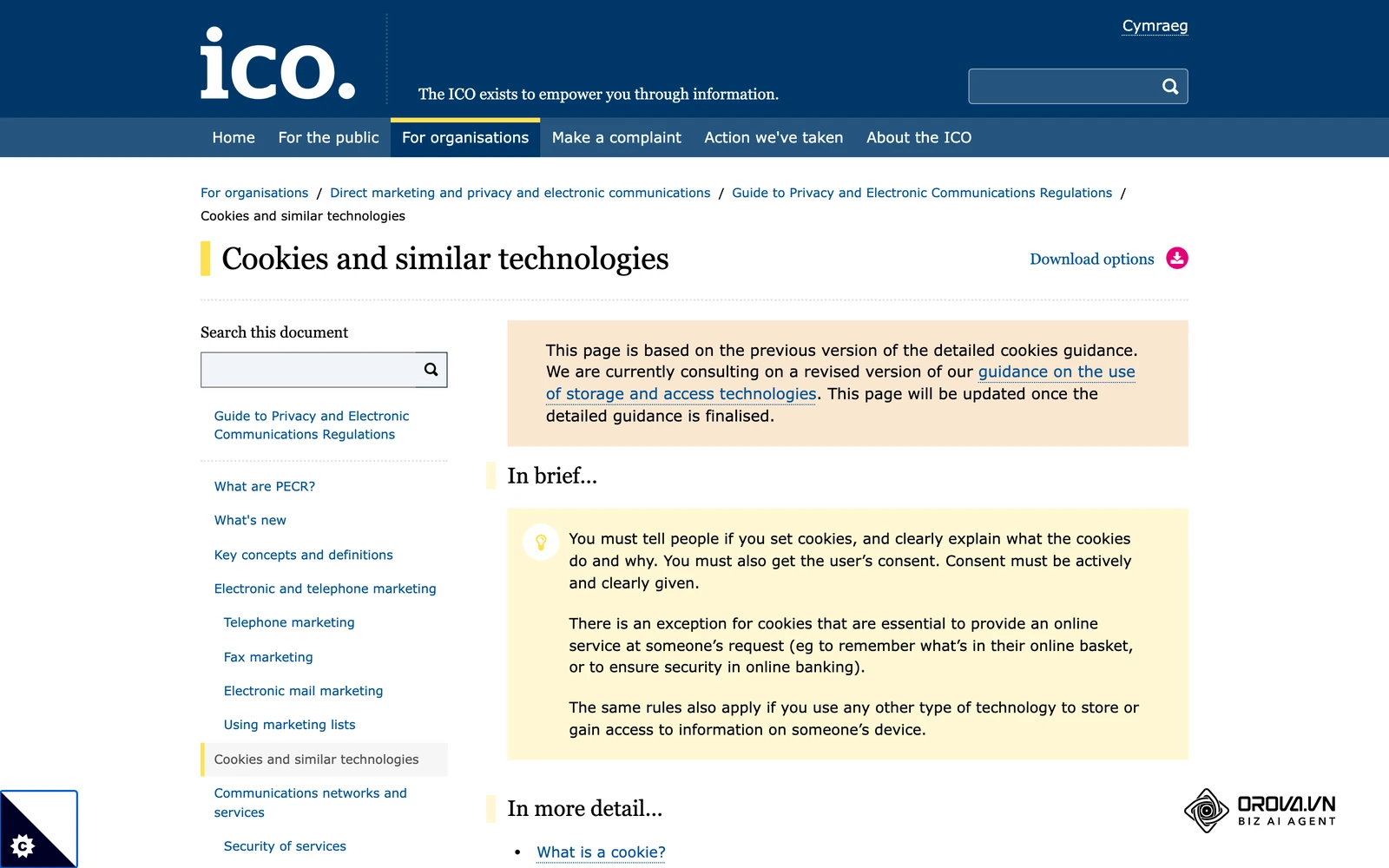
You cannot simply fire tracking events the moment a user lands on your page. You must integrate your tracking setup with a Consent Management Platform (CMP). When a user visits, the CMP displays a cookie banner. The tracking scripts must remain paused and inactive until the user explicitly clicks "Accept". If they decline, the scripts must never execute. The Meta Pixel supports a consent command: you can load the code with consent revoked and grant it only after the visitor accepts, so no events are sent before that choice. Meta may use modeling to estimate some conversions it cannot observe directly, so expect reported numbers to be partly estimated.
A framework for planning your measurement strategy
Before touching any code, you must plan exactly what you need to measure. A common mistake is tracking every single click, which clutters the data and confuses the optimization algorithm. You need a structured event mapping framework that aligns standard events with your specific business funnel.
Below is a template mapping table you can use to organize your strategy before implementation:
| Business Model | User Intent | Page / Action | Standard Event to Fire | Crucial Parameters |
|---|---|---|---|---|
| E-commerce | Browsing catalog | Product Details Page | ViewContent | content_ids, value, currency |
| E-commerce | High intent | "Add to Cart" Button | AddToCart | content_ids, value, currency |
| E-commerce | Finalizing transaction | Order Confirmation URL | Purchase | value, currency, order_id |
| B2B / SaaS | Showing interest | Pricing Page Load | ViewContent | content_name: pricing |
| B2B / SaaS | Providing contact info | Form Submission Success | Lead | lead_quality, form_name |
| Services | Evaluating options | Service Portfolio Page | ViewContent | content_category |
| Services | Requesting a meeting | Calendly Success Redirect | Schedule | time_booked, service_type |
Identifying and fixing common data errors
Meta pixel troubleshooting is an inevitable part of the job. Even perfect initial setups degrade as websites update and change. You must know how to diagnose missing data proactively.
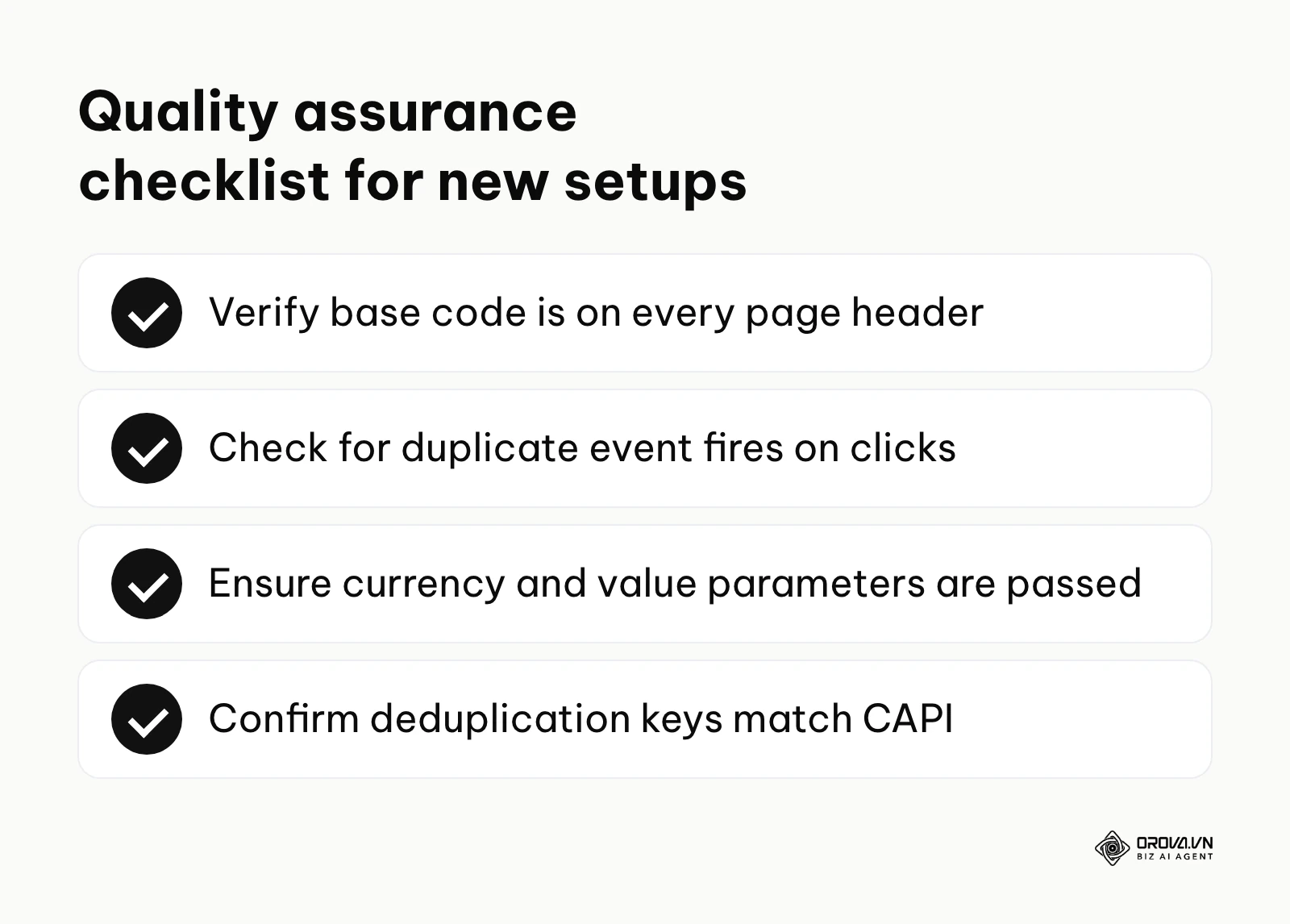
The most common issue is duplicate event firing, where a single purchase is reported twice, heavily skewing your ROAS metrics. This usually happens when an event is tied to a button click rather than a successful page load, and impatient users double-click the button. Another frequent error is missing parameters; your code might fire a Purchase event, but fail to pass the dynamic "value" variable, rendering value-based bidding impossible.
To fix these, you must rely heavily on the "Test Events" interface within the Events Manager. This tool allows you to input your URL, perform actions on your site, and watch each event arrive with its parameters, which quickly exposes missing variables or events that fire twice. A second check comes from the page itself. Meta's Chrome extension for this job was long known as Meta Pixel Helper (at the time of writing the Chrome Web Store lists it as Meta Ads Data Advisor), and it shows which pixel IDs and events load on each URL. If the extension is not available to you, the Network tab of your browser's developer tools does the same job: filter for requests to facebook.com/tr and read the event name in each request.
A short QA routine after every install or site update:
- Open the site with the extension or the Network tab and confirm one pixel ID loads on every page.
- Check that PageView fires once per page load, not twice.
- Walk through the funnel (product, cart, checkout or form) and confirm each planned standard event appears in Test Events.
- Confirm Purchase carries value and currency, and that value matches the order total.
- If you also send server events, confirm browser and server events share the same event_id.
- Recheck Diagnostics in Events Manager a few days later for new warnings.
Illustrative example: A B2B software startup, led by a solo growth marketer, needed to capture precise lead generation data to feed their algorithm. They added the standard 'Lead' event script directly onto the 'Submit' button of their primary landing page form. Soon after, they noticed the data in the ads dashboard was nearly double the actual leads in their CRM database. The stumbling block occurred because impatient users were clicking the submit button multiple times while the page loaded, triggering duplicate event fires for a single user. They fixed this by moving the event trigger away from the button click and placing it onto the dedicated 'Thank You' redirect page that only loads upon a successful server response. The data immediately aligned, providing a clean, 1-to-1 match with their secure database and stabilizing their automated bidding.
How to set up Meta Pixel tracking for your role
Adapting to these technical requirements depends entirely on your role and resources. Whether you are running a small shop or managing a vast agency portfolio, you must take specific, actionable steps to secure your data pipeline.
For the Small Business Owner
As an owner wearing many hats, you do not need to become a JavaScript developer. Your goal is to leverage automated partner integrations to get the best baseline setup with minimal friction.
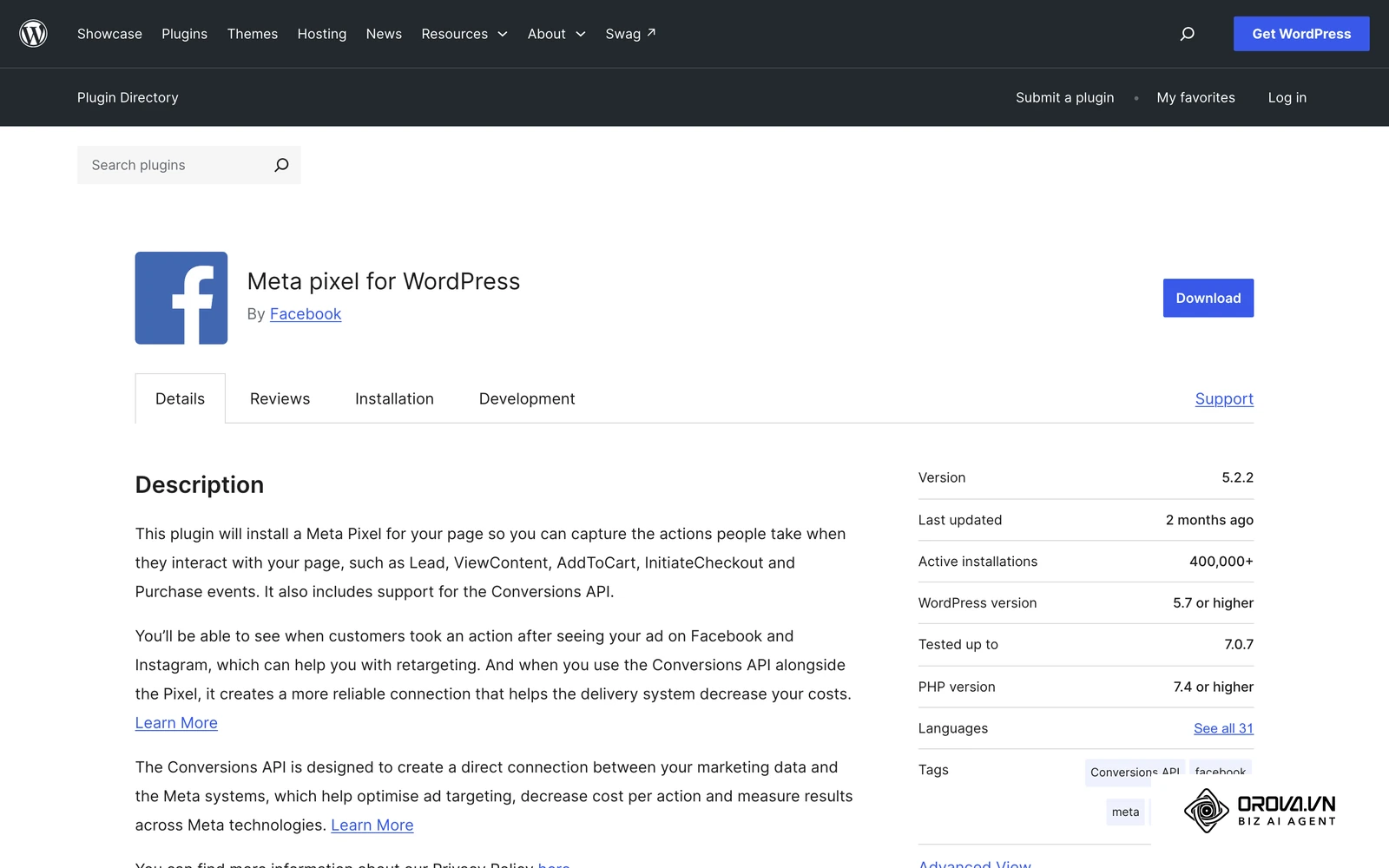
- Audit your current website platform (Shopify, WordPress, Wix) to see if it offers a native Meta integration app.
- Install the official partner application, which typically handles both browser scripts and server API connections automatically.
- Verify your domain ownership within the Meta Business Manager settings to establish authority over your data.
- Run a test transaction on your live site within the week to ensure the events register correctly on the dashboard.
For the In-house Marketing Manager
You have more technical control and need to ensure absolute data hygiene for advanced algorithmic optimization.
- Map out your entire user journey using the event planning framework discussed earlier.
- Deploy the base code and all standard events using a Tag Management System (like Google Tag Manager) rather than hardcoding them into the site.
- Add the Conversions API (for example through a server-side container) to recover events that ad blockers and browser limits stop.
- Implement strict deduplication logic (passing standard event_id parameters) to ensure hybrid setups do not double-count revenue.
- Review the Event Match Quality (EMQ) scores weekly in the Events Manager to ensure you are passing enough customer parameters (like hashed emails).
For the Agency Professional or Freelancer
Your focus is on scaling infrastructure across multiple client accounts safely and proving unquestionable ROI.
- Standardize a tracking audit protocol for every new client onboarding process.
- Educate your clients on the necessity of Consent Management Platforms and assist them in deploying legal cookie banners.
- Build a library of custom reporting dashboards that highlight server-side data recovery rates to prove your technical value.
- Collaborate closely with client backend developers to ensure high-ticket offline conversions (like closed CRM deals) are routed back to the ad platform via API.
| Common Setup Mistake | Consequence for Campaigns | How to Avoid or Fix It |
|---|---|---|
| Firing events before consent | Can breach privacy laws in your market | Integrate scripts directly with a verified CMP banner. |
| Hardcoding prices dynamically | Fails to track varied cart sizes accurately | Use data layer variables to pull live cart totals. |
| Forgetting deduplication keys | Artificially inflates ROAS by double-counting | Ensure both browser and API send identical event_id values. |
| Placing events on buttons | Inflates data through user double-clicks | Always place critical events on successful redirect pages. |
Want to scale your budget but afraid of breaking performance? 📉
Integrate OROVA ADS now - an AI Agent that automatically monitors and optimizes Google, Meta, TikTok ads 24/7. Now, expanding and replicating your Performance Ads team is just one click away.
🚀 Try it now at: orova.vn/ads
Facebook pixel tracking trends in the next few years: author's perspective
As of 2026, the digital advertising landscape has already shifted drastically away from the open data flows we enjoyed a decade ago. Looking at the current trajectory, I predict that the tracking infrastructure will undergo three major transformations in the near future.
The complete disappearance of client-side tracking
I expect browser-only tracking to keep losing ground until it is no longer enough on its own for most advertisers. The signs are already here, with strict browser updates constantly restricting third-party cookies and privacy regulations tightening globally. I believe more and more conversion data will be routed through server-side setups. Advertisers who keep relying on browser snippets alone will likely find their reporting and optimization getting weaker.
AI-driven predictive modeling bridging data gaps
Secondly, I am convinced that AI-driven predictive modeling will become the standard mechanism for bridging the inevitable data gaps. We are seeing early signs of this today, where platforms use machine learning to estimate conversions when a user opts out of direct tracking. I think platforms will lean further on aggregated, anonymized signals and rely less on user-level identifiers. It is worth getting comfortable with modeled reporting now, because a growing share of attribution will likely be estimated rather than observed.
The rise of strictly managed first-party data warehouses
Finally, I lean toward the assumption that businesses of all sizes will be forced to build robust first-party data warehouses. Right now, many advertisers rely entirely on ad platforms to store and manage their customer behavior lists. Industry work on data clean rooms points the same way: matching data in aggregate while keeping individuals anonymous. I think that in the coming years, owning your CRM data and maintaining a clean, structured database will be the only legal and effective way to feed advertising algorithms. However, this prediction could be wrong if platform giants manage to build fully enclosed ecosystems that don't require external data inputs. Regardless, investing in your own data infrastructure is the safest preparation you can make.
Frequently asked questions about Facebook pixel tracking
Does Facebook pixel tracking still work with ad blockers?
Browser-based tracking scripts are heavily impacted by ad blockers, often failing entirely to load when a user visits your site. This is why the Conversions API exists: it sends events from your server, so an ad blocker in the browser does not stop them. Running both together is covered in the Conversions API guide.
Is tracking still necessary if we already have AI campaign management?
Yes, it is absolutely essential. AI campaign management tools are incredibly powerful, but their models rely entirely on the quality of the data they ingest. If your tracking is broken, the AI will learn from flawed, incomplete data, leading to poor budget allocation and failed optimizations.
How much does it cost to implement the Conversions API?
The Meta platform does not charge you to use the API itself. However, you may incur costs related to the infrastructure needed to run it, such as paying for a cloud server to host a Google Tag Manager server container, or paying a developer to build a custom backend integration.
What is the difference between standard events and custom conversions?
Standard events (like Purchase or AddToCart) use specific code and are universally understood by the platform's core algorithm to optimize ad delivery globally. Custom conversions are simply rules you create inside the dashboard (e.g., URL contains "/thank-you") for specific reporting needs, but they are far less effective for training the machine learning models.
Can I use the same tracking script across multiple different websites?
While technically possible, it is highly discouraged unless the websites share the exact same audience and business objective. Sharing a code snippet across wildly different businesses will mix the data, confusing the optimization algorithm and ruining your ability to run accurate retargeting campaigns.
How do I know if my data is being duplicated?
You can detect duplication by checking the Diagnostics tab in Events Manager for warnings about duplicate or overlapping events. Additionally, you should use the Test Events tool to monitor live traffic; if you see the exact same action reported twice simultaneously without a shared event_id deduplication key, you have a setup error.
Where to start your setup?
Determining your first step depends entirely on the current state of your technical infrastructure. You do not need to overhaul everything in a single day; focus on the most impactful action based on your situation. Before making deep technical changes, reviewing a comprehensive PPC ad management strategy can help align your tracking goals with your overall advertising objectives.
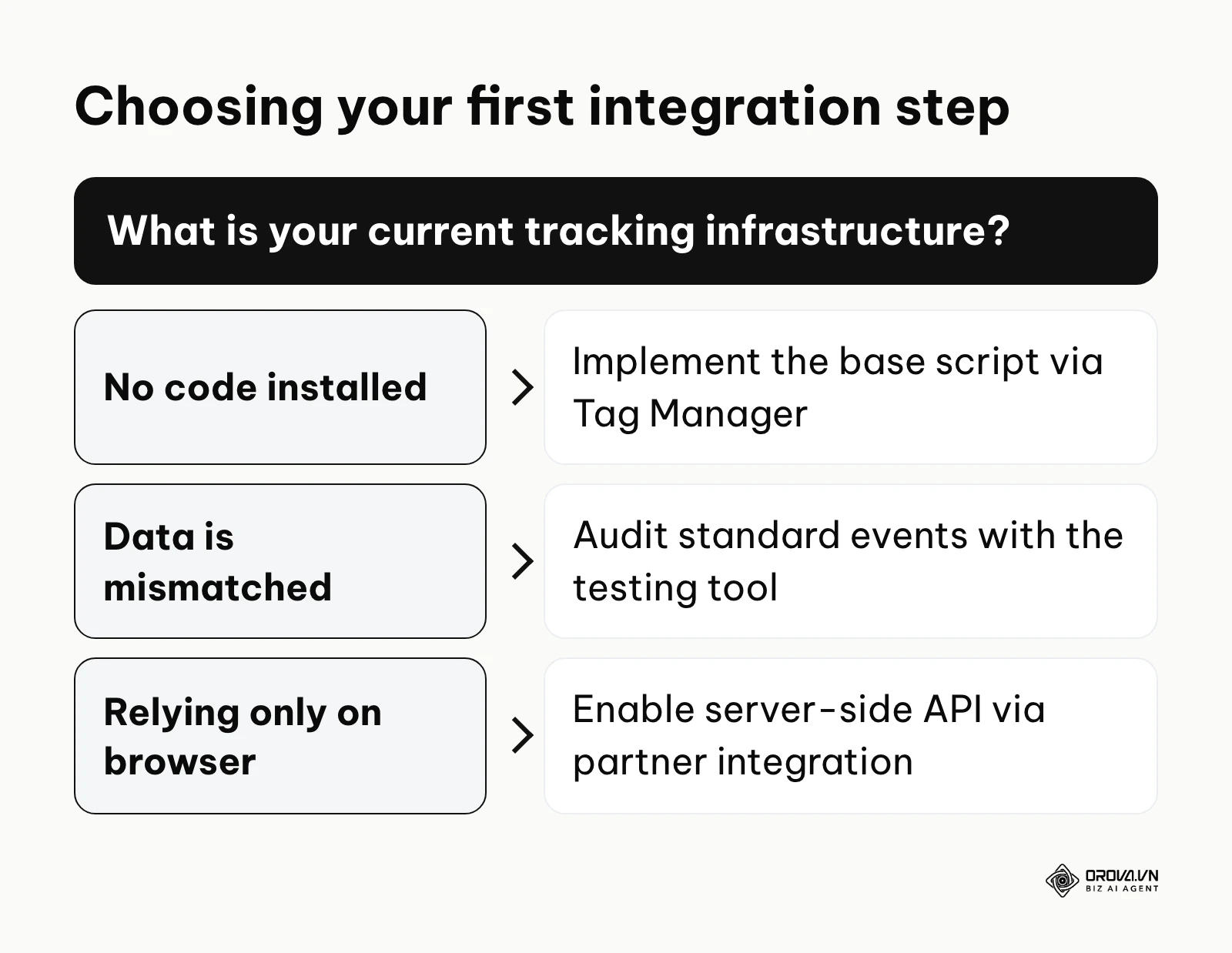
If you have zero infrastructure in place: Your immediate priority is establishing the foundational connection. Do not worry about advanced server routing yet. Focus purely on installing the base script into your website header, ideally using a tag management system, and verifying that the standard PageView event fires correctly on every URL.
If your tracking is highly fragmented or mismatched: If you have data, but it doesn't match your actual sales, stop running ads temporarily. Your first step is to open the Test Events interface and systematically trigger every action on your website yourself. Document exactly which standard events fail to fire and which are missing critical parameters like currency or value, then fix these baseline errors before spending another dollar.
If you are relying solely on browser tracking: If your basic setup works but ad platform reports consistently show fewer conversions than your CRM, some data is being lost to browser and privacy restrictions. Your step today is to research native partner integrations for your specific website builder (like Shopify or WordPress) to enable the Conversions API alongside the pixel. By taking control of your infrastructure, you can confidently rely on Facebook pixel tracking to drive sustainable business growth.
About the author

Builder of Orova
Nguyễn Đỗ Trọng Ân has 8 years of experience in marketing, including 6 years managing market development across Asia. He builds Orova, a Biz AI Agent that never sleeps: it plans, runs and optimizes work for businesses.
Run your business with AI Agents
Orova is the always-on Biz AI Agent — it plans, runs, and optimizes the work for you.
Save time, unlock productivity.