
How to do SEO split testing in 2026: a DIY tracking template and worked example

If you are guessing what Google wants, you are actively losing traffic to competitors who know exactly what works. Understanding how to do SEO split testing transforms your entire growth strategy from blind, gut-feeling assumptions into precise, data-backed decisions. The short answer: you split a set of similar template pages into a control group and a test group, change one element on the test pages only, wait for Google to recrawl them, and then compare how organic clicks moved in each group using Google Search Console. For years, digital marketers have relied on best practices to update title tags, rewrite content, and adjust internal links. But what worked in 2023 might actively harm your rankings today.
The problem with traditional optimization is that you apply a change to your entire website at once. If your organic traffic drops two weeks later, you have absolutely no idea if the drop was caused by your specific change, a broader algorithm update, or just natural seasonal decline. You are completely blind. This article will break down exactly how to run a rigorous, mathematically sound testing protocol on your own site. I will show you how to structure your pages, track the data manually without paying for expensive enterprise software, and determine exactly when an experiment is safe to roll out to your entire domain.
What is SEO split testing and when should you use it?
SEO split testing is the scientific process of dividing a structurally identical group of pages on your website into two distinct buckets: a Control group that remains completely unchanged, and a Test (or Variant) group where you alter exactly one specific variable. You then monitor the organic traffic performance of both groups over a set period. By comparing the performance difference between the two groups, you can isolate the exact impact of your change from external factors like algorithm updates or seasonality.
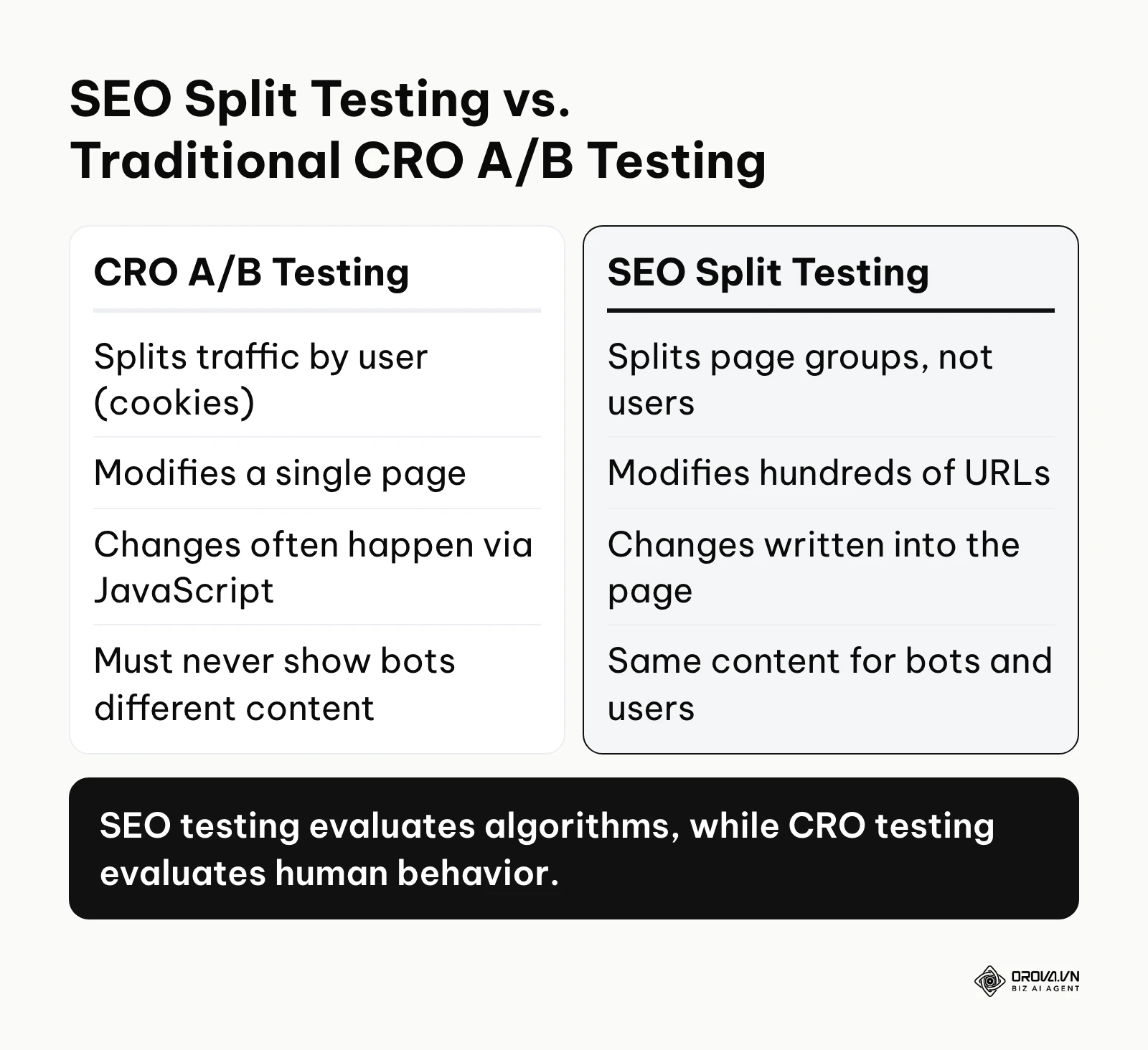
You must understand that this is fundamentally different from traditional Conversion Rate Optimization (CRO) A/B testing. In CRO testing, you have a single URL, and you use JavaScript tools or cookies to split the users visiting that page, showing half of them a red button and half a blue button. In SEO testing, you split the pages, not the users. You take 500 product pages, leave 250 alone, and change the title tags on the other 250. Every user and every search engine bot that visits a specific URL sees the exact same content.
Google's Search Central guidance on website testing is clear on one point: never show Googlebot different content from what users see, because that is cloaking. Page-level SEO tests avoid this risk by design, since every visitor and every bot gets the same version of a given URL. That is why SEO tests are built on distinct URLs, with the change written into the page itself rather than swapped in per visitor.
You should use this methodology when you have a large cluster of templated pages. It works beautifully for e-commerce category pages, programmatic SEO directories, massive blog archives, or real estate listing pages. If you only have a 10-page portfolio website, you cannot run statistical tests because your sample size is far too small to reach statistical significance. In those cases, you simply apply best practices and wait. But if you have hundreds of identical pages, testing is mandatory to protect your revenue.
Essential technical preparation: The 5-step checklist
Before you even think about modifying a single word on your website, you must ensure your infrastructure can handle a split test without destroying your current rankings. The biggest reason businesses fail at this is that they rush the implementation, contaminate their data, and draw the wrong conclusions. Server-rendered HTML is the safest way to make sure Google sees your change on the very first crawl.
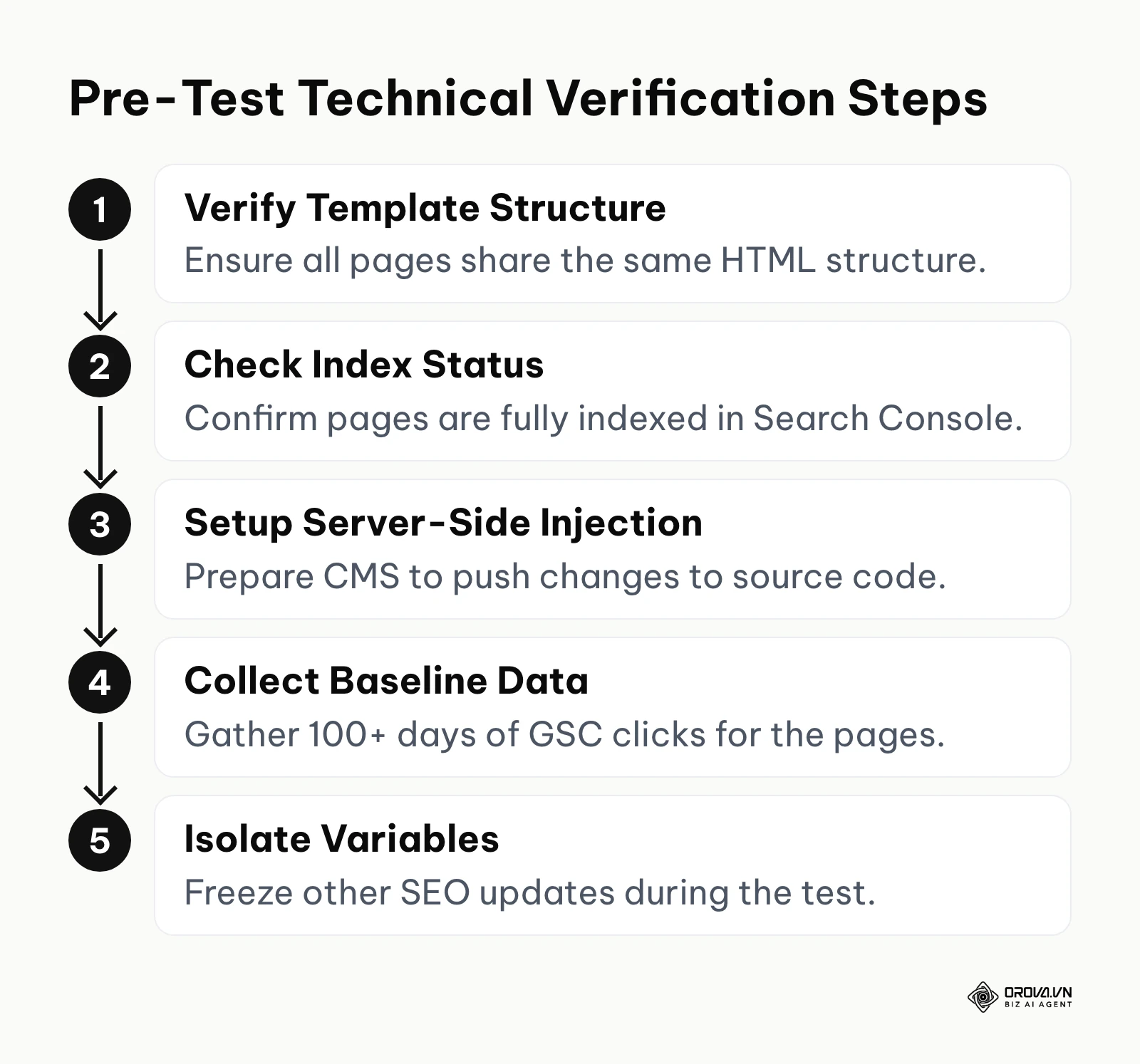
First, you must ensure that your test involves a perfectly homogeneous group of pages. This means the pages must share the exact same HTML template, layout, and purpose. You cannot mix blog posts with product pages in the same test. The intent of the user and the evaluation criteria of the search engine are completely different for these formats.
Second, the changes must be applied server-side. Do not use client-side rendering tools to inject your SEO changes. When Googlebot crawls the page, the changed element (like an H1 or Schema markup) must be present in the raw source code immediately upon load.
Here is the checklist of what you must prepare before starting:
| Requirement | Where to get it / How to verify | Time taken |
|---|---|---|
| Homogeneous page group | Your CMS database or a full site crawl. Ensure at least 200 identical template pages. | 2-4 hours |
| Clean Google Search Console access | Verify Domain property ownership in GSC. Check the Page indexing report. | 15 minutes |
| Server-side editing capability | Confirm with your developer that changes can be hardcoded or pushed via backend CMS. | 1-2 days |
| Historical baseline data | Minimum 100 days of continuous organic traffic data in GSC for the chosen pages. | 0 hours (if already tracking) |
| A freeze on other SEO activities | An internal agreement that no other technical or content changes will be made during the test. | 1 hour (meetings) |
If you cannot guarantee a freeze on other SEO activities, your test is invalid. For example, if you are testing meta descriptions on a category, but your technical team simultaneously updates the site's pagination logic, any change in traffic cannot be definitively attributed to your meta descriptions. The variables are hopelessly contaminated.
How to do SEO split testing manually: The complete process
Many marketing agencies will tell you that you must spend thousands of dollars a month on specialized software to run these tests. This is completely false. While software automates the process, you can achieve the exact same statistical rigor using Google Search Console, a solid spreadsheet, and a disciplined workflow. This section will walk you through the absolute core of the methodology.
Step 1: Hypothesis creation and element selection
A successful test begins with a scientifically structured hypothesis. You cannot just say, "I want to see if adding numbers to titles gets more clicks." That is an assumption, not a hypothesis. Your hypothesis must follow a strict framework: If we change [Variable], then we expect [Metric] to [Direction] because [Reason].
For example: "If we add the current year to the title tags of our review pages, then we expect the Click-Through Rate (CTR) to increase by at least 5% because users prioritize fresh, up-to-date content in this specific niche."
Choosing the right element to test is critical. You must test elements that have a direct, proven impact on either crawling, relevance, or user click behavior. If you are struggling to build a solid seo strategy, testing gives you a clear hierarchy of what to prioritize. The most common and effective elements to test include:
- Title tags and Meta descriptions: Excellent for testing CTR impact in the SERPs.
- H1 tags and introductory paragraphs: Excellent for testing keyword relevance and time-on-page.
- Schema markup (Structured Data): Excellent for testing the acquisition of rich snippets (like review stars on product pages or breadcrumb trails).
- Internal linking blocks: Excellent for testing crawl flow and PageRank distribution to deeper pages.
Step 2: Stratified randomization for group splitting
This is the exact point where most beginners ruin their data. You cannot simply take your list of 500 URLs and randomly assign 250 to Control and 250 to Test. In the real world, traffic follows a Pareto distribution. A tiny fraction of your URLs generates the vast majority of your traffic. If, by pure random chance, all your high-traffic pages end up in the Test group, your data will be skewed immediately.
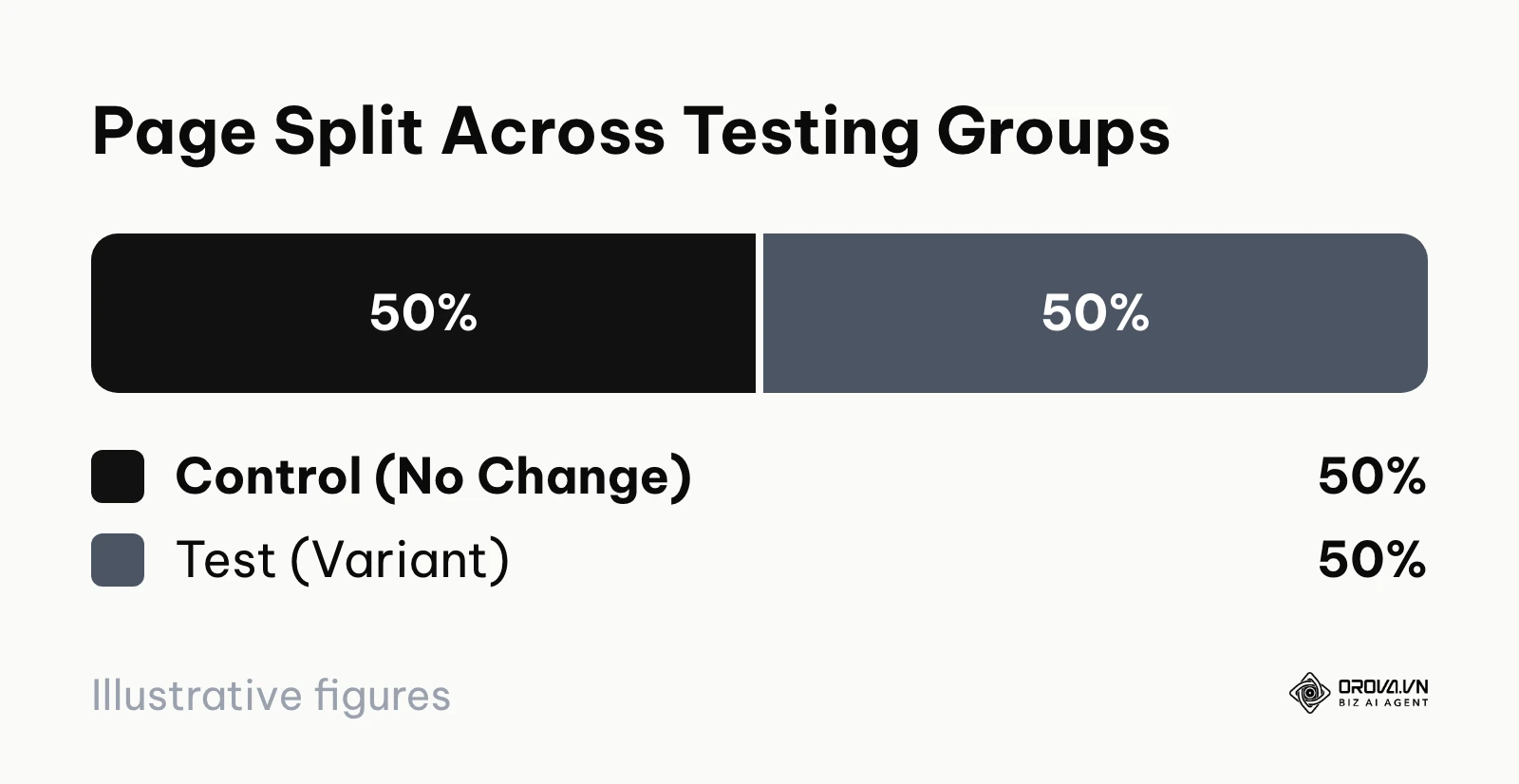
To solve this, you must use Stratified Randomization. This means you group your pages into "buckets" based on their historical traffic levels, and then you randomly split them within those buckets.
Here is exactly how to do it:
- Export the last 90 days of click data for your chosen URL group from Google Search Console.
- Sort the URLs in your spreadsheet from highest clicks to lowest clicks.
- Divide the list into traffic tiers. For example: Tier 1 (over 1000 clicks/month), Tier 2 (500-1000 clicks), Tier 3 (100-500 clicks), Tier 4 (under 100 clicks).
- Within Tier 1, randomly assign half the URLs to Control and half to Test. Repeat this for Tier 2, Tier 3, and Tier 4.
This guarantees that both your Control group and your Test group have the exact same distribution of high-performing and low-performing pages. They are now perfectly balanced competitors.
Step 3: Implementation and indexing triggers
Once your lists are finalized, it is time to push the changes live to the Test group. Work with your developers or use your CMS's bulk editing features to apply the variant to the designated URLs. Ensure the Control group remains absolutely untouched.
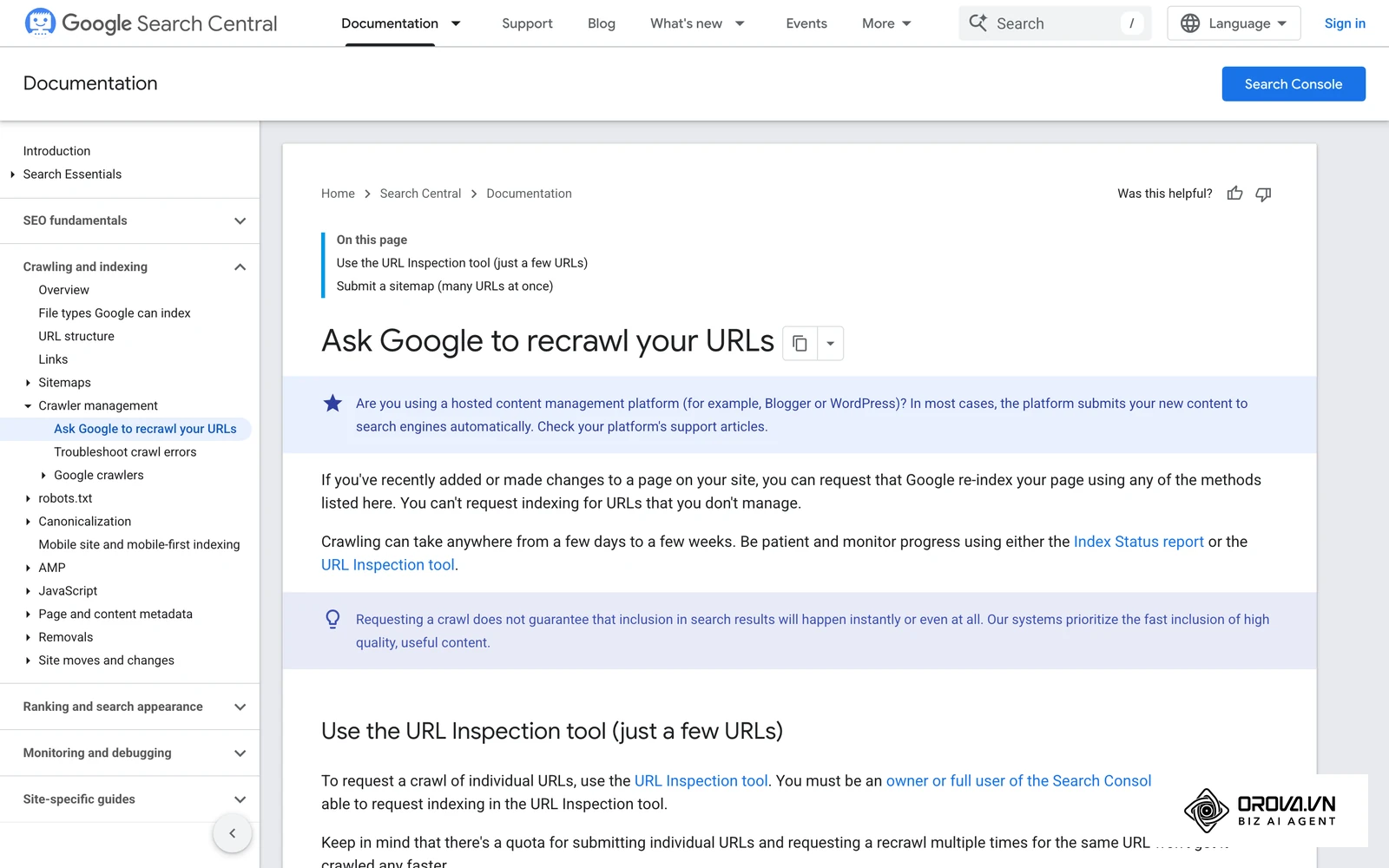
However, your test does not actually begin the moment you hit "publish". The test only begins when Googlebot actually crawls the modified pages and updates them in its index. If you have a massive website, this could naturally take weeks.
To speed this up, you must trigger indexing. For small batches (under 50 URLs), you can manually submit them to the Google Search Console URL Inspection tool and request indexing. For larger batches, the most efficient method is to create a temporary XML sitemap containing only the URLs in your Test group, and submit that sitemap in GSC so Google discovers the changed pages faster.
Keep in mind that Google can only reflect a change after it has recrawled and reprocessed each affected URL, so a template change is never "live in search" on the day you publish it. You must monitor your server log files, the Crawl stats report, or the URL Inspection tool in GSC to verify when the Googlebot has actually visited the Test URLs. Mark that date on your calendar. That is Day Zero of your test.
Step 4: Tracking with the free Google Sheets template
You need to track the performance over a minimum of 14 to 28 days. A shorter window will not account for weekly traffic fluctuations (like weekend dips). Since you are not using paid software, you will build a tracking model in Google Sheets.
Create a spreadsheet with the following columns:
- Column A: URL
- Column B: Group (Control / Test)
- Column C: Pre-Test Clicks (Total clicks 28 days prior to Day Zero)
- Column D: Post-Test Clicks (Total clicks 28 days after Day Zero)
- Column E: Percentage Change (Formula: =(D2-C2)/C2)
Here is what the first rows of the template look like once filled in. The URLs and numbers are illustrative; replace them with your own GSC export:
| A: URL | B: Group | C: Pre-test clicks | D: Post-test clicks | E: % change |
|---|---|---|---|---|
| /category/running-shoes | Test | 1,240 | 1,410 | =(D2-C2)/C2 → 13.7% |
| /category/trail-shoes | Control | 1,180 | 1,230 | =(D3-C3)/C3 → 4.2% |
| /category/walking-shoes | Test | 610 | 720 | =(D4-C4)/C4 → 18.0% |
| /category/hiking-boots | Control | 590 | 615 | =(D5-C5)/C5 → 4.2% |
Below the URL rows, add two summary cells: =AVERAGEIF(B:B,"Test",E:E) for the Test Delta and =AVERAGEIF(B:B,"Control",E:E) for the Control Delta. Add two more cells that compare group totals instead of averages: =SUMIF(B:B,"Test",D:D)/SUMIF(B:B,"Test",C:C)-1 and the same formula with "Control". The averages treat every page equally, while the totals are weighted by traffic. If the two methods point in different directions, a handful of low-traffic pages with huge percentage swings is probably distorting your average, and you should trust the weighted total more.
To calculate the true impact of your test, you cannot just look at the Test group's percentage change. If the Test group traffic went up 10%, but the Control group traffic also went up 10% during the same period, your change did absolutely nothing; the entire market simply grew.
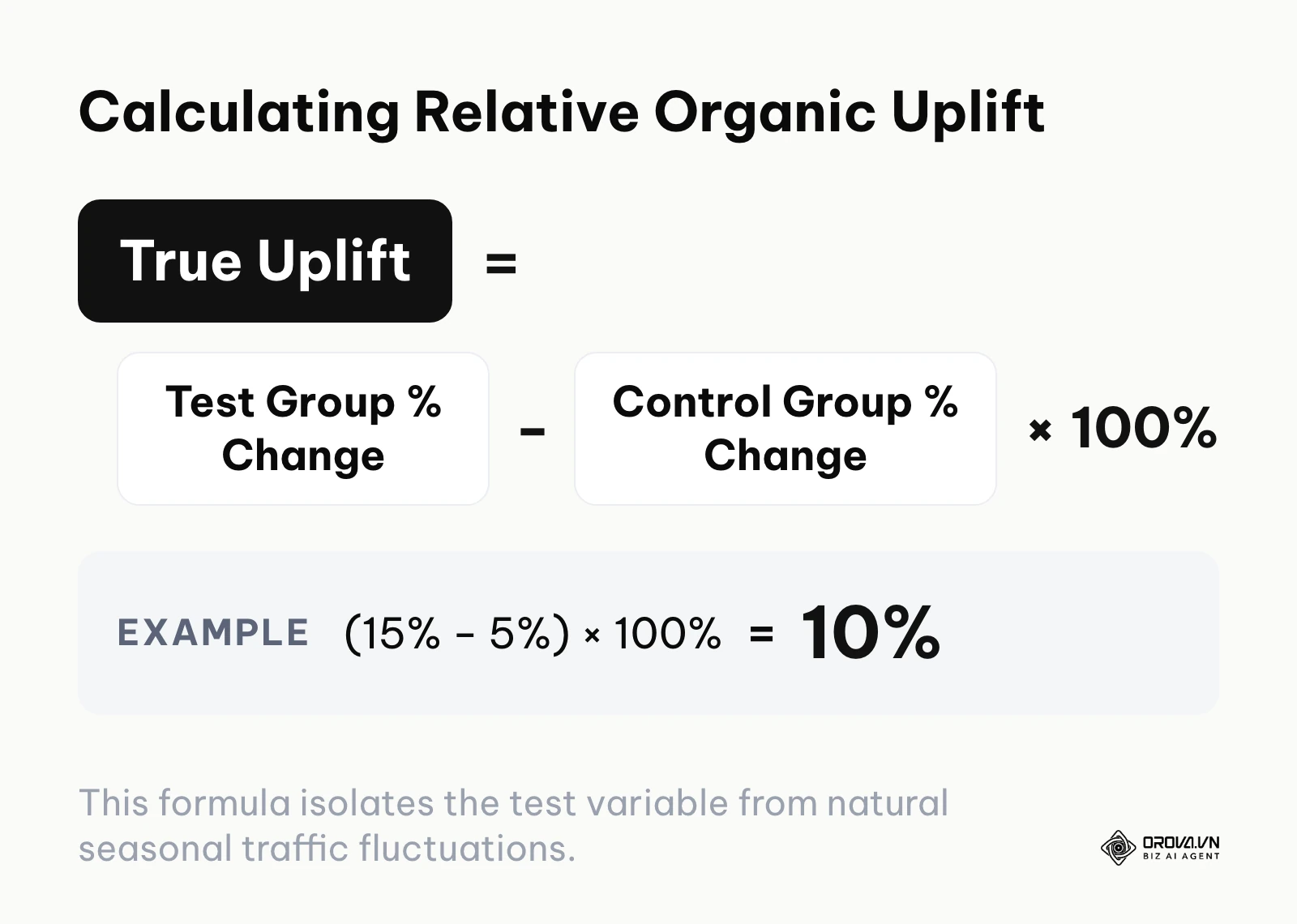
You must calculate the relative uplift. To do this, find the average Percentage Change for the entire Control group. Let's call this the Control Delta. Then, find the average Percentage Change for the entire Test group (Test Delta).
The True Uplift formula is: Test Delta - Control Delta.
If your Test group grew by 15%, and your Control group grew by 5%, your True Uplift is 10%. This logic is loosely based on the CausalImpact algorithm research paper by Google, 2015, which uses Bayesian structural time-series models to estimate what would have happened if the test never occurred. By subtracting the Control group's natural movement, you isolate the exact impact of your SEO modification. If you want to dive deeper into gathering clean data, understanding how to measure website traffic using analytics frameworks is highly recommended.
Step 5: Measuring significance with the decision matrix
Not every positive number means your test was a success. If your True Uplift is only 1.5%, that is likely within the margin of statistical error. It could just be random noise. You need a framework to decide when a result is significant enough to warrant a permanent change to your website's codebase.
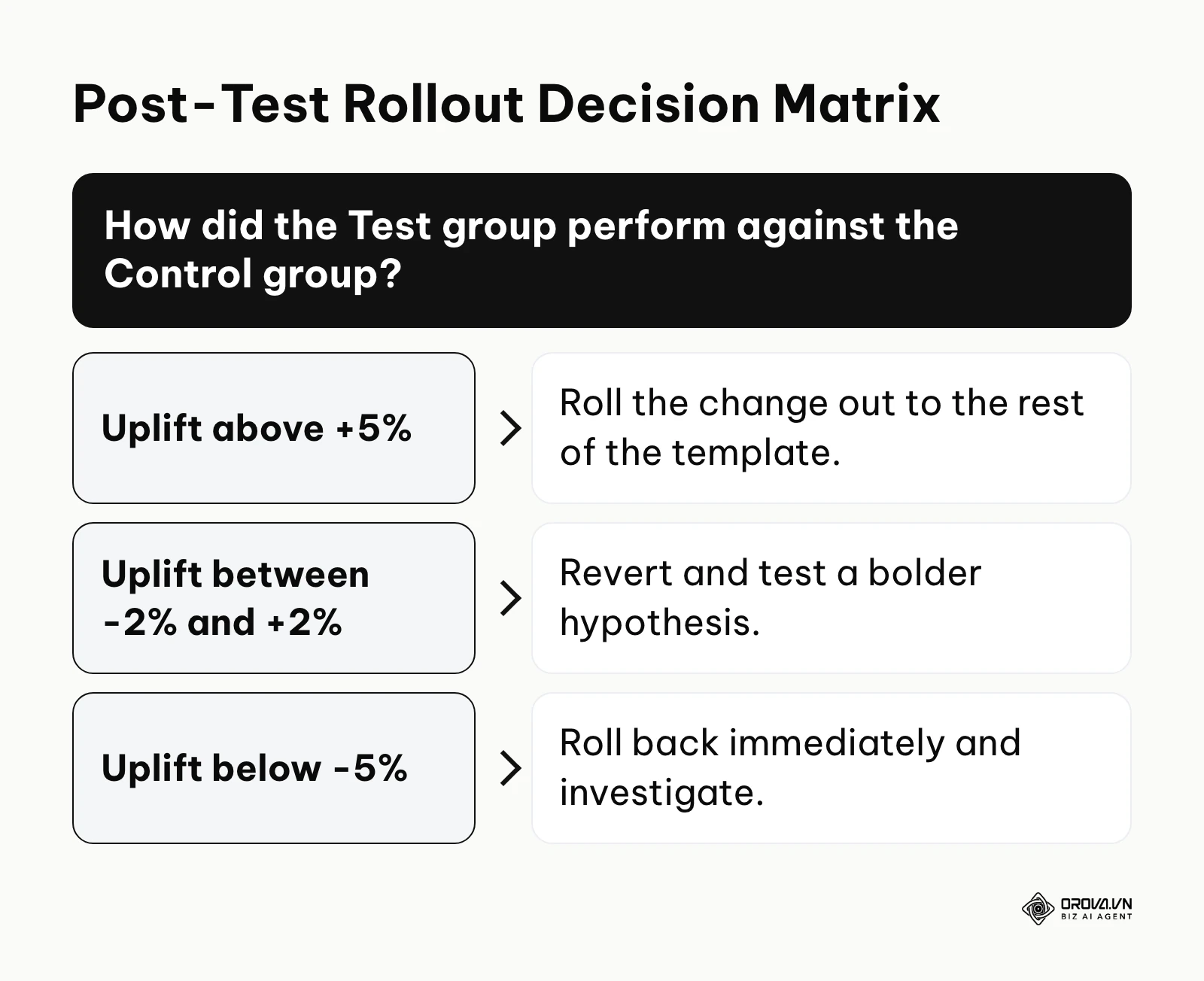
Use this decision matrix to evaluate your results after 28 days:
- True Uplift above +5%: Strong positive. The hypothesis is supported; roll the change out.
- True Uplift between +2% and +5%: Weak positive. Monitor for another 14 days before deciding.
- True Uplift between -2% and +2%: Neutral result. The change had no measurable impact; revert it and test a bolder hypothesis.
- True Uplift between -2% and -5%: Weak negative. Extend the test only if no stop-loss threshold has been hit; otherwise revert.
- True Uplift below -5%: Strong negative. The change harmed your rankings or CTR; roll it back immediately.
These thresholds are practical rules of thumb, not a formal statistical test. To calibrate them for your own site, run an "A/A" check before your first real test: split your pages into two groups exactly as described in Step 2, change nothing, and measure the gap between the groups over the same 28-day window. That gap is your natural noise level. If two untouched groups routinely drift 3% apart on your site, a 4% "uplift" in a real test proves very little, and you should raise your rollout threshold accordingly.
You must also look beyond simple clicks. Did the CTR increase but the average position drop? That means your title tag was more clickable, but Google found it less relevant to the query. You must analyze Impressions, Clicks, CTR, and Average Position together to get the full picture. Position data in GSC is an average across many queries, so it helps to pair it with a steady search engine rank monitoring routine for the handful of queries that matter most to the tested template.
Step 6: Rollout or rollback execution
If the test is a strong positive, the final step is the rollout. You will now apply the successful variant from your Test group to the Control group, and to any other applicable pages across your entire domain. Monitor the rollout closely to ensure the uplift scales as expected.
If the test is neutral or negative, you must immediately execute a rollback. Revert the Test group URLs back to their original state. Do not leave failed tests live on your site, as they will continue to bleed traffic over time. Document the failure in a testing log so your team never tries that specific hypothesis again. A failed test is not a loss; it is valuable data that prevents you from making a site-wide disaster.
Discover Orova.vn – a Biz AI Agent platform with OROVA SEO, a complete solution for every website. The system supports search engine optimization from A to Z with features including keyword research, writing new SEO-ready articles, optimizing existing content, rank tracking, plus competitor analysis and in-depth technical analysis. Sign up today to experience OROVA SEO completely free (offer valid through July 7, 2027).
Worked example: Title tag optimization
To truly understand how this works, it helps to walk through a complete test with numbers. Theories are useless without execution.
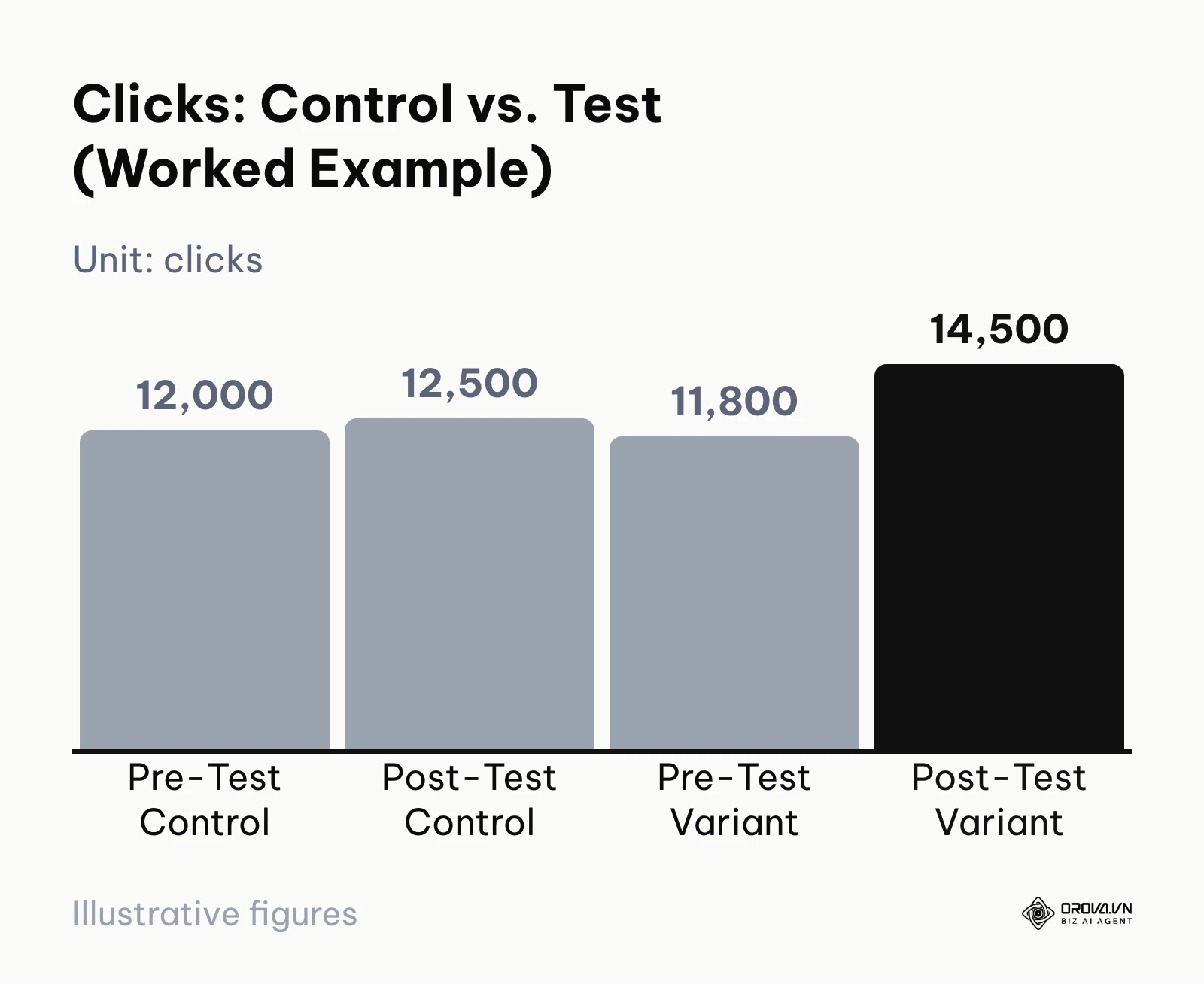
Illustrative example: An e-commerce platform managing 10,000 category pages wanted to increase traffic without building new backlinks. The SEO team hypothesized that adding intent modifiers like "Buy" and the current year to the title tags would increase CTR. They exported 90 days of GSC data, split 1,000 comparable category pages into traffic tiers, and assigned 500 to Control and 500 to Test. The major obstacle was crawl budget; Google took nearly three weeks to crawl the deeper variant pages, which skewed the early daily data and caused panic among stakeholders. The team held firm and extended the testing window to 40 days. In the final comparison, the Control group moved from 12,000 to 12,500 clicks (about +4.2%), while the Test group moved from 11,800 to 14,500 clicks (about +22.9%). Using the True Uplift formula, 22.9% − 4.2% gives roughly 18.7 percentage points attributable to the new titles. That justified a gradual rollout to the remaining categories. Do not expect every test to look like this; neutral results are far more common, and the value of the method is that it tells you which is which.
In this scenario, if they had just changed all 10,000 titles at once and traffic dipped temporarily due to re-indexing, the executives would have forced an immediate rollback, killing a massive growth opportunity. Testing provided the safety net required to weather the storm.
Risk management: How to handle a failed test and traffic loss
SEO split testing inherently involves risk. When you modify your HTML, you are asking Google to re-evaluate your relevance. Sometimes, Google decides your new variant is worse than the old one, and your rankings will drop. You must be prepared for this psychologically and technically.
Illustrative example: A financial advice blog decided to test a new structured data block across 50 of their highest-traffic articles, hoping to earn richer search listings. The team injected the markup through Google Tag Manager instead of the page template, which broke the server-side rule above, and the sample was far below the 200-page minimum. A formatting error in the JSON-LD made the markup invalid, Search Console began reporting structured data errors, and the enhanced listings those articles previously had disappeared, followed by a sharp drop in clicks within days. The result was a forced, immediate rollback of the GTM container, followed by a stressful recovery period of roughly two weeks before their previous listings stabilized.
To manage these risks, you must set strict "Stop-Loss" parameters before the test begins. A stop-loss is a pre-determined metric threshold that, if crossed, immediately triggers a rollback of the experiment, no questions asked. Write the thresholds into your tracking sheet before Day Zero and check them every few days, so the decision is made by the rule you agreed on rather than by whoever panics first.
Here is a standard risk management framework for metrics:
| Metric | Meaning in testing | Danger Threshold (Stop-Loss) |
|---|---|---|
| Average Position | How Google views your relevance | Drop of more than 3 positions sustained for 5 days. |
| Impressions | Your visibility for target keywords | Drop of > 15% compared to the Control group. |
| Click-Through Rate | How users react to your SERP listing | Drop of > 10% relative to historical baseline. |
| Crawl Errors (5xx/4xx) | Technical accessibility issues | Any spike above 1% of total crawled pages. |
It is crucial to understand that after a rollback, your traffic will not recover instantly. Google has to re-crawl the reverted pages and update its index again. Depending on the crawl frequency of your site, a full recovery from a failed test can take anywhere from several days to a few weeks. Do not panic and make further changes during this recovery period; you will only confuse the algorithm further.
With OROVA.VN and the OROVA SEO module, you put an end to the exhausting days of manual work for good. Instead of struggling for hours to write articles and compile reports, the entire process is now optimized and completed in just 5 minutes.
Common mistakes when running your first SEO split test
Even with a perfect setup, human error often destroys the validity of an SEO test. When you are eager for results, it is easy to cut corners. Knowing what seo advice to ignore is just as important as knowing what to implement.
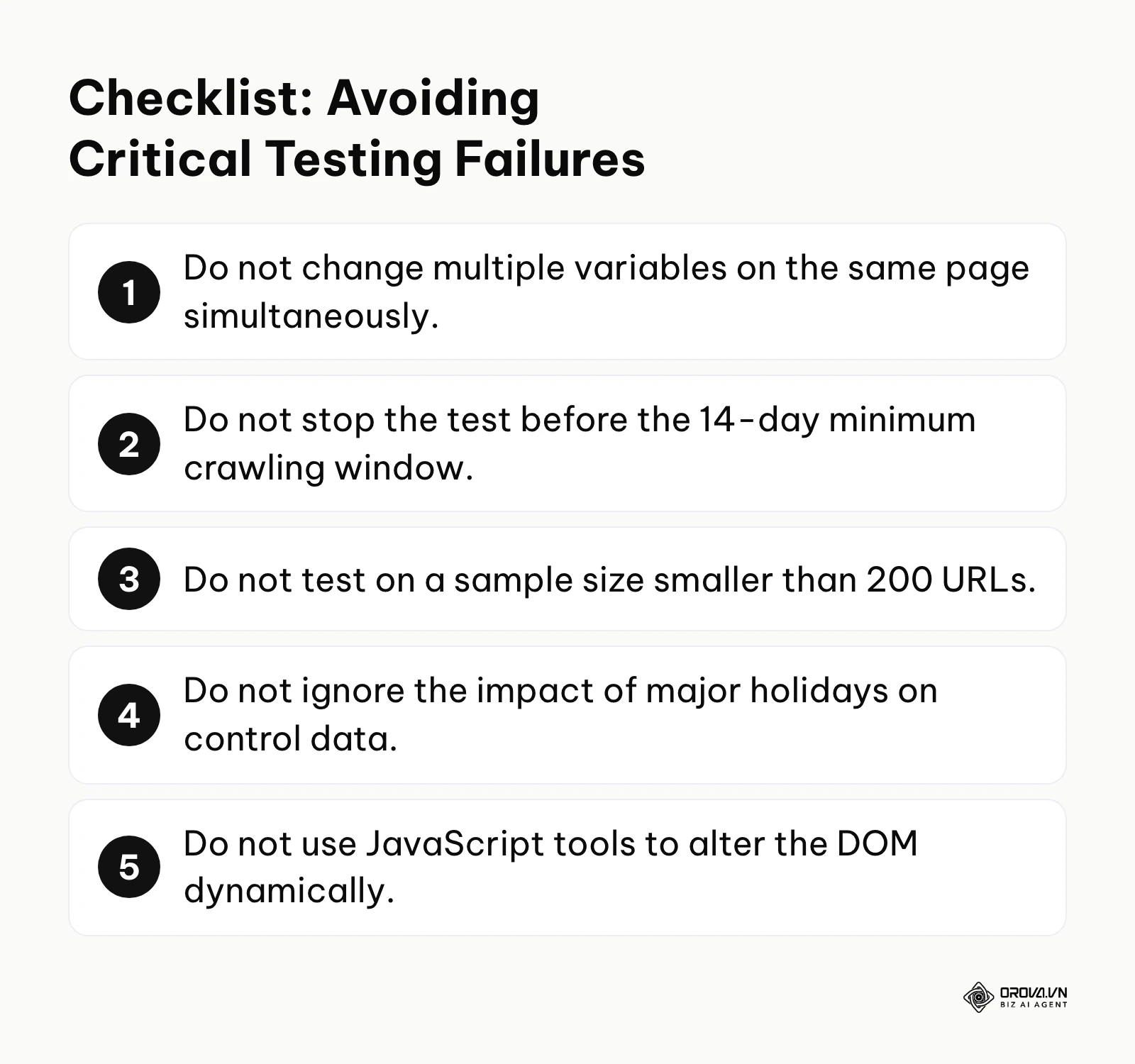
The most fatal mistake is testing too many variables at once. If you change the Title Tag, the H1, the meta description, and the word count all in the exact same test, and traffic goes up 20%, you have learned absolutely nothing. You have no idea which of those four changes actually caused the growth. Was it the H1? Was it the word count? You cannot isolate the variable. You must test exactly one element at a time. It is slow, but it is scientific.
Another frequent error is running tests during massive seasonal shifts without relying heavily on the Control group.
Illustrative example: A B2B SaaS company ran a split test on their feature landing pages during the final weeks of November, coinciding with the Black Friday season. The team grouped pages by feature tier, applied the changes, and tracked conversions and clicks for two weeks. The obstacle was failing to mathematically isolate the seasonal traffic spike; they simply looked at the Test group's numbers going up and concluded the test was a massive success. The result was a failed site-wide rollout that plummeted metrics in late December when the seasonal intent died down, forcing the entire marketing team into a complete strategy reset.
A third mistake is stopping the test too early. You might see a massive drop in traffic on Day 3 of the test. This is often just the "Google Dance"—the algorithm temporarily dropping a page while it recalculates its new value. If you panic and roll back on Day 4, you will never see the uplift that might have appeared by Day 14. You must commit to the testing window unless the stop-loss thresholds are clearly breached.
A fourth mistake is letting the groups drift apart during the test. Pages get deleted, merged, redirected, or set to noindex as part of normal site maintenance. If 30 URLs quietly leave the Test group in week two, the group you measure at the end is no longer the group you started with. Lock the URL list on Day Zero, flag any page whose status changes, and exclude it from both the pre-test and post-test totals so the comparison stays like-for-like.
Finally, many teams forget to write anything down. Keep a simple testing log with the hypothesis, the template tested, Day Zero, the group sizes, the final True Uplift, and the decision you made. After a year, that log becomes the most valuable SEO document you own, because it records what actually works on your site rather than what works on someone else's.
The future of SEO split testing: My predictions for the next few years
Based on the rapid evolution of search algorithms and server technologies, the landscape of SEO testing will shift dramatically. Here is where I think the testing space is heading over the next few years.
AI will draft most of the variants
Right now, human SEOs write the hypotheses and draft the variant title tags or content blocks. I expect AI systems to take over a large share of variant drafting. You will likely point a tool at a cluster of URLs, let it analyze search intent and propose several variations of titles or content blocks, and then decide which ones are worth a real test. In my view, the human role will shift from writing every variant to choosing hypotheses and editing what the machine proposes. If you are curious about this shift, understanding ai seo and how to split work between machines and people is essential.
Edge SEO will become a common way to deploy tests
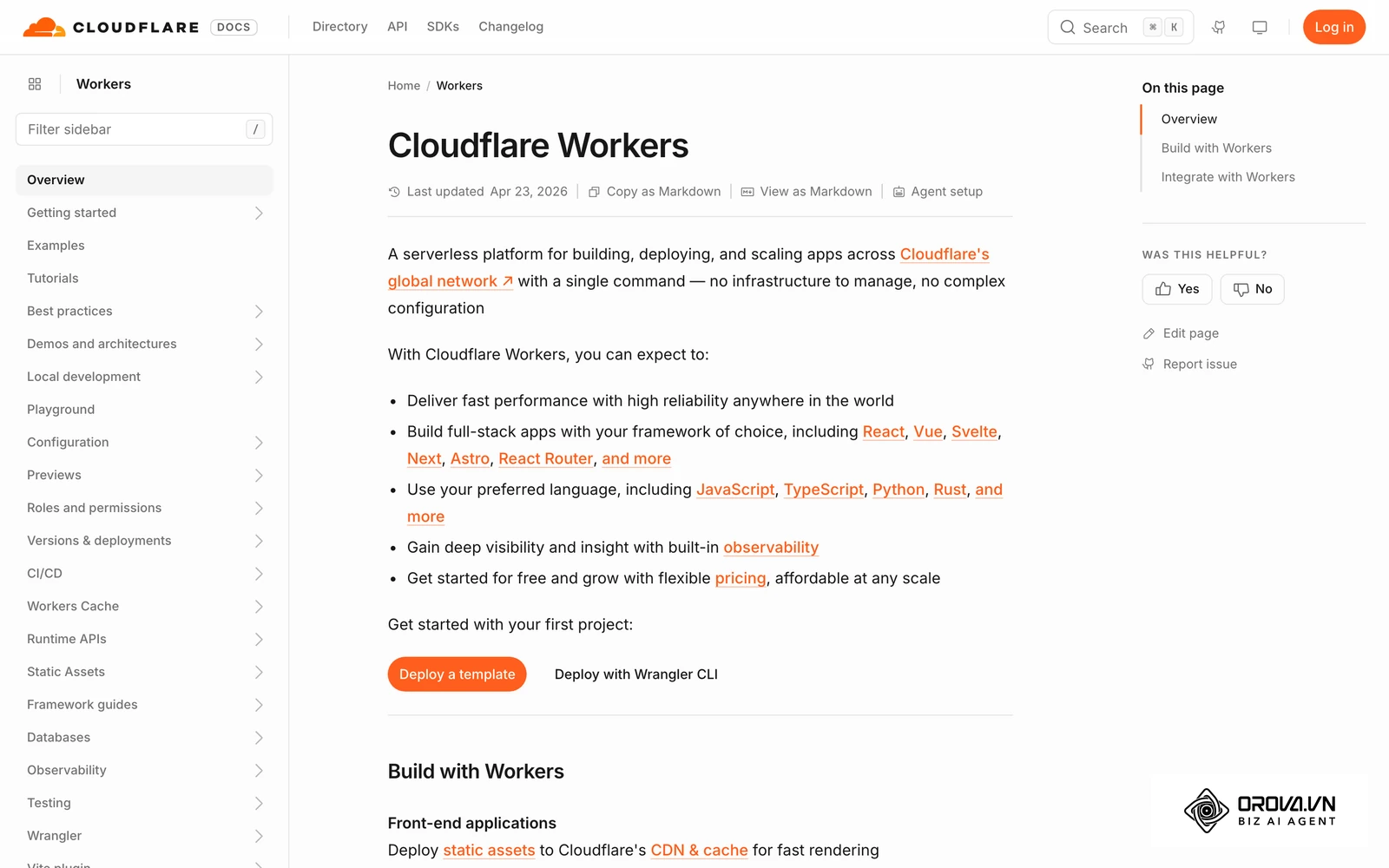
Currently, many teams struggle to get development resources to change server-side code for a temporary test. I think Edge SEO—using Cloudflare Workers or AWS Lambda@Edge to modify HTML as it passes through the CDN—will become a common way to run tests on large sites. It lets SEOs ship a test without waiting in the CMS and development queue, while still serving the same HTML to bots and users. I suspect teams that cannot deploy changes quickly in some form will run far fewer tests than their competitors.
Faster indexing could shorten testing windows
The standard 14 to 28-day testing window exists largely because recrawling takes time. My guess is that if search engines keep moving toward faster, push-based discovery (the Indexing API that Google offers for job postings is an early example of the idea), the time it takes to validate an SEO test could shrink. If that happens, teams with a disciplined testing process will be able to run noticeably more tests per quarter than they can today.
Frequently asked questions about SEO split testing
How long does an SEO split test need to run?
At a minimum, you should run your test for 14 to 28 days. The first few days are often volatile as search engines recrawl the pages and adjust their indexes. You also need to capture full weekly cycles to account for differences between weekday and weekend search behavior. Running a test for less than two weeks usually results in statistically invalid data.
Can I run an SEO split test on a small website with 20 pages?
No, you cannot. Statistical significance requires a large sample size to eliminate the impact of random outliers. If you only have 20 pages, and one page naturally drops in traffic due to a competitor outranking you, it will violently skew the data for your entire group. As a rule of thumb, you need at least 200 templated pages to run a reliable split test.
Will I get penalized for cloaking if I run an SEO test?
Cloaking means deliberately serving Googlebot different content from what human users see, for example by detecting the crawler's user agent and showing it a special version. A page-level SEO test does not do this: each URL shows the same version to everyone. As long as you change the page itself, rather than branching on who is visiting, a properly run SEO split test is not cloaking.
What role does AI play in SEO testing today?
Currently, AI is primarily used to analyze massive datasets faster than humans can, and to generate the actual copy for the variants. For instance, you can use AI to instantly rewrite 500 meta descriptions to include a specific call-to-action, saving days of manual labor before the test even begins. AI is also used in advanced statistical modeling to predict the Control group's baseline performance.
Where should you start?
If you have never run a test before, the sheer volume of technical requirements can feel paralyzing. Do not try to test a massive site migration on your first attempt. Start small, build your internal muscles, and prove the concept to your stakeholders.
If your website has less than 200 pages: Do not attempt split testing. Your sample size is too small. Your first step should be to run sequential testing instead. Pick your top 5 pages, update their title tags, note the exact date of the change in your tracking sheet, and compare the 30-day performance before the change to the 30-day performance after the change. This is a before-and-after comparison, not a true split test, so treat the result as a hint rather than proof. If your pages are not yet ranking well enough to produce meaningful traffic, start with a structured website ranking roadmap before you worry about testing.
If you have a large site but no developer support: Your first step is to focus on elements you can control directly through your CMS without needing code changes. Export your blog or product URLs into a spreadsheet, segment them by traffic, and manually update the meta descriptions or H1 tags using the CMS editor. Track the results manually using the Google Sheets framework discussed above.
If you have an enterprise site and a technical team: Your first step is to build an edge testing protocol. Schedule a meeting with your DevOps or IT team to discuss implementing Cloudflare Workers or a similar CDN-level edge computing solution. This will give your marketing team the power to bypass the CMS entirely and run highly complex, server-side tests at scale without touching the core infrastructure.
About the author

Builder of Orova
Nguyễn Đỗ Trọng Ân has 8 years of experience in marketing, including 6 years managing market development across Asia. He builds Orova, a Biz AI Agent that never sleeps: it plans, runs and optimizes work for businesses.
Run your business with AI Agents
Orova is the always-on Biz AI Agent — it plans, runs, and optimizes the work for you.
Save time, unlock productivity.