
Are free QR codes permanent? What happens after you print one

When planning a physical marketing campaign, many professionals ask, are free qr codes permanent? The short answer is yes, provided you generate a true static QR code rather than a dynamic code that depends on someone else's server. A QR code is fundamentally just a visual representation of text data. If that text is your direct website address, the code will theoretically last forever. However, if that text is a tracking link owned by a software company, your printed materials depend on that link staying active.
This article explains how QR codes work on a mechanical level, from their origins and structure to their use in marketing. You will learn the differences between codes that can stop working and codes that cannot, see which free QR code generator tools and libraries produce static codes, and master the exact steps required to test your codes before sending them to the printer. Furthermore, we will delve into the underlying technology, including error correction algorithms, data density constraints, and the optical limitations of smartphone cameras. Whether you are a small business owner looking to print a simple menu or an enterprise IT architect deploying thousands of inventory tags, this comprehensive guide will equip you with the knowledge to ensure your offline assets remain functional indefinitely.
Are free QR codes permanent? The truth about expiration
Yes, free QR codes are permanent if they are generated as static codes containing direct data. The matrix itself does not possess an internal countdown timer, an expiration date, or any native capability to self-destruct. The longevity of a QR code is dictated entirely by the nature of the data embedded within it and the external infrastructure that data points to.
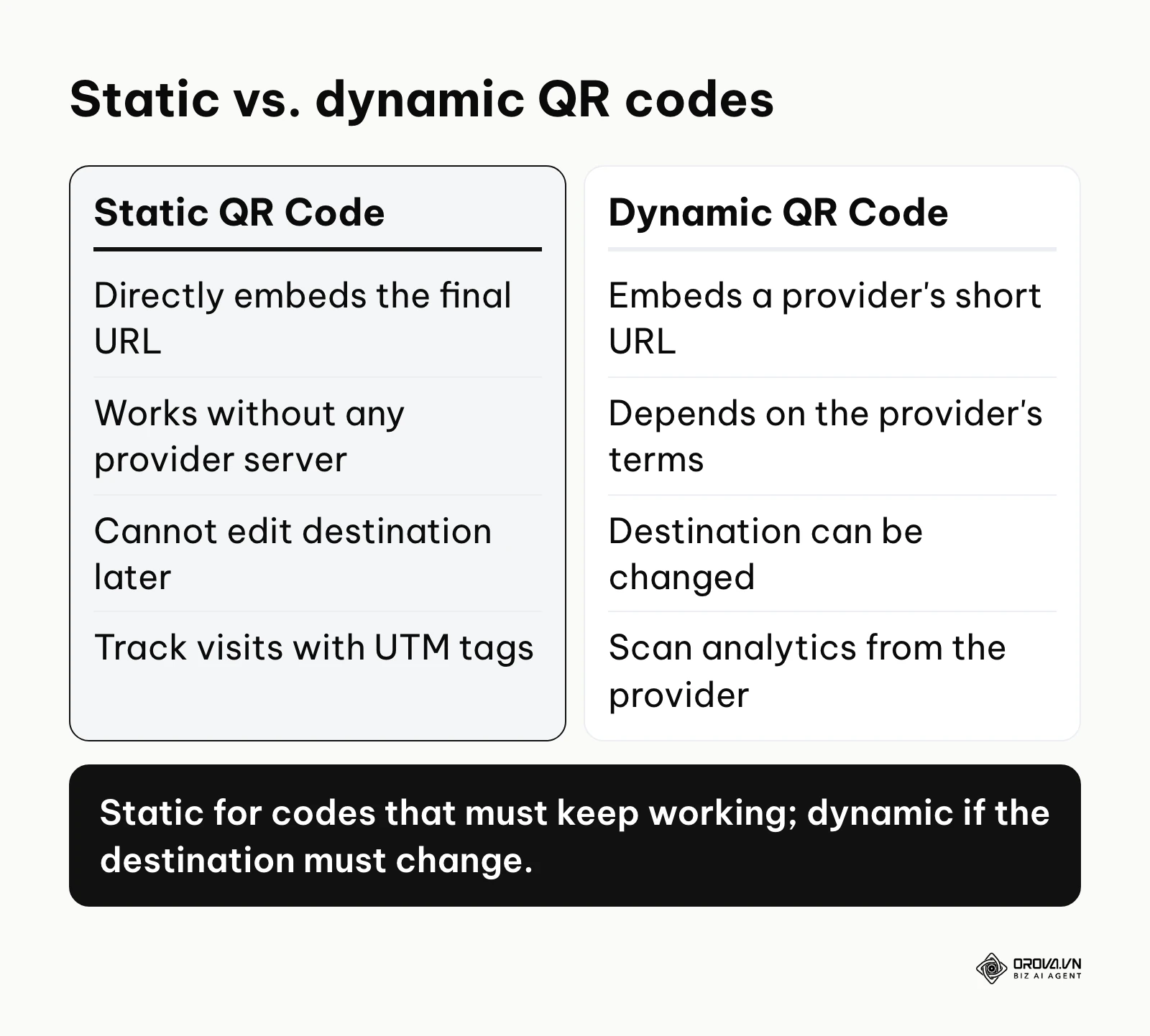
To understand why some codes fail while others last for decades, you must understand the difference between static and dynamic architectures. A static QR code embeds your exact target data directly into the black-and-white squares. A static URL embedded directly into the matrix does not rely on intermediary routing. This direct encoding makes it permanent in practice as long as the destination server remains active. If your website is online and the specific page exists, the code works. The physical pattern of the squares literally spells out your web address in binary code.
Conversely, a dynamic QR code does not embed your final destination. Instead, it embeds a short URL managed by the generator platform (e.g., https://qr-provider.com/xyz123). When a customer scans the dynamic code, their phone navigates to this short URL, which then executes a server-side HTTP redirect (usually a 301 or 302 status code) to send the user to your actual website. This intermediary step allows the platform to count the scan, track the location, capture device data, and most importantly, let you edit the final destination later without reprinting the physical code.
That intermediary step is also the weak point. The redirect only works while the provider keeps your short link active, and the rules for that are set in the provider's own terms: some services tie dynamic codes to a trial, an account, or an active plan, and those terms can change. If the short link is deactivated, scanning the code leads to an error page or a sign-up screen instead of your website, and your printed flyers, business cards, or product packaging stop doing their job. Before you print, read the provider's terms on how long dynamic codes stay active, and check whether the code you downloaded is static or dynamic (Step 5 below shows how).
The anatomy of a permanent QR code
To further grasp the permanence of these codes, one must look at the anatomy of the QR (Quick Response) matrix, invented by Masahiro Hara at Denso Wave in 1994. A standard QR code consists of several distinct structural elements that never change once printed:
- Finder Patterns: The three large squares located in the corners of the matrix. These tell the scanner the orientation of the code and where the data begins.
- Alignment Patterns: Smaller squares distributed throughout the code (in larger versions) that help the scanner compensate for distorted or curved surfaces.
- Timing Patterns: Alternating black and white modules connecting the finder patterns, which define the grid size and help the scanner determine the width of a single data module.
- Format Information: Strips of data located near the finder patterns that declare the error correction level and the masking pattern used.
- Data and Error Correction Keys: The bulk of the matrix, containing the actual binary representation of your URL and the mathematical keys required to reconstruct damaged portions.
Because a static QR code permanently fuses your destination URL into the "Data and Error Correction Keys" section, it is mechanically impossible for the code itself to expire. When a code does stop working, the cause is outside the image: a deactivated short link, or a destination page that no longer exists.
Preparation: What you need before generating a permanent QR code
To generate a permanent QR code successfully, you need a finalized destination URL, testing hardware, and vector design assets. Gathering these components beforehand ensures you avoid mid-process errors that could lead to costly reprinting.
Preparation is critical because static codes cannot be edited once created. If you make a single typographical error in your URL, such as typing htps:// instead of https://, and print a thousand stickers, you will have to throw them away. You must approach the creation process with the same rigor, quality assurance, and peer-review processes as deploying production software code.
| Component | Where to obtain it | Time required | Critical Importance |
|---|---|---|---|
| Final Destination URL | Your website Content Management System | 5 minutes | Absolute. Any typo makes the code permanently useless. |
| UTM Tracking Parameters | Free online campaign URL builder | 5 minutes | Crucial for tracking ROI without relying on dynamic platforms. |
| Vector Logo File (SVG) | Your brand or design department | 10 minutes | Ensures crisp printing at any scale without pixelation. |
| Brand Color Hex Codes | Your official brand guidelines document | 2 minutes | Maintains brand consistency while ensuring high contrast. |
| Raw Data Scanner App | iOS App Store or Google Play Store | 3 minutes | Bypasses native camera redirects to verify raw data. |
| Multiple Test Devices | Borrow from colleagues or friends | 15 minutes | Confirms cross-platform readability (iOS, Android, older models). |
| High-Opacity Paper Samples | Your local commercial printer | 2-3 Days | Verifies that background patterns will not bleed through the code. |
| SSL Certificate Verification | Your web hosting provider | 5 minutes | Ensures users do not receive security warnings upon scanning. |
Selecting the Right Data Payload
Before proceeding to the generation phase, you must definitively lock in your payload. Copy your finalized URL and paste it directly into an incognito browser window. Verify that the page loads correctly, the layout is mobile-responsive, and there are no immediate server errors. A permanent QR code is only as reliable as the web server it points to.
If you are encoding something other than a URL, preparation is equally vital:
- vCard (Contact Information): Ensure all phone numbers include international dialing codes (e.g., +1 for the US). Keep job titles short to reduce matrix density.
- Wi-Fi Credentials: Double-check the exact capitalization of the SSID and password. Ensure the encryption type (WPA2/WPA3) is correctly specified in the raw string.
- Pre-formatted Emails (Mailto): Test the exact subject line and body text rendering, as different email clients (Outlook, Gmail, Apple Mail) parse space characters (like %20) differently.
- Text messages: Verify that the receiving phone number is configured to handle automated inbound texts.
Want a printed code whose destination you can still change? Orova Link & QR lets you create dynamic QR codes that point to a new page after printing, plus short links with click counts and scan statistics by day, device, country and source.
Step-by-step guide: How to create, test, and host QR codes
Creating a reliable offline asset requires choosing the correct data structure, selecting a secure platform, executing rigorous physical tests, and planning for worst-case scenarios. Following a structured, methodical process prevents mass-printing failures and secures your brand reputation.
This section walks through a workflow that keeps your printed materials scannable for as long as the destination page exists.
Step 1: Identify if your project requires a static or dynamic code
The first step is determining whether your specific business case demands a permanent static code or a flexible dynamic code. You achieve this by analyzing the longevity of your destination data, the physical material of the asset, and your organization's technical budget.
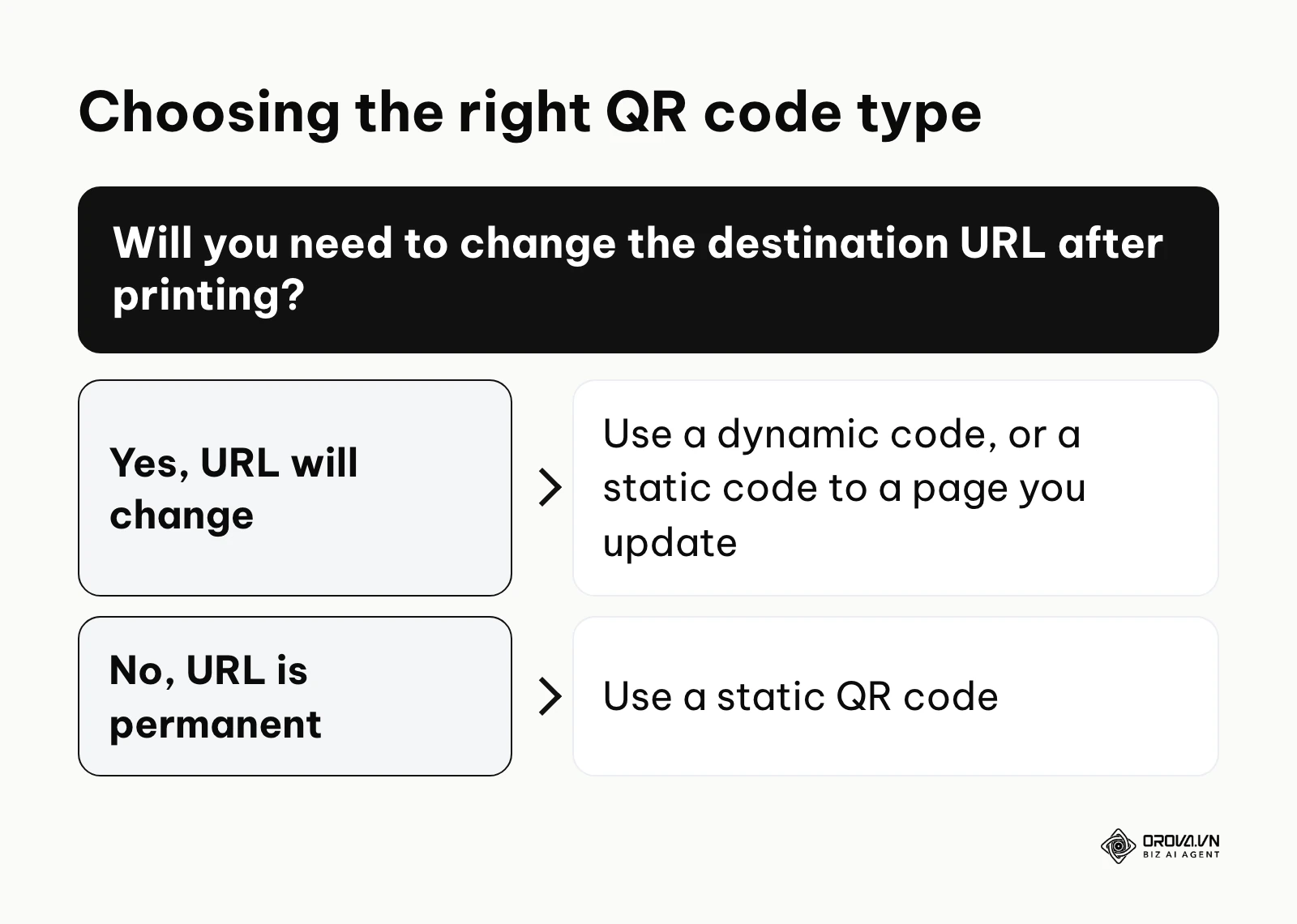
If you are creating a code for a physical asset that will remain unchanged for years, such as a museum exhibit plaque, a hardware instruction manual, a permanent storefront window decal, or a primary company homepage banner, you must choose a static code. Static codes are inherently robust because they bypass third-party dependencies. They are also ideal for offline data transfer where the scanner might not have internet access, such as a plain-text serial number on a piece of industrial machinery.
On the other hand, if you are printing a weekly restaurant menu, a seasonal promotional flyer, a real estate yard sign pointing to a currently active listing, or an event ticket where the URL destination will frequently change, you need a destination you can change. A dynamic code is one option. Another is a static code that points to a single page on your own domain, similar to a link-in-bio page, where you update the links on the page instead of the code on the packaging.
You will know you have completed this step correctly when you have a written technical requirement confirming the exact URL you intend to use and its expected lifespan. A common mistake at this stage is assuming all business applications require advanced tracking analytics, leading teams to inadvertently select dynamic codes for permanent physical assets, thereby exposing themselves to future subscription lock-in and potential link rot.
Step 2: Select a truly free QR code generator without hidden trials
Once you confirm the need for a static code, you must locate a tool that generates raw data matrices without injecting hidden redirect links. You do this by vetting platforms against strict data privacy criteria, analyzing their Terms of Service, and testing their output.
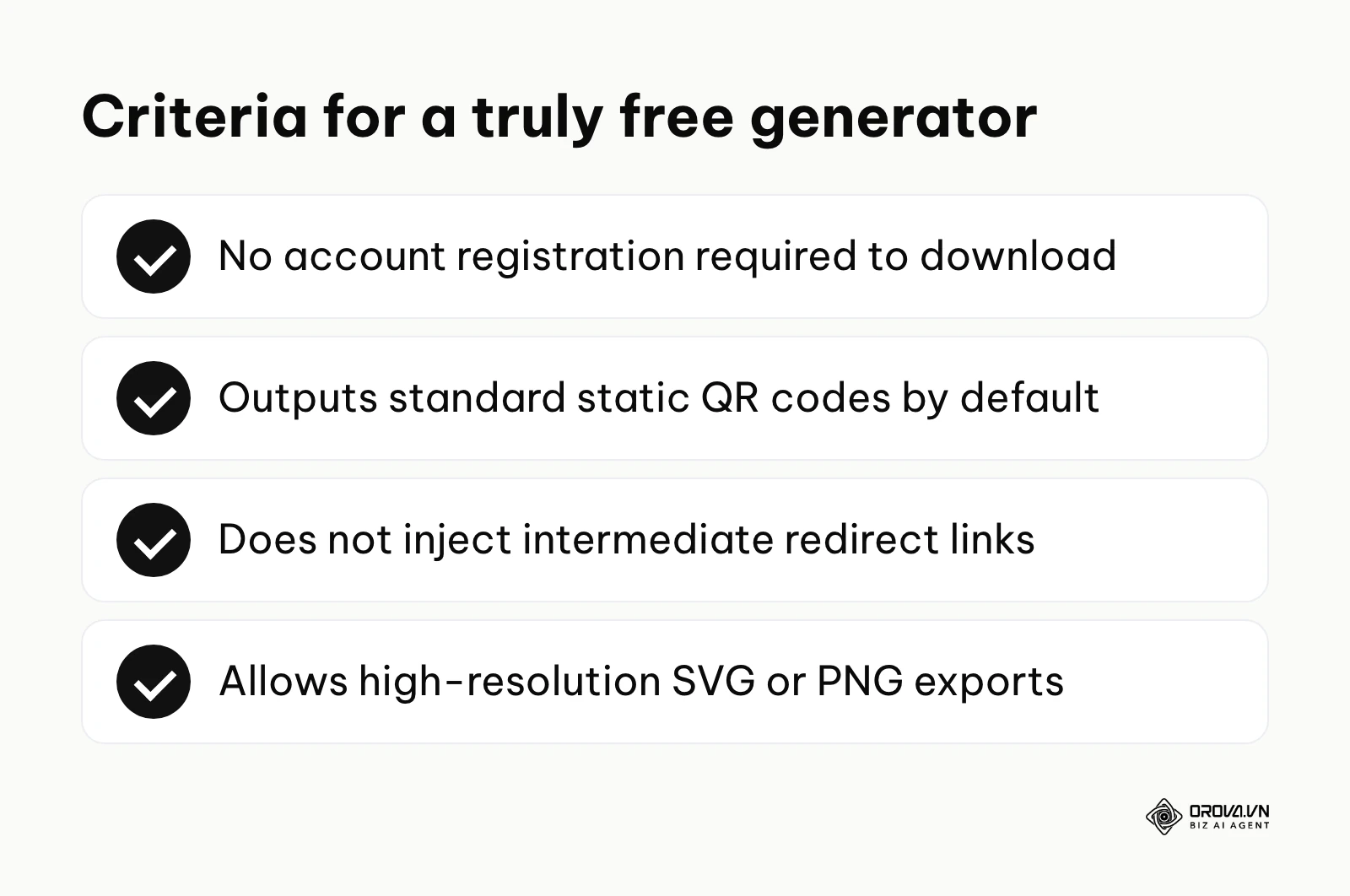
A legitimate free QR code generator will never ask for your credit card, will not force you to create an account to download a basic image, and will provide the output in standard high-resolution formats (PNG, SVG, EPS). Below are tools and libraries that can produce static codes. Each one was online when this article was written; menus and plans change over time, so always run the pre-printing check in Step 5 on whatever file you download:
| Tool | Type | What it produces | Best for | What to check |
|---|---|---|---|---|
| ZXing QR code generator (zxing.org) | Open-source project, web page | Plain static code from text, URL, contact or Wi-Fi data | Quick, no-frills codes | Few styling options; add design in your own graphics tool |
| QRCode Monkey | Web generator | Static code with colors and logo, PNG or SVG download | Designers who need a styled code | Keep contrast high and confirm the raw text in Step 5 |
| Chrome browser share menu | Built into the browser | Code for the page you are viewing | Sharing a page quickly | Menu location changes between versions; check the downloaded image |
| Nayuki QR Code generator library | Open-source library | Static codes generated in your own code | Developers who want a small, readable library | Requires programming |
| QRCode.js | Open-source JavaScript library | Static codes drawn in the browser | Web developers | Requires programming |
| python-qrcode | Open-source Python library | Static PNG or SVG files, including batches | Bulk or internal codes | Requires Python |
| node-qrcode | Open-source Node.js library | Static PNG, SVG or terminal output | Bulk generation in JavaScript projects | Requires Node.js |
You know you have succeeded when you can input your URL, click generate, and instantly download a PNG file without passing through a paywall, encountering a mandatory email collection form, or seeing an intrusive interstitial advertisement. The most frequent error here is picking the first generator you find without checking whether the option you selected creates a static or a dynamic code.
Step 3: Deploy a self-hosted QR code generator for maximum security
If your organization handles sensitive data, requires thousands of codes, or operates in a highly regulated industry (like healthcare or finance), you should generate them internally rather than relying on external websites. You achieve this by setting up a self-hosted environment using open-source programming libraries, ensuring complete data sovereignty.
To execute this, you need a basic server or a local machine running a programming language like Python or Node.js. In Python, you install the qrcode library by running the command pip install qrcode[pil] in your terminal. You can then write a simple script that takes a list of URLs from a CSV spreadsheet and outputs unique image files to a designated folder. Alternatively, if you prefer JavaScript, you can use the node-qrcode library via npm install qrcode. This method ensures that your data never leaves your internal network, eliminates any risk of a third-party vendor altering the matrix, and protects you against sudden API rate limits.
Illustrative example: An IT manager at a 50-employee logistics company needed to generate hundreds of internal inventory tracking codes without paying external software fees. The codes needed to contain highly confidential serialized database keys. First, they provisioned a basic Linux virtual machine on their local network, entirely disconnected from the public internet. Next, they installed Python and pulled an open-source generation library. Then, they wrote a script to batch-generate images directly from their PostgreSQL inventory database. The main hurdle was that the generated images were too low resolution for their warehouse hardware scanners to read from a distance of six feet. They fixed this by modifying the script's dimension parameters to output larger file sizes, adjusting the box_size attribute to 20 pixels per module. The final visual result was a secure internal folder filled with high-contrast, permanent images that printed sharply on standard thermal labels, fully compliant with their internal security protocols.
Step 4: Generate and customize the design without compromising scannability
Customizing your code involves adjusting colors, modifying module shapes, and adding logos, but you must do so while preserving the mathematical integrity of the matrix. You accomplish this by manipulating error correction levels and maintaining strict contrast ratios based on optical physics.
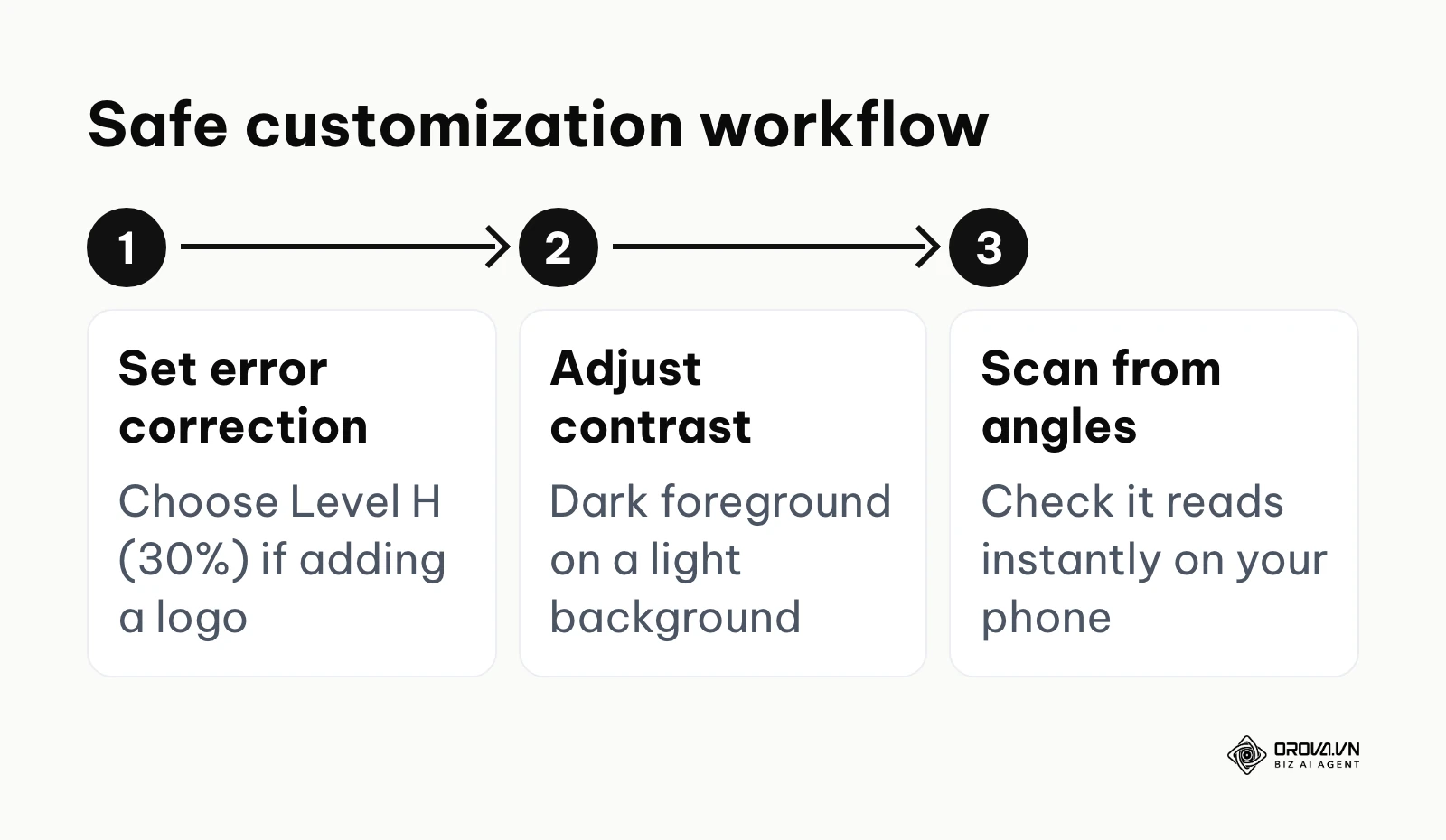
QR codes use Reed-Solomon error correction, the same family of error-correcting codes used in CDs and DVDs, which lets scanners reconstruct missing data. The QR code standard (ISO/IEC 18004) defines four error correction levels, and the level you choose decides how much damage a code can sustain while remaining readable:
- Level L (Low): Recovers ~7% of data. Ideal for dense codes where space is limited.
- Level M (Medium): Recovers ~15% of data. A common default in many generators.
- Level Q (Quartile): Recovers ~25% of data. Useful where codes may get dirty or scuffed, such as factories.
- Level H (High): Recovers ~30% of data. Mandatory if you are placing a logo in the center.
If you place a logo in the center of your code, you are intentionally obscuring data modules. Therefore, you must select Level H before generation to ensure the code remains functional. Furthermore, you must ensure a dark foreground against a light background. The optical sensors in smartphone cameras rely on this contrast to map the grid.
You know this step is successful when the customized code looks visually appealing, aligns with your brand identity, but still reads instantly on your phone screen from various angles. A catastrophic error is inverting the colors—placing a white code on a black background. Some phone cameras can read inverted codes, but many older scanners, budget phones, and POS (Point of Sale) systems cannot, so an inverted code risks failing for part of your audience.
Step 5: Execute the pre-printing QR code inspection checklist
Before committing your design to physical print, you must perform a mechanical audit to verify the data structure. You do this by scanning the draft image with specialized raw data reading applications in multiple simulated environments.
Your phone's built-in camera usually shows only a short preview of the link, and tapping it follows any redirects before you see the final page. For this test, use a scanner app that displays the full decoded text without opening it. Then work through this checklist and tick each row before you send the file to the printer:
| Check | How to do it | Pass when |
|---|---|---|
| Raw text matches your URL | Scan the on-screen draft with a scanner app that shows the decoded text | The text is exactly your URL, e.g. https://yourwebsite.com/sale |
| No third-party domain | Read the domain in the decoded text | It is your own domain, not a short link such as https://qr-tracker.com/xyz (if it is, the code is dynamic) |
| Destination loads on mobile | Open the URL on a phone over mobile data | The page loads over HTTPS with no errors |
| Real print size | Print a sample on office paper at the final size | It scans from the distance people will actually stand |
| Bright light | Scan the printout in a brightly lit room | No glare stops the scan |
| Dim light | Scan the printout in a dim room | It still scans within a few seconds |
| Light damage | Crumple the paper slightly, smooth it out, scan again | Error correction still recovers the data |
| Other devices | Ask a colleague to scan with a different brand of phone | Both iOS and Android open the same page |
Success is indicated by a seamless read across multiple devices without any intermediary domain showing up in the raw text, regardless of minor physical distortions or lighting variations. The most common mistake is skipping the physical paper test, resulting in codes that work perfectly on a glowing, backlit computer monitor but fail completely when printed on matte paper or glossy magazine stock.
Step 6: Rescue an accidentally printed expired dynamic QR code
If you have already distributed printed materials and discovered that the short link behind a dynamic code no longer works, you need a rescue plan. You achieve this by intercepting the digital routing or, if that fails, applying physical corrections to the printed assets.
If you used a custom domain for your short link initially (e.g., link.yourbrand.com/promo), you hold the power. You can log into your Domain Name System (DNS) provider, point the subdomain to your own server, and configure a 301 redirect, which permanently routes the broken slug to your active URL.
However, if the provider owns the short link domain (e.g., qr-provider.com/promo), you cannot change the routing yourself. Your options are to reactivate the link under the provider's terms or to apply a physical patch. You must generate a new, permanent static code and print it on high-opacity sticker paper to physically cover the old matrix.
Illustrative example: A marketing coordinator for a regional retail chain accidentally printed 10,000 high-gloss promotional flyers featuring a dynamic QR code that suddenly expired after a two-week software trial. The flyers had already been distributed to twenty stores. First, they logged into the original vendor platform to assess if a basic monthly plan would reactivate the link. Next, finding that the plan needed to reactivate it did not fit their marketing budget, they opted for a physical fix. They ordered a roll of 10,000 custom-printed sticker overlays featuring a newly generated, permanent static code pointing directly to their website with UTM tags. The main hurdle was ensuring the stickers perfectly masked the old code without looking sloppy, and preventing the old black ink from bleeding through the sticker. They solved this by selecting a block-out vinyl material for the stickers and designing them with a bold, high-contrast colored border that intentionally overlapped the original black-and-white matrix, turning the patch into a design feature. The final visual result was thousands of flyers distributed with vibrant stickers that seamlessly replaced the broken links, saving the campaign without reprinting the flyers.
Deep analysis: Comparing permanent QR code creation methods
The best method for creating permanent codes depends heavily on your technical resources, print volume, and data privacy requirements. While web applications offer speed and accessibility, self-hosted solutions provide total data sovereignty and programmatic scalability.
When deciding how to generate your assets, you face a constant trade-off between convenience and control. Free online Software as a Service (SaaS) platforms require zero technical knowledge and generate images instantly. However, they carry the highest risk of user error, as non-technical staff might accidentally select dynamic tracking options or upload sensitive internal URLs to a public server. Self-hosted libraries require a developer to configure and maintain, but give you full control over the output, which is always static, and keep your data in-house.
Application Programming Interface (API) integrations and Serverless functions (like AWS Lambda or Cloudflare Workers) sit in the middle. They allow businesses to automatically generate codes on-the-fly from their databases without maintaining a dedicated server instance, but they require ongoing software maintenance and initial development overhead.
| Creation Method | Best For | Primary Advantage | Primary Weakness | Cost Profile |
|---|---|---|---|---|
| Free Online SaaS Platforms | Quick, one-off marketing campaigns | Extremely user-friendly UI | High risk of accidental dynamic generation | Free (with high risk) |
| Browser Built-in Tools | Instant sharing of active web pages | Built into existing workflows | Zero aesthetic customization options | Free |
| Self-Hosted Code Libraries | Enterprise compliance and data privacy | Absolute data sovereignty | Requires technical setup and maintenance | Developer Salary / Server Costs |
| Cloud API Integrations | Bulk generation for inventory systems | Highly scalable automation | Vulnerable to third-party rate limits | Pay-per-request |
| Serverless Functions | Dynamic content rendering | Infinite scalability | Complex deployment architecture | Micro-cents per execution |
Measuring results: Tracking your permanent QR code performance
You can precisely measure static code performance by appending UTM parameters to your destination URL and analyzing your web server logs. This approach provides granular scan data without relying on third-party dynamic links, entirely bypassing the need for premium QR subscriptions.
A major misconception in digital marketing is that only dynamic codes provide analytics. This is fundamentally false. By attaching Urchin Tracking Module (UTM) tags to your permanent URL (e.g., https://yoursite.com/landing?utm_source=flyer&utm_medium=qr_code&utm_campaign=summer_sale), you force your standard website analytics platform (like Google Analytics, Matomo, or Plausible) to categorize the incoming traffic. This method is entirely free, relies on your existing digital infrastructure, and ensures you retain ownership of the data.
You can see how many visits came from the code, what operating system they used, how long they stayed on the page, and whether they completed a purchase. This level of granular data helps you work out the marketing ROI of offline materials while maintaining the permanence of a static code. Visitors who arrive from a scan behave like any other site visitor, so they can also be included in the audiences you build for ad retargeting, as long as your site's consent and privacy settings allow it.
Illustrative example: A boutique coffee shop owner with a team of five wanted to measure the effectiveness of physical table-tent menus without paying for an external tracking subscription. They wanted to know which tables generated the most online orders. First, they created a standard static URL string appended with UTM parameters indicating specific physical locations (e.g., ?utm_source=table_1, ?utm_source=table_2). Next, they fed these customized URLs into an offline generator to create unique images for each table. Finally, they configured a dedicated dashboard in their free web analytics platform to monitor incoming traffic filtered by source.
The initial hurdle was that long UTM strings created overly dense matrices that older smartphones struggled to scan in the shop's dim ambient lighting. A denser matrix means smaller data modules, which require better optical focus. They fixed this by implementing an open-source link shortener hosted on their own server (using a free tool like YOURLS) before generating the final images. This kept the matrix simple (Level M, Version 2) while preserving the complex tracking data on the backend. The final visual result was a clean, easily scannable code on every table and a populated analytics dashboard showing exactly which physical location drove the highest digital engagement.
A printed code is rarely the only touchpoint. Someone may scan a flyer, leave, and come back later through a search or an email. If you want the scan to get fair credit alongside those channels, look at multi-touch attribution models rather than judging the flyer on last-click data alone.
To maximize your tracking accuracy, monitor these specific metrics:
| Metric | Meaning | Analytical value | What to watch for |
|---|---|---|---|
| Total sessions | Visits tagged with your QR campaign source | Baseline campaign interest | No sessions at all once the material is out: test the code again |
| Unique users | Individual people arriving from the code | True reach versus repeat scans | Very few users compared with sessions: the same people may be rescanning |
| Geographic origin | Region of the visitor | Local versus distant impact | Traffic from places where nothing was printed |
| Bounce or engagement rate | Whether visitors stay after scanning | Fit of the mobile landing page | Visitors leaving at once: check page speed and mobile layout |
| Conversion rate | Visitors completing the desired action | The clearest measure of campaign ROI | Compare against your other channels rather than a fixed number |
Need a code for a menu, a Wi-Fi network or a contact card? Orova Link & QR offers 59 QR code types with custom colors, logo and frame, and PNG or SVG downloads. It is free until July 7, 2027.
Common mistakes when using a free QR code generator
The most frequent mistakes involve altering the core matrix contrast, ignoring physical print minimums, disregarding material properties, and skipping multi-device testing. Addressing these mechanical errors keeps codes readable on most devices and prevents embarrassing campaign failures.
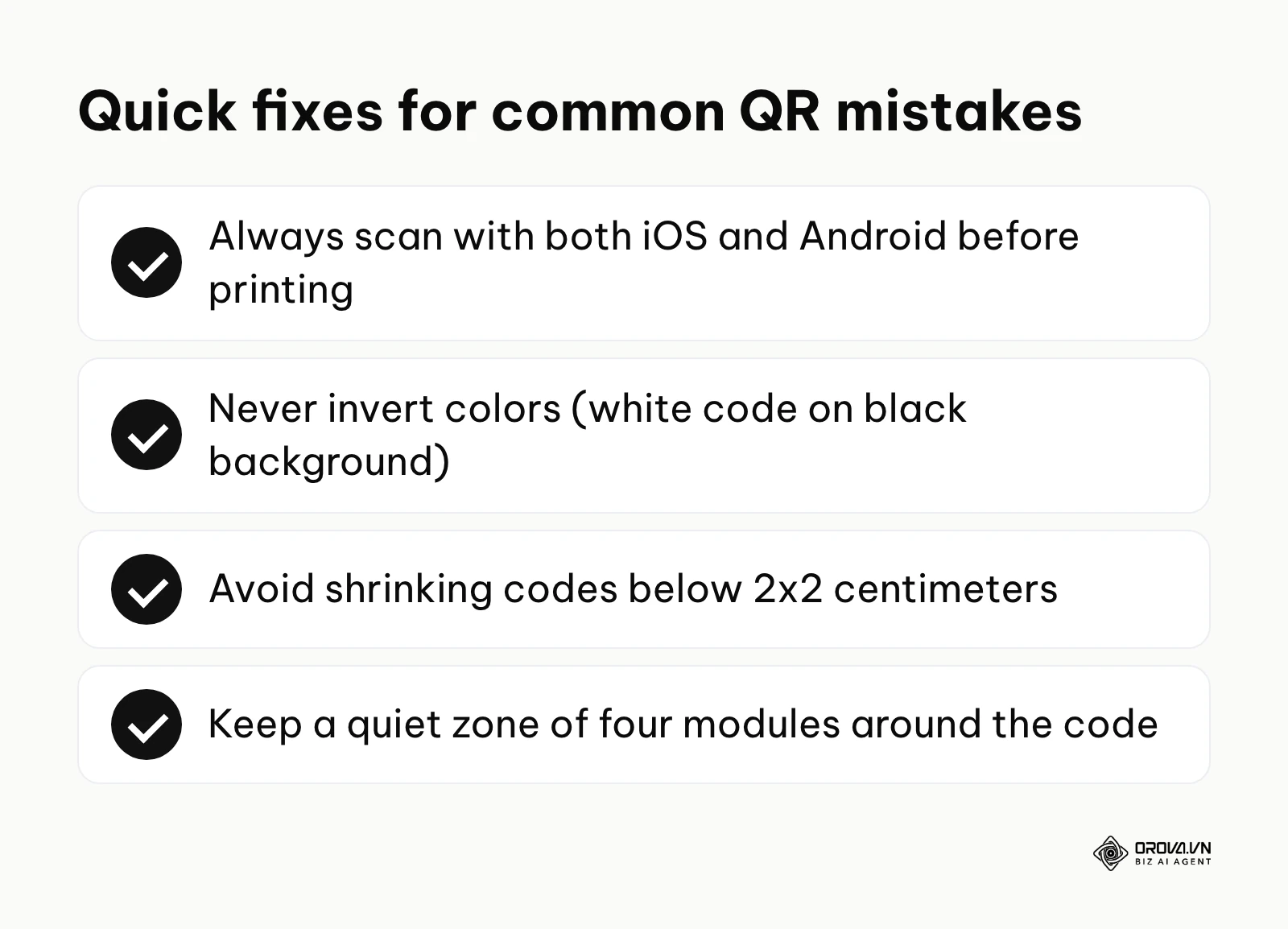
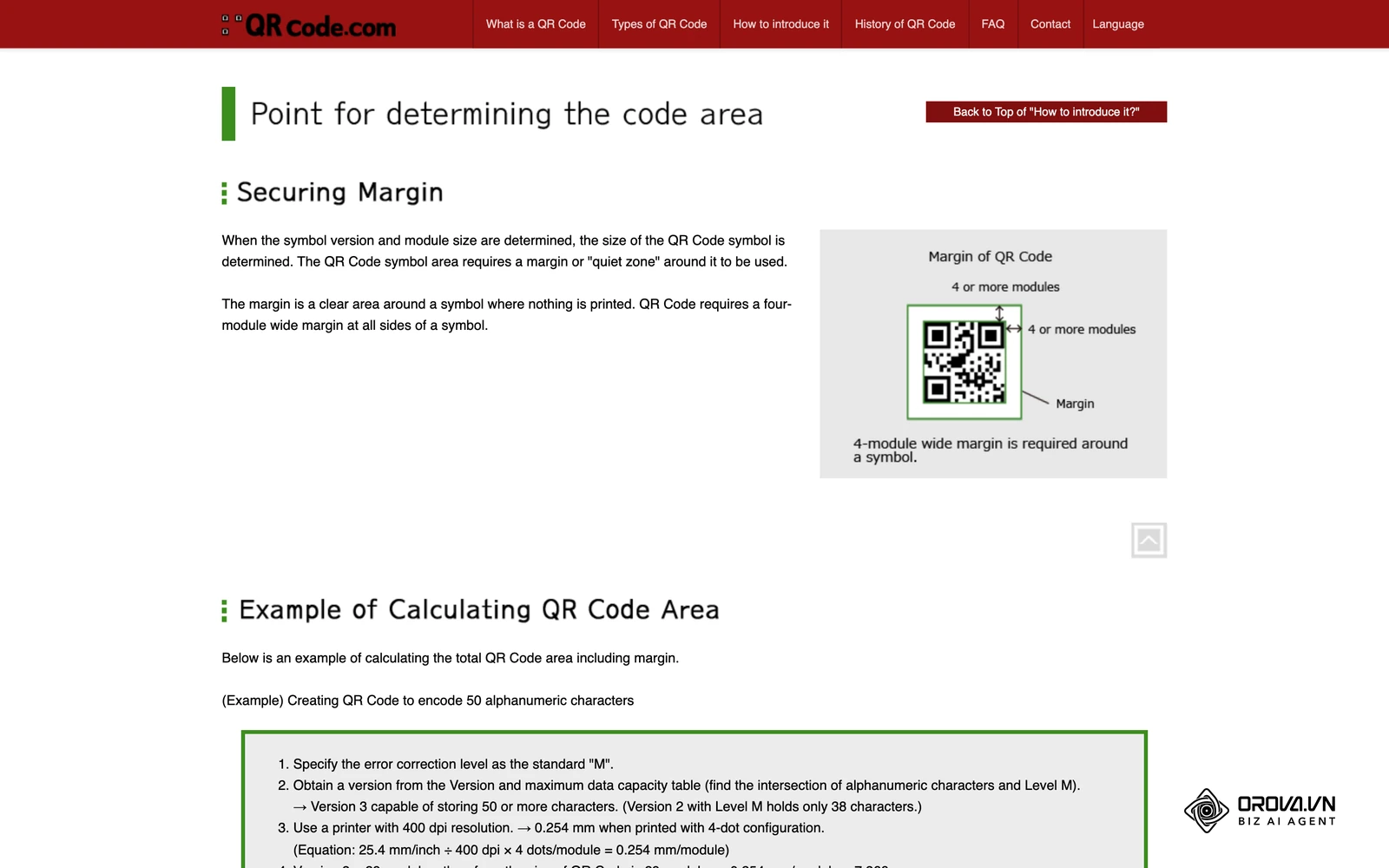
Even with a perfectly configured permanent URL, physical design flaws can render your code entirely useless. A primary mistake is crowding the quiet zone. The quiet zone is the mandatory blank space surrounding the QR matrix. It acts as an optical buffer, telling the scanner's software where the data begins and ends. If you print text, graphics, or borders too close to the edge of the matrix, the scanner's bounding box algorithm will fail, and the code will not read. The ISO specification mandates maintaining a clear boundary of at least four module widths around the entire code.
Another significant error is printing the code too small. While modern flagship smartphones possess excellent macro lenses, older devices and budget phones struggle to focus on dense patterns at a small scale. A common rule of thumb ties the minimum size of a QR code to the scan distance: Minimum Size = Scan Distance / 10. Therefore, if a user is expected to scan a poster from 100 centimeters away, the code must be at least 10x10 centimeters. For close-up items like business cards, never print a QR code smaller than 2x2 centimeters (0.8x0.8 inches). If your embedded URL is extremely long, the matrix becomes denser, and the minimum physical print size must increase accordingly to compensate for the smaller individual data modules.
Material properties are frequently overlooked. Printing a QR code on high-gloss laminated paper or metallic surfaces creates severe light reflection. When the user's camera flash activates or overhead lighting strikes the surface, the glare obscures the matrix, causing a scan failure. Similarly, printing on highly curved surfaces, like cylindrical aluminum cans, distorts the square proportions. The scanner interprets the distorted squares as rectangles and fails to decode the data.
Failing to test across different operating systems also causes major disruptions. The native camera applications on iOS (Apple) and Android (Google/Samsung) utilize slightly different image processing algorithms. A low-contrast code (e.g., dark gray on light gray) might scan instantly on an iPhone but fail repeatedly on a budget Android device. You must execute manual scans on both major platforms in real-world lighting conditions before authorizing mass production.
Where QR codes are heading in the next few years: the author's take
These are my own views, not forecasts backed by data. Each one starts from something visible today and ends with what I would prepare for.
Artistic codes will need stricter testing
Today, image tools can already blend QR data into illustrations so the code looks like part of the artwork. I think these designed codes will become more common on packaging and posters over the next two to three years, because brands want codes that do not look like an afterthought. My advice is to keep a plain, high-contrast version of every code and treat any artistic version as a design that must pass the same multi-device checklist, since the more the pattern is altered, the closer it gets to the limit of what error correction can recover.
Phones and browsers will warn more about unknown short links
Phishing through QR codes, often called quishing, is already a known risk, and security tools increasingly flag unfamiliar redirect domains. My read is that phones, browsers and company networks will warn users more often when a scanned code points to a short link they do not recognize. The practical response is to make your codes point to a domain people associate with your brand, either directly or through a short link on your own subdomain.
Owning the destination will matter more than owning the code
More teams now treat a printed code as a long-lived asset rather than a one-off campaign item. I think the brands that cope best will be those that point codes at pages they control and can update, rather than at links tied to an outside account. If you start now, list every code you have in print, note which domain each one depends on, and move the ones that rely on someone else's link to a page on your own site when you next reprint.
Frequently asked questions about free QR code permanence
Users frequently ask about expiration causes, conversion limitations, security threats, and the underlying mechanics of static data. Understanding these technical boundaries clarifies how long a printed matrix will function in the real world.
Why do some free QR codes stop working after a while?
These codes are usually dynamic, meaning they embed a short link owned by the generator platform, not your actual website. Whether that link keeps working depends on the provider's terms, which may tie it to a trial, an account or a plan. If the provider deactivates the link, the printed code stops reaching your website even though the image itself is unchanged.
Can I convert a static QR code into a dynamic one later?
No, you cannot convert a printed static code into a dynamic one. The physical arrangement of the black-and-white squares permanently represents a specific text string. To change the destination, you must generate a completely new dynamic matrix and physically reprint all your marketing materials.
Will a free generator tool inject advertisements into my link?
True static generators cannot inject advertisements because they embed your exact URL directly. A dynamic code, however, passes through the provider's server, and what happens on that hop (an instant redirect or an intermediate page) is up to the provider. The raw text check in Step 5 shows you which kind of code you have before you print.
How does AI affect the future reliability of QR generation?
AI generation introduces significant variability into the physical matrix. While traditional generators adhere strictly to ISO frameworks, AI image tools often manipulate contrast blocks to form aesthetic pictures. If the AI alters critical alignment patterns or exceeds the error correction threshold, the code becomes unreadable, making rigorous manual testing essential.
Do permanent QR codes have a maximum scan limit?
A static QR code has absolutely no scan limit because the matrix itself does not communicate with any central server. The only potential limit is the bandwidth capacity of your own web server hosting the destination page. As long as your website remains active and can handle the traffic spikes, the code can be scanned infinite times simultaneously by thousands of users.
What happens if my website changes its domain?
If you generate a static QR code pointing to old-brand.com and later rebrand your company to new-brand.com, the physical code will still direct users to old-brand.com. To ensure the code remains functional, you must maintain ownership of old-brand.com and configure a permanent 301 server redirect to new-brand.com.
Can a static QR code contain a malicious virus?
A QR code itself cannot contain an executable virus; it merely contains text. However, a malicious actor can encode a URL that points to a phishing website designed to steal credentials or download malware (a practice called "Quishing"). This is why users should always inspect the raw URL preview provided by their smartphone camera before executing the link.
Do I need a license to generate QR codes?
No. QR code technology was invented by Denso Wave, which holds patents on it but has stated that it does not exercise them for codes that follow the standard specifications. You do not need to pay licensing fees to create, print, or distribute standard QR matrices.
Where to start?
Your immediate next step depends on your organizational context: whether you are launching a quick daily campaign, rescuing a broken link, or building enterprise infrastructure. Identify your current situation to take focused action today and prevent future technical debt.
If you are an independent marketer or small business owner who just needs a quick, reliable code for a flyer today, your first step is to open your web browser and open a static generator such as the ZXing generator or QRCode Monkey. Input your final URL, choose the static option, download the PNG or SVG file, and run the Step 5 checklist before you print.
If you are a manager who has already printed thousands of codes that suddenly stopped working because of a paywall, your immediate action is to determine who owns the short link domain embedded in the broken code. If you own the domain (a custom subdomain), log into your DNS registrar immediately and configure a server-side 301 redirect to rescue the traffic. If the provider owns it, pause the campaign, check whether the link can be reactivated under the provider's terms, and order high-opacity sticker patches featuring a new static code.
If you are an IT professional building a long-term enterprise system for inventory, event ticketing, or secure data transfer, your first step is to provision a local virtual machine. Install a recognized open-source generation library, such as Python's qrcode or JavaScript's node-qrcode, and begin mapping your database integration. This ensures your organization retains absolute sovereignty over how its physical data matrices are constructed, scaled, and deployed for the next decade. ---BAI---
About the author

Builder of Orova
Nguyễn Đỗ Trọng Ân has 8 years of experience in marketing, including 6 years managing market development across Asia. He builds Orova, a Biz AI Agent that never sleeps: it plans, runs and optimizes work for businesses.
Run your business with AI Agents
Orova is the always-on Biz AI Agent — it plans, runs, and optimizes the work for you.
Save time, unlock productivity.