
URL shortener: make short links you can actually track
You paste a two-hundred-character product address into a message to a customer. It wraps onto three lines, the tail gets chopped off, and the page throws an error when they tap it. The same address will not fit in an Instagram bio, nobody can copy it down when you read it aloud in a video, and printed on a flyer it breaks in half. A URL shortener exists for exactly those tight spots: one long address becomes seven or eight characters that anyone can read off a page and type back in.
Most people stop there. They shorten the link, paste it in six places, and by month end still cannot say which post brought customers, which message brought orders, or whether the flyers paid for themselves. A short link you cannot count saves space, not money. The expensive part is not the extra characters. It is paying for five channels every month with no idea which one is quietly carrying the other four.
This guide covers the whole round trip: what happens inside a short link when someone taps it, how to read each view of the data, how to tag links so the numbers land in the right campaign report, how to create one and read the stats, and the six things that quietly kill a link mid-campaign.
What is a URL shortener?
A URL shortener swaps a long web address for a short one that points at the same place. When somebody taps the short link, the service looks up the real destination in its own table and redirects the browser there. The person tapping only sees the destination page open. The step in the middle is invisible to them.
A short link has two parts. The front is the domain of the service, something like orova.vn/l/. The back is an identifier, usually six to eight letters and digits. That code carries no meaning on its own. It is a key, and the only thing it does is find the real destination in a database. Seven characters drawn from upper case, lower case and digits give you enough combinations that a single business will never run into a collision.
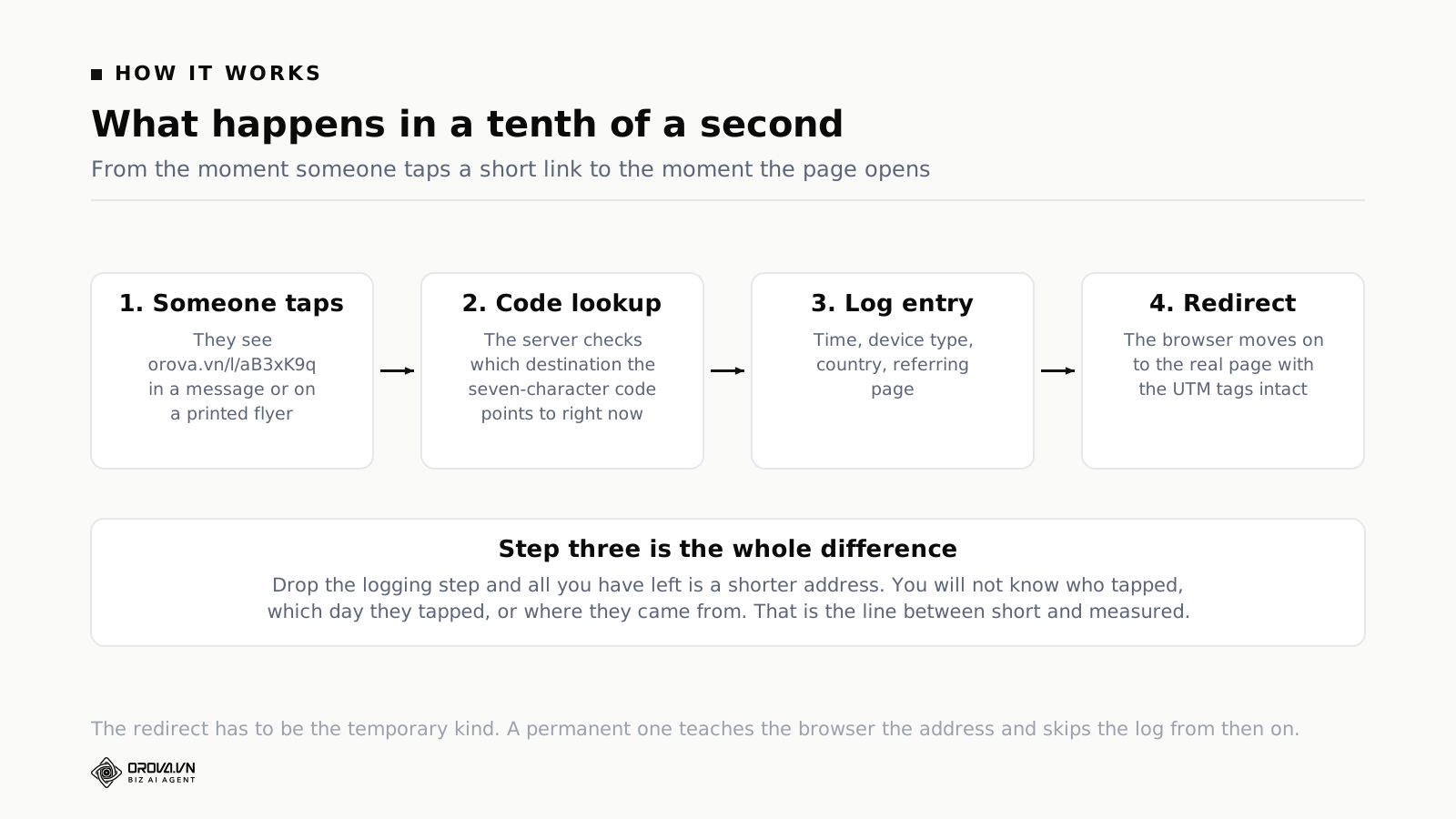
What happens when somebody taps is four beats long, and all four fit inside about a tenth of a second:
- The browser sends a request to
orova.vn/l/aB3xK9q. - The server looks up
aB3xK9qand finds the destination attached to that code right now. - The server writes one row to a log: time of the tap, device type, country guessed from the network address, and the page the visitor came from.
- The server returns a redirect. The browser carries on to the real destination.
Beat three is the entire reason people pay for a shortening service instead of rolling their own. Take that beat out and you are left with a shorter address, nothing more.
Why a temporary redirect beats a permanent one
There are two kinds of redirect and they produce completely different measurement.
A permanent redirect tells the browser that this address has moved for good and there is no need to ask again. The browser takes that literally and remembers. The next time that person taps the same short link, the browser jumps straight to the destination without touching the shortening service at all. You lose the second tap, the third, and every one after that. Worse, on the day you want to change the destination, everyone who already tapped once still lands on the old page, because their browser is still holding the old answer.
A temporary redirect does the opposite. Every tap has to ask the server again. It costs a few hundredths of a second and it buys you the two things that matter most: every tap gets counted, and a change of destination takes effect immediately for everybody. Every shortening service that offers statistics uses the temporary kind. If you build your own redirect path on your own server, this is the classic mistake. Configure it as permanent and the first month's report still looks fine, then the numbers halve in month two and nobody can work out why.
A short link and a measured link are not the same product
Three ways of handing out the same address give you three different amounts of information. Look at the table below before you shop for a tool, because most arguments about which service to use are really arguments about which row you need.
| What you need it to do | Long address pasted as is | Short link, no stats | Short link with stats |
|---|---|---|---|
| Fits on one line in a message, a bio, a flyer | No | Yes | Yes |
| Can be read aloud and typed back in | No | Yes | Yes |
| Total number of people who tapped | No | Usually a running total | Yes |
| Which day and which hour they tapped | No | No | Yes |
| Split by phone, desktop and tablet | No | No | Yes |
| Split by country | No | No | Yes |
| Which page the visitor came from | No | No | Yes |
| Change the destination after printing, posting or sending | No | Depends on the service | Yes |
| UTM tags built in so numbers land in the right campaign | Assemble by hand | Assemble by hand | Type into fields |
The four rows in the middle are what you are paying for. Each one answers a question every owner of a small business asks at least once a month.
You know whether a campaign is alive on day one
Taps by day give a campaign a shape. A good post produces a tall peak in the first six hours, tapers off, and keeps a tail running for days. A weak post produces a small bump and goes flat by the next morning. A bulk message produces a very sharp spike over two hours and then almost nothing. Read that shape on day one and you can decide whether to put money behind the post or pull it and rewrite, instead of waiting for the month to close.
You know what your landing page is being read on
The share of taps coming from phones is the number to check before you blame the landing page. A shop page taking nine in ten taps from phones, while the price list is still a screenshot of a spreadsheet, has a close rate problem that no amount of ad tuning will fix. Deciding what to measure once a campaign is live is covered in the guide to measuring campaign success beyond vanity metrics. For this article the point is narrower: the device split from a short link is the cheapest evidence you will ever get for starting that conversation.
You know who is sharing your work for you
The referrer field records the page a visitor was standing on when they tapped. This is where the surprises live. A trade forum you have never heard of is linking to you. A private group is passing the link around. A news site quoted your article and never told you. With a long address pasted straight in, that information is scattered through your website analytics and easy to miss. With one short link used for one campaign, it sits in a single table.
You can fix a mistake after three thousand flyers are printed
This is the reason print teams switch to short links and stay switched. The landing page moves, the promotion ends, the product sells out: you change the destination in the software, the flyers stay exactly where they are on the café tables, and anybody who scans them afterwards arrives at the new page. Without that step, every change of content means reprinting the whole run.
Four slices of link data and how to read each one
A short link with statistics gives you four views. They are not equally valuable, and reading them in the wrong order is a fast route to the opposite conclusion.
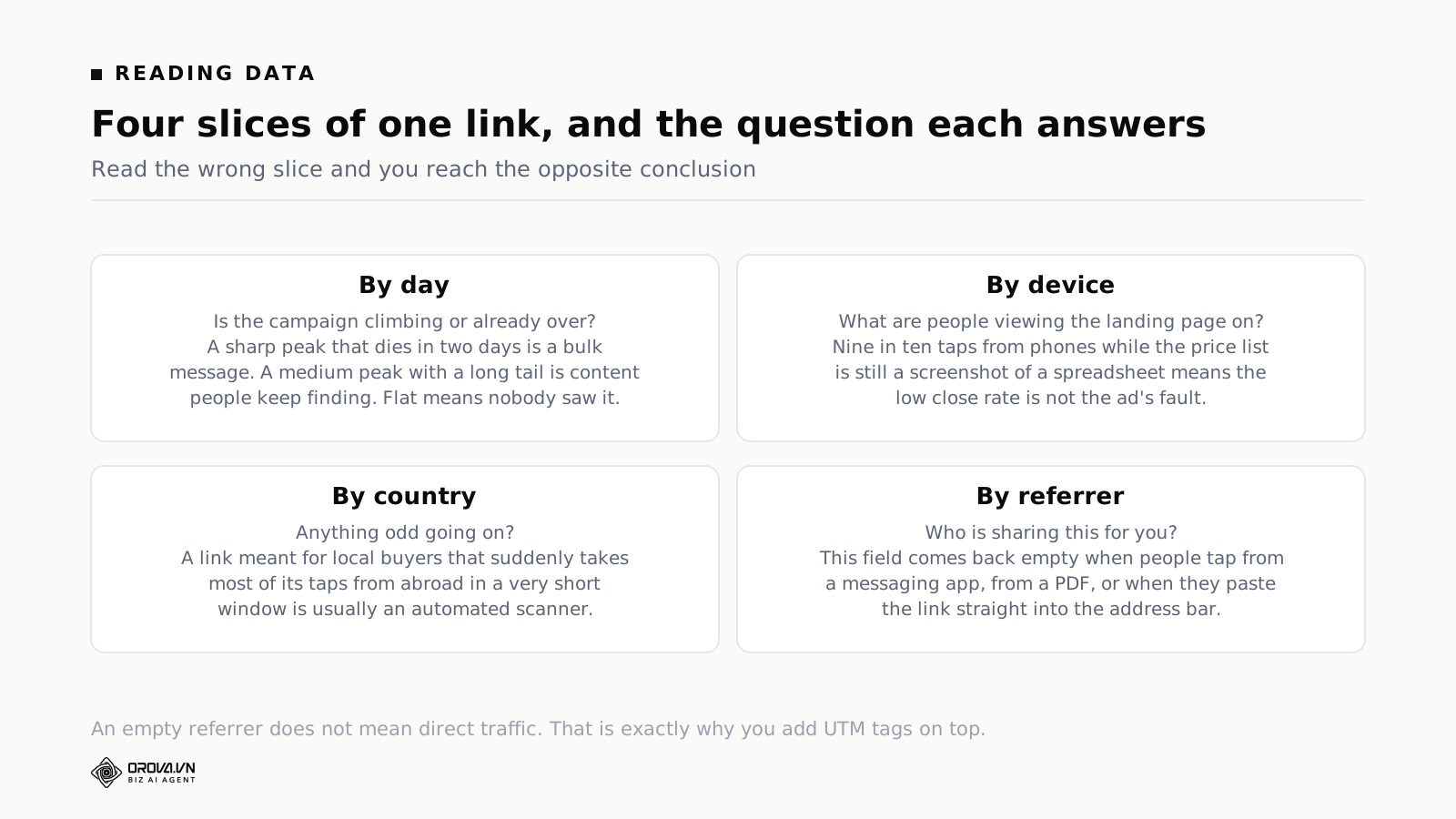
Slice one: by day
This is the view you check daily during the first week of a campaign. Three shapes are worth memorising:
- Sharp spike, gone in two days. Typical of bulk messages and email sends. Nothing to worry about. What you want to measure is the height of the spike against the number of people you sent to.
- Medium peak with a tail running one to three weeks. Typical of content people keep finding again: a blog post, a video, a saved post. That tail is the most valuable part and the part most often ignored, because reports usually close after seven days.
- Flat from the start. The link went out and nobody saw it. Before you blame the content, check whether the link is being blocked. The section on common problems below has the checklist.
One small habit that pays for itself: look at the hourly view on day one. If every tap lands between midnight and three in the morning, those are probably not people.
Slice two: by device
Three buckets: phone, desktop, tablet. The ratio swings hard by channel. Messaging apps and social feeds are almost entirely phone. Email to business customers has a much higher desktop share, usually clustered in office hours. You use this slice for two jobs: deciding which screen the landing page should be built for first, and explaining why the same campaign converts at different rates on two channels.
Slice three: by country
If you sell in one country, this slice is mostly an alarm. A link meant for local buyers that suddenly takes three quarters of its taps from abroad, inside a very short window, usually means an automated scanner has been through it rather than that you have gone viral overseas. If you sell across borders, this is the slice that tells you which language to translate the landing page into first.
Slice four: by referrer
The most valuable slice and the leakiest. Three situations leave the referrer field empty even though a real person tapped:
- They typed or pasted the link straight into the address bar.
- They tapped from a messaging app that does not pass a referring page along.
- They tapped from something outside a browser, like a PDF or a slide deck.
So an empty referrer is not the same thing as direct traffic. On messaging channels most of your taps will land in the empty bucket. That is why you cannot hand out credit to channels using the referrer field alone, and it is why the next section on UTM tags exists at all.
Do not expect link numbers to match your website analytics
The two sides count different things. A short link counts taps, meaning the number of times somebody asked to go to the destination. A website analytics tool counts sessions, meaning the number of times the destination page finished loading and the measurement code got to run. Between those two moments, some people tap and leave before the page loads, some block the measurement code, and some open the link in a preview window. The link number is always higher. Ten to thirty per cent apart is normal. Working out which number to trust for which question is the same problem covered in the roundup of marketing analytics tools and the questions each one answers. The job is not to force the two numbers to agree. The job is to pick one number as the reference for each kind of question and then keep that choice for the whole year.
What UTM tags are and how to fill in the five boxes
UTM tags are five parameters added to the end of an address so an analytics tool knows where the visit came from. Without them, visits from Facebook, from your newsletter, and from a partner's article all fall into the same bucket, and at the end of the month you cannot pull a single order back out to the thing that caused it.
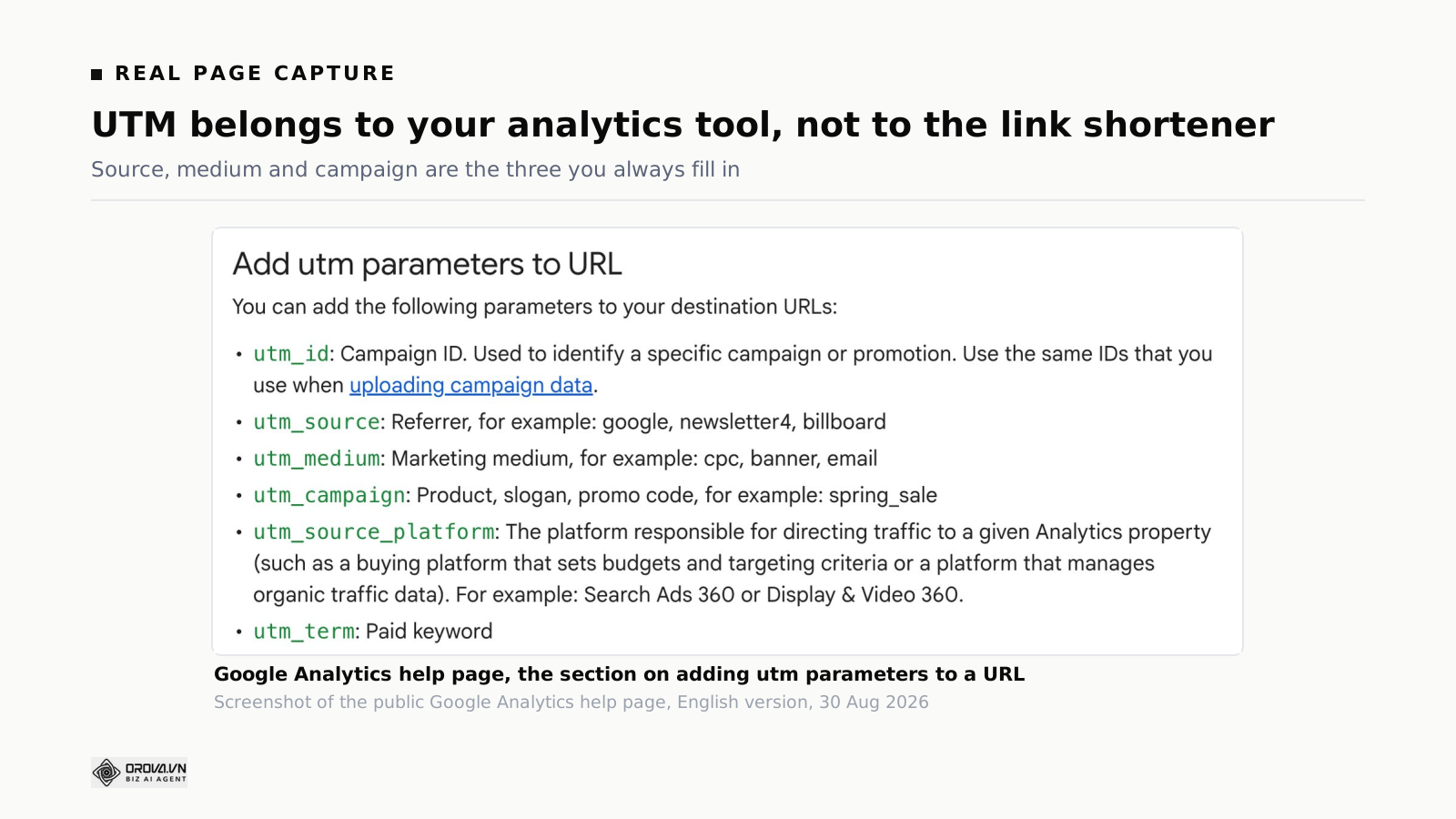
This is a convention that Google Analytics reads. No link shortener invented it. The Google Analytics help pages list the parameters you can use and say plainly that source, medium and campaign are the set you always include. The full list on Google's side has a few more parameters aimed at large advertising platforms, but the five in the table below are the set every analytics tool understands and the set you will actually use day to day.
| Parameter | Answers the question | Values to use | Required |
|---|---|---|---|
utm_source | Where did they tap? | facebook, instagram, google, tiktok, newsletter, partner_acme | Yes |
utm_medium | What kind of channel is that? | cpc for paid ads, social for organic posts, email for newsletters, sms for text messages, referral for partner links, qr for printed codes | Yes |
utm_campaign | Which push does this belong to? | autumn_sale_2026, store_opening_sep_2026, new_plan_launch_2026 | Yes |
utm_term | Which keyword did you buy? | Search advertising only. Leave it blank otherwise | No |
utm_content | Which of the two versions is this? | hero_image, footer_button, variant_a, variant_b | No |
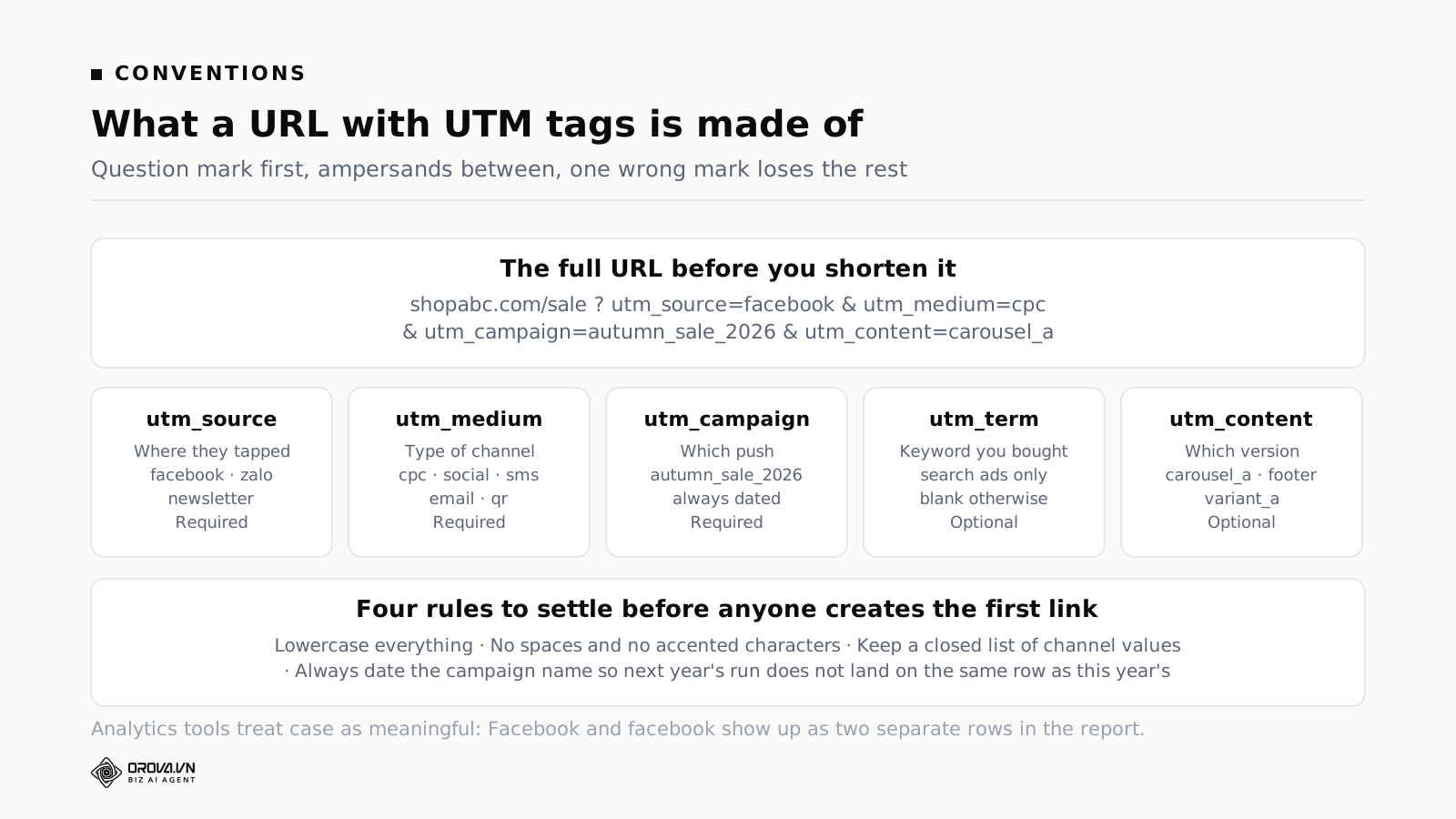
Four conventions to settle before anyone creates the first link
These four sound trivial. They are behind almost every broken UTM report you have ever seen.
- Lower case, always. Analytics tools treat case as meaningful.
Facebookandfacebookappear as two separate rows, and only the sum of the two is the real number. On a team of four, somebody will capitalise. - No spaces, no accented characters. Use an underscore where you want a space. Anything unusual gets encoded into a string of percent signs and letters that nobody can read in a report.
- A closed list of channel values. Agree on six to eight values for the medium box and forbid new ones. Without a closed list you end up six months later with
email,Email,mail,emailmktande-mailall in use at once. - Campaign names carry a date. Use
autumn_sale_2026rather thanautumn_sale. Run the same promotion next year without a date in the name and two years pile into one row with no way to separate them again.
A naming table you can copy straight into a spreadsheet
The table below is the minimum set for a small business selling through social channels and messaging. Drop it into a shared sheet, tell everyone who creates a link to open it first, and nine tenths of the problem is gone.
| Where the link goes out | utm_source | utm_medium | Example utm_campaign |
|---|---|---|---|
| Organic post on your Facebook page | social | content_sep_2026 | |
| Paid Facebook advertisement | cpc | autumn_sale_2026 | |
| Link in bio on Instagram and TikTok | tiktok | bio | bio_evergreen |
| Text message to past customers | sms_list | sms | winback_sep_2026 |
| Monthly email newsletter | newsletter | news_sep_2026 | |
| QR code on flyers handed out in store | flyer_downtown | qr | store_opening_2026 |
| Link inside a partner's article | partner_acme | referral | acme_swap_2026 |
| Email signature of the sales team | email_signature | referral | signature_evergreen |
The last two rows get forgotten most often and they usually produce the best quality of visitor, because the person has already read something of yours before they tapped.
What UTM tags solve that the referrer field cannot
The referrer field is declared by the browser and comes back empty a lot. UTM tags are written by you into the address itself, so they travel with the tap even when somebody clicks from a messaging app or from a PDF. The trade is that UTM tags are only correct if you name things correctly. No machine is checking your spelling.
Two platforms both claiming credit for the same order is a direct consequence of all this, and it gets its own treatment in the piece on multi-touch attribution models and their trade-offs. UTM tags do not remove that overlap. What they give you is a count that is independent of any one platform's own reporting, so you have something to hold up when two of them tell you different stories.
Where the UTM data ends up
After somebody taps a tagged link and the destination page finishes loading, those five values land in the traffic acquisition reports of your website analytics tool. In the current version of Google Analytics you find them in the reports on where traffic came from, where the source and medium columns are literally the first two boxes you filled in. If you want to understand what is actually inside those rows before you start reading them, the article on conversion events and the payload behind every report unpacks the same data from the other end.
The thing to hold on to: a short link counts on the near side of the tap, and your analytics tool counts on the far side. The two tables complement each other. The link table tells you who tapped and where from. The analytics table tells you what they did once they arrived.
Choosing a URL shortener: seven questions to ask first
There are a lot of link shortening services and most of them do the basic job well. Bitly and TinyURL are the two names you meet first when you search for one, and either is a reasonable choice if all you want is a shorter link. What separates services is what happens after the tap, not the shortening itself. The seven questions below are enough to rule out the ones that will not suit your work.
- Does it count taps, and can it split them by day? Plenty of free services show a running total only. A total cannot tell you whether a campaign is climbing or already over.
- Can you change the destination after the link has gone out? This is the most important question if you print anything. If you cannot change it, every flyer is single use.
- Are there UTM fields, or do you have to assemble the string yourself? Assembling by hand means somebody will eventually drop a question mark or double an ampersand. Fields remove that whole family of mistakes.
- Does a QR code come with the same link? If you go out online and on paper at the same time, you want both routes reporting into one table, not two separate ones.
- How long does a link live, and what happens if you stop paying? Few people ask this and it does the most damage. The section on links dying below goes into it.
- Can you export the data to a file? Numbers that live inside a tool and cannot come out cannot be joined to anything else you report on.
- Can you use your own domain? The shared domains of long-running free services attract attention from spam filters, because the people sending spam use the same domains you do.
How free is free, exactly
Almost every service has a free tier, and free tiers tend to cut in the same three places:
- They cut the depth of the statistics. You see a total but not the split by day, by device or by country.
- They cut the right to change the destination. You can create the link but the destination is locked, and unlocking it is a paid upgrade.
- They cut how long things are kept. The link stops working after a few months if nobody taps it, or the statistics are only kept for thirty days.
The third cut is the painful one, because it is invisible at the moment you create the link. Before you print a free short link onto packaging or a shop sign, go and find the sentence that says how long the link will exist. If you cannot find it, treat it as no commitment at all.
One link per placement, never reused
The usual mistake for a team starting out is to make one link and paste it in six places. Do that and the statistics table has one row in it, and you are back where you began, unable to tell which channel produced customers. The rule is one link per placement, each with its own UTM values. Making eight links for eight placements sounds fussy for about ten minutes, and it is the entire difference between a report that means something and a total that means nothing. If you are starting from zero on measurement, the walkthrough of a one-page marketing report executives will read shows what these numbers look like once they are assembled.
How to create a short link at orova.vn/l/ and read the stats
This section walks the buttons you will press, from having no account to having a table you can read. The full product page for the toolset is Orova Link & QR.
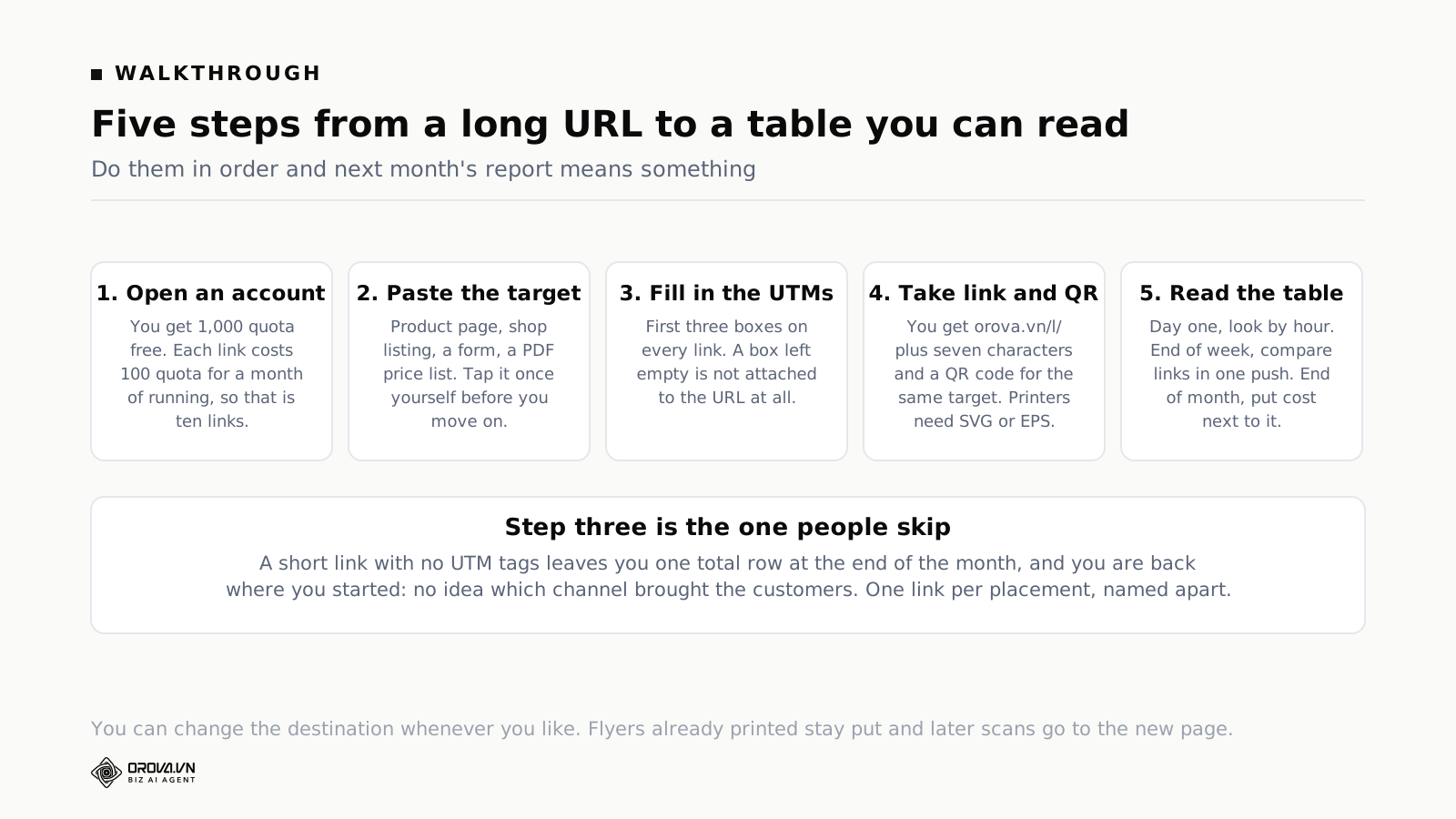
Step 1: Open an account and learn how quota works
Signing up is free and does not ask for a card. New accounts are given 1,000 quota. The arithmetic is simple and worth knowing before you make your first link:
- Each short link costs 100 quota for one month of running. So the 1,000 quota you start with covers ten links running for a month.
- Links run by the month. While there is quota, the link is live. When the quota runs out, the link pauses until you top it up.
- Static QR codes cost no quota. Make as many as you want, download them, and they work forever.
- A dynamic QR code runs on the same machinery as a short link, so it costs the same as a link.
One thing worth knowing because it differs from how a lot of software is sold: every Orova plan has all the features switched on, and the plans differ only in how much quota they carry. You are not locked out of the statistics or the change-destination button for being on a small plan.
Step 2: Paste the destination
Open your workspace, go to Link & QR in the menu, create a new item and paste the destination. The destination can be anything a browser can open: a product page on your own site, a listing on a marketplace, a form, a PDF price list, an article.
Check two things before you move on. First, paste the address into a browser and open it once, to be sure it lands on the page you think it does and not on a login screen. Second, if the original address already carries parameters the platform needs, leave them alone. A lot of marketplaces rely on those to credit the order to the right seller.
Step 3: Fill in the five UTM fields
This is the step that turns a short link into a measured one. Five fields appear in order: source, medium, campaign, term and content. You type the values from the naming table above, the system assembles the string for you, and any field you leave blank is simply not attached to the address.
Doing it here removes three families of mistake that come with assembling by hand: a missing question mark before the first parameter, a doubled or missing ampersand in the middle, and accented characters encoded wrongly. If you have ever seen a report with a campaign name that looks like a run of percent signs and letters, that was the third one.
Fill the first three fields on every link. Fill the last two only when you are genuinely running search advertising, or genuinely testing two versions of the same thing.
Step 4: Take the short link and the QR code that comes with it
Hit save and you have an address in the form orova.vn/l/ plus a seven-character code. At the same moment you get a QR code pointing at the link you just made, so two very different ways of handing something out report into one table: online people tap, offline people scan.
The QR code downloads in ten formats. For posts and web images, PNG or JPEG is fine. For a printer it has to be SVG or EPS, because those two scale to any size without breaking up. Hand a printer a PNG and let them blow it up to shop-sign size and the code goes jagged, which makes scanners slow to lock on.
Step 5: Read the statistics table
Each link has a table with the four slices described earlier: by day, by device, by country and by referrer. Three things are worth doing with it:
- Days one and two: look at the shape by hour. Nobody tapping in the first six hours means you check whether the link is being blocked. Do not wait for the week to end.
- End of week one: compare taps across the links belonging to the same campaign. This is the moment you learn where to put your effort for the remaining three weeks.
- End of the month: take the numbers for every link and set them beside what each channel cost. Putting several sources onto one screen is the subject of the guide to choosing marketing dashboard software.
Changing the destination when a campaign ends
Open the link in your list, edit the destination, save. Every tap after that goes to the new place, including taps from QR codes already printed. Put this on the end-of-promotion checklist: point the links you sent out at a category page rather than leaving them aimed at a promotion that expired. A link that leads to an error page for six months does more damage than no link at all.
What this toolset does not do
Worth saying out loud so you do not go looking in the wrong place. This makes short links, makes QR codes, attaches UTM tags and counts taps and scans. It is not a website analytics tool, so it cannot tell you how long somebody stayed on the destination page or whether they bought anything. That still comes from the analytics on your own site. It is also not a replacement for the reporting inside your ad accounts. The link numbers are there to check against, not to settle the bill with.
Three places short links earn their keep
The one link in your social profile
Social profiles give you one address and everyone wants to fit five things into it. The tidy version: make one short link pointing at your hub page, give it a fixed campaign name like bio_evergreen, and leave that link alone long term. When the hub page needs to move, you change the destination instead of editing your bio on five platforms.
Use a separate link on each platform with a different source value. After a month you know which profile actually produces taps. The answer tends to surprise people, because the platform with the most followers is often not the platform with the most taps.
Text messages and messaging apps
This is where a short link is most obviously worth having, because messages are billed by character and by segment. A hundred-and-sixty-character address can push your message from one segment to two, which doubles the cost of the same send. Cutting it to twenty-something characters is a real saving on every send.
Three things specific to messaging:
- Use
smsas the medium for carrier text messages and keep a different value for messages sent through an app. The two have very different costs and very different behaviour. - Make a new link for every send, even when the copy is identical to last time. Separate links let you compare a morning send against an evening one, a Tuesday against a Saturday.
- Do not let the code get capitalised when you compose the message. Some message editors capitalise the first character of a sentence automatically, which breaks the code and kills the link for the entire send.
Messaging is also the channel where the referrer field is almost always empty, so without UTM tags you lose the ability to give this channel any credit at all.
Print, with a QR code
Flyers, packaging, shop signs, menus, exhibition stands, business cards. Here a short link does two jobs at once: it is the line of text people read and type in, and it is the content encoded inside the QR code.
Four things to settle before the files go to the printer:
- Use a dynamic code, not a static one. A static code carries the whole long address, so its cells are small and dense and scanners are noticeably slower to lock on from a distance. A dynamic code carries a short link, so the pattern is sparser, it scans faster, and above all the destination can be changed.
- Mind the minimum printed size. On a handheld flyer, aim for at least two and a half centimetres across. On a stand or a sign, the rough rule is that the code should be about one tenth of the distance the person scanning will be standing away.
- Leave white space around the code. A code pressed against an edge or against text gives scanners trouble finding the border. Leave a margin about four cells wide.
- Test with at least three phones before the full run. One Android, one iPhone, one older handset. Scan from a printed proof, not from a screen.
Set the medium to qr and set the source to the place the code was handed out. Do that and at the end of the run you can see which distribution point produced scans, and print fewer next time for the ones that did not.
Two more places worth doing that almost nobody does
The sales team's email signature: one fixed link to your price list or your booking page, with its own source value. The number of taps there is a good indicator of whether your team's emails are being read to the end.
Scripts read aloud in videos and podcasts: the link has to be short enough to say out loud and short enough for a listener to type back in after hearing it once. This is the only place where brevity outranks everything else, including how it looks.
Six things that go wrong with short links and how to handle them
Problem 1: The link dies because the service shut down
This is the biggest risk and almost nobody weighs it at the start. When a shortening service closes or changes its policy, every link you ever handed out stops working at the same moment. Flyers printed, posts shared, codes stuck on packaging: all dead. There is nothing you can do from your end.
How to protect yourself: keep a sheet recording every short link next to its real destination, so that if you ever have to move services you at least know what pointed where. For anything printed that will exist for years, like packaging or a shop sign, consider pointing the QR code at an address on your own domain and redirecting from there. As long as your domain is alive, the code keeps working.
Problem 2: The link is blocked as suspected spam
Every long-running shared shortening domain has at some point been used to spread malicious links. The result is that spam filters on some messaging platforms, some corporate mail systems and a few company networks block the entire domain. Your recipient taps and sees a warning, or sees nothing at all.
How to spot it: taps are unusually flat on one channel while the same content on another channel is getting tapped normally. What to do:
- Send a test to three phone numbers on different networks and two mailboxes with different providers before you send the whole batch.
- Do not put a bare link into a first message to somebody who does not know you. A lot of filters score that situation heavily.
- If one shortening domain is blocked on a particular channel, switch services for that channel rather than trying to argue with the filter.
Problem 3: People will not tap because they cannot see where it goes
A short link hides the real destination. That is convenient for you and suspicious for the person receiving it, especially if they do not know you yet. Tap rates on messages to cold contacts are usually lower for this reason and not because the offer is weak.
The fix is to say the destination in the sentence that carries the link: state plainly that it is a price list, a booking form, a how-to article. The sentence does the work the hidden address cannot.
Problem 4: The link numbers do not match the analytics numbers
Covered above and repeated here because it is the question that comes up most. The two sides count at two different moments, and ten to thirty per cent apart is normal. Treat it as a problem only when the gap is more than half, or when your analytics tool sees no campaign at all while the link is reporting taps. That second case is almost always UTM tags being lost somewhere along the way.
Problem 5: UTM tags get lost in transit
Three situations strip the tags, in rough order of how often they happen:
- The destination redirects again. Say your destination is the version without www and the server bounces it to the www version, or from http to https. Some configurations drop the parameters entirely during that bounce. To check: tap the short link yourself and read the address bar once the page has settled. If all five parameters are still there, you are fine.
- The destination is a single-page application. That kind of site sometimes clears the parameters out of the address bar right after loading. If the measurement code runs after the clearing, it sees nothing.
- The destination is an app-opening link. A link that opens a marketplace app directly usually cannot carry UTM tags across, because inside the app is a different environment. For marketplaces, use whatever tracking the marketplace gives its sellers and keep UTM tags for the web side.
Problem 6: Automated scanners get counted as people
Once you paste a link into a messaging app or a social network, their systems fetch it themselves to pull out the preview image and title. Security checking tools fetch it too. None of those are people.
A good service recognises them and keeps them out of the headline count, but no filter catches everything. What it looks like in the table: a cluster of taps within a few seconds of you posting, taps from countries you do not sell in, or a high tap count with no matching sessions in your analytics. The practical answer is to ignore the first few taps immediately after posting, and to read the numbers as a trend across several days rather than fixating on a single day's total.
Frequently asked questions
Can you shorten a link for free?
Yes, nearly every service has a free tier. What matters is where the free tier cuts: the depth of the statistics, the right to change the destination, or how long the link survives. With Orova, static QR codes are free and cost no quota. Short links need an account because the statistics have to live somewhere, and a new account is given 1,000 quota, which covers ten links running for a month.
Do you need to install anything?
No. All of this happens in a browser, phone included. All you need is somewhere to paste the destination and somewhere to look at the numbers afterwards.
Does using a short link affect search rankings?
Short links are for handing out to people, not for linking inside your own site. The address you want search engines to rank has to be the real address on your own domain. Do not replace the links inside your website content with shortened ones.
How many people can use one short link?
There is no cap on the number of people who can tap it. What is capped is how many links you create and how long they run, counted in quota. One link handed to ten thousand people still counts as one link.
Can you replace the seven-character code with a word people remember?
The code is generated at random to avoid collisions. If you need a memorable address for a big campaign, the usual approach is a short path on your own domain that redirects to the destination, while short links carry the channels you need to measure separately.
What is the difference between a short link and a QR code?
They are two ways of handing out the same address. The short link is for digital places, where somebody can tap. The QR code is for the physical world, where all somebody has is a camera. Point both at the same link and the numbers from both land in one table, which is how you compare online against offline.
If I change the destination, do I lose the old numbers?
No. Changing the destination changes where later taps go. It does not erase the history of earlier ones. Do write down the date you changed it, because when you read the daily chart later, a sharp shift at that exact point is usually the destination change rather than anything to do with your content.
Your first thirty minutes, in this order
If you want to start today, this is the work. Nothing beyond it is needed yet:
- Five minutes. Open a new spreadsheet and copy in the naming table from above. Agree the list of values for the medium column, close the list, and do not let anyone add to it.
- Five minutes. List every place you currently hand out links: how many social platforms, whether you send text messages, whether you send email, whether you print anything. Each of those becomes its own link.
- Ten minutes. Create an account, make two or three links for the placements you use most, and fill in all three required UTM fields on each one.
- Five minutes. Tap each link on your own phone. Check that the destination opens correctly and that all five parameters are still in the address bar afterwards.
- Five minutes. Put a reminder in the calendar to open the statistics at the end of this week. A table nobody opens is a table with no value.
After the first month, the next thing worth doing is setting the taps from each link beside what each channel cost, in the same table. That is the point where the numbers start answering the question of where to spend, rather than only the question of how many people tapped. The reporting habits that hold this together week after week are laid out in the guide to picking marketing reporting tools that solve the right problem.
One short link, one QR code, both sets of numbers in one table
Orova Link & QR turns a long address into orova.vn/l/ plus seven characters, with five UTM fields built in so nobody has to assemble the string by hand. It counts taps by day, by device, by country and by referring page. Change the destination whenever you like and printed flyers never need reprinting. New accounts get 1,000 quota, enough for ten links running for a month.
Create a short link