
Boost post vs Ads Manager: which one fits your goal?

Many business owners log into their social media accounts, see a notification suggesting they spend 20 dollars to reach thousands of people, and immediately click the tempting blue button. Two days later, they have hundreds of likes, a handful of random comments, but absolutely zero new sales or leads. This frustrating cycle happens because they do not understand the fundamental difference between a boost post vs ads manager campaign. You might be burning through your marketing budget chasing vanity metrics instead of building a sustainable revenue engine.
The reality is that these two tools were built for entirely different purposes. Relying solely on quick boosts is like trying to build a house with only a hammer; you are missing the precision instruments required for the job. This guide breaks down how the two routes differ, flags an in-app fee that can quietly raise what you pay on iPhone, and gives you a full-funnel framework for using both where each one fits.
Boost post vs ads manager: the core differences
The core difference between the two approaches lies in your ultimate objective and the level of control you possess. A boosted post is a simplified advertising tool designed to amplify an existing organic post directly from your page's timeline, prioritizing immediate engagement like likes, shares, and comments. In contrast, Meta Ads Manager is a comprehensive, backend advertising platform built for direct response marketing, allowing you to create customized ad campaigns from scratch with highly specific conversion goals, intricate targeting rules, and extensive placement options. Boosting has gained more goals over the years, such as messages, calls, website visits and, for some Pages, leads, but its controls stay deliberately simple. A boost post is usually enough when you want quick reach or engagement on a post that already works, while Ads Manager is usually the better fit when your goal is to generate qualified leads, drive website purchases, or retarget previous website visitors.
Introduction to the advertising platforms
Before diving into the technical comparisons and budgeting strategies, it is crucial to understand the distinct philosophies behind both tools. They are not simply different interfaces for the exact same function; they are engineered to serve completely different stages of the modern consumer journey.
Understanding the Boost Post feature
A boost post is essentially the entry-level tier of social media advertising. When you publish a photo, video, or link organically to your business page, the platform often prompts you to "boost" it. By allocating a small budget, you are paying the network to push that specific piece of content into the news feeds of people who do not currently follow you.
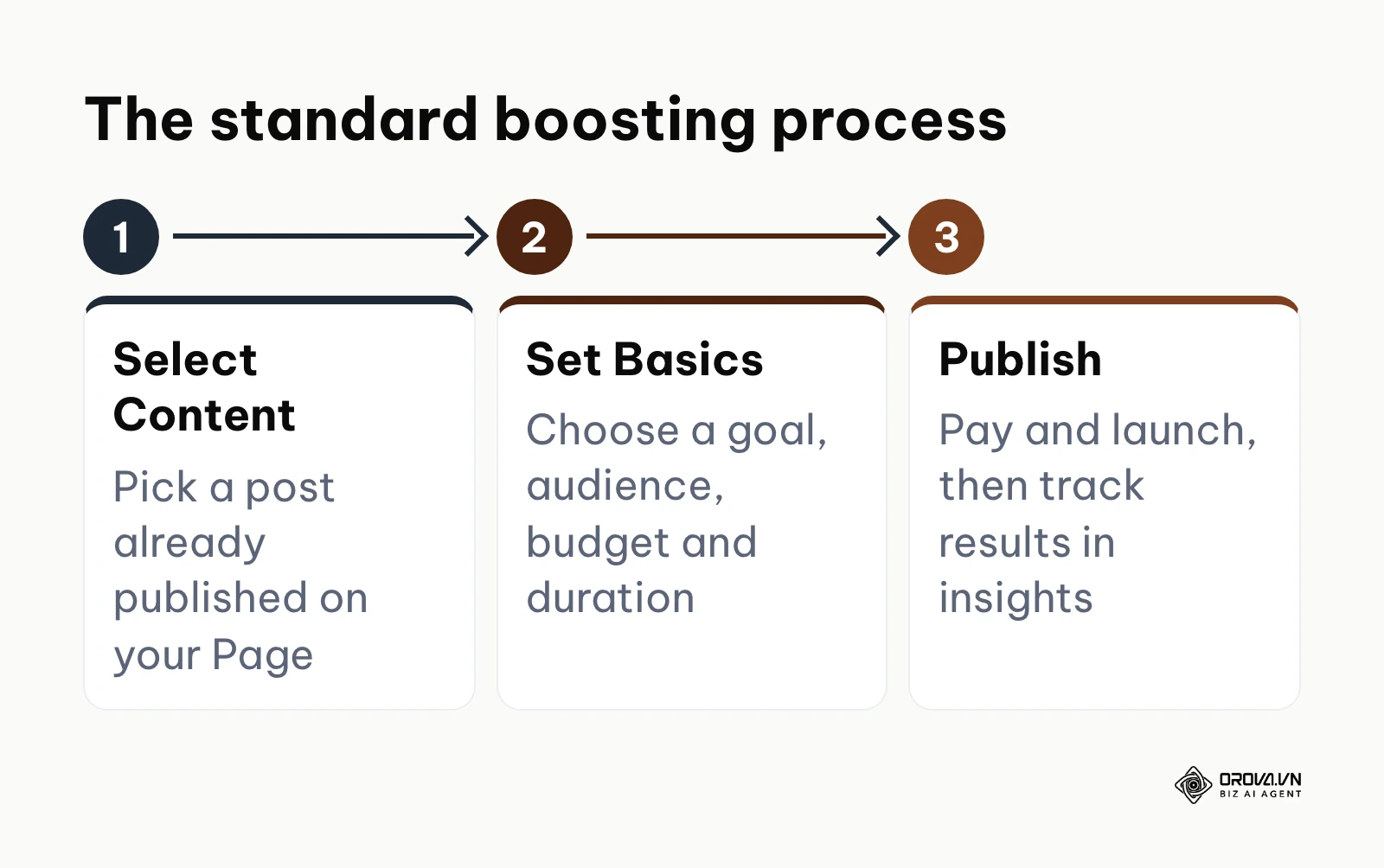
The setup process is designed to be frictionless and takes only a few steps. You pick a goal (the list depends on your Page and post, and typically includes engagement, messages, calls or website visits), choose an audience such as Advantage+ audience, people who like your Page, people in your local area, or one you define by age, location and interests, set a budget and duration, and launch. Meta's own help pages describe boosting as the quick way to amplify a post you have already published, while Ads Manager is where you build ads with more creative, targeting and optimization options. It thrives on social proof, leveraging the likes and comments you have already accumulated to attract more of the same.
The diagram below summarizes the standard boosting process.
Understanding Meta Ads Manager
Meta Ads Manager is the professional command center for your advertising efforts. Instead of simply amplifying an existing post, this platform allows you to construct sophisticated, multi-layered campaigns entirely out of public view. These are commonly referred to as "dark posts" because they do not appear on your organic timeline unless you specifically choose to publish them there.
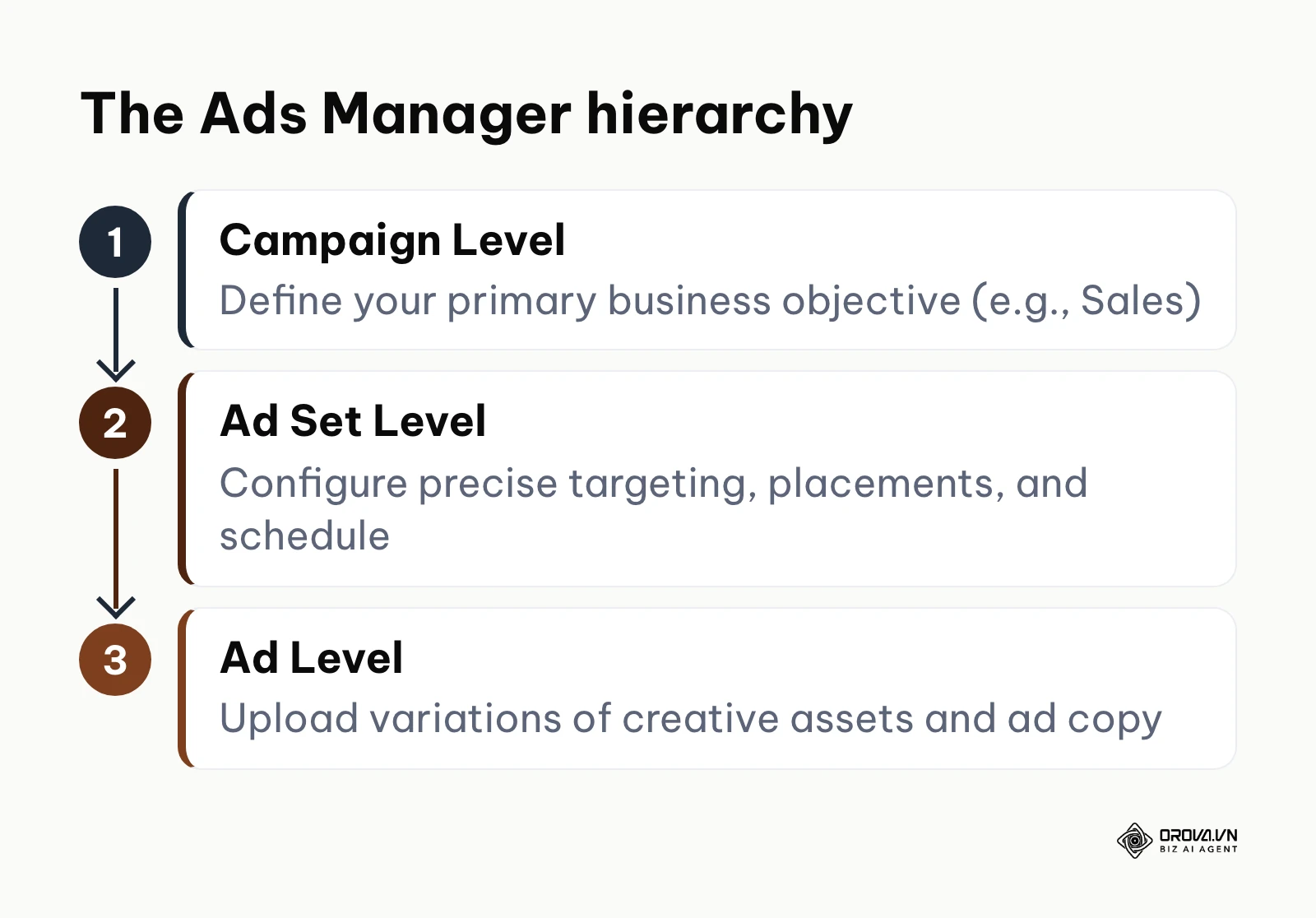
The architecture of this platform is divided into three distinct levels: Campaigns, Ad Sets, and Ads. At the Campaign level, you define your hard business objective, such as lead generation or catalog sales. At the Ad Set level, you control the granular details of targeting, budgeting, and ad placements. Finally, at the Ad level, you test various creative assets. For a deeper look at this structure, read what Facebook Ads Manager is and how it works. This extra structure is what gives advertisers more control over who sees an ad, what it is optimized for and how results are measured.
The diagram below summarizes the Ads Manager hierarchy.
Detailed comparison: 8 points side by side
To make an informed decision about where to allocate your marketing budget, you must evaluate both tools across several critical dimensions. The following criteria are the ones that most often decide which route fits a given campaign.
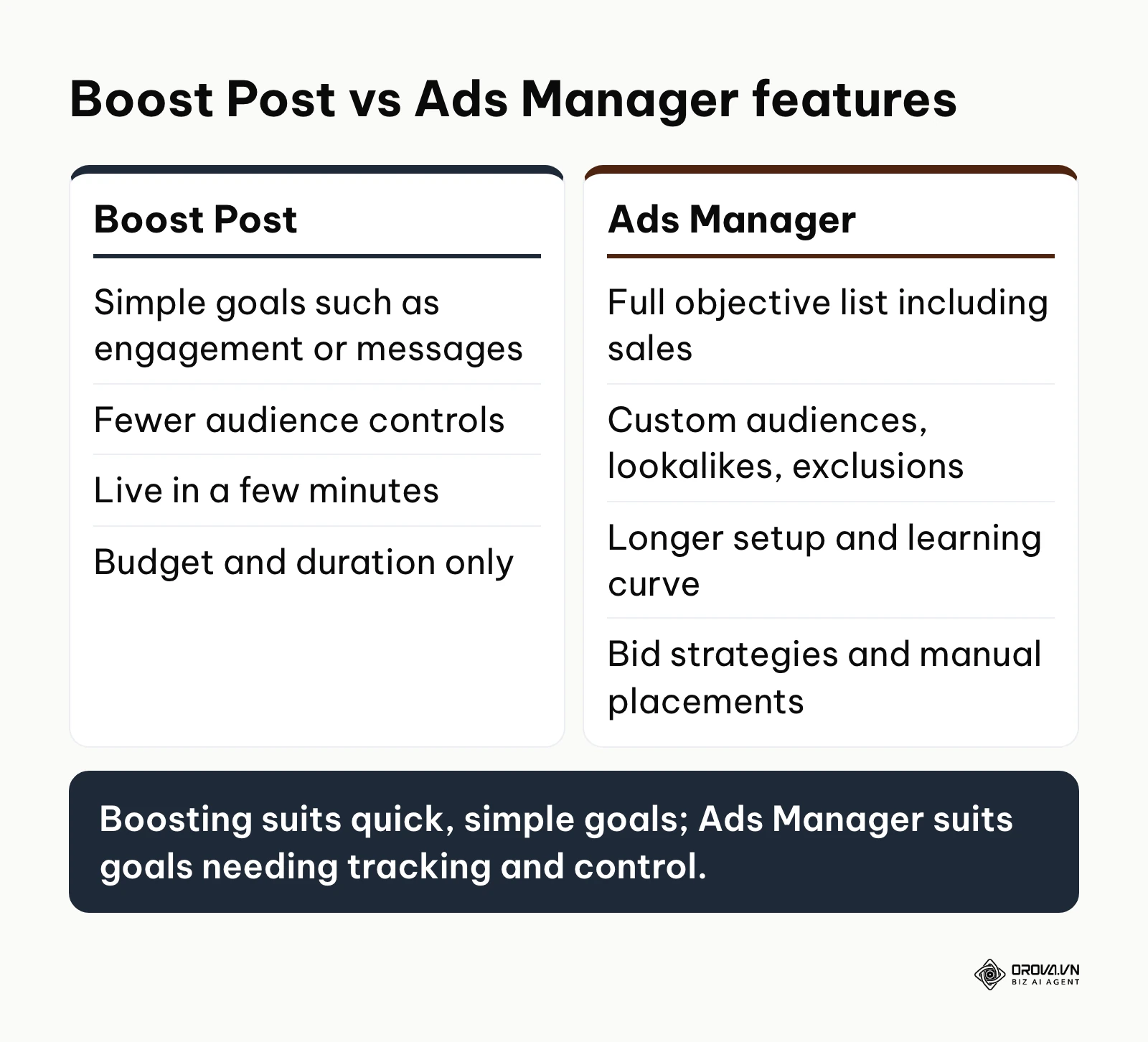
| Feature | Boost Post | Meta Ads Manager | Better fit when |
|---|---|---|---|
| Goals | Engagement, messages, calls, website visits and, for some Pages, leads. | Full objective list: awareness, traffic, engagement, leads, app promotion, sales. | Ads Manager when you need sales or custom conversion events. |
| Audience | Advantage+ audience, Page fans, local area, or age, location and interests. | Custom audiences, lookalikes, exclusions and detailed layering. | Ads Manager when you need exclusions or website-based audiences. |
| Creative | The existing post as it was published. | New ads, carousels, collections and multiple creative variations. | Boost when the post already performs well organically. |
| Placements | Facebook, Instagram and Messenger, chosen in the boost flow. | Advantage+ placements or manual choice, including Audience Network. | Ads Manager when you must include or exclude specific placements. |
| Bidding | Budget and duration only. | Highest volume, cost per result goal, ROAS goal, bid cap. | Ads Manager when cost per result must stay under a limit. |
| Retargeting | Mostly people who engaged with your Page or content. | Website visitors via Meta Pixel and Conversions API, customer lists. | Ads Manager for cart abandoners and past buyers. |
| Testing | One post per boost, compared by hand. | Built-in A/B tests and several ads per ad set. | Ads Manager for structured tests. |
| Speed and effort | Minutes, straight from the Page or the app. | Longer setup and a steeper learning curve. | Boost when time and skills are short. |
Neither column wins on every row: boosting trades control for speed, and Ads Manager trades speed for control. Here is why each difference matters in practice.
Targeting precision and audience control
The most powerful aspect of digital advertising is the ability to show your message exclusively to people who are likely to buy. When you boost a post, your audience options are narrower: Advantage+ audience, people who like your Page, people in your local area, or an audience defined by age, gender, location and interests. You cannot layer as many conditions or exclusions as in Ads Manager, so part of the budget can reach people who were never likely to buy.
In contrast, Ads Manager unlocks the full potential of audience engineering. You can target users based on nuanced behavioral patterns, create Lookalike Audiences based on your best customers, and meticulously exclude people who have already purchased from you so you do not waste impressions. This guide to advanced Facebook ads targeting walks through how to layer and exclude audiences step by step.
Illustrative example: A local high-end furniture retailer trying to reach new homeowners. First, the store owner boosted a post targeting a 10-mile radius and the generic "home decor" interest. They selected the budget, hit boost on their phone, and waited for messages. However, they mostly received inquiries from teenagers and people looking for cheap DIY supplies, wasting much of the budget. To fix this, they switched to Ads Manager, layered their targeting to include only users aged 30-55, excluded people who had already bought, and added interests tied to moving home and interior design. As a result, the showroom foot traffic shifted to serious buyers holding floor plans, and their inbox filled with requests for premium interior design consultations.
Ad formats and placement options
Where your ad appears is just as important as what it says. When you boost, you can choose between Facebook, Instagram and Messenger in the boost flow, but you cannot fine-tune individual placements the way you can in Ads Manager.
Ads Manager gives you much finer control across Meta's apps. You can deploy dynamic product carousels, instant experiences, and lead generation forms. Furthermore, you can manually select or deselect specific placements across Facebook, Instagram, Messenger, and the broader Audience Network. If you notice that your ads convert poorly in the Facebook right column but perform exceptionally well in Instagram Reels, you can shift your budget to favor the winning placement.
The Apple iOS 30% service fee trap
This is a cost many small advertisers miss. In 2024, Meta began passing Apple's 30% service fee on to boosts paid for inside the Facebook and Instagram iOS apps in many markets, because Apple treats a boost bought in the app as an in-app purchase of a digital service. Meta's help pages show whether the fee applies in your country, and the rules can change as app store regulation evolves. Where it applies, part of what you pay when you boost from the iPhone app goes to Apple instead of buying reach.
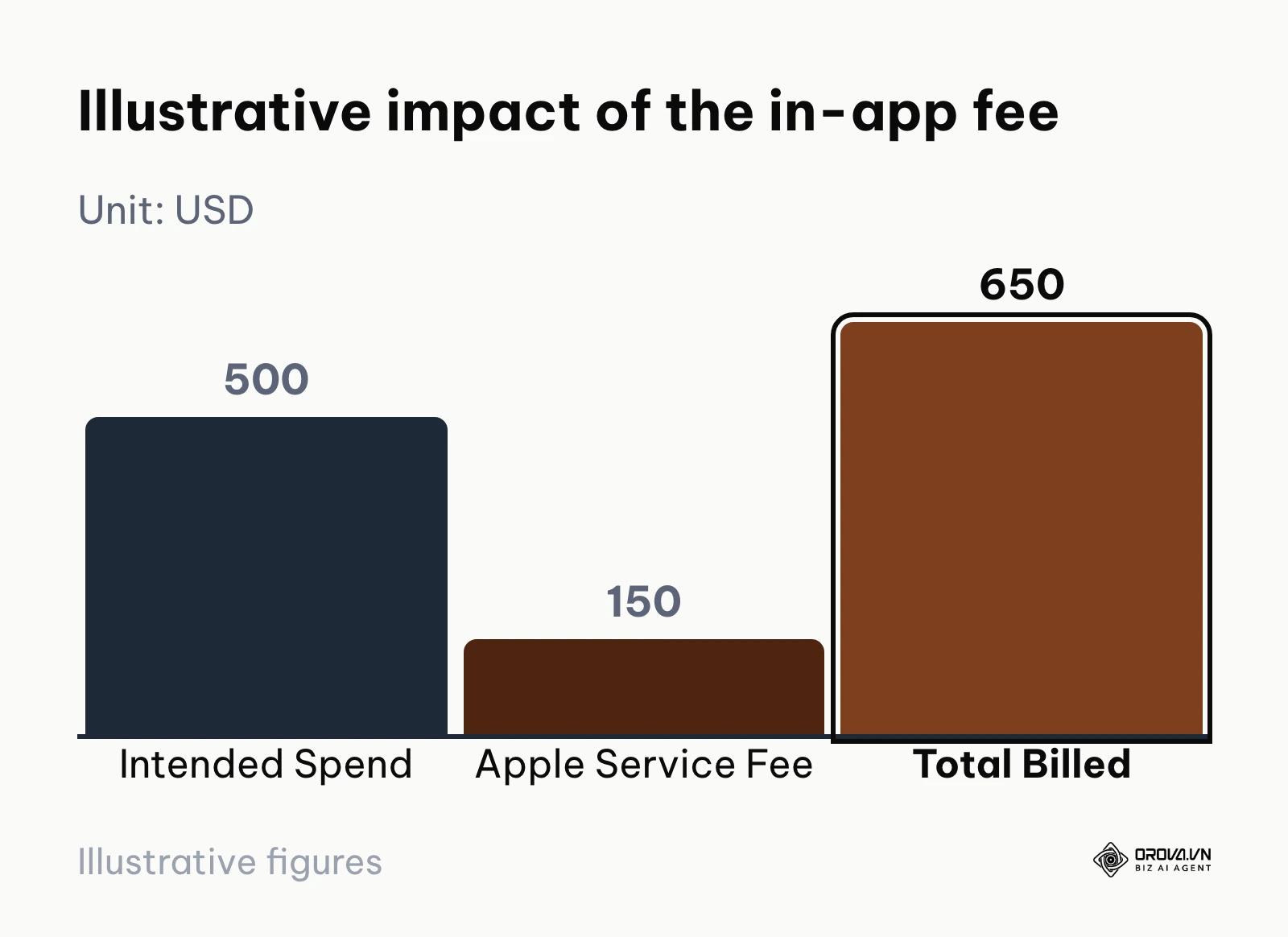
The fee does not buy you more reach or better placements. If you are operating on tight margins, paying around 30% extra for the same delivery can turn a profitable campaign into a loss. The simple way to avoid it is to pay for boosts and campaigns in a web browser, through Meta Business Suite or Ads Manager, rather than inside the iOS app.
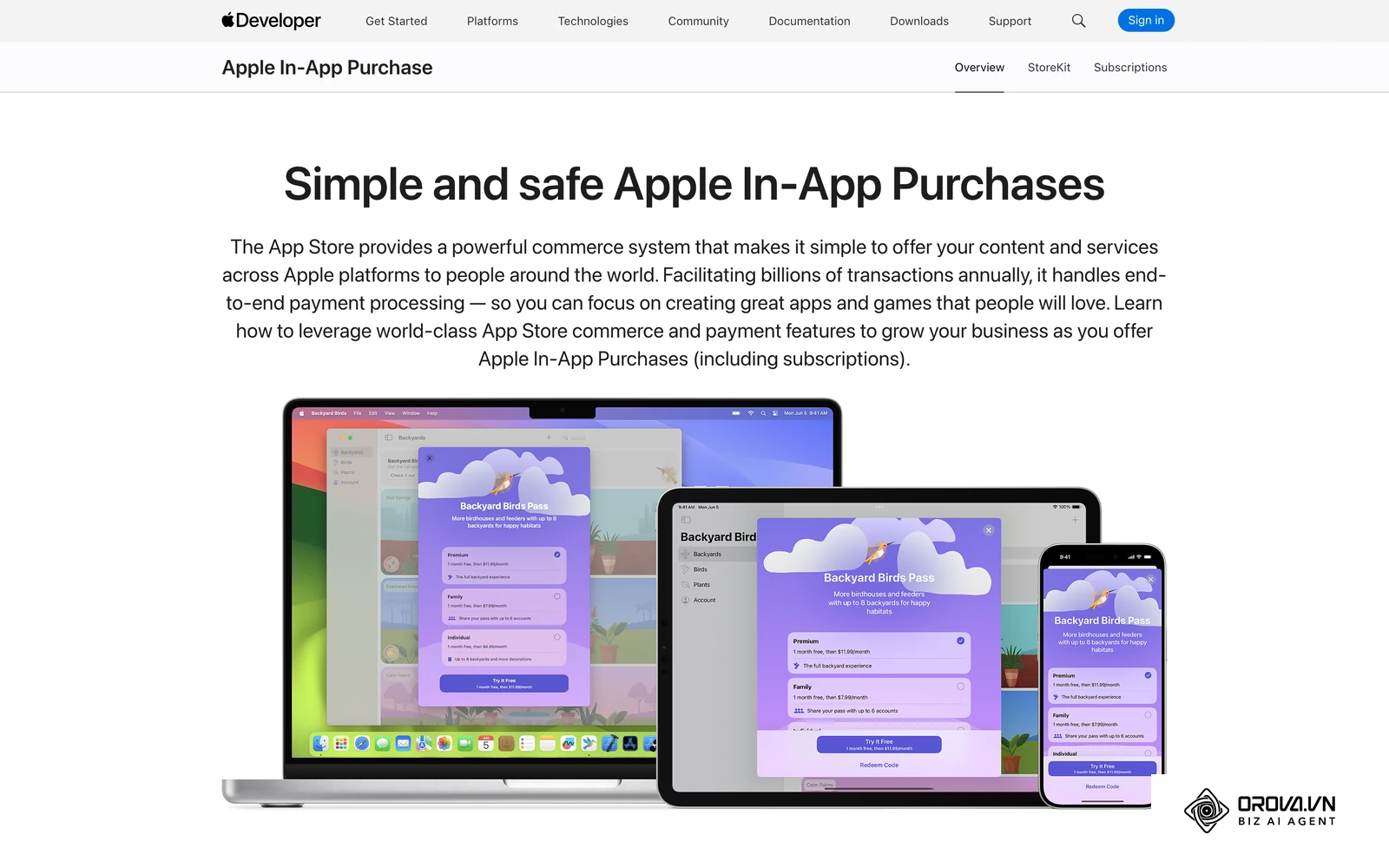
Illustrative example: An independent gym owner managing promotions directly from their smartphone. They wanted to spend 500 dollars to promote a New Year boot camp video and quickly set it up through the Instagram iOS app. They funded the campaign, selected their local audience, and let it run for two weeks. They later noticed they had been billed 650 dollars, because the 30% in-app service fee added 150 dollars that bought no extra impressions. They immediately paused the campaign, logged into Meta Business Suite in a desktop web browser, and relaunched the same video there. The next boost was billed at the planned 500 dollars, and the 150-dollar difference went into a small retargeting campaign.
The diagram below shows the illustrative impact of the in-app fee.
Bidding strategies and delivery optimization
When you boost, you set a budget and a duration, and the system decides how to spend it. It optimizes for the goal you picked, so an engagement goal tends to find people likely to engage, not necessarily people likely to buy. You cannot tell it to stop when results get too expensive.
Ads Manager introduces advanced bidding economics. You can set a cost per result goal to tell the algorithm to stop spending if a lead costs more than a specific threshold. You can optimize for Return on Ad Spend (ROAS), instructing the system to seek out high-value customers who make large purchases. Learning about setting a cost cap correctly is essential for scaling budgets safely without watching your profitability collapse during volatile market periods.
Analytics, reporting, and attribution
Data is only useful if you can accurately interpret it to make diagnostic decisions. The analytics provided after boosting a post are largely superficial. You will see reach, impressions, and basic engagement metrics, but you will struggle to map those interactions directly to backend revenue. It provides a snapshot, not a comprehensive financial report.
In Ads Manager, the reporting goes much deeper. You can build custom columns to track micro-conversions, such as "add to cart" or "initiate checkout." You can analyze the frequency at which users see your ads before they buy, and you can break down demographic performance to see exactly which age group or geographic region is driving the cheapest sales. Learning how to read and diagnose Facebook ads reports will help you transition from guessing to making data-backed scaling decisions.
A/B testing and creative iteration
Stagnant creatives lead to ad fatigue, skyrocketing your costs. If you want to test two different headlines using the boost feature, you essentially have to publish two separate organic posts on your page and boost them individually. This clutters your timeline and splits the algorithm's learning phase, resulting in highly inefficient testing environments.
Ads Manager offers built-in A/B testing and flexible creative options, the successor to what Meta used to call Dynamic Creative. You can upload several images, headlines and descriptions to one ad, and the system combines them to show the version each person is most likely to respond to. You can study competitor ads in the Meta Ad Library and rapidly deploy dozens of variations to find your winning formula without ever showing those tests to your organic followers.
Retargeting capabilities and custom audiences
Most consumers do not buy a product the first time they see it. They need multiple touchpoints. Boosting a post gives you fewer retargeting options; the boost flow centers on Page fans, local audiences and demographic or interest targeting. You cannot reach the people who matter most: those who visited your website but abandoned their shopping carts.
Audiences built from your own data, such as website visitors, customer lists and people who engaged, are the core of retargeting. By utilizing the Meta Pixel and the Conversions API (CAPI), Ads Manager allows you to create hyper-specific audiences. You can serve a unique discount code exclusively to users who spent more than two minutes on a specific product page in the last seven days.
Illustrative example: A boutique skincare brand launching a new anti-aging serum during the holiday season. The marketing manager initially relied on boosting product photos to cold audiences, hoping for impulse buys. They boosted three posts for 100 dollars each, monitored the likes, and tracked the link clicks to their Shopify store. Despite high click-through rates, the bounce rate was massive, and they recorded zero actual sales because customers needed more time to trust a new skincare product. They shifted strategy by installing the Meta Pixel, creating a custom audience of people who viewed the product page but didn't buy, and running an Ads Manager campaign offering a 15% discount strictly to that group. Within a few days, orders started coming in from people who had previously left the site, and the team could finally see which ad brought each sale.
How to run a fair test on your own account
You will find articles quoting large cost per acquisition gaps between boosting and Ads Manager, but those numbers depend on the product, audience, creative, offer and tracking, so they rarely transfer to another account. A fairer way to decide is a small test on your own Page.
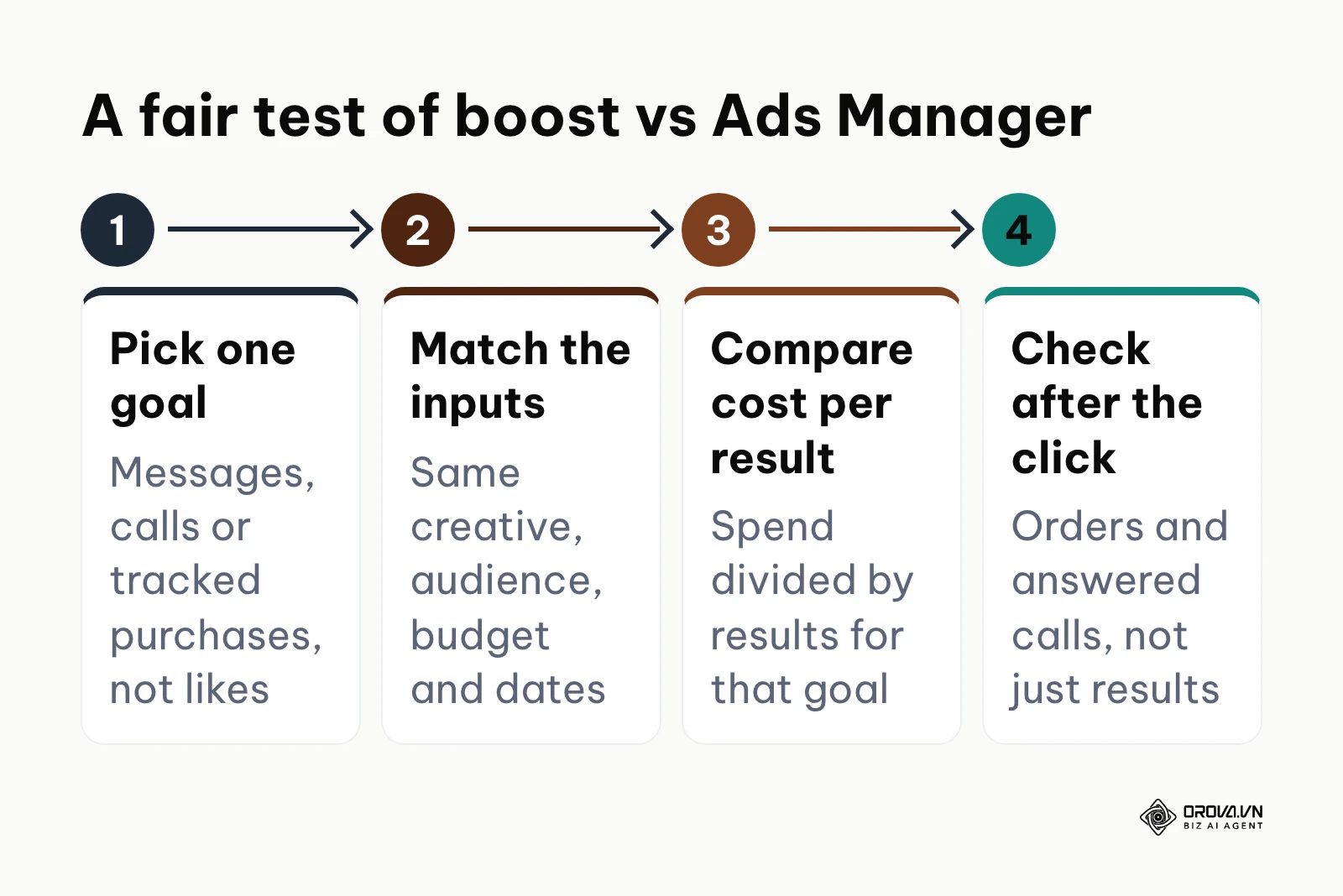
- Pick one goal you can measure in both routes. Messages, calls or website purchases tracked by the Meta Pixel work well. Likes do not.
- Match the inputs. Use the same creative, a similar audience, the same budget and the same dates for the boost and for the Ads Manager campaign.
- Compare cost per result for that one goal. Cost per result is simply what you spent divided by the number of results you counted.
- Check what happened after the click. Count how many messages turned into orders and how many leads actually answered the phone. A cheap result that never buys is not cheap.
If boosting gives you an acceptable cost per result for a simple goal, there is no need to complicate things. If it does not, the extra controls in Ads Manager are worth the learning curve. Either way, you are deciding from your own numbers instead of someone else's.
The diagram below summarizes the four steps of a fair test.
OROVA ADS applies AI Agent to automate and optimize ad performance on Google, Meta and TikTok. Scale your budget safely, monitor 24/7 and expand your business quickly.
Experience the solution at orova.vn/ads
Choosing based on your business situation
Ads Manager offers more control, but it requires a steeper learning curve and a longer setup. There are many situations where a quick boost is the sensible choice. Your business model, tracking setup and available time decide which tool fits.
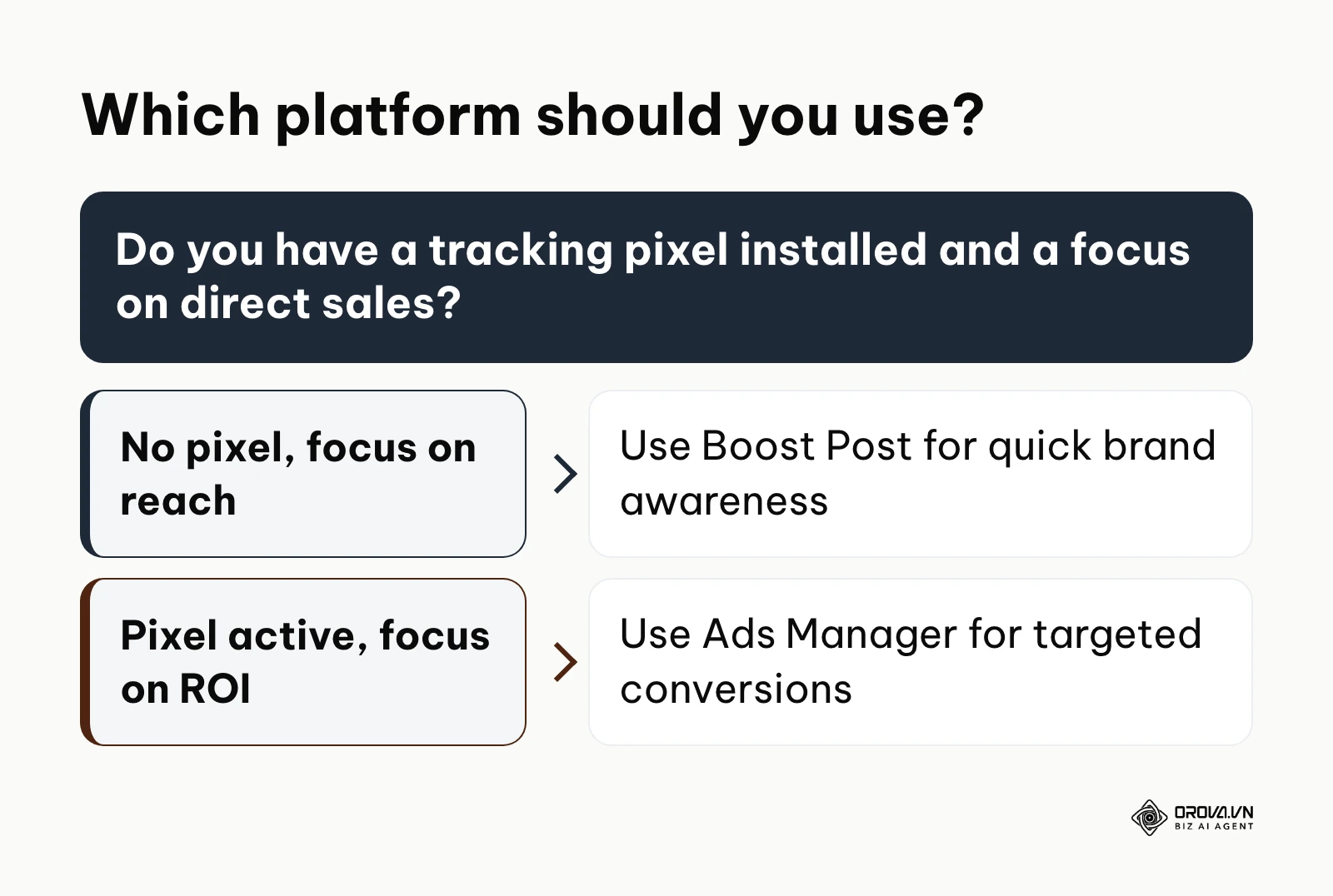
| Business Situation | Recommended Platform | Primary Reason |
|---|---|---|
| No tracking pixel, urgent local promo | Boost Post | Speed of execution and local awareness. |
| Selling physical products online | Ads Manager | Requires catalog integration and ROAS tracking. |
| B2B Lead generation via forms | Ads Manager | Needs lead quality filtering and follow-up tracking. |
| Amplifying a post that already performs well | Boost Post | Builds on existing social proof quickly. |
Let's break down exactly how different business models should approach this decision.
Local brick-and-mortar businesses
For cafes, hair salons, and neighborhood gyms, foot traffic and local awareness are paramount. If you are running a flash sale that ends in 48 hours and you simply want everyone within a three-mile radius to know about it, a Boost Post is often sufficient. The setup is immediate, and you do not need complex website tracking to measure success; you measure it by the number of people walking through your physical doors.
However, once a local business wants to scale—such as a dental clinic offering high-ticket Invisalign consultations—they must transition to Ads Manager. High-ticket local services require rigorous lead qualification, which is much easier with the custom lead forms and audience layering in Ads Manager.
The diagram below summarizes which platform you should use based on your setup.
E-commerce and direct-to-consumer brands
If you sell products online, relying on Boost Posts as your primary strategy leaves most of the tracking and catalog tools unused. E-commerce thrives entirely on the back of the tracking pixel and server-side conversion tracking. You need to know exactly which creative asset generated a 150-dollar cart value versus a 20-dollar cart value.
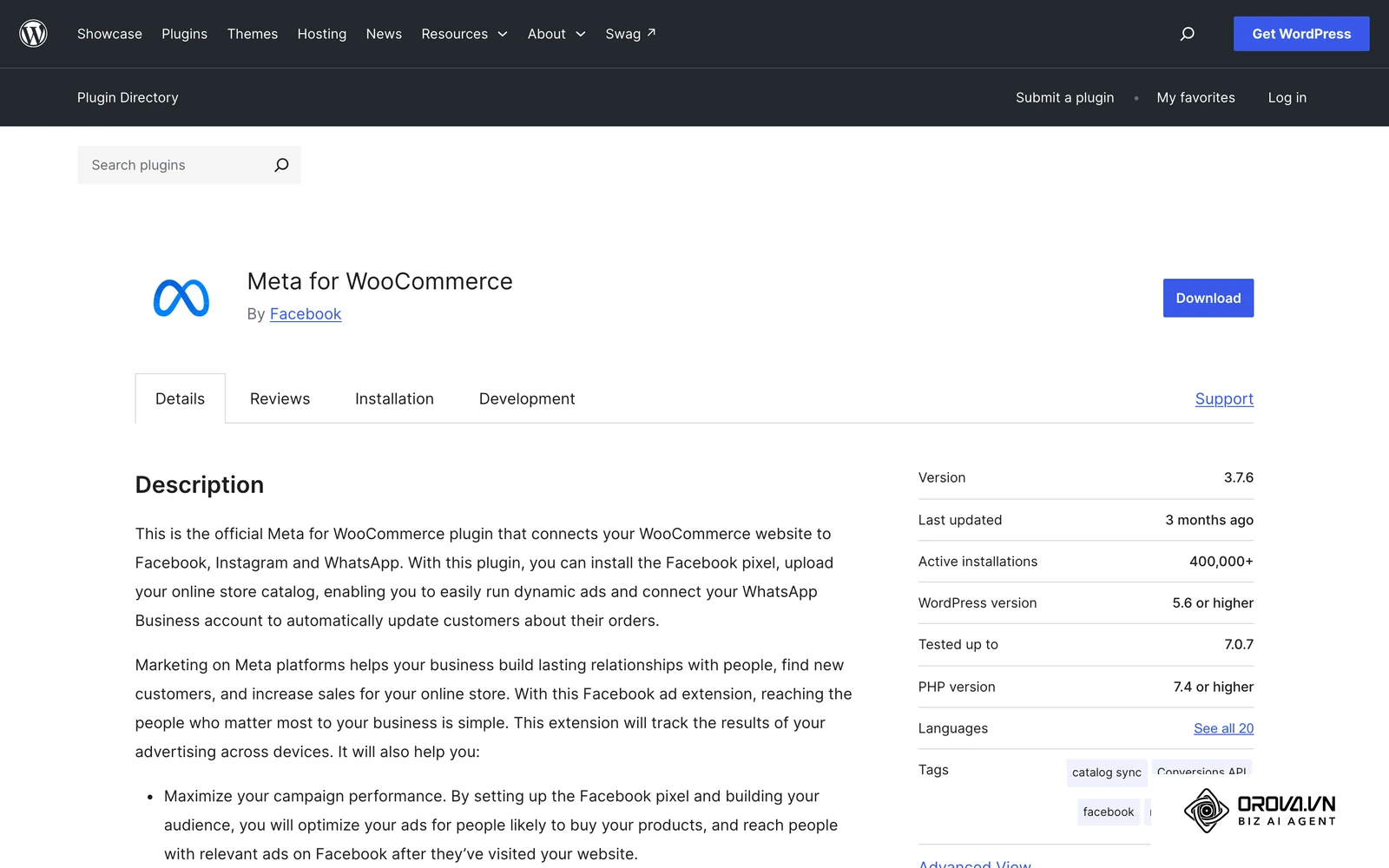
Ads Manager allows e-commerce brands to deploy dynamic product ads. If a user views a specific pair of red sneakers on your website, Ads Manager will autonomously retarget them with an ad featuring those exact red sneakers, rather than a generic brand message. This level of personalized, automated retargeting is impossible through the basic boosting interface and is a common driver of profitable e-commerce growth.
B2B service providers and SaaS companies
Business-to-business marketing requires reaching decision-makers, not casual scrollers. Boosting a post about your new enterprise software will likely result in likes from college students and unrelated industries. The targeting simply isn't sharp enough to justify the spend.
B2B companies must use Ads Manager to filter out unqualified traffic. You can combine work-related interests, customer lists and lookalike audiences built from your best clients, where these options are available in your market. Ads Manager can also connect to many CRMs through lead form integrations or the Conversions API, allowing you to track the journey of a lead from the initial ad click to a closed sales call six months down the line.
Content creators and personal brands
For influencers and content creators, the product is often the audience itself. If your primary goal is to increase your subscriber count, get more video views, or build social proof on a specific post, the Boost Post feature is a highly effective tool. It leverages the platform's natural desire to spread engaging content.
Creators often use a hybrid approach. They will boost a highly engaging behind-the-scenes video to gather views and build a massive custom audience of "video viewers." Once that audience is large enough, they switch to Ads Manager to serve a targeted ad selling their digital course or merchandise exclusively to the people who watched the previous video.
Want to scale your budget but afraid of breaking performance? 📉
Integrate OROVA ADS now - an AI Agent that automatically monitors and optimizes Google, Meta, TikTok ads 24/7. Now, expanding and replicating your Performance Ads team is just one click away.
🚀 Try it now at: orova.vn/ads
The full-funnel strategy: combining both tools
The most sophisticated media buyers do not view this as a strict "either/or" scenario. Instead, they recognize that both tools can serve different stages of a comprehensive marketing funnel. A full-funnel strategy utilizes the cheap reach of a Boost Post to test the waters, and the precision of Ads Manager to close the deal.
Step 1: Testing creatives with top-of-funnel boosting
Instead of guessing what your audience wants, let organic engagement and light boosting dictate your creative direction. Publish three different variations of a video organically. Apply a very small budget—perhaps 10 dollars a day—to boost each of them toward a broad audience. Your goal here is not to drive immediate sales, but to purchase data cheaply.
Monitor the engagement rates, the cost per video view, and the share metrics over 48 hours. The numbers will usually point to a clear winner. You have now successfully used the boosting feature as a low-cost laboratory to validate your creative assets before committing a massive budget to them.
Step 2: Transitioning winners into full campaigns
Once you have identified the winning video, do not simply increase the boost budget. Instead, copy the unique Post ID of that winning content. Open Ads Manager on your desktop and create a brand new conversion campaign optimized strictly for purchases or leads.
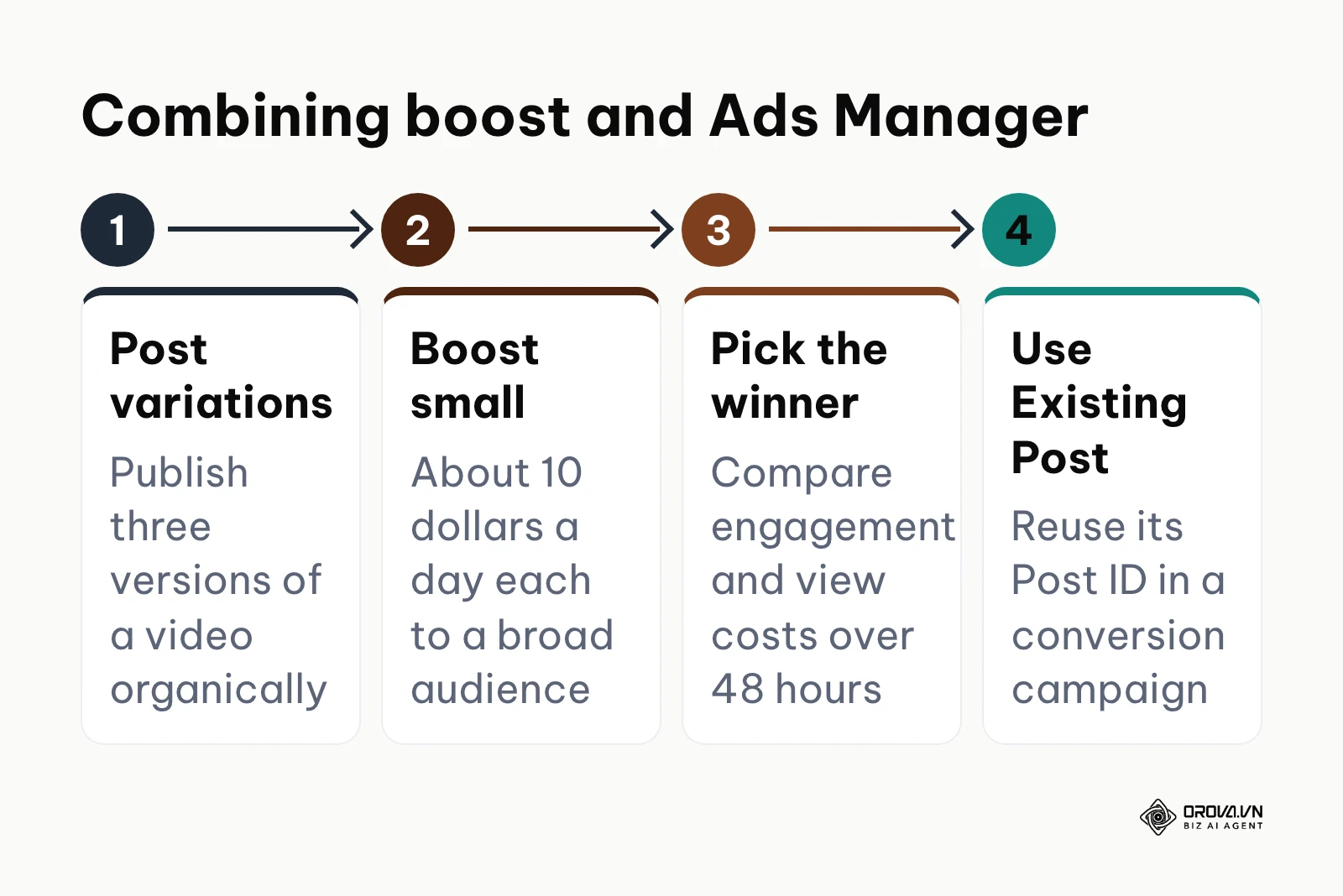
At the ad level, instead of uploading a new video, select "Use Existing Post" and paste the Post ID. This action pulls the winning video—along with all the likes, comments, and social proof it gathered during the boosting phase—into your professional conversion campaign. You are now combining the social proof you gathered with the targeting and optimization of Ads Manager.
The diagram below summarizes the steps of this combined strategy.
Future trends in social advertising: the author's perspective
The landscape of digital advertising is shifting rapidly beneath our feet. Strategies that worked flawlessly two years ago are becoming obsolete as platforms evolve and privacy regulations tighten. Based on the current trajectory, here is where I see the industry heading in the next few years.
The rise of AI-driven autonomous media buying
We are currently seeing a massive push from major platforms to automate the media buying process entirely. Tools like Meta's Advantage+ are already stripping away manual targeting controls in favor of algorithmic broad targeting. I believe that over the next few years, the role of the traditional media buyer will transition from pulling levers in a dashboard to strictly managing creative inputs and financial parameters. AI will take over more of the bidding, placement and targeting decisions. You should prepare for this by focusing heavily on your creative strategy, since that is the input AI cannot invent for you.
Privacy-first tracking and the limits of the pixel
The current tracking infrastructure is under pressure. The iOS 14 update was just the beginning of a broader privacy movement, and browser restrictions and ad blockers keep chipping away at browser-based tracking. I believe server-side tracking, like the Conversions API (CAPI), is becoming the practical baseline for any business running conversion ads. Relying only on the browser pixel means seeing a shrinking share of your real results. You must prepare now by working with a developer to integrate server-side tracking directly from your backend systems to the ad platforms.
The consolidation of basic boosting features
As AI simplifies campaign creation, the stark divide between a basic boost and a full ad campaign will blur. I lean toward the prediction that platforms will eventually deprecate the traditional "Boost Post" button as we know it. Instead, they will replace it with a highly simplified, AI-driven "Smart Campaign" wrapper that automatically creates lookalike audiences and optimizes for downstream events without requiring the user to navigate the complex Ads Manager interface. You should adapt by learning the fundamentals of conversion optimization now, so you understand the logic driving these simplified AI tools in the future.
Frequently asked questions about social ads
How do I avoid the 30% Apple fee entirely?
Where the fee applies, pay for boosts and campaigns in a web browser through Meta Business Suite or Ads Manager instead of inside the Facebook or Instagram iOS app. Meta's help pages explain whether the fee applies in your country, so check them if you are unsure.
Can I convert a boosted post into an Ads Manager campaign?
You cannot directly "convert" a boosted post into a fully functioning Ad Set with deep targeting mid-flight. However, you can use the unique Post ID of the organic post you boosted and insert it into a brand new Ads Manager campaign. This allows you to retain the social proof (likes and comments) while leveraging advanced conversion optimization.
Is boosting a post on Facebook actually worth it?
Yes, but only under specific circumstances. It is worth it if your primary goal is to quickly build local awareness, generate social proof on a specific announcement, or test creative assets cheaply before launching a larger campaign. It is rarely worth it if your survival depends on driving a positive return on ad spend (ROAS) from direct product sales.
How will AI change ad creation and management?
AI is fundamentally restructuring the platform's core architecture. Instead of relying on manual demographic targeting, AI leverages massive behavioral datasets to predict who will convert. Furthermore, generative AI is now capable of altering ad backgrounds, generating copy variations, and resizing assets dynamically to prevent creative fatigue and lower acquisition costs.
When to use boost post vs ads manager for a new page?
For a brand new page with zero followers and no tracking data, start by boosting a few high-quality, value-driven posts to a broad audience to generate initial page likes and video views. Once you have built a small base of engagement, immediately transition to Ads Manager to begin retargeting those early engagers with actual conversion campaigns.
Where to start?
If you are suffering from "analysis paralysis" after absorbing all this technical information, you need a clear, immediate action plan based on your current situation. Identify which of the three states below best describes you, and execute only that single step today.
State 1: You are completely new and have never run an ad. Your first step has nothing to do with creating an ad. Before you spend a single dollar on either boosting or Ads Manager, make sure your ad account and payment method are configured correctly (this Facebook ad account setup guide walks through it), then install the Meta Pixel and configure the Conversions API (CAPI) on your website. Without this foundational tracking infrastructure, you are essentially flying blind. Spend your first afternoon securing this technical setup so that when you do launch, the algorithm can actually learn who your buyers are.
State 2: You frequently boost posts but see negative ROI. If you mostly boost from your phone, your immediate step is to stop paying for boosts inside the iOS app and avoid impulse boosting. Make yourself to log into the desktop Ads Manager. Create one simple conversion campaign optimizing for purchases, and limit your budget to a manageable daily amount while you learn the new interface.
State 3: You use Ads Manager but feel overwhelmed by complexity. If your account is a messy web of dozens of overlapping campaigns, your first step is radical consolidation. Pause all underperforming ad sets and consolidate your budget into one primary campaign. Utilize broad targeting or a broad lookalike audience, and allow the algorithm the breathing room and budget it needs to exit the learning phase. Complexity is the enemy of algorithmic efficiency.
About the author

Builder of Orova
Nguyễn Đỗ Trọng Ân has 8 years of experience in marketing, including 6 years managing market development across Asia. He builds Orova, a Biz AI Agent that never sleeps: it plans, runs and optimizes work for businesses.
Run your business with AI Agents
Orova is the always-on Biz AI Agent — it plans, runs, and optimizes the work for you.
Save time, unlock productivity.