
Advertise on Google Ads: what it is and how to launch profitably

When you decide to advertise on Google Ads, you step directly into the world's highest-intent commercial marketplace. Many new advertisers still operate on the outdated belief that digital advertising simply means choosing five popular keywords, writing a catchy headline, and letting automated algorithms handle the rest. That assumption burns marketing budgets quickly. Modern pay-per-click advertising requires a clear understanding of auction economics, conversion signal fidelity, search intent governance, and structural account configuration. Without these fundamentals, Google's automated defaults often steer your capital into unqualified display placements, unrelated search terms, and inflated cost-per-click auctions. This guide provides a practitioner's blueprint for launching and scaling profitable campaigns. You will examine the core auction mechanics, review a line-by-line pre-launch checklist, inspect realistic budget models with concrete unit economics, and learn how to configure negative keyword safeguards from day one.
What Does It Mean to Advertise on Google Ads?
To advertise on Google Ads is to display sponsored promotional listings across Google Search, YouTube, Display networks, and Partner properties to capture active consumer demand. Unlike organic search optimization, this paid system delivers instant visibility through an auction model, charging advertisers only when qualified prospects interact with their tailored campaign assets.
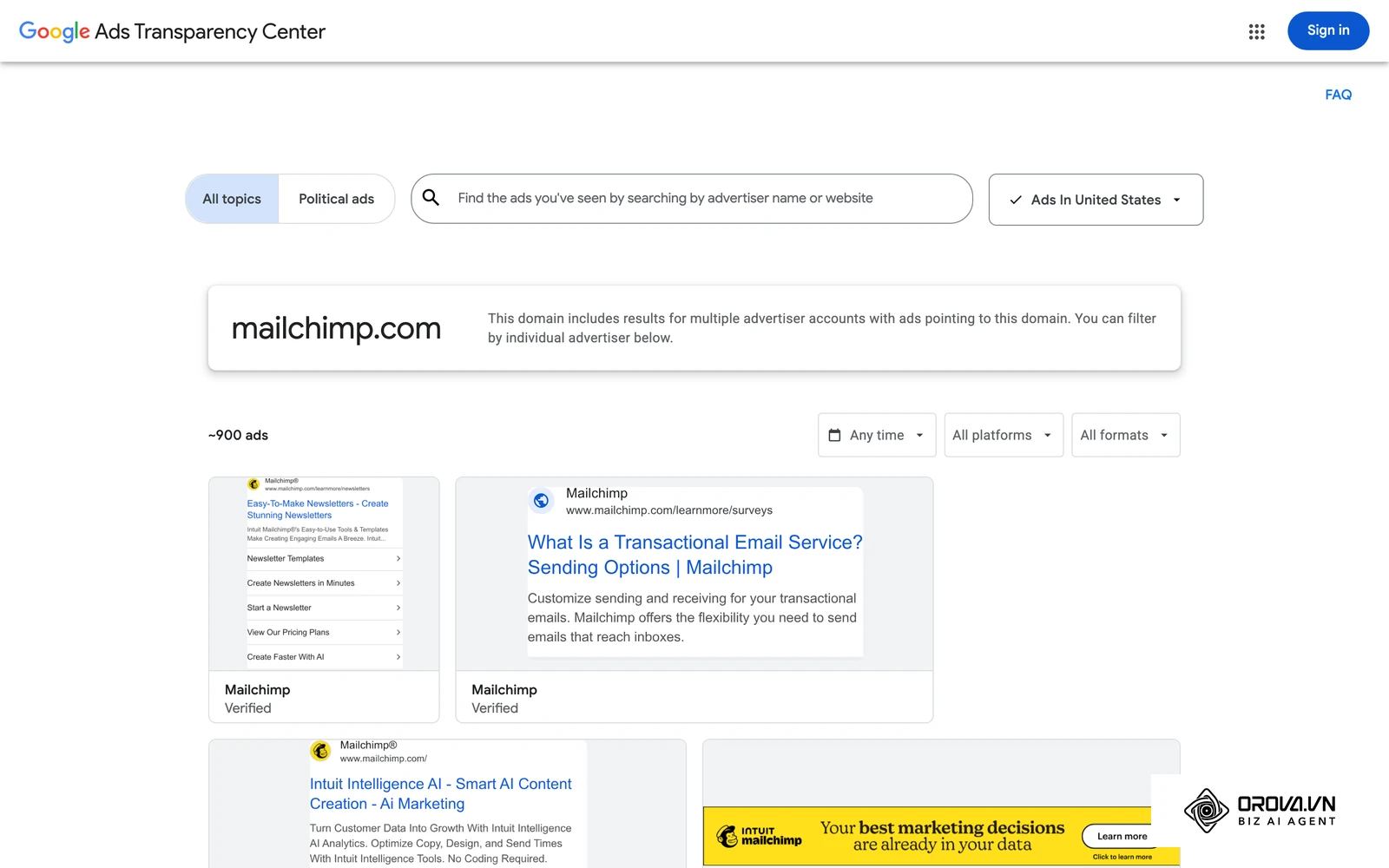
Originally launched in October 2000 as Google AdWords, the platform initially operated on a monthly cost-per-thousand impressions (CPM) basis. In 2002, it transitioned to a performance-based cost-per-click (CPC) engine. In July 2018, Google rebranded the ecosystem to Google Ads to reflect multi-channel inventories that span YouTube video, Google Maps, Gmail, Discover feeds, and algorithmic automated placements.
New advertisers often confuse Google Ads with organic search ranking, social media advertising, or standalone programmatic ad networks. The following comparison clarifies these operational boundaries:
| Advertising Concept | Where It Differs | Practical Example |
|---|---|---|
| Google Ads (Search) | Captures active purchase intent via auction bids when users query specific terms. | Showing an ad when a user searches "hire emergency commercial plumber." |
| Search Engine Optimization (SEO) | Earns organic search placement through technical site architecture and content authority without direct media cost per click. | Publishing comprehensive technical articles to rank on page one over a six-month window. |
| Paid Social (Meta Ads) | Generates passive demand by interrupting social media browsing based on demographic and interest profiling. | Displaying an Instagram carousel ad for ergonomic office chairs to remote tech workers. |
| Programmatic Display | Purchases banner ad real estate across third-party websites based on behavioral audience cookies. | Serving retargeting banners across news portals to users who browsed a product catalog. |
To understand this in everyday terms, imagine a traveler arriving at an international airport with a broken suitcase. Google Ads operates like a luggage store positioned right outside the customs exit, where travelers actively seeking a replacement can buy one immediately. Social media advertising, by contrast, resembles handing out discount flyers to passengers waiting in the departure lounge who might need luggage several months in the future.
The Core Purpose of Google Ads: Why Intent-Driven Advertising Matters
Google Ads exists to solve a single fundamental business problem: commercial latency. Building organic search rankings and compounding word-of-mouth reputation can take quarters or years. When an enterprise needs to validate a new product line, capture market share in a competitive geographic territory, or generate qualified sales calls this quarter, Google Ads bridges that time gap by trading media budget for immediate commercial visibility.
In the broader customer acquisition journey, Google Ads plays a specialized role. Organic social content, brand PR, and podcast sponsorships generate initial awareness at the top of the funnel. Once that awareness transforms into active consideration, prospective buyers turn to Google to compare pricing, locate vendors, and read service specifications. This is where Google Search and Google Shopping intercept high-intent prospects right before they complete a transaction. Post-click landing pages, CRM systems, and automated email nurturing sequences then take over to close the sale and maximize customer lifetime value.
Ignoring Google Ads leaves bottom-of-funnel capture vulnerable. When prospective buyers search for your brand name or your exact service category, competitors willing to bid on those keywords will occupy the top four sponsored search slots. This diverts qualified prospects into competitor sales funnels even if your organic ranking appears first among standard web links. Properly planning your initial Google Ads campaign setup ensures you defend your brand territory while acquiring new accounts efficiently.
When You Do Not Need Google Ads Yet
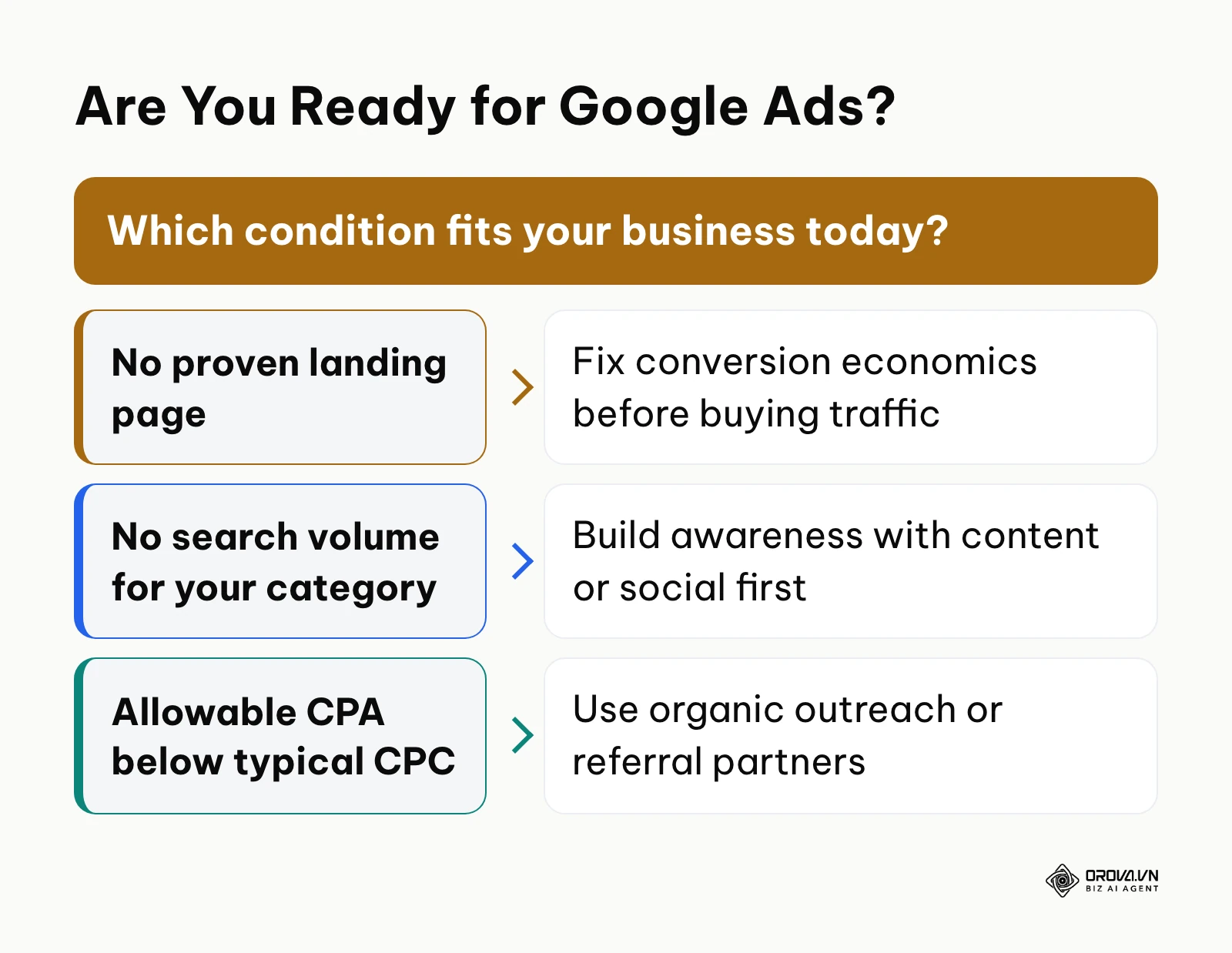
Running Google Ads becomes an expensive mistake under three specific business conditions. First, if your offer lacks a functional landing page with proven conversion economics, paid traffic merely accelerates cash burn without generating pipeline. Second, if you are pioneering an entirely novel product category with zero existing search volume, buyers are not searching for your solution yet; awareness-building content or targeted social discovery must precede paid search. Third, if your unit economics leave an allowable customer acquisition cost lower than your industry average cost per click, organic outreach or referral partnerships offer a far more sustainable acquisition channel.
Business and Operational Benefits of Advertising on Google Ads
Investing in paid search delivers measurable business returns while equipping marketing teams with actionable customer data. These benefits operate across two distinct levels: executive balance-sheet advantages and daily practitioner controls.
Predictable Revenue Generation and Cash Flow Control
Google Ads allows leadership to treat customer acquisition as an engineered financial input rather than an unpredictable quarterly guess. Because you set precise daily budget caps and target bidding thresholds, spending aligns directly with cash flow availability.
Illustrative example (Ví dụ minh hoạ):
- Context: A boutique commercial HVAC repair service operating in a metropolitan area with eight field technicians and an in-house marketing manager.
- Actions taken: The manager deployed an Exact and Phrase match Search campaign targeting emergency repair keywords, applied strict geographic bid radii around core industrial parks, and integrated call tracking into their dispatch software.
- Obstacle and resolution: In the second week, click costs spiked because Google expanded phrase matches to include generic residential DIY searches; the manager audited the Search Terms Report and applied an extensive negative keyword list covering homeowner repair queries.
- Visible outcome: The technician dispatch schedule became fully booked two weeks in advance, with dispatchers fielding direct service contract requests from commercial facility managers.
Rapid Market Validation and Speed to Learning
Organic marketing requires months before traffic yields statistically significant conversion data. Google Ads enables companies to test new messaging, value propositions, and pricing models within forty-eight hours.
Before adopting paid search, a software company might spend four months debating two distinct positioning angles for its enterprise billing software without customer validation. After launching two tightly segmented ad groups targeting the same high-intent search terms, the team gathers data on ad click-through rates and landing page demo requests within one week, settling strategic debates using concrete user actions.
Financial Downside Protection Through Strict Budgetary Controls
Unlike traditional broadcast media or print commitments that require upfront non-refundable contracts, Google Ads lets businesses adjust or pause budgets instantly. If supply chain disruptions delay product delivery or sales teams reach full call capacity, ad spend can be paused with a single click, eliminating wasted overhead.
Before adopting digital controls, businesses faced locked advertising commitments regardless of sales capacity. With modern campaign controls, operations teams configure automated budget thresholds that scale down ad spend during inventory shortages and ramp up pacing during peak demand cycles.
Direct Access to Commercial Intent Over Passive Demographics
The primary advantage for performance marketers is the nature of search intent. Rather than guessing whether a consumer might be interested in accounting software based on their job title on social media, search marketers present solutions when that user explicitly types "hire outsourced bookkeeping firm for tech startup."
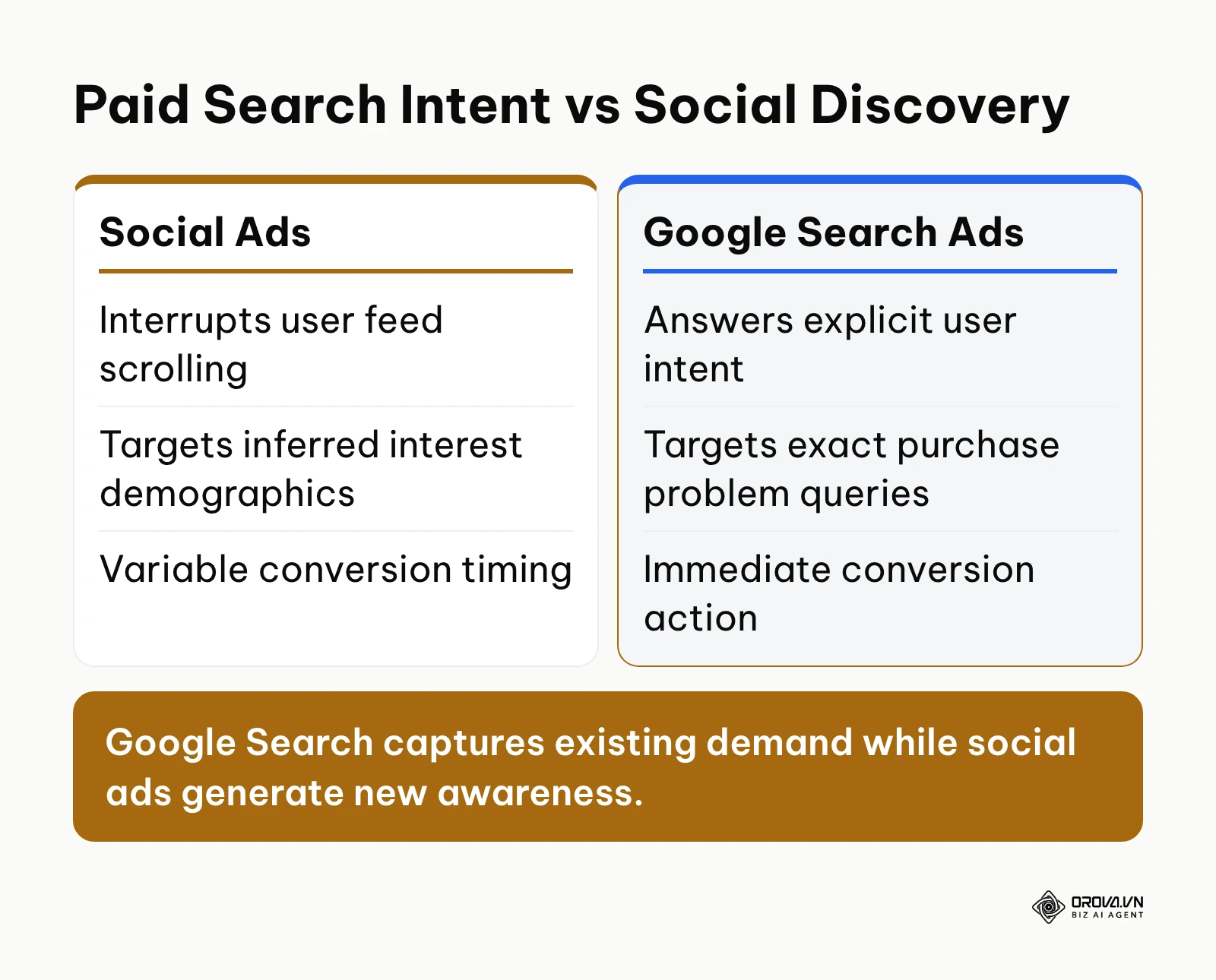
The diagram below summarizes the structural difference between passive social discovery and active search intent:
[Paid Search Intent vs Social Discovery]
Before running search campaigns, media buyers often expend substantial creative resources designing dozens of visual hooks for social feeds, only to fight declining user attention spans. After deploying search ads, the practitioner focuses on search query relevance, high-converting copy, and landing page friction, capturing prospects who have already decided to make a purchase.
Granular Attribution and First-Party Audience Re-engagement
Google Ads provides transparent data tracking every step from the initial search impression to the final conversion. Marketers can identify which specific keyword, ad headline, and geographic location generated each sales lead. This attribution intelligence directly informs product roadmaps, content strategies, and long-term search engine optimization priorities.
The following table outlines how these business benefits translate into concrete performance metrics and operational timeframes:
| Core Benefit | Primary Metric Tracked | Expected Realization Timeframe |
|---|---|---|
| Demand Capture | Conversion Volume & Cost Per Acquisition (CPA) | 2 to 4 weeks (post-learning phase) |
| Market Validation | Click-Through Rate (CTR) & Conversion Rate (CVR) | 3 to 7 days after launch |
| Cost Efficiency | Return on Ad Spend (ROAS) & Average CPC | 4 to 8 weeks of continuous optimization |
| Brand Defense | Impression Share on Branded Terms | 24 to 48 hours |
OROVA ADS applies AI Agent to automate and optimize ad performance on Google, Meta and TikTok. Scale your budget safely, monitor 24/7 and expand your business quickly.
Experience the solution at orova.vn/ads
How Advertising on Google Ads Works: Anatomy of the Modern Ad Auction
Google Ads does not simply sell ad space to the highest bidder. It runs an auction that weighs your bid together with ad quality and context, producing a score known as Ad Rank. Every time a user executes a search, Google runs an automated auction in milliseconds to determine which ads appear and in what order.
The Real-Time Ad Auction and Quality Score Mechanics
The core engine of Google Ads is the Ad Rank calculation. Your Ad Rank dictates whether your ad is eligible to show, what position it takes on the page, and the actual cost you pay when a user clicks.
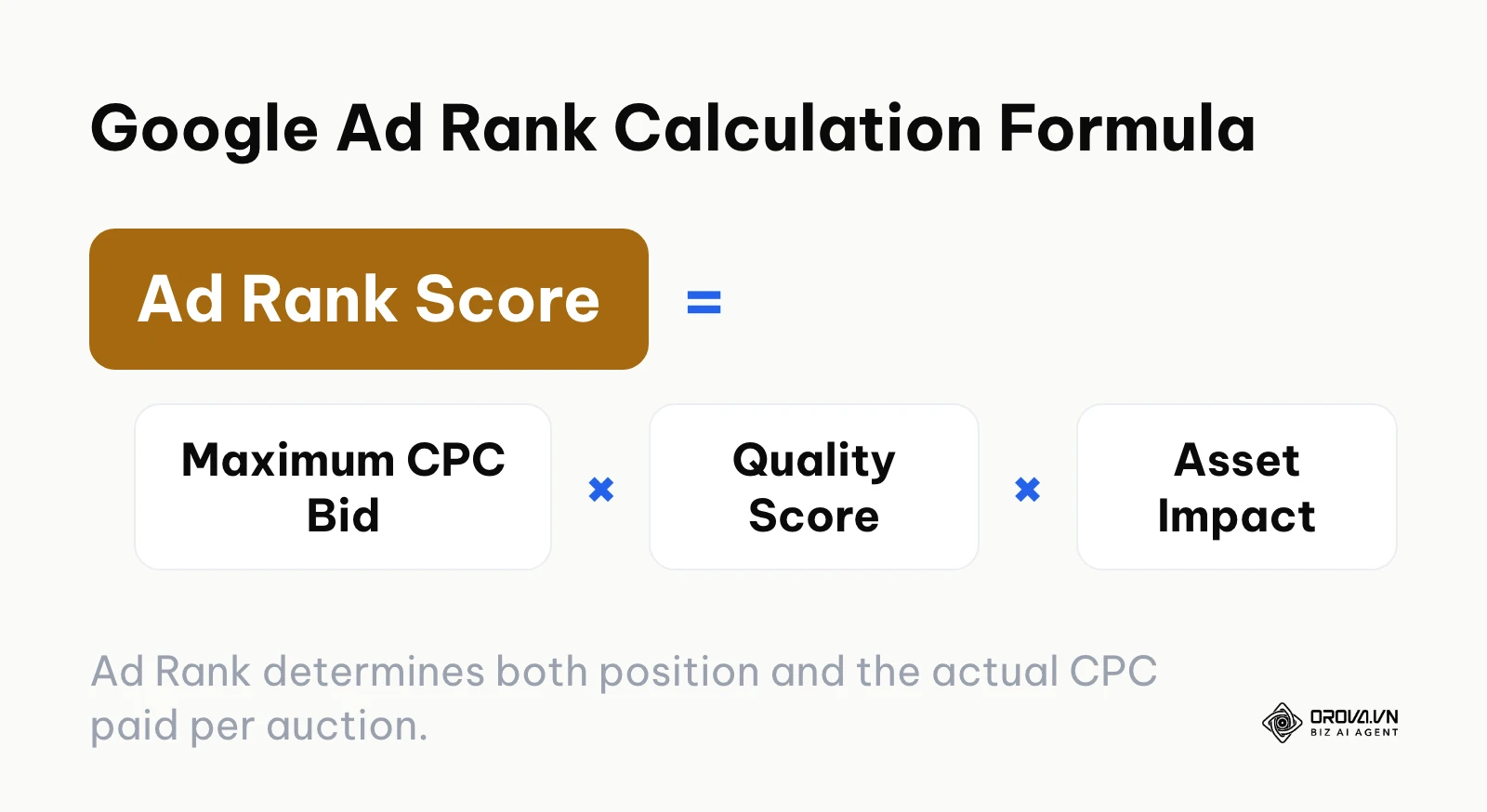
Ad Rank consists of three foundational inputs: your maximum cost-per-click bid, your Quality Score, and the expected impact of your ad assets (formerly ad extensions, such as sitelinks, callouts, and structured snippets). Quality Score is a diagnostic metric scored on a scale of 1 to 10 that reflects three components: expected click-through rate, ad relevance to the search term, and landing page experience.
Google's automated bidding evaluates many contextual signals at auction time to predict conversion probability, but it still works on top of the Ad Rank logic. A simplified way to picture it:
[Google Ad Rank Calculation Formula]
Where this mechanism breaks down is when advertisers attempt to compensate for poor relevance with higher bids. An advertiser with a Quality Score of 3 will pay significantly more per click than a competitor with a Quality Score of 8 for the same ad position. Improving landing page loading speed, aligning ad headlines with search queries, and maintaining a high Google Ads Quality Score lowers actual media costs across every auction.
Campaign Architecture: Search, Performance Max, and Demand Gen Compared
Modern Google Ads accounts span multiple campaign types. Choosing the wrong format for your objective often leads to automated budget waste. As of 2026, Google offers three primary campaign architectures for commercial performance:
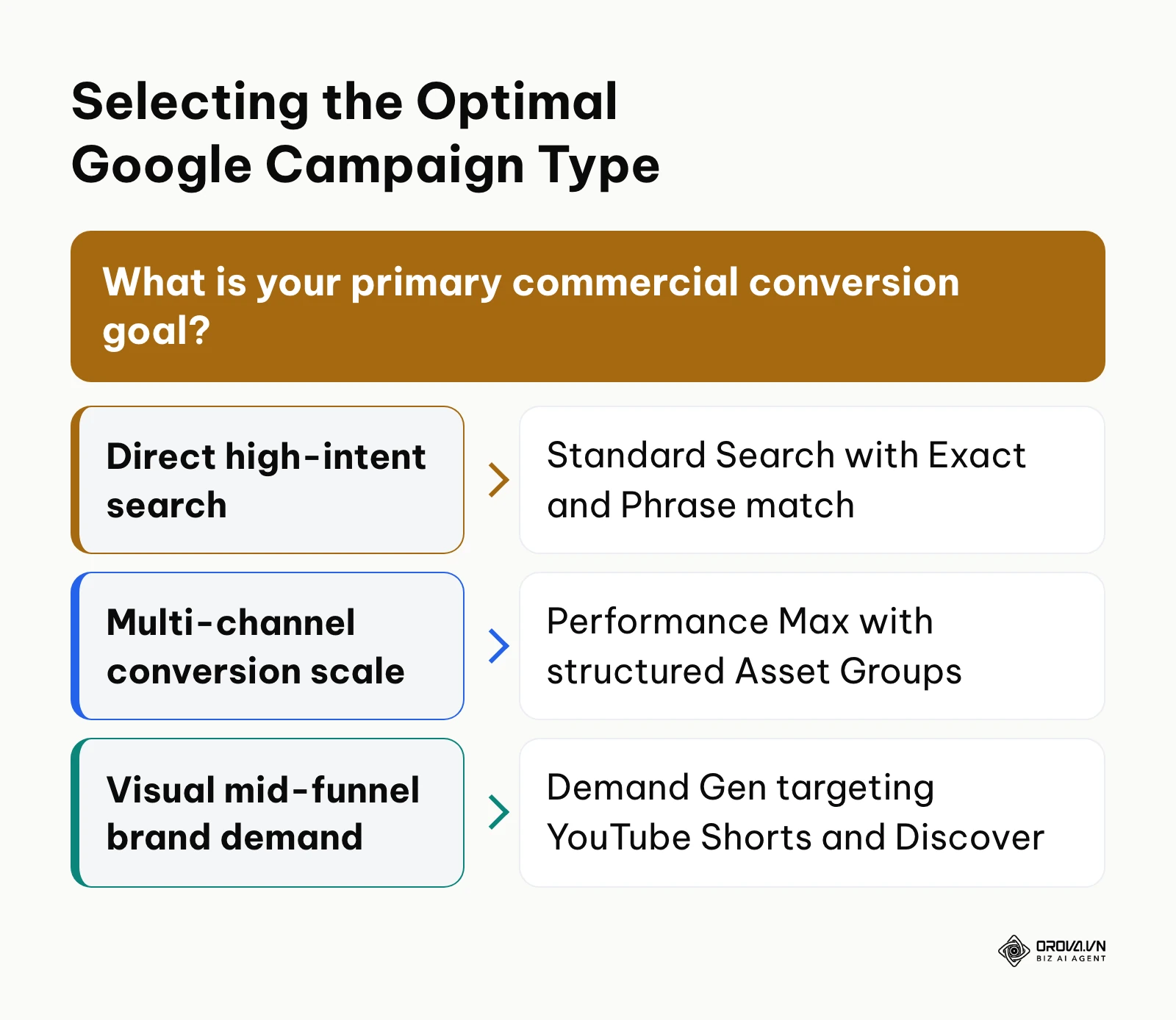
- Standard Search Campaigns: The traditional backbone of paid search. Ads appear as text listings on Google search results pages and Google Maps. Advertisers retain full control over keyword targeting, match types, ad copy, and negative search queries.
- Performance Max (PMax) Campaigns: Google's automated, goal-based campaign type. PMax serves ads across Search, YouTube, Display, Discover, Gmail, and Maps from a single campaign. Instead of individual keywords, advertisers supply asset groups (headlines, descriptions, lifestyle images, video) and audience signals (first-party customer lists, custom intent segments). Machine learning then routes budget dynamically across Google's entire ad inventory.
- Demand Gen Campaigns: The visual successor to Discovery ads. Demand Gen focuses on immersive mid-funnel creative placements across YouTube Shorts, Discover feeds, and Gmail, using lookalike segments to capture prospective buyers before they begin active search queries.
The decision framework below outlines when to deploy each campaign type:
[Selecting the Optimal Google Campaign Type]
To structure an account cleanly, compare these options across their core operational characteristics:
| Campaign Type | Operational Characteristics | Ideal Business Model |
|---|---|---|
| Standard Search | High keyword control, precise search query filtering, manual or smart bidding, text and asset based. | B2B lead generation, local services, high-intent niche products, and brand defense. |
| Performance Max | Fully automated cross-channel inventory, machine-learned budget routing, requires rich visual and video assets. | E-commerce with extensive product catalogs, multi-location retail, and scaled direct-to-consumer brands. |
| Demand Gen | Visual storytelling, video-first formats (Shorts), lookalike audience modeling, mid-funnel engagement. | Visual consumer products, mobile app installs, and consideration-stage SaaS products. |
Step-by-Step Google Ads Account and Campaign Interface Setup
Setting up an effective account requires bypassing several automated default settings that favor Google's ad inventory consumption over advertiser capital efficiency.
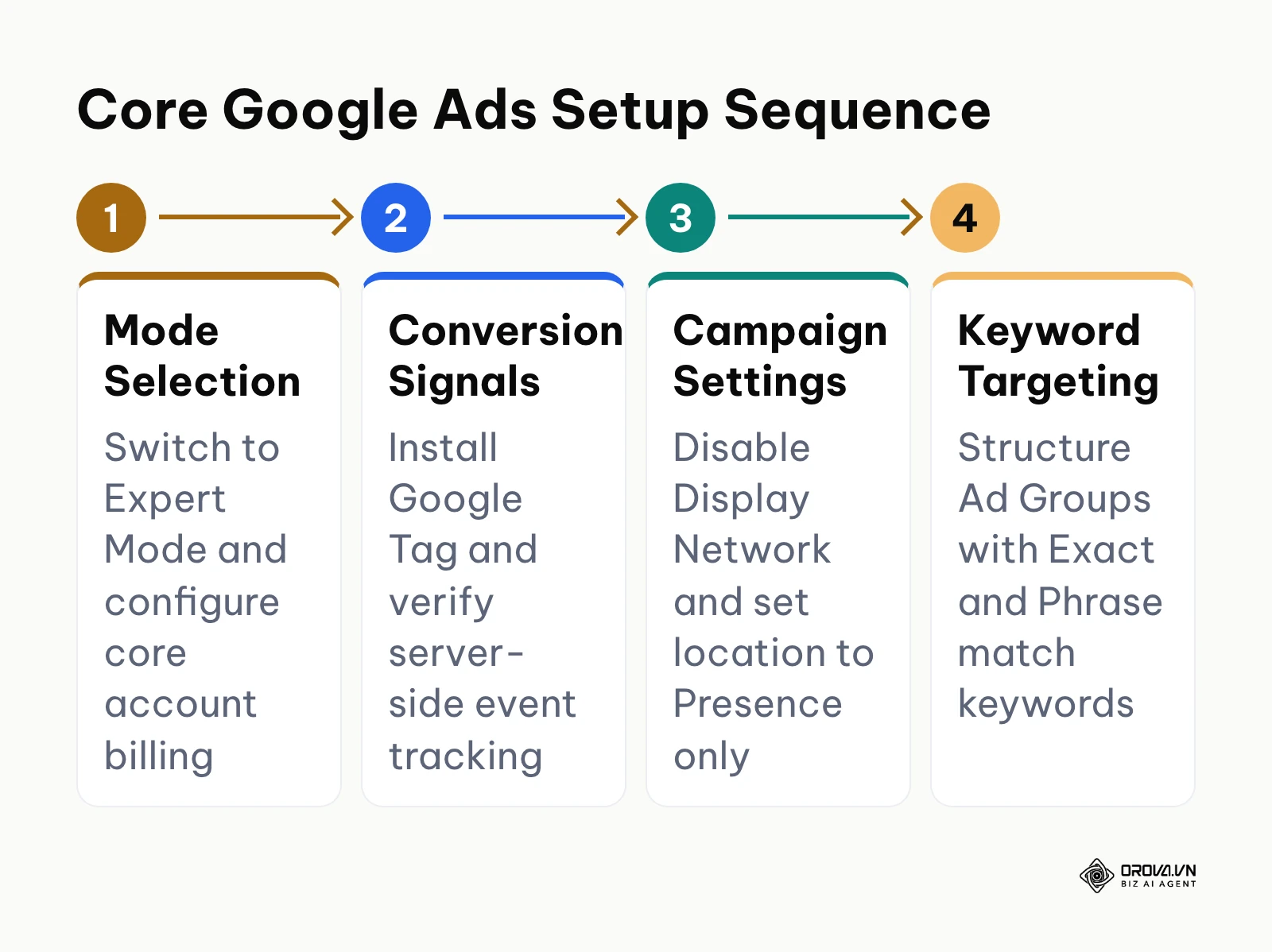
The diagram below illustrates the sequential setup path:
[Core Google Ads Setup Sequence]
Follow this setup sequence:
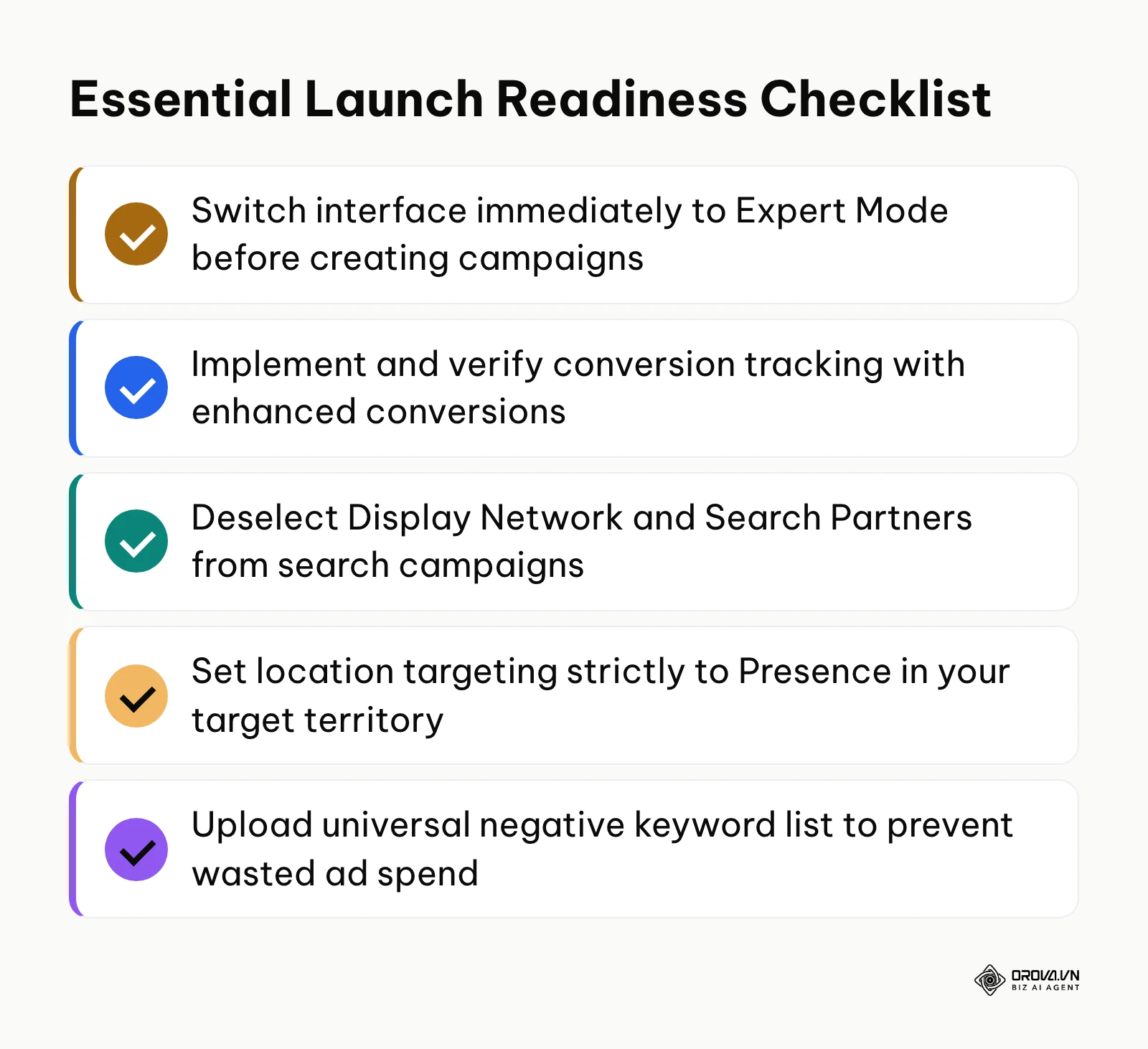
- Create Account in Expert Mode: When registering at Google Ads, Google prompts you to set a basic business goal and automatically configures a "Smart Campaign." Immediately locate and click the small link titled "Switch to Expert Mode." Smart Campaigns strip away keyword control, search terms visibility, and manual bid adjustments.
- Configure Billing and Administrative Access: Set your business currency and time zone carefully. Currency cannot be changed after the account is created, and time zone changes are restricted. Ensure two-factor authentication is enforced across all user logins to prevent unauthorized account changes.
- Deploy Measurement Architecture: Before creating your first campaign, configure your conversion tracking. Install the Google Tag on your website header or through Google Tag Manager. Define your primary conversion action, such as a completed checkout or lead form submission. Enable Enhanced Conversions, which hashes first-party user data (such as email addresses) and sends it securely to Google to maintain attribution accuracy despite browser cookie restrictions.
- Select Campaign Objective Without Guidance: When creating a new campaign, choose "Create a campaign without a goal's guidance," followed by "Search." This unlocks full administrative settings that pre-packaged objective wizards conceal.
- Deselect Network Expansions: In the campaign network settings, uncheck both "Google Search Partners" and "Include Google Display Network." Allowing a Search campaign to expand into the Display Network allows Google to spend search budget on banner placements across apps and websites.
- Set Precise Location Targeting: Under Locations, select "Enter another location" and specify your target market. Expand the "Location options" dropdown and switch the targeting setting from "Presence or interest" to "Presence: People in or regularly in your targeted locations." This prevents your ads from serving to international searchers merely browsing information about your city.
- Define Bidding Strategy with Caution: For brand-new accounts with zero historical conversion data, choosing "Maximize Conversions" forces the machine learning model to guess without baseline performance data. Begin with "Maximize Clicks" with a strict Maximum CPC bid limit (such as 2 dollars) to collect initial traffic, or launch with "Manual CPC" if you require exact bid discipline. Once the campaign records 30 to 50 verified conversions within a 30-day window, transition to "Maximize Conversions" with a Target CPA (Cost Per Acquisition) constraint.
- Structure Ad Groups by Tight Themes: Create dedicated ad groups centered around a single commercial theme containing no more than 5 to 15 tightly related keywords. For example, separate "commercial hvac repair" from "emergency hvac maintenance."
- Apply Correct Keyword Match Types: Understand Google's three match types. Exact Match [keyword] triggers ads only for queries with the exact same meaning. Phrase Match "keyword" triggers ads for searches that include the meaning of your phrase. Broad Match keyword matches any related concept, including loose synonyms and tangential queries. Avoid broad match in new accounts until conversion tracking and negative keyword lists are firmly established.
- Build Responsive Search Ads (RSAs): Provide at least 8 to 12 distinct headlines and 3 to 4 descriptions per ad. Incorporate your primary keywords naturally into the headlines while highlighting clear business differentiators. Pin specific brand headlines only when regulatory or compliance rules mandate exact phrasing.
- Populate Comprehensive Ad Assets: Add at least four sitelinks leading to distinct site pages, three callout assets highlighting service guarantees, structured snippets, and your primary business phone number. Sitelinks expand your physical ad real estate on search results pages, directly improving click-through rates.
- Review Campaign Settings and Launch: Conduct a comprehensive review of your daily budget, location settings, negative keyword attachments, and conversion actions before enabling campaign spend.
Pre-Launch Audit: 10 Google Default Settings to Disable Immediately
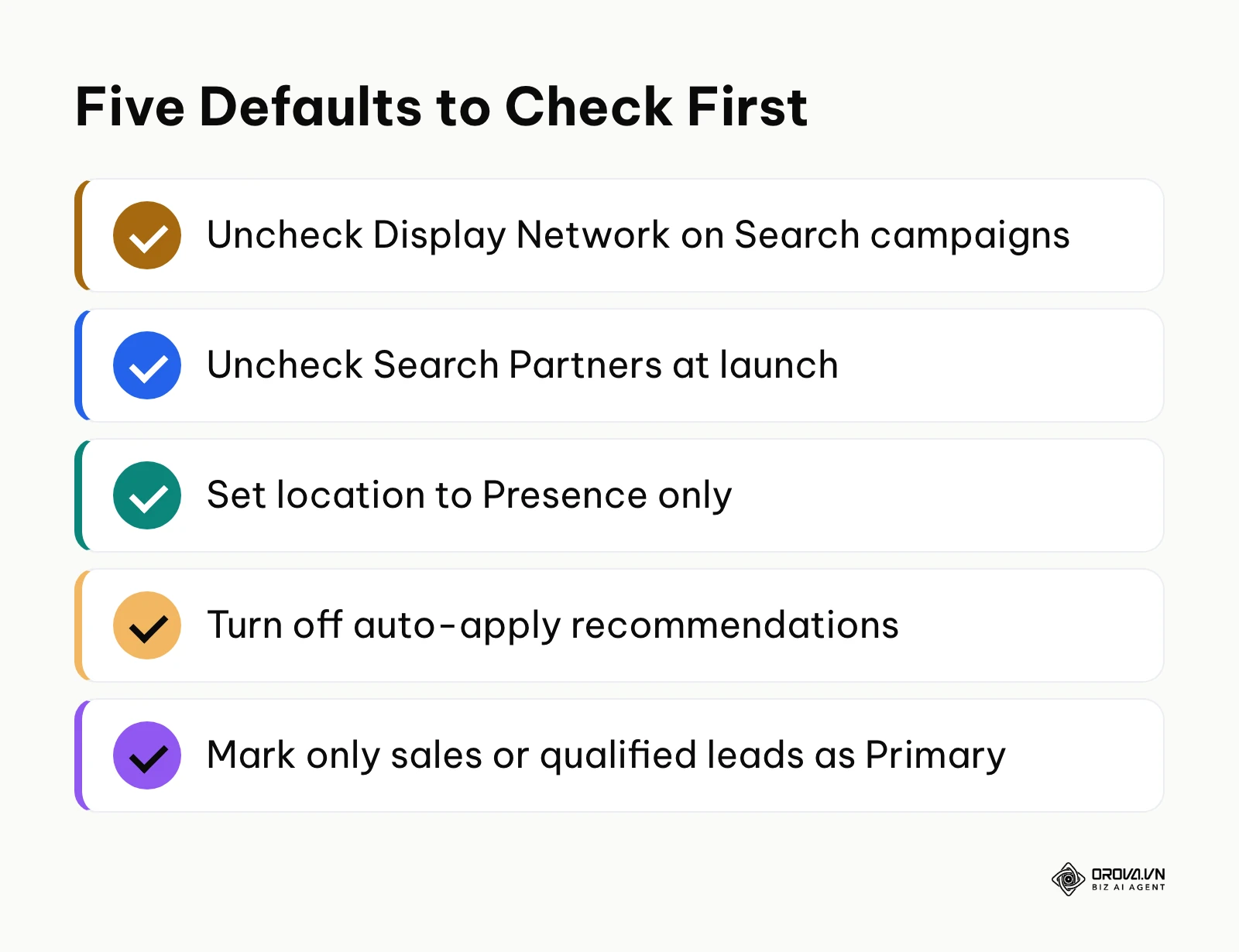
Google Ads incorporates numerous automated default settings designed to maximize platform inventory coverage. For new advertisers, these defaults represent the most common cause of rapid budget exhaustion. Review this checklist before launching:
| Default Feature | Financial Risk / Budget Leakage | Recommended Action |
|---|---|---|
| Display Network on Search | Automatically spends your high-intent search budget on low-converting display banner placements. | Uncheck "Include Google Display Network" in Search campaign settings. |
| Google Search Partners | Distributes ads across third-party search engines, toolbars, and parked domains that often convert differently from Google Search itself. | Uncheck "Include Google Search Partners" during initial campaign launch. |
| Presence or Interest Location | Serves ads to users physically located outside your target geographic territory who search about the area. | Change location options to "Presence: People in or regularly in your targeted locations." |
| Auto-Apply Recommendations | Authorizes Google's algorithm to automatically add keywords, change match types, and alter bids without approval. | Navigate to Recommendations > Auto-apply and uncheck all automated optimization toggles. |
| Smart Bidding Without Caps | Bidding algorithms can bid aggressively on single clicks during uncalibrated learning phases. | Apply a maximum CPC bid limit when using Maximize Clicks or set realistic Target CPA ceilings. |
| Broad Match Campaign Default | Automatically converts all newly added keywords into broad match, expanding reach to loose synonyms. | Toggle off broad match campaign-level defaults; use explicit Exact and Phrase match punctuation. |
| Optimized Targeting in Display/PMax | Expands audience targeting beyond your specified customer lists to arbitrary third-party users. | Manually disable "Optimized Targeting" within ad group or asset group audience settings. |
| Automated Asset Creation | Allows Google to automatically generate headlines and descriptions scraped from unoptimized site pages. | Disable "Automatically created assets" in campaign settings until custom ad copy performance is verified. |
| All Conversions Counted for Bidding | Secondary actions like newsletter signups or page views inflate conversion counts, distorting smart bidding. | Set micro-actions to "Secondary" actions and designate only primary commercial sales or qualified leads as "Primary." |
| Unrestricted Ad Scheduling | Runs campaigns 24 hours a day, draining budget during overnight hours when sales teams cannot respond. | Set ad schedules to match your actual operating hours if rapid lead follow-up is critical. |
Realistic Budget Modeling: 10, 30, and 100 Dollars per Day
New advertisers frequently ask how much capital is required to test Google Ads effectively. Budget planning should be driven by mathematics rather than arbitrary guesses. You need enough daily budget to generate a statistically meaningful sample of clicks within a reasonable evaluation window.
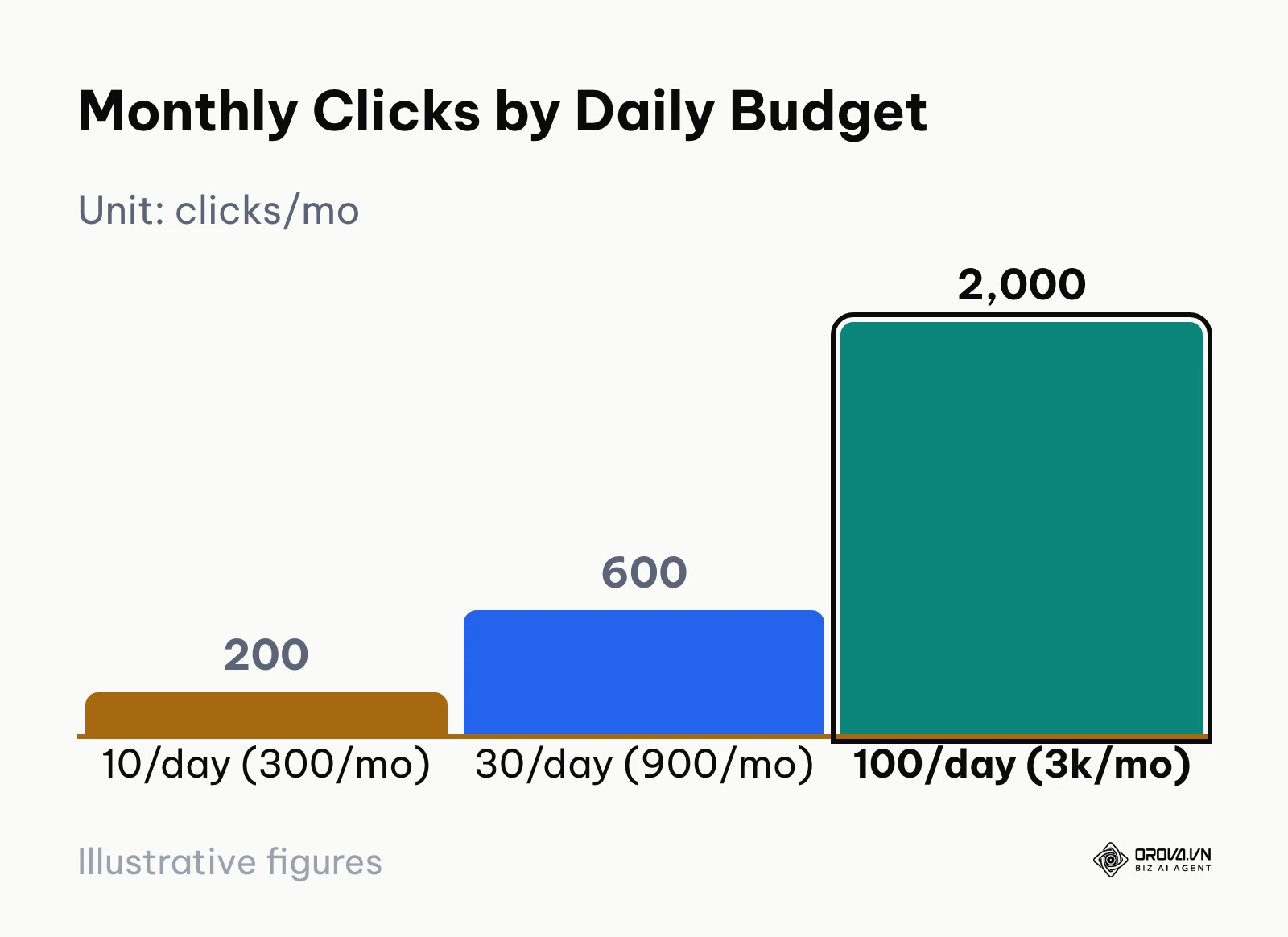
Conversion rates and costs per click vary widely by industry and country, so treat any benchmark as a starting assumption and replace it with your own data after the first weeks. For a breakdown of what drives click costs, see this guide to Google Ads pricing.
The following illustrative model evaluates three testing budgets (10, 30, and 100 dollars of daily spend) over a 30-day billing cycle, assuming an average CPC of 1.50 dollars (an example figure, not a benchmark):
| Daily Budget (Monthly Total) | Estimated CPC | Monthly Clicks Generated | Conversions at 2% CVR (Low) | Conversions at 5% CVR (Average) | Projected CPA at 5% CVR | Target Break-Even Product Margin |
|---|---|---|---|---|---|---|
| 10 dollars/day (300 dollars/month) | 1.50 dollars | 200 clicks | 4 conversions | 10 conversions | 30 dollars | Product profit margin must exceed 30 dollars |
| 30 dollars/day (900 dollars/month) | 1.50 dollars | 600 clicks | 12 conversions | 30 conversions | 30 dollars | Provides sufficient data for Smart Bidding transition |
| 100 dollars/day (3,000 dollars/month) | 1.50 dollars | 2,000 clicks | 40 conversions | 100 conversions | 30 dollars | Algorithm exits initial learning phase within 14 days |
The chart below visualizes the monthly click volume differences across these three daily spending levels:
[Estimated Monthly Clicks by Daily Budget]
At 10 dollars per day, your campaign gathers roughly 6 to 7 clicks per day. If your landing page converts at 3 percent, you will record one conversion every five days. Evaluating ad copy variations or testing two landing pages at that velocity requires months of waiting. At 30 dollars per day, you capture approximately 20 clicks daily, yielding a reliable conversion signal every 36 to 48 hours. At 100 dollars per day, the campaign generates sufficient volume (over 65 clicks daily) for Google's machine learning models to exit their initial learning phase within two to three weeks.
To calculate your own break-even Return on Ad Spend (ROAS), apply this formula:
Break-even ROAS = 1 ÷ gross profit margin (as a decimal)
If your product sells for 100 dollars with a cost of goods sold of 40, dollars your gross profit margin is 60 percent (0.60). Your break-even ROAS is 1 ÷ 0.60 = 1.67 (or 167 percent). Any campaign delivering an ad spend return higher than 1.67 generates net operating profit. Continuous search term hygiene and systematic Google Ads optimization prevent runaway costs and protect these margins over time.
Search Query Governance: Search Terms Report and Universal Negative Keywords
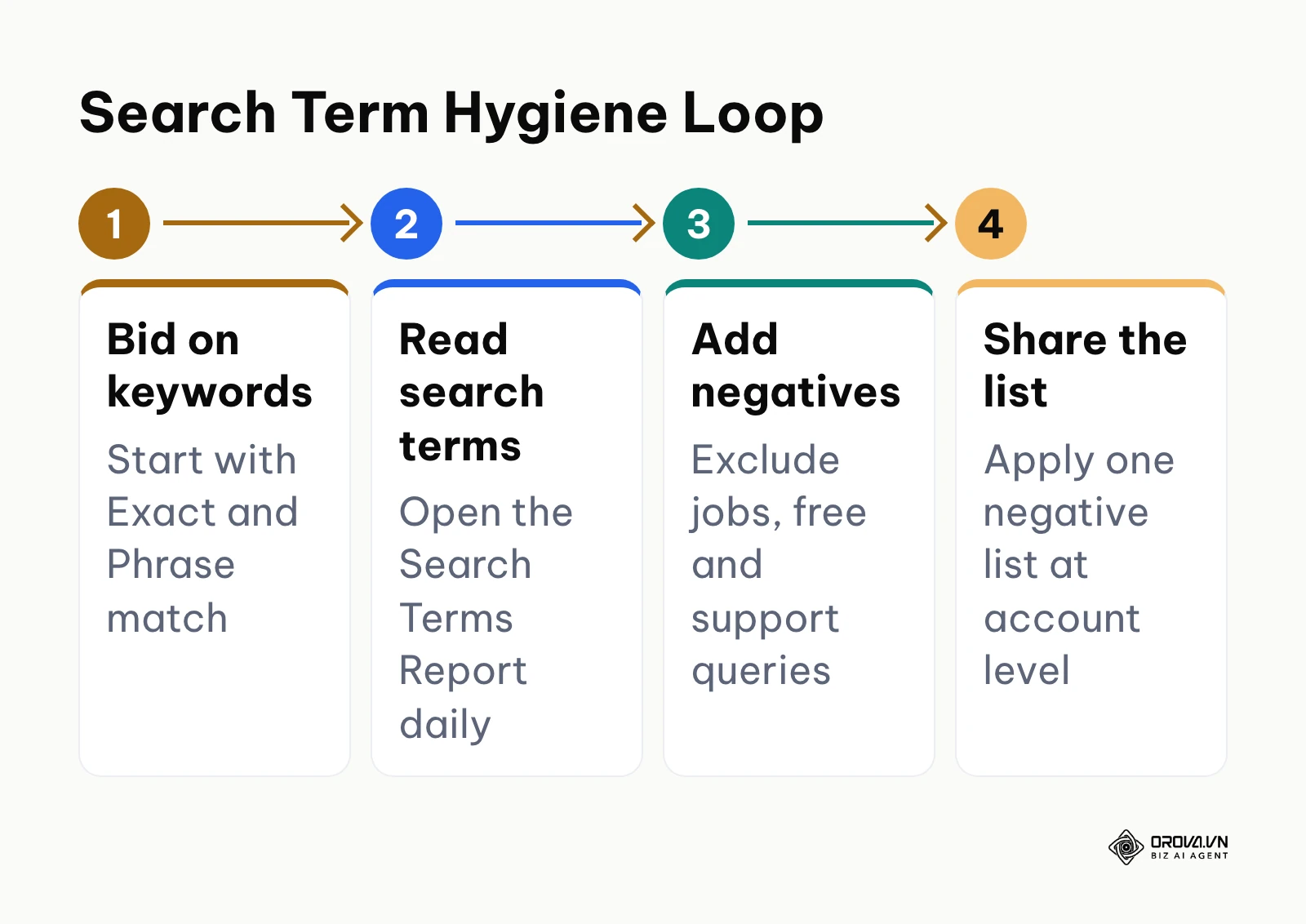
A common point of failure for new campaigns is conflating your selected keywords with the actual search queries users type. When you bid on a Phrase Match keyword like "industrial packaging supplier", Google's semantic engine may serve your ad to a user searching "industrial packaging supplier jobs salary in Chicago."
Illustrative example (Ví dụ minh hoạ):
- Context: A regional legal practice with three partners specializing in commercial corporate litigation aiming to acquire enterprise contract disputes.
- Actions taken: The marketing associate built targeted search ad groups around commercial contract arbitration, configured conversion tracking for online consultation requests, and monitored daily search queries.
- Obstacle and resolution: Within forty-eight hours, the initial ad spend was exhausted on searches seeking free legal aid forms and criminal defense advice; the associate paused all broad queries, restricted targeting to Exact Match commercial litigation terms, and added an extensive negative keyword list covering pro-bono, employment, and personal injury queries.
- Visible outcome: Inquiries submitted through the firm's website form shifted entirely to corporate contract disputes and commercial partnership conflicts.
To protect your budget from day one, upload a comprehensive universal negative keyword list at the account level before turning on campaign spend.
Here are 60 starter negative keywords applicable across most commercial B2B and e-commerce campaigns, organized by intent category:
- Employment and Career Seekers: jobs, career, careers, salary, salaries, hiring, resume, resumes, internships, glassdoor, indeed, linkedin, interview questions, job description, remote work, entry level.
- Academic and Free Resources: free, cheap, open source, torrent, crack, cracked, nulled, download, pdf, template, templates, sample, samples, DIY, how to make, tutorial, course, training, certification, textbook, github, wikipedia.
- Customer Support and Login: login, sign in, portal, customer service, support phone number, contact number, reset password, refund, cancel subscription, billing issue, complaints, headquarters address.
- Unrelated Media: images, photos, pictures, wallpaper, video, youtube, mp3, logo, vector, clipart.
Want to scale your budget but afraid of breaking performance?
Integrate OROVA ADS now - an AI Agent that automatically monitors and optimizes Google, Meta, TikTok ads 24/7. Now, expanding and replicating your Performance Ads team is just one click away.
Try it now at: orova.vn/ads
What to Do to Get Started and Adapt to Google Ads
Executing Google Ads effectively requires a clear roadmap tailored to your organizational structure. Whether you are a solo founder, an internal marketing team, or an agency media buyer, adopt a phased implementation plan.
Small Business Owners and Solo Founders: The Lean Validation Playbook
Small business operators must protect cash flow while proving that paid search can acquire customers at an acceptable unit cost.
Illustrative example (Ví dụ minh hoạ):
- Context: A single-founder specialty coffee equipment retailer selling commercial espresso grinders to independent cafes.
- Actions taken: The founder launched a single Search campaign focusing on 15 high-intent transactional equipment model names, configured purchase conversion tracking, and set a strict 20-dollar daily budget ceiling.
- Obstacle and resolution: Google defaulted the account setup into a Smart Campaign and automatically opted into the Display Network, burning spend on mobile game banner clicks; the founder switched the interface to Expert Mode, disabled Display Network expansion, and isolated pure search inventory.
- Visible outcome: Every recorded checkout in the store order management backend matched direct commercial equipment search queries from independent cafe owners.
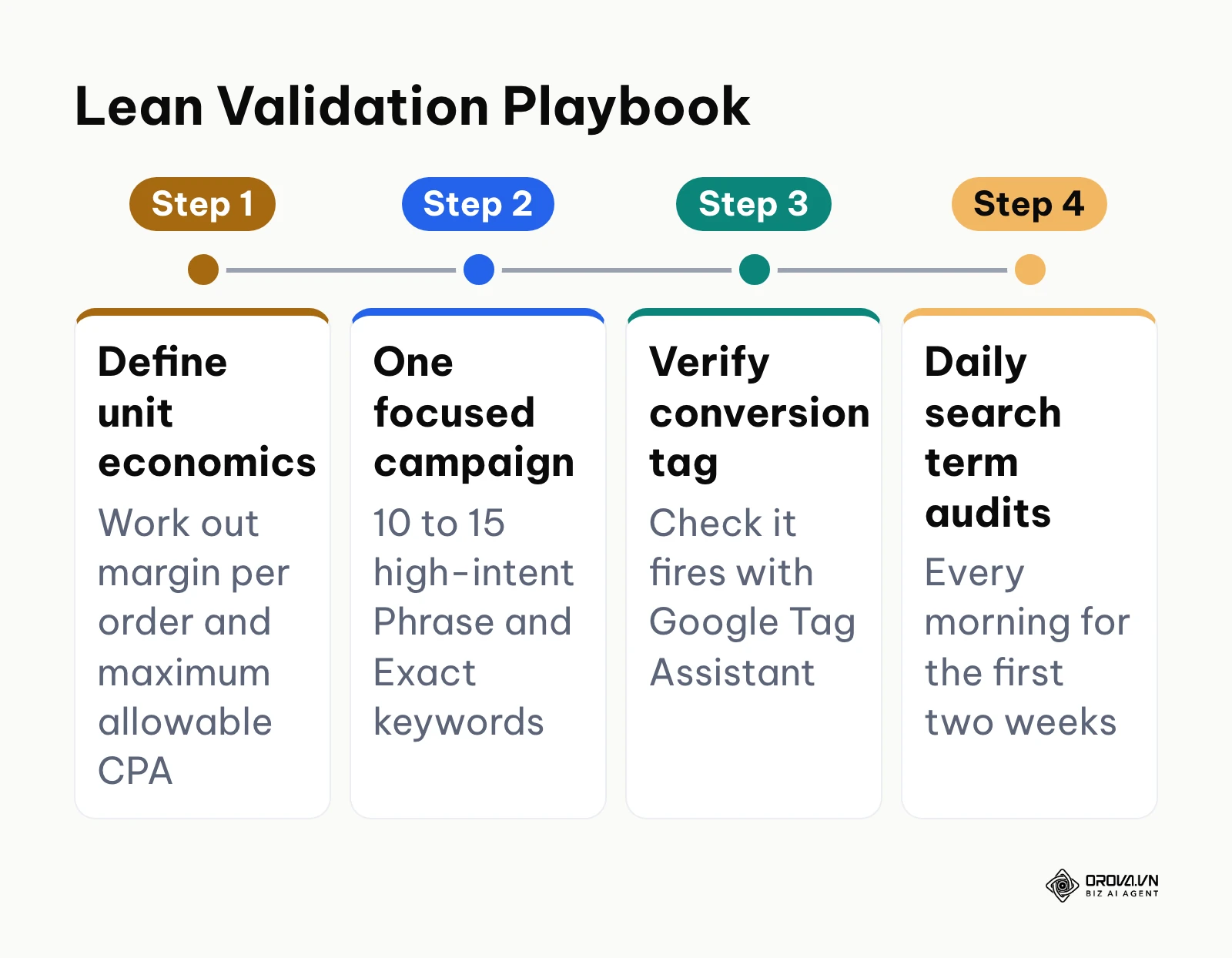
Follow these ordered steps to launch your initial validation test:
- Define Your Unit Economics: Calculate your gross profit margin per order and determine the maximum allowable Cost Per Acquisition (CPA) your business can tolerate before spending media budget.
- Launch a Single Focused Search Campaign: Select no more than 10 to 15 high-intent Phrase and Exact match keywords that represent explicit purchase intent for your top product or service.
- Install Verified Conversion Tracking: Verify that your purchase or lead form conversion tag fires correctly using Google Tag Assistant before enabling ad spend.
- Conduct Daily Search Term Audits: Review the Search Terms Report every morning during your first two weeks, adding irrelevant search terms to your negative keyword list immediately.
In-House Marketing Teams: The Systematic Scaling Framework
Corporate marketing teams manage broader stakeholder expectations, requiring rigorous attribution tracking, cross-channel coordination, and structured experimentation.
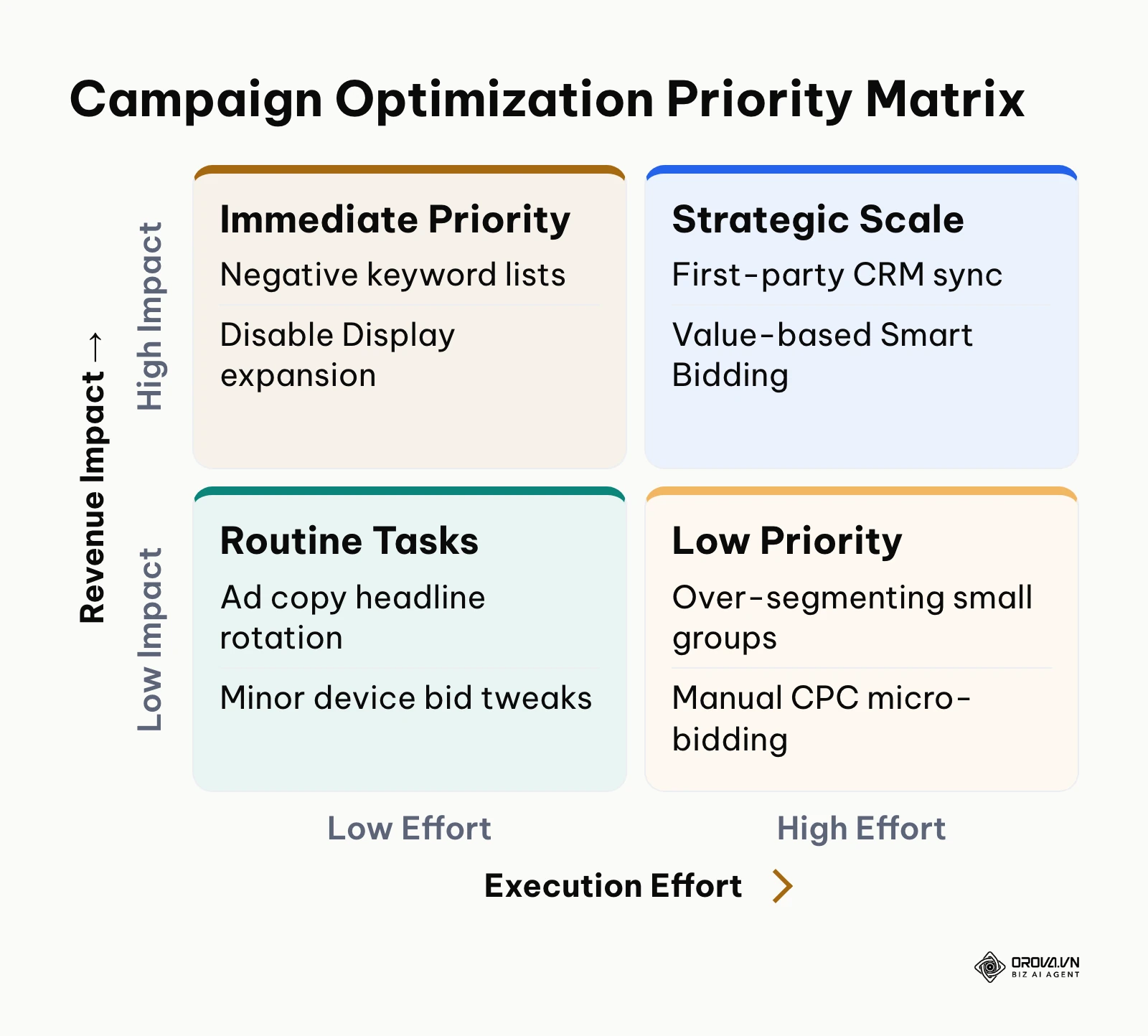
The priority matrix below helps teams organize daily and weekly optimization workflows:
[Campaign Optimization Priority Matrix]
Implement this structured scaling framework:
- Establish Server-Side Conversion Signals: Deploy Enhanced Conversions and connect first-party CRM events via server-side tagging, so measurement holds up as browser cookie restrictions tighten.
- Segment Search Inventory by Funnel Depth: Maintain dedicated Brand Protection campaigns, High-Intent Category Search campaigns, and structured Performance Max campaigns with segmented asset groups.
- Transition to Value-Based Smart Bidding: Once conversion tracking records over 50 events monthly, transition from Maximize Conversions to Target ROAS bidding to prioritize high-margin transactions over raw volume.
- Execute Weekly Creative and Asset Refreshes: Monitor Responsive Search Ad asset performance labels, replacing low-performing headlines and descriptions every two weeks with new variations.
- Evaluate Multi-Channel Management Systems: As ad accounts expand across Google, Meta, and auxiliary channels, evaluating specialized Google Ads management tools helps orchestrate unified workflows and prevent conflicting bidding rules.
Marketing Agencies and Performance Freelancers: The Client Retention Engine
Agencies and media buyers manage multiple client accounts where transparent reporting, systematic onboarding, and disciplined risk management drive retention.
Follow this operational onboarding roadmap:
- Execute Pre-Launch Account Audits: Audit the client's historical account structure against the 10 Google Default Settings checklist, identifying budget leaks before proposing budget increases.
- Standardize Conversion Tracking Governance: Audit every primary conversion action to ensure duplicate conversion counting is eliminated and secondary micro-conversions are excluded from automated bidding.
- Implement Shared Negative Keyword Lists: Build and maintain master negative keyword lists by industry vertical, applying them across all client accounts to safeguard initial spend.
- Establish Clear Milestone Reporting: Educate clients on the mathematical realities of the machine learning learning phase, setting expectation milestones based on statistical click volume rather than arbitrary daily check-ins.
Review this summary of frequent beginner errors, their operational consequences, and prevention measures:
| Common Beginner Mistake | Tangible Business Consequence | Prevention Protocol |
|---|---|---|
| Using Broad Match on New Accounts | High click volume on tangential, non-commercial search queries. | Launch exclusively with Exact and Phrase match types until negatives are established. |
| Ignoring Search Terms Audits | A large share of ad spend goes to irrelevant queries. | Review and filter the Search Terms Report daily for the first 14 days post-launch. |
| Premature Smart Bidding | Erratic bidding behavior and high initial CPAs due to lack of baseline data. | Accumulate 30 to 50 conversion events under bid-capped strategies before enabling Target CPA. |
| Unchecked Conversion Duplication | Over-reporting conversions, misleading Smart Bidding models. | Verify that conversion count settings are set to "One" for lead generation forms. |
| Failing to Add Ad Assets | Lower click-through rates and reduced visual ad real estate. | Add at least 4 sitelinks, 3 callouts, and structured snippets to every ad group. |
Future Trends in Google Ads: Author's Perspective
The paid search ecosystem is evolving toward automated, machine-driven operations. Based on structural changes visible across platform architectures as of 2026, here is my perspective on where Google Ads is heading over the next two to three years.
Autonomous Bidding Will Marginalize Granular Keyword Match Types
In my view, the traditional practice of carefully segmenting Exact, Phrase, and Broad match types across isolated ad groups will fade in importance over the next few years. Google has steadily expanded the semantic boundaries of Phrase and Exact match, prioritizing algorithmic user intent matching over rigid query punctuation. I believe keyword management will shift toward managing comprehensive negative constraint lists and feeding first-party audience signals into algorithmic routing engines like Performance Max. Practitioners should prepare for this shift now by focusing less on manual keyword mining and investing heavily in first-party data collection, customer lifetime value modeling, and server-side tracking pipelines. This expectation could prove incorrect if regulatory antitrust rulings force ad platforms to restore full query transparency and restrict algorithmic data consolidation.
Generative AI Search Interfaces Will Transform Search Ad Formats
I argue that conversational search engines and generative AI answer overviews will alter consumer search behavior, replacing short 2-to-3-word queries with detailed, multi-sentence conversational questions. Today's static text ads with three headlines and two descriptions will struggle to convert inside conversational interfaces. In my view, ad networks will transition toward dynamically synthesized conversational responses that cite advertiser products directly within AI-generated answers. Media buyers should prepare by optimizing their website content for structured semantic clarity, ensuring that product technical specifications, pricing, and availability are readily machine-readable. If consumer adoption of AI search plateaus due to computational latency or user preference for traditional link listings, standard responsive search ad formats will retain their dominance longer than anticipated.
Profit-Driven and Margin-Aware Bidding Will Replace Revenue Bidding
I project that top-line revenue optimization (such as standard Target ROAS) will lose favor among sophisticated enterprises, replaced by real-time margin and net-profit bidding. As rising media costs across competitive verticals compress margins, businesses cannot afford to treat a high-margin service sale identically to a low-margin hardware transaction. Current API pipelines already allow advertisers to feed cost-of-goods-sold data into ad engines. I believe ad platforms will soon require direct gross-profit signal feeds to power automated auctions. Marketing teams should audit their internal unit economics now, calculating real margins across product categories to prepare for profit-driven bid optimization. This shift could slow down if enterprise data privacy regulations restrict the transmission of sensitive internal cost structures to third-party ad networks.
Frequently Asked Questions About How to Advertise on Google Ads
Is advertising on Google Ads still necessary now that AI search and chatbots exist?
Yes, advertising on Google Ads remains vital for customer acquisition because transactional search intent continues to concentrate heavily on Google properties. While conversational chatbots handle informational queries, consumers actively comparing prices, seeking local contractors, or purchasing software continue to execute commercial searches where Google Ads dominates immediate screen visibility. Furthermore, Google is embedding sponsored listings directly into its AI Overviews, ensuring that paid placements remain the fastest route to capturing commercial demand.
What is the minimum test budget needed before the machine learning algorithm exits its learning phase?
Google's Smart Bidding models generally require 30 to 50 conversion events within a rolling 30-day window per campaign to gather sufficient training data and exit the learning phase. If your expected Cost Per Acquisition is 30, dollars a statistically viable testing budget requires at least 900 to 1,500 dollars over your initial month. Allocating significantly less budget spreads conversions too thinly across days, prolonging erratic bidding behavior and delaying campaign stabilization.
How can businesses track conversions accurately after third-party cookie deprecation and Enhanced Conversions enforcement?
Modern conversion tracking relies on first-party server-side tagging combined with Google's Enhanced Conversions protocol. When a customer submits a lead form or completes a checkout, your website hashes their first-party data (such as email address or phone number) using SHA-256 encryption before transmitting it securely to Google alongside conversion event timestamps. This allows the ad platform to match conversions accurately to ad impressions without relying on fragile third-party browser cookies.
Which bidding strategy should a brand-new account use when it has zero historical conversion data?
A brand-new account with zero historical conversions should launch using Maximize Clicks with a mandatory Maximum CPC bid limit, or carefully managed Manual CPC. Choosing unconstrained Maximize Conversions immediately forces the algorithm to bid blindly without conversion baselines, often leading to excessively high costs on initial clicks. Once your tracking records 30 verified conversions, you can transition safely to Maximize Conversions with a defined Target CPA constraint.
How long does it take for a newly launched Google Ads campaign to generate consistent results?
A well-structured Google Ads campaign typically requires three to six weeks to achieve consistent performance metrics. The first one to two weeks represent the initial data gathering phase, during which you audit daily search queries and build out your negative keyword list. Weeks three through four allow smart bidding algorithms to calibrate around verified conversion signals, while weeks five and six reflect normalized acquisition costs and reliable conversion pacing.
Where Should You Start with Google Ads?
Beginning your advertising journey successfully depends entirely on the current operational state of your marketing assets. Instead of trying to implement every optimization tactic at once, focus on the single high-leverage action that matches your current situation.
If you are starting from scratch with no historical account or campaign assets, your first step is purely architectural. Dedicate an afternoon to creating your Google Ads account in Expert Mode, installing the global Google Tag on your website header, and establishing a single verified primary conversion action for your main contact form or checkout page. Do not create ad groups or spend money until your conversion tag passes verification using Google Tag Assistant.
If you have active campaigns that produce scattered, inconsistent results, your immediate priority is search query governance. Open your primary Search campaign, navigate to the Search Terms Report for the past 30 days, sort queries by total spend, and audit every term that failed to generate a conversion. Extract every irrelevant job, educational, or generic query and add them directly to a master negative keyword list, instantly halting ongoing budget leakage.
If you are currently spending money without clear conversion tracking or unit economics, your priority is financial measurement. Pause all active broad match campaigns immediately and calculate your gross product margin to establish your maximum allowable cost per acquisition. Once your financial ceiling is defined, re-enable your campaigns under strict daily budget caps with bid limits that guarantee your acquisition costs remain safely below your break-even threshold. Taking these disciplined steps will ensure you profitably and sustainably advertise on Google Ads.
About the author

Builder of Orova
Nguyễn Đỗ Trọng Ân has 8 years of experience in marketing, including 6 years managing market development across Asia. He builds Orova, a Biz AI Agent that never sleeps: it plans, runs and optimizes work for businesses.
Run your business with AI Agents
Orova is the always-on Biz AI Agent — it plans, runs, and optimizes the work for you.
Save time, unlock productivity.