
Advertise LinkedIn: how to launch B2B lead campaigns in 7 steps (2026)

When you decide to advertise linkedin campaigns for your B2B business, your goal is to generate predictable pipeline from verified decision-makers rather than burning budget on vanity clicks. By following this guide, you will build an active, cost-protected LinkedIn Ads campaign that drives qualified buyer inquiries directly into your CRM. You will need a verified LinkedIn Company Page, Super Admin or Campaign Manager billing access, an active website domain, and a 30-day test budget sized with the formula in Step 3. Plan to spend roughly two hours completing the end-to-end configuration. If your business sells low-ticket consumer products with average order values under 100 US dollars, or relies on impulse purchases, this guide is not for you. LinkedIn advertising is engineered specifically for high-consideration B2B solutions, enterprise software, and high-value professional services where customer lifetime value justifies premium click costs.
How to Advertise LinkedIn Campaigns for Predictable B2B Growth
Learning to advertise linkedin campaigns effectively gives B2B companies direct access to a professional network where members actively maintain accurate job titles, company sizes, and industries. The complete setup process spans 7 sequential steps, requiring approximately two hours of technical and creative configuration before launch.
Unlike consumer social networks where targeting relies on estimated interests or browsing history, LinkedIn operates on first-party professional identity data. LinkedIn reports more than 1 billion members on its platform. This professional precision usually comes with higher click costs than consumer networks, so check the cost forecast Campaign Manager shows for your own audience before you commit a budget. Executing this playbook protects your capital against unnecessary ad waste while converting high-intent enterprise accounts into qualified commercial opportunities.
Prerequisites to Prepare Before You Advertise on LinkedIn
Before touching a single targeting toggle in Campaign Manager, you must assemble four technical and commercial assets. Attempting to build campaigns without these assets leads to tracking blind spots, billing delays, or unqualified inbound inquiries.
| Prerequisite Item | Where to Source It | Time Required | Risk if Missing |
|---|---|---|---|
| LinkedIn Company Page | LinkedIn Navigation Menu (Create Company Page) | 10 minutes | Cannot create ad account or run sponsored feed placements |
| Billing & Admin Permissions | Company Finance Team or Corporate Credit Card | 5 minutes | Campaign drafts remain locked in draft status |
| Website Tag Placement Access | Google Tag Manager or Website CMS Header | 15 minutes | Zero conversion tracking and unable to build website retargeting pools |
| ICP Definition & Negative Lists | Sales Team CRM & Target Account List | 30 minutes | Budget leaks to irrelevant job titles, students, and job seekers |
Once you verify access to these four foundations, you can proceed directly to the technical account configuration.
Step 1: Set Up Campaign Manager and Verify the Insight Tag
The goal of this step is to establish your ad workspace and install tracking code to capture every conversion event that happens on your web properties.
Navigate to the top right grid icon on your LinkedIn homepage labelled For Business and select Advertise. This brings you into LinkedIn Campaign Manager. Click Create Account, name your account after your operating company, select your billing currency, and link your existing LinkedIn Company Page. Once inside your new account dashboard, open the Insight Tag section from the left navigation (it sits under Analyze or Data, depending on your account version).
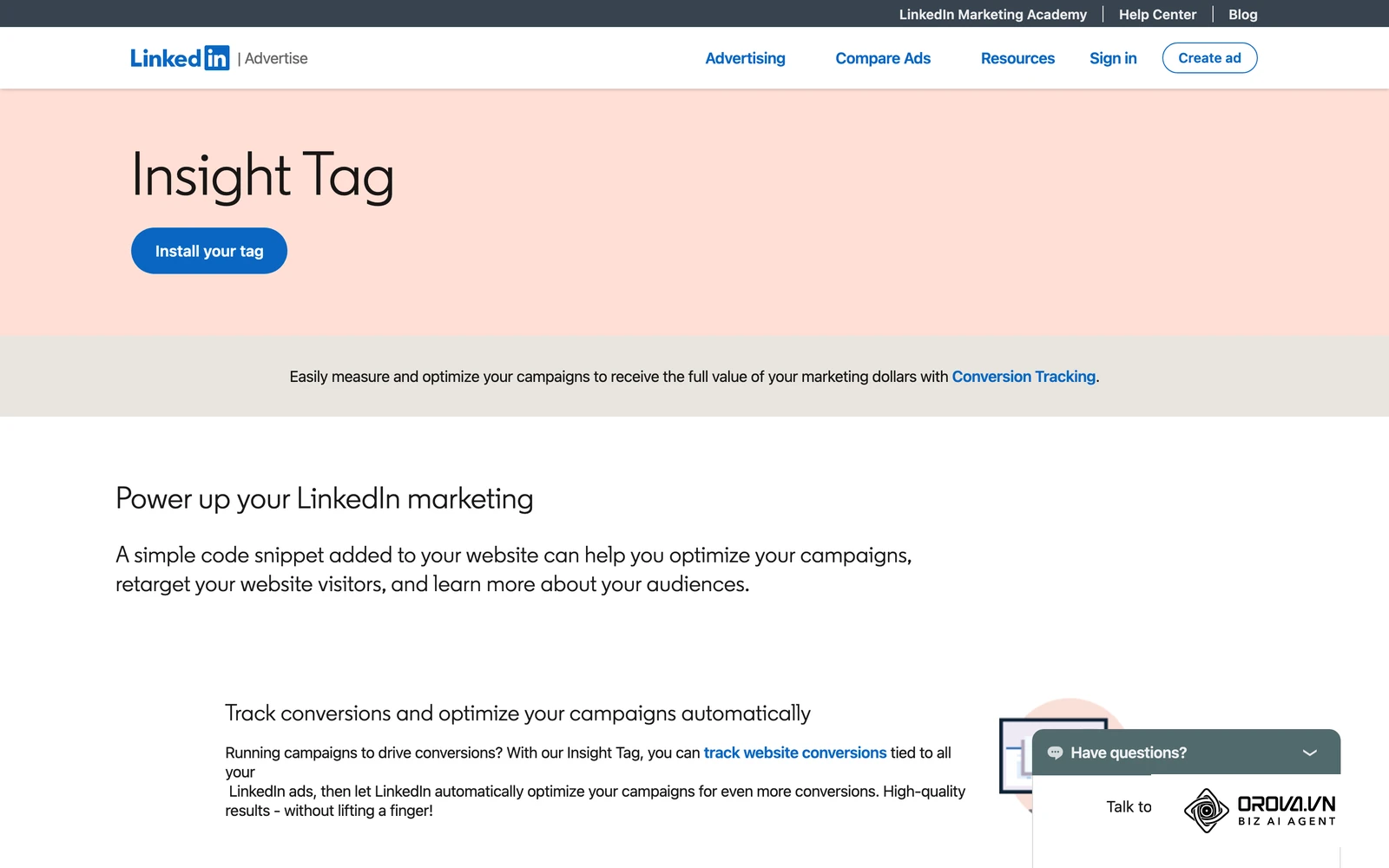
Select I will install the tag myself to retrieve your unique partner ID script. Copy this snippet and place it across all pages of your website, ideally using Google Tag Manager with an All Pages trigger, or paste it directly before the closing </body> tag of your site template. Return to Campaign Manager, reopen the Insight Tag section, and inspect the domains panel.
You will know this step is completed correctly when your domain status changes from Unverified to Active, with a recent signal timestamp.
A common pitfall occurs when browser ad blockers or tag manager draft versions prevent the initial firing. If your status remains unverified after 20 minutes, open your website in an incognito window, submit a test page load, and check the network tab of your browser developer tools for requests directed to px.ads.linkedin.com.
Step 2: Build Precision Audiences Without Audience Bloat
The goal of this step is to isolate your Ideal Customer Profile (ICP) using layered professional parameters without making the audience too broad or excessively narrow.
In Campaign Manager, open your campaign set and advance to the Audience configuration screen. Set your target geographic locations to Recent or permanent location, selecting the countries where your sales team can fulfill contracts. Under Who is your target audience?, choose Narrow audience (AND) rather than combining all traits with OR logic.
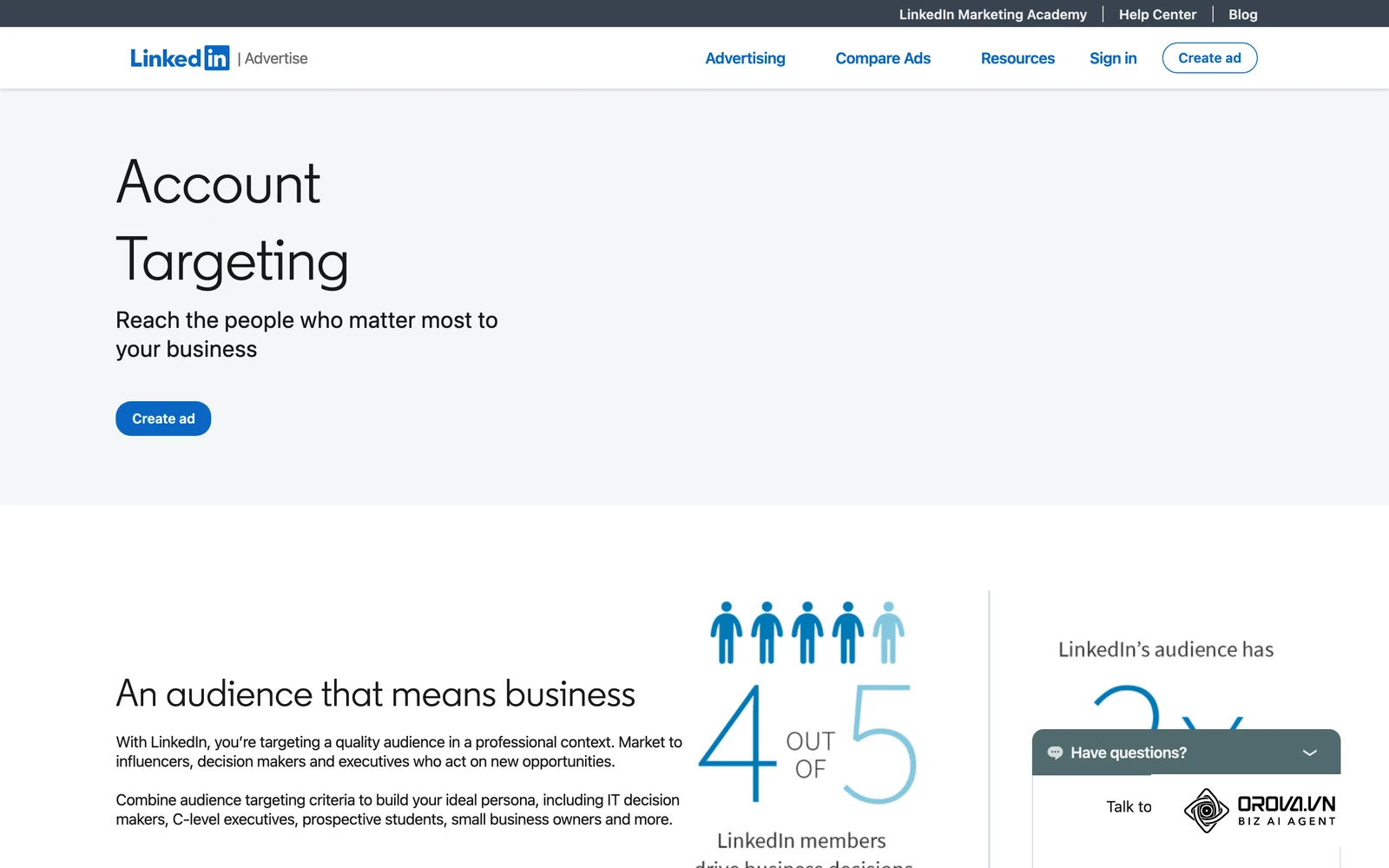
Layer three distinct attributes: Company Industries (select 3 to 6 core sectors), Company Size (such as 51-200 and 201-500 employees), and Job Function combined with Seniority (such as Director, VP, and CXO within Engineering or Marketing). Avoid targeting solely by Job Title, because variations like "Head of People" versus "VP of People Operations" cause massive audience drop-off. LinkedIn's own guidance recommends an audience of at least 50,000 members for Sponsored Content, so aim for that floor in a single market without letting the pool sprawl into the millions.
Next, scroll immediately to the Exclude module. Add explicit exclusions for Job Functions such as Education, Administrative, and Support, along with Job Seniorities for Unpaid, Training, and Entry-Level. Exclude your direct competitors by company name, and exclude current active customers.
Illustrative scenario:
- Context: A 45-person B2B human resources software company targeting HR Directors in North America.
- Actions taken: The marketing lead configured targeting for Job Function "Human Resources" with Seniority "Director" and "VP", restricted company size to 50-500 employees, and applied negative exclusions for educational institutions and recruitment staffing agencies.
- Roadblock: The initial query generated an audience of 420,000 members, which diluted ad delivery across non-buying office managers and independent recruiters.
- Resolution: The lead added an exclusion layer for Job Titles containing "Talent Acquisition", "Recruiter", and "Specialist", narrowing the pool to 68,000 verified HR leaders.
- Result: The account dashboard showed a clean demographic report where 92 percent of delivered impressions reached Director and VP titles in target corporate sectors.
You know this step is successful when the Forecasted Results panel on the right side of the screen shows an audience of at least 50,000 members with a high concentration in your designated seniority brackets.
A common pitfall is over-constraining the audience by layering specific degrees, skills, and exact job titles simultaneously. If your forecasted audience drops far below the recommended size, delivery slows and your cost per result tends to climb.
Step 3: Calculate Your Minimum Viable Budget and Select Campaign Objectives
The goal of this step is to establish a realistic monthly investment that generates sufficient statistical signals for algorithm optimization, avoiding the trap of underfunding campaigns.
When managing ad spend on LinkedIn, setting a tiny daily budget is a common mistake. If your forecast shows clicks costing around 8 US dollars, a 25 US dollars daily budget yields only 3 clicks per day. Over a full month, that represents fewer than 100 visits, which rarely produces enough conversion events for delivery optimization to stabilize.
The formula for determining your Minimum Viable Budget (MVB) is: MVB = Target Monthly Conversions (a working target of 30) × Expected Cost Per Lead (CPL)
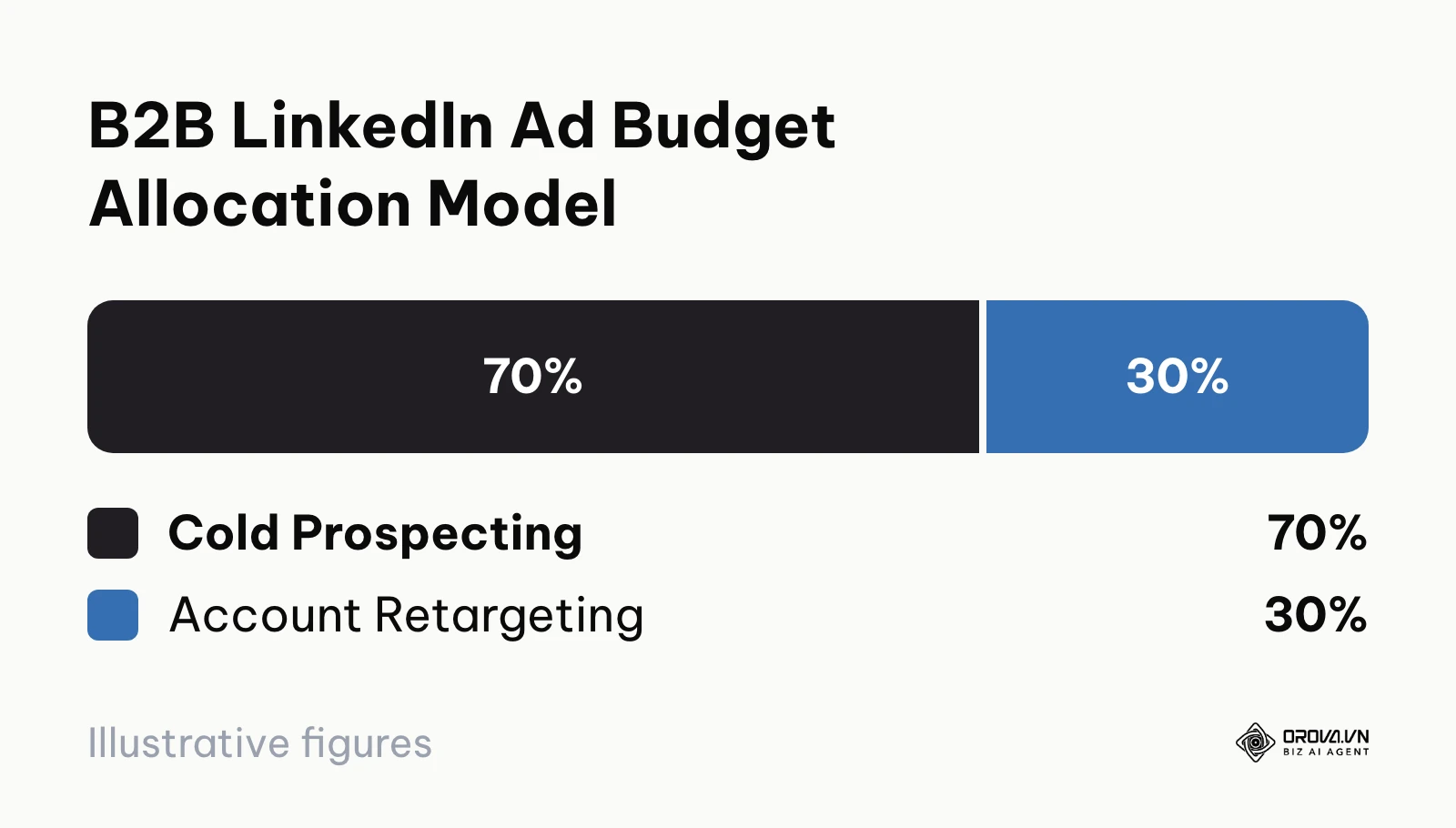
Example: if you assume a CPL of 90 US dollars, 30 × 90 = 2,700 US dollars, so plan a monthly budget of about 2,700 to 3,000 US dollars. Distribute this budget using a 70/30 split: 70 percent allocated to cold prospecting, and 30 percent reserved for retargeting engaged website visitors and content viewers.
The following diagram outlines the suggested budget distribution across prospecting and conversion layers.
B2B SaaS Unit Economics: From Ad Click to Closed Revenue
To validate whether LinkedIn ad costs align with your business model, calculate end-to-end unit economics from ad impression down to signed contract revenue. Every number in the worked example below is an assumption for illustration; replace each one with your own forecast and CRM data.
| Funnel Stage | Target Metric | Assumed Volume | Unit Cost (calculated) | Pipeline Revenue & ROAS |
|---|---|---|---|---|
| Top of Funnel: Ad Impressions | 1.00% CTR | 35,000 impressions | 85.71 US dollars CPM | 3,000 US dollars Total Ad Spend |
| Consideration: Website / Form Clicks | 10.0% Conversion Rate | 350 clicks | 8.57 US dollars CPC | Mid-funnel engagement |
| Lead Generation: Inbound Inquiries | 30.0% Sales Qualified Rate | 35 form submissions | 85.71 US dollars CPL | Pipeline discovery calls |
| Pipeline Qualification: SQL Opportunities | 28.57% Close Rate | 10.5 sales opportunities | 285.71 US dollars Cost per SQL | Active pipeline proposals |
| Bottom of Funnel: Closed Won Deals | Average contract value: 8,000 US dollars | 3 signed customer contracts | 1,000 US dollars Customer Acquisition Cost | 24,000 US dollars Gross Revenue (8.0x ROAS) |
After confirming your budget economics, select your Campaign Objective inside Campaign Manager. For direct lead acquisition, select Lead Generation to leverage native pre-filled forms. For high-touch enterprise software that requires extensive website product tours, select Website Conversions.
You know this step is completed when your budget input matches your monthly unit economic model and your campaign displays a projected daily frequency between 1.2 and 1.8.
Step 4: Eliminate Hidden Spend Traps in Campaign Settings
The goal of this step is to disable platform features that waste ad spend by expanding targeting beyond your defined parameters or serving impressions on low-quality third-party mobile apps.
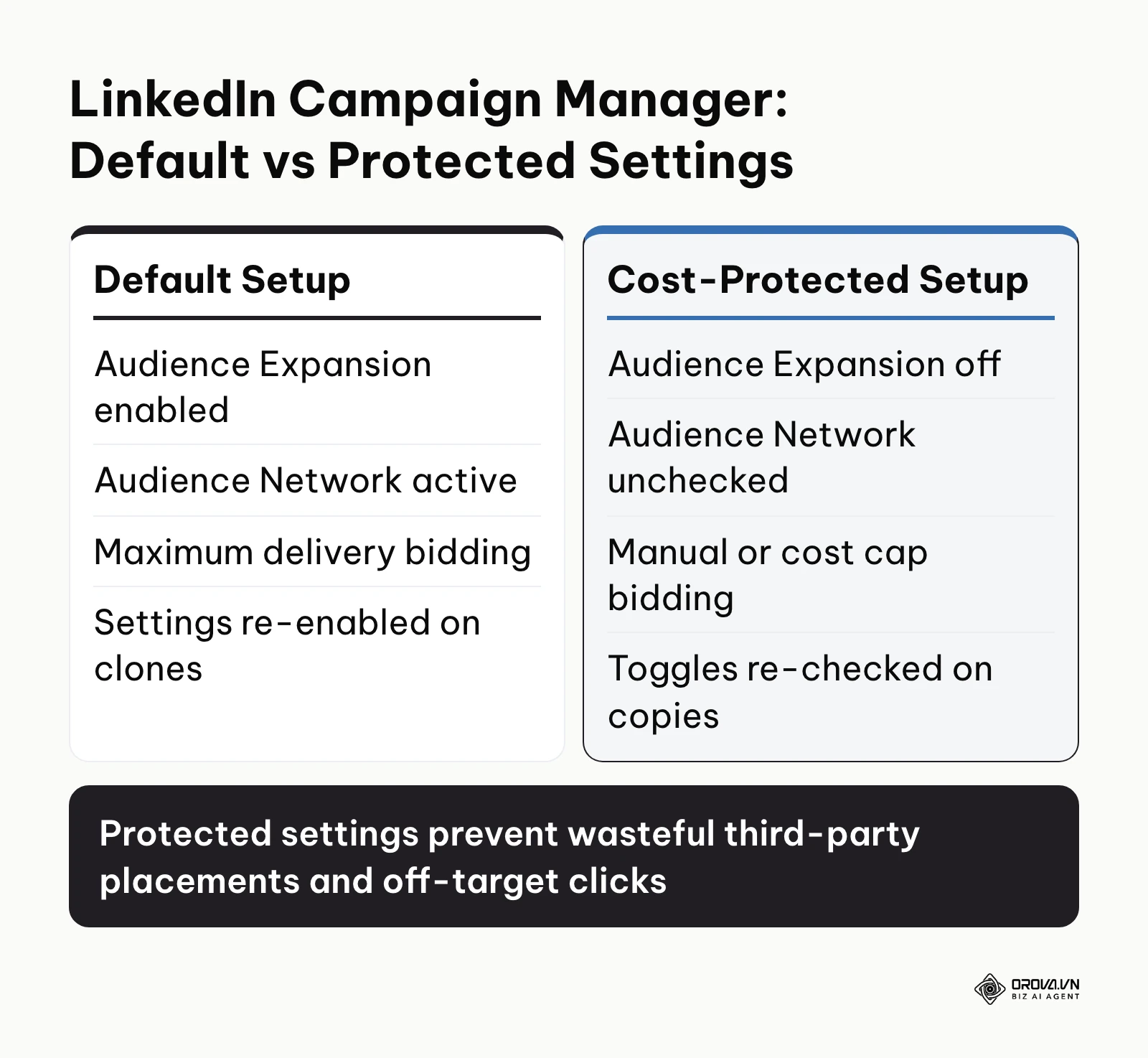
LinkedIn Campaign Manager includes two default options that dilute B2B campaigns: Audience Expansion and the LinkedIn Audience Network (LAN).
Audience Expansion uses algorithmic modeling to display your ads to users whom LinkedIn considers similar to your target persona. In practice, this frequently targets junior staff, freelancers, and unrelated job titles, undermining your carefully defined audience parameters.
The LinkedIn Audience Network displays your sponsored content on external third-party partner applications and mobile websites. These impressions frequently suffer from accidental mobile taps, bot traffic, and unengaged readers outside of a professional work context.
The following diagram outlines the contrast between default platform selections and cost-protective campaign configurations.
To secure your budget, navigate through Campaign Manager and execute these specific actions:
- Locate the Audience screen below your demographic selections. Find the checkbox labeled Enable Audience Expansion and uncheck it immediately.
- Advance to the Placement screen. Uncheck the box labeled LinkedIn Audience Network. Ensure your placement is locked exclusively to the LinkedIn Feed.
- Under the Bidding section, change the bid strategy from Maximum delivery (Automated) to Cost cap or Manual bidding. Automated bidding authorizes the platform to bid up aggressively during competitive auctions, which can push CPCs well above your target for common enterprise titles. Setting a manual bid at 15 to 20 percent below LinkedIn's suggested benchmark helps control costs while monitoring initial delivery pacing.
You will know this step is executed properly when the Audience Summary sidebar states "Audience Expansion: Disabled", the Placements panel confirms delivery solely on LinkedIn properties, and the bidding card displays a defined manual ceiling.
A common pitfall occurs when duplicating campaigns. LinkedIn often re-enables Audience Expansion and LAN by default on cloned ad sets. Always verify these toggles on every duplicated campaign before publishing.
OROVA ADS applies AI Agent to automate and optimize ad performance on Google, Meta and TikTok. Scale your budget safely, monitor 24/7 and expand your business quickly.
Experience the solution at orova.vn/ads
Step 5: Deploy High-Converting Thought Leader Ads and Sponsored Content
The goal of this step is to configure authentic, high-converting ad creatives that generate trust, focusing on personal Thought Leader Ads alongside high-contrast Single Image assets.
Standard corporate brand ads often experience creative fatigue on LinkedIn as users scroll past generic stock photography and brand logos. In contrast, Thought Leader Ads allow your ad account to sponsor organic posts published by your executive team, founders, or subject matter experts. Because these posts come from a real person rather than a logo, they tend to feel like peer advice instead of an advertisement.
The 5-Step Thought Leader Ad Approval Workflow
Securing permission and deploying a Thought Leader Ad requires a formal authorization flow inside Campaign Manager.
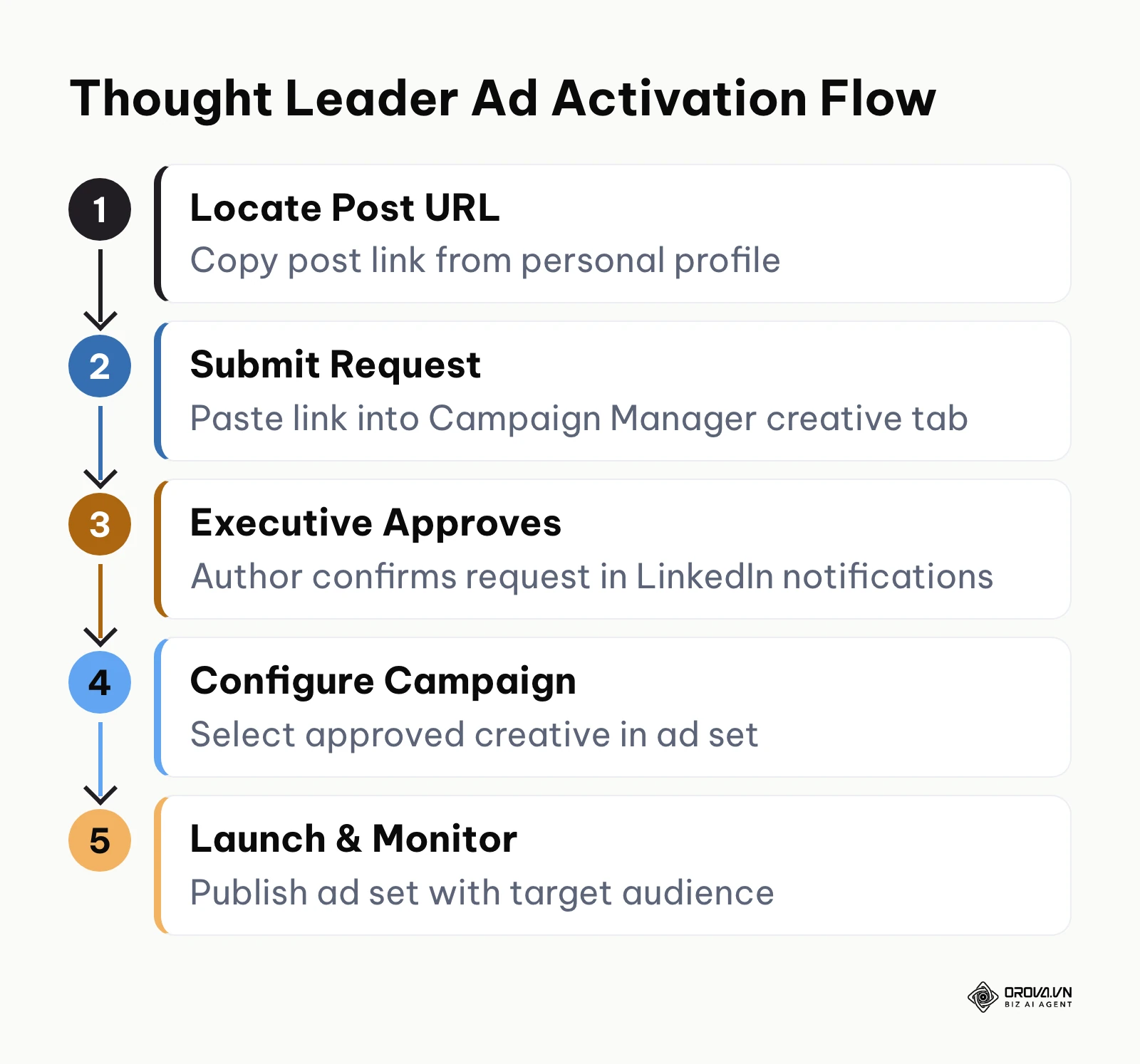
The following diagram summarizes the five stages of requesting and activating executive post sponsorships.
Follow these practical steps to activate a Thought Leader Ad:
- Identify an organic post on your founder or executive's personal profile that delivers high-value analysis or breaks down a case study. Copy the post URL.
- Inside Campaign Manager, select Sponsored Content as your ad format.
- Advance to the ad creative setup screen, choose to browse existing content, and find the member post (or paste its URL).
- Send the sponsorship permission request. LinkedIn notifies the post author.
- The executive opens the request from their personal LinkedIn account and approves it. Return to Campaign Manager, refresh your creative list, select the approved post, and add it to the campaign.
Four High-Converting Thought Leader Ad Frameworks
To maximize click-through and engagement rates, guide your executives to draft content using one of these four proven formats:
- The Tactical Breakdown: A teardown of an operational problem, presenting a step-by-step framework to solve it without pitching product features until the final sentence.
- The Contrarian Industry Shift: Challenging an outdated industry practice, explaining why conventional methods fail as of 2026, and presenting an alternative operational framework.
- The Data-Driven Case Study: Analyzing a real commercial obstacle, detailing the metrics observed before and after the solution, and sharing lessons learned.
- The Executive Playbook: A first-person narrative explaining how leadership overcame a specific scaling challenge, providing actionable takeaways for peers.
Illustrative scenario:
- Context: A Series A cybersecurity software startup with 30 employees seeking enterprise security buyer leads.
- Actions taken: The marketing team drafted a 250-word technical analysis under the Chief Technology Officer's personal profile detailing cloud misconfiguration trends, then requested sponsorship rights via Campaign Manager.
- Roadblock: The post was initially submitted as a standard corporate Company Page ad, generating a Click-Through Rate (CTR) of only 0.38 percent and a CPC of 11.40 US dollars.
- Resolution: The campaign was re-launched as a Thought Leader Ad using the CTO's approved post, pairing it with a clear call-to-action link to a technical whitepaper.
- Result: The campaign dashboard registered an average CTR of 1.45 percent, decreasing average CPC to 4.20 US dollars and yielding 48 content downloads within the first 14 days.
You will know this step is completed correctly when your campaign creative list displays the approved executive post as an active ad.
A common pitfall is trying to sponsor a post that is not public or a post format LinkedIn does not support for Thought Leader Ads. Ensure the personal post is set to public visibility before initiating the sponsorship request.
Step 6: Connect Lead Gen Forms with Automated CRM Sync
The goal of this step is to build an in-app Lead Gen Form and establish automated routing to your CRM to prevent lead decay.
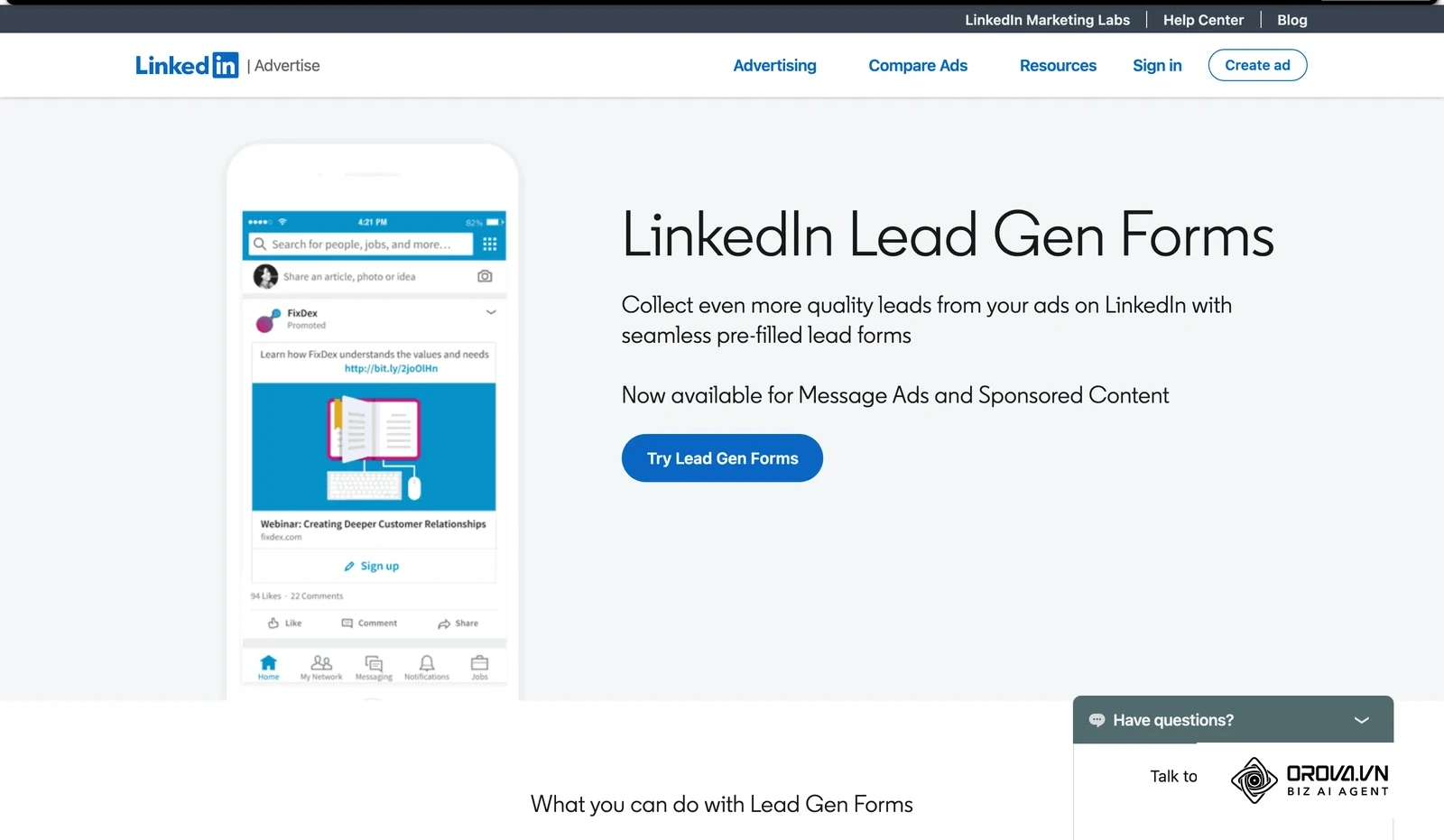
Native in-app forms remove the jump to an external page, which matters most on mobile. Because LinkedIn automatically populates form fields with verified profile data (such as Name, Work Email, Job Title, and Company), friction drops significantly.
When to Choose Native Lead Forms vs Landing Pages
Marketers often struggle to choose between native forms and external websites. For a deeper look at the format itself, see this explainer on what lead form ads are.
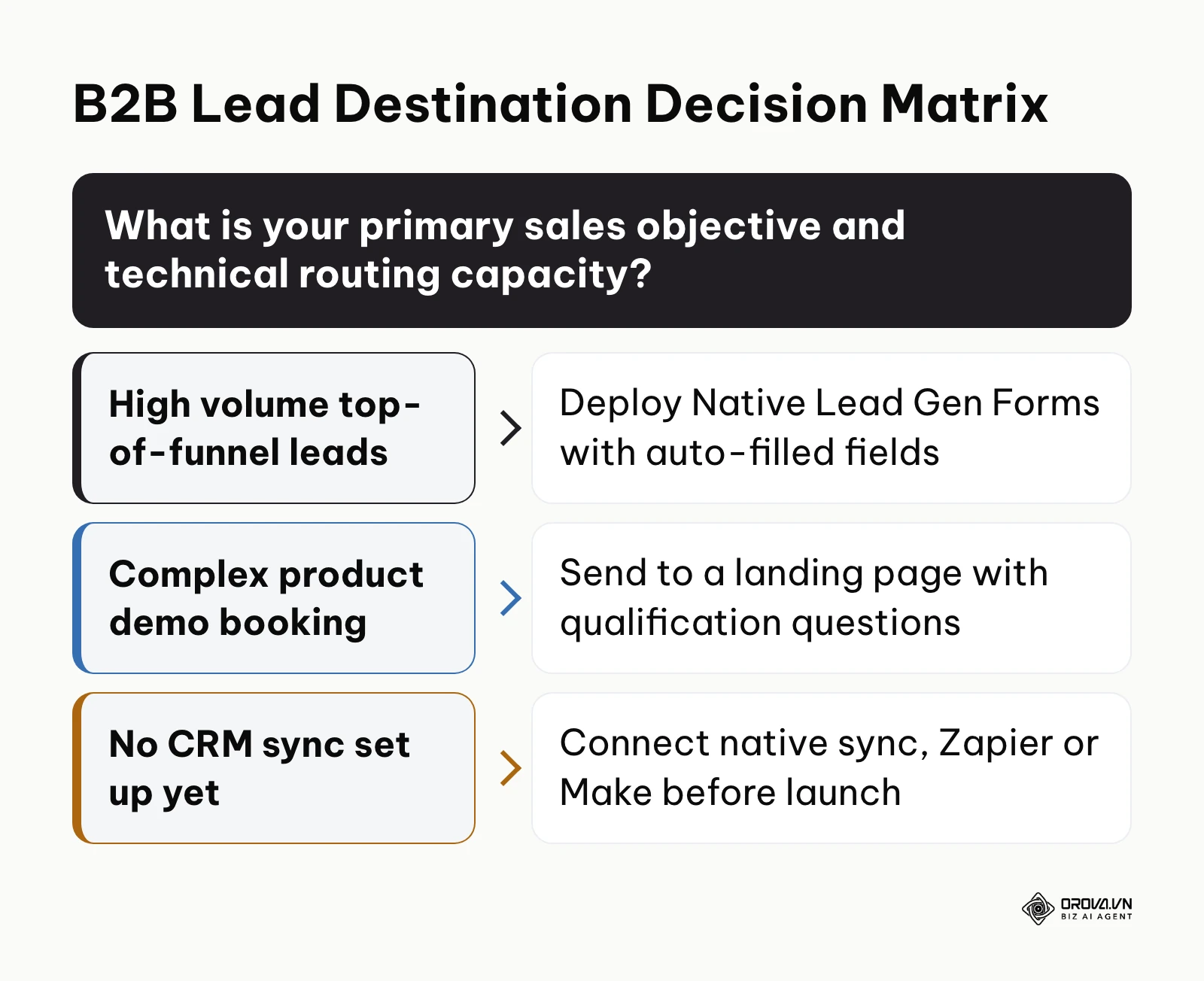
The following decision framework guides your selection based on operational goals and technical capacity.
To build your native form, navigate to Assets > Lead Gen Forms in Campaign Manager and click Create form.
- Enter your form name and select your language.
- Craft an informative headline (under 40 characters) such as "Download the 2026 Enterprise Security Playbook".
- Under the Questions tab, select essential fields: First Name, Last Name, Work Email, Job Title, and Company Name. Avoid asking for phone numbers on cold traffic, because every extra field adds friction and raises abandonment.
- Add a custom qualification question, such as "What is your organization's current deployment timeline?", with dropdown options: Less than 3 months, 3-6 months, or Informational only.
- In the Privacy policy field, paste your valid website privacy URL.
- Under the Confirmation tab, include a landing page link where users can immediately view your asset.
Leads go cold quickly, so the speed of the first follow-up matters. Exporting CSV files manually once a week causes lead decay. Connect your LinkedIn Lead Gen Form directly to your CRM using native integrations (such as HubSpot or Salesforce AppExchange) or configure an automated webhook through Zapier or Make. Map LinkedIn's standard fields to your CRM contact properties, and trigger an automated notification to your sales development reps the instant a form is submitted. This structured lead capture pairs naturally with your targeted bottom of funnel content to educate prospects while sales reps initiate contact.
Illustrative scenario:
- Context: A 120-person B2B logistics software company running global LinkedIn lead campaigns.
- Actions taken: The marketing operations manager built a 4-field native form, created a Zapier webhook endpoint, and configured automated contact routing directly into their CRM database.
- Roadblock: The sales team reported that incoming leads lacked phone numbers and sat in a general queue for 48 hours before initial outreach.
- Resolution: The operations manager configured an automated Slack notification channel that pings the account executive team within 60 seconds of form completion, paired with an automated calendar booking link sent via email.
- Result: Inbound contact response time decreased from 48 hours to 8 minutes, and the sales team booked 19 introductory discovery calls from 42 submitted leads during the first campaign cycle.
You will know this step is completed correctly when you submit a test lead through LinkedIn's form preview tool and observe the complete contact record appear inside your CRM within 60 seconds.
A common pitfall is requesting personal email addresses. In LinkedIn settings, specify "Work Email" rather than "Email" to capture corporate domains instead of personal addresses.
Step 7: Launch Your Campaign, Traverse the Learning Phase, and Adjust Bids
The goal of this step is to publish your campaign, navigate the initial 14-day machine learning phase without premature changes, and optimize bids based on conversion signals.
In Campaign Manager, review your budget, audience, creative, and tracking settings one last time, then launch the campaign. Ads enter LinkedIn's review before they start delivering, so allow up to a day before judging delivery.
During the first 7 to 14 days, the ad delivery algorithm undergoes its learning phase, testing impressions across different segments of your audience to identify high-converting profiles. Avoid editing targeting parameters, changing ad copy, or adjusting daily budgets by more than 15 percent during this period. Modifying key variables resets the learning phase, destabilizing delivery costs.
Monitor daily pacing in Campaign Manager. If your campaign is spending less than 60 percent of its daily allocation, your manual bid is likely below the prevailing auction floor. Increase your bid in 10 percent increments every 48 hours until daily delivery stabilizes. Conversely, if your budget exhausts before noon each day while generating high CPCs, reduce your bid ceiling by 10 percent or narrow your geographic scope. Once initial campaigns demonstrate stable lead flow, exploring scaling automated ads across complementary search and social channels helps balance blended customer acquisition costs.
You will know this step is successful when your campaign maintains steady daily spend, registers a frequency between 1.2 and 2.0 impressions per user per week, and generates consistent conversion actions at your projected CPL.
Comprehensive Checklist for Your LinkedIn Advertising Campaign
Keep this operational checklist accessible when configuring and launching your campaigns.
| Step Number | Core Action Required | Done Indicator | Estimated Time |
|---|---|---|---|
| Step 1 | Install Insight Tag & verify conversion events | Green "Active" status on domain in Campaign Manager | 20 minutes |
| Step 2 | Build ICP audience with strict exclusions | Forecasted audience of 50,000+ members | 25 minutes |
| Step 3 | Set minimum viable budget & bidding mode | Daily budget configured to support 30+ conversions/mo | 15 minutes |
| Step 4 | Uncheck Audience Expansion & Audience Network | Expansion toggles disabled in campaign settings | 5 minutes |
| Step 5 | Sponsor Thought Leader and high-contrast ads | Approved executive creatives populated in ad set | 30 minutes |
| Step 6 | Configure Lead Gen Form & webhook CRM routing | Test lead successfully logged in CRM within 60s | 20 minutes |
| Step 7 | Launch campaign and monitor initial 14-day pacing | Campaign status "Active" with stable daily spend | 10 minutes |
Common LinkedIn Advertising Mistakes and How to Fix Them
Even experienced marketers encounter obstacles when scaling LinkedIn campaigns. Review these common mistakes and their operational fixes.
| Mistake | Common Cause | Recommended Operational Fix |
|---|---|---|
| Runaway CPCs | Using default Maximum Delivery automated bidding | Switch to Cost cap or Manual bidding; start 15-20% below the suggested bid |
| Diluted leads from junior staff | Audience Expansion left enabled by default | Uncheck Audience Expansion across every campaign set |
| Wasted spend on mobile games | LinkedIn Audience Network (LAN) left active | Uncheck Audience Network; restrict delivery to native LinkedIn Feed |
| Campaigns stalling with zero spend | Audience far below the recommended size | Broaden industry groups or consolidate specific job titles into functions |
| Low form conversion rates | Asking for phone numbers and long qualification forms | Restrict forms to 4-5 fields; use native auto-filled work profiles |
| Unqualified student clicks | Missing negative demographic exclusions | Add exclusions for Education function, Intern, and Entry-level seniorities |
| Lead data decaying in CSV files | Exporting lead sheets manually once a week | Connect direct Webhook or Zapier pipeline to CRM for same-hour follow-up |
While LinkedIn serves as the premier network for targeting professional accounts, modern B2B growth teams rarely rely on a single channel. To maintain predictable pipeline, high-performing marketers balance professional network campaigns with intent-driven search and retargeting on other major platforms.
Want to scale your budget but afraid of breaking performance?
Integrate OROVA ADS now - an AI Agent that automatically monitors and optimizes Google, Meta, TikTok ads 24/7. Now, expanding and replicating your Performance Ads team is just one click away.
Try it now at: orova.vn/ads
How to Measure LinkedIn Ad Performance After Launch
Evaluating your campaign's performance requires separating leading indicators (engagement and click metrics) from lagging business metrics (qualified pipeline and closed revenue).
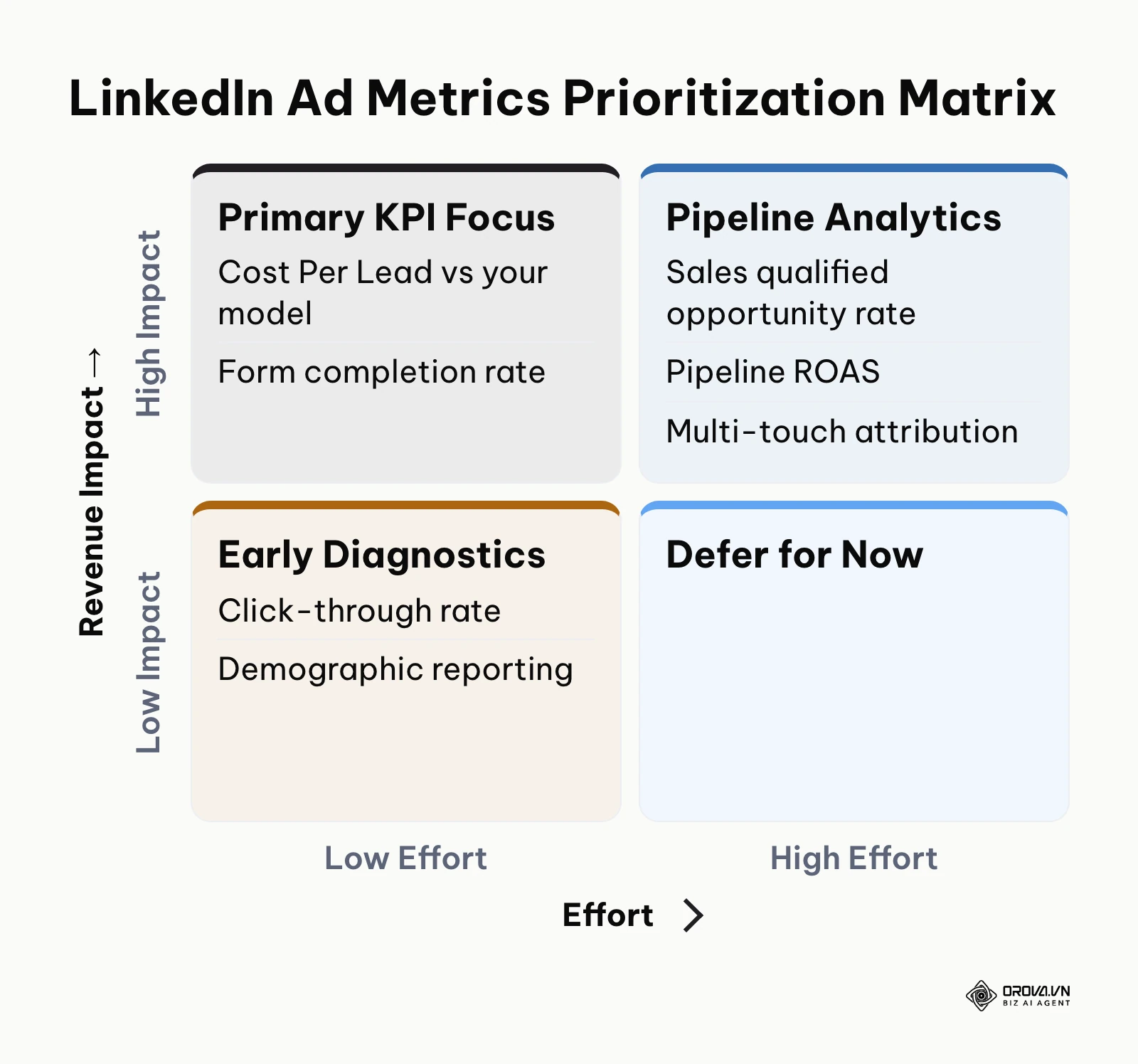
The following matrix categorizes key performance indicators by implementation complexity and business impact.
Use this review schedule to know which metric to check, when, and what to do about it:
| When to Review | Metric | Where to Check | What to Do |
|---|---|---|---|
| 48 to 72 hours after launch | Click-Through Rate (CTR) | Campaign Manager, per ad | An ad whose CTR sits well below the other ads in the same campaign points to weak creative or an audience mismatch; swap the creative first |
| 48 to 72 hours after launch | Demographic Reporting | Campaign Manager, Demographics tab (Job Function, Job Title, Company Name) | If more than 15 percent of impressions reach titles outside your ICP, apply tighter exclusions |
| Day 14 to Day 30 | Cost Per Lead (CPL) | Campaign Manager | Compare with the CPL you assumed in your Step 3 model, not with someone else's benchmark |
| Day 14 to Day 30 | Form Completion Rate | Lead Gen Form reporting | A falling rate suggests too many form fields or an offer that does not feel worth the trade |
| Beyond Day 30 | Sales Qualified Opportunity Rate | Your CRM | Compare with the rate assumed in your Step 3 model (30 percent in the worked example) |
| Beyond Day 30 | Pipeline ROAS | Your CRM | Compare total ad spend with weighted pipeline value and closed revenue |
For enterprise deals with multi-month sales cycles, track account-level engagement and multi-touch attribution so credit is assigned accurately to initial ad touchpoints. Teams that systematically measure cross-channel influence develop a resilient B2B performance marketing engine that justifies sustained executive investment.
Trends in LinkedIn Advertising Over the Next Few Years: Author's Outlook
Looking at the evolution of LinkedIn advertising as of 2026, several strategic shifts are reshaping how B2B companies allocate capital. Below are three major trends I anticipate over the coming two to three years.
Personal Creator Ads Will Outpace Corporate Brand Content Thought Leader Ads have given B2B teams a way to put a real person, rather than a logo, in front of buyers. I believe that over the next 2 to 3 years, many enterprise marketing teams will shift a growing share of their paid LinkedIn budgets toward amplifying the personal profiles of their founders, executives, and engineers rather than publishing from corporate Company Pages. Corporate logos often trigger ad avoidance, whereas authentic first-person analysis fosters peer-level credibility. However, this trend could slow down if LinkedIn imposes stricter compliance gates or if personal profile sponsorship permissions become administratively burdensome for distributed enterprises. To prepare, organizations should develop executive personal branding playbooks and ghostwriting workflows today.
AI-Driven Autonomous Campaign Assembly Will Become Standard LinkedIn continues to expand automated campaign solutions like Accelerate, leveraging machine learning to automate audience selection, copy variations, and bid management. In my view, algorithmic targeting will handle much of the broad demographic matching within a few years, shifting the media buyer's primary responsibility from manual toggle manipulation to high-leverage data inputs and creative positioning. Advertisers who rely solely on basic job title targeting will struggle, while teams that feed high-quality first-party data and distinct creative concepts into platform algorithms will thrive. This shift could stall if platform automation continues to hide spend allocation details or forces unwanted expansion into low-quality partner inventory. Media buyers must prepare now by mastering prompt engineering, conversion API hygiene, and creative testing frameworks.
First-Party Offline Conversion Tracking Will Dictate B2B Survival As browser cookie deprecation and stricter privacy frameworks limit client-side tracking, traditional pixel-based attribution is becoming less reliable for complex sales cycles. I lean toward a future where B2B ad platforms operate primarily on deterministic first-party server connections, directly ingesting offline CRM milestone data (such as Opportunity Created, Contract Sent, and Closed Won) to train bidding algorithms. Without offline signal feeding, ad networks optimize purely for cheap surface-level clicks rather than high-value pipeline. This trajectory could be delayed if mid-market CRM vendors fail to standardize turnkey API connections for non-technical teams. Marketers should prioritize configuring server-side conversion APIs and offline conversion syncing across all ad channels immediately.
Frequently Asked Questions About Advertise LinkedIn
Can you advertise on LinkedIn with a budget under 1,000 US dollars per month?
You can technically launch campaigns with less than 1,000 US dollars per month, but your strategy must be highly focused to avoid spreading funds too thin. If your forecast shows clicks costing 8 to 10 US dollars, an 800 US dollars monthly budget yields only 80 to 100 clicks. In this scenario, do not attempt broad cold prospecting. Instead, allocate 100 percent of your budget to tight retargeting campaigns targeting recent website visitors, or run a single Thought Leader ad directed at a curated list of high-value target accounts. This concentration maximizes reach among warm prospects who are already familiar with your brand.
How do you measure offline conversions when B2B sales cycles last 3 to 6 months?
Measuring long-cycle conversions requires sending offline conversions from your CRM back to LinkedIn, either through LinkedIn's Conversions API or a CSV upload. When a user submits an in-app Lead Gen Form or clicks an ad, capture their unique LinkedIn First-Party Cookie ID (li_fat_id) and store it alongside the contact record inside your CRM. When that prospect subsequently reaches key commercial milestones (such as Stage 2 Qualified Pipeline or Deal Won 90 days later), your CRM pushes that conversion event back to Campaign Manager via API or CSV upload. This allows LinkedIn's reporting dashboard to attribute closed enterprise revenue back to the original campaign creative.
When should you use LinkedIn Accelerate AI campaigns versus Classic campaigns?
Use Classic campaigns whenever you have strict audience parameters (such as targeting specific enterprise account lists, narrow job seniorities, or defined industries) and need strict control over bids and negative placements. Classic campaigns prevent unauthorized budget expansion. Reserve Accelerate campaigns for broad top-of-funnel discovery or content download initiatives where your addressable market is large, and you want platform AI to identify unexpected buyer personas across varied job functions.
What is the role of AI when running LinkedIn advertising campaigns?
Artificial intelligence operates across three primary areas of LinkedIn advertising: creative drafting, automated campaign delivery, and predictive bidding. AI writing assistants within Campaign Manager can generate initial headline and intro copy variations based on your destination URL. Algorithmic delivery models analyze platform signals to predict which members of your audience are most likely to convert, dynamically adjusting auction bids. However, human oversight remains critical to verify messaging tone, monitor cost thresholds, and ensure that AI targeting does not expand into unqualified demographics.
How do you estimate what LinkedIn Ads will cost for your audience?
LinkedIn ads are sold through an auction, so costs vary by industry, geography, and target seniority. Build your audience in Campaign Manager first and read the forecast panel, which estimates results for your budget and bid. Senior titles in competitive industries usually cost more than mid-management titles in broader sectors. Plug the forecast into the Minimum Viable Budget formula from Step 3 before you launch.
How often should you refresh LinkedIn ad creatives to prevent ad fatigue?
Because B2B audiences on LinkedIn are generally smaller than consumer social audiences, ad fatigue sets in faster. As your campaign frequency climbs over a 30-day window, CTR typically declines while CPC increases. Plan to introduce fresh creative variations, new executive post angles, or updated case study graphics every 4 to 6 weeks to sustain engagement across your target account lists.
Where Should You Start with LinkedIn Ads?
Getting started depends on your current marketing maturity and existing technical setup. Choose the scenario below that reflects your present situation and execute the single recommended action today.
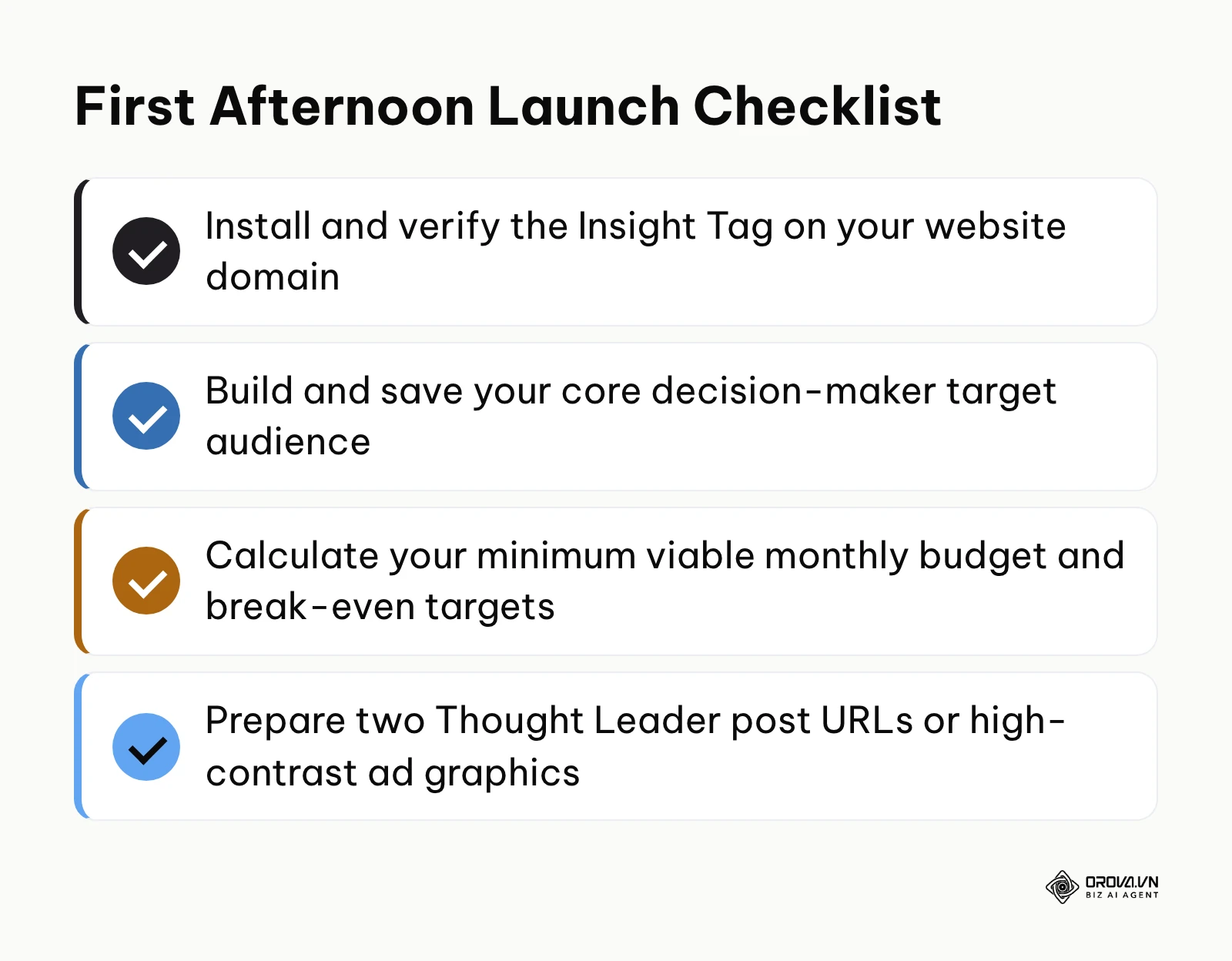
If you have never run paid campaigns and have no tracking installed on your website, your starting action is technical infrastructure. Log into LinkedIn Campaign Manager, create your billing account, generate your Insight Tag, and deploy it across your website via Google Tag Manager. Do not spend money on ads until your tag records an active status and you have verified that conversion events are firing properly.
If you already have steady organic website traffic and an active corporate presence, your starting action is audience construction. Build an account-based retargeting audience in Campaign Manager by uploading your target account list (CSV format) and defining an audience of past 90-day website visitors. Launch a simple 30 US dollars a day retargeting campaign promoting a customer case study to convert existing warm interest into booked demos.
If you are an established B2B brand struggling with declining engagement on corporate sponsored content, your starting action is executive sponsorship. Identify your founder or CEO's most insightful organic post from the past month, request sponsorship rights inside Campaign Manager, and launch your first Thought Leader Ad targeting your core decision-maker persona.
Taking these focused initial actions provides the practical foundation you need to build profitable campaigns and successfully advertise linkedin programs that drive lasting enterprise growth.
About the author

Builder of Orova
Nguyễn Đỗ Trọng Ân has 8 years of experience in marketing, including 6 years managing market development across Asia. He builds Orova, a Biz AI Agent that never sleeps: it plans, runs and optimizes work for businesses.
Run your business with AI Agents
Orova is the always-on Biz AI Agent — it plans, runs, and optimizes the work for you.
Save time, unlock productivity.