
Snapchat adverts: how to launch high-ROI campaigns in 7 steps (2026)

Snapchat adverts are full-screen vertical ads (video, image, Story, Collection, Commercial and AR Lens formats) that appear between friends' Stories, in Discover and Spotlight, and inside the Snapchat camera, bought and managed through Snapchat Ads Manager. When you complete this guide, you will have a live, conversion-ready Snapchat campaign running with verified server-side tracking, native vertical video assets that respect mobile safe zones, and a budget structure you can scale step by step.
Before diving into execution, you will need an active business credit card, access to your website code repository or Google Tag Manager container, and three to five raw vertical video clips recorded on a smartphone. Setting up the business infrastructure and launching your initial ad sets typically takes between two and three hours.
If your target market is exclusively business-to-business enterprise software buyers with purchase cycles exceeding six months, or if you cannot produce mobile vertical video assets, this playbook is not recommended for your acquisition strategy.
What Are Snapchat Adverts and What Results Can You Expect?
Snapchat adverts are full-screen, vertical paid media placements displayed inside Snapchat's mobile application across Stories, Spotlight, Discover shows, and native messaging feeds. Executing this campaign framework requires seven structured steps and approximately three hours of setup, giving you first conversion data to read within the first week.
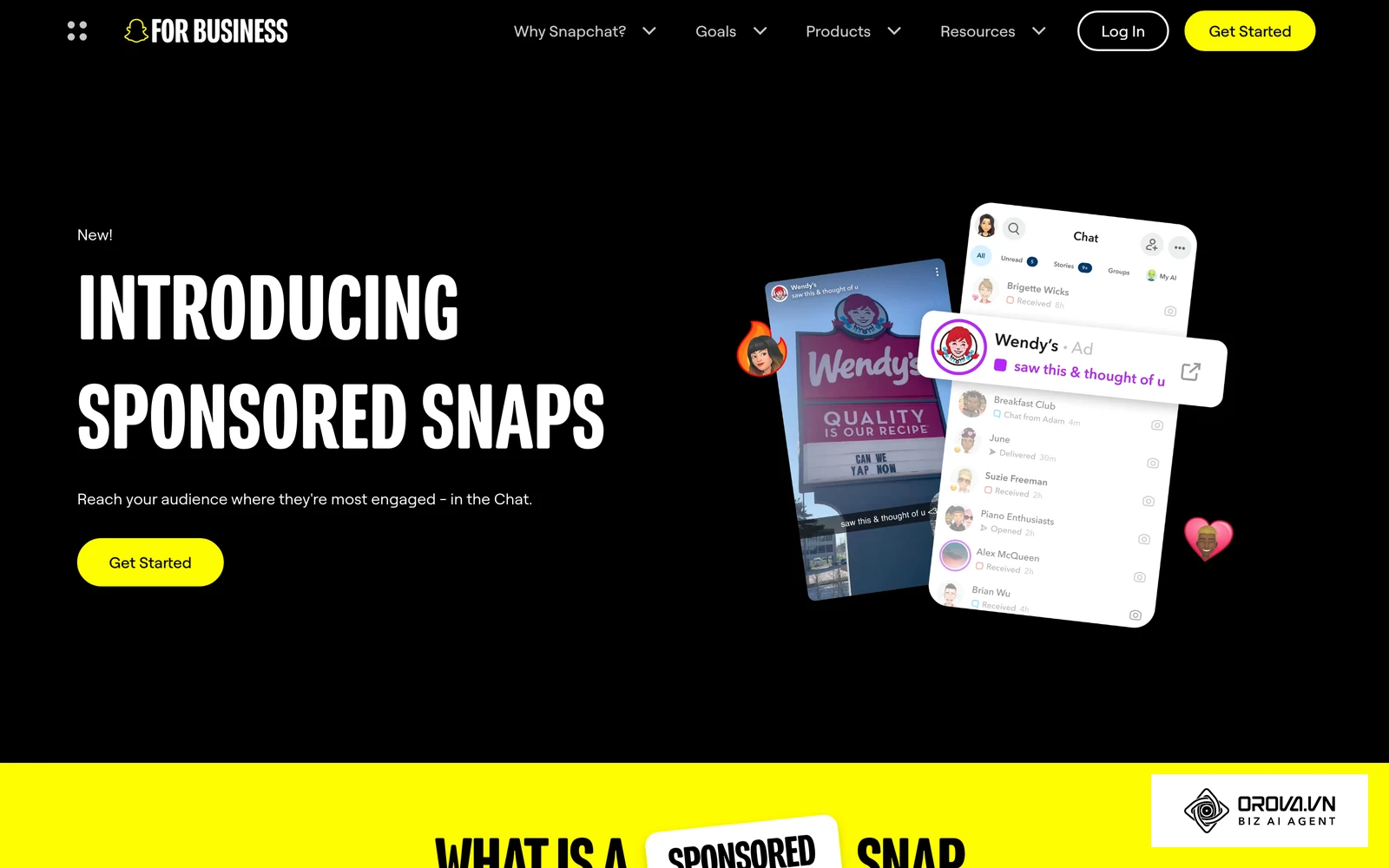
Unlike horizontal display banners or static desktop placements, advertising on Snapchat demands an experience built specifically for sound-on, full-screen mobile immersion. As of 2026, the platform reaches hundreds of millions of daily active users who demonstrate distinct purchasing behaviors compared to users on Meta or LinkedIn. While desktop-first channels rely on dense text copy and long product descriptions, Snapchat rewards instant visual hooks, rapid pacing, and seamless swipe-up interaction mechanics.
By building your media plan around high-intent mobile shoppers, you can diversify your customer acquisition pipeline away from oversaturated ad networks and reduce your blended cost per acquisition.
Prerequisites Checklist Before Launching Your First Campaign
Before opening the ad creation workflow, prepare your technical infrastructure and creative assets to prevent launch delays and ad account billing freezes. Missing even one tracking element can blind the algorithmic bidding engine and artificially inflate your advertising costs.
The following table outlines every asset you must gather before publishing your first ad set:
| Requirement | Source or Location | Estimated Setup Time | Consequence If Missing |
|---|---|---|---|
| Snapchat Business Account | business.snapchat.com | 10 minutes | Inability to access Business Manager, ad accounts, or billing profiles |
| Web Domain Admin Access | Domain registrar or DNS host | 15 minutes | Cannot verify domain ownership or configure server-side conversion routing |
| Google Tag Manager Container | tagmanager.google.com | 20 minutes | Delayed client-side Snap Pixel implementation and manual event tagging errors |
| Server-Side Cloud Endpoint | Cloud provider (AWS, GCP, Stape) | 45 minutes | Lost conversion signals when browsers and iOS block third-party cookies |
| Vertical Video Creatives | In-house camera or video editor | 60 minutes | Immediate ad rejection or low engagement caused by incorrect aspect ratios |
| Verified Payment Method | Corporate card or PayPal | 5 minutes | Campaign delivery suspension immediately upon launching initial ad sets |
Step 1: Set Up Business Manager and Snap Pixel with CAPI
Your first objective is establishing an enterprise-grade organization structure inside Snapchat Business Manager and deploying redundant conversion tracking across both browser and server environments.
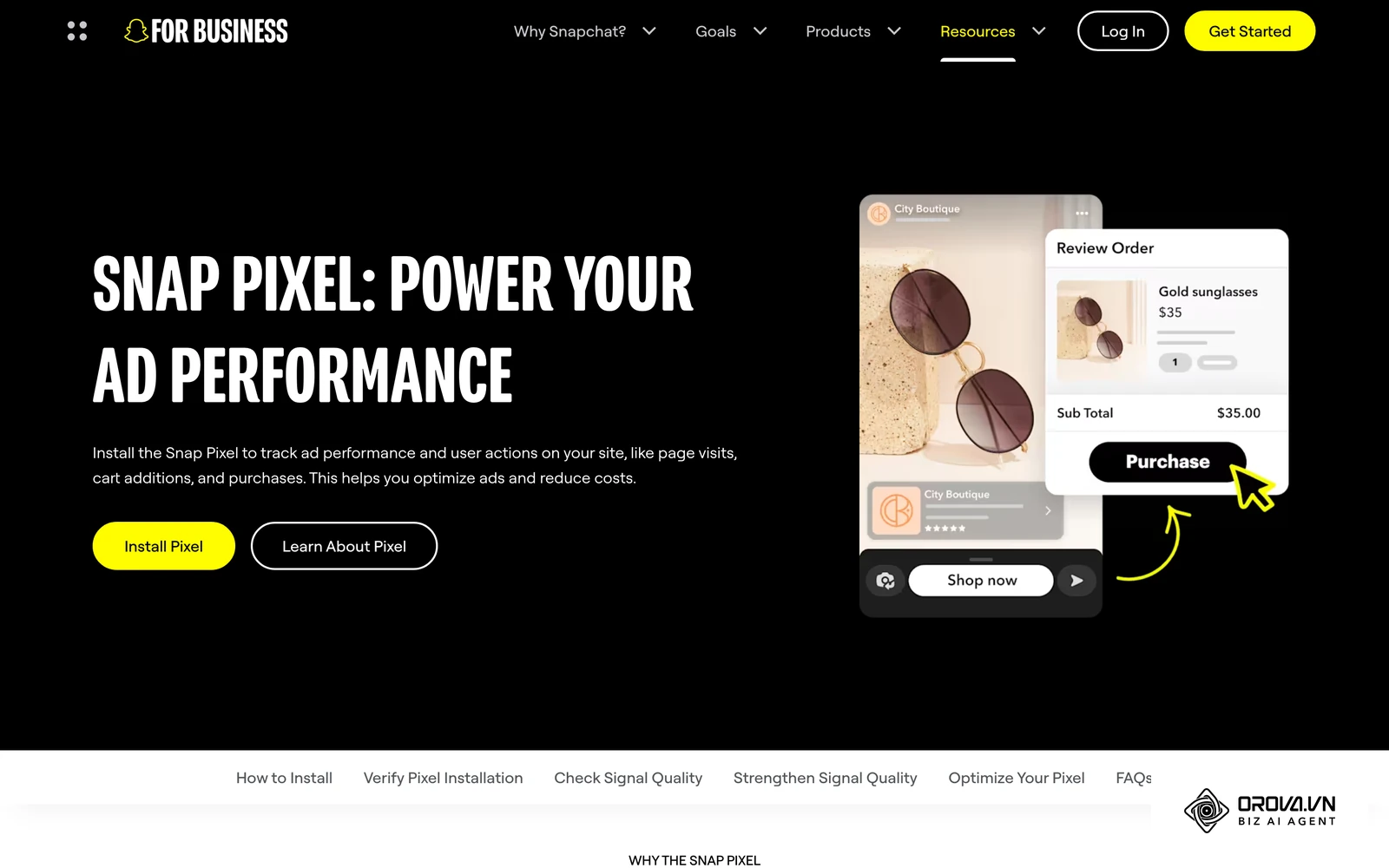
Begin by navigating to business.snapchat.com and signing in with your primary Snapchat credentials. In the onboarding wizard, select "Create Business Account," enter your legal company name, business email, and operational country, and click "Submit." Once redirected to the Business Manager dashboard, open the left-hand navigation menu, select "Business Details," and input your business registration number and physical address. Next, navigate to "Ad Accounts," click "Create New Ad Account," specify your primary billing currency, and link your corporate payment card under the "Billing & Payments" tab.
Dual-Layer Tracking: Snap Pixel and Conversions API (CAPI)
Under the left navigation menu, expand the "Assets" module and select "Pixels." Click "Create Pixel," name the asset after your core brand domain, and note down the alphanumeric Pixel ID. If you manage web tags through Google Tag Manager, locate the official Snap Pixel tag template in the community gallery, paste your Pixel ID, and bind it to fire on "All Pages."
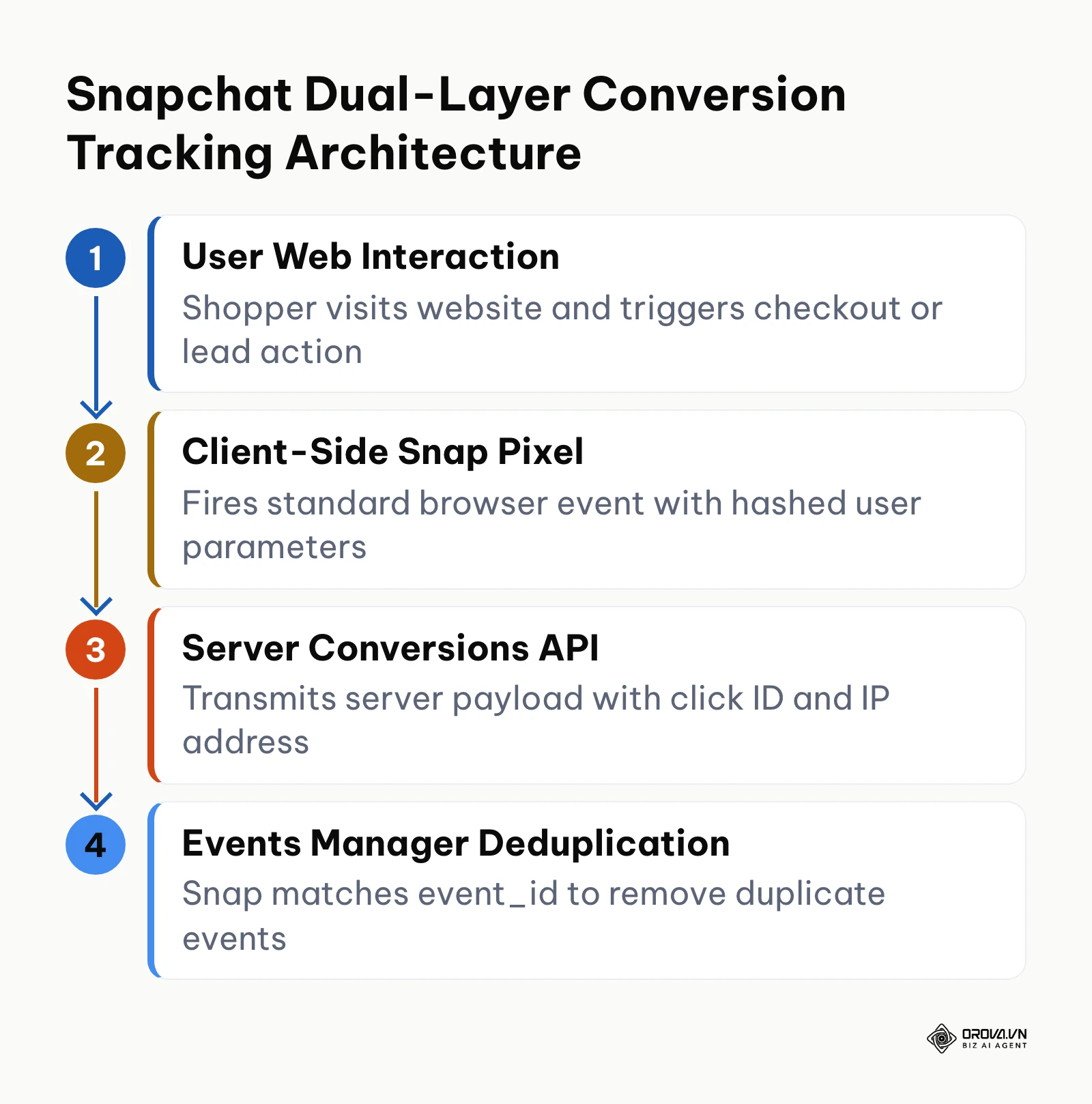
Because mobile privacy frameworks on iOS restrict third-party browser cookies, relying exclusively on client-side pixel tags leads to severe attribution decay. You should implement the Snapchat Conversions API (CAPI) in parallel. The diagram below summarizes this dual-layer tracking pipeline from web interaction to event deduplication.
To configure CAPI, navigate to "Events Manager" inside Business Manager, select your pixel, click the "Settings" tab, and scroll to "Conversions API." Click "Generate Token" to create an access key. Provide this key along with your Pixel ID to your backend engineering team or your server-side Google Tag Manager container. Ensure every purchase and lead trigger sends both a client event and a server payload containing an identical event_id string, the user's hashed email (sha256), client IP address, user agent, and the sc_click_id extracted from the landing page URL. This lets Snapchat deduplicate matching browser and server hits and build an accurate view of what is conversion event performance across your funnel.
To visually confirm successful integration, open your website in Google Chrome with the Snap Pixel Helper extension enabled. Complete a test transaction. The extension must show green status indicators alongside PAGE_VIEW and PURCHASE event triggers. Next, return to Snapchat Events Manager, open the test events view, and confirm that your server events arrive with the same event names and IDs as the browser events.
A frequent error during this phase is event duplication caused by mismatched payload naming. If your web pixel sends PURCHASE while your server sends Purchase_Completed, Snapchat treats them as distinct occurrences, reporting double revenue. Verify that event names match standard casing specifications exactly.
Illustrative example (not a real client):
- Context: A mid-market fashion brand with 12 team members migrating from standard browser tagging to server-side tracking.
- Steps taken: Generated a CAPI token in Events Manager, mapped server purchase webhooks using identical event_id hashes, and activated test mode across five staging checkouts.
- Snag encountered and resolution: Initial server hits matched poorly because the client_ip_address field was mapped to an internal proxy IP rather than the user's mobile gateway; corrected the proxy header extraction in the server tag.
- Visual outcome: Events Manager showed browser and server purchase events pairing up correctly, with no double-counted revenue.
Step 2: Select Campaign Objectives and Funnel Strategy
Your objective in this step is choosing an advertising objective that matches your commercial conversion requirement while aligning with the strengths of the platform's ad formats.
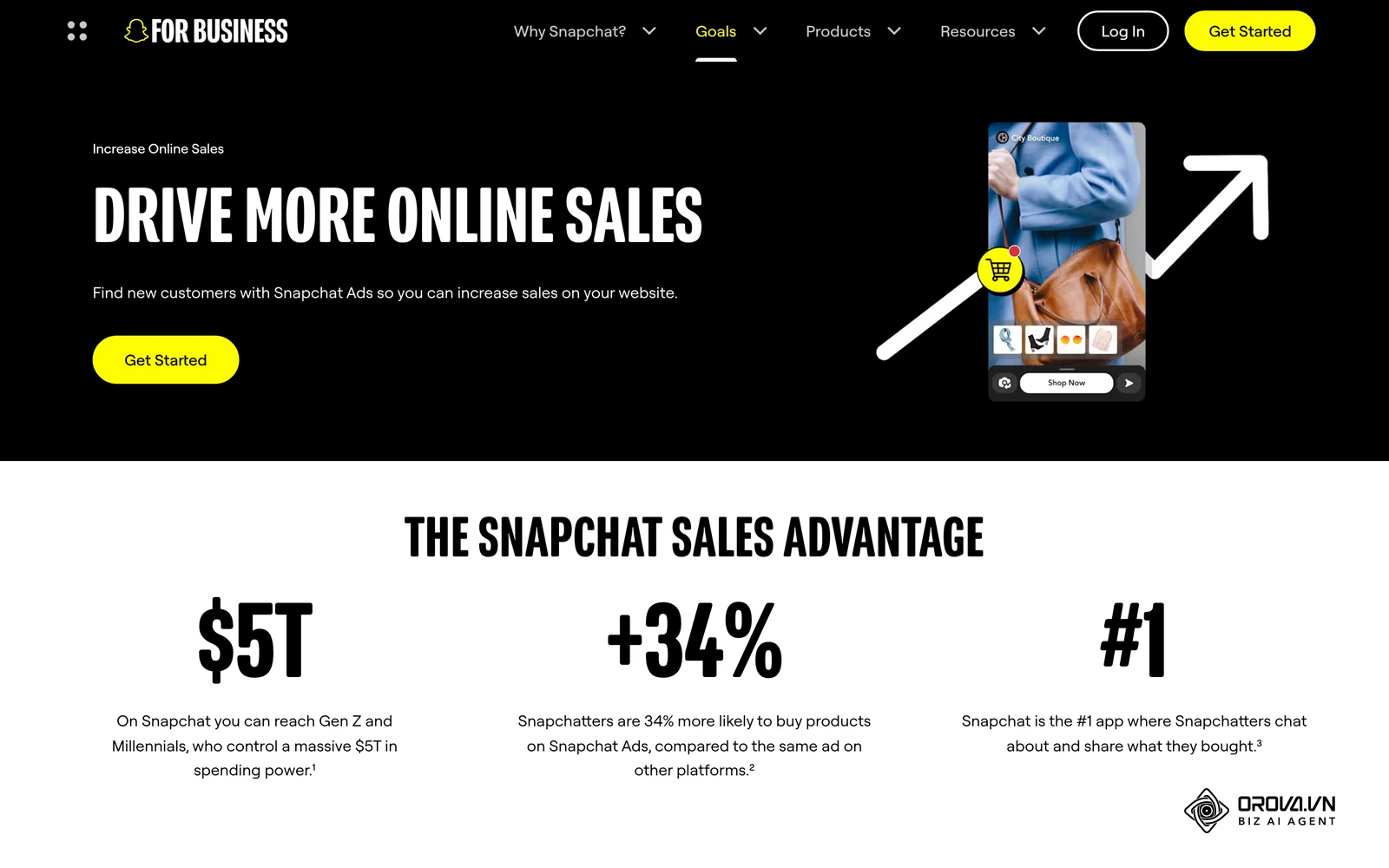
From your Snapchat Ads Manager home view, click the "Create Ads" dropdown in the top navigation bar and select "Advanced Create." Avoid the simplified "Instant Create" path, as it prevents granular audience segmentation, custom bidding thresholds, and manual placement exclusion.
Funnel Alignment and Ad Format Selection
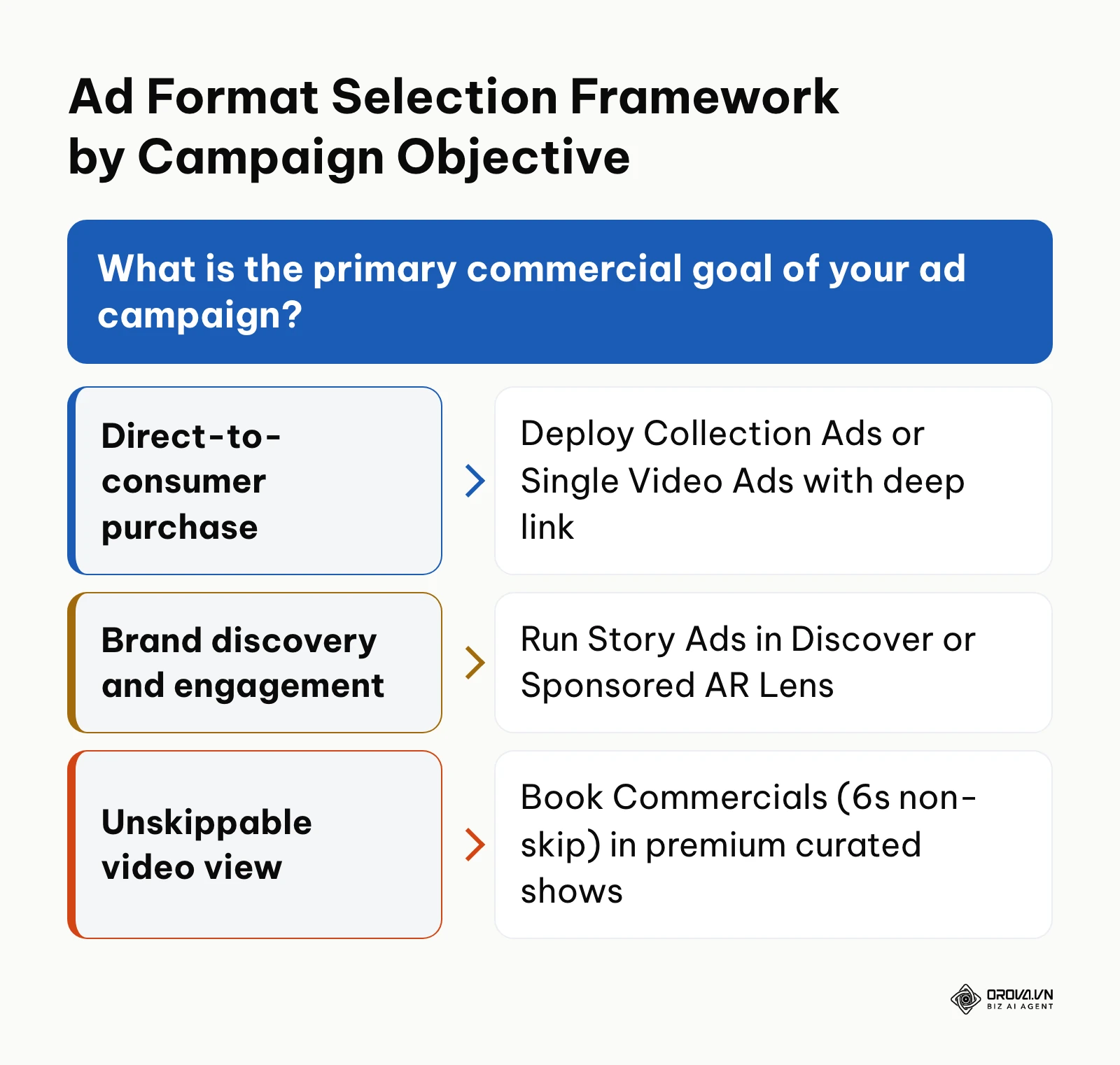
Snapchat offers several core ad formats, including the six below (Sponsored Snaps, which land in the Chat inbox, is a newer addition worth testing once the basics work). Your campaign objective dictates which formats are available at the ad level:
- Single Image or Video Ads: Full-screen 9:16 vertical ads lasting up to 180 seconds (with 3 to 5 seconds recommended for direct response). Best for prospecting, brand hooks, and rapid traffic acquisition.
- Story Ads: A tile placement appearing in the Discover feed that unfolds into a collection of 3 to 20 sequential snaps. Ideal for deep storytelling, product line launches, and high-consideration purchases.
- Collection Ads: Vertical video ads displaying four clickable product thumbnails along the bottom edge. Best for direct-to-consumer e-commerce catalogs and multi-SKU retail promos.
- Commercials: Unskippable 6-second video ads (extending up to 3 minutes) embedded inside curated premium shows. Best for top-of-funnel reach and brand lift.
- AR Lenses: Interactive augmented reality camera experiences allowing users to test products virtually. Ideal for beauty, apparel, and interactive brand activations.
- Filters: Static artistic overlays applied after capturing a photo or video. Best for geo-targeted events and local retail awareness.
The decision framework below summarizes which format to start with for each campaign goal.
In the campaign setup screen, a traffic objective suits a brand-new account whose pixel has recorded few purchases, while a conversions objective makes sense once your pixel and CAPI setup is logging purchases every week. Name your campaign using a standardized taxonomy (e.g., SNAP_DR_CONVERSIONS_PROSPECTING_US_2026).
For your first launch, set budgets at the ad set level rather than at the campaign level. Managing budgets per ad set ensures equal budget distribution across creative angles rather than allowing the algorithm to prematurely concentrate funds into a single variant.
Verify this step by confirming that your chosen objective displays the green checkmark icon in the setup tree and that the delivery estimation widget on the right panel updates with dynamic reach numbers. A common error here is selecting "Brand Awareness" when seeking direct web sales. Awareness campaigns optimize purely for maximum impressions, delivering your ads to users who rarely swipe up or buy.
Step 3: Configure Audience Targeting and Placements
Your objective is building an audience architecture that balances algorithmic discovery with demographic relevance.
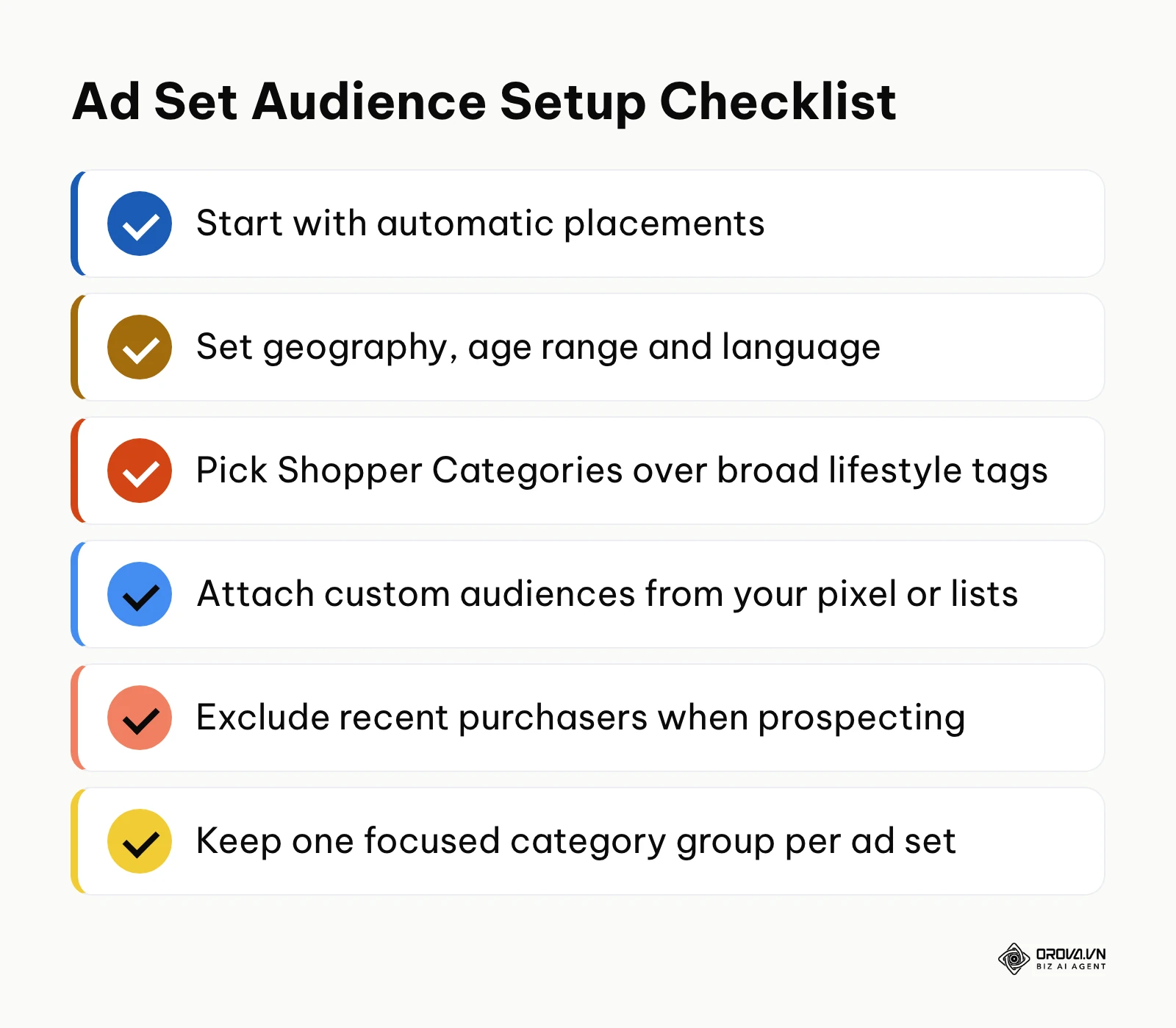
In the Ad Set creation panel, enter a descriptive ad set title. In the "Placements" section, automatic placements are the usual starting point; switch to manual placements only when a creative is built for one surface, such as content between friends' Stories or Spotlight.
Scroll to "Demographics." Select your target geographic market. Set age brackets based on verified customer profiles. For lifestyle brands targeting younger demographics, setting age bounds between 18 and 34 concentrates ad delivery where engagement density is highest. Select your operating language to prevent ad delivery to non-English device environments.
Under "Predefined Audiences," expand the interest taxonomy. Snapchat segments users into two primary categories: Lifestyle Categories (long-term viewing behavior) and Shopper Categories (verified retail and mobile app checkout habits). For direct-response campaigns, avoid broad lifestyle tags like "Music Lovers." Instead, select high-intent segments such as "Online Shoppers," "Department Store Shoppers," or niche categories matching your product line.
Scroll down to "Custom Audiences." If you have uploaded a customer email list or populated website retargeting pools via your Snap Pixel, attach them here. When testing new customer acquisition, always toggle "Exclude" on your existing 30-day website purchasers to avoid paying for conversions that would have occurred organically.
You can verify correct audience setup by checking the "Estimated Reach" counter on the right rail. For prospecting, keep the audience broad enough that the estimate does not warn you about limited reach; very small pools give the bidding system too little room and costs tend to rise.
A common targeting mistake is stacking ten unrelated interest categories inside one ad set. This obscures which audience segment drove your returns. Restrict each ad set to one focused category group or test an entirely broad demographic ad set alongside your interest tests.
OROVA ADS applies AI Agent to automate and optimize ad performance on Google, Meta and TikTok. Scale your budget safely, monitor 24/7 and expand your business quickly.
Experience the solution at orova.vn/ads
Step 4: Design 9:16 Vertical Creatives Within Safe Zones
Your objective is producing vertical video creatives engineered specifically for fast-scrolling mobile screens while complying with platform safety margins.
According to the ad specifications in Snap's Snapchat Business Help Center, vertical video assets should maintain an exact 9:16 aspect ratio with a minimum resolution of 1080x1920 pixels while reserving 150-pixel safety margins at the top and bottom. Files should be MP4 or MOV with H.264 compression; check the current file size limit in the specs before you export.
Safe Zone Matrix and 2026 Creative Compliance Checklist
Because Snapchat overlays native interface elements across every ad, positioning text or visual hooks incorrectly will render them unreadable. The top 150 pixels display your brand avatar, handle, and back arrow, while the bottom 150 pixels host the native swipe-up arrow, dynamic call-to-action bar, and URL preview card.
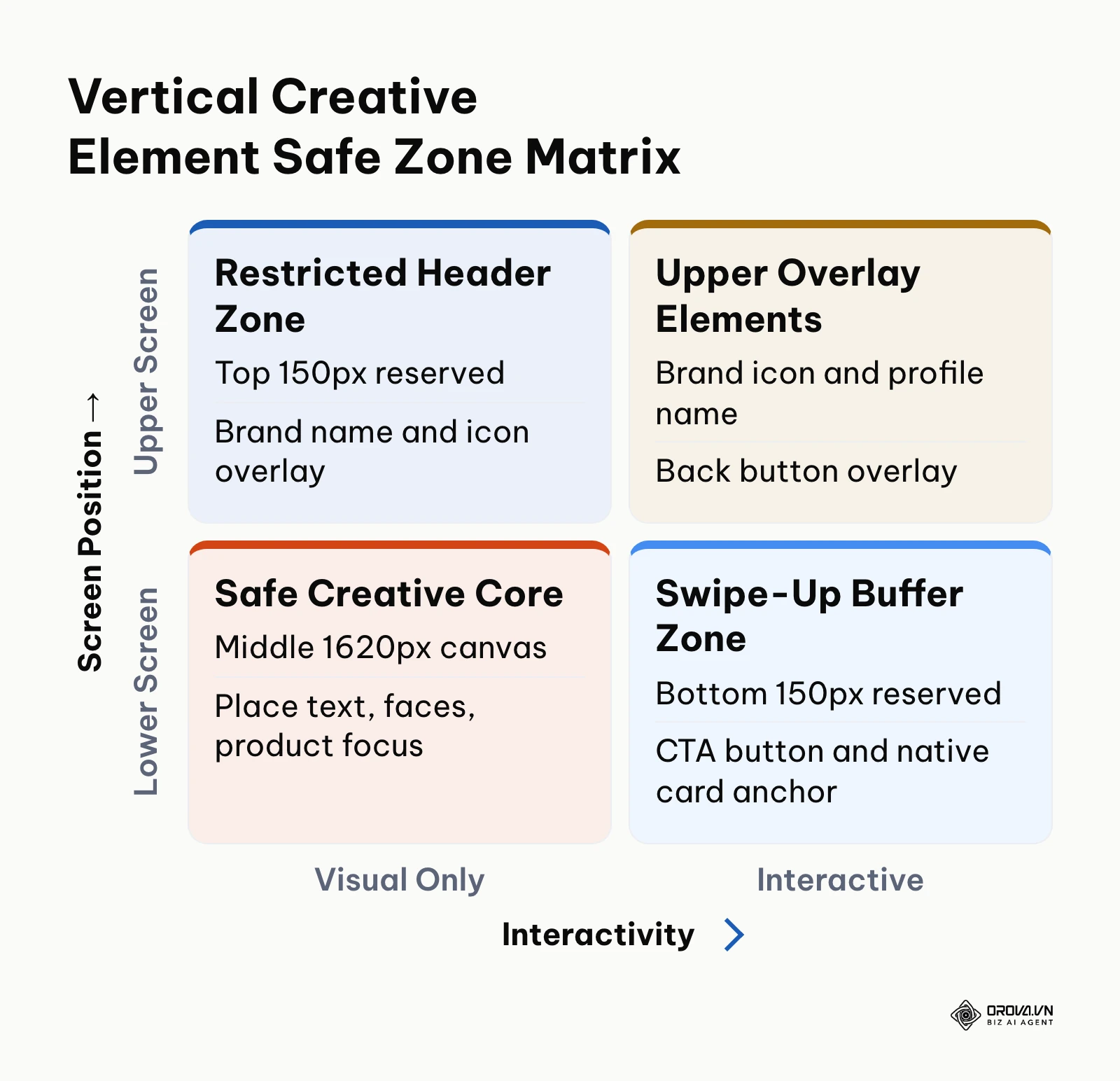
The matrix below maps the primary screen positions against interactivity requirements:
| Screen Position | Visual Content (Low Interaction) | Interactive / System Overlays |
|---|---|---|
| Top 150px Canvas | Background scene, ambient lighting | Native brand icon, profile name, back button |
| Middle 1620px Canvas | Primary actor, product demo, core value text | On-screen captions, stickers, visual reaction badges |
| Bottom 150px Canvas | Neutral background color, floor/surface | Swipe-up chevron, CTA button pill, legal disclosures |
Use the following 8-point checklist before uploading any video asset to Ads Manager:
- [ ] Aspect ratio measures exactly 9:16 (1080 pixels wide by 1920 pixels high).
- [ ] No primary headline text, promotional codes, or logos reside within the top 150 pixels.
- [ ] No button graphics, legal disclaimers, or subtitles sit within the bottom 150 pixels.
- [ ] Voiceover sits clearly above the background music, and the ad still makes sense with sound off.
- [ ] Video contains no artificial borders, letterboxing, or horizontal pillarbox black bars.
- [ ] The first frame features a high-contrast visual hook with zero blank intro title cards.
- [ ] Video duration lands between 5 and 15 seconds for single-asset direct response ads.
- [ ] All background music tracks are licensed for commercial advertising use.
The 3-Second Hook Architecture and Vertical Creative Playbook
Users tap through Snapchat quickly, so the first two to three seconds decide whether anyone sees your offer. Put the product, the problem or the brand hook on screen immediately rather than building up to it.
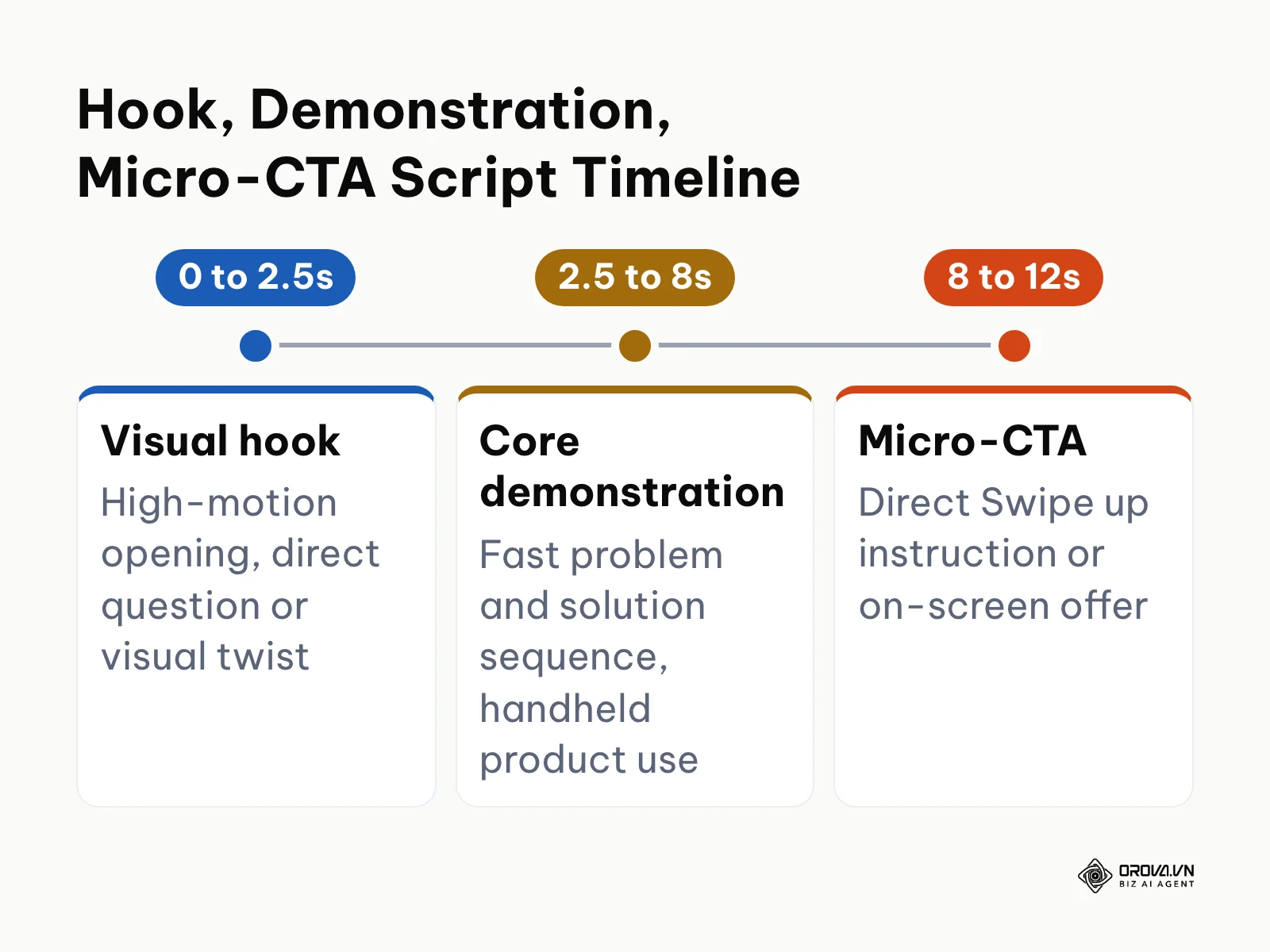
Structure your vertical video scripts using the three-part "Hook, Demonstration, Micro-CTA" framework: a visual hook in roughly the first 2.5 seconds, a fast product demonstration until about second 8, and a direct "Swipe up" instruction or offer by second 12.
Here are five production scripts tailored for vertical mobile e-commerce:
- The Unboxing Velocity Script: Frame opens with hands ripping open a shipping mailer in the first second. Second 2 reveals the product in close-up. Seconds 3 through 7 showcase quick 0.8-second cuts demonstrating three product use cases. Seconds 8 through 10 display a bold central caption: "Swipe up for 20% off your first order."
- The "Stop Doing This" Pattern Interrupt: Frame begins with an actor shaking their head at a conventional, messy product alternative. Text caption at center: "Stop wasting money on X." Second 3 cuts to the featured product solving the issue smoothly. Closes with a clear swipe-up arrow prompt.
- The Split-Screen Comparison: Screen split vertically 50/50. Left side shows "Old Routine" with frustrated expression. Right side shows "New Routine" using the advertised item with a pleased expression. Fast 6-second total loop with native text stickers.
- The Creator Confessional: Handheld selfie angle. Creator speaks directly to camera: "I honestly didn't think this would work until day three." Cuts to before-and-after b-roll footage. Closes with a verbal command to swipe up.
- The Rapid Texture Macro: Ultra-close macro lens video capturing product texture, application, or sound (ASMR style) without background music for the first two seconds, followed by an upbeat audio transition and promotional discount overlay.
Illustrative example (not a real client):
- Context: A direct-to-consumer skincare brand running vertical ads on mobile channels.
- Steps taken: Produced four 9:16 video variations, loaded them into an editing timeline with 150px safe-zone boundary masks, and aligned discount captions in the middle 60% of the screen.
- Snag encountered and resolution: The initial cut placed the discount voucher text 80 pixels above the bottom screen edge; on live mobile tests, the native "Shop Now" swipe-up pill blocked the code completely; adjusted text baseline upward by 120 pixels.
- Visual outcome: In-app preview verification confirmed clear visual separation between the brand's discount caption and the operating system's swipe-up navigation bar.
Step 5: Structure Ad Sets, Delivery Bidding, and Budgets
Your objective is establishing budget caps, delivery pacing, and bidding mechanics that protect efficiency while allowing algorithmic discovery.
Inside your Ad Set configuration panel, locate the "Budget & Schedule" section. Set your daily budget to at least five times your target Cost Per Acquisition (CPA). For example, if your break-even acquisition cost is 20 US dollars, allocate a minimum of 100 US dollars per day to that ad set. Setting budgets below this ratio prevents the ad delivery algorithm from generating enough statistical data to clear its calibration phase.
How Snapchat Compares with Meta and TikTok, and a Test Budget Split
Media buyers evaluating Snapchat should understand how its inventory differs from other social video networks before deciding how much test budget it deserves. Auction prices change by market, season and objective, so read CPM, CPC and conversion rate from your own accounts rather than from generic averages.
The table below compares what each channel is typically used for in a mobile test plan:
| Factor | Snapchat Adverts | Meta Ads (Reels & Stories) | TikTok Ads |
|---|---|---|---|
| Main placements | Between friends' Stories, Discover, Spotlight, Chat (Sponsored Snaps), AR Lenses | Facebook and Instagram Feed, Stories, Reels | For You feed, TopView, Spark Ads |
| Creative that fits | Full-screen 9:16, fast hook, camera-native, AR try-on | Mixed formats, square to vertical | Full-screen 9:16, creator-style, sound-on |
| Typical role in a test plan | Low-cost reach and prospecting among younger mobile users | Core conversions and retargeting | Creator content and trend-driven discovery |
| Tracking | Snap Pixel plus Conversions API | Meta Pixel plus Conversions API | TikTok Pixel plus Events API |
| Learning phase | Needs steady weekly conversion volume per ad set | Needs steady weekly conversion volume per ad set | Needs steady weekly conversion volume per ad set |
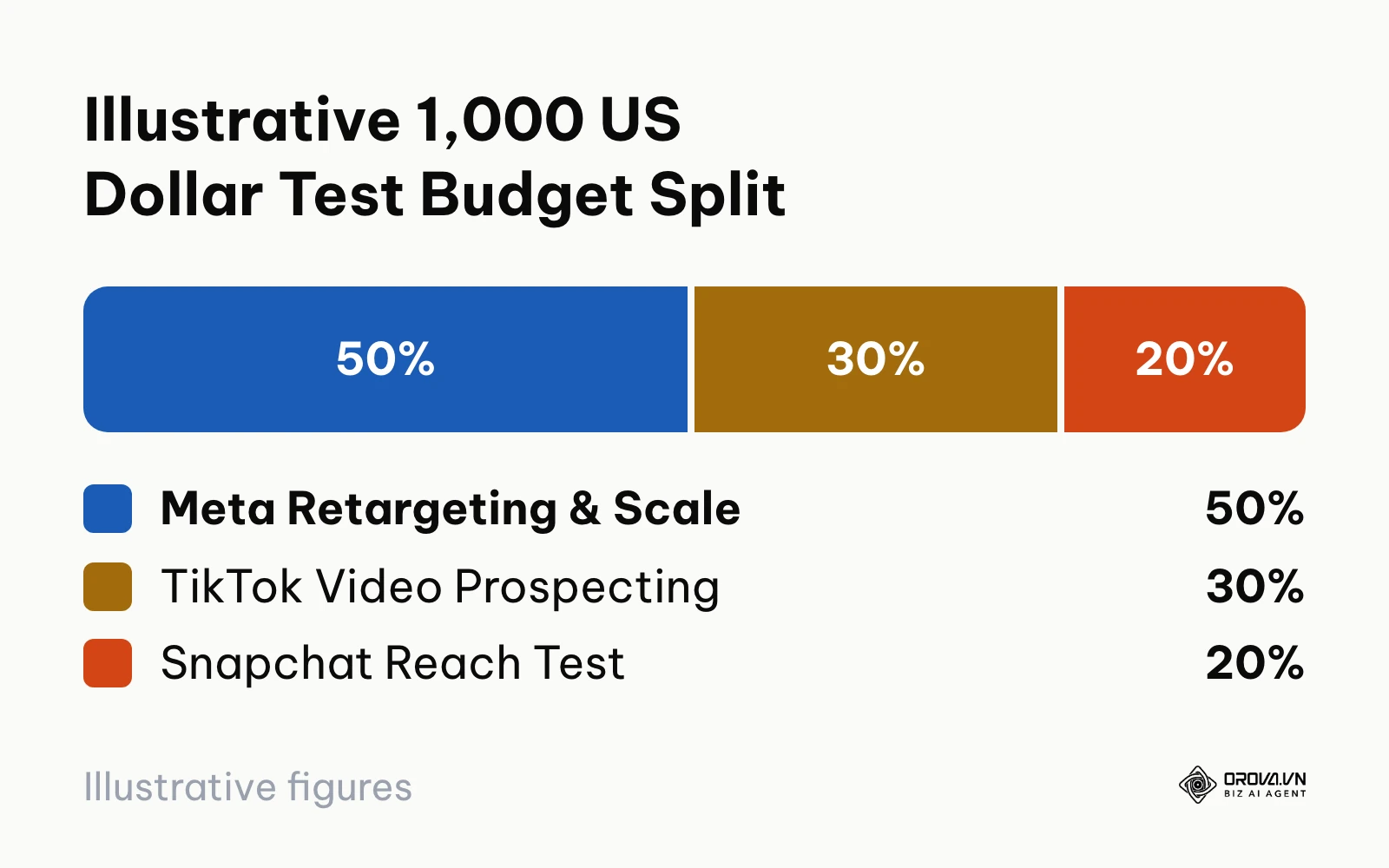
Illustrative example: when deploying an exploratory 1,000 US dollar paid social testing budget across channels, allocate funds according to channel maturity and volume efficiency:
- Meta Ads (500 US dollars / 50%): Captures core high-intent purchase conversions and anchors retargeting.
- TikTok Ads (300 US dollars / 30%): Tests high-energy creator content and trend-driven discovery.
- Snapchat Adverts (200 US dollars / 20%): Tests top-of-funnel reach and prospecting traffic.
With a 200 US dollar initial allocation on Snapchat and an assumed CPM of 4 US dollars (replace it with the CPM your own account shows), you would buy about 50,000 impressions; at an assumed 1.0% swipe-up rate that is about 500 site visits, or 0.40 US dollars per visit. For brands utilizing a break even ROAS calculator, this kind of small, capped allocation provides a testing ground for creative angles before rolling them out across higher-cost networks.
In the "Bidding" options, choose "Target Cost" if you have historic CPA baselines from other mobile ad accounts, or select "Auto-Bid" if launching a fresh pixel. Auto-Bid instructs the auction engine to capture the maximum volume of conversion events given your daily budget limit, preventing your ads from underdelivering due to overly aggressive manual bid floors.
Verify this step by reviewing the summary module on the right rail. Ensure the flight schedule is set to run continuously starting immediately, and confirm that dayparting is set to all hours unless your product requires live customer support agents.
A frequent bidding mistake is selecting "Max Bid" and setting a bid far below what your account has historically paid. The ad auction will fail to win impression bids, resulting in zero impressions over consecutive days.
Step 6: Launch Campaigns and Clear the Learning Phase
Your objective is publishing your ad sets and guiding the algorithmic delivery engine through its initial learning phase without disruptive manual interventions.
Click "Review & Publish" at the bottom right of the campaign builder. Review your targeting exclusions, daily budget caps, ad attachment links, and tracking parameters. Click "Publish Campaign." Your ads now enter the automated policy review queue. Many ads are reviewed within hours, but leave a full day of buffer before any launch date, especially in peak seasons.
Learning Phase Diagnosis and Thresholds
Once approved, each ad set enters an exploratory calibration status known as the Learning Phase. During this window, the delivery algorithm tests your creatives across various demographic clusters to identify which user segments respond most efficiently to your bid.
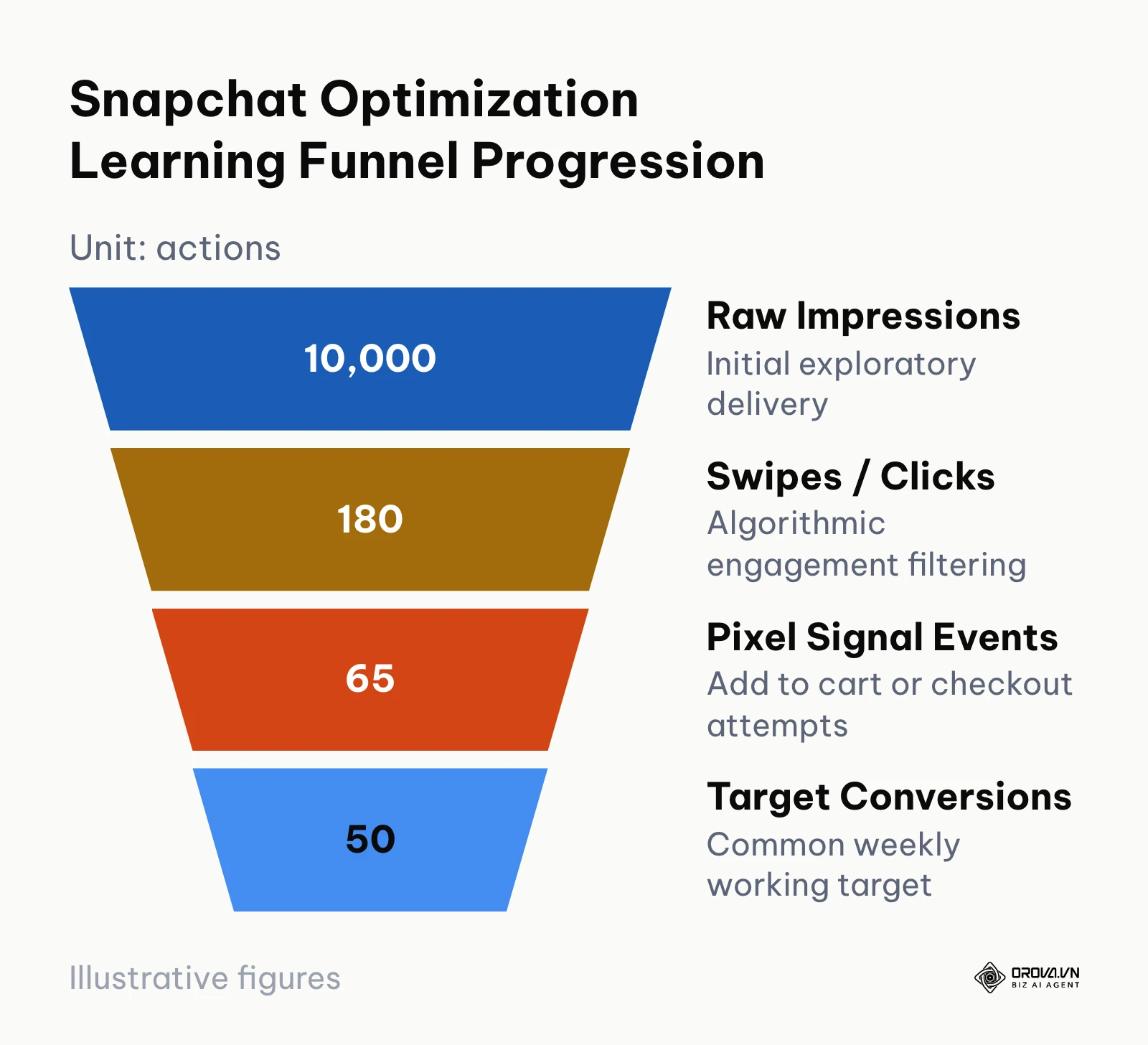
The diagram below shows, with example numbers, how volume narrows from impressions to the conversions the system learns from.
To exit the Learning Phase reliably, an ad set needs a steady flow of optimization events; around 50 per week is a common working target among media buyers. If your campaign generates far fewer conversions than that, the algorithm lacks sufficient mathematical confidence to stabilize delivery, leading to wide swings in daily CPA.
Follow these operational rules while your ad set is calibrating:
- Avoid large budget jumps while learning: Big adjustments can send the ad set back into learning.
- Do not change targeting parameters or creative assets: If a creative is underperforming, pause it rather than swapping the underlying video file inside an active ad.
- Allow at least 72 hours of uninterrupted delivery: Evaluating performance within the first 24 hours leads to premature conclusions, as early impression batches are exploratory.
Illustrative example (not a real client):
- Context: A mobile utility app generating trial subscriptions through in-app install campaigns.
- Steps taken: Launched three ad sets at 35 US dollars of daily spend each, targeting app installs via Auto-Bid, and monitored daily event intake.
- Snag encountered and resolution: After four days, Ad Set 2 had recorded only 14 trials, remaining stuck in learning with a CPA well above target; instead of editing targeting, paused the ad set and shifted its budget into Ad Set 1, which had achieved 42 trials.
- Visual outcome: Ads Manager status for Ad Set 1 transitioned from "Learning" to "Active" on day six, with cost per install stabilizing at 2.10 US dollars across the subsequent 14 days.
Step 7: Analyze Attribution and Scale High-Performing Ads
Your objective is auditing attributed conversion returns, isolating high-performing creatives, and scaling spend safely.
Open Ads Manager and navigate to the "Manage Ads" dashboard. Click the "Columns" button above the data table and select "Customize Columns." Add the following performance metrics to your default reporting view:
- Spend: Total media investment across the selected date range.
- Paid Impressions: Total delivered impressions.
- Swipe-Up Rate: Percentage of impressions that resulted in an upward swipe navigation.
- eCPSU (Effective Cost Per Swipe-Up): True cost per mobile site visitor.
- Purchases: Total completed checkout actions logged via Pixel and CAPI.
- Purchases ROAS: Attributed revenue divided by media ad spend.
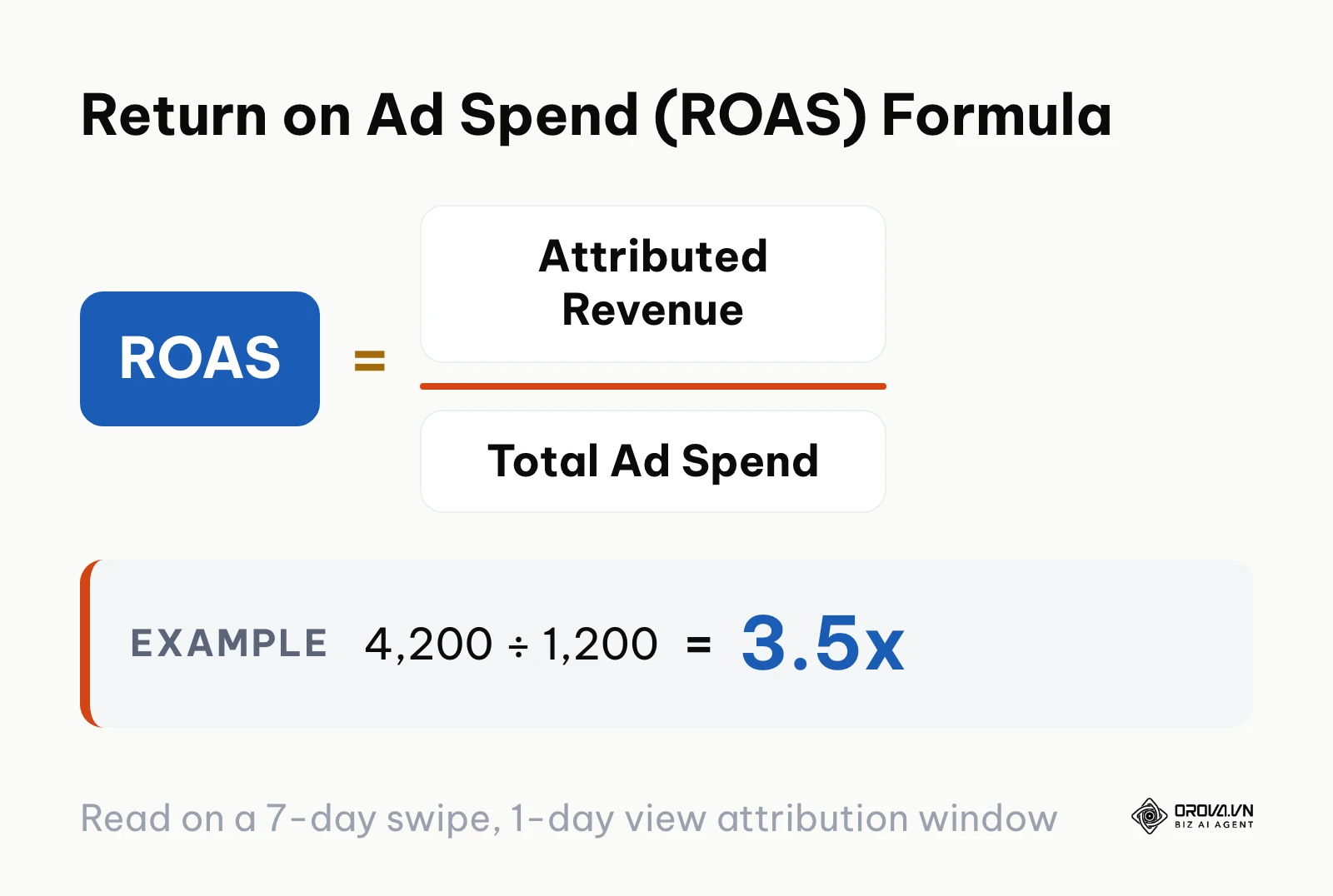
To accurately evaluate performance, media buyers monitor Return On Ad Spend using the standard relationship between attributed conversion value and media investment:
ROAS = Attributed Revenue ÷ Total Ad Spend. For example, 4,200 US dollars in attributed revenue on 1,200 US dollars of spend is a ROAS of 3.5x.
When calculating ROAS inside Snapchat Ads Manager, verify your active attribution window under "Attribution Settings." The default window reports conversions occurring within 28 days of a swipe-up and 1 day of an ad view. For direct-response consumer goods, change this window to 7-day swipe and 1-day view. This filters out passive view-through conversions that may have occurred regardless of ad exposure, providing a clearer reading of true ad impact.
When an ad set maintains a ROAS at least 20% above your commercial break-even threshold over four consecutive days, apply horizontal or vertical scaling tactics:
- Vertical Scaling: Increase the daily budget by 15% to 20% every 48 hours. Never double a budget overnight.
- Horizontal Scaling: Duplicate the winning ad set, expand the audience age or geographic parameters, or introduce two fresh video variations featuring alternative 3-second visual hooks into the duplicated set.
Verify your scaling stability by reviewing day-over-day CPA trends in the performance chart. If CPA rises by more than 30% following a budget expansion, hold spend steady for 48 hours to allow the delivery engine to adjust to the deeper audience tier.
Master Execution Checklist for Snapchat Adverts
Use this comprehensive table to track your implementation progress across each operational stage:
| Step Number | Core Operational Action | Completion Verification Signal | Estimated Time |
|---|---|---|---|
| Step 1 | Establish Business Account and deploy dual-layer Pixel with CAPI | Events Manager shows matching browser and server events with deduplication active | 45 minutes |
| Step 2 | Choose Advanced Create and set conversion campaign objective | Selected objective marked with green checkmark in campaign tree | 10 minutes |
| Step 3 | Define placement exclusions and curate predefined shopping audiences | Audience reach estimator shows no limited-reach warning | 20 minutes |
| Step 4 | Render 9:16 videos respecting top and bottom safe zones | In-app mobile preview confirms zero overlap with native CTA buttons | 60 minutes |
| Step 5 | Set ad set daily budget (≥ 5x target CPA) and configure Target Cost bidding | Budget and bid strategy displayed correctly in ad set configuration panel | 15 minutes |
| Step 6 | Publish campaign and monitor learning phase without manual edits | Ad set status displays "Active" or "Learning" with steady impressions | 10 minutes |
| Step 7 | Audit 7-day swipe attribution and scale winning assets gradually | Normalized ROAS meets profitability goals across customized report view | Ongoing |
Want to scale your budget but afraid of breaking performance?
Integrate OROVA ADS now - an AI Agent that automatically monitors and optimizes Google, Meta, TikTok ads 24/7. Now, expanding and replicating your Performance Ads team is just one click away.
Try it now at: orova.vn/ads
Common Snapchat Adverts Mistakes and Practical Fixes
Even experienced media buyers can encounter performance roadblocks when running campaigns on Snapchat. The table below details frequent operational issues, their root causes, and practical solutions:
| Mistake | Root Cause | Practical Solution |
|---|---|---|
| Zero impressions delivered after approval | Bid threshold in Target Cost or Max Bid is set below current auction clearing rates | Switch bidding to Auto-Bid for 48 hours to establish true auction clearing benchmarks, then reset Target Cost |
| Campaign stuck in Learning Phase indefinitely | Daily budget too low to generate 50 conversion events within 7 days | Consolidate fragmented ad sets into one unified audience or move optimization goal up-funnel to Add to Cart |
| High swipe-up rate with low landing page views | Slow mobile page load or a redirect chain that drops tracking parameters | Compress web images, enable mobile CDN caching, and test destination URLs via Google PageSpeed Insights |
| Creative rejected for copyright infringement | Unlicensed commercial audio or unauthorized celebrity likeness used in video track | Replace the soundtrack with audio licensed for commercial advertising |
| High spend with zero attributed conversions | Snap Pixel and CAPI event names do not match standard nomenclature | Align client and server event strings to exact casing (PURCHASE and PAGE_VIEW) in Events Manager |
| Severe ad fatigue after 10 days of scaling | Audience size too narrow, so frequency per user keeps climbing | Expand audience targeting parameters or introduce two fresh creative hooks into the ad set |
When Snapchat is one channel inside a wider performance marketing program, review these issues weekly next to the same checks on your other paid channels, so a tracking break on one platform does not hide behind good numbers on another.
How to Measure Success After Campaign Launch
Evaluating performance requires looking beyond top-line vanity metrics. Focus on indicators that directly reflect delivery health and acquisition economics.
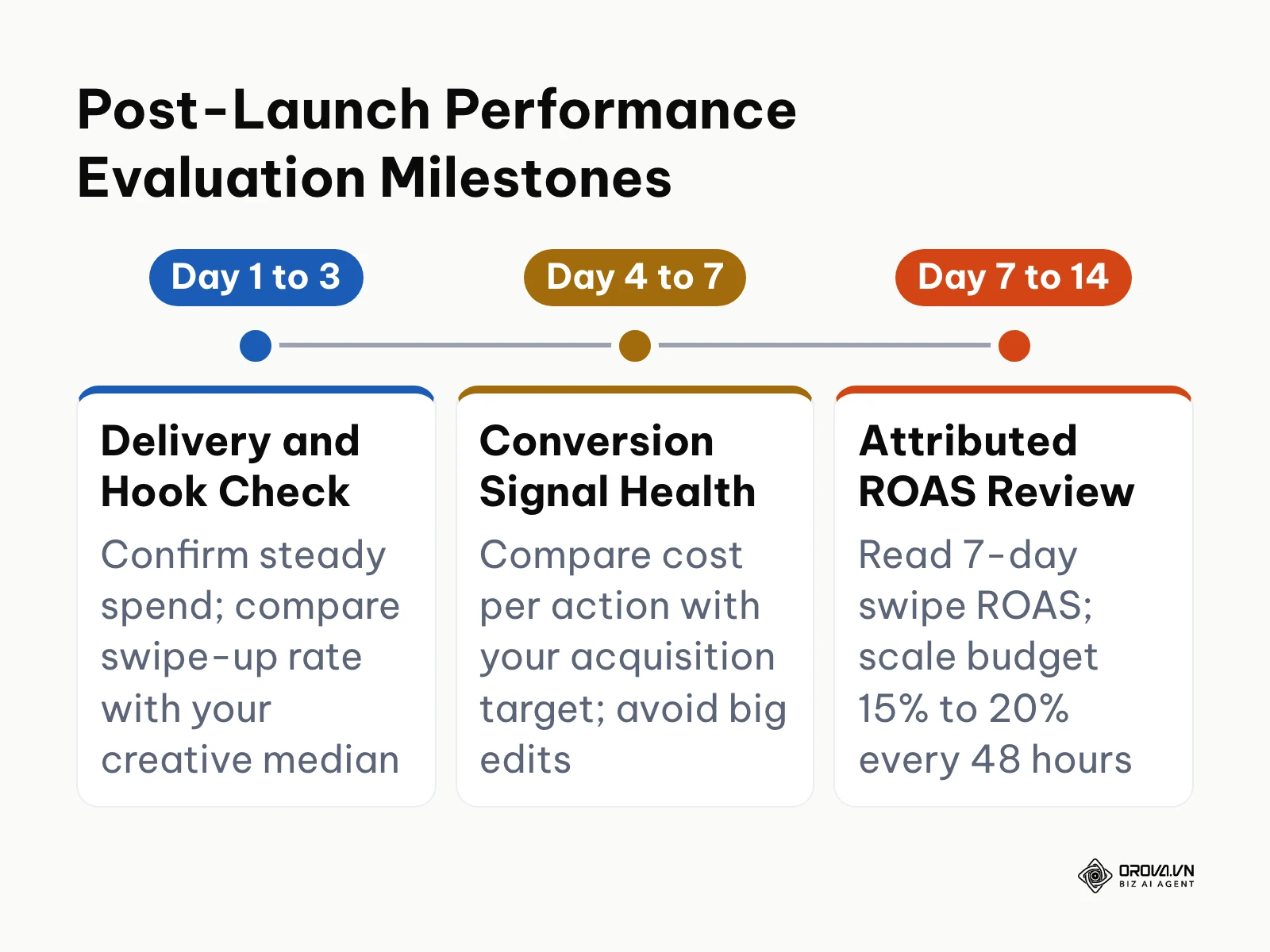
Key metrics to track in Ads Manager include:
- Delivery Clearing (Hours 1 to 24): Confirm your ad set delivers impressions consistently without hitting auction bid limits. A healthy ad set starts spending soon after approval.
- Swipe-Up Engagement (Days 1 to 3): Compare each creative's swipe-up rate with the median of your other creatives; an asset far below that median has a hook that is failing to stop users tapping past.
- Conversion Signal Health (Days 4 to 7): Monitor your cost per target action against your historical customer acquisition targets. Use a reliable framework for managing daily ad spend to prevent runaway costs during this period.
- Attributed ROAS (Days 7 to 14): Measure blended return across your 7-day swipe window. Evaluate your metrics directly inside the Snapchat Ads Manager dashboard under the Manage Ads view, cross-referencing your orders against backend e-commerce sales records.
Future Trends in Snapchat Adverts: Author's Perspective
The paid mobile advertising landscape is undergoing significant structural shifts. Below, I outline three trends that will define how brands approach advertising on Snapchat over the next few years.
Generative AI Will Replace Static Creative Iteration
As of 2026, marketing teams still spend substantial hours manually filming, editing, and formatting vertical video variations to combat creative fatigue. I believe that over the next few years, the production of mobile vertical ads will shift toward automated, generative video pipelines. Rather than shooting five physical variations of an unboxing video, media buyers will input raw product photography and value propositions into generative video tools that render dozens of native-looking 9:16 video variations customized to specific audience micro-segments.
Brands that master modular creative production today will be best positioned to leverage these generative tools as they mature. However, this trend could slow if mobile audiences develop banner blindness toward AI-generated visual styles and demand raw, unedited creator footage.
Augmented Reality Will Transition from Brand Vanity to Direct Commerce
Today, many marketers still view Sponsored AR Lenses as high-cost branding novelties reserved for global entertainment or athletic brands. In my view, AR advertising will become a standard direct-response channel for mainstream e-commerce. As spatial computing standards and mobile hardware improve, virtual try-ons for eyewear, cosmetics, footwear, and home furnishings could close more sales than static product pages for these categories.
E-commerce operators should begin cataloging 3D assets and experimenting with lightweight Lens Web Builder templates today to establish operational familiarity. This transition could be delayed if mobile camera permissions face tighter operating system restrictions or if consumer adoption remains limited to casual entertainment lenses.
Algorithmic Media Buying Will Dominate Manual Campaign Configuration
The manual configuration of granular interest segments, placement toggles, and device targeting is steadily losing effectiveness compared to broad, algorithmic delivery. I anticipate that social ad platforms, including Snapchat, will eventually phase out manual interest targeting in favor of consolidated, goal-based campaign engines similar to Google Performance Max or Meta Advantage+. In this operating environment, targeting will be determined entirely by the creative asset itself and the quality of first-party conversion signals fed back through server-side APIs.
Media buyers should stop obsessing over hyper-niche audience exclusions and instead invest their resources into first-party data infrastructure and high-volume creative testing. This shift could face resistance if advertisers demand granular audience transparency or if privacy regulations limit the depth of algorithmic optimization models.
Frequently Asked Questions About Snapchat Adverts
What is the minimum budget required to advertise on Snapchat?
Snapchat sets a low minimum daily budget per ad set (check the current figure in Ads Manager when you create the ad set). For direct-response conversion campaigns, a practical rule is a daily budget of at least five times your target acquisition cost, so the delivery algorithm can gather sufficient data to exit the Learning Phase.
How does the 2026 Snapchat ad auction determine which ad wins?
The auction evaluates every ad entry using an eCPM calculation that combines your monetary bid, the historical engagement rate of your creative (such as swipe-up rate), and signals about ad quality and how users respond to it. An engaging, fast-loading creative can outbid a higher cash offer that has poor user engagement.
Can small businesses create Snapchat AR Lenses without custom coding?
Yes. Businesses can build interactive AR experiences using Snapchat's browser-based Lens Web Builder inside Ads Manager without writing custom code. The tool provides pre-built 3D templates for beauty try-ons, product showcases, and interactive face filters that can be customized with your brand assets.
Why do Snapchat video ads get rejected during policy review?
The most common reasons for ad rejection include text or logos placed in the top or bottom safe zones, landing pages that do not match the product shown in the video, slow-loading destination URLs, and the use of commercial background audio tracks without appropriate licensing rights.
How does artificial intelligence affect performance marketing on Snapchat today?
AI plays a dual role in modern mobile advertising: it powers automated audience discovery through machine-learning bidding models, and it accelerates vertical video production through automated script generation and voiceover tools. Incorporating automated ads rules allows media buyers to systematically pause fatigue-prone creatives before ad spend is wasted.
Where Should You Start Today?
Your immediate next step depends on your current media buying experience and infrastructure readiness:
If you have never opened a Snapchat business account, start by registering your organization at business.snapchat.com. Dedicate your first afternoon to completing your business profile, entering payment details, and deploying the Snap Pixel across your website through Google Tag Manager so your account begins gathering baseline visitor data before you spend your first advertising dollar.
If you already have an active pixel recording traffic but have never launched a paid campaign, audit your creative library. Use a smartphone to record three authentic vertical videos that demonstrate your core product solving a customer problem. Edit each clip to under 10 seconds, verify that all captions stay inside the middle safe zone, and prepare an initial ad set with a modest daily budget using Auto-Bid.
If you are already running active paid campaigns on other social channels, focus your first session on establishing server-side tracking integrity. Generate a Conversions API access token in Snapchat Events Manager and map your server-to-server purchase events with deduplication keys to safeguard your reporting against iOS tracking loss.
By building your technical tracking foundation and respecting vertical mobile creative standards from day one, your business can unlock profitable customer acquisition through snapchat adverts.
About the author

Builder of Orova
Nguyễn Đỗ Trọng Ân has 8 years of experience in marketing, including 6 years managing market development across Asia. He builds Orova, a Biz AI Agent that never sleeps: it plans, runs and optimizes work for businesses.
Run your business with AI Agents
Orova is the always-on Biz AI Agent — it plans, runs, and optimizes the work for you.
Save time, unlock productivity.