
What is a Google Search Console SEO audit? An advanced 5-step framework

Many website owners spend countless hours guessing why their traffic is stagnant. They invest heavily in external tools that provide rough estimates and synthetic metrics. However, they often overlook the most accurate source of truth provided directly by the search engine itself. Performing a comprehensive google search console seo audit is the most reliable way to uncover technical issues and growth opportunities for your website.
This native platform holds verified data about how your pages are crawled, indexed, and served to actual users. Relying solely on third-party crawlers can lead to chasing phantom errors while ignoring critical blocks preventing your site from ranking. This article provides an advanced, step-by-step framework to analyze your technical health and content performance. You will learn how to move beyond basic dashboard views using advanced filtering and external visualization. By the end of this guide, you will have a clear standard operating procedure to maximize your search visibility.
What is a Google Search Console SEO audit?
A google search console seo audit is a systematic evaluation of website health and organic performance using Google's proprietary data. It is used to identify indexing blocks and optimize search visibility. It differs from external SEO crawlers by providing verified Google metrics instead of third-party estimates.
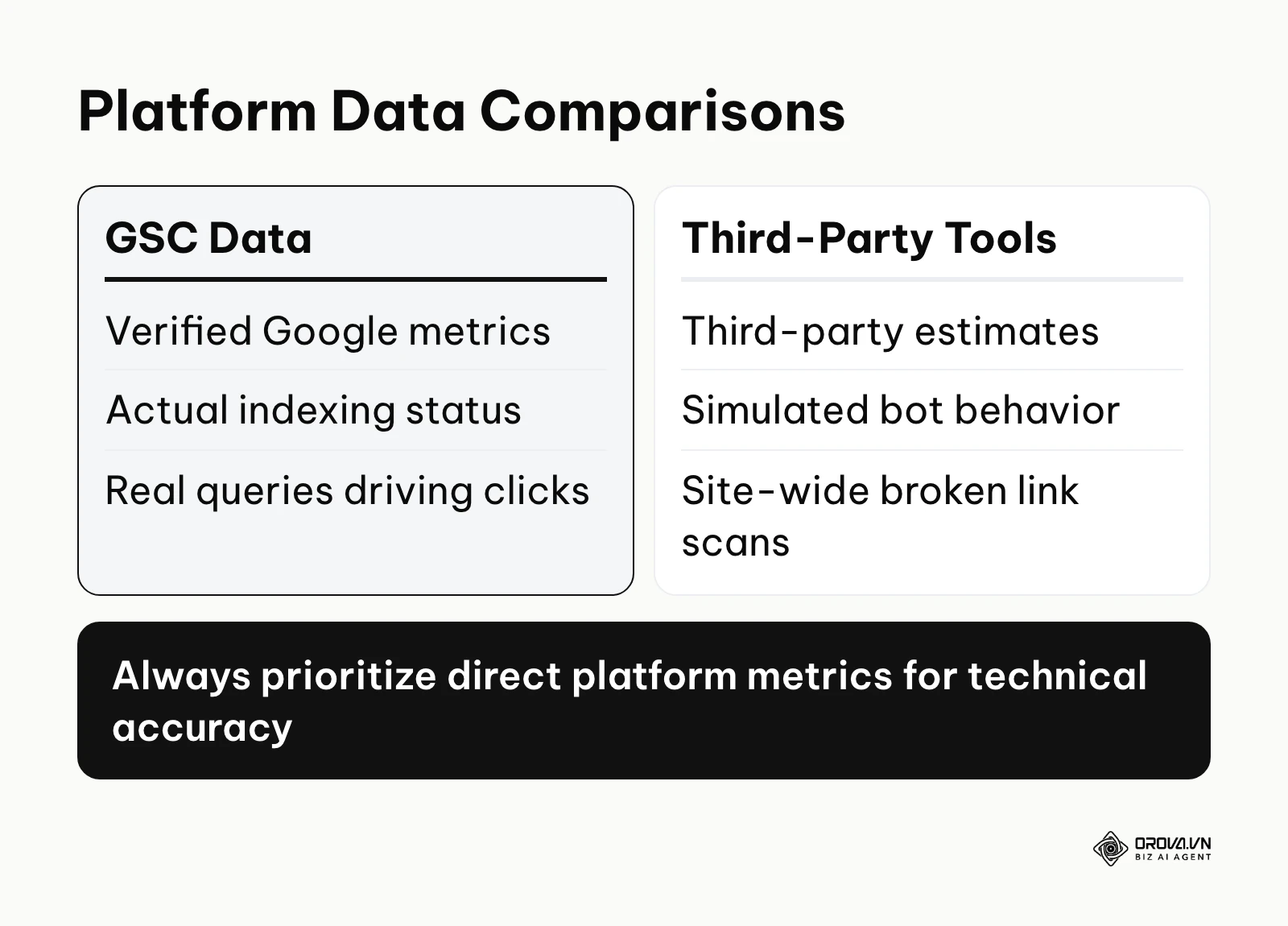
The diagram below summarizes the key differences between these data sources.
The name originates from the platform itself, previously known as Google Webmaster Tools. Google provides this free service to help site owners monitor and maintain their presence in search results. Over time, the platform evolved into a robust analytics suite essential for modern optimization.
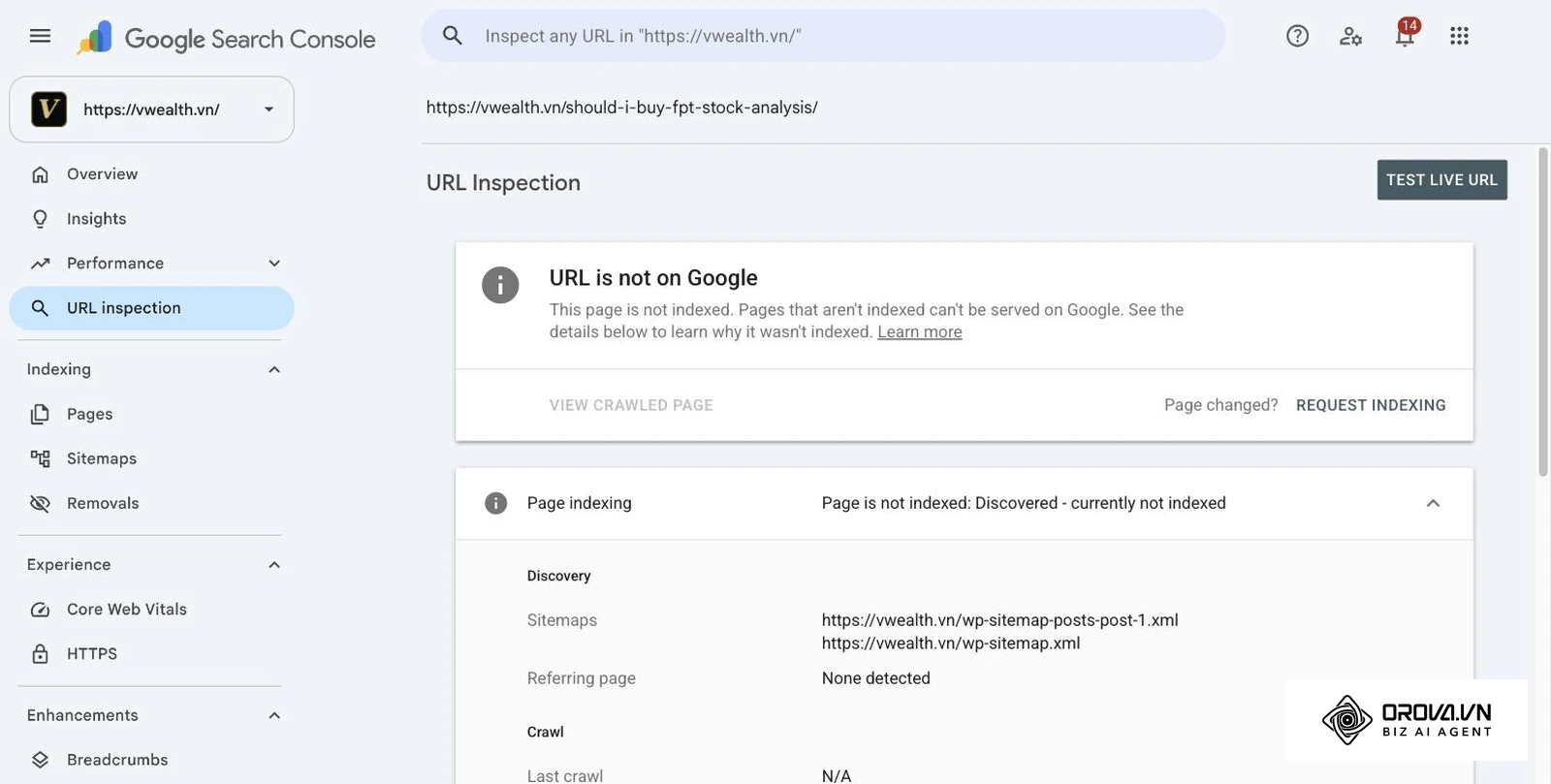
Understanding how this process differs from other common evaluations is crucial. Many beginners confuse native data analysis with third-party software scans. The table below clarifies these distinctions. For a worked example of a full-site review, see this SEO audit case study.
| Concept | How it differs | Example |
|---|---|---|
| Native Platform Audit | Uses Google's own search and indexing data | Identifying actual queries driving clicks |
| Third-Party Crawler Audit | Simulates bot behavior externally | Finding broken links across the site |
| Analytics Audit | Measures user behavior post-click | Tracking conversion rates on landing pages |
Illustrative example: A local bakery owner wanted to know why their new cake pages were not ranking. First, they opened the native dashboard and navigated to the indexing report. Second, they inspected the specific URLs that were missing. Third, they requested manual indexing. The stumble was that they accidentally typed the wrong URL variation with HTTP instead of HTTPS, causing a temporary error. The visual result was a green checkmark indicating successful discovery, leading to the pages appearing in search results a week later.
The Meaning Behind the Data
This analytical process exists to solve the fundamental problem of search engine transparency. Before these tools were available, webmasters had to guess how search bots interacted with their architecture. This audit provides a direct communication line between your server and the search engine. It sits at the very foundation of your digital marketing efforts.
In the broader picture, this process comes right after your initial website launch but before any large-scale promotional campaigns. You must ensure the technical foundation is solid before pouring resources into content creation. If the site is still being built, follow an SEO-friendly website design workflow first, then audit once real data arrives. Integrating google search console for seo provides the baseline metrics needed to measure any future success. If you ignore this crucial step, you risk building a massive content library that search engines simply refuse to index.
When you do not need a Google Search Console SEO audit yet: There are specific situations where conducting this analysis is a waste of time. First, if you just launched a brand new website yesterday, you will not have enough impression data to review. Second, if your site is exclusively an internal portal blocked by robots.txt, organic search data is completely irrelevant. Finally, if you have not finished building your basic site architecture, you should focus on publishing the foundation first. In these cases, focus on basic setup rather than auditing.
Values and Benefits of the Audit
Performing this analysis delivers profound advantages split into two layers. It protects the overall business infrastructure while empowering the daily practitioner to work smarter. Understanding these distinct layers helps justify the time investment required to master the platform.
Protecting Business Revenue from Technical Disasters
The diagram below summarizes what a regular monitoring routine protects.
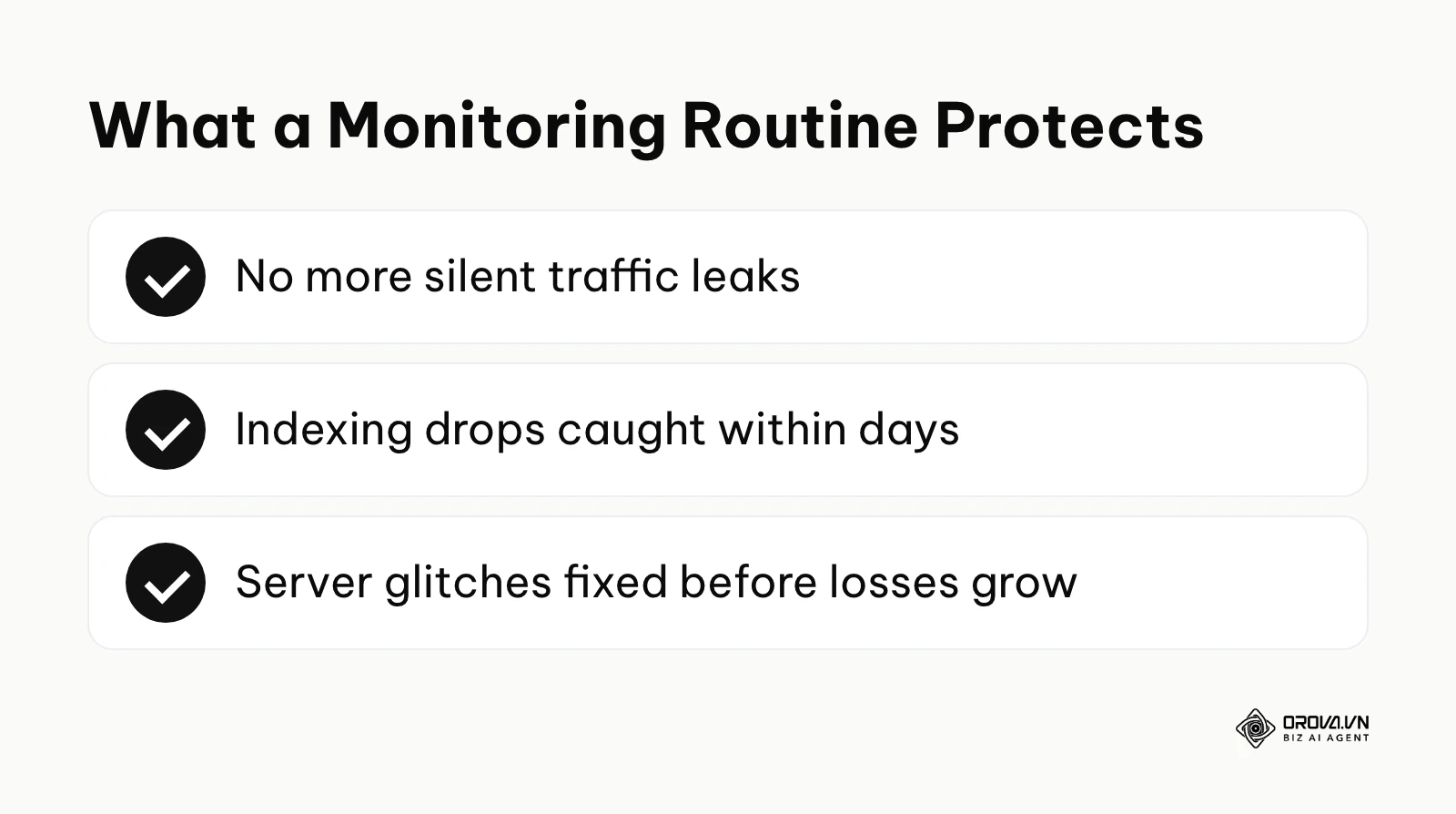
For a business, technical errors mean lost revenue. A sudden drop in indexation can wipe out months of hard work overnight. Before implementing a routine review, companies often suffer silent traffic leaks for months without noticing.
After establishing a monitoring routine, teams can catch indexing drops within days. This rapid response prevents minor server glitches from becoming catastrophic financial losses. Regular checks act as an insurance policy for your organic revenue stream.
Reducing Dependency on Expensive Third-Party Tools
Practitioners often rely heavily on paid software subscriptions to gather search volume estimates. Before diving deep into native data, SEOs might spend thousands of dollars annually on tool stacks. These external platforms provide estimates that can differ from what your site actually receives, especially in niche industries.
After mastering the native interface, professionals realize they have access to exact impression data for free. This allows them to allocate budget toward content creation rather than redundant software. It fundamentally shifts the strategy from estimation to factual analysis.
Uncovering Hidden Content Opportunities
Finding what to write next is a constant challenge for marketing teams. Before using advanced filtering, writers typically rely on generic keyword research tools that show highly competitive terms. This often leads to wasted effort targeting impossible phrases.
After applying a structured seo strategy to the performance data, teams can find exact phrases their site already ranks for on the second page. This reveals massive opportunities to capture traffic with minimal effort.
| Benefit | Measured By | Time to See Results |
|---|---|---|
| Technical Protection | Indexing coverage errors | After Google recrawls the fixed URLs |
| Cost Reduction | Monthly software spending | Immediately |
| Content Growth | Search impressions & CTR | Several weeks, varies by site |
Illustrative example: An online furniture retailer wanted to increase organic sales. First, they filtered the performance report for the phrase "wooden dining table". Second, they identified a specific product page stuck at position twelve. Third, they updated the page title and added missing material specifications. The stumble was that they initially changed the URL slug, breaking existing backlinks, but quickly reverted it using a redirect. The visual result was a steady climb on the position graph, settling at position four within a month.
Discover Orova.vn – a Biz AI Agent platform with OROVA SEO, a complete solution for every website. The system supports search engine optimization from A to Z with features including keyword research, writing new SEO-ready articles, optimizing existing content, rank tracking, plus competitor analysis and in-depth technical analysis. Sign up today to experience OROVA SEO completely free (offer valid through July 7, 2027).
How a Google Search Console SEO Audit Works: The Advanced SOP
Executing this process requires a methodical approach to prevent data overload. The diagram below summarizes the sequential workflow you should follow.
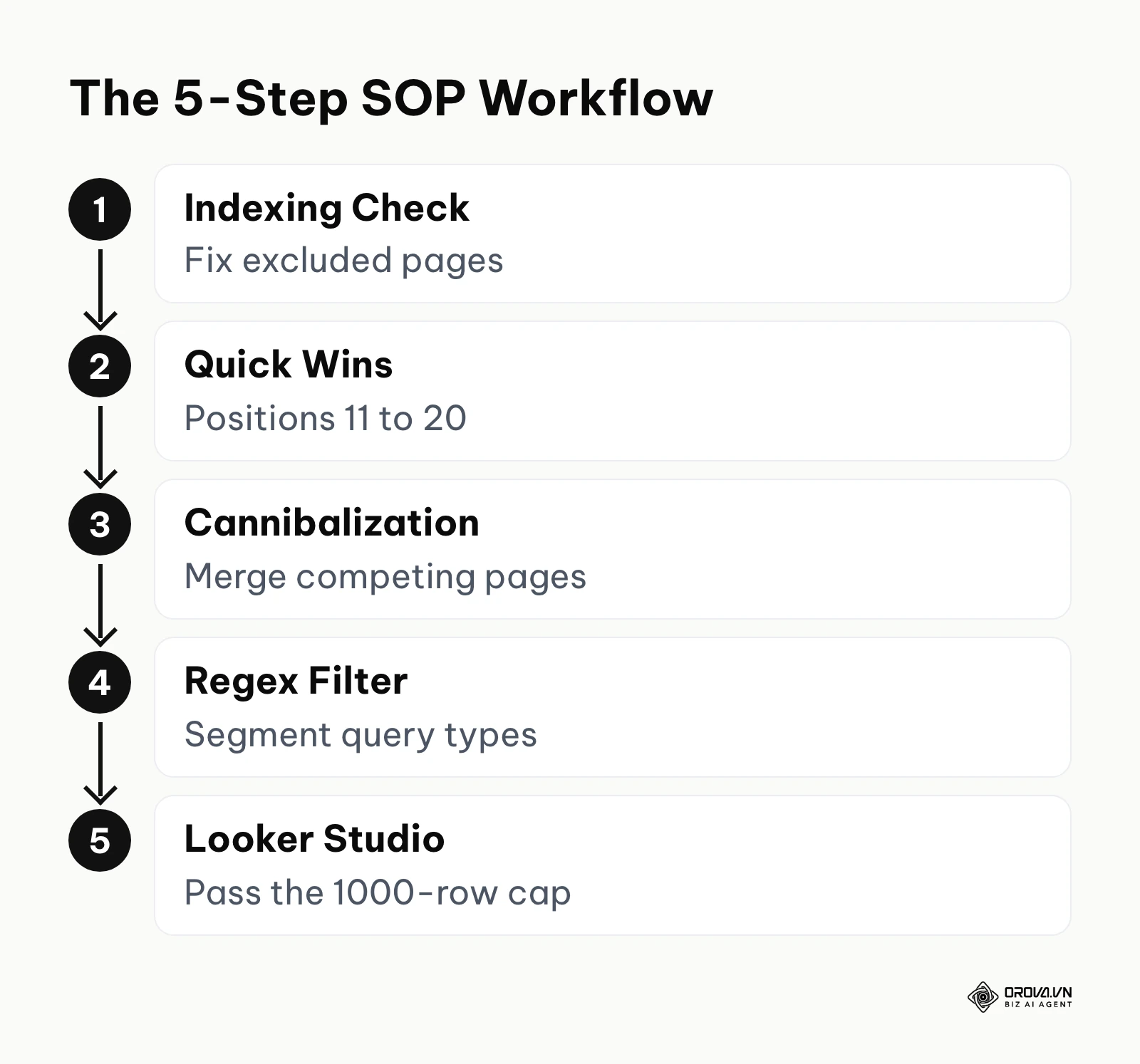
Many users log in, stare at the colorful charts, and leave without making a single decision. To extract real value, you must treat the platform as a diagnostic laboratory. The following steps outline an advanced standard operating procedure that moves from technical foundations to advanced data manipulation.
Before diving into the steps, it is helpful to understand the different flavors of analysis you can perform. The table below categorizes the main approaches.
| Type of Audit | Key Focus Areas | Best Suited For |
|---|---|---|
| Technical & Indexing | 404 errors, page indexing statuses, robots.txt | Sites experiencing sudden traffic drops |
| Content & Performance | Click-through rates, queries, positions | Mature blogs needing content refreshes |
| User Experience | Core Web Vitals, HTTPS | Sites preparing for algorithm updates |
Step 1: Technical and Indexing Check
The first phase of any review must ensure your pages are actually eligible to appear in search results. You cannot optimize content if the bot cannot read it. You begin by navigating to the "Pages" report under the indexing section. This interface displays the exact reasons why specific URLs are excluded from the database.
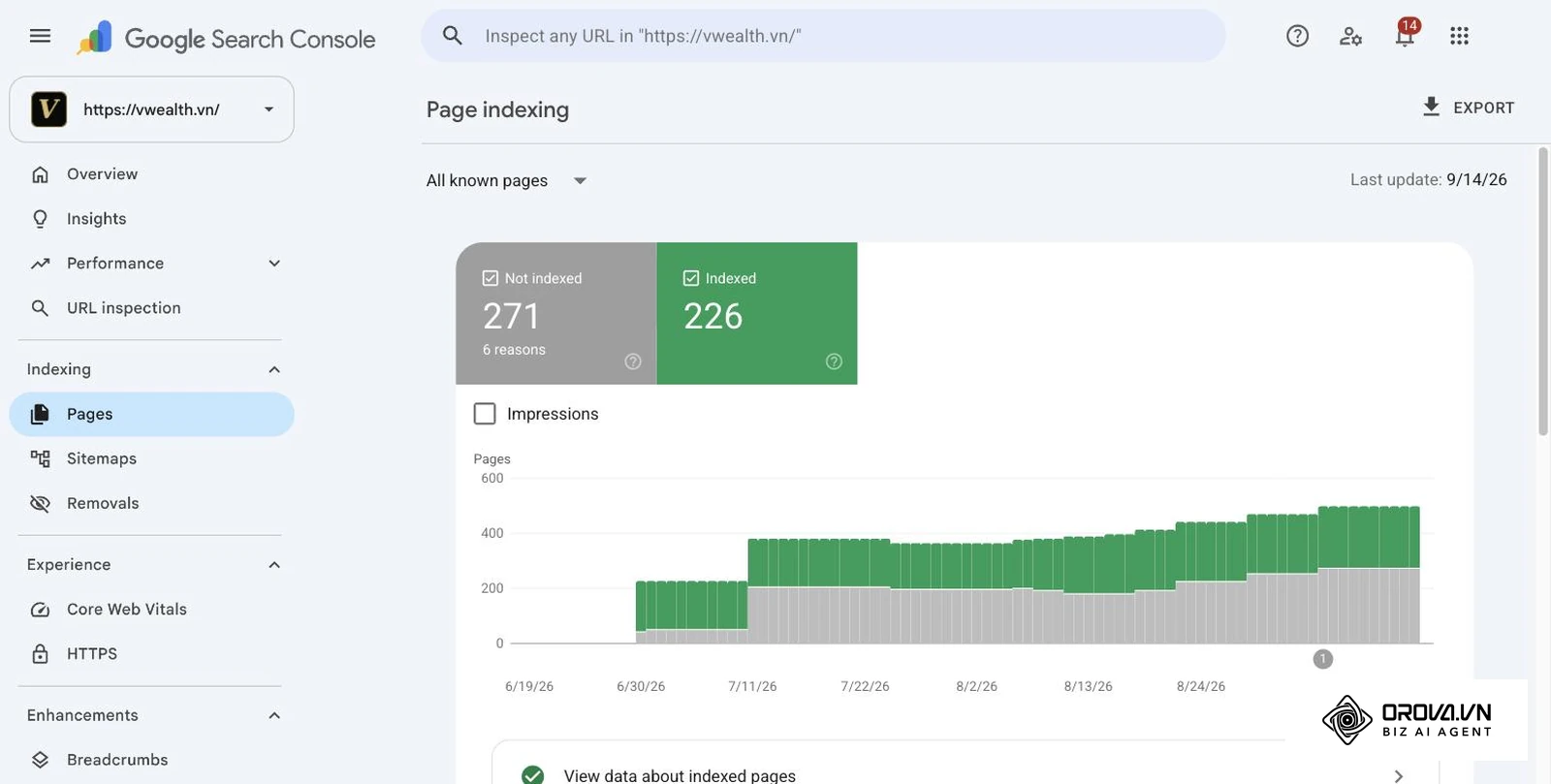
Your primary input here is the list of excluded pages provided by the platform. Your output should be a prioritized list of URLs requiring developer intervention. You must review the "Discovered - currently not indexed" status, which often indicates crawl budget issues or server overloads. Next, examine the "Crawled - currently not indexed" status, which usually points to thin or duplicate content that failed to meet quality thresholds.
A common failure point in this step is obsessing over "Alternate page with proper canonical tag" notices. These are usually expected behaviors when you have duplicate structures pointing to a main version. Focus instead on 5xx server errors and unexpected 404 not found notices. Once indexing is clean, open the Core Web Vitals report as well: according to the Core Web Vitals report documentation by Google Search Central (2024), Interaction to Next Paint (INP) is one of the metrics the report evaluates. Always verify your technical baseline before moving forward.
Step 2: Finding Low-Hanging Fruit Keywords
Once the technical foundation is secure, shift your focus to the "Search results" performance report. The goal here is to find queries where you already have momentum but lack the final push to reach the top. Your input is historical impression data, and your output is a prioritized list of pages to update.
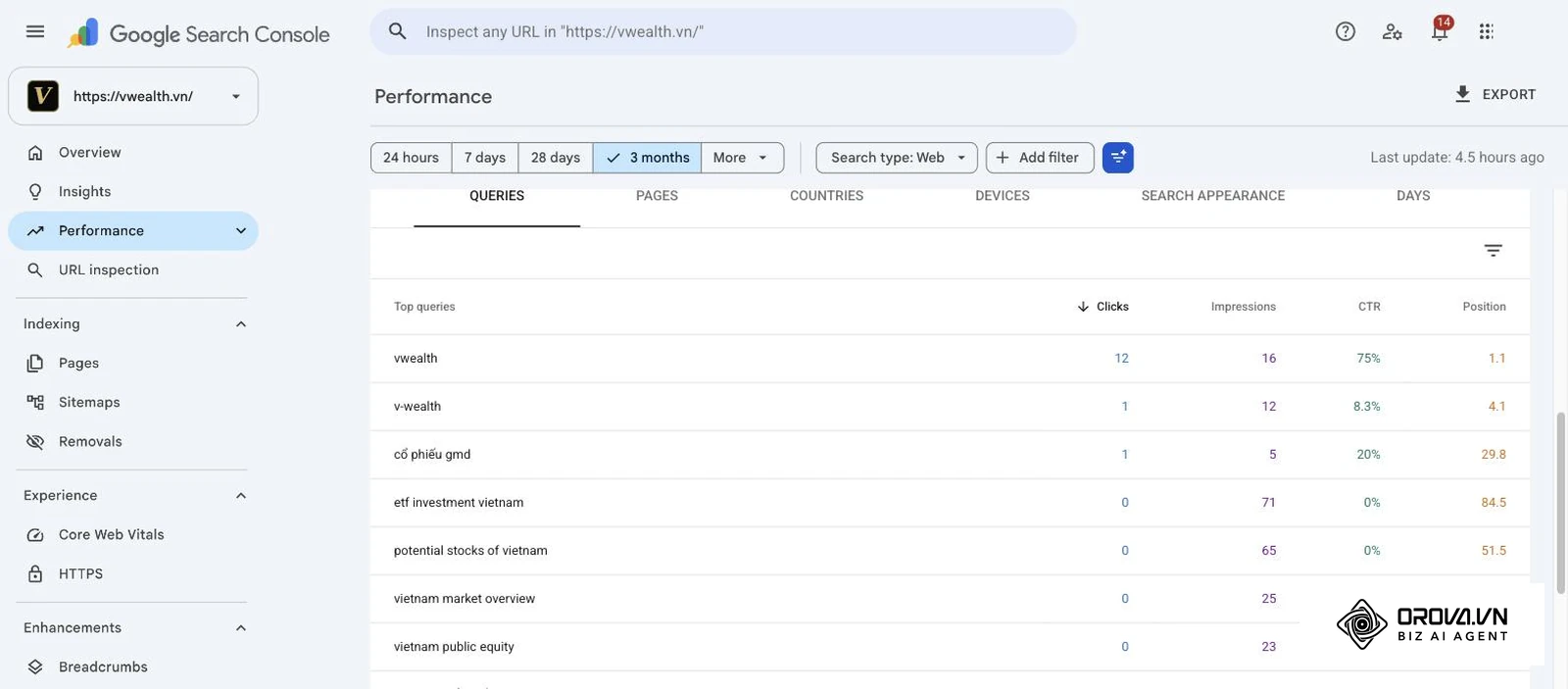
Start by setting the date range to the last three months to gather a solid sample size. Filter the report to show queries ranking between positions eleven and twenty. These are your "low-hanging fruit" keywords sitting on the second page of results; this website ranking guide explains which signals usually move a page from there to page one. Sort this filtered list by impressions in descending order. This reveals the topics that generate massive search volume where you are almost visible.
A frequent mistake here is choosing keywords with high impressions but irrelevant search intent. You must manually verify that your landing page actually answers the user's implicit question. Once identified, apply on page seo best practices to update headers, add internal links, and expand the content depth. A minor tweak to these pages often yields faster results than publishing entirely new articles.
Step 3: Diagnosing Keyword Cannibalization
The diagram below summarizes the exact clicks needed to resolve keyword conflicts.
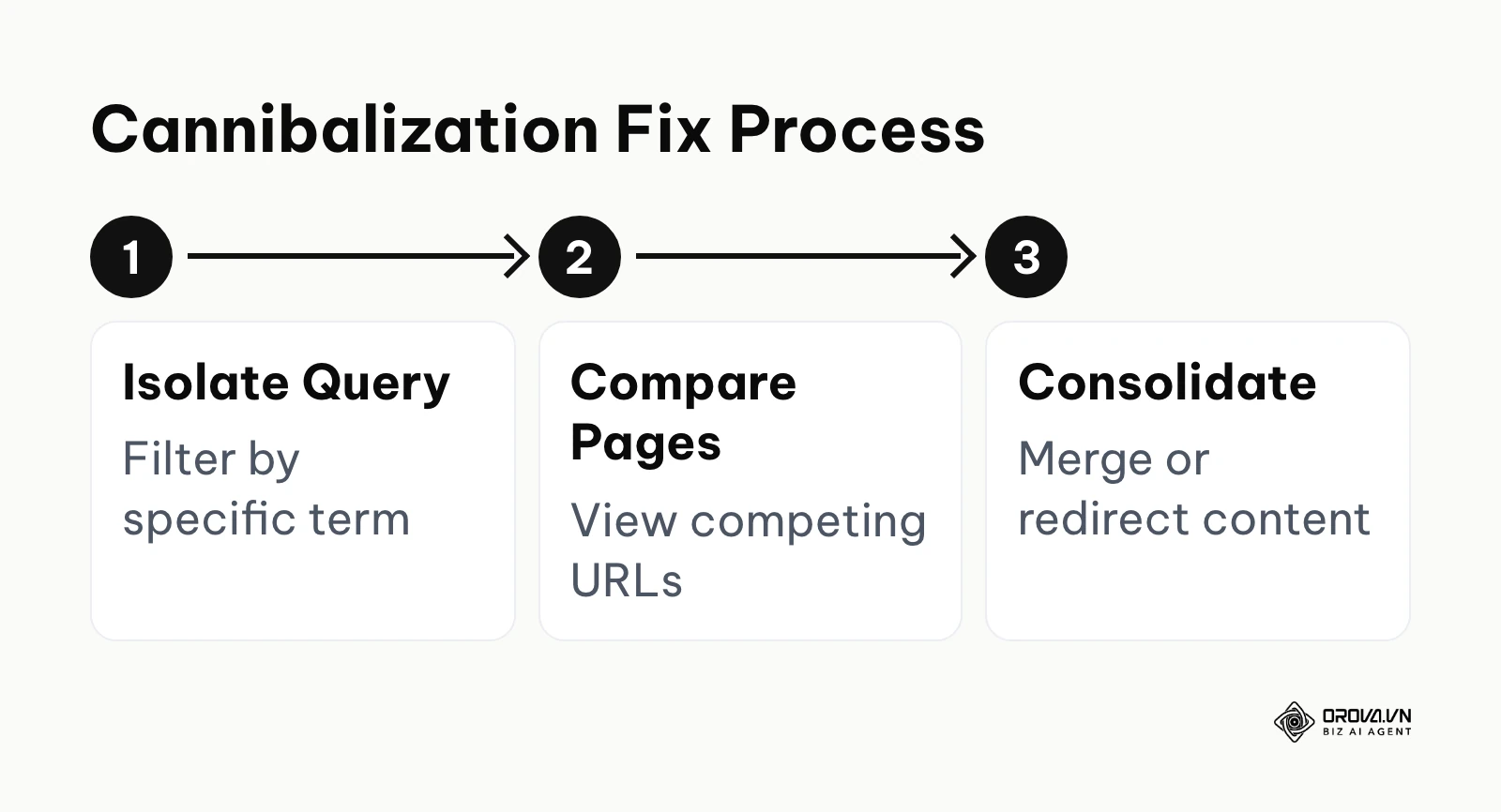
Keyword cannibalization occurs when multiple pages on your website compete for the exact same search query. This confuses the search engine, forcing it to split ranking signals across several weak URLs instead of one strong authoritative page. To find these conflicts, enter your target keyword into the "Query" filter in the performance report.
After filtering for the query, click on the "Pages" tab below the chart. If you see two or more URLs generating significant impressions for that single term, you have a conflict. The input is the isolated query data, and the output is a consolidation plan.
To fix this, you must choose a primary URL and merge the unique content from the weaker pages into it. The most critical failure point is forgetting to implement 301 redirects. If you simply delete the competing pages, you will lose any external link equity they gathered. Consolidating the intent always results in a more stable ranking trajectory.
Step 4: Advanced Filtering with Regex
To truly master this platform, you must move beyond basic text matching and utilize Regular Expressions (Regex). Regex allows you to segment vast amounts of query data based on complex patterns. Search Console's own help documentation states that its regex filters use RE2 syntax, so a few patterns go a long way.
Your input is a specific Regex string, and your output is a highly segmented view of user intent. For example, you can filter out your company name to analyze pure non-branded organic growth. You can also group queries by specific question modifiers to plan your editorial calendar.
A common stumbling block is using incorrect syntax, which results in zero matched queries. Always test your strings carefully. The cheat sheet below lists the most useful patterns for everyday analysis.
Informational queries:   ^(how|what|where|why|when|who)\b
Transactional keywords:  (buy|cheap|price|software|hire)
Exclude brand terms:     yourbrand|your brand    (choose "Doesn't match regex")
Long-tail questions:     (\S+\s+){4,}\S+
Exact word match:        \bkeyword\b
Use the informational pattern to find top-of-funnel blog topics and the transactional pattern to prioritize commercial pages. The brand pattern, applied with "Doesn't match regex", isolates pure non-brand growth, while the long-tail pattern surfaces specific questions of five or more words. The word-boundary pattern filters a term without matching it inside longer words.
Step 5: Bypassing the Limit with Looker Studio
The diagram below summarizes the process of visualizing your full dataset externally.
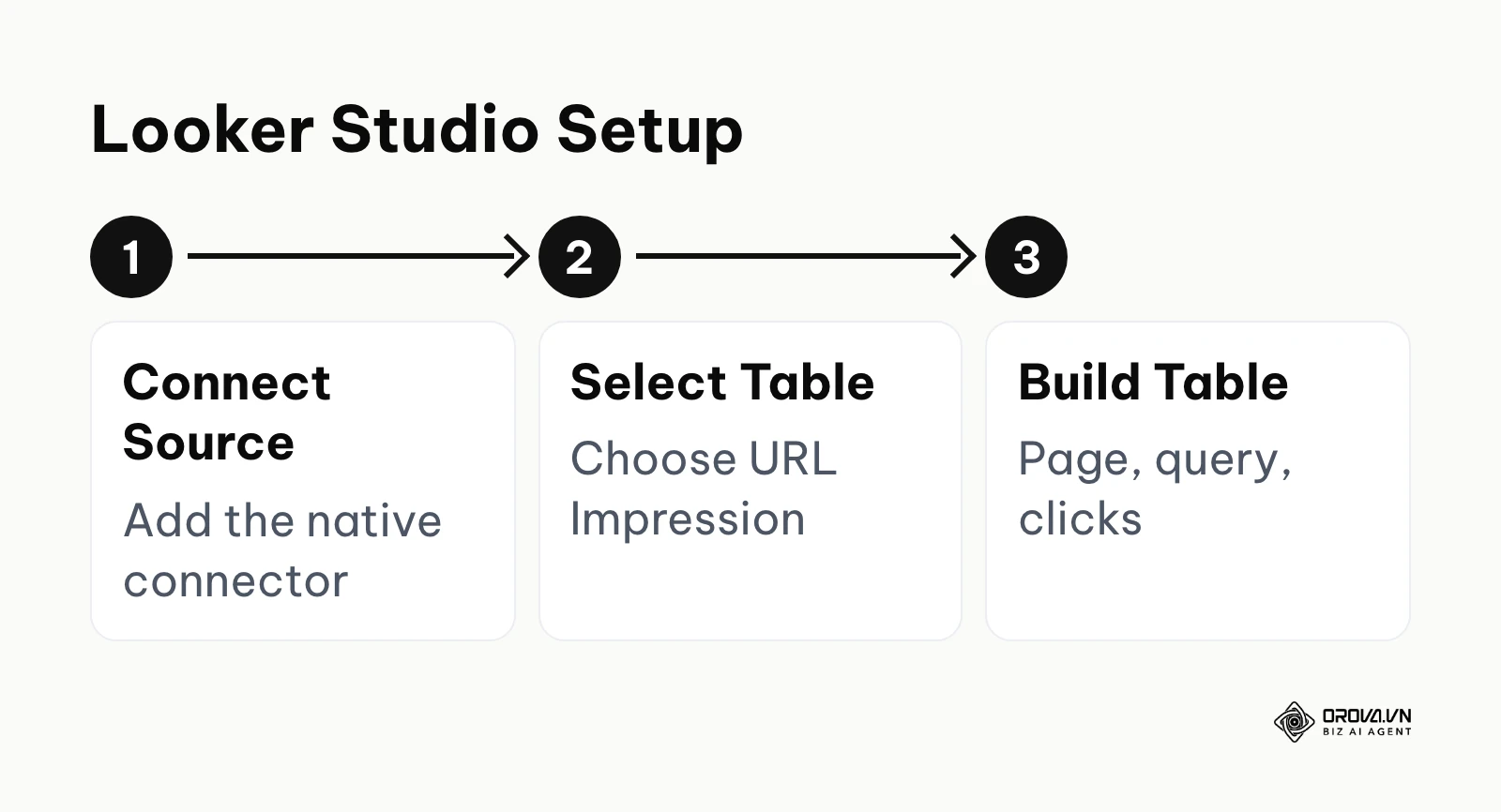
The most frustrating limitation of the native web interface is the strict 1000-row export cap. If your site generates thousands of queries, the interface hides the vast majority of your long-tail data. To bypass this, you must utilize the official API connection. The Looker Studio help page "Connect to Search Console" describes the native connector, which pulls data through the Search Console API instead of the 1000-row interface table.
Your input is your verified property, and your output is a dynamic dashboard with far more rows than the interface shows. Start by opening Looker Studio (Google's help pages now call it Data Studio; the steps are the same) and adding a new data source. Select the native connector and choose the "URL Impression" table, which provides page-level metrics.
A frequent mistake is choosing the "Site Impression" table, which aggregates data differently and prevents deep page-level analysis. Once connected, build a simple table chart with dimensions for Landing Page and Query, paired with metrics for Impressions and Clicks. This setup lets you export far more than 1000 rows at once for bulk analysis in spreadsheet software.
What to Do to Adapt and Get Started
The diagram below summarizes the key actions you must take to implement these practices successfully.
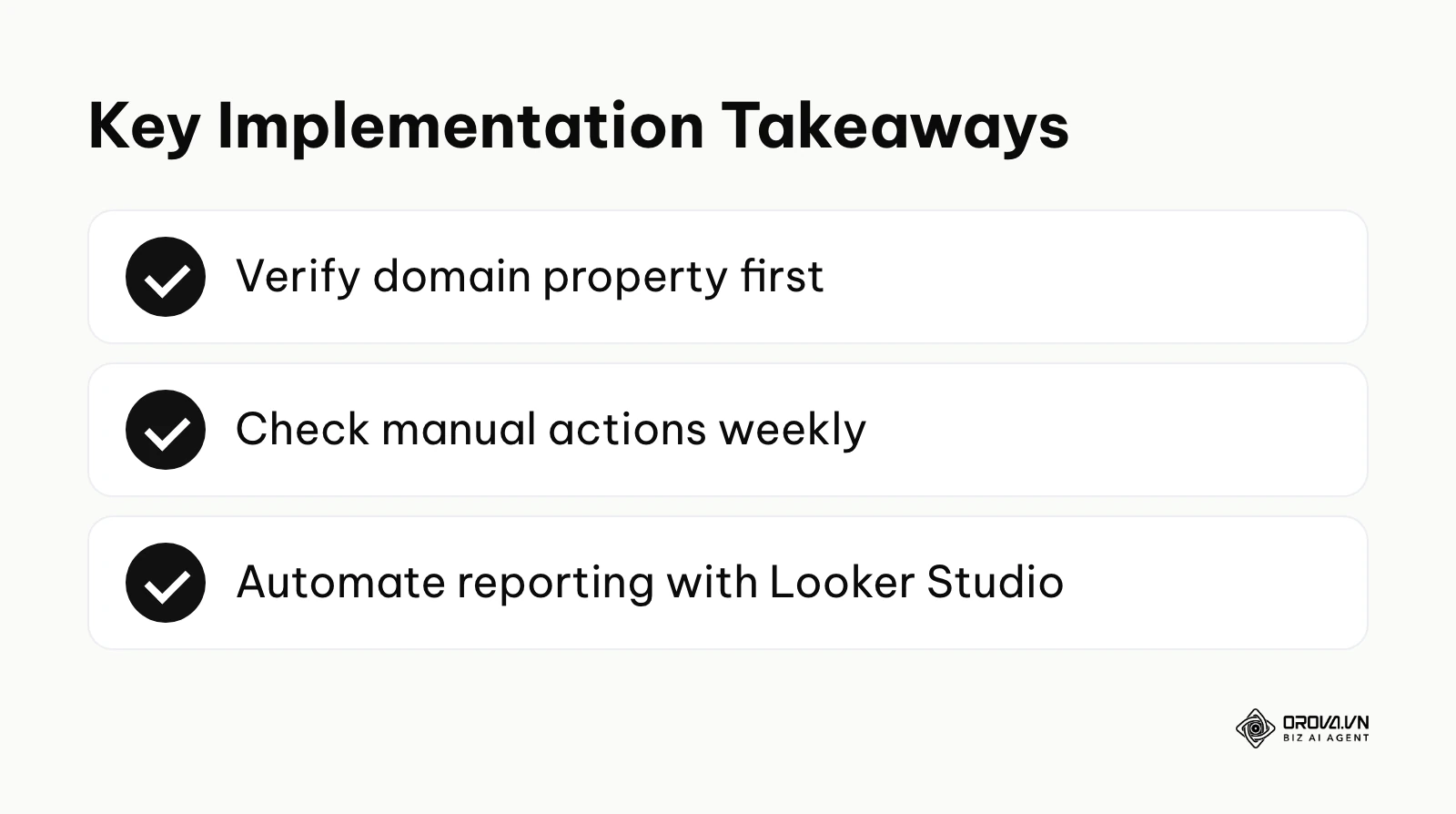
Different roles require entirely different approaches when interacting with this data. A technical developer will look for different insights than a content marketer. Tailoring your approach ensures you extract maximum value without becoming overwhelmed by irrelevant metrics. If you follow a structured seo checklist, you can streamline this adaptation process for your specific role.
Small Business Owners
For founders managing their own digital presence, the focus should be on broad health metrics rather than microscopic query analysis. Your goal is to ensure the site is accessible and free of penalties.
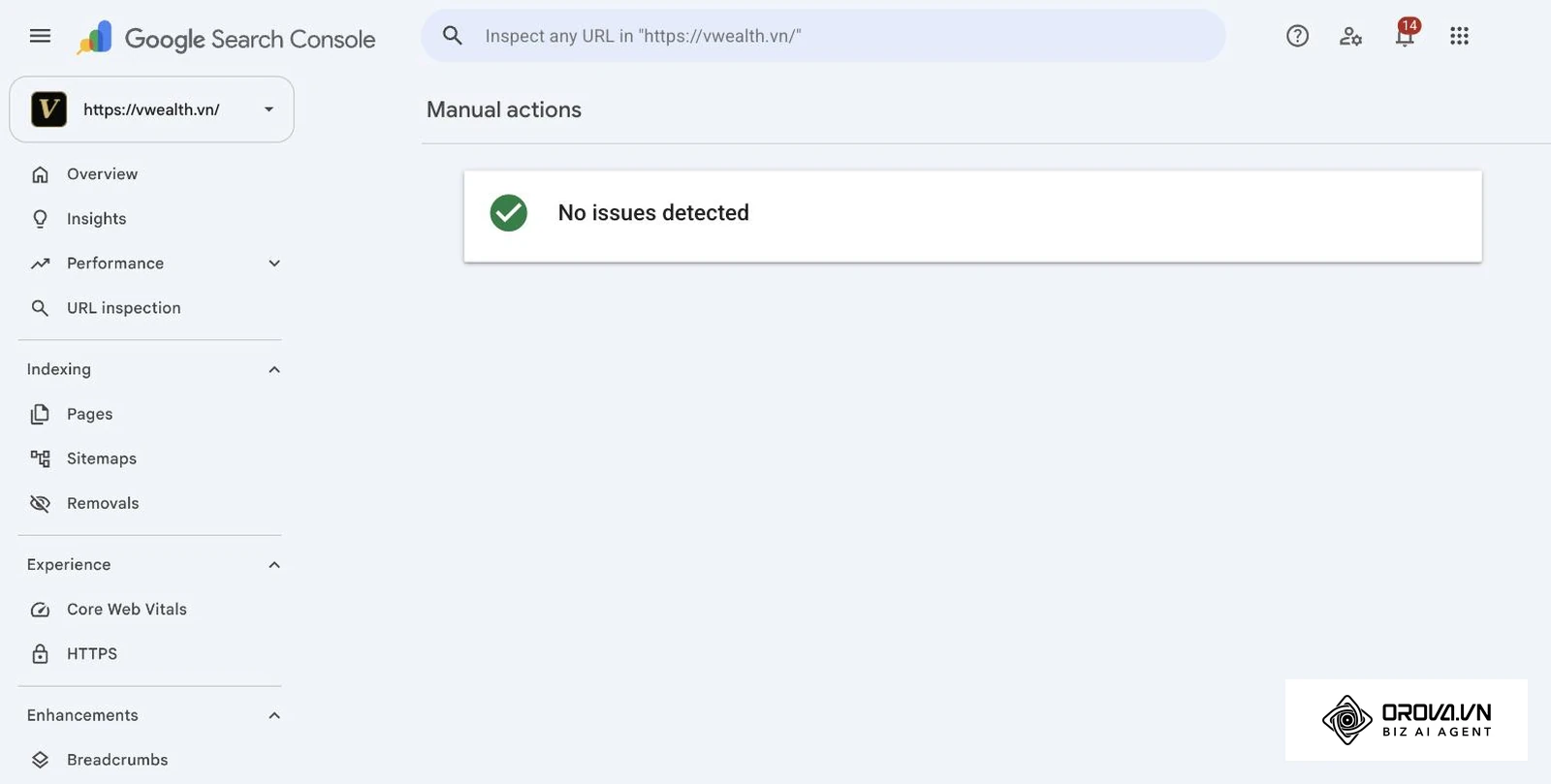
- Verify your domain property using a DNS record to capture all subdomains automatically.
- Submit your XML sitemap to ensure the engine knows about your most important pages.
- Check the "Manual actions" and "Security issues" tabs weekly to ensure your site is safe.
- Review the top performing queries monthly to understand what customers are actually searching for.
In-House SEO Specialists
In-house professionals must build scalable reporting systems to communicate progress to stakeholders. Your focus shifts toward automation and trend analysis over time.
- Build a Looker Studio dashboard connected to the API to bypass the export limits.
- Segment branded versus non-branded traffic to prove the value of content marketing efforts.
- Conduct a deep indexing review every two weeks to catch developer staging errors early.
- Monitor Core Web Vitals to prepare for future algorithmic shifts prioritizing page speed.
Agency or Freelance Consultants
Consultants must use this data to prove immediate value and uncover quick wins for new clients. Your approach involves forensic analysis of historical data to find hidden gaps.
- Request delegated access immediately during the onboarding phase.
- Identify historical keyword cannibalization that previous agencies ignored.
- Export the full list of excluded pages to justify technical retainer hours.
- Filter for position eleven to twenty keywords to deliver rapid traffic wins in the first month.
To ensure smooth execution across any of these roles, avoid the common pitfalls listed in the table below.
| Common Mistake | Immediate Consequence | How to Avoid It |
|---|---|---|
| Ignoring HTTP vs HTTPS | Splitting data across multiple properties | Always verify the domain property level |
| Looking at default dates | Missing seasonal trends and recent drops | Always compare the last 28 days to previous |
| Not filtering brand queries | Overestimating generic search visibility | Use Regex to remove your company name |
If you want to act on these findings in one place, Orova SEO connects Google Search Console and GA4 to measure results, suggests new keywords from four sources (Google Search Console, Google Keyword Planner, Google suggestions and AI), and includes a visual editor for editing articles directly on connected websites.
With OROVA.VN and the OROVA SEO module, you put an end to the exhausting days of manual work for good. Instead of struggling for hours to write articles and compile reports, the entire process is now optimized and completed in just 5 minutes.
Future Trends of GSC Audits in the Next Few Years: Author's Perspective
The landscape of technical optimization is evolving rapidly. Traditional metrics are slowly giving way to more advanced computational models. As the search ecosystem changes, our approach to analyzing server data must adapt accordingly.
Automated Anomaly Detection
As of 2026, we are seeing basic alert systems becoming standard practice in most analytics suites. I believe that manual error hunting will increasingly give way to predictive alerts. AI may notify you of indexing drops before they materially impact traffic. You should prepare by moving away from daily dashboard checking and focusing on building automated reporting pipelines that flag deviations automatically.
Entity-Based Performance Tracking
Currently, most practitioners focus entirely on exact match keywords and individual query strings. I think the future belongs to analyzing topical entities rather than isolated phrases. Google will likely shift its reporting to show how well your brand covers broad concepts across the entire site. You need to start grouping your URLs by topic clusters today to stay ahead of this reporting shift. If you continue to optimize for single keywords, you will lose ground to competitors building comprehensive knowledge graphs.
Integration with Conversational AI
Traditional click-through rates are dropping as users get immediate answers directly on the results page. I expect future audits will need to analyze metrics specifically tied to conversational AI visibility. We might soon see new metrics defining how often your exact data is used as source material for generated summaries. Start optimizing your technical markup now to ensure your content is easily digestible by these new agents. Note that major algorithm shifts or regulatory changes could alter this timeline significantly.
Frequently Asked Questions About Google Search Console SEO Audits
How often should you perform a Google Search Console SEO audit?
You should conduct a high-level review of indexing errors every week to catch sudden technical drops. A deep analysis of search queries and content decay should be done monthly. Comprehensive technical evaluations are typically required quarterly or after major site redesigns.
Can you export more than 1000 rows directly from the dashboard?
No, the default web interface restricts data exports to exactly 1000 rows per view. To bypass this limitation, you must use the official API. Connecting the platform to Looker Studio is a simple no-code way to work with a much larger slice of your data.
What is the difference between Google Analytics and Search Console data?
Google Analytics tracks what users do after they arrive on your website. Search Console tracks how your website appears in search engines before a user clicks. Combining both platforms provides a complete picture of the entire user journey.
Is a Google Search Console SEO audit still needed when AI is present?
Yes, analyzing technical foundations is absolutely still needed when AI is present. AI engines still rely on traditional crawling and indexing mechanisms to discover your content. If your site blocks Googlebot or returns server errors, AI features in Search have nothing from your pages to draw on.
How do I find keyword cannibalization issues quickly?
Enter your target keyword into the query filter within the performance report. Then, click on the pages tab to view the results. If you see multiple URLs generating impressions for that exact same phrase, you likely have a cannibalization problem that needs consolidation.
Where to Start?
The diagram below summarizes the decision matrix for taking your first steps.
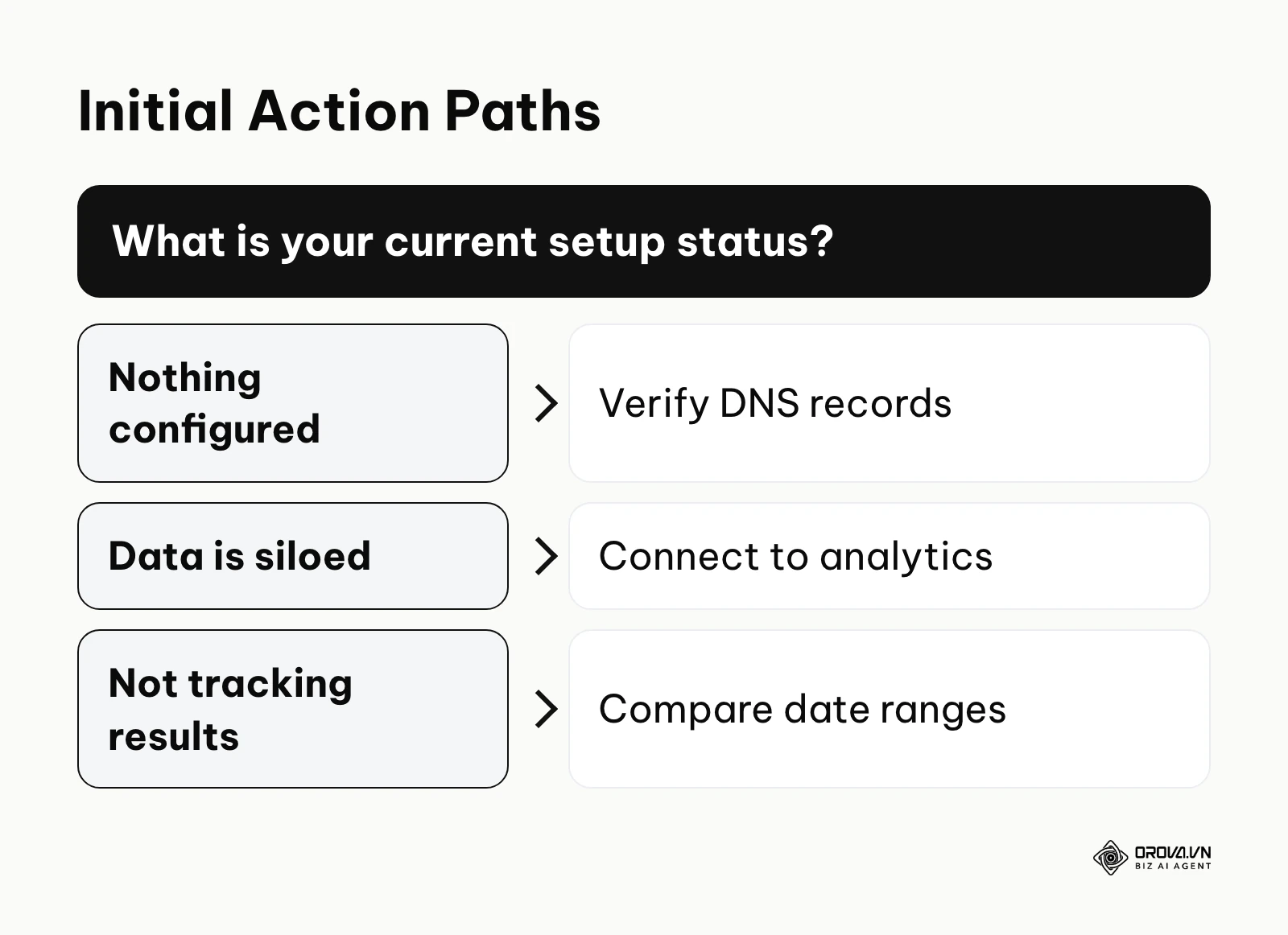
Knowing exactly what to do first depends entirely on your current data maturity. Diving into complex Regex filtering when you have not verified your domain is a recipe for frustration. Assess your current situation honestly and execute the single most impactful action available to you today.
If you have nothing set up yet, your first action should be verifying your domain property using a DNS record. This ensures you see data for all subdomains and protocols in one property. You can accomplish this in a single afternoon session with your hosting provider. Getting this property in place is your highest priority.
If you have data but it remains siloed, your first step is to link your property directly with Google Analytics 4. This bridges the critical gap between search visibility and actual user behavior on your site. It takes less than ten minutes in the admin settings to complete this integration. This connection unlocks powerful blended reports that reveal the true ROI of your organic traffic.
If you have the setup but are not measuring results, your first step is to filter the performance report for the last twenty-eight days compared to the previous period. This immediately highlights which specific pages are losing traffic right now. You can do this instantly in the native dashboard without exporting anything. Identifying these quick wins builds momentum for deeper analysis later.
Performing a rigorous google search console seo audit remains a dependable foundation for search visibility.
About the author

Builder of Orova
Nguyễn Đỗ Trọng Ân has 8 years of experience in marketing, including 6 years managing market development across Asia. He builds Orova, a Biz AI Agent that never sleeps: it plans, runs and optimizes work for businesses.
Run your business with AI Agents
Orova is the always-on Biz AI Agent — it plans, runs, and optimizes the work for you.
Save time, unlock productivity.