
Google SEO optimization tool guide: Google's own toolkit and how to connect it

Building a high-performing website is no longer just about publishing good content; it requires a precise, data-driven approach supported by the right technology. If you are serious about ranking higher, finding the right google seo optimization tool is the foundation of your entire digital growth strategy.
Many beginners make the fatal mistake of immediately purchasing expensive, enterprise-level software suites before they even understand how to read their own traffic data. They end up overwhelmed by metrics they do not need and dashboards they do not know how to connect. The truth is, the core of most successful organic growth strategies relies heavily on tools provided directly by search engines themselves, supplemented by specialized platforms that bridge the execution gap.
This comprehensive guide will tear down the fragmented landscape of SEO software. We will not just list tools; we will categorize them, expose their steep learning curves, highlight their critical limitations, and show you exactly how to chain them together into practical workflows that actually drive revenue for your business. Most of the tools covered here are Google's own free products; if you want a broader comparison of paid all-in-one suites, our best SEO tools guide covers that market.
What is a Google SEO Optimization Tool?
A google seo optimization tool is any software application, data dashboard, or browser extension designed specifically to help webmasters improve their website's visibility, technical performance, and ranking on Google's search engine results pages (SERPs). These platforms solve a fundamental problem: search algorithms are a completely opaque black box, and without diagnostic software, optimizing a website is merely guesswork.
Anyone responsible for digital growth needs a reliable SEO optimization tool. This includes solo founders trying to build initial traction for a startup, content marketers aiming to scale their editorial calendars efficiently, and dedicated SEO specialists managing complex enterprise site migrations. If you are publishing content online and expect people to find it, operating without these tools means you are flying blind in a highly competitive market.
In this guide, we have selected tools based on strict criteria: they must provide actionable data, they must have a proven track record in the industry, and they must serve a distinct, non-overlapping purpose in a modern marketing workflow.
The Ultimate Google SEO Optimization Tool Master List
Before diving into the deep technical setup of each platform, you need a high-level view of the software landscape. The table below synthesizes 15 of the most important tools in the industry. It categorizes them by their primary function, explains the core value they deliver to the end user, and indicates what size of business they are best suited for. We have intentionally grouped these by the job to be done, as this is how you should think about building your SEO optimization tool stack.
| Tool Name | Category | Primary Use Case | User Value | Ideal Business Size | Learning Curve |
|---|---|---|---|---|---|
| Google Search Console | Analytics & Foundation | Performance tracking | Shows exactly what queries drive clicks and identifies indexing errors. | All sizes | Medium |
| Google Analytics 4 | Analytics & Foundation | User behavior | Maps the user journey after they click through from search. | All sizes | Steep |
| Google Tag Manager | Analytics & Foundation | Script deployment | Allows marketers to add tracking codes without bothering developers. | Mid-market to Enterprise | Steep |
| Looker Studio | Analytics & Foundation | Data visualization | Combines data from multiple sources into automated, shareable reports. | Agencies & Enterprise | Steep |
| Google Keyword Planner | Keyword & Content | Volume estimation | Provides historical search volume data directly from Google's ad network. | All sizes | Low |
| Google Trends | Keyword & Content | Trend analysis | Identifies seasonal spikes and declining interest in broad topics. | All sizes | Low |
| Orova SEO | Keyword & Content | End-to-end automation | Uses AI to research, write, publish, and optimize content automatically. | Solo to Mid-market | Low |
| Ahrefs Webmaster Tools | Keyword & Content | Backlink monitoring | Provides a free, comprehensive look at your site's inbound link profile. | All sizes | Medium |
| PageSpeed Insights | Technical & Performance | Speed testing | Measures Core Web Vitals and provides specific code-level fix recommendations. | All sizes | Medium |
| Rich Results Test | Technical & Performance | Schema validation | Confirms if your structured data is eligible for enhanced SERP features. | All sizes | Low |
| Chrome DevTools | Technical & Performance | Live debugging | Allows developers to inspect the DOM and test rendering issues on the fly. | Mid-market to Enterprise | Steep |
| Screaming Frog | Technical & Performance | Site crawling | Mimics a search engine bot to map out broken links and architecture flaws. | All sizes | Steep |
| XML Sitemap Generator | Technical & Performance | URL mapping | Creates a structured list of your pages to help search engines discover them. | Small businesses | Low |
| Google Business Profile | Local Presence | Local map rankings | Manages your physical business presence on Google Maps and local search. | Brick & mortar | Low |
| Google Merchant Center | Local Presence | Product feeds | Feeds e-commerce product data directly into Google Shopping tabs. | E-commerce | Medium |
Core Analytics & Foundation Tools
If you build a house on a broken foundation, the walls will eventually crack. The foundation of your SEO optimization tool stack must consist of diagnostic analytics. These platforms do not optimize the site for you, but they provide the essential data required to know if your content and technical fixes are actually working. Without these, you are simply guessing.
Google Search Console (GSC)
- What it does: Google Search Console is a free service offered by Google that helps you monitor, maintain, and troubleshoot your site's presence in Google Search results. It is the only platform that gives you direct communication from Google regarding technical penalties or manual actions applied to your domain.
- Value for the user: GSC is the absolute source of truth for your organic performance. It tells you exactly which search queries are triggering your pages to appear, your average ranking position, and your click-through rate (CTR). More importantly, it flags pages that Google cannot crawl or index, allowing you to fix technical blockages before they destroy your traffic flow.
- Who it is for: Absolutely everyone who owns a website. Installing it is non-negotiable for any webmaster.
- How to start using it:
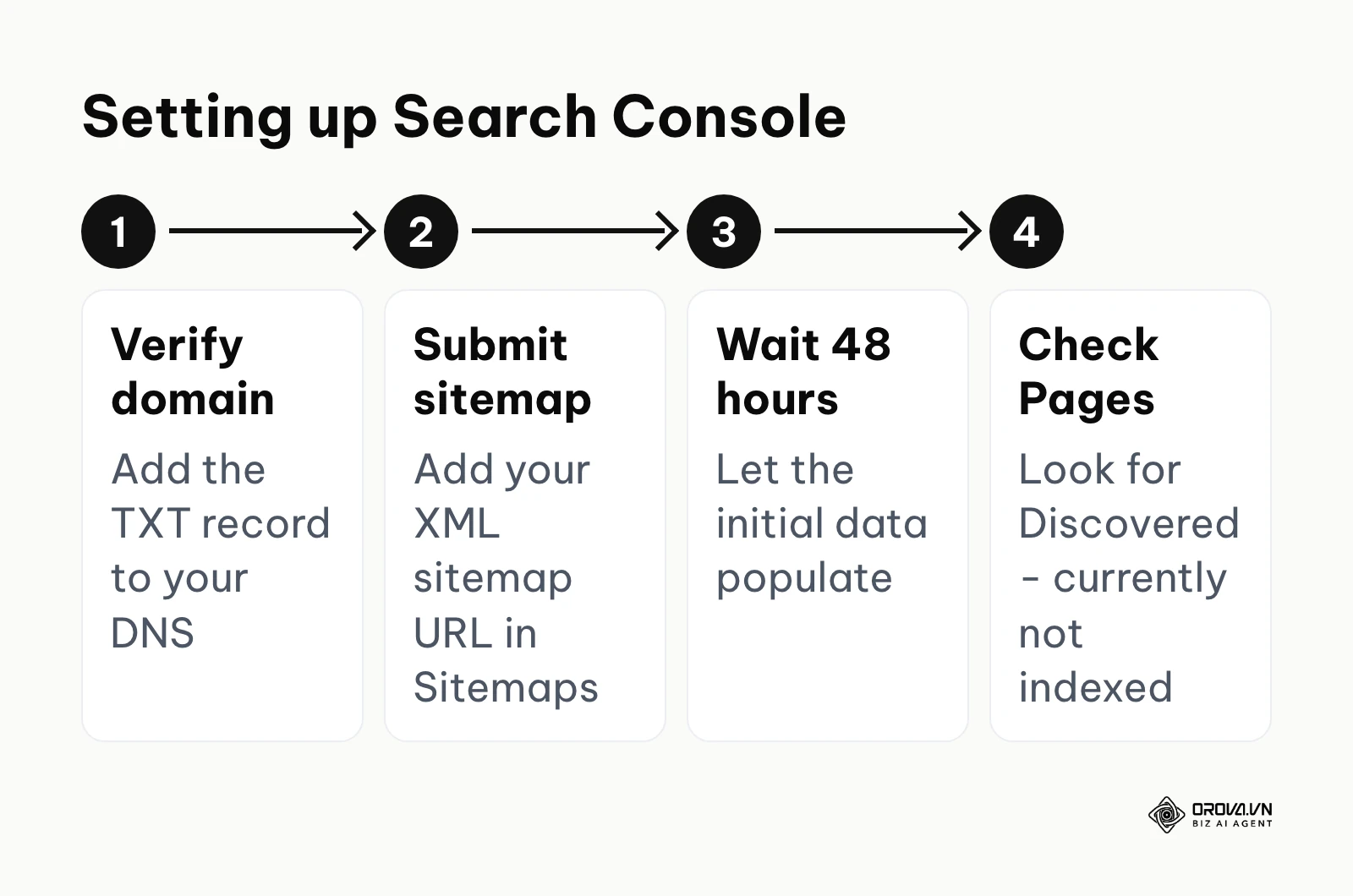
- Verify your domain ownership by adding a TXT record provided by GSC to your domain's DNS configuration (this is the most robust and secure method).
- Navigate to the "Sitemaps" section and submit your XML sitemap URL to ensure Google knows exactly where all your important pages are located.
- Wait 48 hours for the initial data to populate, then check the "Pages" indexing report to see if any critical URLs are marked as "Discovered - currently not indexed."
Illustrative Example: A B2B SaaS company generating leads through a blog.
- Context: A mid-sized B2B software company was struggling with declining organic traffic on their core product feature pages, despite the marketing team publishing new, high-quality blog posts every single week. The marketing manager needed to find the leak.
- Steps taken: First, the manager opened GSC and navigated to the 'Performance on Search results' report, filtering the date range for the last 6 months and comparing it to the previous 6 months. Second, they sorted the table by the largest 'Click Difference' to pinpoint the exact URLs losing traffic. Third, they clicked on the specific losing URLs and switched to the 'Queries' tab to see which exact search terms had dropped in rankings.
- Hurdles and fixes: The manager noticed that the impressions (how many times the page was seen in search) were still high, but the Click-Through Rate (CTR) had plummeted. The problem was not the ranking position; the problem was that their title tags and meta descriptions had become outdated and boring compared to competitors who had recently updated theirs for the new year. The manager immediately rewrote the meta tags to be more compelling and benefit-driven.
- Visible result: Within three weeks of requesting re-indexing of the updated URLs via the GSC URL Inspection tool, the CTR stabilized. The pages regained their previous traffic baseline, which brought in a noticeable increase in daily demo requests visible on their sales dashboard. (For more advanced tactics, read our guide on google search console for seo).
The Catch (Limitations): GSC restricts its query data export to only 1,000 rows in the web interface, which is severely limiting for large sites. Furthermore, privacy filtering hides many rare (anonymized) queries, so long-tail terms that drive minimal traffic are often missing and you never get a 100% complete picture of your search terms.
Google Analytics 4 (GA4)
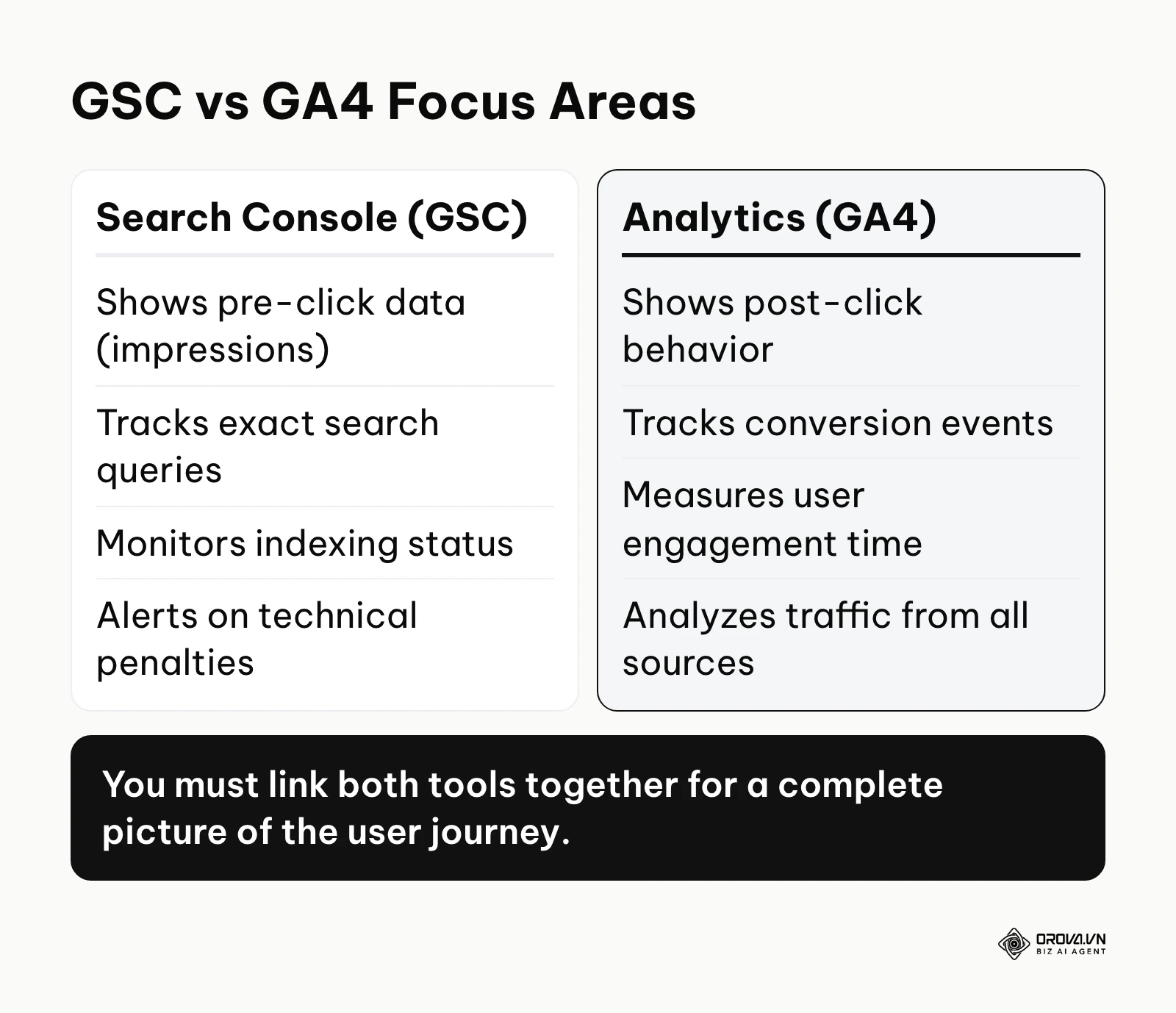
- What it does: While GSC tells you what happens before a user clicks on your site, GA4 tells you what happens after. It is a complex, event-based analytics platform that tracks user interactions, sessions, engagement metrics, and conversion paths across your website and apps.
- Value for the user: GA4 proves the financial value of your SEO efforts. Ranking in the first position is useless if the traffic does not convert into customers. GA4 allows you to see which organic landing pages generate the most revenue, have the highest engagement times, and lead to the most newsletter signups. It shifts the conversation from "vanity traffic" to "business outcomes."
- Who it is for: Marketers, business owners, and data analysts who need to tie website traffic to actual revenue generation and specific user behaviors.
- How to start using it:
- Create a GA4 property and install the Google tag (gtag.js) into the <head> section of your website's HTML code.
- Define your critical business actions by setting up "Key Events" (formerly known as Conversions), such as tracking when a user reaches a specific "Thank You" page after a purchase.
- Link your GA4 property directly to your Google Search Console account via the admin settings. This unlocks specialized reports inside GA4 that blend pre-click and post-click data into one view.
The Catch (Limitations): The learning curve for GA4 is notoriously steep compared to the older Universal Analytics system. Its event-based data model requires a fundamental shift in how you think about tracking. Additionally, event-level data retention for Explorations defaults to 2 months (up to 14 months on standard properties), so long-range custom analysis usually requires exporting the data to a warehouse like BigQuery.
Google Tag Manager (GTM)
- What it does: GTM is a powerful tag management system that allows you to quickly and easily update tracking codes and related code fragments (collectively known as tags) on your website or mobile app without directly modifying the core codebase yourself.
- Value for the user: It creates total independence for the marketing team. Instead of filing a ticket with the IT department every time you need to add a Meta Pixel, a new GA4 event tag, or an SEO schema markup script, you can deploy it directly through the GTM visual interface. It keeps your site's codebase clean and speeds up campaign implementation.
- Who it is for: Mid-market to enterprise marketing teams who run multiple advertising campaigns and need to deploy tracking scripts rapidly without developer bottlenecks.
- How to start using it:
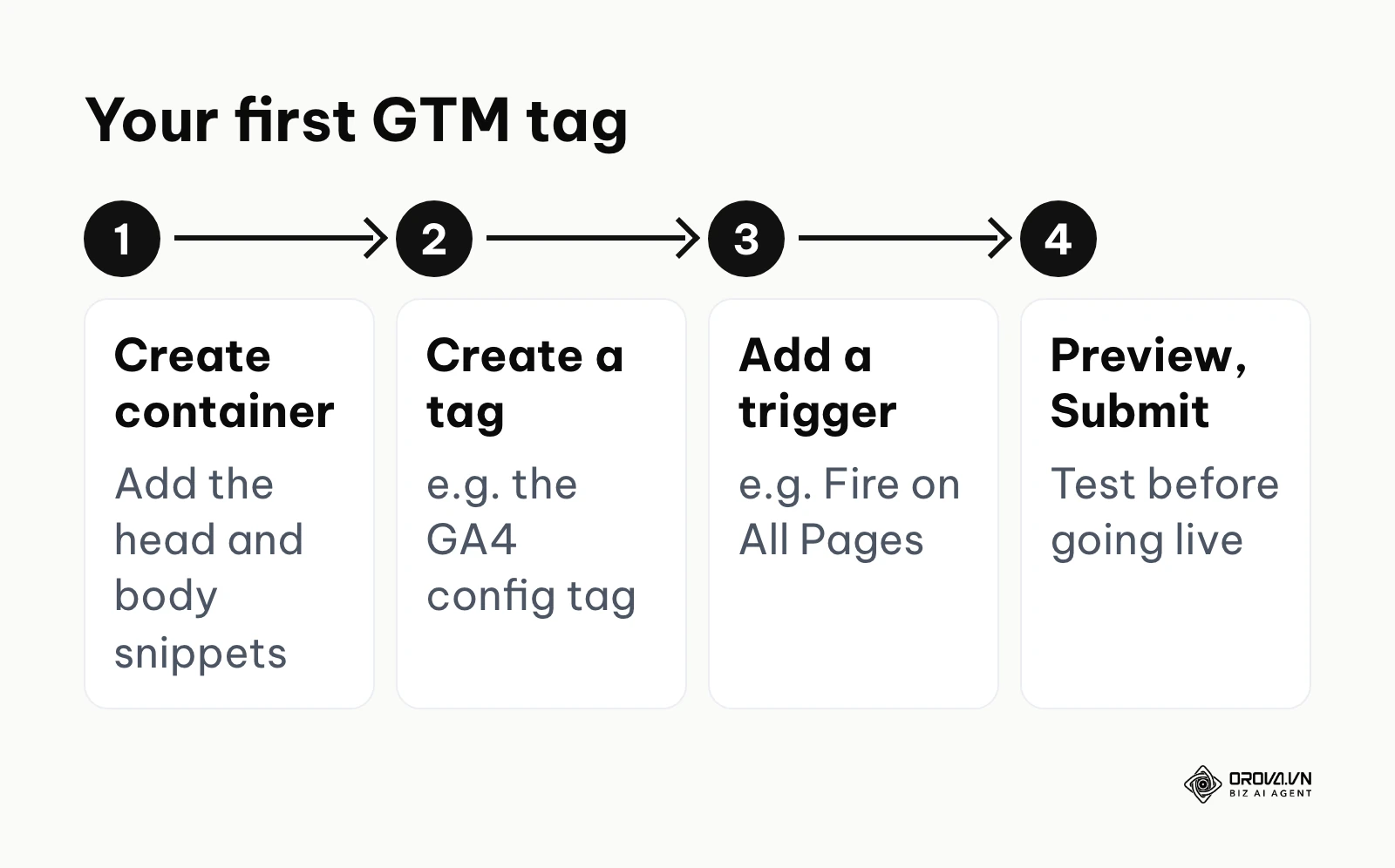
- Create a GTM container and place the two required snippets of code (one in the <head>, one in the <body>) directly on your website.
- Use the visual interface to create your first "Tag" (e.g., the GA4 Configuration tag) and define a "Trigger" (e.g., "Fire on All Pages").
- Use the built-in "Preview" mode to test that your tags are firing correctly before hitting the "Submit" button to push the changes live to users.
The Catch (Limitations): While you do not need to know how to write raw code to use the interface, you absolutely must understand how the Document Object Model (DOM) works to set up complex, highly specific triggers. A poorly configured tag in GTM can break essential website functionality or slow down page loading times significantly.
Looker Studio
- What it does: Formerly known as Google Data Studio, Looker Studio is a dynamic data visualization tool that turns your raw analytics data into informative, easy-to-read, easy-to-share, and fully customizable dashboards and reports.
- Value for the user: It automates the tedious reporting process. Instead of manually pulling CSV files from GSC and GA4 every single month to build a static PowerPoint presentation for stakeholders, Looker Studio connects directly to live data sources. You build the dashboard once, and it updates dynamically forever.
- Who it is for: SEO agencies reporting to multiple clients, and in-house SEO managers reporting to C-level executives who need visual summaries rather than spreadsheets.
- How to start using it:
- Open Looker Studio and create a new "Blank Report."
- Click "Add Data" and authorize direct connections to your existing Google Search Console and Google Analytics 4 accounts.
- Drag and drop charts (like time series line charts for traffic over time, or tables for top performing queries) onto the canvas, mapping the data sources to the visuals.
The Catch (Limitations): Complex dashboards pulling from multiple heavy data sources can become incredibly slow to load in the browser. Furthermore, blending data (for example, attempting to combine GSC query data with GA4 conversion data on a single chart) is notoriously finicky and often results in broken metrics if the join keys do not match perfectly.
Discover Orova.vn – a Biz AI Agent platform with OROVA SEO, a complete solution for every website. The system supports search engine optimization from A to Z with features including keyword research, writing new SEO-ready articles, optimizing existing content, rank tracking, plus competitor analysis and in-depth technical analysis. Sign up today to experience OROVA SEO completely free (offer valid through July 7, 2027).
Keyword Research & Content Creation Tools
Once your analytics foundation is completely solid, you need to figure out exactly what content to create. Choosing the right keyword SEO optimization tool helps you identify what your target audience is actively searching for, understand the exact search volume, and ultimately execute the content creation process as efficiently as possible.
Google Keyword Planner
- What it does: Located deep inside the Google Ads platform, this tool is originally designed to help advertisers find new keywords and see estimated search volumes and costs to target them. However, it is heavily utilized by SEOs for organic keyword research.
- Value for the user: It provides direct, authoritative data from Google regarding how many times a month a specific term is searched globally or locally. This prevents you from wasting hours writing an incredible article on a niche topic that literally zero people are looking for. It also actively suggests related semantic terms you might not have considered.
- Who it is for: Content creators, copywriters, and SEO strategists mapping out their long-term editorial calendars.
- How to start using it:
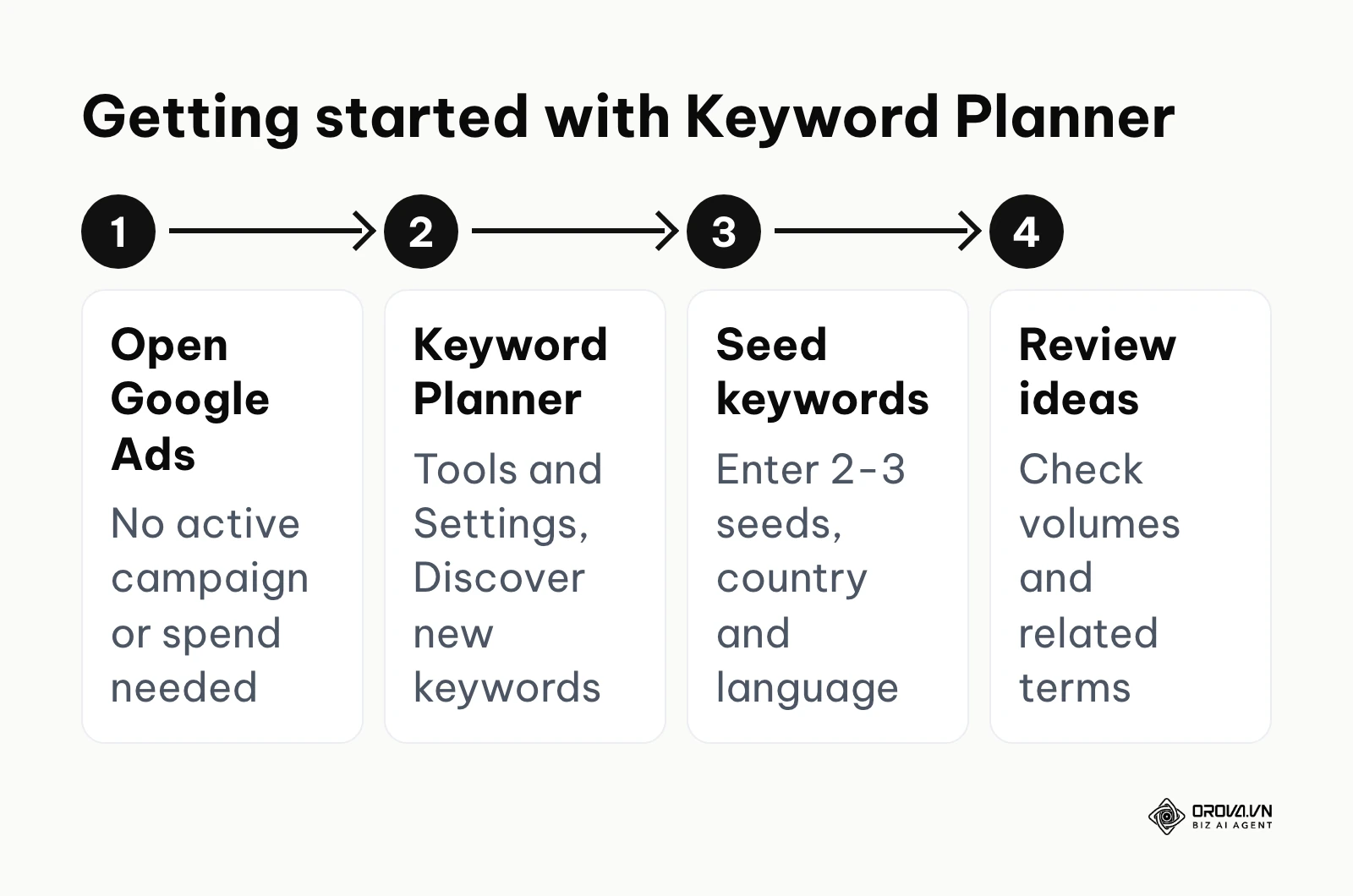
- Create a standard Google Ads account (you do not need to run an active campaign or spend any money to access the base tool).
- Navigate to "Tools and Settings" and select "Keyword Planner," then click on "Discover new keywords."
- Enter 2-3 seed keywords related to your core business offering, select your target country and language, and thoroughly review the generated list of ideas.
The Catch (Limitations): If you are not actively spending a significant amount of money on live Google Ads, Keyword Planner will heavily restrict your search volume data, showing uselessly broad ranges like "10k - 100k" instead of precise numbers. Furthermore, it groups similar keywords together, masking the nuanced search volume of important long-tail variations.
Google Trends
- What it does: Google Trends analyzes the relative popularity of top search queries in Google Search across various regions and languages. It uses visual graphs to compare the search volume of different queries over long periods of time.
- Value for the user: It provides vital context that Keyword Planner completely lacks. A keyword might have 10,000 searches a month on average, but Google Trends will explicitly show you if that interest is rapidly declining, steadily growing, or purely seasonal (like searches for "Christmas tree stands"). It helps you prioritize exactly when to publish specific content.
- Who it is for: News publishers, e-commerce managers planning seasonal inventory, and SEO strategists looking to capitalize on breakout topics.
- How to start using it:
- Go to the Google Trends website and enter a broad, overarching topic related to your specific industry.
- Adjust the date range to "Past 5 years" to see long-term macro trends and identify true seasonality rather than temporary, week-long blips.
- Scroll down to the "Related queries" section at the bottom and sort by "Rising" to find breakout keywords that your competitors have not noticed yet.
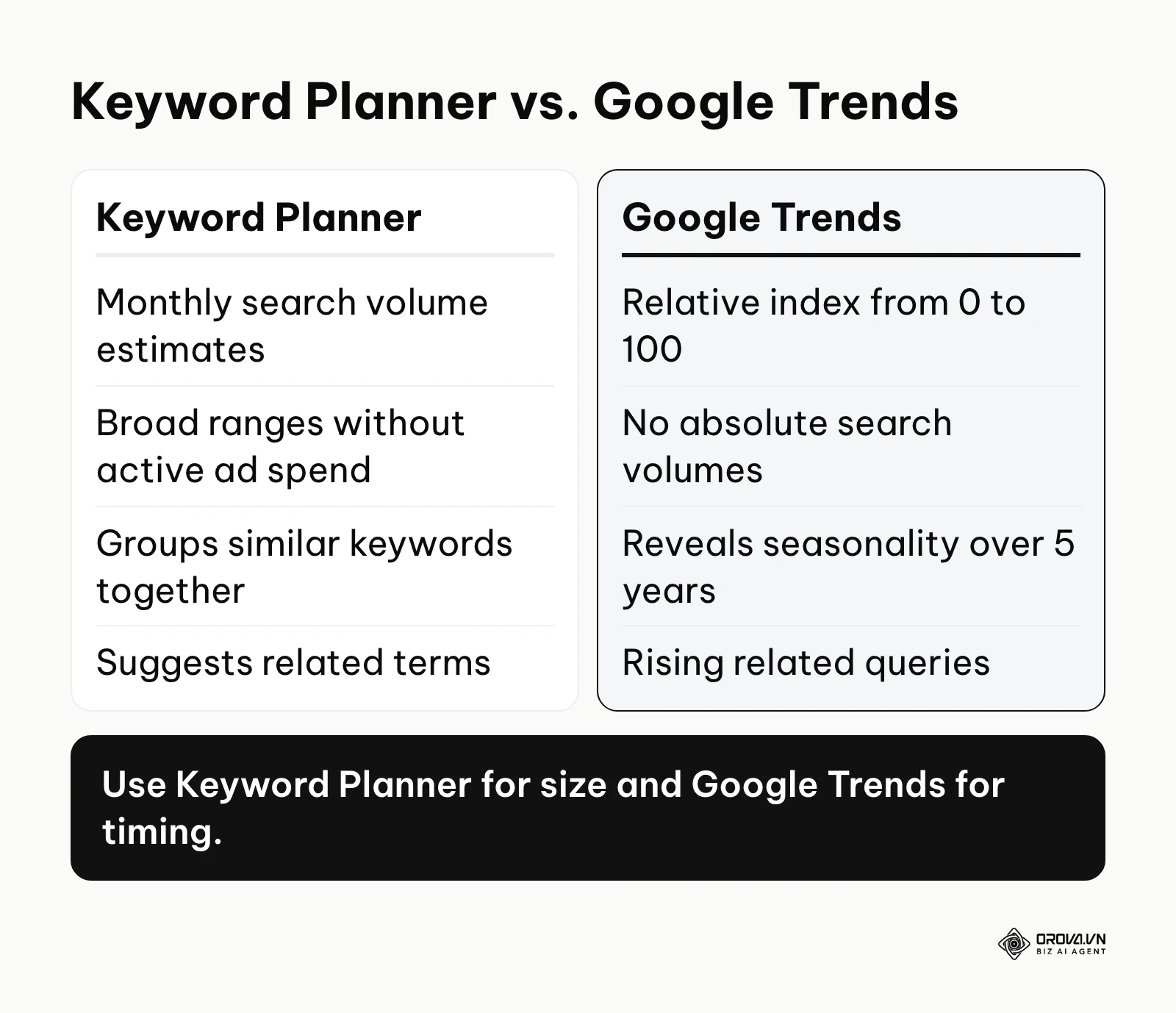
The Catch (Limitations): Google Trends absolutely does not provide absolute search volume numbers; it only provides relative index scores scaling from 0 to 100. You cannot use it to determine if a keyword gets 500 or 50,000 exact searches; you can only use it to see if keyword A is currently more popular than keyword B at this exact moment.
Orova SEO (AI Automation Platform)
- What it does: Orova SEO is an AI SEO software that writes, publishes and optimizes. Rather than just giving you passive data to look at on a screen, it acts as an active execution engine that automates the heavy lifting of the entire content lifecycle.
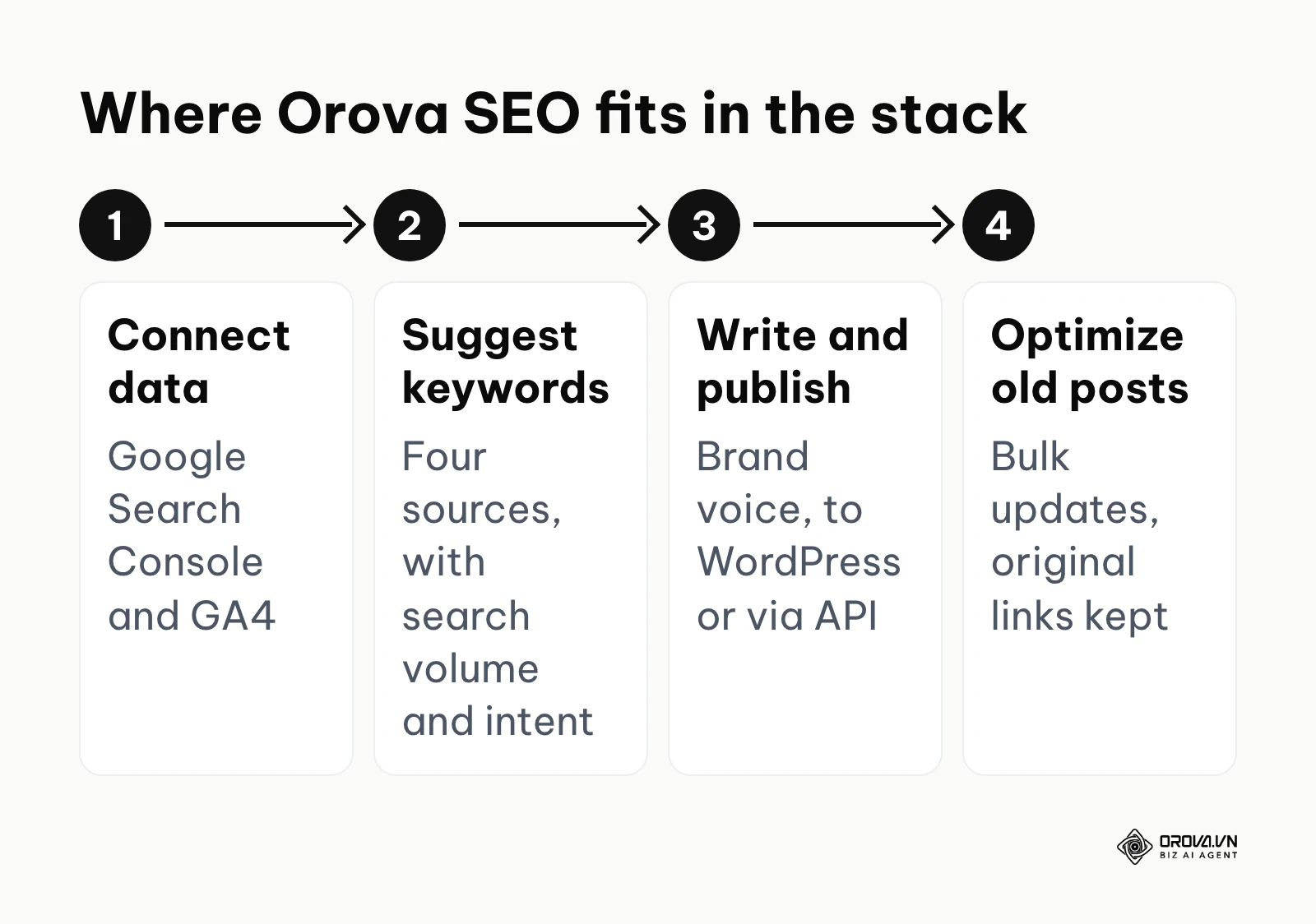
- Value for the user: It bridges the massive gap between finding keywords and actually getting high-quality content live. Orova connects to Google Search Console and GA4 to measure your baseline performance. It then proactively suggests new keywords drawing from four distinct sources: GSC, Google Keyword Planner, Google Suggest, and its own AI, providing actual search volume and user intent. It automatically writes SEO-optimized articles with matching illustrations in your exact brand voice, publishes them directly to WordPress or custom websites via API, and can bulk optimize your old URLs while strictly keeping the original links intact. It also features competitor tracking, a technical health check, and a Visual Editor that lets you fix issues directly on your live site.
- Who it is for: Lean marketing teams, solo founders, and modern agencies that need to aggressively scale their content velocity without sacrificing technical quality or hiring an army of freelance writers.
- How to start using it:
- Connect your Google Search Console and GA4 accounts to allow the system to ingest your historical performance data.
- Run the technical health check to identify immediate site issues that might hinder new content from ranking properly.
- Use the AI keyword suggestions to select a high-potential topic, and let the software draft and publish your first fully optimized article directly to your CMS.
The Catch (Limitations): As a specialized execution and automation tool, it is explicitly designed for rapid content deployment and on-page optimization. However, it is not a deep-dive, enterprise-level spider crawler; it focuses on actionable technical health checks rather than endlessly scraping hundreds of thousands of complex architectural nodes on massive enterprise sites.
Ahrefs Webmaster Tools (Free Version)
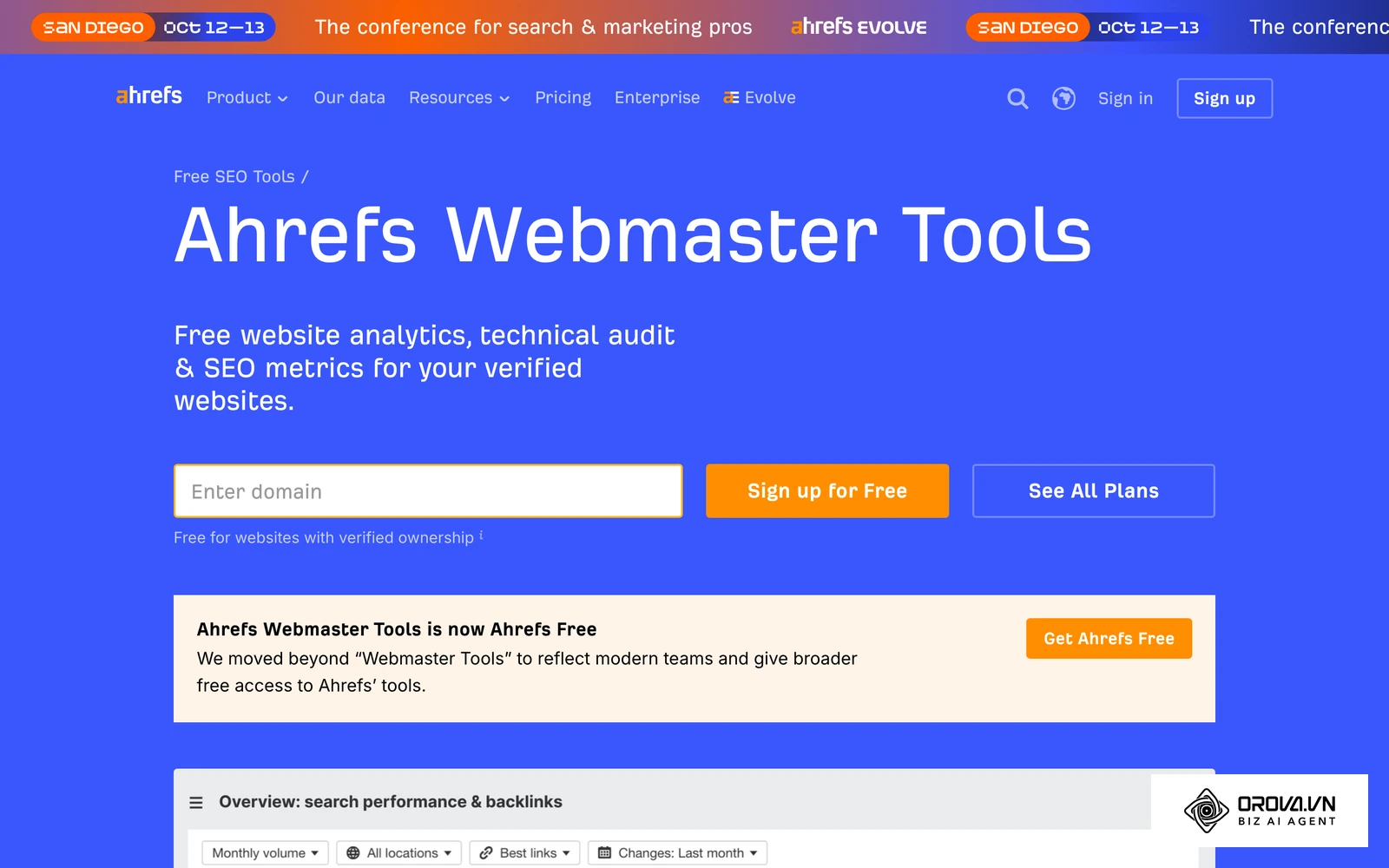
- What it does: While Ahrefs is primarily a premium third-party suite, they offer a free tier for verified site owners, launched as Ahrefs Webmaster Tools (AWT) and now branded as Ahrefs Free. It provides robust access to their world-class backlink database and site auditing capabilities.
- Value for the user: Google Search Console is notoriously bad at showing your complete backlink profile. Relying solely on free Google tools for backlink analysis leaves a gap in your view of who links to you. AWT fills this gap, showing you who is linking to your site, which pages they link to, and what anchor text they are using.
- Who it is for: SEO strategists heavily focused on off-page SEO and link building, and webmasters who need a more robust technical crawl than GSC natively provides.
- How to start using it:
- Sign up for a free Ahrefs account and verify your website ownership (you can do this instantly and securely by connecting your existing GSC account).
- Run a full Site Audit to get a comprehensive health score and a highly prioritized list of technical errors.
- Navigate to the "Backlink profile" report to see a detailed list of referring domains and identify your most linked-to pages.
The Catch (Limitations): The free tier only allows you to view data for your own verified websites. You absolutely cannot use it to research competitors' backlinks or spy on their top-performing keywords, which is what the paid Ahrefs plans are designed for.
Technical SEO & Performance Tools
Content might be king, but technical SEO is the kingdom. If your website is painfully slow, structurally broken, or unreadable by search engine bots, the best content in the world will never see the light of day. A technical SEO optimization tool helps you diagnose and surgically repair the infrastructure of your site.
Google PageSpeed Insights & Lighthouse
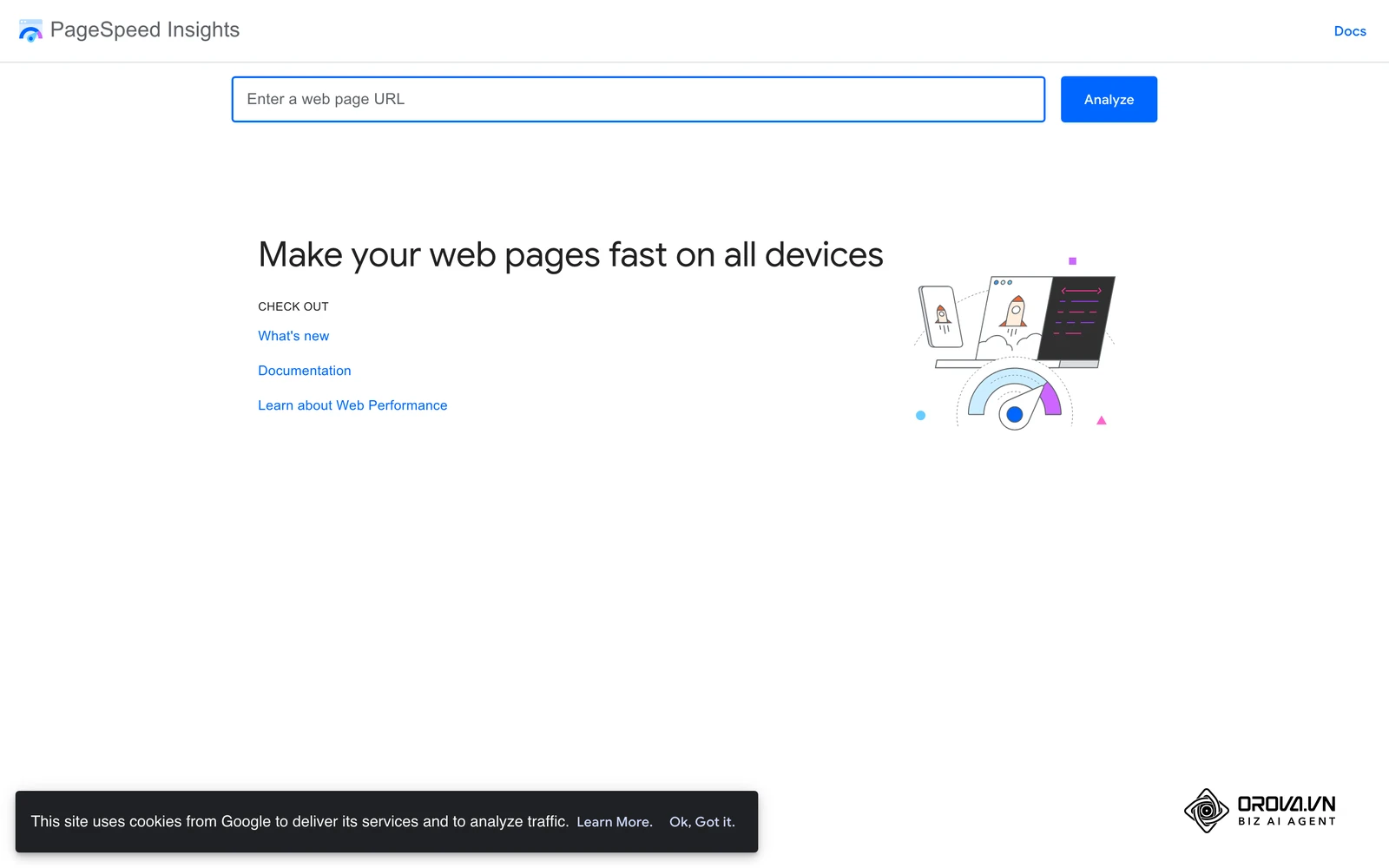
- What it does: PageSpeed Insights (PSI) is a dedicated tool that analyzes the content of a web page, then generates highly specific suggestions to make that page faster. It utilizes Lighthouse, an open-source, automated tool for improving the quality of web pages, running under the hood to generate its simulated lab data.
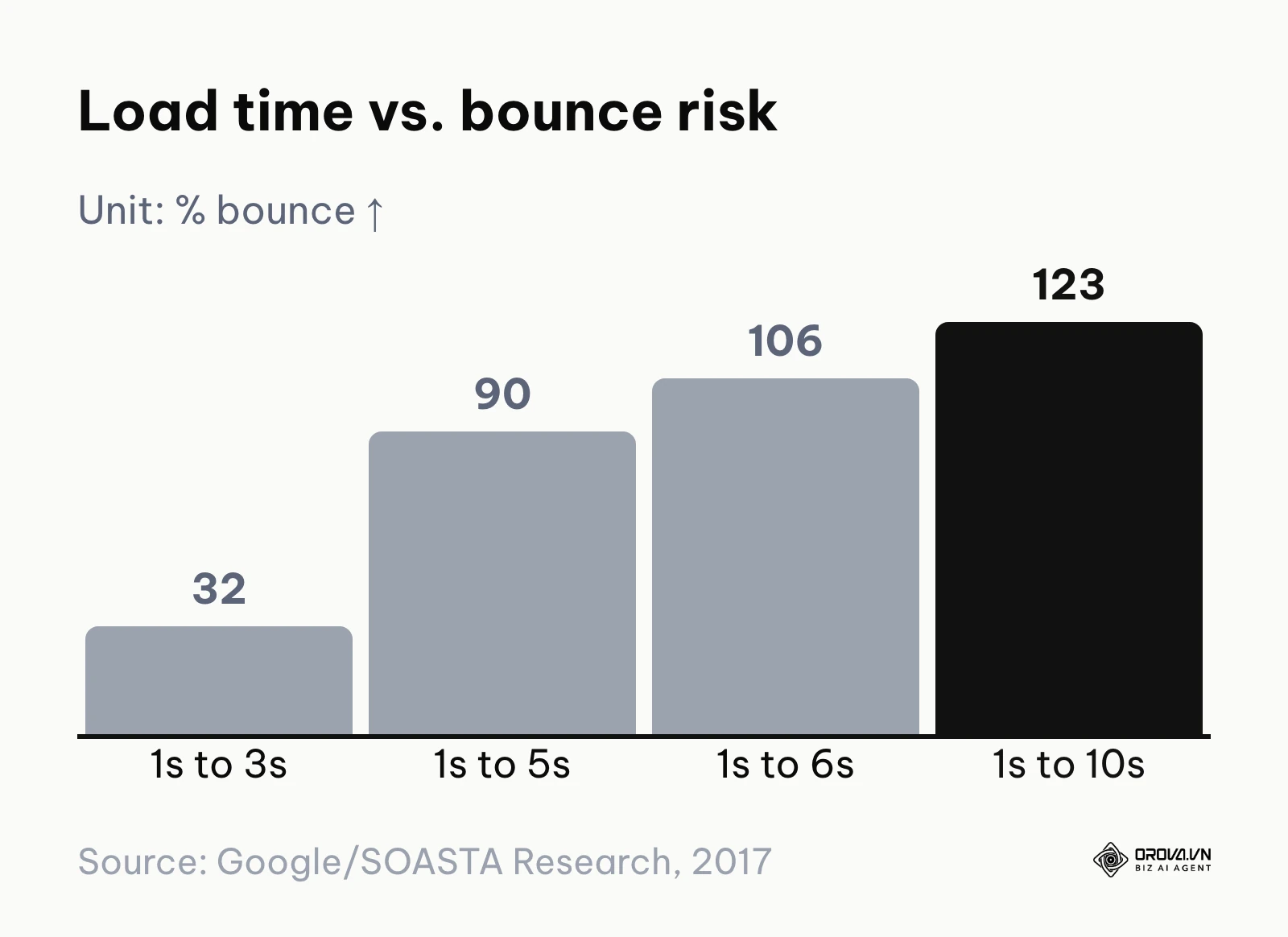
- Value for the user: Page experience signals, including Core Web Vitals, are part of what Google's ranking systems reward, particularly on mobile. Google's research with SOASTA (2017) found that as page load time goes from one second to three seconds, the probability of a bounce increases 32%; from one to five seconds it increases 90%, from one to six seconds 106%, and from one to ten seconds 123%. PSI measures your Core Web Vitals (Largest Contentful Paint, Interaction to Next Paint, and Cumulative Layout Shift) using both lab data (simulated conditions) and field data (real user metrics from the Chrome browser). Data from the Web Almanac by HTTP Archive (2022) indicates that heavy JavaScript execution remains a primary bottleneck for mobile performance, a metric you must strictly monitor using Lighthouse.
- Who it is for: Web developers and technical SEOs explicitly tasked with optimizing server response times and frontend rendering paths.
- How to start using it:
- Navigate to the PageSpeed Insights website and enter a specific URL (you must test individual landing pages, not just the homepage).
- Review the distinction between the "Discover what your real users are experiencing" section (Field Data) and the "Diagnose performance issues" section (Lab Data).
- Scroll down to the diagnostic suggestions below the scores to find specific, actionable developer advice (for example, reducing unused JavaScript or compressing oversized images).
The Catch (Limitations): PSI analyzes exactly one URL at a time. If you have a massive e-commerce site with 50,000 product pages, checking them manually is physically impossible. You must rely on the Core Web Vitals report inside GSC for site-wide aggregate data, using PSI only to diagnose specific page templates.
Google Rich Results Test
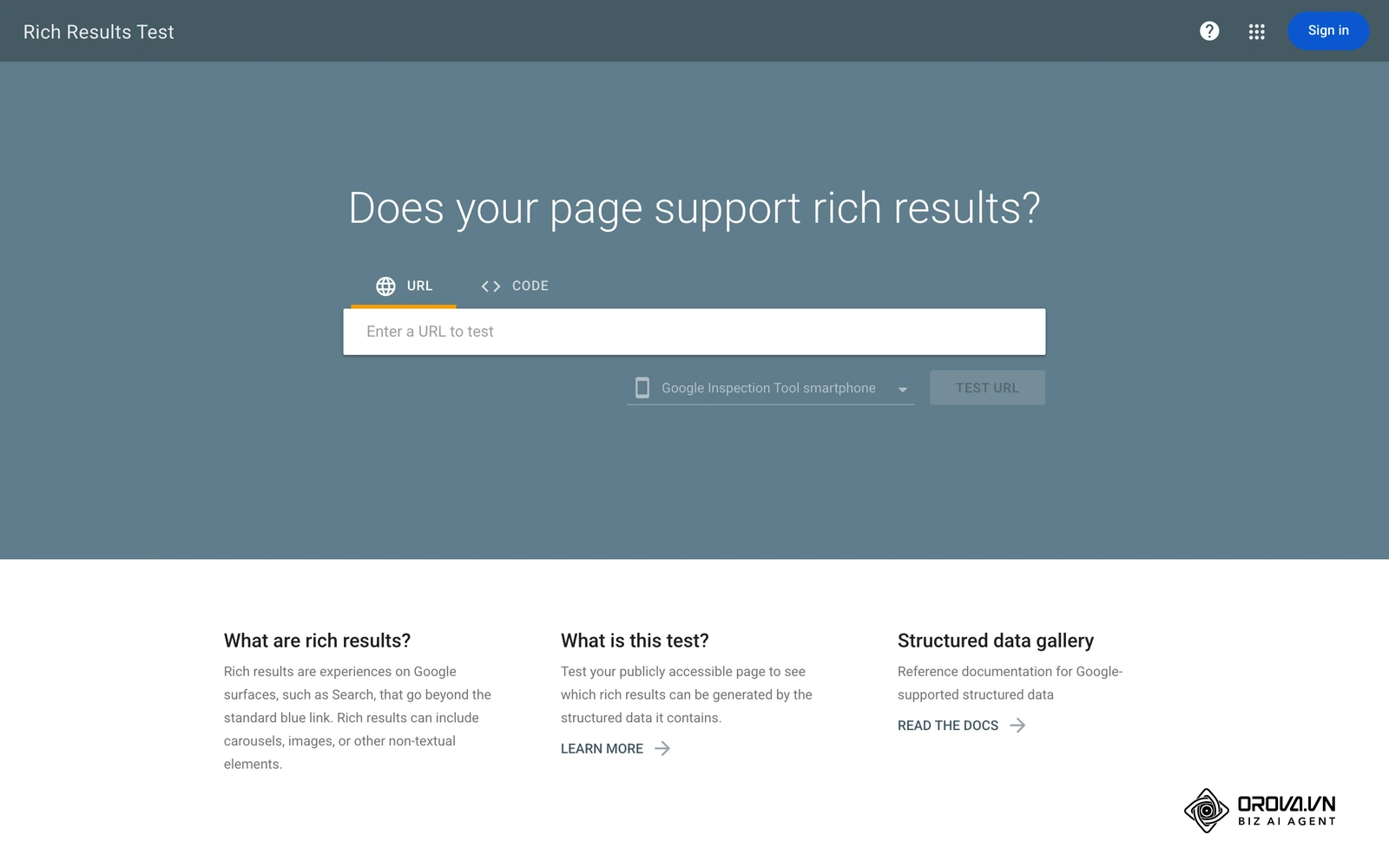
- What it does: This tool allows you to test your publicly accessible URLs or raw code snippets to see exactly what rich results (like recipe cards, product review stars, or breadcrumbs) can be generated by the structured data embedded on the page.
- Value for the user: Implementing Schema markup is completely useless if Google cannot read it properly. This tool validates your JSON-LD code, highlighting syntax errors or missing required properties before you publish. Earning rich results can drastically increase your click-through rate in the SERPs, even if your actual ranking position does not change.
- Who it is for: Content publishers, recipe bloggers, and e-commerce managers who heavily rely on visually enhanced SERP features to drive competitive clicks.
- How to start using it:
- Write your structured data code (using the standard JSON-LD format) or generate it using a reputable schema markup plugin.
- Paste the URL of your drafted page, or the raw code snippet itself, directly into the Rich Results Test interface.
- Review the green checkmarks to ensure the schema is entirely valid, and look at the "Preview" button to see a visual simulation of how it might appear on Google.
The Catch (Limitations): A passing grade in the Rich Results Test does not guarantee that Google will actually display the rich snippet in the live SERPs. The search algorithm ultimately decides whether the markup is highly relevant to the specific search query and the immediate user intent.
Chrome DevTools
- What it does: Chrome DevTools is a comprehensive set of web developer tools built directly into the Google Chrome browser ecosystem. It allows you to edit pages on the fly, inspect network activity, and diagnose rendering problems quickly.
- Value for the user: It is the ultimate tool for live, in-browser debugging. Technical SEOs use it to inspect the Document Object Model (DOM) to see exactly how JavaScript alters the page after the initial HTML load. You can simulate various mobile devices, intentionally throttle network speeds to see how the site loads on a slow mobile connection, and rigorously check HTTP status headers.
- Who it is for: Advanced technical SEO specialists and frontend developers who need deep visibility into browser behavior.
- How to start using it:
- Open your website in Google Chrome, right-click anywhere on the page, and select "Inspect."
- Use the "Elements" panel to verify that your critical SEO content (like H1 tags and main body text) is actually present in the rendered HTML, not just hidden in scripts.
- Switch to the "Network" panel, aggressively reload the page, and filter by "Doc" to check the initial server response code (ensure it is a clean 200 OK and not a messy redirect chain).
The Catch (Limitations): DevTools is an intimidating, highly technical environment meant primarily for software engineers. It offers absolutely no guidance, tutorials, or SEO-specific recommendations; it simply exposes the raw, unforgiving mechanics of the web page. You have to know exactly what you are looking for.
Screaming Frog (Free Version)
- What it does: Screaming Frog SEO Spider is an industry-standard, installable desktop program (available for PC or Mac) that rapidly crawls websites' links, images, CSS, script files, and apps purely from an SEO perspective.
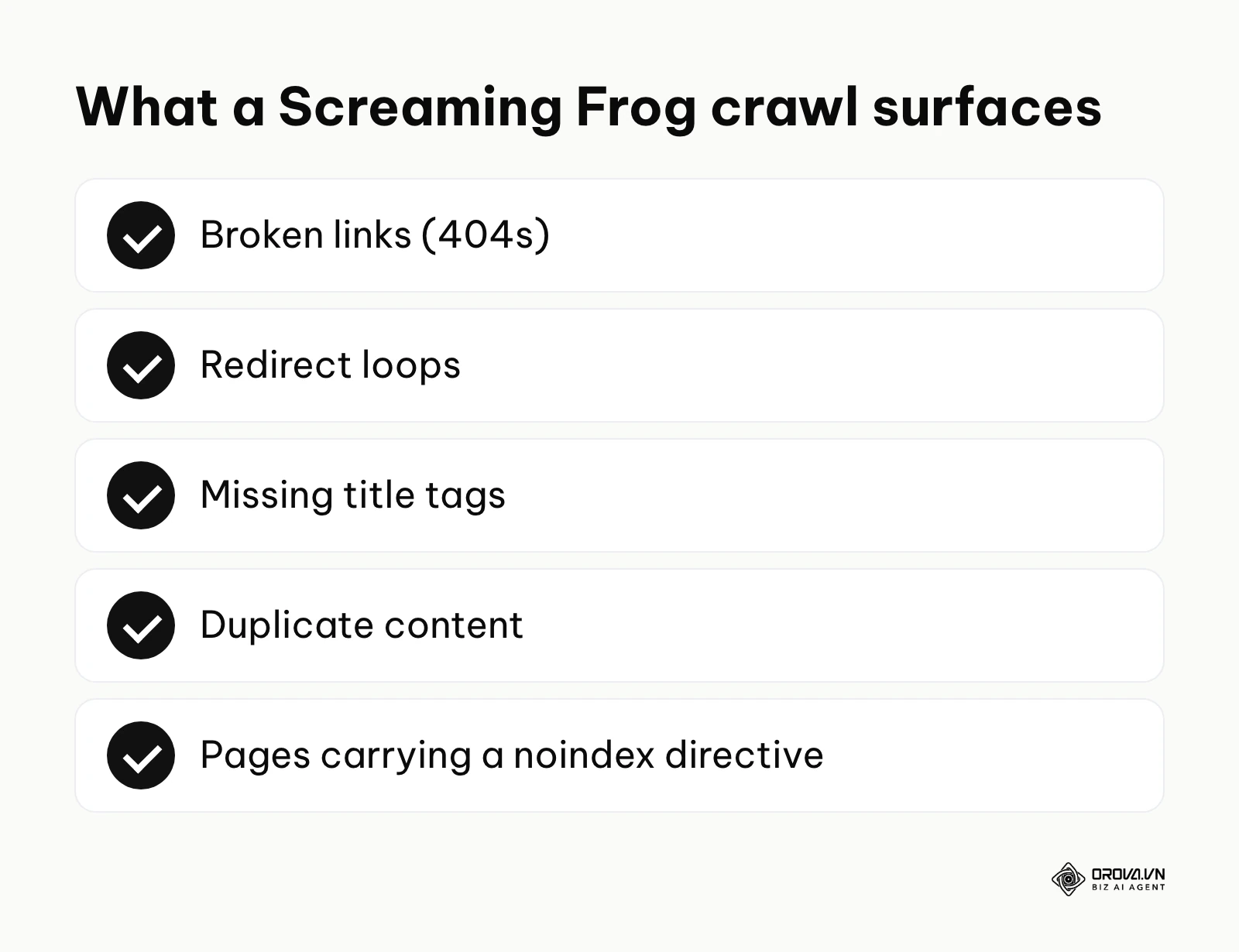
- Value for the user: While Google Search Console tells you what Google has found in the past, Screaming Frog tells you what is actually on your site right now. It acts exactly like a search engine bot, crawling every link and mapping the entire architecture. It is absolutely essential for finding broken links (404s), catastrophic redirect loops, missing title tags, and duplicate content at scale.
- Who it is for: Technical SEO specialists conducting deep, forensic site audits and preparing for massive website migrations.
- How to start using it:
- Download and install the software directly on your local computer.
- Enter your homepage URL into the search bar at the very top and click "Start" to initiate the crawl.
- Once finished, use the right-hand window pane to filter for specific technical issues, such as clicking on "Response Codes" and filtering for "Client Error (4xx)" to find all broken links.
Illustrative Example: An e-commerce store with a messy product catalog.
- Context: A small e-commerce retailer selling specialized outdoor gear noticed that many of their highly profitable new product category pages were not appearing on Google at all. The solo founder, acting as the de facto SEO manager, needed to figure out exactly why Google was ignoring their new inventory.
- Steps taken: First, the founder downloaded the free version of Screaming Frog and entered their homepage URL to start a site-wide crawl. Second, they navigated to the 'Response Codes' tab to look for widespread 404 errors, but found none. Third, they checked the 'Directives' tab to see if any pages were accidentally carrying a rogue 'noindex' meta tag, essentially blocking search engines.
- Hurdles and fixes: The crawl hit the free version's 500-URL limit almost immediately, long before it reached the new category pages. The founder discovered that their faceted navigation (the sidebar filters for color, size, and price) was generating thousands of dynamic URLs, completely eating up the crawl budget and trapping the spider. Because they could not fix the complex backend code themselves, they used Screaming Frog's export feature to send a clear spreadsheet of the problematic URL parameters to a freelance developer, clearly instructing them to implement proper canonical tags.
- Visible result: After the developer implemented the canonical tags, the founder ran a second crawl which completed smoothly, mapping the clean category architecture. Within a month, the missing product categories finally appeared in Google search results, drastically expanding the site's overall organic footprint and driving new, highly targeted sales. (For more on technical roadmaps, see our website ranking guide).
The Catch (Limitations): The free version is strictly limited to crawling a maximum of 500 URLs. If your website has 501 pages, you cannot audit the entire site without a paid license. Furthermore, because it runs on your local machine, crawling massive sites requires a very powerful computer with extensive RAM.
Local SEO & Business Presence Tools
If your business operates a physical storefront or serves a specific geographic area, traditional organic search is only half the battle. A local SEO optimization tool focuses on helping you dominate the "Local Pack"—the highly visible, map-based results that appear at the very top of local queries.
Google Business Profile
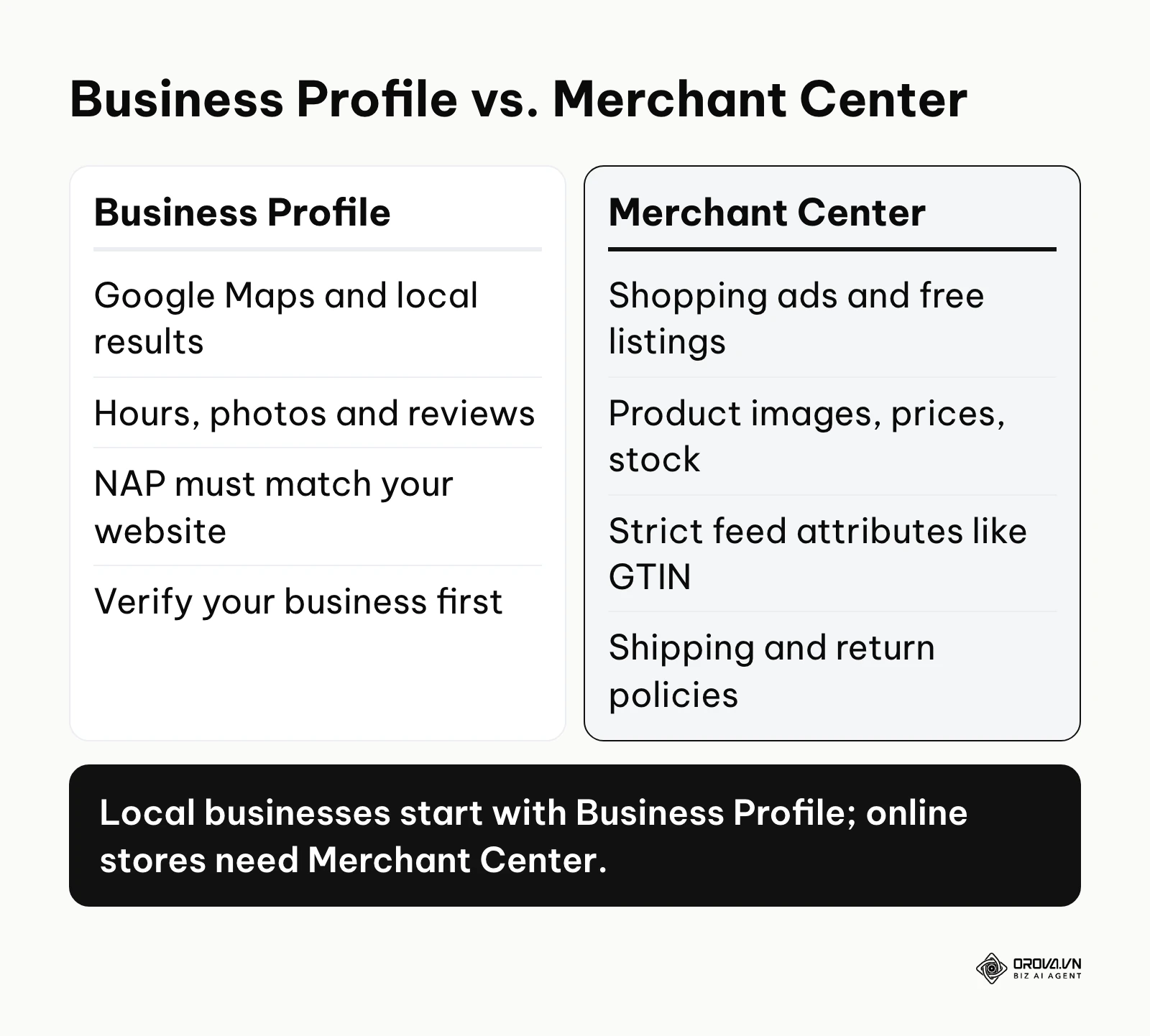
- What it does: Formerly known as Google My Business, this is a completely free tool that allows business owners to manage how their local business appears across various Google products, specifically Google Maps and localized search results.
- Value for the user: It is one of the most important assets for local SEO. A properly optimized profile ensures that when someone in your city searches for "plumber near me," your business shows up with accurate hours, a direct link to your website, authentic customer reviews, and high-quality photos of your work. It directly drives foot traffic and urgent phone calls.
- Who it is for: Brick-and-mortar retail stores, restaurants, and local service providers (like plumbers, lawyers, and dentists).
- How to start using it:
- Claim or proactively create your business profile through the Google Business interface, ensuring your NAP (Name, Address, Phone Number) matches the information on your website exactly.
- Verify your business using the method Google offers you, which can include a video recording, phone, email, or a postcard with a code mailed to your address.
- Fully populate the profile by adding high-quality photos, listing your services in detail, and actively requesting and replying to all customer reviews.
The Catch (Limitations): You have very little control over the malicious actions of unscrupulous competitors, who can suggest incorrect edits to your profile (like marking you as "Permanently Closed") or coordinate fake negative reviews. Constant vigilance and active management are required to protect your profile's integrity.
Google Merchant Center
- What it does: Merchant Center is a specialized tool that lets you upload your store and product data directly to Google and make it available for Shopping ads and free product listings across the Google ecosystem.
- Value for the user: It injects your actual products—complete with high-resolution images, exact prices, and stock availability—directly into the search results. Even if your e-commerce category pages struggle to rank organically, well-optimized Merchant Center feeds can secure high-visibility placements in the Shopping tab and the main SERP image carousels.
- Who it is for: Any e-commerce business selling physical goods online.
- How to start using it:
- Create a Merchant Center account and definitively verify your website URL.
- Set up your shipping and return policies within the platform settings, as Google requires strict transparency regarding these details.
- Create a product feed (usually via an automated plugin from your CMS like Shopify or WooCommerce) that automatically syncs your inventory data with Google on a daily basis.
The Catch (Limitations): The feed requirements are extremely strict and unforgiving. If your data feed is missing required attributes (like accurate GTIN codes or proper image formats), Google will aggressively disapprove your products, immediately removing them from search results until the technical feed errors are fully resolved.
With OROVA.VN and the OROVA SEO module, you put an end to the exhausting days of manual work for good. Instead of struggling for hours to write articles and compile reports, the entire process is now optimized and completed in just 5 minutes.
Recommended SEO Tech Stacks by Budget
Understanding individual tools is helpful, but building a cohesive SEO optimization tool stack based on your specific financial constraints is absolutely critical. Here are three recommended software configurations, from zero spend up to a full professional setup.
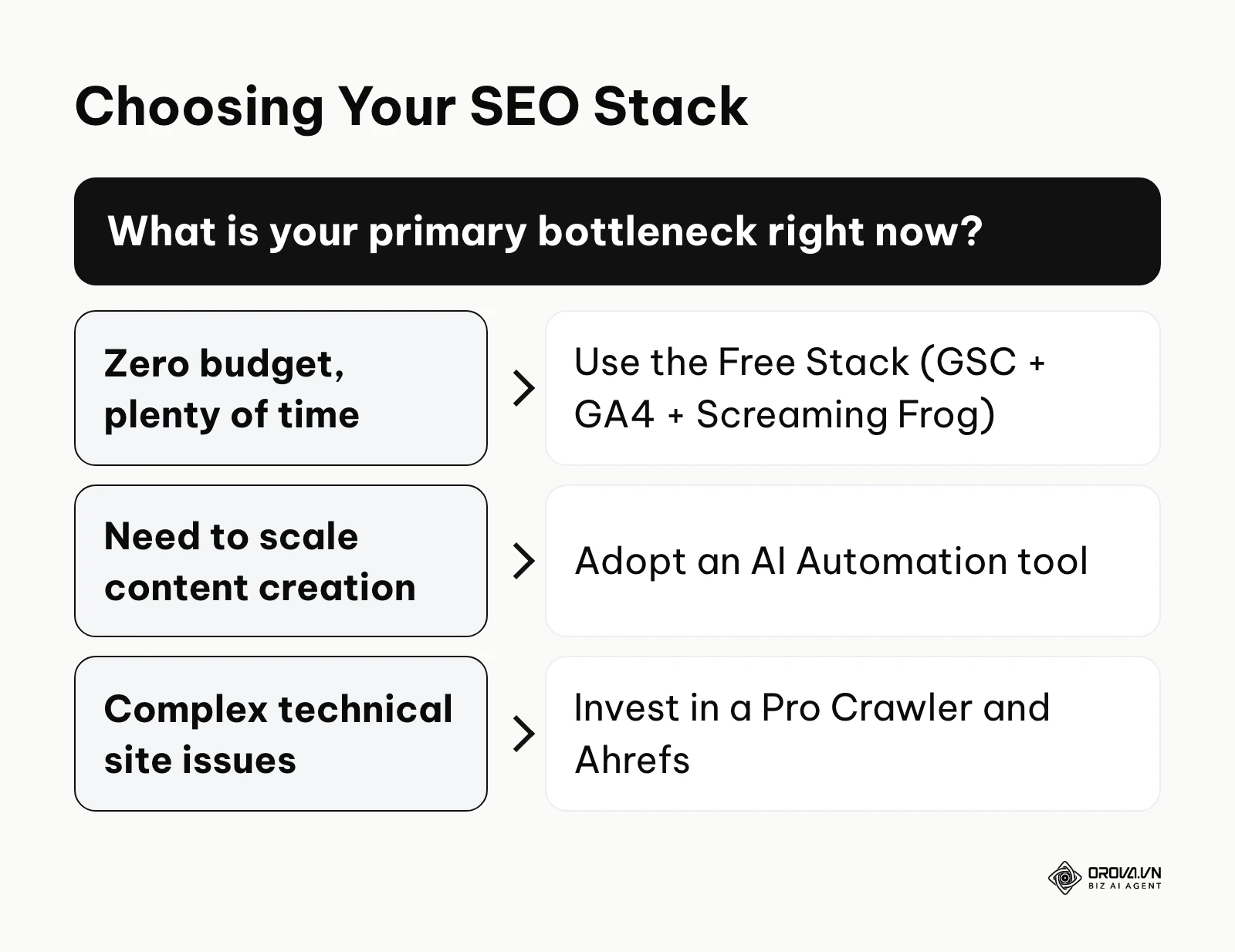
The Free Stack If you are bootstrapping a new venture, you can absolutely build a strong data foundation without spending a single dime. Your stack will heavily consist of Google Search Console for performance tracking, Google Analytics 4 for mapping user behavior, and the Free Version of Screaming Frog for basic technical auditing. You will rely heavily on Google Keyword Planner for rough keyword estimates. The major tradeoff here is time; you will spend significantly more hours manually manipulating data in complex spreadsheets to find actionable insights.
The Starter Stack As your business grows and your personal time becomes significantly more valuable, you need efficiency. You keep GSC and GA4 for data, but you introduce a powerful automation layer. An execution platform like Orova SEO becomes the core of your operation, directly pulling data from Google, suggesting keywords with search volume and intent, and automating the writing and publishing process. You might supplement this with an affordable local citation tool if you are a local business. This stack aggressively maximizes your output per hour spent. (To understand how to allocate funds effectively, read our breakdown on seo optimization cost).
The Pro Stack For established marketing agencies and enterprise teams, data depth and competitive intelligence are the highest priority. This stack includes everything in the Starter tier to handle automation, but adds a premium, heavy-duty crawler (like the paid version of Screaming Frog or Sitebulb) and an elite competitive intelligence tool (like Ahrefs or Semrush). (The best SEO tools guide linked above compares these paid suites in detail.) This configuration allows for massive-scale technical audits, deep historical backlink analysis, and aggressive competitor reverse-engineering.
How to Connect These Tools: A Practical Workflow
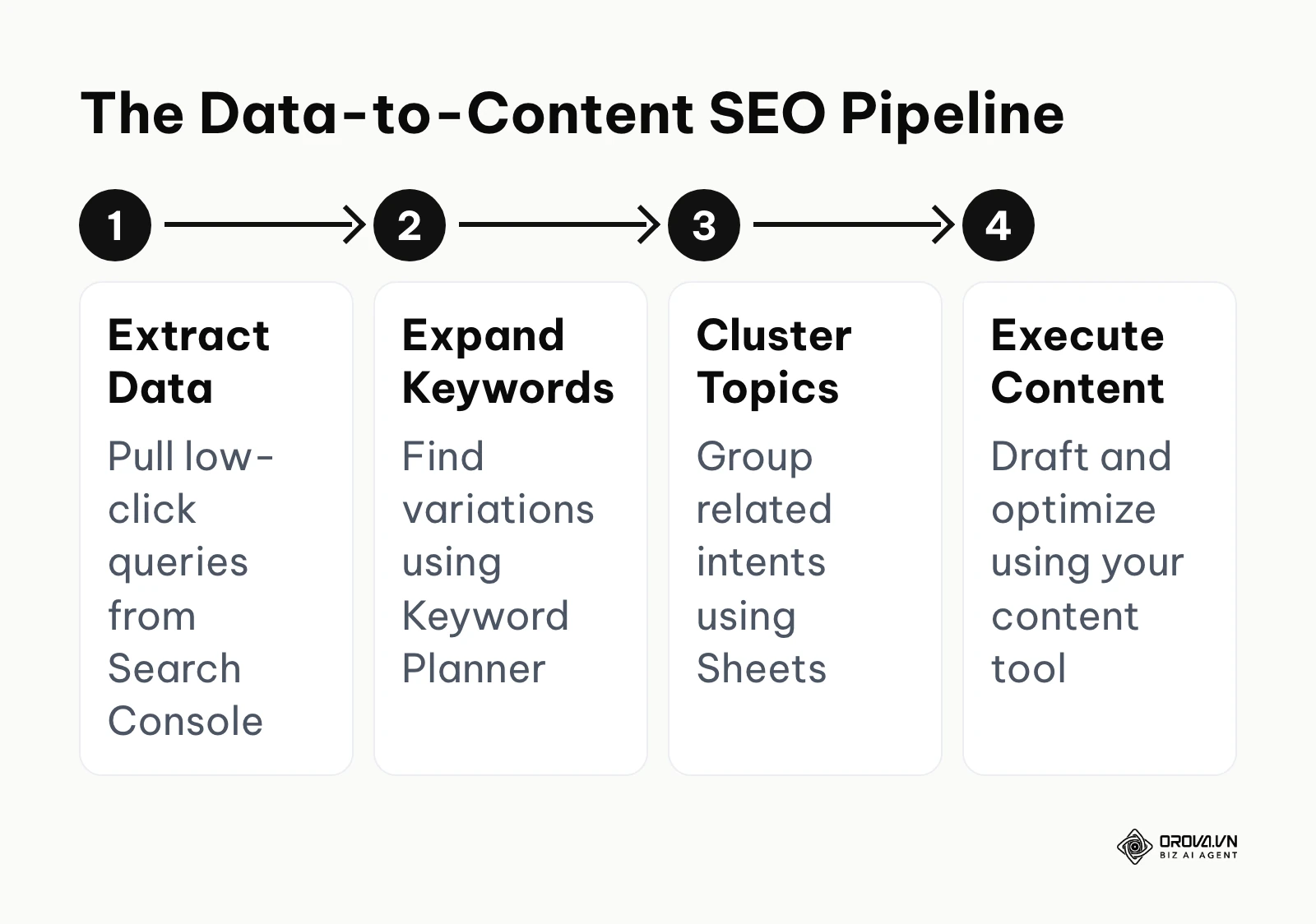
The biggest mistake marketers make is treating an SEO optimization tool as an isolated silo. A true professional builds a seamless pipeline where the data output of one tool becomes the exact input for the next. Here is a highly practical, data-driven workflow for content creation.
Illustrative Example: An agency scaling content production.
- Context: A boutique digital marketing agency managing five distinct client accounts needed to standardize exactly how they moved from finding raw keywords to publishing polished content. Their previous process involved endless email threads, and critical data kept getting lost between the SEO strategists and the freelance writers.
- Steps taken: First, the SEO team exported a comprehensive list of high-impression, low-click queries directly from Google Search Console. Second, they ran these seed queries through Google Keyword Planner to find related, long-tail variations and search volumes. Third, they pasted all this raw data into a master Google Sheet, rigorously grouping the keywords by user intent to create a clear content cluster map. Finally, they fed these strictly approved keyword clusters into their content creation platform to draft the articles.
- Hurdles and fixes: Initially, the freelance writers completely ignored the exact keyword phrasing because the massive spreadsheet full of raw data was too complex and intimidating to read. The agency fixed this by using advanced Google Sheets formulas to create a simplified, read-only 'Writer View' tab. This specific tab only showed the primary keyword, secondary keywords, and the specific user intent, completely hiding the confusing metrics and raw data columns.
- Visible result: This standardized workflow permanently eliminated the back-and-forth clarification emails. The agency successfully increased their publishing output from a sluggish 10 to a highly efficient 25 optimized articles per month per client. Because the content was tightly mapped to actual GSC data, the newly published pages were indexed faster and began driving initial clicks much quicker than their old, chaotic process. (For advanced drafting techniques, review our seo content writing guide).
Future Trends in SEO Tooling: Author's Perspective
As we move deeper into the age of generative search and artificial intelligence, the landscape of SEO optimization tools is undergoing a radical and permanent transformation. Here is my perspective on where the industry is heading in the next few years.
The Shift from Volume Metrics to Intent Modeling
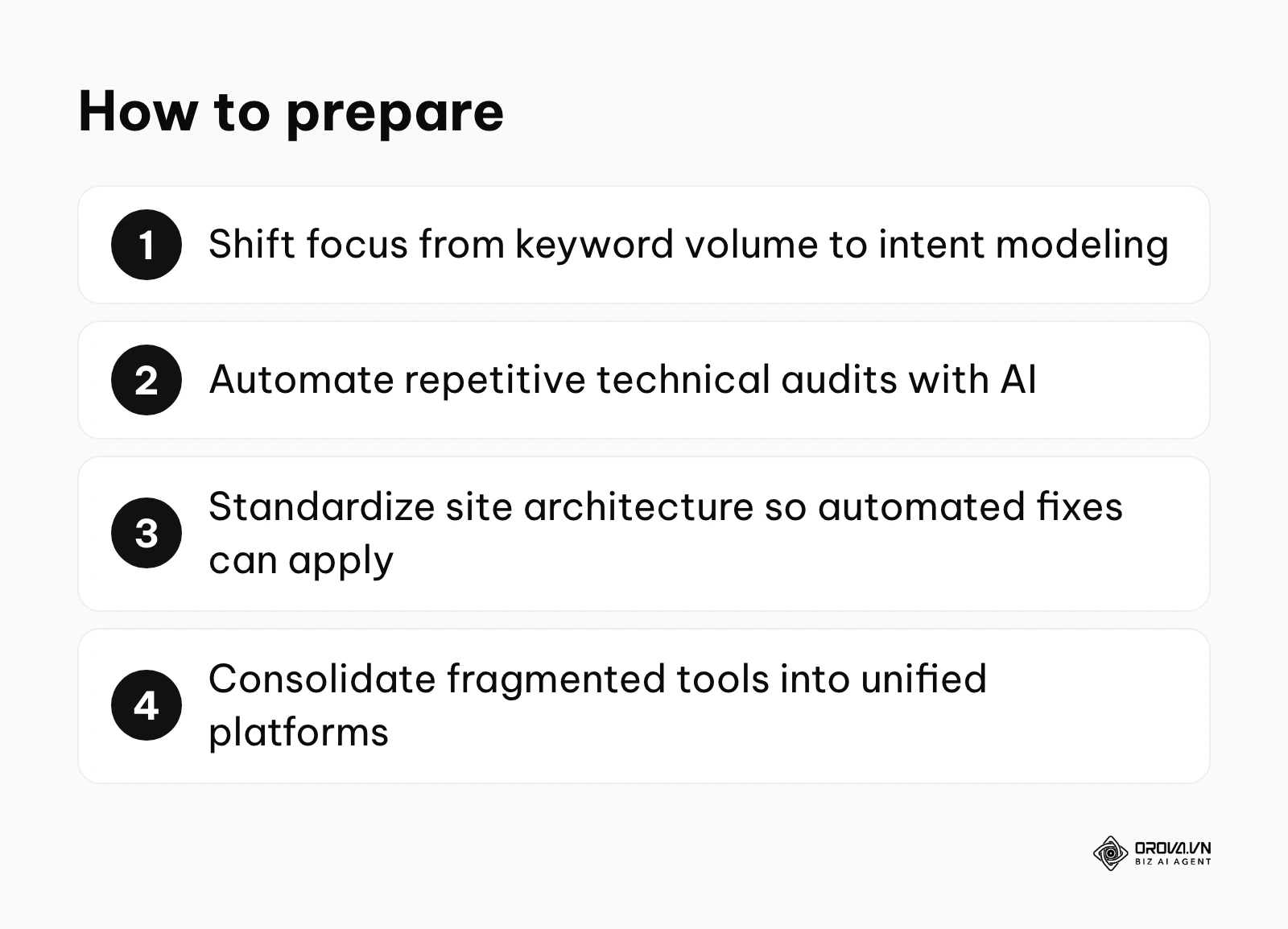
Currently, the industry is completely obsessed with search volume—we look at tools to tell us a keyword gets exactly 10,000 searches a month, and we blindly target it. However, as of 2026, AI overviews and zero-click searches are actively cannibalizing high-volume, informational queries. I believe that over the coming years, the best SEO tools will gradually stop prioritizing raw volume. Instead, they will focus heavily on predictive intent modeling. Future tools will likely analyze a query and predict whether the user is likely to buy, subscribe, or simply read and leave. You should prepare for this shift by immediately pivoting your strategy away from generic "what is" glossary terms and focusing heavily on middle and bottom-of-funnel content where the user intent is highly transactional or requires deep human experience that AI cannot instantly summarize.
AI-Driven Technical Auto-Remediation
For the last decade, technical SEO tools have essentially functioned as passive alarm systems. A crawler like Screaming Frog tells you that 500 pages are missing critical canonical tags, but you still have to manually implement the fix or hire an expensive developer. I expect a gradual shift toward auto-remediation. Future technical tools may not just flag the error; they could use AI to access your CMS securely and safely deploy the necessary code fix autonomously. We are already seeing early glimpses of this with edge SEO technologies, and I expect it to spread to standard WordPress and Shopify setups. You should start preparing by rigorously standardizing your website architectures now; highly customized, messy codebases will severely struggle to integrate with these upcoming automated remediation tools.
The Consolidation of Fragmented Tech Stacks
Right now, the average SEO professional logs into four or five completely different software platforms every single day—one for analytics, one for crawling, one for keyword research, and one for content writing. This fragmentation is inherently inefficient. I expect the market to push toward software consolidation, with more unified SEO platforms emerging that handle everything from the initial GSC data ingestion to the final API-driven publication of content in one interface. To prepare, teams should begin brutally auditing their current software subscriptions, identifying overlapping features, and migrating toward platforms that offer end-to-end workflow automation rather than isolated, disconnected data points.
Frequently Asked Questions about Google SEO Optimization Tools
Can I rank on page one using only free Google tools?
Yes, absolutely. According to the Search Quality Evaluator Guidelines by Google (2023), establishing high-quality content requires demonstrating clear expertise and trustworthiness, which means your tool stack must help you identify what users actually want to read, not just manipulate arbitrary metrics. If your content is genuinely the best answer on the internet, and your site architecture is fundamentally sound, the free data provided directly from GSC and GA4 is entirely sufficient to guide you to page one. Paid tools simply speed up the research process and provide competitor insights; they do not magically rank the site for you.
When should a business upgrade from a free stack to paid software?
You should upgrade exactly when manual data processing becomes your primary operational bottleneck. If you are spending five hours a week exporting CSVs from GSC, matching them against Keyword Planner data in Excel, and manually checking your competitor's backlinks one by one, you are wasting incredibly valuable time. When the hourly cost of your labor (or your team's labor) spent on data manipulation exceeds the monthly subscription cost of a paid tool or an automation platform, it is financially irresponsible not to upgrade immediately.
How does AI change the way we use these traditional optimization tools?
AI does not replace foundational diagnostic tools like Search Console; rather, it radically changes how we interact with the data they produce. Instead of staring at a complex chart trying to manually identify a pattern in dropping traffic, AI overlays can instantly analyze the massive datasets and accurately pinpoint that a specific algorithm update devalued your category pages. Furthermore, AI drastically accelerates the execution phase, taking the keyword insights derived from traditional tools and turning them into fully optimized content or deployed technical fixes in a fraction of the time it takes a human.
Where Should You Start?
Feeling overwhelmed by the sheer number of tools available is completely normal. Do not attempt to implement everything on this massive list at once. Choose your starting point based on your current operational reality. (For a highly structured approach to prioritize tasks, follow our seo checklist).
- If your website is brand new and has absolutely no traffic: Stop researching premium tools immediately. Your only job today is to create a free Google Search Console account, verify your domain ownership, and submit your XML sitemap. You cannot optimize a site if Google does not even know it exists.
- If you have traffic but no idea which pages actually make money: Do not write another blog post until you completely fix your analytics setup. Spend one afternoon properly configuring a Google Analytics 4 property, strictly linking it to your GSC account, and defining at least one key conversion event (like a contact form submission or a product purchase).
- If you know what keywords you want but struggle to produce content fast enough: You have a critical execution problem, not a data problem. Implement a strong automation layer. Connect an AI content generation tool to your data sources so you can start immediately turning those keyword ideas into published, technically sound pages before your competitors do.
Mastering a google seo optimization tool stack is not about buying the most expensive software on the market; it is entirely about building a disciplined workflow that consistently turns raw data into profitable organic growth.
About the author

Builder of Orova
Nguyễn Đỗ Trọng Ân has 8 years of experience in marketing, including 6 years managing market development across Asia. He builds Orova, a Biz AI Agent that never sleeps: it plans, runs and optimizes work for businesses.
Run your business with AI Agents
Orova is the always-on Biz AI Agent — it plans, runs, and optimizes the work for you.
Save time, unlock productivity.