
What is eLearning? The definitive guide to digital training

What is eLearning? eLearning (electronic learning) is structured training delivered through computers, tablets, or phones over the internet, where lessons, quizzes, and certificates are tracked so an organization can see who learned what and prove it later. It ranges from self-paced online courses to live virtual classes, and it is now the default way growing companies onboard staff and keep compliance training consistent.
Imagine staring at a dashboard indicating that less than fifteen percent of your newly hired employees have completed their mandatory compliance training. The deadline is tomorrow, and the legal risks are mounting. In a panic, you send out passive-aggressive reminder emails, wondering why your expensive new digital academy feels like a ghost town.
Many business leaders fall into the trap of thinking that simply uploading a few PDF documents and recorded Zoom calls to a shared drive constitutes a robust digital training strategy. This fundamental misunderstanding leads to wasted budgets, frustrated employees, and critical knowledge gaps across the organization.
Understanding exactly what is elearning goes far beyond recognizing it as studying on a computer screen. It requires a deep dive into the architecture of learning management systems, the psychology of adult education, and the stark reality of hidden implementation costs. This article strips away the vendor hype to provide a pragmatic, no-nonsense guide to building a digital training ecosystem that actually scales, changes behavior, and directly impacts your bottom line.
What is eLearning? The Core Definition
To answer the fundamental question of what is eLearning, we must strip away the marketing jargon and focus on its structural reality as a trackable business tool.
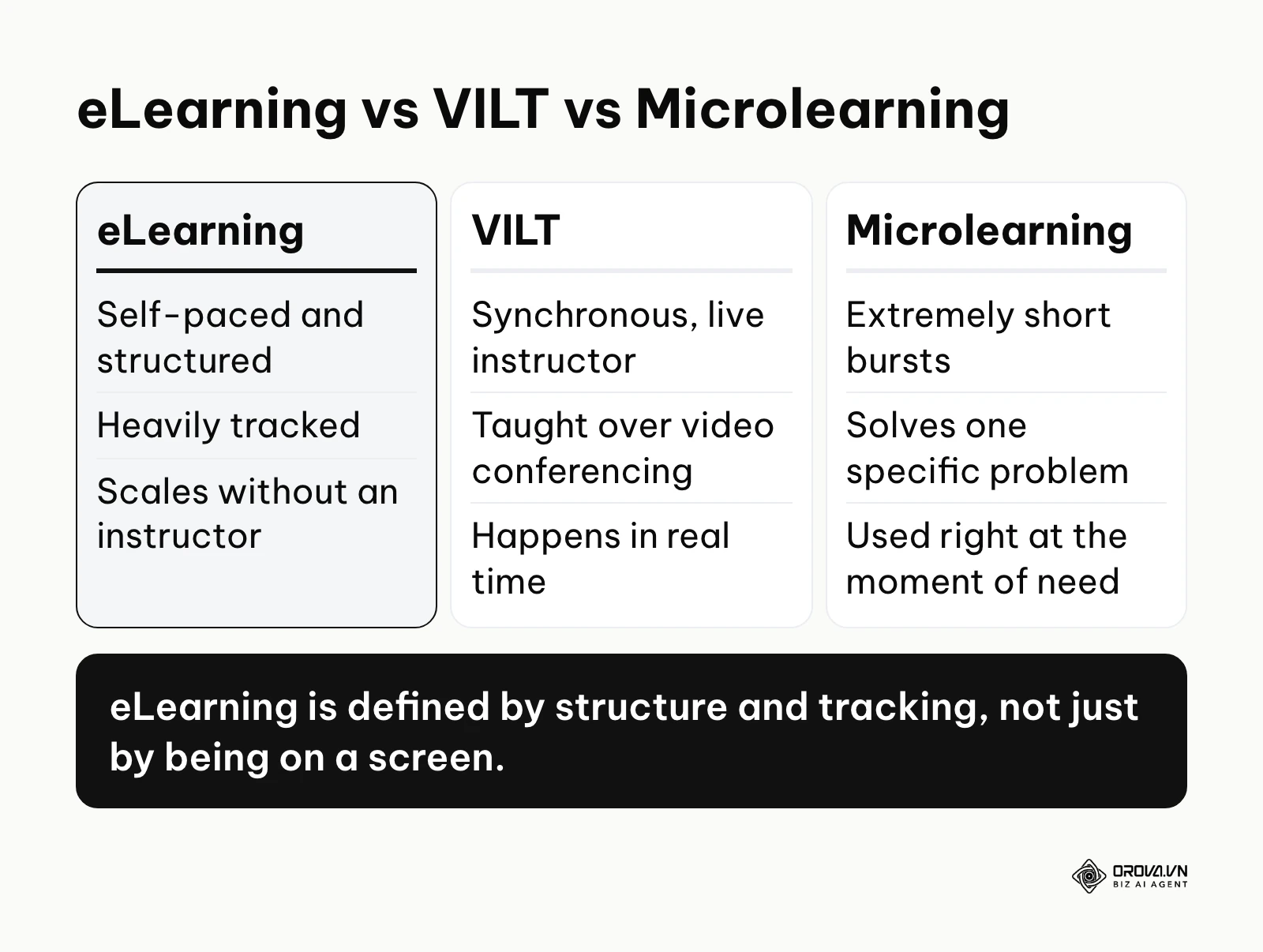
eLearning is a structured educational approach delivered electronically via computers or mobile devices, utilizing the internet to distribute training materials, assessments, and certifications. It is used to systematically upskill the workforce and ensure compliance. Unlike casual web browsing or unstructured video watching, eLearning involves trackable instructional design and measurable learning outcomes.
The term is generally traced to the late 1990s, when corporate training began shifting from CD-ROM-based courses to network-delivered content. Today, the landscape is heavily fragmented, and distinguishing between core concepts is vital for anyone planning to build an infrastructure.
To clarify the boundaries of the concept, here is a comparison between eLearning and other commonly confused training methodologies.
| Concept | Key Difference | Everyday Example |
|---|---|---|
| eLearning | Self-paced, structured, heavily tracked, and highly scalable without human intervention. | Completing an interactive cybersecurity awareness module with a final quiz on an LMS. |
| VILT (Virtual Instructor-Led Training) | Synchronous, requires a live human instructor teaching in real-time over video conferencing. | Attending a live Zoom workshop on leadership skills on a Tuesday morning. |
| Microlearning | Extremely short, focused bursts of information designed to solve one specific problem instantly. | Watching a three-minute video on how to calibrate a specific machine right before using it. |
A common everyday example of eLearning is modern new hire training. On a new hire's first day, instead of sitting in a conference room listening to a manager read a handbook, they log into a portal. They watch highly produced videos explaining the company culture, interact with scenarios demonstrating the software they will use, and pass a brief quiz to prove they understand the data privacy policy. The system automatically records their score and notifies human resources that the compliance requirement is fulfilled.
The True Purpose of eLearning in Modern Business
eLearning exists to solve the critical business problem of inconsistent, unscalable knowledge transfer. It serves growing organizations that can no longer rely on tribal knowledge or shoulder-to-shoulder shadowing. In the broader business landscape, it sits precisely at the intersection of human resources and operational efficiency.
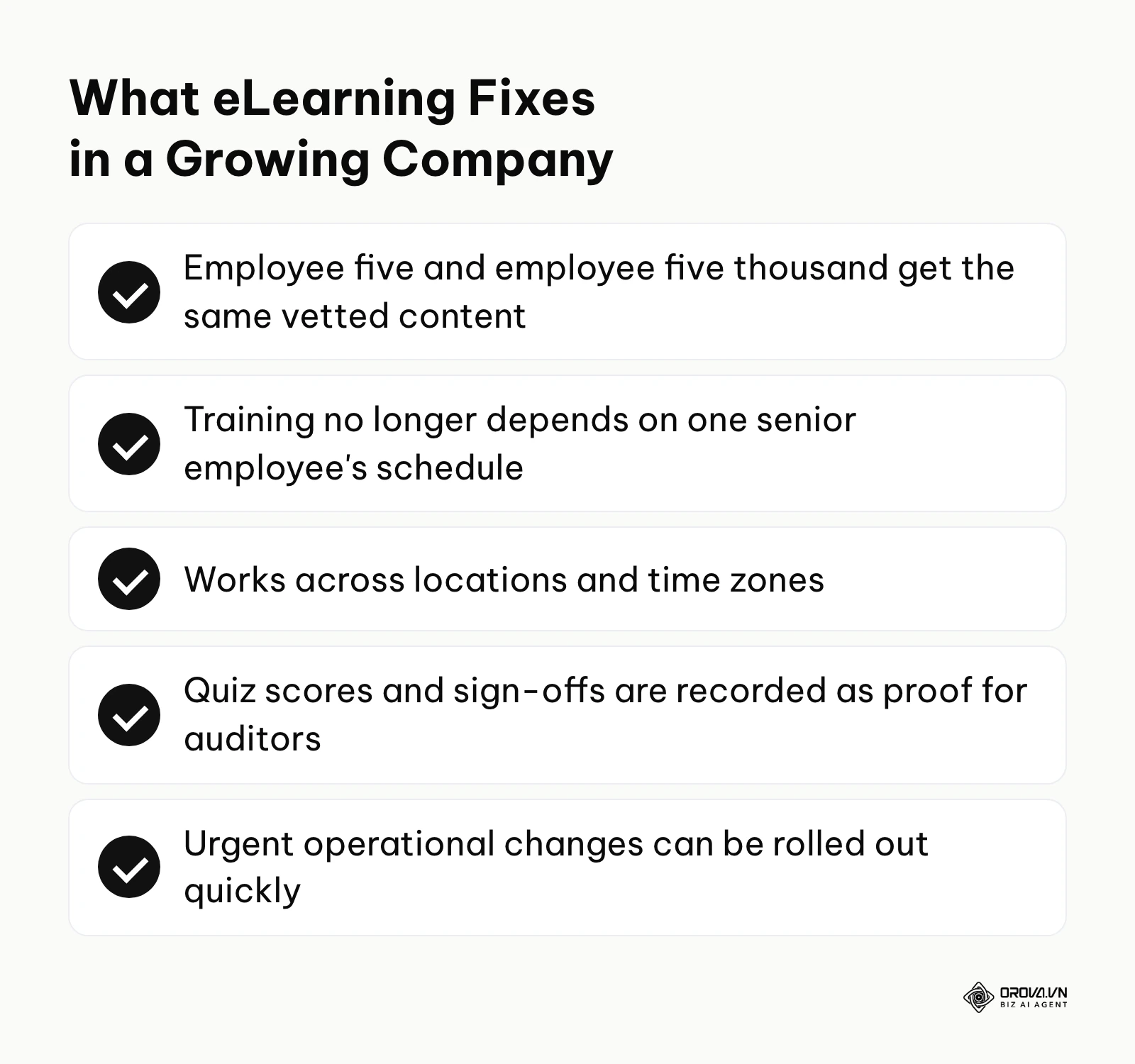
When an organization relies on traditional training, the quality of education depends entirely on the mood, memory, and schedule of the senior employee tasked with teaching. eLearning removes this dangerous variability. Its primary purpose is to guarantee that employee number five receives the exact same high-quality, rigorously vetted information as employee number five thousand, regardless of geographic location or time zone.
Furthermore, eLearning acts as a legal and operational shield. By forcing users to interact with compliance materials and permanently recording their digital signature or quiz scores, it provides undeniable proof to auditors that the company fulfilled its duty to train its workforce. If you choose to ignore eLearning as you scale, you lose the ability to deploy urgent operational changes rapidly, and you expose your company to massive liabilities when an untrained employee makes a catastrophic, yet avoidable, error. Integrating this into your broader strategy is just as vital as deploying recruitment automation tools to ensure a seamless flow from hiring to full productivity.
However, eLearning is not a universal cure. You do not need an eLearning system if your company has fewer than ten employees working in the same physical office, as face-to-face mentorship is faster and cheaper. It is also wasteful for highly tactile, physical roles like heavy machinery operation or advanced surgical procedures where muscle memory and physical feedback are mandatory. In these scenarios, stick to traditional on-the-job training or dedicated apprenticeship programs until theoretical knowledge needs to scale across multiple locations.
The Real Value and Benefits of eLearning (Beyond the Hype)
The marketing materials for learning platforms often paint a utopian picture of fully engaged employees eagerly consuming knowledge. The reality is more nuanced. The true value of eLearning must be divided into two distinct layers: the hard financial metrics for the business, and the practical daily advantages for the worker.
Business Value: Cost Reduction and Scale
The most immediate and aggressive benefit for a corporation is the sheer reduction in logistical spending. Traditional training requires flying subject matter experts across the country, renting conference spaces, printing massive binders, and paying for hotels. eLearning centralizes the production cost into a single upfront investment. Once a digital module is created, the marginal cost of training one additional employee drops to near zero.
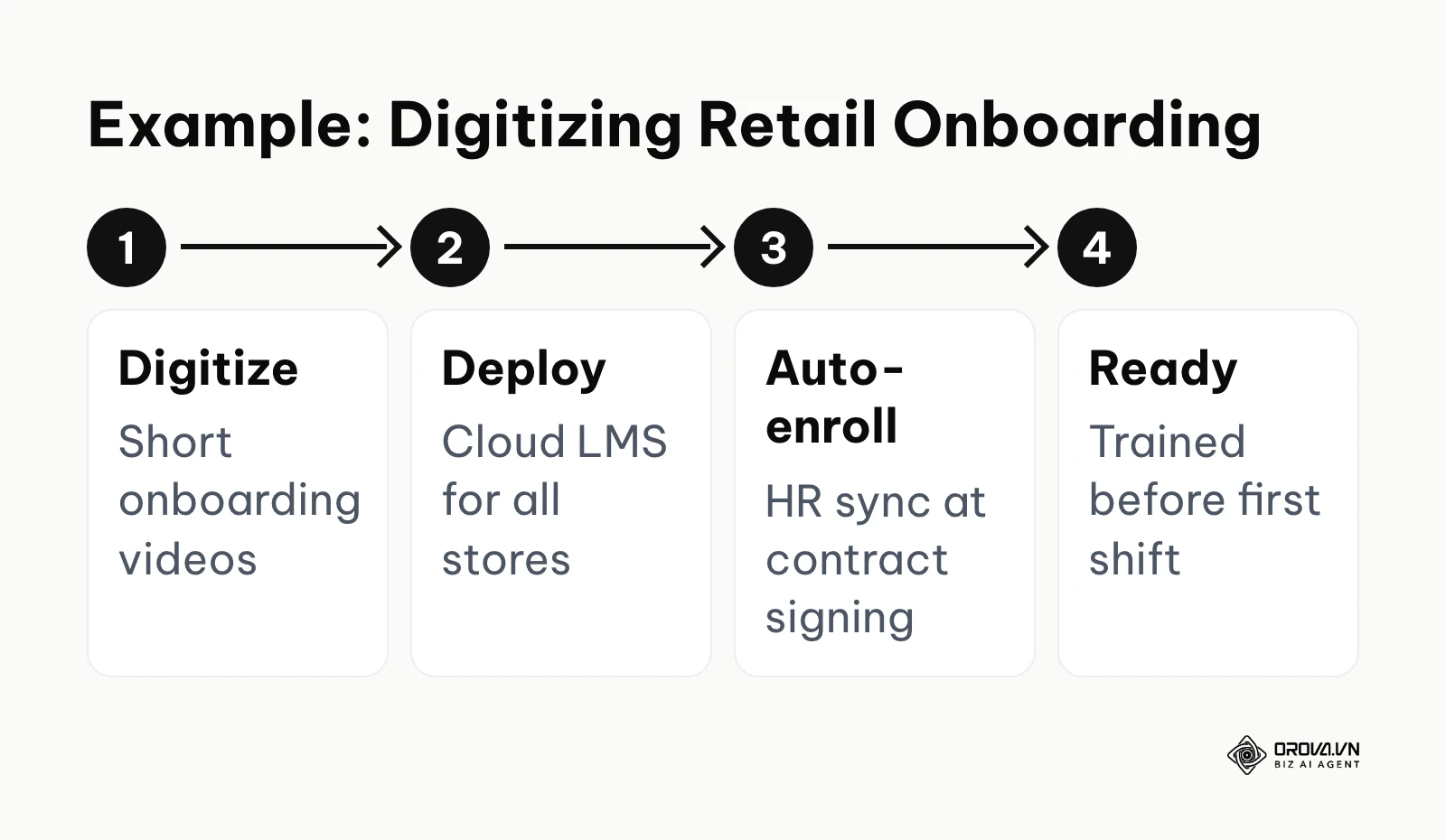
Illustrative example: You are an Operations Director at a regional retail chain with thirty locations. You digitized the standard customer service onboarding into a series of short video modules and deployed them via a cloud LMS. Initially, store managers forgot to assign the courses to new hires during their first week; you fixed this by integrating the LMS directly with your HR software to automate enrollment upon contract signing. As a result, new staff complete their basic training before their first shift, and store managers spend zero time repeating the same fundamental instructions.
Business Value: Mitigating Risk and Compliance Failures
In heavily regulated industries such as healthcare, finance, or manufacturing, the cost of an untrained employee is not just lost productivity; it can run into heavy regulatory fines. eLearning systems provide airtight, auditable records showing exactly who took what training, how long they spent on it, and what they scored.
Direct Worker Benefits: Autonomy and Career Growth
For the employee, the primary benefit is autonomy. Adult learners despise being forced into a rigid classroom environment that ignores their prior experience. eLearning allows workers to fast-forward through concepts they already understand and pause to deeply review complex materials. It democratizes access to upward mobility, allowing ambitious employees to acquire the skills needed for promotion on their own schedule.
Illustrative example: You are a mid-level marketing specialist at a B2B software company. You decided to transition into a data analytics role by enrolling in your company's internal digital academy. You struggled to complete the lengthy Python courses after work hours due to fatigue; you adjusted your approach by blocking out fifteen minutes every morning to complete one micro-module while drinking coffee. Consequently, you finished the certification path within four months and successfully transitioned to the data team without taking an expensive external bootcamp or unpaid leave.
Where eLearning ROI Usually Comes From
To move beyond theory, it helps to know where large organizations that moved training online have typically found their savings. Three patterns show up again and again:
- Travel and venue elimination: Shifting manager or leadership training from classrooms to digital modules removes flights, hotels, and room rentals for a dispersed workforce.
- Automated record-keeping: Moving mandatory compliance and safety training online lets the system track completions and scores, cutting the hours staff once spent on manual attendance records.
- Less time away from productive work: When core curriculums become short web-based modules, employees spend fewer hours out of client-facing or billable work.
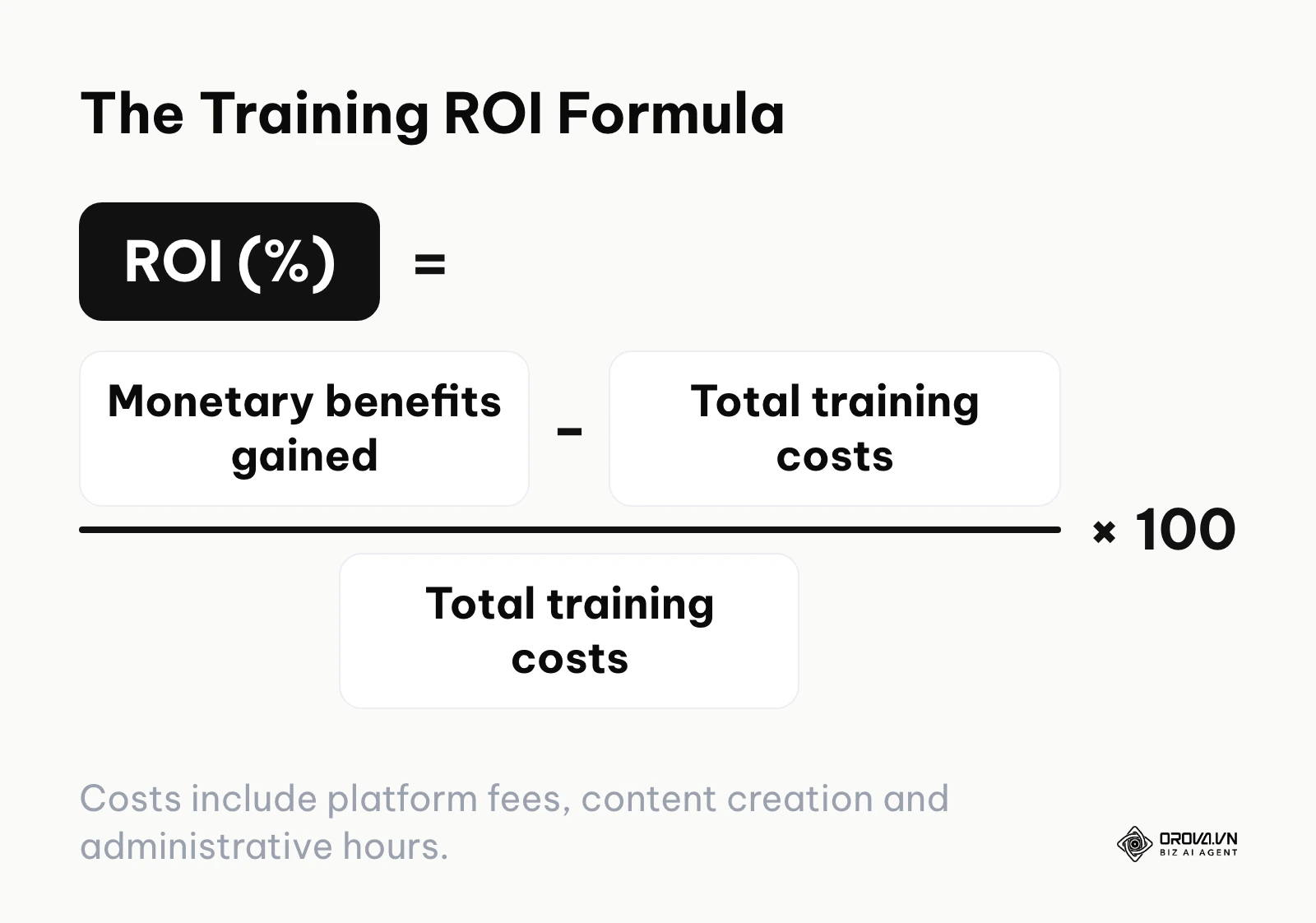
To check whether your own program pays off, use the standard training ROI formula: ROI (%) = (monetary benefits gained − total training costs) ÷ total training costs × 100. Count platform fees, content creation, and administrative hours as costs, and value benefits with a metric you measured before launch.
The Dark Side of eLearning: Why Completion Rates Plummet
Despite the financial benefits, corporate eLearning harbors a dark secret: abysmal completion rates. If an employee is not legally forced to take a course, they will frequently abandon it early. LinkedIn's annual Workplace Learning Report has repeatedly pointed to a lack of dedicated time during the workday as one of the biggest barriers to employee learning.
However, the problem goes deeper into instructional psychology. Many corporate courses suffer from immense cognitive overload. Instructional designers often pack every possible piece of information into a module, creating a dense, unreadable wall of text. Furthermore, the "Netflix effect" has drastically raised user expectations. When employees are accustomed to algorithmically curated, high-definition entertainment at home, a clunky, pixelated PowerPoint presentation wrapped in a SCORM wrapper feels actively insulting.
To combat this drop-off, organizations must ruthlessly edit their content, focusing only on actionable skills. They must employ spaced repetition and ensure the platform interface is as frictionless as a modern social media application.
| Key Benefit | Primary Measurement Metric | Expected Time to See Results |
|---|---|---|
| Travel Cost Elimination | Total T&E (Travel and Expense) budget spent on training | 1 to 3 months post-launch |
| Faster Time-to-Productivity | Number of days until a new hire reaches quota/baseline | 3 to 6 months post-launch |
| Compliance Risk Reduction | Number of regulatory audit failures or safety incidents | 6 to 12 months post-launch |
| Employee Retention | Voluntary turnover rate among employees taking courses | 12 to 18 months post-launch |
Are you struggling with the overhead of producing digital training materials? Orova Training lets you build lessons, slides, podcasts and narrated videos with subtitles using AI, so you can turn existing know-how into engaging courses without starting from a blank page.
How eLearning Works: Anatomy of a Digital Training Ecosystem
Understanding how to create an elearning course requires looking under the hood of the technology. The ecosystem is rarely a single piece of software; it is a stack of specialized tools communicating with each other to deliver, track, and analyze educational content.
The architecture typically consists of a central database that manages users, a creation tool that builds the actual interactive lessons, and a standardized language that allows the two to speak.
The Learning Management System (LMS) Component
The LMS is the administrative heart of the operation. It does not necessarily create content; rather, it hosts it, distributes it, and relentlessly tracks user behavior.
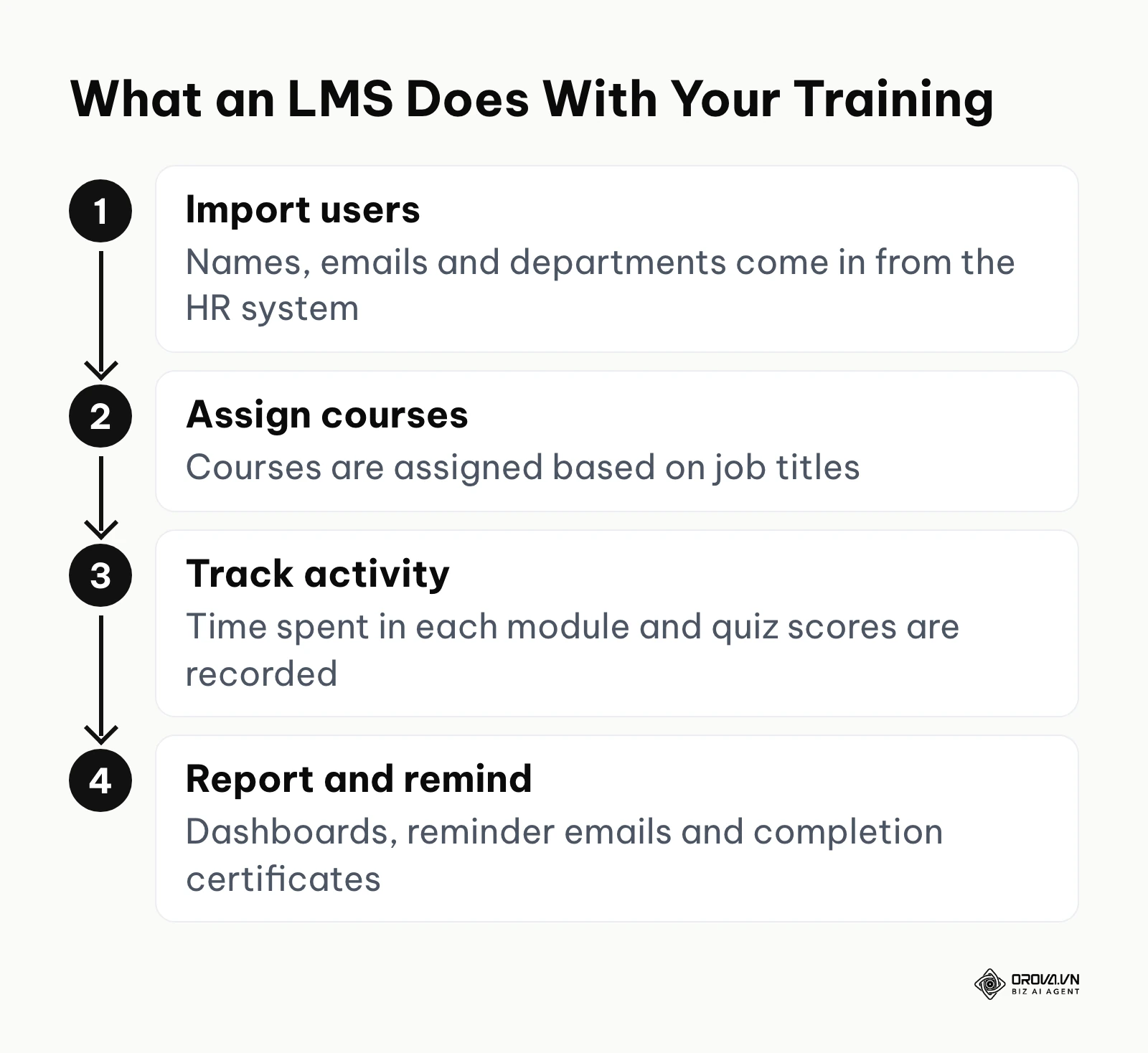
- What it does: It acts as the gatekeeper. It handles user authentication, assigns specific courses based on job titles, tracks every second a user spends in a module, records quiz scores, and generates compliance reports for management.
- Inputs: Raw user data (names, emails, departments) imported from the HR system, and packaged course files uploaded by administrators.
- Outputs: Detailed analytics dashboards, automated email reminders to complete courses, and downloadable certificates of completion.
- Common Failure Points: The most frequent point of failure is poor integration with the company's central Active Directory or HR system, leading to a nightmare of manual data entry where administrators have to create user accounts one by one.
For a deeper breakdown of features and selection criteria, read our guide on what a learning management system is.
Authoring Tools and Content Creation
If the LMS is the library, the authoring tool is the printing press. This software is used by Instructional Designers to transform raw knowledge into interactive experiences. This guide only covers the role authoring tools play in the ecosystem; for a side-by-side look at the tools themselves, see our roundup of eLearning authoring tools.
- What it does: It allows creators to build multimedia slides, embed videos, create drag-and-drop interactions, and build complex branching scenarios where a user's choice dictates the next screen.
- Inputs: Raw text, subject matter expert interviews, raw video files, and graphic assets.
- Outputs: A standardized, packaged file (usually SCORM or xAPI) that is ready to be uploaded to any modern LMS.
- Common Failure Points: Overusing interactions. Creators often add unnecessary clicks, complex animations, and forced navigational hurdles that frustrate the learner rather than aid retention.
Illustrative example: You are a solo Instructional Designer hired by a healthcare startup. You used a rapid authoring tool to build interactive patient privacy compliance courses from dry legal PDF documents. The initial prototype failed because the nurses found the text-heavy slides boring and clicked through without reading; you resolved this by replacing the text blocks with scenario-based audio dialogues and mandatory drag-and-drop quizzes. The revised modules achieved a high passing rate on the first attempt, proving that learners absorbed the complex legal constraints effectively.
The Interoperability Standards (SCORM and xAPI)
For the authoring tool to pass data to the LMS, they must speak the same language. Based on the SCORM 2004 specification documentation by ADL (Advanced Distributed Learning) Initiative released in 2004, the standard dictates precisely how content packages must report scoring and completion data back to the server. SCORM ensures that a course built in one software can be played perfectly on hundreds of different LMS platforms. Newer standards, like xAPI (Experience API), allow organizations to track learning that happens outside the LMS, such as reading an article on a website or performing a task in a simulator.
Decision-Making Framework: Choosing Your Core System
The market is flooded with acronyms, primarily LMS and LXP (Learning Experience Platform). Choosing the right one dictates the success of your entire initiative.
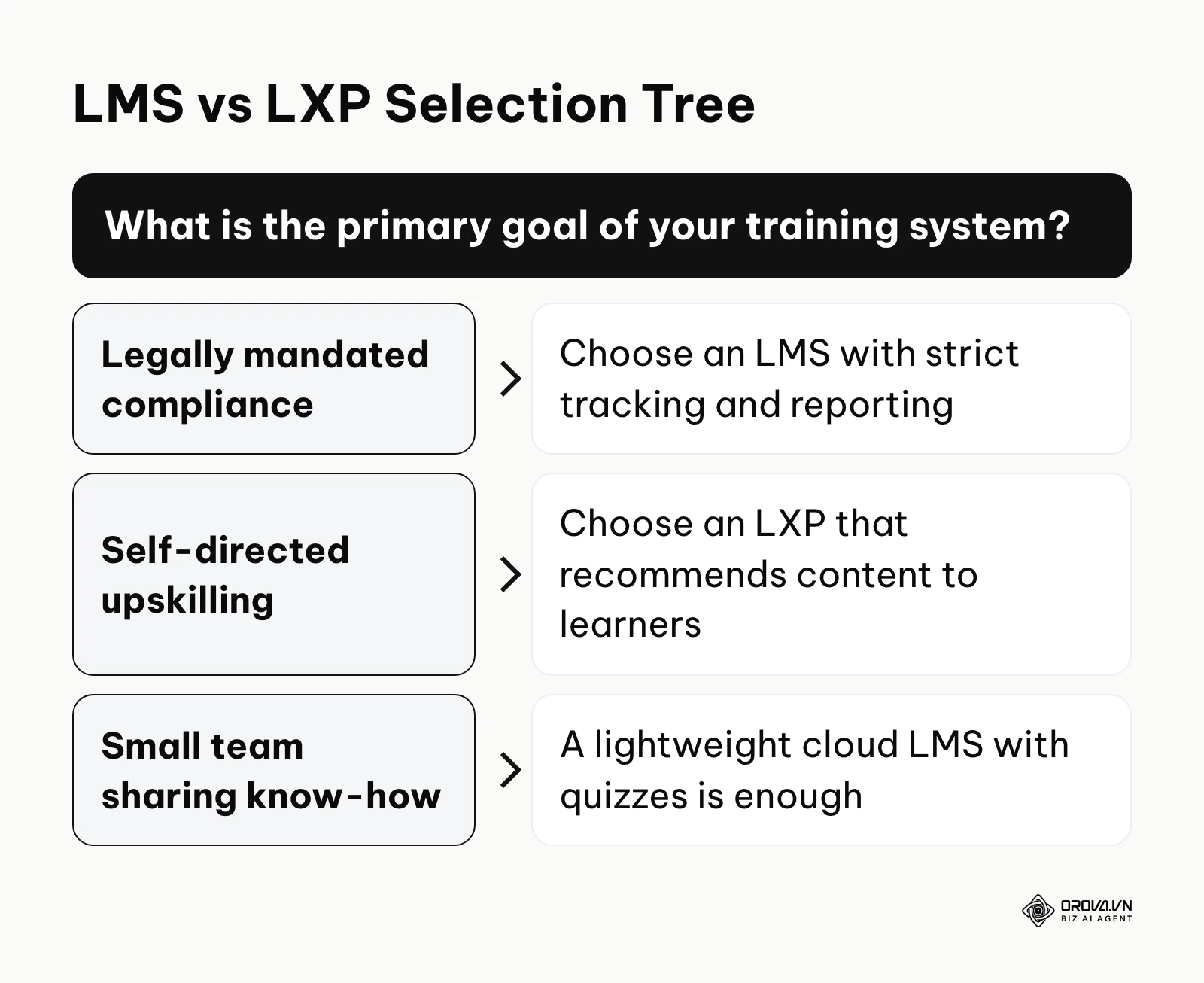
An LMS is fundamentally a top-down, compliance-driven tool. Management decides what you need to learn, assigns it, and punishes you if you fail to complete it. An LXP is a bottom-up, discovery-driven tool. It functions more like Netflix, using artificial intelligence to recommend articles, podcasts, and short courses based on what your peers are studying and what career goals you have declared. If your primary goal is legally mandated safety training, you must buy an LMS. If your primary goal is fostering a culture of continuous, self-directed upskilling for knowledge workers, an LXP is far superior. If you are a small team that simply needs to share recorded know-how and check it with quizzes, a lightweight cloud LMS is enough.
The GenAI Revolution in Course Production
The most massive shift in how the ecosystem works today is the intervention of Artificial Intelligence in content production. Historically, creating one hour of high-quality eLearning took an instructional designer dozens of hours of labor.
Today, AI is slashing that timeline. Instructional designers are producing AI generated content by feeding massive policy documents into large language models, which instantly generate structured outlines, detailed scripts, and complex multiple-choice assessment questions. Furthermore, synthetic voice technology has advanced to the point where recording voiceovers no longer requires renting a studio or hiring voice actors; AI generates natural-sounding narration quickly, allowing for instant updates when policies change without needing to re-record a human voice.
| Type of eLearning | Core Characteristics | Best Suited For |
|---|---|---|
| Synchronous | Live, scheduled, interactive with peers and an instructor. | Leadership workshops, complex problem-solving discussions. |
| Asynchronous | Pre-recorded, self-paced, available on-demand 24/7. | Standard onboarding, compliance training, software tutorials. |
| Blended (Hybrid) | Combines self-paced digital modules with live classroom sessions. | Deep technical certifications where theory meets practical application. |
| Mobile Learning | Designed specifically for small screens, highly modular. | Retail floor workers, field sales representatives, delivery drivers. |
How to Start and Adapt to eLearning in Your Organization
Implementing an eLearning strategy is an exercise in change management, not just software procurement. The approach varies wildly depending on your role and the scale of your organization. When comparing elearning vs traditional learning, the transition phase is where most companies stumble, expecting digital tools to magically fix broken training cultures.
Small Business Owners and Founders
For small business owners, speed and low overhead are the ultimate priorities. You do not have the time to negotiate complex enterprise software contracts.
- Document the tribal knowledge: Identify the single most repetitive question new hires ask and write down the exact answer.
- Record your screen: Use free software to record yourself performing critical digital tasks while explaining your thought process out loud.
- Choose a lightweight platform: Select a simple, cloud-based LMS that allows you to upload these videos and attach basic quizzes; an online quiz maker can cover the assessment part.
- Enforce usage immediately (Do this week): Make it a strict policy that no manager is allowed to answer a basic question if the answer is already documented in the portal; route the employee back to the system.
Corporate L&D Professionals
For professionals in larger organizations, the challenge is fighting administrative bloat and ensuring the content actually impacts performance metrics.
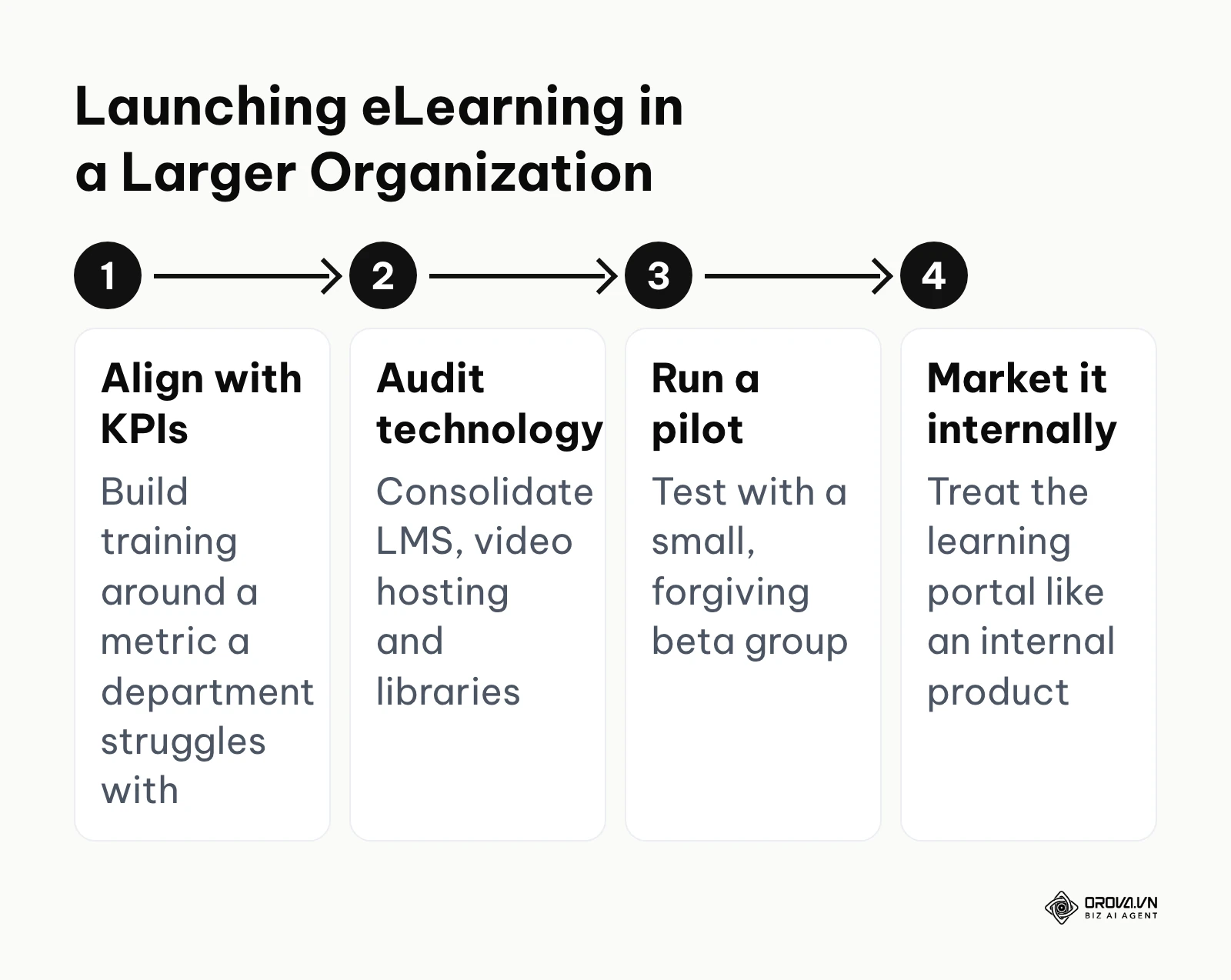
- Align with business KPIs: Stop measuring success by "courses completed." Interview department heads to find a metric they are struggling with (e.g., customer churn) and build training specifically to address it.
- Conduct a technology audit: Inventory your current systems. Are you paying for an LMS, a separate video hosting platform, and an external course library? Consolidate these to save budget.
- Establish a pilot group: Never launch a massive new curriculum company-wide. Roll it out to a small, forgiving beta group to iron out technical glitches and gather honest feedback.
- Implement a marketing strategy (Do this week): Treat your learning portal like an internal product. Draft an email campaign teasing the release of the new courses, highlighting exactly how taking them will make the employees' daily jobs easier.
Freelance Instructional Designers
For agencies and freelancers, your value lies in moving beyond simple asset creation and becoming a strategic consultant who solves business problems.
- Shift to rapid prototyping: Stop writing hundred-page design documents. Build a rough, functional prototype of one module within the first week to secure client alignment early.
- Master AI authoring tools: Your competitive advantage is speed. Learn to use generative AI to draft scripts and generate voiceovers, allowing you to handle higher volume.
- Upsell analytics consulting: Do not just hand over the SCORM file and disappear. Offer a retainer to analyze the drop-off metrics inside the client's LMS and revise the content iteratively.
- Build a reusable template library (Do this week): Standardize your interaction types (drag-and-drop, flashcards) into a master file so you never have to design a course from a blank screen again.
The Hidden Costs: A Zero-to-One Cost Estimator
When evaluating platforms, the monthly subscription fee is merely the tip of the iceberg. To avoid budgetary disaster, you must calculate the hidden costs of deployment.
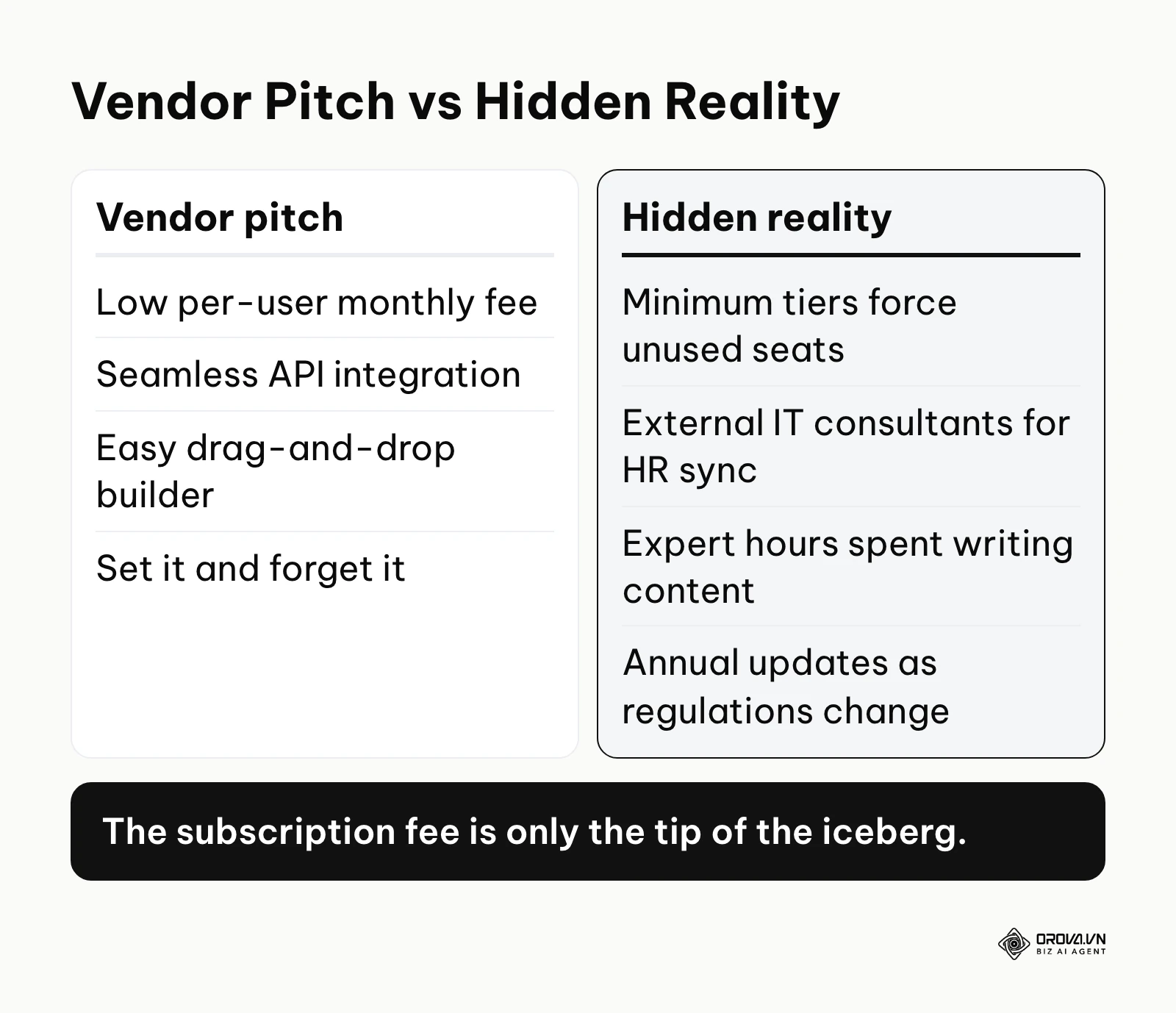
| Cost Category | Vendor Pitch | The Hidden Reality (Year 1) | Estimated Budget Impact |
|---|---|---|---|
| Software Licensing | "Low per-user monthly fee" | Minimum user tiers often force you to buy unused seats. | High |
| System Integration | "Seamless API integration" | Requires hiring external IT consultants to connect the LMS to your legacy HR database. | Very High |
| Content Creation | "Easy drag-and-drop builder" | Internal subject matter experts will spend dozens of expensive hours writing content instead of doing their jobs. | High |
| Course Maintenance | "Set it and forget it" | Regulations change annually; courses must be actively updated, re-recorded, and re-tested. | Medium |
| Change Management | Usually unmentioned | Time spent marketing the platform internally and training managers how to pull reports. | Low |
Course Health Checklist Before Launch
Before you force hundreds of employees to consume a new digital module, run it through this rigorous quality assurance process. Similar to executing a rigorous technical audit, you must verify functionality across all touchpoints.
| Step | Criteria | Check | Action if Failed |
|---|---|---|---|
| 1 | Mobile Responsiveness | Does the layout break or require horizontal scrolling on a smartphone? | Redesign the layout using responsive blocks instead of fixed-pixel absolute positioning. |
| 2 | Audio Clarity | Is the narration audible over the background music, and are transcripts provided? | Lower the music track volume by at least 50% or remove it entirely. |
| 3 | Cognitive Load | Are there more than six bullet points or dense paragraphs on a single screen? | Split the content across three separate screens or convert it to an audio narrative. |
| 4 | Navigation Logic | Can the user easily locate the 'Next' button, or are they trapped on a screen? | Ensure navigational elements are universally placed and clearly contrasted. |
| 5 | Assessment Validity | Do the quiz questions accurately reflect the material taught, without trick questions? | Rewrite the distractors (wrong answers) to be plausible but definitively incorrect. |
| 6 | SCORM Tracking | Does the course accurately report a "Passed" status back to the LMS staging environment? | Check the authoring tool's publishing settings to ensure the correct standard (SCORM 1.2 vs 2004) is selected. |
| 7 | Accessibility (WCAG) | Can a screen reader navigate the text, and do all images have alt-text? | Add descriptive text to all crucial diagrams and ensure tab-key navigation works. |
| 8 | Bandwidth Efficiency | Does the initial video take longer than three seconds to buffer on a standard connection? | Compress the video files aggressively or reduce the resolution to 720p. |
| 9 | Tone and Relevancy | Does the scenario feature realistic dialogue that matches the company culture? | Rewrite the script to remove overly formal, robotic corporate speak. |
| 10 | Time to Completion | Does the module take longer than twenty minutes to complete in one sitting? | Break the module into two distinct microlearning segments. |
| Common Mistake | Consequence | How to Avoid It |
|---|---|---|
| Dumping raw PowerPoint files into the LMS | Learners click through without reading, retaining nothing. | Force interaction by converting key slides into scenario-based quizzes. |
| Tracking only completion rates | You know they finished it, but not if it improved their job performance. | Measure business metrics (e.g., error rates) before and after the training rollout. |
| Hiding the LMS behind complex logins | Employees abandon the system before even seeing a course. | Implement Single Sign-On (SSO) so they access the portal automatically. |
Ready to launch a trackable, engaging corporate academy? With Orova Training, you can assign courses to your whole workspace, specific people or groups, track each learner's progress, run live ranked quiz rooms, and award certificates with public lookup codes. It is free until July 7, 2027, with no credit card required.
eLearning Trends in the Next Few Years: An Author's Perspective
Looking closely at the enterprise training landscape, the mechanisms of knowledge delivery are shifting rapidly. The traditional model of forcing employees through hours of linear video is losing ground. As of 2026, the technology to dynamically generate and adjust content is moving from experimental labs into mainstream corporate budgets. Here are my predictions for where the industry is heading in the next few years.
Hyper-Personalization via Generative AI
As of 2026, we are seeing basic AI features that can draft text and generate quiz questions based on uploaded documents. I believe static, one-size-fits-all courses will steadily lose ground to adaptive engines that generate learning paths tailored to each learner. If an employee struggles with a specific concept, the AI could generate alternative explanations, custom audio analogies, and personalized quizzes tailored to their exact job role. You should prepare for this by focusing your current efforts on organizing your internal knowledge base into clean, structured data, rather than investing heavily in rigid, linear video production that is likely to age quickly.
The Death of the 60-Minute Course
In my view, learner patience is shrinking. The modern employee simply does not have an uninterrupted hour to dedicate to training. I expect the default unit of corporate learning to shrink to a few minutes. Learning will be integrated directly into the flow of work—appearing as a micro-prompt inside their CRM or communication tools exactly when they need to perform a task. To adapt, you must audit your current long-form courses and begin systematically breaking them down into searchable, modular assets.
Predictive Analytics Replacing Post-Course Surveys
Currently, the industry relies on "smile sheets"—post-course surveys asking if the learner enjoyed the module. These are fundamentally useless for predicting business impact. I expect platforms to increasingly use predictive analytics to correlate micro-behaviors (how fast a user reads, where they hesitate during a simulation) with real-world performance metrics. Such systems could alert managers that an employee is likely to make a compliance error before the error actually occurs on the floor. Start demanding better data access from your vendors now to ensure you are ready for this analytical shift.
Frequently Asked Questions About eLearning
Is eLearning still necessary with AI?
Absolutely. While AI can instantly generate answers or summarize documents, eLearning provides the structured verification required for high-stakes environments. AI acts as a performance support tool, but a formal eLearning system tracks accountability, provides verified assessments, and creates the auditable trails necessary for legal compliance and standardized onboarding.
What is the difference between synchronous and asynchronous learning?
Synchronous learning happens in real-time, requiring all participants and the instructor to be present simultaneously, such as a live video conference. Asynchronous learning allows learners to access pre-recorded materials, interactive modules, and quizzes on their own schedule without a live instructor present.
How do you measure the success of an eLearning program?
Success must be measured beyond simple completion rates. The most effective method is evaluating behavioral change and business impact: tracking reductions in safety incidents, increases in sales close rates, or shorter onboarding times after the training has been deployed compared to historical baselines.
Can soft skills be taught effectively online?
Yes, but it requires sophisticated instructional design. Instead of simply reading about leadership, soft skills are best taught online through branching scenario simulations where the learner must navigate difficult conversations, choose how to respond to an angry virtual customer, and immediately see the consequences of their choices.
How much does a standard LMS cost for a mid-sized company?
Pricing models vary widely: most cloud LMS vendors charge per active user or per seat tier, so the annual bill grows with headcount and feature level. Always ask vendors for a written quote, because the subscription often excludes implementation fees, custom integrations, and the ongoing budget required to license or develop the actual course content.
Where to Start Building Your eLearning Program?
The biggest mistake organizations make is attempting to build a massive, comprehensive digital university on day one. To succeed, you must start small, prove the value, and iterate. Depending on your current situation, here is exactly where you should focus your energy.
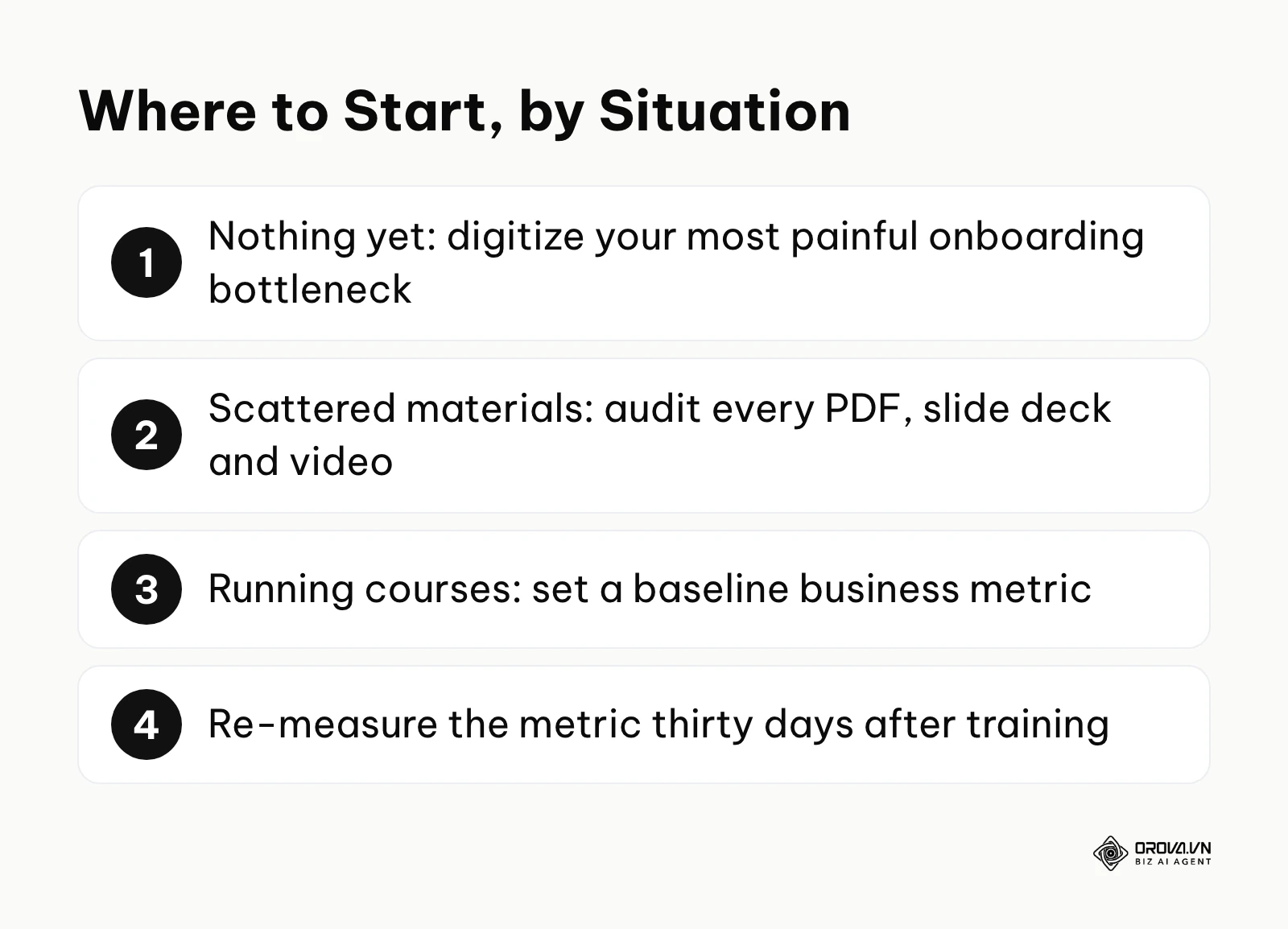
If you have absolutely nothing yet, your first step is to digitize your most painful bottleneck. Do not buy expensive software immediately. Instead, identify the one repetitive task that senior staff constantly have to teach new hires. Record a simple screencast or shoot a video on a smartphone explaining the process, upload it to a private video link, and require the next new hire to watch it before asking questions. This validates the concept in a single afternoon.
If you have materials but they are scattered and disjointed, your first step is conducting a content audit. Create a spreadsheet and list every PDF, PowerPoint, and video floating around your organization. Map these assets against the roles that actually need them. You will often find you have too much outdated content and severe gaps in critical operational procedures. Clean the house before inviting an LMS to host the party.
If you are already running courses but fail to measure anything beyond completion, your first step is setting a baseline business metric. Pick one existing course, such as customer service training. Before the next cohort takes the course, document the current average customer satisfaction score. Run the training, wait thirty days, and measure the score again. Connecting digital learning directly to a business outcome is the only way to secure future budgets from executive leadership.
About the author

Builder of Orova
Nguyễn Đỗ Trọng Ân has 8 years of experience in marketing, including 6 years managing market development across Asia. He builds Orova, a Biz AI Agent that never sleeps: it plans, runs and optimizes work for businesses.
Run your business with AI Agents
Orova is the always-on Biz AI Agent — it plans, runs, and optimizes the work for you.
Save time, unlock productivity.